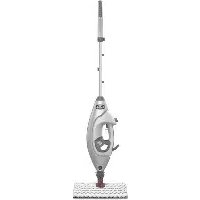
LiftAway Pro Steam S3973D - Steam cleaner SHARK - Free user manual and instructions
Find the device manual for free LiftAway Pro Steam S3973D SHARK in PDF.



| Product Type | Steam Cleaner |
| Brand | Shark |
| Model | LiftAway Pro Steam S3973D |
| Voltage | 120 V |
| Frequency | 60 Hz |
| Power | 1500 W |
| Water Tank Capacity | 300 ml (10.14 oz) |
| Steam Modes | Dust (light steam), Mop (normal steam), Scrub (heavy steam) |
| Special Features | Steam Blaster (concentrated steam jet), removable handheld steamer |
| Included Accessories | Intelli-Mop head, Dirt Grip pads, direct steam nozzle, garment steamer with bonnet and frame, hose accessory, pocket accessory for precision cleaning |
| Mop Head | Intelli-Mop with snap-lock attachment and release for pad changes |
| Dirt Grip Pads | Double-sided, machine washable, replace every 3 to 4 months |
| Recommended Surfaces | Sealed hardwood, marble, tile, stone (test first on an inconspicuous area) |
| Safety | Polarized plug, auto shut-off in standby mode, do not use on leather, waxed furniture, synthetic fabrics, velvet |
| Warranty | 1 year limited |
| Customer Service | 1 800 798-7398, sharkclean.com |
Frequently Asked Questions - LiftAway Pro Steam S3973D SHARK
User questions about LiftAway Pro Steam S3973D SHARK
0 question about this device. Answer the ones you know or ask your own.
Ask a new question about this device
Download the instructions for your Steam cleaner in PDF format for free! Find your manual LiftAway Pro Steam S3973D - SHARK and take your electronic device back in hand. On this page are published all the documents necessary for the use of your device. LiftAway Pro Steam S3973D by SHARK.
USER MANUAL LiftAway Pro Steam S3973D SHARK
IMPORTANT SAFETY INSTRUCTIONS
For Household Use Only
WHEN USING YOUR SHARK® LIFT-AWAY® PRO STEAM POCKET® MOP, BASIC SAFETY PRECAUTIONS SHOULD ALWAYS BE FOLLOWED, INCLUDING THE FOLLOWING:
READ ALL INSTRUCTIONS BEFORE USING YOUR SHARK LIFT-AWAY PRO STEAM POCKET MOP.

WARNING: DANGER OF SCALDING.
The steam emitted from the Steam Mop is very hot and may cause scalding. Please use caution when using the Steam Mop.

WARNING: KEEP STEAM MOP AWAY FROM CHILDREN.
POLARIZED PLUG:
This Steam Mop has a polarized plug (one blade is wider than the other). As a safety feature, this plug will fit into a polarized outlet only one way. If the plug does not fit fully into the outlet, reverse the plug. If it still does not fit, contact a qualified electrician. Do not attempt to defeat this safety feature. It is not recommended to use an extension cord with this product.
WARNING:
TO REDUCE THE RISK OF FIRE, ELECTRIC SHOCK OR INJURY:
- When in use never turn the Steam Mop over on its side or direct steam toward people, pets or plants.
- Use the system only for its intended use.
- DO NOT use for space-heating purposes.
- DO NOT use outdoors.
- DO NOT leave the Steam Mop unattended when plugged in. Always unplug the power cord from the electrical outlet when not in use and before servicing.
- DO NOT allow the Steam Mop to be used by children. Close attention is necessary when used near children, pets, or plants.
- Use only as described in this owner's guide.
- Use only manufacturer's recommended accessories.
- DO NOT use with damaged cord or plug. If Steam Mop is not working as it should or has been dropped, damaged, left outdoors, or dropped into water, return it to SharkNinja Operating LLC for examination and repair. Incorrect reassembly or repair can cause a risk of electrical shock or injury when the Steam Mop is used.
-
To protect against a risk of electric shock, DO NOT immerse the Steam Mop in water or any other liquids.
-
DO NOT handle the plug or Steam Mop with wet hands or operate it without wearing shoes.
- DO NOT pull or carry by cord, use cord as a handle, close a door on cord, or pull cord around sharp edges or corners. Do not run Steam Mop over cord. Keep cord away from heated surfaces.
- DO NOT unplug by pulling on power cord. To unplug, grasp the plug not the power cord. Do not use extension cords or outlets with inadequate current-carrying capacity.
- DO NOT put any objects into the steam nozzle openings. Discontinue use if the steam nozzle is blocked.
- DO NOT put hands or feet under the Steam Mop. It gets very hot.
- Use ONLY on flat, horizontal surfaces. DO NOT use on walls, counters, or windows.
- DO NOT use on leather, wax-polished furniture, synthetic fabrics, velvet, or other delicate, steam-sensitive materials.
- DO NOT add cleaning solutions, vinegar, scented perfumes, oils, or any other chemicals to the water used in the Steam Mop as this may damage it or make it unsafe for use. If you live in a hard-water area, we recommend using distilled water in your Steam Mop.
- Never leave any Dirt Grip™ pad in one spot while using or storing for any period of time, as this may damage your surfaces.
-
You can release the Dirt Grip pad after you have unplugged the Steam Mop and allowed it to cool.
-
When cleaning the exterior of the Steam Mop, unplug the power cord from the electrical outlet and clean the Steam Mop with a dry or damp cloth. Do not pour water or use alcohol, benzene, or paint thinner on the Steam Mop.
- Extreme caution should be exercised when using the Steam Mop to clean stairs.
- Never use Steam Mop without the Dirt Grip pad attached.
- Keep your work area well lit.
- Store Steam Mop indoors in a cool, dry place.
- To avoid circuit overload, do not operate another appliance on the same socket (circuit) as the Steam Mop.
- To avoid scalding injuries, always unplug and allow the Steam Mop to cool before removing or changing mop heads, accessories, or Dirt Grip pads.
WARNING: Your Steam Mop is designed to clean hard floor surfaces that will withstand high heat. Do not use on unsealed wood or unglazed ceramic floors. On surfaces that have been treated with wax and on some no-wax floors, the sheen may be removed by the heat and steam action. It is always recommended to test an isolated area of the surface to be cleaned before proceeding. We also recommend that you check the use and care instructions from the floor manufacturer.
SAVE THESE INSTRUCTIONS
Thank you for purchasing the Shark® Lift-Away® Pro Steam Pocket® Mop.
This Owner's Guide is designed to help you get a complete understanding of your new Shark Lift-Away Pro Steam Pocket Mop. Please read it carefully and keep for future reference.
For a list of what is included with this model, refer to box's top panel.
If you should have a question about your Shark Lift-Away Pro Steam Pocket Mop, please call Shark Customer Service at 1-800-798-7398.
The Shark Lift-Away Pro Steam Pocket Mop is an amazing solution for deep steam cleaning. Whether you need to battle tough stains with the Steam Blaster™ or handle general cleaning and hard floor sanitization*, our next-generation IntelliMop™ Head and Dirt Grip™ pads offer the ultimate in versatility and efficiency, making cleaning simple, quick and easy.
- Sanitization studies were conducted under controlled test conditions. Household conditions and results may vary. With the Intelli-mop head only in SCRUB mode. Not in above floor mode or when using Steam Blaster.
REGISTER YOUR PURCHASE:
registryourshark.com
1-800-798-7398
RECORD THIS INFORMATION:
Model Number:
Date of Purchase (Keep receipt):
TECHNICAL SPECIFICATIONS:
Voltage: 120V, 60 Hz
Watts: 1500W
Water Capacity: 300 ml (10.14 oz.)
RECOMMENDED SCHEDULE FOR REPLACING WASHABLE DIRT GRIP PADS:
Every 3 months
FOR BEST CLEANING PERFORMANCE:
See the Caring for Your Steam Pocket Mop section for more detail. Vacuum or sweep before mopping.
Contents
Thank you for purchasing the Shark® Lift-Away® Pro Steam Pocket® Mop.
Getting Started. 5
Assembling Your Steam Pocket Mop 7
Using Your Steam Pocket Mop 8
Intelligent Steam Control 9
Above-Floor Cleaning 10
Using the Direct Steam Nozzle 11
Using the Garment Steamer 12
Using the Accessory Hose and the Precision Clean Accessory. 13
Caring For Your Steam Pocket Mop. 14
Ordering Additional Accessories. 15
Troubleshooting Guide 16
Frequently Asked Questions 17
Warranty. 18
Getting Started
When assembling your Steam Mop there may be a little water in or around the water tank. This is because we test all our Steam Mops before you buy them, so you get a quality Shark Lift-Away Pro Steam Pocket Mop.
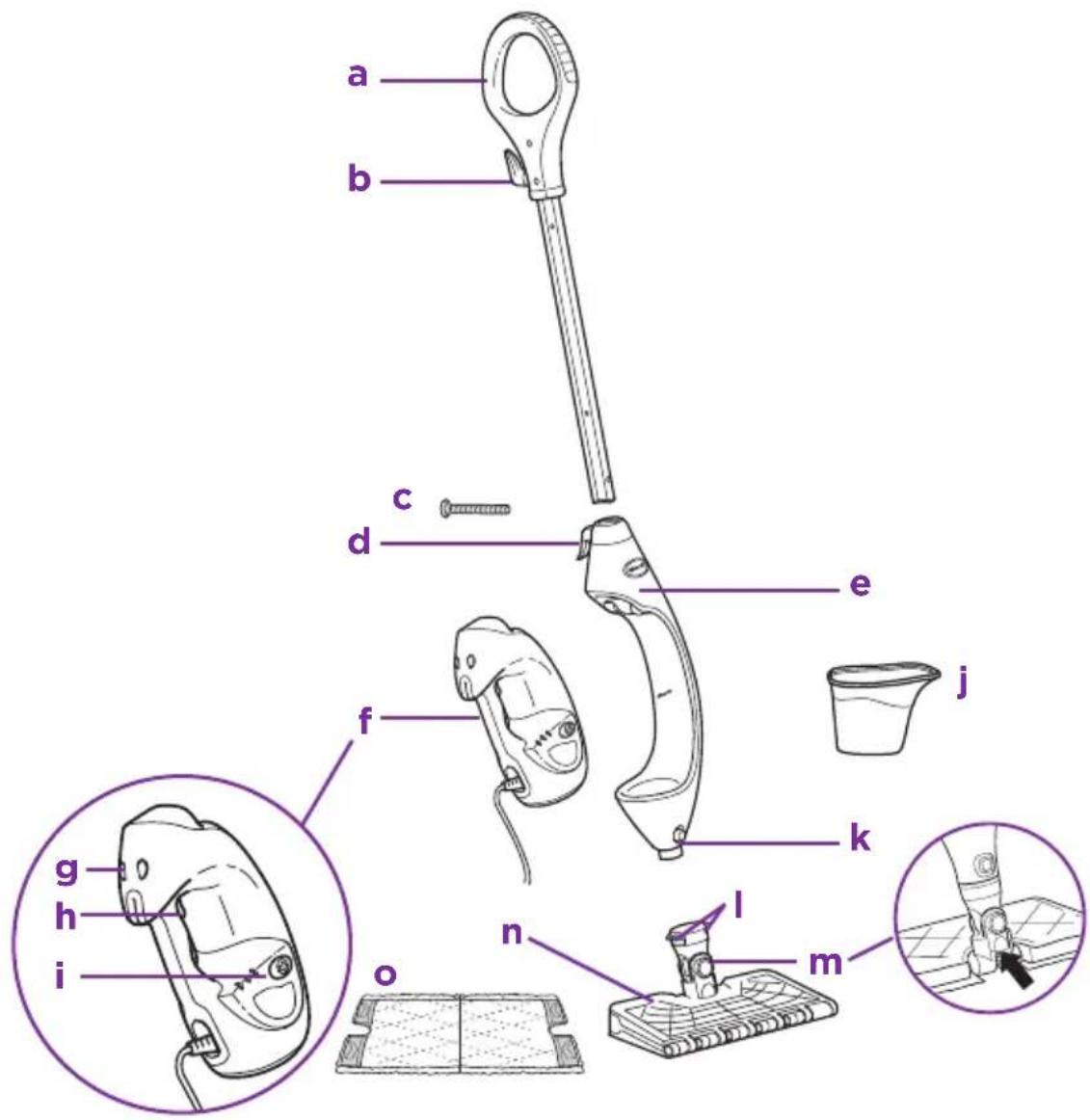
Steam Mop Handle
Upper Cord Wrap
c (1) 6mm× 54mm Large Screw*
d Lower Cord Wrap
Steam Mop Body
f Removable Handheld Steamer
g Release Button for Handheld Steamer
*Phillips or flat head screwdriver can be used. Screwdriver not included.
Steam Trigger
Steam Control Panel
Filling Flask
Mop Head Release Button
Dirt Grip Pad Release Buttons
m Steam Blaster ™ Nozzle
Intelli-Mop™ Head
Dirt Grip Pad
For a full list of what is included with your Steam Mop, please refer to the inside flap of your box.
CAUTION: Test in a small inconspicuous area and contact your surface manufacturer/installer for specific information on your surface.
HANDHELD ACCESSORIES
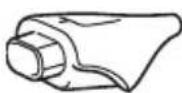
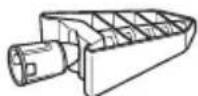
DIRECT STEAM NOZZLE
Use steam to break down dirt and hard surfaces and wipe away grime.
Use 3-to-5-second bursts of steam using the trigger on the handle unit for best results.
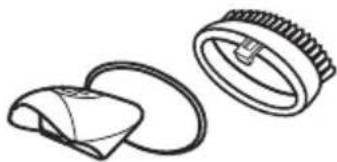
GARMENT STEAMER
WITH BONNET AND BRISTLE FRAME
Ideal for removing wrinkles from clothing and for freshening and grooming upholstery.
Do not use this tool without the Microfiber Bonnet attached.
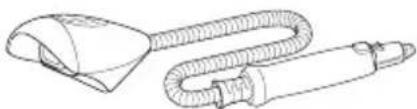
ACCESSORY HOSE
For optimal range and mobility when cleaning above-floor surfaces.
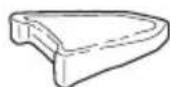
PRECISION CLEAN POCKET ACCESSORY AND PAD
Ideal for small, uneven surfaces, corners, and edges. Do not use without a Precision Clean Pocket Pad attached.
Assembling Your Steam Pocket® Mop
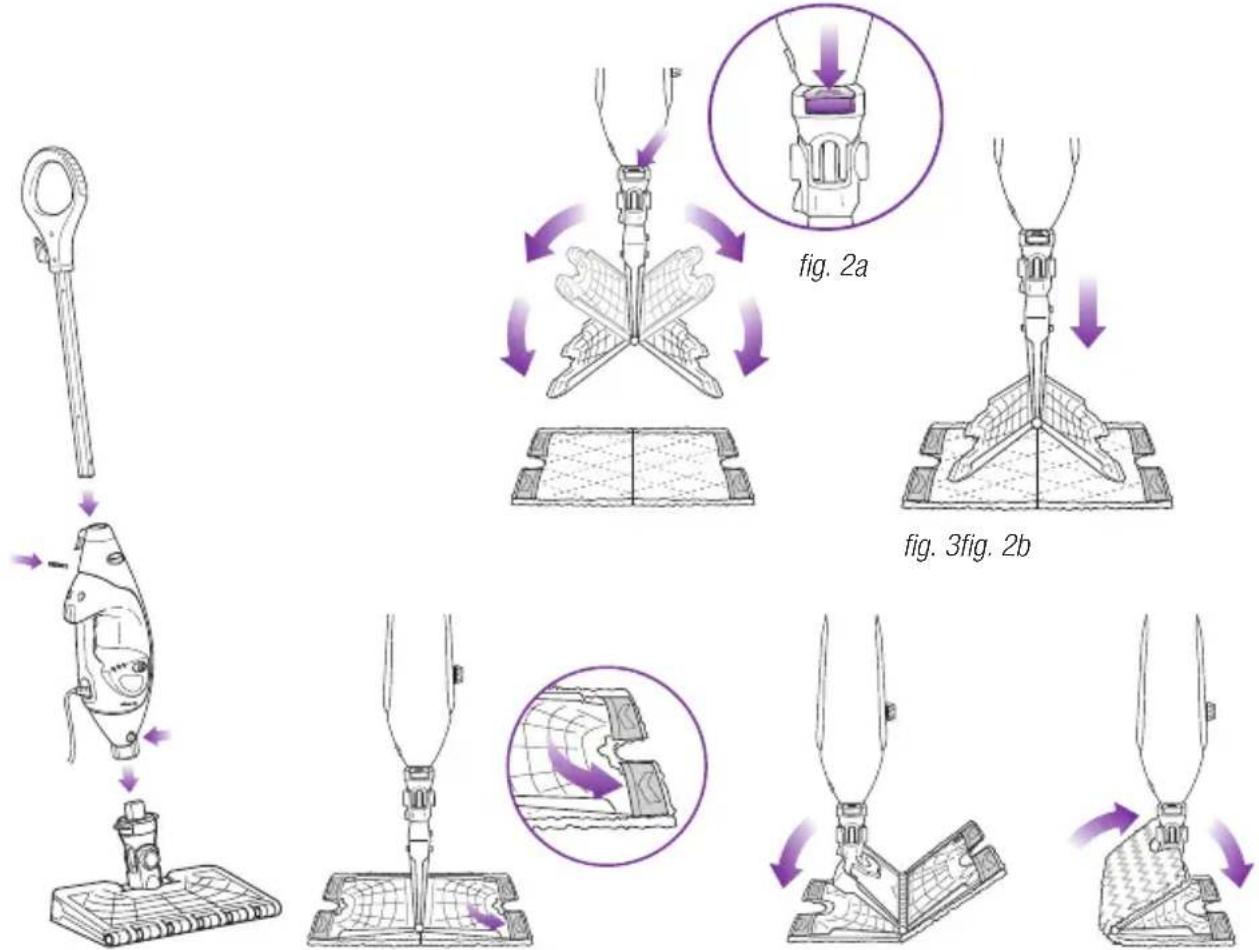
fig. 1 fig. 5 fig. 6fig. 4
WARNING: Always make sure the Steam Mop is UNPLUGGED when not in use. Never fill the Steam Mop or attach the mop head when the Steam Mop is plugged into an electrical outlet. Unplug from the electrical outlet and allow to cool before you fill the mop, or attach or remove the head. To prolong the life of your Steam Mop, we recommend using distilled water. Make sure you add only water to the tank. Chemicals or cleaning solutions (including vinegar) may damage the Steam Mop and could be unsafe for you and your family.
STEAM MOP ASSEMBLY
1 Screw the mop handle into the Steam Mop body (screwdriver not included) (fig. 1).
2 Slide the Intelli-Mop ^10 Head post into the Steam Mop body. Push until you hear it click securely into place. (fig. 1) To detach the Intelli-Mop Head, press the release button on the front of the unit above the head connection (fig. 1) and slide off.
3 To attach the Dirt Grip pad, spread the pad on the floor with the pocket side up. Lift the mop and center the Intelli-Mop Head above the pad, then press down on the release buttons on the neck of the steam mop head (fig. 2a). Both sides of the Intelli-Mop Head will drop open (fig. 2b). Slip the Intelli-Mop Head's four corner tabs into the four corner pockets of the pad (fig. 3 and fig. 4). Gently press one side of the Intelli-Mop Head to the floor until that side clicks into place (fig. 5). Repeat on the other side (fig. 6).
4 Open the water tank cap (fig. 7), fill the tank with water, then replace and tighten the cap. Use the filling flask and pour water into the tank (fig. 8). Do not overfill. Replace the cap on the water tank.
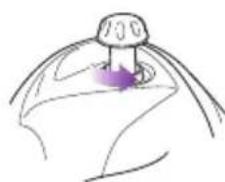
fig. 7
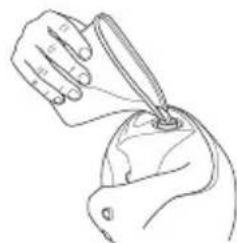
fig. 8
Using Your Steam Pocket® Mop
IMPORTANT: Make sure you do not use the Shark® Lift-Away® Pro Steam Pocket® Mop without attaching a Dirt Grip™ pad and adding water to the water tank first. When you are using the Steam Mop for the first time, it might take longer than the normal 30 seconds to start steaming.
IMPORTANT: Do not use on unsealed wood or unglazed ceramic floors. On surfaces that have been treated with wax and on some no-wax floors, the sheen may be removed by the heat and steam action. Test an isolated area of the surface to be cleaned before proceeding. Check the use and care instructions from the floor manufacturer.
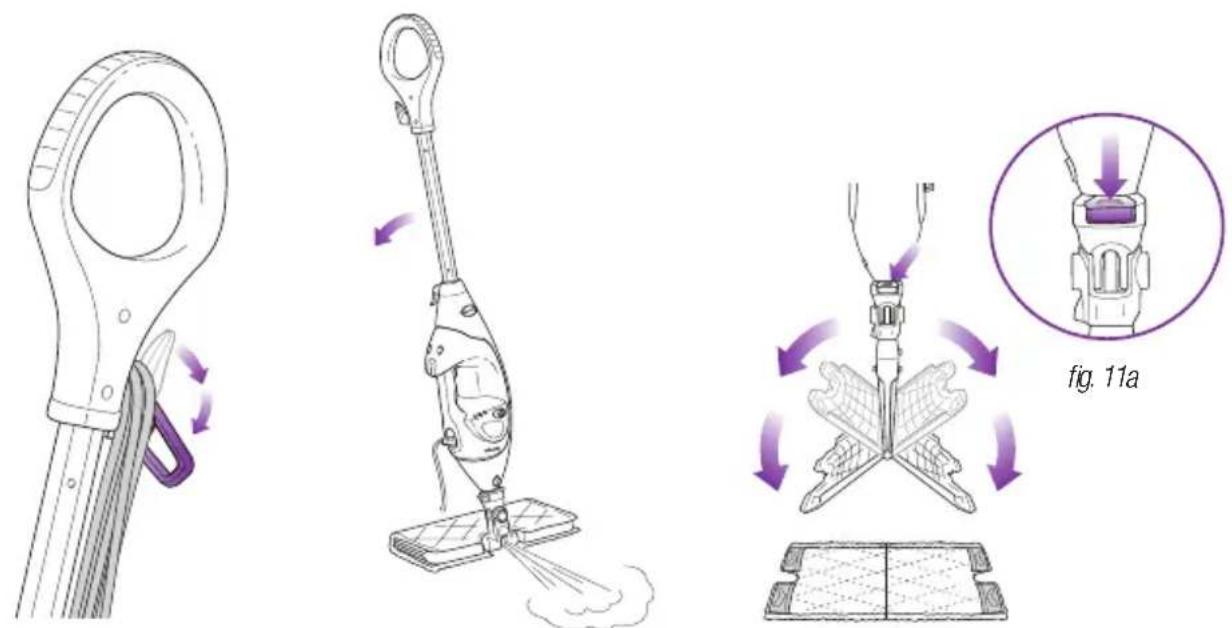
fig. 9 fig. 10 fig. 11b
NOTE: To prolong the life of your Steam Mop, we recommend using distilled water.
NOTE: Sweep or vacuum your floors prior to cleaning with your Steam Mop.
Twist the upper cord holder to unwrap the power cord completely (fig. 9). Plug into an electrical outlet.
2 When it's first plugged in, the unit will be in Standby mode. The 3 lights below the Steam Control Button will blink to indicate Standby mode.
3 To select the steam mode, press the Steam Control Button once for DUST (1 blue light) twice for MOP (2 blue lights) or three times for SCRUB (3 blue lights). Pressing a fourth time will place the unit on Standby.
4 Clean your floors with a forward and backward motion.
5 When you need an extra burst of steam to clean a stuck-on stain, you can use the Steam Blaster feature. Flip the head over so that it is behind the mop body, then tilt the mop handle down. This will cause the the Steam Blaster (fig. 10) to emit a concentrated blast of steam onto the stain.
CAUTION: While in Steam Blaster mode, do not leave stationary for more than one minute.
CAUTION: Do not scrub any one area for an extended period of time.
6 To stop the Steam Blaster spray, simply raise the handle. You can then flip the mop head back into its original position and continue cleaning.
7 When you are done mopping, press the Steam Control Button until you return to Standby mode.
8 To remove the Dirt Grip pad, simply lift the mop straight up by the handle until the Intelli-Mop™ Head is hanging straight down. Press down on the pad release buttons on the neck of the mop head (fig 11a), and both sides of the head will drop open, releasing the pad (fig 11b).
9 Once the Dirt Grip pad has been released, close the Intelli-Mop Head. To close, gently press one side of the Intelli-Mop Head to the floor until that side clicks into place. Repeat on the other side.
10 When the water tank is empty, the Steam Mop will stop producing steam. You can refill the water tank at any time as long as the Steam Mop is unplugged. Follow the water tank filling instructions on page 7.
NOTE: Please wait 2 to 3 minutes for the Steam Mop to cool off before switching the mop head. Never leave the Steam Mop with a damp or wet Dirt Grip pad on any floor for an extended period of time.
Intelligent Steam Control
The Shark® Lift-Away® Pro Steam Pocket® Mop has 3 unique Intelligent Steam Control settings so you can use the right amount of steam for the cleaning task at hand. See below for tips on when to use each setting.
| SETTING IDEAL | FOR THESE SEATED SURFACES | RECOMMENDED USAGE |
| DUST LIGHT STEAM | Laminate Hardwood Marble | Cleaning delicate surfaces Light cleaning and dusting Loosening and lifting light dirt |
| MOP NORMAL STEAM | Hardwood Marble Tile Stone | Cleaning most surfaces and large areas Basic, everyday cleaning Removing spots and smaller messes Cleaning moderate and heavy-traffic areas |
| SCRUB HEAVY STEAM | Hardwood Marble Tile Stone | Deep-cleaning and cleaning hard-to-clean surfaces Tough cleaning and removing stuck-on messes and stains Deep-cleaning heavy-traffic areas Cutting through heavy dirt and grime Sanitizing* floors |
| Steam Blaster™ | For an extra burst of steam, you can use the Steam Blaster feature in DUST, MOP, or SCRUB. Follow the instructions found on the “Using your Steam Pocket Mop” page. | |
TO SANITIZE* WITH THE STEAM MOP USING THE INTELLI-MOP™ HEAD AND THE DIRT GRIP™ PAD:
1 Attach a clean Dirt Grip pad to the mop head.
2 Plug in the unit and press the Steam Control Button to select the SCRUB Setting.
3 Wait 30 seconds for the unit to begin producing steam.
4 Start mopping on an appropriate sealed hard floor surface with a forward and backward motion. After three minutes, your unit is ready to be used to sanitize.
5 Using a forward and backward motion, move the unit over the area you seek to sanitize. Repeat at least 15 times.
- Sanitization studies were conducted under controlled test conditions. Household conditions and results may vary. With the Intelli-mop head only in SCRUB mode. Not in above floor mode or when using Steam Blaster.
Above-Floor Cleaning
For a full list of what is included with your Steam Mop, please refer to box's top panel.
The Shark® Lift-Away® Pro Steam Pocket® Mop is designed to clean surfaces that can withstand high heat and moisture. Do not use on unsealed wood surfaces (especially antique wood furniture), unglazed ceramic tile, painted surfaces, or surfaces that have been treated with wax, oils, varnishes, or shellac. The sheen may be removed by the heat, steam, and friction of the cleaning accessories. It is always recommended to test an isolated area of the surface to be cleaned before proceeding.
We also recommend you check the use and care instructions from the surface manufacturer. When cleaning finished wood surfaces, use broad, continuous strokes. To prevent surface damage, avoid focusing steam or allowing the cleaning accessories to remain stationary in any one spot.
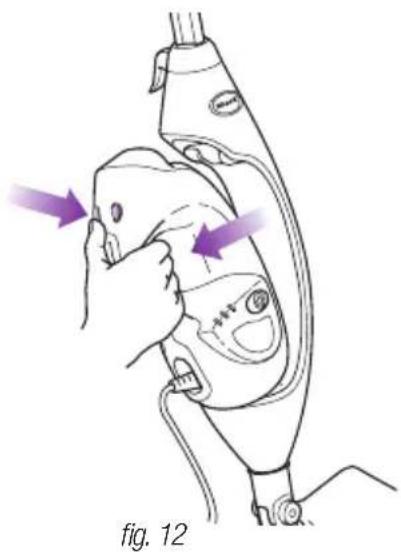
- Remove the Handheld Steamer by pressing on the release button and pulling away from the cradle. Be careful to NOT press the steam trigger as you remove the handheld steamer. (fig. 12)
The Handheld Steamer is automatically set to SCRUB mode. Squeeze the steam trigger to activate steam. You may select other steam modes depending on the accessory and the use.
- With all attachments, control Steam better by using 3-to-5-second bursts of the trigger. This will allow you to steam longer and with more control.
Using the Direct Steam Nozzle
For a full list of what is included with your Steam Mop, please refer to box's top panel.
PLEASE KEEP THESE IMPORTANT SAFEGUARDS IN MIND WHEN USING THE APPLIANCE:
CAUTION: Do not press the steam trigger until the Direct Steam Nozzle is snapped into the main nozzle of your Handheld Steamer.
CAUTION: Do not press the steam trigger while removing the Direct Steam Nozzle. Avoid touching the tip of the Direct Steam Nozzle, as this will be very hot after steaming.
NOTE: To remove the Direct Steam Nozzle, press and hold down the Handheld Release Buttons. Then slide out the Direct Steam Nozzle using the grip.
NOTE: The Handheld Steamer may continue to emit steam for a few seconds after the trigger is released. This is normal, and the steaming will eventually come to a stop.
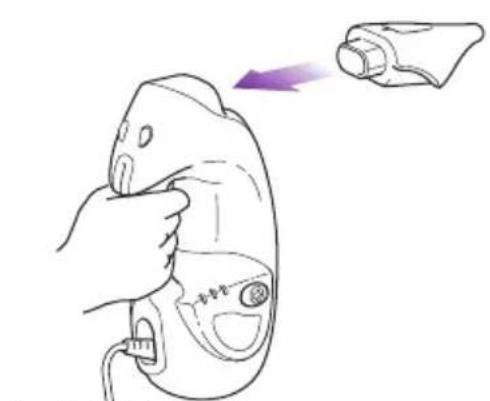
fig. 13 fig. 14
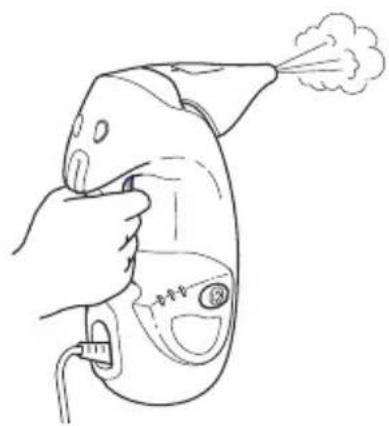
How to Attach/Detach:
The Direct Steam Nozzle slides directly on to the handheld steamer. (fig. 13)
- To remove, wait 2 to 3 minutes for the tool to cool, hold the release button and pull the tool away from the unit.
Usage:
- The Direct Steam Nozzle creates direct steam spray to clean hard-to-reach nooks and crannies, flat surfaces, toys and other places where germs may build up. (fig. 14)
Spray direct steam and wipe clean with a wet cloth or paper towel.
Cleaning Tips:
- For effective cleaning, hold the steam output nozzle 1 to 2 inches away from the surface you're cleaning.
Using the Garment Steamer
For a full list of what is included with your Steam Mop, please refer to box's top panel.
CAUTION: Make sure the Handheld Steamer is unplugged or in Standby mode while attaching or removing the accessory. Avoid touching the accessory, as it will be very hot after steaming.
CAUTION: To avoid scalding injuries, always unplug and allow the Steam Mop to cool before removing or changing accessories or pads.
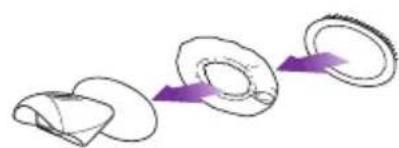
fig. 15 fig. 17fig. 16
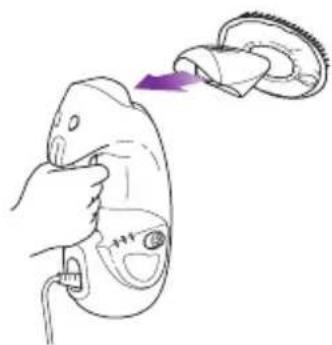
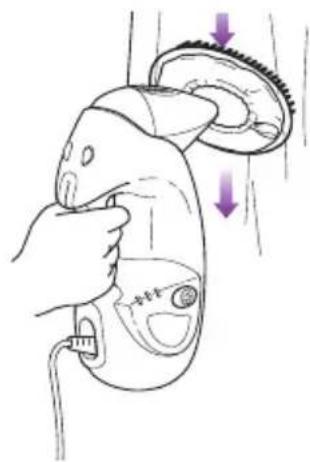
How to Attach/Detach:
- Use the lavender loop on the side of the bonnet to slide over the nozzle opening of the Garment Steamer. (fig. 15)
- Snap the bristle frame over the bonnet with the bristles placed at the top of the Garment Steamer bonnet.
- Attach the assembled Garment Steamer to the Handheld Steamer by snapping it into the main nozzle. (fig. 16)
To remove, wait 2 to 3 minutes for the tool to cool, hold the release button and pull the tool away from the unit.
Usage:
The Garment Steamer is ideal for removing wrinkles from clothing and for freshening and grooming upholstery.
The bonnet and frame with bristles provides controlled steaming for fabrics and upholstery.
Cleaning Tips:
- Pressing the steam trigger in 3-to-5-second bursts, move slowly up and down over your garments or upholstery. (fig. 17)
Always determine color fastness of any fabric, especially with reds or blues:
Take a clean, moist, warm towel and gently rub a small area on the fabric that is as out of sight and out of the way as possible.
If color bleeds onto the towel, you may need to have the piece professionally cleaned.
Using The Accessory Hose and The Precision Clean Accessory
For a full list of what is included with your Steam Mop, please refer to box's top panel.
CAUTION: Make sure the Handheld Steamer is unplugged or in Standby mode while attaching or removing the accessory. Avoid touching the accessory, as it will be very hot after steaming.
CAUTION: To avoid scalding injuries, always unplug and allow the Steam Mop to cool before removing or changing accessories or pads.
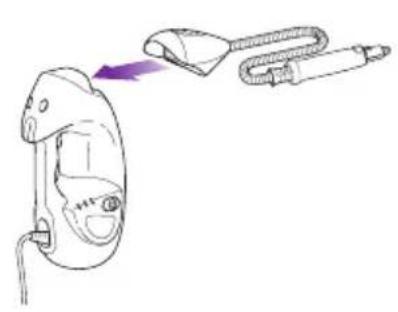


How to Attach/Detach:
- First attach the Accessory Hose to the Handheld Steamer by snapping the Accessory Hose into the main nozzle. (fig. 18)
- Slide the Precision Clean Pocket Pad over the Precision Clean Pocket Accessory so it fits snugly. Cinch the elastic band and slide the locking toggle to tighten. Attach the Precision Clean Pocket Accessory by connecting it to the Direct Steam Nozzle until it clicks into place.
- Do not use the Precision Clean Accessory without the Precision Clean Pocket Pad attached.
- Press the Flat Scrubber Tool onto the Accessory Hose until it clicks into place. (fig. 19)
To remove, wait 2 to 3 minutes for the tool to cool, hold the release button and pull the tool away from the unit.
Usage:
- The Precision Clean Pocket Accessory is ideal for small, uneven surfaces. The pointed tip is great for edges and corners. (fig. 20)
Cleaning Tips:
Additional attachments are available for your accessory hose. Please visit sharkclean.com for more information.
Caring for Your Steam Mop
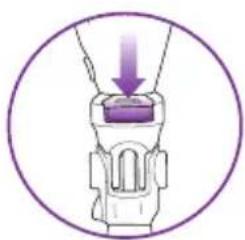
fig. 21

fig. 22
AFTER USE AND STORAGE
1 Press the Steam Control Button until it starts to blink, indicating that you are in Standby mode. Unplug the cord from the outlet and place the Steam Mop into the upright position. Let it cool.
2To remove the Dirt Grip pad, lift the Steam Mop straight up by the handle until the Intelli-Mop Head is hanging straight down. Press the pad release buttons on the neck of the mop head, and both sides of the Intelli-Mop Head will drop open, releasing the pad. Once the pad has been released, close the Intelli-Mop Head.
3 Ifthe Intelli-Mop Head is not attached to the mop, the pad can still be removed. Press down on the release button on the Intelli-Mop Head post to release the pad (fig. 21).
4 Empty the water tank before storing. To empty the tank, hold the Steam Mop beside a sink. Open the water tank lid, then lean the unit over the sink. Let the water drain out, then close the lid.
5 To store the Steam Mop, wait until after it has cooled and the steam has been released. Then remove the Intelli-Mop Head and hang the mop by its handle on a large hook (not included) (fig. 22).
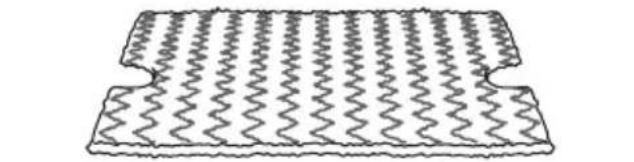

fig. 23
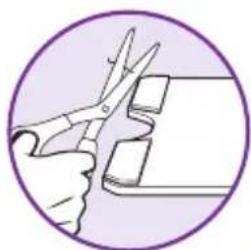
fig. 24
DIRT GRIP™ PAD CARE INSTRUCTIONS
Care
Machine-wash the Dirt Grip pads separately with warm water using liquid detergent.
NEVER USE BLEACH,POWDERED DETERGENT,OR
FABRIC SOFTENERS as they may damage or leave a coating on the Dirt Grip pads that will reduce their cleaning performance and absorbency. Dirt Grip pads should be line-dried or tumble-dried on a low setting, as this will extend the life of the microfiber fabric (fig. 23).
Loose fibers can indicate wearing of the microfiber fabric. Do not pull the loose fibers, as this can cause the weave to come undone. Simply trim the loose fibers with scissors (fig. 24).
Replacement Dirt Grip pads
For best cleaning results, we recommend replacing your Dirt Grip pads every 3 to 4 months following normal use. As with any fabric, dirt particles, grease, friction, and repeated washing can cause the fibers to break down, and you may notice an increase in the effort needed to push or pull the mop.
You can purchase replacement Dirt Grip pads and other accessories by visiting sharkclean.com or calling 1-800-798-7398.
STEAM NOZZLE CARE
If you believe the main steam nozzle or the Steam Blaster™ nozzle is clogged, please contact Customer Service at 1-800-798-7398 or consumer-services@sharkninja.com
Ordering Additional Accessories
| ACCESSORY | |
| Intelli-Mop™ Head Great for all-purpose cleaning. Get an extra boost for tough stains from the Steam Blaster™, and cut your cleaning time in half with the hands-free two-sided pad. | |
| Dirt Grip™ Pad Double-sided pad. Easy, hands-free installation and removal. Washable and reusable. | |
| Triangle Scrubber Head Triangle shape is perfect for cleaning corners and hard-to-reach areas. Equipped with a Steam Blaster to help loosen stains and a deployable scrubber to tackle stuck-on spots. | |
| Triangle Scrubber Pad Ideal for cleaning corners and other hard-to-reach spaces. Easy to install and remove. | |
| PROBLEM POSSIBLE REASONS & SOLUTIONS | |
| The Steam Mop isn't producing any steam. | The Steam Mop should be securely plugged into an electrical outlet. Check your fuse or circuit breaker or try a different outlet. Make sure the water tank is full, the unit is plugged in, and the light around the Steam Control Button is solid. If the lights below the Steam Control Button are not illuminated, try a different electrical outlet. If the lights below the Steam Control Button are blinking, press the Steam Control Button to select a Steam setting. If the lights below the Steam Control Button are solid, wait 30 seconds for the unit to warm up. If after following the above steps the Steam Mop still does not produce any steam, contact Customer Service at 1-800-798-7398 or consumer-services@sharkninja.com |
| The Steam Mop is producing intermittent steam. | This is normal—for more consistent steam select the SCRUB setting. Also make sure the water tank is full. |
| I can't select a Steam Setting. | Make sure the Steam Mop is plugged in and the lights below the Steam Control Button are solid. If your Steam Mop is producing steam but the lights below the Steam Control Button are not lit, call customer service at 1-800-798-7398. |
| I am getting streaky/cloudy floors. | The Dirt GripTM pad might be dirty. If it is, flip it over to the clean side or change it entirely. If you washed the Dirt Grip pad with powdered detergent, then it could be damaged and require replacement. This could also be an indication of soap or grease residue that has accumulated on the floor. As the Steam Mop uses only a small amount of water, it may not be enough to rinse off the accumulation of residue that the steam is bringing to the surface. We suggest rinsing the floor with nothing but water, letting it dry, and then steam mopping again with a clean Dirt Grip pad. One or more rinses will generally remove the residue. A more stubborn case may require you to rinse the floor with a mix of one part vinegar and two parts water* (but DO NOT put vinegar or any other cleaner into the Steam Mop's water tank.) *Please consult your flooring manufacturer's care and maintenance instructions before applying any cleaning products or solutions including vinegar. |
| QUESTION ANSWER | |
| Can I use the Steam Mop on carpets? | No, the Steam Mop is not designed for carpet cleaning. |
| What surfaces can I use the Steam Mop on? | The Steam Mop is designed for use on all sealed hard floor surfaces. We recommend that you first test an isolated area of the floor surface to be cleaned as well as review the use and care instructions from your floor manufacturer. ▲WARNING: Do not use on leather, wax-polished furniture, synthetic fabrics, velvet, or other delicate, steam-sensitive materials. NOTE: On surfaces treated with wax and on some no-wax floors, the sheen may be removed by the heat or steam action of the unit. Test an isolated area of flooring first to see if sheen is affected. |
| Can I put something other than water in the water tank of the Steam Mop? | DO NOT add cleaning solutions, scented perfumes, oils, or any other chemicals to the water used in this appliance, as this may damage the unit or make it unsafe for use. We recommend using distilled water in your Steam Mop. |
Shark|Ninja
ONE (1) YEAR LIMITED WARRANTY
SharkNinja Operating LLC warrants this product to be free from defects in material and workmanship for a period of one (1) year from the date of the original purchase, when utilized for normal household use, subject to the following conditions, exclusions, and exceptions.
If your appliance fails to operate properly while in use under normal household conditions within the warranty period, return the complete appliance and accessories, freight prepaid. For assistance with warranty service options or customer support, please call Customer Service at 1-800-798-7398 or visit sharkclean.com.
If the appliance is found to be defective in material or workmanship, SharkNinja Operating LLC will repair or replace it free of charge. Proof of purchase is required and a fee of $19.95 will apply to cover the cost of return freight.*
The liability of SharkNinja Operating LLC is limited solely to the cost of the repair or replacement of the unit at our option. This warranty does not cover normal wear of parts and does not apply to any unit that has been tampered with or used for commercial purposes. This limited warranty does not cover damage caused by misuse, abuse, negligent handling, or damage due to faulty packaging or mishandling in transit. This warranty does not cover damage or defects caused by or resulting from damages from shipping or from repairs, service, or alterations to the product or any of its parts that have been performed by a repair person not authorized by SharkNinja Operating LLC.
This warranty is extended to the original purchaser of the unit and excludes all other legal and/or conventional warranties. The responsibility of SharkNinja Operating LLC warranty, if any, is limited to the specific obligations expressly assumed by it under the terms of the limited warranty. In no event is SharkNinja Operating LLC liable for incidental or consequential damages of any nature whatsoever. Some states/provinces do not permit the exclusion or limitation of incidental or consequential damages, so the above may not apply to you.
This warranty gives you specific legal rights, and you may also have other rights which vary from state to state or province to province.
*Important: Carefully pack item to avoid damage in shipping. Be sure to include proof of purchase date and to attach tag to item before packing with your name, complete address, and phone number with a note giving purchase information, model number, and what you believe is the problem with the item. We recommend you insure the package (as damage in shipping is not covered by your warranty). Mark the outside of your package “ATTENTION CUSTOMER SERVICE”.
Product Registration
Please visit registryourshark.com or call 1-800-798-7398 to register your new Shark® product within ten (10) days of purchase. You will be asked to provide the store name, date of purchase, and model number, along with your name and address.
The registration will enable us to contact you in the unlikely event of a product safety notification. By registering, you acknowledge you have read and understood the instructions and the accompanying warnings set forth in this owner's guide.
CONSIGNES DE SECURITÉ IMPORTANTES
Intelligent Steam Control MD 27
ACCESSIONS PORTATIFS
CÓMÖ ENSAMBLAR LA MOPA A VAPOR
jsssepepepepepepepepepepepepepepepepepepepepepepepepepepepepepepepepepepepepepepepepepepepepepepepepepepepepepepepepepepepepepepepepepepepepepepepepepepepepepepepepepepepepepepepepepepepepepe pe
- IMPORTANT SAFETY INSTRUCTIONS
- For Household Use Only
- POLARIZED PLUG:
- WARNING:
- SAVE THESE INSTRUCTIONS
- REGISTER YOUR PURCHASE:
- RECORD THIS INFORMATION:
- TECHNICAL SPECIFICATIONS:
- RECOMMENDED SCHEDULE FOR REPLACING WASHABLE DIRT GRIP PADS:
- FOR BEST CLEANING PERFORMANCE:
- Contents
- Getting Started
- HANDHELD ACCESSORIES
- DIRECT STEAM NOZZLE
- GARMENT STEAMER
- WITH BONNET AND BRISTLE FRAME
- ACCESSORY HOSE
- PRECISION CLEAN POCKET ACCESSORY AND PAD
- Assembling Your Steam Pocket® Mop
- STEAM MOP ASSEMBLY
- Using Your Steam Pocket® Mop
- Intelligent Steam Control
- TO SANITIZE* WITH THE STEAM MOP USING THE INTELLI-MOP™ HEAD AND THE DIRT GRIP™ PAD:
- Above-Floor Cleaning
- Using the Direct Steam Nozzle
- PLEASE KEEP THESE IMPORTANT SAFEGUARDS IN MIND WHEN USING THE APPLIANCE:
- How to Attach/Detach:
- Usage:
- Cleaning Tips:
- Using the Garment Steamer
- Using The Accessory Hose and The Precision Clean Accessory
- Caring for Your Steam Mop
- AFTER USE AND STORAGE
- DIRT GRIP™ PAD CARE INSTRUCTIONS
- Care
- NEVER USE BLEACH,POWDERED DETERGENT,OR
- Replacement Dirt Grip pads
- STEAM NOZZLE CARE
- Ordering Additional Accessories
- Shark|Ninja
- ONE (1) YEAR LIMITED WARRANTY
- Product Registration
- CONSIGNES DE SECURITÉ IMPORTANTES
- ACCESSIONS PORTATIFS
- CÓMÖ ENSAMBLAR LA MOPA A VAPOR
- jsssepepepepepepepepepepepepepepepepepepepepepepepepepepepepepepepepepepepepepepepepepepepepepepepepepepepepepepepepepepepepepepepepepepepepepepepepepepepepepepepepepepepepepepepepepepepepepe pe
Brand : SHARK
Model : LiftAway Pro Steam S3973D
Category : Steam cleaner