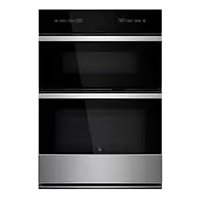
JMW3430IM - Microwave Oven JENN-AIR - Free user manual and instructions
Find the device manual for free JMW3430IM JENN-AIR in PDF.


| Brand | JENN-AIR |
| Model | JMW3430IM |
| Product Type | Built-in Microwave Oven |
| Electrical Power Supply | 120 V (each side) on 208/240 V circuit, 60 Hz |
| Microwave Power | Variable by setting (10 levels from 10% to 100%) |
| Cooking Modes | Microwave, Convection (baking and roasting), Grill, Steam, Defrost, Reheat, Keep Warm, Quick Cook, Browning Pan, Melt, Soften, Boil and Simmer, Popcorn, Beverage |
| Control Panel | Color Touch Screen with Interactive Display |
| Turntable | Included, rotates in both directions (can be disabled) |
| Included Accessories | Turntable, support and rollers, convection rack, crisp pan with removable handle |
| Sensing Functions | Sensor cooking (automatically adjusts time and power), steam sensor for steaming and boiling/simmering |
| Control Lock | Yes, can be enabled via menu with on-screen security code |
| Kitchen Timer | Independent, adjustable up to 12 hours |
| Wi-Fi Connectivity | On some models (integrated, configurable via home network) |
| Care and Cleaning | Mild detergent and soft cloth; stainless steel with specific cleaner (Affresh®); turntable dishwasher safe |
| Safety | Auto shut-off, child lock, precautions against microwave exposure |
| Service and Support | 1-800-JENNAIR (U.S.), 1-800-JENNAIR (Canada), website jennair.com |
| Repairability | Replacement parts specified by the manufacturer; service by qualified technician |
| Warranty | See provided manual |
Frequently Asked Questions - JMW3430IM JENN-AIR
User questions about JMW3430IM JENN-AIR
0 question about this device. Answer the ones you know or ask your own.
Ask a new question about this device
Download the instructions for your Microwave Oven in PDF format for free! Find your manual JMW3430IM - JENN-AIR and take your electronic device back in hand. On this page are published all the documents necessary for the use of your device. JMW3430IM by JENN-AIR.
USER MANUAL JMW3430IM JENN-AIR
27" AND 30" (68.6 CM AND 76.2 CM)
BUILT-IN MICROWAVE/OVEN COMBINATION
DES FOURS ENCASTRÉS (MICRO-ONDES/FOUR)
For questions about features, operation/performance, parts, accessories, or service in the U.S.A., call: 1-800-JENNAIR (1-800-536-6247) or visit our website at www.jennair.com.
In Canada, call: 1-800-JENNAIR (1-800-536-6247) or visit our website at www.jennair.ca.
Electrical Requirements 4
PARTS AND FEATURES 5
Turntable. 5
Convection Grid 6
Coated Crisper Pan and Handle. 6
Food Characteristics. 10
Cooking Guidelines 10
Cookware and Dinnerware. 11
Aluminum Foil and Metal 11
Microwave Cooking Power. 11
Cook Sensor. 12
My Creations 12
Cooking Functions 12
Auto Convection Conversion 14
Convect Bake. 14
Convect Roast. 15
Defrost. 15
SpeedCook Foods 15
Cook. 16
Popcorn. 16
Beverage 17
Broil & Grill. 17
Steam 17
Melt. 18
Reheat 18
Soften 18
Boil & Simmer. 19
Keep Warm. 19
Browning Pan. 20
BUILT-IN MICROWAVE OVEN CARE 21
General Cleaning. 21
TROUBLESHOOTING 22
ASSISTANCE OR SERVICE 23
In the U.S.A. 23
In Canada 23
Accessories 23
SECURITE DU FOUR A MICRO-ONDES ENCASTRE 24
My Creations (Mes creations) 33
Auto Convection Conversion (Conversion
Beverage (Boisson) 38
Your safety and the safety of others are very important.
We have provided many important safety messages in this manual and on your appliance. Always read and obey all safety messages.

This is the safety alert symbol.
This symbol alerts you to potential hazards that can kill or hurt you and others.
All safety messages will follow the safety alert symbol and either the word "DANGER" or "WARNING."
These words mean:
DANGER
You can be killed or seriously injured if you don't immediately follow instructions.
WARNING
You can be killed or seriously injured if you don't follow instructions.
All safety messages will tell you what the potential hazard is, tell you how to reduce the chance of injury, and tell you what can happen if the instructions are not followed.
IMPORTANT SAFETY INSTRUCTIONS
When using electrical appliances basic safety precautions should be followed, including the following:
WARNING: To reduce the risk of burns, electric shock, fire, injury to persons, or exposure to excessive microwave energy:
Read all instructions before using the microwave oven.
Read and follow the specific "PRECAUTIONS TO AVOID POSSIBLE EXPOSURE TO EXCESSIVE MICROWAVE ENERGY" found in this section.
The microwave oven must be grounded. Connect only to properly grounded outlet. See "GROUNDING INSTRUCTIONS" found in this section.
Install or locate the microwave oven only in accordance with the provided Installation Instructions.
Some products such as whole eggs in the shell and sealed containers - for example, closed glass jars - may explode and should not be heated in the microwave oven.
Use the microwave oven only for its intended use as described in this manual. Do not use corrosive chemicals or vapors in the microwave oven. This type of oven is specifically designed to heat, cook, or dry food. It is not designed for industrial or laboratory use.
- Oversized foods or oversized metal utensils should not be inserted in the microwave oven as they may create a fire or risk of electric shock.
- Do not clean with metal scouring pads. Pieces can burn off the pad and touch electrical parts involving a risk of electric shock.
- Do not store any materials, other than manufacturer's recommended accessories, in this oven when not in use.
- Do not operate the microwave oven if it has a damaged cord or plug, if it is not working properly, or if it has been damaged or dropped.
- Do not deep fry in oven. Microwavable utensils are not suitable and it is difficult to maintain appropriate deep frying temperatures.
- Do not use paper products when appliance is operated in the "PAN BROWN" mode.
- Do not cover racks or any other part of the oven with metal foil. This will cause overheating of the oven.
As with any appliance, close supervision is necessary when used by children.
The microwave oven should be serviced only by qualified service personnel. Contact nearest authorized service company for examination, repair, or adjustment. - Do not cover or block any openings on the microwave oven.
SAVE THESE INSTRUCTIONS
IMPORTANT SAFETY INSTRUCTIONS
Liquids, such as water, coffee, or tea are able to be overheated beyond the boiling point without appearing to be boiling. Visible bubbling or boiling when the container is removed from the microwave oven is not always present. THIS COULD RESULT IN VERY HOT LIQUIDS SUDDENLY BOILING OVER WHEN THE CONTAINER IS DISTURBED OR A SPOON OR OTHER UTENSIL IS INSERTED INTO THE LIQUID.
To reduce the risk of injury to persons:
- Do not overheat the liquid.
- Stir the liquid both before and halfway through heating it.
- Do not use straight-sided containers with narrow necks.
- After heating, allow the container to stand in the microwave oven for a short time before removing the container.
-
Use extreme care when inserting a spoon or other utensil into the container.
-
Do not store the microwave oven outdoors. Do not use this product near water - for example, near a kitchen sink, in a wet basement, or near a swimming pool, and the like.
See door surface cleaning instructions in the "Oven Care" section.
To reduce the risk of fire in the oven cavity: -
Do not overcook food. Carefully attend the microwave oven if paper, plastic, or other combustible materials are placed inside the oven to facilitate cooking.
- Remove wire twist-ties from paper or plastic bags before placing bags in oven.
- If materials inside the oven should ignite, keep oven door closed, turn oven off, and disconnect the power cord, or shut off power at the fuse or circuit breaker panel.
- Do not use the cavity for storage purposes. Do not leave paper products, cooking utensils, or food in the cavity when not in use.
SAVE THESE INSTRUCTIONS
PRECAUTIONS TO AVOID POSSIBLE EXPOSURE TO EXCESSIVE MICROWAVE ENERGY
(a) Do not attempt to operate this oven with the door open since open-door operation can result in harmful exposure to microwave energy. It is important not to defeat or tamper with the safety interlocks.
(b) Do not place any object between the oven front face and the door or allow soil or cleaner residue to accumulate on sealing surfaces.
(c) Do not operate the oven if it is damaged. It is particularly important that the oven door close properly and that there is no damage to the:
(1) Door (bent),
(2) Hinges and latches (broken or loosened),
(3) Door seals and sealing surfaces.
(d) The oven should not be adjusted or repaired by anyone except properly qualified service personnel.
Electrical Requirements
Observe all governing codes and ordinances. The microwave oven is connected to both 120V sides of the 208/240 V circuit required for electrical connections. If the incoming voltage to the microwave oven is less than 120V , cooking times may be longer. Have a qualified electrician check your electrical system.
This device complies with Part 18 of the FCC Rules.
This device complies with Industry Canada ICES-001.
GROUNDING INSTRUCTIONS
For a permanently connected microwave oven:
The microwave oven must be connected to a grounded, metallic, permanent wiring system, or an equipment grounding conductor should be run with the circuit conductors and connected to the equipment grounding terminal or lead on the microwave oven.
SAVE THESE INSTRUCTIONS
PARTS AND FEATURES
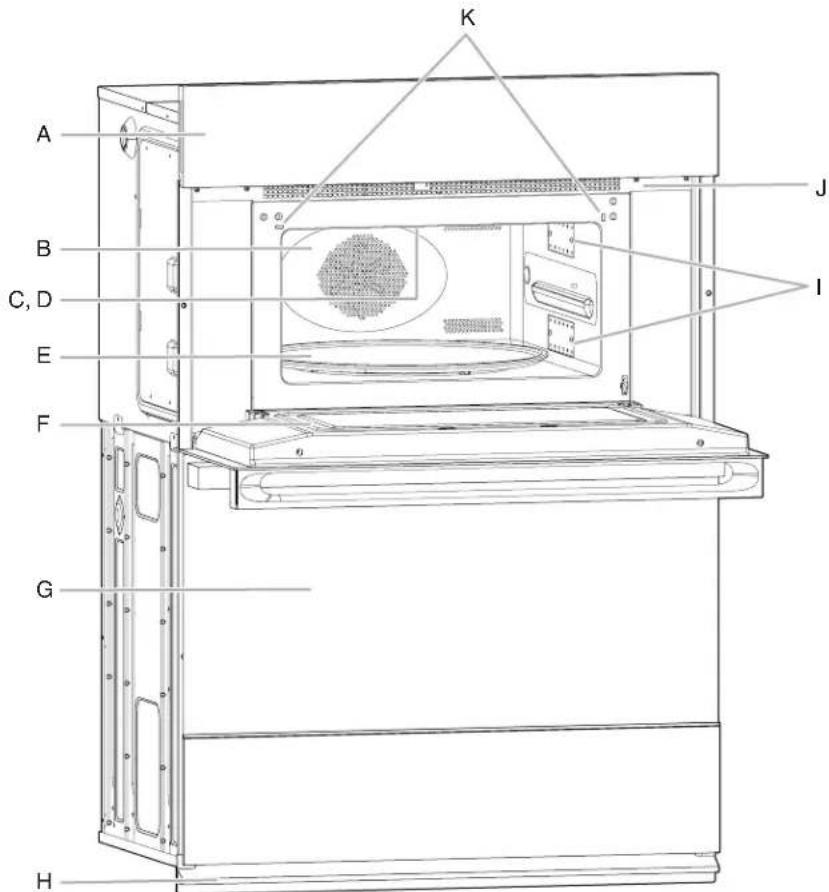
A. Electronic oven control
B. Convection element and fan (hidden behind back panel)
C. Light
D. Broil element
E. Turntable
F. Metal shielded window
G. Lower oven (on combination models. See
separate Use and Care Guide.)
H. Bottom vent
I. Dual microwave emission
J. Model and serial number plate (on center vent under control panel. NOTE: On single microwave oven models, on the right side trim.)
K. Door switch
Parts and Features not shown
Convection grid
Grilling grid
Crisper pan and handle
This manual covers several models. Your model may have some or all of the items listed. Refer to this manual or the Frequently Asked Questions (FAQs) section of our website at www.jennair.com for more detailed instructions. In Canada, refer to the Customer Service Section at www.jennair.ca.
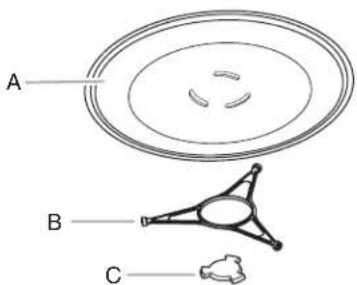
A. Turntable
B. Support and rollers
C. Hub
Turntable
The turntable rotates in both directions to help cook food more evenly. Do not operate the microwave oven without having the turntable in place. See "Assistance or Service" to reorder any of the parts.
The raised, curved lines in the center of the turntable bottom fit between the 3 spokes of the hub. The hub turns the turntable during microwave oven use. The rollers on the support should fit inside the turntable bottom ridge.
NOTE: The microwave-cooling fan may continue to run for several minutes after the cooking cycle has been completed. The microwave cooking does not continue beyond the end of cooking cycle.
To Turn On/Off:
For best microwave performance, it is recommended to always leave the turntable on. If necessary, the turntable can be turned Off (except during an auto function).
This is helpful when cooking with a dish that is larger than the turntable.
- From the Microwave Cooking Mode menu, touch TURNTABLE to turn the rotation On or Off.
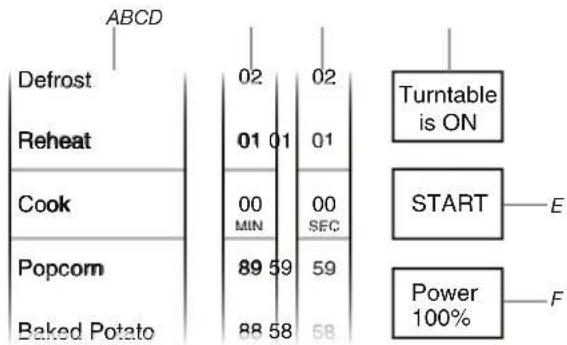
A. Cooking mode
B. Time - minute selection
C. Time - second selection
D. Turntable on/off menu
E. Start cooking cycle
F. Power level selection
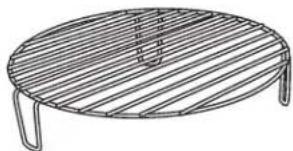
Convection Grid
The convection grid provides optimal heat circulation for convection cooking (on some models). It is recommended for convection cooking and for grilling thick pieces of meat such as bone-in chicken.
The grid will become hot. Always use oven mitts or pot holders when handling.
To avoid damage to the microwave oven, do not allow the grid to touch the inside cavity walls, ceiling, or floor.
Always use the turntable.
To avoid damage to the microwave oven, do not store the grid in the oven.
Two-level cooking is not recommended.
For best results, do not place popcorn bags on the grid.
The grid is designed specifically for this oven. For best cooking results, do not attempt to use any other grid in this oven.
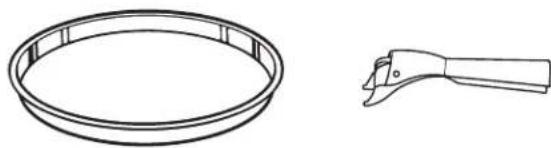
Coated Crisper Pan and Handle
The crisper pan, with its nonstick surface and detachable handle, has been specifically designed for microwave use and is ideal for pan-frying (pan-browning) foods in the microwave oven.
The crisper pan will become hot. Always use the handle and oven mitts or pot holders when handling. Place gripping end on the edge of pan, squeeze handle, and lift pan.
Do not allow the risper pan or handle to touch the inside cavity walls, ceiling, or floor.
Use the turntable as a support for the crisper pan.
Do not place hot crisper pan on heat-sensitive surfaces. Damage may occur.
To avoid damage to the microwave oven, do not use another metal object with the crisper pan.
The crisper pan is designed specifically for this oven. Do not use it in any other oven.
Use only wooden or plastic cooking utensils to help avoid scratches.
This manual covers several models. Your model may have some or all of the items listed. Refer to this manual or the Frequently Asked Questions (FAQs) section of our website at www.jennair.com for more detailed instructions. In Canada, refer to the Customer Service Section at www.jennair.ca.
The microwave oven's controls are accessed through its control panel and interactive touch display.
NOTE: Due to the sensitivity of the control panel, we have provided special instructions for cleaning the panel as well as the touch panel. See "General Cleaning" section for cleaning instructions.
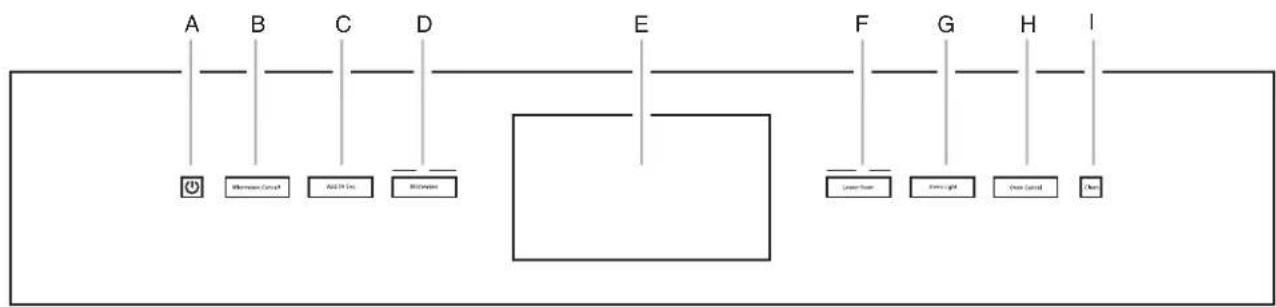
Combination Oven Models
A. Power
B. Microwave cancel
C.Add 30 Sec.
D. Microwave
E. Display
F. Lower oven
G.Oven light
H. Oven cancel
I. Clean
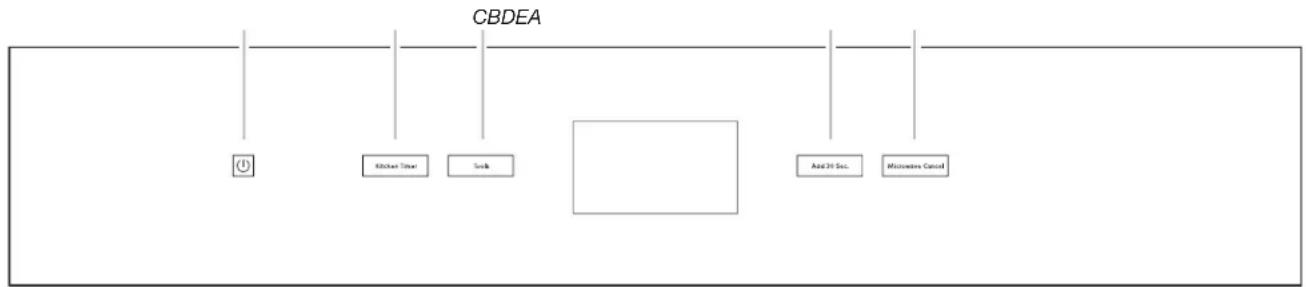
A. Power
B. Kitchen Timer
C. Tools
D.Add 30 Sec.
E. Microwave Cancel
Touch Panel
The touch panel houses the control menu and function controls. The touch pads are very sensitive and require only a light touch to activate.
For more information about the individual controls, see their respective sections in this manual.
Welcome Guide
This appears on your display the first time the microwave is powered up. The Welcome Guide allows you to set up your new microwave oven.
After every selection, a tone will sound.
- A new welcome screen will appear, please read it and touch NEXT.
- Select your language.
- Select the clock by scrolling to the correct time in the hours and minutes column. You can then select AM/PM or 24 hour clock (military time). Touch NEXT.
- Choose to have daylight savings time AUTO SYNC (turn on), or DO NOT ADJUST (turn off). Touch NEXT.
- Enter current date (MM/DD/YYYY) by scrolling to the column to set the MONTH, DAY, and YEAR. Touch NEXT.
- Select the units of temperature. You can choose Fahrenheit or Celsius. Touch NEXT.
- Select the Clock Theme by scrolling to the desired setting. Touch NEXT.
NOTE: This is the background for the center touch display.
- If you selected CLOCK ONLY, touch SAVE to complete the setup.
OR
If you selected a picture for the Clock Theme, select the desired image and touch SAVE.
Display
When the oven(s) is in use (active mode), the display shows the oven temperature, heat source(s) and timer if set.
After approximately 2 minutes of inactivity, the display will go into standby (sleep) mode, and the backlight of the display will dim. When the oven is in operation, the display will remain active.
During programming, the display shows menus and the appropriate selections for the respective cooking function.
Display Screen
- The touch display screen is used to make menu selections, adjust settings and input commands.
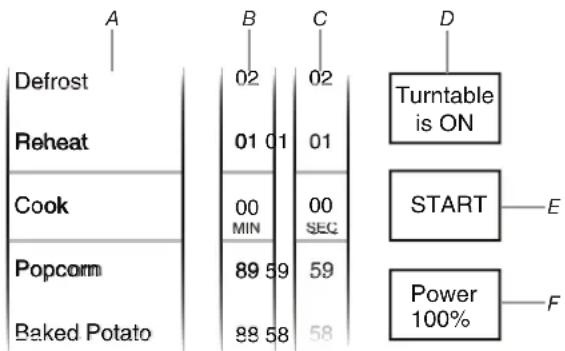
A. Cooking mode
B. Time - minute selection
C. Time - second selection
D. Turntable on/off menu
E. Start cooking cycle
F. Power level selection
Menu selections and input adjustments are made in the center portion of the screen, and the command inputs (Back, More, Start, etc.) are made using the bottom buttons. Screen titles and descriptions are displayed in the top portion of the screen. A light to medium pressure touch of the fingertip will activate the menu selection.
Main Menu
From the Main Menu, all automatic cooking programs can be activated; all manual cooking can be programmed; settings can be adjusted; and instructions, preparation, and tips can be accessed.
This manual covers different models. The oven you have purchased may have some or all of the items listed. The locations and appearances of the features shown here may not match those of your model.
Menu Demonstration
The following demonstrates a sequence showing how to bake a potato from the "Built-in Foods" menu.
- Touch START or MICROWAVE (on combination oven models).
- From the Cooking Mode Menu, scroll to select Baked Potato.
- Use the tumbler to select one of the preset quantities (4 max.).
- (Optional) To adjust doneness, touch DONENESS, read the on-screen information, and then touch DONENESS again. Select More Done, suggested, or Less Done, and then Touch SET.
- Touch START.
Drop-down Message Demonstration
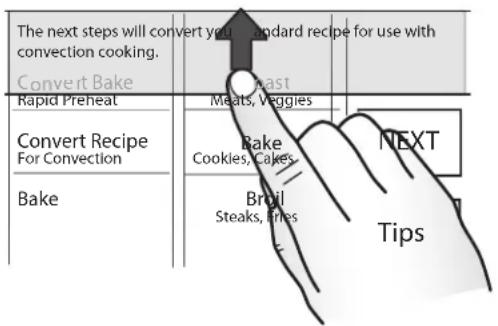
There are some menus that prompt a drop-down message to appear. Once the message is read, you can dismiss the menu by touching the directional arrow and swiping up.
Tools Menu
Your microwave provides you with the ability to control several of the default settings and access information through the on-screen display. These include: Clock, Sound, Appearance, Language, Temperature Units, Service, and Restore Defaults.
This manual covers different models. The oven you have purchased may have some or all of the items listed. The locations and appearances of the features shown here may not match those of your model.
To Access Tools Menu:
- Touch TOOLS.
- From the Tools Menu, scroll to the desired Tools choice.
- Touch the quickset pad that corresponds to the desired choice.
MODE AVAILABLE SELECTIONS
| Sabbath Sets Sabbath Mode |
| Demo Mode OnOff (Default) |
| Temp Units CelsiusFahrenheit (Default) |
| Language FrançaisEnglish (Default) |
| Display On/Off Display OffDisplay Dimmed (Default) |
| Clock On/Off Clock OffClock On (Default) |
| Brightness MaxHighMed(Default)LowDim |
| Sound Key PressTimer & Alert (Default)Power On & Off |
MODE AVAILABLE SELECTIONS
| Clock Theme | ■ Textures ■Celebration ■Culinary ■Clock Only ■Animation (Default) ■Spring ■Summer ■Fall ■Winter |
| Time & Date ▪Daylight Saving | |
| ■Clock Style ■Set Clock (Default) ■Set Date | |
| Button Lock | ■ Press Lock to lock controls. |
| Number Entry | ■ Number Pad ■Scroll (Default) |
| Touch Calib. | ■ Use to calibrate touch screen |
| Service Info. | ■ Model Number and Serial Number |
| Legal Info. | ■ License Information |
| Restore Defaults | ■ Restores Factory Defaults |
Service Information
- From the Tools Menu, scroll until Service Info appears.
- Touch TIPS.
- The service phone number, website, model number, and serial number are displayed on the screen.
- See "Assistance or Service" section for additional information.
- From the Tools Menu, scroll until Restore Factory Defaults appears.
- Touch TIPS, read the drop-down message, and then swipe the message arrow up.
- Touch RESET to Restore Factory Defaults.
- The following settings will be lost: Language, Temperature Units, Clock Settings, Date and Screen Appearance. The Welcome Guide will appear to help you reset these settings. See the "Welcome Guide" section for additional information.
Kitchen Timer
This is an independent timer not associated with the cook timers.
NOTE: The Kitchen Timer appears as a drop-down display. To dismiss the timer message, swipe the message arrow up. The timer will continue to count down even though it is not visible.
- Touch TIMER (KITCHEN TIMER for dedicated microwave ovens) anytime needed.
- Enter the desired time (00:00:00) using the tumbler.
- Touch Back next to Cancel Timer or touch START.
- To adjust TIMER / KITCHEN TIMER, touch the countdown timer, use the tumbler to set the new desired hour, minute, and seconds, and then touch SET.
OR
- To cancel timer, touch the countdown timer, and then touch OFF. This will cancel the TIMER / KITCHEN TIMER and return you to the Cooking mode menu.
- When the Kitchen Timer is complete, a tone will sound, and then reminder tones will sound every minute.
Button Lock
The Button Lock allows all the buttons to be locked. To Activate the Button Lock:
- From the Tools menu, touch BUTTON LOCK.
- Touch BUTTON LOCK to activate the Button Lock mode.
NOTE: The touch screen will return to idle mode, and a control locked message will be displayed.
To Deactivate the Button Lock:
- Touch the Power pad, and then follow the on-screen directions.
NOTE: The oven will generate a random sequence of shapes that must be touched in the order prompted on the screen.
- The controller will unlock and return to the cooking modes menu once the shapes are touched in the needed sequence.
NOTE: The Button Lock tool must set every time you wish to use this feature.
Wi-Fi Connectivity (on some models)
Your oven may have built-in Wi-Fi connectivity, but for it to work, you will have to connect it to your home wireless network. For information about setting up the connectivity, turning it on and off, receiving important notifications and taking advantage of available features, refer to the Oven Wi-Fi Connected Quick Start Guide that came with your oven.
Once the setup process has been completed for the Wi-Fi, you will have access to features that will give you new freedom in cooking. Your available features may vary depending on firmware updates.
NOTE: Wi-Fi connectivity may be interrupted or lost during a microwave cooking function. The Wi-Fi will reconnect once the microwave cooking function has ended.
BUILT-IN MICROWAVE OVEN USE
A magnetron in the oven produces microwaves that reflect off the metal floor, walls, and ceiling and pass through the turntable and appropriate cookware to the food. Microwaves are attracted to and absorbed by fat, sugar, and water molecules in the food, causing them to move, producing friction and heat which cooks the food.
To avoid damage to the microwave oven, do not lean on or allow children to swing on the microwave oven door.
To avoid damage to the microwave oven, do not operate microwave oven when it is empty.
The turntable must be in place and correct side up when microwave oven is in use. Do not use if turntable is chipped or broken. See "Assistance or Service" section to reorder.
Baby bottles and baby food jars should not be heated in microwave oven.
Clothes, flowers, fruit, herbs, wood, gourds, paper, including brown paper bags and newspaper, should not be dried in microwave oven.
Paraffin wax will not melt in the microwave oven because it does not absorb microwaves.
■Use oven mitts or pot holders when removing containers from microwave oven.
Do not overcook potatoes. At the end of the recommended cook time, potatoes should be slightly firm. Let potatoes stand for 5 minutes. They will finish cooking while standing
■Do not cook or reheat whole eggs inside the shell. Steam buildup in whole eggs may cause them to burst. Cover poached eggs and allow a standing time.
Food Characteristics
When microwave cooking, the amount, size and shape, starting temperature, composition, and density of the food affect cooking results.
Amount of Food
The more food heated at once, the longer the cook time needed. Check for doneness and add small increments of time if necessary.
Size and Shape
Smaller pieces of food will cook more quickly than larger pieces, and uniformly shaped foods cook more evenly than irregularly shaped food.
Starting Temperature
Room temperature foods will heat faster than refrigerated foods, and refrigerated foods will heat faster than frozen foods.
Composition and Density
Foods high in fat and sugar will reach a higher temperature, and will heat faster than other foods. Heavy, dense foods, such as meat and potatoes, require a longer cook time than the same size of a light, porous food, such as cake.
Cooking Guidelines
Covering
Covering food helps retain moisture, shorten cook time, and reduce spattering. Use the lid supplied with cookware. If a lid is not available, wax paper, paper towels or plastic wrap approved for microwave ovens may be used. Plastic wrap should be turned back at one corner to provide an opening to vent steam. Condensation on the door and cavity surfaces is normal during heavy cooking.
Stirring and Turning
Stirring and turning redistribute heat evenly to avoid overcooking the outer edges of food. Stir from outside to center. If possible, turn food over from bottom to top.
Arranging
If heating irregularly shaped or different sized foods, arrange the thinner parts and smaller sized items toward the center. If cooking several items of the same size and shape, place them in a ring pattern, leaving the center of the ring empty.
Piercing
Before heating, use a fork or small knife to pierce or prick foods that have a skin or membrane, such as potatoes, egg yolks, chicken livers, hot dogs, and sausage. Prick in several places to allow steam to vent.
Shielding
Use small, flat pieces of aluminum foil to cover the thin pieces of irregularly shaped foods, bones, and foods such as chicken wings, leg tips, and fish tail. See "Aluminum Foil and Metal" first.
Standing Time
Food will continue to cook by the natural conduction of heat even after the microwave cooking cycle ends. The length of standing time depends on the volume and density of the food.
Turntable On/Off
For best performance, the turntable should be on during microwave cooking.
If using oversized cookware that does not turn freely on the turntable, turn the turntable off. See the "Turntable" section for additional information.
When microwave cooking with the turntable off, food should be turned halfway through the cooking process.
Cookware and Dinnerware
Cookware and dinnerware must fit on the turntable. Always use oven mitts or pot holders when handling because any dish may become hot from heat transferred from the food. Do not use cookware and dinnerware with gold or silver trim. Use the following chart as a guide, and then test before using.
MATERIAL RECOMMENDATIONS
| Aluminum Foil, Metal | See "Aluminum Foil and Metal" section. |
| Browning Dish Bottom must be at least 3/16" (5 mm) above the turntable. Follow manufacturer's recommendations. | |
| Ceramic Glass, Glass | Acceptable for use. |
| China, Earthenware | Follow manufacturer's recommendations. |
| Melamine Follow manufacturer's recommendations. | |
| Paper: Towels, Dinnerware, Napkins | Use non-recycled and those approved by the manufacturer for microwave oven use. |
| Plastic: Wraps, Bags, Covers, Dinnerware, Containers | Use those approved by the manufacturer for microwave oven use. |
| Pottery, Clay Follow manufacturer's recommendations. | |
| Silicone Bakeware Follow manufacturer's recommendations. | |
| Straw, Wicker, Wooden Containers | Do not use in microwave oven. |
| Styrofoam®† | Do not use in microwave oven. |
| Wax Paper Acceptable for use. | |
To Test Cookware or Dinnerware for Microwave Use:
- Place cookware or dinnerware in microwave oven with 1 cup (250 mL) of water beside it.
- Cook at 100% cooking power for 1 minute.
Do not use cookware or dinnerware if it becomes hot and the water stays cool.
Aluminum Foil and Metal
Always use oven mitts or pot holders when removing dishes from the microwave oven.
Aluminum foil and some metal can be used in the microwave oven. If not used properly, arcing (a blue flash of light) can occur and cause damage to the microwave oven.
OK for Use
Grids and bakeware supplied with the microwave oven (on some models), aluminum foil for shielding, and approved meat thermometers may be used with the following guidelines:
To avoid damage to the microwave oven, do not allow aluminum foil or metal to touch the inside cavity walls, ceiling, or floor.
Always use the turntable.
To avoid damage to the microwave oven, do not allow contact with another metal object during microwave cooking.
Do Not Use
Metal cookware and bakeware, gold, silver, pewter, non-approved meat thermometers, skewers, twist ties, foil liners such as sandwich wrappers, staples, and objects with gold or silver trim or a metallic glaze should not be used in the microwave oven.
Microwave Cooking Power
Many recipes for microwave cooking specify which cooking power to use by percent, name or number. For example, 70% = 7 = Medium-High.
Use the following chart as a general guide for the suggested cooking power of specific foods.
Microwave Cooking Power Chart
| PERCENT/NAME NUMBER USE | |
| 100%, High (default setting) | 10 Quick heating convenience foods and foods with high water content, such as soups, beverages, and most vegetables. |
| 90% 9 Cooking small, tender pieces of meat, ground meat, poultry pieces, and fish fillets. Heating cream soups. | |
| 80% 8 Heating rice, pasta or casseroles. Cooking and heating foods that need a cook power lower than high. For example, whole fish and meat loaf. | |
| 70%, Medium-High | 7 Reheating a single serving of food. |
| 60% 6 Cooking sensitive foods such as cheese and egg dishes, pudding and custards. Cooking non-stirrable casseroles, such as lasagna. | |
| 50%, Medium | 5 Cooking ham, whole poultry and pot roasts. Simmering stews. |
| 40% 4 Melting chocolate. Heating bread, rolls, and pastries. | |
| 30%, Medium-Low, Defrost | 3 Defrosting bread, fish, meats, poultry, and precooked foods. |
| 20% 2 Softening butter, cheese, and ice cream. | |
| 10%, Low | 1 Taking chill out of fruit. |
NOTE: A percentage of 0% is also acceptable. This will not heat up.
Cook Sensor
During the Sensor Cook function, a sensor automatically adjusts for the cook time and power level.
The microwave oven display will show the time countdown once the sensor identifies the cooking duration.
If the microwave oven door is opened during a sensor function, the microwave oven will turn off and any additional operations will be canceled.
For Best Cooking Performance:
Before using a sensor cook function, make sure power has been supplied to the microwave oven for at least 2 minutes, the room temperature is not above 95°F (35°C) , and the outside of the cooking container and the microwave oven cavity are dry.
My Creations
My Creations allows the customization of cooking processes. When My Creations is selected from the main menu a list of existing creations is presented along with the ability to create more.
- From the Cooking Mode menu, scroll until "My Creations" is shown.
- Select between Create New, Use Saved, or Delete/Edit. NOTE: The first time MY CREATIONS is used, only "Create New" will be displayed.
- Touch the Create New pad, and then touch NEXT.
- Select the desired Cook mode. Choose between Convect Roast, Convect Bake, Steam Cook, Defrost, Reheat, Cook, Keep Warm, Soften, Melt, Boil & Simmer, Broil & Grill, and Browning Pan.
- Enter a Cook Time (---:---:---).
NOTE: The maximum total length of time of all three available stages is 12:00:00.
- Touch POWER to adjust cooking power, touch the desired cooking power, and then touch SET.
OR
- If the "Convect Bake" or "Convect Roast" mode is chosen, choose a cook temperature between 170° and 450°F (77°C and 232°C) , touch NEXT, enter a Cook Time (---), and then touch SET and go to step 9.
NOTE: In the "Convect Bake" mode, the Power Level selection is unavailable.
- Touch NEXT.
- Review your settings. If any extra stage is needed, touch the Stage you wish to set, and then touch ADD.
NOTE: Each stage set shows the following information: Mode, Power/Temperature, and Cook Time. It is possible to have 3 stages.
- Enter the information into each stage, and then touch SAVE.
- Use the tumbler to select the shortcut menu where the creation will be stored.
- Touch SAVE or OVERWRITE. Overwrite will appear if there is a creation previously stored in the chosen shortcut menu.
To Use Saved
- Use the tumbler to select Use Saved from the menu selection, and then touch NEXT.
- Select the cooking creation you desire to use, and then touch START.
NOTE: You may be prompted to open and close the door before the creation can begin cooking.
To Delete
- Use the tumbler to select Delete / Edit from the menu selection, and then touch NEXT.
-
Using the tumbler, select the creation you wish to delete.
-
Touch DELETE.
To Edit
- Use the tumbler to select Delete / Edit from the menu selection and then touch NEXT.
- Using the tumbler, select the creation you wish to edit and then touch EDIT.
- Use the tumbler to select the stage to be modified and then touch EDIT.
NOTE: If a stage is empty, you can touch ADD to add an action to that stage.
- Select the desired Cook mode. Choose between Convect Roast, Convect Bake, Steam Cook, Defrost, Reheat, Cook, Keep Warm, Soften, Melt, Boil & Simmer, Broil & Grill, and Browning Pan.
- Enter a Cook Time (---:---:---).
NOTE: The maximum total length of all three available stages is 12:00:00.
- Touch POWER to adjust cooking power, select the desired cooking power, and then touch SET.
OR
If the "Convect Bake" or "Convect Roast" mode is chosen, choose a cook temperature between 170° and 450°F (77°C and 232°C) , touch NEXT, enter a Cook Time (---), and then touch SET and go to step 8.
- Touch NEXT.
- Review your settings. If any extra stage is needed, touch the Stage you wish to set, and then touch ADD.
NOTE: Each stage set shows the following information: Mode, Power/Temperature, and Cook Time. It is possible to have 3 stages.
- Enter the information into each stage and then touch SAVE.
- Use the tumbler to select the shortcut menu where the creation will be stored.
- Touch SAVE or OVERWRITE. Overwrite will appear if there is a creation previously stored in the chosen shortcut menu.
Cooking Functions
- Touch the POWER button or touch the MICROWAVE button (on combination oven models).
- Select the desired Cook mode. Choose between Convect Roast, Convect Bake, Convert Recipe for Convection, Steam Cook, SpeedCook, My Creation, Auto Cook, Defrost, Reheat, Cook, Popcorn, Baked Potato, Beverage, Keep Warm, Soften, Melt, Boil & Simmer, Broil & Grill, and Browning Pan
- Enter a Cook Time (------). The maximum length is 01:29:59. NOTE: The Cook Time selection is not available for sensor cooking modes.
- To adjust the cooking power level, touch POWER, select your desired power, and then touch SET. The available ranges are shown in the following table.
| MODE RANGE | |
| Convect Roast 170-450°F (77-232°C) | |
| Default 325°F (163°C) @ 0% Power | |
| Power: 0-30% (Default 0%) | |
| Convect Bake 170-450°F (77-232°C) | |
| Default 325°F (163°C) | |
| Convert Recipe For Convection | Roast |
| Bake (Default) | |
| 170-450°F (77-232°C) | |
| Default 325°F (163°C) | |
| Steam Cook Manual (Default @ 100% Power) | |
| Asparagus | |
| Broccoli | |
| Carrots | |
| Cauliflower | |
| Corn on the Cob | |
| Fish Fillets | |
| Frzn. Vegetables | |
| Green Beans | |
| Potatoes | |
| Shrimp | |
| Spinach | |
| Summer Squash | |
| SpeedCook Foods Breads | |
| Casserole | |
| Convenience Foods (Default) | |
| Desserts | |
| Fish | |
| Meats | |
| Poultry | |
| Vegetables | |
| My Creation Create New (Default) | |
| Auto Cook Beef Roast | |
| Bread | |
| Cookies | |
| Frozen Entrée | |
| Hot Cereal (Default) | |
| Scrambled Eggs | |
| Defrost Bread | |
| Fish | |
| Juice | |
| Meats | |
| Manual (Default @ 20% Power) | |
| Poultry | |
| Seafood | |
| MODE RANGE | |
| Reheat Manual (Default @ 100% Power) | |
| Casserole | |
| Dinner Plate | |
| Pizza Slice | |
| Sauce | |
| Soup | |
| Cook 00:01-89:59 | |
| 10-100% (Default 100%) | |
| Popcorn 1.75 ~ 3.5oz Bag | |
| Baked Potato 4 Potatoes | |
| 3 Potatoes | |
| 2 Potatoes | |
| 1 Potato (Default) | |
| Beverage 2 Cups (16 oz) | |
| 1 Cup (8 oz) (Default) | |
| Keep Warm 00:01-89:59 (Default 60:00 @ 10% Power) | |
| Soften Manual (Default @ 20% Power) | |
| Butter | |
| Cream Cheese | |
| Ice Cream | |
| Margarine | |
| Melt | Manual (Default @ 30% Power) |
| Butter | |
| Cheese | |
| Chocolate | |
| Margarine | |
| Marshmallow | |
| Boil & Simmer | Manual (Default @ 100% Power) |
| Dry Fettuccini | |
| Dry Macaroni | |
| Dry Penne | |
| Dry Rotini | |
| Dry Spaghetti | |
| Linguine | |
| Long Rice | |
| Ravioli | |
| Tortellini | |
| Short Rice | |
| Broil & Grill | Manual (Default @ 0% Power) |
| Chicken Pieces | |
| Browning Pan Manual (Default @ 100% Power) | |
| Bacon | |
| Boneless Breasts | |
| French Fries | |
| Hamburger Patty | |
| Pizza Roll | |
| Potato Nuggets | |
| Rising Crust Pizza | |
| Thin Crust Pizza | |
- Touch START. The display will count down the cook time. When the stop time is reached, the oven will shut off automatically. If enabled, end-of-cycle tones will sound.
- Touch MICROWAVE CANCEL (CANCEL MICROWAVE on combination oven models), or open the door to clear the display.
NOTE: The microwave-cooling fan may continue to run for several minutes after the cooking cycle has been completed. The microwave cooking does not continue beyond the end of cooking cycle.
Auto Convection Conversion
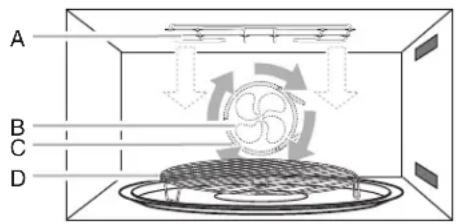
A. Broil element
B. Convection fan
C. Convection element
D. Grilling grid or convection grid
Convection cooking uses the convection element, the broil element and the fan. Hot air is circulated throughout the oven cavity by the fan. The constantly moving air surrounds the food to heat the outer portion quickly.
The convect function may be used to cook small amounts of food on a single grid.
Always use the grilling grid or convection grid placed on turntable.
To avoid damage to the microwave oven, do not cover turntable, grilling grid or convection grid, or baking tray with aluminum foil.
- Do not use light plastic containers, plastic wrap, or paper products. All heatproof cookware or metal utensils can be used in convection cooking. Round pizza pans are excellent for convection cooking.
■When the broil element is in use, the cooling fan turns on and stays on for up to 10 minutes after the cycle is over.
■Use convection cooking for items such as soufflés, breads, cookies, angel food cakes, pizza, and most meats and fish.
Auto Convection Conversion is a function that converts a standard thermal bake cook time and temperature into an ideal cook time and temperature for convection cooking.
Convection temperatures and times differ from those of standard cooking. The oven will automatically reduce standard recipe temperatures and times for convection cooking.
The conversion may not be exact because foods are grouped in general categories.
Use the following chart as a guide.
Convection Chart
SETTINGFOODS
Bake Casseroles and baked goods
Roast Meats and vegetables
To Use Recipe Conversion:
- If preheat is not required, place food in oven or on convection grid on the turntable, and close the door.
- Touch POWER or MICROWAVE (on combination oven models).
- From the Cooking mode menu, select the Convert Recipe (for convection).
- Select between Roast or Bake to convert a traditional recipe to a convection method of cooking. Touch NEXT.
- Enter the standard cooking temperature between 170°F and 450°F (77°C and 232°C).
- Touch NEXT.
- Select the original recipe Bake/Roast time and touch SET. OR
- Touch SKIP TIMER to move to the next step.
- Touch START. If preheat is required, place food in oven or on convection grid on turntable after preheat tone sounds. The display will count down the cook time.
When the stop time is reached, the oven will display "Cooking Ended" and transition to hold temperature, which maintains the oven temperature.
If enabled, end-of-cycles tones will sound.
- (Optional) After the cooking cycle ends, touch the ADD 30 SEC button. This will automatically add 30 seconds to the cook time.
- Touch MICROWAVE CANCEL to turn off the microwave oven.
Convect Bake
Convection Bake uses convection element and fan.
Use the convection grid. Place on turntable.
Use oven mitts as the door and grids will become hot.
To Use Convect Bake:
- Touch POWER or MICROWAVE (on combination oven models).
- From the Cooking mode menu, select Convect Bake.
- Using the tumbler, select the microwave oven temperature, and then touch START.
- (Optional) When a Microwave Timer is set, the WHEN DONE option will appear. This option allows you to select the microwave oven behavior at the end of the current cooking cycle. You can select between Keep Warm, Hold Temp, and MW Off. Keep Warm will run the microwave oven at 10% power for 60 minutes, Hold Temp maintains the selected cooking cycle after the timer expires, and MW Off deactivates the microwave cooking cycle when the timer expires.
NOTE: The default temperature is 325°F (163°C) . If enabled, end-of-cycle tones will sound.
- (Optional) After the cooking cycle ends, touch ADD 30 SEC. This will automatically add 30 seconds to the cook time.
- Touch MICROWAVE CANCEL to turn off the oven.
Convect Roast
The Roast function uses the convection element with or without microwave power. The Roast function requires that a time and temperature (and microwaves if desired) be entered. The highest microwave power level that can be used is 30% .
Use the convection grid. Place on turntable.
Use oven mitts as the door and grids will become hot.
To Use Convect Roast:
- Touch POWER or MICROWAVE (on combination oven models).
- From the Cooking mode menu, select Convect Roast.
- Using the tumbler, select the oven temperature. NOTE: The default temperature is 325°F (163°C) , and the default microwave power level is 0% .
- Touch START. OR
- To adjust the power level, touch POWER, select a new power level, touch SET (the set range is between 0% and 30% ), and then touch START.
- To enter a cook time, touch MW TIMER after the cooking cycle has started, use the tumbler to select a cook time (00:00:00), and then touch START. The maximum length is 11:59:00. If enabled, end-of-cycle tones will sound.
- When a Microwave Timer is set, the WHEN DONE option will appear. This option allows you to select the microwave oven behavior at the end of the current cooking cycle. You can select between Keep Warm, Hold Temp, and MW Off. Keep Warm will run the microwave oven at 10% power for 60 minutes, Hold Temp maintains the selected cooking cycle after the timer expires, and MW Off deactivates the microwave cooking cycle when the timer expires. When the stop time is reached, the oven will Hold Temp by default or behave as set in the When Done menu.
- (Optional) After the cooking cycle ends, touch ADD 30 SEC. This will automatically add 30 seconds to the cook time.
- Touch MICROWAVE CANCEL to turn off the oven.
Defrost
The Defrost feature can be used, or the microwave oven can be manually set to defrost by using 20% cook power.
■For optimal results, food should be 0°F (-18°C) or colder when defrosting.
Unwrap foods and remove lids (from fruit juice) before defrosting.
Shallow packages will defrost more quickly than deep blocks.
- Separate food pieces as soon as possible during or at the end of the cycle for more even defrosting.
Foods left outside the freezer for more than 20 minutes or frozen ready-made food should not be defrosted using the Custom Defrost feature, but should be defrosted manually.
■Use small pieces of aluminum foil to shield parts of food such as chicken wings, leg tips, and fish tails. See "Aluminum Foil and Metal" first.
Times and cooking powers have been preprogrammed for defrosting a number of food types. For each food category, a precise amount of food can be entered or preprogrammed quantities can be selected.
SpeedCook Foods
The SpeedCook function uses the broil element, convection element and fan, and microwaves. All cycle on and off in intervals.
Bakeware and the interior oven surfaces, including the door, will become hot.
Always use an instant read thermometer to determine doneness of meat and poultry.
Use microwave-safe and ovenproof bakeware.
- Do not use covers or containers made of foil, paper, waxed paper, or plastic not recommended for use in a conventional oven.
- When roasting, meats and poultry may spatter. Plastic oven bags designed for conventional oven use can be used for easier cleanup. Follow manufacturer's recommendations.
- When using the grilling grid or convection grid, place it directly on the turntable.
- Arrange pieces of food in a single layer on the crisper pan or baking dish.
Before SpeedCooking, put food in the oven and close the door. Preheating is not necessary.
To Use SpeedCook Foods:
NOTE: For combination units, touch the MICROWAVE to access the microwave menu.
- From the Mode menu, select SPEEDCOOK FOODS.
- Scroll to the desired food category and touch NEXT.
- Scroll to the desired food and touch NEXT.
NOTE: Some cooking selections may ask for additional information, such as food weight or pan size. If this occurs, make the proper selection and touch NEXT.
- Read and follow the on-screen cooking instructions.
- Touch START to begin cooking cycle. OR
Touch DONENESS and scroll to select between More Done, Suggested, or Less Done and touch SET to return to the previous screen, and then touch START to begin the cooking cycle.
- Touch MICROWAVE CANCEL to turn off the oven.
SETTING QUANTITY
| Meats | |
| Bone-in pork chops 0.4-1.5 lb (0.2-0.7 kg) | |
| Boneless beef roast 1.5-5.0 lb (0.7-2.3 kg) | |
| Boneless ham 1.0-4.5 lb (0.5-2.0 kg) | |
| Boneless pork chops 0.3-1.6 lb (0.1-0.7 kg) | |
| Boneless pork roast 1.0-5.0 lb (0.5-2.3 kg) | |
| Meatloaf 1.5-2.0 lb (0.7-0.9 kg) | |
| Meatballs 20 pieces | |
| Swiss steak 1.0-2.0 lb (0.5-0.9 kg) | |
| SETTING QUANTITY | |
| Poultry | |
| Frozen Chicken Tenders 5-20 pieces | |
| Chicken breast 0.2-2.0 lb (0.1-0.9 kg) | |
| Chicken nuggets 6-24 pieces | |
| Chicken pieces - with skin 0.5-2.0 lb (0.2-0.9 kg) | |
| Frozen fried chicken 4-8 pieces | |
| Turkey breast 3.0 lb (1.4 kg) | |
| Whole chicken 3.0-5.5 lb (1.4-2.5 kg) | |
| Bone-in chicken pieces 0.5-2.0 lb (0.2-0.9 kg) | |
| Frozen chicken wings 0.5-1.5 lb (0.2-0.7 kg) | |
| Fish | |
| Fish fillets 0.4-1.2 lb (0.2-0.5 kg) | |
| Frozen fish sticks 4-16 pieces | |
| Frozen fish, battered 2-8 pieces | |
| Breads | |
| Refrigerated biscuits - large, 1 pan | 8 pieces |
| Refrigerated biscuits - small, 1 pan | 10 pieces |
| Cinnamon rolls - large, 1 pan | 5 pieces |
| Cinnamon rolls - small, 1 pan | 8 pieces |
| Crescent rolls - 1 pan | 8 pieces |
| Frozen bread sticks - 1 pan | 6 pieces |
| Garlic/cheese bread - 1 loaf | 8 oz (226.8 g) |
| Vegetables | |
| Baked potatoes | 1-8 potatoes |
| French fries | 3-12 oz (85.0-340.2 g) |
| Frozen onion rings | 4-16 oz (113.4-453.6 g) |
| Frozen potato nuggets | 3-12 oz (85.0-340.2 g) |
| Frozen potato skins | 1-4 servings |
| Frozen potato wedges | 1-4 servings |
| Roasted vegetables | 2-8 cups (500-2,000 mL) |
| Sweet potatoes | 1-6 potatoes |
| Desserts | |
| Brownies - (8" x 8" [20.3 x 20.3 cm] or 9" x 13" [22.9 x 33 cm] pan) | |
| Cake, bundt cake | |
| Cookie dough - 1 pan | 8 cookies |
| Casserole | |
| Freshly made casserole - (8" x 8" [20.3 x 20.3 cm] or 9" x 13" [22.9 x 33 cm] pan) | |
| Freshly made lasagna - (8" x 8" [20.3 x 20.3 cm] pan | |
| Frozen lasagna | 10.0-60.0 oz (284 g-1.7 g) |
| SETTING QUANTITY | |
| Convenience Food | |
| Bagel bites | 9 pieces |
| Cheese sticks | 4-16 pieces |
| Frozen egg rolls | 1-8 pieces |
| Frozen french toast | 1-4 pieces |
| Frozen sausage links | 2-10 pieces |
| Frozen sausage patties | 2-8 pieces |
| Frozen waffles | 1-4 pieces |
| Hot dogs | 2-10 pieces |
| Jalapeno poppers | 5-20 pieces |
| Nachos - 1 pan | -------- |
| Pizza - reheat | 1-4 slices |
Cook
To Use Manual Cook:
NOTE: For combination units, touch the MICROWAVE to access the microwave menu.
- From the Mode menu, select Cook (Default Mode).
NOTE: The default power setting is 100% . - Scroll to enter a Cook Time (----). The maximum length is 89:59.
- (Optional) To adjust the power level, touch "Power 100% ", scroll to select the desired power level, and then touch SET. The range is between 10% and 100% .
- Touch START.
When the stop time is reached, the oven will shut off automatically.
NOTE: The microwave-cooling fan may continue to run for several minutes after the cooking cycle has been completed. The microwave cooking does not continue beyond the end of cooking cycle.
- (Optional) After the cooking cycle ends, touch the ADD 30 SEC button. This will automatically add 30 seconds to the cook time.
- Touch Microwave Cancel to turn off the oven.
Popcorn
Pop only 1 package at a time.
Listen for popping to slow to 1 pop every 1 or 2 seconds, and then stop the cycle.
To Use Popcorn Mode:
- From the Mode menu, select Popcorn.
- (Optional) To adjust the doneness, touch DONENESS, read the onscreen information, and then touch DONENESS. Select More Done, Suggested, or Less Done, and then touch SET.
- Touch START.
- Touch Microwave Cancel to turn off the oven.
When the stop time is reached, the oven will shut off automatically.
NOTE: The microwave-cooling fan may continue to run for several minutes after the cooking cycle has been completed. The microwave cooking does not continue beyond the end of cooking cycle.
Beverage
Use a microwave safe container.
Do not cover.
To Use Beverage Mode:
NOTE: For combination units, touch the MICROWAVE to access the microwave menu.
- From the Mode menu, select BEVERAGE.
- Select quantity
- (Optional) To adjust the doneness, touch DONENESS, read the on-screen information, and then touch DONENESS. Select More Done, Suggested, or Less Done, and then touch SET.
- Touch START.
- Touch Microwave Cancel to turn off the oven. When the stop time is reached, the oven will shut off automatically.
NOTE: The microwave-cooling fan may continue to run for several minutes after the cooking cycle has been completed. The microwave cooking does not continue beyond the end of cooking cycle.
Broil & Grill
The Grill function uses the broil element and microwaves to grill your food.
Microwave oven cavity and door will become very hot during the Grill cycle. Use oven mitts.
- The grilling grid and convection grid will become very hot. Use oven mitts to grasp and remove the grid from the microwave oven.
For large pieces like chicken, use the crisper pan beneath the convection grid or grilling grid to catch drippings.
For best results, apply light amount of cooking oil to grilling grid or convection grid.
- When the broil element is in use, the cooling fan turns on and stays on for up to 10 minutes after the cycle is over.
Use the following chart as a guide.
Grill Chart
FOOD QUANTITY
Manual*
Chicken pieces - bone-in 1-2 pieces
*Manual Grill requires that a cook time be entered.
To Use Programmed Broil & Grill:
NOTE: For combination units, touch the MICROWAVE to access the microwave menu.
- From the Mode menu, select Broil & Grill.
- Select Chicken Pieces and then touch NEXT.
- Scroll to select the serving size and then touch NEXT.
- (Optional) To adjust the doneness, touch DONENESS, read the on-screen information, and then touch Doneness. Select More Done, Suggested, or Less Done, and then touch SET.
- Read the on-screen recommendations and then touch START.
- Touch Microwave Cancel to turn off the oven.
- (Optional) After the cooking cycle ends, touch the ADD 30 SEC button. This will automatically add 30 seconds to the cook time.
NOTE: The microwave-cooling fan may continue to run for several minutes after the cooking cycle has been completed. The microwave cooking does not continue beyond the end of cooking cycle.
To Use Manual Broil & Grill:
- From the Mode menu, select Broil & Grill.
-
Select Manual and then touch NEXT. NOTE: The default power level is 0%
-
Enter a Cook Time (---). The maximum length is 89:59.
-
(Optional) To adjust the power level, touch Power 0% and scroll to select a range between 0-40%, then touch SET.
-
Touch START.
-
(Optional) After the cooking cycle ends, touch the ADD 30 SEC button. This will automatically add 30 seconds to the cook time.
- Touch Microwave Cancel to turn off the oven.
NOTE: The microwave-cooling fan may continue to run for several minutes after the cooking cycle has been completed. The microwave cooking does not continue beyond the end of cooking cycle.
Steam
Steam is a sensor cooking function that uses microwaves to steam food. Use Steam for foods such as vegetables, fish, and potatoes.
Times and cooking powers have been preprogrammed for steaming a number of food types.
Use a microwave-safe steamer.
Use the following chart as a guide.
Steam Cooking Chart
FOOD QUANTITY
Manual -
Asparagus 8-16 oz
Broccoli 2-6 cups
Carrots 2-6 cups
Cauliflower 2-6 cups
Corn on the Cob 2-4 ears
Fish Fillets 0.5-1.5 lbs
Frzn. Vegetables 2-6 cups
GreenBeans2-6cups
Potatoes 2-6 cups
Shrimp 5-8 oz
Spinach 4-8 cups
Summer Squash 2-6 cups
*Manual Steam requires that a cook time be entered.
(Optional) Modify the food doneness by touching the Doneness pad. Select More Done, Suggested, or Less Done, then touch SET, review the cook settings, and then touch START.
Melt
The Melt function may be used to melt your food. Times and cooking powers have been preprogrammed for a number of food types. Use the following chart as a guide.
Melt Chart
| FOOD QUANTITY | |
| Manual ---- | |
| Butter 1/2 Stick | |
| 1 Stick | |
| \( 1^{1/2} \)Sticks | |
| 2 Sticks | |
| Cheese 8 oz | |
| 16 oz | |
| Chocolate 1-12 oz | |
| Margarine 1/2 Stick | |
| 1 Stick | |
| \( 1^{1/2} \)Sticks | |
| 2 Sticks | |
| Marshmallows 5 oz | |
| 10 oz | |
*Manual Melt requires that a cook time be entered.
(Optional) Modify the food doneness by touching the Doneness pad. Select More Done, Suggested, or Less Done, then touch SET, review the cook settings, and then touch START.
Reheat
Times and cooking powers have been preprogrammed for reheating a number of food types.
Use the following chart as a guide.
Custom Reheat Chart
| FOOD QUANTITY | |
| Manual* Default power level 100%. | |
| Casserole | 1-4 cups (250 mL-1 L) |
| Place in microwave-safe container. Cover with plastic wrap and vent. Stir and let stand 2-3 minutes after reheating. | |
| Dinner Plate | 8-16 oz (227-454 g) |
| Place food on plate. Cover with plastic wrap and vent. Let stand 2-3 minutes after reheating. | |
| Pizza Slices | 1-3 slices (3 oz [85 g] each) |
| Place on a paper towel. | |
| Sauce | 1-4 cups (250 mL-1 L) |
| Place in microwave-safe container. Cover with plastic wrap and vent. Stir and let stand 2-3 minutes after reheating. | |
| Soup | 1-4 cups (250 mL-1 L) |
| Place in microwave-safe container. Cover with plastic wrap and vent. Stir and let stand 2-3 minutes after reheating. | |
*Manual Reheat requires that a cook time be entered.
To Use Programmed Reheat:
For Combination Ovens, begin by touching the MICROWAVE button.
- Scroll to REHEAT in the cooking mode menu.
- Scroll to the desired food category and touch NEXT. If you choose DINNER PLATE, skip to step 4.
- Scroll to select one of the preset quantities, and then touch NEXT.
- Touch START.
OR
Touch DONENESS and scroll to select between More Done, Suggested, or Less Done and touch SET to return to the previous screen, and then touch START to begin the cooking cycle.
- Touch MICROWAVE CANCEL to turn off the oven.
To Use Manual Reheat:
For Combination Ovens, begin by touching the MICROWAVE button.
- Scroll to REHEAT in the cooking mode menu.
- Scroll to MANUAL food category and then touch NEXT.
- Scroll the MIN and SEC tumbler to set the desired amount of cook time.
NOTE: The default power setting is 100% .
- (Optional) The default Turntable is ON. To change the Turntable setting, touch TURNTABLE IS ON. The button will display TURNTABLE IS OFF. Repeat the process to turn the turntable back on.
NOTE: Once the cooking cycle has completed, the turntable will return to the default of ON. - (Optional) To adjust the power level, touch Power 100% , then scroll to the desired power level and touch SET. The range is between 10-100%.
- Touch START to begin cooking cycle.
- Touch MICROWAVE CANCEL to turn off the oven.
Soften
The Soften function may be used to soften your food. Times and cooking powers have been preprogrammed for a number of food types.
Use the following chart as a guide.
SoftenChart
| FOOD QUANTITY | |
| Manual ---- | |
| Butter 1/2 Stick | |
| 1 Stick | |
| \(1^{1/2}\)Sticks | |
| 2 Sticks | |
| Cream Cheese 3 oz | |
| 8 oz | |
| Ice Cream 16 oz | |
| 32 oz | |
| 64 oz | |
| Margarine 1/2 Stick | |
| 1 Stick | |
| \(1^{1/2}\)Sticks | |
| 2 Sticks | |
*Manual Soften requires that a cook time be entered.
(Optional) Modify the food doneness by touching the Doneness pad. Select More Done, Suggested, or Less Done, then touch SET, review the cook settings, and then touch START.
Boil & Simmer
Boil & Simmer is a sensor function, and uses only microwaves to simmer your food.
■Follow recommended water and food amounts that appear on the display.
For best cooking results, do not use plastic wrap as a cover during the Boil & Simmer cycle.
- Do not remove the lid while the dish is still in the oven, as the rush of steam will disrupt the sensor readings.
Use a microwave-safe dish with a loose-fitting lid.
Use the following chart as a guide.
Boil & Simmer Chart
| FOOD QUANTITY | |
| Dry fettuccine, dry spaghetti | 2-8 oz (57-227 g) |
| Dry macaroni,dry penne, dry rotini | 1½-2 cups (118-473 mL) |
| Linguine, ravioli, tortellini 9 or 18 oz (255 or 510 g) | |
| Long or short grain white rice | 1½-2 cups (118-473 mL) |
■Use the Manual Simmer function for foods such as soups, casseroles, stews, and other liquid food.
■Manual Boil & Simmer requires that a cook time be entered.
To Use Programmed Boil & Simmer:
To begin the function on combination ovens, touch MICROWAVE.
- Scroll to Boil & Simmer in the cooking mode menu.
- Scroll to select the desired food type and touch NEXT.
- Scroll to select one of the preset quantities and thentouch NEXT.
- (Optional) To adjust the doneness, touch DONENESS, read the on-screen information, and then touch DONENESS. Select More Done, Suggested, or Less Done, and then touch SET.
- Touch START.
NOTE: When cooking pasta, the oven will pause for adding pasta to the water. Then the oven will restart. If enabled, end-of-cycle tones will sound.
- (Optional) After the cooking cycle ends, touch the ADD 30 SEC button. This will automatically add 30 seconds to the cook time.
- Touch Microwave Cancel to turn off the oven.
To Use Manual Boil & Simmer:
To begin the function on combination ovens, touch MICROWAVE.
- Scroll to Boil & Simmer in the cooking mode menu.
- Scroll to Manual and touch NEXT.
- Enter a Cook Time (---). The maximum length is 89:59. NOTE: In the Boil & Simmer mode, the microwave controls power. After water is brought to a boil, the food will simmer for the length of the Cook Time.
- Touch START. Once the boiling point is reached, the display will count down the cook time. If enabled, end-of-cycle tones will sound.
- (Optional) After the cooking cycle ends, touch the ADD 30 SEC button. This will automatically add 30 seconds to the cook time.
- Touch Microwave Cancel to turn off the oven.
Manual Simmer Chart
FOOD INSTRUCTIONS
| Pasta* Add 1 tbs (15 mL) oil to water. Place the dish containing water in oven. Enter 1 second of simmer time. The water will heat to a boil and then the oven will turn off. Place the pasta in the water and cover the dish. Repeat steps 1–4 under “To Use Manual Simmer,” then enter the actual simmer time desired. |
| Rice and Vegetables Place water and food in dish. Place dish in oven. Set simmer time. |
| Soup and liquid foods | Place food in dish and place dish in oven. Set simmer time. |
*Use a dish large enough to completely cover food with water. (Optional) Modify the food doneness by touching the Doneness pad. Select More Done, Suggested, or Less Done, then touch SET, review the cook settings, and then touch START.
Keep Warm
WARNING
Food Poisoning Hazard
Do not let food sit in oven more than one hour before or after cooking.
Doing so can result in food poisoning or sickness.
Hot cooked food can be kept warm in the microwave oven. Keep WarmTM setting can be used by itself or can be preprogrammed to follow a cooking cycle.
Cover plates of food.
Cover foods that were covered while being cooked.
■For best results, do not cover baked goods such as pastries, pies, turnovers, etc.
To Use Keep Warm:
- Touch POWER or MICROWAVE (on combination oven models).
- From the Cooking mode menu, touch KEEP WARM. NOTE: The default power level is 10% .
- Select a Keep Warm time (---:---:---) . The maximum length is 01:29:59.
- Touch START. The oven display will count down the cook time.
When the stop time is reached, the microwave oven will shut off automatically. If enabled, end-of-cycle tones will sound.
- Touch MICROWAVE CANCEL to turn off the oven.
NOTE: The microwave-cooling fan may continue to run for several minutes after the cooking cycle has been completed. The microwave cooking does not continue beyond the end of cooking cycle.
Browning Pan
The Browning Pan feature uses the crisper pan, the broil element and microwaves to crisp and brown foods. While microwaves heat food from above, they also heat the pan from below to brown and crisp the food.
Browning Pan can be used to saute meats and vegetables, pan fry bacon and eggs, and to crisp and brown pizza and french fries.
Some Browning Pan cycles are programmed to preheat the empty pan for 3 minutes before cooking begins. When the preheating cycle is complete, the microwave oven will stop and prompt you to add the food to the crisper pan. The microwave oven may prompt you to turn over the food during the cycle.
Always use the crisper pan.
See the "Coated Crisper Pan and Handle" section before using.
Microwave oven cavity and door will become very hot during broil element use. The use of oven mitts is recommended.
The crisper pan will become very hot. Use the handle to grasp and remove the pan from the oven. Do not place hot crisper pan directly on heat-sensitive surfaces. Damage may occur.
To avoid damage to plastic utensils, do not use them with the crisper pan as it becomes very hot and could melt the utensils.
Do not use metal utensils, as they can scratch the pan.
For best cooking results, do not use the pan in any other microwave oven or in a thermal oven.
For best cooking results, do not place the crisper pan on the grilling grid or convection grid. Always use the turntable as a support for the pan.
■For best results, coat pan lightly with cooking oil to make removing food and cleaning easier.
Use the following chart as a guide when using the browning function.
Preprogrammed Browning Pan
Times and cooking powers have been preprogrammed for browning several food types.
Browning Pan Cooking Chart
| FOOD QUANTITY |
| Manual* |
| Bacon 2-4 slices |
| Poultry breast, boneless 1-3 pieces |
| French fries 1-3 servings |
| Hamburger patties 1-4 patties |
| Pizza roll 1-4 servings |
| Potato nuggets 1-4 servings |
| Pizza, frozen, rising crust 6 to 12" (15-30.5 cm) |
| Pizza, frozen, thin crust 6 to 12" (15-30.5 cm) |
*Manual Browning requires that a cook time be entered.
To Use Programmed Browning Pan:
- Touch POWER or MICROWAVE (on combination oven models).
- From the Cooking mode menu, touch BROWNING PAN.
- Select the food type, and then touch NEXT.
- Use the tumbler to select one of the preset quantities, and then touch NEXT to start cooking to the recommended doneness.
OR
- Modify the food doneness by touching a Doneness pad. Choose Select More Done, Suggested, or Less Done, and then touch SET.
- Touch START.
When the stop time is reached, the microwave oven will shut off automatically.
NOTE: The microwave-cooling fan may continue to run for several minutes after the cooking cycle has been completed. The microwave cooking does not continue beyond the end of cooking cycle.
If enabled, end-of-cycle tones will sound.
- (Optional) After the cooking cycle ends, select Keep Warm from the Cooking mode menu, and then touch START.
This will start a new cooking cycle that will keep food warm. The microwave will run at 10% power for a default of 60 minutes, but can be set for up to 01:29:59. See the "Keep Warm" section for additional information.
- (Optional) After the cooking cycle ends, touch ADD 30 SEC. This will automatically add 30 seconds to the cook time.
- Touch MICROWAVE CANCEL to turn off the oven.
To Use Manual Browning Pan:
- Touch POWER or MICROWAVE (on combination oven models).
- From the Cooking mode menu, touch BROWNING PAN.
- Touch NEXT.
- To enter a cook time, use the tumbler to select a cook time (00:00:00), and then touch START. The maximum length is 01:29:59.
NOTE: In the Browning Pan mode, the microwave controls power. High Power is needed to heat the pan.
- Touch START. The display will count down the cook time. When the stop time is reached, the oven will shut off automatically.
NOTE: The microwave-cooling fan may continue to run for several minutes after the cooking cycle has been completed. The microwave cooking does not continue beyond the end of cooking cycle.
If enabled, end-of-cycle tones will sound. - (Optional) After the cooking cycle ends, select Keep Warm from the Cooking mode menu, and then touch START. This will start a new cooking cycle that will keep food warm. The microwave will run at 10% power for a default of 60 minutes, but can be set for up to 01:29:59. See the "Keep Warm" section for additional information.
- (Optional) After the cooking cycle ends, touch ADD 30 SEC. This will automatically add 30 seconds to the cook time.
- Touch MICROWAVE CANCEL to turn off the oven.
BUILT-IN MICROWAVE OVEN CARE
General Cleaning
IMPORTANT: Before cleaning, make sure all controls are off and the microwave oven is cool. Always follow label instructions on cleaning products. For additional information, you can visit the Frequently Asked Questions (FAQs) section of our website at www.jennair.com. In Canada, reference the Customer Service section at www.jennair.ca.
Activate the Button Lock to avoid touch screen activation during cleaning. See "Button Lock" in the "Tools Menu" section.
Soap, water and a soft cloth or sponge are suggested first unless otherwise noted.
STAINLESS STEEL (on some models)
NOTE: To avoid damage to stainless steel surfaces, do not use soap-filled scouring pads, abrasive cleaners, Cooktop Polishing Creme, steel-wool pads, gritty washcloths, or some paper towels. Damage may occur to stainless steel surfaces, even with one-time or limited use.
Cleaning Method:
Rub in direction of grain to avoid damaging.
Vinegar for hard water spots.
■Affresh Stainless Steel Cleaner Part Number W10355016 (not included):
See the "Accessories" section for more information.
MICROWAVE OVEN DOOR EXTERIOR
Cleaning Method:
Glass cleaner and a soft cloth or sponge:
Apply glass cleaner to soft cloth or sponge, not directly on panel.
■Affresh 念 Kitchen and Appliance Cleaner Part Number W10355010 (not included):
See the "Accessories" section for more information.
To avoid damage to microwave oven cavity, do not use soap-filled scouring pads, abrasive cleaners, steel-wool pads, gritty washcloths, or some recycled paper towels.
On stainless steel models, rub in direction of grain to avoid damaging.
The area where the oven door and frame touch when closed should be kept clean.
Cleaning Method:
Average Soil
■Mild, nonabrasive soaps and detergents:
Rinse with clean water and dry with soft, lint-free cloth.
Heavy Soil
■Mild, nonabrasive soaps and detergents:
Heat 1 cup (250 mL) of water for 2 to 5 minutes in oven. Steam will soften soil. Rinse with clean water and dry with soft, lint-free cloth.
Odors
Lemon juice or vinegar:
Heat 1 cup (250 mL) of water with 1 tbs (15 mL) of either lemon juice or vinegar for 2 to 5 minutes in oven.
CONTROL PANEL/DISPLAY
Activate the Button Lock to avoid touch screen activation during cleaning. See "Button Lock" in the "Tools Menu" section.
To avoid damage to the control panel, do not use abrasive cleaners, steel-wool pads, or gritty washcloths.
Use gentle pressure when wiping the touch screen.
Cleaning Method:
Glass cleaner and soft cloth:
Apply glass cleaner to soft cloth or sponge, not directly on panel.
Mild soap, water, and soft washcloth.
■Affresh 念 Kitchen and Appliance Cleaner Part Number W10355010 (not included):
See the "Accessories" section for more information.
The broil element does not need cleaning since the intense heat will burn off any food spatters. However, the ceiling above the broil element may need regular cleaning. Allow the broil element to cool before cleaning the ceiling.
Cleaning Method:
Warm water, mild detergent, and a sponge.
To Clean:
- Push the fastening thread gently toward the back of the ceiling, and then lower it to release the broil element.
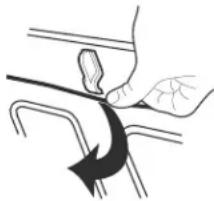
- Lower the front of the broil element to access the ceiling for cleaning.
- Raise broil element back up and return the fastening thread back to its original location.
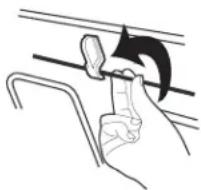
Always return the broil element to the cooking position after cleaning.
TURNTABLE
Replace turntable immediately after cleaning. Do not operate the microwave oven without the turntable in place.
Cleaning Method:
■Mild cleanser and scouring pad
Dishwasher
GRIDS
Steel-wool pad
Dishwasher
TROUBLESHOOTING
First try the solutions suggested here. If you need further assistance or more recommendations that may help you avoid a service call, refer to the warranty, or visit https://jennair.custhelp.com. In Canada, visit http://www.jennair.ca.
Contact us by mail with any questions or concerns at the address below:
In the U.S.A.:
JennAir Brand Home Appliances
Customer eXperience Center
553 Benson Road
Benton Harbor, MI 49022-2692
Please include a daytime phone number in your correspondence.
In Canada:
JennAir Brand Home Appliances
Customer eXperience Centre
200-6750 Century Ave.
Mississauga, Ontario L5N 0B7
PROBLEM POSSIBLE CAUSES AND/OR SOLUTIONS
| Nothing will operate | Has a household fuse blown, or has a circuit breaker tripped? Replace the fuse or reset the circuit breaker. If the problem continues, call an electrician. Is the microwave oven wired properly? See Installation Instructions. |
| Microwave oven will not operate | Is the door completely closed? Firmly close door. Is the electronic oven control set correctly? See “Microwave Oven Control” section. On some models, is the Button Lock set? See “Button Lock” in the “Tools Menu” section. On combination oven models, is the lower oven self-cleaning? The upper oven will not work during the lower oven Self-Cleaning Cycle. Is the magnetron working properly? Try to heat 1 cup (250 mL) of cold water for 2 minutes at 100% cooking power. If water does not heat, call for service. See “Assistance or Service” section. |
| Oven makes humming noise | This is normal and occurs when the transformer in the magnetron cycles on. |
| Oven door looks wavy This is normal and will not affect performance. | |
| Turntable will not operate | Is the turntable properly in place? Make sure turntable is correct side up and is sitting securely on the turntable support. Is the turntable support operating properly? Remove turntable. Remove and clean turntable support and rollers. Replace turntable support. Replace turntable. Place 1 cup (250 mL) of water on the turntable, then restart oven. If it still is not working, call for service. See “Assistance or Service” section. Do not operate the oven without turntable and turntable support working properly. |
| Turntable rotates in both directions | This is normal and depends on motor rotation at beginning of cycle. |
| Cooling fan continues to run after cooking cycle is complete | This is normal and allows for proper cooling of the microwave oven. The microwave cooling fan may continue to run for several minutes after the cooking cycle has been completed. No microwave energy is used after the cycle is completed and the control will display “Cooking Complete” with options for Keep Warm or Add 30 Seconds. |
| Display shows time countdown, but is not operating | Is the Kitchen Timer in use? See “Kitchen Timer” in the “Tools Menu” section. |
| Tones are not sounding Are tones disabled? See “Sound” in the “Tools Menu” section. | |
| Smoke is coming from oven vent during broiling or grilling (on some models) | Some smoke is normal and occurs just as in conventional crisping. |
| Sparking during broiling or grilling (on some models) | This is normal and occurs as fat burns off from past cooking. Sparking will stop once fat is completely burned off. |
| Cooking times seem too long | Are large amounts of food being heated? Larger amounts of food need longer cooking times. Is the incoming voltage less than that specified in the “Built-In Microwave Oven Safety” section? OR Is the incoming voltage less than that specified in the “Electrical Requirements” section? Have a qualified electrician check the electrical system of the house. |
| Radio or TV interference | Is the radio or TV receiver near the microwave oven? Move the receiver away from the microwave oven, or adjust the radio or TV antenna. Are the microwave oven door and sealing surfaces clean? Make sure these areas are clean. |
ASSISTANCE OR SERVICE
If you need service
Please refer to the warranty.
If you need replacement parts
If you need to order replacement parts, we recommend that you use only factory specified parts. These factory specified parts will fit right and work right because they are made with the same precision used to build every new JennAir® appliance.
To locate factory specified parts in your area, call us or your nearest JennAir designated service center.
In the U.S.A.
Call the Customer eXperience Center toll-free: 1-800-JENNAIR (1-800-536-6247).
Our consultants provide assistance with:
■Features and specifications on our full line of appliances.
■Installation information.
Use and maintenance procedures.
Repair parts sales.
■Specialized customer assistance (Spanish speaking, hearing impaired, limited vision, etc.).
Referrals to local dealers, repair parts distributors and service companies. JennAir designated service technicians are trained to fulfill the product warranty and provide afterwarranty service anywhere in the United States.
To locate the JennAir designated service company in your area, you can also look in your telephone directory Yellow Pages.
For further assistance
If you need further assistance, you can write with any questions or concerns at:
JennAir Brand Home Appliances
Customer eXperience Center
553 Benson Road
Benton Harbor, MI 49022-2692
Please include a daytime phone number in your correspondence.
In Canada
Call the JennAir Canada LP Customer eXperience Centre toll-free: 1-800-JENNAIR (1-800-536-6247).
Our consultants provide assistance with:
Use and maintenance procedures.
Repair parts sales.
Referrals to local dealers, repair parts distributors and service companies. JennAir designated service technicians are trained to fulfill the product warranty and provide afterwarranty service anywhere in Canada.
For further assistance
If you need further assistance, you can write with any questions or concerns at:
JennAir Brand Home Appliances
Customer eXperience Centre
200-6750 Century Ave.
Mississauga, ON L5N 0B7
Please include a daytime phone number in your correspondence.
Accessories
To order accessories, visit our website at www.jennair.com.
Affresh® Stainless Steel Cleaning Wipes
(stainless steel models)
Affresh Stainless Steel Cleaner
(stainless steel models)
Affresh® Kitchen and Appliance Cleaner
SECURITE DU FOUR À MICRO-ONDES ENCASTRÉ
Activation/désactivation :
ALIMENT INSTRUCTIONS
Customer eXperience Centre
200-6750 Century Ave.
Mississauga, Ontario L5N 0B7
PROBÉME CAUSES ET/OU SOLUTIONS POSSIBLES
JennAir Brand Home Appliances
Customer eXperience Center
553 Benson Road
Benton Harbor, MI 49022-2692
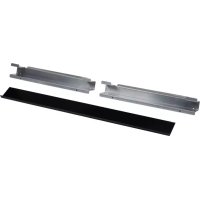
- YOUR SAFETY AND THE SAFETY OF OTHERS ARE VERY IMPORTANT
- DANGER
- WARNING
- IMPORTANT SAFETY INSTRUCTIONS
- SAVE THESE INSTRUCTIONS
- PRECAUTIONS TO AVOID POSSIBLE EXPOSURE TO EXCESSIVE MICROWAVE ENERGY
- ELECTRICAL REQUIREMENTS
- GROUNDING INSTRUCTIONS
- TURNTABLE
- TO TURN ON/OFF
- TOUCH PANEL
- WELCOME GUIDE
- OR
- DISPLAY
- DISPLAY SCREEN
- MAIN MENU
- MENU DEMONSTRATION
- DROP-DOWN MESSAGE DEMONSTRATION
- TOOLS MENU
- TO ACCESS TOOLS MENU
- SERVICE INFORMATION
- KITCHEN TIMER
- BUTTON LOCK
- TO DEACTIVATE THE BUTTON LOCK
- WI-FI CONNECTIVITY (ON SOME MODELS)
- BUILT-IN MICROWAVE OVEN USE
- FOOD CHARACTERISTICS
- AMOUNT OF FOOD
- SIZE AND SHAPE
- STARTING TEMPERATURE
- COMPOSITION AND DENSITY
- COOKING GUIDELINES
- COVERING
- STIRRING AND TURNING
- ARRANGING
- PIERCING
- SHIELDING
- STANDING TIME
- TURNTABLE ON/OFF
- COOKWARE AND DINNERWARE
- TO TEST COOKWARE OR DINNERWARE FOR MICROWAVE USE
- ALUMINUM FOIL AND METAL
- OK FOR USE
- DO NOT USE
- MICROWAVE COOKING POWER
- MICROWAVE COOKING POWER CHART
- COOK SENSOR
- FOR BEST COOKING PERFORMANCE
- MY CREATIONS
- TO USE SAVED
- TO DELETE
- TO EDIT
- COOKING FUNCTIONS
- AUTO CONVECTION CONVERSION
- CONVECTION CHART
- SETTINGFOODS
- TO USE RECIPE CONVERSION
- CONVECT BAKE
- TO USE CONVECT BAKE
- CONVECT ROAST
- TO USE CONVECT ROAST
- DEFROST
- SPEEDCOOK FOODS
- TO USE SPEEDCOOK FOODS
- COOK
- TO USE MANUAL COOK
- POPCORN
- TO USE POPCORN MODE
- BEVERAGE
- TO USE BEVERAGE MODE
- BROIL & GRILL
- GRILL CHART
- FOOD QUANTITY
- TO USE PROGRAMMED BROIL & GRILL
- TO USE MANUAL BROIL & GRILL
- STEAM
- STEAM COOKING CHART
- MELT
- MELT CHART
- REHEAT
- CUSTOM REHEAT CHART
- TO USE PROGRAMMED REHEAT
- TO USE MANUAL REHEAT
- SOFTEN
- SOFTENCHART
- BOIL & SIMMER
- TO USE PROGRAMMED BOIL & SIMMER
- TO USE MANUAL BOIL & SIMMER
- MANUAL SIMMER CHART
- FOOD INSTRUCTIONS
- KEEP WARM
- FOOD POISONING HAZARD
- TO USE KEEP WARM
- BROWNING PAN
- PREPROGRAMMED BROWNING PAN
- BROWNING PAN COOKING CHART
- TO USE PROGRAMMED BROWNING PAN
- TO USE MANUAL BROWNING PAN
- BUILT-IN MICROWAVE OVEN CARE
- GENERAL CLEANING
- STAINLESS STEEL (ON SOME MODELS)
- CLEANING METHOD
- MICROWAVE OVEN DOOR EXTERIOR
- AVERAGE SOIL
- HEAVY SOIL
- ODORS
- CONTROL PANEL/DISPLAY
- TO CLEAN
- GRIDS
- TROUBLESHOOTING
- ASSISTANCE OR SERVICE
- IF YOU NEED REPLACEMENT PARTS
- IN THE U.S.A
- OUR CONSULTANTS PROVIDE ASSISTANCE WITH
- FOR FURTHER ASSISTANCE
- IN CANADA
- ACCESSORIES
- AFFRESH® STAINLESS STEEL CLEANING WIPES
- AFFRESH STAINLESS STEEL CLEANER
- SECURITE DU FOUR À MICRO-ONDES ENCASTRÉ
- ACTIVATION/DÉSACTIVATION
- ALIMENT INSTRUCTIONS
Brand : JENN-AIR
Model : JMW3430IM
Category : Microwave Oven