MDE28PDCYW - Tumble drier MAYTAG - Free user manual and instructions
Find the device manual for free MDE28PDCYW MAYTAG in PDF.


User questions about MDE28PDCYW MAYTAG
0 question about this device. Answer the ones you know or ask your own.
Ask a new question about this device
Download the instructions for your Tumble drier in PDF format for free! Find your manual MDE28PDCYW - MAYTAG and take your electronic device back in hand. On this page are published all the documents necessary for the use of your device. MDE28PDCYW by MAYTAG.
USER MANUAL MDE28PDCYW MAYTAG
INSTALLATION INSTRUCTIONS COMMERCIAL DRYER - GAS OR ELECTRIC
INSTRUCTIONS D'INSTALLATION SÉCHEUSE COMMERCIALE - À GAZ OU ÉLECTRIQUE
Table of Contents/Table des matieres 2
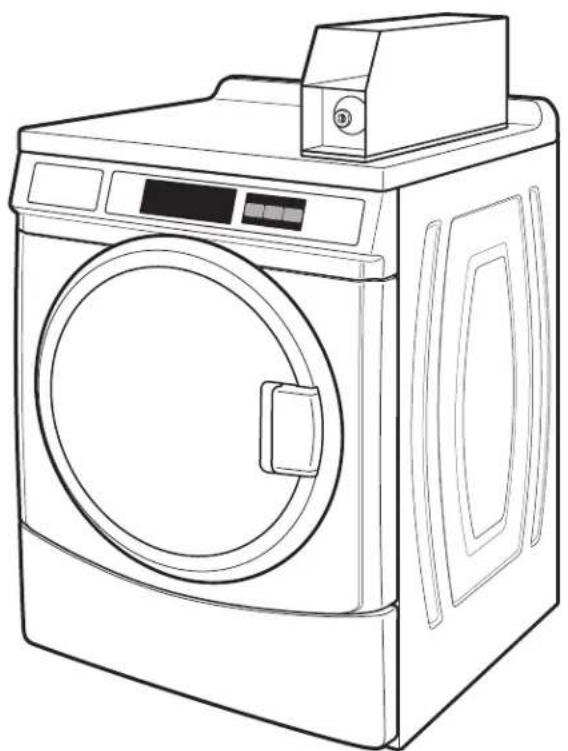
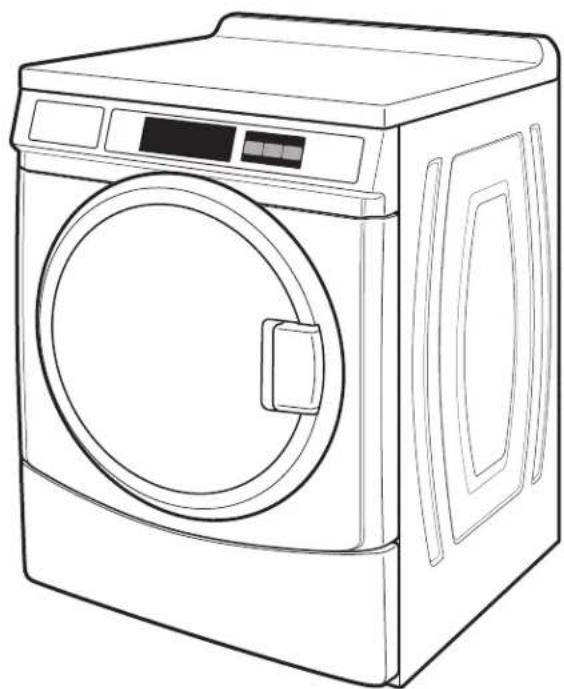
TABLE OF CONTENTS
DRYER SAFETY 2
INSTALLATION REQUIREMENTS 5
Tools and Parts. 5
Location Requirements 6
Electrical Requirements 7
Gas Supply Requirements 10
Venting Requirements 11
Leveling 13
INSTALLATION INSTRUCTIONS - GAS DRYER 14
Make Gas Connection. 14
Gas Supply Line. 14
Connect Vent. 15
Complete Installation 15
INSTALLATION INSTRUCTIONS - ELECTRIC DRYER 16
Power Supply Cord (U.S.A. Only) 16
Direct Wire Method (U.S.A. Only) 20
Connect Vent. 23
Complete Installation 23
REVERSING THE DOOR SWING 24
Remove the Door Assembly 24
Reverse Hinge 24
Reverse The Strike 25
Reinstall The Door 25
MAINTENANCE INSTRUCTIONS 25
ELECTRONIC CONTROL SETUP 26
WARRANTY 30
TABLE DES MATIÈRES
SECURITE DE LA SECHEUSE 31
EXIGENCES D'INSTALLATION 34
Your safety and the safety of others are very important.
We have provided many important safety messages in this manual and on your appliance. Always read and obey all safety messages.

This is the safety alert symbol.
This symbol alerts you to potential hazards that can kill or hurt you and others.
All safety messages will follow the safety alert symbol and either the word "DANGER" or "WARNING."
These words mean:
DANGER
WARNING
All safety messages will tell you what the potential hazard is, tell you how to reduce the chance of injury, and tell you what can happen if the instructions are not followed.
It is recommended that the owner post, in a prominent location, instructions for the customer's use in the event the customer smells gas. This information should be obtained from your gas supplier.
Post the following warning in a prominent location.
FOR YOUR SAFETY
Do not store or use gasoline or other flammable vapors and liquids in the vicinity of this or any other appliance.

ARNING:
FIRE OR EXPLOSION HAZARD
Failure to follow safety warnings exactly could result in serious injury, death or property damage.
- Do not store or use gasoline or other flammable vapors and liquids in the vicinity of this or any other appliance.
-
WHAT TO DO IF YOU SMELL GAS:
-
Do not try to light any appliance.
- Do not touch any electrical switch; do not use any phone in your building.
- Clear the room, building, or area of all occupants.
- Immediately call your gas supplier from a neighbor's phone. Follow the gas supplier's instructions.
-
If you cannot reach your gas supplier, call the fire department.
-
Installation and service must be performed by a qualified installer, service agency, or the gas supplier.
WARNING: Gas leaks cannot always be detected by smell.
Gas suppliers recommend that you use a gas detector approved by UL or CSA.
For more information, contact your gas supplier.
If a gas leak is detected, follow the "What to do if you smell gas" instructions.

WARNING
Fire Hazard
Failure to follow safety warnings exactly could result in serious injury, death, or property damage.
Do not install a booster fan in the exhaust duct.
Install all clothes dryers in accordance with the installation instructions of the manufacturer of the dryer.

WARNING - "Risk of Fire"
- Clothes dryer installation must be performed by a qualified installer.
- Install the clothes dryer according to the manufacturer's instructions and local codes.
- Do not install a clothes dryer with flexible plastic venting materials or flexible metal (foil type) duct. If flexible metal duct is installed, it must be of a specific type identified by the appliance manufacturer as suitable for use with clothes dryers. Flexible venting materials are known to collapse, be easily crushed, and trap lint. These conditions will obstruct clothes dryer airflow and increase the risk of fire.
- To reduce the risk of severe injury or death, follow all installation instructions.
- Save these instructions.
In the State of Massachusetts, the following installation instructions apply:
Installations and repairs must be performed by a qualified or licensed contractor, plumber, or gas fitter qualified or licensed by the State of Massachusetts.
Acceptable Shut-off Devices: Gas Cocks and Ball Valves installed for use shall be listed.
A flexible gas connector, when used, must not exceed 4 feet (121.9 cm).
IMPORTANT SAFETY INSTRUCTIONS
WARNING: To reduce the risk of fire, electric shock, or injury to persons when using the dryer, follow basic precautions, including the following:
Read all instructions before using the dryer.
- Do not place items exposed to cooking oils in your dryer. Items contaminated with cooking oils may contribute to a chemical reaction that could cause a load to catch fire. To reduce the risk of fire due to contaminated loads, the final part of a tumble dryer cycle occurs without heat (cool down period). Avoid stopping a tumble dryer before the end of the drying cycle unless all items are quickly removed and spread out so that the heat is dissipated.
- Do not dry articles that have been previously cleaned in, washed in, soaked in, or spotted with gasoline, dry-cleaning solvents, or other flammable or explosive substances as they give off vapors that could ignite or explode.
- Do not allow children to play on or in the dryer. Close supervision of children is necessary when the dryer is used near children.
Before the dryer is removed from service or discarded, remove the door to the drying compartment.
- Do not reach into the dryer if the drum is moving.
- Do not install or store the dryer where it will be exposed to the weather.
Do not tamper with controls.
- Do not repair or replace any part of the dryer or attempt any servicing unless specifically recommended in this Use and Care Guide or in published user-repair instructions that you understand and have the skills to carry out.
- Do not use fabric softeners or products to eliminate static unless recommended by the manufacturer of the fabric softener or product.
- Do not use heat to dry articles containing foam rubber or similarly textured rubber-like materials.
Clean int screen before or after each load.
- Keep area around the exhaust opening and adjacent surrounding areas free from the accumulation of lint, dust, and dirt.
The interior of the dryer and exhaust vent should be cleaned periodically by qualified service personnel.
See "Electrical Requirements" located in the installation instructions for grounding instructions.
SAVE THESE INSTRUCTIONS
IMPORTANT: The gas installation must conform with local codes, or in the absence of local codes, with the National Fuel Gas Code, ANSI Z223.1/NFPA 54, or the Natural Gas and Propane Installation Code, CSA B149.1.
The dryer must be electrically grounded in accordance with local codes, or in the absence of local codes, with the National Electrical Code, ANSI/NFPA 70, or the Canadian Electrical Code, Part 1, CSA C22.1.
IMPORTANT SAFETY INSTRUCTIONS
When discarding or storing your old clothes dryer, remove the door.
SAVE THESE INSTRUCTIONS
INSTALLATION REQUIREMENTS
Tools & Parts
Tools Needed:
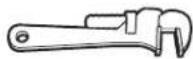
8" or 10"
Pipe wrench Adjustable wrench that opens to 1
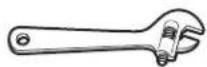
8" or 10"
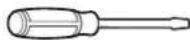
Flat-blade screwdriver
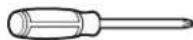
Phillips screwdriver
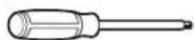
TORX T20 ^ security screwdriver or bit
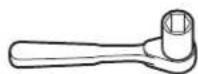
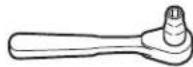
1" Hex-head 5/16" Socket wrench Pliers socket wrench
Pipe-joint compound resistant to Propane gas
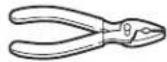
that open to 1^9 / 16

Level
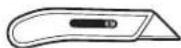
Utility knife
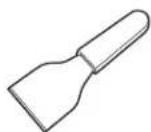
Putty knife
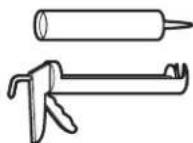
Caulk gun and caulk (for installing new exhaust vent)

Vent clamps
Parts supplied:
Remove parts bag from dryer drum. Check that all parts were included.
Foot boot (4)
Dryer foot (4)
PD models: Cam for service door lock PR models: Card reader bezel, card reader wire harness, hardware
Optional parts not included:
279810 Long dryer foot
LP Kit W10402145
208 V electric element: U.S.-W10206352A, Canada-W10206351A
Location Requirements
WARNING

Explosion Hazard
Keep flammable materials and vapors, such as gasoline, away from dryer.
Do not install in a garage.
Failure to do so can result in death, explosion, or fire.
IMPORTANT: Do not install or store the dryer where it will be exposed to the weather. Proper installation is your responsibility.
You will need:
A grounded electrical outlet located within 6 ft. (1.8 m) of where the power cord is attached to the back of the dryer. See "Electrical Requirements."
A level floor with a maximum slope of 1^ (25 mm) under entire dryer. Installing the dryer on soft floor surfaces, such as carpets or surfaces with foam backing, is not recommended.
If installing a gas dryer:
IMPORTANT: Observe all governing codes and ordinances.
- Check code requirements: Some codes limit or do not permit installation of clothes dryers in garages, closets, or sleeping quarters. Contact your local building inspector.
Make sure that lower edges of the cabinet, plus the back and bottom sides of the dryer, are free of obstructions to permit adequate clearance of air openings for combustion air. See "Recessed Area and Closet Installation Instructions" below for minimum spacing requirements.
NOTE: The dryer must not be installed in an area where it will be exposed to water and/or weather.
Recessed Area and Closet Installation Instructions
This dryer may be installed in a recessed area or closet. For recessed area and closet installations, minimum clearances can be found on the warning label on the rear of the dryer.
The installation spacing is in inches and is the minimum allowable. Additional spacing should be considered for ease of installation, servicing, and compliance with local codes and ordinances.
If closet door is installed, the minimum unobstructed air opening in the top and bottom is required. Louvered doors with equivalent air openings are acceptable.
The dryer must be exhausted outdoors.
No other fuel-burning appliance may be installed in the same closet as the dryer.
Minimum Installation Clearances
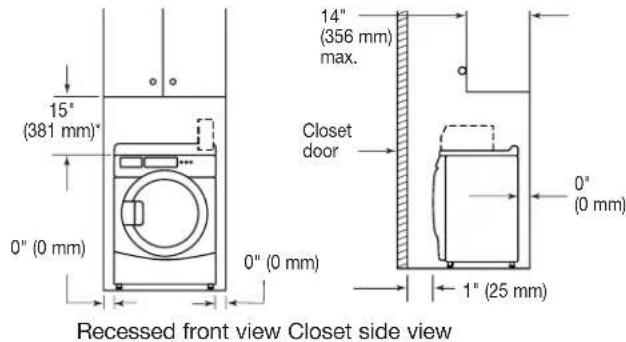
Additional clearances for wall, door, and floor moldings may be required or if external exhaust elbow is used.
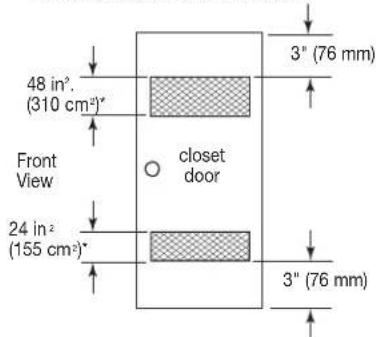
* Opening is the minimum for a closet door. Louvered doors with equivalent air openings are acceptable.
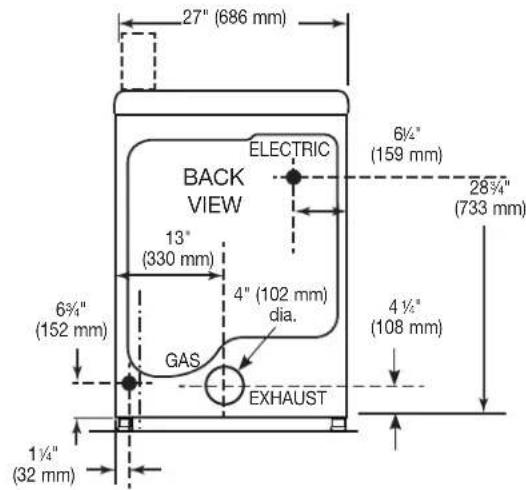
Product Dimensions 27" (68.6 cm) Dryer
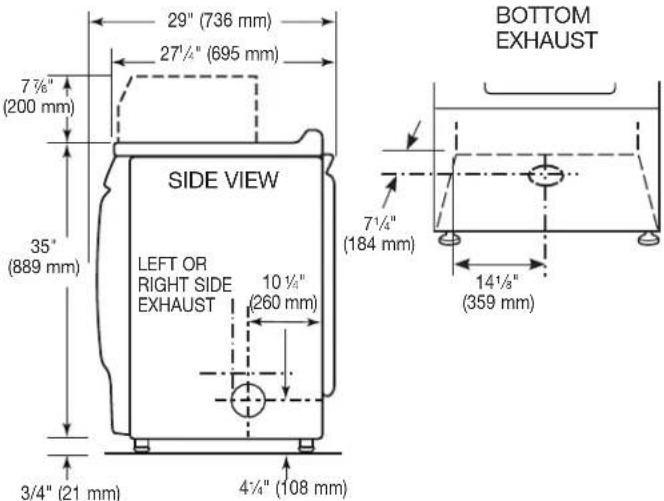
Electrical Requirements - Gas Dryer
WARNING
Electrical Shock Hazard
Plug into a grounded 3 prong outlet.
Do not remove ground prong.
Do not use an adapter.
Do not use an extension cord.
Failure to follow these instructions can result in death, fire, or electrical shock.
IMPORTANT: The dryer must be electrically grounded in accordance with local codes and ordinances or, in the absence of local codes, with the National Electrical Code, ANSI/NFPA 70, latest edition, or Canadian Electrical Code, CSA C22.1. If codes permit and a separate ground wire is used, it is recommended that a qualified electrical installer determine that the ground path is adequate.
A copy of the above code standards can be obtained from:
National Fire Protection Association
One Batterymarch Park, Quincy, MA 02269
CSA International
8501 East Pleasant Valley Road
Cleveland, Ohio 44131-5575
Do not ground to a gas pipe.
Do not have a fuse in the neutral or ground circuit.
A 120V 60 Hz, AC only, 15 or 20 A, fused electrical circuit is required. A time-delay fuse or circuit breaker is also recommended. It is recommended that a separate circuit serving only this dryer be provided.
This dryer is equipped with a power supply cord having a 3-prong grounding plug.
To minimize the possibility of shock, the cord must be plugged into a mating, 3 prong, grounding-type outlet, grounded in accordance with local codes and ordinances. If a mating outlet is not available, it is the personal responsibility and obligation of the customer to have the properly grounded outlet installed by a qualified electrician.
If codes permit and a separate ground wire is used, it is recommended that a qualified electrician determine that the ground path is adequate.
Check with a qualified electrician if you are not sure the dryer is properly grounded.
Gas Dryer Grounding
GROUNDING INSTRUCTIONS
For a grounded, cord-connected dryer:
This dryer must be grounded. In the event of malfunction or breakdown, grounding will reduce the risk of electric shock by providing a path of least resistance for electric current. This dryer uses a cord having an equipment-grounding conductor and a grounding plug. The plug must be plugged into an appropriate outlet that is properly installed and grounded in accordance with all local codes and ordinances
For a permanently connected dryer:
This dryer must be connected to a grounded metal, permanent wiring system, or an equipment-grounding conductor must be run with the circuit conductors and connected to the equipment-grounding terminal or lead on the dryer.
WARNING: Improper connection of the equipment-grounding conductor can result in a risk of electric shock. Check with a qualified electrician or service representative or personnel if you are in doubt as to whether the dryer is properly grounded. Do not modify the plug on the power supply cord: if it will not fit the outlet, have a proper outlet installed by a qualified electrician.
SAVE THESE INSTRUCTIONS
Electrical Requirements - Electric Dryer (U.S.A. Only)
It is your responsibility:
To contact a qualified electrical installer.
To be sure that the electrical connection is adequate and in conformance with the National Electrical Code, ANSI/NFPA 70-latest edition and all local codes and ordinances.
The National Electrical Code requires a 4-wire power supply connection for homes built after 1996, dryer circuits involved in remodeling after 1996, and all mobile home installations.
A copy of the above code standards can be obtained from: National Fire Protection Association, One Batterymarch Park, Quincy, MA 02269.
To supply the required 3 or 4 wire, single phase, 120 / 240V 60Hz AC only electrical supply (or 3 or 4 wire, 120 / 208V electrical supply, if specified on the serial/rating plate) on a separate 30 A circuit, fused on both sides of the line. A time delay fuse or circuit breaker is recommended. Connect to an individual branch circuit. Do not have a fuse in the neutral or grounding circuit.
Do not use an extension cord.
If codes permit and a separate ground wire is used, it is recommended that a qualified electrician determine that the ground path is adequate.
Electrical Connection
To properly install your dryer, you must determine the type of electrical connection you will be using and follow the instructions provided for it here.
This dryer is manufactured ready to install with a 3-wire electrical supply connection. The neutral ground conductor is permanently connected to the neutral conductor (white wire) within the dryer. If the dryer is installed with a 4-wire electrical supply connection, the neutral ground conductor must be removed from the external ground connector (green screw), and secured under the neutral terminal (center or white wire) of the terminal block. When the neutral ground conductor is secured under the neutral terminal (center or white wire) of the terminal block, the dryer cabinet is isolated from the neutral conductor.
If local codes do not permit the connection of a neutral ground wire to the neutral wire, see "Optional 3-wire connection" section.
A 4-wire power supply connection must be used when the appliance is installed in a location where grounding through the neutral conductor is prohibited. Grounding through the neutral is prohibited for (1) new branch-circuit installations (2) areas where local codes prohibit grounding through the neutral conductor.
Electric Dryer Grounding
GROUNDING INSTRUCTIONS
For a grounded, cord-connected dryer:
This dryer must be grounded. In the event of malfunction or breakdown, grounding will reduce the risk of electric shock by providing a path of least resistance for electric current. This dryer uses a cord having an equipment-grounding conductor and a grounding plug. The plug must be plugged into an appropriate outlet that is properly installed and grounded in accordance with all local codes and ordinances
For a permanently connected dryer:
This dryer must be connected to a grounded metal, permanent wiring system, or an equipment-grounding conductor must be run with the circuit conductors and connected to the equipment-grounding terminal or lead on the dryer.
WARNING: Improper connection of the equipment-grounding conductor can result in a risk of electric shock. Check with a qualified electrician or service representative or personnel if you are in doubt as to whether the dryer is properly grounded. Do not modify the plug on the power supply cord: if it will not fit the outlet, have a proper outlet installed by a qualified electrician.
SAVE THESE INSTRUCTIONS
WARNING
Fire Hazard
Use a new UL listed 30 amp power supply cord.
Use a UL listed strain relief.
Disconnect power before making electrical connections.
Connect neutral wire (white or center wire) to center terminal.
Ground wire (green or bare wire) must be connected to green ground connector.
Connect remaining 2 supply wires to remaining 2 terminals (gold).
Securely tighten all electrical connections.
Failure to do so can result in death, fire, or electrical shock.
If using a power supply cord:
Use a UL listed power supply cord kit marked for use with clothes dryers. The kit should contain:
A UL listed 30 A power supply cord, rated 120/240 V minimum. The cord should be type SRD or SRDT and be at least 4 ft. (1.22 m) long. The wires that connect to the dryer must end in ring terminals or "U" shaped spade terminals with upturned ends.
A UL listed strain relief.
If your outlet looks like this:
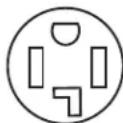
Then choose a 4-wire power supply cord with ring or spade terminals and UL listed strain relief. The 4-wire power supply cord, at least 4 ft. (1.22 m) long, must have four 10-gauge copper wires and match a 4-wire receptacle of NEMA Type 14-30R.
The ground wire (ground conductor) may be either
green or bare. The neutral conductor must be
identified by a white cover.
If your outlet looks like this:
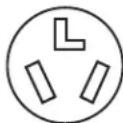
Then choose a 3-wire power supply cord with ring or spade terminals and UL listed strain relief. The 3-wire power supply cord, at least 4 ft. (1.22 m) long, must have three 10-gauge copper wires and match a 3-wire receptacle of NEMA Type 10-30R.
3-Wire
Receptacle
(10-30R)
Direct Wire
WARNING
Fire Hazard
Use 10 gauge copper wire.
Use a UL listed strain relief.
Disconnect power before making electrical connections.
Connect neutral wire (white or center wire) to center terminal.
Ground wire (green or bare wire) must be connected to green ground connector.
Connect remaining 2 supply wires to remaining 2 terminals (gold).
Securely tighten all electrical connections.
Failure to do so can result in death, fire, or electrical shock.
If connecting by direct wire:
Power supply cable must match power supply (4-wire or 3-wire) and be:
- Flexible armored cable or nonmetallic sheathed copper cable (with ground wire), covered with flexible metallic conduit. All current-carrying wires must be insulated.
10-gauge solid copper wire (do not use aluminum).
At least 5 ft. (1.52 m) long.
Electrical Requirements - Canada only
WARNING
Electrical Shock Hazard
Plug into a grounded 4 prong outlet.
Failure to do so can result in death or electrical shock.
It is your responsibility:
To contact a qualified electrical installer.
To be sure that the electrical connection is adequate and in conformance with the Canadian Electrical Code, C22.1 - latest edition and all local codes. A copy of the above codes standard may be obtained from: Canadian Standards Association, 178 Rexdale Blvd., Toronto, ON M9W 1R3 CANADA.
To supply the required 4 wire, single phase, 120 / 240V 60Hz AC only electrical supply on a separate 30 A circuit, fused on both sides of the line. A time-delay fuse or circuit breaker is recommended. Connect to an individual branch circuit.
This dryer is equipped with a CSA International Certified Power Cord intended to be plugged into a standard 14-30R wall receptacle. The cord is 5 ft (1.52 m) in length. Be sure wall receptacle is within reach of dryer's final location.
Do not use an extension cord.
If you are using a replacement power supply cord, it is recommended that you use Power Supply Cord Replacement Part Number 9831317. For further information, please reference the service numbers located in the "Assistance or Service" section.
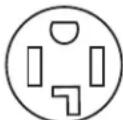
4-Wire Receptacle (14-30R)
GROUNDING INSTRUCTIONS
For a grounded, cord-connected dryer:
This dryer must be grounded. In the event of malfunction or breakdown, grounding will reduce the risk of electric shock by providing a path of least resistance for electric current. This dryer is equipped with a cord having an equipment-grounding conductor and a grounding plug. The plug must be plugged into an appropriate outlet that is properly installed and grounded in accordance with all local codes and ordinances.
WARNING: Improper connection of the equipment-grounding conductor can result in a risk of electric shock. Check with a qualified electrician or service representative or personnel if you are in doubt as to whether the dryer is properly grounded. Do not modify the plug provided with the dryer: if it will not fit the outlet, have a proper outlet installed by a qualified electrician.
SAVE THESE INSTRUCTIONS
Gas Supply Requirements
WARNING
Explosion Hazard
Use a new CSA International approved gas supply line.
Install a shut-off valve.
Securely tighten all gas connections.
If connected to propane, have a qualified person make sure gas pressure does not exceed 13" (33 cm) water column.
Examples of a qualified person include:
licensed heating personnel, authorized gas company personnel, and authorized service personnel.
Failure to do so can result in death, explosion, or fire.
IMPORTANT: Observe all governing codes and ordinances. This installation must conform with all local codes and ordinances. In the absence of local codes, installation must conform with American National Standard, National Fuel Gas Code ANSI Z223.1/NFPA 54 or CAN/CSA B149.
A copy of the above code standards can be obtained from:
National Fire Protection Association
One Batterymarch Park, Quincy, MA 02269
CSA International
8501 East Pleasant Valley Road
Cleveland, Ohio 44131-5575
The design of this dryer has been certified by CSA International for use at altitudes up to 10,000 feet (3048 m) above sea level at the B.T.U. rating indicated on the model/serial plate. Burner input adjustments are not required when the dryer is operated up to this elevation.
When installed above 10,000 feet (3048 m), a four percent (4%) reduction of the burner B.T.U. rating shown on the model/serial plate is required for each 1,000 foot (305 m) increase in elevation. For assistance when converting to other gas types and/or installing above 10,000 feet (3048 m) elevation, contact your local service company.
Type of Gas
This dryer is equipped for use with natural gas. It is design-certified by CSA International for propane and butane gases with appropriate conversion. No attempt shall be made to convert the dryer from the gas specified on the serial/rating plate for use with a different gas without consulting the serving gas supplier. Conversion must be done by a qualified service technician. Gas conversion kit part number is W10402145. This part number is also available on a label on the gas valve burner base.
Venting Requirements
WARNING
Fire Hazard
Use a heavy metal vent.
Do not use a plastic vent.
Do not use a metal foil vent.
Failure to follow these instructions can result in death or fire.
WARNING: To reduce the risk of fire, this dryer MUST BE EXHAUSTED OUTDOORS.
IMPORTANT: Observe all governing codes and ordinances.
- The dryer exhaust must not be connected into any gas vent, chimney, wall, ceiling, attic, crawlspace, or a concealed space of a building. Only rigid or flexible vent shall be used for exhausting.
Only a 4^ (102 mm) heavy, metal exhaust vent and clamps may be used. - Do not use an exhaust hood with a magnetic latch.
Use clamps to seal all joints. Do not use screws or other fastening devices that extend into the interior of the duct and catch lint. Do not use duct tape.
Do not use plastic or metal foil vent.
Rigid metal vent:
Recommended for best drying performance and to avoid crushing and kinking.
Flexible metal vent (acceptable only if accessible to clean):
Must be fully extended and supported in final dryer location.
- Remove excess to avoid sagging and kinking that may result in reduced airflow and poor performance.
- Do not install in enclosed walls, ceilings, or floors.
The total length should not exceed 7% ft. (2.4m)
An exhaust hood should cap the vent to prevent rodents and insects from entering the home or business.
Exhaust hood must be at least 12^ (305 mm) from the ground or any object that may be in the path of the exhaust (such as flowers, rocks, or bushes).
If using an existing vent system, clean lint from the entire length of the system and make sure exhaust hood is not plugged with lint. Replace any plastic or metal foil vent with rigid metal or flexible metal vent.
Plan installation to use the fewest number of elbows and turns.
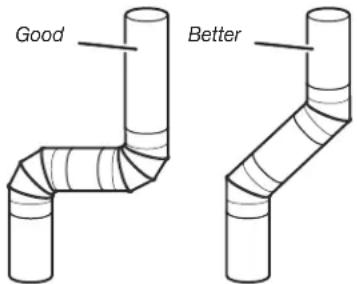
Allow as much room as possible when using elbows or making turns. Bend vent gradually to avoid kinking.
Vent outlet is located at the back of the dryer, at bottom center. The vent can be routed up, down, left, right, behind the dryer, or straight out the back of the dryer. See "Product Dimensions" in the "Location Requirements" section.
Make-up air:
Although each single-load dryer should have an unobstructed outdoor air opening of 24in^2 (154~cm^2) (based on 1 square inch [6.5~cm^2] per 1,000 Btu [252 kcal]), common make-up air openings are also acceptable. Set up common openings so that the make-up air is distributed equally to all of the dryers. Keep in mind that the coverage area must be increased by 33% to account for use of registers or lovers over the openings. Also, make-up air openings should not be installed near the location of exhaust vents exiting the building.
Vent System Length
Maximum length of vent system depends upon the type of vent used, number of elbows, and type of exhaust hood. The maximum length for rigid vent is shown in the chart.
Maximum Vent Length
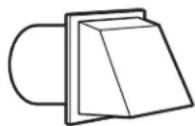
4" (102 mm) Diameter Exhaust Hoods
Box Louvered
212'' (63.5 mm) Angled
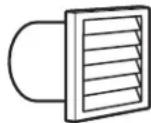
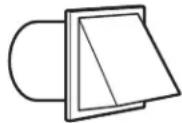
Vent System Chart (Rigid Metal Vent)
No. of 90^ Box Hood and
Turns Louvered Style Angled Hood Style
0 130 ft. (39.6 m) 129 ft. (39.3 m)
1 125 ft. (38.1 m) 119 ft. (36.3 m)
2 115 ft. (35.1 m) 109 ft. (33.2 m)
3 106 ft. (32.3 m) 100 ft. (30.5 m)
4 98 ft. (29.9 m) 92 ft. (28.0 m)
For vent systems not covered by the vent specification chart, see your parts distributor.
Provision must be made for enough air for combustion and ventilation. (Check governing codes and ordinances.) See "Recessed Area and Closet Installation Instructions" in the "Location Requirements" sections.
A 4^ (102 mm) outlet hood is preferred. However, a 2^1 / 2'' (64 mm) outlet exhaust hood may be used. A 2^1 / 2'' (64 mm) outlet creates greater back pressure than other hood types. For permanent installation, a stationary vent system is required.
Connect Vent
- If connecting to existing vent, make sure the vent is clean.
- Using a 4^ (102 mm) clamp, connect vent to exhaust outlet in dryer. Vent Col
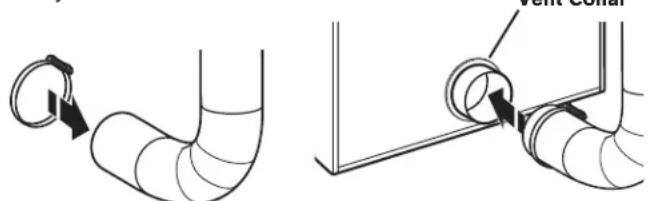
NOTE: Do not remove vent collar.
- Tighten hose clamp with Phillips screwdriver.
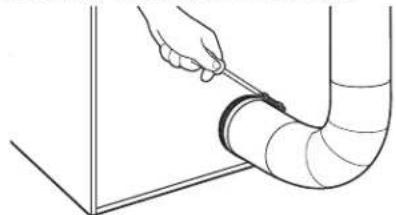
- Make sure the vent is secured to exhaust hood with a 4^ (102 mm) clamp.
- Move dryer into final position. Do not crush or kink vent. Make sure dryer is level.
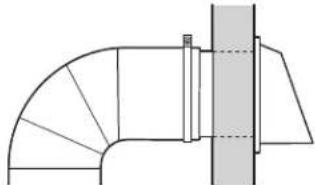
NOTE: Testing for proper ventilation should be done with a Manometer. Minimum: 0.01" (0.2 mm). Maximum: 0.6" (16 mm). For vent systems not covered by the vent specification chart, see your parts distributor.
If dryer is installed in a confined area, such as a bedroom, bathroom, or closet, provision must be made for enough air for combustion and ventilation. (Check governing codes and ordinances.) See "Recessed Area and Closet Installation Instructions" in the "Location Requirements" section.
A 4^ (102 mm) outlet hood is preferred. However, a 212'' (64 mm) outlet exhaust hood may be used. A 212'' (64 mm) outlet creates greater back pressure than other hood types. For permanent installation, a stationary vent system is required.
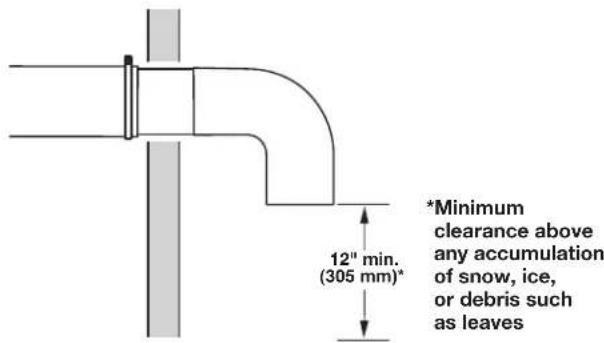
If An Exhaust Hood Cannot Be Used
The outside end of the main vent should have a sweep elbow directed downward.
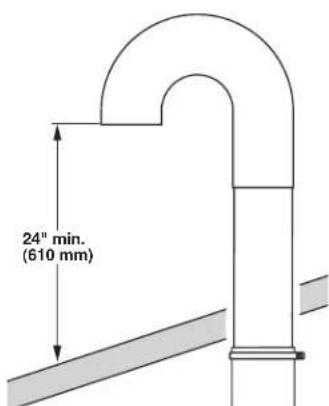
If the main vent travels vertically through the roof, rather than through the wall, install a 180^ sweep elbow on the end of the vent at least 2 ft. (610 mm) above the highest part of the building. The opening in the wall or roof shall have a diameter 1/2'' (13 mm) larger than the vent diameter. The vent should be centered in the opening.
Do not install screening or cap over the end of the vent.
Multiple Dryer Venting
A main vent can be used for venting a group of dryers. The main vent should be sized to remove 200 CFM of air per dryer. Large-capacity lint screens of proper design may be used in the main vent if checked and cleaned frequently. The room where the dryers are located should have make-up air equal to or greater than the CFM of all the dryers in the room.
A back-draft damper kit is needed and is available from a commercial laundry distributor; it should be installed in the vent of each dryer to prevent exhausted air from returning into the dryers and to keep the exhaust in balance within the main vent. Unobstructed return air openings are required.
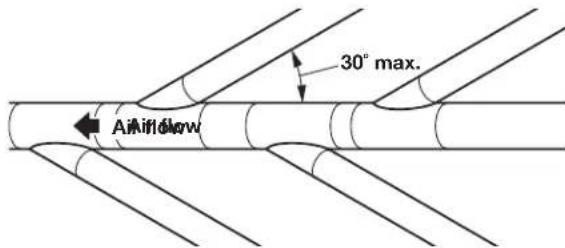
Each vent should enter the main vent at an angle pointing in the direction of the airflow. Vents entering from the opposite side should be staggered to reduce the exhausted air from interfering with the other vents.
The maximum angle of each vent entering the main vent should be no more than 30^ .
Keep air openings free of dry cleaning fluid fumes. Fumes create acids which, when drawn through the dryer heating units, can damage dryers and items being dried.
A clean-out cover should be located on the main vent for periodic cleaning of the vent system.
Leveling
Leveling your dryer properly reduces excess noise and vibration.
WARNING
Excessive Weight Hazard
Use two or more people to move and install dryer.
Failure to do so can result in back or other injury.
- Remove cardboard from beneath dryer. Place a level on top edges of dryer, checking each side and front. If not level, tip dryer and adjust legs up or down as shown in Step 3, repeating as necessary.
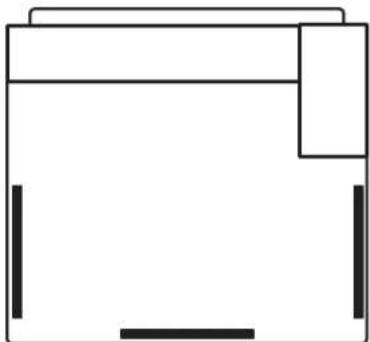
(appearance may vary)
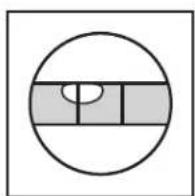
Not Level LEVEL Not Level
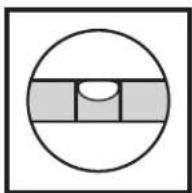
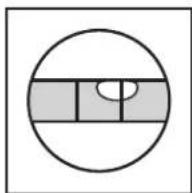
- Grip dryer from top and rock back and forth, making sure all four legs are firmly on floor. Repeat, rocking dryer from side to side. If dryer rocks, go to Step 3 and adjust leveling legs.
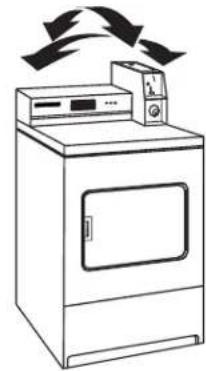
(appearance may vary)
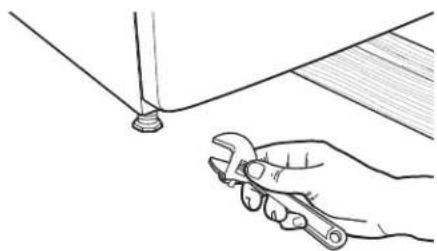
- If dryer is not level, use a 1" or 25 mm open-end or adjustable wrench to turn the leveling leg counterclockwise to lower the dryer or clockwise to raise the dryer. Recheck levelness of dryer and that all four legs are firmly in contact with the floor. Repeat as needed.
HELPFUL TIP: You may want to prop up front of dryer about 4^ (102 mm) with a wood block or similar object that will support weight of dryer.
INSTALLATION INSTRUCTIONS - GAS DRYER
Make Gas Connection
WARNING
Explosion Hazard
Use a new CSA International approved gas supply line. Install a shut-off valve.
Securely tighten all gas connections.
If connected to propane, have a qualified person make sure gas pressure does not exceed 13" (33 cm) water column.
Examples of a qualified person include:
licensed heating personnel, authorized gas company personnel, and authorized service personnel.
Failure to do so can result in death, explosion, or fire.
- Remove red cap from gas pipe.
- Connect gas supply to dryer. Use pipe-joint compound resistant to the action of propane for gas connections. If flexible metal tubing is used, be certain there are no kinks.
If necessary for service, open the toe panel by removing the 214 hex-head screws from the bottom of the panel. Then lift up on the panel while pulling the bottom of the panel away from the dryer.
- Open the shutoff valve in the gas supply line.
- Test all connections by brushing on an approved noncorrosive leak-detection solution. Bubbles will show a leak. Correct any leak found.
Gas Supply Line
Recommended method
- Provide a gas supply line of 1/2'' rigid (IPS) pipe to the dryer location. Pipe joint compounds that resist the action of Propane gas must be used. Do not use TEFLOW® tape. With Propane gas, piping or tubing size can be 1/2'' minimum. Usually, Propane gas suppliers determine the size and materials used in the system.
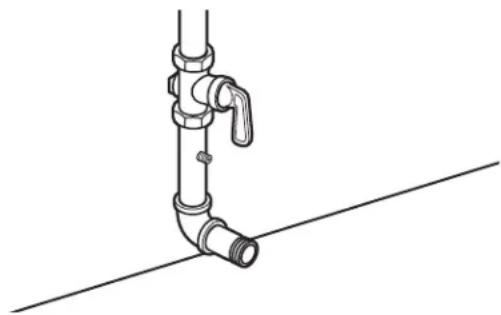
Gas Supply Pressure Testing
A 1/8'' (3 mm) NPT minimum plugged tapping, accessible for gauge testing, must be installed immediately downstream of the installed shut-off valve to the dryer (as shown above). The dryer must be disconnected from the gas supply piping system during any pressure testing of the system at test pressures in excess of 1/2'' psig (352kg / m^2) . The expected pressures for the gas supply are listed in inches of water in the table below:
| Natural Gas Propane Gas | |
| Minimum | 5.2" (132.1 mm) 80" (203.2 mm) |
| Maximum | 10.5" (266.7 mm) 13.0" (330.2 mm) |
Alternatemethod
The gas supply may also be connected using 3/8'' approved copper or aluminum tubing. If the total length of the supply line is more than 20 ft. (6.1 m), larger tubing will be required. If using natural gas, do not use copper tubing. Pipe joint compounds that resist the action of Propane gas must be used.
Flexible metal appliance connector:
It is recommended that a new flexible stainless steel gas line, design-certified by CSA International, be used for connecting the dryer to the gas supply line. (The gas pipe, which extends through the lower rear of the dryer, is provided with 3/8" male pipe thread.)
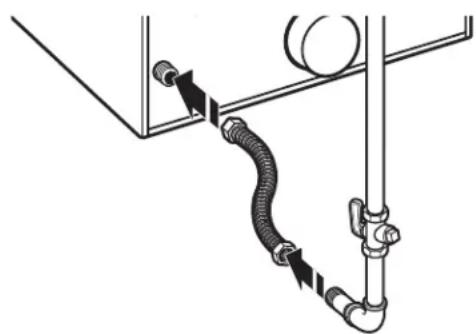
- Do not kink or damage the flexible stainless steel gas line when moving the dryer.
Rigid pipe connection:
The rigid pipe connection requires a combination of pipe fittings to obtain an in-line connection to the dryer.
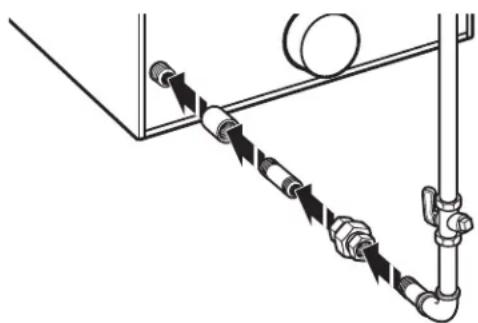
© TEFLON is a registered trademark of Chemours.
Must include a shutoff valve:
The supply line must be equipped with a manual shutoff valve installed within 6 ft. (1.8 m) of dryer in accordance with National Fuel Gas Code, ANSI Z223.1. In Canada, an individual manual shutoff valve must be installed in accordance with the B149 installation codes CAN/CGA B149.1 and CAN/CGA B149.2. This valve should be located in the same room as the dryer. It should be in a location that allows ease of opening and closing. Do not block access to shutoff valve. The valve is for turning on or shutting off gas to the dryer.
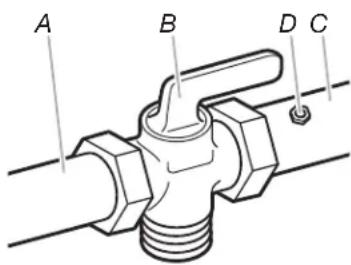
A. Gas supply line
B.Shutoff valve in "open" position
C. To dryer
D. NPT 1/8" min. plugged tapping
■ Installed in a confined area:
If the dryer is installed in a confined area such as a bathroom or closet, provision must be made for enough air for combustion and ventilation. Check governing codes and ordinances or refer to the "Recessed Area and Closet Installation Instructions" in the "Location Requirements" section.
Connect Vent
- Using a 4^ (102 mm) clamp, connect vent to exhaust outlet on the dryer. If connecting to existing vent, make sure the vent is clean. The dryer vent must fit over the dryer exhaust outlet and inside the exhaust hood. Make sure the vent is secured to exhaust hood with a 4^ (102 mm) clamp.
- Using two or more people, move dryer to desired installation location. Do not crush or kink vent, and remove any excess flexible vent to improve airflow. Make sure dryer is level.
- Check to be sure there are no kinks in the flexible gas line.
Complete Installation
- With dryer in final position, place level on top of the dryer, first side to side; then front to back. If the dryer is not level, adjust the legs of the dryer up or down until the dryer is level.
- Check the electrical requirements. Be sure that you have the correct electrical supply and the recommended grounding method. See "Electrical Requirements."
- Check that all parts are now installed. If there is an extra part, go back through the steps.
- Check that you have all of your tools.
- Dispose of/recycle all packaging materials.
WARNING
Electrical Shock Hazard
Plug into a grounded 3 or 4 prong outlet.
Do not remove ground prong.
Do not use an adapter.
Do not use an extension cord.
Failure to follow these instructions can result in death, fire, or electrical shock.
- Plug into a grounded outlet, or connect power.
- Check dryer operation:
Insert coins. Select a cycle. Using the WHITES & COLORS cycle, let the dryer run for at least five minutes. Dryer will stop when time is used up.
Note: Dryer door must be closed for dryer to operate. When door is open, dryer stops, but timer continues to run. To restart dryer, close door and reselect a cycle.
- If the burner does not ignite and there is no heat inside the dryer, shut off dryer for five minutes. Check that all gas supply valves are in the "ON" position and that the electrical cord is plugged in. Repeat five-minute test.
- If drying time is too long, make sure that the lint screen is clean and that there are no obstructions to airflow in the dryer vent system.
INSTALLATION INSTRUCTIONS - ELECTRIC DRYER
Power Supply Cord (U.S.A. Only)
WARNING
Fire Hazard
Use a new UL listed 30 amp power supply cord.
Use a UL listed strain relief.
Disconnect power before making electrical connections.
Connect neutral wire (white or center wire) to center terminal.
Ground wire (green or bare wire) must be connected to green ground connector.
Connect remaining 2 supply wires to remaining 2 terminals (gold).
Securely tighten all electrical connections.
Failure to do so can result in death, fire, or electrical shock.
- Disconnect power.
- Remove the hold-down screw and terminal block cover.
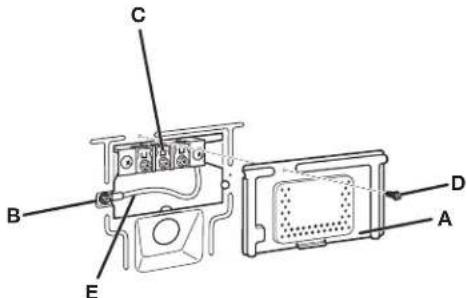
A. Terminal block cover
B. External ground conductor screw
3. Install strain relief.
C. Center terminal block screw
D. Hold-down screw
E. Neutral ground wire
| Electrical Connection Options | ||
| If your location has: And you will be Go to Section connecting to: | ||
| 4-wire receptacle A UL listed, 120/240 V 4-wire connection: (NEMA Type 14-30R) minimum 30A Power supply cord dryer power supply cord* | ||
| 3-wire receptacle A UL listed, 120/240 V 3-wire connection: (NEMA type 10-30R) minimum, 30A Power supply cord dryer power supply cord* | ||
| 4-wire direct circuit breaker box* | A fused disconnect or Direct Wire | 4-wire connection: |
| 3-wire direct circuit breaker box* | A fused disconnect or Direct Wire | 3-wire connection: |
| *If local codes do not permit the connection of a cabinet-ground conductor to the neutral wire, go to “Optional 3-wire connection” section. | ||
Power supply cord strain relief:
Remove the screws from a 3 / 4'' (19 mm) UL listed strain relief (UL marking on strain relief). Put the tabs of the two clamp sections into the hole below the terminal block opening so that one tab is pointing up and the other is pointing down, and hold in place.
Tighten strain relief screws enough to hold the two clamp sections together.
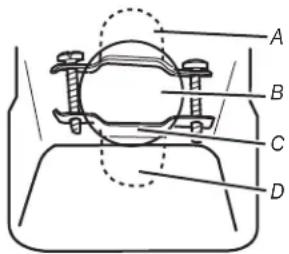
A. Strain relief tab pointing up
B. Hole below terminal block opening
C. Clamp section
D. Strain relief tab pointing down
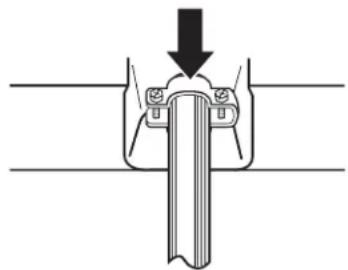
Put power supply cord through the strain relief. Be sure that the wire insulation on the power supply cord is inside the strain relief. The strain relief should have a tight fit with the dryer cabinet and be in a horizontal position. Do not further tighten strain relief screws at this point.
Power supply cord, 4-wire connection:
IMPORTANT: A 4-wire connection is required for mobile homes and where local codes do not permit the use of 3-wire connections.
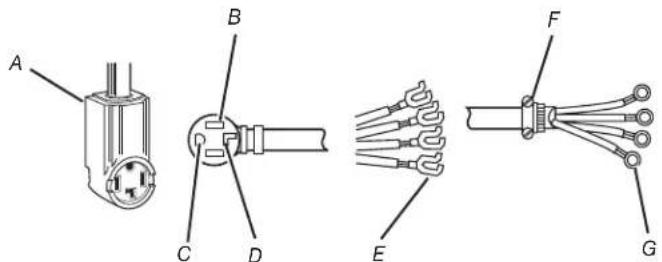
A. 4-wire receptacle (NEMA type 14-30R)
B. 4-prong plug
C. Ground prong
D. Neutral prong
E. Spade terminals with upturned ends
F. 3 / 4'' (19 mm) UL listed strain relief
G. Ring terminals
- Remove center terminal block screw (B).
- Remove neutral ground wire (C) from external ground conductor screw (A). Connect neutral ground wire and the neutral wire (white or center wire) of power supply cord under center terminal block screw (B). Tighten screw.
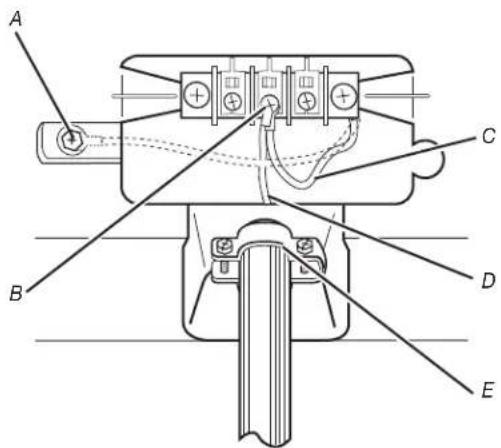
A. External ground conductor screw - Dotted line shows position of NEUTRAL ground wire before being moved to center terminal block screw.
B. Center terminal block screw
C. Neutral ground wire
D. Neutral wire (white or center wire)
E. 3 / 4'' (19 mm) UL listed strain relief
- Connect ground wire (B) (green or bare) of power supply cord to external ground conductor screw (A). Tighten screw.
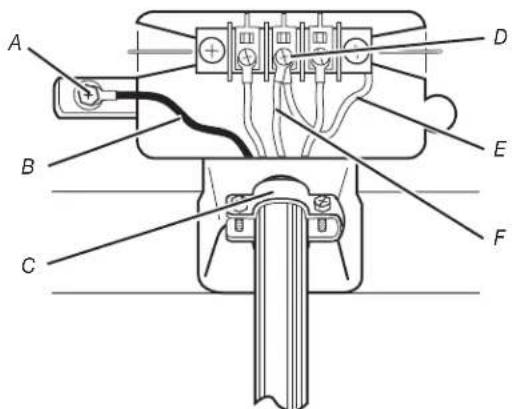
A. External ground conductor screw
B. Ground wire (green or bare) of power supply cord
C. 3 / 4'' (19 mm) UL listed strain relief
D. Center terminal block screw
E. Neutral ground wire
F. Neutral wire (white or center wire)
- Connect the other wires to outer terminal block screws. Tighten screws.
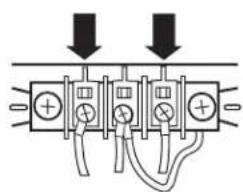
- Tighten strain relief screws.
- Insert tab of terminal block cover into slot of dryer rear panel. Secure cover with holddown screw.
- You have completed your electrical connection. Now go to "Venting Requirements."
Power supply cord, 3-wire connection:
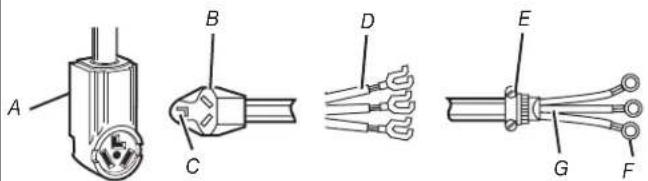
A. 3-wire receptacle (NEMA type 10-30R)
B. 3-wire plug
C. Neutral prong
D. Spade terminals with uptumed ends
E. 3 / 4'' (19 mm) UL listed strain relief
F. Ring terminals
G. Neutral (white or center wire)
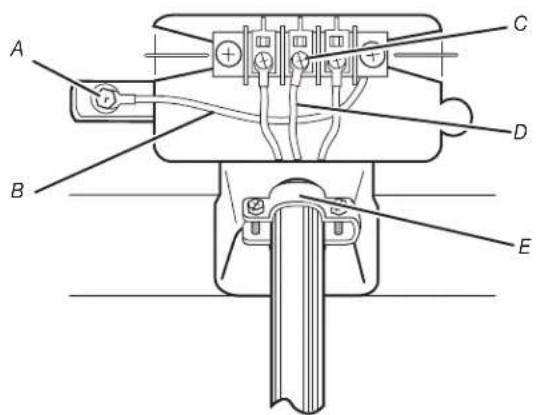
Use where local codes permit connecting cabinet-ground conductor to neutral wire.
- Loosen or remove center terminal block screw (C).
- Connect neutral wire (white or center wire) of power supply cord (D) to the center terminal screw (C) of the terminal block. Tighten screw.
- Connect the other wires to outer terminal block screws. Tighten screws.
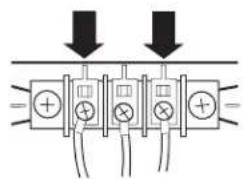
- Tighten strain relief screws.
- Insert tab of terminal block cover into slot of dryer rear panel. Secure cover with holddown screw.
- You have completed your electrical connection. Now go to "Venting Requirements."
A. External ground conductor screw
B. Neutral ground wire
C. Center terminal block screw
D. Neutral wire (white or center wire)
E. 3 / 4'' (19 mm) UL listed strain relief
Direct Wire Method (U.S.A. Only)
WARNING
Fire Hazard
Use 10 gauge copper wire.
Use a UL listed strain relief.
Disconnect power before making electrical connections.
Connect neutral wire (white or center wire) to center terminal.
Ground wire (green or bare wire) must be connected to green ground connector.
Connect remaining 2 supply wires to remaining
2 terminals (gold).
Securely tighten all electrical connections.
Failure to do so can result in death, fire, or electrical shock.
Direct wire cable must match power supply (4-wire or 3-wire) and be:
- Flexible armored cable or nonmetallic sheathed copper cable (with ground wire), protected with flexible metallic conduit. All current-carrying wires must be insulated.
10-gauge solid copper wire (do not use aluminum).
At least 5 ft. (1.52 m) long.
1.Disconnectpower. - Remove hold-down screw and terminal block cover.
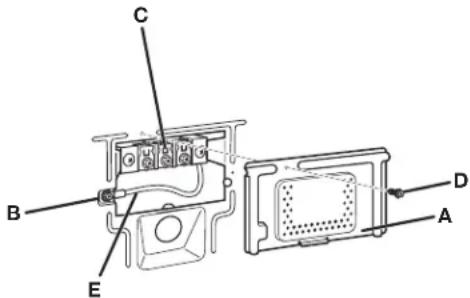
A. Terminal block cover
B. External ground conductor screw
C. Center terminal block screw
D. Hold-down screw
E. Neutral ground wire
-
Install 3/4'' conduit connector into the hole below the terminal block opening. Connect flexible metallic conduit and tighten connector screw. Install direct wire cable through the flexible metallic conduit.
-
Complete installation following instructions for your type of electrical connection:
-
Four-wire (recommended method)
- Three-wire (if four-wire is not available)
Direct wire strain relief:
- Unscrew the removable conduit connector (A) and any screws from a 3/4'' (19 mm) UL listed strain relief (UL marking on strain relief). Put the threaded section of the strain relief through the hole (B) below the terminal block opening. Reaching inside the terminal block opening, screw the removable conduit connector onto the strain relief threads (C).
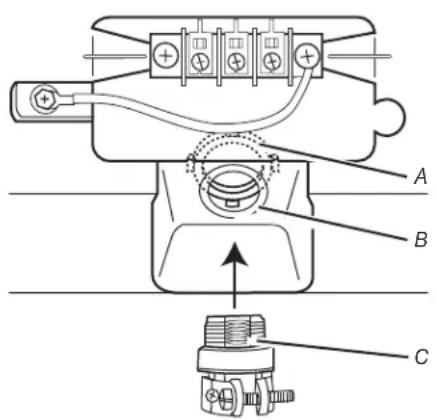
Put direct wire cable through the strain relief. The strain relief should have a tight fit with the dryer cabinet and be in a horizontal position. Tighten strain relief screw against the direct wire cable.
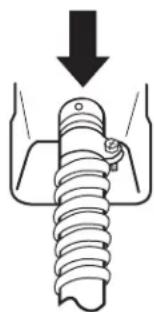
- Now complete installation following instructions for your type of electrical connection:
4-wire (recommended)
3-wire (if 4-wire is not available)
A. Removable conduit connector
B. Hole below terminal block opening
C. Strain relief threads
Direct Wire, 4-wire connection:
IMPORTANT: A 4-wire connection is required for mobile homes and where local codes do not permit the use of 3-wire connections.
Direct wire cable must have 5 ft (1.52 m) of extra length so dryer can be moved if needed.
Strip 5^ (127 mm) of outer covering from end of cable, leaving bare ground wire at 5^ (127 mm). Cut 112'' (38 mm) from 3 remaining wires. Strip insulation back 1^ (25 mm). Shape ends of wires into a hook shape.
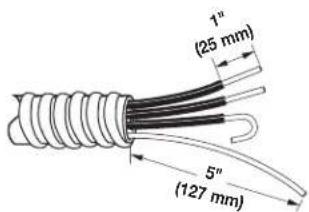
When connecting to the terminal block, place the hooked end of the wire under the screw of the terminal block (hook facing right), squeeze hooked end together and tighten screw, as shown.
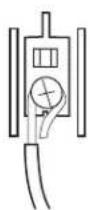
- Remove center terminal block screw.
- Remove neutral ground wire (C) from external ground conductor screw (A). Connect neutral ground wire and place the hooked end (hook facing right) of the neutral wire (white or center wire) of direct wire cable (D) under the center screw (B) of the terminal block. Squeeze hooked ends together. Tighten screw.
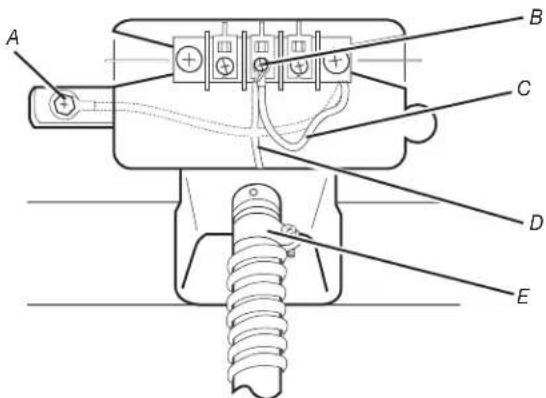
A. External ground conductor screw - Dotted line shows position of NEUTRAL ground wire before being moved to center terminal block screw.
B. Center terminal block screw
C. Neutral ground wire
D. Neutral wire (white or center wire)
E. 3 / 4'' (19 mm) UL listed strain relief
- Connect ground wire (green or bare) of direct wire cable (B) to external ground conductor screw (A). Tighten screw.
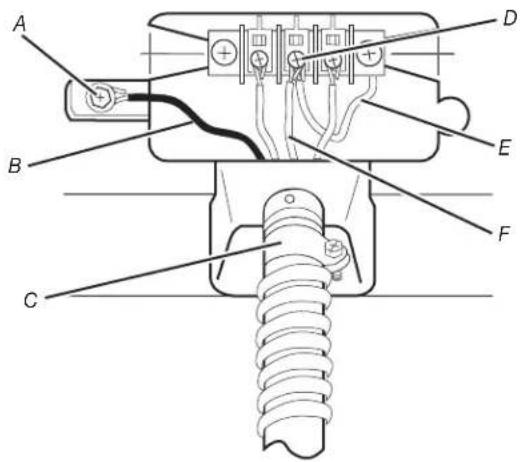
A. External ground conductor screw
B. Ground wire (green or bare) of power supply cable
C. 3 / 4'' (19 mm) UL listed strain relief
D. Center terminal block screw
E. Neutral ground wire
F. Neutral wire (white or center wire)
- Place the hooked ends of the other direct wire cable wires under the outer terminal block screws (hooks facing right). Squeeze hooked ends together. Tighten screws.
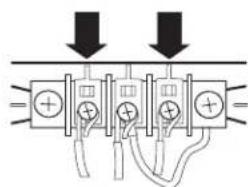
- Tighten strain relief screw.
- Insert tab of terminal block cover into slot of dryer rear panel. Secure cover with holddown screw.
- You have completed your electrical connection. Now go to "Venting Requirements."
Direct wire,
3-wire connection:
Use where local codes permit connecting cabinet-ground conductor to neutral wire.
Direct wire cable must have 5 ft (1.52 m) of extra length so dryer can be moved if needed.
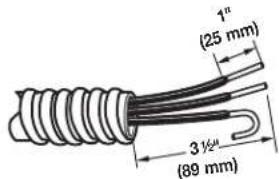
Strip 31 / 2'' (89 mm) of outer covering from end of cable. Strip insulation back 1" (25 mm). If using 3-wire cable with ground wire, cut bare wire even with outer covering. Shape ends of wires into a hook shape.
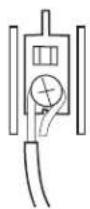
When connecting to the terminal block, place the hooked end of the wire under the screw of the terminal block (hook facing right), squeeze hooked end together, and tighten screw, as shown.
- Loosen or remove center terminal block screw (C).
- Place the hooked end of the neutral wire (white or center wire) of direct wire cable (D) under the center screw of terminal block (hook facing right). Squeeze hooked end together. Tighten screw.
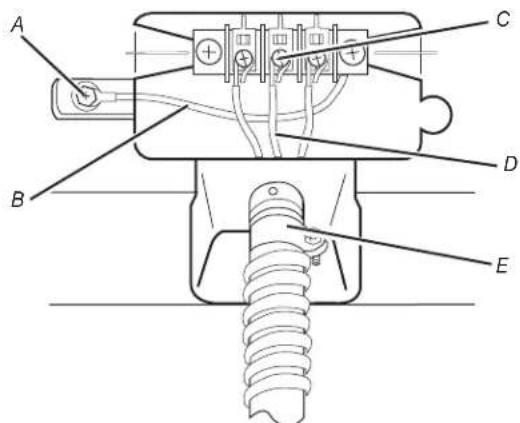
A. External ground conductor screw
B. Neutral ground wire
C. Center terminal block screw
D. Neutral wire (white or center wire)
E. 3 / 4^ (19 mm) UL listed strain relief
- Place the hooked ends of the other direct wire cable wires under the outer terminal block screws (hooks facing right). Squeeze hooked ends together. Tighten screws.
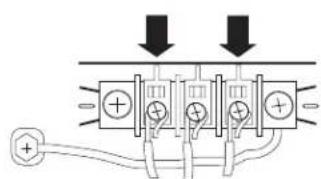
- Tighten strain relief screw.
- Insert tab of terminal block cover into slot of dryer rear panel. Secure cover with holddown screw.
- You have completed your electrical connection. Now go to "Venting Requirements."
Optional,
3-wire connection:
Use for direct wire or power supply cord where local codes do not permit connecting cabinet-ground conductor to neutral wire.
- Remove center terminal block screw (B).
- Remove neutral ground wire (C) from external ground conductor screw (A). Connect neutral ground wire and the neutral wire (white or center wire) of power supply cord/cable (D) under center terminal block screw. Tighten screw.
- Connect the other wires to outer terminal block screws. Tighten screws.
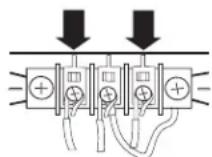
- Tighten strain relief screws.
- Connect a separate copper ground wire (F) from the external ground conductor screw (A) to an adequate ground.
- Insert tab of terminal block cover into slot of dryer rear panel. Secure cover with holddown screw.
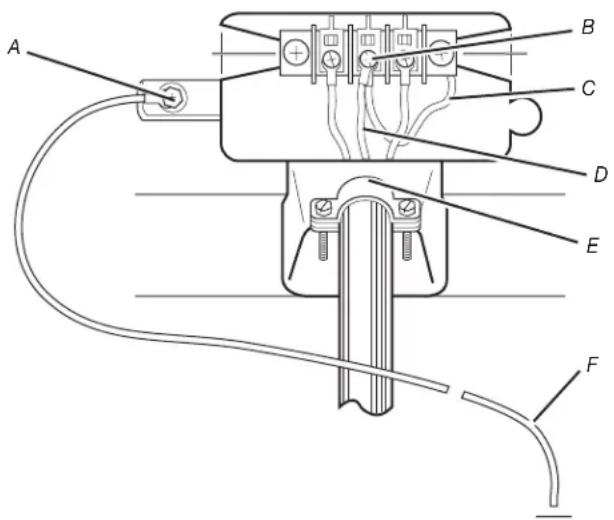
A. External ground conductor screw
B. Center terminal block screw
C. Neutral ground wire
D. Neutral wire (white or center wire)
E. 3 / 4'' (19 mm) UL listed strain relief
F. Grounding path determined by a qualified electrician
Connect Vent
WARNING
Excessive Weight Hazard
Use two or more people to move and install dryer.
Failure to do so can result in back or other injury.
- Using a 4'' (102 mm) clamp, connect vent to exhaust outlet in dryer. If connecting to existing vent, make sure the vent is clean. The dryer vent must fit over the dryer exhaust outlet and inside the exhaust hood. Make sure the vent is secured to exhaust hood with a 4'' (102 mm) clamp.
- Move dryer into final position. Do not crush or kink vent, and remove any excess flexible vent to improve airflow. Make sure dryer is level.
Complete Installation
- With dryer in final position, place level on top of the dryer, first side to side; then front to back. If the dryer is not level, adjust the legs of the dryer up or down until the dryer is level.
AWARNING
Electrical Shock Hazard
Plug into a grounded 3 or 4 prong outlet.
Do not remove ground prong.
Do not use an adapter.
Do not use an extension cord.
Failure to follow these instructions can result in death, fire, or electrical shock.
- Plug in dryer or reconnect power.
- Check dryer operation:
Insert coins. Select a cycle. Using the WHITES & COLOURS cycle, let the dryer run for at least five minutes. Dryer will stop when time is used up.
NOTE: Dryer door must be closed for dryer to operate. When door is open, dryer stops, but timer continues to run. To restart dryer, close door and reselect a cycle.
- If drying time is too long, make sure that the lint screen is clean, and that there are no obstacles to airflow in the dryer vent system.
- Now start the dryer and allow it to complete a full cycle to make sure it is working properly.
REVERSING THE DOOR SWING
Door swing can be changed from a right-side opening to left-side opening, if desired.
Place a towel or soft cloth on top of the dryer or workspace to prevent scratching the surface.
Remove the Door Assembly
- Remove 3 of the 4 screws that hold the door hinge on the front panel of the dryer. Partially loosen the remaining screw with keyhole opening and lift the door off the screw.
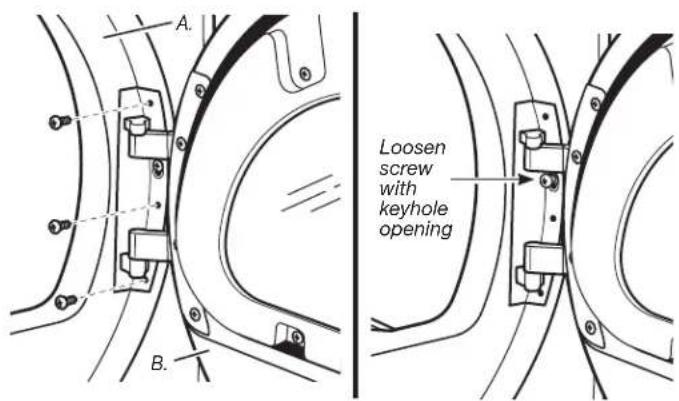
A. Dryer front panel
B. Door assembly
- Lay the door assembly on a previously prepared flat surface with the inside (inner door assembly) facing up.
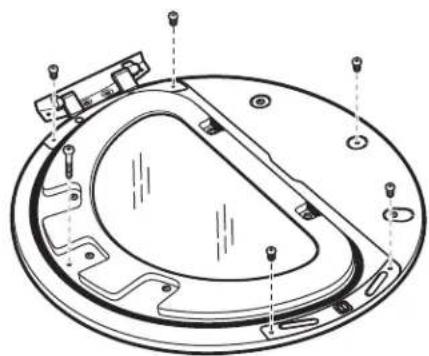
- Remove the 6 Phillips head screws to release the outer door assembly from the inner door assembly, as indicated below. See illustration. It is important that you remove only the 6 indicated screws.
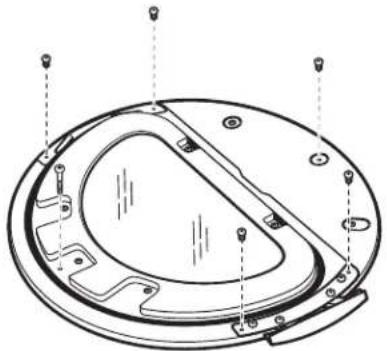
- Lift the inner door assembly off the outer door assembly.
- Rotate outer door 180^ .
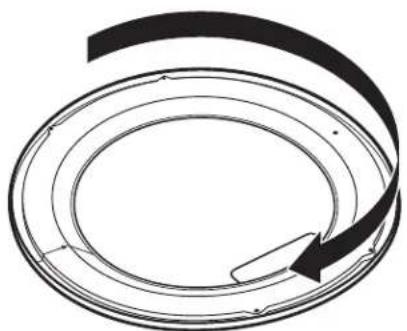
Reverse Hinge
- Use a small flat-blade screwdriver to remove 2 plug strips from the inner door. Slide the head of the screwdriver under the plugs, being certain not to scratch the inner door surface. Lift up.
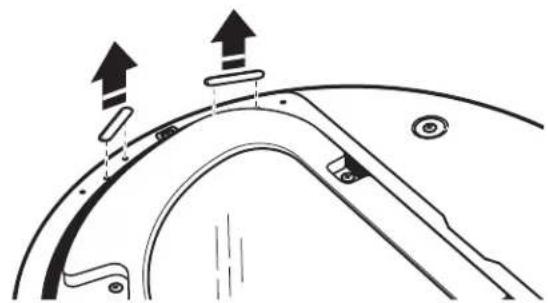
- Remove the 4 screws that attach to the inner door hinge and move the hinge to the other side. Reinstall the 4 screws.
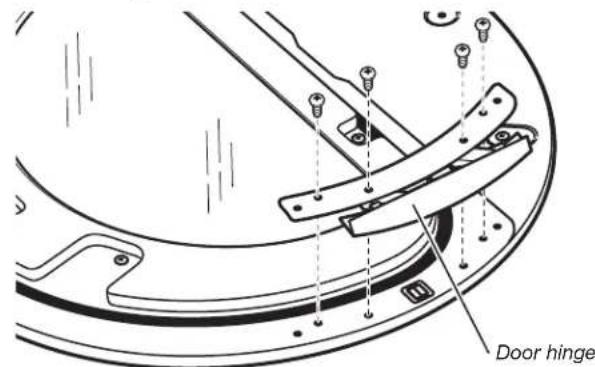
- Reinstall plug strips on opposite side of the inner door.
- Check for fingerprints on the glass. Clean glass if necessary.
- Place the inner door assembly inside the outer door assembly. To fit correctly, the inner door assembly edge fits completely inside the outer door assembly edge.
- Reassemble the inner and outer door assemblies with the 6 screws.
Reverse The Strike
- Use a small flat-blade screwdriver to remove plug strip from the dryer door opening. Slide the head of the screwdriver under the plugs, being certain not to scratch the dryer surface. Lift the plastic strip from the dryer slowly to prevent distortion of the plug strip.
- Remove the strike using a Phillips screwdriver.
- Insert strike on the opposite side.
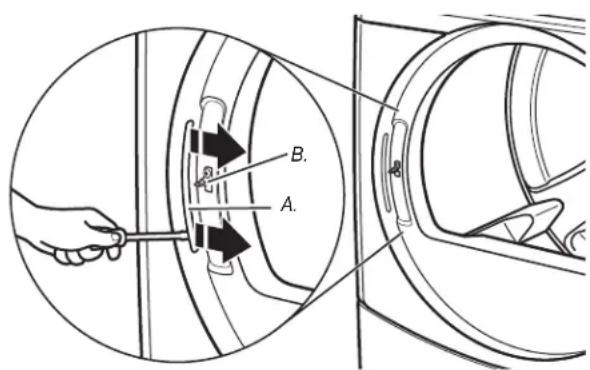
A. Plug strip
B. Door strike
Reinstall The Door
- Reattach door to dryer front panel with the 4 screws. Partially install the screw with keyhole opening first, and fit the keyhole opening in the hinge over the screw. Then install the remaining 3 screws and tighten all 4 screws.
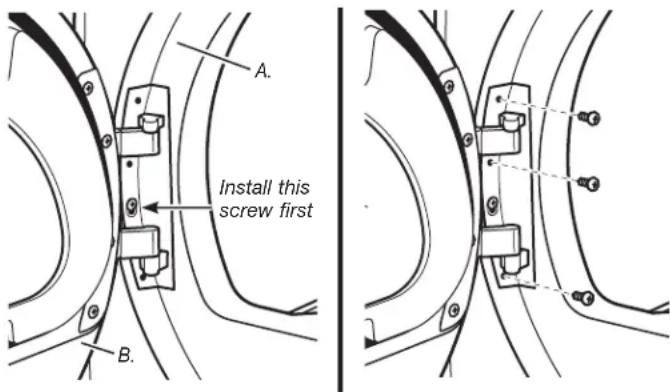
A. Dryer front panel
B. Door assembly
- Check for fingerprints on the glass. Clean glass if necessary.
- Close door and check that it latches securely.
MAINTENANCE INSTRUCTIONS
Maintenance instructions:
Clean lint screen after each cycle.
Removing accumulated int:
From inside the dryer cabinet:
Lint should be removed every 2 years or more often, depending on dryer usage. Cleaning should be done by a qualified person.
From the exhaust vent:
Lint should be removed every 2 years, or more often, depending on dryer usage.
- Keep area around dryer clear and free from combustible materials, gasoline, and other flammable vapors and liquids.
- Keep dryer area clear and free from items that would obstruct the flow of combustion and ventilation air.
If dryer does not operate, check the following:
Electrical supply is connected.
Circuit breaker is not tripped or house fuse is not blown.
- Door is closed. Listen closely to hear the door switch activate.
Control is set up properly and display shows cycle time.
Cycle selection button has been pushed firmly.
For gas dryers, check that gas supply shutoff valves are set in open position.
If you need assistance:
Contact your authorized Maytag® Commercial Laundry distributor. To locate your authorized Maytag® Commercial
Laundry distributor, or for web inquiries, visit www.MaytagCommercialLaundry.com.
If you cannot locate your distributor, the Commercial Laundry Support Center will answer any questions about operating or maintaining your dryer not covered in the Installation Instructions.
Just dial 1-800 NO BELTS (1-800-662-3587)—the call is free.
When you call, you will need the dryer model number and serial number. Both numbers can be found on the serial-rating plate located in the dryer door opening.
ELECTRONIC CONTROL SETUP
GENERAL USER INFORMATION
Scrolling "out of order" showing in display, followed by a failure code
This condition indicates the dryer is inoperative.
'0 Minutes' showing in display
This condition indicates the dryer cannot be operated. Coins dropped or debit inputs during this condition will be stored in escrow but cannot be used until normal operation is restored by opening and closing the door. If the door switch fails, it must be replaced before normal operation can be restored.
Cold Start (initial first use)
Dryer is programmed at the factory as follows:
45 minutes dry time for PR models.
5 minutes per quarter for PD models.
$1.50 dry price (fixed cycle with top off - PD Models).
$0.00 dry price (fixed cycle - PR Models).
Warm Start (after power failure)
A few seconds after power is restored, if a cycle was in progress at the time of the power failure, 'RESELECT CYCLE' will flash in the display. This is to indicate the need for a fabric setting key pad to be pressed to restart dryer.
Pricing
After the door is opened and closed following the completion of a cycle, the display indicates the cycle price (unless set for free operation). As coins or debit inputs arrive, the display will change to lead the user through the initiation of a cycle.
There are four (4) types of pricing:
Fixed 'Vend' Pricing
A dryer set up for 'Fixed Cycle' operation can only accept additional time accumulated by increments equal to the length of a complete dry cycle. A maximum of 75 minutes may be purchased; no additional credit is given when 75 minutes is in the display.
Accumulator Pricing
If the price is set to one coin 1, then accumulator mode is in effect. Cycle time can be purchased one coin at a time (PD models) up to the maximum time of 75 minutes.
Fixed Cycle With Top Off Pricing
A dryer set to offer 'Top Off' capability will allow time to be added to an existing dry cycle in increments equal to the number of minutes of dry time per quarter (coin 1), up to 75 minutes, regardless of the cost required to start the dryer. No credit is given for coins or debit inputs entered when the control is displaying 75 minutes.
PR Models: In Enhanced Debit Mode, the top off price can be set independently (see VALUE OF COIN 2), and the top off time is calculated according to the following equation:
top off price top off time full cycle price full cycle length
Penny increment offset is not applied to top off purchases.
Free Cycles
This is established by setting the cycle price to zero. When this happens, 'SELECT CYCLE' will appear rather than a cycle price. Any cycle started as a free cycle will automatically terminate when the door is opened.
Debit Card Ready
This dryer is debit card 'cable' ready. It will accept a variety of debit card systems, but does NOT come with a debit card reader. Refer to the debit card reader manufacturer for proper dryer set-up. In models converted to a Generation 1 debit card system, debit pulses represent the equivalent of one coin (coin 1).
CONTROL SET-UP PROCEDURES
IMPORTANT: Read all instructions before operating.
The fabric setting key pads along with the digital display are used to set-up the dryer controls.
The display can contain 4 numbers and/or letters and a decimal point. These are used to indicate the set-up codes and related code values available for use in programming the dryer.
How to use the key pads to program the controls
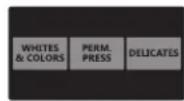
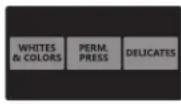
- The WHITES & COLORS key pad is used to adjust the values associated with set-up codes. Pressing and releasing this key pad will increment the value by one (1). Rapid adjustment is possible by holding the key pad down.
- The PERM. PRESS key pad will advance through the set-up codes. Pressing and releasing this key pad will advance to the next available set-up code. Holding the key pad down will automatically advance through the set-up codes at a rate of one (1) per second.
- The DELICATES key pad is used to select or deselect options.
Start Operating Set-Up
PD Models: Insert service access door key, turn, and lift to remove service access door.
- PR Models: Once a Gen. 2 debit card reader is installed (according to the reader manufacturer's instructions), the set-up mode can be entered by inserting a manual set-up card (supplied by the reader manufacturer) into the card slot. If manual set-up card is not available, manual set-up mode cannot be entered. However, diagnostic mode can be entered by removing connector AA1 on the circuit board.
IMPORTANT: The console must not be opened unless power is first disconnected from the dryer. To access connector AA1:
Unplug dryer or disconnect power.
Open console, disconnect jumper on AA1, close console.
Plug in dryer or reconnect power.
PR Models Set-up as PN can use the Service Access Code.
This code can be entered to access service mode without removing the console. It only functions on dryers set up for 0 vend price without any Special Pricing set-up, and the Coin/Debit Option must be set to "J._d".
The alternative Service Access Code to enter set-up mode is: Press the left key pad, right key pad, left key pad, right key pad, and right key pad.
The dryer is now in the set-up mode.
NOTE: Prior to operation, a payment system or an OPL kit must be installed.
Before proceeding, it is worth noting that, despite all the options available, an owner can simply choose to uncrate a new commercial dryer, hook it up, plug it in, and have a dryer that operates.
PD dryers have a factory default of fixed cycle price with top off.
PR dryers have a factory default of free cycle operation so they can be run without readers or coins.
DISPLAY
After the dryer has been installed and plugged in, the display will show '0 minutes.'
Once the dryer has been plugged in and the dryer door opened and closed, the display will show the price. In PR models set for free cycles, the display will flash 'SELECT CYCLE' and the cycle time.

PD Models

PR Models
SET-UP CODES
The set-up code is indicated by the one or two left hand characters. The set-up code value is indicated by the two or three right hand characters.
NOTE: The first line of each code indicates the factory default for PD models. The set-up codes for PR models are the same except where noted.
| CODE | EXPLANATION |
| 606 | REGULAR CYCLE PRICE |
| 606 | Represents the number of quarters (coin 1) needed to start the dryer; may adjust from 0-39 (See b.xx set-up for VALUE OF COIN 1). Advance from 0-39 by pressing WHITES & COLORS. Factory default of 6 quarters = $1.50. |
| 600 | PR MODELS: Factory default of 6 00, or 0 quarters. → Press PERM. PRESS key pad once to advance to next code. |
| 705 | REGULAR DRY TIME |
| 705 | PD MODELS: Represents the number of minutes per quarter (coin 1). Factory default of 5 minutes per coin. Example: 6 quarters x 5 minutes = 30 minutes. By pressing the WHITES & COLORS key pad, value adjusts from 1-75 minutes. |
| 745 | PR MODELS: Represents the cycle length for free cycles. As example: '7 45' = 45 minutes. → Press PERM. PRESS key pad once to advance to next code. |
| 800 | TYPE OF DRYER PRICING |
| 800 | Fixed Cycle with Top Off. For detailed description, see General User Information. |
| 8FC | PR MODELS ONLY: Factory default of FC. Fixed Cycle. For detailed description, see General User Information. Use DELICATES key pad to make this selection. → Press PERM. PRESS key pad once to advance to next code. |
| 900 | CYCLE COUNTER OPTION This option is either Selected 'ON' or Not Selected 'OFF'. |
| 900 | Not Selected 'OFF'. |
| 90C | Selected 'ON' and not able to be deselected. Press DELICATES key pad 3 consecutive times to select 'ON'. Once selected 'ON' it cannot be deselected. → Press PERM. PRESS key pad once to advance to next code. |
| CODE | EXPLANATION |
| 1.00 | MONEY COUNTER OPTION This option is either Selected 'ON' or Not Selected 'OFF'. |
| 1.00 | Not Selected 'OFF'. |
| 1.00 | Selected 'ON'. Press DELICATES key pad 3 consecutive times to select 'ON' and 3 consecutive times to remove (Not Selected 'OFF'). Counter resets by going from 'OFF' to 'ON'. |
| 1.00 | Selected 'ON' and not able to be deselected. To select 'ON' and not able to be deselected, first select 'ON', then within two seconds press DELICATES twice, WHITES & COLORS once, and exit the set-up mode. |
| → Press PERM. PRESS key pad once to advance to next code. | |
| 2.00 | SPECIAL PRICING OPTIONS This option is either Selected 'ON' or Not Selected 'OFF'. |
| 2.00 | Not Selected 'OFF'. |
| 250 | Selected 'ON'. Press DELICATES key pad once for this selection. |
| If SPECIAL PRICING OPTION is selected, there is access to codes '3.' through '9.' → Press PERM. PRESS key pad once to advance to next code. | |
| OPTIONS TO USE IF SPECIAL PRICING IS SELECTED: | |
| 3.06 | SPECIAL CYCLE PRICE |
| 3.06 | Represents the number of quarters (coin 1) needed to start the dryer; may adjust from 0-39. (See b.xx set-up for VALUE OF COIN 1). Advance from 0-39 by pressing WHITES & COLORS. Factory default of 6 quarters = $1.50. |
| 3.00 | PR MODELS: Factory default of 0 quarters. → Press PERM. PRESS key pad once to advance to next code. |
| 4.05 | SPECIAL DRY TIME |
| 4.05 | PD MODELS: Represents the number of minutes per quarter (coin 1). Factory default of 5 minutes per coin. Example: 6 quarters × 5 minutes = 30 minutes. By pressing the WHITES & COLORS key pad, the value can be adjusted from 1-75 minutes. |
| 4.45 | PR MODELS: Represents the fixed cycle time in minutes. As example: '4 45' = 45 minutes. → Press PERM. PRESS key pad once to advance to next code. |
| 5.00 | TIME-OF-DAY CLOCK, MINUTES |
| 5.00 | This is the TIME-OF-DAY CLOCK, minute setting; select 0-59 minutes by pressing WHITES & COLORS key pad. → Press PERM. PRESS key pad once to advance to next code. |
| 6.00 | TIME-OF-DAY CLOCK, HOURS NOTE: Uses military time - 24 hr. clock. |
| 6.00 | This is the TIME-OF-DAY CLOCK, hour setting; select 0-23 hours by pressing WHITES & COLORS key pad. → Press PERM. PRESS key pad once to advance to next code. |
| CODE | EXPLANATION |
| OPTIONS TO USE IF SPECIAL PRICING IS SELECTED (continued): | |
| 7.00 | SPECIAL PRICE START HOUR NOTE: Uses military time - 24 hr. clock. |
| 7.00 | This is the start hour, 0-23 hours. Select START HOUR by pressing WHITES & COLORS key pad. → Press PERM. PRESS key pad once to advance to next code. |
| 8.00 | SPECIAL PRICE STOP HOUR NOTE: Uses military time - 24 hr. clock. |
| 8.00 | This is the stop hour, 0-23 hours. Select STOP HOUR by pressing WHITES & COLORS key pad. → Press PERM. PRESS key pad once to advance to next code. |
| 9.10 | SPECIAL PRICE DAY |
| 9.10 | This represents the day of the week and whether special pricing is selected for that day. A number followed by '0' indicates no selection that particular day (9.10). A number followed by an 'S' indicates selected for that day (9.1S). Days of week (1-7) can be chosen by pressing the WHITES & COLORS key pad. Press DELICATES key pad once to select special pricing for each day chosen. When exiting setup code '9', the display must show current day of week: DISPLAY DAY OF WEEK CODE (selected) 10 Day 1 = Sunday 1S 20 Day 2 = Monday 2S 30 Day 3 = Tuesday 3S 40 Day 4 = Wednesday 4S 50 Day 5 = Thursday 5S 60 Day 6 = Friday 6S 70 Day 7 = Saturday 7S |
| → Press PERM. PRESS key pad once to advance to next code. | |
| R.00 | VAULT VIEWING OPTION This option is either Selected 'ON' or Not Selected 'OFF'. |
| R.00 | Not Selected 'OFF'. |
| R.SC | Selected 'ON'. Press DELICATES key pad once for this selection. When selected, the money and/or cycle counts will be viewable (if counting is selected) when the coin box is removed. |
| → Press PERM. PRESS key pad once to advance to next code. | |
| 6.05 | VALUE OF COIN 1 |
| 6.05 | This represents the value of coin 1 in number of nickels. 05 = $0.25. By pressing WHITES & COLORS key pad, there is the option of 1-199 nickels. With coin slide activation, this represents the total vend price in nickels. Example: b.30 = 1.50. |
| → Press PERM. PRESS key pad once to advance to next code. | |
| C.20 | VALUE OF COIN 2 |
| C.20 | PD MODELS: This represents the value of coin 2 in number of nickels. 20 =1.00. By pressing WHITES & COLORS key pad, there is the option of 1-199 nickels. |
| C.05 | PR MODELS: For models using Enhanced Debit, this field represents the value of top off in nickels, or $.25. Factory default of C.05; represents 5 x .05, or.25. |
| → Press PERM. PRESS key pad once to advance to next code. | |
| CODE | EXPLANATION |
| 8.00 | COIN SLIDE OPTIONThis option is either Selected 'ON' or Not Selected 'OFF'.Replacement of metercase will be needed for coin slide mounting. |
| 8.00 | Not Selected 'OFF'. |
| 8.CS | Selected 'ON'.NOTE: This option needs to be set to '00' unless the metercase has been changed to accept a coin slide device.Press DELICATES key pad 3 consecutive times for this selection. When coin slide mode is selected, set 'b.' equal to value of vend price in nickels. Set '6 XX' (REGULAR CYCLE PRICE) and '3.XX' (SPECIAL CYCLE PRICE) to number of slide operations.NOTE: If the installer sets up 'CS' on a coin drop model, the dryer will not register coins inserted.→ Press PERM. PRESS key pad once to advance to next code. |
| E.00 | ADD COINS OPTIONThis option is either Selected 'ON' or Not Selected 'OFF'. This option causes the customer display to show the number of coins (coin 1) to enter, rather than the dollars-and-cents amount. |
| E.00 | Not Selected 'OFF'. |
| E.AC | Selected 'ON'.Press DELICATES key pad 3 consecutive times for this selection.PR MODELS: In enhanced debit mode, this option is not selectable.→ Press PERM. PRESS key pad once to advance to next code. |
| J.B | COIN/DEBIT OPTION |
| J.CB | Both coin & debit selected. Press DELICATES key pad 3 consecutive times to change this selection. |
| J.CB | Coins selected, debit disabled. Press DELICATES key pad 3 consecutive times to change this selection. |
| J.CB | Debit Card selected, coin disabled. This is the factory default for PR models.PR SET UP AS PN MODELS ONLY: Must be set for 'd.'Press DELICATES key pad 3 consecutive times to change this selection. |
| J.EB | Enhanced debit is self-selected when a Generation 2 card reader is installed in the dryer. The 'Ed' option cannot be manually selected or deselected.→ Press PERM. PRESS key pad once to advance to next code. |
| L.00 | PRICE SUPPRESSION OPTIONThis option is either Selected 'ON' or Not Selected 'OFF'. This option causes the customer display to show 'AVAILABLE' or 'ADD' rather than the amount of money to add. (Used mainly in debit installations.) |
| L.00 | Not Selected 'OFF'. |
| L.PS | Selected 'ON'. Press DELICATES key pad once for this selection.→ Press PERM. PRESS key pad once to advance to next code. |
| B.CE | CLEAR ESCROW OPTIONThis option is either Selected 'ON' or Not Selected 'OFF'.When selected, money held in escrow for 30 minutes without further escrow or cycle activity will be cleared. |
| B.CE | Selected 'ON'. |
| B.OQ | Not Select cited 'OFF'. Press DELICATES key pad once to deselect this option.→ Press PERM. PRESS key pad once to advance to next code. |
| 0.00 | PENNY INIncrement OFFSET |
| 0.00 | This represents the penny increment price offset used in Generation 2 (Enhanced Debit) PR models. Choose from 0-4 pennies by pressing the WHITES & COLORS key pad.→ Press PERM. PRESS key pad once to advance to next code. |
If cycle counter (90C) is selected, the following is true:
100 Represents the number of cycles in HUNDREDs. 1 02 = 200
200 Represents the number of cycles in ONES. 225 = 25
TOTAL CYCLES = 225
This is 'VIEW ONLY' and cannot be cleared.
Press the PERM. PRESS button once to advance to next code.
If money counter (1.0C or 1.C0) is selected, the following is true:
3 00 Number of dollars in HUNDREDS. 301 = 100.00
400 Number of dollars in ONES. 468= 68.00
500 Number of CNTS. 575 = 00.75
TOTAL = $168.75
END OF SET-UP PROCEDURES
EXIT FROM SET-UP MODE
PD MODELS: Reinstall service access door.
PR MODELS: Remove set-up card.
PR MODELS where AA1 connector was removed:
- Unplug dryer or disconnect power.
- Open console, reinsert jumper into AA1, close console.
- Plug in dryer or reconnect power.
PR MODELS WHERE SERVICE ACCESS CODE WAS USED: Set-up mode can be exited by using procedures from Service Access Code (see page 24).
Wait for 2 minutes without activating any dryer inputs.
Disconnect and then re-connect power.
MAYTAG COMMERCIAL WASHER, DRYER, STACKED DRYER/DRYER, COMMERCIAL STACK LAUNDRY, AND MULTI-LOAD COIN OPERATED COMMERCIAL WASHERS AND DRYERS WARRANTY
LIMITED WARRANTY (PARTS ONLY - LABOR NOT INCLUDED)
For the first five years from the original date of purchase, when this commercial appliance is installed, maintained, and operated according to the instructions attached to or furnished with the product, Maytag brand of Whirlpool Corporation (hereafter "Maytag") will pay for factory specified replacement parts to correct defects in materials or workmanship that existed when this commercial appliance was purchased. This limited warranty does not include labor.
YOUR SOLE AND EXCLUSIVE REMEDY UNDER THIS LIMITED WARRANTY SHALL BE PRODUCT REPAIR AS PROVIDED HEREIN. Maytag recommends that you use an "in network" service provider to diagnose and repair your Commercial Laundry product. Maytag will not be responsible under this warranty to provide additional replacement parts as a result of incorrect diagnosis or repair by an "out of network" service company. This limited warranty is valid in the United States or Canada and applies only when the commercial appliance is used in the country in which it was purchased. This limited warranty is effective from the date of the original consumer purchase. Proof of original purchase date is required to obtain service under this limited warranty.
ITEMS EXCUSED FROM WARRANTY
This limited warranty does not cover:
- All other costs including labor, transportation, shipping, or custom duties for covered parts.
- Factory specified replacement parts if this commercial appliance is used for other than normal, commercial use or when it is used in a manner that is inconsistent to published user or operator instructions and/or installation instructions.
- Service calls to correct the installation of your commercial appliance, to instruct you on how to use your commercial appliance, to replace or repair house fuses, or to correct external wiring or plumbing.
- Damage resulting from improper handling of product during delivery, theft, accident, alteration, misuse, abuse, fire, flood, acts of God, improper installation, installation not in accordance with local electrical or plumbing codes, or use of products not approved by Maytag.
- Pick up and delivery. This commercial appliance is designed to be repaired on location.
- Repairs to parts or systems resulting from unauthorized modifications made to the commercial appliance.
- The removal and reinstallation of your commercial appliance if it is installed in an inaccessible location or is not installed in accordance with published installation instructions.
- Damage resulting from exposure to chemicals.
- Changes to the building, room, or location needed in order to make the commercial appliance operate correctly.
- Factory specified replacement parts on commercial appliances with original model/serial numbers that have been removed, altered, or cannot be easily determined.
- Discoloration, rust, or oxidation of stainless steel surfaces.
- Factory specified replacement parts as a result of incorrect diagnosis or repair by an "out of network" service company.
The cost of repair or replacement under these excluded circumstances shall be borne by the customer.
DISCLAIMER OF IMPLIED WARRANTYES
IMPLIED WARRANTY, INCLUDING ANY IMPLIED WARRANTY OF MERCHANTABILITY OR IMPLIED WARRANTY OF FITNESS FOR A PARTICULAR PURPOSE, ARE LIMITED TO ONE YEAR OR THE SHORTEST PERIOD ALLOWED BY LAW. Some states and provinces do not allow limitations on the duration of implied warranties of merchantability or fitness, so this limitation may not apply to you. This warranty gives you specific legal rights, and you also may have other rights that vary from state to state or province to province.
DISCLAIMER OF REPRESENTATIONS OUTSIDE OF WARRANTY
Maytag makes no representations about the quality, durability, or need for service or repair of this commercial appliance other than the representations contained in this Warranty. If you want a longer or more comprehensive warranty than the limited warranty that comes with this commercial appliance, you should ask Maytag or your retailer about buying an extended warranty.
LIMITATION OF REMEDIES; EXCLUSION OF INCIDENTAL AND CONSEQUENTIAL DAMAGES
YOUR SOLE AND EXCLUSIVE REMEDY UNDER THIS LIMITED WARRANTY SHALL BE PRODUCT REPAIR AS PROVIDED HEREIN. MAYTAG SHALL NOT BE LIABLE FOR INCIDENTAL OR CONSEQUENTIAL DAMAGES. Some states and provinces do not allow the exclusion or limitation of incidental or consequential damages, so these limitations and exclusions may not apply to you. This warranty gives you specific legal rights, and you also may have other rights that vary from state to state or province to province.
If you need service, please contact your authorized Maytag Commercial Laundry® distributor. To locate your authorized Maytag Commercial Laundry® distributor, call 1-800-662-3587, or for web inquiries, visit www.MaytagCommercialLaundry.com.
02/14
For written correspondence:
Maytag Commercial Laundry Service Department
2000 N M 63
Benton Harbor, Michigan 49022-2632 USA
SECURITE DE LA SECHEUSE
National Fire Protection Association
One Batterymarch Park, Quincy, MA 02269
CSA International
8501 East Pleasant Valley Road
Cleveland, Ohio 44131-5575
National Fire Protection Association
One Batterymarch Park, Quincy, MA 02269
CSA International
8501 East Pleasant Valley Road
Cleveland, Ohio 44131-5575
programme complet programme complet
TOTAL DE PROGRAMMES = 225
Maytag Commercial Laundry Service Department
2000 N M 63
Benton Harbor, Michigan 49022-2632 USA
NOTES
NOTES