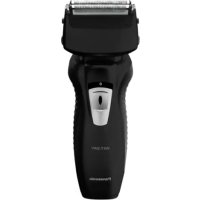
PANASONIC ESRW31 - Shaver

ESRW31 - Shaver PANASONIC - Free user manual and instructions

Find the device manual for free ESRW31 PANASONIC in PDF.

📄 124 pages English EN Download 💬 AI Question 11 questions ⚙️ Specs
Notice PANASONIC ESRW31 - page 2
Pick your language and provide your email: we'll send you a specifically translated version.
Product type Electric shaver
Brand Panasonic
Model ESRW31
Dimensions (L x W x H) 5.8 x 15.3 x 5.1 cm
Weight 160 g
Power supply AC mains adapter (model RE7-67)
Motor voltage 1.2 V=
Charging time (230 V~) Approx. 7 hours
Charging time (220 V~) Approx. 8 hours
Battery life Approx. 21 minutes (dry use at 20-30 °C)
Battery type Built-in nickel-metal hydride (NiMH)
Usage Dry shaving or wet shaving with gel, waterproof for shower use
Functions Shaving, integrated trimmer
Cleaning Washable with water, cleaning brush included
Outer foil replacement frequency 1 year
Inner blade replacement frequency 2 years
Charging temperature 0-35 °C
Operating temperature Above 0 °C
Sound level (shaving) 59 dB(A)
Sound level (trimmer) 63 dB(A)
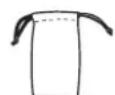
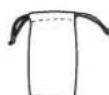
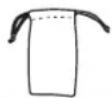
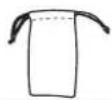
Supplied accessories Cleaning brush, travel pouch
Repairability Battery replaceable only by an authorized center
Intended use Household use only

Frequently Asked Questions - ESRW31 PANASONIC

What is the battery life of the Panasonic ESRW31 shaver?
Battery life is approximately 21 minutes after a full charge, when used dry at 20-30 °C.
How long does it take to charge the shaver?
Charging time is approximately 7 hours on a 230 V~ outlet and 8 hours on 220 V~.
Can I use the shaver in the shower?
Yes, the shaver is waterproof and can be used in the shower or with shaving gel on wet skin.
How do I clean the shaver?
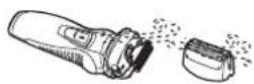
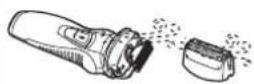
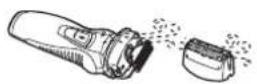
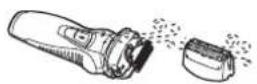
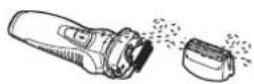
Remove the adapter, then clean the foil and blades under running soapy water. Use the included cleaning brush for the inner blades (in direction A). Dry completely before reassembling.
How often should I replace the foil and blade?
Replace the outer foil once a year and the inner blade every two years for optimal performance.
What if the shaver stops working?
Check the charge. If the problem persists, contact an authorized service center for repair. Do not attempt to disassemble yourself.
Can I use the shaver with shaving gel?
Yes, the shaver is designed for use on wet skin with shaving gel. It is recommended to try it for 3 weeks to get used to it.
Is the shaver suitable for sensitive skin?
Yes, because it provides a gentle shave. It is advised not to press too hard and to let the skin adapt for about a month.
How do I remove the battery for recycling?
Before disposal, remove the shaver from the adapter, discharge the battery, then follow the disassembly steps in the manual. Insulate the terminals with adhesive tape and deposit it at a collection point.
What if the power cord is damaged?
The cord is not replaceable. If damaged, the AC adapter must be discarded and replaced with an identical model (RE7-67).

User questions about ESRW31 PANASONIC

1 question about this device. Answer the ones you know or ask your own.

Ask a new question about this device

The email remains private: it is only used to notify you if someone responds to your question.

How to lift or remove the grille of the PANASONIC ESRW31 razor to access the blades?
Frequently Asked Questions - 15 j
Response Notice-Facile

The PANASONIC ESRW31 razor has a removable protective grille that covers the inner blades. To access it:

  • Turn off and unplug the razor from the power adapter
  • Gently remove the grille by pulling it towards you
  • Once the grille is removed, you can see the inner blades underneath

This allows you to clean the blades with the short brush provided, brushing in the direction (A) indicated in the manual. Remember to brush properly: do not brush in the opposite direction, as this could damage the blades.

Regular maintenance: The grille should be replaced once a year, and the inner blades every two years. For regular cleaning, rinse the grille under running water after each use (steps 4-6 of the standard cleaning procedure in your manual).

Respond (be the first)

Download the instructions for your Shaver in PDF format for free! Find your manual ESRW31 - PANASONIC and take your electronic device back in hand. On this page are published all the documents necessary for the use of your device. ESRW31 by PANASONIC.

USER MANUAL ESRW31 PANASONIC

Operating Instructions

(Household) Rechargeable Shaver

ES-RW33

ES-RW31

English2Português44Česky 86
Deutsch9Svenska51Slovensky 93
Français16Dansk58Magyar 100
Italiano23Norsk65Română 107
Español30Suomi72Türkçe 114
Nederlands37Polski79

PANASONIC ESRW31 - 1

natural_image Two black Panasonic electric shaver designs, shown from different angles (no text or symbols visible)

Thank you for purchasing this Panasonic product.

Before operating this unit, please read these instructions completely and save them for future use.

Warning

  • This appliance can be used by children aged from 8 years and above and persons with reduced physical, sensory or mental capabilities or lack of experience and knowledge if they have been given supervision or instruction concerning use of the appliance in a safe way and understand the hazards involved. Children shall not play with the appliance. Cleaning and user maintenance shall not be made by children without supervision.
  • The supply cord cannot be replaced. If the cord is damaged, the AC adaptor should be scrapped.
  • Do not immerse the AC adaptor in water or wash with water.

  • Do not use any AC adaptor other than one specifically designed for this model (RE7-67).

  • This WET/DRY shaver can be used for wet shaving using shaving lather or for dry shaving. You can use this watertight shaver in the shower and clean with water. The following symbol means suitable for use in a bath or shower.

PANASONIC ESRW31 - Warning - 1

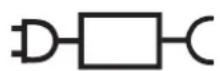
- The following symbol indicates that a specific detachable power supply unit is required for connecting the electrical appliance to the supply mains. The type reference of power supply unit is marked near the symbol.
PANASONIC ESRW31 - Warning - 2

Important

▶ Before use

Treat yourself to wet lather shaves for at least three weeks and notice the difference. Your Panasonic WET/DRY shaver requires a little time to get used to because your skin and beard need about a month to adjust to any new shaving method.

▶ Using the shaver

Caution - The outer foil is very thin and can be damaged if not used correctly. Check that the foil is not damaged before using the shaver. Do not use the shaver if the foil etc. is damaged as you will cut your skin.

The appliance may not operate in an ambient temperature lower than approximately 0 °C.

▶ Charging the shaver

Charge the appliance correctly according to these Operating Instructions. (See page 5 "Charging".)

This appliance contains battery that is only replaceable by skilled persons. Please contact an authorized service centre for the details of repair.

Plug in the adaptor into a household outlet where there is no moisture and handle it with dry hands. The shaver may become warm during use and charging. However, this is not a malfunction. Do not charge the shaver where it will be exposed to direct sunlight or other heat sources.

Adequate ambient temperature for charging is 0-35 °C.

▶ Cleaning the shaver

Warning - Remove the shaver from the AC adaptor before cleaning it to prevent electric shock.

If you clean the shaver with water, do not use salt water or hot water. Do not soak the shaver in water for a long period of time. Wipe it with a cloth dampened with soapy water. Do not use thinner, benzine or alcohol.

▶ Storing the shaver

Remove the shaver from the AC adaptor when storing it. Keep these operating instructions in a safe place.

Parts identification

A
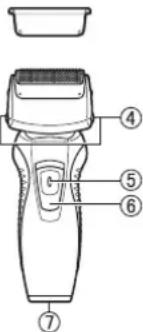
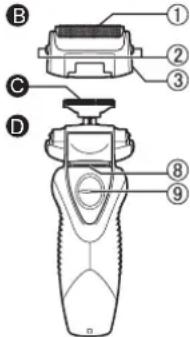
Diagram of a hairbrush with numbered parts labeled 4, 5, 6, and 7

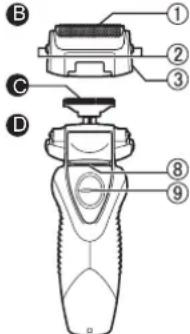
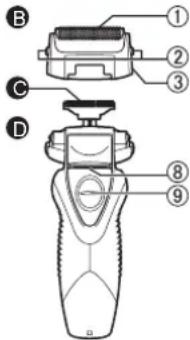
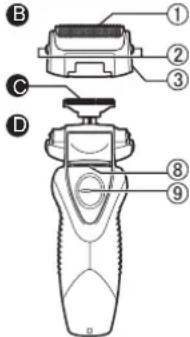
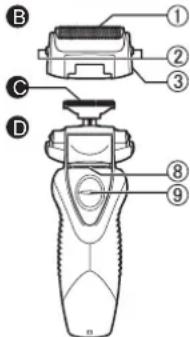
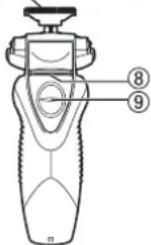
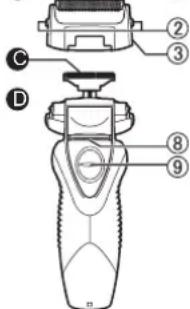
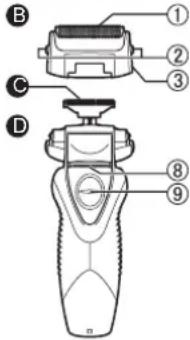
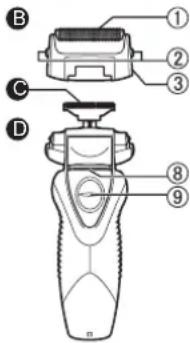
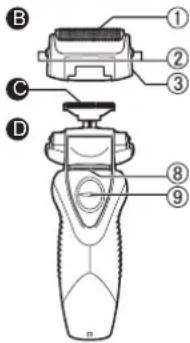
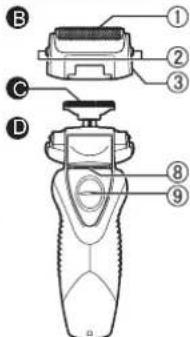
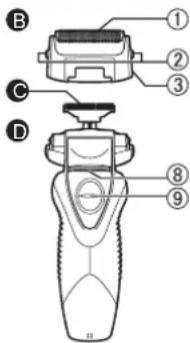
B ① ② ③ C D ⑧ ⑨

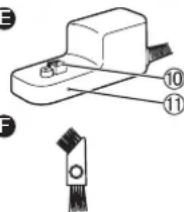
E
PANASONIC ESRW31 - Parts identification - 3
F

PANASONIC ESRW31 - Parts identification - 4

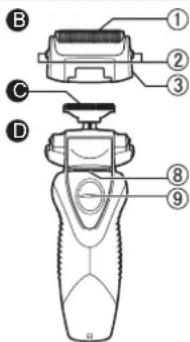
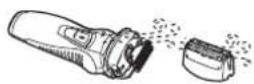
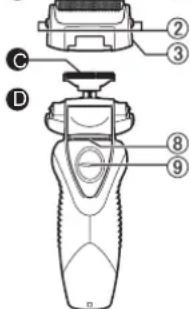
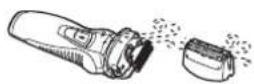
A Protective cap

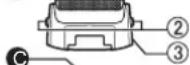
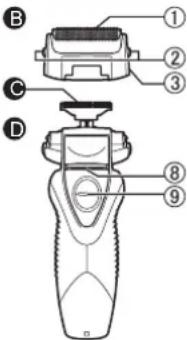
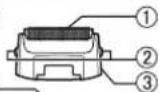
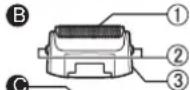
B Outer foil section

① System outer foil
② System outer foil release buttons
③ Foil frame

© Inner blades

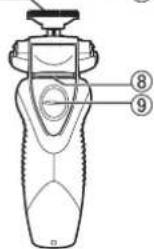
D Main body

④ Foil frame release buttons
⑤ Switch lock button
⑥ Power switch (0/1)

⑦ Appliance socket
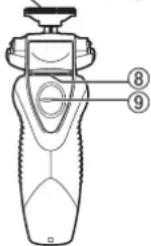
⑧ Trimmer
⑨ Trimmer handle

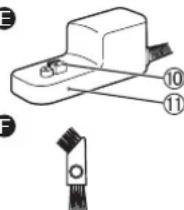
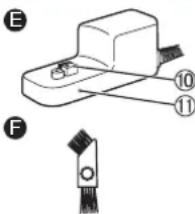
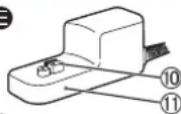
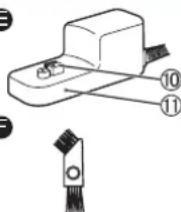
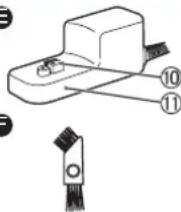
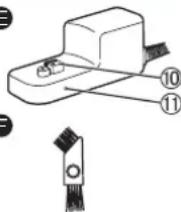
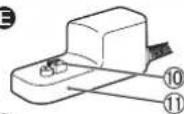
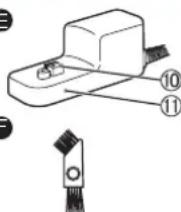
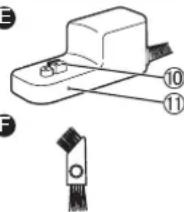
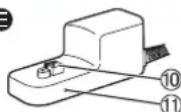
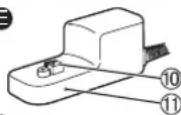
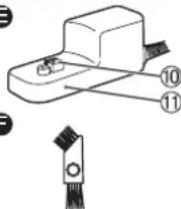
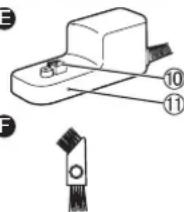
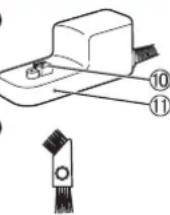
E AC adaptor (RE7-67)

⑩ Charging plug
⑪ Charge indicator lamp

Accessories

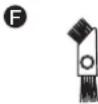
F Cleaning brush

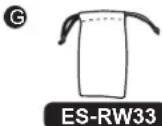
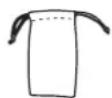
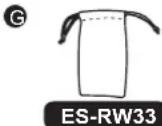
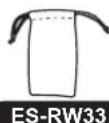
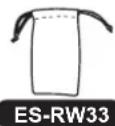
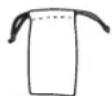
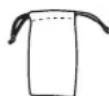
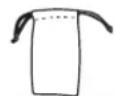
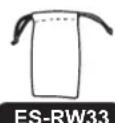
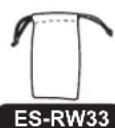
G Travel pouch ES-RW33

Charging

Perform the following steps to charge the shaver if it seems to lose the speed.

The charging time differs depending on the rated voltage. (See page 8.)

- A full charge supplies enough power for approximately 30 minutes of use. (ES-RW33)

A full charge supplies enough power for approximately 21 minutes of use. (ES-RW31)

(Based on dry using at 20 °C-30 °C.)

The operating time may differ depending on the frequency of use and the operating method.

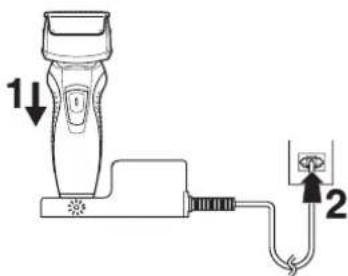
1 Turn off the shaver and insert it in the AC adaptor as illustrated.

2 Plug in the adaptor into a household outlet.

- The charge indicator lamp glows and stays on until the shaver is removed from the AC adaptor.
1↓ 2

Using the shaver

PANASONIC ESRW31 - Using the shaver - 1

natural_image Hand holding a small cylindrical object with a black cap and arrow, against a plain background (no text or symbols)

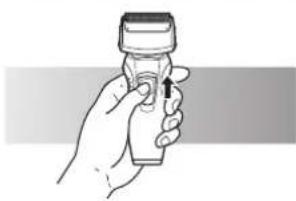
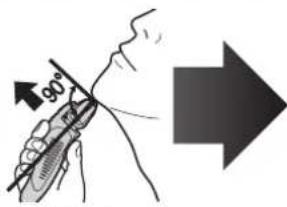
1 Depress the switch lock button and slide the power switch (0/1) upwards.
90°

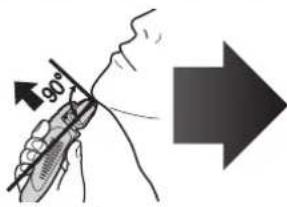
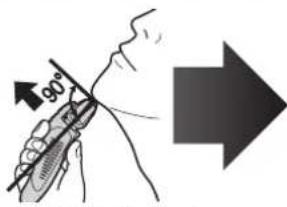
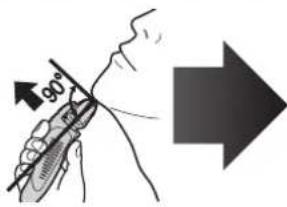
2 Hold the shaver as illustrated above and shave.

- Start out shaving by applying gentle pressure to your face. Stretch your skin with your free hand and move the shaver back and forth in the direction of your beard. You may gently increase the amount of pressure as your skin becomes accustomed to this shaver. Applying excessive pressure does not provide a closer shave.

▶ Using the trimmer

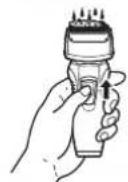
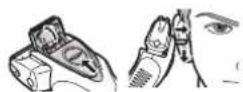
Slide the trimmer handle up. Place at a right angle to your skin and move downwards to trim your sideburns.
PANASONIC ESRW31 - ▶ Using the trimmer - 1

Cleaning

3
PANASONIC ESRW31 - Cleaning - 1
5,6

PANASONIC ESRW31 - Cleaning - 2

PANASONIC ESRW31 - Cleaning - 3

natural_image Illustration of hands using a spray gun to spray liquid onto a pipe (no text or symbols)

8

PANASONIC ESRW31 - Cleaning - 4

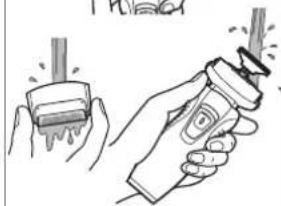
  1. Remove the shaver from the AC adaptor.
  2. Apply some hand soap and some water to the outer foil.
  3. Turn the shaver on.
  4. Turn the shaver off after 10-20 seconds.
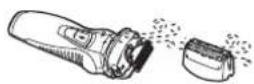
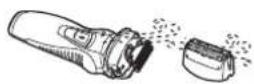
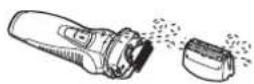
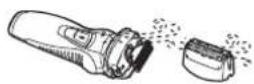
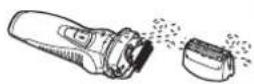
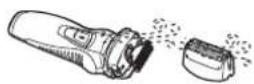
  5. Remove the outer foil section and turn the shaver on.
  6. Clean the shaver and the outer foil section with running water.
  7. Wipe off any drops of water with a dry cloth.
  8. Dry the outer foil section and the shaver completely.
  9. Attach the outer foil section to the shaver.

Replacing the outer foil and the inner blades

System outer foil Once every year

Inner blade Once every two years

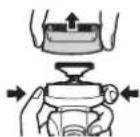
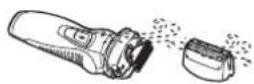
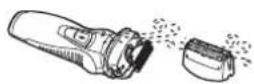
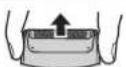
  1. Press the system outer foil release buttons and lift the system outer foil upwards as illustrated.
  2. Insert the system outer foil by pushing it downwards until it clicks.

▶ Replacing the inner blades

1
PANASONIC ESRW31 - ▶ Replacing the inner blades - 1

  1. Press the foil frame release buttons and lift the outer foil section upwards as illustrated.
  2. Remove the inner blades one at a time as illustrated.

- Do not touch the edges (metal parts) of the inner blades to prevent injury to your hand.

  1. Insert the inner blades one at a time until they click as illustrated.

Cleaning with the brush
1 (A) (B)

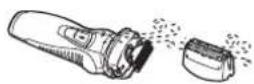
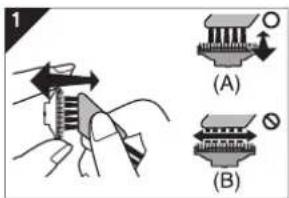
  1. Clean the inner blades using the short brush by moving it in direction (A).

Clean the outer foil, the shaver body and the trimmer using the long brush.

  • Do not move the short brush in direction (B) as it will damage the inner blades and affect their sharpness.
  • Do not use the short brush to clean the outer foil.

Removing the built-in rechargeable battery

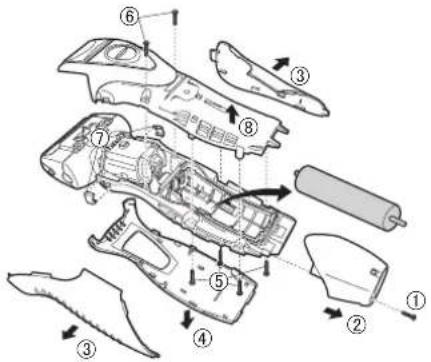
Remove the built-in rechargeable battery before disposing of the shaver. The battery is to be disposed of safely. Please make sure that the battery is disposed of at an officially designated location if there is one. Do not dismantle or replace the battery so that you can use the shaver again. This could cause fire or an electric shock. Replace it at an authorized service centre.

  • Remove the shaver from the AC adaptor when removing the battery.
  • Press the power switch to turn on the power and then keep the power on until the battery is completely discharged.
  • Perform steps ① to ⑧ and lift the battery, and then remove it.
    • Take care not to short-circuit the positive and negative terminals of the removed battery, and insulate the terminals by applying tape to them.
Exploded view diagram of a vehicle showing internal components with numbered labels

For environmental protection and recycling of materials This shaver contains a Nickel-Metal Hydride battery. Please make sure that the battery is disposed of at an officially assigned location, if there is one in your country.

Specifications

Power source See the name plate on the product.
Motor voltage 1.2 V ---
Charging timeES-RW33230 V~ Approx. 11 hours
220 V~ Approx. 12 hours
ES-RW31230 V~ Approx. 7 hours
220 V~ Approx. 8 hours
Airborne Acoustical NoiseIn shaving mode: 59 (dB (A) re 1 pW) In trimmer mode: 63 (dB (A) re 1 pW)

This product is intended for household use only.

Disposal of Old Equipment and Batteries Only for European Union and countries with recycling systems
PANASONIC ESRW31 - Disposal of Old Equipment and Batteries Only for European Union and countries with recycling systems - 1

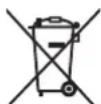
These symbols on the products, packaging, and/or accompanying documents mean that used electrical and electronic products and batteries must not be mixed with general household waste.

For proper treatment, recovery and recycling of old products and used batteries, please take them to applicable collection points in accordance with your national legislation.

By disposing of them correctly, you will help to save valuable resources and prevent any potential negative effects on human health and the environment.

For more information about collection and recycling, please contact your local authority.

Penalties may be applicable for incorrect disposal of this waste, in accordance with national legislation.
PANASONIC ESRW31 - Disposal of Old Equipment and Batteries Only for European Union and countries with recycling systems - 2

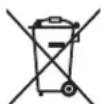
Note for the battery symbol (bottom symbol)

This symbol might be used in combination with a chemical symbol. In this case it complies with the requirement set by the Directive for the chemical involved.

Warnung

B ① ② ③ C D ⑧ ⑨

E 10 11 F

PANASONIC ESRW31 - Warnung - 3

A Schutzkappe

B Scherkopf

natural_image Hand holding a small cylindrical object with a black cap and arrow, against a plain background (no text or symbols)
natural_image Illustration of hands using a spray gun to lift a stick (no text or symbols present)

8

1 (A) (B)

B
PANASONIC ESRW31 - B Scherkopf - 2
D

PANASONIC ESRW31 - B Scherkopf - 3

E
PANASONIC ESRW31 - B Scherkopf - 4
F

PANASONIC ESRW31 - B Scherkopf - 5

G
PANASONIC ESRW31 - B Scherkopf - 6
ES-RW33

natural_image Hand holding a small cylindrical object with a black cap and arrow, against a plain background (no text or symbols)
natural_image Illustration of two hands using a spray gun to apply liquid, no text or symbols present

8

1 (A) (B)

B
Labeled diagram of a hand-operated device with numbered parts for identification

E
Technical diagram showing a mechanical component with labeled parts 10 and 11, including a close-up view of the base.

F
G

PANASONIC ESRW31 - B Scherkopf - 10

PANASONIC ESRW31 - B Scherkopf - 11
ES-RW33

natural_image Hand holding a small object with a black arrow pointing upward (no text or symbols visible)
natural_image Illustration of two hands using a tool to interact with a brush (no text or symbols present)

8

1 (A) (B)

B
B ① ② ③ C D ⑧ ⑨

E
PANASONIC ESRW31 - B Scherkopf - 14
F

PANASONIC ESRW31 - B Scherkopf - 15

A Tapa protectora

natural_image Hand holding a small cylindrical object with a black cap and arrow indicator (no text or symbols)
natural_image Illustration of hands using a tool to apply spray or spray onto a surface, with no visible text or symbols.

8

1 (A) (B)

B ① ② ③ C D ⑧ ⑨

E
Technical diagram showing a component with labeled parts 10 and 11, including a close-up view of the connector.

F
F
F
F
F
F
F
F
F

Opladen

natural_image Hand holding a small cylindrical object with a black cap and arrow indicating direction (no text or symbols)
natural_image Illustration of two hands using a handheld tool to interact with a brush (no text or symbols present)

8

1 (A) (B)

B
PANASONIC ESRW31 - Opladen - 2
D

PANASONIC ESRW31 - Opladen - 3

E
PANASONIC ESRW31 - Opladen - 4
F

PANASONIC ESRW31 - Opladen - 5

G
PANASONIC ESRW31 - Opladen - 6
ES-RW33

A Tampa protectora

B Parte externa

natural_image Hand holding a small cylindrical object with a black cap and arrow indicator (no text or symbols)
natural_image Illustration of hands using a spray gun to brush or brush (no text or symbols present)

8

1 (A) (B)

B ① ② ③ C D ⑧ ⑨

E
Technical diagram showing a mechanical component with labeled parts 10 and 11, including a close-up view of the base.

F
F
G

PANASONIC ESRW31 - B Parte externa - 4

A Skyddshuv

B Ytterbladsdel

① Ytterbladsenhet
② Spärrknappar för ytterbladsenhet
③ Bladram

© Innerblad

D Huvudenhet

natural_image Hand holding a small cylindrical object with a black cap and arrow, against a plain background (no text or symbols)

90°

natural_image Illustration of two hands using a tool to interact, showing motion and vibration effects (no text or symbols)

8

1 (A) (B)

B
B ① ② ③ C D ⑧ ⑨

E
PANASONIC ESRW31 - D Huvudenhet - 4
F

G
PANASONIC ESRW31 - D Huvudenhet - 5

natural_image Hand holding a small cylindrical object with a black cap and arrow, against a plain background (no text or symbols)
natural_image Illustration of two hands using a spray gun to apply liquid, showing the brush and spray nozzle (no text or symbols present)

8

1 (A) (B)

B ① ② ③ C D ⑧ ⑨

E
PANASONIC ESRW31 - D Huvudenhet - 8
F

PANASONIC ESRW31 - D Huvudenhet - 9

G
PANASONIC ESRW31 - D Huvudenhet - 10
ES-RW33

A Beskyttelsesdeksel

B Ytterfolie

① Systemets ytre folie
② Utløserknapper for systemets ytre folie
③ Folieramme

© Innerblader

D Hoveddel

④ Utløserknapper for folieramme
⑤ Låsebryterknap
⑥ Strømbryter (0/1)

⑦ Pluggmottak
⑧ Trimmer
⑨ Trimmerhåndtak

E Vekselstrømadapter (RE7-67)

⑩ Ladekontakt
⑪ Indikatorlampe for lader

Tilbehør

F Rensebørste

© Reiseveske

ES-RW33

Lading
natural_image Hand holding a small cylindrical object with a black cap and arrow, no visible text or symbols

90°

natural_image Illustration of hands using a spray gun to spray liquid onto a cylindrical object (no text or symbols present)

8

PANASONIC ESRW31 - Lading - 2

  1. Ta barbermaskinen ut av vekselstrømsadapteren.
  2. Påfør litt håndsåpe og vann på ytterfolien.
  3. Slå barbermaskinen på.
  4. Slå barbermaskinen av etter 10–20 sekunder.
  5. Ta av ytterfolien, og slå barbermaskinen på.
  6. Rengjør barbermaskinen og ytterfolien med rennende vann.
  7. Tørk av eventuelle vanndråper med en tørr klut.
  8. Tørk ytterfolien og barbermaskinen godt.
  9. Sett ytterfolien på barbermaskinen.

PANASONIC ESRW31 - Lading - 3

D
PANASONIC ESRW31 - Lading - 4

E
PANASONIC ESRW31 - Lading - 5
F

PANASONIC ESRW31 - Lading - 6

G
PANASONIC ESRW31 - Lading - 7
ES-RW33

A Suojus

B Teräverkko-osa

natural_image Hand holding a small cylindrical object with a black cap and arrow indicating direction (no text or symbols)
natural_image Illustration of hands using a spray gun to spray liquid onto a pipe (no text or symbols)

8

1 (A) (B)

B
Labeled diagram of a hand-operated device with numbered parts for identification

E
PANASONIC ESRW31 - B Teräverkko-osa - 3
F
G

PANASONIC ESRW31 - B Teräverkko-osa - 4
ES-RW33

A Nakładka ochronna

natural_image Hand holding a small cylindrical object with a black cap and arrow indicating direction (no text or symbols)
natural_image Illustration of hands using a handheld tool to interact with a spray bottle (no text or symbols present)

8

1 (A) (B)

Polski

B ① ② ③ C D ⑧ ⑨

E
PANASONIC ESRW31 - A Nakładka ochronna - 3

G
PANASONIC ESRW31 - A Nakładka ochronna - 4
ES-RW33

A Ochranný kryt

natural_image Hand holding a small cylindrical object with a black cap and arrow indicator (no text or symbols)
natural_image Illustration of hands using a spray gun to spray liquid onto a pipe (no text or symbols)

8

1 (A) (B)

B ① ② ③ C D ⑧ ⑨

E
Technical diagram showing a mechanical component with labeled parts 10 and 11, plus a close-up view of the component.

F
F

PANASONIC ESRW31 - A Ochranný kryt - 4

G
PANASONIC ESRW31 - A Ochranný kryt - 5

A Ochranný kryt

B Čast's vonkajšou fóliou

natural_image Hand holding a small cylindrical object with a black cap and arrow, against a plain background (no text or symbols)

1 Stlačte tlačidlo spínača uzamknutia a vypínač posuňte 0/1 dohora.

90°

natural_image Illustration of hands using a handheld tool to interact with a brush (no text or symbols present)

8

PANASONIC ESRW31 - B Čast's vonkajšou fóliou - 2

  1. Holiaci strojček vyberte z napájacieho adaptéra.
  2. Na vonkajšiu fóliu naneste mydlo a trochu vody.
  3. Zapnite holiaci strojček.
  4. Po 10 až 20 sekundách vypnite holiaci strojček.
  5. Odoberte časť s vonkajšou fóliou a holiaci strojček zapnite.
  6. Holiaci strojček a čast's vonkajšou fóliou vyčistite pod tečúcou vodou.
  7. Utrite zvyšné kvapky vody suchou tkaninou.
  8. Čast's vonkajšou fóliou a holiaci strojček nechajte dôkladne vyschnút.
  9. Na holiaci strojček nasadte čast's vonkajšou fóliou.

B ① ② ③ C D ⑧ ⑨

E
PANASONIC ESRW31 - B Čast's vonkajšou fóliou - 4
F

PANASONIC ESRW31 - B Čast's vonkajšou fóliou - 5

G
PANASONIC ESRW31 - B Čast's vonkajšou fóliou - 6
ES-RW33

A Védősapka

B Külső szita rész

natural_image Hand holding a small cylindrical object with a black cap and arrow indicating direction (no text or symbols)
natural_image Illustration of two hands using a spray gun to remove or spray liquid from a pipe (no text or symbols present)

8

1 (A) (B)

B ① ② ③ C D ⑧ ⑨

E
Technical diagram of a device with numbered parts and a close-up view of the component

PANASONIC ESRW31 - B Külső szita rész - 4
G

PANASONIC ESRW31 - B Külső szita rész - 5
ES-RW33

natural_image Hand holding a small cylindrical object with a black cap and arrow, against a plain background (no text or symbols)
natural_image Illustration of hands using a handheld tool to interact with a spray bottle (no text or symbols present)

8

1 (A) (B)

B ① ② ③ C D ⑧ ⑨

E
PANASONIC ESRW31 - B Külső szita rész - 8

PANASONIC ESRW31 - B Külső szita rész - 9
G

PANASONIC ESRW31 - B Külső szita rész - 10

A Koruyucu kapak

B Dis elek

① Dis Elek

natural_image Hand holding a small cylindrical object with a black cap and arrow, against a plain background (no text or symbols)
natural_image Illustration of hands using a spray gun to spray liquid onto a pipe (no text or symbols)

8

1 (A) (B)

33, Wanbao North Street, Wanbao Industry Zone, Zhongcun, Panyu District, Guangzhou City, Guangdong Province, China

YETKILI TEMSILCI

Ithalatçı Firma:

Tesan İletişim A.Ş.

© EN, GE, FR, IT, SP, DU, PT, SW, DA, NW, FI, PL, CZ, SK, HU, RO, TK

ES9700RW332503 Y0619-10920

Manual assistant
Powered by Anthropic
Waiting for your message
Product information

Brand : PANASONIC

Model : ESRW31

Category : Shaver