
Power TMS6SG - Car speaker Rockford Fosgate - Free user manual and instructions
Find the device manual for free Power TMS6SG Rockford Fosgate in PDF.


| Product Type | 4-Channel Car Amplifier |
| Brand | Rockford Fosgate |
| Model | Power TMS6SG |
| Rated RMS Power (4 ohms) | 75 Watts x 4 |
| Dimensions (H x W x D) | 3.90 cm x 10.80 cm x 17.20 cm |
| Power Supply | 9 - 16 VDC |
| Recommended External Fuse | 30 A |
| Signal-to-Noise Ratio (at 1W/4 ohms) | ≥ 80 dB |
| Signal-to-Noise Ratio (rated) | ≥ 100 dB |
| Frequency Response | 20 Hz - 20 kHz ±1.0 dB |
| Built-in Filter | Low-Pass / High-Pass / All-Pass (80 Hz, 12 dB/octave slope) |
| Gain Adjustment Range | 150 mV - 11 V |
| Input Impedance | 20 kΩ |
| Damping Factor | 200 |
| Total Harmonic Distortion + Noise | < 0.5% (4 ohms) |
| Protection | Short circuit and overheating (automatic shutdown) |
| Warranty | 1 year (Punch amplifier) |
| Included Accessories | Installation manual, speaker/RCA harness |
Frequently Asked Questions - Power TMS6SG Rockford Fosgate
User questions about Power TMS6SG Rockford Fosgate
0 question about this device. Answer the ones you know or ask your own.
Ask a new question about this device
Download the instructions for your Car speaker in PDF format for free! Find your manual Power TMS6SG - Rockford Fosgate and take your electronic device back in hand. On this page are published all the documents necessary for the use of your device. Power TMS6SG by Rockford Fosgate.
USER MANUAL Power TMS6SG Rockford Fosgate
natural_image
Abstract geometric logo with a black diamond shape and white arrow-like symbol (no text or symbols)Rockford Fosgate®
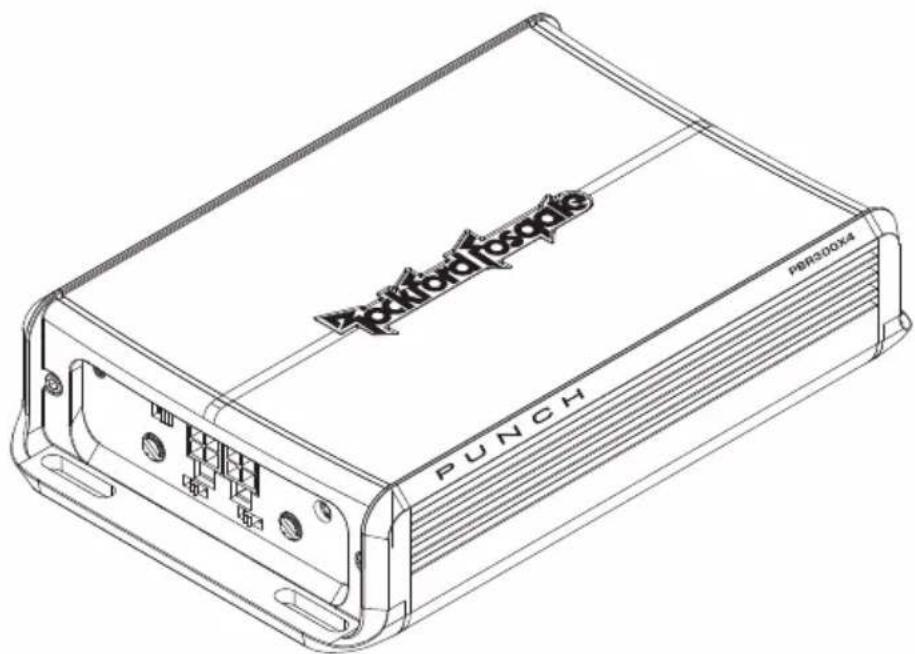
PUNCH™
BOOSTED RAIL 4 CHANNEL AMPLIFIER
PBR300X4
Installation & Operation
Congratulations on your purchase of the world's finest brand of car audio amplifiers. At Rockford Fosgate we are fanatics about musical reproduction at its best, and we are pleased you chose our product. Through years of engineering expertise, hand craftsmanship and critical testing procedures, we have created a wide range of products that reproduce music with all the clarity and richness you deserve.
For maximum performance we recommend you have your new Rockford Fosgate product installed by an Authorized Rockford Fosgate Dealer, as we provide specialized training through Rockford Technical Training Institute (RTTI). Please read your warranty and retain your receipt and original carton for possible future use.
Great product and competent installations are only a piece of the puzzle when it comes to your system. Make sure that your installer is using 100% authentic installation accessories from Rockford Fosgate in your installation. Rockford Fosgate has everything from RCA cables and speaker wire to Power line and battery connectors. Insist on it! After all, your new system deserves nothing but the best.
To add the finishing touch to your new Rockford Fosgate image order your Rockford accessories, which include everything from T-shirts to jackets and hats.
To get a free brochure on Rockford Fosgate products and Rockford accessories, visit our web site at: www.rockfordfosgate.com or, in the U.S. call 1-800-669-9899 or FAX 1-800-398-3985. For all other countries, call +001-480-967-3565 or FAX +001-480-967-8132.
PRACTICE SAFE SOUND™
Continuous exposure to sound pressure levels over 100dB may cause permanent hearing loss. High powered auto sound systems may produce sound pressure levels well over 130dB. Use common sense and practice safe sound.
If, after reading your manual, you still have questions regarding this product, we recommend that you see your Rockford Fosgate dealer. If you need further assistance, you can call us direct at 1-800-669-9899. Be sure to have your serial number, model number and date of purchase available when you call.
The serial number can be found on the outside of the box. Please record it in the space provided below as your permanent record. This will serve as verification of your factory warranty and may become useful in recovering your unit if it is ever stolen.
Serial Number: ____
Model Number: ____
TABLE OF CONTENTS
Introduction....2
Safety Instructions....3
Design Features .... 4
Installation....5-7
Installation Considerations .... 5
Mounting Locations....5
Battery and Charging 6
Wiring the System 6-7
Operation....8
Adjusting Crossover 8
Variable High Level Adjustment ..... 8
Adjusting Gain 8
Troubleshooting....9
Specifications ..... 10
Limited Warranty Information ..... 11
NOTE: Review each section for more detailed information.
©2011 Rockford Corporation. All rights reserved.
Rockford Fosgate, the Rockford Fosgate logo, and the PUNCH logo are either registered trademarks or trademarks of Rockford Corporation.
GETTING STARTED
Welcome to Rockford Fosgate! This manual is designed to provide information for the owner, salesperson and installer. For those of you who want quick information on how to install this product, please turn to the Installation Section of this manual. Other information can be located by using the Table of Contents. We, at Rockford Fosgate, have worked very hard to make sure all the information in this manual is current. But, as we are constantly finding new ways to improve our product, this information is subject to change without notice.
SAFETY INSTRUCTIONS

WARNING
This symbol with “WARNING” is intended to alert the user to the presence of important instructions. Failure to heed the instructions will result in severe injury or death.

CAUTION
This symbol with “CAUTION” is intended to alert the user to the presence of important instructions. Failure to heed the instructions can result in injury or unit damage.

CAUTION: To prevent injury and damage to the unit, please read and follow the instructions in this manual. We want you to enjoy this system, not get a headache.

CAUTIONIf you feel unsure about installing this system yourself, have it installed by a qualified Rockford Fosgate technician.

CAUTIONBefore installation, disconnect the battery negative (-) terminal to prevent damage to the unit, fire and/or possible injury.
CONTENTS OF CARTON
Punch Boosted Rail Mono PBR300X4 Amplifier Installation & Operation Manual
RCA/Speaker Input Harness (Front and Rear) Speaker Output Harness (Front and Rear)
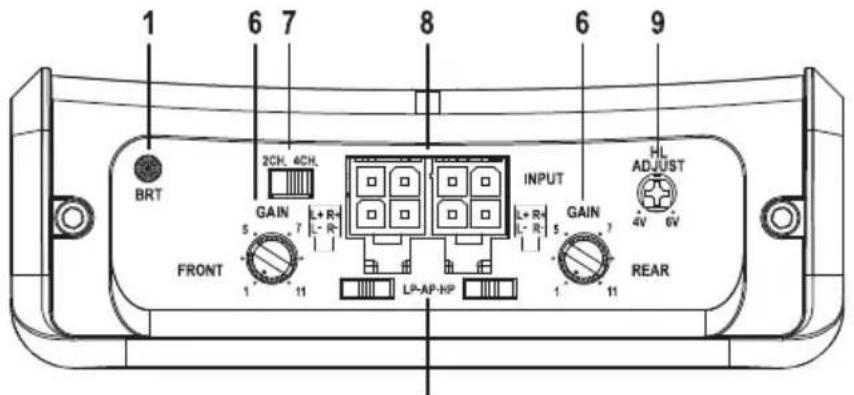
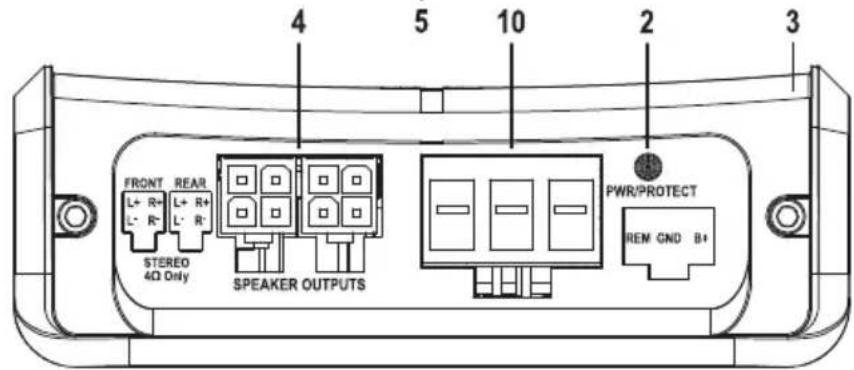
I. BRT(Boosted Rail Technology) LED – This LED illuminates when the unit is in boost mode.
2. Power/Protect LED – This LED illuminates Blue when the unit is turned on and Red if a short circuit/low impedance is detected at the speaker connections or the amplifier's internal components become too hot engaging the protection. The amplifier will shut down to cool if this occurs.
3. Extruded Aluminum Heatsink – The extruded aluminum heatsink of the Punch amplifier dissipates heat generated by the amplifier's circuitry.
4. Speaker Harness Connection (Output) – The Molex connection port for the mating + and - speaker harness.
5. Crossover Switch – Selectable switch for 80Hz High-Pass (HP), All Pass (AP), or Low-Pass (LP) operation.
6. Gain Control – The input gain control is preset to match the output of most source units. It can be adjusted to match output levels from a variety of source units.
7. 2/4 Channel Switch – Setting this switch to the 2CH. position, switches the inputs to a 2-channel mode, allowing connection to only the front inputs with a 4-channel output.
8. RCA/Speaker Harness Connection (Input) – The Molex connection port for the mating RCA/Speaker harness.
9. Variable High Level Adjustment – With the variable 4V to 6V DC(Direct Current) offset voltage input turn on can be set.
10. Power Terminals – The Molex connection port for the mating Remote/Ground/Power plug.
INSTALLATION CONSIDERATIONS
The following is a list of tools needed for installation:
| Fuse-holder and fuse. (See specifications for fuse rating) | Wire cutters | Assorted connectors |
| #1 Standard screwdriver | Adequate Length—Power Wire | |
| Volt/Ohm Meter | Battery post wrench | Adequate Length—Remote Turn-on Wire |
| Wire strippers | Hand held drill w/assorted bits | |
| Wire crimpers | 1/8" diameter heatshrink tubing | Adequate Length—Ground Wire |
NOTE: We recommend a 10 AWG wire for use on the power (B+) and ground (GND) connections.
This section focuses on some of the vehicle considerations for installing your new amplifier.
Pre-planning your system layout and best wiring routes will save installation time. When deciding on the layout of your new system, be sure that each component will be easily accessible for making adjustments.

CAUTION: If you feel unsure about installing this system yourself, have it installed by a qualified technician.

CAUTION: Before installation, disconnect the battery negative (-) terminal to prevent damage to the unit, fire and/or possible injury.
Before beginning any installation, follow these simple rules:
I. Be sure to carefully read and understand the instructions before attempting to install the unit.
2. For safety, disconnect the negative lead from the battery prior to beginning the installation.
3. For easier assembly, we suggest you run all wires prior to mounting your unit in place.
4. Route all of the RCA cables close together and away from any high current wires.
5. Use high quality connectors for a reliable installation and to minimize signal or power loss.
6. Think before you drill! Be careful not to cut or drill into gas tanks, fuel lines, brake or hydraulic lines, vacuum lines or electrical wiring when working on any vehicle.
7. Never run wires underneath the vehicle. Running the wires inside the vehicle provides the best protection.
8. Avoid running wires over or through sharp edges. Use rubber or plastic grommets to protect any wires routed through metal, especially the firewall.
9. ALWAYS protect the battery and electrical system from damage with proper fusing. Install the appropriate fuse holder and fuse on the +12V power wire within 18" (45.7 cm) of the battery terminal.
10. When grounding to the chassis of the vehicle, scrape all paint from the metal to ensure a good, clean ground connection. Grounding connections should be as short as possible and always be connected to metal that is welded to the main body, or chassis, of the vehicle.
MOUNTING LOCATIONS
Engine Compartment
Never mount this unit in the engine compartment. Mounting the unit in the engine compartment will void your warranty.
Trunk Mounting
Mounting the amplifier vertically or inverted will provide adequate cooling of the amplifier.
Mounting the amplifier on the floor of the trunk will provide the best cooling of the amplifier.
Passenger Compartment Mounting
Mounting the amplifier in the passenger compartment will work as long as you provide a sufficient amount of air for the amplifier to cool itself. If you are going to mount the amplifier under the seat of the vehicle, you must have at least 1" (2.54cm) of air gap around the amplifier's heatsink.
Mounting the amplifier with less than 1" (2.54cm) of air gap around the amplifier's heatsink in the passenger compartment will not provide proper cooling and will severely affect the performance of the amplifier and is strongly not recommended.
BATTERY AND CHARGING
Amplifiers will put an increased load on the vehicle's battery and charging system. We recommend checking your alternator and battery condition to ensure that the electrical system has enough capacity to handle the increased load of your stereo system. Stock electrical systems which are in good condition should be able to handle the extra load of any Punch Series amplifier without problems, although battery and alternator life can be reduced slightly. To maximize the performance of your amplifier, we suggest the use of a heavy duty battery and an energy storage capacitor.
WIRING THE SYSTEM

CAUTION: If you do not feel comfortable with wiring your new unit, please see your local Authorized Rockford Fosgate Dealer for installation.

CAUTION: Before installation, disconnect the battery negative (-) terminal to prevent damage to the unit, fire and/or possible injury.

CAUTION: Avoid running power wires near the low level input cables, antenna, power leads, sensitive equipment or harnesses. The power wires carry substantial current and could induce noise into the audio system.
I. Plan the wire routing. Keep RCA cables close together but isolated from the amplifier's power cables and any high power auto accessories, especially electric motors. This is done to prevent coupling the noise from radiated electrical fields into the audio signal. When feeding the wires through the firewall or any metal barrier, protect them with plastic or rubber grommets to prevent short circuits. Leave the wires long at this point to adjust for a precise fit at a later time.
NOTE: We recommend a 10 AWG wire for use on the power (B+) and ground (GND) connections.
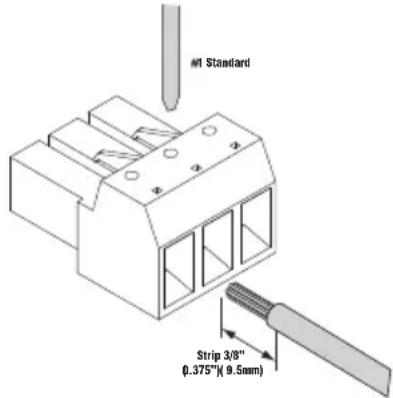
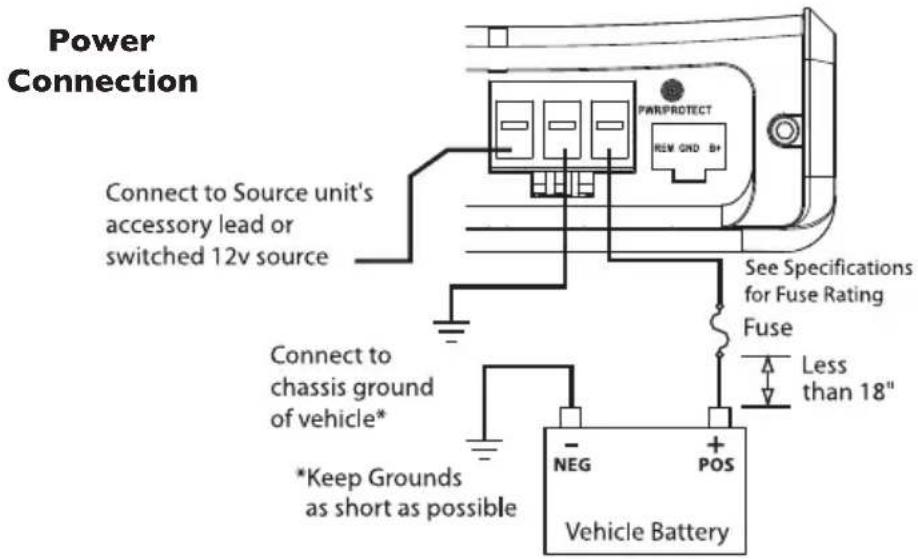
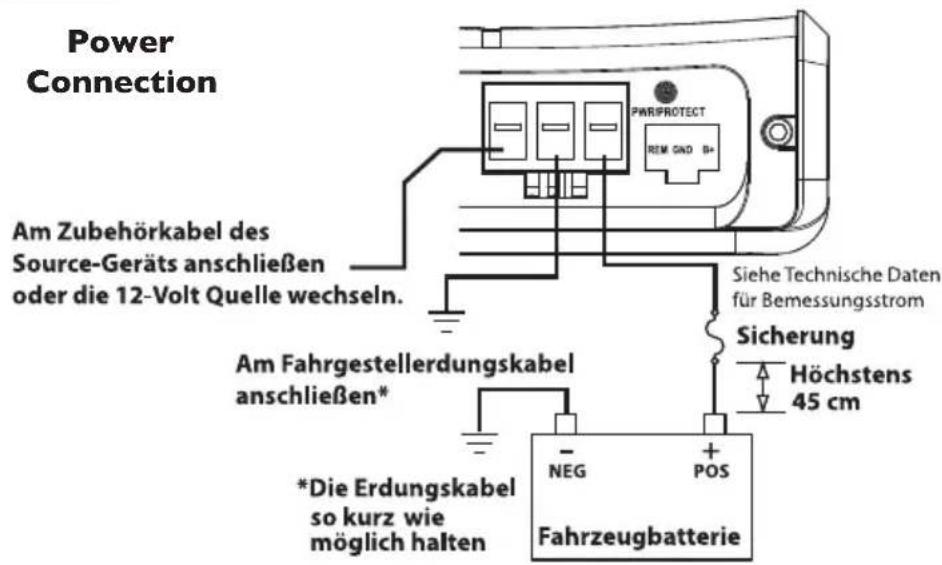
- Prepare the RED wire (power cable) for attachment to the amplifier by stripping 3/8" of insulation from the end of the wire. Insert the bared wire into the B+ terminal and tighten the set screw to secure the cable in place.
NOTE: The B+ cable MUST be fused 18" or less from the vehicle's battery. Install the fuseholder under the hood and ensure connections are water tight.
- Trim the RED wire (power cable) within 18" of the battery and splice in a inline fuse holder (not supplied). See Specifications for the rating of the fuse to be used. DO NOT install the fuse at this time.
-
Strip 1/2" from the battery end of the power cable and crimp a large ring terminal to the cable. Use the ring terminal to connect to the battery positive terminal.
-
Prepare the BLACK wire (Ground cable) for attachment to the amplifier by stripping 3/8" of insulation from the end of the wire. Insert the bare wire into the GROUND terminal and tighten the set screw to secure the cable in place. Prepare the chassis ground by scraping any paint from the metal surface and thoroughly clean the area of all dirt and grease. Strip the other end of the wire and attach a ring connector. Fasten the cable to the chassis using a non-anodized screw and a star washer.
NOTE: Keep the length of the BLACK wire (Ground) as short as possible. Always less than 30"(76.2cm).
- Prepare the Remote turn-on wire for attachment to the amplifier by stripping 3/8" of insulation from the end of the wire. Insert the bared wire into the REMOTE terminal and tighten the set screw to secure the wire in place. Connect the other end of the Remote wire to a switched 12 volt positive source. The switched voltage is usually taken from the source unit's remote amp on lead. If the source unit does not have this output available, the recommended solution is to wire a mechanical switch in line with a 12 volt source to activate the amplifier.
NOTE: When utilizing a 6V DC(Direct Current) offset voltage, the REM becomes an output to turn on/off an amplifier or other accessory.
- Securely mount the amplifier to the vehicle or amp rack. Be careful not to mount the amplifier on cardboard or plastic panels. Doing so may enable the screws to pull out from the panel due to road vibration or sudden vehicle stops.
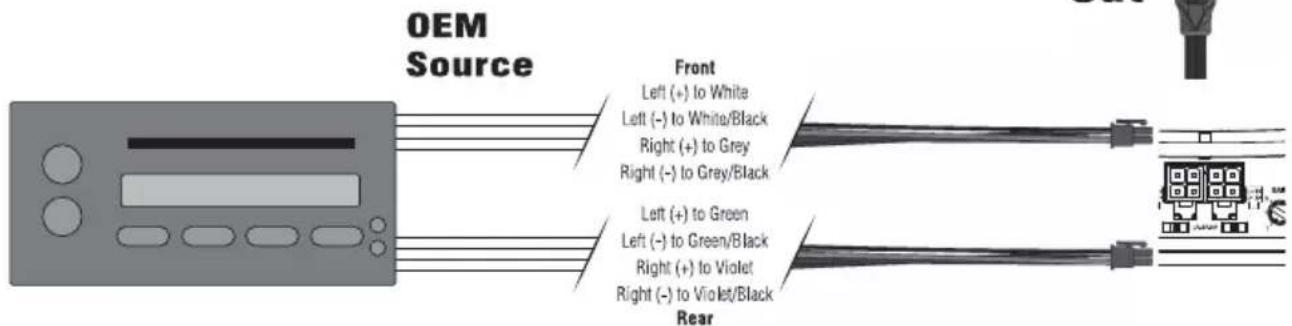
- Connect from source signal by plugging the RCA cables into the RCA/Speaker Harness input jacks, then insert the four pin Molex connector into the mating four pin INPUT connector at the amplifier.
From Source Unit

natural_image
Diagram of a cable connector with two connectors and a terminal device (no text or symbols visible)NOTE: When the installation requires a High Level(Speaker) input, the RCA/Speaker Harness will need to be cut on the speaker wire side of the y-splitter. Then connect the harness(s) to the corresponding vehicle wires.

CAUTION: Always ensure power is off or disconnected at the amplifier before connecting RCA cables. Failure to do so may cause injury, damage to the amplifier and/or connected components.
- Connect the speakers. Strip the speaker wires 1/2" and connect to the Speaker Wire Harness, then insert the four pin Molex connector into the mating four pin SPEAKER connector at the amplifier. Be sure to maintain proper speaker polarity. DO NOT chassis ground any of the speaker leads as unstable operation may result.
NOTE: 4 ohm Stereo ONLY.
- Perform a final check of the completed system wiring to ensure that all connections are accurate. Check all power and ground connections for frayed wires and loose connections which could cause problems. Install inline fuse near battery connection.
NOTE: Follow the diagrams for proper signal polarity.
ADJUSTING CROSSOVER
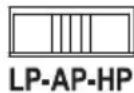
Placing the crossover switch in the HP position sets the amplifier to the 80Hz High Pass mode, enabling frequencies above the cut-off point to pass.
Placing the crossover switch in the AP position sets the amplifier to the All Pass mode, preventing any crossover adjustment, allowing all frequencies to pass.
Placing the crossover switch in the LP position sets the amplifier to the 80Hz Low Pass mode, enabling frequencies below the cut-off point to pass.
VARIABLE HIGH LEVEL ADJUSTMENT
The variable high level adjustment can be used to delay the turn on eliminating induced noise, turn on/off pop.
In a high level(speaker) input application, utilizing a 6V DC(Direct Current) offset voltage, the Punch Boosted Rail amplifier can be turned on/off allowing the REM to be used as an output to turn on/off an amplifier or other accessory.

ADJUSTING GAIN
To adjust the gain setting, turn the amplifier gains all the way down (counter-clockwise). Turn the source unit volume up until distortion is audible and then turn it down a bit until the distortion is inaudible. This will be about all the way up on most source units. Next, increase the amplifier gain setting until adequate volume is achieved.
NOTE: Best signal to noise and dynamic range are realized with the gain at minimum. Most users find adequate gain and volume is achieved at about halfway in the adjustment range.

CAUTION: Avoid setting the amplifier gain very high as noise and distortion will increase significantly.
NOTE: For a more in depth setting procedure, contact Rockford Technical Support.
NOTE: If you are having problems after installation follow the Troubleshooting procedures below.
Procedure I: Check Amplifier for proper connections.
Verify that POWER light is on. If POWER light is on skip to Step 3, if not continue.
I. Check in-line fuse on battery positive cable. Replace if necessary.
2. Verify that Ground connection is connected to clean metal on the vehicle's chassis. Repair/replace if necessary.
3. Verify there is 9 to 16 Volts present at the positive battery and remote turn-on cable. Verify quality connections for both cables at amplifier, stereo, and battery/fuseholder. Repair/replace if necessary.
Procedure 2: Protect light is on.
- This is a sign of a possible short in the speaker connections. Check for proper speaker connections and use an ohm meter to check for possible shorts in the speaker wiring. Too low of a speaker impedance may also cause Protect to light.
- In the event that the speaker connections are not the issue, check for proper speaker impedance and rewire if needed. This can also be a sign of driving the amplifier at very high power levels without adequate airflow around the amplifier. Shut off the system and allow amplifier to cool. Check that the vehicle charging system is maintaining proper voltage. If the previous items do not solve the problem, a fault may be in the amplifier, call customer service for support.
Procedure 3: Check Amplifier for audio output.
I. Verify good RCA/Speaker input connections at stereo and amplifier. Check entire length of cables for kinks, splices, etc. Test RCA/Speaker inputs for AC volts with stereo on. Repair/replace if necessary.
2. Disconnect RCA/Speaker input from amplifier. Connect RCA/Speaker input from test stereo directly to amplifier input.
Procedure 4: Check Amplifier if you experience Turn-on Pop.
I. Disconnect input signal to amplifier and turn amplifier on and off.
2. If the noise is eliminated, connect the REMOTE lead of amplifier to source unit with a delay turn-on module.
OR
I. Use a different 12 Volt source for REMOTE lead of amplifier (i.e. battery direct).
- If the noise is eliminated, use a relay to isolate the amplifier from noisy turn-on output.
OR
I. In a high level(speaker) input application the Variable High Level Adjustment can be used to delay the turn on eliminating turn on/off pop.
Procedure 5: Check Amplifier if you experience excess Engine Noise.
I. Route all signal carrying wires (RCA, Speaker cables) away from power and ground wires.
OR
- Bypass any and all electrical components between the stereo and the amplifier(s). Connect stereo directly to input of amplifier. If noise goes away the unit being bypassed is the cause of the noise.
OR
- Remove existing ground wires for all electrical components. Reground wires to different locations. Verify that grounding location is clean, shiny metal free of paint, rust etc.
OR
- Add secondary ground cable from negative battery terminal to the chassis metal or engine block of vehicle.
OR
- Have alternator and battery load tested by your mechanic. Verify good working order of vehicle electrical system including distributor, spark plugs, spark plug wires, voltage regulator etc.
MODEL- PUNCH PBR300X4
Continuous Power Rating (RMS) - Measured at 14.4 Battery Volts
4 Load Stereo 75 Watts x 4
Dimensions: Height 1.53" (3.90cm)
Width 4.25" (10.8cm)
Length 6.75" (17.2cm)
External Battery Fuse Rating 30A
"A" Weighted Signal to Noise Ratio
Referenced to 1 Watt into 4 ohms ≥80 dB
"A" Weighted Signal to Noise Ratio
Referenced to rated output into 4 ohms ≥100 dB
Crossover Slope 12dB/octave Butterworth
Crossover Frequency 80Hz LP/AP/HP
Frequency Response 20Hz to 20kHz ±1.0dB
Signal Voltage Adjustment Range Variable from 150mV to 11V
Protection Short circuit protection shut downs the amplifier in
case of very low impedance, shorted speaker wires, or shuts down the amplifier in case of overheating.
Input Impedance
20K ohms
Operating Voltage
9 to 16 Volts DC
CMRR (Common Mode Rejection Ratio)
55dB @ 1kHz
Damping Factor
200
THD+N (Total Harmonic Distortion+Noise)
< 0.5% @ 4 ohm
These specifications are Amplifier Power Standard CEA-2006 Compliant
Specifications subject to change without notice
Rockford Corporation offers a limited warranty on Rockford Fosgate products on the following terms:
Length of Warranty
Source Units, Speakers, Signal Processors and PUNCH Amplifiers – 1 Year
POWER Amplifiers – 2 Years
Any Factory Refurbished Product – 90 days (receipt required)
What is Covered
This warranty applies only to Rockford Fosgate products sold to consumers by Authorized Rockford Fosgate Dealers in the United States of America or its possessions. Product purchased by consumers from an Authorized Rockford Fosgate Dealer in another country are covered only by that country's Distributor and not by Rockford Corporation.
Who is Covered
This warranty covers only the original purchaser of Rockford product purchased from an Authorized Rockford Fosgate Dealer in the United States. In order to receive service, the purchaser must provide Rockford with a copy of the receipt stating the customer name, dealer name, product purchased and date of purchase.
Products found to be defective during the warranty period will be repaired or replaced (with a product deemed to be equivalent) at Rockford's discretion.
What is Not Covered
I. Damage caused by accident, abuse, improper operations, water, theft, shipping
2. Any cost or expense related to the removal or reinstallation of product
3. Service performed by anyone other than Rockford or an Authorized Rockford Fosgate Service Center
4. Any product which has had the serial number defaced, altered, or removed
5. Subsequent damage to other components
6. Any product purchased outside the U.S.
7. Any product not purchased from an Authorized Rockford Fosgate Dealer
Limit on Implied Warranties
Any implied warranties including warranties of fitness for use and merchantability are limited in duration to the period of the express warranty set forth above. Some states do not allow limitations on the length of an implied warranty, so this limitation may not apply. No person is authorized to assume for Rockford Fosgate any other liability in connection with the sale of the product.
How to Obtain Service
Contact the Authorized Rockford Fosgate Dealer you purchased this product from.
If you need further assistance, call 1-800-669-9899 for Rockford Customer Service. You must obtain an RA# (Return Authorization number) to return any product to Rockford Fosgate. You are responsible for shipment of product to Rockford.
EU Warranty
This product meets the current EU warranty requirements, see your Authorized dealer for details.
Cher client,
natural_image
Diagram of a cable connector with two connectors and an external terminal (no text or symbols)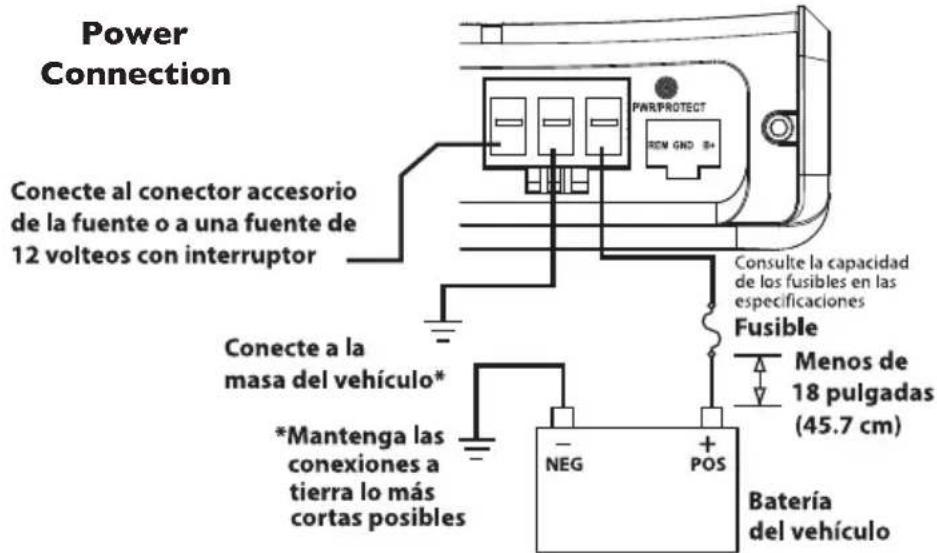
www.rockfordfosgate.com/rftech

Rockford Fosgate
Rockford Corporation
600 South Rockford Drive
Tempe, Arizona 85281 U.S.A.
In U.S.A., (480) 967-3565 - Customer Service I-800-669-9899
www.rockfordfosgate.com

- Rockford Fosgate®
- PUNCH™
- BOOSTED RAIL 4 CHANNEL AMPLIFIER
- PBR300X4
- Installation & Operation
- PRACTICE SAFE SOUND™
- TABLE OF CONTENTS
- GETTING STARTED
- SAFETY INSTRUCTIONS
- WARNING
- CAUTION
- CONTENTS OF CARTON
- INSTALLATION CONSIDERATIONS
- MOUNTING LOCATIONS
- Engine Compartment
- Trunk Mounting
- Passenger Compartment Mounting
- BATTERY AND CHARGING
- WIRING THE SYSTEM
- ADJUSTING CROSSOVER
- VARIABLE HIGH LEVEL ADJUSTMENT
- ADJUSTING GAIN
- Procedure I: Check Amplifier for proper connections.
- Verify that POWER light is on. If POWER light is on skip to Step 3, if not continue.
- Procedure 2: Protect light is on.
- Procedure 3: Check Amplifier for audio output.
- Procedure 4: Check Amplifier if you experience Turn-on Pop.
- OR
- Procedure 5: Check Amplifier if you experience excess Engine Noise.
- MODEL- PUNCH PBR300X4
- Continuous Power Rating (RMS) - Measured at 14.4 Battery Volts
- Length of Warranty
- What is Covered
- Who is Covered
- What is Not Covered
- Limit on Implied Warranties
- How to Obtain Service
- EU Warranty
Brand : Rockford Fosgate
Model : Power TMS6SG
Category : Car speaker