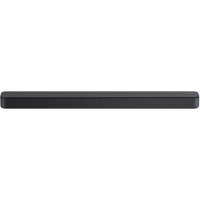
HTS100F - Home Theater System SONY - Free user manual and instructions
Find the device manual for free HTS100F SONY in PDF.


User questions about HTS100F SONY
0 question about this device. Answer the ones you know or ask your own.
Ask a new question about this device
Download the instructions for your Home Theater System in PDF format for free! Find your manual HTS100F - SONY and take your electronic device back in hand. On this page are published all the documents necessary for the use of your device. HTS100F by SONY.
USER MANUAL HTS100F SONY
Operating Instructions
GB
©2018 Sony Corporation Printed in China
HT-S100F
HT-S100F
WARNING
Do not install the appliance in a confined space, such as a bookcase or built-in cabinet.
To reduce the risk of fire, do not cover the ventilation opening of the appliance with newspapers, tablecloths, curtains, etc.
Do not expose the appliance to naked flame sources (for example, lighted candles).
To reduce the risk of fire or electric shock, do not expose this appliance to dripping or splashing, and do not place objects filled with liquids, such as vases, on the appliance.
The unit is not disconnected from the mains as long as it is connected to the AC outlet, even if the unit itself has been turned off.
As the main plug is used to disconnect the unit from the mains, connect the unit to an easily accessible AC outlet.
Should you notice an abnormality in the unit, disconnect the main plug from the AC outlet immediately.
Do not expose batteries or appliances with battery-installed to excessive heat, such as sunshine and fire.
Indoor use only.
Recommended cables
Properly shielded and grounded cables and connectors must be used for connection to host computers and/or peripherals.
For the Bar Speaker
The nameplate is located on the bottom of the Bar Speaker.
Table of Contents
Basic Setup
separate document)
About These Operating Instructions 3
What's in the Box 4
What You Can Do with the System 5
Guide to Parts and Controls 6
Preparing for Using the System
Mounting the Bar Speaker on a Wall 12
When the TV Remote Control does not Work 14
Listening to the Sound
Listening to a TV and Other Devices 15
Listening to Music on a USB Device 16
Selecting the Sound Effect
Adjusting the Sound 18
Listening to Music/Sound with the BLUETOOTH® Function
Listening to Music from a Mobile Device 20
Turning the System On by Operating the BLUETOOTH Device 22
Turning the BLUETOOTH Function Off 22
Using the Various Functions
Using the Control for HDMI Function 23
Saving Power Consumption 24
Troubleshooting
Troubleshooting 25
Resetting the System 29
Additional Information
Specifications 30
Playable Types of Files (USB Input) 31
Supported Input Audio Formats (HDMI OUT (TV (ARC)) or TV IN (OPTICAL)) 31
On BLUETOOTH Communication 32
Precautions 33
About These Operating Instructions
The instructions in these Operating Instructions describe the controls on the remote control.
- Some illustrations are presented as conceptual drawings, and may be different from the actual products.
The default settings are underlined on each feature description.
What's in the Box
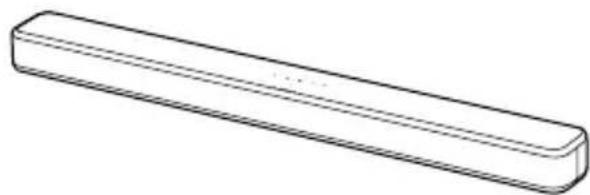
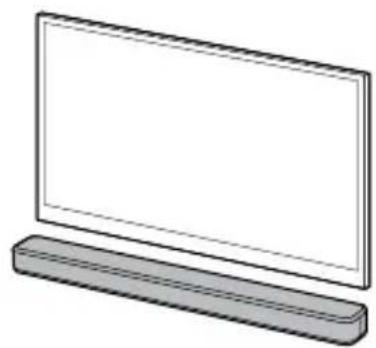
- Bar Speaker(1)

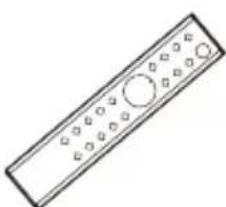
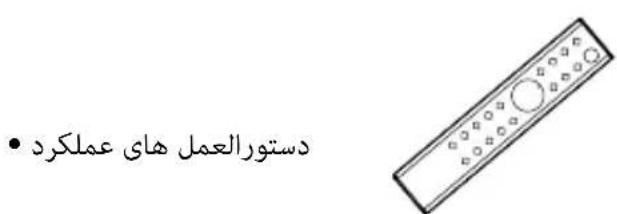
- Remote control (1)
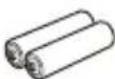
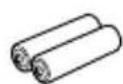
R03 (size AAA) battery (2)
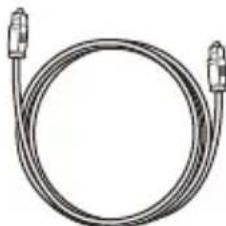
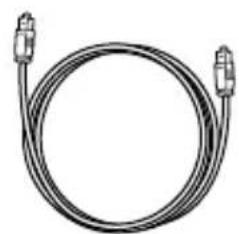
Optical digital cable (1)
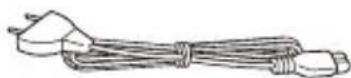
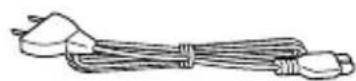
- AC power cord (mains lead) (1)
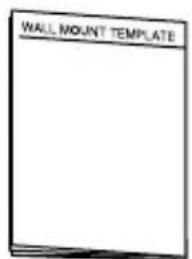
- WALL MOUNT TEMPLATE (1)

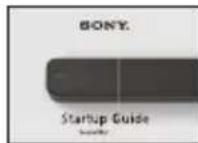
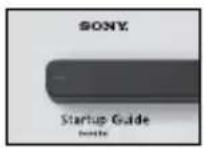
- Startup Guide
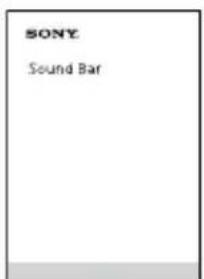
- Operating Instructions
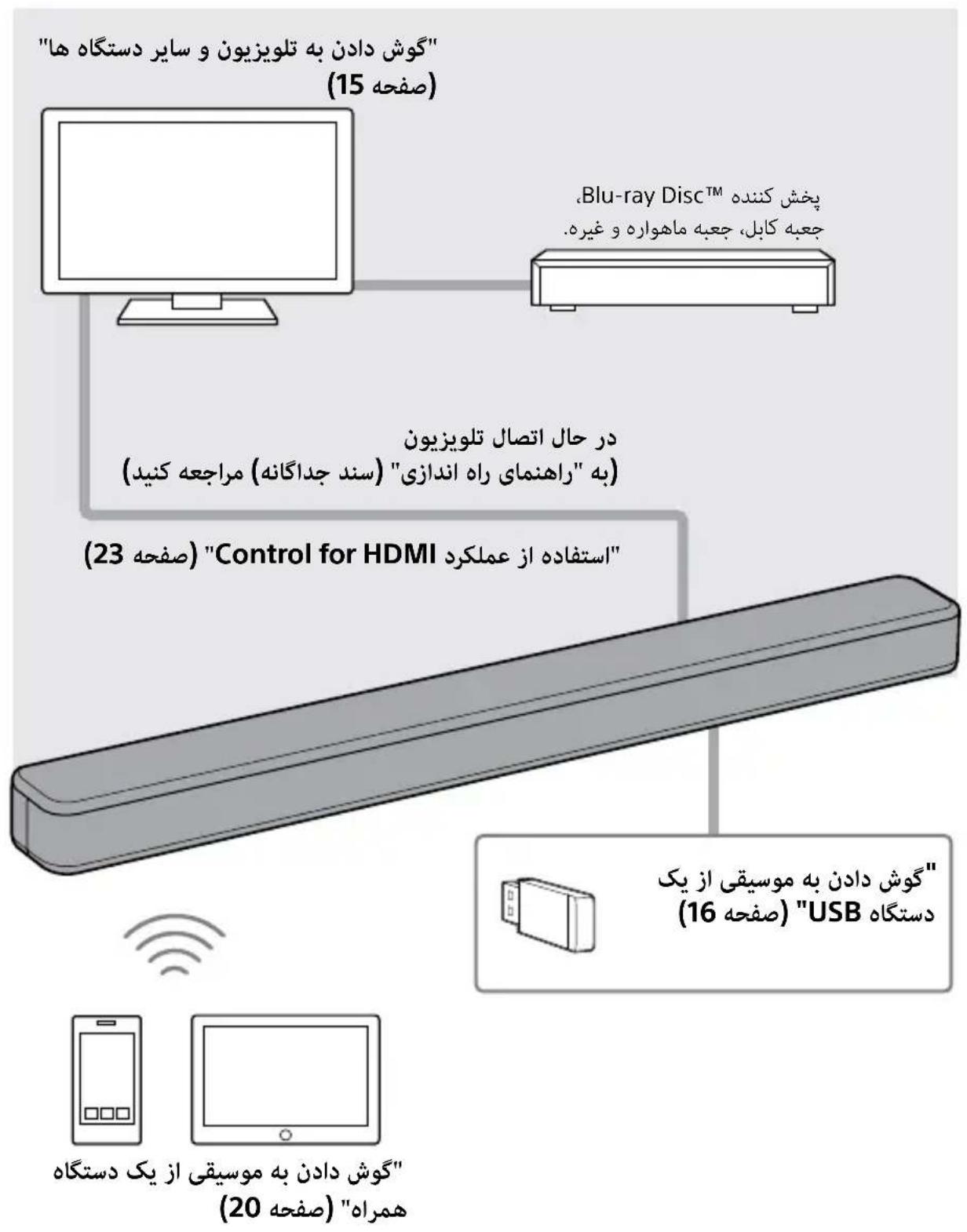
What You Can Do with the System
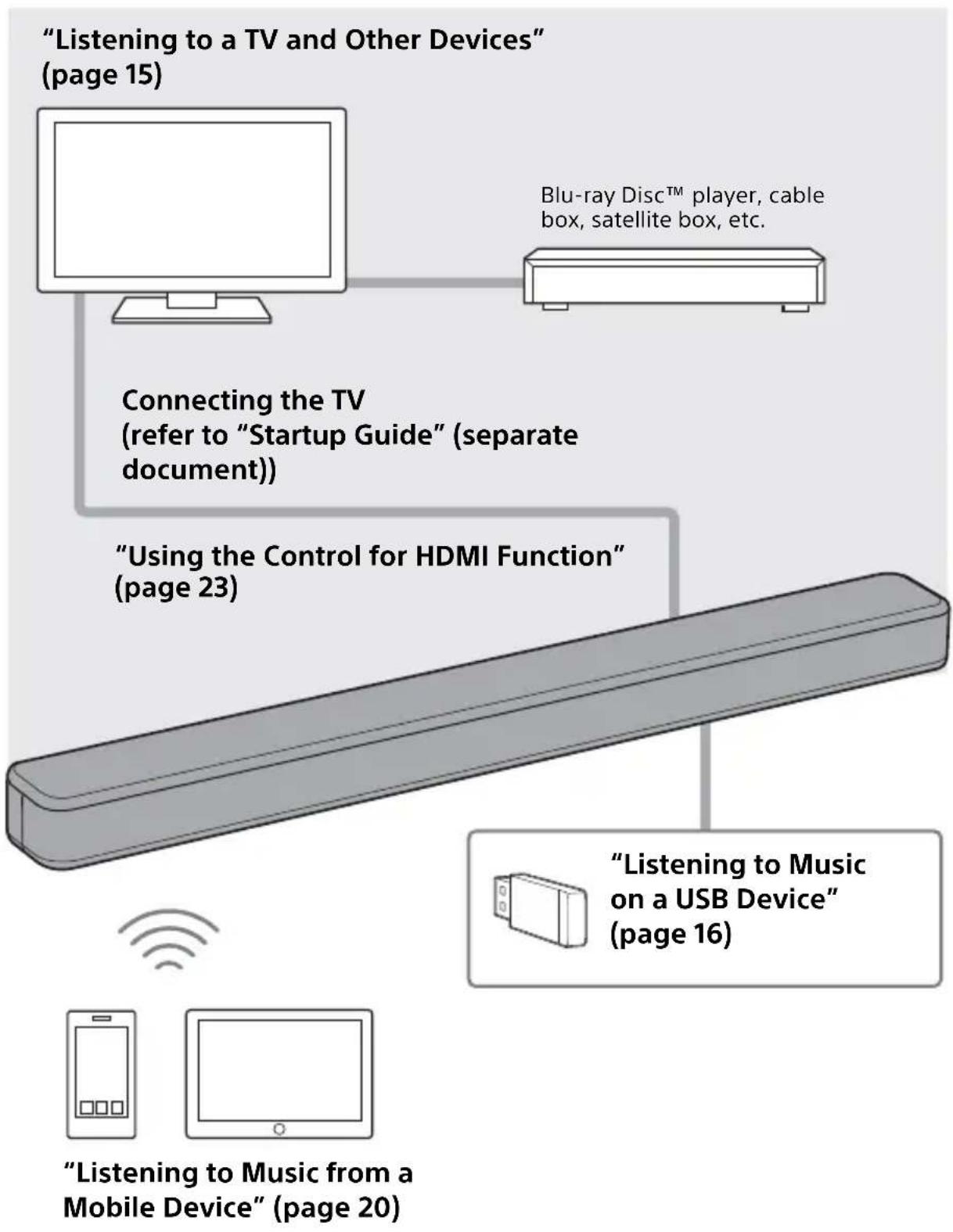
Guide to Parts and Controls
Details are omitted from the illustrations.
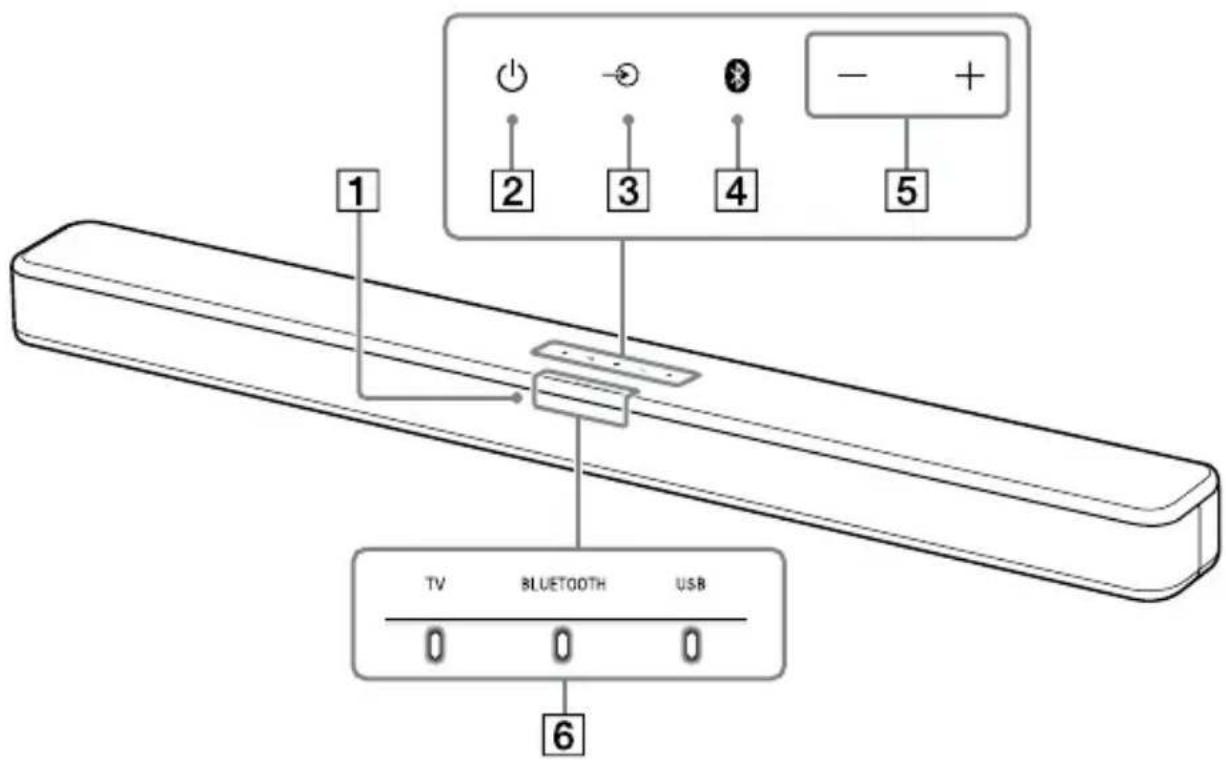
Bar Speaker
Front
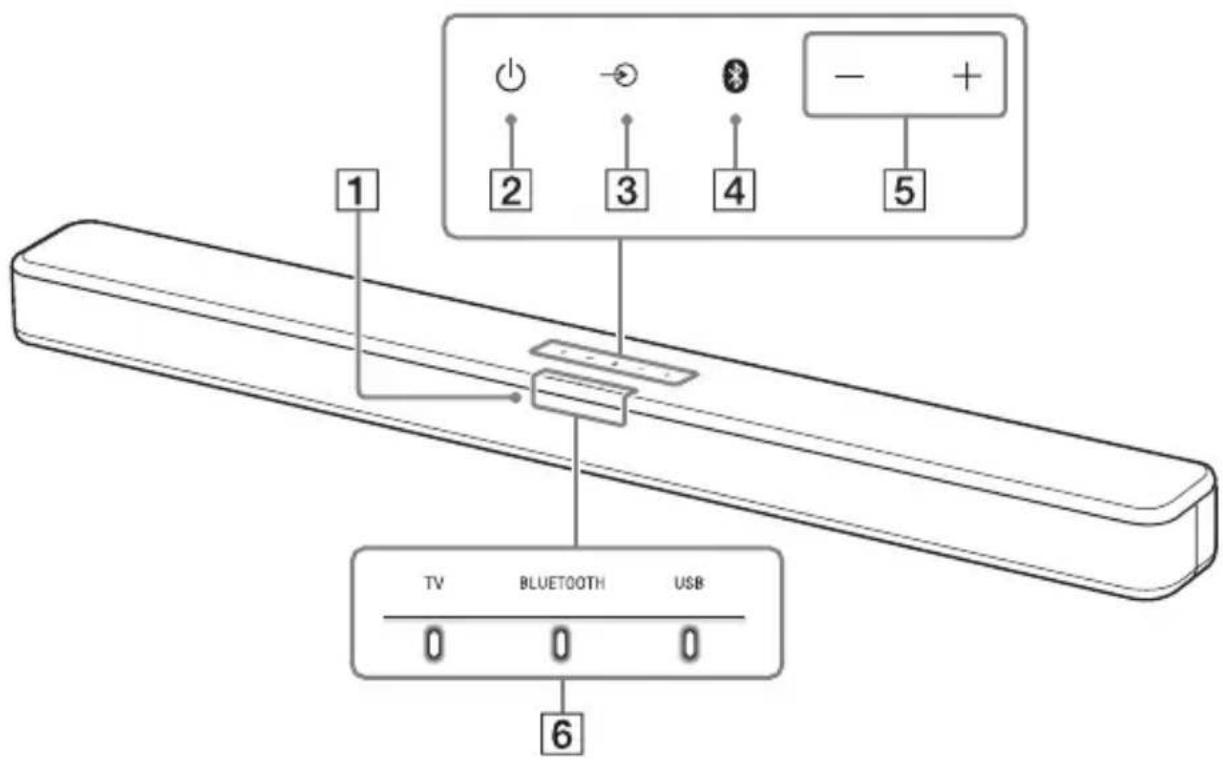
Remote control sensor
Point the remote control at the remote control sensor to operate the system.
2 (power) button
Turns on the system or sets it to standby mode.
3 input select) button (page 15)
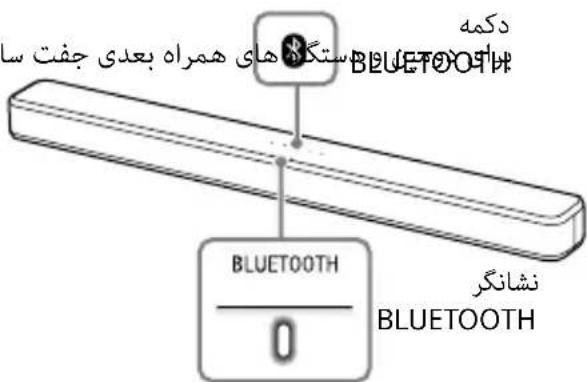
4 BLUETOOTH button (page 20)
5 +/- (volume) buttons
6 Indicators
For details, see "About the indicators on the Bar Speaker" (page 7).
About the indicators on the Bar Speaker
Lighting and flashing of the indicator(s) on the Bar Speaker indicate the input or status of the input device.
| Indicators Status | |
| TV | ·Lights: TV input is selected. |
| 0 | |
| BLUETOOTH | ·Lights in blue: BLUETOOTH connection is established (BLUETOOTH input is selected). |
| 0 | ·Flashes quickly in blue: While waiting for connection with a device. |
| ·Flashes in blue: While reconnecting or performing pairing. | |
| USB | ·Lights: USB input is selected. |
| ·Flashes twice: The play mode is changed. | |
| ·Flashes three times first, then flashes slowly repeatedly: When connecting an unsupported device. | |
| ·Flashes repeatedly: While reading data of the connected USB device. | |
The indicators flash when turning on/off the function setting or operating the remote control.
| Indicators Status | |||
| TV | • Flashes twice: One of the following functions is set to on. - N i g h t m o d e ( p a g e 18 ) - V o i c e m o d e ( p a g e 18 ) | ||
| 0 | |||
| • Flashes once: The audio channel is set to Main (page 19), the sound mode is selected (page 18), or one of the following functions is set to off. - N i g h t m o d e ( p a g e 18 ) - V o i c e m o d e ( p a g e 18 ) | |||
| USB | • Flashes twice: One of the following functions is set to on. - D o l b y D R C ( p a g e 19 ) - Control for HDMI (page 23) - BLUETOOTH standby (page 22) - BLUETOOTH function (page 22) - Auto standby (page 24) - IR repeater (page 14) | ||
| 0 | |||
| • Flashes once: The audio channel is set to Sub (page 19) or one of the following functions is set to off. - D o l b y D R C ( p a g e 19 ) - Control for HDMI (page 23) - BLUETOOTH standby (page 22) - BLUETOOTH function (page 22) - Auto standby (page 24) - IR repeater (page 14) | |||
| TV | USB | • Flash once: The audio channel is set to Main/Sub (page 19). | |
| 0 | 0 | 0 | |
| TV | BLUETOOTH | USB | • Flash quickly: The protection feature is activated (page 28). • Flash slowly: The system enters standby mode by the auto standby function (page 24). |
| 0 | 0 | 0 | |
The indicators flash while adjusting the volume level.
| Indicators Status | ||
| TV | BLUETOOTH | USB |
| 0 | 0 | 0 |
| TV | BLUETOOTH | USB |
| 0 | 0 | 0 |
| TV | BLUETOOTH | USB |
| 0 | 0 | 0 |
| TV | BLUETOOTH | USB |
| 0 | 0 | 0 |
Tip
You can turn the indicators off by pressing INDICATOR.
Even if the indicators are turned off by pressing INDICATOR, if you operate the system, the indicators in relation to the operation light or flash.
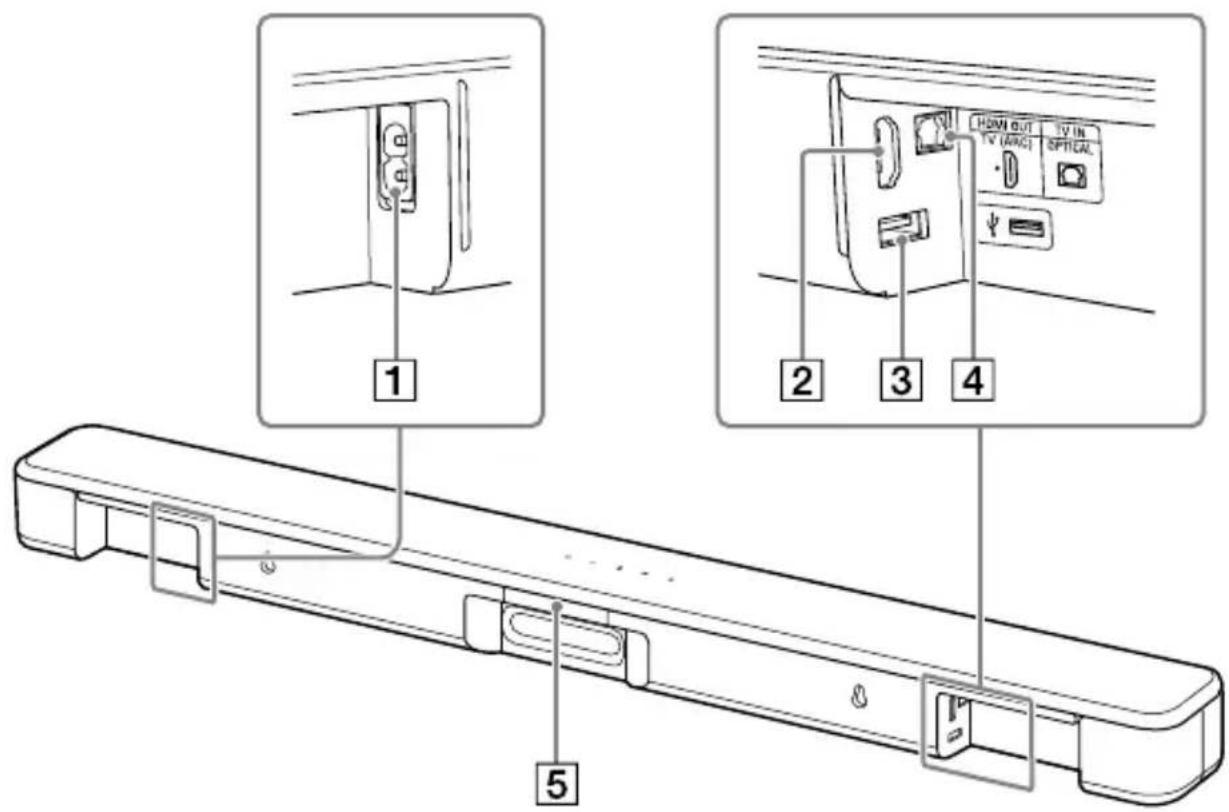
Rear
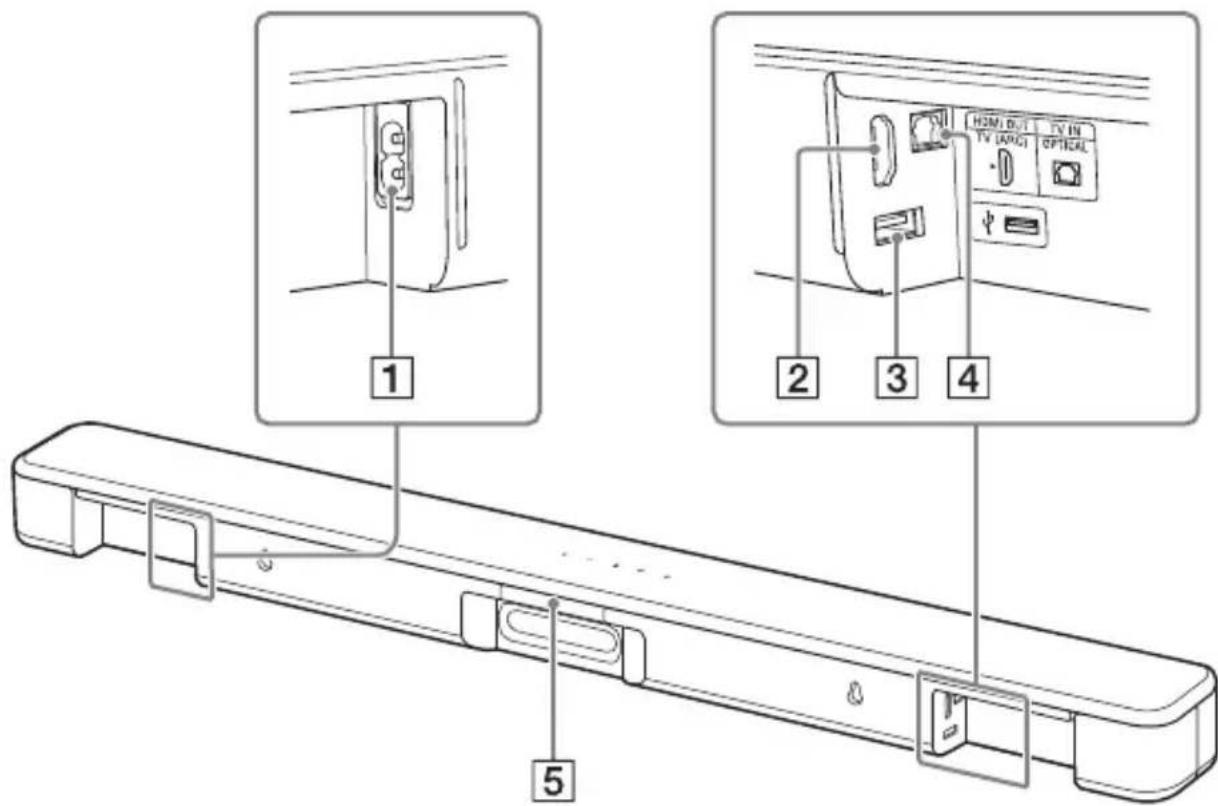
1 AC IN terminal
2 HDMI OUT (TV (ARC)) jack
Connect a TV that has an HDMI input jack with an HDMI cable. The system is compatible with Audio Return Channel (ARC). ARC is the function that sends TV sound to an AV device such as the system from the TV's HDMI jack.
3 (USB) port (page 16)
4 TV IN (OPTICAL) jack
5 IR repeater (page 14)
Transmits the remote signal of the TV remote control to the TV.
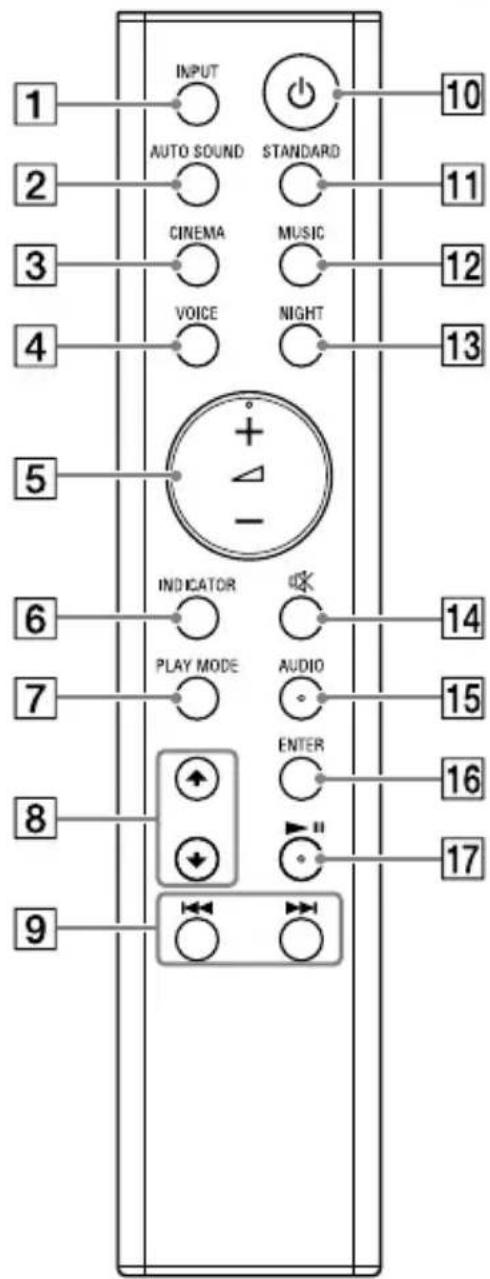
Remote Control
Some buttons function differently depending on how long the button is pressed. The icons below indicate how long to press the button.
: Press the button.
: Press and hold the button for 5 seconds.
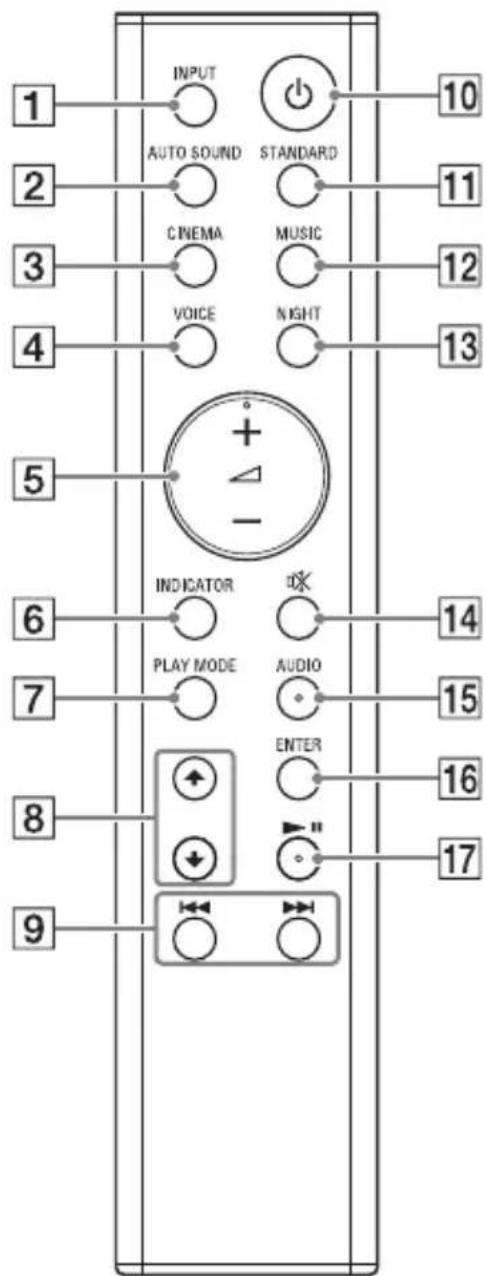
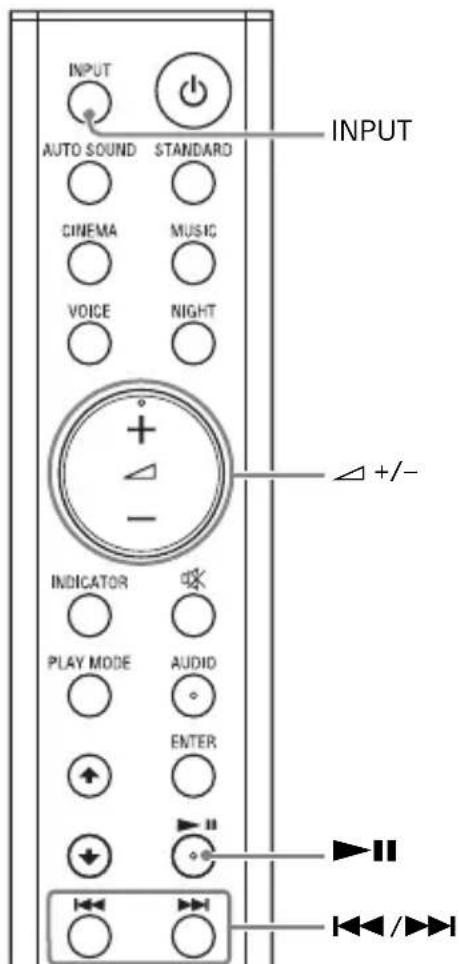
1 INPUT (page 15)
Selects the playback source. When you press INPUT once, the current input indicator flashes. Press INPUT again to select the device you want. Each time you press INPUT, the input changes cyclically as follows. TV input BLUETOOTH input USB input
2 AUTO SOUND (page 18)
Selects AUTO SOUND for the sound effect.
3 CINEMA
: Selects CINEMA for the sound effect. (page 18)
Turns on/off the auto standby function. (page 24)
4 VOICE
Turns on/off the voice mode. (page 18)
Turns on/off the Control for HDMI function. (page 23)
5 (volume) +^* / -
Adjusts the volume.
6 INDICATOR (page 7)
Turns on/off the indicators on the Bar Speaker.
7 PLAY MODE (page 16)
Selects the play mode for USB playback.
8 / (page 16)
Select the content on the TV screen for USB playback.
9 /previous/next) (page 16, 20)
Pressing the button shortly goes to the beginning of the previous or next file. Pressing and holding searches backward or forward (rewind/fast forward).
10 (power)
Turns on the system or sets it to standby mode.
11 STANDARD
: Selects STANDARD for the sound effect. (page 18)
Turns on/off the IR repeater function. (page 14)
12 MUSIC (page 18)
Selects MUSIC for the sound effect.
13 NIGHT
:Turns on/off the night mode. (page 18)
Turns on/off the BLUETOOTH standby mode. (page 22)
14 (muting)
Turns off the sound temporarily or turn on the sound.
15 AUDIO\*
: Selects the audio channel for Dolby Digital multiplex broadcast. (page 19)
Turns on/off the Dolby DRC function. (page 19)
16 ENTER (page 16)
Plays the content that is selected by / for USB playback.
17 II (play/pause)* (page 16, 20)
Pauses or resumes playback.
- The AUDIO, + ,and buttons have a tactile dot. Use it as a guide during operation.
Preparing for Using the System
Mounting the Bar Speaker on a Wall
You can mount the Bar Speaker on a wall.
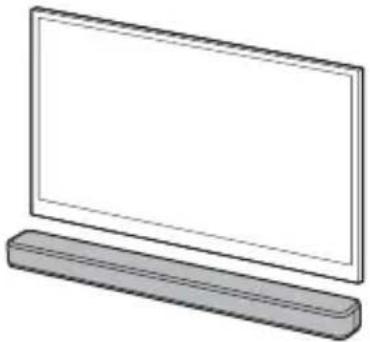
Notes
- Prepare screws (not supplied) that are suitable for the wall material and strength. As a plasterboard wall is especially fragile, attach the screws securely in the wall beam. Install the speakers horizontally, hung by screws in studs in a continuous flat section of the wall.
- Have the installation done by a Sony dealer or licensed contractor and pay special attention to safety during the installation.
- Sony shall not be held responsible for accidents or damage caused by improper installation, insufficient wall strength, improper screw installation or natural disaster, etc.
1 Prepare two screws (not supplied) that are suitable for the wall mount holes on the rear of the Bar Speaker.
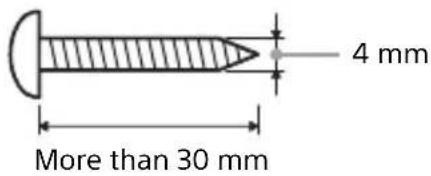
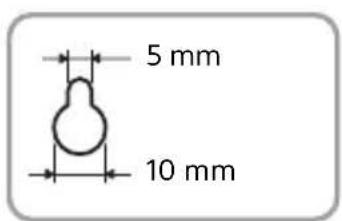
Hole on the rear of the Bar Speaker
2 Stick WALL MOUNT TEMPLATE (supplied) on a wall.
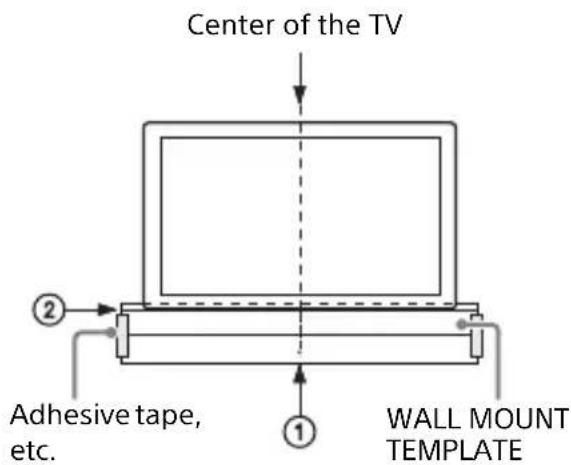
1 Align TV CENTER LINE (①) of WALL MOUNT TEMPLATE with the center line of your TV.
2 Align TV BOTTOM LINE (②) of WALL MOUNT TEMPLATE with the bottom of your TV, then stick WALL MOUNT TEMPLATE on a wall by using a commercially available adhesive tape, etc.
3 Fasten the screws into the marks on SCREW LINE (③) of WALL MOUNT TEMPLATE as the illustration below.

4 Remove WALL MOUNT TEMPLATE.
5 Hang the Bar Speaker on the screws.
Align the holes of the rear of the Bar Speaker with the screws, then hang the Bar Speaker on the two screws.
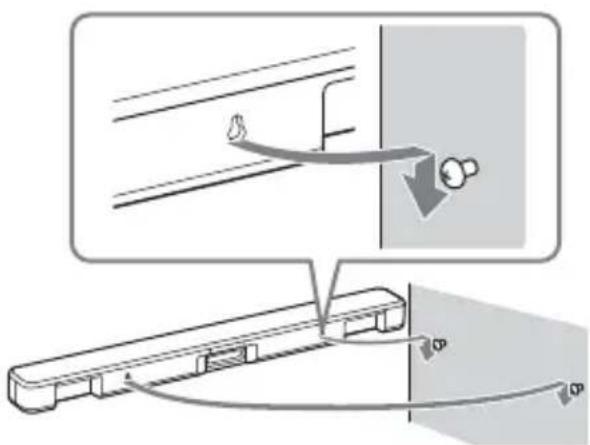
Note
When sticking WALL MOUNT TEMPLATE, smooth it out fully.
When the TV Remote Control does not Work
When the Bar Speaker obstructs the remote control sensor of the TV, the TV remote control may not work. In that case, enable the IR repeater function of the system.
You can control the TV with the TV remote control by sending the remote signal from the rear of the Bar Speaker.
Press and hold STANDARD for 5 seconds to set the function to on or off.
IR repeater on
The USB indicator flashes twice.
IR repeater off
The USB indicator flashes once.
Notes
- Be sure to check that the TV remote control cannot control the TV, and then set the IR repeater function to on. If it is set to on when the remote control can control the TV, appropriate operation may not be obtained because of the interference between the direct command from the remote control and the command via the Bar Speaker.
- On some TVs, this function may not work correctly. In this case, place the Bar Speaker slightly further away from the TV.
Listening to the Sound
Listening to a TV and Other Devices
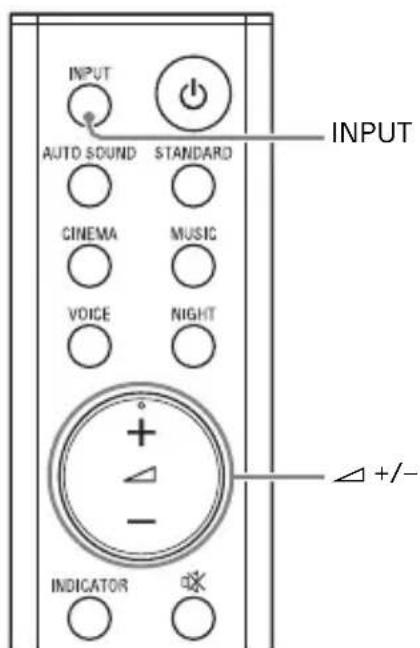
1 Press INPUT repeatedly.
When you press INPUT once, the current input indicator flashes.
Press INPUT again to select the device you want.
The indicator of the selected device lights up.
Each time you press INPUT, the input changes cyclically as follows.
TV input BLUETOOTH input USB input
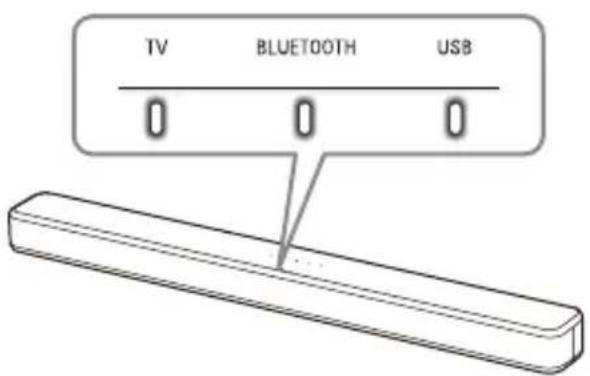
TV input
- TV that is connected to the TV IN (OPTICAL) jack
- TV compatible with the Audio Return Channel (ARC) function that is connected to the HDMI OUT (TV (ARC)) jack
When you connect the TV to both the HDMI OUT (TV (ARC)) and TV IN (OPTICAL) jacks, the input of the HDMI OUT (TV (ARC)) jack has priority.
BLUETOOTH input
BLUETOOTH device that supports A2DP For details, see "Listening to Music/ Sound with the BLUETOOTH® Function" (page 20).
USB input
USB device that is connected to the (USB) port
For details, see "Listening to Music on a USB Device" (page 16).
2 Adjust the volume by pressing + / - on the remote control.
Tip
You can also select the input by pressing on the Bar Speaker.
Listening to Music on a USB Device
You can play music files stored on a connected USB device.
For playable types of files, see "Playable Types of Files (USB Input)" (page 31).
Notes
- To view the USB content list on the TV screen, make sure you connect the system to the TV using an HDMI cable.
- Change the input of the TV to the input which the Bar Speaker is connected.
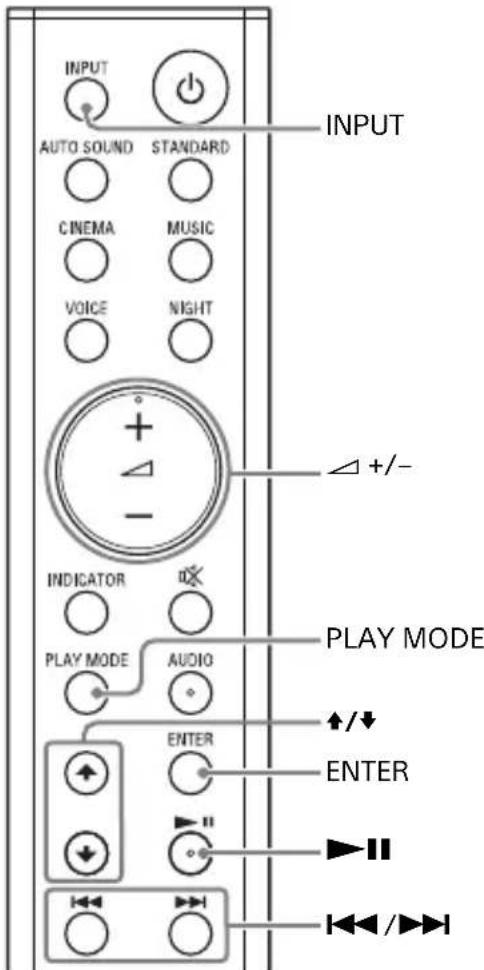
1 Connect the USB device to the (USB) port.
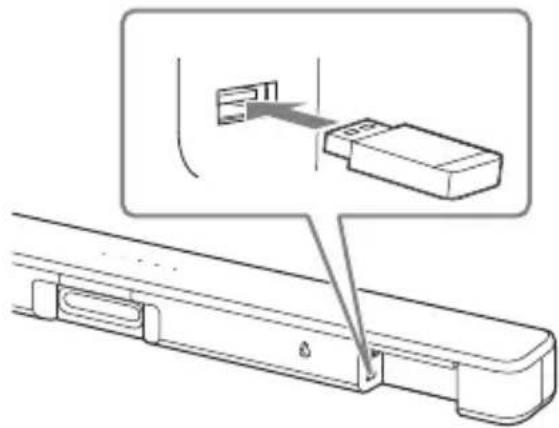
2 Press INPUT repeatedly to select the USB input.
The USB indicator lights up and the USB content list appears on the TV screen.
3 Press / to select the content you want, then press ENTER.
The selected content starts playing.
4 Press PLAY MODE repeatedly to select the play mode you want.
- None: Plays back all tracks.
- [Repeat One]: Repeats one track.
- [Repeat Folder]: Repeats all tracks in a folder.
- [Shuffle]: Repeats all tracks in a folder in random order.
The USB indicator flashes twice each time you press PLAY MODE.
5 Adjust the volume by pressing + / - on the remote control.
Other operations
| To Do this | |
| Pause or resume playback | Press▶■. |
| Select the previous or next track | Press▶/▶■. |
| Search backward or forward (rewind/fast forward) | Press and hold▶/▶■. |
Notes
- Do not remove the USB device during operation. To avoid data corruption or damage to the USB device, turn the system off before connecting or removing the USB device.
- The USB indicator flashes three times first, then flashes slowly repeatedly if you connect an unsupported USB device.
Depending on the file format, rewind and fast forward do not work.
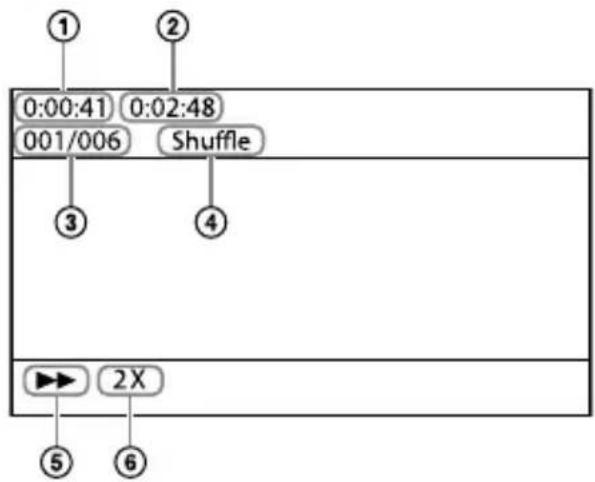
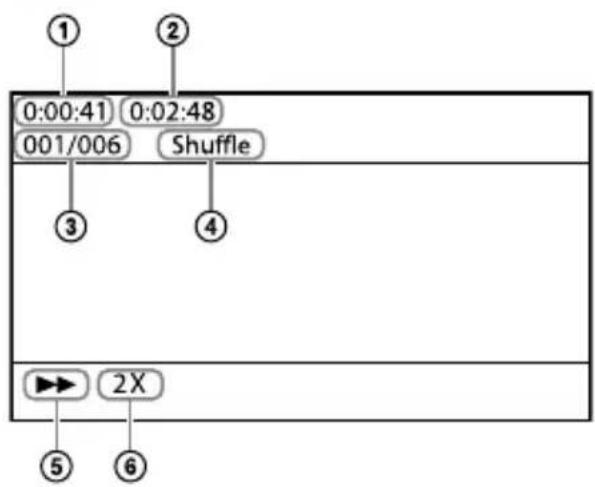
Information of USB Device on the TV Screen
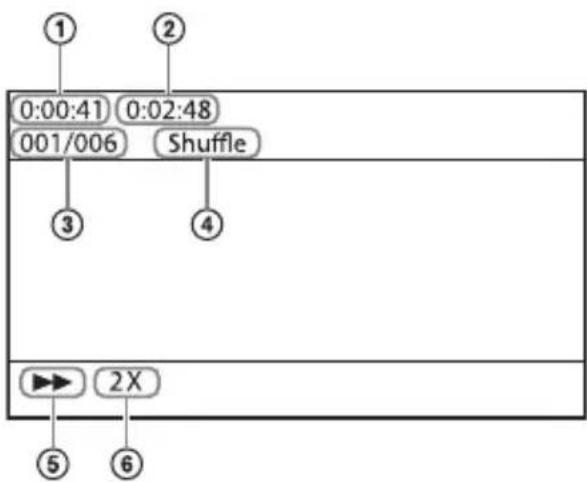
① Playing time
② Total playing time
③ Selected file index/Total files in the folder
④ Play mode
⑤ Playback status
⑥ Rewind/fast forward speed
The following messages appear on the TV screen depending on the status of the USB device.
- [No USB] No USB device is inserted.
- [Waiting] The system is searching a USB device.
Notes
Depending on the playback source, some information may not be displayed.
Depending on the play mode, the information displayed may be different.
Selecting the Sound Effect
Adjusting the Sound
Enjoying the Sound Effect that is Tailored to Sound Sources (Sound Mode)
You can easily enjoy pre-programmed sound effects that are tailored to different kinds of sound sources.
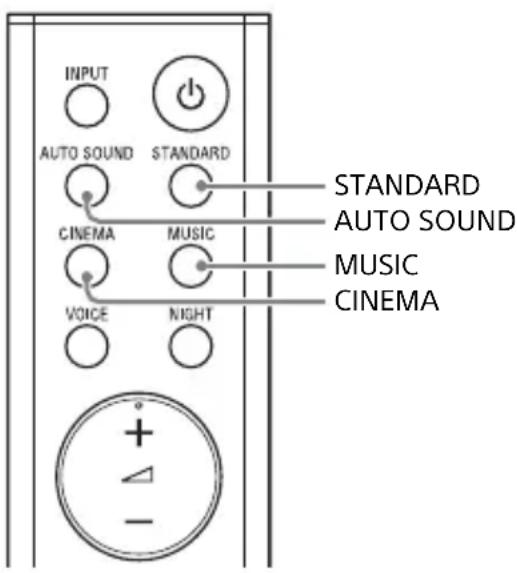
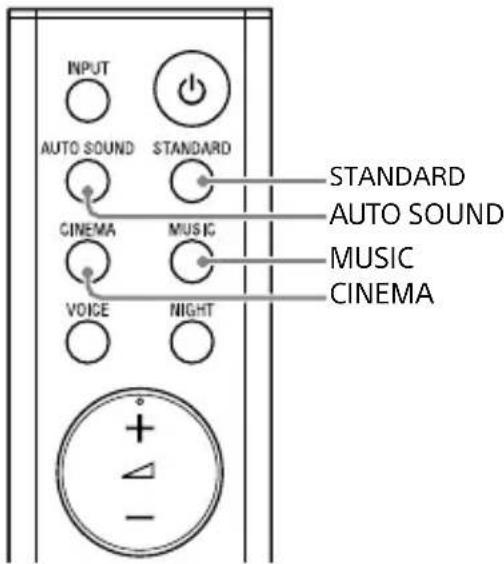
Press AUTO SOUND, CINEMA, MUSIC, or STANDARD to select the sound mode.
When selecting the sound mode, the TV indicator flashes once.
AUTO SOUND
You can enjoy the sound with Sony-recommended sound mode. The sound mode is automatically optimized according to playback content and function.
CINEMA
Sounds are played back with surround effects, and they are realistic and powerful, making them suitable for movies.
MUSIC
Sound effects are optimized for listening to music.
STANDARD
Sound effects are optimized for the individual source.
Enjoying Clear Sound with Low Volume at Midnight (NIGHT)
You can compress sound in accordance with the information contained in the content by setting the night mode to on. Sound is output at low volume with minimum loss of fidelity and clarity of dialogue.
Press NIGHT to set the function to on or off.
Night mode on
The TV indicator flashes twice.
Night mode off
The TV indicator flashes once.
Note
When you turn the system off, the night mode is set to off automatically.
Making Dialogs Clearer (VOICE)
You can make dialogs clearer by setting the voice mode to on.
Press VOICE to set the function to on or off.
Voice mode on
The TV indicator flashes twice.
Voice mode off
The TV indicator flashes once.
Making Sound with Low Volume Easy to Hear by Compressing Dynamic Range
This function works only when playing the Dolby Digital signal of the device that is connected to the TV IN (OPTICAL)/HDMI OUT (TV (ARC)) jack. When you set Dolby DRC (Dynamic Range Control) to on, dynamic range of the audio signal (range between the maximum and minimum volume) is compressed and sound with low volume is easy to hear.
Press and hold AUDIO for 5 seconds to set the function to on or off.
Dolby DRC on
The USB indicator flashes twice.
Dolby DRC off
The USB indicator flashes once.
Enjoying Multiplex Broadcast Sound (AUDIO)
You can enjoy multiplex broadcast sound when the system receives a Dolby Digital multiplex broadcast signal.
Press AUDIO repeatedly.
The channel changes cyclically as follows.
Main Sub Main/Sub
Main
Outputs only the main channel.
The TV indicator flashes once.
Sub
Outputs only the sub channel.
The USB indicator flashes once.
Main/Sub
Main sound is output from the left speaker and sub sound is output from the right speaker.
The TV and USB indicators flash once.
Note
To receive a Dolby Digital signal, you need to connect a TV or other devices to the TV IN (OPTICAL) jack with the optical digital cable (supplied) or the HDMI OUT (TV (ARC)) jack with an HDMI cable (not supplied).
Listening to Music/Sound with the BLUETOOTH® Function
Listening to Music from a Mobile Device
You can listen to music stored on a mobile device such as a smartphone or tablet via a wireless connection by connecting the system and the mobile device with the BLUETOOTH function. When connecting to the mobile device with the BLUETOOTH function, you can operate by simply using the supplied remote control without turning the TV on.
Listening to Music by Pairing with a Mobile Device
1 Press and hold the BLUETOOTH button on the Bar Speaker for 5 seconds.
The system enters the pairing mode and the BLUETOOTH indicator flashes quickly.
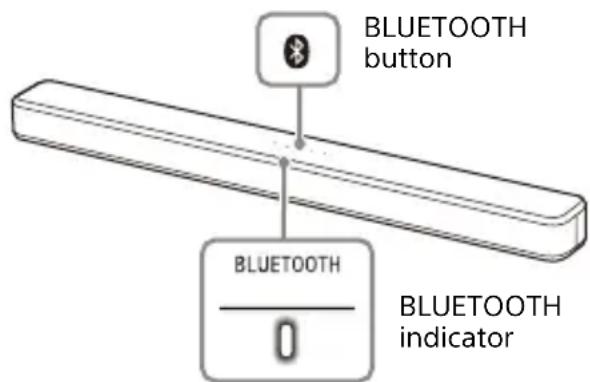
2 On the mobile device, turn on the BLUETOOTH function, and then select "HT-S100F" after searching for it.
If a Passkey is requested, enter "0000."
3 Make sure that the BLUETOOTH indicator on the Bar Speaker lights in blue.
A connection between the system and mobile device has been established.
4 Start audio playback with the music app on the connected mobile device.
Sound is output from the Bar Speaker.
5 Adjust the volume.
- Adjust the volume by pressing + / - on the remote control.
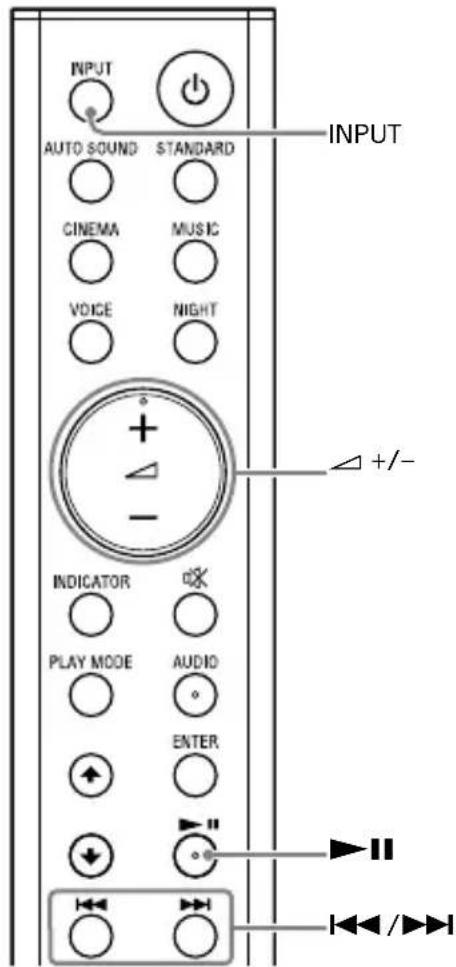
- and / on the remote control can be used for the BLUETOOTH function.
Notes
- You can pair up to 8 BLUETOOTH devices. If a 9th BLUETOOTH device is paired, the least recently connected device will be replaced by the new one.
- Perform pairing for the second and subsequent mobile devices.
Tips
- You can check the connection status of the BLUETOOTH function by checking the BLUETOOTH indicator status (page 7).
- While the BLUETOOTH input is being selected, the system enters the pairing mode by pressing the BLUETOOTH button on the Bar Speaker shortly.
Listening to Music from the Paired Mobile Device
1 Turn the BLUETOOTH function of the mobile device to on.
2 Press INPUT repeatedly to select the BLUETOOTH input or press the BLUETOOTH button on the Bar Speaker shortly.
The BLUETOOTH indicator flashes and the system automatically reconnects to the BLUETOOTH device it was most recently connected to.
3 Make sure that the BLUETOOTH indicator lights in blue.
A connection between the system and mobile device has been established.
4 Start audio playback with the music app on the connected mobile device.
Sound is output from the Bar Speaker.
5 Adjust the volume.
- Adjust the volume by pressing + / - on the remote control.
- and / on the remote control can be used for the BLUETOOTH function.
Turning the System On by Operating the BLUETOOTH Device
When the system has pairing information, you can turn the system on and listen to music from a BLUETOOTH device even when the system is in standby mode by setting the BLUETOOTH standby mode to on.
Press and hold NIGHT for 5 seconds to set the function to on or off.
BLUETOOTH standby mode on The USB indicator flashes twice.
BLUETOOTH standby mode off The USB indicator flashes once.
Note
While the BLUETOOTH standby mode is on, standby power consumption increases.
Turning the BLUETOOTH Function Off
You can turn the BLUETOOTH function off.
Press and hold , and - on the Bar Speaker for 10 seconds to set the function to on or off.
BLUETOOTH function on The USB indicator flashes twice.
BLUETOOTH function off The USB indicator flashes once.
Note
When the BLUETOOTH function is set to off, the BLUETOOTH input is skipped while selecting input by pressing INPUT.
Using the Various Functions
Using the Control for HDMI Function
Connecting a device such as a TV or Blu-ray Disc player compatible with the Control for HDMI function* using an HDMI cable (not supplied) enables you to easily operate the device by using a TV or Blu-ray Disc player remote control. The following functions can be used with the Control for HDMI function.
- System Power Off function
- System Audio Control function
Audio Return Channel - One-Touch Play function
Note
These functions may work with devices other than those manufactured by Sony, but operation is not guaranteed.
- Control for HDMI is a standard used by CEC (Consumer Electronics Control) for allowing HDMI (High-Definition Multimedia Interface) devices to control each other.
Preparing to Use the Control for HDMI Function
Press and hold VOICE for 5 seconds to set the function to on or off.
Control for HDMI function on The USB indicator flashes twice.
Control for HDMI function off The USB indicator flashes once.
Enable the Control for HDMI function settings for the TV and other device connected to the TV.
System Power Off Function
When you turn off the TV, the system will turn off automatically.
System Audio Control Function
If you turn on the system while you are watching the TV, the TV sound will be output from the speakers of the system. The volume of the system can be adjusted using the TV remote control. If the TV sound was output from the speakers of the system the previous time you watched the TV, the system will be turned on automatically when you turn on the TV again. Operations can also be made by the TV's menu. For details, refer to the operating instructions of your TV.
Notes
- Sound is only output from the TV if an input other than the TV input is selected when using the Twin Picture function on the TV. When you disable the Twin Picture function, the sound is output from the system.
The number for the system's volume level is displayed on the TV screen depending on the TV.
Depending on the settings of the TV, the System Audio Control function may not be available. For details, refer to the operating instructions of your TV.
Audio Return Channel
If the system is connected to a TV's HDMI IN jack compatible with Audio Return Channel (ARC), you can listen to TV sound from the speakers of the system without connecting an optical digital cable.
Note
If the TV is not compatible with Audio Return Channel, the optical digital cable (supplied) needs to be connected (refer to the supplied Startup Guide).
One-Touch Play Function
When you play content on a device (Bluray Disc player, "PlayStation4," etc.) connected to the TV, the system and TV are turned on automatically, the input of the system is switched to "TV" input, and sound is output from the speakers of the system.
Notes
- If the TV sound was output from the speakers of the TV the previous time you watched the TV, the system does not turn on and the sound and picture are output from the TV even if device content is played.
Depending on the TV, the beginning part of content being played may not play correctly.
Notes on HDMI Connections
- Use an HDMI-authorized cable.
- Use a Sony High Speed HDMI Cable with the Cable Type Logo.
- We do not recommend using an HDMI-DVI conversion cable.
- Audio signals (sampling frequency, bit length, etc.) transmitted from an HDMI jack may be suppressed by the connected device.
Saving Power Consumption
To use the system while saving power consumption, change the following settings.
Turn the System Off by Detecting the Using State
When you set the auto standby function to on, the system enters standby mode automatically when you do not operate the system for about 20 minutes and the system is not receiving an input signal.
Press and hold CINEMA for 5 seconds to set the function to on or off.
Auto standby on
The USB indicator flashes twice.
Auto standby off
The USB indicator flashes once.
Saving Power in Standby Mode
To save power consumption during the standby mode, set the BLUETOOTH standby mode (page 22) and Control for HDMI function (page 23) to off.
The default settings for them are off.
Troubleshooting
Troubleshooting
If you experience any of the following difficulties while using the system, use this troubleshooting guide to help remedy the problem before requesting repairs. Should any problem persist, consult your nearest Sony dealer.
Power
The system does not power up.
Check that the AC power cord (mains lead) is connected securely.
Disconnect the AC power cord (mains lead) from the wall outlet (mains), and then reconnect after several minutes.
The system is turned off automatically.
The auto standby function is working. Set the auto standby function to off (page 24).
The system does not turn on even when the TV is turned on.
Set the Control for HDMI function to on (page 23). The TV must support the Control for HDMI function. For details, refer to the operating instructions of your TV.
Check the speaker settings of the TV. The system power syncs with the speaker settings of the TV. For details, refer to the operating instructions of your TV.
If the sound was output from the speakers of the TV the previous time, the system does not turn on even when the TV is turned on.
The system turns off when the TV is turned off.
Check the setting of the Control for HDMI function (page 23). When the Control for HDMI function is set to on, the system turns off automatically when you turn off the TV regardless of the input.
The system does not turn off even when the TV is turned off.
Check the setting of the Control for HDMI function (page 23). To turn the system off automatically regardless of the input when you turn off the TV, set the Control for HDMI function to on. The TV must support the Control for HDMI function. For details, refer to the operating instructions of your TV.
Picture
There is no picture or the picture is not output correctly.
Select the appropriate input (page 15).
When there is no picture while TV input is selected, select the TV channel that you want using the TV remote control.
Disconnect the HDMI cable, then connect it again. Make sure that the cable is firmly inserted.
Sound
No TV sound is output from the system.
Check the type and connection of the HDMI cable or optical digital cable that is connected to the system and the TV (refer to the supplied Startup Guide).
Disconnect the cables that are connected between the TV and the system, then connect them firmly again. Disconnect the AC power cords of the TV and the system from the AC outlets (mains), then connect them again.
When the system and TV are connected with an HDMI cable, check the following.
- The HDMI jack of the connected TV is labeled with "ARC."
- The Control for HDMI function of the TV is set to on.
- On the system, the Control for HDMI function is set to on (page 23).
If your TV is not compatible with Audio Return Channel, connect the optical digital cable (supplied) (refer to the supplied Startup Guide). If the TV is not compatible with Audio Return Channel, TV sound will not be output from the system even if the system is connected to the TV's HDMI IN jack.
If the sound of the device that is connected to the optical input jack of the TV is not output, try the following.
- Connect the cable box or satellite box directly to the TV IN (OPTICAL) jack of the system.
Press INPUT repeatedly to select the TV input (page 15).
Increase the volume on the TV or cancel muting.
Depending on the order in which you connect the TV and the system, the system may be muted. If this happens, turn on the TV first, then the system.
Set the speakers setting of the TV (BRAVIA) to Audio System. Refer to the operating instructions of your TV regarding how to set the TV.
Check the sound output of the TV. Refer to the operating instructions of the TV for the TV settings.
The system supports the Dolby Digital and PCM audio formats (page 31). When you playback unsupported format, set the digital audio out setting of the TV (BRAVIA) to "PCM." For details, refer to the operating instructions of your TV.
The sound is output from both the system and the TV.
Mute the sound of the system or the TV.
No sound or only a very low-level sound of the device connected to the system is heard from the system.
Press + and check the volume level (page 10).
Pres or + to cancel the muting function (page 10).
Make sure the input source is selected correctly. You should try other input sources by pressing INPUT repeatedly (page 15).
Check that all the cables and cords of the system and the connected device are firmly inserted.
If the connected device supports the up-sampling feature, you need to turn it off.
The surround effect cannot be obtained.
Depending on the input signal and the sound mode setting, surround sound processing may not work effectively. The surround effect may be subtle, depending on the program or disc.
To play multi channel audio, check the digital audio output setting on the device connected to the system. For details, refer to the operating instructions supplied with the connected device.
USB Device Connection
The USB device is not recognized.
Try the following:
① Turn the system off.
② Remove and reconnect the USB device.
③ Turn the system on.
Make sure that the USB device is securely connected to the (USB) port (page 16).
Check to see if the USB device or a cable is damaged.
Make sure that the USB device is on.
If the USB device is connected via a USB hub, disconnect it and connect the USB device directly to the system.
Mobile Device Connection
BLUETOOTH connection cannot be completed.
Make sure that the BLUETOOTH indicator on the Bar Speaker is lit (page 6).
Make sure the BLUETOOTH device to be connected is turned on and the BLUETOOTH function is enabled.
Bring the BLUETOOTH device close to the system.
Pair this system and the BLUETOOTH device again. You may need to cancel the pairing with this system using your BLUETOOTH device first.
If the BLUETOOTH function is set to off, set it to on (page 22).
Pairing cannot be achieved.
Bring the BLUETOOTH device close to the system.
Make sure this system is not receiving interference from a wireless LAN device, other 2.4 GHz wireless devices, or a microwave oven. If a device that generates electromagnetic radiation is nearby,
move the device away from this system.
Pairing may not be possible if other BLUETOOTH devices are present around the system. In this case, turn off the other BLUETOOTH devices.
Sound of the connected BLUETOOTH mobile device is not output from the system.
Make sure that the BLUETOOTH indicator on the Bar Speaker is lit (page 6).
Bring the BLUETOOTH device close to the system.
If a device that generates electromagnetic radiation, such as a wireless LAN device, other BLUETOOTH devices, or a microwave oven is nearby, move the device away from this system.
Move the USB 3.0 device and its cable away from this system.
Remove any obstacle between this system and the BLUETOOTH device or move this system away from the obstacle.
Reposition the connected BLUETOOTH device.
Switch the wireless LAN frequency of any nearby wireless LAN router or PC to 5 GHz range.
Increase the volume on the connected BLUETOOTH device.
The sound is not in sync with the image.
When you are watching movies, you may hear the sound with a slight delay from the image.
Remote Control
The remote control of this system does not function.
Point the remote control at the remote control sensor on the Bar Speaker (page 6).
Remove any obstacles in the path between the remote control and the system.
Replace both batteries in the remote control with new ones, if they are weak.
Make sure you are pressing the correct button on the remote control (page 10).
The TV remote control does not work.
Install the Bar Speaker so that it does not obstruct the remote control sensor of the TV.
This problem might be solved by enabling the IR repeater function (page 14).
Others
The Control for HDMI function does not work properly.
Check the connection with the system (refer to the supplied Startup Guide).
Enable the Control for HDMI function on the TV. For details, refer to the operating instructions of your TV.
Wait a while, and then try again. If you unplug the system, it will take a while before operations can be made. Wait for 15 seconds or longer, and then try again.
Make sure the devices connected to the system support the Control for HDMI function.
Enable the Control for HDMI function of the devices connected to the system. For details, refer to the operating instructions of your device.
The type and number of devices that can be controlled by the Control for HDMI function is restricted by the HDMI CEC standard as follows: - Recording devices (Blu-ray Disc recorder, DVD recorder, etc.): up to 3 devices
-Playback devices (Blu-ray Disc player, DVD player, etc.):up to 3 devices
-Tuner-related devices:up to 4 devices
- Audio system (receiver/ headphone):up to 1 device (used by this system)
All indicators on the Bar Speaker flash, the sound is muted, and buttons on the remote control or Bar Speaker other than (power) do not work.
The protection feature is activated. Press (power) to turn the system off and disconnect the AC power cord (mains lead) and check the items below.
- Make sure that the ventilations of the Bar Speaker are not covered and turn on the system after a while.
- When the system is using the USB connection, remove the USB device and turn on the system. If the system operates properly, the current of the connected USB device is over the maximum output current of the system 500mA , or the USB device may have an abnormality.
Sensors of the TV do not work properly.
The Bar Speaker may block some sensors (such as the brightness sensor), the remote control receiver of your TV or the emitter for 3D glasses (infrared transmission) of a 3D TV that supports the infrared 3D glass system, or wireless communication. Move the Bar Speaker away from the TV within a range that allows those parts to operate properly. For the locations of the sensors and remote control receiver, refer to the operating instructions supplied with the TV.
The system does not work properly.
The system may be in demo mode. To cancel demo mode, reset the system. Press and hold (power), +, and on the Bar Speaker for more than 5 seconds (page 29).
When you change to the TV input from the USB input by pressing INPUT, the message appears.
-
Please select the desired TV channels with the TV's remote control.
-
This screen is an example for English.
Select the TV program by using the TV remote control.
Resetting the System
If the system still does not operate properly, reset the system as follows.
1 Press and hold , +, and on the Bar Speaker for more than 5 seconds.
All indicators on the Bar Speaker flash 3 times, and the settings return to their initial status.
2 Disconnect the AC power cord (mains lead).
3 Connect the AC power cord (mains lead), then press to turn on the system.
Tip
The default settings are underlined on each feature description.
Additional Information
Specifications
Amplifier section
POWER OUTPUT (rated)
Front woofer L + Front woofer R: 22 W + 22 W (at 8 ohms, 1 kHz, 1% THD)
Front tweeter L + Front tweeter R: 22 W + 22 W (at 8 ohms, 10 kHz, 1% THD)
POWER OUTPUT (reference)
Front L/R woofer blocks: 30 W (per channel at 8 ohms, 1 kHz)
Front L/R tweeter blocks: 30 W (per channel at 8 ohms, 10 kHz)
Audio Inputs TV IN (OPTICAL) USB HDMI OUT (TV (ARC))
TV Display Output (USB display) HDMI OUT (TV (ARC))
USB section

(USB) port:
Type A (For connecting USB memory)
BLUETOOTH section
Communication system BLUETOOTH Specification version 4.2
Output BLUETOOTH Specification Power Class 1
Maximum communication range Line of sight approx. 10m^1)
Frequency band 2.4 GHz band (2.4000 GHz - 2.4835 GHz)
Modulation method FHSS (Freq Hopping Spread Spectrum)
Compatible BLUETOOTH profiles 2) A2DP (Advanced Audio Distribution Profile) AVRCP (Audio Video Remote Control Profile)
Transmission range (A2DP) 20 Hz - 20,000 Hz (Sampling frequency 32 kHz, 44.1 kHz, 48 kHz)
1) The actual range will vary depending on factors such as obstacles between devices, magnetic fields around a microwave oven, static electricity, cordless phone use, reception sensitivity, the operating system, software applications, etc.
2) BLUETOOTH standard profiles indicate the purpose of BLUETOOTH communication between devices.
3) Codec: Audio signal compression and conversion format
4) Abbreviation for Subband Codec
Front L/Front R speaker block section
Speaker system 2-way speaker system, Bass reflex
Speaker -woofer: 48mm × 90mm cone type - Tweeter: 25mm balanced dome type
General
Power requirements 220 V - 240 V AC, 50 Hz/60 Hz
Power consumption
On: 30 W
Standby mode: 0.5 W or less (Power Saving mode)
(When Control for HDMI function and BLUETOOTH Standby mode are set to off)
Standby mode: 2 W or less
(When Control for HDMI function is set to on and/or BLUETOOTH Standby mode is set to on)
Dimensions* (approx.) (w / h / d) 900~mm× 64~mm× 90~mm
* Including projection portion Mass (approx.) 2.4 kg
Design and specifications are subject to change without notice.
Playable Types of Files (USB Input)
| Codec Extension | |
| MP3 (MPEG-1 Audio Layer III) | .mp3 |
| WMA9 Standard .wma | |
| LPCM (2ch) .wav | |
Notes
- Some files may not play or may play with no sound depending on the file format, the file encoding, or the recording condition.
- Some files edited on a PC may not play.
- The system does not play coded files such as DRM and Lossless.
-
The system can recognize the following files or folders in USB devices:
-
up to 200 folders (including empty folder and root folder)
- up to 150 tracks in one folder
-
up to folders in the 8th layer (including the root folder)
-
Some USB devices may not work with this system.
- The system can recognize Mass Storage Class (MSC) devices.
Supported Input Audio Formats (HDMI OUT (TV (ARC)) or TV IN (OPTICAL))
Audio formats supported by this system are as follows.
Dolby Digital
- Linear PCM 2ch
On BLUETOOTH Communication
-
BLUETOOTH devices should be used within approximately 10 meters (33 feet) (unobstructed distance) of each other. The effective communication range may become shorter under the following conditions.
-
When a person, metal object, wall or other obstruction is between the devices with a BLUETOOTH connection
- Locations where a wireless LAN is installed
- Around microwave ovens that are in use
-
Locations where other electromagnetic waves occur
-
BLUETOOTH devices and wireless LAN (IEEE 802.11b/g/n) use the same frequency band (2.4 GHz). When using your BLUETOOTH device near a device with wireless LAN capability, electromagnetic interference may occur. This could result in lower data transfer rates, noise, or inability to connect. If this happens, try the following remedies:
-
Use this system at least 10 meters (33 feet) away from the wireless LAN device.
- Turn off the power to the wireless LAN device when using your BLUETOOTH device within 10 meters (33 feet).
-
Install this system and BLUETOOTH device as closer to each other as possible.
-
The radio waves broadcast by this system may interfere with the operation of some medical devices. Since this interference may result in malfunction, always turn off the power on this system and BLUETOOTH device in the following locations:
-
In hospitals, on trains, in airplanes, at gas stations, and any place where flammable gasses may be present
- Near automatic doors or fire alarms
- This system supports security functions that comply with the BLUETOOTH specification to ensure secure connection during communication using BLUETOOTH technology. However, this security may be insufficient depending on the setting contents and other factors, so always be careful when performing communication using BLUETOOTH technology.
- Sony cannot be held liable in any way for damages or other loss resulting from information leaks during communication using BLUETOOTH technology.
- BLUETOOTH communication is not necessarily guaranteed with all BLUETOOTH devices that have the same profile as this system.
- BLUETOOTH devices connected with this system must comply with the BLUETOOTH specification prescribed by the Bluetooth SIG, Inc., and must be certified to comply. However, even when a device complies with the BLUETOOTH specification, there may be cases where the characteristics or specifications of the BLUETOOTH device make it impossible to connect, or may result in different control methods, display or operation.
- Noise may occur or the audio may cut off depending on the BLUETOOTH device connected with this system, the communications environment, or surrounding conditions.
If you have any questions or problems concerning your system, please consult your nearest Sony dealer.
Precautions
On safety
- Should any solid object or liquid fall into the system, unplug the system and have it checked by qualified personnel before operating it any further.
- Do not climb on the Bar Speaker, as you may fall down and injure yourself, or system damage may result.
On power sources
- Before operating the system, check that the operating voltage is identical to your local power supply. The operating voltage is indicated on the nameplate on the bottom of the Bar Speaker.
- If you are not going to use the system for a long time, be sure to disconnect the system from the wall outlet (mains). To disconnect the AC power cord (mains lead), grasp the plug itself; never pull the cord.
- One blade of the plug is wider than the other for the purpose of safety and will fit into the wall outlet (mains) only one way. If you are unable to insert the plug fully into the outlet, contact your dealer.
- AC power cord (mains lead) must be changed only at a qualified service shop.
On heat buildup
Although the system heats up during operation, this is not a malfunction. If you continuously use this system at high volume, the system temperature at the rear and bottom rises considerably. To avoid burning yourself, do not touch the system.
On placement
- Place the system in a location with adequate ventilation to prevent heat buildup and prolong the life of the system.
- Do not place the system near heat sources or in a place subject to direct
sunlight, excessive dust, or mechanical shock.
- Do not place anything on the top of the Bar Speaker.
- If the system is being used in combination with a TV, VCR, or tape deck, noise may result and picture quality may suffer. In such a case, place the system away from the TV, VCR, or tape deck.
- Use caution when placing the system on a surface that has been specially treated (with wax, oil, polish, etc.), as staining or discoloration of the surface may result.
- Take care to avoid any possible injury from the corners of the Bar Speaker.
On operation
Before connecting other equipment, be sure to turn off and unplug the system.
If you encounter color irregularity on a nearby TV screen
Color irregularities may be observed on certain types of TV.
- If color irregularity is observed...
Turn off the TV, then turn it on again after 15 to 30 minutes. - If color irregularity is observed again... Place the system further away from the TV.
On cleaning
Clean the system with a soft, dry cloth. Do not use any type of abrasive pad, scouring powder, or solvent such as alcohol or benzine.
If you have any question or problem concerning your system, please consult your nearest Sony dealer.
Copyrights and Trademarks
This system incorporates Dolby* Digital.
- Manufactured under license from Dolby Laboratories.
Dolby, Dolby Audio and the double-D symbol are trademarks of Dolby Laboratories.
This system incorporates High-Definition Multimedia Interface (HDMI™) technology. The terms HDMI and HDMI High-Definition Multimedia Interface, and the HDMI Logo are trademarks or registered trademarks of HDMI Licensing Administrator, Inc. in the United States and other countries.
The BLUETOOTH word mark and logos are registered trademarks owned by Bluetooth SIG, Inc. and any use of such marks by Sony Corporation is under license. Other trademarks and trade names are those of their respective owners.
"BRAVIA" logo is a trademark of Sony Corporation.
MPEG Layer-3 audio coding technology and patents licensed from Fraunhofer IIS and Thomson.
Windows Media is either a registered trademark or trademark of Microsoft Corporation in the United States and/or other countries.
This product is protected by certain intellectual property rights of Microsoft Corporation. Use or distribution of such technology outside of this product is prohibited without a license from Microsoft or an authorized Microsoft subsidiary.
All other trademarks are trademarks of their respective owners.
AVERTISSEMENT
1 Borne AC IN
2 Prise HDMI OUT (TV (ARC))
:active/désactive le mode
Veille BLUETOOTH. (page 22)
14 (silencieux)
17 ▶II (lecture/pause)* (page 16, 20)
Entrées audio TV IN (OPTICAL) USB HDMI OUT (TV (ARC))
double-D Dolby Audio.Dolby
Dolby Laboratories
(HDMITM)
High-Definition Multimedia Interface
.
HDMI High-Definition HDMl
HDMI Multimedia Interface
HDMI Licensing
Jw g dAdministrator, Inc.
=
sLCOBLUETOOTH 8 sLgJ g 405 cOx
Bluetooth SIG, Inc. 4
Sony 1wgi Iooj jol olaol g jg w
Corporation
4bgyjolJlO 4 jLsio gJgJgJg
.
Sj jJg S"BRAVIA"
Sony Corporation
MPEG Layer-3
Thomson, Fraunhofer IIS jg
Coxs y 00000000000000000000000000000000000000000000000000000
Microsoft Corporation
Lg5 Lg
Microsoft 0g g
Ggolj jy jzj y 100 Corporation
j Microsoft j j g o o o o o o o o o o o o
Microsoft
jIJUo jooj glooe Jooj gloo
= = 35
jIgVCR jyjglolss 1
G 0000000000000000
j1 jwww wyy
LSSJgVCR.
())
s j 1 s j L d a j b w s g
jglg jglgulgl aaggl
Jy
sJwIolJy
005 1 pwwwlo 1 jaa Jlaa J
AD = AQ, PAQ = 60^ PQA 为等边编形
J 1
400 400
jolgEglil jcll lss
BLUETOOTH BLUETOOTH 10000000000000000000000000000000000000000000000000000000000000000000000000000000000000000000000000000
-
BLUETOOTH drarabat
BLUETOOTH
05la 1 (glo j gdoal) 10
joo jgogabjolodgudoyj brrw .
.
$$ - \varepsilon_ {l} g o r l w _ {l}. $$
BLUETOOTH JlJdJg
1
$$ - \mathrm {d} \dot {\bar {w}} \omega \omega \omega \omega $$
$$ - \downarrow 1 6 > 0. 4 5 s g $$
olalai
$$ - 2 g \div g = \frac {1}{2} $$
m = 311
LAN BLUETOOTH
TV IN OUT (TV (ARC))
(OPTICAL)
J 1
.
Dolby Digital
AIS 2 p
g)
(USB
Sudg
| .mp3 | MP3 (MPEG-1 Audio LayerIII) |
| .wma | WMA9 Standard |
| .wav | (ωις 2) LPCM |
m = 311
山
JU 100g g00 JILs sJL 00:5S (3
jbjSsSj
1/0g 8
511
100 wly wksil dbsgd gdsdily
g山
90x 48gjgj
25 Jaleo ggi:
jglsluolj
/jz50.240-220
60
20
30:
0jJ) jS 0.5:J4ool
(s)
SLsGL BLUETOOTH 4o0ofo
P 1000 已 出 出 出 出 出 出 出 出 出 出 出 出 出 出 出 出 出 出 出 出 out Control for HDMI
()
j0sUg2:J4oosol
_2 / Control for HDMI (jloj)
BLUETOOTH 40
(
()
90×64×900
oljC Jolit
()
S_ S = 12 · PG · PD = 12 × PG × 5
jwJ 100000000000000000000000000
.
1
(0)
22:wlglgjg+glg
(THD 1% 182+
22:wwglg+
(THD 1%.j8j5 10 8 j) 22+
()
30:1/2g 5g
(jggls1.80JbIs
(s)30:w/glgss
(jggls10.8jJls
gogslgogg
TV IN (OPTICAL)
USB
HDMIOUT (TV (ARC))
(USB jai) jj j j j j j j
HDMI OUT (TV (ARC))
USB
:USB)
(USBdlaJlalA)A
BLUETOOTH
山b1j
4.2Bluetooth
(9)
1 wS BLUETOOTH
lblj10gduo jSla
10 1
wils
- jz2.4000) zjz2.4
(2.4835
jGg
FHSS (Freq Hopping Spread Spectrum)
2jLjLw BLUETOOTH 1a
A2DP (Advanced Audio Distribution
Profile)
AVRCP (Audio Video Remote Control
Profile)
pww w jzj
41 paaaw aai jao Jao gws dy jgios paasw 51
a5 jaijbljz
j 1
5
- Please select the desired TV channels with the TV's remote control.
*
←doj.
S ACD = S COD + S DCE - S CDE
Saaagjgssy gssygsaiaai plaa jUJSSGgssgsswagol (s) Jgssgssyds y 15 gogol) .sJnJ5 gogol) .LdJLgJgJgJgJgJgJgJgJgJgJgJgJgJgJgJgJgJgJgJgJgJgJgJgJgJgJgJgJgJgJgJgJgJgJgJgJgJgJgJgJgJgJgJgJgJgJgJgJgJgJg
pswssn j 1 J USB 3.0 s
1
olw g o w j j zio diy
J J 1sblssgoggglgj yd jg dks
.15 j0d 1j1j0d 1j .
bluETOOTH 1
sJw Coo Joo ooh
sloolw
sLgSjIyIyJyJyJyJyJyBIL
g w jj g j 000000000000000000000000000000000000000000
L 100 1 J 100
j05 1 1 1 1 1 1 1 1 1 1 1 1 1
.0g 000000000000000
1 100 g d
(104xiao)
+1 100
(10 dào)
oaiyioi ioo 50g9g gao 45 yjg jiaobo
Jr Jd J 1 J 1 J 1 J 1 J 1 J 1 J 1 J 1
(15 aaaa) uS jIaIaI INPUT
g paaa a 1000 g 1000 d45 1000
Lilysao Jiaooobiws
1100 cggg oogolg oks
.
.
Jg g 10
Lssj Lao jgo jgboo Jsoo sJg slw
i000000000000000000000000000000000000000
- iI 2. 0.1
pab 5 dss s yss ss sss
pimw 40 05w (g) glu w g
JL JELIJI 1
afo ofofofofofofofofo
S OBC = S COD + S_ BOC
USB
.00000000000000000000000000000000000000000000
:ui5 jloio1j j 0
1
Llog0g0g0g1 USB ②
. ③
HDMI
.
= ( 12 - 1m) + 12( 12 - 1m)
"ARC"
Control for HDMI -
.15 15
Control for HDMI
(23 a)
Audio Return Channel 1
()
oai ai jaiil oj slaiol a) iS Jao 1
Audio Return 1.
J j Jj j j j j j Channel
HDMI 1
IN
g j g 999 4 Jao oos
15 1501, jj j j g. g
Control for 50.25 (234)
HDMI
(20 1
0g = = g_0( 0g) ^2
j 45 j0j d g o
.
Control for HDMI
(20 15g> jdu wgo 234
gol 1 j j j j ggl 45 jol j ggd g d j
Control for HDMI
Control 5e
albcsy
Egj jygl 5Las gl JaoJgiws ay
S = 5
y
0d jn 4y d y d y g g
.0
(15 aoo) uio 1 ooi
451J 1
jg jgl g0 ol j1 jss jolalw l alg
.0g 019 p500 Ls u5 c0 .u5
100
0g j 1 j gjgl s
4) 15
.(uSdoolooo oolgulolgluaol
.15 Log p500 1 JgT OJgO
j 1 j 0 0 0 0 0 0 0 0 0 0
Lg1gT oJgD gglio

j1 p15 j0slaai p5i 51
jss s1y Cwglg 0d jlls
.
m = 311
9
.0g(aij)
←
←
J 1
.
3.512s.
5 5
(24do)
jggl 45 jolj gwhn
← sogg dJd jdojdo ggsgss
Control for HDMI
Control 234
cIeIbI css sJy J for HDMI
Lggej 0eess
m = 5
←
sJw pKaa jgjyjgl sSuii blaa i
Jusjyds 4y jy dylb y s y
S OBC = S OBC = S ABC + S BOC
HDMI H
.
←
←
#
0000000000000000000000000000000000000
. 1000 jj j j J
J Audio Return Channel 1 J
J L b (o) j
.
Ss
Blu-ray oii5) 0520s glgao45 jol 4y Jia (Jg y"PlayStation4".Disc 4y 4y jyj yj yj yj yj yj yj yj yj yj yj yj yj yj yj yj yj yj yj yj yj yj yj yj yj yj yj yj yj yj yj yj yj yj yj yj yj yj yj yj yj yj yj yj yj yj yj yj yj yj yj
.0g
#
S OBC = S COD + S_ BOC
100 100 100 100
G
.0g 1
HDMI
SoyHDMI
.
Jusololol JUs
HDMI-DVI JJ 1
.
()
SaaHdHDMI 5J 5
paaee 0o5 gol oJos
j0b
0g 15g
pIJI JJIJJJJJJJJJSSGIOOIOI JLOSLsc
gJooJIyGwD 4, jyBjIyIeXbI yS gJy.
S OBC = S COD + S BOC - S BOD
aliso glosjlae jolaa
Control for
HDMI
aui 1i jyj yil
Control for 2ee_j_w Blu-ray Disc
(0d)HDMI JbSjOoHDMI
10000000000000000000000000000000000000
LBlu-rayDisc 0005 j1 Jzss
Sgluloljgjglg
jIg Control for HDMI sLus L
.0505laawjzgl00slos
·
-
Audio F
S
山
jI bdd 100 000 000 TV s0g0g j0s0g0g
1glgdo gao 2Sloa gao
0ggo joo 11do aS
0g 0000000000000000000000000000000000000
j 15b1 s 1s
Sgjgjgl 35s gla
Audio Return Channel
Audio 45 HDMI IN
Jw Jw Return Channel (ARC)
pssss sllj jn jyglg 4 y
Ji 15 Jui jui dui dui uu
.
g jyjgl jy glg jy ggs oJlao j 0oiaol pia 49
4a1j 4yolokwL LooSlae J
Ss
.
- 与Jouleux
CEC (Consumer Electronics Control)
Jus HSAH (High bSDefinirgh gdaed 4yss jao
Multimedia Interface)
S木弟形 COBD = S COD + S_ BDO
dsloj olaol g jLoo
Control for HDMI
1 VOICE
BLUETOOTH 40sloT JIJ SSSS USB
4
BLUETOOTH 400000000000000000000000000000000000000000000000
01yds 05i00000000000000000000000000
Lg 1 L
0g 00000000000000000000000000000000000000
15 1 10
200oljUus (g+/-o10uL
15 120 1j
100 1
BLUETOOTH 0
3.5 < a < 4.5
4
olr oolj ggo 4 jds
5
J 0000000000000000000000000000000000000000000000000000
1
S OBC = S COD + S_ BOC
INPUT. BLUETOOTH
BLUETOOTH 40501
J 5
.
j j Ss BLUETOOTH sJ
05u 400g015g0
0000000000000000000000000000000000000000000000000000
.og
3
BLUETOOTH 45
.
0000000000000000000000000000000000000
.
BLUETOOTH 0
"HT-S100F"
.
0000"
S OBC = S COD + S_ BOC
3
BLUETOOTH 45
.
0d j 00000000000000000000000000000
.
oloofofofofofofofofofo
15 2
.0g 00 j0s s1gj gds j1du
15 110
290olj1JzSg+/-ofoL
1.5 1,1u0j1
gdojglssg
BLUETOOTH
0.500( 12 - 1)
5
dsloc ly1d/gygo yds
BLUETOOTH®
05s s j 8o go dJd
01.aa
05s 5y jdo ofo yfo ggo 4y
Jiai jybjj Cui li diaow jali iilo ol
351 0j0s05i0g i00
BLUETOOTH
3.5Lae lyolos oksos dy Jlaal jloj
oslaa LcRGLBLUETOOTH
05 j 00000000000000000000000000000000000000
- ( x,y) = 1( 0,1)
gjw jg jg ggo 4 jds
01yoo 05
长
BLUETOOTH 8
BLUETOOTH 5
000000000000000000000000000000000000000
.
BLUETOOTH
5g00d
sllg gss sglw
JJG SAAeBBLUETOOTH
g
- slw
山
BLUETOOTH 50
BLUETOOTH
(7 4d.20)
BLUETOOTH 45
BLUETOOTH 4050 joljLjLj pwnw
cJg 1000000000000000000000000000000000
.8g 80 gJlu
40
Dolby Digital Jus dJus Jus Jus Jus Jus Jus Jus Jus Jus Jus Jus Jus Jus Jus Jus Jus Jus Jus Jus Jus Jus Jus Jus Jus Jus Jus Jus Jus Jus Jus Jus Jus Jus Jus Jus Jus Jus Jus Jus Jus Jus Jus Jus Jus Jus Jus Jus Jus Jus Jus Jus
J 100000000000000000000000000000000000000000
aai aiai gaaagao 10s0g5 sI ygoglo
STANDARD
aai aai iaii gai gai gai gai gai gai
1
| الشامبُّلَةِيَّلَةِيَّلَةِيَّلَةِيَّلَةِيَّلَةِيَّلَةِيَّلَةِيَّلَةِيَّلَةِيَّلَةِيَّلَةِيَّلَةِيَّلَةِيَّلَةِيَّlc | الشامبُّلَةِيَّلَةِيَّلَةِيَّلَةِيَّلَةِيَّلَةِيَّلَةِيَّlc |
| الشامبُّلَةِيَّلَةِيَّلَةِيَّلَةِيَّلَةِيَّlc | الشامبُّلَةِيَّلَةِيَّلَةِيَّlc |
1J.USB 05s
USB 000000000000000000000000000000000000000000000
USB 05000000000000000000000000000000000000
15
JL Jao 1 s oui jy USB oS w S
Wj Go Saing
15 z , x, y z
.15
jolj ①
j_L ②
sla jIpa/ouw laaia slaaol
JL ④
5
6
USB 0kssd yds sla pl
.
- [No USB]
.Us USB
- [Waiting]
USB 050000000000000
- 1
.
- 50000000000000000000000000000000000000
Lulologles
J 1 J 1 J 1 J 1 J 1 J 1 J 1 J 1 J 1 J 1 J 1 J 1 J 1 J 1 J 1 J 1 J 1 J 1 J 1 J 1 J 1 J 1 J 1 J 1 J 1 J 1 J 1 J 1 J 1 J 1 J 1 J 1 J 1 J 1
.5 J 1
j j 1 1 1 1 1 1
sglg gddj j00oljl JswJwJbgs
L
STANDARD
a
JIRoos
..jj go Sua 1y go USB sll
wolrOUsS,5Si
.ij go Sua 1y Su USB jui
G
015 153 153 153 153 153 153 153 153 153 153 153 153 153 153 153 153 153 153 153 153 153 153 153 153 153 15
jgws jao Jolw Cde 4 cwi jSoo.ogpabii
gj gjjj j j j
Lului CwU Lwloos
4.2
Audio Return Channel (ARC)
SLU 45 CusuysLAs ARC. cwiSjLw
sAAV 4J
HDMI
(16 a) (USB) 3
TV IN (OPTICAL) 4
(14 a) IR oos
4y1r20000000000000000000000000000000000000
. 1000
| ### | ### | ### |
| .### | TV | ### |
| 0 | 0 | 0 |
| .### | TV | ### |
| 0 | 0 | 0 |
| .### | TV | ### |
| 0 | 0 | 0 |
45
indcator 1
d 4 b 8 y 8 8 8 8 8 8 8 8 8 8 8 8 8 8 8 8 8 8 8 8 8 8 8 8 8 8 8 8 8 8
.1i j 5 a i 1 i 1
| . . . . . . . . . . . . . . . . . . . . . . . . . . . . . . . . . . . . . . . . . . . . . . . . . . . . . . . . . . . . . . . . . . . . . . . . . . . . . . . . . . . . . . . . . . . . . . . . . . . . .. . . . . . . . . . . . . . . . . . . . . . . . . . . . . . . . . . . . . . . . . . . . . . . . . . . . . . . . . . . . . . . . . . . . . . . . . . . . . . . . . . . . . . . . . . . . . . . . . . . . . . . . . . . . . . . . . . . . . . . . . . . . . . . . . . . . . . . . . . . . . . . . . . . . . . . . . . . . . . . . . . . . . . . . . . . . . . . . . . . . . . . . . . . . . . . . . . . . . . . .. . . . . . . . . . . . . . . . . . . . . . . . . . . . . . . . . . . . . . . . . . . . . . . . . . . . . . . . . . . . . . . . . . . . . . . . . . . . . . . . . . . . . . . . . . . . . . . . . . . .. . . . . . . . . . . . . . . . . . . . . . . . . . . . . . . . . . . . . . . . . . . . . . . . . . . . . . . . . . . . . . . . . .. . . . . . . . . . . . . . . . . . . . . . . . . . . . . . . . . . . . . . . . . . . . . . . . . . . . . . . . . . . . . . . . . . . . . . . . . . . . . . . . . . . . . . . . . . . . . . . . . . . . ? . . . . . . . . . . . . . . . . . . . . . . . . . . . . . . . . . . . . . . . . . . . . . . . . . . . . . . . . . . . . . . . . . . . . . . . . . . . . . . . . . . . . . . . . . . . . . . . . . . . ; . . . . . . . . . . . . . . . . . . . . . . . . . . . . . . . . . . . . . . . . . . . . . . . . . . . . . . . . . . . . . . . . . . . . . . . . . . . . . . . . . . . . . . . . . . . . . . . . . . . -1 -1 -1 -1 -1 -1 -1 -1 -1 -1 -1 -1 -1 -1 -1 -1 -1 -1 -1 -1 -1 -1 -1 -1 -1 -1 -1 -1 -1 -1 -1 -1 -1 -1 - -1 -1 -1 -1 -1 -1 -1 -1 -1 -1 -1 -1 -1 -1 -1 -1 -1 -1 -1 -1 -1 -1 -1 -1 -1 -1 -1 -1 -1 -1 -1 -1 -1 (19 a.s) Doly DRC - 0 (22 a.s) Control for HDMI - (22 a.s) BLUETOOTH j5 a.b.o.l.a-l - (22 a.s) BLUETOOTH o.s.l.a-l - (24 a.s) j5 a.b.o.l.a-l - (14 a.s) IR o.s.l a-l (22 a.s) Control for HDMI - (22 a.s) BLUETOOTH j5 a.b.o.l.a-l - (22 a.s) BLUETOOTH o.s.l.a-l - (24 a.s) j5 a.b.o.l.a-l - (14 a.s) IR o.s.l a-l (22 a.s) Control for HDMI - (22 a.s) BLUETOOTH j5 a.b.o l.a-l - (22 a.s) BLUETOOTH o.s.l.a-l - (24 a.s) j5 a.b.o.l.a-l - (14 a.s) IR o.s.l a-l (22 a.s) Control for HDMI - (22 a.s) BLUETOOTH j5 a.b.o.l.a-l - (22 a.s) BLUETOOTH o.s.l.a-l - (24 a.s) j6 a.b.o.l.a-l - (14 a.s) IR o.s.l a-l (22 a.s) Control for HDMI - (22 a.s) BLUETOOTH j5 a.b.o.l.a-l - (22 a.s) BLUETOOTH o.s.l.a-l - (24 a.s) j5 a.b.o.l.a-l - (14 a.s) IR o.s.l a-l (22 a.s) |
gl
$$ (1 a _ {0} j 1 j _ {m}) + / - a _ {0} s _ {0} \boxed {5} $$
1
$$ \text {l a s i l} \boxed {6} $$
0j1 Jzss 5 6 8 8 8 8 8 8 8 8
.0g 0g1jw1 oJ pww w
()a0s2
16 59 1
.05 15 4.0501
(15)(g)()
(20 4
L 1000 pIJI IJIgG G SJS 4 Paaa
(1)
d 48
(1)
- slalol slalol
(1)
(2)R03(AAA)
Slaos
(1)
(1)
#
25
29.
#
30
31.....(USB g) 1s s s s s s s s s s
TV IN L (HDMI OUT (TV (ARC))
31............((OPTICAL)
32..BLUETOOTH
33
s
.
glo 1yga0o L wJ 5 o
ii
Jb
(slaol slaol) (a5la

dgl
- 100 p1234567890
6....LJSSglaBglai
j0slaolg jLw olo
- 5 15 jn jn jn jn jn jn jn jn
14.
14 4 j0s
15.....LgKwJgJgJgJgJgJgJgJgJgJgJgJgJgJgJgJgJgJgJgJgJgJgJgJgJgJgJgJgJgJgJgJgJgJgJgJgJgJgJgJgJgJgJgJgJgJgJgJgJgJgJ
16.....USB 05sS jJ ggo do
- 35455555555555555555555555555555555555555555555555555555555
jg0ogjy
118.ogaa.sla.ka.JkA.4a.Lauogj.lu
sLoc 100/ ggo 4 jds
BLUETOOTH
20....olalkssSj jwgo yds
05c0s 251oc 1 paaee 0o5 jw
22.. BLUETOOTH
22.....BLUETOOTH sLac oJgol
aolso glsslac j0sl
23.....Control for HDMI 5.0
24.
u54 400 S y wio o gdoo j kso y d JdLwog nJ
i 15gi
4Lw g 4yggj dIaLg sJgsw jT Ssw yRgolgdo
.
()
()
Sg Sg Sg Sg Sg Sg Sg
J 1
j 1s a w g s j 1w s iilo ciao j gl oo slg
.
45 46
ddu jgloljbrj lalldgagg
.
j 100g j 100g 100g 100g 100g 100g 100g
j 1000
JLIO JLOI WJOW Lgglio
12
L51gglio gjg j1jdo
sloj s o jr d r drd hdu y bly l Lw y Lg
. 1
.
a 400gglj
g ouo ouo yol5 glouoo Juaill g lo 15 j u
1/9 jjzglgol 4 Jlslgrb
.ogwoslaewjilpjlg
sJgSgSdSg
1
.Dolby* Digital
- Dolby
Laboratories
D Dolby Audio Dolby
.Dolby Laboratories
High-Definition
- Multimedia Interface (HDMI™)
HDMI High-Definition, HDMI
aHdHMMultimedia Interface
HDMI Licensing aJzJd JzJzJzJzJzJz
Administrator, Inc.
.5
Lxg BLUETOOTH
Bluetooth SIG, Inc.
Sony 5yabwglg lolal oaj Jooai j
Corporation
Jusll 15uol ool g
Sony 品 _ 日 aJzjao "BRAVIA"
. Corporation
MPEG Layer-3
. Fraunhofer IIS and Thomson as
aWindows Media
Microsoft Corporation
.5
aJ 1
a. Microsoft Corporation
j j 100000000000000000000000000000000000000000
Microsoft
aolj jclx y
i
aJzoo cJzbsu Jbllg zg oJzJall g 10
algaonl llaolgl jjgl gaoo) 1
23 gJ bssu Jcgsyogab 11s yds ydd: (g)
.4gJ
Rso J5rBaaia aIoa aI aJ bi jzJL G
J 1
alil laii i j no s 1s s jg j g .d
j 1
jg jgl j 100000000000000000000000000000000000000000000000
15 30 J! .Jg jgjg
a.1
Jaaa Y. aIg aocI aao aab ayb y IaB y P a
algall g a bll gaaag aol l no ggl
. jyjll gl Jgss Jia
Jy Jolbi aLg gJgW gJwJ51d! 20000000000000000000000000000000000000000
中
Jolj j 0
L 150000000000000000000000000000000000000000000
.
aI J 1
J 1 J 1 J 1 J 1 J 1 J 1 J 1 J 1 J 1 J 1 J 1 J 1 J 1 J 1 J 1 J 1 J 1 J 1 J 1 J 1 J 1 J 1 J 1 J 1 J 1 J 1 J 1 J 1 J 1 J 1 J 1 J 1 J 1 J 1 J
aogcJlJyHdH HDMI OUT (TV (ARC))) (TV IN (OPTICAL)
.111 111 111 111 111 111 111 111 111 111 111 111 111 111 111 111 111 111 111 111 111 111 1
Jusu Ua Jauu uag (USB
| mp3 | MPEG-1) MP3 (III) |
| wma | WMA9 ميران |
| wav | (العربية)LPCM |
山
. jg y
. g
. .
.
.
.
.
.
.
.
.
.
.
.
.
.
.
.
.
.
.
.
.
.
.
.
.
.
.
.
.
.
.
.
.
.
.
.
.
.
.
.
.
.
.
.
.
.
.
.
.
.
.
.
.
.
.
.
.
.
.
.
.
.
.
.
.
.
.
.
.
.
.
.
.
.
.
.
.
.
.
.
.
.
.
.
.
.
.
.
.
.
.
.
.
.
.
.
.
.
.
.
.
.
.
.
.
.
.
.
.
.
.
.
.
.
.
.
.
.
.
.
.
.
.
.
.
.
.
.
.
.
.
.
.
.
.
.
.
.
.
.
.
.
.
?
- 200
- 150
- 150
- 150
- 150
- 150
- 150
- 150
- 150
- 150
- 150
- 150
- 150
- 150
- 150
- 150
- 150
- 150
-
(3pgeoljoojglzolj
(4SBC
(A2DP)JL
32 a 20,000-20
(jg48. jg44.1
1
g 100
aLwG SLWU U aIg pIaIcWg aSIuIeSULg
log aoojll cawbllg Jzul plzg Jzwl
.
BLUETOOTH 2
BLUETOOTH Jaua
Jgagll aog oal Jol:jol jol 3
(4
/1s
Gaiy 2010
Gall
golkai, lalayy gai gao y
aabbjao
Gall
90x48:
j25:25
aIbI IuIbuio
/50.240 220
60
aBbJy
1930:
()0.5:
念 Control for HDMI
BLUETOOTH
jglg2:sluoy
Control for HDMI aabg jS laie)
BLUETOOTH 1/9
( x,y的) = ( ab,52ac)
()/()/()()
90×64×900
jUJI eJUdALu
()
S 2.4
Jzai 1902 4e 1olgajg
a#llo!loglo
gall poa o
(J)aB
gall aiaa + yolal gall
8aog()b22+blg22:
151
Jle Jgol + jyol yol oJyol Jyol
aogla)b1g22+blg22:
1% 108
(g)aB
30:J/
(jg18aoglaobJ)
30:JyI/yyI yIyI yIyI yIyI yIyI J
(jg10gJ8aoglaobla)
gall
TV IN (OPTICAL)
USB
HDMI OUT (TV (ARC))
(USB 0g)
HDMI OUT (TV (ARC))
USB
: (USB)
(USB o,51 Joo)A g
BLUETOOTH
Jusy
4.2 BLUETOOTH aolgo
21
1 aBbbl bBLUETOOTH aolgo
Jusilbga
(1) 10 & j1 = j2 = j3 = j4 = j5 = j6 = j7 = j8 = j9 = j10 = j11 = j12 = j13 = j14 = j15 = j16 = j17 = j18 = j19 = j20 = j21 = j22 = j23 = j24 = j25 = j26 = j27 = j28 = j29 = j30 = j31 = j32 = j33 = j34 = j35 = j36 = j37 = j38 = j39 = j40 = j41 = j42 = j43 = j44 = j45 = j46 = j47 = j48 = j49 = j50 = j51 = j52 = j53 = j54 = j55 = j56 = j57 = j58 = j59 = j60 = j61 = j62 = j63 = j64 = j65 = j66 = j67 = j68 = j69 = j70 = j71 = j72 = j73 = j74 = j75 = j76 = j77 = j78 = j_79 =
1
-2.4000) 2.4
(20 2.4835
aeeaeeaeea
FHSS (Freq Hopping Spread Spectrum)
(2) BLUETOOTH
A2DP (Advanced Audio Distribution
Profile)
AVRCP (Audio Video Remote Control
Profile)
pIbIbI bIoo
a 1
.
1
5 5
- Please select the desired TV channels with the TV's remote control.
Gol
*
←ps
.
山g 1
e 8000000000000000000000000000000000000000
Jgall gall ggl jg 0
(山)
()
ssjlll l 1111 1111
.015 jolal 2
Joo 1000000000000000000000000000000
y 1 y
. jjjaiy jolj jg joo
(14 a)
yaa
← abg 5
s
pIbll Jg.01b2o Lgbll gall
S OBC = S COD + S_ BOC
Soo 0o
JU JU J USB JU JU Loo
← jaios
←
←
BUETOOHTHJUB joojoo
.0jLpIbIb USB jIg g dla
Jgoo j4j Joo
.LBLETOOTH JJLJLJ5! 5y
BLUETOOTH
(6aa)
BLUETOOTH
. BLUETOOTH aabg jSos g algo
J 1
oBLUETOOTH j49 100
pI 110 g o j JrJy, sJ! J J cJ .sJ
yBLUETOOTH jg
LbBLOBLUETOOTH 15
(22aa)
.
中
[{5t} \leftarrow {j40} < 0]
y1u y p11 j 0
2.4 24 24
jg g g dI. .g g g
p 150
.111 11
Soo JzJy Jy
BLUETOOTH
. BLUETOOTH
< 05000000000000000000000000000000000000
.
←.jgjalglplzllgogp
← DDHD
- 4ule 4do la
".ARC"
afo goo y
pI11n pI11jLJlgl 1a)gall sgsuagol + Jb201 (10
gall aBbgy 1+gX bdo (10a
15 15
jglg pblil yIwI g IyI g quJdo Jno Jt .Saa Jsbi JaiJI
Joo oJoo Joo poo Jao jao jao J 1
.
Joo y .gall gol g Jdoy oal 1
jgo n j. Jg Jk b aal cgal aal
. gall gl gol g
.1 1 J 1 J 1 J 1 J 1 J 1 J 1 J 1 J 1 J 1 J 1 J 1 J 1 J 1 J 1 J 1 J 1 J 1 J 1 J 1 J 1 J 1 J 1 J 1 J 1 J 1 J 1 J 1 J 1 J 1 J 1 J 1 J 1 J 1
USB j4j Joo
.USB jg j
中
1
.
③
Control for HDMI 品 _ 品 ^ 品
S木弟定理 = 12 · S木弟形 = 12 × 4t
Control for aabg bpo pblil 1c - (23 aao) Jzai jg HDMI
Audio Return
Jz Jz Jz Jz Jz Jz Jz Jz Jz Jz Jz Jz Jz Jz Jz Jz Jz Jz Jz Jz Jz Jz Jz Jz Jz Jz Jz Jz Jz Jz Jz Jz Jz Jz Jz Jz Jz Jz Jz Jz Jz Jz Jz Jz Jz Jz Jz Jz Jz Jz Jz
a
J 1
a 100g pluxly luy jy jyjolll ola .
( x,y) = ( x^ ( x) ,y^ ( y) )
#
p 1
()jyjzjllg jybljaiy jaiy jyj
p 1111111111111111111111111111111111111
40xolg [b]
pI 1501 1501 1501 1501 1501 1501 1501 1501 1501 1501 1501 1501 1501 1501 1501 1501 1501 1501 1501 1501 150
#
pki joo
0.5 < a < 1.5
a
1
左向右异
(24 a) g
← Jb01 no Stig aluag HDMI bLpaH
G Control for HDMI a.23 (23) 1
Control for HDMI a.
HDMI Jg j 00000000000000000000000000000000000000000000000000000000
Jzoo plll Jao jn .0y 10al y
aalil
y
.
JlLslypIy
p1
j 1
gai y laic lalai duiu wiy gog pilil jdu
pI11 20 1
.150
5 CINEMA
.
Jusuui jilaiu sluaui
USB
jglg pblll jll lall 1j g k u j.
a. g jgaoall jglal
"HT-S100F" sBLUETOOTH .d c Jds, gjol jdo 1s! dio b 1s! "0000"
BLUETOOTH 1000000000000000000000000000000000000000000000000000000000
gall gall yll lal 1y
+/- 15 b/ll yall sgsa a. .jy jy pssll oog g .I /pIg I pluaiw jay .BLUETOOTH aagj yj ne pssll oog
2
pUuB/luuWuuuUuUuUuUuUuUuUuUuUuUuUuUuUuUuUuUuUuUuUuUuUuUuUuUuUuUuUuUuUuUuUuUuUuUuUuUuUuUuUuUuUuUuUuUuUuUuUuUuUuUu
3
joo no gogol 1gao
4
jglg jzjzjll gglg 1s
Jlalr g Jgolg Sd Jg0
Jg000000000000000000000000000000000000000000000000000000000000000000000000000000000000000000000000
5
Jgoo j4
#
1s. BLUETOOTH 8 J L J L J J J J J J J J J J J J J J J J J J J J J J J J J J J J J J J J J J J J J J J J J
.
#
JLwJyDdSoooOoOoOoOoOoOoOoOoOoOoOoOoOoOoOoOoOoOoOoOoOoOoOoOoOoOoOoOoOoOoOoOoOoOoOoOoOoOoOoOoOoOoOoOoOoOoOoOoOoOo
Lusie Jwryd sizto cIy g yiaa wll kS
Aiai jy Jwryd sizto cIy oJy pblil Jy.
.Dolby Digital
AUGIO 15
A
a aai j 1y
.0gTV
a
.
a. j/ai
y 1 y
gss 20 g
(NIGHT)
laai yll lalglal g gall bdo k
J 1
jglalgoggagabio ggo gaa
aJ1 aas jaa Jg
NIGHT
.
J 1
TV
山
.0g0gTV 20g
边
JUULI 10000000000000000000000000000000000000000000
L
gogg jolj
(Voice)
gog bgy ggy jglgj
Jg
JIO VOICE
.
J 1
TV
Jusill Js dgo gallgog
.0g0g 0gTV g
g
gall
aJoo aal jgag elaa
()
aogjgag
jlao jao aolio ggl adyloaal
.
CINEMA AUTO SOUND
STANDARD MUSIC
008 TV 00g 心g d
AUTO SOUND
Sony- gallg plioi y glil
g g recommended
a.bg1g 1s
CINEMA
aagg ggsg bga 000000000000000000000000
ydsuLgduo lo:dsJd
MUSIC
gall 11 ealw w gall jgall
STANDARD
a aal aal
jzjzjz jzjz
山文
1
JyI JyI/000000000000000000000000000000000000
1x
15
g 6
J 1
.USB j
- [No USB]
.USB jIe Jb0
- [Waiting]
.USB jgs
#
logalai jksj
.
s
joooh
11
g kāo gō lù è à i ǎ lāj
Jllg Jlal Jlaa Jlaa Jlaa
.14
jzaiy1x 20 b
1
pOg
(gj
山
L 1. USB
Jg j 1j.
.45j g1 USB jg2
ygl 1rU SBU
USB jgjogoo
·
.
.(USB) USB
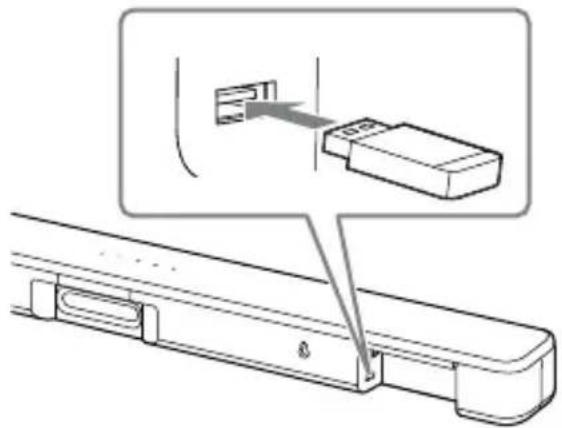
JU 2 USB
USB goo aolg USB 1000
HDMI OUT Channel (ARC)
(TV (ARC))
HDMI OUT
aJgSvTV IN (OPTICAL) (TV (ARC))
.HDMI OUT (TV (ARC))
BLUETOOTH
A2DP sbl BLUETOOTH j
/
aao)《BLUETOOTH@ aabgulwu
(20
USB
(USB)
aagall gll Ealil 1 jbl lolal 1e xlbU
(16 aoo) USB jz jz o0g g
2
00000000
s
.
gall
JzIJI JcGgOeJrAolll CooaJrJrso 0.0100 USB
#
- jyjdua
jnnn nnnn nn nnnn nnnn nnnn nnnn nnnn nnnn nnnn nnnn nnnn nnnn nnnn nnnn nnnn nnnn nnnn nnnn nnnn nnnn nnnn nnnn nnnn nnnn nnnn nnnn nnnn nnnn nnnn nnnn nnnn nnnn nnnn nnnn nnnn nnnn nnne
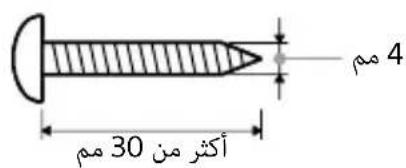
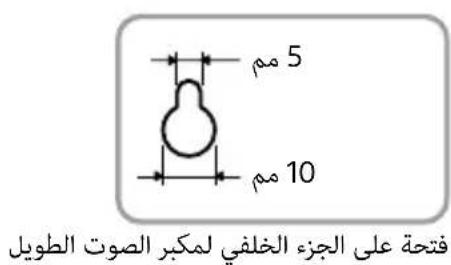
() 2
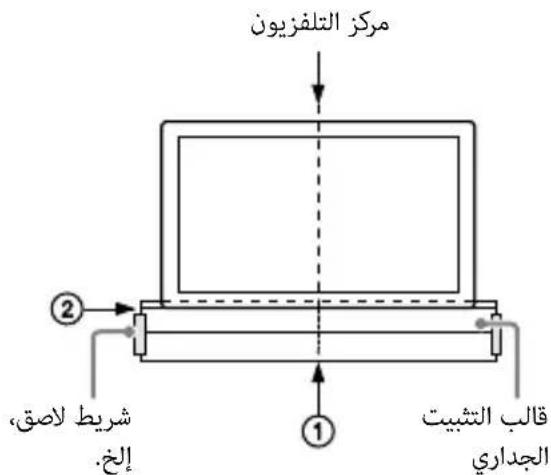
(1) jjjjjjjj jj j j j j j j j j j j j j j j j j j j j j j j j j j j j j j j j j j j j j j
(2) jjjJU U JU U U U U U U U U U U U U U U U U U U U U U U U U U U U U U U UU


.
#
. 10000000000000000000000000000000000000000000000000000000000000000000000000000000000
16()(/)
aallll laiy jzj 1
L
gJ 1
(g)plo
()① 10
.1JxWg 20 g 4b0g p 1
STANDARD 11
STANDARD
(18 aoo)
a#
(14 aao).a
(18 a) MUSIC 12
MUSIC
NIGHT 13
(18 afo).gfofofofofofofofofofofofofofofofofofofofofofofofofofofofofofofofofofofofofofofofofofofofofofofofofofofofo
daww g0g aag/
(22 aoo).BLUETOOTH
()
gall jfo gfo gao
p
*AUDIO 15
Dolby Digital
(19 a)
.Dolby DRC 1
(19 aoo)
(16 a) ENTER 16
1/abwglssalgai
.USB
16()*()
(20
.
abai 19AUDIO jj
.
(15 a) INPUT 1
INPUT le bdoL ic. JdoL jdoL
Jlcl JdoL jdoL g doL o
JdoL ddoL g doL
INPUT le bdo1
Oyj
I do L doL
INPUT le cbdo I do
. ly
← BLUETOOTH J do T V J do USB
(18 a) AUTO SOUND 2
AUTO SOUND
CINEMA 3
(18 aCINEMA 24
VOICE 4
(18 a) .Cg/ 出 出 Control for 出 出 HDMI
+*/(g)5
(7dd)INDICATOR 6
Jgblgolgsoe
(16 a) PLAY MODE 7
.USB
(16 a) ↑/↓ 8
.USB
JgB aaiiaaagjll jgs
bJl Jgb 101 oioj gogjll .ge b2.
.5 5
ACIN 1
HDMI OUT (TV (ARC)) 2
HDMI Joo
.HDMI
Audio Return
ARC. Channel (ARC)
/0g0 gjgl jyjzalw
HDMI 0
(16 a) (USB) 3
TVIN (OPTICAL) 4
(14 a) 5
Jc Jc Jc Jc Jc Jc
J 1
| الإستعمال |
| • . مصحيى : مصحيى : مصحيى : مصحيى : مصحيى : مصحيى : مصحيى : مصحيى : مصحيى : مصحيى : مصحيى : مصحيى : مصحيى : مصحيى : مصحيى : مصحيى : مصحيى : مصحيى : مصحيى : مصحيى : مصحيى |
| • . مصحيى : مصحيى : مصحيى : مصحيى : مصحيى : مصحيى : مصحيى : مصحيى : مصحيى : مصحيى : مصحيى : مصحيى : مصحيى : مصحيى : مصحيى : مصحيى : مصحيى : مصحيى : مصحيى |
| • . نزه : نزه : نزه : نزه : نزه : نزه : نزه : نزه : نزه : نزه : نزه : نزه : نزه : نزه : نزه : نزه : نزه : نزه : نزه : نزه : نزه : نزه : نزه : نزه : نزه : نزه |
| • . مصحيى : مصحيى : مصحيى : مصحيى : مصحيى : مصحيى : مصحيى : مصحيى : مصحيى : مصحيى : مصحيى : مصحيى : مصحيى : مصحيى : مصحيى : مصحيى : مصحيى : مصحيى : مصحيى: مصحيى : مصحيى : مصحيى : مصحيى : مصحيى : مصحيى : مصحيى : مصحيى : مصحيى : مصحيى : مصحيى : مصحيى : مصحيى : مصحيى : مصحيى : مصحيى : مصحيى : مصحيى : مصحيى : مصحيى: مصحيى: مصحيى : مصحيى : مصحيى : مصحيى : مصحيى : مصحيى : مصحيى : مصحيى : مصحيى : مصحيى : مصحيى : مصحيى : مصحيى : مصحيى : مصحيى : مصحيى : مصحيى : مصحيى : مصحيى: مصحيى: مصحيى : مصحيى : مصحيى : مصحيى : مصحيى : مصحيى : مصحيى : مصحيى : مصحيى : مصحيى : مصحيى : مصحيى : مصحيى : مصحيى : مصحيى : مصحيى : مصحيى : مصحيى : مصحيى : مصحيى: مصحيى : مصحيى : مصحيى : مصحيى : مصحيى : مصحيى : مصحيى : مصحيى : مصحيى : مصحيى : مصحيى : مصحيى : مصحيى : مصحيى : مصحيى : مصحيى : مصحيى : مصحيى : مصحيى: مصحيى : مصحيى : مصحيى : مصحيى : مصحيى : مصحيى : مصحيى : مصحيى : مصحيى : مصحيى : مصحيى : مصحيى : مصحيى : مصحيى : مصحيى : مصحيى : مصحيى : مصحيى : مصحيى : مصحيى : مصحيى : مصحيى : مصحيى : مصحيى : مصحيى : مصحيى : مصحيى : مصحيى : مصحيى : مصحيى : مصحيى : مصحيى : مصحيى : مصحيى : مصحيى : مصحيى : مصحيى : مصحيى : مصحيى : مصحيى: مصحيى :\( 0 \) |
IINDICATOR 15
| .19 (28 a) | .19 (28 a) | .19 (28 a) | .19 (28 a) | .19 (28 a) |
| .19 (24 a) | .19 (24 a) | .19 (24 a) | .19 (24 a) | .19 (24 a) |
| .19 (24 a) | .19 (24 a) | .19 (24 a) | .19 (24 a) | .19 (24 a) |
| .19 (24 a) | .19 (24 a) | .19 (24 a) | .19 (24 a) | .19 (24 a) |
| (28 a) | .19 (28 a) | .19 (28 a) | .19 (28 a) | .19 (28 a) |
| .19 (24 a) | .19 (24 a) | .19 (24 a) | .19 (24 a) | .19 (24 a) |
| .19 (24 a) | 19 (24 a) | .19 (24 a) | .19 (24 a) | .19 (24 a) |
| .19 (24 a) | .19 (24 a) | .19 (24 a) | .19 (24 a) | .19 (24 a) |
| .19 (24 a) | .19 (24a) | .19 (24 a) | .19 (24 a) | .19 (24 a) |
| .19 (24 a) | .19 (24 a) | .19 (24 a) | .19 (24 a) | .19 (24 a) |
| .19 (24 a) | .19 (24 a) | .19(24 a) | .19 (24 a) | .19 (24 a) |
| .19 (24 a) | .19 (24 a) | .19 (24 a) | .19 (24 a) | .19 (24 a) |
| .19 (24 a) | .19 (24 a) | .19 (24 a) | 19 (24 a) | .19 (24 a) |
| .19 (24 a) | .19 (24 a) | .19 (24 a) | .19 (24 a) | .19 (24 a) |
| .19 (24 a) | .19 (24 a) | .19 (24 a) | .19 (24a) | .19 (24 a) |
| .19 (24 a) | .19 (24 a) | .19 (24 a) | .19 (24 a) | .19 (24 a) |
| .19 (24 a) | .19 (24 a) | .19 (24 a) | .19 (24 a) | .19(24 a) |
| .19 (24 a) | .19 (24 a) | .19 (24 a) | .19 (24 a) | .19 (24 a) |
| .19 (24 a) | .19 (24 a) | .19 (24 a) | .19 (24 a) | .19 (24 a) |
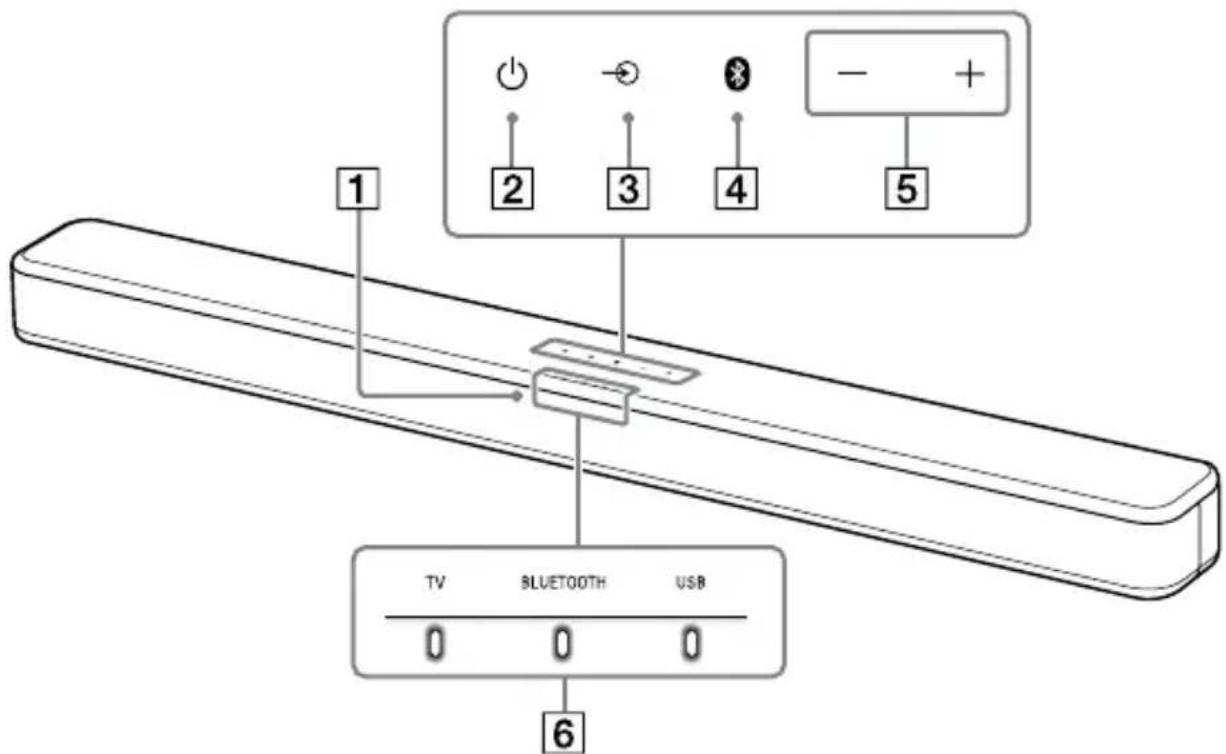
$$ \left(\ddot {c} \omega_ {\text {g s}} \omega_ {\text {s s}}\right) + / - 1; j \quad 5 $$
$$ \text {尔} \quad 6 $$
J 1
(7)
$$ \text {1} $$
aaii i 100
pI 1 J 0 0
$$ \left(\cup_ {j} \right. \cup_ {j} \boxed {2} $$
.
$$ (1 5 \ddot {a} \dot {a} \dot {a} \omega) (\dot {j} \dot {j} \dot {j} \dot {j} \dot {j} \dot {j}) \rightarrow j j ③ $$
$$ (2 0 \ddot {a} \dot {a} \omega) B L U E T O O T H \quad j; \quad 4 $$
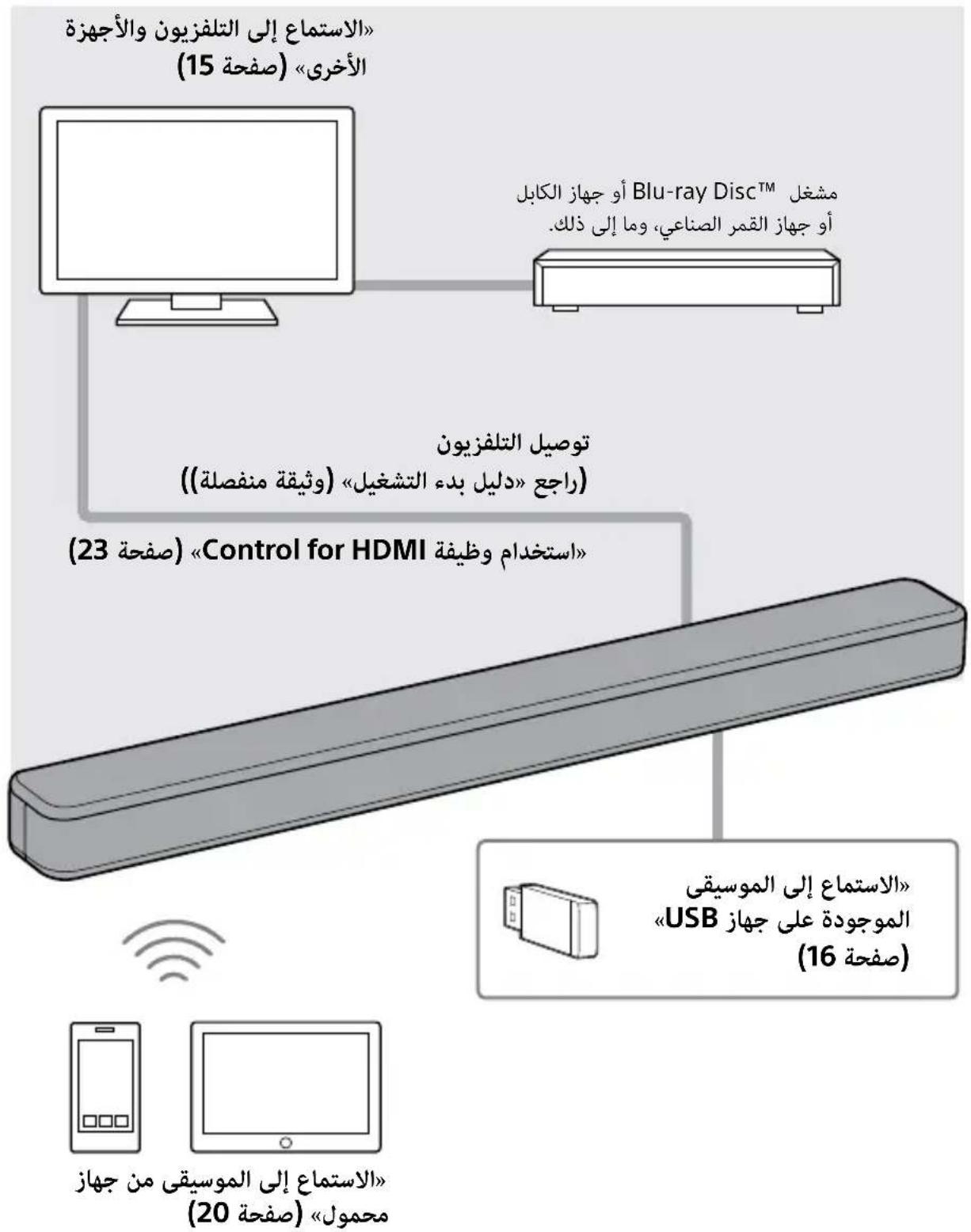
pIiI pIiIy IeE iSoy lo
(1)

(1)
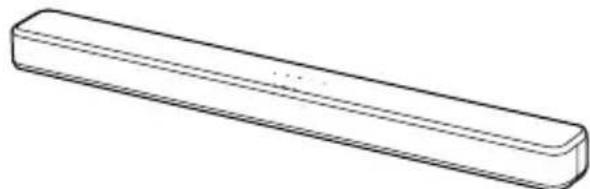
Jusit
(1)
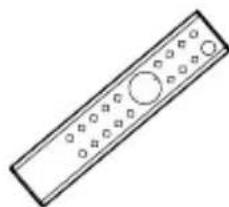
-
jll aee jaaa aall aal l
JAC