KBBR306ESS - Fridge KITCHENAID - Free user manual and instructions
Find the device manual for free KBBR306ESS KITCHENAID in PDF.


User questions about KBBR306ESS KITCHENAID
0 question about this device. Answer the ones you know or ask your own.
Ask a new question about this device
Download the instructions for your Fridge in PDF format for free! Find your manual KBBR306ESS - KITCHENAID and take your electronic device back in hand. On this page are published all the documents necessary for the use of your device. KBBR306ESS by KITCHENAID.
USER MANUAL KBBR306ESS KITCHENAID
BOTTOM-MOUNT BUILT-IN REFRIGERATOR
Use & Care Guide
For questions about features, operation/performance, parts, accessories or service, call: 1-800-422-1230
or visit our website at www.kitchenaid.com
In Canada, call: 1-800-807-6777 or visit our website at www.KitchenAid.ca
natural_image
Simple line drawing of a milk carton with a bunch of grapes (no text or symbols)TABLE OF CONTENTS
REFRIGERATOR SAFETY....3 Proper Disposal of Your Old Refrigerator....4
BEFORE USE ....4 Water Supply Requirements....4 Water System Preparation....5
REFRIGERATOR USE ....5 Power On/Off Switch....5 Using the Controls ....6 Ice Maker and Storage Bin....7 Water Filtration System ....8
REFRIGERATOR FEATURES ....9 Refrigerator Shelves ....9 Deli/Crisper Pans ....9 Wine Rack....10
FREEZER FEATURES ....10 Freezer Pan and Pull-out Ice Bin....10
DOOR FEATURES ....10 Utility Compartment....10 Door Bins ....10
REFRIGERATOR CARE .... 11 Cleaning.... 11 Changing the Light Bulbs.... 11 Power Interruptions .... 12 Vacation Care .... 12
TROUBLESHOOTING 12 Refrigerator Operation....12 Temperature and Moisture....13 Ice and Water....13
ASSISTANCE OR SERVICE....14 In the U.S.A....14 In Canada....14
ACCESSORIES....15 WATER FILTER CERTIFICATIONS....15 PERFORMANCE DATA SHEETS....16 WARRANTY....18
ÍNDICE
Your safety and the safety of others are very important.
We have provided many important safety messages in this manual and on your appliance. Always read and obey all safety messages.

This is the safety alert symbol.
This symbol alerts you to potential hazards that can kill or hurt you and others.
All safety messages will follow the safety alert symbol and either the word "DANGER" or "WARNING."
These words mean:
DANGER
You can be killed or seriously injured if you don't immediately follow instructions.
WARNING
You can be killed or seriously injured if you don't follow instructions.
All safety messages will tell you what the potential hazard is, tell you how to reduce the chance of injury, and tell you what can happen if the instructions are not followed.
IMPORTANT SAFETY INSTRUCTIONS
WARNING: To reduce the risk of fire, electric shock, or injury when using your refrigerator, follow these basic precautions:
■ Plug into a grounded 3 prong outlet.
■ Do not remove ground prong.
■ Do not use an adapter.
■ Do not use an extension cord.
■ Disconnect power before servicing.
■ Replace all parts and panels before operating.
■ Remove doors from your old refrigerator.
■ Use nonflammable cleaner.
- Keep flammable materials and vapors, such as gasoline, away from refrigerator.
■ Use two or more people to move and install refrigerator.
■ Disconnect power before installing ice maker (on ice maker kit ready models only).
■ Use a sturdy glass when dispensing ice (on some models).
■ Do not hit the refrigerator glass doors (on some models).
SAVE THESE INSTRUCTIONS
State of California Proposition 65 Warnings:
WARNING: This product contains one or more chemicals known to the State of California to cause cancer.
WARNING: This product contains one or more chemicals known to the State of California to cause birth defects or other reproductive harm.
Proper Disposal of Your Old Refrigerator
WARNING
Suffocation Hazard
Remove doors from your old refrigerator.
Failure to do so can result in death or brain damage.
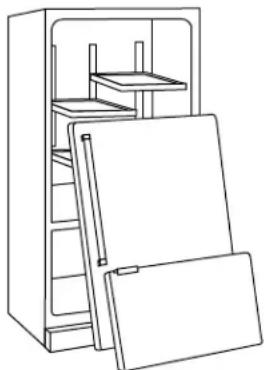
IMPORTANT: Child entrapment and suffocation are not problems of the past. Junked or abandoned refrigerators are still dangerous – even if they will sit for "just a few days." If you are getting rid of your old refrigerator, please follow these instructions to help prevent accidents.
Before You Throw Away Your Old Refrigerator or Freezer:
■ Take off the doors.
■ Leave the shelves in place so that children may not easily climb inside.
natural_image
Line drawing of a refrigerator with open doors and shelves (no text or symbols)Important information to know about disposal of refrigerants:
Dispose of refrigerator in accordance with Federal and Local regulations. Refrigerants must be evacuated by a licensed, EPA certified refrigerant technician in accordance with established procedures.
BEFORE USE
Remove the Packaging
■ Remove tape and glue residue from surfaces before turning on the refrigerator. Rub a small amount of liquid dish soap over the adhesive with your fingers. Wipe with warm water and dry.
- Do not use sharp instruments, rubbing alcohol, flammable fluids, or abrasive cleaners to remove tape or glue. These products can damage the surface of your refrigerator. For more information, see “Refrigerator Safety.”
■ Dispose of/recycle all packaging materials.
Clean Before Using
After you remove all of the packaging materials, clean the inside of your refrigerator before using it. See the cleaning instructions in "Refrigerator Care."
Important information to know about glass shelves and covers:
Do not clean glass shelves or covers with warm water when they are cold. Shelves and covers may break if exposed to sudden temperature changes or impact, such as bumping. Tempered glass is designed to shatter into many small, pebble-size pieces. This is normal. Glass shelves and covers are heavy. Use both hands when removing them to avoid dropping.
Water Supply Requirements
Read all directions before you begin.
IMPORTANT:
■ When your refrigerator was installed, the water connection from the water source should have been connected to your refrigerator. If your refrigerator is not connected to a water source, see “Connect to Water Line” in the Installation Instructions. If you have any questions about your water connection, see “Troubleshooting” or call a licensed, qualified plumber.
If you turn the refrigerator on before the water line is connected, turn the ice maker OFF. See “Ice Maker and Storage Bin.”
■ All installations must meet local plumbing code requirements.
Water Pressure
A cold water supply with water pressure between 30 and 120 psi (207 and 827 kPa) is required to operate the water dispenser and ice maker. If you have questions about your water pressure, see "Troubleshooting" or call a licensed, qualified plumber.
Reverse Osmosis Water Supply
IMPORTANT: The pressure of the water supply coming out of a reverse osmosis system going to the water inlet valve of the refrigerator needs to be between 30 and 120 psi (207 and 827 kPa).
If a reverse osmosis water filtration system is connected to your cold water supply, the water pressure to the reverse osmosis system needs to be a minimum of 40 psi (276 kPa).
If the water pressure to the reverse osmosis system is less than 40 psi (276 kPa):
■ Check to see whether the sediment filter in the reverse osmosis system is blocked. Replace the filter if necessary.
- Allow the storage tank on the reverse osmosis system to refill after heavy usage.
If your refrigerator has a water filter, it may further reduce the water pressure when used in conjunction with a reverse osmosis system. Remove the water filter. See “Water Filtration System.”
If you have questions about your water pressure, call a licensed, qualified plumber.
Water System Preparation
Please read before using the water system.
Immediately after installation, follow the steps below to make sure that the water system is properly cleaned.
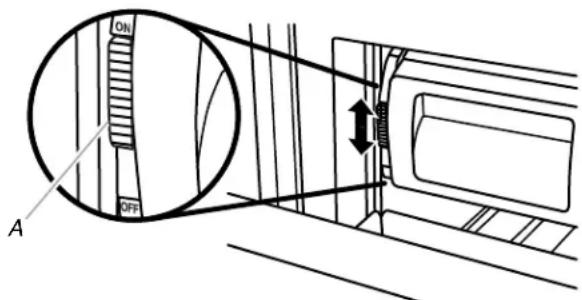
- Turn off the ice maker. Slide the ice maker On/Off control, located on the left-hand side of the ice bin, to the OFF (down) position as shown.
text_image
ON OFF AA. On/Off control
NOTE: If your model has a base grille filter system, make sure the base grille filter is properly installed.
Do not use with water that is microbiologically unsafe or of unknown quality without adequate disinfection before or after the system.
- Turn on the ice maker. Slide the ice maker On/Off control, located on the left-hand side of the ice bin, to the ON (up) position. Please refer to "Ice Maker and Storage Bin" for further instructions on the operation of your ice maker.
■ Allow 24 hours to produce the first batch of ice.
■ Discard the first 3 batches of ice produced.
REFRIGERATOR USE
WARNING

Electrical Shock Hazard
Plug into a grounded 3 prong outlet.
Do not remove ground prong.
Do not use an adapter.
Do not use an extension cord.
Failure to follow these instructions can result in death, fire, or electrical shock.
WARNING
Explosion Hazard
Keep flammable materials and vapors, such as gasoline, away from refrigerator.
Failure to do so can result in death, explosion, or fire.
Power On/Off Switch
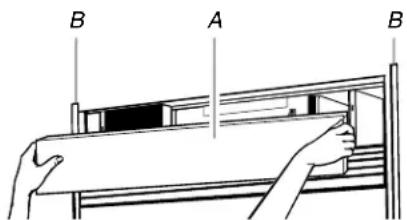
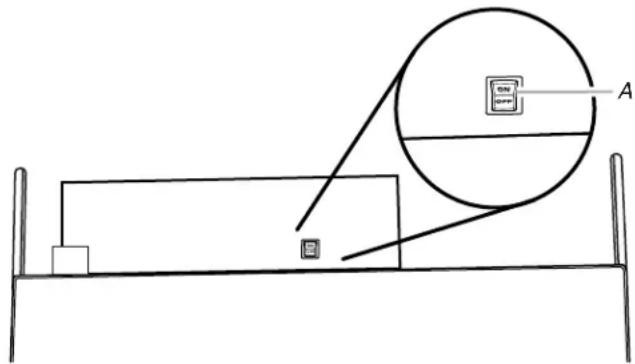
If you need to turn the power to your refrigerator On or Off, you must remove the top grille assembly to access the power switch. Turn the power to the refrigerator Off when cleaning your refrigerator or changing light bulbs.
To Remove Top Grille:
- Grasp both ends of the top grille.
- Push the top grille straight up, then pull straight out. Lay the grille on a soft surface.
text_image
B A BA. Top grille
B. Cabinet side trims
To Replace Top Grille:
- Insert top grille hooks (located on the back of the top grille) onto mounting bolts on the side trim.
- Pull grille down slightly to lock into place.
Turn Power On or Off:
- Remove top grille.
- Press power switch to the On or Off position.
- Replace top grille.
IMPORTANT: Be sure the power switch is set to the On position after cleaning refrigerator or changing light bulbs.
text_image
Diagram showing a bed with a computer monitor and an attached circular component labeled A, likely illustrating a device or setup.A. Power switch
Using the Controls
IMPORTANT:
■ The refrigerator control adjusts the refrigerator compartment temperature. The freezer control adjusts the freezer compartment temperature.
■ Wait 24 hours after you turn on the refrigerator before you put food into it. If you add food before the refrigerator has cooled completely, your food may spoil.
NOTE: Adjusting the refrigerator and freezer controls to a lower (colder) setting will not cool the compartments any faster.
■ If the temperature is too warm or too cold in the refrigerator or freezer, first check the air vents to be sure they are not blocked before adjusting the controls.
■ The preset settings should be correct for normal household usage. The controls are set correctly when milk or juice is as cold as you like and when ice cream is firm.
■ The actual temperature may differ from the display when a door is open for an extended period of time.
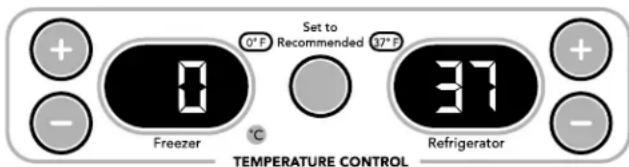
NOTE: The factory recommended set points are 0^ F ( -18^ C) for the freezer and 37^ F ( 3^ C) for the refrigerator.
Turning Refrigerator On and Viewing Set Points
■ Press the Cooling (ON/OFF) touch pad.

COOLING
NOTE:
■ After the refrigerator is turned on, the Over Temperature audio alarm and indicator light may activate every 1½ hours until the refrigerator and freezer temperatures are below 48°F (9°C) and 15°F (-9°C), respectively, or until the alarm is turned off. To turn off the audio alarm and indicator light, see “Master Alarm Reset.”
The ON/OFF touch pad on the control panel shuts down refrigerator functions such as cooling, lighting, fans and compressors. To turn the power off completely, use the power ON/OFF switch located behind the top grille. See “Power On/Off Switch.”
Viewing the Celsius Temperatures
■ Press °C touch pad. To redisplay degrees Fahrenheit, press °C again.

NOTE: If the freezer temperature is below zero, the negative sign next to the freezer display will light up. This is normal.
Adjusting Controls
NOTE: Wait at least 24 hours between adjustments. Recheck the temperatures before other adjustments are made.
To Adjust Set Point Temperatures:
■ Press the refrigerator or freezer PLUS (+) or MINUS (-) touch pad until the desired temperature is reached.
text_image
Set to Recommended 0°F Freezer 31 Refrigerator - °C -■ Press the Set To Recommended touch pad to reset the set points to the factory recommended temperatures.
NOTE: The set point range for the freezer is -5^ F to 5^ F ( -21^ C to -15^ C). The set point range for the refrigerator is 33^ F to 45^ F ( 0^ C to 7^ C).
| CONDITION/REASON: TEMPERATUREADJUSTMENT: | |
| REFRIGERATOR too coldNot set correctly for conditions | REFRIGERATOR Control 1° higher |
| REFRIGERATOR too warmHigh use or room very warm | REFRIGERATOR Control 1° lower |
| FREEZER too coldNot set correctly for conditions | FREEZER Control 1° higher |
| FREEZER too warm/too little iceHigh use or heavy ice use | FREEZER Control 1° lower |
Water Filter Indicator and Reset
See "Water Filter Indicator" in the "Water Filtration System" section.
Max Cool
The Max Cool feature assists with periods of heavy ice usage, full grocery loads, or temporarily warm room temperatures.
■ Press MAX COOL to turn on the Max Cool feature. The Max Cool indicator light will remain on for 24 hours unless manually turned off.

NOTE: The temperature display will remain at 34^ F ( 1^ C) and -5^ F ( -21^ C) for the refrigerator and freezer compartments, respectively, while the Max Cool feature is enabled. After 24 hours, the refrigerator returns to the previous temperature set points.
Holiday Mode
The Holiday Mode feature is designed for the traveler or for those whose religious observances require turning off the lights and ice maker. By selecting this feature, the temperature set points and Deli Pan settings remain unchanged, the ice maker will be disabled and the interior lights will turn off. For most efficient refrigerator operation, it is recommended to exit the Holiday Mode when it is no longer required.
■ Press HOLIDAY MODE to turn on the Holiday Mode feature. This feature will remain on until Holiday Mode is pressed again.
Holiday Mode

NOTE: If the Max Cool feature has been selected prior to turning on the Holiday Mode feature, then the set points will remain at 34^ F ( 1^ C) and -5^ F (-21°C) for the refrigerator and freezer compartments, respectively, until the Max Cool feature times out. The refrigerator will then return to the previous temperature set points chosen prior to the selection of the Max Cool feature, but the lights and ice maker will remain off until the Holiday Mode is pressed again.
Energy Saver Feature (42" Bottom Mount Only)
The Energy Saver feature controls the heaters located inside the hinged seal between the refrigerator doors. The heaters help keep external moisture from forming on the hinged seal.
■ Press ENERGY SAVER control to turn on this feature for low humidity conditions. The ring around the control will be lit when Energy Saver is on. If moisture begins to collect on the hinged seal between the doors, press ENERGY SAVER control again to turn off this feature.
Energy Saver

Alarm Functions
Master Alarm Reset
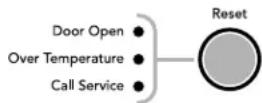
Pressing Alarm Reset once will turn off the audio alarm and indicator light. The audio alarm will not sound again for the current condition that caused the alarm until a new condition occurs or until a Master Alarm Reset is performed.
A Master Alarm Reset can be performed by pressing Cooling (ON/OFF) twice or by turning the power to the refrigerator off and on again. See "Power On/Off Switch." After performing a Master Alarm Reset, the indicator light will reactivate if the condition that caused the alarm is still present. See "Over Temperature," "Call Service," or "Door Open."

COOLING
ALARMS
Door Open
The Door Open indicator light will flash, an alarm will sound and the interior lights will turn off when a door has been open for longer than 10 minutes. When the door is closed, the audio alarm will reset and turn off, but the Door Open indicator light will continue to flash until the temperature is equal to or below 45°F (7°C) and 15°F (-9°C) for the refrigerator and freezer compartments, respectively.
NOTE: To deactivate the audio alarm and indicator light, see "Master Alarm Reset."
Over Temperature
IMPORTANT: If the Over Temperature Alarm activates, your food may spoil. See the "Power Interruptions." Minimize door openings until temperatures return to normal.
The Over Temperature feature is designed to let you know when either the refrigerator temperature rises above 48^ F ( 9^ C) or the freezer temperature rises above 15^ F (- 9^ C) for longer than 112 hours. The audio alarm will shut off automatically when the temperature returns to normal, but the indicator light will continue to flash until the Alarm is pressed to let you know that an over temperature condition has occurred.
If the over temperature condition is still present when an Over Temperature Reset is performed, the indicator light will continue to reactivate every 1½ hours until refrigerator and freezer temperatures are below 48°F (9°C) and 15°F (-9°C), respectively.
NOTE: The audio alarm will be disabled for subsequent occurrences of over temperature alarm condition. To enable the audio alarm, see "Master Alarm Reset."
Call Service
If the Call Service indicator light is flashing, call for service. See the "Assistance or Service" section for information on calling for service.
NOTE: The audio alarm will be disabled for subsequent occurrences of the call service alarm condition. To enable the audio alarm, see "Master Alarm Reset."
Ice Maker and Storage Bin
IMPORTANT: After connecting the refrigerator to a water source or replacing the water filter, fill and discard two full containers of ice to prepare the water filter for use, before using the ice.
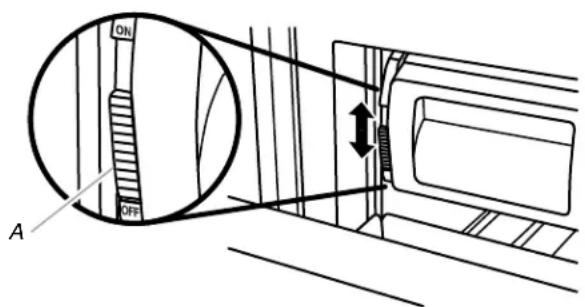
Turn the Ice Maker On/Off
The ice maker On/Off control is located on the left-hand side of the ice bin.
- To turn on the ice maker, slide the ice maker On/Off control to the ON (up) position.
NOTE: Your ice maker has an automatic shutoff. As ice is made, the ice cubes will fill the ice storage bin. The ice maker sensors will automatically stop ice production, but the ice maker control will remain in the ON (up) position.
- To manually turn off the ice maker, slide the ice maker On/Off control to the OFF (down) position as shown.
text_image
ON OFF AA. On/Off control
Ice Storage Bin Care
NOTE: It is normal for ice to stick together in the ice bin. It is recommended that the ice bin be emptied and cleaned as needed.
To clean the ice storage bin:
- Slide the ice bin out of the freezer and lift up and out.
- Empty the ice bin. Use warm water to melt the ice if necessary.
NOTE: Do not use anything sharp to break up the ice in the bin. This can cause damage to the ice container and the dispenser mechanism.
- Wash ice bin with warm water and a mild detergent, rinse well and dry thoroughly. Do not use harsh or abrasive cleaners or solvents.
REMEMBER:
■ Allow 24 hours to produce the first batch of ice.
■ It may take 3 to 4 days for the ice bin to completely fill, if no ice is used.
■ The quality of your ice will be only as good as the quality of the water supplied to your ice maker.
■ Avoid connecting the ice maker to a softened water supply. Water softener chemicals (such as salt) can damage parts of the ice maker and lead to poor quality ice. If a softened water supply cannot be avoided, make sure the water softener is operating properly and is well maintained.
■ It is normal for the ice cubes to be attached at the corners. They will break apart easily.
■ Do not store anything inside the ice bin.
Water Filtration System
Do not use with water that is microbiologically unsafe or of unknown quality without adequate disinfection before or after the system.
Water Filter Indicator (on some models)
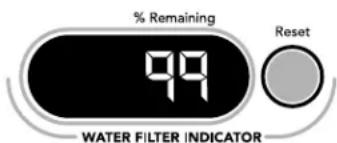
The water filter indicator, located on the control panel, will help you know when to change the water filter.
A new water filter should display a reading of 99%. The reading in the display will decrease as the filter life is used. A replacement water filter should be ordered when "Order Filter" is displayed. It is recommended that you replace the filter when "Change Filter" is displayed or when water flow to your water dispenser and/or ice maker decreases noticeably. See "Changing the Water Filter" later in this section.
text_image
% Remaining 99 WATER FILTER INDICATOR ResetAfter changing the water filter, press and hold RESET for 2 seconds until the status display changes to 99%.
Changing the Water Filter
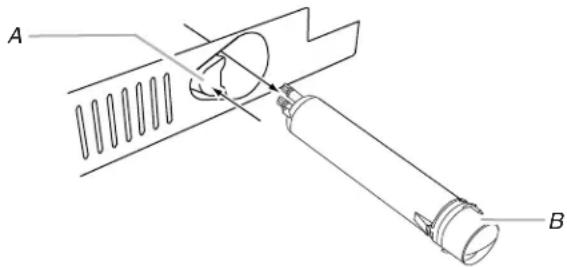
The water filter is located in the base grille below the freezer compartment door. It is not necessary to remove the base grille to remove the filter.
- Remove the filter by pressing the eject button and pulling straight out on the filter cap.
NOTES:
- Avoid twisting the cap when removing the filter because this could cause the cap to come off. If this occurs, replace the cap and pull the filter straight out.
■ There will be water in the filter. Some spilling may occur.
natural_image
Technical line drawing of a mechanical assembly with labeled parts A and B (no text or symbols beyond labels)A. Eject button
B. Filter cap
- Remove the cap by turning it counterclockwise until it stops.
IMPORTANT: Do not discard the cap. It is part of your refrigerator. Keep the cap to use with the replacement filter. - Align the ridge on the cap with the arrow on the new filter and turn the cap until it snaps into place.
text_image
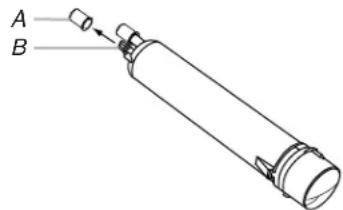
A BA. Cover
B. O-rings
- Remove the covers from the O-rings. Be sure the O-rings are still in place after the covers are removed.
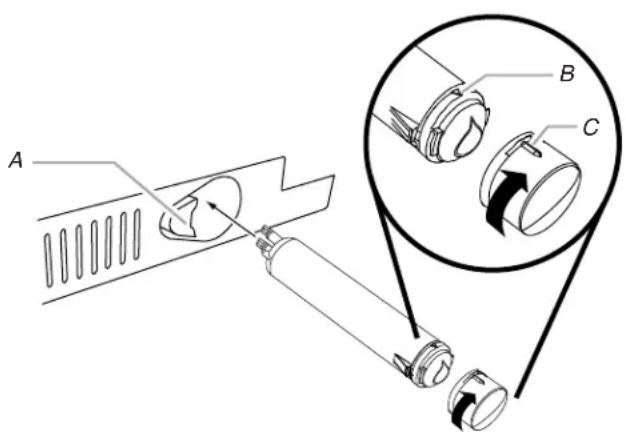
- Place the cap (removed in Step 2) on the new filter. Align the ridge on the cap with the arrow on the filter. Turn the cap clockwise until it snaps into place.
text_image
Technical diagram showing mechanical assembly with labeled parts A, B, and C, including a magnified inset view of component C.A. Eject button
B. Arrow on filter
C. Ridge on cap
- Push the new filter into the opening in the base grille. As the filter is inserted, the eject button will depress. The eject button will pop back out when the filter is fully engaged.
- Pull gently on the cap to check that the filter is securely in place.
- Flush the water system. Depending on your model, see "Water and Ice Dispensers" or "Ice Maker and Storage Bin."
Using the Ice Maker Without a Water Filter
You can operate the ice maker without a water filter. Your ice will not be filtered.
- Remove the filter by pressing the eject button and pulling on the cap. See "Changing the Water Filter" earlier in this section.
- Remove the cap by turning it counterclockwise until it stops.
IMPORTANT: Do not discard the cap. It is part of your refrigerator. Keep the cap to use with the replacement filter.
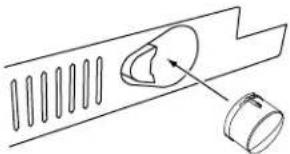
- With the cap in a horizontal position, insert the cap into the base grille until it stops.
natural_image
Technical line drawing of a mechanical component with a circular feature and a cylindrical part, no text or symbols present.- Turn the cap counterclockwise until the cap slips into the attachment slot. Then, turn the cap clockwise until it is in a horizontal position.
NOTE: The cap will not be even with the base grille.
REFRIGERATOR FEATURES
Refrigerator Shelves
Important information to know about glass shelves and covers:
Do not clean glass shelves or covers with warm water when they are cold. Shelves and covers may break if exposed to sudden temperature changes or impact, such as bumping. Tempered glass is designed to shatter into many small, pebble-size pieces. This is normal. Glass shelves and covers are heavy. Use both hands when removing them to avoid dropping.
The shelves in your refrigerator are adjustable to meet your individual storage needs.
Storing similar food items together in your refrigerator and adjusting the shelves to fit different heights of items will make finding the exact item you want easier. It will also reduce the amount of time the refrigerator door is open, and save energy.
Shelves and Shelf Frames
To Remove and replace a Shelf/Frame:
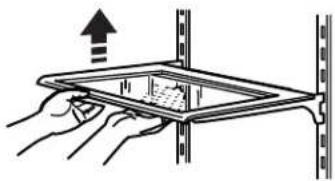
- Remove the shelf/frame by tilting it up at the front and lifting it out of the shelf supports. Pull shelf straight out.
-
Replace the shelf/frame by guiding the rear shelf hooks into the shelf supports. Tilt the front of the shelf up until the rear shelf hooks drop into the shelf supports.
-
Lower the front of the shelf and check that the shelf is in position.
natural_image
Illustration of hands holding a tablet device with an upward arrow, no text or symbols presentDeli/Crisper Pans
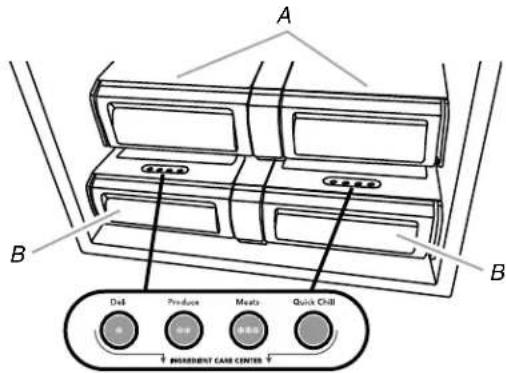
The 42" (106.7 cm) model includes two deli pans, two crisper pans, and the Ingredient Care Center control panel as shown. The 36" (91.4 cm) model has one deli pan and one crisper pan.
text_image
A B Del Produce Meats Quick Chill DEPARTMENT CARD CENTERA. Crisper pans
B. Deli pans
Deli Pan Settings (42" [106.7 cm] Models)
The Ingredient Care Center control panel located above each deli pan has the following three temperature settings: Deli, Produce, Meats (Cold to Coldest) and the Quick Chill setting. Select the appropriate setting for the food being stored.
Meat Storage Guide (42" [106.7 cm] Models)
Store most meat in original wrapping as long as it is airtight and moisture-proof. Rewrap if necessary. See the following chart for storage times. When storing meat longer than the times given, freeze the meat.
Fresh fish or shellfish.....use same day as purchased
Chicken, ground beef, variety meat (liver, etc.) ....1-2 days
Cold cuts, steaks/roasts ....3-5 days
Cured meats....7-10 days
Leftovers - Cover leftovers with plastic wrap, aluminum foil, or plastic containers with tight lids.
Quick Chill Setting (42" [106.7 cm] Models)
Each deli pan has a Quick Chill setting. Selecting Quick Chill lowers the temperature of the deli pan for a 1-hour period.
NOTE: The deli pan temperature will be lower than the freezing point for liquids. Remove items that may freeze, before setting the deli pan to Quick Chill.
Crisper Pan
Above each deli pan is a crisper pan (the larger of the pans) which is for your larger produce items.
Remove and Replace the Deli/Crisper Pans
- Slide the deli/crisper pan straight out to the stop. Lift the front of the pan with one hand while supporting the bottom with the other hand. Slide the pan out the rest of the way.
- To replace the deli/crisper pan, pull out the pan slides until they are fully extended and set the pan on the slides. Push the pan in toward the back until it is in closed position.
- Reopen the deli/crisper pan to make sure it has been replaced properly.
Wine Rack
To Remove and Replace the Wine Rack:
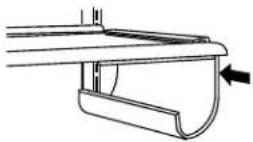
- Remove the rack by pulling it straight out from the shelf.
- Replace the rack by sliding it in between the shelf and the wall of the refrigerator.
FREEZER FEATURES
Freezer Pan and Pull-out Ice Bin
The freezer pan can be used to store smaller items. The freezer pan is not removable.
Remove and Replace the Ice Bin:
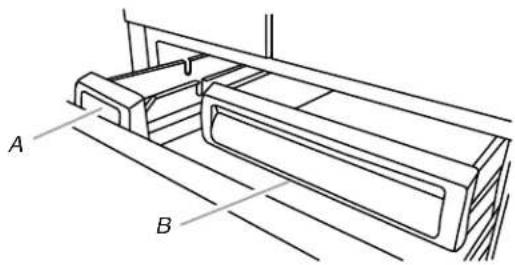
- Slide the ice bin out of the freezer and lift up and out.
natural_image
Technical line drawing of a mechanical component with labeled points A and B (no text or symbols beyond labels)A. Ice bin
B. Freezer pan
-
To replace the ice bin, pull out the pan slides until they are fully extended and set ice bin on the slides. Push the ice bin in toward the back until it is in closed position.
-
Reopen the ice bin to make sure it has been replaced properly.
Frozen Food Storage Guide
Storage times will vary according to the quality and type of food, the type of packaging or wrap used (should be airtight and moisture-proof), and the storage temperature. Ice crystals inside a sealed package are normal. This simply means that moisture in the food and air inside the package have condensed, creating ice crystals.
Put no more unfrozen food into the freezer than will freeze within 24 hours (no more than 2 to 3 lbs of food per cubic foot [907-1,350 g per 28 L] of freezer space). Leave enough space in the freezer for air to circulate around packages. Be sure to leave enough room for the door to close tightly.
For more information on preparing food for freezing, check a freezer guide or reliable cookbook.
DOOR FEATURES
Utility Compartment (on some models)
The utility compartment can be placed in any position on the refrigerator door.
To Remove and Replace the Utility Bin:
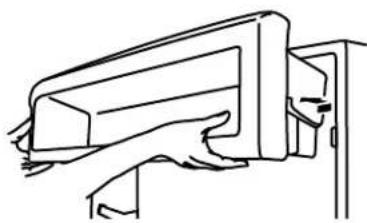
- Remove utility compartment by grasping both ends and lifting compartment up and out.
- Replace the bin by sliding it in above the desired support and pushing it down until it stops.
natural_image
Line drawing of a mechanical component or bracket assembly (no text or symbols)Door Bins
Large door bins hold gallon containers and the smaller door bins hold 2-liter bottles. The door bins are adjustable and removable for easy cleaning and adjusting.
Gallon Door Bin
To Install Gallon Door Bin:
NOTE: The gallon door bin can only be placed on the lower support.
- Position gallon door bin above lowest door adjustment slot.
- Push down to secure bin.
- Adjust other bins, as necessary to allow for milk or beverage container height.
Door Bins
To Remove and Replace the Door Bins:
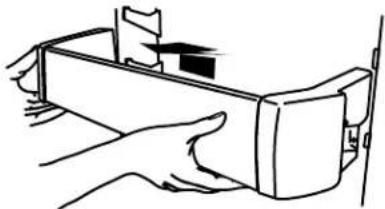
- Remove the bin by lifting it up and pulling it out.
- Replace the bin by sliding it in above the desired support and pushing it down until it stops.
natural_image
Line drawing of hands holding a rectangular device with a small object on top (no text or symbols)REFRIGERATOR CARE
Cleaning
WARNING
Explosion Hazard
Use nonflammable cleaner.
Failure to do so can result in death, explosion, or fire.
Both the refrigerator and freezer sections defrost automatically. However, clean both sections about once a month to avoid buildup of odors. Wipe up spills immediately.
To Clean Your Refrigerator:
- Remove the top grille. See "Power On/Off Switch."
- Press power switch to OFF.
- Remove all removable parts from inside, such as shelves, crispers, etc.
- Hand wash, rinse, and dry removable parts and interior surfaces thoroughly. Use a clean sponge or soft cloth and a mild detergent in warm water.
■ Do not use abrasive or harsh cleaners such as window sprays, scouring cleansers, flammable fluids, cleaning waxes, concentrated detergents, bleaches or cleansers containing petroleum products on plastic parts, interior and door liners or gaskets. Do not use paper towels, scouring pads, or other harsh cleaning tools. These can scratch or damage materials.
■ To help remove odors, you can wash interior walls with a mixture of warm water and baking soda (2 tbs to 1 qt [26 g to 0.95 L] of water).
- Clean the exterior surfaces.
WARNING
Broken Glass Hazard
Do not hit refrigerator glass doors.
Protect glass surface and edges during installation or removal of doors.
Failure to do so can result in serious eye injury or minor cuts.
Glass door panels: Wash glass door panels with a clean sponge or soft cloth and a mild detergent in warm water.
NOTE: Do not hit the glass with pots, pans, furniture, toys, or other objects. Scratching, hitting, jarring or stressing the glass may weaken its structure, causing an increased likelihood of breakage at a later date.
Stainless steel panels: Wash stainless steel with a clean sponge or soft cloth and a mild detergent in warm water.
To keep your stainless steel refrigerator looking like new and to remove minor scuffs or marks, it is suggested that you use the manufacturer's approved Stainless Steel Cleaner and Polish.
IMPORTANT: This cleaner is for Stainless Steel parts only!
Do not allow the Stainless Steel Cleaner and Polish to come into contact with any plastic parts such as the trim pieces, dispenser covers or door gaskets. If unintentional contact does occur, clean plastic part with a sponge and mild detergent in warm water. Dry thoroughly with a soft cloth. To order the cleaner, see "Accessories."
- Press the power switch to ON.
- Replace the top grille. See "Power On/Off Switch."
Changing the Light Bulbs
NOTE: Not all appliance bulbs will fit your refrigerator. Be sure to replace the bulb with one of the same size and shape. The lights require a 40-watt maximum appliance bulb. Replacement bulbs are available from your dealer.
Refrigerator Lights
There are three light bulbs located in the top front of the refrigerator compartment behind a light shield.
- Remove the top grille. See "Power On/Off Switch."
- Press power switch to the Off position.
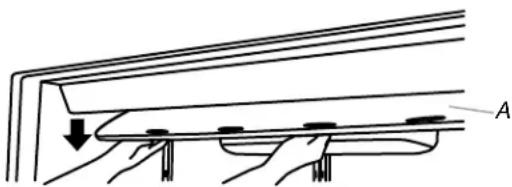
- Open the light shield. Grasp the light shield by the openings. Gently push back and pull down, as shown, to access the light bulbs.
natural_image
Diagram of a mechanical assembly with labeled component A, showing hands and structural elements (no text or symbols beyond label)A. Light shield
- Remove the light bulb and replace it with one of the same size, shape and wattage.
- Close the light shield by raising it up into place.
NOTE: If needed, clean the light shield with a damp soft cloth.
- Press the power switch to the On position.
- Replace the top grille. See "Power On/Off Switch."
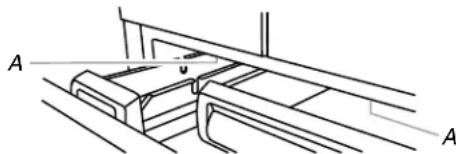
Freezer Lights
There are two light bulbs located in the top of the freezer compartment. One bulb is over the ice bin, and the other bulb is over the freezer pan.
- Slide open the ice bin or freezer pan to access the light bulb.
- Remove the light bulb and replace it with one of the same size, shape and wattage.
natural_image
Technical line drawing of a mechanical assembly with labeled points A (no text or symbols beyond labels)A. Light bulbs
Power Interruptions
If the power will be out for 24 hours or less, keep the door or doors closed (depending on your model) to help food stay cold and frozen.
If the power will be out for more than 24 hours, do one of the following:
■ Remove all frozen food and store it in a frozen food locker.
■ Place 2 lbs (907 g) of dry ice in the freezer for every cubic foot (28 L) of freezer space. This will keep the food frozen for 2 to 4 days.
■ If neither a food locker nor dry ice is available, consume or can perishable food at once.
REMEMBER: A full freezer stays cold longer than a partially filled one. A freezer full of meat stays cold longer than a freezer full of baked goods. If you see that food contains ice crystals, it may be refrozen, although the quality and flavor may be affected. If the condition of the food is poor, dispose of it.
Vacation Care
Your refrigerator is equipped with the Holiday Mode feature, which is designed for the traveler who wishes to turn off the lights and ice maker. By selecting this feature, the temperature set points remain unchanged, the ice maker will be disabled and the interior lights will turn off. For most efficient refrigerator operation, it is recommended to exit the Holiday Mode when it is no longer required.
If You Choose to Leave the Refrigerator on While You're Away:
- Use up any perishables and freeze other items.
- Press HOLIDAY MODE pad.
- If your refrigerator has an automatic ice maker, shut off the water supply to the ice maker.
- Empty the ice bin.
- When you return from vacation, press HOLIDAY MODE to return to normal operation.
If You Choose to Turn the Refrigerator Off Before You Leave:
- Remove all food from the refrigerator.
-
If your refrigerator has an automatic ice maker:
■ Turn off the water supply to the ice maker at least one day ahead of time.
■ When the last load of ice drops, slide the ice maker control to the OFF (down) position. -
Depending on your model, turn the Thermostat Control (or Refrigerator Control) to OFF. See "Using the Controls."
-
Clean refrigerator, wipe it, and dry well.
-
Tape rubber or wood blocks to the tops of all doors to prop them open far enough for air to get in. This stops odor and mold from building up.
TROUBLESHOOTING
Try the solutions suggested here first in order to avoid the cost of an unnecessary service call.
Refrigerator Operation
The refrigerator will not operate
WARNING
Electrical Shock Hazard
Plug into a grounded 3 prong outlet.
Do not remove ground prong.
Do not use an adapter.
Do not use an extension cord.
Failure to follow these instructions can result in death, fire, or electrical shock.
■ Power cord unplugged? Plug into a grounded 3 prong outlet.
■ Is outlet working? Plug in a lamp to see if the outlet is working.
■ Household fuse blown or circuit breaker tripped? Replace the fuse or reset the circuit breaker. If the problem continues, call an electrician.
■ Are controls on? Make sure the refrigerator controls are on. See “Using the Controls.”
Is refrigerator defrosting? Your refrigerator will regularly run an automatic defrost cycle. Recheck in 30 minutes to see if it is operating.
■ New installation? Allow 24 hours following installation for the refrigerator to cool completely.
NOTE: Adjusting the temperature controls to coldest setting will not cool either compartment more quickly.
The motor seems to run too much
Your new refrigerator may run longer than your old one due to its high-efficiency compressor and fans. The unit may run even longer if the room is warm, a large food load is added, doors are opened often, or if the doors have been left open.
The refrigerator is noisy
Refrigerator noise has been reduced over the years. Due to this reduction, you may hear intermittent noises from your new refrigerator that you did not notice from your old model. Below are listed some normal sounds with an explanation.
■ Buzzing - heard when the water valve opens to fill the ice maker
■ Pulsating - fans/compressor adjusting to optimize performance
■ Rattling - flow of refrigerant, water line, or from items placed on top of the refrigerator
■ Sizzling/Gurgling - water dripping on the heater during defrost cycle
■ Popping - contraction/expansion of inside walls, especially during initial cool-down
■ Water running - may be heard when water melts during the defrost cycle and runs into the drain pan
■ Creaking/Cracking - occurs as ice is being ejected from the ice maker mold.
There is no audible door open alarm
Has the door been open less than 10 minutes? The door open alarm will only flash when the door has been open for 10 minutes. The audible alarm will sound the first time the door is left open for more than 10 minutes. Subsequent door open alarms will only flash. You must reset the audible alarm each time. See “Using the Control(s).”
The doors will not close completely
■ Door blocked open? Move food packages away from door.
■ Bin or shelf in the way? Push bin or shelf back in the correct position.
The doors are difficult to open
WARNING
Explosion Hazard
Use nonflammable cleaner.
Failure to do so can result in death, explosion, or fire.
■ Are the gaskets dirty or sticky? Clean gaskets with mild soap and warm water.
The lights do not work
■ Is a light bulb loose in the socket or burned out? See "Changing the Light Bulbs."
- Is the refrigerator in Holiday Mode? See "Using the Controls."
■ Has the door been open more than 10 minutes? See “Using the Controls.”
Temperature and Moisture
Temperature is too warm
■ New installation? Allow 24 hours following installation for the refrigerator to cool completely.
■ Door(s) opened often or left open? Allows warm air to enter refrigerator. Minimize door openings and keep doors fully closed.
■ Large load of food added? Allow several hours for refrigerator to return to normal temperature.
■ Controls set correctly for the surrounding conditions? Adjust the controls a setting colder. Check temperature in 24 hours. See "Using the Controls."
■ Refrigerator not cooling? For models with digital controls, turn the refrigerator OFF and then ON to reset. If this does not correct the problem, call for service.
■ Air vents blocked? Remove any item from in front of the air vents.
There is interior moisture buildup
NOTE: Some moisture buildup is normal.
■ Humid room? Contributes to moisture buildup.
■ Door(s) opened often or left open? Allows humid air to enter refrigerator. Minimize door openings and keep doors fully closed.
There is moisture between the refrigerator doors
■ Energy Saver on? Turn the Energy Saver feature OFF, if moisture is collecting between the refrigerator doors. See "Using Controls."
Ice and Water
The ice maker is not producing ice or not enough ice
■ Refrigerator connected to a water supply and the supply shutoff valve turned on? Connect refrigerator to water supply and turn water shutoff valve fully open.
■ Kink in the water source line? A kink in the line can reduce water flow. Straighten the water source line.
■ Ice maker turned on? Make sure wire shutoff arm or switch (depending on model) is in the ON position.
■ New installation? Wait 24 hours after ice maker installation for ice production to begin. Wait 72 hours for full ice production.
■ Large amount of ice recently removed? Allow 24 hours for ice maker to produce more ice.
■ Ice cube jammed in the ice maker ejector arm?
Remove ice from the ejector arm with a plastic utensil.
■ Reverse osmosis water filtration system connected to your cold water supply? This can decrease water pressure. See “Water Supply Requirements” in either the Installation Instruction booklet or the Use & Care Guide.
The ice cubes are hollow or small
NOTE: This is an indication of low water pressure.
■ Water shutoff valve not fully open? Turn the water shutoff valve fully open.
■ Kink in the water source line? A kink in the line can reduce water flow. Straighten the water source line.
■ Reverse osmosis water filtration system connected to your cold water supply? This can decrease water pressure. See “Water Supply Requirements.”
■ Questions remain regarding water pressure? Call a licensed, qualified plumber.
Ice is sticking together in the ice storage bin
■ It is normal for frost to be on top of the ice storage bin due to normal opening and closing of the freezer.
■ It is normal for ice to stick together when it is not dispensed or used frequently. It is recommended that the ice storage bin be emptied and cleaned as needed. See “Ice Maker and Storage Bin.”
Off-taste, odor or gray color in the ice
■ New plumbing connections? New plumbing connections can cause discolored or off-flavored ice.
■ Ice stored too long? Discard ice. Wash ice bin. Allow 24 hours for ice maker to make new ice.
■ Odor transfer from food? Use airtight, moisture-proof packaging to store food.
■ Are there minerals (such as sulfur) in the water? A water filter may need to be installed to remove the minerals.
■ Is there a water filter installed on the refrigerator? Gray or dark discoloration in ice indicates that the water filtration system needs additional flushing.
ASSISTANCE OR SERVICE
If You Need Service
Please refer to the warranty page in this manual.
If You Need Replacement Parts
If you need to order replacement parts, we recommend that you use only factory specified parts. Factory specified parts will fit right and work right because they are made with the same precision used to build every new KITCHENAID® appliance.
To locate factory specified parts in your area, call us or your nearest designated service center.
In the U.S.A.
Call the KitchenAid Customer eXperience Center toll free 1-800-422-1230, or visit our website at www.kitchenaid.com.
Our consultants provide assistance with:
■ Features and specifications on our full line of appliances.
■ Referrals to local KitchenAid brand dealers.
■ Installation information.
■ Use and maintenance procedures.
■ Accessory and repair parts sales.
■ Specialized customer assistance (Spanish speaking, hearing impaired, limited vision, etc.).
For Further Assistance
If you need further assistance, you can write to KitchenAid with any questions or concerns at:
KitchenAid Brand Home Appliances Customer eXperience Center 553 Benson Road Benton Harbor, MI 49022-2692
Please include a daytime phone number in your correspondence.
In Canada
Call the KitchenAid Canada LP Customer eXperience Centre toll free 1-800-807-6777 or visit our website at www.kitchenaid.ca.
Our consultants provide assistance with:
■ Scheduling of service. KitchenAid ^® appliances designated service technicians are trained to fulfill the product warranty and provide after-warranty service, anywhere in Canada.
■ Features and specifications on our full line of appliances.
■ Referrals to local KitchenAid brand dealers.
■ Use and maintenance procedures.
■ Accessory and repair parts sales.
For Further Assistance
If you need further assistance, you can write to KitchenAid Canada LP with any questions or concerns at:
KitchenAid Brand Home Appliances Customer eXperience Centre 200 – 6750 Century Ave. Mississauga, Ontario L5N 0B7
Please include a daytime phone number in your correspondence.
ACCESSORIES
To order accessories, call 1-800-442-9991 and ask for the appropriate part number listed below or contact your authorized KitchenAid brand dealer. In Canada, call 1-800-807-6777.
affresh® Stainless Steel Cleaner:
In U.S.A., order Part #W10355016
In Canada, order Part #W10355016B
affresh® Stainless Steel Wipes:
In U.S.A., order Part #W10355049
In Canada, order Part #W10355049B
affresh® Kitchen & Appliance Cleaner:
In U.S.A., order Part #W10355010
In Canada, order Part #W10355010B
Replacement Water Filter:
In U.S.A., order Part #4396841 (T2RFWG2)
In Canada, Order Part #4396841B (T2RFWG2)
WATER FILTER CERTIFICATIONS
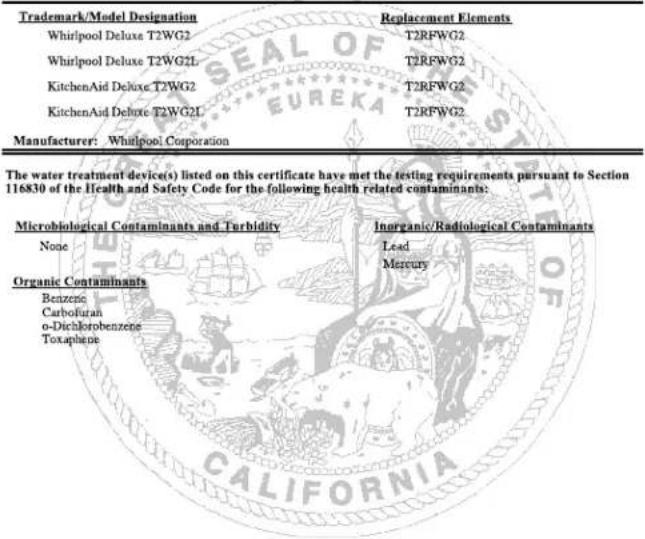
State of California
Department of Health Services
Water Treatment Device
Certificate Number
05-1703
Date Issued: April 6, 2005
Date Revised: September 7, 2005
text_image
Trademark/Model Designation Replacement Elements Whirlpool Deluxe T2WG2 T2RFWG2 Whirlpool Deluxe T2WG2L T2RFWG2 KitchenAid Deluxe T2WG2 T2RFWG2 KitchenAid Deluxe T2WG2L T2RFWG2 Manufacturer: Whirlpool Corporation The water treatment device(s) listed on this certificate have met the testing requirements pursuant to Section 116830 of the Health and Safety Code for the following health related contaminants: Microbiological Contaminants and Turbidity Inorganic/Radiological Contaminants None Lead Mercury Organic Contaminants Benzene Carbofuran o-Dichlorobenzene ToxapheneRated Service Capacity: 200 gals
Rated Service Flow: 0.85 gpm
Conditions of Certification:
Do not use with water that is microbiologically unsafe or of unknown quality, without adequate disinfection before or after the system.
State of California
Department of Health Services
Water Treatment Device
Certificate Number
05 - 1702
Date Issued: April 6, 2005
Date Revised: September 7, 2005
| Trademark/Model Designation | Replacement Elements |
| Whirlpool Deluxe T1WG2 | T2RFWG2 |
| Whirlpool Deluxe T1WG2L | T2RFWG2 |
| KitchenAid Deluxe T1WG2 | T2RFWG2 |
| KitchenAid Deluxe T1WG2L | T2RFWG2 |
| Manufacturer: Whirlpool Corporation | |
| The water treatment device(s) listed on this certificate have met the testing requirements pursuant to Section 116830 of the Health and Safety Code for the following health related contaminants: | |
| Microbiological Contaminants and Turbidity None Organic Contaminants Benzene Carbostrano o-Dichlorobenzene Toxaphene | Inorganic/Radiological Contaminants Lead Mercury |
Rated Service Capacity: 200 gals
Rated Service Flow: 0.5 gpm
Conditions of Certification:
Do not use with water that is microbiologically unsafe or of unknown quality, without adequate disinfection before or after the system.
PERFORMANCE DATA SHEETS
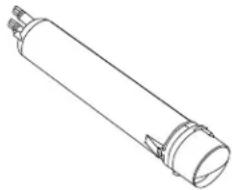
Base Grille Water Filtration System
Model T2WG2L/T2RFWG2 Capacity 200 Gallons (757 Liters)
Model T2WG2/T2RFWG2 Capacity 200 Gallons (757 Liters)

System tested and certified by NSF International against NSF/ANSI Standard 42 for the reduction of Chlorine Taste and Odor, Particulate Class II ^* ; and against NSF/ANSI Standard 53 for the reduction of Mercury, Benzene, Toxaphene, O-dichlorobenzene, and Carbofuran.
This system has been tested according to NSF/ANSI Standards 42 and 53 for the reduction of the substances listed below. The concentration of the indicated substances in water entering the system was reduced to a concentration less than or equal to the permissible limit for water leaving the system, as specified in NSF/ANSI Standards 42 and 53.
| Substance Reduction Aesthetic Effects | NSF Reduction Requirements | Average Influent | Influent Challenge Concentration | Maximum Effluent | Average Effluent | Minimum % Reduction | Average % Reduction |
| Chlorine Taste/Odor Particulate Class II* | 50% reduction 85% reduction | 2.0182 mg/L 1333333 #/mL | 2.0 mg/L ± 10% At least 10,000 particles/mL | 0.06 mg/L 6600 #/mL** | 0.0536 mg/L 2325 #/mL | 97.03 99.51 | 97.34 99.83 |
| Contaminant Reduction | NSF Reduction Requirements | Average Influent | Influent Challenge Concentration | Maximum Effluent | Average Effluent | Minimum % Reduction | Average % Reduction |
| Lead: @ pH 6.5*** | 0.010 mg/L | 0.1533 mg/L | 0.15 mg/L ± 10% | 0.0005 mg/L | 0.0005 mg/L | 99.67 | 99.67 |
| Lead: @ pH 8.5*** | 0.010 mg/L | 0.1400 mg/L | 0.15 mg/L ± 10% | 0.0007 mg/L | 0.0006 mg/L | 99.50 | 99.57 |
| Mercury: @ pH 6.5 | 0.002 mg/L | 0.0058 mg/L | 0.006 mg/L ± 10% | 0.0002 mg/L | 0.0002 mg/L | 96.54 | 96.54 |
| Mercury: @ pH 8.5 | 0.002 mg/L | 0.0059 mg/L | 0.006 mg/L ± 10% | 0.0005 mg/L | 0.0003 mg/L | 91.57 | 94.92 |
| Benzene 0.005 mg/L 0.0154 mg/L 0.015 mg/L ± 10% 0.0012 mg/L 0.0006 mg/L 92.22 96.34 | |||||||
| O-Dichlorobenzene 0.6 mg/L 1.7571 mg/L 1.8 mg/L ± 10% 0.0250 mg/L 0.0066 mg/L 98.58 99.63 | |||||||
| Toxaphene | 0.003 mg/L | 0.015 mg/L | 0.015 mg/L ± 10% | 0.001 mg/L | 0.001 mg/L | 93.33 | 93.33 |
| Carbofuran | 0.04 mg/L | 0.0819 mg/L | 0.08 mg/L ± 10% | 0.0400 mg/L | 0.0213 mg/L | 51.13 | 74.00 |
Test Parameters: pH = 7.5 ± 0.5 unless otherwise noted. Flow = 0.85 gpm (3.2 Lpm). Pressure = 60 psig (413.7 kPa).
Temp. = 68°F to 71.6°F (20°C to 22°C). Rated service capacity = 200 gallons (757 liters).
It is essential that operational, maintenance, and filter replacement requirements be carried out for the product to perform as advertised.
■ Use replacement filter T2RFWG2, part #4396841.
Model T2WG2L: Style 1 – When the filter indicator reads 10%, order a new filter. When the indicator reads 0%, it is recommended that you replace the filter.
Style 2 – When the filter indicator changes from green to yellow, order a new filter. When the indicator changes from yellow to red, it is recommended that you replace the filter.
Style 3 – When the water filter status display changes from "GOOD" to "ORDER," order a new filter. When the filter indicator reads "REPLACE," it is recommended that you replace the filter.
Style 4 – Press FILTER to check the status of your water filter. If the filter indicator light is yellow, order a new filter. If the filter indicator light is red, it is recommended that you replace the filter.
Model T2WG2: Change the water filter cartridge every 6 months. If the water flow to the water dispenser or ice maker decreases noticeably before 6 months have passed, replace the water filter cartridge more often.
These contaminants are not necessarily in your water supply. While testing was performed under standard laboratory conditions, actual performance may vary.
■ The product is for cold water use only.
■ Do not use with water that is microbiologically unsafe or of unknown quality without adequate disinfection before or after the system.
■ Refer to the "Warranty" section for the Manufacturer's name, address and telephone number.
■ Refer to the "Warranty" section for the Manufacturer's limited warranty.
Application Guidelines/Water Supply Parameters
| Water Supply | City or Well |
| Water Pressure | 30 - 120 psi (207 - 827 kPa) |
| Water Temperature | 33° - 100°F (0.6° - 37.8°C) |
| Service Flow Rate | 0.85 gpm (3.2 Lpm) @ 60 psi |
natural_image
Line drawing of a cylindrical mechanical component with flanged ends and a protruding rod (no text or symbols)*Class II particle size: 1 um to <5 um
**Test requirement is at least 100,000 particles/mL of AC Fine Test Dust.
***Compliant for Lead reduction requirements under NSF/ANSI Standard 53 as tested by Pace Analytical Services, Inc.
® NSF is a registered trademark of NSF International.
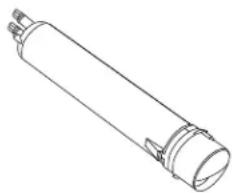
Base Grille Water Filtration System
Model T1WG2L/T2RFWG2 Capacity 200 Gallons (757 Liters)
Model T1WG2/T2RFWG2 Capacity 200 Gallons (757 Liters)

System tested and certified by NSF International against NSF/ANSI Standard 42 for the reduction of Chlorine Taste and Odor, Particulate Class II ^+ ; and against NSF/ANSI Standard 53 for the reduction of Mercury, Benzene, Toxaphene, O-dichlorobenzene, and Carbofuran.
This system has been tested according to NSF/ANSI Standards 42 and 53 for the reduction of the substances listed below. The concentration of the indicated substances in water entering the system was reduced to a concentration less than or equal to the permissible limit for water leaving the system, as specified in NSF/ANSI Standards 42 and 53.
| Substance Reduction Aesthetic Effects | NSF Reduction Requirements | Average Influent | Influent Challenge Concentration | Maximum Effluent | Average Effluent | Minimum % Reduction | Average % Reduction |
| Chlorine Taste/Odor Particulate Class II* | 50% reduction 85% reduction | 2.0182 mg/L 1333333 #/mL | 2.0 mg/L ± 10% At least 10,000 particles/mL | 0.06 mg/L 6600 #/mL** | 0.0536 mg/L 2325 #/mL | 97.03 99.51 | 97.34 99.83 |
| Contaminant Reduction | NSF Reduction Requirements | Average Influent | Influent Challenge Concentration | Maximum Effluent | Average Effluent | Minimum % Reduction | Average % Reduction |
| Lead: @ pH 6.5*** | 0.010 mg/L | 0.1533 mg/L | 0.15 mg/L ± 10% | 0.0005 mg/L | 0.0005 mg/L | 99.67 | 99.67 |
| Lead: @ pH 8.5*** | 0.010 mg/L | 0.1400 mg/L | 0.15 mg/L ± 10% | 0.0007 mg/L | 0.0006 mg/L | 99.50 | 99.57 |
| Mercury: @ pH 6.5 | 0.002 mg/L | 0.0058 mg/L | 0.006 mg/L ± 10% | 0.0002 mg/L | 0.0002 mg/L | 96.54 | 96.54 |
| Mercury: @ pH 8.5 | 0.002 mg/L | 0.0059 mg/L | 0.006 mg/L ± 10% | 0.0005 mg/L | 0.0003 mg/L | 91.57 | 94.92 |
| Benzene 0.005 mg/L 0.0154 mg/L 0.015 mg/L ± 10% 0.0012 mg/L 0.0006 mg/L 92.22 96.34 | |||||||
| O-Dichlorobenzene 0.6 mg/L 1.7571 mg/L 1.8 mg/L ± 10% 0.0250 mg/L 0.0066 mg/L 98.58 99.63 | |||||||
| Toxaphene | 0.003 mg/L | 0.015 mg/L | 0.015 mg/L ± 10% | 0.001 mg/L | 0.001 mg/L | 93.33 | 93.33 |
| Carbofuran | 0.04 mg/L | 0.0819 mg/L | 0.08 mg/L ± 10% | 0.0400 mg/L | 0.0213 mg/L | 51.13 | 74.00 |
Test Parameters: pH = 7.5 ± 0.5 unless otherwise noted. Flow = 0.5 gpm (1.9 Lpm). Pressure = 60 psig (413.7 kPa). Temp. = 68°F to 71.6°F (20°C to 22°C). Rated service capacity = 200 gallons (757 liters).
It is essential that operational, maintenance, and filter replacement requirements be carried out for the product to perform as advertised.
■ Use replacement filter T2RFWG2, part #4396841.
Model T1WG2L: Style 1 – When the filter indicator reads 10%, order a new filter. When the indicator reads 0%, it is recommended that you replace the filter.
Style 2 – When the filter indicator changes from green to yellow, order a new filter. When the indicator changes from yellow to red, it is recommended that you replace the filter.
Style 3 – When the water filter status display changes from "GOOD" to "ORDER," order a new filter. When the filter indicator reads "REPLACE," it is recommended that you replace the filter.
Style 4 – Press FILTER to check the status of your water filter. If the filter indicator light is yellow, order a new filter. If the filter indicator light is red, it is recommended that you replace the filter.
Model T1WG2: Change the water filter cartridge every 6 months. If the water flow to the water dispenser or ice maker decreases noticeably before 6 months have passed, replace the water filter cartridge more often.
These contaminants are not necessarily in your water supply. While testing was performed under standard laboratory conditions, actual performance may vary.
■ The product is for cold water use only.
■ Do not use with water that is microbiologically unsafe or of unknown quality without adequate disinfection before or after the system.
■ Refer to the "Warranty" section for the Manufacturer's name, address and telephone number.
■ Refer to the "Warranty" section for the Manufacturer's limited warranty.
Application Guidelines/Water Supply Parameters
| Water Supply | City or Well |
| Water Pressure | 30 - 120 psi (207 - 827 kPa) |
| Water Temperature | 33° - 100°F (0.6° - 37.8°C) |
| Service Flow Rate | 0.5 gpm (1.9 Lpm) @ 60 psi |
natural_image
Line drawing of a cylindrical mechanical component with flanges and a protruding rod (no text or symbols)**Test requirement is at least 100,000 particles/mL of AC Fine Test Dust.
***Compliant for Lead reduction requirements under NSF/ANSI Standard 53 as tested by Pace Analytical Services, Inc.
® NSF is a registered trademark of NSF International.
KITCHENAID® REFRIGERATION LIMITED WARRANTY
ATTACH YOUR RECEIPT HERE. PROOF OF PURCHASE IS REQUIRED TO OBTAIN WARRANTY SERVICE.
Please have the following information available when you call the Customer eXperience Center:
■ Name, address and telephone number
■ Model number and serial number
■ A clear, detailed description of the problem
■ Proof of purchase including dealer or retailer name and address
IF YOU NEED SERVICE:
- Before contacting us to arrange service, please determine whether your product requires repair. Some questions can be addressed without service. Please take a few minutes to review the Troubleshooting or Problem Solver section of the Use and Care Guide, scan the QR code on the right to access additional resources, or visit http://kitchenaid.custhelp.com.
- All warranty service is provided exclusively by our authorized KitchenAid Service Providers. In the U.S. and Canada, direct all requests for warranty service to:
KitchenAid Customer eXperience Center
In the U.S.A., call 1-800-422-1230. In Canada, call 1-800-807-6777.
http://kitchenaid.custhelp.com
If outside the 50 United States or Canada, contact your authorized KitchenAid dealer to determine whether another warranty applies.
TWELVE YEAR LIMITED WARRANTY
WHAT IS COVERED WHAT IS NOT COVERED
TWO YEAR LIMITED WARRANTY
For two years from the date of purchase, when this major appliance is installed, operated and maintained according to instructions attached to or furnished with the product, KitchenAid brand of Whirlpool Corporation or Whirlpool Canada LP (hereafter "KitchenAid") will pay for Factory Specified Replacement Parts and repair labor to correct defects in materials or workmanship that existed when this major appliance was purchased, or at its sole discretion replace the product. In the event of product replacement, your appliance will be warranted for the remaining term of the original unit's warranty period.
THIRD THROUGH SIXTH YEAR LIMITED WARRANTY (SEALED REFRIGERATION SYSTEM ONLY)
In the third through sixth year from the date of purchase, when this major appliance is installed, operated and maintained according to instructions attached to or furnished with the product, KitchenAid brand will pay for factory specified replacement parts and repair labor for the following components to correct non-cosmetic defects in materials or workmanship in the sealed refrigeration system (includes compressor, evaporator, condenser, dryer and connecting tubing) that existed when this major appliance was purchased.
SEVENTH THROUGH TWELFTH YEAR LIMITED WARRANTY (SEALED REFRIGERATION SYSTEM ONLY - LABOR NOT INCLUDED)
In the seventh through twelfth year from the date of purchase, when this major appliance is installed, operated and maintained according to instructions attached to or furnished with the product, KitchenAid brand will pay for factory specified replacement parts for the following components to correct defects in materials or workmanship in the sealed refrigeration system (includes compressor, evaporator, condenser, dryer and connecting tubing) that existed when this major appliance was purchased.
YOUR SOLE AND EXCLUSIVE REMEDY UNDER THIS LIMITED WARRANTY SHALL BE PRODUCT REPAIR AS PROVIDED HEREIN. Service must be provided by a KitchenAid designated service company. This limited warranty is valid only in the United States or Canada and applies only when the major appliance is used in the country in which it was purchased. This limited warranty is effective from the date of original consumer purchase. Proof of original purchase date is required to obtain service under this limited warranty.
- Commercial, non-residential or multiple-family use, or use inconsistent with published user, operator or installation instructions.
- In-home Instruction on how to use your product
- Service to correct improper product maintenance or installation, installation not in accordance with electrical or plumbing codes or correction of household electrical or plumbing (i.e. house wiring, fuses or water inlet hoses).
- Consumable parts (i.e. light bulbs, batteries, air or water filters, preservation solutions, etc.).
- Damage from accident, misuse, abuse, fire, floods, acts of God or use with products not approved by KitchenAid.
- Repairs to parts or systems to correct product damage or defects caused by unauthorized service, alteration or modification of the appliance.
- Cosmetic damage including scratches, dents, chips, and other damage to appliance finishes unless such damage results from defects in materials and workmanship and is reported to KitchenAid within 30 days.
-
Discoloration, rust or oxidation of surfaces resulting from caustic or corrosive environments including but not limited to high salt concentrations, high moisture or humidity or exposure to chemicals.
-
Food or medicine loss due to product failure.
-
Pick-up or delivery. This product is intended for in-home repair.
-
Travel or transportation expenses for service in remote locations where an authorized KitchenAid servicer is not available.
-
Removal or reinstallation of inaccessible appliances or built-in fixtures (i.e. trim, decorative panels, flooring, cabinetry, islands, countertops, drywall, etc.) that interfere with servicing, removal or replacement of the product.
-
Service or parts for appliances with original model/serial numbers removed, altered or not easily determined.
The cost of repair or replacement under these excluded circumstances shall be borne by the customer.
DISCLAIMER OF IMPLIED WARRANTIES
IMPLIED WARRANTIES, INCLUDING ANY IMPLIED WARRANTY OF MERCHANTABILITY OR IMPLIED WARRANTY OF FITNESS FOR A PARTICULAR PURPOSE, ARE LIMITED TO ONE YEAR OR THE SHORTEST PERIOD ALLOWED BY LAW. Some states and provinces do not allow limitations on the duration of implied warranties of merchantability or fitness, so this limitation may not apply to you. This warranty gives you specific legal rights, and you also may have other rights that vary from state to state or province to province.
DISCLAIMER OF REPRESENTATIONS OUTSIDE OF WARRANTY
KitchenAid makes no representations about the quality, durability, or need for service or repair of this major appliance other than the representations contained in this warranty. If you want a longer or more comprehensive warranty than the limited warranty that comes with this major appliance, you should ask KitchenAid or your retailer about buying an extended warranty.
LIMITATION OF REMEDIES: EXCLUSION OF INCIDENTAL AND CONSEQUENTIAL DAMAGES
YOUR SOLE AND EXCLUSIVE REMEDY UNDER THIS LIMITED WARRANTY SHALL BE PRODUCT REPAIR AS PROVIDED HEREIN. KITCHENAID SHALL NOT BE LIABLE FOR INCIDENTAL OR CONSEQUENTIAL DAMAGES. Some states and provinces do not allow the exclusion or limitation of incidental or consequential damages, so these limitations and exclusions may not apply to you. This warranty gives you specific legal rights, and you also may have other rights that vary from state to state or province to province.
natural_image
Line drawing of a refrigerator with multiple doors and shelves (no text or symbols)text_image
Diagram showing a bed with a computer monitor and an attached circular device labeled A, illustrating a physical setup or measurement setup.text_image
% Remaining 99 WATER FILTER INDICATOR Resettext_image
Technical diagram showing a mechanical assembly with labeled parts A, B, and C, including a magnified inset view of the component.natural_image
Technical line drawing of a mechanical component with a curved cutout and a cylindrical part inserted (no text or symbols)natural_image
Illustration of hands holding a transparent tray with an upward arrow, next to a vertical wall (no text or symbols)Cajones para carnes frías/verduras
natural_image
Technical line drawing of a mechanical assembly with labeled components A and B (no text or symbols beyond labels)natural_image
Line drawing of a mechanical component or bracket assembly (no text or symbols)natural_image
Line drawing of hands holding a rectangular device with a small object on top (no text or symbols)natural_image
Diagram of a mechanical assembly with hands holding a component, showing layered structure and a downward arrow (no text or symbols)A. Pantalla de luz
natural_image
Technical line drawing of a mechanical assembly with labeled points A (no text or symbols beyond labels)A. Focos de luz
Cortes de corriente
natural_image
Line drawing of a cylindrical mechanical component with flanges and end caps (no text or symbols)natural_image
Line drawing of a cylindrical mechanical component with flanges and end caps (no text or symbols)natural_image
Line drawing of a refrigerator with multiple doors and shelves (no text or symbols)text_image
Diagram showing a bed with a computer monitor and an attached circular device labeled 'A', likely illustrating a computer setup or testing setup.Holiday Mode (mode vacances)
text_image
% Remaining 99 WATER FILTER INDICATOR Resettext_image
Technical diagram showing mechanical assembly with labeled parts A, B, and C, including a magnified inset view of component C.natural_image
Technical line drawing of a mechanical component with a curved cutout and a cylindrical end (no text or symbols)natural_image
Illustration of hands holding a transparent tray with an upward arrow, next to a wall-mounted frame (no text or symbols)natural_image
Technical line drawing of a mechanical component with labeled points A and B (no text or symbols beyond labels)A. Bac à glaçons
natural_image
Line drawing of a mechanical component or bracket assembly (no text or symbols)Balconnets de porte
natural_image
Line drawing of hands holding a device with a device on top (no text or symbols)ENTRETIEN DU RÉFRIGÉRATEUR
Nettoyage
AVERTISSEMENT
Risque d'explosion
natural_image
Diagram of a mechanical assembly with hands and a labeled component 'A' (no text or symbols beyond label)A. Protège-ampoule
natural_image
Technical line drawing of a mechanical assembly with labeled points A (no text or symbols beyond labels)A. Ampoules
Pannes de courant
ASSISTANCE OU SERVICE
KitchenAid Brand Home Appliances.
natural_image
Line drawing of a cylindrical mechanical component with flanges and end caps (no text or symbols)natural_image
Line drawing of a cylindrical mechanical component with flanged ends and a tapered end (no text or symbols)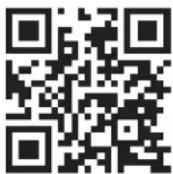
http://www.kitchenaid.ca