E89243 (MD 87430) - Photo accessory MEDION - Free user manual and instructions
Find the device manual for free E89243 (MD 87430) MEDION in PDF.


| Product Type | Wireless Bluetooth Selfie Stick |
| Brand | Medion |
| Model | E89243 (MD 87430) |
| Main Material | Aluminum |
| Length (unfolded) | Approx. 970 mm |
| Length (folded) | Approx. 230 mm |
| Weight | Approx. 169 g |
| Power Supply | Rechargeable battery via micro USB port |
| Input Voltage | DC IN 5 V, 500 mA |
| Charging Time | Approx. 1 hour |
| Standby Time | Approx. 300 hours |
| Connectivity | Bluetooth V3.0 |
| Compatible Systems | iOS 5.0 and above, Android 2.3 and above |
| Charging Connection Type | Micro USB 2.0 |
| Number of Telescopic Segments | 5 |
| Package Contents | Selfie stick, wrist strap, smartphone holder, USB cable |
| Main Functions | Remote shutter release, selfie taking, burst photos, Android/iOS selector, status LED |
| Safety | Do not open or repair yourself, avoid excessive heat and humidity, keep out of reach of children |
| Maintenance | Clean with a soft, dry cloth, avoid thinners and petroleum-based products |
| General Information | Warranty void if used improperly |
Frequently Asked Questions - E89243 (MD 87430) MEDION
User questions about E89243 (MD 87430) MEDION
0 question about this device. Answer the ones you know or ask your own.
Ask a new question about this device
Download the instructions for your Photo accessory in PDF format for free! Find your manual E89243 (MD 87430) - MEDION and take your electronic device back in hand. On this page are published all the documents necessary for the use of your device. E89243 (MD 87430) by MEDION.
USER MANUAL E89243 (MD 87430) MEDION
- About these operating instructions 25
1.1. Warning symbols and signal words used in these instructions 26
1.2. Proper use 28
- Safety information 29
2.1. Dangers for children and people with reduced capability 29
2.2. Safety precautions 30
2.3. Never carry out repairs yourself 32
- Declaration of conformity 33
- Overview of the device 34
- Package contents 35
- Using the device for the first time 36
6.1. Charging the battery via USB 36
7. First steps 37
7.1. Switching on the selfie stick 37
7.2. Switching off the selfie stick 38
8. Taking photos 38
9. Maintenance and care 40
10. Disposal 41
11. Technical data 42
12. Legal notice 43
1. About these operating instructions

Ensure that you read these operating instructions carefully and follow all instructions given. The instructions will help you to operate the device reliably and help increase its service life. Always store these operating instructions near the device. Keep these operating instructions so that you can pass them on with the device if you sell it.
1.1. Warning symbols and signal words used in these instructions
| ! | DANGER! Warning of immediate mortal danger! WARNING! Warning: possible mortal danger and/or serious irreversible injuries! CAUTION! Warning: possible minor or moderate injuries! |
| ATTENTION! Please follow the instructions to avoid property damage. |
26 of 110
| 1 | NOTICE! Additional information on using the device. |
| 6 | NOTICE! Please follow the guidelines in the operating instructions. |
| 4 | WARNING! Warning of risk of electric shock! |
| ·Bullet point/information on operating steps and results | |
| ►Tasks to be performed | |
1.2. Proper use
This device is suitable for taking wireless selfies with smartphones.
- The device is intended for private use only and not for industrial/commercial use.
Please note that we shall not be liable in cases of improper use: - Do not modify the device without our consent and do not use any auxiliary equipment which we have not approved or supplied.
- Use only spare parts and accessories that we have supplied or approved.
Heed all the information in these operating instructions, especially the safety information. Any other use is deemed improper and can cause personal injury or property damage. -
Do not use the device in areas where there is a risk of explosion, e.g. tank systems, fuel storage depots, or areas in which solvents are being used. This device should also not be used in areas where the air is contaminated with fine particles (e.g. flour dust or sawdust).
-
Do not expose the device to any extreme conditions. The following should be avoided:
-High levels of humidity or moisture
-Extremely high or low temperatures
-Direct sunlight
-Naked flames
2. Safety information
2.1. Dangers for children and people with reduced capability
-
This device is not intended for use by people (including children) with reduced physical, sensory or mental abilities or for those without experience and/or knowledge, unless they are supervised by a person responsible for their safety or they have been instructed in its use.
-
Children should be supervised to ensure that they do not play with the device. Children should not be allowed to use this device without supervision.
- Keep the device and its accessories out of the reach of children.

DANGER!
Keep plastic packaging out of the reach of children. There is a risk of suffocation!
2.2. Safety precautions
Take the following safety precautions, in order to avoid damage to your device and to always keep it in perfect condition:
- Avoid excessive heat
Do not use or store the device in sunlight or at high temperatures. This can cause the housing to deform.
30 of 110
- Avoid extreme fluctuations in temperature
If you take the device from a cold environment into a warm one or vice versa, drops of water can form outside and inside the device which can cause malfunctions and can damage the device. Wait until the device has reached ambient temperature before switching it on. Using a carrying case or plastic case offers a certain amount of protection against fluctuations in temperature.
- Do not drop the device
Jarring or vibrations resulting from a fall can cause malfunctions. Loop the carrying strap around your wrist when you carry the selfie stick.
2.3. Never carry out repairs yourself

WARNING!
Never try to open or repair the device yourself. There is a risk of electric shock!
- If there is a fault, contact the Medion Service Centre or another authorised specialist workshop in order to avoid risks and hazards.
3. Declaration of conformity
Medion AG hereby declares that the product conforms to the following European requirements:
R&TTE Directive 1999/5/EC
RoHS Directive 2011/65/EU.
Full declarations of conformity are available at www.medion.com/conformity.
4. Overview of the device

1) LED charge indicator
2) Record button
3) Operating LED
4) Android/iOS system selection button
34 of 110
5) Telescopic pole
6) Locking screw
7) Smartphone holder
8) On/Off switch
9) Micro USB connection
5. Package contents
Please check your purchase to ensure that all the items are included and contact us within 14 days of purchase if any parts are missing. The following items are supplied with your product:
Selfie stick
- Wrist strap
- Smartphone holder
- Carrying case
USB cable
Documentation

DANGER!
Keep plastic packaging out of the reach of children. There is a risk of suffocation!
6. Using the device for the first time
6.1. Charging the battery via USB
You can charge the battery via a USB connection on your PC or another device with a USB connection.
Connect the USB cable to the selfie stick.
Use the supplied USB cable to connect the selfie stick to the USB port on your PC or another device with a USB port.
During charging, the LED charge indicator lights up blue.
36 of 110

NOTICE!
The battery is not charged when you purchase the product. You need to charge the battery before you can use the device.
7. First steps
7.1. Switching on the selfie stick
Slide the On/Off switch to the ON position to switch on the selfie stick.
The operating LED will briefly light up in red and then flashes alternately red and blue.

NOTICE!
If the selfie stick does not turn on, check whether the battery has been fully charged.
7.2. Switching off the selfie stick
Slide the On/Off switch to the OFF position to switch off the selfie stick.
8. Taking photos
- Clamp your smartphone into the smartphone holder.
Pull out the telescopic pole to the desired length and lock it in place by turning it in a clockwise direction.
Switch on the selfie stick.
As soon as the operating LED starts flashing alternately red and blue, the stick will attempt to establish a Bluetooth connection.
Activate the Bluetooth function on your smartphone and search for "BT Selfie". The two devices will now pair automatically. Once a connection has been successfully established, the operating LED will light up in red or blue.
Press the Android/iOS system selection button to choose the correct system for your smartphone.
If you are using an iOS system, please use the system selection button to choose the setting in which the LED lights up in red.
If you are using an Android system, it is possible to use the settings for both the red LED and the blue LED.
- When the smartphone and the selfie stick have been paired via Bluetooth, open the camera mode on the smartphone.
Press the capture button to take a photo.
Hold down the capture button to start taking a series of photos.

NOTICE!
The selfie stick will now automatically connect to the smartphone as soon as you switch it on. If you want to use a different smartphone, please switch off the Bluetooth connection to the smartphone that you do not wish to use.

NOTICE!
The selfie stick will switch to sleep mode if it is not used for more than 3 minutes. Press any button to switch back to operating mode.

NOTICE!
If the camera app used on your smartphone does not respond to the selfie stick, check whether the volume+ button can be defined as the shutter release in the settings for your photo app. If this is not the case, download and install a different camera app that does provide this feature.
9. Maintenance and care
Clean the selfie stick as follows:
Clean the stick with a soft, dry cloth.
Do not use thinners or detergents which contain oil. These could damage your selfie stick.
40 of 110
10. Disposal

Packaging
The product has been packaged to protect it from damage in transit. The packaging is made of materials that can be recycled in an environmentally friendly manner.
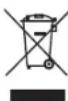
Device
Old devices should not be disposed of with the normal household rubbish.
In accordance with Directive 2012/19/EU, the device must be properly disposed of at the end of its service life.
This involves separating the materials in the device for the purpose of recycling and preventing any impact on the environment.
Take old devices to a collection point for electrical scrap or a recycling centre.
Contact your local waste disposal company or your local authority for more information on this subject.
11. Technical data
Weight: approx. 169 g
Length: approx. 230-970 mm
Main material: aluminium
Connection: micro USB 2.0
Telescopic segments: 5
Battery: Li-ion, 3.7 V 120 mAh
Input voltage: DC IN 5 V
Charging time: approx. 1 hour
Standby time: approx. 300 hours
Supported systems: iOS 5.0 and higher
Android 2.3 and higher
Bluetooth: V3.0
42 of 110
Subject to technical and optical changes as well as printing errors!
CE
12. Legal notice
Copyright © 2015
All rights reserved.
This operating manual is protected by copyright.
Mechanical, electronic and any other form of reproduction is prohibited without the written permission of the manufacturer. Copyright is owned by the company:
Medion AG
Am Zehnhof 77
45307 Essen
Germany
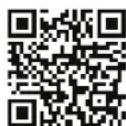
The operating manual can be reordered via the service hotline and is available for download via the service portal at www.medion.com/gb/service/start/.
You can also scan the QR code above and download the operating manual onto your mobile device via the service portal..
Sommaire
- Directive R&TTE 1999/5/CE
Directive RoHS 2011/65/UE
Yououpouzeobtenirdesdéclarationsdeconformitécompletéssurwww.medion.com/conformity.
- Etui
Cable USB
Documentation

DANGER!
- About these operating instructions
- Warning symbols and signal words used in these instructions
- Proper use
- Safety information
- Dangers for children and people with reduced capability
- DANGER!
- Safety precautions
- Never carry out repairs yourself
- WARNING!
- Declaration of conformity
- Overview of the device
- Package contents
- Using the device for the first time
- Charging the battery via USB
- NOTICE!
- First steps
- Switching on the selfie stick
- Switching off the selfie stick
- Taking photos
- Maintenance and care
- Disposal
- Packaging
- Device
- Technical data
- Legal notice
- Sommaire
Brand : MEDION
Model : E89243 (MD 87430)
Category : Photo accessory