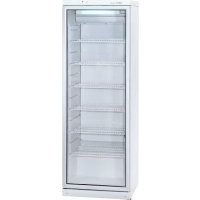
CD350 - Beverage fridge Exquisit - Free user manual and instructions
Find the device manual for free CD350 Exquisit in PDF.



| Product Type | Beverage Refrigerator |
| Brand | Exquisit |
| Model | CD350 |
| Dimensions (H x W x D) | 173 x 60 x 60 cm |
| Weight | 67 kg |
| Power Supply | 220-230 V / 50 Hz |
| Current | 1.7 A |
| Power | 230 W |
| Net Refrigerator Volume | 320 liters |
| Bottle Capacity (0.33 l) | 329 bottles |
| Bottle Capacity (0.5 l) | 197 bottles |
| Internal Temperature | 0 °C to +10 °C |
| Refrigerant | R600a |
| Insulation | Polyurethane foam with cyclopentane |
| Climate Class | 3 (ambient temperature 16-32 °C) |
| Interior Lighting | LED, 3 W |
| Number of Adjustable Shelves | 8 |
| Door Reversal | Yes, reversible |
| Defrost | Automatic |
| Cooling Type | Compressor |
| Fan | Yes |
| Maintenance and Cleaning | Regular cleaning with soapy water, cleaning of the drain |
| Safety | Unplug before cleaning, do not cover ventilation grilles |
| After-Sales Service | Contact customer service for technical assistance |
Frequently Asked Questions - CD350 Exquisit
Dust the rear part and compressor at least once a year with a soft brush or vacuum cleaner.
User questions about CD350 Exquisit
0 question about this device. Answer the ones you know or ask your own.
Ask a new question about this device
Download the instructions for your Beverage fridge in PDF format for free! Find your manual CD350 - Exquisit and take your electronic device back in hand. On this page are published all the documents necessary for the use of your device. CD350 by Exquisit.
USER MANUAL CD350 Exquisit
natural_image
Front view of a white stainless steel refrigerator with clear glass doors (no visible text or labels)
natural_image
Exterior view of a two-tiered stainless steel refrigerator with clear glass doors (no visible text or labels)

CD290-1004, CD350-1003, CD350-1313, FKU 290 G CD351, KSCD 350.1 CD350-311, CD350-1D, CD350
5

CD350-1004, CD350-2D, KS CD 350.2, CD350-2
SAFETY INSTRUCTIONS
Carefully read the Instruction manual! If instructions are not followed, there is a risk of injury, damage of the appliance and loss of the right to free warranty service. We recommend to keep the Instruction manual the whole time you have the appliance. When you sell the appliance pass the Instruction manual to the new owner of the appliance.
WARNING!
- Do not cover the ventilation holes at the top and on the sides of the appliance.
- Do not use any mechanical means or electrical devices to hasten the thawing process when cleaning the freezer compartment.
- Do not use electrical appliances inside the food storage compartments of the appliance, unless they are of the type recommended by the manufacturer.
- If the supply cord is damaged it must be replaced by the manufacturer, manufacturer service agent or a similarly qualified person, in order to avoid a hazard.
— Disposal of the appliance should be according to national rules. - Do not damage the appliance refrigeration system. It contains the refrigerant gas R600a. If the refrigeration system is damaged:

√ Do not use any open flame.
√ Avoid sparks — do not turn on any electrical devices or lighting fixtures.
√ Immediately ventilate the room.
- The appliance should be used only for storing foodstuffs.
- This appliance is not designed for the storage of explosive substances such as aerosol cans with a flammable propellant.
- It is prohibited to store petrol and other flammable liquids near the appliance.
! CONNECTION TO THE MAINS
- The appliance must be plugged into an earthed electricity supply socket. The earthed electrical socket by which the appliance is connected to the mains should be in an accessible place.
-
IF THE APPLIANCE IS PRODUCED WITH THE SPECIAL SUPPLY CORD IT CAN BE EXCHANGED ONLY BY THE SAME SPECIAL SUPPLY CORD PROVIDED BY THE MANUFACTURER.
-
TO AVOID HAZARDS, DAMAGED POWER SUPPLY CORDS SHOULD ONLY BE REPLACED BY THE MANUFACTURER, A MAINTENANCE TECHNICIAN OR A PERSON WITH AN EQUIVALENT QUALIFICATION.
— DO NOT USE extension cords or connectors (adapters), or hubs. - The frequency and power of the electricity supply must conform to the general data parameters of the appliance as it is shown in the product label.
- When positioning the appliance be careful that the electrical cord isn't squeezed in order to avoid its damage. Do not store heavy objects such as cooling devices, furniture or other devices next the appliance in such a way that they could squeeze and damage the electrical cord. This can cause a short circuit and a fire.
- Make sure that the plug of the electrical cord is not squeezed by the back wall of the appliance or otherwise damaged. A damaged plug can be the cause of a fire!
- WARNING! DO NOT OPEN THE COVER OF THE LED ILLUMINATION. In case that LED illumination is used the service representative must be contacted when the LED light is defected.
- IF THE APPLIANCE IS UNPLUGGED (FOR CLEANING, MOVING TO ANOTHER PLACE, ETC.), IT MAY BE REPEATEDLY SWITCHED ON AFTER 15 MIN.
- It is forbidden to use a technically damaged appliance.
- The appliance can't be disposed of by burning.
- Do not place any switched on electrical devices (such as microwave ovens, hair dryers, irons, electric kettles or other electrical devices) on top of the appliance because this may cause ignition of plastic parts.
- Do not place any dishes with liquids on top of the appliance and do not keep flowers in vases or other liquid-filled vessels on the appliance.
- Do not climb on or sit on the appliance, do not lean on or hang on the appliance doors.
IF THE APPLIANCE IS OUT OF ORDER AND IT IS NOT POSSIBLE TO REPAIR IT BY MEANS OF GIVEN RECOMMENDATIONS, UNPLUG IT, OPEN THE DOORS AND CALL THE SERVICE EXPERT. ONLY A SERVICE REPRESENTATIVE CAN REMEDY ALL TECHNICAL OR CONSTRUCTION FAULTS.

GENERAL INFO RMATION
The appliance is a vertical display cooler with glass doors and with a fan and storage of foodstuffs and for chilling of drinks and for a short-term storage of them.
This applian ce is int e n d e d f o r c o mmer c i a l
THE APPLIANCE IS ECOLOGICALLY CLEAN, CONTAINING NO MATERIALS HARMFUL TO OZONE LAYER: the refrigerant used is R600a, the foaming agent used for the appliance insulation is cyclopentane C_5H_10 .
THE MANUFACTURER GUARANTEES RELIABLE OPERATION OF THE REFRIGERATOR WHEN THE AMBIENT TEMPERATURE IS +16 TO +32 DEGREES CELSIUS AND THE RELATIVE AIR HUMIDITY NOT GREATER THAN 60 PER CENT.
The appliance climate class is 3. Inside temperature class - S (from -2^ to +14^ )
| Model | CD290-1004FKU 290 GFLK-292 | CD350-1003/1004KSCD 350.1/KS CD 350.2CD350-1D/ CD350-2DCD351, CD350, CD350-2 | |||
| Refrigerator total gross volume, L | 290 | 350 | |||
| Refrigerator net volume, L | 275 | 320 | |||
| Dimensions (H x W x D), cm | 145 x 60 x 60 | 173 x 60 x 60 | |||
| Shelf area, dm2 | 115 | 115 | |||
| Average air temperature inside the refrigerator, °C | from 0 to +10 | ||||
| Rated current, A | 1,5 | 1,7 | |||
| Weight, kg | 58 | 67 | |||
| Voltage used | 220 - 230V/50HZ | ||||
| Rated input, W | 200 | 230 | |||
| Data according to requirements of standard EN ISO 23953-2:2005 | |||||
| Product temperature ranges, °C | from -2 to +14 | ||||
| Door opening area, m2 | 0,66 | 0,80 | |||
| General product exposure area, m2 | 0,51 | 0,62 / 0,58 | |||
| Loading of the refrigerator quantity of bottles, pcs. | 0,33 l | 270 | 329 | ||
| 0,5 l PET | 162 | 197 | |||
| Maximum loading of one shelf, kg | 50 | 50 | |||
| Energy consumption at ambient temperatur +25 °C: | At switched lighting | OnAt switched off lighting | At switched lighting | OnAt switched off lighting | |
| kWh/24 h | 2,05 | 2,02 | 2,14 | 2,07 | |
| kWh/year | 748 | 737 | 781 | 756 | |
| Nominal input of luminaire, W | 3 | ||||
NOTE. The manufacturer reserves the right to make future changes to technical parameters and specifications.
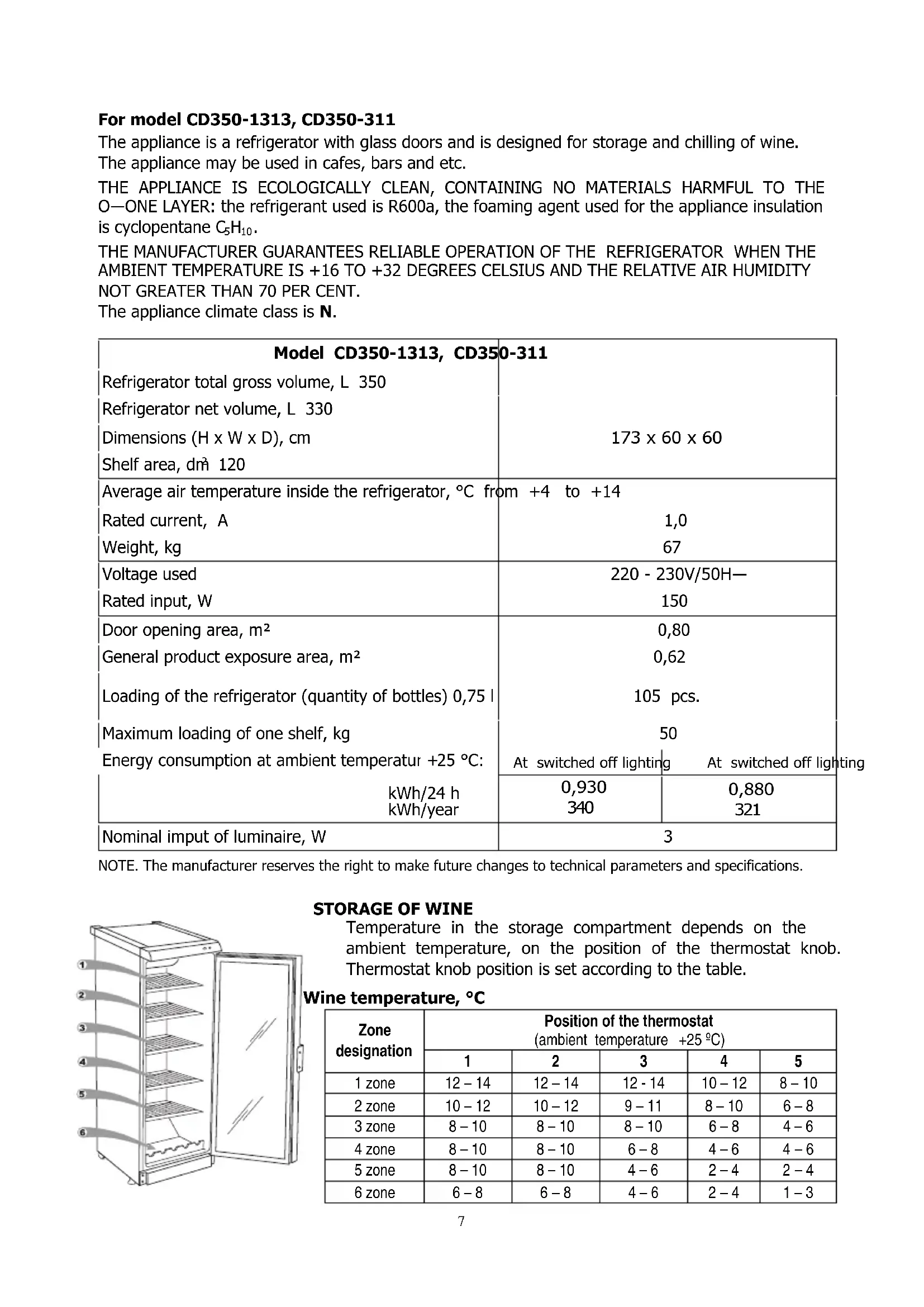
For model CD350-1313, CD350-311
The appliance is a refrigerator with glass doors and is designed for storage and chilling of wine. The appliance may be used in cafes, bars and etc.
THE APPLIANCE IS ECOLOGICALLY CLEAN, CONTAINING NO MATERIALS HARMFUL TO THE O—ONE LAYER: the refrigerant used is R600a, the foaming agent used for the appliance insulation is cyclopentane C_5H_10 .
THE MANUFACTURER GUARANTEES RELIABLE OPERATION OF THE REFRIGERATOR WHEN THE AMBIENT TEMPERATURE IS +16 TO +32 DEGREES CELSIUS AND THE RELATIVE AIR HUMIDITY NOT GREATER THAN 70 PER CENT.
The appliance climate class is N.
| Model CD350-1313, CD350-311 | ||
| Refrigerator total gross volume, L 350 | ||
| Refrigerator net volume, L 330 | ||
| Dimensions (H x W x D), cm | 173 x 60 x 60 | |
| Shelf area, dm ^2 120 | ||
| Average air temperature inside the refrigerator, °C from +4 to +14 | ||
| Rated current, A | 1,0 | |
| Weight, kg | 67 | |
| Voltage used | 220 - 230V/50H— | |
| Rated input, W | 150 | |
| Door opening area, m ^2 | 0,80 | |
| General product exposure area, m ^2 | 0,62 | |
| Loading of the refrigerator (quantity of bottles) 0,75 l | 105 pcs. | |
| Maximum loading of one shelf, kg | 50 | |
| Energy consumption at ambient temperatur +25 °C: | At switched off lighting | At switched off lighting |
| kWh/24 h | 0,930 | 0,880 |
| kWh/year | 340 | 321 |
| Nominal imput of luminaire, W | 3 | |
NOTE. The manufacturer reserves the right to make future changes to technical parameters and specifications.
STORAGE OF WINE
Temperature in the storage compartment depends on the ambient temperature, on the position of the thermostat knob. Thermostat knob position is set according to the table.
Wine temperature, °C

| Zone designation | Position of the thermostat(ambient temperature +25 °C) | ||||
| 1 | 2 | 3 | 4 | 5 | |
| 1 zone | 12 – 14 | 12 – 14 | 12 - 14 | 10 – 12 | 8 – 10 |
| 2 zone | 10 – 12 | 10 – 12 | 9 – 11 | 8 – 10 | 6 – 8 |
| 3 zone | 8 – 10 | 8 – 10 | 8 – 10 | 6 – 8 | 4 – 6 |
| 4 zone | 8 – 10 | 8 – 10 | 6 – 8 | 4 – 6 | 4 – 6 |
| 5 zone | 8 – 10 | 8 – 10 | 4 – 6 | 2 – 4 | 2 – 4 |
| 6 zone | 6 – 8 | 6 – 8 | 4 – 6 | 2 – 4 | 1 – 3 |
DESCRIPTION OF THE APPLIANCE, BASIC PARTS (see fig. 1)
1 Switch -(ON/OFF); 6 Fan
2 Thermostat knob 7 Shelf
3 Thermostat indicator 8 Cleaner
4 Electricity supply indicator 9 Condenser
5 Interior light block (LED) 10 Compressor
REVIEW OF MECHANICAL CONTROL (see fig. 1)
1 — On / off switch for interior light. On / off switch for interior light I -(ON) O -(OFF)
2 — Thermostat knob. The thermostat is off when there is a zero (0) in the thermostat indicator space. Turning the thermostat knob clockwise the temperature in the compartment lowers.
3 — Thermostat indicator. Marked with the symbol

4 — Electricity supply indicator, marked with the symbol

When the appliance is connected to the electricity supply, the green indicator light is illuminated. WARNING! The fan switches on and continuously operates.
PREPARING THE APPLIANCE FOR OPERATION
It is recommended to prepare the appliance for operation with a helper.
- Remove package. Lift the appliance away from foamed polystyrene base.

If your appliance is fit with screwed handles. Do not rise or push it taking by handles. Handles may break.
- Therefore take out adhesive tapes from sides and simply lift the appliance up and take out the board. Strip adhesive tapes off and open the door. Remove the spacer above the door.
- When positioning the appliance in chosen location, it will move more easily into position if you lift the front a little and incline it backward allowing it to roll on its casters.
- Suitably dispose the packaging material.
- Take two supports from the bag (see fig. 4) and insert them into the guides at the top back part of the appliance.
POSITIONING
- Place the appliance in a dry, well ventilated room.
WARNING! The appliance should not be operated in an unheated room or porch. Place the appliance away from heat sources such as kitchen stove/oven, radiators, or direct sunlight.
WARNING! The appliance must not touch any pipes for heating, gas or water supply or any other electrical devices.
- Do not cover the ventilation holes at the top of the appliances – it must be a good air circulation around the appliance. There should be a gap of at least 10 cm between the top of the appliance body and any furniture that may be above it. If this requirement is not followed, the appliance consumes more electrical energy and its compressor may overheat.
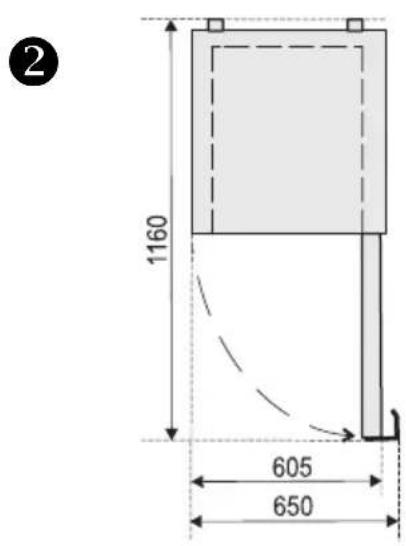
- If the appliance is placed in a corner, a gap of at least 1 cm must be left between the appliance body and the wall (see fig. 2).
- The appliance must stand on a level surface and must not touch the wall. If necessary, regulate the height of the appliance by adjusting the levelling feet: by turning them clockwise – the front of the appliance rises, by turning them counter clockwise – it comes down. If the appliance is tilted slightly backward – the doors will close by themselves.

TEMPERATURE REGULATION
The temperature in the refrigerator compartment is controlled using the thermostat knob 2 (see fig. 1) by turning it to one side or the other. The temperature indication in digits is shown beside the thermostat knob. When the door is closed, the temperature setting can be seen on the thermostat indicator display 3 (fig. 1). The temperature is regulated on the scale of five digits.
0 = Compressor is switched off. WARNING! Electric current is not switched off.
1 = highest temperature (lowest cooling)
5 = lowest temperature (highest cooling)
If foodstuffs in the refrigerator compartment are too cold, set the thermostat knob to 1, 2 or 3. If foodstuffs in the refrigerator compartment are not being chilled sufficiently, set the thermostat knob to 4 or 5.
Please set the desired temperature in the appliance according to your own requirements!
THE TEMPERATURE IN THE REFRIGERATOR COMPARTMENT MAY VARY DEPENDING ON

AMBIENT TEMPERATURE, THE AMOUNT OF FOODSTUFFS, THE TEMPERATURE OF THE FOODSTUFFS, AND HOW OFTEN THE APPLIANCE DOORS ARE OPENED AND CLOSED.
IF THE ROOM IS COOL, THE APPLIANCE COOLS LESS. THE TEMPERATURE IN THE APPLIANCE MAY THEREFORE RISE. Use the thermostat wheel to set a lower temperature.
CHANGING THE OPENING DIRECTION OF THE DOORS
It is recommended that changing the opening direction of the doors should be done with a helper. You will need two spanners No. 8 and No. 10 and a Philips head screwdriver.
When changing the opening direction of the doors YOU CAN NOT lay the refrigerator horizontally!

NOTE. Direction of door is not changeable in refrigerators with lockable doors.
Do the actions below in the order they are listed:
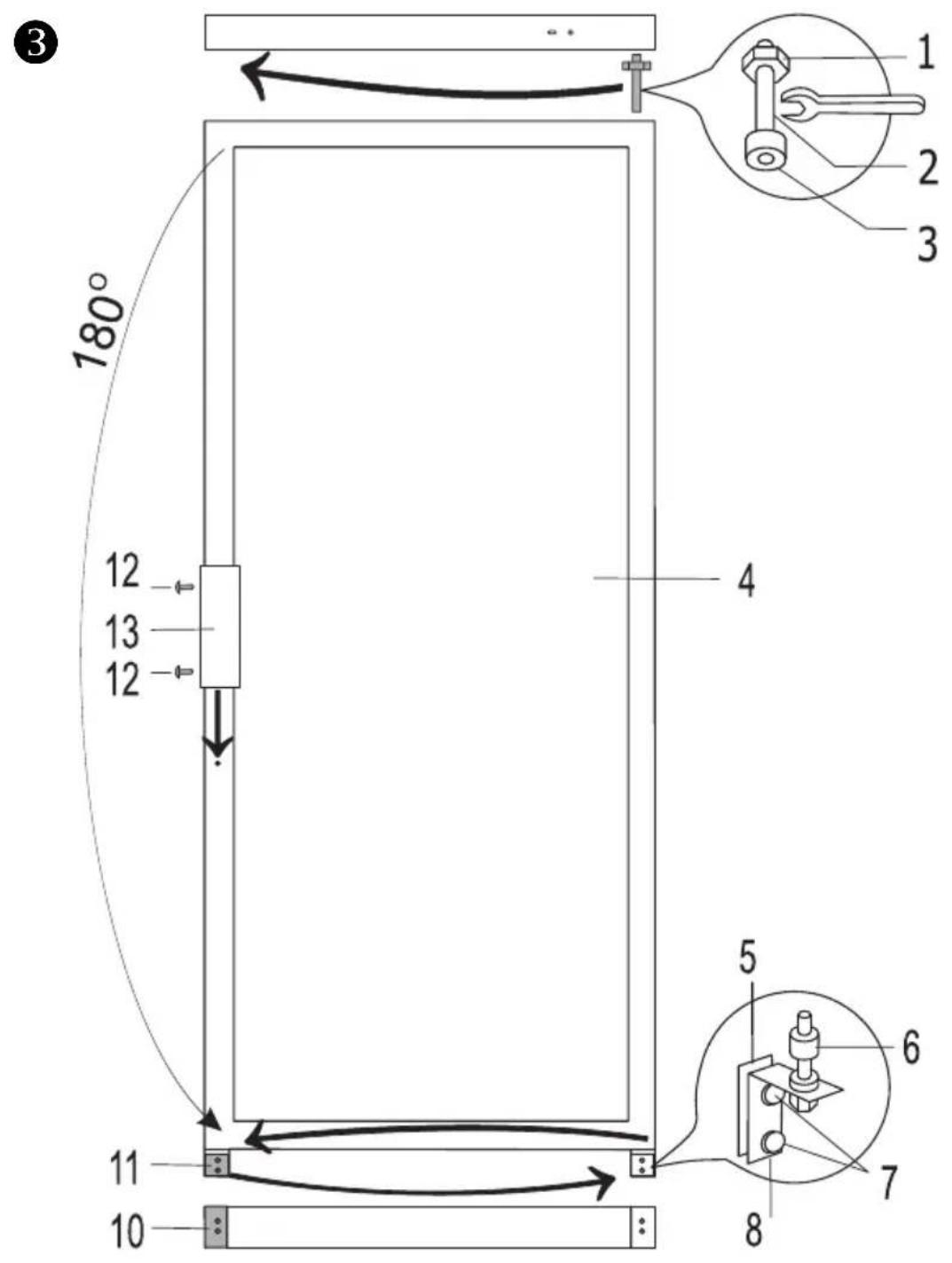
For models CD290-1004, CD350-1003, CD350-1313, FKU 290 GCD351, KSCD 350.1
CD350-311, CD350-1D, CD350 (see fig. 3):
WARNING! Turn off the appliance and pull the plug out of the electricity supply socket.
- Unscrew two screws 7 and remove the bottom bracket 8 together with the set of washers 6 on the axle and the spacer 5.
- Unscrew two screws 7 and remove the bracket 11. Remove the door 4.
- Unscrew the axle 2 together with the nut 1 and washers 3 from the upper bracket and screw all this set on the reverse side of the door;
- Before hanging the door, turn the door over by 180 ° and insert the upper axle in the door.
- Unscrew fixing screws 12 from doors, remove handles 13 and fix them screwing in free holes on the same side. Plate 10 remains in its place.
- Before screwing the bottom bracket 8 together with the set of washers and spacers on the reverse side of a cabinet, insert the bracket axle to the door.
- Screw the bracket 11 on the reverse side of a cabinet.
For models CD350-1004, CD350-2D, KS CD 350.2, CD350-2 (see fig. 5):
WARNING! Turn off the appliance and pull the plug out of the electricity supply socket.
- Unscrew two screws 12 and remove the bottom bracket 13 together with the set of washers 11 on the axle and the spacer 10.
- Unscrew two screws 12 and remove the bracket 15. Remove the bottom door 9.
- Unscrew fixing screws 7 of the middle bracket. Remove the middle bracket 6 together with washers on the axle and the spacer 5. Remove the top door 4.
- Unscrew the axle 2 together with the nut 1 and washers 3 from the upper bracket and screw all this set on the reverse side of the door.
- Take out the plugs 18 in the crossbar zone and displace them on the reverse side.
-
Before hanging the upper door, turn the door over by 180 ^0 and insert the upper axle in the door.
-
Before screwing the middle bracket 6 with the set of washers and spacers on the reverse side of the cabinet, insert the bracket axle into the upper door;
- Before hanging the bottom door on the middle bracket axle, turn them over by 180°.
- Unscrew fixing screws 16 from both of door, remove handles 17 and fix them screwing in free holes on the same side. Plate 14 remains in its place.
- Before screwing the bottom bracket 13 together with the set of washers and spacers on the reverse side of a cabinet, insert the bracket axle to the door.
- Screw the bracket 15 on the reverse side of a cabinet.
DEFROSTING
The refrigerator compartment defrosts automatically. Drops of ice that form on the back wall of the refrigerator compartment thaw during the time the compressor is not working and the thaw water runs down the thaw water runoff channel to the tray on top of the compressor, where it evaporates.
CLEANING AND CARE
REGULARLY CLEAN THE APPLIANCE.
Remember that before cleaning you must disconnect the appliance from the electrical energy supply socket by pulling the plug out of the electricity outlet.
- Protect the appliance inner surfaces and plastic parts from fats, acids and sauces. In case of accidental spills – immediately clean with warm soapy water or dishwashing detergent. Wipe dry.
- Clean the appliance inner surfaces with warm soapy water. Dishwashing detergent may also be used.
- Wipe dry inner and outer surfaces. Regularly clean the hermetic gaskets of the doors. Wipe dry.

natural_image
Illustration of a hand holding a dropper above a surface with arrows indicating direction (no text or symbols)- REGULARLY CLEAN THE THAW WATER CHANNEL SPACE WITH A SPECIAL CLEANER 8 FOR THAT PURPOSE (Fig. 1).
- At least once a year clean dust away from the back part of the appliance body and the compressor. A soft brush, electrostatic cloth or vacuum cleaner may be used for cleaning.
- DO NOT use detergents containing abrasive particles, acid, alcohol or benzene for cleaning the appliance inner and outer surfaces. - DO NOT use for cleaning cloths or sponges that have coarse surfaces intended

natural_image
Illustration of a hand holding a small object inside a container (no text or symbols visible)for scrubbing.
- IF THE APPLIANCE IS TO BE LEFT SWITCHED OFF FOR AN EXTENDED PERIOD, LEAVE ITS DOORS OPEN.
- ATTENTION! Outer of the doors – glass – clean with agents intended for glass cleaning.

Remarks on the appliance operating noise. As the appliance operates and goes through the freezing cycle, various noises will be emitted. This is normal and is not a sign of any malfunction.
- As the refrigerant circulates around the refrigeration system, it causes sounds like murmuring, bubbling, or rustling.
- Louder sounds like popping or clicking may be heard for a short time as the refrigerator compressor switches on.
OPERATION PROBLEMS AND THEIR SOLUTIONS (TROUBLESHOOTING)
What if ...
- The appliance is plugged in to the mains but it does not work and the electricity supply voltage indicator is not illuminated. Check that your house electricity supply installations are in order. Check that the plug is correctly inserted into the electricity supply socket.
- The noise has become louder. Check that the appliance is standing stable, on a level place. To make it level, regulate the front feet. Check if the appliance is not touching any furniture, and that no part of the refrigeration system at the back part of the appliance body is touching
the wall. Pull the appliance away from any furniture or walls. Check that the cause of increased noise isn't due to bottles, cans or dishes in the appliance that might be touching each other.
- Water has appeared at the bottom of the refrigerator compartment. Check whether a thaw water channel space isn't blocked. Clean the thaw water channel space with a cleaner intended for that purpose.
- Water has appeared under the appliance. The thaw water collection tray has slipped off the compressor. Place the tray on top of the compressor.
- When the appliance door is opened, the rubber sealing gasket pulls out. The gasket is smeared with sticky foodstuffs (fat, syrup). Clean the sealing gasket and the groove for it with warm water containing soap or dishwashing detergent and wipe dry. Put the rubber sealing gasket back into the place.
- High temperature in appliance, the compressor operation pauses are short. Ascertain whether the appliance door/doors are shutting tightly, whether the door wasn't kept open longer than necessary when taking out or putting in foodstuffs or whether a large amount of warm food was placed in the appliance.
- The top of the appliance has condensation on it. The ambient relative air humidity is above 60%. Ventilate the room where the appliance stands and if possible remove the cause of the humidity.
TRANSPORT

THE MANUFACTURER WILL NOT BE RESPONSIBLE FOR ANY DAMAGE OF THE APPLIANCE THAT RESULTS FROM NON-COMPLIANCE WITH THE INSTRUCTIONS FOR TRANSPORTATION.
- The appliance should be transported only in the vertical position.
- When being transported, the appliance should be protected from atmospheric conditions (rain, snow, dampness).
- The appliance should be firmly secured in place while being transported, to avoid slippage or any shocks in the transport vehicle.
- If the appliance was transported not vertically, it may be connected to the mains after 4 hours at least. If this is not done, the appliance compressor may fail.
ENVIRONMENTAL PROTECTION INFORMATION

This symbol indicates that once the appliance is no longer needed, it cannot be disposed together with other miscellaneous municipal waste. It should be collected and eliminated separately, i.e. in containers specially marked with this symbol in large-dimension rubbish collection areas. Full information on where to submit the old appliance safety can be obtained from local government authorities, the shop where you bought the appliance or the manufacturer's representatives.
If you decided to scrap the appliance, make it impossible to use in order to prevent possible misadventure. Pull out the electric plug from the electricity supply socket and then cut off the cord. Tear off the gasket. Break the door lock if any.
WAR N ING! Do not dismantle the appliance yourself. Pass it on to recycling companies.
WARRANTY SERVICE
IF YOUR APPLIANCE IS NOT WORKING PROPERLY, ASCERTAIN WHETHER YOU CAN REMEDY THE CAUSE OF THE FAULTY FUNCTIONING OF THE APPLIANCE YOURSELF. If you cannot solve the problem yourself, contact the nearest refrigerator service representative by telephone or in writing. When making contact necessarily indicate the refrigerator model 1 and number 2. You will find this data on the product label, which is glued to the wall.

SICHERHEITSHINWEISE
ALLG EMEIN E D AT EN
DIE TEMPERATUR DES WEINES °C
NOTE. Direction of door is not changeable in refrigerators with lockable doors.
Voor koelkasten CD290-1004, CD350-1003, CD350-1313, FKU 290 G, CD351, KSCD 350.1, CD350-311, CD350-1D, CD350 (zie abf. 3):
natural_image
Line drawing of a hand holding a screwdriver above a small component (no text or symbols)REINIG REGELMATIG DE AFVOER VAN HET ONDOOISYSTEEM MET HET DAARTOE BESTEMDE SCHOONMAAKELEMENT 8 (Afb. 1).
natural_image
Illustration of a hand holding a small object inside a container (no text or symbols visible)CONSERVATION DU VIN
NOTE. Direction of door is not changeable in refrigerators with lockable doors.
natural_image
Illustration of a hand holding a pen tip with a small object inserted, no text or symbols presentnatural_image
Hand holding a small object inside a container (no text or symbols visible)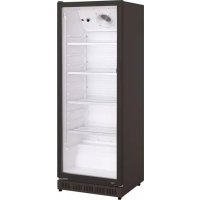
- SAFETY INSTRUCTIONS
- WARNING!
- ! CONNECTION TO THE MAINS
- GENERAL INFO RMATION
- This applian ce is int e n d e d f o r c o mmer c i a l
- For model CD350-1313, CD350-311
- STORAGE OF WINE
- DESCRIPTION OF THE APPLIANCE, BASIC PARTS (see fig. 1)
- REVIEW OF MECHANICAL CONTROL (see fig. 1)
- PREPARING THE APPLIANCE FOR OPERATION
- If your appliance is fit with screwed handles. Do not rise or push it taking by handles. Handles may break.
- POSITIONING
- TEMPERATURE REGULATION
- CHANGING THE OPENING DIRECTION OF THE DOORS
- DEFROSTING
- CLEANING AND CARE
- OPERATION PROBLEMS AND THEIR SOLUTIONS (TROUBLESHOOTING)
- What if ...
- TRANSPORT
- ENVIRONMENTAL PROTECTION INFORMATION
- WARRANTY SERVICE
- SICHERHEITSHINWEISE
- ALLG EMEIN E D AT EN
- DIE TEMPERATUR DES WEINES °C
- CONSERVATION DU VIN
Brand : Exquisit
Model : CD350
Category : Beverage fridge