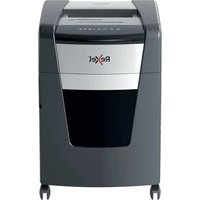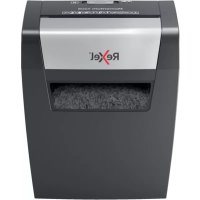
Momentum X308 - Shredder REXEL - Free user manual and instructions
Find the device manual for free Momentum X308 REXEL in PDF.



| Product Type | Document Shredder |
| Brand | Rexel |
| Model | Momentum X308 |
| Shredding Capacity (80 g/m² sheets) | 8 sheets |
| Cut Type | Cross Cut (not specified, standard estimate) |
| Functions | Forward, Reverse (R), Auto Stop |
| Light Indicators | On (blue), Cooling (red) |
| Bin Capacity | Not specified (estimated 20-25 liters) |
| Safety | Safety lock, open door detection, auto stop in case of jam |
| Overheat Protection | Yes, red indicator, cooling time ~60 minutes |
| Maintenance | Use Rexel lubricating sheets (ref. 2101949 or 2101948) |
| WEEE | Do not dispose with household waste, separate recycling |
| Warranty | 2 years |
| Compatible Accessories | Lubricating sheets (20) ref. 2101949, (12) ref. 2101948 |
| Intended Use | Indoor only, office or home |
| Destructible Materials | Paper (max 8 sheets), small staples and paperclips, folded sheets |
| Non-destructible Materials | CD/DVD, credit cards, plastic, bindings, adhesive labels |
Frequently Asked Questions - Momentum X308 REXEL
User questions about Momentum X308 REXEL
0 question about this device. Answer the ones you know or ask your own.
Ask a new question about this device
Download the instructions for your Shredder in PDF format for free! Find your manual Momentum X308 - REXEL and take your electronic device back in hand. On this page are published all the documents necessary for the use of your device. Momentum X308 by REXEL.
USER MANUAL Momentum X308 REXEL
To register and activate the warranty go to www.rexeleurope.com/register


C∈


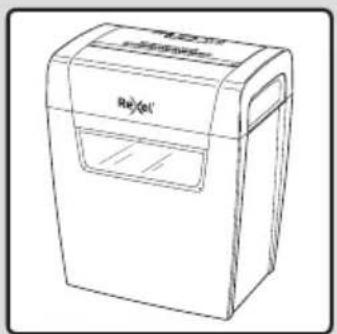





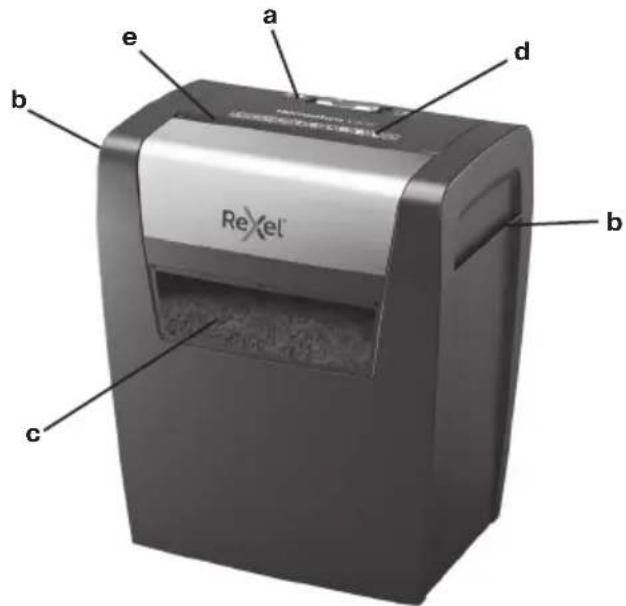
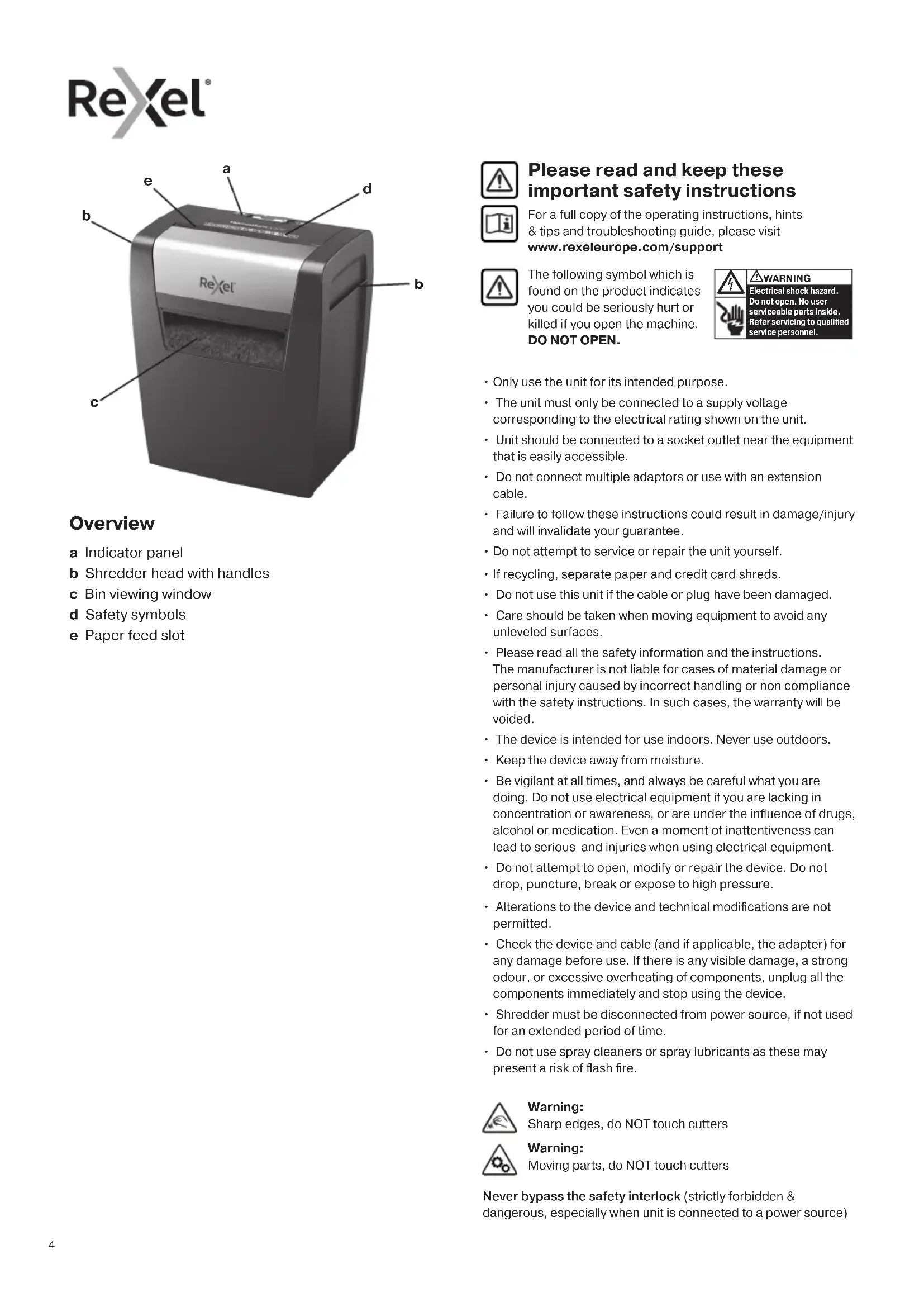
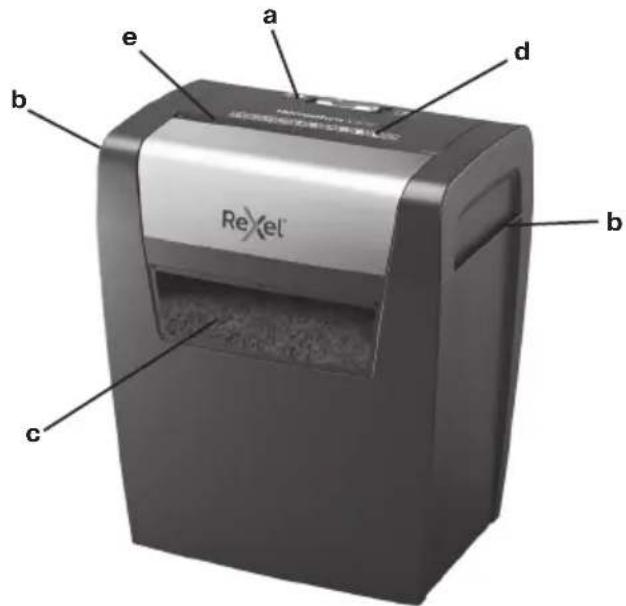
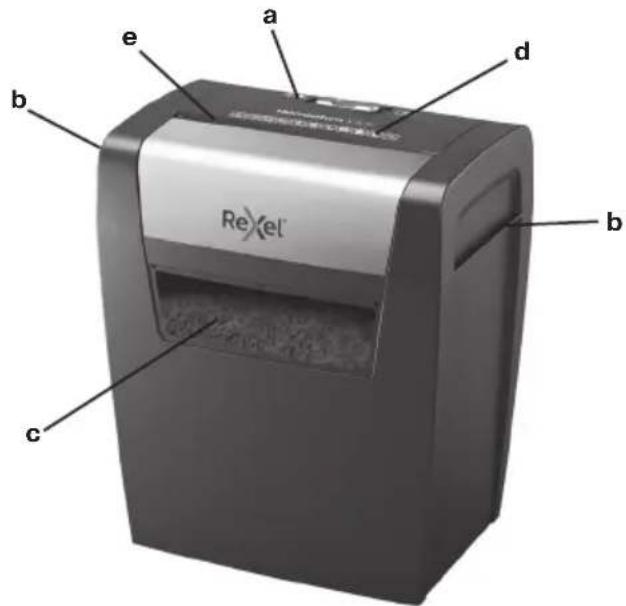
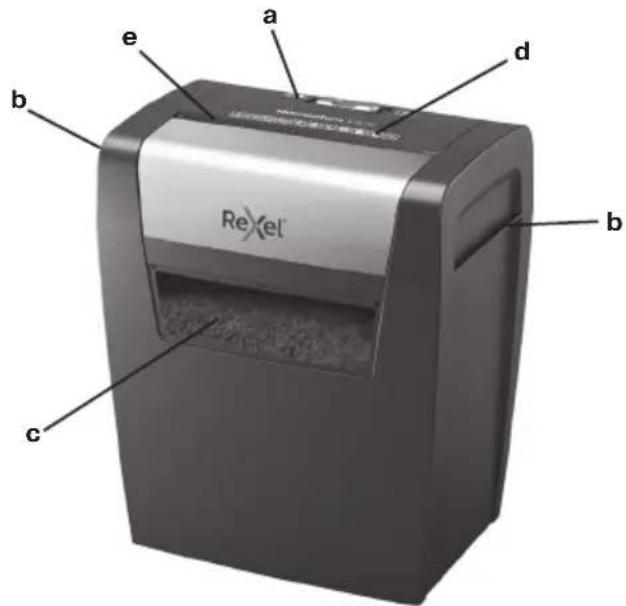
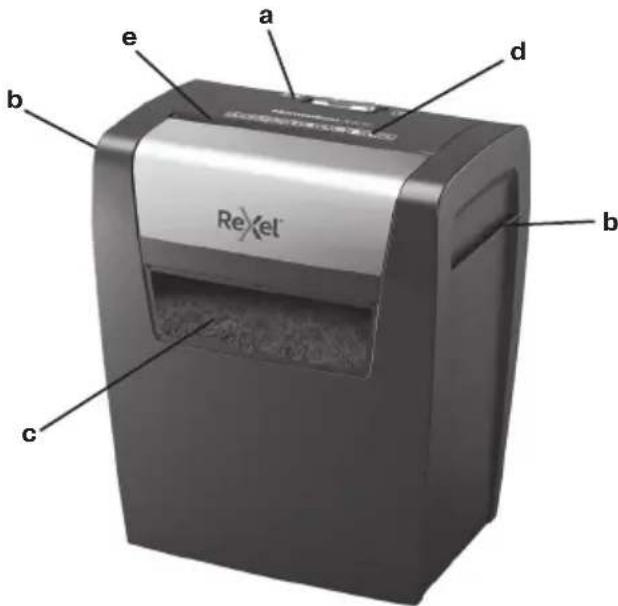
Overview
a Indicator panel
b Shredder head with handles
c Bin viewing window
d Safety symbols
e Paper feed slot
Please read and keep these important safety instructions
For a full copy of the operating instructions, hints & tips and troubleshooting guide, please visit www.rexeleurope.com/support
The following symbol which is found on the product indicates you could be seriously hurt or killed if you open the machine. DO NOT OPEN.
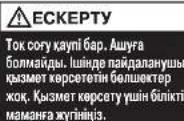
WARNING Electrical shock hazard. Do not open.No user serviceable parts inside. Refer servicing to qualified service personnel.
- Only use the unit for its intended purpose.
- The unit must only be connected to a supply voltage corresponding to the electrical rating shown on the unit.
- Unit should be connected to a socket outlet near the equipment that is easily accessible.
- Do not connect multiple adaptors or use with an extension cable.
- Failure to follow these instructions could result in damage/injury and will invalidate your guarantee.
- Do not attempt to service or repair the unit yourself.
If recycling, separate paper and credit card shreds. - Do not use this unit if the cable or plug have been damaged.
- Care should be taken when moving equipment to avoid any unlevelled surfaces.
- Please read all the safety information and the instructions. The manufacturer is not liable for cases of material damage or personal injury caused by incorrect handling or non compliance with the safety instructions. In such cases, the warranty will be voided.
- The device is intended for use indoors. Never use outdoors.
- Keep the device away from moisture.
- Be vigilant at all times, and always be careful what you are doing. Do not use electrical equipment if you are lacking in concentration or awareness, or are under the influence of drugs, alcohol or medication. Even a moment of inattention can lead to serious and injuries when using electrical equipment.
- Do not attempt to open, modify or repair the device. Do not drop, puncture, break or expose to high pressure.
- Alterations to the device and technical modifications are not permitted.
- Check the device and cable (and if applicable, the adapter) for any damage before use. If there is any visible damage, a strong odour, or excessive overheating of components, unplug all the components immediately and stop using the device.
- Shredder must be disconnected from power source, if not used for an extended period of time.
- Do not use spray cleaners or spray lubricants as these may present a risk of flash fire.
Warning: Sharp edges, do NOT touch cutters
Warning: Moving parts, do NOT touch cutters
Never bypass the safety interlock (strictly forbidden & dangerous, especially when unit is connected to a power source)
| Indicator Panel Icon Colour | ||
| Slider Switch | ○ | White Move the slider to play turn on shredder |
| Reserve Setting | R | Move the slider to manually remove paper |
| Shredding in operation INDICATOR | Blue Constantly illuminated – unless in Power Save mode. | |
| Cooling Down INDICATOR | Red Illuminates when shredder is cooling down | |
Operation
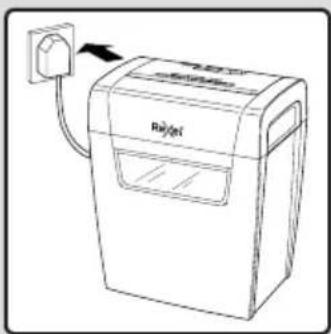
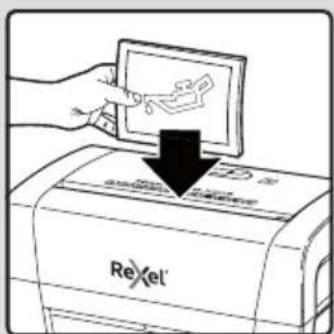
- Remove the shredder from the packaging and place the shredder head on top of the bin.
- Connect the shredder to an appropriate mains supply.
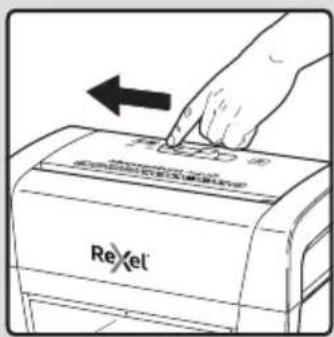
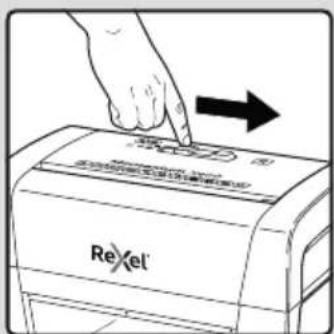
- To commence shredding move the slider to the left. The 'Shredder in operation' icon lights up blue. You are now able to shred.
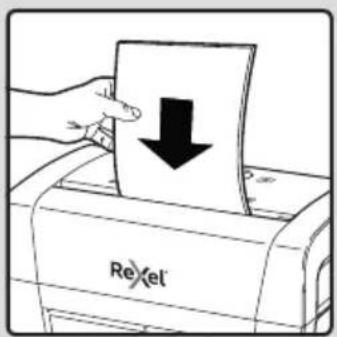
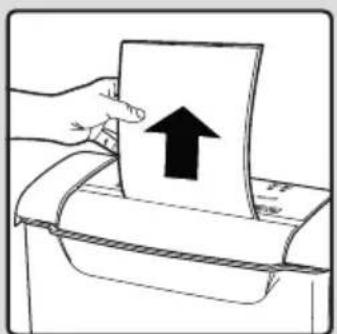
- Insert paper to be shredded into the feed slot 'e'.
Note: Make sure the paper to be inserted is neatly stacked.
If the paper thickness is within the shredder's capacity, the motor will start and your documents will be shredded. The cutters will stop once the shredding process is complete.
- If the paper thickness is greater than the shredder's capacity, the shredder will stop. Slide the switch to the 'R' position and reverse the jammed paper. If the paper is jammed to such an extent that it will not come out using the reverse function, slowly move the slider between the R and
Do not do this quickly as it can damage the shredder.
- Remove some of the sheets from the paper stack and re-try. The shredder will automatically start and allow the paper to be shredded.

Warning: Do NOT under any circumstances use any metal objects (scissors, letter openers etc.) in an attempt to clear the paper entry.
Warning symbols


No CDs

Keep loose jewellery clear

No credit cards

Ties and loose clothing hazard

Keep long hair clear

Do not reach into opening

This equipment is not intended for use by children

Do not use spray cleaners or spray lubricants as these may present a risk of flash fire

Manual feed slot capacity

No aerosols
Rare occasions of jamming
In the unlikely event of the shredder jamming, use the manual reverse function as per step 5 of the 'Operation' section.
Reduce the number of sheets in the paper stack and re-try.
Reverse function
- Should you wish to reverse the shredding direction whilst shredding a document a reverse function R has been fitted for your convenience.
- Push the slider to the right to reverse paper out.
- The shredder will continue to run in reverse until the slider is moved to the left.
Operation time
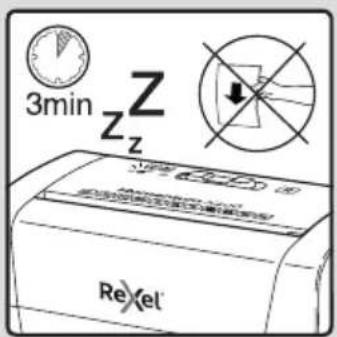
When the shredder is used continuously for 3 minutes or more the shredder may overheat. If this occurs the overheat icon will illuminate red.
When the shredder is ready to be used again the red overheat icon will go out. This will take approx. 60 minutes.
To resume shredding, feed paper into the feed slot.
Momentum X308 & X406 shredding capability
CAN shred the following:

X308: 8 sheets X406: 6 sheets
- Stapled paper, 25mm within the corner
26/6 and 24/6 or smaller staples - Small sized paper

X308:8 sheets X406:6 sheets
- Paperclipped paper, 25mm within the corner
- Capable of shredding small/medium paperclips (max. wire thickness = 0.9 mm)
80/100gsm paper

Thick paper or card < 200gsm

Glossy paper or a sheet covered with print on both sides.
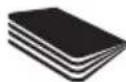
Multiple folded sheets (A3 sheets folded in half).
CANNOT shred the following:

Heavy duty staples. Check the staple leg length is not greater than 6mm.

Large clips. Check the length of the paperclip is not longer than 32mm .

Plastic sheets, laminated documents, plastic folders.

Bulldog clips

Bound documents

Credit cards

Adhesive labels.

Magazines or other documents bound by multiple staples or clips.


No aerosols No oil

CDs & DVDs
Bin full
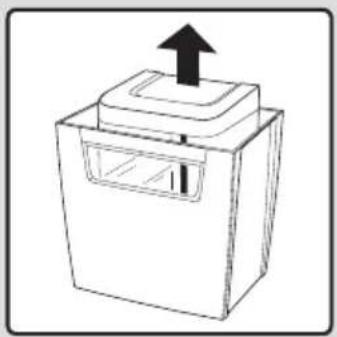
When the bin is full the shredder head will be pushed up off the bin.
This will stop the shredder from shredding.
Please empty the bin and then position the shredder head back on top of the bin.
You can now start shredding.

WARNING
The shredder bin must be fully pushed closed for the machine to operate.
- Empty the shredder bin when it is full otherwise the shredder's performance will be adversely affected. Operating the shredder with a full shredder bin can result in paper jamming in the cutters, which will increase the machine's noise level.
- Do not force down shredded paper in the bin using your feet.
Troubleshooting
If the paper shredder will not start, please check the following:
- Is the machine plugged in correctly?
- Is the switch pushed to the position?
- Is the machine jammed with paper?
- Has the motor overheated?
Accessories
Only use Rexel accessories:
Oil Sheets (20) - 2101949
Oil Sheets (12) - 2101948
Waste Electrical and Electronic Equipment (WEEE)
At the end of its useful life, your product is considered to be WEEE. As such it is important to note that WEEE is not to be disposed of as an unsorted municipal waste. It is to be collected separately such that it can be disassembled so its components and materials can be recycled, re-used, and recovered (burned for energy content in the production of electricity)
Public collection points have been set up by municipalities for the collection of WEEE, free of charge to you.
Please return your WEEE to the collection facility nearest your home or office.
If you have difficulty in locating a collection facility, the retailer that sold you the product should accept your WEEE.
If you are no longer in contact with the retailer, please contact ACCO for assistance with this matter
Recycling of WEEE is geared toward protecting the environment, protecting human health, preserving raw materials. Improving sustainable development, and ensuring a better supply of commodities within the European Union. This will be achieved by retrieving valuable secondary raw materials and reducing the disposal of waste. You can contribute to the success of these goals by returning your WEEE to a collection facility.
Your product is marked with the WEEE symbol (wheelie bin with an X through it). This symbol is to inform you that the WEEE is not to be disposed off as unsorted municipal waste.
Guarantee
Operation of this machine is guaranteed for two years within the date of purchase, subject to normal use. Within the guarantee period, ACCO Brands Europe will at its own discretion either repair or replace the defective machine free of charge. Defects due to misuse or use for inappropriate purposes are not covered under the guarantee.
Proof of date of purchase will be required. Repairs or alterations made by persons not authorised by ACCO Brands Europe will invalidate the guarantee. It is our aim to ensure that our products perform to the specifications stated. This guarantee does not affect the legal rights which consumers have under applicable national legislation governing sale of goods.
This guarantee does not apply to Australian customers - see warranty on page 100.
Überblick
OBEPEKHO!
Hebeemek yupkckn anenepyrrnnm
cypnwn. Hbkyvnnnnn
Xcypknn anapaa hnmse paeanr.
Ae 0000000000000000000000000000000000000000000000000000000000000000000000
BVKOpncToByTe npucTpiBnKIOUHO 3a npniHaueHHM.
Pi'deHnyTe ue npntpiBnKlnHouHO do TaKOro dKepeNa eJektpuHoro cTpyMy, Hanpyra JKOro BiNobiJaec eJektpuHNM napaMeTpam,HaHeceHM Ha npctpi.
PiEynHyeepnnpctpiD0eJektpnHoi po3eKn,po3TaOBOyETbC npaIdo koi neKo diCTaN.
He nii'ednyte ue o6naHnHaHHdo po3raJyKBya a6o Jdo Hypa-nOdBxbya.
HeDToPMaHHaIX IHCTpyKcIM MoKe np3BecTn DO noSKoJxEHMaHa Ta (a60) TpaBMyBaHHa IIOdei, a TaKoXdo npnnHHeHHa II rapaHTII.
He HamaraTeCn 06cnyroByBaTu n peMOHTyBaTu ne npucptpi camOCTIHO.
-ДяВТОПИНHOI nepepo6kn BiДДINITb obpi3kn nanepy BiD obpi3kIB KPeDIHTHIX KapT.
3abopohraetbcKOPnCTyBaTnc npnCTpoem,RAUo Ioro UHyp a60 BNky NOsKOxEHO.
- Bydte o6epeXHmN iid yac nepeMieHHa cboO o5naHaHH, 0o6 He hATpanNTn Ha HepiBHi nobepxHi nCtopoHHi npedMeTn Ha niDIO3i.
IpoHTaTe BcIO IHOpMaUIO npo 6e3NeKy Ta BnBHTb Bci Htpykui. BnO6HnK He Hece BiNObiJaBHOCTI 3a BnNaKn MaTePiaJIbHOI IKoDn A60 TpaBM, BKNJIkaHnx HnPaBIIbHM NOBODKeHHR 3 npCtPOe NHeDOTpMaHHaTExHIXe3NeKu.Y TAKINX BnNAkX rapaTIT6yde AnyIbOBAHa.
- Pnucpi npn3HaenHnnBnKOpncTaHHB nPmHiennH.He BnKOpNCTOByTe 3OBHI npmUeHH.
- TpmaTe npctpi noani BiB BOnr.
6 Bybte nIbHI BeCb Yac i 3abXn 6bIbTe oBepexH,IO Bn pObnte. He BNKOpNCTOByte eNEKTPo06NaHAnHHa,IKUo BA m6paKyE KOHeHTpaui abc CbiDMOCtI, abo kAIO Bu 3hAXoNDTeC b nd BnINBOM HApKOTNkIB, AIKORIOu YI NIKIB.HabITb MOMENT HeyBaXHOCTMOpe Np3BeCTOn Do cepno3Hx HeuaChNX BnAaKnIB I TpaBM PnBKNOpNCTaHHI eNEKTPoPnpnaJAB.
HEnpinyuctmmm BIDKpnuBAtn,MOuNphiKyBaTn upeMoHTyBaTn npucptpi. He KnaaTe, He npoNBauTe, He lamaiTe npucptpi i He niDaabaTe NOrO BrNBy BnCOkOrTo nCKy.
He npinyctmmmE BheceHHa 3miH TaTexHiHi MoNphiKaJI npucTpoI.
- Ppei BnKOpNCaHnM npncTpoI nepeBipTe npncTpi Ta KaBeIb (y pa3i Heo6xInHocti aadTep) Ha HaeBHicb NowKoDkeHb. RaKIOe Kcib BVnIMi NowKOJKeHH, CnBnH 3anax, abo neperpib KOMNoHeHtIB, BiPa3y BiE'EDHaHTe Bci 3'EdHaHH i pinnHnHb BnKOpNCaHnH npncTpoI.
He BnKOpNCToBnyTe aepo3OJIbHi OHIyBaHi a60 aepo3OJIbHi MaCTnla, ockJIbKn ce MoKe cnpuHHHTn pN3NK panTOBoI noKeXi.

06epexno!
Toctpn kpa. He TopkaTecra pixyux hactnH.

06epexno!
Pyxomi chaTnH. He TopkaiTeCg pixyux chaTnH.
YxOJHOMy pa3i He 6oBte 3a06jXHe aTb6kYBaHH. Lc cyBopo 3a60poHeHO Ta 0co6JIbBO He6e3NeH, Kku npncptpi nIKLIOeHO Do dKepeNa XNBneHH.
Kibkict apkyiB, 10 MOXHa BCTaBJIrTn Do OTbOpy

Hemae aepo3ojib
NooHOKI BnnaKn 3aHaHH
Ypa3i3aIdaHnnoPi6HOBaHa nanepy, 0o E malOnMOBipHOIO nOIOE, BKNOPNCOTByte yHKUIO pyxny nanepy y 3BOpOTHomy HAnpymky, nepeCyBaIOuN BPuyHy nepemKau, k3a3NaueHO B nyHKTI 5 po3diny "EkCnnyaTaiaJ".
3MeHHTe KInbKcTb apKyuib nanepy B cTOnu Ta nobTOpHO BCTaBTe nanip y npnMaIbHn OTbip.
KoHTeHep 3aIOBHeNo Do KpaIO
KoHHeep 3anOBHeNo KoAIO, NpDip6HOBaIbHn npCTpi BucHyTeBcB Bropy Ta BiD'EdHaetbCByiKOHTeHepa.
Lc3yunHnHbpo6Oy noDpi6HOBaayanepy.
CnopoXHiTb KOHTeHep i BCTaHOBItb noDi6HIOBaJIbHm npNCptiHa Micue 3Bepxv KOHTeHepa.
IicraLcboROMoxHaNoHHaTNIOpbiHHeHH.

OBEPEKHO!
MOnKINBOCTeKcNpyataaapanapaTIOpiHIOBaHn npucTpiH Heo6xIDHO npabuHOBCTAHOBHTHa KOHTeHepi.
CnpoxHbKoHTeHep noDpi6HOBaHa napey, kUO
Ioro 3anOBHeHO do KpaIO, iHaKUe npOdyKTNBHcTb
noDpi6HOBaHa napey cTahe 3NaHo HnXyIO.
Ecknlyaataiio noDpi6HOBaHa napey i3 3anOBHeHM
do KpaIO KOHTeHepOM MoKe npu3BeCTn Do 3aDaHHa
nanepy B pixyHuX qacTHnax, IIO niDBnUHTb pBeHb
Wmy Ni dac po60t anapata.
He cnpecobyTe noDpi6HEnn nanip y KOHTeHepi HOrAMN.
Nouyk i ycyhenHHeCnpabHocTei
KJIO NOpI6HOBaH naepy He 3aynyckaetbcra, BnkoHaTe OncaHi HNKe nepeBipKn.
- Yn npabunbHo niknoyeHo anapaTdo eNeKtpomepeksi?
2.нпөрөміценоөрөмікayу noloxkeHn? - YI 3aTpy nanip B anapati?
4.Диburgнперрься? - Yu 3aunHeNo DBepuTa noDpi6HIOBau nanepy?
DonomixKHe oBHaHHa
BukopncOByte BuknIOUHO donOMIXHe 6naHaHRexel.
ApkyiJnIy3MaayBaHHa (20)-2101949
ApkyuJnIy3MaUyBaHHa(12)-2101948
Ytni3aicia BiXoDIB eJeKtpnHoro N eJeKtpoHHoro 6bIaHaHn (WEEE)
IIO 3aBepWeHNI TepMHy EKcNlyaTauii Bnpi6 RaBnE CObOIO BiXoDn EeKtpnHOrO N eEeKtpOnHOrO OblaHaHHN (WEEE). 3BepHiB yBary, 00 BiXoDn EeKtpnHOrO N eEeKtpOnHOrO OblaHaHHN (WEEE) 3abOpOHeNo YtNiI3yBaTn pa3om i3 HecopToBaHIM NObyOBm CmITTM. Taki BiXoDn MaIOTB 3bnpTuCA OKpEMO, 006 ix MoXHa 6yNo pO3i6paTn Ta NobTOpHO nepepoBHTn, NOBTOpHO BkOpNCtAnu n peKynepyBaTn IXHI KOMPHeHTn Ta MATEpIaII (A K NaINBO DnI BnPOBnHTBa eEeKTPoeHepriii).
Micuebi opraHn BnaIaI CTbOpnnr IpomAdcbKi NyHKtn npinomy BTOpHHOICnpOBHHIJI36npAHNBIIXoIDB eJekTpnuHoro Ta eJeKtpoHHORO 0bnadHaHnR (WEEE).IaTnx, xTO 3dae BiXoDi, nocnyrTaKnx nyHKTIb 63KOwTOBHi.
Будьлackа,Доctаве BiДхODи eNEKtpuHOrTo a eNEKtpoHnHOrO 6bIaHaHHa(WEEE)do NyHKTpy npNOMy BtOpuHHOcnpOBuHn, 10po3TaUOByeTbCnNoBn3y BaWOrO 6yDnHKy nOphiCy.
KsqoBaMCKlaHNO3'acyBaTnpo3TaUyBaHHnyHKrTpnpiMy BTOPINHOI CnpOBHN,PO3pip6HNI pOpaBeCb,yAKORO BN KynnnIeepncptpiMaepnpinHrtBjDxOOn eJektpnHoro Ta eJektpoHHOrO 6bnaHaHHa (WEEE).
3a BiCyTHOCTI 3B'3Ky 3 pO3pI6HIM npOdaBcEM npocMo Bac 3B'3aTnC3 ACCO dIg OTrpMaHHaONOMr B po3B'3aHHi ciie I npo6IeMn.
BtopnHna nepepo6ka BiXoJb eNeKtpuHoro Ta eNeKtpoHoro
oblaHaHHa (WEEE) Mae Ha Meti 3axNCT HABKOINHbOro
cepeOBuIua, 36epexHenra 3dOpOB' JIOJe, OuaAInBe
CTaBHeHHa DO 3anacB CnpOBuHn Ta MaTePiAIB, yDcCKoHaJIeHHa
CTaIoro pO3BNTky Ta NOKpaUe He NoCTaayHn CNOxNBuNX TObApIB
do KpaIH EByPoneCbKOcoHOy. Lc DoCRAeTbCs 3aBJaKN
BiIDHOJIeHHO cIIHOI BTOPINHOI CnpOBHN My CKOpOeHHIO
yTNIi3auJI BiXoJb.Bn MoKeTe 3pO6nTu CBI BHEcOK y
DOcRHeHHa ONCaHnx cJIeN, 3daOnH BiIXoN eNEKtpuHoro
Ta eNeKtpoHHo OBlaHaHHa (WEEE) do NyHKTy npinomy
BTOPINHOI CnpOBuHn.
BaW Bpi6 MICTNb CmB0J «BiDxOJeEKeTpuHOro Ta eJeKtpoHHOrO 6bNaHaHHra (WEEE) (nepeCyBn KOHTeHep dIcMTT, kN I nepeKpeCneHo). LcE CmB0J O3Haae, 100 BiXOn eJeKtpuHOrO Ta eJeKtpoHHOrO 6bNaHaHHra (WEEE) He MaOTb yTNIi3yBaTNCpa3OM i3 HecOpTOBaHIM NObyTOBIM CMITTM.
TapaHTi
Bnpo6nHK rapaHTye HopMaJIbHy po6Otu 5b0rO anapata BnpoIOBx DBox pOKIB biD daTn NOKyKn (3a yMOBN HOPMaJIbHOI ekCnlyatauii). YnpoIOBx rapaHTiHOro nepioDy kOMNaHIA ACCO Brands Europe Ha BlaChn pOzD 6eKoUToBHO 3a6pe Anapat, 10 Mae dEkeTN, Ha pEMONT abO x 3amHt b Ioro Ha HOBNI. YHHa rapaHTiHa NoWpIOeTbCra Ha deEkeTN, 3ymOBNeHi He npabINbHM BkOpNCtAHHm cboTO pNcTpoHO a6o X Ioro BkOpNCtAHHm He 3a npN3HaueHHM.
Ira rapaHTiHOrO 6cIyTOBvBaHHr cIbO rnpCTPOIO Heo6xIDHe nITBepdxHn DaTn Ioro KynibI. PemOH t a60 3mHa KOHCTpyKuII npCTPOIO 3 bOKy Oci6, kIMM KOMMaHIA ACCO Brands Europe He HadaJa Taki NOBHOBaXeHHa, pIN3BeDe DO npINHHeHHa II rapaTII. Mi 3aBXdN Po6Mo Bce MoXJIbE, o6peaJbHa po6To HaWoI npOdyKUII BiINOBiDaIa 3aABJIeHIM XapAKTePncTikam. Lra rapaTlHE BnInBaE Ha 3aKOHHi npaba CNOXJBauIB, BN3HaueHi YHHMM DepXaBHMM 3aKOHOAbCTBOM, IO perYIIOE IpOdaX TOBapIB.
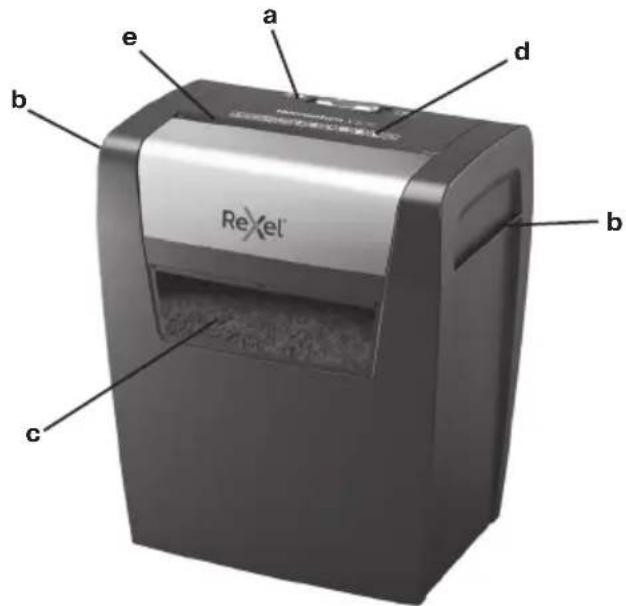
0630p
a INHdkatopnha naHeIb
bBepxHra yactb c pexyIIM MExaHn3MOM CpyKaM
c CMOTPOBOE OKHO KOP3HHbI
d CmboJIbIOBecneueHn8630NaCHOCTN
e PnpemHoe OTBepCTne

IprocIM npoHTaTb n COxpaHNTb DOKyMeHT C 3TMM BaXhbIMN HnCTpyKzmaMn NO TexHnke 6e30napchoCTn
A PNEYPNKDEHNE
OIOCTOBNPOBNNPBOBNOBPOBNOBPOBNOBPOBNOBPOBNOBPOBNOBPOBNOBPOBNOBPOBNOBPOBNOBPOBNOBPOBNOBPOBNOBPOBNOBPOBNOBPOBNOBPOBNOBPOBNOBPOBNOBPOBNOBPOBNOBPOBNOBPOBNOBPOBNOBPOBNOBPOBNOB
- IcnoIb3yIte yCTPOCTBO TOLbKO IO npRmOMy Ha3HaueHnIO.
JaHHoe yCTPOIcTBO DOJIXHO NOKJIIOHATBCr TOJbKO K ICTOHNKY NITaHnC HAnpXKeHEm, COOTBETCTBYUOM BEINuHAm, YKa3aHHbIM Ha yCTPOIcTBe. - YCTPOINCTBO DOJIJXHO HAXOINTBcB B6n3N OT CTeBOI PO3ETKU C yIO6HbIM DOCTyNOM.
He nodknoaHTe uepe3 TpoHnK nUy dnnHntelb.
HeBbONHEHNE 3TNX INCHPTyKmIMoKET npNBecTn K NOBpEKeD HNOYCTBA,NOJYeHIO TpaBMi AHNIOPOBAHIO rapAHIN.
He npednpinHMaTe NoBtOK 06cnykBaTb Nn peMOHTnpoBaTb yctpoIcTB CaMOCTOReJIbHO.
B Cnyae nepeaHn H BTOPNHHyI nepepa6Otky CneJeYET OTDeJIbTB 6ObPe3Kn 6yMaHn OT OCTaTKOB KpeuHTbIX KapT.
He nCnoB3yIte yCTpoIcTBO,ecn noBpeXeH erO cTeBOU shHyp nn Bnka. - Pn npemepemeHn yctpoCTBa co6JIOdaaTe OCTOPOXHOCTb n36eraTHe HPOBbIX NOBepXHOCTe NnnnpenTCTBn.
O3HaKoMbTeCb CO BcEMN npaBnAmu TexHKn 6e3OnaCHOCTn yka3aHmM.N3r0TOBnTeB he HecET OTBECTBeHHOCTn 3a CnyuAn MaTePnAblHO yep6a nn TpaBMPOBaHnB, Bb3BaHHbIe HApuyHeHem npaBnO6paUeHn N HecoBIOJeHEm nPaBVn texHKn 6e3OnaCHOCTn. B taks cnyaX rapaHTn aHHyUpyetc.
O3HaKoMbTeCb CO BcEMN PpaBnIaMn TEXHKn 6e3OnaCHOCTn yka3aHnAMy. N3rTOBnTeJb He HecET OTBETCTBEHOCHTn 3a Cnyau MaepnaJIbHO rOy uepBaNn TpBaBMnPOBaHnB, BblBaHHbE HApueHHeHm PpaBnI ObaaHnN nN Heco6NIOJeHMe nPaBnI TEXHKn
He donyckaIte Bo3deIcTBnB BnaHHa yctpoIcTBO
Bcerda npoBnIte 6DnteBHOCTb N OCTOpOxHOCTb npn paOBe. 3anpeaTcE KCNpyATnpoBaTb JNEKTPooBOPyOBaHMe, ECNI BBy He npoBnIeTe DOCTaTOHyQ KOHeTPAUIO BHIMAHN IIN 6DnTeBtBOCTb HNHOJAtOeYIO BND BNIHmEH MApKOTMHECKNX CpeCTB, AKNOROI INI NEKAPCTBEHHbIX PpEnapatOB. Daxke CEKYHaDE HBNHMaTeBHOCTMOXETPnBecCTN K HecCaTHbIM CUYaAM IN cepBe3HBIM TpaBMam B PPOEcCE 3KCNlNyataUNI 3JIeKTPOOOBOpOBOHAN.
3anpeaaetcnpnpiHIMaTbnoBtKnOTKpblT,b3MeHHTbnn OTpeMOHTNPOBaTb yCTPOHCTBO.3anpeaaetc poHrTb, pOKaIbBaTb, JOMaTb NIOBepRaTb BO3dEeCTBIO BbICOKOFO daJIENHa. - NImeHnYyCTpoiCTBaNTEXHueCKNe MOuΦnKaunHe pa3peuaIOTc.
- Npei nCnoB3OBAHnEM npOBepbTe yCTpoNCTBO n KaBeIb (n, cIyI npIMHeHMO, aAaNTe) Ha npEdMeT NOBpExdHn. B Cnyae HauuNkAKoTO-JIo BO BuDnMOrO NOBpExdHnCnBHO 3aNaXa IHype3MepHoro NepePeba KOMNoHEtOB HeMeJeHNO OTKJIOHTe BCE pa3bEmbl O CTcN 3JIeKTPoNITAHn N ppeKpaTInE NCNoB3OBAHnE YCTPONCTBa.
He nCnoJb3yIte YnCTraIue CpeDCTBa IIN CMA3KN B a3pO30JIbHO yNaKOBKe, TAK KAK 3TO MOKeT PnBecNT K NOxApY.

PpeoctepexeHne!

OctpbIe KpOMKn. He npnKacaiTecb KpejxuemMy MEXaHn3My.
PpeoctepexeHne!
DnKyuuecKOMnoHeHb. He npKacaiTeCb KpeKyuemy MEXAHN3My.
HnKoIa He 06xOdnte 3aunTHyIO 6IoKnPOBky (CTpOrO 3anpeueHo n ONaCHO,OCoBeHHo KOrDa yCTpoiCTBO IOnKJIouHeo K cTeN nITAHNA)
He n3meIbyaIte KpeIuTHbIe KapTbi

He donyckaTe nonaandaHraIcTyKOB n Cb6oDnBx npedmetOB ODEXdbI B yCTpOINCTBO

He donyckaTe nonaandaHnДINHHbX BONOC BycTpoCTBO

He 3acobbBaIte pyKn B npneMHoe OTBepCTne

TOyCTPOINCTBOHe npedHa3HaueHO INCNOb3OBAHN DEbMn

Bpedknx cnyaax 3actpebaHna6ymarn
B ManOBepoTHOM Cnyae 3acTpeBaHn 6ymaRn B yHHTOXKNTe, nCnoIb3yIte pyHyIO fYHKUIO ObaTHoro XOJa, KaK OINcAHO B nyHKTe 5 pa3dena «AnCnIyatauia".
YMeHbIeKoJIuYeCTBOJINCTOBBCTOJIKeIIOBTOPe.
Функця образнохда
- EcnnIOTpe6yeTcN3MeHnTBHaNPaBHeHne pe3Kn Ha 0bpaTHoe HENOCpeDCTBeHHO BO Bpemr pe3Kn DOKymeHTa, TO 3TO yIO6HO CNeIaTb C NOMOuB O CNEuaNbHO KHOKN 0bpaTHoro XoJaR.
- IpeMeCTIe NOn3yHOK BnpaBO DJIa BBIOda 6ymaMn 06paTHbIM XOdom.
3.YHHTOKeTEnb6yETpa0TaBpeXnme o6paTHOro xOda nOpeneMeueHnnoI3yHkA BneBO.
Bpempa6oTbI
HenpebIBHOe nCIOB3OBAHHe yHHToXInTeIe 60Jee 3 MmHT MoKeT pNBecTN K er OpepepeBy. B ATOM cIyuae 3aIopntcra KpaChbI 3HaQK pepepeBa
Korda yHnHToXnteJIb OCTbIHET n CHOBa 6yIeT rOToB K pa60Te, KpaCHbI 3HaQK nepepeBa noracHeT. Ppoecc OCTbIBAHn nnITcra pnpMePHO 60 MNHyT.
Ipy3nte6yMaBnB npneMHOE OTBepCTne.
MaTePnaIbI, yHnTuToXaEmbIe c nOmoUbO Momentum X308/X406
ДОПУСКАТСЕУИЧTOжЕпЕ СLEДУЮШМATEРNASВ:

X308:8JNCTOB X406:6JNCTOB
- ByMaRn Co CKo6aMn, pacNoJIOKeHHbIMn Ha paCCTOaHm He 60Je e 25 MM OT yIJa JInCTa.
26/6 n 24/6 nnncko6amm Mehwego pa3mepa
- Jnctb6ymarHne6oJbIoro pa3Mepa.

X308:8JNCTOB X406:6JNCTOB
Bymary,ckpenHHyCKpenkamn,pacnoJoxeHHbIMn Ha pacctoHm He 60nee 25 MM OT yra.
- CkpennkamMaIeneHbKOro / cpeIHeRo pa3Mepa(ToluHa npOBOJOKN = 0,9 MM).
- Bymara nnotHO tio > 80/100 r/kB.M.

ПлOTнэбумагикapTOUKNILOTHOCTbIO<200rKB.M.

TJHueBa6ymara nnIINCTbICBvCTOpOHHe neaTabIO.
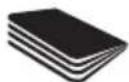
HeckoIbKO CIOKeHHbIX
JIcTOb 6ymaHn (HaPmep,
JIcTbI cOpMaTa A3,
CIOKeHHbIe NOnJAm).
HE DONYCKAETCByHnTuToXeHne CJeDyUoXn MaTePnaIob:

OchB npoHbIe cKobbl.
y6eNTecb, yTO dINHa HOKKN
cKOBbl He npeBbIaet 6 MM.

BolbwaCpkn. Y6eHntecb, 1TO DnHa CkpenKn dny 6ymarn He npebwaaet 32 MM.

JIcTbN3 pIaCTnKa,
JAMHINPOBaHHbIE
DOKyMeHTbI,
NOJIN3TUNHeHOBBie NaKN.

CkpenKu Tuna Bulldog

Dokymentb IB nepenneTe

KpeiHTbIe KapTbI

Hakleki

KyphaIbI INpyrIe DOKymeHTbl,CKpeJIeHHIbe HECKOJIbKIMNCKoBaMn IIN CKpeKNaMn


3anpeaaetcnaonb308aTa a9p030n
3anpeaaetcnaIb30BaHnMaCJaIg CMA3KN

KoMaKT-DnCKnDVD-
Kop3nHa 3anOJIHeHa
Pn3aONJIHeHH KOp3HbI BepXHry cAeTb CpeXyUMMexAHN3MOM HaHT HeH Ne npINoNDHMaTbC.
3To npBedeT KOCTaHOBKe yHHTOXNITeJIa.
OuHCTnTe KOp3nHy n yCTaHOBnTe Ha Hee BepxHIOU cpeKyuIM MExaHn3MOM.
Pocne 3TOrO yHnTuXnTeNb roTOB K pa60Te.

PPEIOCTEPEXEHNE
HnHaIeKaUeroFyHKuOHnpOBaHryCtpoiCTBa HeoXoIMMO,HTO6bI BepxHra YAcTb CpeKyUM MExAHN3MOM 6blna npabunlboYo yctahOBHeHa KOp3nHe.
Bcerda ouuuaite Kop3nHy dIy OTXoOB, KOrDa OHa 3aONHeHa, nHaue 3TO He6laRopnTHO cKa3bBaETc Hapabote yHnHTOKnTeIe 6ymar. 3Kcnnyataun yHnHTOKnTeIe C nepeonlonHHoN KOp3nHOJ dJIr OTxOBoM MoKeT npNBecTI K 3actpeBaHHIO 6yMaR N B pekuysem MexaHm3Me I NOBbHEHIO ypOBH IyMa, npOn3BODMIMO YCTPOINCTBOM.
He ytpam60b6BaIte HOrAmn Hape3aHHyIO 6ymary B KOp3nHe.
YctpaHeHne HEnCnpabHocTei
Ecni yHnTuToXnTeJIb 6yMaI He NaHaHaT paBoTaT nocLe BkIOUeHHa, peKOMeHNyEM npOBepNT cNe dyIOoee:
1.Празвлбно ЛИ ВКЛЮЕНОУ ectpoICTBO BCetb?
2.YctaHOBJEnJINpeKNIQUaTeJIbBIOJOXeHHe?
3.He 3acTpna JIN ByyctpoiCTBe 6ymara?
4. He neperpenca nn moTOp?
5. 3akpbita lii Dbepua yHnTuToXnteJIa?
DOnOHHTeIbHbIe npHaIeXHOCTN
IcnoJb3yTe doonHHTeHbHe npHaJnEaXHOCTuToJIbKO KOMNaHnRexel:
JnCTbI Dn CmaKu (20)-2101949
JINCTbI DnI Cm3Kn (12)-2101948
YTNIN3aun OTOxOIOB 3JIeKtpnueckoro N 3JIeKtpoHOrO o6OpyDobAHnA (WEEE)
Iocne 3aBepseHnCpOKa 3KcNlyatauINBaW npOyKT
PnHaJnxK T OXToDAM 3NeKTPnueCKORIO 3NeKTPoHHORO
OBopydOBAHn (WEEE). COOTBeTCTBeHHO, Heo6xoIMo PpHrTb BO BHMmaHHe CneDuOooee.
OTxoDbI 3JIeKTPnueckoro I 3JIeKTPoHNO O6OpyOBaHnA (WEEE) He doJxHbI yTuIN3nPoBaTbCak HecOpTnpOBAHHbIe 6bITOBbIE OTxObl. OHn DoJXHbI C6uPaTbCt OTeJbHO, YTO6bl IN MOxHO 6bIIO pa3OpaTB n NOBtropHO nepepa60TaTb, NOBtOPHO INcPb3ObaTB INI peKnyepnPobAOBt IN KOMNoHEtBl IN MATEpNaIbI (B KaueCTBe TOnnBa dIJIpeReHepaUN 3HeprN pIn pIpOn3BOJcTBe 3JIeKTPnueCTBa).
MecThbIe opraHbI Bnactu C03dAno 6ueCTBeHHbIe nyHKtB npneMa yTnIbCbIp8 dJa C6opa OTxOIOB 3JeKtpnueCKORO n 3JIeKtpOnHO o6OpyIDobAHnWEEE. YcIpy TaKIN NyHKTOB 6ecNlAthbI dna Cdaioux.
IoxaIyIcTa,doCTabTe OTxOdbI 3JIeKtpueeCKoRIO n 3JIeKTPoHHOrO
6obopyoBaHnA (WEEE) B 6JNkaMn K BaWeMy DOMy nn Ofncy
nyHKT npMeMa yTINbCbIpB.
PnB03HKnHOBeHm TpydHocTe C BbIcHHeHem MecToHaxOxDeHn npEma yTnIbCbIpb, npOdaue, npOdaWn Bam ycTpoiCTBO, DOJIKeH npINrTB OTXoDbI 3JeKtpuYeCKOrO n 3JeKtpoHHOrO o6OpyDobAHn (WEEE).
PnO TcYCTBnC B3n C p03HnHbIM npoDaBcOM npocm Bac C8ra3atbcA C ACCO nOnyuEHHn NMOU BpeuEHn 3Toro BONpoca.
IobTOpHna nepepa6oTKa 0TxOIOB 3eKtpnueckoro n 3eKtpnoHHoro 0bOpdyOBaHnra (WEEE) HnpaBHeHa Ha 3auHTy OkpykaIOUe Cpebl, COxpaHHeNc 3dOpOBbJIIODei, COxpaHEnHe 3aNaOCB CbIpbN MATEpNaIOB, COBpeHcTBoBaHne yToHNVBO rpoBaBHrN uOeCNEuHHe NlyUeN NOCTABKn B Ebponeckn Co103 ToapOB HApOHO rnoTOptpeBHeHn.3To DocTHraETCnyTEM BOCCTaHOBNeHn UeHHO BTOpNHOrO cbIpbN cOKpaSeHnry Tynl3aun OTOXoOB. Bbl MoKeTe BHECTn CBOB BKlAd, BDOCTXKeHHe 3TNX CEJIeN, CDaBAr OTOXoBl 3eKtpnueckoro n 3eKtpnoHHoro 0bOpdyOBaHnra (WEEE) B NyHKT npEma YtINbcbIpbJ.
BaI npOdyKT IMeET CmB0J 一 O T x 0 dI 3JIeKtpueckoro IN 3JIeKtpoHHOrO o6OpyIOBaHnra (WEEE) (pepeepkHytbi nepeDnIXHOMyCOPHbIK KOHTeINHeP). 3OTOT CmB0J O3Haayet, yTO OTxOdbI 3JIeKtpueckoro IN 3JIeKtpoHHOrO o6OpyIOBaHnra (WEEE) He IOJXHBI yTNIIN3NpOBaTbcRA KaK HecopTnpOBaHHbIe 6bITOBBe OTxOdbI.
TapaHTy
Pa60Ta daHHoro yctpoiCTBa o6ecneuHbaeTc8 DByXJteH erapaHTneo DaTbI npno6peTeHNn npu yCIOBn HOpMaJIbHOI 3Kcnnyataun. B pamkax rapaHTnHoro nepnoDA KOMNaHNA ACCO Brands Europe Ha cBoe ycMTopeHne npOn3BeDeT JIn60 peMOHT, JIn6o 3aMeHy HeNCnPabHOrO yCTpoiCTBa 6ecnlaTHo. DaHHa rapaHTnHe paCnpocTpaHNTcHa HeNCnPabHOCTN, Bbl3BaHHbIe Heco6nIoDeHNem npaBn 3KcKnNyataun NIN INCNOJB3OBaHMe N3deJINB HEnpeDyCMTopeHHbIX CEJIAX.
Heo6xOIMO noTBePckDeHnne DaTb npno6peTeHn. Pa60tbo npoemHTy N MoDnKauu, npOBeEHhBie LuaMn, He yNoIHOmOeHHbIMN KOMnAhnEi ACCO Brands Europe, npekpaahOT DeIcTBnE rapaHTn. Mbl CTpeMMc o6ecneHTb BbICOKNE 3KcPiYaTaUOnHbE CBOICTBa HaXnx I3deLNI corlacho PpeIOCTaBHeHNO CneUOnKaun. DAnHra rapaHTn He 3aTpaIbNAETOpNJnueCKNe pnaB noTpe6nteJeBpAMkax COOTBEcTBYIOUero HAUNOHALbHOrO 3aKHOdAteJIbCTBa, peryInpuyUooI npOdaKy TobapOB.
#
a INHdkatop TaKtacbl
b TyTkacblbapTypaFbiW6acbl
c Ce6eTti Kapay Tepe3eci
d Kayinci3ik TaH6anapbi
e KaFaz 6epy yacbl

OcbI MaHbI3dbl Kayinci3diK HycKaynapbIH OKbIHbI3 XHe CaKTan KObIHbI3

PaiDalaHny HcyKaynapbHbH TOblk KeuipMeciH, naIdaJI bKeHeCTepJxHEaaybIKTapdbKOIO HcyckaybHfHany yuiH www.rexeleurope.com/support cauTbHa Kipih3.

HIMDe TaBbIaTbH KeNeci TaH6 KaPbIbHbI aKaH KaFda C3dH KaTTb KaPaKaTTaHybHbI HEmece eJyH3 MymKIn eKeHb6inipedeI. AUYFA BOJMAIbl.
KypbIbHbI TEK OHbIH apHaJIFaH MaKcTTapbl yuH naDanaHbHb3.
KypbIfbyTeK KypbIfbyda KepeCteTirReH 3neKtpnik peHTnHRKe CaiKec KeletIH Kyat KepeHyiHe Kocblnybi Kepek.
KpybIbI OHaIKoN XeTI3yRe 60JIaTH KypaNFA XaKbIH Xepderi pO3eTKaFA KOcbIbI KepeK.
BipHeWe po3eTkaIbI aadantepre KocnaHbI Hemece y3apTKbiW Ka6eJIbMeH naJaIaHaHbI3.
OcHyckaynapbOpbHdAmay3aKbIMbJXapakaTTbyTydbpybXHEKeiniririH3iXkapamcb3eYi MYkHi.
KypbIbIfa e3iH3 Kbl3Met KepcTyre HEmce OHbXeHdeyerepeket etneH3.
- ΘHney xaFdaBbHdTypaJFaH KaFa3 6eH Hecne KapTaCbHbH TypamdaPbH 6eNih3.
KaBeI Hemece aIaCbI 3aKbIMdaJFaH 6oJca, 6yI KypblfBhlb naDalaHaB13.
KypaIbI JxblkbyKe3iHne KaHdAn da bip teric emec 6eTepn Hemece eEneri 3aTTapHaayak bony yuH an abai 6ony kepek.
Kayinc3ik TypaIbI aknapaTAP meH Hcckayapbl Okbl UbiFybHb3IbEtiHEMi3. EhdpuyiDpybc KOnlaH6ay HeMece Kayinc3ik HcyckayapblOpbHaMay caIpaBHaH 6oNfAH MylIkke 3aBkIM KeYHe MeCe XeKe XapaKaT JxAdaNapBaH Xayantbl EmeC.OHdaXaRdaNapDa,KeINJIK KUYH XOJIyB
KypbIbI FImapat iHHe KOJaHyra apHaIraH. DaIaDa KOndaHyra 6OIMaIbI.
KypbIbIFbIHbIbIaFaDahKaLbIKyCTaHbI3.
- 3pkaaah abai 60bHb3, apekeTepi epkaaah abaian opbHaB3. Erep 3eHH KOIO DeHReHH TEmH 6oCa Hemece Haia, apak Hemece dpi Ka6blnacAH3, 3neKtp KpybIbnapBkOJIaHb3. 3NeKtp KpybIbnapBn 3eIH KOIMa KOnlaHy cTepHIn 3eI de yIKHe anaTKa Hemece aybp XapaKaT anyfa Ce6en bony MymKiH.
KypblfHbIaWyfa,03repTyre Hemece XeHdeyre apekTeH6eH3. KylaTbIn, Tecin Hemece cblbipn aImaHb3, KbCbIM Tycyeh caKaTaHb3.
KpypbIbIbIe3reptyRe HemeTexHnKaJIbIK e3repictep eHI3yre pyKcAT etImeJi.
KoJdaHyFa deiH, KypbIbIbMeH Kyat KaBenIH (erep 60nca, adanTeepin) KyHH Teckepin anbHb3. Erep Ke3re KeipHeTIh 6yliHy bEnirpei baKaJaCA, KWTi nic WbIrapca Hemece 6BneWekTePe iwaamadH Tbc KbItn KetC, KockBtapbH CybpIn, KypblbHbKOJaHyDb IbDnEH TKTAtbHb3.
Cnpe Ta3apKbIaTapBHeMece Cnpe MaJNaFbIaTapBnaHdaHa6aHb13, c6e6i 6ynap ePteHy KaTepi H TydbpybMVMkiH.

A6aiJhaH3: OTkip kya3. KeckiwTepre Tmehi3.

A6aIahbI3: Ko3fanaTbH 6oJIkTeP. KeckiTpRe TImeH3.
Kayinci3dk cKaTaHdbIpBfw KynnbH ewkaah enemeyre 60lmaiDb (KaTah TbiBIM caIbHaNb JxHe ecipece, Kypblfki Kyat Ke3iHe KocBIFFaH Ke3ne Kayinti).
KypbIbI KymMbIC ICTeyi yuH TpyaBliu 6acbccebetke npbcOpHaNactbipInyblTnic.
TypaftbcetTolfahKe3deOnb6ocatbHb3, 60Jmaca,TypaftbTbH,ehIMdiirHe Kepi acep etyi MymkiH. TypaftbTbToBkTypaftbIc6eTimEn icKe KOCy KecktiTepeKaFa3dbH,KeNTenYiHe AkeNyi MyMKiH, 6yKpylbHbH,uy DeHreHH apTbipadbl.
TypaHaH Kafazblce6eTke aRfbHb36eH 6acbin KYWTeMeHi3.
AkaIbIKTapdbI KOIO
KaFa3 TpyaBbI icke KocbImaca, KeleceInepdi TeKcepini3:
- KypbIybl dypbic Kocblfah 6a?
- KockbiiI IO3NIuRcBHa nTepiReH 6e?
- KypbIFbda KaFa3 KeTeTirReh 6e?
- Motop KaTbI KbI3FaH 6a?
- TypaBbIe ci Ika6bIK na?
KocanKbI KypaIap
Tek Rexel KocalkbI KypaIaNapbIH naIaNanHbI3.
Ma npakap (20)-2101949
Ma nnapaktap (12)-2101948
3neKtpnik XaHe 3neKtpoHdbIK Ka6dbkTapdbIH KaIdbkTapbl (WEEE)
3iH Kb3MeT Mep3imHcObHda eHIMH3 WEEE 60bln Kapactbiplaa. CoNbIKaH, WEEE eHIMHcypbIaMaHaKOMMyHaBk Kokbc peTHe TaTAlMay KepeKTIirEeKepty MaHb3db60bln Ta6bIa. OI KOMNoHEHTepi MeH MaTePnAaPabH KaTa eHDeYre, KaTa naIaNanAHyFaKaHe KaIIbHa KeTIpyre BoNaTBdA etin 6eJWeKTeNy iYsiH 6eKeK HInaBy Tnic (3JeKTP TorbH bIfapya aHeprnaHb KaIIbHa KeTIpy ysiH kaHaapMa peTInde).
Kofamdbik xinHay opbHdapbH MHNuNaIITetTep WEEE eHIMdepHxNhay yuih xacaFaH, ci3 yuih TeriH.
WEEE eHimH3di yHni3re Hemece KeHceH3re JkaBn OphanaackaH XnHay oPhbHa anapbHbI3.
XnHay opHbH Ta6yda KnbHbIKTap TybHJaCa, ci3re eHimDi caTkAH catyWb WEEE eHimHj3di Ka6bJdaybKepek.
CatyuBImeH baIaNaHbCTa 6oJIMaCaHb3, Ocbl MceJe 6oIbIHwa kEmek any yuih ACCO KOMnHaNcBiHa xa6apnaCbHb3.
WEEE eHIMdepiH KaTaNtO HnEy KOpShaFaH opTaHbI KOpFayra, aam DeHCayIbIbIH KOpFayfa, uNKi3aTTapDbI cakTayfa, TypaKtbl DaMydbI JAKCapTyFa XHe EyponaIbIK OJaKaTb Tayap YCbHbCTapBbH XaKcapTyDbI KaMTaMaCbI 3EtYe 6aftTaNFaH. ByfAH KyHdbI ekHIwI pet Wnk3aTTapDbI any XHe KaIbIKbITb TaCTaydbI a3aHTy apKbIbI KOJ XeTk3iJIeJI. WEEE eHimH3di XnHay OPbHa anapy apKbIbI OCbIMaCATTapFa XeTyre YIec Koca aJIacbl3.
OHiMHi3 WEEI TaHbAcBImeH 6enrHeH (X TaHbAcB 6ap KOKbc ce6eti). Byan TaHbCi3re WEEI eHIMHi CypbntaJMaHaN KOMMyHaJIbIK KOKbc peTInDe TactaImaybKepeKtirH xaabapnayFa apHaJIFaH.
Kenildk
Ocb KypbIbIbIH JyMbIcBHa KaJIbITbI naIdaIaNbIFaH
KafdaiCaTbI aIfAH KyyHHe6acteKki bIra KeiJik
Bepinei.KeiJIK Mep3imi Ke3IHde ACCO Brands Europe
KOMnAHNcBcE3 KapayBImeAkaybl KypblbHbTeirH XeHnei
Hemece aybICTbpaIbI. Dypbc NaIdaIaNbaydAn Hemece TnicTi
Emec MaKcTAP yuH naIdaIaNHydAh TybHdaFAn akaynap
KeiJIdkTEKaMTbIMaIbI.
CAtbIn any kyHinH danei tanan etinei, ACCO Brands Europe KOMnHaHrcbl pyKcat etnereh aamap tapaBihah xacaIraH XeHdeynep Hemece 3reptynp kerinikti japaMcbi3 etei. EhimdepimizdH kpcetirreh TexHkAbnk depekTrepre caib 60nyh KaMTamacbl3 ety 63DIN MaKcTabmb3. ByenkeniktayapnapdbCaTydb backapaTbH KOlaHbictaFbYTTbIK,3aHaMaJap aRcbHda TyTbHybnapneHeTeIH 3aHbkybkTatpfa ecep etneii.
Přehled
MNOPEI va kaTaOtpéψει Ta παραΚάτω:

X308:8oελiδεc X406:6oελiδεc
Sprey kullanmayin Yag kullamayin

CD ve DVD'ler
Cop kutusu dolu
aegblljieLayjglally bial
ylll lall pssu 4paa Lai Ls1 1 yg jy g aeg e g aag
aui 1
jlll jie aaiy 1 y
a 100000000000000000000000000000000000000000000000000000000
aalaae aae ae aee aee aee aee aee aee
pae
1.2.3.4.5 a
Lao co bail 1b
aLLI ayLoo sili C
a0xlljgocd
1234567890
:
alaball 5: sla

yjz
clabll jai y 1s jao oji

alao 151 ysi laie aolgy, lly laio e gao jao) iay loyll aai
WEEE)
d 100000000000000000000000000000000000000000000000000000000000000000000000000000000000000
Jolal
a 151 y aalld plaii i 100 100 100 100 100 100 100 100 100 100 100 100 100 100 100 100 100 100 100 100 100 100 100 100 100 10
saaee aee eae ee eae eae eae eae eae eae eae eae eae eae eae eae eae eae eae eae eae eae eae eae eae eae eae eae eae eae eae eae eae eae eae eae eae eae eae eae eae eae eae eae eae eae eae eae eae eae eae eae eae eae eee
X406 9 Momentum X308
JLo Joo
33.29X308:8·
X406:6
plo 25 a j s j c dall a g a l y
(10.0,9=dlll daw s) 4kww/1/snll lL
80/100<
33.9X308:8·
X406:6
p25 25
24/6 26/6
paall xinoo 3gll
ACCO Brands Australia Pty Ltd (ABN 16000265047)
This document details the terms and conditions of the warranty against defects provided with this product. Please disregard any other representation contained on this product's packaging or provided with this product which constitutes or appears to constitute a warranty against defects.
WARRANTY AGAINST DEFECTS
This product comes with ACCO Brands Australia Pty Ltd (ACCO Brands) warranty against defects, the details and conditions of which are set out below.
Subject to the terms and conditions set out in this warranty, ACCO Brands will (at ACCO Brands' option) repair or replace this product with a new or refurbished product if it contains defects which are a result of faulty manufacturer workmanship or materials.
PERIOD OF WARRANTY
You may claim on this warranty if you notify ACCO Brands within 2 years of the date of purchase in the manner set out below and if you comply with the other conditions of this warranty.
WHO CAN CLAIM UNDER THIS WARRANTY?
This warranty applies to and can be exercised by the original purchaser of the product only. This warranty is not transferrable to any other person or party under any circumstances.
WHAT THIS WARRANTY DOES NOT COVER
If we reasonably consider that any of the following situations are present, this warranty does not apply. The situations to which this warranty does not apply are:
- any cosmetic damage;
- any product where the product's serial number is no longer present or visible;
- loss or damage caused by factors beyond ACCO Brands' control including, but not limited to, damage or failure due to power fluctuations, overload, excessive heat or humidity;
- any product which has not been installed and/or maintained according to any care or operating instructions provided with the product;
- any alterations or repairs to the product not authorised in writing or performed by ACCO Brands;
- damage or defects caused to the product due to unusual, abnormal, non-recommended or negligent use of the product;
- any wearable component in any product, including but not limited to blades, slitters, cutting sticks, cutting light bulbs, drill bits, base boards, feed wheels, separators, fuses, cutters and carriers, manual punches and cutting disks, light bulbs and staple inserts; or
- liability based on any service agreement entered into with third parties.
PROCEDURE FOR MAKING A CLAIM
Any claim made under this warranty must be made by sending the faulty product to ACCO Brands at the address noted below, together with the following information in writing:
- Your name or company name (if applicable);
- Your address;
- Your telephone number;
- Contact name:
Machine type, model number and serial number;
Proof of your purchase of this product, such as your receipt; and - A detailed description of the defect you believe the product to have.
WHAT WE WILL DO TO HONOUR THIS WARRANTY
Upon delivery to us we will organise for the product to be assessed to determine if the fault or problem is covered by this warranty. We will advise you by telephone, email or in writing whether the fault is covered by this warranty.
STATUTORY GUARANTEES AND YOUR OTHER RIGHTS AND REMEDIES
This warranty against defects is provided in addition to other rights or remedies you, as a consumer, may have under a law in relation to this product.
Our goods come with guarantees that cannot be excluded under the Australian Consumer Law.
You are entitled to a replacement or refund for a major failure and for compensation for any reasonably foreseeable loss or damage. You are also entitled to have the goods repaired or replaced if the goods fail to be of acceptable quality and the failure does not amount to a major failure.
CONTACTING US
ACCO Brands Australia Pty Ltd (ABN 16000265047)
Australia and New Zealand Distributor
Locked Bag 50
Blacktown BC NSW 2148
For product purchased in Australia call: 1300 278 546
Email: enquiry.nsw@acco.com
For product purchased in New Zealand call: 0800 800 526
Email: enquiry.nz@acco.com

ACCO Brands Europe
Oxford House
Aylesbury HP21 8SZ
United Kingdom