Key Light Air - Lamp ELGATO - Free user manual and instructions
Find the device manual for free Key Light Air ELGATO in PDF.


User questions about Key Light Air ELGATO
0 question about this device. Answer the ones you know or ask your own.
Ask a new question about this device
Download the instructions for your Lamp in PDF format for free! Find your manual Key Light Air - ELGATO and take your electronic device back in hand. On this page are published all the documents necessary for the use of your device. Key Light Air by ELGATO.
USER MANUAL Key Light Air ELGATO
Federal Communication Commission Interference Statement
This device complies with Part. 15 of the FCC Rules. Operation is subject to the following two conditions: (1) This device may not cause harmful interference, and (2) this device must accept any interference received, including interference that may cause undesired operation.
This equipment has been tested and found to comply with the limits for a Class B digital device, pursuant to Part 16 of the FCC Rules. These limits are designed to provide reasonable protection against harmful interference in a residential installation. This equipment generates ease and can reduce radio frequency surgery and, if not installed and used in accordance with the instructions, may cause harmful interference to radio communications. However, there is no guarantee that interference will not occur in a particular installation. If this equipment does cause harmful interference to radio or television reception, which can be determined by turning the equipment off and on, the user is encouraged to try to correct the interference by one of the following measures:
- Regrient or relocate the receiving antenna.
- Increase the separation between the equipment and receiver.
- Connect the equipment into an outlet on a circuit different from that to which the receiver is connected.
- Consult the dealer or an experienced radio/TV technician for help
FCC Caution: Any changes or modifications not expressly approved by the party responsible for compliance could void the user's authority to operate this equipment. This equipment complies with FCC radiation exposure limits set forth for an uncontrolled environment. This equipment should be installed and operated with a minimum distance of 20 cm between the radiator and a human body.
For questions about Elgato product compliance with FCC regulations, please contact: Compliance Officer, Censair Memory Inc., 47100 Bayside Plkwy, Francant, CA 94538, USA
This device complies with Industry Canada license-exempt RSS standard's
Operation is subject to the following two conditions. (1) this device may not cause interference, and (2) this device must accept any interference, including interference that may cause unvested protection of the devices.
Eigatn, a division of
Corsair Memory Inc., 47100 Bayside Pkwy, Fremont. CA 94538, USA
Carsair Memory, BV Wormerweg 8, 1311 XB, Almar
Copyright 2018 - 2021 Corsair Memory Inc. All rights reserved. Elgate and the Elgate logo are trademarks of Corsair Memory Inc., registered in the U.S. and other countries.
Part: 51LAB9904

B-R-CSI-20LAB9901
R-R-CSI-BLO26-130200GX
Applicant Name (상호명): Corsair Memory, Inc.
Product Name (제품명상): Key Light Air
Model No.(보일본) 701AB9901
Manufactured Year & Month (저조연월): Please refer to gift box sticker
Manufacturer & Country of Origin (제조자 및 제조국가: Corsair Memory, Inc / Made in Taiwan
A/S:(주)검스빌,1522-1460
elgato


/elgato

KEY LIGHT AIR
EN Quick Start Guide
TR Guide de prise en main rapide
DC Kurzanleitung
ES Guía de inicio rápido
⑪ Guida rapida
NL Snelstartgids
Pikaopas
Lynstart guide
Hurtigveiledning
SV Kom igång
Guia de Início Rápido
TR Hizli Kurulum Rehberi
GR Σύντομος οδηγός
L Skrócona instrukcja
Краткое руководство
クイックス タートガイド
kU 룵 스타트 가이드
快速入门指南
快速入門指南
دليل البء السريع
Assemble Key Light Air
1
natural_image
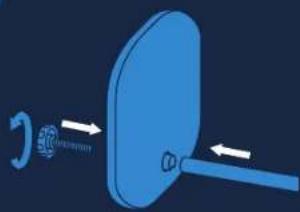
Blue 3D diagram of a mechanical component with directional arrows indicating motion (no text or symbols)Secure the pole to the base using the included screw.
2
natural_image
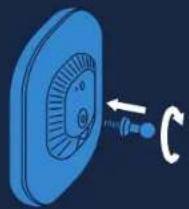
Blue 3D icon of a circular device with a knob and directional arrow, no text or symbols presentScrew the ball mount into the threaded socket on Key Light Air.
5
natural_image
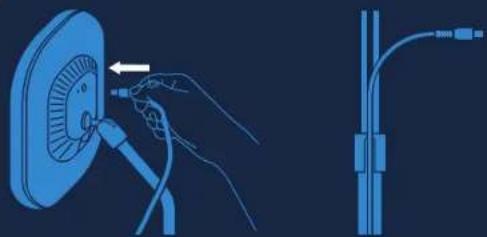
Illustration of a hand inserting a cable into a fan device, with no visible text or symbolsConnect the power supply and run the cable through the clip and rail.
3
natural_image
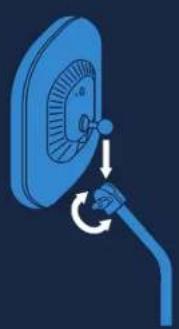
Illustration of a hand inserting a cable into a fan-shaped device (no text or symbols)Insert the pole into the ball mount socket and tighten the knob.
4
natural_image
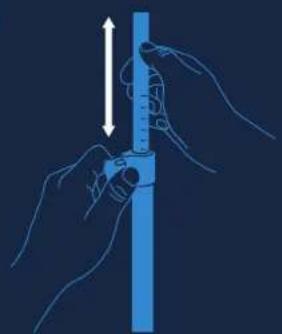
Illustration of hands using a tool to measure a vertical cylindrical object (no text or symbols present)Minimum 60 cm / 24 in Maximum 89 cm / 35 in
text_image
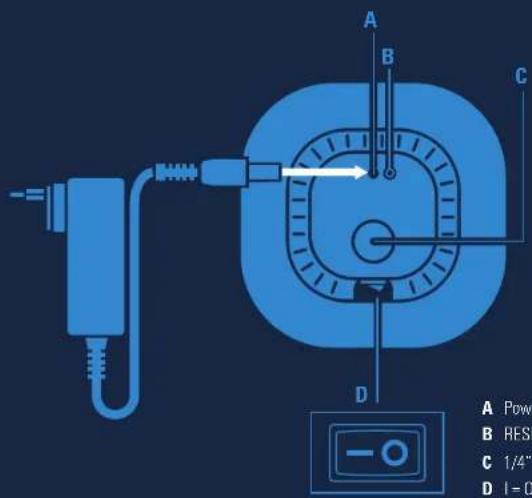
A B C D A Powc B RES C 1/4" D I = 0A Power: 13V=2A
B RESET Button
C 1/4" Mounting Thread
D I=ON 0=OFF
Software Installation Reset
1

text_image
elgato.com/downloadDownload and install the Elgato Control Center app from the App Store or Google Play or get the PC/MAC software version.
2
natural_image
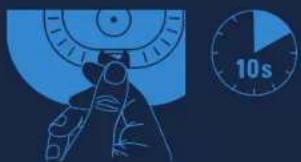
Illustration of a hand holding a device next to a stopwatch showing 10 seconds (no text or symbols on the diagram itself)Switch on your Key Light Air. It will take approximately 10 seconds to boot up.
3
text_image
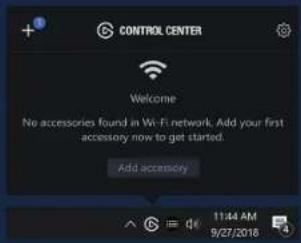
CONTROL CENTER Welcome No accessories found in Wi-Fi network. Add your first accessory now to get started. Add accessory 11:44 AM 9/27/2018Launch Control Center and pair Key Light Air by clicking the + icon.
4
text_image
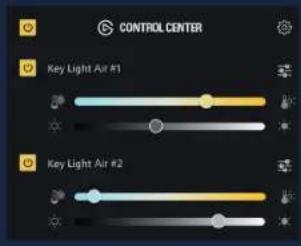
CONTROL CENTER Key Light Air #1 Key Light Air #2Use Control Center to switch Key Light Air on/off, adjust brightness, and fine-tune color temperature.

Key Light Air requires a 2.4 GHz network with WPA or WPA2 encryption. Your system must therefore be Wi-Fi enabled, and Key Light Air must be within range of your router.
If your PC is not equipped with Wi-Fi, use the Elgate Control Center app on your iOS or Android device to add Key Light Air. A Wi-Fi connection is only needed for initial pairing. Once Key Light Air is paired, you can control it via any wired or wireless device in your network.
text_image
10s 3x
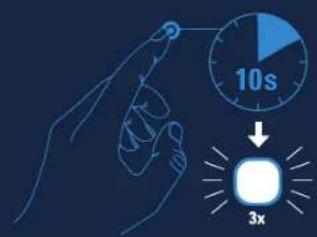
RESET will restore your Key Light Air factory settings and erase all Wi-Fi credentials.
Power on Key Light Air. Push and hold the RESET Button for at least 10 seconds until the light flashes 3x.
Warning
• Key Light Air may become hot during prolonged use. Always handle with care.
- Do not cover this product, especially the ventilation holes.
- Do not place on or near a carpet, curtains, or any other flammable materials.
- Be especially cautious when setting up near children.
- Do not attach items to Key Light Air or its stand.
- Do not leave Key Light Air in direct sunlight.
- Do not set up in areas susceptible to strong air currents. Drafts and breezes can cause movement that may result in damage to Key Light Air.
- Keep the lighting surface free from dirt and dust. If Key Light Air becomes dirty, wipe it lightly with a soft cloth moistened with a little water and mild, neutral detergent. Benzene, thinner, and other volatile agents can cause permanent damage and should never be used for cleaning.
- Always place Key Light Air on a flat and firm surface. Uneven or unstable surfaces may cause tipping and result in damage or personal injury.
- Do not use the stand for applications other than those specified in this guide or the packaging.
For indor use only
Frequency range: 2412 - 2472 MHz (2462 MHz for FCC, ISED), Max RF e.i.r.p power < 20 dBm, Temperature range: 0 °C - 45 °C
Hereby, Corsair Memory Inc. declares that this device is in compliance with the essential requirements and other relevant provisions of Directive 2014/53/EC. The declaration of conformity for Elgato products is available at www.elgato.com/coc

• A Almentation: 13V = 2A
B Epsilon RESET
C Filepage 1/4"
D. I - MARCH
D - MARSH
Software installation
Key Light, Control Center