60001595 - Blender Klarstein - Free user manual and instructions
Find the device manual for free 60001595 Klarstein in PDF.


| Product type | Blender |
| Brand | Klarstein |
| Model | 60001595 |
| Power supply | 220-240 V ~ 50/60 Hz |
| Power | 1800 W |
| Jug capacity | 2.0 L (max) |
| Jug material | Plastic |
| Blade material | Stainless steel |
| Number of speeds | 3 (Low, Middle, High) |
| Pulse function | Yes |
| Automatic programs | 7: Sauces, Grind, Fruits, Bisque, FIB, Meat, Grains |
| Timer | Yes |
| Dimensions (approx.) | 40 x 20 x 20 cm (H x W x D) |
| Weight (approx.) | 3 kg |
| Cable length | Approx. 1 m |
| Color | White / Silver |
| Safety | Overload protection; do not use for more than 5 minutes continuously |
| Cleaning | Unplug before cleaning; do not immerse the base; wash the jug with soapy water |
| Warranty | 2 years |
Frequently Asked Questions - 60001595 Klarstein
User questions about 60001595 Klarstein
0 question about this device. Answer the ones you know or ask your own.
Ask a new question about this device
Download the instructions for your Blender in PDF format for free! Find your manual 60001595 - Klarstein and take your electronic device back in hand. On this page are published all the documents necessary for the use of your device. 60001595 by Klarstein.
USER MANUAL 60001595 Klarstein
natural_image
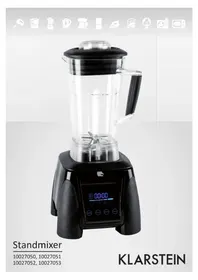
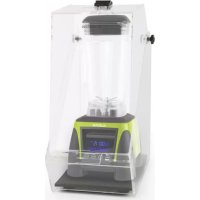
Black standminder blender with digital display and control buttons (no visible text or symbols on the device itself)Standmixer
10027050, 10027051
10027052, 10027053
KLARSTEIN
Warnung
Gerät
natural_image
Symbol of a trash bin crossed with a diagonal line, no text or numbers present- Make sure the voltage is correct according to the plug label.
- With the unit in Off position, place container on the blender base. Be sure container is fully seated and that drive coupling is properly engaged. Plug blender cord into outlet.
- Put ingredients into container and cover it. Do not fill above Max Line.
- Ensure the blender jar, lid, fill cap and tamper are clean and prepare your ingredients before operation.
Placing Ingredients
- Placing materials into the blender jar.
a) Place soft materials or liquids in first, then hard materials or ice in last. Large ingredients should be sliced or broken into chunks before being placed in the jar for better blending results. b) Most ingredients should be started on a low speed then changed to medium or high or started with the timer. If the ingredients get stuck you can press 'PULSE' 2 or 3 times to refresh and then use the tamper to help blending.
-
Place the lid tightly on the blender jar.
-
Put the blender jar onto motor base correctly.
Starting
Touch panel Version:
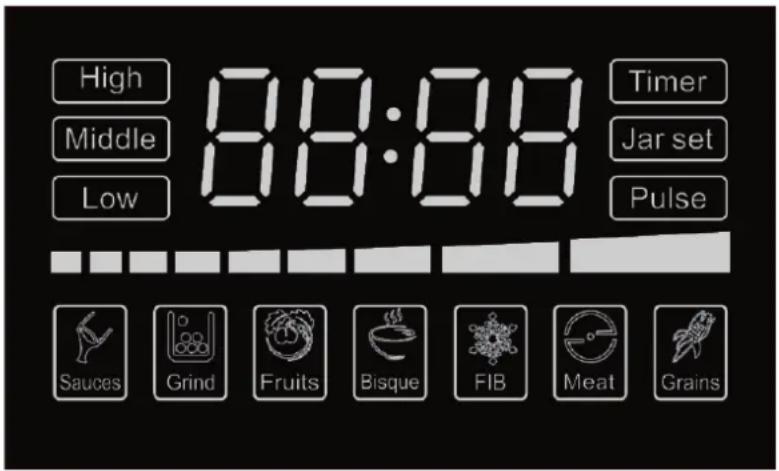
- This blender is equipped with an electronic glass touch keypad. The keypad has a main power On/Off button, and High Middle and Low, 7 function setting timer and Pulse buttons.
- Press the On/Off button, to turn on the blender. The whole glass pad will illuminate. For continuous operation, press either Low or Middle or High button, When finished blending, Press stop. For momentary operation, pree the pulse button; motor will run on High speed until the button is released. Also you can press setting, choose the best function for your food blend. Each function will have difference speed and time.
- To turn the unit off, press On/Off button. Blue LED light will go off.
- This blender is equipped with a pulse option. Hold paddle switch in down position to engage pulse function. Unit will run on high speed until the paddle switch is released.
- All Motor to come to a complete stop before removing container from blender base. Never place the container on the motor base or remove it from the motor base while motor is running.
- Always hold container with one hand when starting and while blending. Never operate without jar lid.
- Wash and dry container after each use.
Under the state of high speed by 5 minutes, it must be stopped 1 minute. When using the mixing rod, take off the fill cap first and then insert into the cap lid.
Cautions
No metal articles, such as knives, forks, spoons...etc. in the container. To prevent the danger of the cutting blade, don't clean by hand.
- Ensure that the container is securely placed on the motorized base before using the blender.
- Hold the container before starting as the motor is powerful, also ensure that the clutch is in place.
- Do not place your fingers inside the jug at anytime, whether on or off the base, due to the sharpness of the blade.
- Remove the jug from the base before pouring blended produce.
- Be sure not to touch the switch when the machine has started.
Safeguards
- Unplug from wall when blender is not in use.
- The cover can only be opened when the blade has completely stopped rotating.
- When cleaning, ensure that you unplug the appliance, the jug can be washed separately.
- Do not submerge the motorized blender base in water or place in the dishwasher.
- When in use, keep children away to prevent accidents.
Cleaning And Maintenance
- Always unplug the blender from the power source before cleaning.
- Clean the machine and relative parts after use.
- The outer case can be wiped with a damp cloth.
- Clean the jar every time after use. Do not use abrasives or stiff brushes to clean the blender base or blender jug as this will make them dull or scratch them.
- There will be some sediment attached to the blades after use. This will affect the blades so please ensure they are cleaned for optimum performance.
- Make sure the machine is clean and dry before you store it away.
- Please unplug the machine when not in use for long periods of time and keep the machine away from dust, insects and moisture.
- DO NOT CLEAN THE BLENDER JUG AND LID IN A DISHWASHER.
Trouble Shooting
| Problem Possible cause Solution | ||
| Blender fails to run No | power connection Plug in correct power outlet | |
| Motor overheat protector was tripped | Allow motor to cool down with power off in cool spot | |
| Increased vibration and noise | The machine is not on a level surface | Place the machine on a level surface |
| The blender jug has not been placed on the base completely | Make sure the blender jug is placed securely | |
| Container is too full Decrease the ingredients | ||
| Leaking from lid Water | or liquid is too high Decrease the water or liquid | |
| The lid is not fitted properly Place | the lid tightly on the blender jug | |
If the problem is still not resolved, please contact your local Distributor for maintenance.
Hints On Disposal
natural_image
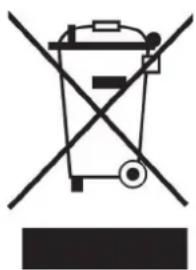
Symbol of a trash bin crossed out by a diagonal line, with no text or labels present.According to the European waste regulation 2002/96/EC this symbol on the product or on its packaging indicates that this product may not be treated as household waste. Instead it should be taken to the appropriate collection point for the recycling of electrical and electronic equipment. By ensuring this product is disposed of correctly, you will help prevent potential negative consequences for the environment and human health, which could otherwise be caused by inappropriate waste handling of this product. For more detailed information about recycling of this product, please contact your local council or your household waste disposal service.
Declaratino Of Conformity
Producer: Chal-Tec GmbH, Wallstraße 16, 10179 Berlin, Germany.

This product is conform to the following European Directives:
2014/30/EU (EMC)
2014/35/EU (LVD)
2011/65/EU (RoHS)
Avertissement
Équipement
natural_image
Symbol of a trash bin crossed with a diagonal line, no text or numbers present
Brand : Klarstein
Model : 60001595
Category : Blender