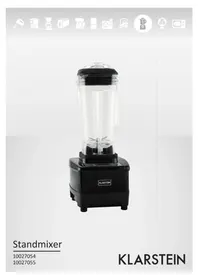
60001599 - Blender Klarstein - Free user manual and instructions
Find the device manual for free 60001599 Klarstein in PDF.


| Product Type | Blender |
| Brand | Klarstein |
| Model | 60001599 |
| Dimensions (approx.) | 18 x 20 x 40 cm |
| Weight (approx.) | 2.5 kg |
| Power Supply | 220-240 V ~, 50/60 Hz |
| Power (approx.) | 1000 W |
| Capacity (approx.) | 1.5 L |
| Main Material | ABS plastic and glass |
| Speeds | Adjustable (Speed), preset time (Time), pulse function (AT/Pulse) |
| Turbo Function | Yes, for crushing ice cubes |
| Display | LCD (LED-Window) |
| Cleaning | Do not wash in dishwasher, do not immerse, clean interior with appliance off |
| Safety | Do not insert metal objects, do not touch plug with wet hands, do not open appliance |
| Spare Parts | Mixing jug, lid, pusher, motor base |
| Intended Use | Blend food (add liquid for solids) |
| Warranty | Void if unauthorized opening |
Frequently Asked Questions - 60001599 Klarstein
User questions about 60001599 Klarstein
0 question about this device. Answer the ones you know or ask your own.
Ask a new question about this device
Download the instructions for your Blender in PDF format for free! Find your manual 60001599 - Klarstein and take your electronic device back in hand. On this page are published all the documents necessary for the use of your device. 60001599 by Klarstein.
USER MANUAL 60001599 Klarstein
Congratulations on purchasing this equipment. Please read this manual carefully and take care of the following hints to avoid damages. Any failure caused by ignoring the mentioned items and cautions mentioned in the instruction manual are not covered by our warranty and any liability.
Parts Description
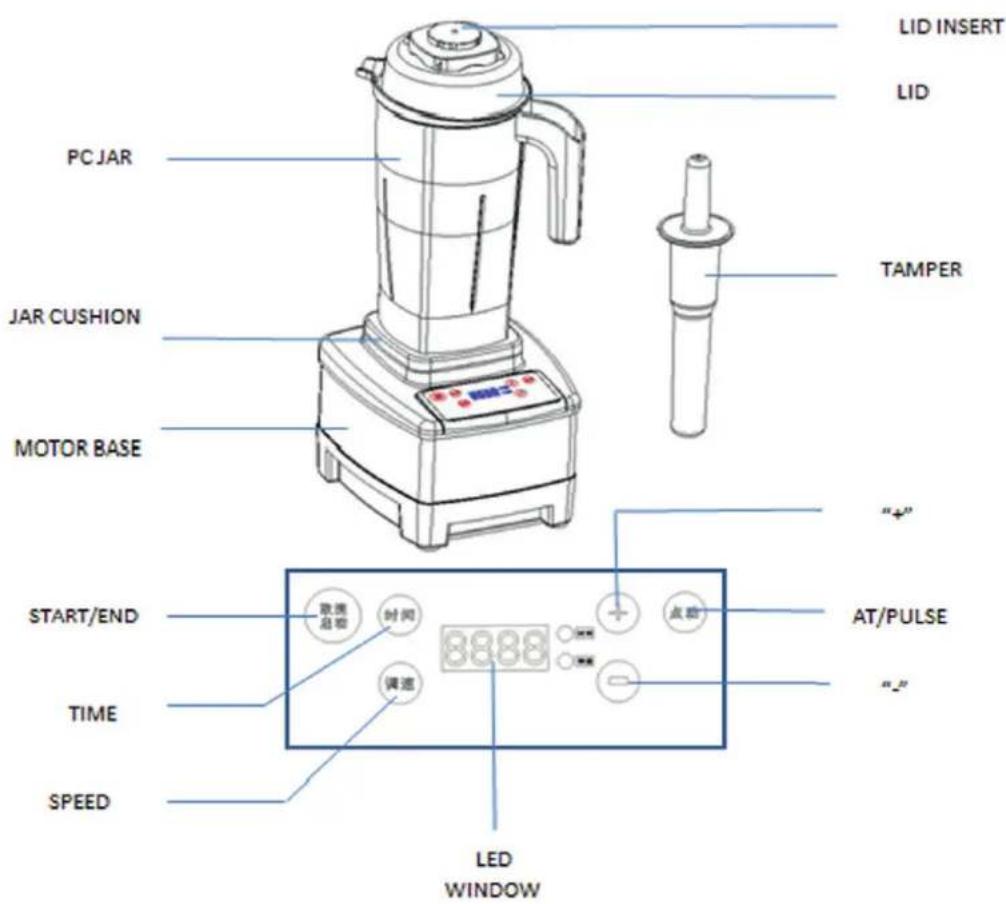
When using this machine or any other electrical appliance, always follow these basic instructions:
- Ensure that the container is securely placed on the motorized base before using the blender.
- Hold the container before starting as the motor is powerful, also ensure that the clutch is in place.
- Do not place your fingers inside the jug at anytime, whether on or off the base, due to the sharpness of the blade.
- Remove the jug from the base before pouring blended produce.
Safety Instructions
- Read all instructions.
- Unplug from wall when blender is not in use.
- The cover (Lid) can only be opened when the blade has completely stopped rotating.
- When cleaning, ensure that you unplug the appliance, the jug can be washed separately.
- To protect against risk of electrical shock, do not submerge the motorized blender base in water or other liquid or place in the dishwasher.
- When in use, keep children away to prevent accidents.
- Do not operate this appliance with damaged cord or plug or after appliance malfunctions or is dropped or damaged in any manner.
- Do not put the metal matter in the container. Such as knife, fork, scoop...
- Do not let the power cord hang over the edge of a table or counter, or touch hot surfaces.
- Do not place the machine on or near a hot gas or electrical burne, in a heated oven, or allow machine to touch hot surfaces. External sources of heat can damage your appliance.
- Do not use outdoors.
Operation
- Place the container on the motorized base securely
- Put the food in the container. Please inpouring some fluidity(such as water, milk, honey, fruit juice...) if it is solid food.
- Cover the robber lid, then put the mixing rod or fill cap.
- Plug and hold the container, then the machine will have one bumming. the LED window indicate "00:00", and the "TIME" indicator light is on. That mean machine is standby mode. Then you can start the blending by two settings
Set the time and speeds before start.
a) Time setting
when machine in standby mode, the LED window indicate "00:00", push "TIME" button, in default status is "01:30"(1 minute and 30 seconds), you can push "+" or "-" to add or reduce the time,5 seconds's change when you push the "+" or "-" each time. Such as push "+" button one time, the time is "01:35", push it again, the time is "01:40"... "-" button is opposite setting. Max time is "02:00", Min time is "00:00".
b) Speed setting
push "SPEED" button, the "SPEED" indicator light will be on. in default status is": 250. It is Max speed), you can push "- to reduce the speed, 1000 RPM's change each time. Such as push "- button one time, the speed is "240"(push it again, the speed is "230"...,Min speed is "150".
Completed above time and speed setting, then push "START/END" button, machine start working.
Start working, then set the time and speeds.
a) when machine in standby mode, push "START/END" button, machine start working with default data(time is 01:30, speed is 250)
b) Push "TIME" or "SPEED" button, then make the time or speed setting by "+" or "-" button. Tips: you can change the speed or time by "+"/-" button when blending.
"AT/PULSE" Button
When machine in standby mode, push this button one by one time, usually for ICE crush function.
- Completed blending, push "START/END" button, blender stop working.
Maintenance Tips
- When cleaning or maintaining, unplug appliance and ensure main switch is turned to off position.
- Clean the blender body and the cover with a sponge or cloth
- Do not clean inside the jug by hand unless the blade is already removed.
- Clean the rotary shaft and the motor base with a dry rag.
- If required use a clean cloth with a mild-ph detergent to clean. Never place the motor base in water or other liquid.
Troubleshooting
Check if the current protector button is turned off, press it and then reset. If the blender still doesn't work. Check the following:
- Whether the appliance is plugged in
- If there is a power cut
- If none of the above applies, please do not attempt to fix the blender yourself and instead, ask specialized personnel for repair or approved supplier for replacement.
Hints on Disposal

According to the European waste regulation 2012/19/EU this symbol on the product or on its packaging indicates that this product may not be treated as household waste. Instead it should be taken to the appropriate collection point for the recycling of electrical and electronic equipment. By ensuring this product is disposed of correctly, you will help prevent potential negative consequences for the environment and human health, which could otherwise be caused by inappropriate waste handling of this product. For more detailed information about recycling of this product, please contact your local council or your household waste disposal service.
Declaration of Conformity
Producer: Chal-Tec GmbH, Wallstraße 16, 10179 Berlin, Germany.

This product is conform to the following European Directives:
2014/30/EU (EMC)
2014/35/EU (LVD)
2011/65/EU (RoHS)
Chere cliente, cher client,
- Parts Description
- When using this machine or any other electrical appliance, always follow these basic instructions:
- Safety Instructions
- Operation
- Set the time and speeds before start.
- Start working, then set the time and speeds.
- "AT/PULSE" Button
- Maintenance Tips
- Troubleshooting
- Hints on Disposal
- Declaration of Conformity
- Chere cliente, cher client,
Brand : Klarstein
Model : 60001599
Category : Blender