840000015 - Switch Profile - Free user manual and instructions
Find the device manual for free 840000015 Profile in PDF.



| Product type | Programmable timer |
| Brand | Profile |
| Model | 840000015 |
| Supply voltage | 220-240 V ~ 50 Hz |
| Max resistive power | 3680 W (16 A) |
| Max inductive power | 920 VA (4 A) |
| Number of programs | Up to 140 ON/OFF periods per week |
| Minimum setting | 1 minute |
| Display | Liquid crystal display (LCD) |
| Functions | Weekly programming, countdown, random function, manual on/off, summer/winter time |
| Countdown | Adjustable from 1 second to 99:59:59 |
| Random function | Off between 26 and 42 min, on between 10 and 26 min |
| Manual switch | ON, AUTO, OFF |
| Time display | 12h (AM/PM) or 24h |
| Backup power | Internal battery (2h charge for programming) |
| Usage | Indoor only |
| Maintenance and cleaning | Wipe with a dry cloth; do not use liquid cleaners |
| Safety | Do not exceed max power; disconnect before handling; indoor use only |
| Warranty | 3 years |
| Repairability | Spare parts available via after-sales service; repair by manufacturer under warranty |
Frequently Asked Questions - 840000015 Profile
User questions about 840000015 Profile
0 question about this device. Answer the ones you know or ask your own.
Ask a new question about this device
Download the instructions for your Switch in PDF format for free! Find your manual 840000015 - Profile and take your electronic device back in hand. On this page are published all the documents necessary for the use of your device. 840000015 by Profile.
USER MANUAL 840000015 Profile
- The Programmable Digital Timer (hereinafter refer as "Timer") can preset specific on/off time of your home electrical appliances. It is ideal for energy saving and home security.
- The countdown function can switch on/off your appliance on your pre-set time and random functions allows you to switch on and off the appliance in irregular time, it is not only ideal for home automation, also prevent burglary during your absence.
- The LCD displays program setting status and real time.
- With maximum 140 on/off programs per week.
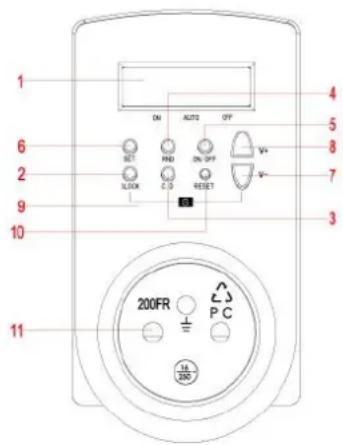
B. Image and descripon
- 220-240V ~ 50Hz
Max resistive capacity: 3680W (16A)
Max inductive capacity: 920Va (4A)
Weekly programming - Adjustable in periods of 1 minute
- Countdown function
- Random function : creates a domestic situation by turning your devices on/off at irregular times
- Summer-/winter time
- With manual ON/OFF switch

| No. | Description | Functions |
| 1 | LCD Display | Shows time and program setting. |
| 2 | CLOCK button | Return to real time display when in program setting press together with SET Button to set real time and week press together with v-Button to change to Summer Time |
| 3 | CD button | Press the button to start/stop countdown program when it is in AUTO status |
| 4 | RND button | Press the button to start/stop random program when it is in AUTO status |
| 5 | On/Off button | Change the setting mode to ON, ATUO or OFF. When press the button each time, the horizontal line in the LCD moves to ON←→AUTO←→OFF which were silk printed on the Timer |
| 6 | SET button | To set time and week and to confirm setting |
| 7 | ^- button | Press the button to reduce the time, week or program group |
| 8 | v+ button | Press the button to increase the time, week or program group |
| 9 | S function (summer-/winter hour) | Press CLOCK Button and v-Button at the same time to change to Summer Time. Time display adds one hour automatically and “S” are shown on the LCD. |
| 10 | Reset button | Press once to reset all your preset programs |
| 11 | Socket & Plug | Connect your appliance to the socket and plug the timer to the wall AC socket to get power |
C. Time Display
There are two different kinds of time displays:
- 12-hour display: the digital number is from 11:59 to 12:00 with AM or PM shown on the LCD
- 24-hour display: the digital number is from 00:00 to 23:59, no AM or PM is shown on the LCD
- To change from 12-hour display to 24-hour display, or vice versa, press CLOCK Button and hold it till the LCD display changes. Press CLOCK Button again to return to original display.
D. Week and me sengs
1. Week sengs
1.1 Press and hold the SET Button until the week display flashes, which indicates setting is ready
1.2 Press V+ Button to increase the day, or V- Button to reduce the day, the sequence of the display is shown as follows:

1.3 Press V + / V - Button once will increase or reduce the day by sequence slowly. To press and hold the button, the week display moves quickly. Release the button until your desired day of the week shown on the display. Press SET Button to confirm your setting.
2. Time seng
2.1 Aer seng the day of the week, hour display ashes to indicate seng me can be started
2.2 Press v+Buon to increase number of hour, or v- Buon to reduce.
2.3 Press + / - Buon once will increase or reduce each hour slowly. To press and hold the buon, the hour display moves quickly. Release the buon unl your desired hour shown on the display. Press SET Buon to confirm your seng.
2.4 "Minute" display then ashes to indicate seng minute is ready. Repeat the same procedures in seng hour as in #2.2 and #2.3 to set minutes.
3. Summer me sengs
3.1. Press CLOCK Buon and v— Buon at the same me to change to summer me, me display automatically adds one hour and "S" is shown on the LCD.
3.2. By pressing Clock Buon and v—Buon again to cancel the summer me seng.
Note:
LCD must be in real me display to start week and me seng. If LCD is in program seng display, press CLOCK Buon once to return to real me display.
E. Programming
- When the LCD is in real me display, press V+ Buon once to change to program seng display, "1ON" will be shown on the lower le corner of the LCD:
1.1 "1" indicates the program group's number (program group is from 1 to 14)
1.2 "ON" indicates power on me.
1.4 "OFF" indicates power o me - To choose the program group and on/o status, press v+ Buon to increase the group number, sequence as follows:

- To reduce the program group number, press Buon, LCD displays in the following sequence:

- Aer choosing the program group, then can set the week and me. Press SET Buon unl the week display ashes, press v+ Buon each me, the LCD will display the following in sequence:
4.1 MO TU WE TH FR SA SU
4.2 MO TU WE TH FR SA SU
4.3 MO WE FR
4.4 TU TH SA
4.5 SASU
4.6 MOTU WE
4.7 TH FR SA
4.8 MO TU WE TH FR and
4.9 MOTU WE TH FR SA
- By pressing the v-Button, the week display will be shown in the opposite direcon as above sequence.
- Press v + / v - Buon once will increase or reduce the week display slowly. To press and hold the buon, the display moves quickly. Release the buon unl your desired week paern shown on the display. Press SET Buon to conrm, week display stops ashing.
- Aer set the day of the week, the hour display ashes, repeat procedures menoned in Part D2. Time Seng to set me.
- To set other program group's on/o me, repeat procedures menoned from #2 to #7.
Note:
(a). To change a preset program, repeat procedures #2 to #7 as menoned in Part E and input the new data to replace the old seng
(b). Aer program seng, press CLOCK Buon to return to clock display at once, or it will be returned automatically aer 15 seconds without pressing any other buons.
F. Countdown funcon
- When the LCD is in real me display, press V—Buon once to change to countdown seng display, "d ON (or OFF)" will be shown on the lower le corner of the LCD
1.1 "d": indicates the program is in countdown mode
1.2 "ON": count down the power on me
1.3 "OFF": counting down the power o me - Press SET Buon unl the on/o display ashes, seng the countdown power on/o status is ready.
- Press v + / v - Buon to choose countdown on/o program and press SET Buon to conrm
- Hour display ashes aer seng the on/o status, then press V + / V Buon to increase or reduce hour and press SET Buon to conrm.
- Minute display then ashes, press v+/v—Buon to increase or reduce minute and press SET Buon to conrm
- Second display ashes, press + / - Buon to increase or reduce the hour display and press SET Buon to conrm. Seng interval is from 99:59:59 to 1 second.
- Connect the Timer to the AC socket and set the Timer to AUTO status in order to start /stop the countdown funcons.
- Press CD Buon once to start the countdown funcon, "d ON (or OFF)" ashes in the lower corner of the LCD to indicate countdown is in progress. Press CD Buon again to stop the countdown funcon.
Note:
(a). When countdown is in progress, LCD is in real me display, press v - Buon once to view the countdown details.
(b) To change a preset program, repeat the above procedures #2 to #6 in Part F Countdown Seng and input the new data to replace the old seng
(b). After program setting, press CLOCK Button to return to clock display at once, or it will be returned automatically after 15 seconds without pressing any other buttons.
G. Random funcon
- Random function turns on and off the appliance irregularly:
1.1 Minimum time for power off: 26 minutes
1.2 Maximum time for power off: 42 minutes
1.3 Minimum time for power on: 10 minutes
1.4 Maximum time for power on: 26 minutes - Connect the Timer to the AC socket and set the program to AUTO status in order to start/stop the random function.
- Press RND Button once, "r OFF" is flashing in the lower corner of the LCD, random function is activated. Power is off for 26 to 42 minutes. The mode will change to "r ON", where power turns on from 10 to 26 minutes. Then back to "r OFF" again.
Press RND Button again can stop the random function, "r OFF"or "r ON" disappears from the LCD
Note:
Random funcon doesn not work when no program is setup. Firstly setup your standard programming to acvate these intervals with the RND buon :
H. Override/Resume Preset Program
Press ON/OFF Buon each me can override/resume the preset program, LCD changes the display in the following sequence:
1.ON: override the preset program and appliance remains on at all me
2.AUTO: resume the preset program, appliance will be turned on and o automatically according to the preset me
3.OFF: override the preset program and appliance remains o at all me
Note:
(a). The preset countdown or random funcons only acvates when the Timer is in AUTO status and plugged into the AC socket.
(b). When countdown funcon is acvated, random and auto on/o program seng will not acve.
I. USE
- Preset your desired On/o programs on the Timer as menoned above.
- Switch o your electrical appliance
- Connect your appliance's power cord to the Timer's socket, then connect the Timer to the AC socket to get power
- Switch on your appliance.
- Appliance will then be turned on/o according to your preset programs unless manual override pressed
J. SAFETY
The batteries will be fully charged after connect to main power for 2 hours
Risk of electric shock:
- Keep away from children
- Unplug timer before cleaning and program setting
- Fully insert plug
- Do not use in wet locations, the timer is for indoor use only
Risk of fire:
- Do not use to control appliances that contain heating elements (cooking appliances, heaters, irons, etc.)
- Do not exceed electrical rating
K. WARANTY
The warranty period is 2 years, and commences on the date of purchase. During the warranty period Eltra NV will resolve any defects caused by material or manufacturing faults. Eltra NV may, at its own discretion, repair or replace the faulty device.
Eltra NV is under no obligaon to repair or replace devices if the failure is a result of damage, misuse, modicaon or changes made aer the date of purchase.
Bring the faulty device, along with the original sales receipt, back to the store where the device was sold. Always include a note with a descripion of the problem.
Eltra NV can, under no circumstances, be held liable for damages of any kind if the device is not properly installed according to the prescribed instrucons for installaon, or for damage due to unforeseen circumstances such as natural disasters, lightning ... All costs arising from this shall therefore be charged to the buyer and are not covered by the warranty.