Harley Davidson 76L187 - Wristwatch Bulova - Free user manual and instructions
Find the device manual for free Harley Davidson 76L187 Bulova in PDF.



| Brand | Bulova |
| Model | Harley Davidson 76L187 |
| Product type | Quartz wristwatch |
| Movement | Battery-powered quartz |
| Power source | 1.5 V battery (type SR626SW or equivalent) |
| Battery life | Approximately 1 year under normal conditions |
| Display | Hours, minutes, seconds, date, and day (depending on model) |
| Special functions | Elapsed time indicator (rotating bezel), end-of-life battery indicator (seconds hand jumps every few seconds) |
| Time setting | By two-position crown (inner and outer) |
| Date and day setting | Manual via crown in intermediate position |
| Screw-down crown | Yes, for enhanced water resistance |
| Water resistance | Guaranteed for deep water use (depth indicated on dial) provided the glass and button are intact |
| Warranty | 2 years, limited, parts and labor (excluding battery, strap, glass, and accidental damage) |
| Care and cleaning | Periodic inspection and cleaning by a competent watchmaker; avoid operating the button underwater |
| Repairability | Bulova authorized service center; recommended to send with description of problem and cost participation |
| General information | Harley-Davidson inspired design, manufactured by Bulova since 1875 |
Frequently Asked Questions - Harley Davidson 76L187 Bulova
User questions about Harley Davidson 76L187 Bulova
0 question about this device. Answer the ones you know or ask your own.
Ask a new question about this device
Download the instructions for your Wristwatch in PDF format for free! Find your manual Harley Davidson 76L187 - Bulova and take your electronic device back in hand. On this page are published all the documents necessary for the use of your device. Harley Davidson 76L187 by Bulova.
USER MANUAL Harley Davidson 76L187 Bulova
OWNER'S GUIDE AND WARRANTY
BOOK NO. 544

TIMEPIECES BY BULOVA
Congratulations......
You are now the proud owner of a Bulova Watch... one of the world's finest timepieces. Your new Bulova is precision-engineered to deliver years of dependable service. Bulova. Since 1875, your guarantee of elegance and accuracy.
Felicitaciones...
*Bulova and the tuning fork logo are registered trademarks of Bulova Corporation
SETTING NON-DATE MODELS
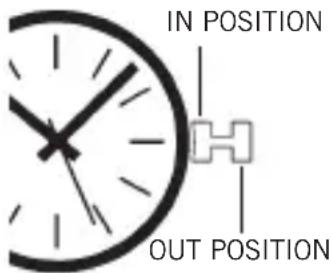
If the watch has no second hand, merely pull out the crown and proceed to step 2.
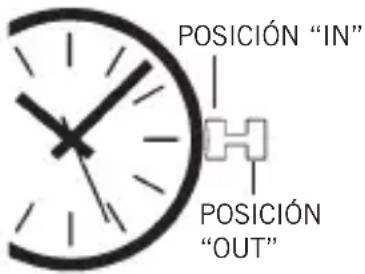
Step 1: When the second hand reaches the 60th second mark, pull the crown to the "OUT" position. All hands will stop.
Step 2: Turn the hands forward (clockwise) to set the time. In order to prevent the hands from jumping when the crown is pushed in, set the minute hand approximately 5 minutes ahead of the desired minute marker; then, gently turn back to the same minute marker.
Step 3: When the time standard by which you are setting your watch reaches the 60th second, push the crown to the "IN" position without turning. All hands will start instantly.
SETTING DATE AND DAY/DATE MODELS
Step 1: When the second hand reaches the 60th second mark, pull the crown all the way to the "OUT" position (you will hear two tiny "click" sounds). All hands will stop.
Step 2: With the crown still in the "OUT" position, move hands forward (clockwise) until you see the date (for date only) or both day and date change. This establishes midnight.
Step 3: For A.M. time, continue to move the hands forward until the minute hand is approximately 5 minutes ahead of the desired minute marker; then, gently turn back to the same minute marker. For P.M. time, follow the same procedure, but first advance the hands past 12 o'clock.
Note: The date will advance automatically at midnight, provided that A.M. and P.M. have been established (steps 2 and 3). The watch calendar is programmed for a 31 - day cycle. Therefore,
on the first day of any month following a month with less than 31 days, the date must be advanced manually (see Step 5).
Step 4: When the time standard by which you are setting your watch reaches the 60th second, push the crown all the way to the "IN" position without turning. All hands will start instantly.
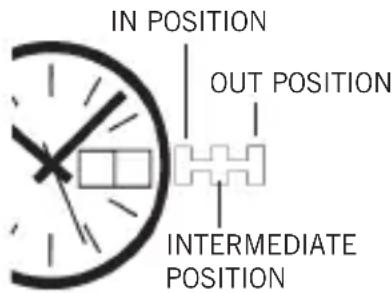
Step 5: Pull the crown to the "INTERMEDIATE" position (one "click"). Your watch will continue to tell time. Slowly turn crown one way until correct date appears. Then, for day/date models, slowly turn crown the other way until correct day appears.
Note: The day is printed in two successive positions on the day indicator: in English and in Spanish on U.S. models; in English and in French, depending on the models. It is possible
to make use of either position. The display will automatically remain in the language chosen. In some models, the calendar cannot be changed manually between 9:00pm and 6:00am. However, the mechanism will not be damaged if the crown is turned accidentally during this period of time.
Step 6: Push the crown to the "IN" position. Your watch is now operating normally.
HOW TO USE THE ELAPSED TIME INDICATOR
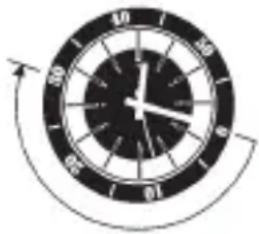
If your watch is equipped with a rotatable outer dial with one-minute graduations, this can be used in various ways to check elapsed time. For example if a diver has a 30-minute air supply, he can set the outer ring so that the triangle is in line with the minute hand when he submerges. The minute hand will then indicate on the outer ring the length of time that the diver has been under water.
SCREW-DOWN CROWN
If your watch includes a screw-down crown, you have additional assurance that it will remain watertight. To make the crown operational, it must be turned toward you until the threads are disengaged. Then, instructions for setting must be followed. To reseal the crown, press in until threads engage. Turn away from you until tight.
ABOUT THE POWER CELL
Your new Quartz Watch has a fresh power cell designed to provide maximum reliability for approximately a year under normal use.
If the cell is not replaced before it is exhausted, the watch will simply stop. The mechanism should not be harmed in any manner. However, when the power cell becomes exhausted, it should be removed at your earliest convenience to diminish the possibility of leakage. Never store your watch with an exhausted power cell in it.
The watch should be brought to an authorized Bulova dealer for replacement of the power cell. For best performance, the proper power cell should be used.
ABOUT THE BATTERY LIFE INDICATOR
Some models are equipped with a battery life indicator. This is a novel device that will alert you to the need to replace the battery before the watch actually stops. At least a week prior to exhaustion of the battery, the second hand will jump a few seconds at a time. Timekeeping will not be affected.
Note: When the crown is in the "OUT" position, the motor and hands stop. Only the quartz crystal continues to vibrate, using very little power. If the watch is to be stored for a length of time, it is recommended that the crown be left in the "OUT" position to prolong battery
life. This does not apply to models with two hands only.
DEEP WATER LIMITED WARRANTY
Supplementary and subject to all the provisions and duration of the basic Bulova watch limited warranty, deep sea watches are further warranted not to leak when submerged in water to the depth shown on the dial, provided crystal and crown remain intact and the case has been unopened.
In order to assure the preservation of your watch's water resistance, particularly in those instances where the element of safety is involved, have it checked occasionally by a competent watch technician and serviced or repaired, if necessary. In addition, the wearer should avoid manipulation of the crown when submerged.
WATER RESISTANCE
Watch modelsmarked only "Water Resistant on the case back, without additional depth markings on the dial, are not to be used for swimming. For swimming, models that have the additional marking of "50M," "100M" or "200M" on the dial are recommended.
CÓM O AJUSTAR A LOS MODELOS SIN FECHA
IF SERVICE IS REQUIRED: Bulova timepieces have been engineered to provide years of use with minimal need for service. In the unlikely event that service is needed, first have the battery tested to be sure it still has sufficient power. If this does not correct the problem, send a statement outlining the specific nature of the problem along with the timepiece in a durable, protective wrapping, postage prepaid and with a $6.00 shipping/handling fee.
IMPORTANT REMINDERS FOR SERVICE
- Do not show the name "Bulova" as part of the address
- Use registered mail or insured mail.
- Carefully wrap the timepiece in protective wrapping. Do not send in original box.
POST-WARRANTY SERVICE: Bulova's staff of watchmakers is expert at repairing and restoring Bulova timepieces. For repairs outside of warranty, a $10.00 charge will be assessed to cover cost of evaluation, postage and handling if repair authorization is refused. Post-warranty repairs should be mailed to the appropriate address.
For additional information please visit our Web Site at www.bulova.com
For operating instructions in German, Japanese and Chinese contact your local distributor.
Bulova Two-year Limited Warranty
COVERAGE: Your new Bulova timepiece is warranted to the owner for two full years from date of purchase. The warranty covers any and all parts of the watch that may need repair due to defects in materials or workmanship under normal use. Bulova's obligations hereunder are limited to repair or replacement at its option. The warranty excludes the battery, strap and excessive wear or damage to the case, crystal or bracelet, and does not protect against water damage if the model is not marked water-resistant.
Bulova is not liable for any consequential or incidental damages, and any recovery may not exceed the amount paid for the timepiece. All implied warranties, including that of merchantability, are limited to two years. This warranty gives you specific legal rights; you may also have other rights which vary from state to state, so the limitations in this paragraph may not apply to you.
North American Service Locations
Service Department
26-15 Brooklyn-Queens Expressway
Woodside, New York 11377
Service Department 39 Casebridge Court Toronto, Ontario Canada M1B 5N4
Departamento de Servicio Insurgentes Sur 664, Piso 8 Col. Del Valle, C.P. 03100 Mexico, D.F.
© 2001 H-D All Rights Reserved
Manufactured by Bulova under license from Harley-Davidson Motor Company
www.bulova.com
08/01

- OWNER'S GUIDE AND WARRANTY
- Congratulations......
- Felicitaciones...
- SETTING NON-DATE MODELS
- SETTING DATE AND DAY/DATE MODELS
- HOW TO USE THE ELAPSED TIME INDICATOR
- SCREW-DOWN CROWN
- ABOUT THE POWER CELL
- ABOUT THE BATTERY LIFE INDICATOR
- DEEP WATER LIMITED WARRANTY
- WATER RESISTANCE
- CÓM O AJUSTAR A LOS MODELOS SIN FECHA
- IMPORTANT REMINDERS FOR SERVICE
- For additional information please visit our Web Site at www.bulova.com
- Bulova Two-year Limited Warranty
- North American Service Locations
Brand : Bulova
Model : Harley Davidson 76L187
Category : Wristwatch