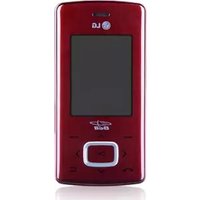
KP502 - Cellphone LG - Free user manual and instructions
Find the device manual for free KP502 LG in PDF.


| Product Type | Mobile Phone |
| Brand | LG |
| Model | KP502 |
| Dimensions (approx.) | 106 x 52 x 14 mm |
| Weight (approx.) | 90 g |
| System | GSM 900 / DCS 1800 / GSM 850 / PCS 1900 |
| Display | Resistive touchscreen |
| Camera | 3 megapixels (2048x1536) |
| Video Camera | Yes, max resolution 320x240 |
| Internal Memory | Approx. 50 MB (verify) |
| Expandable Memory | microSD card up to 8 GB |
| Battery | Rechargeable Lithium-ion, typical capacity 950 mAh |
| Connectivity | Bluetooth 2.0, USB 2.0, GPRS, EDGE |
| FM Radio | Yes |
| Music Player | Yes (MP3, AAC) |
| Main Functions | Calls, SMS/MMS, Email, Camera, Video, Music, Radio, Bluetooth, Organizer, Games |
| Care and Cleaning | Clean with a dry cloth; do not use solvents, benzene, or alcohol |
| Safety | Do not expose to water, do not use near medical equipment, turn off in restricted areas |
| Spare Parts and Repairability | Use only original LG accessories; have any repairs done by a qualified technician |
| General Information | 154-page user manual available for download |
Frequently Asked Questions - KP502 LG
User questions about KP502 LG
0 question about this device. Answer the ones you know or ask your own.
Ask a new question about this device
Download the instructions for your Cellphone in PDF format for free! Find your manual KP502 - LG and take your electronic device back in hand. On this page are published all the documents necessary for the use of your device. KP502 by LG.
USER MANUAL KP502 LG
natural_image
Front view of a black LG mobile phone with blank screen and control buttons (no visible text or symbols on device body)natural_image
Front view of a LG smartphone with blank screen and keypad (no visible text or symbols)natural_image
Close-up of a black electronic device with control buttons and indicator lights (no readable text or symbols)natural_image
Close-up of a cylindrical electronic device with indicator lights and ports (no visible text or symbols)natural_image
Stacked smartphone rear panel with a red arrow indicating the portion of the cover (no text or symbols visible)natural_image
3D model of a smartphone showing internal components and a red arrow pointing to a specific area (no text or symbols visible)
natural_image
Foldable smartphone showing internal components and a red arrow indicating rotation (no text or symbols)natural_image
Close-up of a smartphone showing internal components and a magnified view of the lid (no text or symbols visible)natural_image
3D illustration of a smartphone showing internal components with red arrows indicating movement or change (no text or symbols)natural_image
Illustration of a smartphone with an attached USB port and a close-up of its internal component (no text or symbols visible)Carte mémoire
natural_image
3D model of a smartphone showing internal components and a close-up view of the lid (no text or symbols visible)text_image
Screenshot of a mobile app interface showing a dialog box with user profile icons and a dropdown menu open for 'Section pass degree' (User Profile).| Lettre Traits | |
| A | A A a a |
| B | B B b b |
| C | C G |
| D | D D d d |
| E | E E e e |
| F | F F F F |
| G | G G g g |
| H | H H h h |
| I | I I I I |
| J | J J J J |
| K | K K K K |
01
02
03
04
05
06
07
08
Messages
| Lettre Traits | |
| L | |
| M | M M m m |
| N | N N n n |
| O | |
| P | p p p p |
| Q | Q Q q q |
| R | R R r |
| S | S |
| T | |
| U | U U |
| V | |V V |
| W | W W W |
| X | X X |
| Y | Y Y Y y |
| Z | Z Z |
Chiffres
natural_image
Black-and-white photo of a crowd with bokeh effects, no visible text or symbolsnatural_image
Black and white close-up of a blooming rose with soft petals, no visible text or symbolsnatural_image
Black and white close-up of a blooming rose with a bud, no text or symbols visiblenatural_image
Black and white close-up of a blooming rose with tool icons in the corner (no text or symbols on the flower itself)natural_image
Black and white photo of a rose flower with playback controls (no readable text or symbols)natural_image
Black and white photo of a blooming rose with playback controls (no readable text or symbols)natural_image
Coiled black electronic device with earbuds and a rectangular connector (no text or symbols visible)LG Twin Tower 20, Yeouido-dong, Yeongdeungpo-gu Seoul, Korea 150-721
Détails du produit
Nom du produit
E-GSM 900 / DCS 1800 / GSM 850 / PCS 1900 Quad Band Terminal Equipment
Modèle
KP502
Nom commercial
LG
C€0168
R&TTE Directive 1999/5/EC
EN 301 489-01 v1.6.1 / EN 301 489-07 v1.3.1 / EN 301 489-17 v1.2.1
EN 60950-1 : 2001
EN 50360 / EN62209-1:2006
EN 301 511 V9.0.2
EN 300 328 V1.7.1
BABT, Balfour House, Churchfi eld Road, Walton-on-Thames, Surrey, KT12 2TD, United Kingdom Notifi ed Body Identifi cation Number : 0168
Déclaration
European Standard Center
LG Electronics Logistics and Services B.V.
Volwazoom 15, 1327 AE Almer, The Netherlands
Tel: +31-36-547-8940. Fax: +31-36-547-8794
e-mail: jacub@18.com
Name
Seung Hyoun Ji / Director
Issued Date
18, March, 2009

Signature of representative
Message Causes possibles Actions correctives possibles
natural_image
Blank white image with faint horizontal gray lines and corner markers (no text or symbols)HOW TO USE QUICK REFERENCE GUIDE
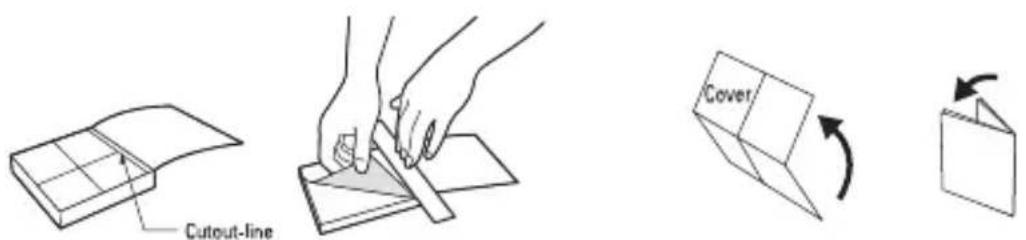
Cut out Quick Reference Guide bound to this manual along the cutout line and fold as illustrated below.
How to cut
Cut out Quick Reference Guide along the cutout line. You can place a scale on the cutoff line and cut as illustrated below.
- Be careful not to cut yourself when using scissors.
How to fold
Fold Quick Reference Guide along the perforated line so that the cover faces upwards as illustrated below.
text_image
Cutout-line Cover
LG
KP502
QUICK REFERENCE GUIDE
WELCOME AND THANK YOU FOR CHOOSING LG MOBILE PHONE
For more details, please refer to the User Guide.
Your standby screen
The touch reactive LCD gives an interactive and ultra convenient experience. You'll be more than pleased!
From the standby screen, you can access menu options, make a quick call and as well as many other things.
The main menu
- Touch in the standby screen to open a Top menu.
- You can access further menus: Communicate, Entertainment, Utilities and Settings.
- Just touch the icon that you want to open.
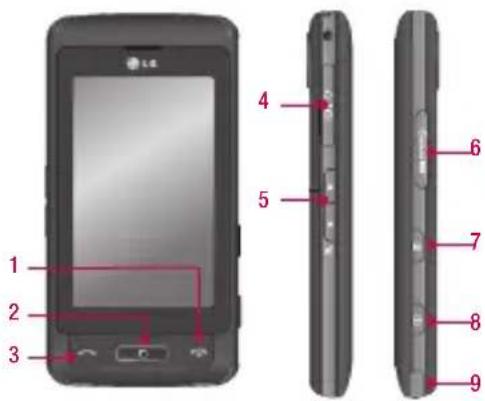
Parts of the phone
text_image
1 2 3 4 5 6 7 8 9- End/Power key
- Multitasking key
- Call key
-
Charger, Cable, Handsfree connector
-
Side keys
- Micro SD memory card socket
- Lock/Unlock key
- Capture button
- Stylus
MP3 player
Your LG KP502 has a built-in MP3 player so you can play all your favourite music.
▶ All tracks: Contains all of the songs you have on your phone.
▶ PlaylistsContains any playlists you have created as well as On the go, Recent songs and Favourite songs.
▶ Artists/Albums/Genres: Browse through your music collection by artist, album or genre.
▶ Shuffle tracks: Play your tracks in a random order.
Playing a song
-
Select All songs and then chose the song you want to play.
-
Touch II to pause the song.
- Touch ▶▶▶ to skip to the next song.
-
Touch to skip to the previous song.
-
SelectMinimize on the option menu to hide the MP3 player screen so that you can continue using your phone as normal while music is playing.
- Touch ← to stop the music and return to the MP3 player menu.
Camera
Using the camera module built in your phone, you can take pictures or record videos. Additionally, you can send photos to other people and select photos as wallpaper.
Tip: When using the camera, power consumption increases. If icon appears on the wallpaper, indicating low battery, recharge the battery before use.
• To take a picture
- On the standby screen hold the camera key down on the right side of the handset. The camera's viewfinder will appear on screen.
- Holding the phone horizontally, point the lens towards the subject of the photo.
- Press the camera key on the right side of the handset all of the way down to take a photo.
FM radio
You can search radio stations and enjoy listening to the radio.
Tip: To improve the radio reception, extend the headset cord which functions as the FM radio antenna.
- Choose FM radio then select the channel number of the station you would like to listen to.
- After selecting radio channels, you can listen to other channel by selecting ◀▶.
- You can access the following option menus by touching Options.
▶ Auto scan: If you choose Auto scan then select Yes, each time a station is found, your KP502 will ask if you want to save it. Select Yes if you want to store the channel and No if you don't. Any stations you choose to save will automatically be allocated to a channel number in your phone.
▶ Reset: If you choose Reset then select Yes, current channel will be reset.
Listen via speaker: Select this to listen to the radio through the built-in speaker. To turn off the speaker, select Listen via headset.
Video camera
- On the standby screen hold the camera key down on the right side of the handset. The camera's viewfinder will appear on screen.
- On the Camera preview mode touch the video camera icon. The video camera's viewfinder will appear on screen.
- Point the camera lens towards the subject of the video.
- Press the camera key on the right side of the handset to start recording.
- REC will appear in the bottom left corner of the viewfinder and a timer will show the length of your video.
- To pause the video touch □□ and resume by selecting
- Touch □ on screen or press the capture button a second time to stop recording.
Voice recorder
Use your voice recorder to record voice memos or other sounds.
Recording your voice memo
- Choose Voice recorder.
- Select ● begin recording.
- Select || to pause the recording.
- Choose ■ end the recording.
- Select ▶ to listen to the recording.
Note: You can listen to all of the voice recordings you have saved by selecting Options and Go to my sounds.