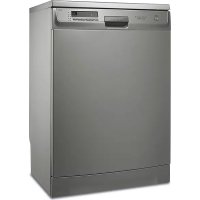
ESF66710X - Dishwasher ELECTROLUX - Free user manual and instructions
Find the device manual for free ESF66710X ELECTROLUX in PDF.



User questions about ESF66710X ELECTROLUX
0 question about this device. Answer the ones you know or ask your own.
Ask a new question about this device
Download the instructions for your Dishwasher in PDF format for free! Find your manual ESF66710X - ELECTROLUX and take your electronic device back in hand. On this page are published all the documents necessary for the use of your device. ESF66710X by ELECTROLUX.
USER MANUAL ESF66710X ELECTROLUX
Thinking of you Electrolux
gebruiksaanwijzing notice d'utilisation benutzerinformation user manual
Afwasmachine Lave-vaisselle Geschirrspüler Dishwasher
Electrolux. Thinking of you.
text_image
Labeled diagram of a kitchen appliance showing 10 numbered parts including front panel, drawer, and sink.text_image
Intensive Auto Quick Eco Rinse Delay A B C D E Cancel 6natural_image
Technical illustration of a mechanical component with two circular parts and a rotating knob (no text or symbols)text_image
Diagram showing a hand pressing down on a device with labeled component 'A' and directional arrows indicating motion or adjustment.natural_image
Hand inserting a camera into a device's main dial (no text or symbols visible)natural_image
Technical line drawing of a mechanical component with coiled spring and housing (no text or symbols)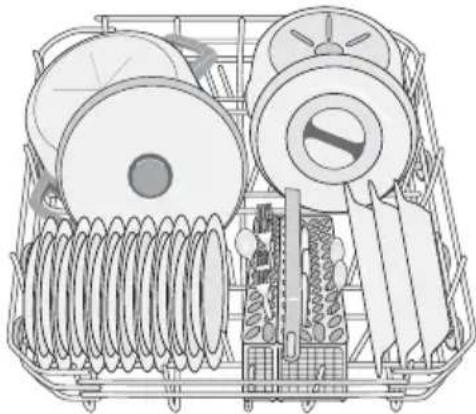
natural_image
Technical line drawing of a mechanical device with coiled springs and a central fan (no text or symbols)natural_image
Line drawing of a wire basket with two curved arrows indicating rotation or movement (no text or symbols)De bestekmand
text_image
Diagram illustrating a battery pack with cutlery, screwdriver, and warning symbols including X, ✓, and exclamation mark.natural_image
Diagram of a multi-story building with ventilation grilles and a curved arrow indicating rotation (no text or symbols)natural_image
Illustration of a hand pressing down on a device with arrows indicating motion (no text or symbols)natural_image
Diagram of a mobile phone charger with a close-up view showing internal structure and directional arrows (no text or symbols)natural_image
Line drawing of a basket filled with various ceramic teaware (no text or symbols)natural_image
Line drawing of a metal rack with multiple cups and a tray, no text or symbols presentMini bestekmandje
text_image
Diagram illustrating a cleaning or anti-smoking mechanism with labeled components and warning symbolsnatural_image
Technical line drawing of a mechanical assembly with multiple cylindrical components and grid-like supports (no text or symbols)natural_image
Two technical diagrams showing hand positioning and a cross-section of a mechanical component (no text or symbols)Let op! CONTROLEER VOORDAT U DE DEUR SLUIT OF DE SPROEIARMEN VRIJ KUNNEN RONDDRAAIEN.
natural_image
Illustration of a basket filled with various ceramic items, with two hands holding handles (no text or symbols)natural_image
Illustration of a hand pressing down on a smartphone screen with arrows indicating action (no text or symbols)text_image
Diagram illustrating a robotic arm tool interacting with a device, labeled with components 1 and 2.natural_image
Illustration of a hand placing a small electronic component into a device casing (no text or symbols visible)text_image
Diagram showing a mechanical component with labeled parts and directional arrows indicating motion or assembly.natural_image
Illustration of a hand pressing down on a perforated metal tray (no text or symbols)natural_image
Technical line drawings of a multi-chamber electric motor or battery pack, showing internal components and external structure (no text or labels)Montage
natural_image
Technical line drawing of a mechanical assembly with a magnified inset showing a component labeled '1' (no text or symbols present)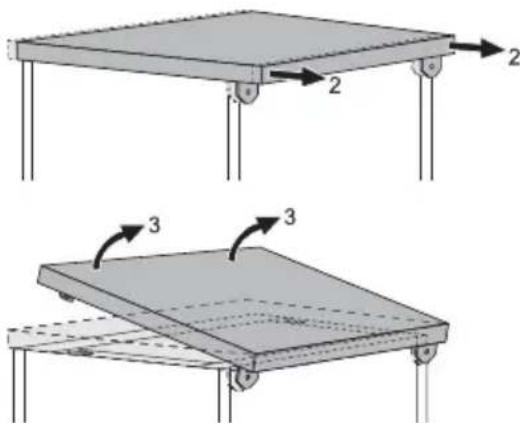
natural_image
Two technical diagrams showing a table frame with labeled components and rotational arrows (no text or symbols present)natural_image
Diagram of a U-shaped pipe with a labeled component 'A' (no text or symbols beyond label)Electrolux. Thinking of you.
text_image
Labeled diagram of a kitchen appliance showing 10 numbered parts including front panel, drawer, and sink.text_image
Intensive Auto Quick Eco Rinse Delay A B C D E Cancel 6natural_image
Diagram of a mechanical component with two views: one showing a gear-like shaft and the other showing a circular dial with a knob (no text or symbols)text_image
Diagram showing a hand pressing down on a device with labeled component 'A' and directional arrows indicating motion or adjustment.natural_image
Hand inserting a camera into a device, showing the dial and scroll wheel (no text or symbols visible)natural_image
Technical line drawing of a mechanical component with coiled spring and housing (no text or symbols)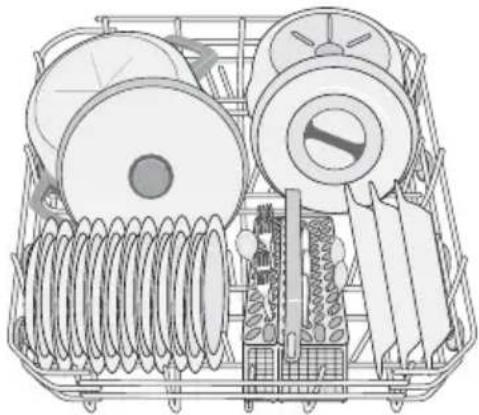
natural_image
Technical line drawing of a multi-compartment cleaning or mechanical device with spools and rollers (no text or symbols)natural_image
Line drawing of a wire basket with internal grid structure and two curved arrows indicating rotation (no text or symbols)Panier supérieur
text_image
Diagram illustrating a food preparation setup with utensils, cutlery, and tools, including warning symbols for inspection.natural_image
Diagram of a device with ventilation slots and a curved arrow indicating rotation (no text or symbols)natural_image
Illustration of a hand pressing down on a grid-patterned device with an arrow indicating motion (no text or symbols)natural_image
Diagram of a portable air conditioner unit with heat exchanger and ventilation slots, showing airflow direction (no text or symbols)natural_image
Line drawing of a basket filled with various ceramic teaware (no text or symbols)natural_image
Line drawing of a metal rack with multiple cylindrical containers and a grid-patterned side panel (no text or symbols)text_image
Diagram illustrating a cleaning or inspection process with labeled components and warning symbolsnatural_image
Technical line drawing of a mechanical assembly with three cylindrical components and grid-like supports (no text or symbols)natural_image
Line drawing of a hand placing pins into a grid structure (no text or symbols)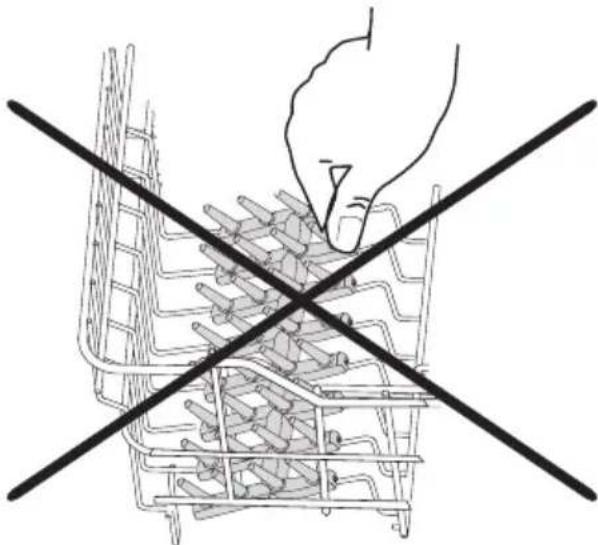
natural_image
Line drawing of a hand using a tool to cut a basket filled with food items, crossed by two diagonal lines (no text or symbols)natural_image
Diagram of a basket filled with various ceramic bowls and plates, with two hands holding handles (no text or symbols)natural_image
Illustration of a hand pressing down on a smartphone with a curved arrow indicating motion (no text or symbols)text_image
Diagram illustrating a procedure for handling a food item, labeled with steps 1 and 2.natural_image
Illustration of a hand holding a small electronic component with a close-up view of internal compartments (no text or symbols)natural_image
Illustration of a hand pressing down on a perforated metal tray (no text or symbols)natural_image
Line drawing of a basket filled with various small round objects, no text or symbols presentnatural_image
Technical line drawing of an electrical insulator assembly (no text or labels)Installation
natural_image
Illustration of a multi-tiered food storage or processing unit with no visible text or symbolstext_image
Technical diagram showing two structural components with labeled parts and directional arrows indicating motion or force.natural_image
Diagram of a flatbed platform with three directional arrows indicating orientation (no text or symbols)natural_image
Diagram of a U-shaped pipe with a valve and labeled component A (no text or symbols beyond label)Electrolux. Thinking of you.
text_image
Labeled diagram of a refrigerator interior showing numbered components for identificationtext_image
Intensive Auto Quick Eco Rinse Delay A B C D E Cancel 6natural_image
Technical illustration of a mechanical component with two views: one showing a gear-like component and the other showing a rotating shaft (no text or symbols)text_image
Diagram showing a hand pressing down on a device with labeled component 'A' and directional arrows indicating motion or adjustment.natural_image
Hand inserting a camera into a device's main dial (no text or symbols visible)Täglicher Gebrauch
natural_image
Technical line drawing of a mechanical component with coiled spring and housing (no text or symbols)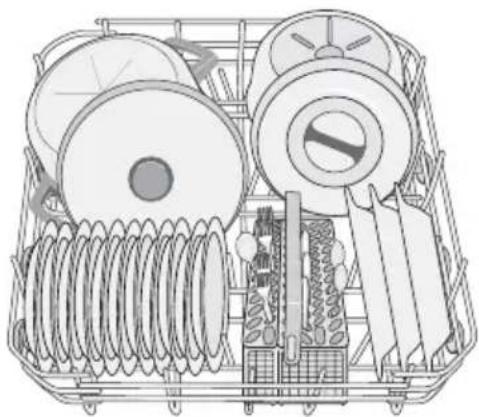
natural_image
Technical line drawing of a mechanical device with coiled springs and spools (no text or symbols)natural_image
Line drawing of a wire basket with two curved arrows indicating rotation or movement (no text or symbols)Besteckkorb
text_image
Diagram illustrating a dental tool setup with labeled tools and warning symbolsnatural_image
Diagram of a device with ventilation slots and a curved arrow indicating rotation (no text or symbols)natural_image
Illustration of a hand pressing down on a perforated device with an arrow indicating motion (no text or symbols)natural_image
Diagram of a mechanical device with internal components and directional arrows indicating movement or force (no text or symbols present)natural_image
Line drawing of a basket filled with various ceramic bowls and plates (no text or symbols)natural_image
Line drawing of a metal rack with multiple cylindrical containers and a grid-patterned base (no text or symbols)Mini-Besteckkorb
text_image
Diagram illustrating a battery pack with labeled components and warning symbols for electrical hazardnatural_image
Technical line drawing of a mechanical assembly with three cylindrical components embedded in a grid-patterned frame (no text or symbols)natural_image
Technical line drawing of a mechanical assembly with multiple parallel channels and a hand pointing to a component (no text or symbols present)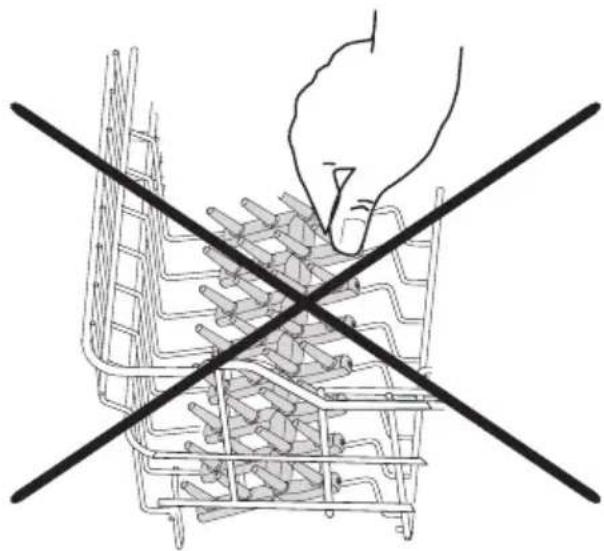
natural_image
Line drawing of a hand using a tool to cut through a basket filled with food items, crossed by two black lines (no text or symbols)natural_image
Illustration of a basket filled with various ceramic bowls and plates, with two hands holding cups (no text or symbols)natural_image
Illustration of a hand pressing down on a smartphone screen with arrows indicating motion (no text or symbols)text_image
Diagram illustrating a robotic manipulation process with labeled steps 1 and 2, showing tool insertion and cleaning steps.natural_image
Illustration of a hand inserting a small electronic component into a device casing (no text or symbols visible)text_image
Diagram showing a mechanical component with labeled parts and directional arrows indicating motion or assembly.natural_image
Illustration of a hand pressing down on a perforated metal plate inside a vehicle or storage unit (no text or symbols visible)natural_image
Diagram of a metal basket containing multiple cups arranged in rows (no text or symbols)natural_image
Technical line drawing of a multi-layered electrical insulator assembly (no text or symbols)natural_image
Illustration of a multi-tiered food processor with utensils and kitchen utensils (no text or labels)Gerät aufstellen
natural_image
Technical line drawing of a mechanical assembly with a circular inset showing a component labeled '1' (no text or symbols present)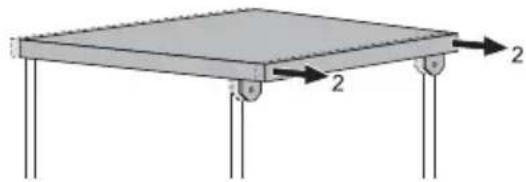
natural_image
Simple diagram of a rectangular structure with two vertical supports and a horizontal load, no text or symbols present.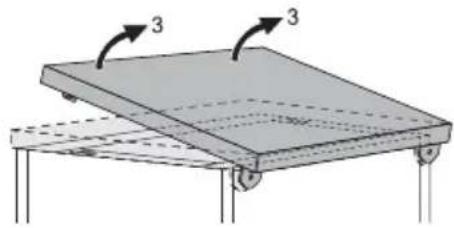
natural_image
Diagram of a flatbed table with two curved arrows labeled '3' indicating rotation or movement (no text or symbols present)natural_image
Diagram of a U-shaped pipe with a labeled component 'A' (no text or symbols beyond label)Electrolux. Thinking of you.
Share more of our thinking at www.electrolux.com
Contents
| Safety information 74 | Unloading the dishwasher 87 |
| Product description 75 | Washing programmes 88 |
| Control panel 76 | Care and cleaning 89 |
| First use 77 | What to do if... 90 |
| Set the water softener 77 | Technical data 91 |
| Use of dishwasher salt 78 | Hints for test institutes 91 |
| Use of rinse aid 79 | Installation 92 |
| Daily use 80 | Water connection 93 |
| Load cutlery and dishes 81 | Electrical connection 94 |
| Use of detergent 84 | Environment concerns 95 |
| Multi-tab function 85 | |
| Select and start a washing programme |
86
CE
Subject to change without notice
!
Safety information
In the interest of your safety and to ensure the correct use, before installing and first using the appliance, read this user manual carefully, including its hints and warnings. To avoid unnecessary mistakes and accidents, it is important to ensure that all people using the appliance are thoroughly familiar with its operation and safety features. Save these instructions and make sure that they remain with the appliance if it is moved or sold, so that everyone using it through its life will be properly informed on appliance use and safety.
Correct use
- This dishwasher is only intended for washing household utensils suitable for machine washing.
- Do not put any solvents in the dishwasher. This could cause an explosion.
- Knives and other items with sharp points must be loaded in the cutlery basket with their points down or placed in a horizontal position in the upper basket.
-
Only use products (detergent, salt and rinse aid) suitable for dishwashers.
-
Avoid opening the door whilst the appliance is in operation, hot steam may escape.
- Do not take any dishes out of the dishwasher before the end of the washing cycle.
- After use, isolate the appliance from the power supply and turn off the water supply.
- This product should be serviced only by an authorized service engineer, and only genuine spare parts should be used.
- Under no circumstances should you attempt to repair the machine yourself. Repairs carried out by inexperienced persons could cause injury or serious malfunctioning. Contact your local Service Force Centre. Always insist on genuine spare parts.
General safety
- Dishwasher detergents can cause chemical burns to eyes, mouth and throat. Could endanger life! Comply with the safety instructions of the dishwasher detergent manufacturer.
-
Water in the dishwasher is not for drinking purposes. Detergent residue may still be present in your machine.
-
Ensure that the door of the dishwasher is always closed when it is not being loaded or unloaded. In this way you will avoid anybody tripping over the open door and hurting themselves.
- Do not sit or stand on the open door.
Child safety
- This appliance is designed to be operated by adults. Do not allow children to use the dishwasher unsupervised.
- Keep all packaging well away from children. There is a risk of suffocation.
- Keep all detergents in a safe place out of children's reach.
- Keep children well away from the dishwasher when the door is open.
Installation
- Check your dishwasher for any transport damage. Never connect a damaged machine. If your dishwasher is damaged contact your supplier.
- All packaging must be removed before use.
- Any electrical and plumbing work required to install this appliance must be carried out by a qualified and competent person.
- For safety reasons it is dangerous to alter the specifications or attempt to modify this product in any way.
- Never use the dishwasher if the electrical supply cable and water hoses are damaged; or if the control panel, work top or plinth area are damaged such that the inside of the appliance is freely accessible. Contact your local Service Force centre, in order to avoid hazard.
- All sides of the dishwasher must never be drilled to prevent damage to hydraulic and electric components.
Warning! For electrical and water connection carefully follow the instructions given in the specific paragraphs.
Product description
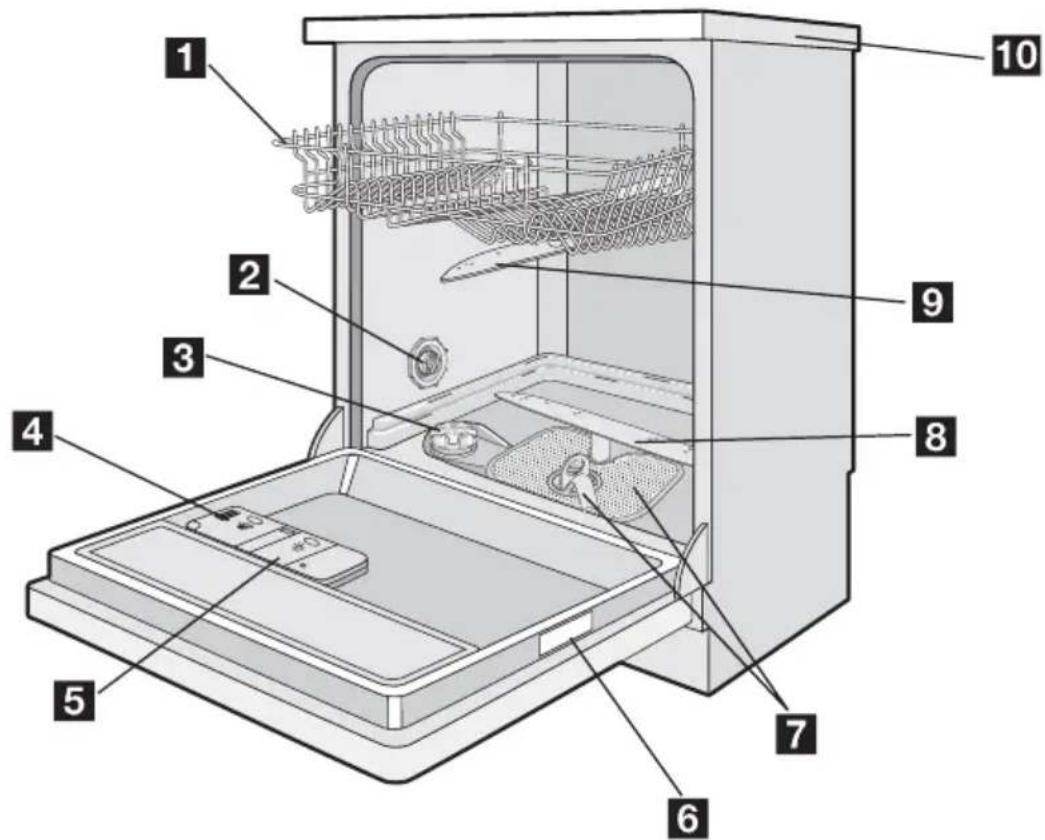
text_image
Labeled diagram of a kitchen appliance showing internal components and parts numbered 1 to 101 Upper basket
2 Water hardness dial
3 Salt container
4 Detergent dispenser
5 Rinse aid dispenser
6 Rating plate
7 Filters
8 Lower spray arm
9 Upper spray arm Worktop
Control panel
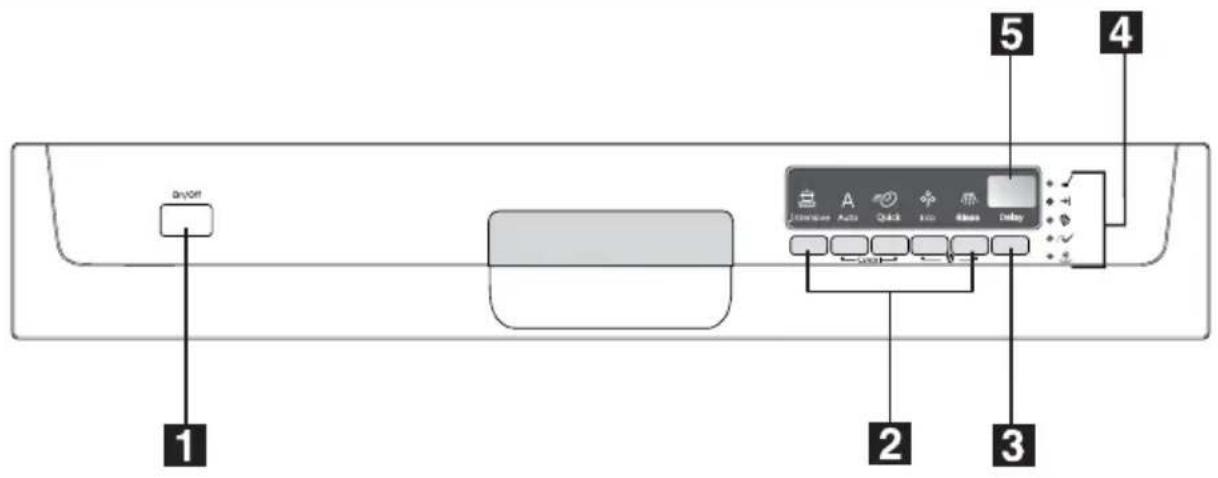
text_image
On/Off 1 2 3 4 5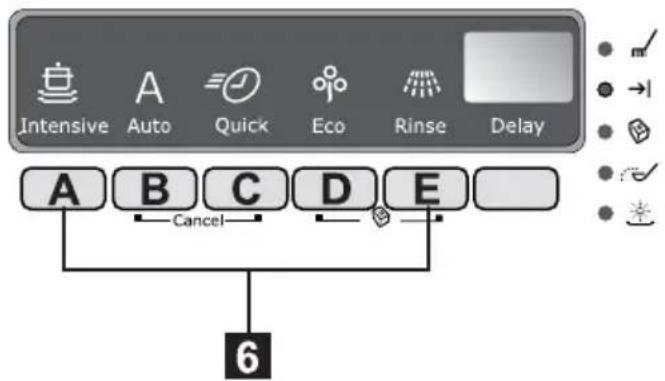
text_image
Intensive Auto Quick Eco Rinse Delay A B C D E Cancel 61 On/Off button
2 Programme selection buttons
3 Delay start button (Delay)
4 indicator lights
5 Digital display
6 Function buttons
| Indicator lights | |
| Programme in progress | Comes on when a washing programme is set and remains on for all the duration of the washing programme.Goes off when the washing programme has ended. |
| End Comes on when a washing programme has →| | ended. |
| Multitab function | Indicates the activation/deactivation of the 'Multi-tab function' (see 'Multitab function'). |
| Salt1) | Comes on when the special salt has run out. |
Indicator lights
Rinse aid

Comes on when the rinse aid has run out.
1) The salt and rinse aid indicator lights never come on while a washing programme is running even if filling with salt and/or rinse aid is necessary.
The digital display
The digital display indicates:
- the level of hardness to which the water softener is set,
- the approximate remaining time of the running programme,
- activation/deactivation of the rinse aid dispenser (ONLY with 'Multitab function' active),
- the end of a washing programme (a zero will appear in the digital display),
- the countdown for the delay start,
- fault codes concerning malfunction of the dishwasher.
Function buttons
The following functions can be set using these buttons:
- setting the water softener level,
- cancelling a washing programme or a delay start in progress,
- activation/deactivation of the Multitab function,
- activation/deactivation of the rinse aid dispenser when Multitab function is active.
Setting mode
Press the On/Off button. ALL programme button lights come on. Programme in pro-
First use
Before using your dishwasher for the first time:
- Ensure that the electrical and water connections comply with the installation instructions
- Remove all packaging from inside the appliance
- Set the water softener level
Set the water softener
The dishwasher is equipped with a water softener designed to remove minerals and salts from the water supply, which would have a detrimental or adverse effect on the operation of the appliance.
gress indicator light is off. The appliance is in setting mode.
i Always remember that when performing the following operations:
– selecting a washing programme,
- setting the water softener level,
- activating/deactivating the rinse aid, the appliance MUST be in setting mode.
Press the On/Off button. Only 1 programme button light comes on. The programme in progress indicator light comes on. The last performed or selected programme is still set. In this case, to return to setting mode, the programme has to be cancelled.
To cancel a set programme or a programme in progress
Simultaneously press and hold the two function buttons B and C until all the programme button lights and the programme in progress indicator light come on. The programme has been cancelled and the machine is now in setting mode.
- Pour 1 litre of water into the salt container and then fill with dishwasher salt
- Fill the rinse aid dispenser
If you want to use combi detergent tablets such as: "3 in 1", "4 in 1", "5 in 1" etc... set the Multitab function. (See "Multitab function").
The higher the content of these minerals and salts, the harder your water is. Water hardness is measured in equivalent scales, German degrees (dH°), French degrees (°TH)
and mmol/l (millimol per litre - international unit for the hardness of water).
The softener should be adjusted according to the hardness of the water in your area. Your local Water Authority can advise you on the hardness of the water in your area.
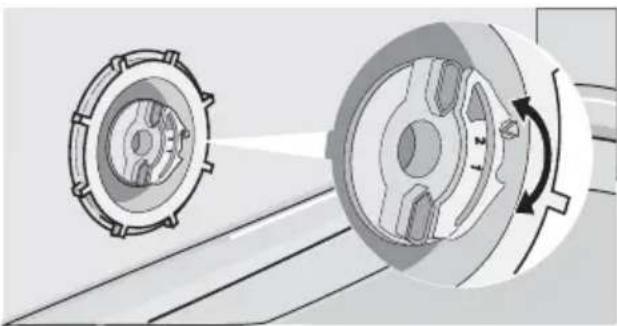
The water softener must be set in two ways: manually, using the water hardness dial and electronically.
| Water hardness Adjusting the water hardness setting Use of | salt | ||||
| °dH | °TH | mmol/l | manually | electronically | |
| 51 - 70 | 91 - 125 | 9,1 - 12,5 | 2 | level 10 | yes |
| 43 - 50 | 76 - 90 | 7,6 - 9,0 | 2 | level 9 | yes |
| 37 - 42 | 65 - 75 | 6,5 - 7,5 | 2 | level 8 | yes |
| 29 - 36 | 51 - 64 | 5,1 - 6,4 | 2 | level 7 | yes |
| 23 - 28 | 40 - 50 | 4,0 - 5,0 | 2 | level 6 | yes |
| 19 - 22 | 33 - 39 | 3,3 - 3,9 | 2 | level 5 | yes |
| 15 - 18 | 26 - 32 | 2,6 - 3,2 | 1 | level 4 | yes |
| 11 - 14 | 19 - 25 | 1,9 - 2,5 | 1 | level 3 | yes |
| 4 - 10 | 7 - 18 | 0,7 - 1,8 | 1 | level 2 | yes |
| < 4 | < 7 | < 0,7 | 1 | level 1 | no |
Setting manually
i The dishwasher is factory set at position 2.
- Open the dishwasher door.
- Remove the lower basket from the dishwasher.
- Turn the water hardness dial to position 1 or 2 (see chart).
- Replace the lower basket.
natural_image
Diagram of a mechanical component with two circular parts and a rotating shaft, showing motion direction (no text or symbols)Setting electronically
i The dishwasher is factory set at level 5.
-
Press the On/Off button. The dishwasher must be in setting mode.
-
Simultaneously press and hold function buttons B and C, until the lights of function buttons A, B and C start flashing.
- Press function button A, the lights of function buttons B and C go off while the light of function button A continues to flash. The current level shows on the digital display.
Examples:
5 L displayed = level 5 10 L displayed = level 10
- To change the level, press function button A. Each time the button is pressed the level changes. (For the selection of the new level see the chart).
Examples: If the current level is 5, by pressing function button A once, level 6 is selected. if the current level is 10, by pressing function button A once, level 1 is selected.
- To memorize the operation, switch off the dishwasher by pressing the On/Off button.
Use of dishwasher salt

Warning!
Only use salt specifically designed for use in dishwashers. All other types of salt not specifically designed for use in a dishwasher, es-
pecially table salt, will damage the water softener. Only fill with salt just before starting one of the complete washing programmes. This will prevent any grains of salt or salty water, which may have been spilt, remaining on the bottom of the machine for any period of time, which may cause corrosion.
To fill:
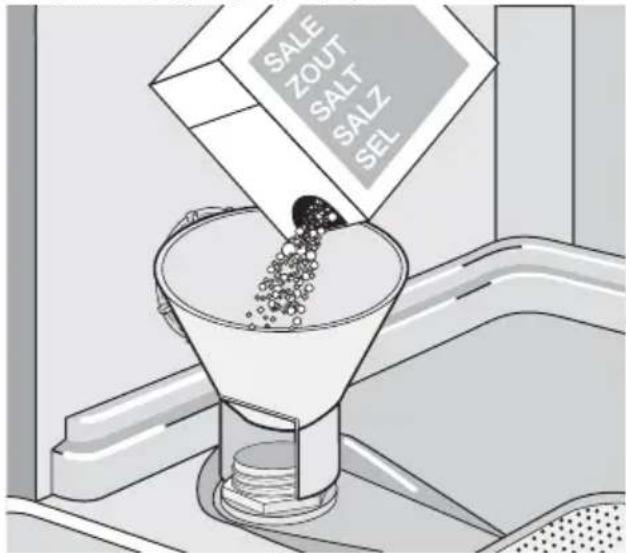
- Open the door, remove the lower basket and unscrew the cap of the salt container by turning it anticlockwise.
- Pour 1 litre of water into the container (this is necessary only before filling with salt for the first time).
- Using the funnel provided, pour in the salt until the container is full.
text_image
SALE ZOUT SALT SALZ SEL- Replace the cap making sure that there is no trace of salt on the screw thread or on the gasket.
- Replace the cap tightly turning it clockwise until it stops with a click.
Do not worry if water overflows from the unit when filling with salt, this is quite normal.
The salt indicator light on the control panel can remain illuminated for 2-6 hours after the salt has been replenished, assuming the dishwasher remains switched on. If you are using salt that takes longer to dissolve then this can take longer. The operation of the machine is not affected.
Use of rinse aid
Warning! Only use branded rinse aid for dishwashers.
Never fill the rinse aid dispenser with any other substances (e.g. dishwasher cleaning agent, liquid detergent). This would damage the appliance.
i Rinse aid ensures thorough rinsing, and spot and streak free drying.
Rinse aid is automatically added during the last rinse.
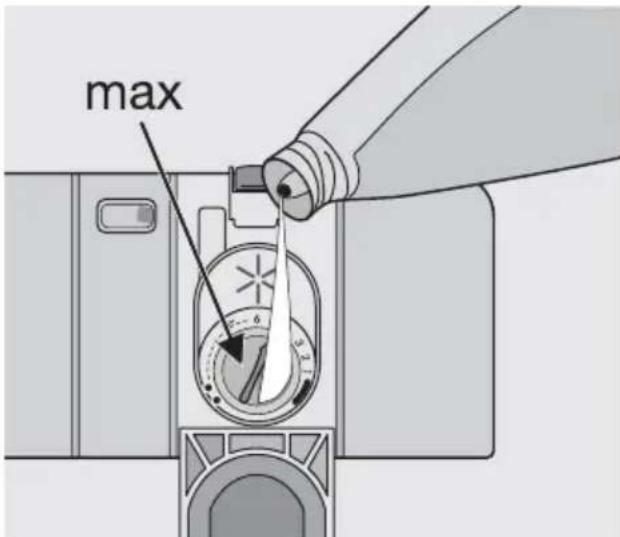
- Open the container by pressing the release button (A).
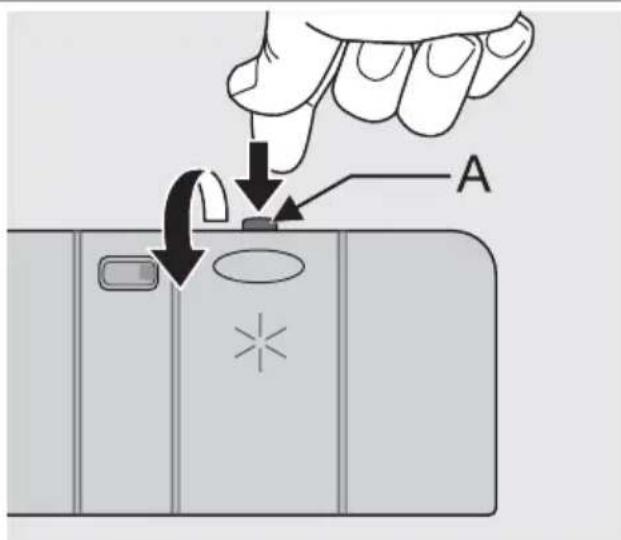
text_image
Diagram showing a hand pressing down on a device with labeled component A and directional arrows indicating motion or adjustment.- Add the rinse aid in the container. The maximum level for filling is indicated by "max".
text_image
maxThe dispenser holds about 110 ml of rinse aid, which is sufficient for between 16 and 40 washing cycles, depending upon the dosage setting.
- Ensure that the lid is closed after every refill.
i Clean up any rinse aid spilt during filling with an absorbent cloth to avoid excess foaming during the next wash.
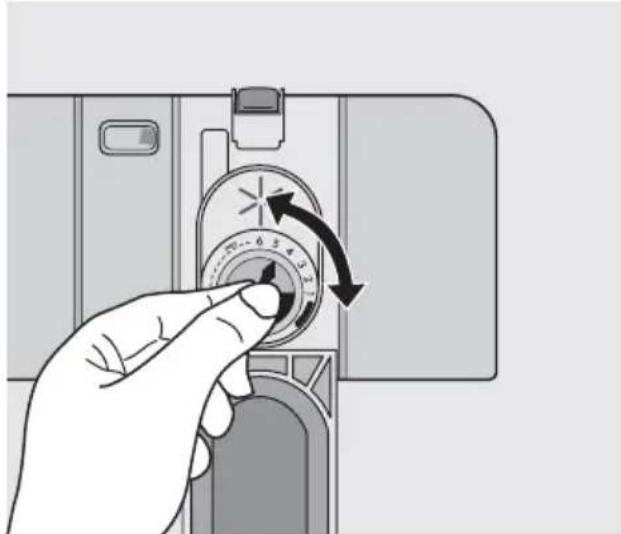
According to the finish and drying results obtained, adjust the dose of rinse aid by means
of the 6 position selector (position 1 minimum dosage, position 6 maximum dosage).
The dose is factory set in position 4. Increase the dose if there are drops of water or lime spots on the dishes after washing. Reduce it if there are sticky whitish streaks on the dishes or a bluish film on glassware or knife blades.
natural_image
Hand inserting a camera into a dial, showing the number 72-6 and 43-3 with an arrow indicating rotation (no text or symbols on the dial itself)Daily use
- Check if it's necessary to refill with dishwasher salt or rinse aid.
- Load cutlery and dishes into the dishwasher.
- Fill with dishwasher detergent.
- Select a wash programme suitable for the cutlery and dishes.
- Start the wash programme.
Helpful hints and tips
Sponges, household cloths and any object that can absorb water may not be washed in the dishwasher.
- Before loading the dishes, you should:
- Remove all left over food and debris.
- Soften remnants of burnt food in pans
- When loading the dishes and cutlery, please note:
- Dishes and cutlery must not impede the rotation of the spray arms.
- Load hollow items such as cups, glasses, pans, etc. with the opening downwards so that water cannot collect in the container or a deep base.
– Dishes and items of cutlery must not lie inside one another, or cover each other. - To avoid damage to glasses, they must not touch.
– Lay small objects in the cutlery basket.
- Plastic items and pans with non stick coatings have a tendency to retain water drops; these items will not dry as well as porcelain and steel items.
- Light items (plastic bowls etc.) must be loaded in the upper basket and arranged so they do not move.
For washing in the dishwasher the following cutlery and dishes are not suitable: are of limited suitability:
- Cutlery with wooden, horn, china or mother-of-pearls handles.
- Plastic items that are not heat resistant.
- Older cutlery with glued parts that are not temperature resistant.
- Bonded cutlery items or dishes.
- Pewter or copper items.
- Lead crystal glass.
• Steel items prone to rusting. - Wooden platters.
-
Items made from synthetics fibres.
-
Only wash stoneware in the dishwasher if it is specially marked as being dishwasher-safe by the manufacturer.
- Glazed patterns may fade if machine washed frequently.
- Silver and aluminium parts have a tendency to discolour during washing: Residues, e.g. egg white, egg yolk and mustard often cause discolouring and staining on silver. Therefore always clean left-overs from silver immediately, if it is not to be washed straight after use.
Load cutlery and dishes
The lower basket
The lower basket is designed to take saucepan, lids, plates, salad bowls, cutlery etc. Service dishes and large lids should be arranged around the edge of the basket, ensuring that the spray arms can turn freely.
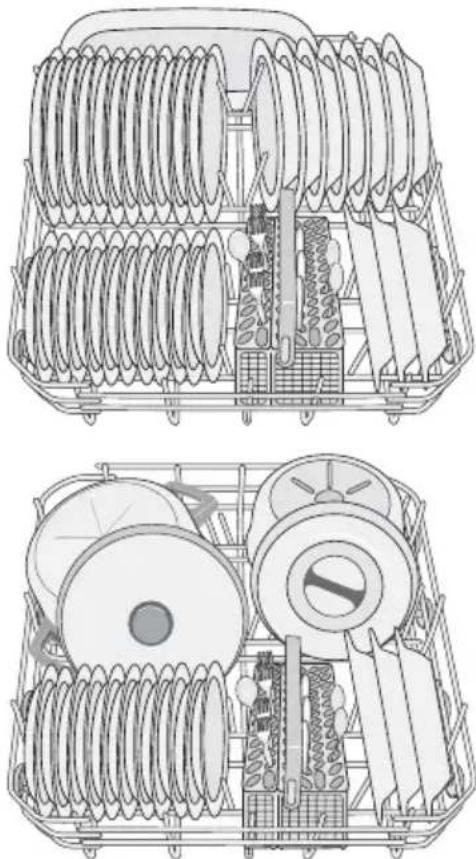
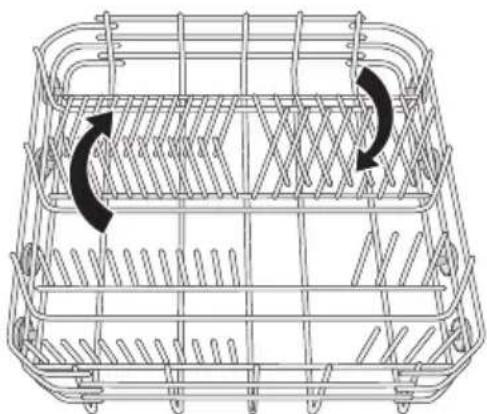
The rows of prongs in the lower basket can lie flat to allow you to load pots, pans and bowls.
natural_image
Line drawing of a wire basket with two curved arrows indicating rotation or movement (no text or symbols)The cutlery basket
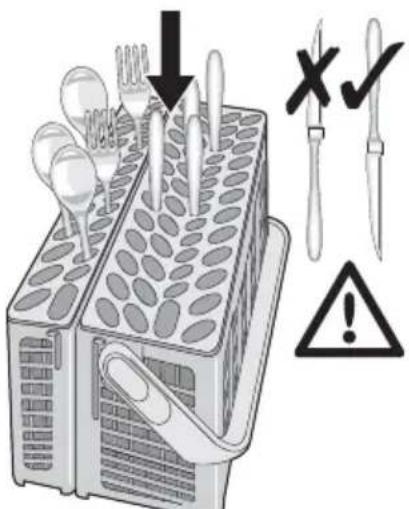
! Long bladed knives stored in an upright position are a potential hazard. Long and/or sharp items of cutlery such as carving knives must be positioned horizontally in the upper basket. Take care when loading or unloading sharp items such as knives.
Forks and spoons should be placed in the removable cutlery basket with the handles facing downwards and the knives with their handles facing upwards.
text_image
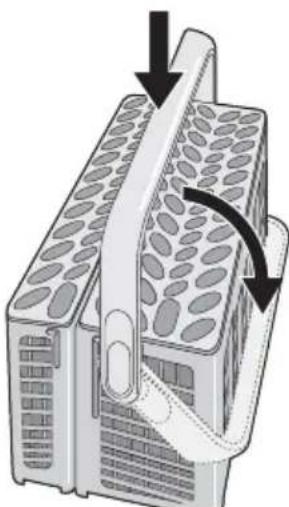
Diagram showing a kitchen appliance with cutlery and tools, including a warning symbol indicating no errors or defects.If the handles protrude from the bottom of the basket, obstructing the lower spray arm, load the cutlery with the handles facing upwards. Mix spoons with other cutlery to prevent them from sticking together. To make loading of the cutlery basket easier, lower the cutlery basket handle.
natural_image
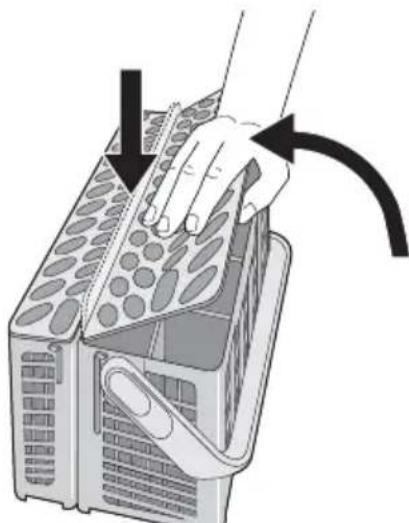
Diagram of a device with a curved arrow indicating rotation or movement, no text or symbols presentFor best results we recommend that you use the cutlery grids. If the size and dimensions of the cutlery do not allow the use of the grids, they can be easily hidden.
natural_image
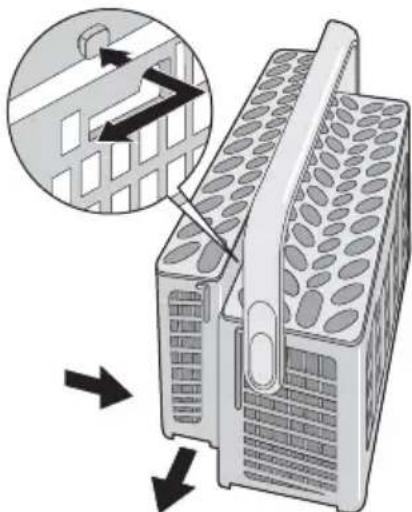
Illustration of a hand pressing down on a device with arrows indicating motion (no text or symbols)The cutlery basket is in two parts which can be separated to give greater loading flexibility. To separate the two parts, slide them horizontally in opposite directions and pull them apart.
natural_image
Diagram of a mechanical device with a magnified inset showing a grid structure and directional arrows (no text or symbols)To reassemble, reverse the procedure.
The upper basket
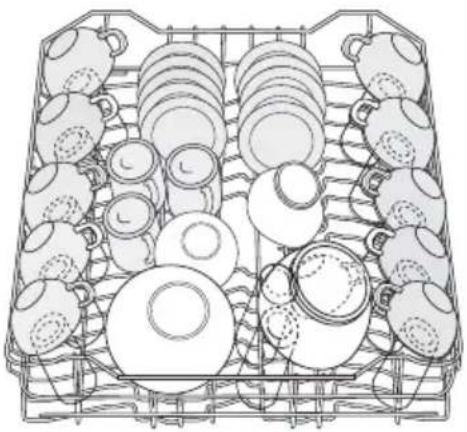
The upper basket is designed for saucers, salad bowls, cups, glasses, pots and lids. Arrange items on and underneath the cup racks so that water can reach all surfaces.
natural_image
Line drawing of a basket filled with various ceramic items (no text or symbols)Glasses with long stems can be placed up-side down in the cup racks.
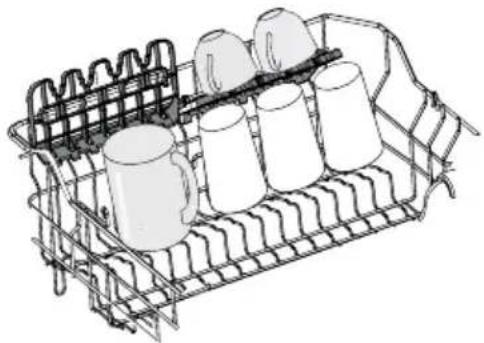
For taller items the cup racks can be folded upwards.
natural_image
Line drawing of a metal rack with multiple cylindrical containers and a grid-patterned base (no text or symbols)Mini cutlery basket
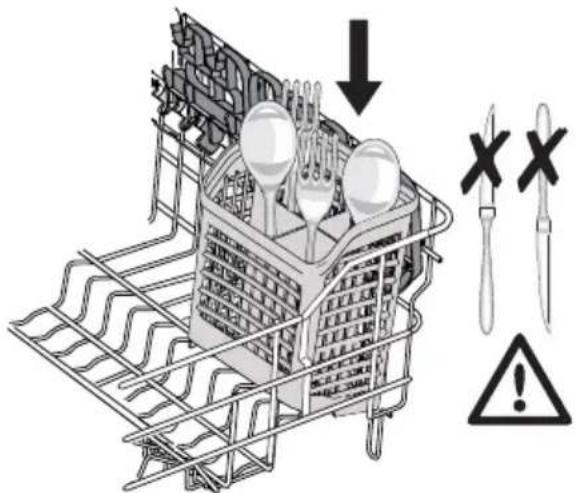
The upper basket is supplied with a mini cutlery basket.

Caution! NEVER PUT KNIVES IN THE MINI CUTLERY BASKET. THIS WILL PREVENT DAMAGE TO THE APPLIANCE.
The mini cutlery basket must only be placed in the front part of the upper basket, on the left or on the right side.
text_image
Diagram illustrating a cleaning or repair process with labeled components and warning symbolsThe dimensions of the cutlery depend on the position of the upper basket. Refer to the following table.
| Cutlery dimensions for mini cutlery basket | |
| Upper basket in higher position | maximum 15 cm |
| Upper basket in lower position | maximum 20 cm |
Soft spikes
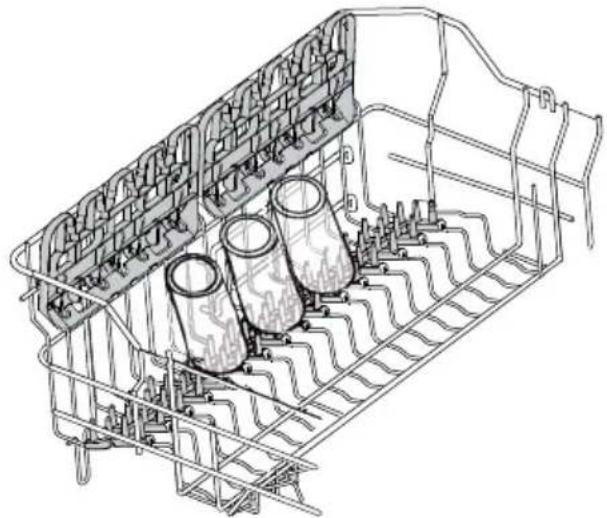
Soft spikes impede glassware to move during the washing cycle or when the upper basket is moved.
natural_image
Technical line drawing of a mechanical assembly with cylindrical components and mesh framework (no text or symbols)Refer to the figures for a correct positioning of the soft spikes. For more loading flexibility, they can be positioned on the left or right-hand side of the basket.
Once positioned correctly, press them down firmly and make sure they do not move.
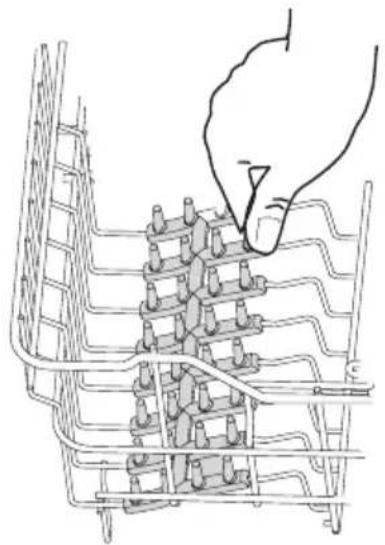
natural_image
Line drawing of a hand inserting into a grid-like structure with no text or symbols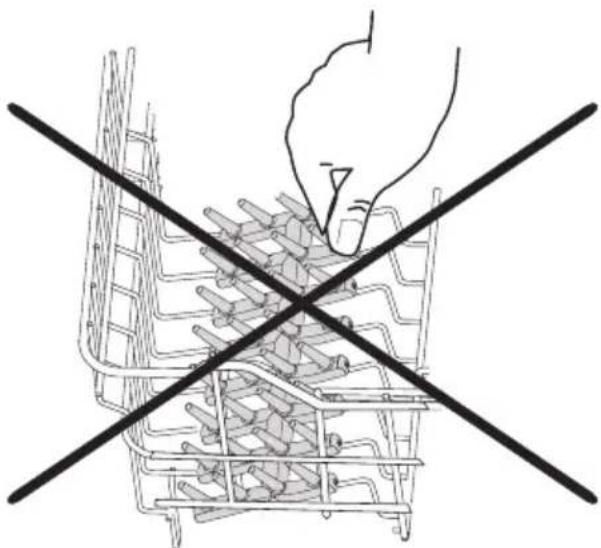
natural_image
Line drawing of a hand placing food into a shopping cart with two crossed lines (no text or symbols)Caution! BEFORE CLOSING THE DOOR, MAKE SURE THAT THE SPRAY ARMS CAN ROTATE FREELY.
Adjusting the height of the upper basket If washing very large plates you can load them in the lower basket after moving the upper basket to the higher position.
| Maximum height of the dishes in the lower basket | |
| With upper basket raised | 31 cm |
| With upper basket lowered | 27 cm |
To move to the higher position proceed as follows:
Use of detergent
Only use detergents specifically designed for use in dishwashers. Please observe the manufacturer's dosing and storage recommendations as stated on the detergent packaging. Using no more than the correct amount of detergent contributes to reducing pollution.
Fill with detergent
-
Open the lid.
-
Pull out the basket until it stops.
- Carefully lift both sides upwards until the mechanism is engaged and the basket is stable.
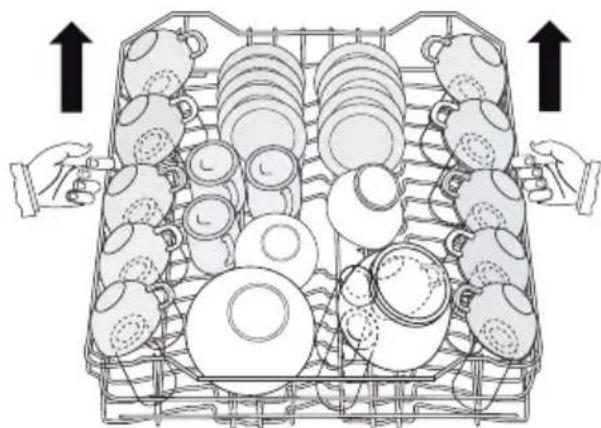
natural_image
Illustration of hands arranging various ceramic teaware in a basket (no text or symbols)To lower the basket to the original position proceed as follows:
- Pull out the basket until it stops.
- Carefully lift both sides upwards and then allow the mechanism to drop back down slowly, keeping hold of it.
i Never lift or lower the basket on one side only When the basket is in the higher position cups cannot be placed on the cup racks.
After loading your machine always close the door, as an open door can be a hazard.
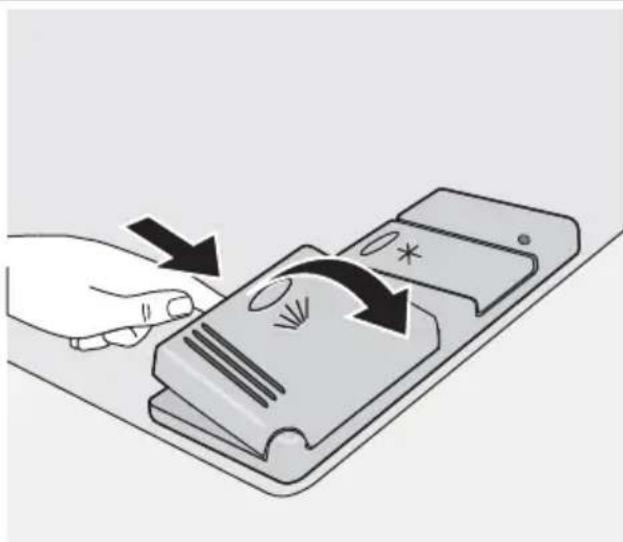
natural_image
Illustration of a hand pressing down on a smartphone screen with arrows indicating motion (no text or symbols)- Fill the detergent dispenser (1) with detergent. The marking indicates the dosing levels:
20 = approximately 20 g of detergent 30 = approximately 30 g of detergent.
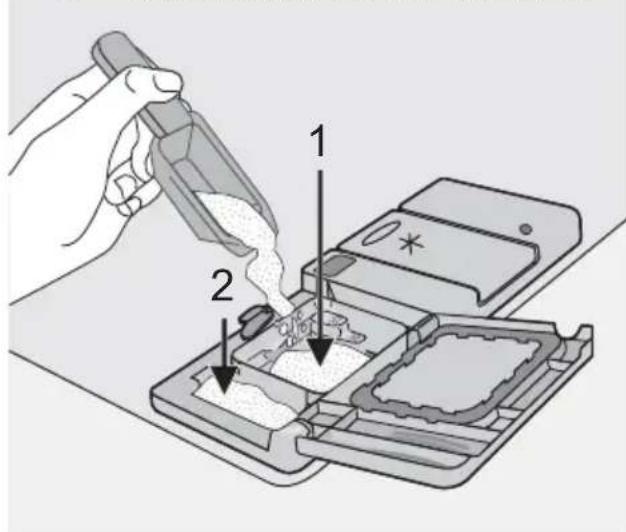
text_image
Diagram illustrating a mechanical process with labeled components, showing tool application and assembly steps.- All programmes with prewash need an additional detergent dose (5/10 g) that must be placed in the prewash detergent chamber (2). This detergent will be used during the prewash phase. When using detergent tablets; place the tablet in compartment (1)
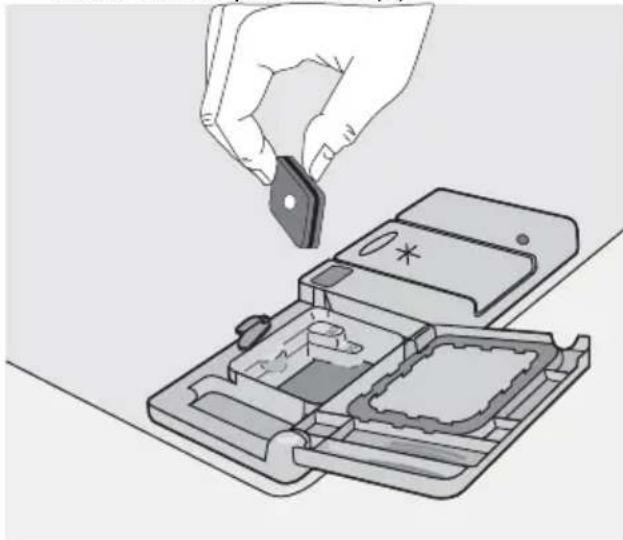
natural_image
Illustration of a hand inserting a small electronic component into a device casing (no text or symbols visible)- Close the lid and press until it locks in place.
Detergent tablets from different manufacturers dissolve at different rates. For this reason, some detergent tablets do not attain their full cleaning power during short washing programmes. Therefore, please use long washing programmes when using detergent tablets, to ensure the complete removal of detergent residuals.
Multi-tab function
This appliance is equipped with the "Multitab function", that allows the use of the "Multitab" combi detergent tablets.
These products are detergents with a combined cleaning, rinsing and salt functions. They can also contain other different agents depending on which kind of tablets you choose ("3 in 1", "4 in 1", "5 in 1" etc...).
Check whether these detergents are suitable for your water hardness. See the manufacturers instructions.
Once this function is selected it will remain active for all following wash programmes. With the selection of this function the inflow of rinse aid and salt from each respective supply container is automatically deactivated and also the indicator lights for salt and rinse aid are deactivated.
When using the "Multitab function", the cycle durations may change. If this is the case, the running time for the programme is automatically updated on the digital display.
i Activate/deactivate the "Multitab function" before the start of a washing programme.
Once the programme is running, the "Multitab function" can NO longer be changed. If you want to cancel the "Multitab function" you have to cancel the programme setting and then deactivate the "'Multitab function''. In this case you have to set a washing programme (and desired options) again.
Activation/deactivation of the Multitab function
Simultaneously press and hold the two Multitab buttons (function buttons D and E) until the Multitab indicator light comes on. This means that the function is active.
To deactivate the function press the same buttons again until the indicator light corresponding to the Multitab function symbol goes off.
If the drying results are not satisfactory we suggest that you:
- Fill up the rinse aid dispenser with rinse aid.
- Activate the rinse aid dispenser.
- Set the rinse aid dosage to position 2.
- The activation/deactivation of the rinse aid is only possible with the Multitab function active.
Activation/deactivation of the rinse aid dispenser
- Press the On/Off button. The dishwasher must be in setting mode.
- Simultaneously press and hold function buttons B and C, until the lights of function buttons A, B, and C start flashing.
- Press function button B, the lights of function buttons A and C go off while the light of function button B continues to flash. The digital display indicates the current setting.
0d
Rinse aid dispenser deactivated
Id
Rinse aid dispenser activated
- To change the setting, press button B again, the digital display indicates the new setting.
- To memorize the operation, switch off the dishwasher by pressing the On/Off button.
If you decide to revert back to the use of individual detergents we advise that you:
- Deactivate the Multitab function.
- Fill up the salt container and the rinse aid dispenser again.
- Adjust the water hardness setting to the highest setting and perform 1 normal washing programme without loading any dishes.
- Adjust the water hardness setting according to the hardness of the water in your area.
- Adjust the rinse aid dosage.
Select and start a washing programme
i Select the washing programme and delay start with the door slightly opened. The start of the programme or the countdown of the delay start will occur only after the closure of the door. Until then it is possible to modify the settings
- Check that the baskets have been loaded correctly and that the spray arms are free to rotate.
- Check that the water tap is opened.
-
Press the On/Off button. The dishwasher must be in setting mode.
-
Press the button corresponding to the required programme (see "Washing programmes" chart).
When a programme has been selected the corresponding light comes on.
The programme in progress indicator light comes on.
Close the dishwasher door, the programme starts automatically.
The programme in progress indicator light remains on.
Setting and starting the programme with delay start
- Once selected the washing programme, press the delay start button until the flashing number of hours for the delay start appear in the digital display. The start of the selected washing programme can be delayed for between 1 and 19 hours.
- Close the dishwasher door, the count-down starts automatically. The number in the display is no longer flashing but fixed with static light.
i With the delay start function set, the programme in progress indicator light goes off. Once the countdown of the delay start has elapsed, the washing programme will start automatically and the programme in progress indicator light comes on. - The countdown will decrease with steps of 1 hour.
- The opening of the door will interrupt the countdown. Close the door; the count-down will continue from the point at which it was interrupted.
- Once the delay start has elapsed the programme will start automatically.
The selection of the washing programme and delay start can also occur with the door closed. Keep in mind that in this way, once a washing programme button is pressed you have ONLY 3 seconds in which you can choose another programme or select a delay start, after which the selected programme will start automatically.
Warning! Interrupt or cancel a washing programme in progress ONLY if it's absolutely necessary. Attention! Hot steam may escape when the door is opened. Open the door carefully.
Unloading the dishwasher
- Hot dishes are sensitive to knocks. The dishes should therefore be allowed to cool down before removing from the appliance.
- Empty the lower basket upper one; this will avoid water dripping from the upper basket onto the dishes in the lower one.
Interrupt a washing programme in progress
- Open the dishwasher door; the programme will stop. Close the door; the programme will start from the point at which it was interrupted.
- Press the On/Off, all indicator lights will go off. Press the On/Off button again; the programme will start from the point at which it was interrupted.
Cancel a delay start or a washing programme in progress
- Simultaneously press and hold the two function buttons B and C until all the programme lights come on and the programme in progress indicator light goes off.
- Cancelling a delay start will also cancel the washing programme. You have to select the washing programme again.
- If a new washing programme is to be selected, check that there is detergent in the detergent dispenser.
End of the washing programme
- The dishwasher stops automatically.
• Zero appears in the digital display. - The programme in progress indicator light remains on.
-
The light of the programme just ended remains on.
-
Switch off the dishwasher by pressing the On/Off button.
-
Open the dishwasher door, leave it ajar and wait a few minutes before removing the dishes; this way they will be cooler and the drying will be improved.
- Water may appear on the sides and the door of the dishwasher as the stainless steel will eventually become cooler than first dishesen the
When the washing programme has finished, it is recommended that the
dishwasher is unplugged and the water tap turned off.
Washing programmes
Washing programmes
| Programme | Degree of soil | Type of load | Programme description |
^ Intensive Intensive | Heavy soil | Crockery, cutlery,pots and pans | PrewashMain wash2 intermediate rinsesFinal rinseDrying |
^ Auto1) Auto1) | Any | Crockery, cutlery,pots and pans | PrewashMain wash1 or 2 intermediate rinsesFinal rinseDrying |
^ Quick2) Quick2) | Normal or light soil | Crockery and cutlery | Main washFinal rinse |
^ Eco3) Eco3) | Normal soil | Crockery and cutlery | PrewashMain wash1 intermediate rinseFinal rinseDrying |
| ^[GCAT] Rinse | Any | Partial load (to be completed later in the day). | 1 cold rinse (to avoid food scraps from sticking).This programme does not require the use of detergent. |
1) During the 'Auto' washing programme the level of soiling on the dishes is determined by how cloudy the water is. The programme duration, water and energy consumption levels can vary; this depends upon whether the appliance is fully or partially loaded and if the dishes are lightly or heavily soiled. The temperature of the water is automatically adjusted between 45^ C and 70^ C.
2) Ideal for washing a partially loaded dishwasher. This is the perfect daily programme, made to meet the needs of a family of 4 persons who only wish to load breakfast and dinner crockery and cutlery.
3) Test programme for test institutes
Consumption values
| Programme Programme duration (in minutes)1) | Energy consumption (in kWh) | Water consumption (in litres) |
| Intensive - 1,8 - 2,0 23 - 25 | ||
| Auto - 1,1 - 1,7 12 - 23 | ||
| Quick - 0,9 9 | ||
| Eco2) | - 1,0 - 1,1 12 - 13 | |
| Rinse - 0,1 4 |
1) The digital display shows the programme duration.
2) Test programme for test institutes
The consumption values are intended as a guide and depend on the pressure and temperature of the water and also by the
variations of the power supply and the amount of dishes.
Care and cleaning
Cleaning the filters
The filters must be checked and cleaned from time to time. Dirty filters will degrade the washing result.

Warning! Before cleaning the filters ensure that the machine is switched off.
- Open the door, remove the lower basket.
- The dishwasher filter system comprises a coarse filter (A), a microfilter (B) and a flat filter. Unlock the filter system using the handle on the microfilter.
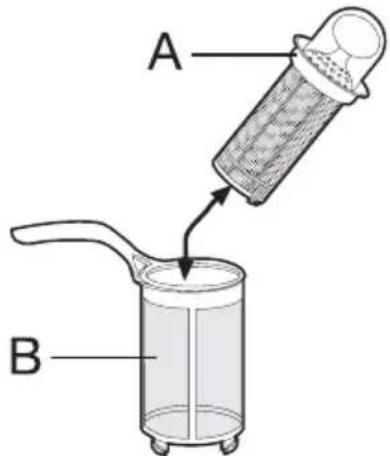
text_image
A B- Turn the handle about 1/4 a turn anti-clockwise and remove the filter system
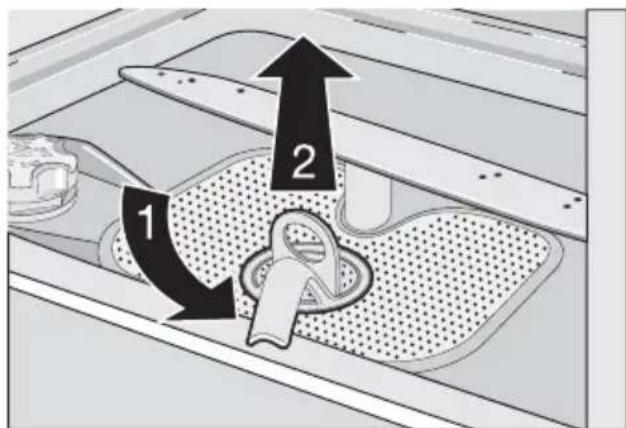
text_image
Diagram showing two labeled components (1 and 2) with arrows indicating movement or flow, likely illustrating a mechanical or fluid system.- Take hold of the coarse filter (A) by the handle with the hole and remove from the microfilter (B).
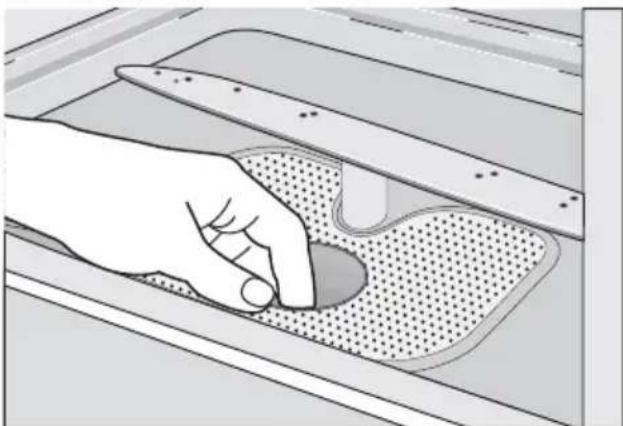
- Clean all filters thoroughly under running water.
- Remove the flat filter from the base of the washing compartment and clean both faces thoroughly.
natural_image
Illustration of a hand holding a tool interacting with a perforated metal tray (no text or symbols visible)- Put the flat filter back in the base of the washing compartment and ensure that it fits perfectly.
- Place the coarse filter (A) in the microfilter (B) and press together.
- Put the filter combination in place and lock by turning the handle clockwise to the stop. During this process ensure that the flat filter does not protrude above the base of the washing compartment.
i NEVER use the dishwasher without filters. Incorrect repositioning and fitting of the filters will produce poor washing results and will result in damage to the appliance.
i NEVER try to remove the spray arms.
If residues of soil have clogged the holes in the spray arms, remove the debris with a cocktail stick.
External cleaning
Clean the external surfaces of the machine and control panel with a damp soft cloth. If necessary use only neutral detergents. Never use abrasive products, scouring pads or solvent (acetone, trichloroethylene etc...).
Internal cleaning
Ensure that the seals around the door, the detergent and rinse aid dispensers are cleaned regularly with a damp cloth.
We recommend every 3 months you run the wash programme for heavy soiled dishes using detergent but without dishes.
Prolonged periods of non-operation
If you are not using the machine for a prolonged period of time you are advised to:
- Unplug the appliance and then turn off the water.
- Leave the door ajar to prevent the formation of any unpleasant smells.
- Leave the inside of the machine clean.
Frost precautions
Avoid placing the machine in a location where the temperature is below 0^ C. If this is unavoidable, empty the machine, close the appliance door, disconnect the water inlet pipe and empty it.
What to do if...
The dishwasher will not start or stops during operation.
Certain problems can be due to the lack of simple maintenance or oversights, which can be solved with the help of the hints described in the chart, without calling out an engineer.
Moving the machine
If you have to move the machine (moving house etc...):
- Unplug it.
- Turn the water tap off.
- Remove the water inlet and discharge hoses.
- Pull the machine out together with the hoses.
Avoid over tilting the machine during transportation.
Switch off the dishwasher, open the door and carry out the following suggested corrective actions.
| Fault codes and malfunction Possible | cause and solution |
| continuous flashing of the light of the running programmedigital display shows,10The dishwasher does not fill with water | The water tap is blocked or furred with lime-scale.Clean the water tap.The water tap is turned off.Turn the water tap on.The filter (where present) in the water inlet hose is blocked.Clean the filter in the water inlet hose.The water inlet hose has not been correctly laid or it is kinked or squashed.Check the water inlet hose connection. |
| continuous flashing of the light of the running programmedigital display shows,20The dishwasher will not drain | The sink spigot is blocked.Clean out the sink spigot.The water drain hose has not been correctly laid or it is kinked or squashed.Check the water drain hose connection. |
| continuous flashing of the light of the running programmedigital display shows,30Anti-flood device is activated | Close the water tap and contact your local Service Force Centre. |
| Malfunction Possible cause and solution | |
| The programme does not start • The dishwasher door has not been properly closed. Close the door. • The main plug is not plugged in. Insert the main plug • The fuse has blown out in the household fuse box. Replace the fuse. • Delay start has been set. If dishes are to be washed immediately, cancel the delay start. |
Once these checks have been carried out switch on the appliance.
The programme will continue from the point at which it was interrupted.
If the malfunction or fault code reappears contact your local Service Force Centre.
For other fault codes not described in the above chart, please contact your local Service Force Centre.
Contact your local Service Force Centre, quoting the model (Mod.), product number (PNC) and serial number (S.N.).
This information can be found on the rating plate located on the side of the dishwasher door.
So that you always have these numbers at hand, we recommend you to make a note of them here:
Mod.:
PNC:
S.N.: ....
| The wash results are not satisfactory | |
| The dishes are not clean | · The wrong programme has been selected.· The dishes are arranged in such a way as to stop water reaching all parts of a surface. The baskets must not be overloaded.· The spray arms do not rotate freely due to incorrect arrangement of the load.· The filters in the base of the washing compartment are dirty or incorrectly positioned.· Too little or no detergent has been used.· Where there are limescales deposits on the dishes; the salt container is empty or incorrect level of the water softener has been set.· The drain hose connection is not correct.· The salt container cap is not properly closed. |
| The dishes are wet and dull | · Rinse aid was not used.· The rinse aid dispenser is empty. |
| There are streaks, milky spots or a bluish coating on glasses and dishes | · Decrease rinse aid dosage. |
| Water drops have dried onto glasses and dishes | · Increase rinse aid dosage.· The detergent may be the cause. Contact the detergent manufacturer consumer care line. |
If after all these checks, the problem persists, contact your local Service Force Centre.
Technical data
| Dimensions Width | HeightDepth | 60 cm85 cm63,5 cm |
| Electrical connection - Voltage - Overall power - Fuse | Information on the electrical connection is given on the rating plate on the inner edge of the dishwasher door. | |
| Water supply pressure Minimum | Maximum | 0,05 MPa (0,5 bar)0,8 MPa (8 bar) |
| Capacity 12 place settings | ||
Hints for test institutes
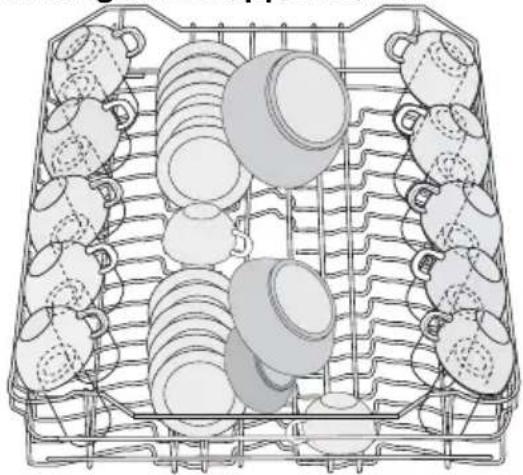
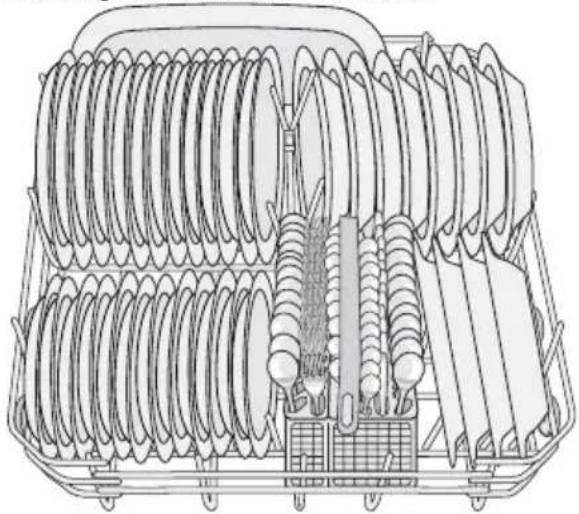
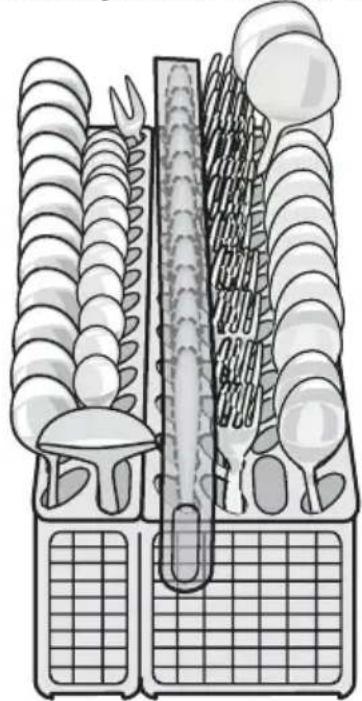
Testing in accordance with EN 60704 must be carried out with appliance fully loaded and
using the test programme (refer to 'Consumption values').
Test in accordance with EN 50242 must be carried out when the salt container and rinse aid dispenser have been filled with salt and
rinse aid respectively and using the test programme (refer to 'Consumption values').
Full load: 12 standard place settings
Amount of detergent required: 5 g + 25 g (Type B)
Rinse aid setting position 4 (Type III)
i Testing MUST be carried out with:
- NO soft spikes
- NO mini cutlery basket.
REMOVE these items from the upper basket.
Arrangement upper basket
natural_image
Line drawing of a basket containing various kitchen utensils (no text or symbols)Arrangement lower basket
natural_image
Technical line drawing of a multi-layered electrical insulator assembly (no text or symbols)Arrangement cutlery basket
natural_image
Illustration of a multi-tiered kitchen appliance with cutlery and a thermometer (no text or symbols)Installation
Warning! Any electrical and/or plumbing work required to install this appliance should be carried out by a qualified electrician and/or plumber or competent person.
Fitting under a counter (kitchen worktop or sink)
Remove all packaging before positioning the machine.
If possible, position the machine next to a water tap and a drain.
By removing the machine's worktop, you can install it under a close fitting sink unit or a pre-existing top, providing the dimensions of the recess correspond to those shown in the picture.
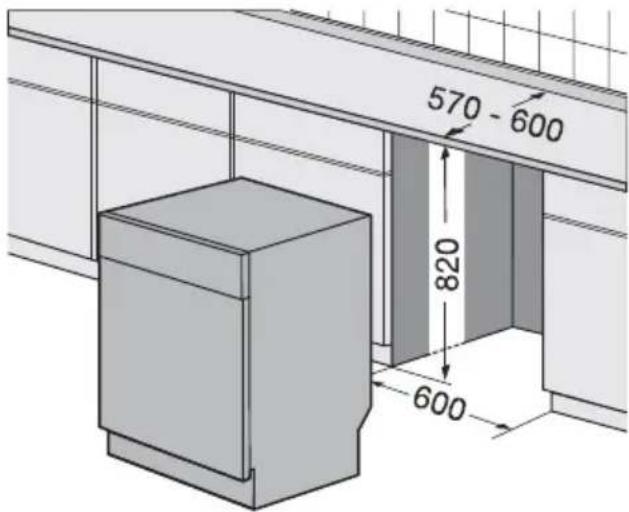
text_image
570 - 600 820 600Proceed as follows:
- Remove the machine's worktop by un-screwing the two rear retaining screws (1), pull the worktop from the back of the machine (2) and slide out the front slots, lifting the worktop (3).
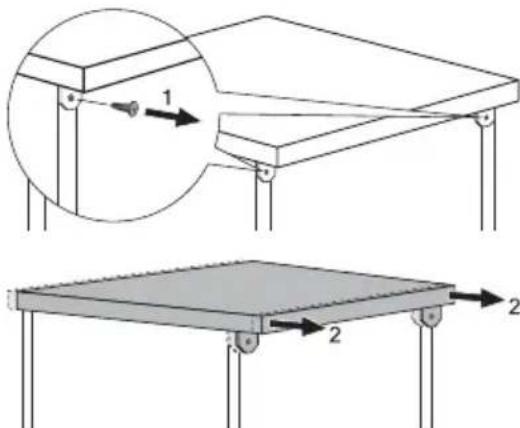
text_image
Technical diagram showing two structural components with labeled parts and directional arrows indicating motion or force.Water connection
Water inlet connection
This appliance can be connected to either a hot (max. 60°) or cold water supply.
With a hot water supply you can have a significant reduction of energy consumption.
This however, depends on how the hot water is produced. (We suggest alternative sources of energy that are more environmentally friendly as e.g. solar or photovoltaic panels and aeolian).
For making the connection itself, the coupling nut fitted to the appliance water inlet
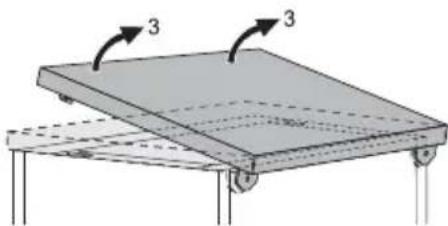
natural_image
Diagram of a flatbed platform with three directional arrows indicating orientation (no text or symbols)Insert the machine after adjusting the level-ling with the adjustable feet. When inserting the machine, ensure that the water inlet and drain hoses are not kinked or squashed.
During all operations that involve accessibility to internal components the dishwasher has to be unplugged.
Be sure that once the appliance has been installed, it is easily accessible for the service engineer in the event that a repair is required. If the dishwasher is later used as a free-standing appliance, the original worktop must be re-mounted.
The plinth on free-standing appliances is not adjustable.
Levelling
Good levelling is essential for correct closure and sealing of the door.
When the appliance is correctly levelled, the door will not catch on either side of the cab-inet.
If the door does not close correctly, loosen or tighten the adjustable feet until the machine is perfectly level.
hose is designed to screw onto a 3/4" thread spout or to a purpose made quick-coupling tap such as the Press-block.
The water pressure must be within the limits given in the 'Technical data'. Your local Water Authority will advise you on the average mains pressure in your area.
The water inlet hose must not be kinked, crushed, or entangled when it is being connected.
The appliance features inlet and drain hoses which can be turned either to the left or the
right to suit the installation by means of the locknut. The locknut must be correctly fitted to avoid water leaks.
i Attention! NOT all dishwasher models of have inlet and drain hoses provided with a locknut. In this case, this facility is not available.
If the appliance is connected to new pipes or pipes which have not been used for a long time, you should run the water for a few minutes before connecting the inlet hose.
DO NOT use connection hoses which have previously been used on an old appliance.
This appliance has been fitted with safety features which will prevent the water used in the appliance from returning back into the drinking water system. This appliance complies with the applicable plumbing regulations.
Water drain connection
The end of the drain hose can be connected in the following ways:
- To the sink outlet spigot, securing it to the underside of the work surface. This will prevent waste water from the sink running into the machine.
- To a stand pipe provided with venthole, minimum internal diameter 4 cm.
The waste connection must be at a height of between 30 cm (minimum) and 100 cm (maximum) from the bottom of the dishwasher.
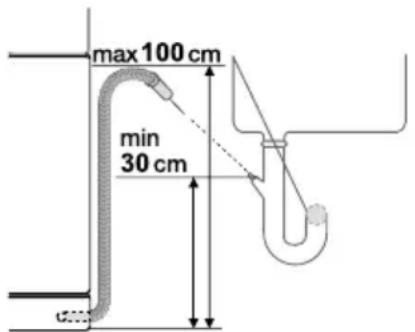
text_image
max 100 cm min 30 cmElectrical connection
Warning! Safety standards require the appliance to be earthed. Prior to using the appliance for the first time, ensure that the rated voltage and type of supply on the rating
The drain hose can face either to the right or left of the dishwasher
Ensure the drain hose is not bent or squashed as this could prevent or slow down the discharge of water.
The sink plug must not be in place when the machine is draining as this could cause the water to syphon back into the machine.
If you use a drain hose extension it must be no longer than 2 metres and its internal diameter must be no smaller than the diameter of the hose provided.
Likewise the internal diameter of the couplings used for connections to the waste outlet must be no smaller than the diameter of the hose provided.
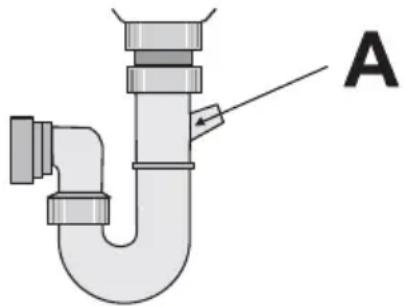
When connecting the drain hose to an under sink trap spigot, the entire plastic membrane (A) must be removed. Failure to remove all the membrane will result in food particles building up over time eventually blocking the dishwasher drain hose spigot
natural_image
Diagram of a U-shaped pipe with a valve and labeled component A (no text or symbols beyond label)Our appliances are supplied with a security device to protect against the return of dirty water back into the machine. If the spigot of your sink has a "no return valve" incorporated this can prevent the correct draining of your dishwasher. We therefore advise you to remove it.
To avoid water leakage after installation make sure that the water couplings are tight.
plate match that of the supply where the appliance is to be installed. The fuse rating is also to be found on the rating plate.
Always plug the mains plug into a correctly installed shockproof socket.
Multi-way plugs, connectors and extension cables must not be used. This could constitute a fire hazard through overheating.
If necessary, have the domestic wiring system socket replaced. In case that the electrical cable has to be
replaced, contact your local Service Force centre.
The plug must be accessible after the appliance has been installed. Never unplug the appliance by pulling on the cable. Always pull the plug.
The manufacturer accepts no liability for failure to observe the above safety precautions.
Environment concerns
The symbol ☒ on the product or on its packaging indicates that this product may not be treated as household waste. Instead it should be taken to the appropriate collection point for the recycling of electrical and electronic equipment. By ensuring this product is disposed of correctly, you will help prevent potential negative consequences for the environment and human health, which could otherwise be caused by inappropriate waste handling of this product. For more detailed information about recycling of this product, please contact your local council, your household waste disposal service or the shop where you purchased the product.
Packaging material
The packaging materials are environmentally friendly and can be recycled. The plastic components are identified by markings, e.g. >PE<, >PS<, etc. Please dispose of the packaging materials in the appropriate container at the community waste disposal facilities.

Warning! When a unit is no longer being used:
- Pull the plug out of the socket.
- Cut off the cable and plug and dispose of them.
- Dispose of the door catch. This prevents children from trapping themselves inside and endangering their lives.
