JP4119260 - Microwave Oven Junker - Free user manual and instructions
Find the device manual for free JP4119260 Junker in PDF.



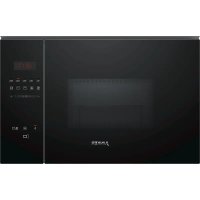
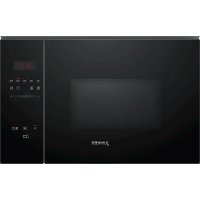
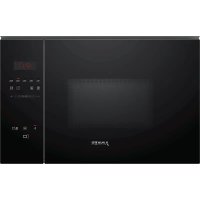
| Product type | Microwave oven |
| Brand | Junker |
| Model | JP4119260 |
| Use | Cooking, defrosting, reheating |
| Microwave power | 800 W max (5 levels: 90, 180, 360, 600, 800 W) |
| Automatic programs | 4 defrosting programs (meat, poultry, bread) and 3 cooking programs (rice, potatoes, vegetables) |
| Memory function | Yes (saves a custom setting) |
| Cleaning | Aqua Clean (steam cleaning) |
| Turntable | Glass, removable |
| Door opening | Automatic (by touch control) |
| Display | Digital (time, duration, weight) |
| Controls | Touch buttons + rotary adjustment zone |
| Front material | Stainless steel (front part) |
| Power supply | 230 V ~ 50 Hz |
| Standby consumption | ≤ 0.5 W (screen off) |
| Operating consumption | ≤ 1 W (screen on) |
| Included accessories | Turntable, roller ring |
Frequently Asked Questions - JP4119260 Junker
User questions about JP4119260 Junker
0 question about this device. Answer the ones you know or ask your own.
Ask a new question about this device
Download the instructions for your Microwave Oven in PDF format for free! Find your manual JP4119260 - Junker and take your electronic device back in hand. On this page are published all the documents necessary for the use of your device. JP4119260 by Junker.
USER MANUAL JP4119260 Junker
text_image
Illustration showing a blue spoon inside a glass with a checkmark and an 'X' symbol indicating incorrect behavior.text_image
Two side-by-side icons with symbols: a boat icon and a checkmark, both marked with blue checkmarks.text_image
88:88h P M min kg 4 2 3 2 1text_image
Two identical icons showing a boat with a wavy line and a checkmark followed by an 'X' symbol.text_image
Illustration showing a blue spoon inside a glass with a checkmark and an 'X' mark, indicating incorrect water quality.ACHTUNG!
natural_image
Illustration of a microwave oven with various kitchen utensils and accessories (no text or symbols)15.4 Einbaumöbel
natural_image
Illustration of a microwave oven with a downward arrow indicating cooling or discharging motion (no text or symbols)natural_image
Illustration of a microwave oven with a blue tray and two arrows indicating downward motion (no text or symbols)de Montageanleitung
natural_image
Illustration of a microwave oven with a circular arrow indicating rotation or clockwise motion (no text or symbols)natural_image
Illustration of a microwave oven with two arrows indicating clockwise motion (no text or symbols)natural_image
Illustration of a microwave oven with a blue tray and two black arrows indicating rotation or assembly (no text or symbols)text_image
Diagram illustrating a device with multiple sensors and a device mounted on a base, showing signal flow and component placement.natural_image
Two identical line drawings of a kitchen appliance with a checkmark and a cross mark, no text or symbols present.natural_image
Diagram of a microwave oven with open doors and internal compartments, showing airflow direction (no text or symbols)text_image
Diagram illustrating microwave oven installation with labeled components and directional arrows indicating motion2 Preventing material damage 27
3 Environmental protection and saving energy 28
4 Familiarising yourself with your appliance ..... 29
5 Before using for the first time 30
6 Basic operation 31
7 Memory.... 32
8 Programmes.... 32
9 Basic settings.... 34
10 Cleaning and servicing.... 34
11 Troubleshooting.... 36
12 Disposal.... 37
13 Customer Service.... 37
14 How it works.... 38
15 INSTALLATION INSTRUCTIONS 41
15.1 Safe installation 42

1 Safety
Observe the following safety instructions.
1.1 General information
- Read this instruction manual carefully.
- Keep the instruction manual and the product information safe for future reference or for the next owner.
- Do not connect the appliance if it has been damaged in transit.
1.2 Intended use
Only a licensed professional may connect appliances without plugs. Damage caused by incorrect connection is not covered under the warranty.
The appliance can only be used safely if it is correctly installed according to the safety instructions. The installer is responsible for ensuring that the appliance works perfectly at its installation location.
Only use this appliance:
■ To prepare meals and drinks.
■ Under supervision. Never leave the appliance unattended when cooking for short periods.
- For household use and similar applications, such as: In kitchens for employees in shops, offices and other commercial sectors; in agriculture; by customers in hotels and other residential facilities; in bed and breakfasts.
■ Up to an altitude of max. 4000 m above sea level.
This appliance complies with the standards EN 55011 and CISPR 11. It is a group 2, class B product. Group 2 means that microwaves are produced for the purpose of heating food. Class B means that the appliance is suitable for private households.
1.3 Restriction on user group
This appliance may be used by children aged 8 or over and by people who have reduced physical, sensory or mental abilities or inadequate experience and/or knowledge, provided that they are supervised or have been instructed on how to use the appliance safely and have understood the resulting dangers.
Do not let children play with the appliance.
Children must not perform cleaning or user maintenance unless they are at least 15 years old and are being supervised.
Keep children under the age of 8 years away from the appliance and power cable.
1.4 Safe use
⚠ WARNING – Risk of fire!
Combustible objects that are left in the cooking compartment may catch fire.
▶ Never store combustible objects in the cooking compartment.
▶ If smoke is emitted, the appliance must be switched off or the plug must be pulled out and the door must be held closed in order to stifle any flames.
Loose food remnants, fat and meat juices may catch fire.
Before using the appliance, remove the worst of the food residues and remnants from the cooking compartment, heating elements and accessories.
Overheating of the appliance may cause a fire.
▶ Never install the appliance behind a decorative door or unit door.
⚠ WARNING – Risk of burns!
Accessories and cookware get very hot.
▶ Always use oven gloves to remove accessories or cookware from the cooking compartment.
When the cooking compartment is hot, any alcoholic vapours inside may catch fire.
▶ Only use small quantities of drinks with a high alcohol content in food.
▶ Open the appliance door carefully.
⚠ WARNING – Risk of scalding!
The accessible parts of the appliance become hot during operation.
▶ Never touch these hot parts.
- Keep children at a safe distance.
Hot steam may escape when you open the appliance door. Steam may not be visible, depending on the temperature.
▶ Open the appliance door carefully.
- Keep children at a safe distance.
If there is water in the cooking compartment when it is hot, this may create hot steam.
▶ Never pour water into the cooking compartment when the cooking compartment is hot.
⚠ WARNING – Risk of injury!
Scratched glass in the appliance door may develop into a crack.
- Do not use any harsh or abrasive cleaners or sharp metal scrapers to clean the glass on the appliance door, as they may scratch the surface.
The hinges on the appliance door move when the door is opened and closed, which could trap your fingers.
- Keep your hands away from the hinges.
Cracks, splinters or breaks in the glass turntable are dangerous.
▶ Never allow hard objects to strike the turntable.
▶ Handle the turntable with care.
⚠ WARNING – Risk of electric shock!
If the insulation of the power cord is damaged, this is dangerous.
▶ Never let the power cord come into contact with hot appliance parts or heat sources.
▶ Never let the power cord come into contact with sharp points or edges.
▶ Never kink, crush or modify the power cord.
⚠ WARNING – Risk of suffocation!
Children may put packaging material over their heads or wrap themselves up in it and suffocate.
- Keep packaging material away from children.
- Do not let children play with packaging material.
Children may breathe in or swallow small parts, causing them to suffocate.
- Keep small parts away from children.
▶ Do not let children play with small parts.
1.5 Microwave
CAREFULLY READ THE IMPORTANT SAFETY INSTRUCTIONS AND KEEP THEM SAFE FOR FUTURE USE
⚠ WARNING – Risk of fire!
Using the appliance for anything other than its intended purpose is dangerous and may cause damage. For example, heated slippers and pillows filled with grain or cereal may catch fire, even several hours later.
▶ Never dry food or clothing with the appliance.
▶ Never heat up slippers, pillows filled with grain or cereal, sponges, damp cleaning cloths or similar with the appliance.
- The appliance must only be used to prepare food and drink.
Food and its packaging and containers may catch fire.
▶ Never heat food in heat-retaining packaging.
- Do not leave food unattended while it is heating in containers made of plastic, paper or other combustible materials.
▶ Never set the microwave power too high or the cooking time too long. Follow the instructions provided in this user manual.
▶ Never use the microwave to dry food.
▶ Never defrost or heat food with a low water content, such as bread, at too high a microwave power or for too long.
Cooking oil may catch fire.
▶ Never use the microwave to heat cooking oil on its own.
⚠ WARNING – Risk of explosion!
Liquids and other food may easily explode when in containers that have been tightly sealed.
▶ Never heat liquids or other food in containers that have been tightly sealed.
⚠ WARNING – Risk of burns!
Foods with peel or skin may burst or explode during heating, or even afterwards.
▶ Never cook eggs in their shell or heat hard-boiled eggs in their shell.
▶ Never cook shellfish or crustaceans.
▶ Always prick the yolk of eggs before microwaving.
The skin of foods that have a peel or skin, such as apples, tomatoes, potatoes and sausages, may burst. Before heating, prick the peel or skin.
Heat is not distributed evenly through baby food.
▶ Never heat baby food in closed containers.
▶ Always remove the lid or teat.
▶ Stir or shake well after heating.
▶ Check the temperature before giving the food or drink to a child.
Heated food gives off heat. The cookware may become hot.
▶ Always use oven gloves to remove cookware or accessories from the cooking compartment.
Airtight packaging may burst when food is heated.
▶ Always follow the instructions on the packaging.
▶ Always use oven gloves to remove the dishes from the cooking compartment.
The accessible parts of the appliance become hot during operation.
▶ Never touch these hot parts.
- Keep children at a safe distance.
Using the appliance for anything other than its intended purpose is dangerous. This is because, for instance, overheated slippers, pillows filled with grain or cereal, sponges and damp cleaning cloths, etc., may cause burns to the skin.
▶ Never dry food or clothing with the appliance.
▶ Never heat up slippers, pillows filled with grain or cereal, sponges, damp cleaning cloths or similar with the appliance.
- The appliance must only be used to prepare food and drink.
⚠ WARNING – Risk of scalding!
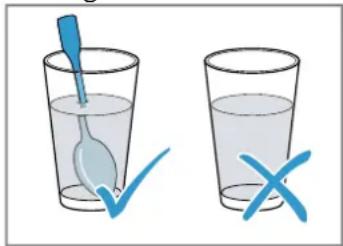
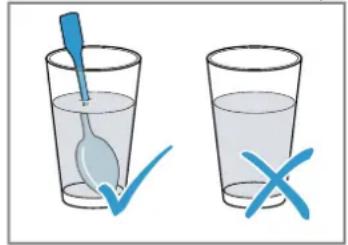
There is a possibility of delayed boiling when a liquid is heated. This means that the liquid reaches the boiling temperature without the usual steam bubbles rising to the surface. Exercise caution even when only gently shaking the container. The hot liquid may suddenly boil over and splatter.
▶ Always place a spoon in the container when heating liquids. This prevents delayed boiling.
text_image
Illustration showing a blue spoon inside a glass with a checkmark and an 'X' mark, indicating water quality inspection.⚠ WARNING – Risk of injury!
Unsuitable cookware may crack. Porcelain or ceramic cookware can have small perforations in the handles and lid. These perforations conceal a cavity below. If moisture penetrates this cavity, it could cause the cookware to crack.
▶ Only use microwave-safe cookware.
Cookware and containers made from metal or cookware with metal edging may lead to sparks being formed during simple microwave operation. The appliance is damaged.
▶ Never use metal containers during microwave-only operation.
▶ Only use microwave-safe cookware.
⚠ WARNING – Risk of electric shock!
The appliance uses a high voltage.
▶ Never remove the casing.
⚠ WARNING – Risk of serious harm to health!
Inadequate cleaning may destroy the surface of the appliance, reduce its service life, and lead to dangerous situations, such as escaping microwave energy.
- Clean the appliance on a regular basis, and remove any food residue immediately.
▶ Always keep the cooking compartment, door and door stop clean.
→ "Cleaning and servicing", Page 34
Never operate the appliance if the cooking compartment door is damaged. Microwave energy may escape.
▶ Never use the appliance if the cooking compartment door or the plastic door frame is damaged.
▶ Any repair work must only be carried out by the after-sales service.
Microwave energy will escape from appliances that do not have any casing.
▶ Never remove the casing.
- Contact our after-sales service if maintenance or repair work is needed.
2 Preventing material damage
2.1 General
ATTENTION!
The prolonged presence of moisture in the cooking compartment leads to corrosion.
▶ Always wipe away the condensation after cooking.
- Do not keep moist food in the cooking compartment for a long time with the door closed.
- Do not store food in the cooking compartment.
Sitting or placing objects on the appliance door may damage it.
- Do not place, hang or support objects on the appliance door.
2.2 Microwave
Follow these instructions when using the microwave.
ATTENTION!
Metal touching the wall of the cooking compartment will cause sparks, which may damage the appliance or the inner door pane.
▶ Metal (e.g. a spoon in a glass) must be kept at least 2 cm from the cooking compartment walls and the inside of the door.
Placing aluminium containers in the appliance may cause sparks, which will damage the appliance.
- Do not use aluminium containers in the appliance.
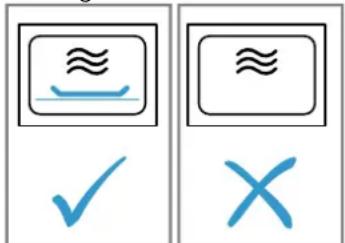
Operating the appliance without food in the cooking compartment may lead to overloading.
- Do not switch on the microwave unless there is food inside. The only exception to this rule is when performing a short cookware test.
text_image
Two identical icons showing a boat with a wavy line and a checkmark followed by an 'X' symbol.If you prepare several bags of microwave popcorn in immediate succession at a microwave power level that is too high, the cooking compartment may be damaged.
Leave the appliance to cool down for several minutes between each use.
▶ Never set a microwave power level that is too high.
▶ Use a maximum microwave output of 600 watts.
▶ Always place the popcorn bag on a glass plate.
The microwave feed is damaged by the removal of the cover.
▶ Never remove the cover of the microwave feed in the cooking compartment.
Removing the transparent film from the inside of the door damages the appliance door.
▶ Never remove the transparent film on the inside of the door.
Liquid that penetrates the interior of the appliance may damage the turntable drive.
▶ Monitor the cooking process.
- Set a shorter cooking time first and, if necessary, increase the cooking time.
▶ Never use the appliance without the turntable.
3 Environmental protection and saving energy
3.1 Disposing of packaging
The packaging materials are environmentally compatible and can be recycled.
- Sort the individual components by type and dispose of them separately.
3.2 Saving energy
If you follow these instructions, your appliance will use less power.
Hide the clock in standby mode.
■ The appliance saves energy in standby mode.
Note:
The appliance requires:
■ A maximum of 1 W when the appliance is in operation with the display switched on
■ A maximum of 0.5 W when the appliance is in operation with the display switched off
4 Familiarising yourself with your appliance
4.1 Control panel
You can use the control panel to configure all functions of your appliance and to obtain information about the operating status.
Note: On certain models, specific details such as colour and shape may differ from those pictured.

text_image
88:88h P M min kg 4 2 3 2 1| 1 | Automatic door opener Open the door automatically. |
| 2 | Touch fields Select functions. |
| 3 | Settings area Set the time, cooking times or automatic programmes. |
| 4 | Display Display clock or cooking time. |
Settings area
Use the settings area to change the setting values that are shown on the display.
The settings area works like a wheel. To change a setting, swipe your finger left or right. The quicker you swipe, the quicker the wheel moves. To pause the settings area and implement that precise setting, touch it.
Automatic door opener
When you press the automatic door opener, the appliance door springs open. You can fully open the appliance door manually.
Notes
In the event of a power cut, the automatic door opener does not work. You can open the door manually.
■ If you open the appliance door during operation, this pauses the operation.
- When you close the appliance door, the operation does not continue automatically. You must restart the operation.
■ If the appliance is switched off for an extended period of time, the appliance door opens with a time delay.
4.2 Types of heating
Here you can find an overview of the types of heating. You can find recommendations on using the types of heating.
Symbol Name Use
90–800 Microwave Defrosting, cooking or heating food and liquids.
4.3 Cooling fan
The cooling fan switches on and off as required. The cooking compartment remains cold during microwave operation. Despite this, the cooling fan will still switch on.
Note: The cooling fan may run on even if the oven has been switched off.
4.4 Condensation
Condensation can occur in the cooking compartment and on the appliance door when cooking. Condensation is normal and does not adversely affect appliance operation. Wipe away the condensation after cooking.
5 Before using for the first time
Configure the settings for initial start-up. Clean the appliance and accessories.
5.1 Initial configuration
Configure the settings for initial start-up. Clean the appliance and accessories.
Note: After connecting the appliance to the power or following a power cut, a signal sounds and several zeros are shown on the display. It may take a few seconds until a signal sounds and you can set the time.
Requirements
■ An audible signal sounds.
■ 12:00 is shown on the display.
■ The indicator light lights up via
1. Set the time via the settings area.
2. Press ☑
5.2 Cleaning the appliance before using it for the first time
Clean the cooking compartment and accessories before using the appliance to prepare food for the first time.
-
Make sure that there is no leftover packaging, accessories or other objects in the cooking compartment.
-
Clean the smooth surfaces in the cooking compartment with a soft, damp cloth.
- To eliminate the new-appliance smell, wipe the empty cooking compartment with hot soapy water. → "Cleaning the cooking compartment", Page 35
5.3 Fitting the turntable
Never use the appliance without the turntable.
- Place the roller ring into the recess in the cooking compartment.

text_image
a b c-
Engage the turntable bin the drive in the centre of the cooking compartment floor.
-
Check whether the turntable is correctly engaged.
Note: The turntable can turn anti-clockwise or clockwise.
6 Basic operation
6.1 Microwave power settings
This is where you can find an overview of the different microwave power settings and when to use them.
| Microwave power setting in watts | Use |
| 90 Defrost delicate foods. | |
| 180 Defrost food and continue cooking. | |
| 360 Cooking meat and fish or heating delicate foods. | |
| 600 Heat and cook food. | |
| 800 Heat liquids. | |
Note:
You can set the microwave power settings for a particular cooking time:
■ 800 W for 30 minutes
■ 600 W for 60 minutes
■ 90 W, 360 W, 180 W for 99 minutes
6.2 Microwave-safe cookware and accessories
To heat food evenly and avoid damaging your appliance, it is important to use the right cookware and accessories.
Note: Read the manufacturer's instructions before using any cookware in the microwave. If in doubt, carry out a cookware test.
Microwave-safe
| Cookware and accessories | Reason |
| Cookware made from heat-resistant, microwave-safe material:■ Glass■ Glass ceramic■ Porcelain■ Temperature-resistant plastic■ Fully glazed ceramic without cracks | These materials allow microwaves to pass through. Microwaves do not damage heat-resistant cookware. |
| Metal cutlery Note: You can use metal cutlery, e.g. place a spoon in a glass, to prevent delayed boiling. | |
ATTENTION!
Metal touching the wall of the cooking compartment will cause sparks, which may damage the appliance or the inner door pane.
▶ Metal (e.g. a spoon in a glass) must be kept at least 2 cm from the cooking compartment walls and the inside of the door.
Not microwave-safe
| Cookware and accessories | Reason |
| Metal cookware Metal does not allow microwaves to pass through. The food hardly heats up. | |
| Cookware with gold or silver decoration | Microwaves can damage gold and silver decoration.Tip: You can only use this kind of cookware if the manufacturer guarantees that it is microwave-safe. |
6.3 Testing cookware for microwave suitability
Test cookware to see whether it is suitable for microwave use. Testing cookware is the only time the appliance should be operated in microwave mode without any food inside.
⚠ WARNING – Risk of scalding!
The accessible parts of the appliance become hot during operation.
▶ Never touch these hot parts.
- Keep children at a safe distance.
- Place the empty cookware in the cooking compartment.
- Set the appliance to the maximum microwave power setting for 30 seconds to 1 minute.
- Start the operation.
-
Check the cookware several times:
-
If the cookware is cold or warm to the touch, it is suitable for microwave use.
- If the cookware becomes hot or sparks are created, stop the cookware test. The cookware is not microwave-safe.
6.4 Configuring the microwave settings
ATTENTION!
Operating the appliance without food in the cooking compartment may lead to overloading.
- Do not switch on the microwave unless there is food inside. The only exception to this rule is when performing a short cookware test.

text_image
Two identical icons showing a boat with a wavy line and a checkmark followed by an 'X' symbol.Tip: To ensure optimum use of your appliance, you can refer to the information in the recommended settings.
→ "How it works", Page 38
- Follow the safety instructions. → Page 25
- Read the safety instructions and the section on how to prevent material damage. → Page 27
- Read the information on microwave-safe cookware and accessories. → Page 31
- Use the buttons to set the required microwave power setting.
- Use the settings area to set the required cooking time.
Note: If you open the cooking compartment door during operation, the microwave interrupts the operation and pauses the set time that is counting down. When you close the cooking compartment door, the operation continues.
6.5 Changing the cooking time
You can change the cooking time at any time.
▶ Use the settings area to set the required cooking time.
6.6 Pausing operation
- Press ☐ or open the appliance door.
√ The indicator light lights up via. - To continue the operation, close the appliance door and press ▷
6.7 Cancelling the operation
- Press twice or open the door and press once.

7 Memory
You can use the memory function to save the setting for a dish and call it up again at any time.
Tip: If you prepare one dish often, use the memory function.
7.1 Saving memory settings
Note:
- You cannot save several microwave power settings in succession.
■ You cannot save any automatic programmes. - Press M
√ The indicator light lights up viaM - Use the buttons to set the required microwave power setting.
√ The indicator lamp above the button lights up and the display shows 1:00 min. - Use the settings area to set the required cooking time.
- If required, select one of the options:
- To save the memory and immediately start, press ▷.
- To save the memory and not start, press ☐
√ If the appliance does not start, the time appears on the display and the appliance saves the setting.
7.2 Starting the memory
It is very easy to start the saved programme. Place your dish in the appliance and close the appliance door.
- Press M
√ The saved settings are displayed. - Press ▷.
7.3 Pausing operation
- Press ☐ or open the appliance door.
√ The indicator light lights up via. - To continue the operation, close the appliance door and press ▷
7.4 Cancelling the operation
- Press twice or open the door and press once.

8 Programmes
The programmes help you to use your appliance to prepare different dishes by selecting the optimum settings automatically.
8.1 Setting a programme
- Select a programme.
- Press repeatedly until the display shows the required programme number.
√ The indicator light lights up via 📊. - Press
√ The indicator lamp above lights up and the display shows a suggested value for the weight. -
Use the settings area to set the weight of the meal. If it is not possible to enter the exact weight, round the weight up or down.
-
Press ▷to start the operation.
√ The cooking time visibly counts down. -
If an audible signal sounds during the programme, open the appliance door.
-
Break up, stir or turn the food.
- Close the appliance door.
- Press ▷
8.2 Pausing operation
- Press ☐ or open the appliance door.
√ The indicator light lights up via. - To continue the operation, close the appliance door and press ▷.
8.3 Cancelling the operation
- Press twice or open the door and press once.
8.4 Defrosting with the automatic programmes
You can use the four defrosting programmes to defrost meat, poultry and bread.
Programme Food Cookware Weight range in kg
| P01 Minced meat Open 0.20–1.00 |
| P02 Pieces of meat Open 0.20–1.00 |
| P03 Chicken, chicken pieces Open 0.40–1.80 |
| P04 Bread Open 0.20–1.00 |
Defrosting food using the automatic programmes
- Take the food out of its packaging. Use food that is stored flat and in portion-sized quantities at -18 °C.
- Weigh the food. You require the weight in order to set the programme.
- Place the food in a microwaveable shallow dish, e.g. a glass plate or porcelain plate. Do not put the cover on.
-
Set the programme. → Page 32
-
Note: Liquid is produced when you defrost meat and poultry.
Drain off any liquid when turning and under no circumstances use it for other purposes or allow it to come into contact with other foods. - Flat pieces of meat and items made from minced meat should be separated from each other before leaving to stand.
- The defrosted food should be left to stand for an additional 10 to 30 minutes until it reaches an even temperature.
Large pieces of meat require a longer standing time than smaller pieces. For poultry, remove the giblets after the resting time. - Continue to prepare the food, even though thick pieces of meat may still be frozen in the middle.
8.5 Cooking with the automatic programmes
With the three cooking programmes, you can cook rice, potatoes or vegetables.
| Programme | Food Cookware Weight range in kg | Information | ||
| P05 | Rice | With lid | 0.05–0.20 | ■ For rice, use a large, deep dish.■ Do not use any boil-in-the-bag rice.■ For every 100 g rice, add twice to three times the amount of water. |
| P06 | Potatoes | With lid | 0.15–1.00 | ■ For boiled potatoes, cut fresh potatoes into small, equally sized pieces.■ Add one tablespoon of water and a little salt for every 100 g boiled potatoes. |
| P07 | Vegetables | With lid | 0.15–1.00 | ■ Weigh fresh, washed vegetables scales.■ Cut the vegetables into small, uniform pieces.■ Add one tablespoon of water for every 100 g boiled potatoes. |
Cooking food with the automatic programmes
- Weigh the food. You require the weight in order to set the programme.
- Place the food on microwave-safe cookware and cover with a lid.
-
Add the volume of water in accordance with the manufacturer's instructions on the packaging.
-
Set the programme. → Page 32
- Once the programme has finished, stir the food again.
- The food should be left to stand for an additional 5 to 10 minutes until it reaches a uniform temperature. The cooking results are dependent on the food quality and consistency of the food.
9 Basic settings
You can configure the basic settings for your appliance to meet your needs.
9.1 Overview of the basic settings
Here you can find an overview of the basic settings and factory settings. The basic settings depend on the features of your appliance.
Setting Selection Meaning
| ■ Button tone ■ | On1 | Switch the button tone on and off. |
| ■ OFF | Note: The button tone remains active for ▷and 11/□ | |
2 Demo mode Activate or deactivate demo mode.
Note: The appliance is switched off. You can use the buttons and the display; the buttons do not work. Demo mode is mainly useful for dealers.
^1 Factory setting (may vary according to model)
9.2 Changing basic settings
Requirement: The appliance is switched off.
- Press and hold ▷ and □ for a few seconds.
√ The display shows the first basic setting. - Press ▷
√ The current value flashes on the display. - Use the settings area to set the required value.
- To accept the basic setting, press ▷.
- To exit the basic setting, press ☐/☐
- Use the settings area to switch to the basic setting 2.
- To edit the basic setting, press ▷.
√ The selected setting lights up on the display. - Use the settings area to set the required value.
- To accept the basic setting, press ▷
- To exit the basic setting, press ☐/☐
- To exit the basic settings menu, press again.
Tip: The setting can be changed at any time.
9.3 Changing the signal duration
When your appliance is switched off, you hear an audible signal. You can change the duration of the signal.
▶ Press and hold ▷for approx. six seconds.
√ The signal duration switches between short and long.
√ The appliance applies the signal duration and displays the time.
9.4 Setting the time
Note: After connecting the appliance to the power or following a power cut, a signal sounds and several zeros are shown on the display. It may take a few seconds until a signal sounds and you can set the time.
Requirements
■ An audible signal sounds.
■ 12:00 is shown on the display.
■ The indicator light lights up via
1. Set the time via the settings area.
2. Press ☑
9.5 Hiding the clock
To reduce the standby consumption of your appliance, you can hide the clock.
- Press √
- Press ☐/☐
To view the clock, press ▼again.
10 Cleaning and servicing
To keep your appliance working efficiently for a long time, it is important to clean and maintain it carefully.
10.1 Cleaning products
Only use suitable cleaning agents.
⚠ WARNING – Risk of electric shock!
An ingress of moisture can cause an electric shock.
- Do not use steam- or high-pressure cleaners to clean the appliance.
ATTENTION!
Unsuitable cleaning agents damage the surfaces of the appliance.
- Do not use harsh or abrasive cleaning products.
- Do not use cleaning products with a high alcohol content.
- Do not use hard scouring pads or cleaning sponges.
- Do not use any special cleaners for cleaning the appliance while it is hot.
▶ Only use glass cleaners, glass scrapers or stainless steel care products if recommended in the cleaning instructions for the relevant part.
New sponge cloths contain residues from production.
- Wash new sponge cloths thoroughly before use.
You can find out which cleaning products are suitable for each surface or part of the appliance in the individual cleaning instructions.
10.2 Cleaning the appliance
Clean the appliance as specified. This will ensure that the different parts and surfaces of the appliance are not damaged by incorrect cleaning or unsuitable cleaning products.

WARNING – Risk of fire!
Loose food remnants, fat and meat juices may catch fire.
Before using the appliance, remove the worst of the food residues and remnants from the cooking compartment, heating elements and accessories.

WARNING – Risk of injury!
Scratched glass in the appliance door may develop into a crack.
- Do not use any harsh or abrasive cleaners or sharp metal scrapers to clean the glass on the appliance door, as they may scratch the surface.
- Read the information on cleaning products. → Page 34
- Observe the information on cleaning the appliance components or surfaces.
- Unless otherwise specified:
- Clean the components of the appliance with hot soapy water and a dish cloth.
- Dry with a soft cloth.
10.3 Cleaning the cooking compartment
ATTENTION!
Incorrect cleaning may damage the cooking compartment.
- Do not use oven spray, abrasive materials or other aggressive oven cleaners.
- Read the information on cleaning products. → Page 34
- Clean with hot soapy water or a vinegar solution.
- Use oven cleaner to remove very heavy soiling. Only use oven cleaner when the cooking compartment is cold.
Tip: To eliminate unpleasant odours, heat up a cup of water with a few drops of lemon juice for 1 to 2 minutes at maximum microwave power setting. Always place a spoon in the container to prevent delayed boiling.
- Wipe out the cooking compartment with a soft cloth.
- Leave the cooking compartment to dry with the door open.
Cleaning the turntable
- Read the information on cleaning products. → Page 34
- Remove the turntable.
- Clean the turntable with hot soapy water and a soft dish cloth.
- Dry with a soft cloth.
- Reinsert the turntable. Ensure that the turntable engages correctly.
10.4 Cleaning the front of the appliance
ATTENTION!
Incorrect cleaning may damage the front of the appliance.
- Do not use glass cleaner, metal scrapers or glass scrapers for cleaning.
▶ To prevent corrosion on stainless steel fronts, remove any limescale, grease, starch and albumin (e.g. egg white) stains immediately. -
On stainless steel surfaces, use special stainless steel cleaning products suitable for hot surfaces.
-
Read the information on cleaning products. → Page 34
- Clean the front of the appliance using hot soapy water and a dish cloth.
Note: Slight differences in colour on the front of the appliance are caused by the use of different materials, such as glass, plastic and metal.
- For stainless steel appliance fronts, apply a thin layer of the stainless steel cleaning product with a soft cloth.
You can obtain the stainless steel cleaning products from the after-sales service or the online shop.
- Dry with a soft cloth.
10.5 Cleaning the control panel
ATTENTION!
Incorrect cleaning may damage the control panel.
▶ Never wipe the control panel with a wet cloth.
- Read the information on cleaning products. → Page 34
- Clean the control panel using a microfibre cloth or a soft, damp cloth.
- Dry with a soft cloth.
10.6 Cleaning the door panels
ATTENTION!
Incorrect cleaning may damage the door panes.
▶ Do not use a glass scraper.
-
Read the information on cleaning products. → Page 34
-
Clean the door panels with a soft dish cloth and glass cleaner.
Note: Shadows on the door panels, which look like streaks, are caused by reflections made by the interior lighting.
- Dry with a soft cloth.
10.7 Aqua Clean
The cleaning aid is a quick alternative for occasionally cleaning the cooking compartment. The cleaning aid softens dirt by vaporising the soapy water. The dirt can then be removed more easily.
Setting the cleaning aid
-
Add a few drops of washing-up liquid to a cup of water.
-
Place a spoon in the cup to prevent delayed boiling.
-
Place the cup in the centre of the cooking compartment.
-
Press
-
Press ▷
√ An audible signal sounds once the time has elapsed.
-
Once the duration has elapsed, keep the door closed for a further three minutes.
-
Wipe out the cooking compartment with a soft cloth.
-
Leave the cooking compartment to dry with the door open.
11 Troubleshooting
You can rectify minor faults on your appliance yourself. Read the troubleshooting information before contacting after-sales service. This will avoid unnecessary costs.
⚠ WARNING – Risk of injury!
Improper repairs are dangerous.
- Repairs to the appliance should only be carried out by trained specialist staff.
▶ If the appliance is defective, call Customer Service.
11.1 Malfunctions
Fault Cause and troubleshooting
| The appliance is not working. | The mains plug of the power cord is not plugged in.► Connect the appliance to the power supply. |
| The circuit breaker in the fuse box has tripped.► Check the circuit breaker in the fuse box. | |
| There has been a power cut.► Check whether the lighting in your kitchen or other appliances are working. | |
| Malfunction1. Switch off the fuse in the fuse box.2. Switch the fuse back on after approx. 10 seconds.✓ If the fault was a one-off, the message disappears.3. If the message appears again, call the after-sales service. Please specify the exact error message when calling.→ "Customer Service", Page 37 | |
| Door is not fully closed.► Check whether food remains or foreign material are trapped in the door. | |
| Food takes longer than usual to heat up. | The microwave power setting is set too low.► Set a higher microwave power setting. → Page 31 |
| You have placed a larger amount of food than normal in the appliance.► Set a longer cooking time.You need double the time when you have double the amount. | |
| The food is colder than usual.► Turn or stir the food from time to time during cooking. | |
| Turntable grates or grinds. | There is dirt or foreign objects in the area of the turntable drive.► Clean the roller ring and recess in the cooking compartment. |
Fault Cause and troubleshooting
| Microwave mode is cancelled. | Appliance has a fault.► If this fault recurs, call the after-sales service. |
| The appliance is not in operation. A cooking time is shown in the display. | The settings area has been activated accidentally.► Press ∥/□ |
| ▷ was not pressed after the setting was implemented.► Press ▷ or delete the setting by pressing ∥/□ | |
| Three zeros flash on the display. | There has been a power cut.► Reset the time.→ "Initial configuration", Page 30 |
| An Ms shown on the display. | Demo mode is activated.► Deactivate demo mode.→ "Basic settings", Page 34 |
| The message E ap-pears on the display. | Fault in the automatic door opening system.1. Switch off the appliance.2. Wait for 10 minutes.3. Switch the appliance on again.► If this fault recurs, call the after-sales service. |
12 Disposal
12.1 Disposing of old appliance
Valuable raw materials can be reused by recycling.
- Dispose of the appliance in an environmentally friendly manner. Information about current disposal methods are available from your specialist dealer or local authority.

This appliance is labelled in accordance with European Directive 2012/19/EU concerning used electrical and electronic appliances (waste electrical and electronic equipment - WEEE).
The guideline determines the framework for the return and recycling of used appliances as applicable throughout the EU.
13 Customer Service
Detailed information on the warranty period and terms of warranty in your country is available from our after-sales service, your retailer or on our website. If you contact Customer Service, you will require the product number (E-Nr.) and the production number (FD) of your appliance.
The contact details for Customer Service can be found in the enclosed Customer Service directory or on our website.
This product contains light sources from energy efficiency class G. These light sources are available as a spare part and should only be replaced by trained specialist staff.
13.1 Product number (E-Nr.) and production number (FD)
You can find the product number (E-Nr.) and the production number (FD) on the appliance's rating plate. You will see the rating plate with these numbers if you open the appliance door.

text_image
E Nr: 10000000000000000000000000000000000000000000000000000000000000000 FD: 1.588888 Z Nr: 1.5888888888 CE X Type: 1.5888888888Make a note of your appliance's details and the Customer Service telephone number to find them again quickly.
14 How it works
Here, you can find the ideal settings for various dishes as well as the best accessories and cookware. We have tailored these recommendations to your appliance.
14.1 What is the best way to proceed?
In this section, you will find out the best way to proceed step-by-step in order to be able to make optimum use of the recommended settings. You will get information on many meals, with details and tips on how to best use and set your appliance.

WARNING – Risk of burns!
Heated food gives off heat. The cookware may become hot.
▶ Always use oven gloves to remove cookware or accessories from the cooking compartment.
Note: The times given in the tables are guidelines and depend on the quality, temperature and consistency of the food.
-
Before using the appliance, remove all unnecessary cookware from the cooking compartment.
-
Select a type of food from the recommended settings.
-
Add the food to a suitable tableware. → "Microwave-safe cookware and accessories", Page 31
-
Always place the cookware on the turntable.
-
Set the appliance according to the recommended settings. Time ranges are often specified in the recommended settings. Set the shorter cooking time first. If necessary, increase the cooking time. If two microwave power settings and times are specified in the tables, set the first microwave power setting and cooking time first and, after the signal, set the second.
Tip: If you want to cook quantities that deviate from those specified in the tables, set approximately double the time for double the amount.
14.2 Tips for defrosting and heating
Follow these tips for good results when defrosting and heating.
Issue Tip
| The food should be de-frosted, hot or cooked once the time has elapsed. | Set a longer cooking time. Larger quantities and food which is piled high require longer times. |
Issue Tip
| Once the time has elapsed, the food should not be overheated at the edge and cooked in the middle. | ■ Stir the food occasionally.■ Set a lower microwave power setting and a longer cooking time. |
| After defrosting, poultry or meat should not be de-frosted on the outside only but still frozen in the middle. | ■ Set a lower microwave power setting.■ If you are defrosting a large quantity, turn it several times. |
| The food should not be too dry. | ■ Set a lower microwave power setting.■ Set a shorter cooking time.■ Cover the food.■ Add more liquid. |
14.3 Defrosting
With your appliance you can defrost frozen food.
Defrosting food
- Place the frozen food in an open container on the turntable.
Delicate parts, such as the legs and wings of chicken or fatty outer layers of roasts, can be covered with small pieces of aluminium foil. The foil must not touch the sides of the cooking compartment. - Start the operation.
You can remove the foil halfway through the defrost-ing time. - Note: Liquid is produced when you defrost meat and poultry.
Drain off any liquid when turning and under no circumstances use it for other purposes or allow it to come into contact with other foods. - Redistribute the food or turn it once or twice as it defrosts.
Turn large pieces of food several times. - To even out the temperature, leave the defrosted food to stand at room temperature for approx. 10-20 minutes.
You can remove the giblets from poultry at this point. You can continue to cook the meat even if a small section of it is still frozen in the centre.
Defrosting with the microwave
Observe the recommended settings for using the microwave to defrost frozen food.
| Food Weight in g Microwave power | setting in W | Cooking time in mins | |
| Whole pieces of beef, veal or pork (on the bone or boned) | 800 1. 180 | 2. 90 | 1. 152. 10–20 |
| Whole pieces of beef, veal or pork (on the bone or boned) | 1000 1. 180 | 2. 90 | 1. 202. 15–25 |
| Whole pieces of beef, veal or pork (on the bone or boned) | 1500 1. 180 | 2. 90 | 1. 302. 20–30 |
| Meat in pieces or slices of beef, veal or pork 200 1. 180 | 2. 90 | 1. 2^1 2. 4–6 | |
| Meat in pieces or slices of beef, veal or pork 500 1. 180 | 2. 90 | 1. 5^1 2. 5–10 | |
| Meat in pieces or slices of beef, veal or pork 800 1. 180 | 2. 90 | 1. 8^1 2. 10–15 | |
| Minced meat, mixed^2,3 | 200 90 10 | ^4 | |
| Minced meat, mixed^2,3 | 500 1. 180 | 2. 90 | 1. 5^4 2. 10–15 |
| Minced meat, mixed^2,3 | 800 1. 180 | 2. 90 | 1. 8^4 2. 10–20 |
| Poultry or poultry portions^5 | 600 1. 180 | 2. 90 | 1. 82. 10–20 |
| Poultry or poultry portions^5 | 1200 1. 180 | 2. 90 | 1. 152. 10–20 |
| Fish fillet, fish steak or fish slices^5 | 400 1. 180 | 2. 90 | 1. 52. 10–15 |
| Vegetables, e.g. peas 300 180 10–15 | |||
| Fruit, e.g. raspberries^5 | 300 180 7–10 | ^6 | |
| Fruit, e.g. raspberries^5 | 500 1. 180 | 2. 90 | 1. 8^6 2. 5–10 |
| Butter, defrosting^7 | 125 1. 180 | 2. 90 | 1. 12. 2–3 |
| Butter, defrosting^7 | 250 1. 180 | 2. 90 | 1. 12. 3–4 |
| Loaf of bread 500 1. 180 | 2. 90 | 1. 62. 5–10 | |
| Loaf of bread 1000 1. 180 | 2. 90 | 1. 122. 10–20 | |
| Cakes, plain, e.g. sponge cake^8,9 | 500 90 10–15 | ||
| Cakes, plain, e.g. sponge cake^8,9 | 750 1. 180 | 2. 90 | 1. 52. 10–15 |
| Cakes, moist, e.g. fruit flan, cheesecake^8 | 500 1. 180 | 2. 90 | 1. 52. 15–20 |
| Cakes, moist, e.g. fruit flan, cheesecake^8 | 750 1. 180 | 2. 90 | 1. 72. 15–20 |
^1 Separate any defrosted parts when turning.
^2 Freeze the food flat.
^3 Remove any meat that has already defrosted.
^4 Turn the food several times.
^5 Separate any defrosted parts.
^6 Carefully stir the food occasionally.
^7 Remove all packaging.
^8 Only defrost cakes without icing, whipped cream, gelatine or custard.
^9 Separate the pieces of cake.
14.4 Heating
With your appliance you can heat food.
Heating food

WARNING – Risk of burns!
Heated food gives off heat. The cookware may become hot.
▶ Always use oven gloves to remove cookware or accessories from the cooking compartment.

WARNING – Risk of scalding!
There is a possibility of delayed boiling when a liquid is heated. This means that the liquid reaches the boiling temperature without the usual steam bubbles rising to the surface. Exercise caution even when only gently shaking the container. The hot liquid may suddenly boil over and splatter.
▶ Always place a spoon in the container when heating liquids. This prevents delayed boiling.
text_image
Illustration showing a blue spoon inside a glass with a checkmark and an 'X' mark, indicating incorrect water quality.ATTENTION!
Metal touching the wall of the cooking compartment will cause sparks, which may damage the appliance or the inner door pane.
▶ Metal (e.g. a spoon in a glass) must be kept at least 2 cm from the cooking compartment walls and the inside of the door.
1. Take ready meals out of the packaging and place in microwave-safe cookware.
2. Distribute the food flat in the cookware.
3. Cover the food with a suitable lid, a plate or special microwave foil.
4. Start the operation.
5. Turn or stir the food several times during cooking. The speed at which different components of the meal heat up may vary.
6. Check the temperature.
7. To even out the temperature, leave the heated food to stand at room temperature for approx. 2–5 minutes.
Heating frozen food in the microwave
Observe the recommended settings for using the microwave to heat frozen food.
| Food Weight in g Microwave power | setting in W | Cooking time in mins | |
| Set menu, plated meal, ready meal with 2–3 components | 300–400 600 8–11 | ||
| Soup 400 600 8–10 | |||
| Stew 500 600 10–13 | |||
| Slices or pieces of meat in sauce, e.g. goulash | 500 600 12–17 | ^1 | |
| Bakes, e.g. lasagne, cannelloni 450 600 10–15 | |||
| Side dishes, e.g. rice, pasta ^2 | 250 600 2–5 | ||
| Side dishes, e.g. rice, pasta ^2 | 500 600 8–10 | ||
| Vegetables, e.g. peas, broccoli, carrots ^3 | 300 600 8–10 | ||
| Vegetables, e.g. peas, broccoli, carrots ^3 | 600 600 14–17 | ||
| Creamed spinach ^4 | 450 600 11–16 | ||
| ^1 Separate the pieces of meat when stirring. ^2 Add a little liquid to the food. ^3 Pour water into the dish so that it covers the base. ^4 Cook the food without any additional water. | |||
Heating in the microwave
Observe the recommended settings for using the microwave to heat food.
| Food Amount Microwave power | setting in W | Cooking time in mins | |
| Beverages^1 | 200 ml 800 2-3 | 2,3 | |
| Beverages^1 | 500 ml 800 3-4 | 2,3 | |
| Baby food, e.g. baby bottles^4 | 50 ml 360 Approx. 0.5 | 5,6 | |
| Baby food, e.g. baby bottles^4 | 100 ml 360 Approx. 1 | 5,6 | |
| Baby food, e.g. baby bottles^4 | 200 ml 360 1.5 | 5,6 | |
| Soup, 1 cup 200 g 600 2-3 | |||
| Soup, 2 cups 400 g 600 4-5 | |||
| Set menu, plated meal, ready meal with 2-3 components | 350-500 g 600 4-8 | ||
| Meat in sauce^7 | 500 g 600 8-11 | ||
| Stew 400 g 600 6-8 | |||
| Stew 800 g 600 8-11 | |||
| Vegetables, 1 portion^8 | 150 g 600 2-3 | ||
| Vegetables, 2 portions^8 | 300 g 600 3-5 | ||
| ^1 Place a spoon in the glass. ^2 Do not overheat alcoholic drinks. ^3 Check the food occasionally. ^4 Heat up baby food without the teat or lid. ^5 Always shake the food well after heating. ^6 Always check the temperature. ^7 Separate the slices of meat. ^8 Add a little liquid to the food. | |||
14.5 Test dishes
These overviews have been produced for test institutes to facilitate appliance testing in accordance with EN 60350-1:2013 or IEC 60350-1:2011 and EN 60705:2012, IEC 60705:2010.
Cooking with the microwave
| Food Microwave power | setting in W | Cooking time in mins Note: | |
| Custard, 750 g 1. 360 | 1. 12–17 | Place the Pyrex dish 20 x 25 cm on the turntable. | |
| 2. 90 | 2. 20–25 | ||
| Biscuit 600 8–10 Place a 22 cm diameter Pyrex | dish on the turntable. | ||
| Meat loaf 600 20–25 | Place a Pyrex dish on the | turntable. | |
Defrosting with the microwave
Recommended settings for using the microwave to defrost food.
| Food Microwave power | setting in W | Cooking time in mins Note: | |
| Meat | 1. 180 | 1. 5–7 | Place the Pyrex dish (22 cm diameter) on the turntable. |
| 2. 90 | 2. 10–15 | ||
15 Installation instructions
Observe this information when installing the appliance.


15.1 Safe installation
Follow these safety instructions when installing the appliance.
- The appliance can only be used safely if it is correctly installed according to the safety instructions. The installer is responsible for ensuring that the appliance works perfectly at its installation location.
- Check the appliance for damage after unpacking it. Do not connect the appliance if it has been damaged in transit.
■ Before starting up the appliance, remove any packaging material and adhesive film from the cooking compartment and the door.
■ Never remove the transparent film on the inside of the door.
■ Proceed in accordance with the installation sheets for installing accessories.
■ Fitted units must be temperature-resistant up to 90 °C, and adjacent unit fronts up to 65 °C. - Do not install the appliance behind a decorative door or the door of a kitchen unit. There is a risk of overheating.
- Cut-out work on the units should be carried out before installing the appliance. Remove any shavings. Otherwise, the correct operation of electrical components may be adversely affected.
- Only a licensed professional may connect appliances without plugs. Damage caused by incorrect connection is not covered under the warranty.

WARNING – Risk of injury!
Parts that are accessible during installation may have sharp edges and may lead to cutting injuries.
▶ Wear protective gloves

WARNING – Risk of fire!
It is dangerous to use an extended power cord and non-approved adapters.
- Do not use extension cables or multiple socket strips.
15.2 Electrical connection
In order to safely connect the appliance electrically, follow these instructions.

WARNING – Risk of electric shock!
Incorrect installation is dangerous.
▶ Only a qualified electrician may route the socket or replace a power cable while taking into consideration the applicable regulations.
- Connect the appliance only to a correctly installed, earthed socket.
If the plug is no longer accessible following installation, an all-pole isolating unit with a contact clearance of at least 3 mm must be available on the installation side. Contact protection must be ensured by the installation.
15.3 Scope of delivery
After unpacking all parts, check for any damage in transit and completeness of the delivery.

natural_image
Illustration of a microwave oven with various kitchen utensils and accessories (no text or symbols)15.4 Fitted units
Here, you can find notes on safe installation.
ATTENTION!
Any shavings may impair the function of electrical components.
- Carry out cut-out work on the units before installing the appliance.
▶ Remove the shavings.
■ The minimum installation height is 850 mm.
■ The installation cabinet must not have a back panel behind the appliance.
■ The ventilation slots and intake openings must not be covered.
■ Fitted units must be heat-resistant up to 90 °C, and adjacent unit fronts up to 65 °C.
15.5 Installation dimensions in the upper cabinet
Observe the installation dimensions and the safety clearances in an upper cabinet.

text_image
600 560+8 16 min. 300 362+3 1615.6 Preparing the upper cabinet
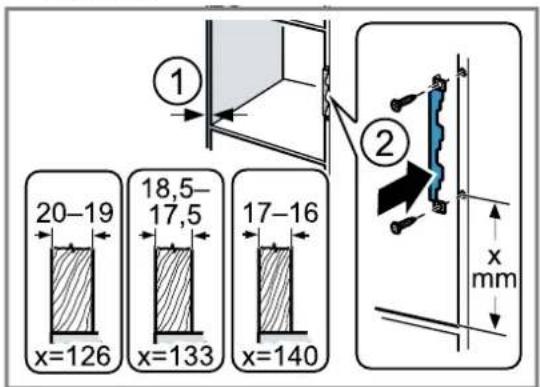
- Determine the wall thickness of the unit. ① An x-value is assigned to the wall thickness
- Note: The x-value corresponds to the clearance between the lower hole on the connection plate and the bottom of the fitted unit.
Screw the connection plate tightly onto the upper unit. ②
When doing so, observe the x-value that was determined.
text_image
20-19 x=126 18,5- 17,5 x=133 17-16 x=140 ① ② x mm15.7 Installation dimensions in the tall unit
Observe the installation dimensions and the safety clearances in a tall unit.

text_image
600 560+8 35 min. 550 380+2 3515.8 Preparing the tall unit
- Determine the wall thickness of the unit. ① An x-value is assigned to the wall thickness.
- Note: The x-value corresponds to the clearance between the lower hole on the connection plate and the bottom of the fitted unit.
Screw the connection plate tightly to the tall unit. ② When doing so, observe the x-value that was determined.

text_image
20-19 x=140 18,5- 17,5 x=147 17-16 x=154 ① ② x mm15.9 Preparing the appliance
If you install your appliance in a tall unit, you must prepare the appliance.
- Remove the middle screw on the base of the microwave.

natural_image
Illustration of a microwave oven with a downward arrow indicating cooling or discharging motion (no text or symbols)- Remove the cover at the base of the microwave.

natural_image
Illustration of a microwave oven with a blue tray and control buttons, showing airflow direction (no text or symbols)- Screw the middle screw tightly on the base of the microwave.

natural_image
Illustration of a microwave oven with a circular arrow indicating rotation or clockwise motion (no text or symbols)- Loosen the two outer screws on the microwave base.

natural_image
Illustration of a microwave oven with two arrows indicating clockwise motion (no text or symbols)- Secure the built-in frame on the microwave base with the two outer screws.

natural_image
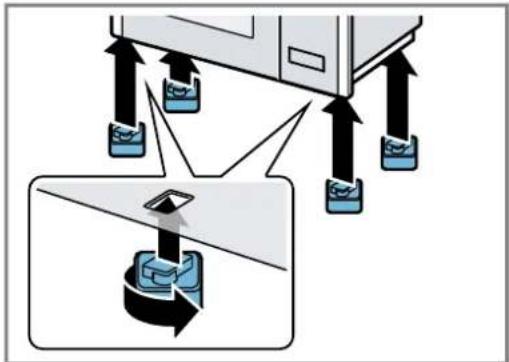
Illustration of a microwave oven with a blue tray and directional arrows indicating motion (no text or symbols)- Secure the four supporting feet to the base of the microwave.
text_image
Diagram illustrating a mechanical or electrical system with multiple devices and a magnified view of a device's internal structure.15.10 Installing the appliance
- Secure the spacers to the appliance in accordance with the wall thickness.
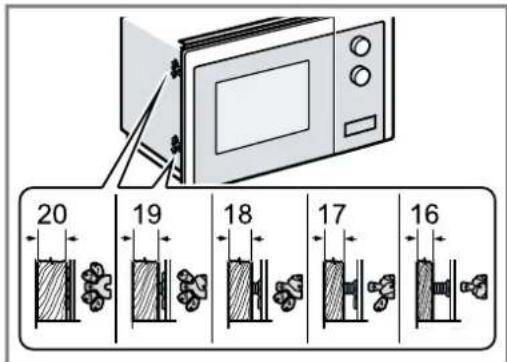
text_image
20 19 18 17 16- Note: Do not trap or kink the power cable.
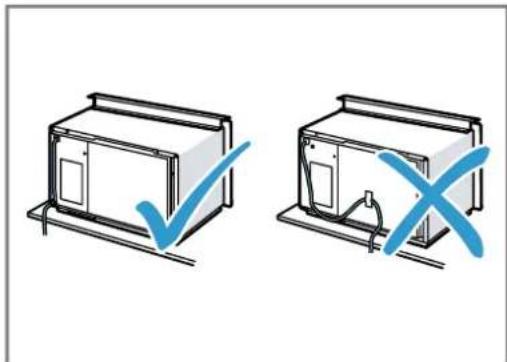
natural_image
Two hand-drawn diagrams showing a device with a checkmark and a cross, no text or symbols present.Insert the appliance into the unit and move it to the right.

natural_image
Diagram of a microwave oven with open doors and internal compartments, showing no text or symbols- Screw the appliance in until the appliance is centrally aligned.

text_image
Diagram illustrating microwave oven installation with labeled components and directional arrows indicating motion- Check the clearance to the adjacent appliances.
The clearance to the adjacent appliances must be at least 3 mm.
- Remove any packaging material and adhesive film from the cooking compartment and the door.
Table des matières
MANUEL D'UTILISATION
1 Sécurité...... 46
text_image
Illustration showing a blue spoon inside a glass with a checkmark and an 'X' symbol, indicating incorrect eye condition.⚠ AVERTISSEMENT – Risque de blessure !
text_image
Two identical icons showing a boat with water and a checkmark and an X symbol, likely indicating equivalence or verification.text_image
Two identical icons showing a boat with water and a checkmark and an X symbol, likely indicating a verification or rejection status.→ "Comment faire", Page 60
text_image
Illustration showing a blue spoon inside a glass with a checkmark and an 'X' mark, indicating incorrect eye condition.ATTENTION!
natural_image
Illustration of a microwave oven with screws, screwdriver, and various small components (no text or symbols)natural_image
Illustration of a microwave oven with a downward arrow indicating cooling or discharging motion (no text or symbols)natural_image
Illustration of a microwave oven with a blue tray and arrows indicating assembly or mounting (no text or symbols)natural_image
Illustration of a microwave oven with a circular arrow indicating rotation (no text or symbols)natural_image
Illustration of a microwave oven with two arrows indicating clockwise motion (no text or symbols)natural_image
Illustration of a microwave oven with a blue tray and directional arrows indicating motion (no text or symbols)text_image
Diagram illustrating a device setup with labeled components and directional arrows, including a magnified view of the component.natural_image
Two technical diagrams showing a door frame with a checkmark and a cross symbol, no text or labels present.natural_image
Diagram of a microwave oven with open doors and internal compartments, showing airflow direction (no text or symbols)text_image
Diagram illustrating microwave oven installation with labeled components and directional arrows indicating motion⚠ WAARSCHUWING – Kans op brand!
⚠ WAARSCHUWING – Kans op letsel!
⚠ WAARSCHUWING – Kans op verstikking!
⚠ WAARSCHUWING – Kans op brand!
⚠ WAARSCHUWING – Kans op explosie!
text_image
Illustration showing a blue spoon inside a glass with a checkmark and an 'X' mark, indicating incorrect eye condition.⚠ WAARSCHUWING – Kans op letsel!
text_image
Two identical icons showing a boat with a wavy line and a checkmark followed by an 'X' symbol, likely indicating cancellation or rejection.text_image
Two instructional icons: one with a boat and checkmark, the other with a rectangle and 'X' symbol.WAARSCHUWING – Kans op brand!
WAARSCHUWING – Kans op letsel!
WAARSCHUWING – Kans op letsel!
text_image
Illustration showing a blue spoon inside a glass with a checkmark and an 'X' mark, indicating a water quality inspection or validation.LET OP!
WAARSCHUWING – Kans op letsel!
WAARSCHUWING – Kans op brand!
natural_image
Illustration of a microwave oven with screw, screwdriver, and kitchen utensils (no text or symbols)15.4 Inbouwmeubel
natural_image
Illustration of a microwave oven with a downward arrow indicating cooling or discharging motion (no text or symbols)natural_image
Illustration of a microwave oven with a blue tray and two arrows indicating downward motion (no text or symbols)natural_image
Illustration of a microwave oven with a circular arrow indicating rotation or clockwise motion (no text or symbols)natural_image
Illustration of a microwave oven with two arrows indicating clockwise motion (no text or symbols)natural_image
Illustration of a microwave oven with a blue tray and directional arrows indicating motion (no text or symbols)text_image
Diagram illustrating a mechanical or electrical system with multiple devices and a magnified view of a device's internal structure.15.10 Apparaat monteren
natural_image
Two hand-drawn diagrams showing a device with a checkmark and a cross, no text or symbols present.natural_image
Diagram of a microwave oven with open doors and internal compartments, showing no text or symbolstext_image
Diagram illustrating microwave oven installation with labeled components and directional arrows indicating motionValid within Great Britain:
Imported to Great Britain by
BSH Home Appliances Ltd.
Grand Union House
Old Wolverton Road
Wolverton, Milton Keynes
MK12 5PT
United Kingdom
BSH Hausgeräte GmbH
Carl-Wery-Straße 34
81739 München, GERMANY


9001611026
020428
de, en, fr, nl