Contemporary EV0P002B - Watch ORIENT - Free user manual and instructions
Find the device manual for free Contemporary EV0P002B ORIENT in PDF.



User questions about Contemporary EV0P002B ORIENT
0 question about this device. Answer the ones you know or ask your own.
Ask a new question about this device
Download the instructions for your Watch in PDF format for free! Find your manual Contemporary EV0P002B - ORIENT and take your electronic device back in hand. On this page are published all the documents necessary for the use of your device. Contemporary EV0P002B by ORIENT.
USER MANUAL Contemporary EV0P002B ORIENT
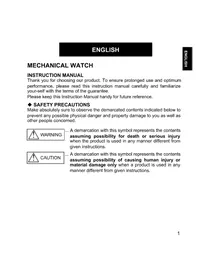
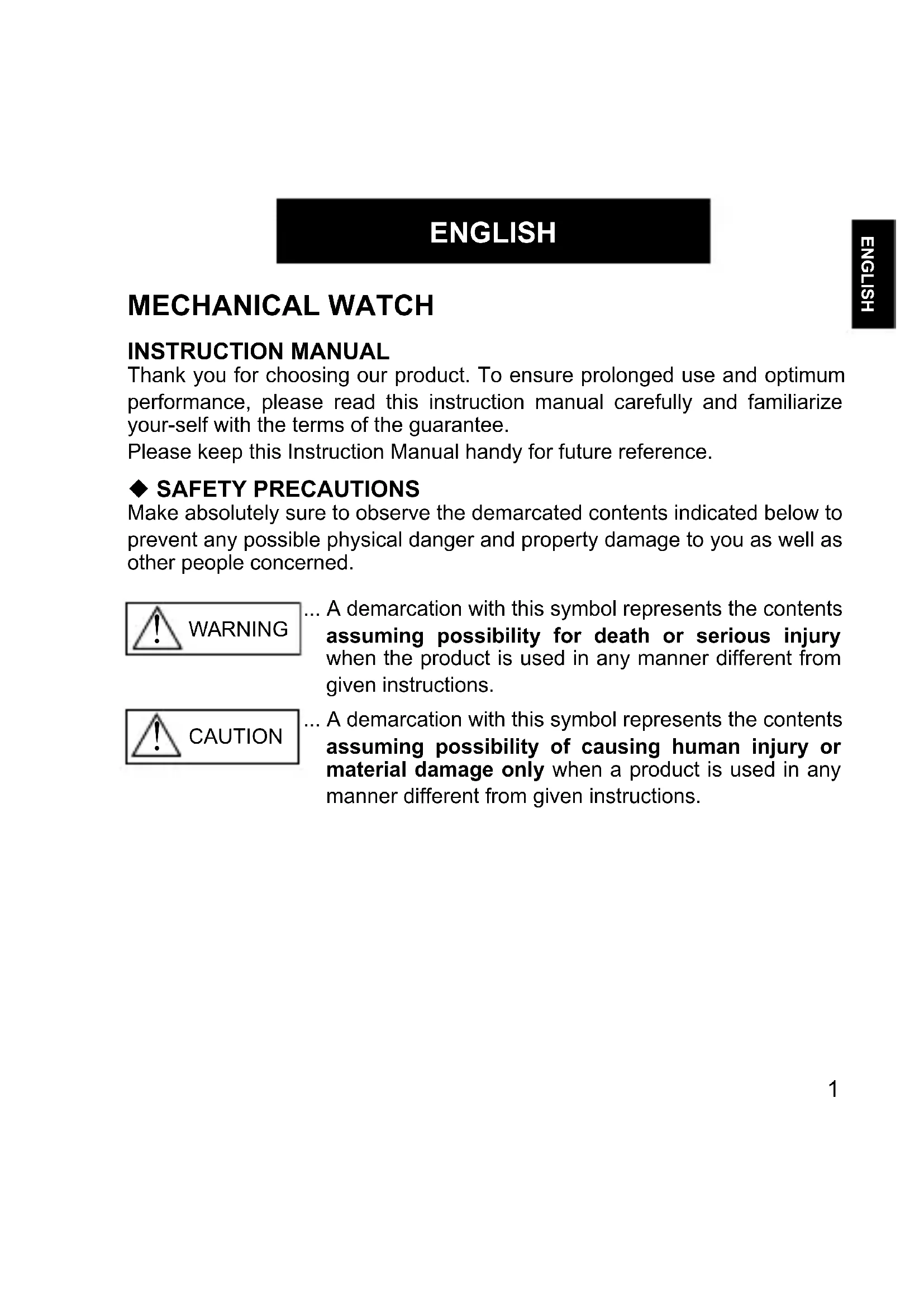
Thank you for choosing our product. To ensure prolonged use and optimum performance, please read this instruction manual carefully and familiarize yourself with the terms of the guarantee.
Please keep this Instruction Manual handy for future reference.
SAFETY PRECAUTIONS
Make absolutely sure to observe the demarcated contents indicated below to prevent any possible physical danger and property damage to you as well as other people concerned.
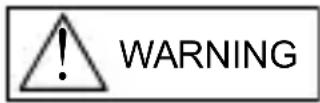
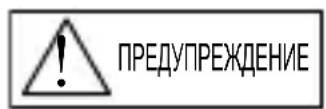
... A demarcation with this symbol represents the contents assuming possibility for death or serious injury when the product is used in any manner different from given instructions.
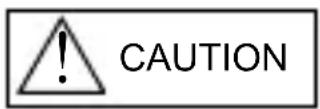
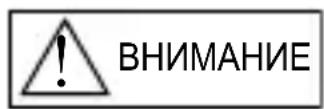
... A demarcation with this symbol represents the contents assuming possibility of causing human injury or material damage only when a product is used in any manner different from given instructions.
IN HANDLING THE WATCH
(1) Water-resistance
| Type\Conditions of use | Underwater operation of crown and operation of crown with drops of water on it | Exposure to small amounts of water (face-washing, rain, etc.) | Water sports (swimming, etc.), frequent contact with water (car-washing, etc.) | Skin diving (air tanks are not used) | Scuba diving (air tanks are used) | Mixed-gas Diving (using helium gas) | ||
| Non water resistant | Without WATER RESISTANT (WATER RESIST) | × × | × × | × × | ||||
| Water resistant watches | Water resistant for daily life | WATER RESISTANT (WATER RESIST) | × | ○ | × × × × × | |||
| Reinforced water resistance for daily life I | WATER RESISTANT (WATER RESIST) 50m (5bar) | × | ○ | ○ | × × × × | |||
| Reinforced water resistance for daily life II | WATER RESISTANT (WATER RESIST) 100m (10bar) 200m (20bar) | × | ○ | ○ ○ | × | × | ||
| Diver's watches | Diver's watch for Air Diving | AIR DIVER'S 100m / 150m 200m | × | ○ | ○ ○ | ○ | × | |
| Diver's watch for Mixed-gas Diving | He-GAS DIVER'S 200m / 300m /... | × | ○ | ○ ○ | ○ | ○ | ||
- It is recommended that you use the watch correctly following the above-mentioned scope of usage after ascertaining water resistance precautions marked on the dial or caseback.
WARNING
① A watch with water resistance for daily life 30m (3 bar) can be used during face-washing, etc. but cannot be used in an environment in which it will be submerged in water.
② A watch with reinforced water resistance for daily life I 50m (5 bar) can be used while swimming, etc. but cannot be used during any type of diving including skin diving.
(3) A watch with reinforced water resistance for daily life II 100m or 200m (10 or 20 bar) can be used while skin diving, but cannot be used while scuba diving using oxygen tanks or saturation diving using helium gas, etc.
CAUTION
④ Keep the crown pushed in at all times (in the normal position) while using the watch. If the crown is the screwed-down type, check that it is securely screwed down.
⑤ Do not operate the crown underwater, or while the watch is wet. Water may enter the interior of the watch and defeat the water resistance.
⑥ If your watch is non-water resistant, beware of splashes of water (during face washing, rain, etc.) and sweat. If the watch becomes wet from water or sweat, wipe the moisture off with a dry, soft cloth.
⑦ Even with a water resistant watch for everyday use, avoid directing strong jets of mains water onto the watch. Water pressure above the limit can apply, which may defeat the water resistance.
⑧ With a water resistant watch for everyday use, rinse sea water off the case after exposure, then wipe it thoroughly to avoid corrosion and other effects.
The interior of the watch contains some amount of moisture, which may cause fogging on the inside of the glass when the outside air is cooler than the internal temperature of the watch. If the fogging is temporary it causes no harm inside the watch, but if prolonged, or if water enters the watch, consult your place of purchase and do not leave the problem untreated.
(2) Shock
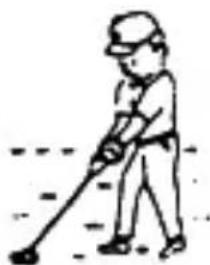
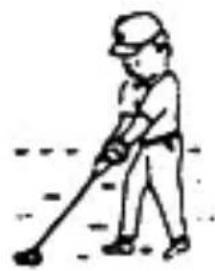
① Be sure not to carry the watch when you engage in strenuous sports, whereas playing such light sports as golf, etc., will not adversely influence the watch.
② Avoid a violent shock such as dropping the watch on the floor.
(3) Magnetism
① If the watch is left at a location with strong magnetism for an extended period of time, the components may be magnetized, resulting in malfunction. Be careful.
② The watch may temporarily speed up or slow down when exposed to magnetism. Precision is restored when placed away from magnetism. In such a case, reset the time.
(4)Vibration
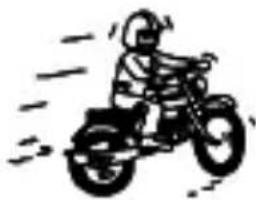
The watch may lose precision if subjected to strong vibrations such as from riding motorcycles, using jackhammers, chain saws, etc.
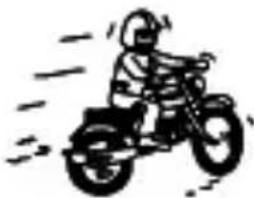
(5) Temperature
In environments below and above normal temperatures (5^ - 35^) , the watch may malfunction and stop.
CAUTION
Do not use the watch at high temperatures, such as in a sauna. The watch may heat and cause burns.
(6) Chemicals, Gases, etc.
Utmost caution must be exercised when coming into contact with gases, mercury, chemicals (paint thinner, gasoline, various solvents, detergents containing such components, adhesives, paint, drugs, perfumes, cosmetics, etc.), and so forth. Such may cause discoloration of the watchcase, watchband, and dial face. Discoloration, deformation, and damage to various resin-based component parts may also occur.
(7) About accessory parts
Do not attempt to disassemble or modify the watch.
Store the bracelet/strap pin and other small parts out of the reach of children.
If any small parts are swallowed, immediately contact a doctor.
(8) Allergic reactions
If you develop a skin rash or your skin becomes abnormally irritated due to contact with the watch or strap, stop wearing the watch immediately and consult a doctor.
(9) About "luminous light"
Some models have luminous light on the hands and dial.
The luminous light is a safe paint that stores sunlight and artificial light without using any radioactive material, and emits that light in a dark setting. As the paint discharges the stored light, it will become dimmer over time. The amount of light emitted and the time that light is emitted depends on various factors when the light is stored, such as the shape of the glass, the thickness of the paint, surrounding brightness level, the distance from the watch to the light source, and the light absorption level. Please note that when not enough light energy is stored, the watch may emit weak light or emit light for only a short time.
(10) Water resistant watchband
Some models employ leather and nylon bands on which a special treatment to resist perspiration and water absorption have been applied. Please understand that the water resisting effect of this watchband can be lost depending on the period and conditions of use.
HOW TO IDENTIFY THE CALIBER NUMBER
Check the caliber number by referring to the model number of your watch or the case code on the watch's case back.
1. Searching by 10-digit model number
Check the 10-digit model number on the guarantee supplied with your watch. You can also see the number on the product tag put on the watch. Its second and third digits indicate the caliber number of your watch.
Example: If the model number is "FX01002B", the caliber number is "FX".
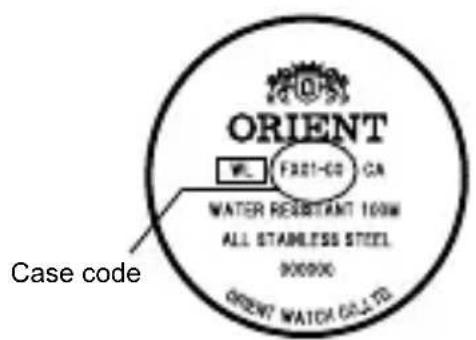
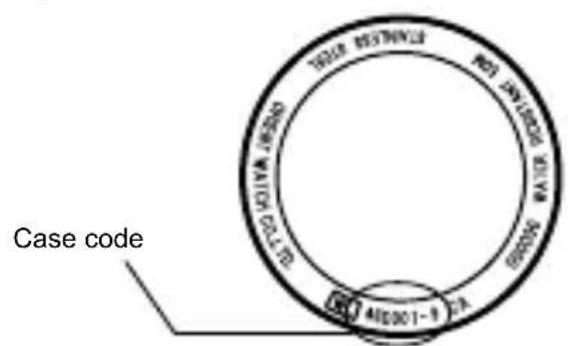
2. Searching by the case code
See the case code on the case back of your watch.
A: If the case code is 6 digits, the first two digits indicate the caliber number.
B: If the case code is 8 or 9 digits, the first three digits indicate the movement number. Search the caliber number corresponding to the movement number referring to the correspondence table.
Example A
Example B
Example A: When the case code is "FX01-C0", the caliber number is "FX".
Example B: When the case code is "46D001-9", the movement number is "46D". The caliber number corresponding the number will be found "EU" on the table.
- The place of case code may vary and its letter size may be small and difficult to see depending on the characteristics of watches.
- The pictures and illustrations on this manual may differ from the actual appearance of your watch but the function and operation procedures are the same.
SPECIFICATIONS
| Caliber | Number of Jewels | Date | Day of week 24H hand | Daily accuracy Remark1* | |
| ES 46C 21 | ○ | Hand Indicating type | - +25~-15s/day | 9:00 p.m. ~ 2:00 a.m. | |
| ET 46B 21 | ○ | Hand Indicating type | ○ | +25~-15s/day | |
| EU 46D 21 | ○ | ○ | - +25~-15s/day | 9:00 p.m. ~ 2:00 a.m. | |
| EV 46E 21 | ○ | Wide type | - +25~-15s/day | 10:00 p.m. ~ 1:00 a.m. | |
| FE 46P 21 | ○ | - | ○ | +25~-15s/day | |
| FN 46V 21 | ○ | Wide+AM/PM | - +25~-15s/day | 9:00 p.m. ~ 3:00 a.m., 10:30 a.m. ~ 1:30 p.m. | |
| FP 46W 21 | ○ | Dot or arrow indicating | - +25~-15s/day | 9:00 p.m. ~ 3:00 a.m. | |
| FX 46Y 21 | ○ | ○ | - +25~-15s/day | 9:00 p.m. ~ 2:00 a.m. |
(1)Vibrations:21.600 vibrations/hour
(2) Running time: More than 40 hours
(3) Shock-proof bearings to protect the balance with hairspring from shocks.
The stated daily accuracy is in the following conditions:
- After 24 hours at room temperature with the mainspring wound fully and the dial facing up.
- Due to the characteristics of the automatic winding watch, the time may deviate from the stated "daily accuracy" depending on the following conditions: amount of time the watch is worn each day, position of the watch, movement of your arm, winding condition of the mainspring.
Product specifications may change without notice, for improvement.

CAUTION
- Avoid setting the date during the time periods listed in "Remark1" above since the calendar changes during this time. If the date is set during this time period, the date may not change or the watch may malfunction. Be sure to move the hour and minute hands away from this time period when setting the date.
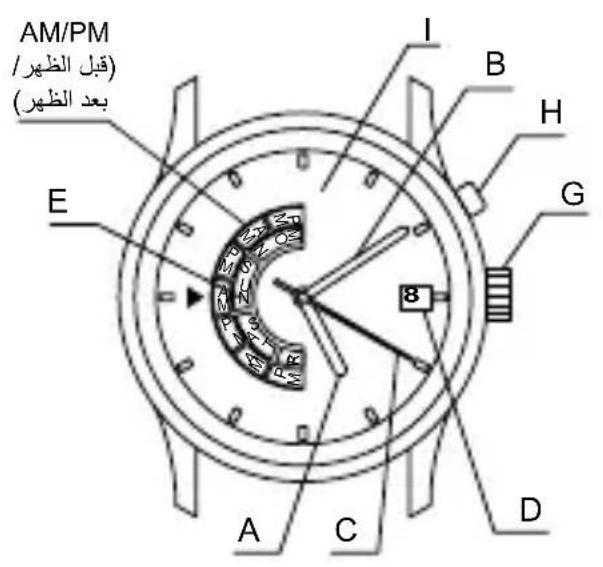
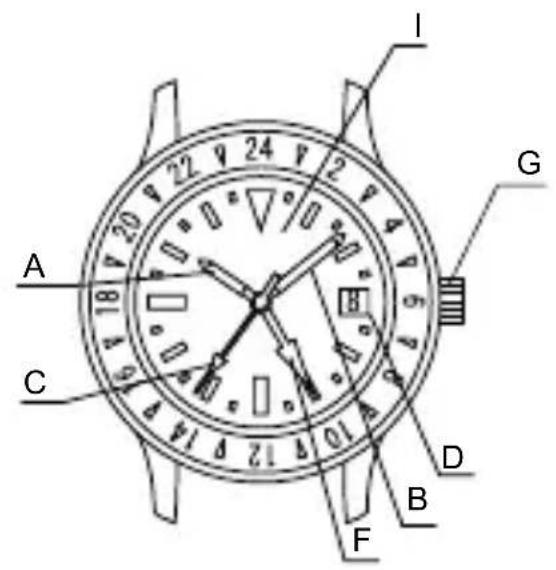
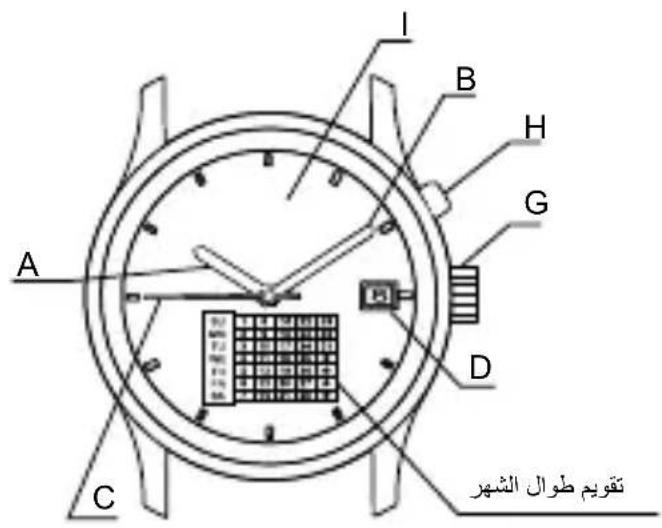
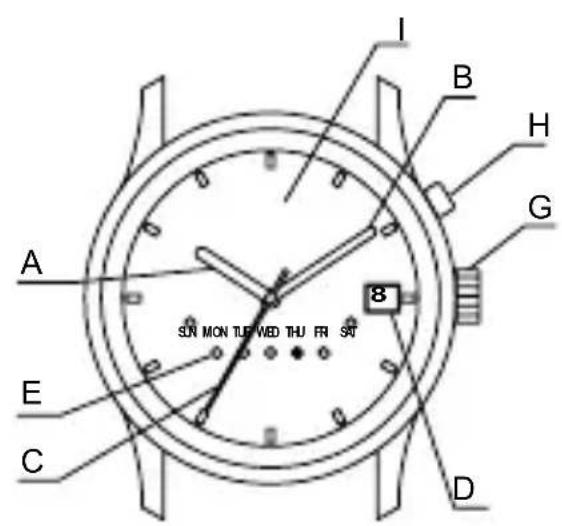
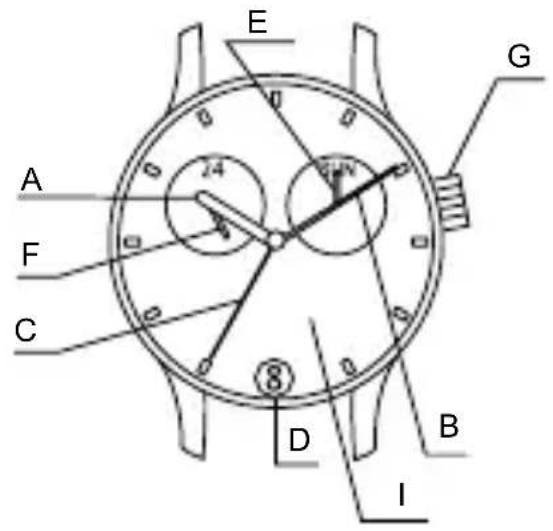
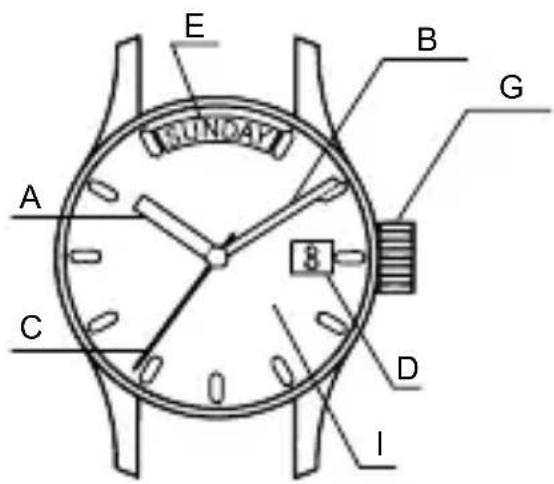
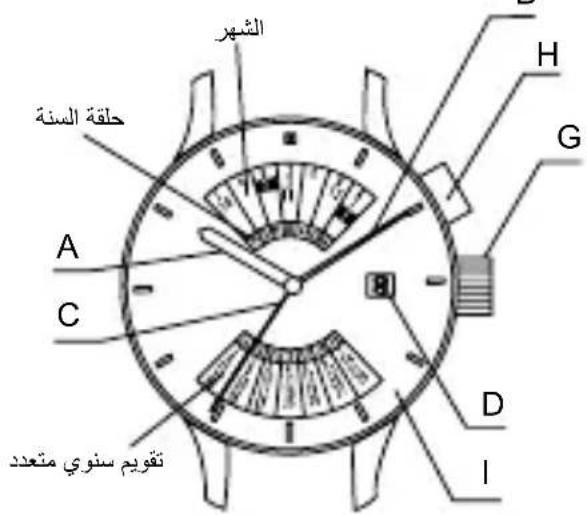
NAMES OF INDIVIDUAL COMPONENT PARTS
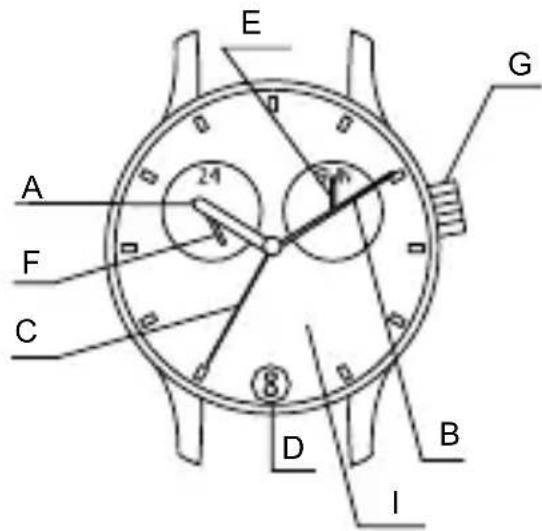
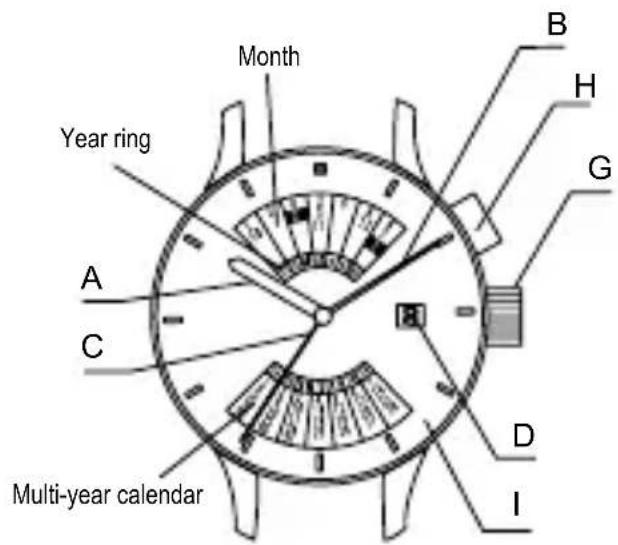
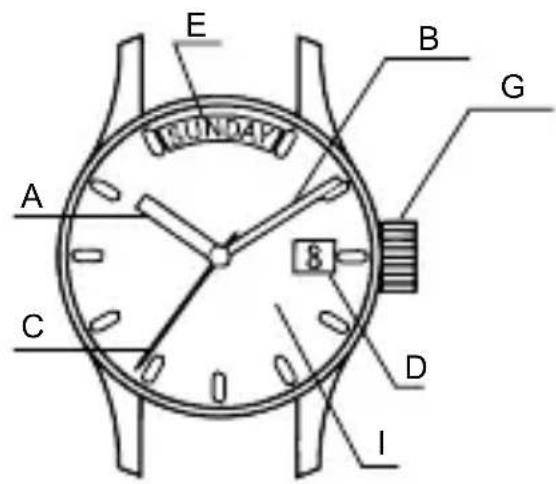
$$ < F E (4 6 P) > < F N (4 6 V) > $$
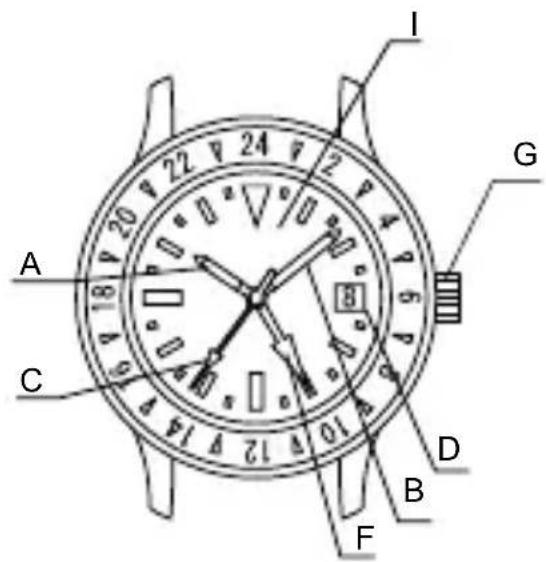
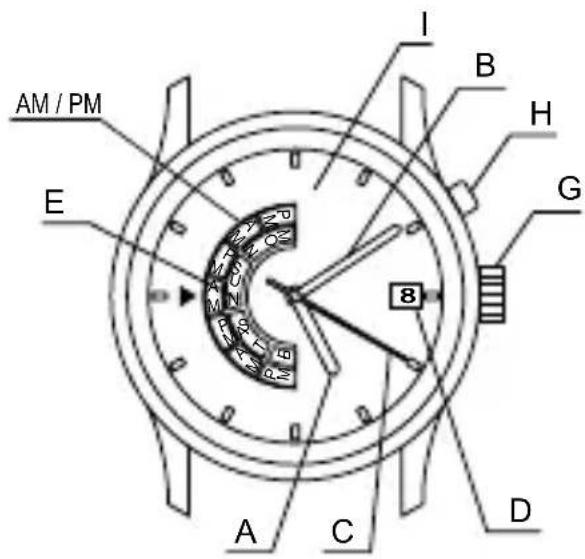
$$ < F P (4 6 W) > < F X (4 6 Y) > $$
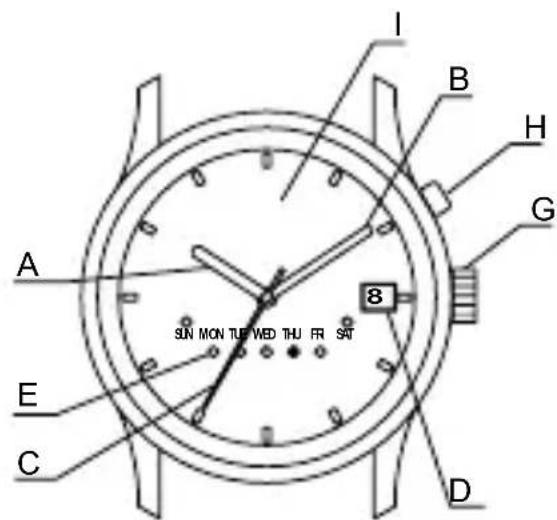
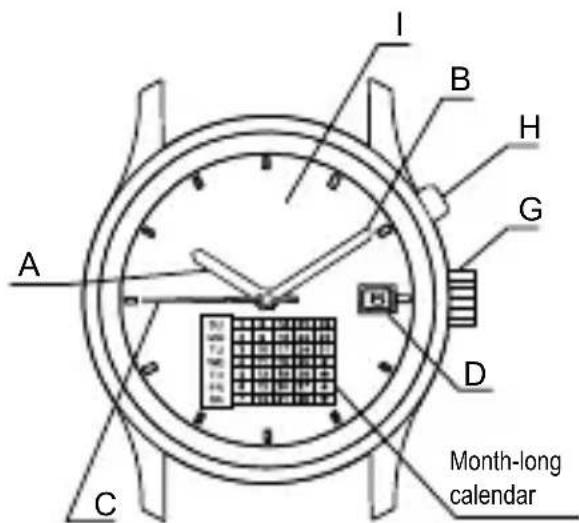
- The position of the crown, date indicator, etc. may vary on some models.
AUTOMATIC WINDING MECHANISM
(1) This is an automatic winding mechanical watch.
(2) The mainspring is wound by natural movements of your arm when wearing the watch on your wrist.
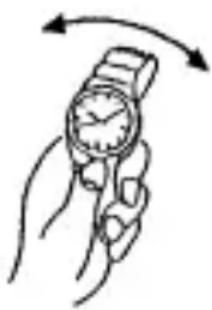
(3) If your watch stops, swing the watch back and forth ten or more times to re-start the second hand. After it starts moving, set the date and time.
(4) This watch will run approximately 40 hours after it is fully wound. If it is not wound enough, the watch may lose accuracy. In order to maintain the watch's accuracy, we recommend wearing the watch at least 8 hours a day.
MODELS WITH SCREWED-DOWN CROWN
Depending on the model, you may not be able to pull the crown out without unscrewing it (models with screwed-down crown).
Operate this type of watch as follows:
(1) Before setting the date and time, first turn the crown to the left to loosen the screw lock.
(2) After setting the date and time, turn the crown to the right while pressing in, until it stops turning to securely tighten the screw.
HOW TO SET THE TIME [EU(46D), FX(46Y), FE(46P), FN(46V), FP(46W)]
(1) Pull out the crown to the second click. The second hand does not stop.
(2) Turn the crown clockwise and set the current time.
Since this watch comes with a calendar, make sure that you set either a.m. or p.m. without fail.
The date changes at [twelve o'clock midnight].
When setting the time, first bring the hand back slightly earlier the actual time and then move it forward to the actual time.
(3) Press the crown in to the normal position.
![ORIENT Contemporary EV0P002B - HOW TO SET THE TIME [EU(46D), FX(46Y), FE(46P), FN(46V), FP(46W)] - 1](/content/2026/03/497261/images/12f75904ae99c1036a1935fd4d47582de8247db60243877d1bd50eeda1adf7fc.jpg)
![ORIENT Contemporary EV0P002B - HOW TO SET THE TIME [EU(46D), FX(46Y), FE(46P), FN(46V), FP(46W)] - 2](/content/2026/03/497261/images/fbea28d904b3db169911ae14ab8e7fa6d7f7717a8df1909a133444ca0e85ba92.jpg)
![ORIENT Contemporary EV0P002B - HOW TO SET THE TIME [EU(46D), FX(46Y), FE(46P), FN(46V), FP(46W)] - 3](/content/2026/03/497261/images/8ae8c1103b2f9601d7b28f12d17545ec59a715c6f7d26b5e7848bd6027778960.jpg)
HOW TO SET THE DATE [ALL MODELS]
(1) Pull the crown out to the first click. The crown on this watch can be pulled out to the first and second clicks.
(2) Turn the crown counterclockwise until you reach today's date.
(3) Press the crown in to the normal position.
![ORIENT Contemporary EV0P002B - HOW TO SET THE DATE [ALL MODELS] - 1](/content/2026/03/497261/images/1b19b02fbef463e9e9b4276151eebafc50887b7a982b0a1e8058a48f86985460.jpg)
The position of the crown, date indicator, etc. may vary on some models.
About date correction at month's end:
Date correction is necessary for months with 30 days or less. Set the date to the [1st day] on the first day of the next month.
- ET(46B)
The 24-hour hand moves in conjunction with the hour hand and cannot be set by itself.
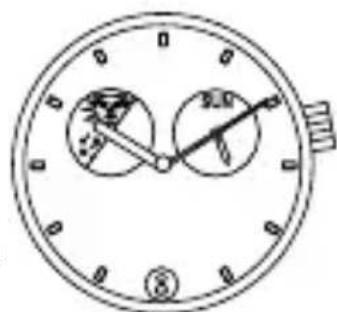
Some watches may display time using pictures or symbols (Sun & Moon) instead of the 24-hour hand.
![ORIENT Contemporary EV0P002B - HOW TO SET THE DATE [ALL MODELS] - 2](/content/2026/03/497261/images/5d2f7609d5319584e635e5320d503e2922ff0babf8920e31cea0c98c6032b4e8.jpg)
HOW TO SET THE TIME & DAYS OF THE WEEK [ES(46C), ET(46B)]
Set the day of the week first by turning the hour hand and minute hand since this watch does not come with a correcting mechanism for the day of the week.
(1) Pull the crown out to the second click. (Second hand does not stop.)
(2) At first, turn the crown and set the day of the week.
Turn the crown clockwise until the hand indicates the day of the week.
Turn the crown counterclockwise and bring
back the
hands to
about 11:30
p.m. (At this
time, the day
of the week
does not
change.)
Again, turn the crown clockwise until the hand indicates the next day of the week.
Repeat this operation and set the day of the week.
![ORIENT Contemporary EV0P002B - HOW TO SET THE TIME & DAYS OF THE WEEK [ES(46C), ET(46B)] - 1](/content/2026/03/497261/images/7c4a3d1c672790bb4c9a16db71a225e922edb33339129dc239b0e38d1aaefe96.jpg)
![ORIENT Contemporary EV0P002B - HOW TO SET THE TIME & DAYS OF THE WEEK [ES(46C), ET(46B)] - 2](/content/2026/03/497261/images/c7695f0ce6c3d07612d3388fec4412ed440dc93761ece2ea32b7bbb4fc6cec3e.jpg)
![ORIENT Contemporary EV0P002B - HOW TO SET THE TIME & DAYS OF THE WEEK [ES(46C), ET(46B)] - 3](/content/2026/03/497261/images/3a8e0812b9657190d5fd051f81f6cfb6575b805c0d29dc3bdc86b34e32cf53be.jpg)
(3) Turn the crown clockwise to set the time.
- Since this watch comes with a calendar, be sure to set either a.m. or p.m.
The date changes at [twelve o'clock midnight].
Also, you can check a.m. and p.m. with the 24-hour hand.
Some models may use a picture-based system (Sun & Moon) instead of the 24-hour hand. The time is twelve o'clock midnight when the Moon symbol is at the top of the window.
- When setting the time, first bring the hand back slightly later than the actual time and then move it forward to the actual time.
(4) Press the crown in to the normal position.
![ORIENT Contemporary EV0P002B - HOW TO SET THE TIME & DAYS OF THE WEEK [ES(46C), ET(46B)] - 4](/content/2026/03/497261/images/258f06121d3c1626d33255cd949a86afefa491db1b8fe33393f1bbd7c3928841.jpg)
Turn clockwise
![ORIENT Contemporary EV0P002B - HOW TO SET THE TIME & DAYS OF THE WEEK [ES(46C), ET(46B)] - 5](/content/2026/03/497261/images/e9c755562f624007710f198c6a6c8c3a4192cd0789f809fba174771caa174a1e.jpg)
HOW TO SET THE TIME & DAYS OF THE WEEK [EV(46E)]
Set the day of the week first by turning the hour hand and minute hand since this watch does not feature a correcting mechanism for the day of the week.
(1) Pull the crown out to the second click. (Second hand does not stop.)
(2) At first, turn the crown and set the day of the week.
Turn the crown clockwise until the hand indicates the day of the week.
If a day of the week is between two days of the week, turn the crown until a day is shown.
Turn the crown counterclockwise and bring back the hands to about 11:30 p.m. (At this time, the day of the week does not come back.)
Again, turn the crown clockwise until the next day of the week is shown.
Repeat this operation and set the day of the week.
(3) Turn the crown clockwise to set the time. Since this watch comes with a calendar, be sure to set either a.m. or p.m.
The date changes at [twelve o'clock midnight].
When setting the time, first bring the hand back slightly later than the actual time and then move it forward to the actual time.
(4) Press the crown in to the normal position.
![ORIENT Contemporary EV0P002B - HOW TO SET THE TIME & DAYS OF THE WEEK [EV(46E)] - 1](/content/2026/03/497261/images/7f7b8a4cc7b9f78042db0f289116d46c1d737e4b4efab107968a4f4748ce41ac.jpg)
![ORIENT Contemporary EV0P002B - HOW TO SET THE TIME & DAYS OF THE WEEK [EV(46E)] - 2](/content/2026/03/497261/images/7166fd15c2640b0038f1914261ba236b08457994e7837dee26567c12340da324.jpg)
![ORIENT Contemporary EV0P002B - HOW TO SET THE TIME & DAYS OF THE WEEK [EV(46E)] - 3](/content/2026/03/497261/images/1ff75b430ab186c14a11d3e3c0555932fd3dec1f19e3cddbab6c91affe9d8f39.jpg)
![ORIENT Contemporary EV0P002B - HOW TO SET THE TIME & DAYS OF THE WEEK [EV(46E)] - 4](/content/2026/03/497261/images/d4e0e024f3f222cd45283add5dcdd8fb478e1e4b5280a3f37685134bf08168c3.jpg)
![ORIENT Contemporary EV0P002B - HOW TO SET THE TIME & DAYS OF THE WEEK [EV(46E)] - 5](/content/2026/03/497261/images/3ee8251c800686e27345dd636c052eafc45f5fe9b38b7afcca30b768de52a7a1.jpg)
HOW TO SET THE DAY OF THE WEEK & AM/PM [FN(46V)]
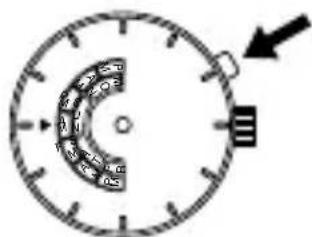
Press the click button at the two o'clock position to set AM/PM and the day of the week.
When setting the time, be sure that AM/PM is set correctly.
Example: Changing the display from SUN AM to MON AM
(1) Press the click button to change the display from SUN AM to SUN PM.
(2) Press the click button again to change SUN PM to MON AM.
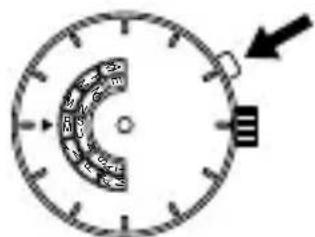
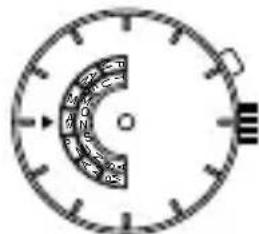
- For types of watches with a click button that cannot be pressed with your finger (i.e. the "hidden button" type)
The day of the week can be set by pressing the click button using a sharp, pointed object such as a precision screwdriver, a pair of tweezers or a metal pin.
The layout of the days of the week and the location of the window vary from model to model.
HOW TO SET THE DAY OF THE WEEK [FP(46W)]
There are models that indicate the day of the week with (dot) or (arrow). Though display methods are different, operation methods are the same.
See below for operation methods.
(Dot-indicating type)
Press the click button at the two o'clock position to set the day of the week.
![ORIENT Contemporary EV0P002B - HOW TO SET THE DAY OF THE WEEK [FP(46W)] - 1](/content/2026/03/497261/images/be808117d371ddfb11947d7df08d953daff3ac6b11ee176b2c9d8e651cbb3235.jpg)
(Arrow-indicating type)
Press the click button at the two o'clock position to set the day of the week.
![ORIENT Contemporary EV0P002B - HOW TO SET THE DAY OF THE WEEK [FP(46W)] - 2](/content/2026/03/497261/images/fc85edb4cd91a6f06f92c8a884d5d096c5238235295949cdb3a13bae31a2ec74.jpg)
- For types of watches with a click button that cannot be pressed with your finger (i.e. the "hidden button" type)
The day of the week can be set by pressing the click button using a sharp, pointed object such as a precision screwdriver, a pair of tweezers or a metal pin.
The layout of the days of the week and the location of the window vary from model to model.
HOW TO USE THE MULTI-YEARCALENDAR [EU(46D)]
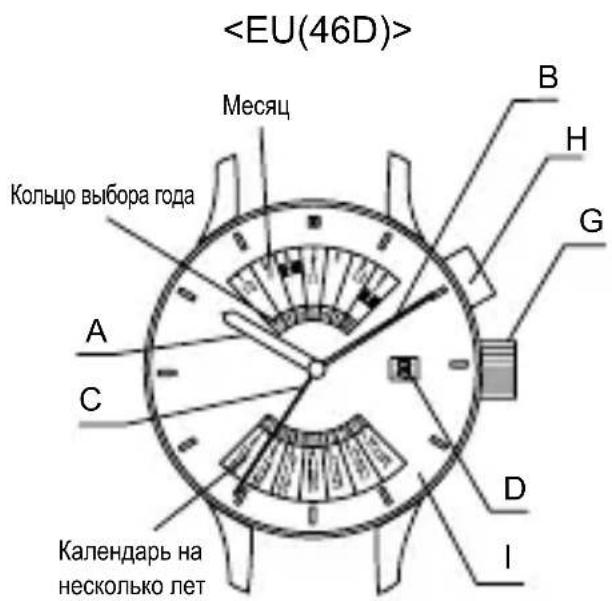
[NAMES AND FUNCTIONS OF COMPONENT PARTS]
![ORIENT Contemporary EV0P002B - [NAMES AND FUNCTIONS OF COMPONENT PARTS] - 1](/content/2026/03/497261/images/a133811fe9c2539fc77253a596b799320c388a326ce84929bd6217d15c32935e.jpg)
- The click button, location of the date indicator, and style of the month indicator may vary by model.
[HOW TO SET THE MULTI-YEAR CALENDAR]
Press the click button until the month to be set lines up with the last two digits of the year to be set at the top of the dial.
- To display the month of January or February during a leap year, line up the last two digits of the year with the appropriate 1 or 2 in the black box. The last two digits of the year for a leap year are printed in red.
![ORIENT Contemporary EV0P002B - [HOW TO SET THE MULTI-YEAR CALENDAR] - 1](/content/2026/03/497261/images/e2027e5340bc014e86e9aae294487e36251bf4daa8ea01012013e305f6424442.jpg)
A calendar with the days for the specified month in their appropriate places is displayed at the bottom of the dial.
![ORIENT Contemporary EV0P002B - [HOW TO SET THE MULTI-YEAR CALENDAR] - 2](/content/2026/03/497261/images/5db05ef8feb5696c31e2e1b14e772b7f79c1cd9b6500c0c3a8586ae287a29a78.jpg)
HOW TO USE THE DUAL TIME FUNCTION [FE(46P)]
You can see the time for two different time zones, one for the city you are in and another for any other city, using the rotating bezel and the 24-hour hand.
(1) First be sure that the watch is showing the correct time.
(2) Get the time difference for the city you want to know the time of. (See Comparison table of standard times.)
(3) When the time difference is a negative number, turn the bezel clockwise to that number of hours. When the time difference is positive, turn the bezel counterclockwise to that number of hours.
(4) The number on the bezel where the 24-hour hand is pointing will be the time in the city you selected.
Example: When you want to know the time in London while you are in Japan London time is 9 hours behind Japan. Therefore, turn the rotating bezel clockwise 9 hours. The hours and minutes shown by the watch hands is the time in Japan. The number on the bezel where the 24-hour hand is pointing is the time in London. (Japan time: 10:09 a.m., London time: 01:09 a.m.)
![ORIENT Contemporary EV0P002B - HOW TO USE THE DUAL TIME FUNCTION [FE(46P)] - 1](/content/2026/03/497261/images/84dc663a041e2e21814821116202c4f0bb74bc79736b10a4092b82aa0821ad09.jpg)
Example: When you want to know the time in Japan while you are in London Japan time is 9 hours ahead of the time in London. Therefore, turn the rotating bezel counterclockwise 9 hours. The hours and minutes shown by the watch hands is the time in London. The number on the bezel where the 24-hour hand is pointing is the time in Japan. (London time: 10:09 a.m., Japan time 07:09 p.m.).
![ORIENT Contemporary EV0P002B - HOW TO USE THE DUAL TIME FUNCTION [FE(46P)] - 2](/content/2026/03/497261/images/01cb02572da2fb068e7ca1f9a046cd6eb0c9b4566b0d10fa36127a9f8e99dd61.jpg)
USING THE ROTATING WORLD TIME RING
When you turn the rotating indicator ring and align the city names with the times, you can read the respective times of the cities right away.
Example: It is 10:00 p.m. in Tokyo now.
(1) In the 24-hour system, 10:00 p.m. is 22:00 hours.
(2) Set TOKYO on the World Time Ring to the 22-hour position of the 24-hour scale.
- The World Time Ring comes in various types, such as with a crown for setting world time or with a rotating bezel.
(3) The position that CHICAGO on the World Time Ring indicates is the time in Chicago.
-
The position indicated by each scale on the World Time Ring represents the time in that country. Using this method, you can simultaneously see the time in countries around the world by using the scales on the World Time Ring and reading the dial.
-
The position of the inner ring crown and details of the date indicator may vary depending on the model.
COMPARISON TABLE OF STANDARD TIMES
| City indication Typical city Time differen | ces with GMT | |
| GMT GMT ±0 | ||
| PAR PARIS +1 | ||
| CAI CAIRO +2 | ||
| MOW MOSCOW +3 | ||
| DXB DUBAI +4 | ||
| KHI KARACHI +5 | ||
| DAC DHAKA +6 | ||
| BKK BANGKOK +7 | ||
| BJS | BEIJING | +8 |
| TYO TOKYO +9 | ||
| SYD SYDNEY +10 | ||
| NOU | NOUMEA | +11 |
| AKL AUCKLAND | +12 | |
| MDY | MIDWAY | -11 |
| HNL HONOLULU | -10 | |
| ANC ANCHORAGE | -9 | |
| LAX LOS ANGELES | -8 | |
| DEN DENVER | -7 | |
| CHI CHICAGO | -6 | |
| NYC NEW YORK | -5 | |
| SDQ | S. DOMINGO | -4 |
| RIO | RIO DE JANEIRO | -3 |
| SGS S.GEORGIA | -2 | |
| PDL AZORES | -1 |
- Some countries use daylight savings time. There may be cases where the time difference and daylight savings time change to suit the country's convenience.
- The city names listed are major cities in various countries of the world. Please note in advance that some product specifications are subject to change for product improvement purposes.
- If planning to use the watch in a place not listed in the table above, select a city in the same time zone as the city for which you want to indicate time.
HOW TO ADJUST A DAY OF THE WEEK [FX(46Y)]
Correction of a day of the week is required the beginning of a month.
Please unite the day of the week display of a dial on the day at the beginning of a month.
Please adjust the following procedure.
![ORIENT Contemporary EV0P002B - HOW TO ADJUST A DAY OF THE WEEK [FX(46Y)] - 1](/content/2026/03/497261/images/4f657e3fe36c25c0556013bde2df94b42ea9acf90f4504e4cd463c7c22c82ffa.jpg)
Push the click button, and adjust a day of the week.
Whenever it pushes a day of the week display twice, it changes.
(* It does not change to the right position only by pushing once)
Please repeat this operation and adjust with the day of the week of that month.
- For types of watches with a click button that cannot be pressed with your finger (i.e. the "hidden button" type)
The day of the week can be set by pressing the click button using a sharp, pointed object such as a precision screwdriver, a pair of tweezers or a metal pin.
USING THE ROTATING ORIENTATION RING [FE (46P)]
Turning the crown will rotate the rotating orientation ring. If you point the hour hand in the direction of the sun while keeping the watch horizontal, the direction between the hour hand and twelve o'clock will face south.
(1) In the morning, with twelve o'clock as the origin, "the position midway between twelve o'clock and the hour hand counterclockwise from twelve o'clock" will point toward south. Refer to FIG. 1.
(2) In the afternoon, with twelve o'clock as the origin, "the position midway between twelve o'clock and the hour hand clockwise from twelve o'clock" will point toward south. Refer to FIG. 2.
The orientation ring is labeled with indications for north, south, east, and west (N, S, E, and W) as well as numbers for degrees of angles to allow directions to be known quickly.
![ORIENT Contemporary EV0P002B - USING THE ROTATING ORIENTATION RING [FE (46P)] - 1](/content/2026/03/497261/images/f76c007a6ce5229b04ec4a7b59966133fd65b233119c47df12d1a18a4487e29d.jpg)
FIG. 1
![ORIENT Contemporary EV0P002B - USING THE ROTATING ORIENTATION RING [FE (46P)] - 2](/content/2026/03/497261/images/ae4b1bf103a37050533701f04fbf78d5bbe591a89f1b1e63dca25ed29c7d546c.jpg)
FIG. 2
This function can only be used in the northern hemisphere. However, you may not be able to use it in regions in latitudes lower than the Tropic of Cancer, depending on the season.
- To use this function, you need to be able to confirm the position of the sun.
- To use this function, you need to set the watch's time to the local time of the place where you are located.
- This function is merely a simple compass and cannot be used to determine true direction.
Example: When wanting to know the direction of east at nine o'clock in the morning. Refer to FIG. 1.
(1) Point the hour hand toward the sun.
(2) The position midway between the hour hand (nine o'clock) and twelve o'clock points toward south, so turn the S on the rotating orientation ring to line it up with the position of 10:30 on the dial.
(3) In this case, the direction in which E points (7:30) on the rotating orientation ring is east.
HOW TO SET THE MONTHLYCALENDAR
Some models come with a calendar function which uses an inner ring or bezel on the exterior of the case to indicate the date.
The monthly calendar can be used by turning the crown to set the rotating ring inside the watchcase and aligning it with the day of the week that is printed on the dial.
Turn the crown to align the first day of the month to the appropriate day of the week.
- Note that when setting the first day of the month, if the days at the end of the month (31st, etc.) are aligned with the section that does not have the days of the week printed on the dial (3 - 4 o'clock side), days of the week will not be indicated at the end of the month.
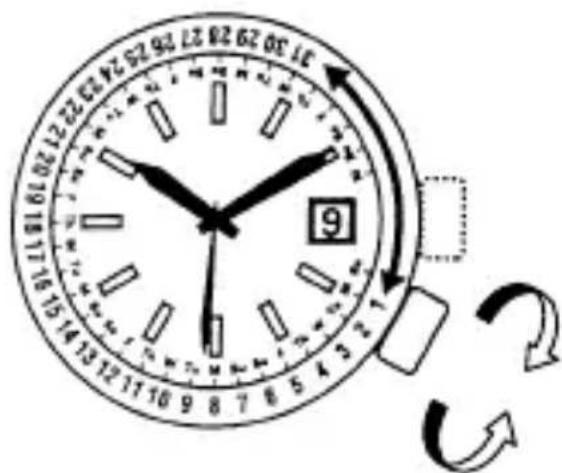
- The position of the inner ring crown and details of the date indicator may vary depending on the model.
HOW TO USE THE ROTATING INDICATOR BEZEL
Please notice that some models come with a rotating indicator bezel, which should be used properly.
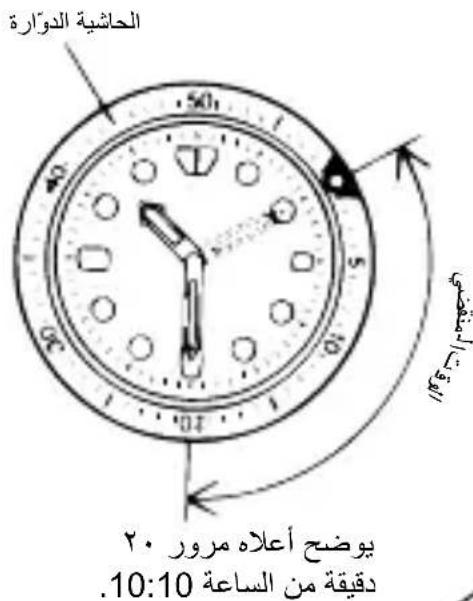
Turn the bezel by pointing the mark to the minute-hand. While certain time goes by, you can measure the elapsed time from the distance between minute-hand and figures on the rotating indicator bezel. You can also set the mark as a desired time to remind you how long time is still remain for an appointment.
You cannot turn the bezel reversely since it comes with a protection mechanism for preventing wrong operation by force or shock. Figures on the bezel could also help you to read the current time easily.
Rotating bezel
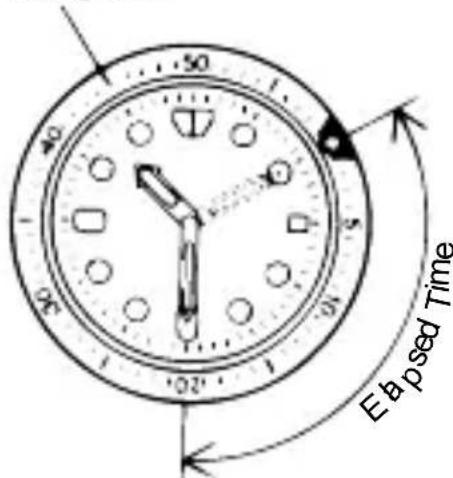
The above shows that 20 minutes have elapsed from 10:10.
DEUTSCH
MECHANISCHE UHR
MEPbI INPEIOCTOPOXHOCTN
Ctporo co6IIOdaIte npBVeJeHHbIe HIXe IHCTpyKcIIN dIy IpeIoTbpaUeHnIIObOro yIeep6a 3dOpOBbIou n IOBpeJdeHnBaIero mMyIecTba nIMyIecTba dpyrnx Iu.
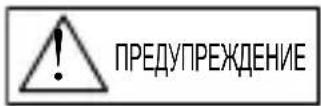
...ДаHHьСИМВОЛ O3HauaeT BO3MOxHOCtBJIeTaJIbHOrO nCxOda nIIN Cepbe3HbIX TpaBM B Cclyae, ecnДaHHь IpoDyKT 6yDet NcNoJb3OBaTbcr JIO6bIM cNoCobOM, OTJIuHbIM OT npINBeDeHHbIX INHCTpyKcN.
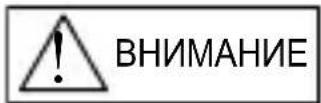
...ДаHHьСИМВОЛ O3нauаET BO3MOxHOCtб Серbe3HbIX TpaBM ИИ MaTePnAJIbHOrO yIepe6a ToIbKO B TOM Cnyuae, ecIи ДaHHьI ПpoDyKT 6yIeT IcNoJb3OBAtbcЯ ЛIbIM INHbIM CnOco6OM, OTJIINuHbIM OT npINBeDEHHbIX INHCTpyKcI.
ПРИОБPAUSEHINСЧАСМN
(1) Bódohe npohncaemoctb
* PeKoMeHnyETcNcNoJIb3OBAbTb YacB B COOTBeTCTBm C npuBeHeHHo BblIe KlaaccnФkaCnei, PpeDbapntelbHo npOBepnB MapKnpoBky nO BoOnHePOnHuaemocTn Ha cΦep6NaTe UIN Kopnyce.
① Yacbl C BOIOHepOnHuaemocTbI O IJI NOBceDHeBHO ICNoJb3OBAHn 30 M (36ap) MOryt NCIOJIb3OBAtbcra BO BpeM yMbIBaHn I T. I., HO He MOryt NCIOJIb3OBAtbcra ByCIOBnX, pR KOTOpBX OHn 6ydyT NorpykaTbCRA B BODY.
② Yacbl c ycnleHHo BDOHepnoHuaeMoCTbIO DnI NOBceDHeBHORO NcNoIb3OBaHnKlaccCa I 50 M (5 6ap) Moryr NcNoJb3OBaTbCBA BpEm PJIaBaHnN T. n., HO He MoryrNCNoJIb3OBaTbCBA BpEm HbIPAHN NII NODBOHO rPJIaBaHnN.
③ Yacbl C ycnHeHNOBDOHEnPOHnUaEMOCTbIO IJN NOBCEdHEBHOI NCNoJIb3OBaHnKnaCca II 100 M nnn 200 M (10 nn 20 6ap) MOrYT NcNoJIb3OBaTbcr BO BpeMn HbIpHn IIN NODBOHDoro PJIaBAHn, HO He MOrYT NcNoJIb3OBaTbcr BO BpeMn NOBDOHoro PJIaBAHn C KNCNOPoDnHbIM 6aANHOOM IIN BbINOJHHeHn BO DOJNa3HbIXpa6OT c aBOTOHMhIM NbIXaTeNbHbIM annapaTaMn Ha reINI.
④ Пи Ксплуataци Уасов ГОВКа ДОЖнHaхODИТбСВУTOПЕHHOM (HOPMaJIbHOM) NOLOжЕн. EcNi ГОВКа OTHOCINTCa K TINY 3aBnHnBaIO7uNXcR, TO OHa DOJxKha 6blTb ПNotHO 3aBnHueHa.
⑤ He nCnoB3yIte roNoBky noi BDoi nn ecnn Ha yacax nMeetcBnara.Boa MoKET npOHKnHyTb BHyTpB Kopnyca yacOB i HapuyuNb IX repMeTNUHOCtB.
⑥ Ecnn Baun yacbl He YBnIOTc BOHOHpOHNcaeMbIMN, To He DOnyckaIte InonadaHna Ha HIX BOJnHbIX 6pb3r (BO BpeM yMbIBaHn, B DOxKnByIO nOrOdy N T. d.), a Takke 3anoteBaHn. Ppi nonadHn Ha yacbl BOdbI INn npn 3anoteBaHn ydaJIte Bnary c NOMOsbIO cyXoMgKO TKAHN.
⑦ Daxe ecn Baun Yacbl, npedHa3NaueHHbIe dIy NOBceHbHO NC0Nb3o7BaHn, ObnadT BDOHepOnucaemocTbO, He DOynckaIte BO3dEInCTBn Ha Hx CNbHO CTpyn BoDbl. Pn npeBbIweHN DNOpCTMOrO ypOBn DaBHeHn BObl MoKet 6blb HapyseHa repMeTnUHOCt Yacob.
⑧Пи nonaHaHn Ha Baun BDOHeHPOHuaeMbIe Yacbl, npeHa3HaueHHbIe JnnoBceDHeBHO NOJb3OBaHnMOPCKOu BObl, CTpXHnTe BoUy INPOTpHTe KOpNyc HacyxO, yTO6bI He DOnyCTnTB BO3HNKHOBeHnKoppo3nn NIN INhBX HeratNBbIX NocJeDCTBn.
⑨ Bnytpn Koprnyca YacOB copeKHTcR He6oNbHoe KOJNUeCTBO Bna. IOnToMy KOrDa TeMnepaTpya OkpyKaIOUeRO BO3dYxa HIXKe TeMnepaTpybI BO3dYxa BHyTpN Koprnyca YacOB, Ha BHyTpeHHe NOBepXHOCTN CTeKNa MOKeT O6pa3ObBtBaTbcr 3aNoTeBaHne. Ecn 3aNoTeBaHne HocNT BpeMeHHb XapaKTep, To 3TO He HaHOCTBpeDa Yacam. Ondako eCIn 3aNoTeBaHne OCTaETcR Ha CTeKNe IpOdoJIxHTelbHOe BpeMn IIe ECIn B Yacbl IonoJa BOda, IpOKOHcyIbTnpyITecb No MeCTy npno6peTeHnra YacOB n He OCTaB7JRAIte 3Ty np6IeMy 6e3 BHIMAHnra.
(2) YdaponpouHocTb
① CHHMaIte YacbI BO BpEm 3aHrTm 3HeprnHbIMN BNuAMN CNoPTa, Ondako, 3aHrTne TaKIMN BNuAMN CNoPTa, KaK rOJIbΦ N T. He OKAKET HerATNBHO RO3DeEICTBna HA COCTOHNue YacOB.
② N36eraTe cHbHOrO yIapa Tnpa nAeHnYacOB Ha NoJ.
(3) Bo3dEiCTBnE MaHHTbIX NOJe
① 3a npEaetcnoBepraTb Yacbl BO3deICTBnIO CNJbHbIX MaHTbIX NOe B TeueHne IInTeJbHoro nepNoDa BpeMeHN, NocKoJIbKy KOMHOENTbI yacOB MOyT HamaHHTtbcr, YTO npNBedET K hapuWeHIO pa60tbI yacOB. Co6IouaIte octopoXHoCTb.
② ПOD BO3dEINCTBnEM MaHHTHO NOJYaCbI MOrYT BpeMeHHO CneuNTb NIM OTCTaBaTb.ToUHOCTb NOKa3AHN YacOB 6yDet BOCCTaHOBNeHa,ecnYcTpaHNTb BO3dEINCTBnE MaHHTHO NOJHa YacBI. B TAKOM cnyuae NOBTOpHo yCTaHOBnTe BpeMra.
(4) Bn6paun
YacblMOryT NOTepeTb TOUHOCTb,ecn6yUT NODBepKeHb CINbHO Bn6paun,HaNPmEp,Bbl3bBaEMOn POe3KOHNAMOTOUKNE,NCNOJb3OBAHNEM OT60HOROMOTKa,CEHHO INJIbI NT.
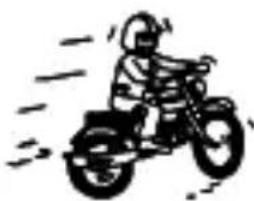
(5) Temnepatypa
YacbI MOrTuN HePpaBnIbHo IIN OCTaHOBtbcra Pn TeMnepaTypax HIXe NJI Bblse HopMaJIbHoro Dnana3OHa (5^ - 35^)

BHIMAHNE
He noIb3yIteCb YacAMn npN BbICOKo TeMnepaType (HaNPIMep, B cayHe). Yacbl MOryt HArpeBaTbCS N Bbl3bIBaTb OXOrN.
(6) XIMNueckne BeuaceCTBa, ra3bl T.I.
CneJyET co6IIOaTb MaKcHMaJIbHyU OCTOpOXHOCTb npN KOHTaKTe C ra3AMn, pTyTbU, XIMNUeCKMn BeIeCTBaMn (pa36aBnteJeM dIЯ KpackN, 6EH3INHom, pa3NIuHbIMn pacTBOPHTeJIaMn, MOUImM cpeCTBaMn, COePkaUIMN TaKHe BeIeCTBa, KJIeAMN, KpackAmN, JekapCTBeHHbIMN npenapaTaMn, napΦIOMepNei, KOCMeTkoN I np.) n T.I. 3TN BeIeCTBa MOryt N3MeHNTb ZBet KOpNyCa YacOB, 6pacIeta/peMeIka N uΦep6IaTaN Bo3MOxHbI TaKxe N3MeHHe NcBETA, DeΦopMaun I NOBpeXdEHN E NOJIIMePHbIX KOMNOHETOB.
He nbItaIteScb pa36npaTb n MoDnΦnCnPoBaTb Yacbl.
He daBaIte 7nnIbKn 6paCneTa/peMeuKa n npyrNe MeIknE DeTaII N deTAM.
B cnyuae nporlaatbIBaHnmeJIKoIeTaJIHHeMeJeHNo o6paTntecb K BpaCy.
(8)Аллергунеcke peakun
A: Ecnn KOD KOpnyca WeCTn3HaHbI, nepBbI DBe ZnOePbI COOTBETCTBYOT HOMepy KaIIbpa.
B: Ecni KoI KOpnyca 8- nII 9-3HaHbI, nepBbIe Tpi cIOOpbl COOTBeTCTBYOT HOMepy MexaHn3Ma. Hxke npINBOdntcra Ta6NIuCA COOTBeTCTBNI HOMepOB KaJIb6pa I HOMepOB MexaHn3Ma.
Приимер A
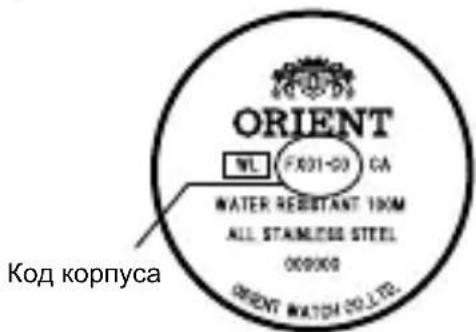
ПриимерВ
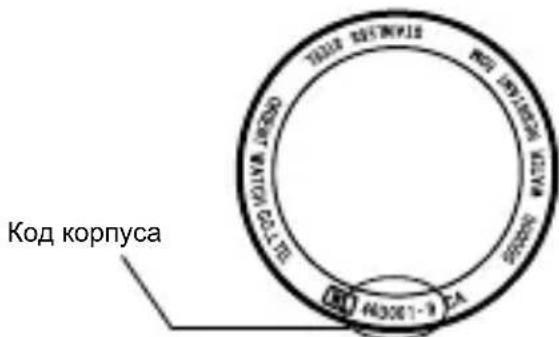
Приимер A:Еспн ков Корпуca“FX01-C0”,TO Homeр KaII6pa—“FX”.
Пример B:Еспк КОД КОрпуca "46D001-9",TO Homep MexaHn3Ma -"46D".B Ta6пице эТOMY HOMepy 6ydet COOTBETCTBOBaTb Homep KaIибpa "EU".
- B 3aBnCmOCTn OT xapaKTePncTnK yacOB pacNoJoxKeHne Koda KopnyCa MoKetOTJIuATbcra, ero 3HaKn MOryT nMeTb MaJIeHbKn pa3Mep n 6bITb TpydHo pa3JIuYIMbIMN.
- PucyHKn i nllnoctpaun B daHHO IHCTpyKun MoryT OTnuaTbcra OT peaIbHorO Bnda Baunx YacOB, Ondako cyHKun n pa6oue npoceDypbl octaIOTcR HeN3MeHHbIMN.
TEXHnueCKXAPAKTEPNUCTnKn
| Калпбр | Количесъв Камней | Даара | Дениные | Стrelka 24-часового Индikatopa | Сутона точность | Примechanical 1* | |
| ES 46C 21 | ○ | Стrelочая Иndидаця | - | +25 --15 cek./cytк 21:00 ~ 2:00 | |||
| ET 46B 21 | ○ | Стrelочая Иndидаця | ○ | +25 --15 cek./cytк 21:00 ~ 2:00 | |||
| EU 46D 21 | ○ | ○ | - | +25 --15 cek./cytк 21:00 ~ 2:00 | |||
| EV 46E 21 | ○ | Полноформатный | - | +25 --15 cek./cytк 22:00 ~ 1:00 | |||
| FE 46P 21 | ○ | - | ○ | +25 --15 cek./cytк 21:00 ~ 2:00 | |||
| FN46V 21 | ○ | Полноформатный+ утreachе/ Вочерпец вруем | - | +25 --15 cek./cytк 21:00 ~ 3:00, 10:30 ~13:30 | |||
| FP 46W 21 | ○ | Иndидаця точков ил стrelков | - | +25 --15 cek./cytк 21:00 ~ 3:00 | |||
| FX46Y 21 | ○ | ○ | - | +25 --15 cek./cytк 21:00 ~ 2:00 | |||
(1) YacToTa Kone6aHn: 21,600 Kone6aHn/uaC
(2)Прдолжпельностьхда:болес 40 уасов
(3) ydapoctoKne noDshnHnKn dny 3aunTbI 6aJahCnpa C BOJOCKOB npyXnKoN OT ydapOB.
3aBHeHnA cyToHnA ToUHOCTb XoJa oBeCneuBaETc npi Co6IIOJeHn CNeDuOx yCIOBn:
- После 24 часов пебьвань В усюнгд Рмнathо Temпературbl, с ПОЛностю заеведенй рухшиони и цферблaitom, obpaцени вьерх.
- TexHHueckne OCO6eHHOCTN YAcOB C aBTOMaTHueCKM XoDOM MOryT CTaTb PnUHHoI OTKJIOHeHnCyTOOH ToUHOCTN XoDa OT 3aABJIeHHoro 3HaueHn; Ha 3TO BnIaHTCNeDyUoUHe ΦaKTOpbl: pOdoJXnteJIbHOCTb eKeIeHBeHORo HOWeHn YAcOB, NpIoXeHne YAcOB, DbIXeHne pyKn I yCNoBn 3aBOda npxKnbl.
Texnueckne xapaKTeepNCTnK MoYr 6bITb N3MeHeHbI 6e3 npedBapntelbHoro yBeOMJIeHNA B CBa3n C MOdePHN3aCnei N3dEJIy.
BHIMAHINE
- He pekomehnyetcK KoppeKTnpoBaTb DaTy B npomexyTkax, yka3aHhbix B "PpimehaHn 1" Bblwe, NockoJbKy B 3TO BpeM npocxOJT CMeHa DaTbI. Pnp ycTaHOBKe DaTbI B 3TOT npomexyTOK BpeMeHH OHa MoXeT He CMeHHTBCR BOBpeM, JIn60 MOXeT Bo3HnKHyTb C60N B pa6Ote YacOB. Ppn ycTaHOBKe DaTbI ObraTeJIbHo NepeBeDnte YacOByU MmHyTHyU CTpeJIky Ha DpyrO IpomexyTK BpeMeHN.
HA3BAHЯ KOMnoHEHTOB
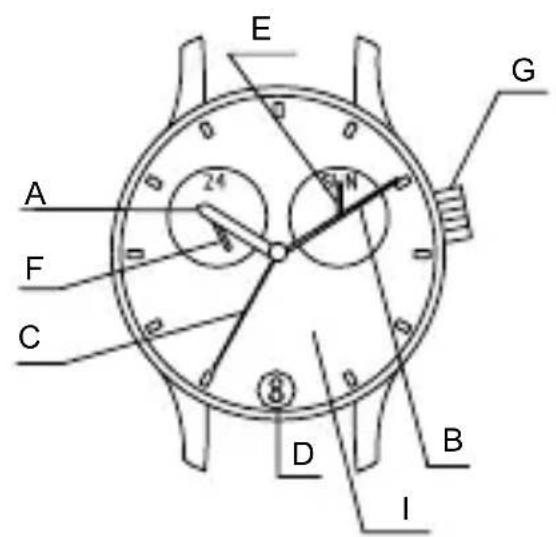
A: Yacobar cTpeIka
B: MInHyTHa nCtpeNka
C: CekyHdHa cTpeIka
D:Дараза
E:Дeнь HeДeЛи
F: 24-часоваястельka
G: TOnOBka
H: Khonka
I: Unepe6nat
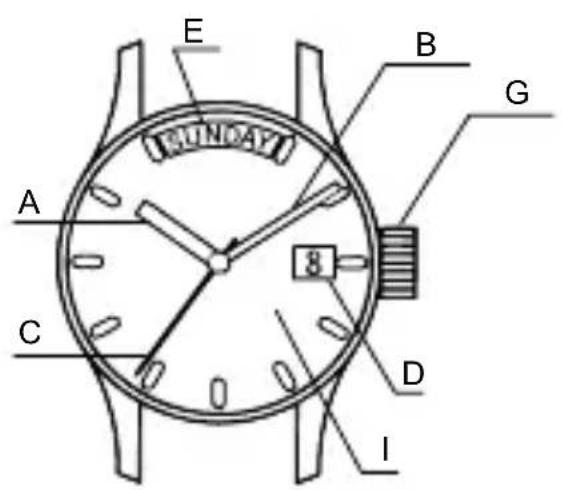
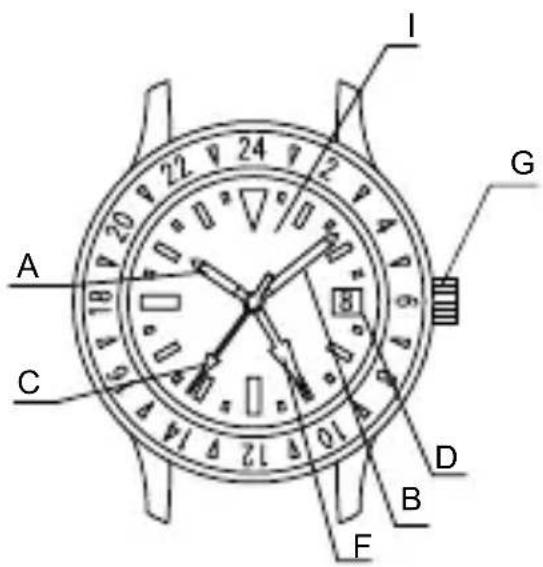
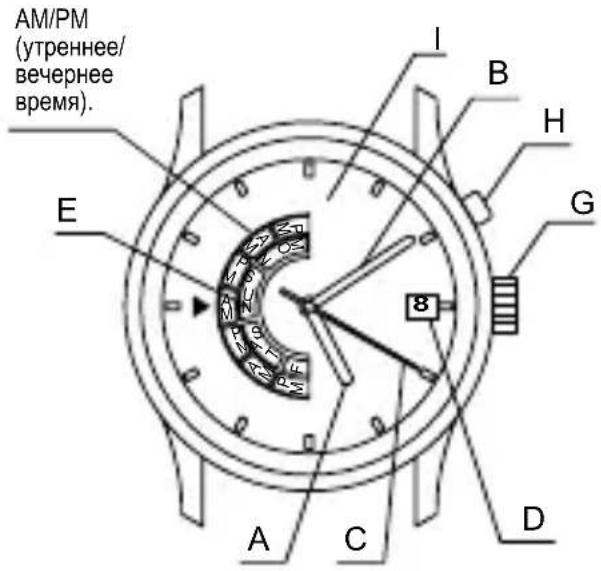
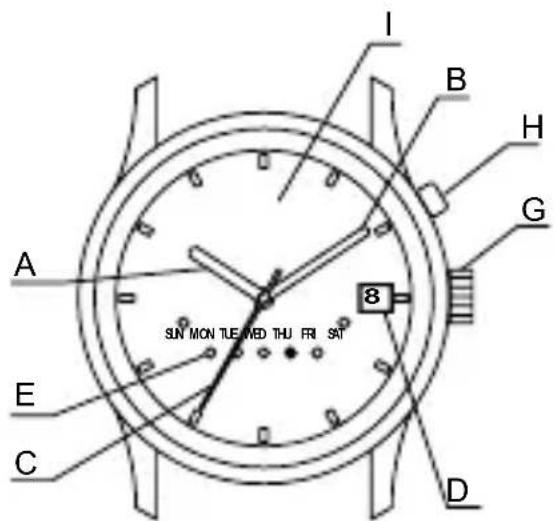
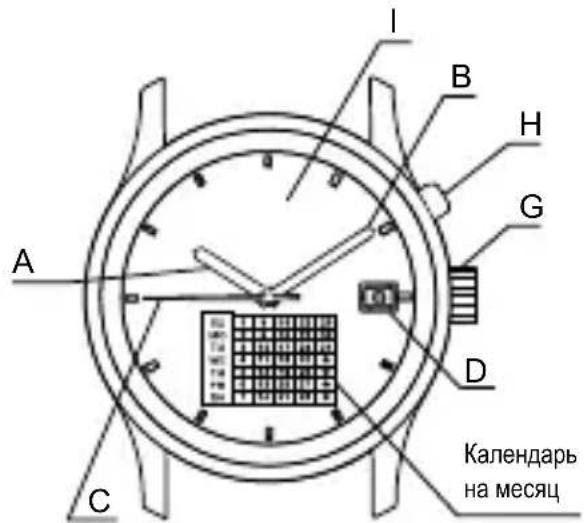
*IIOJKeHHe rONOBKN, INdNKaTopa DaTbI N dpyrNX KOMNoHEHTOB Ha HEKOTOpbIX MoDEJIAX MOKeT OTNIuHaTbcra.
MEXAHN3M ABTOMATNUECKOTo 3ABODA
(1)ДаHHbIe Yacbl - MexaHnueckne, OHN OCHaUeHbI ΦyHKuNei aBTOMaTHueCKOrO 3aBOda.
(2)Приношени часов на заразсте пухшина заюдпсг OT ecTeCTBeHHbIX Движени рук.
(3) Ecni yacbi ocTaHOBnJIncb, BCTpIxHnTe nx He MeHee DecaTn pa3, YTO6bl 3anyCTnTB ceKyHdHyo CTpeNky. NocTe TORO, KaK cTpeNka 6yDet 3anyuSha, yCTaHOBnTe daTy n Bpemr.
(4) C noJIHbIM 3aBoIOM yacbl 6ydyT nITn npIbIIN3ntelbHO 40 yacOB. Ecnn Yacbl 3aBeDeHbI HeIOCTaTOUHO, TOUHOCTb XOda MOXET OTJNUaTbcr O T 3aIBJeHHo. IJIa ObecneueHn ToHOCn XOda Yacbl peKOMeHdyetc HocNTb He MeHee 8 yacOB B DeHb.

MODEJI N C 3ABINHcNBAIOUeIeCra TOLOBKoI
B HeKOTOpbIX MoTeJbI He CMOKeTe BbITaHyTb rOIOBky, He BbIKpyTnB ee (MoTeJIc 3aBnHcNBAUoSeiCra rOIOBkoJ).
24-yaCoBa n He MoKeT bItb OtperynipoBaHa OTdJIbHOOT Hee.
Ha HeKOTOpbIX MoDeJIaX BMeCTO 24-uaCobOu CTpeJIkn IcNoJIb3yETcI N3o6paXeHne IJN CmBOJ (CoJIHcE n IyHa).
YCTAHOBKA BPEMEHNI INI HEN HEJEIN [ES(46C), ET(46B)]
Chauana yctaHOBITE DeHb HeJeN, NOBopaunBaJ YacOByo N MHyTHyO CTpeJIKN, NockoIbky DaHHbIe YacBi He IMeIoT MexAHn3Ma KoppeKTIPOBKn DnHa HeJeN.
(1) BbITaHNTe roJIOBky do BtOpRo 0uJeUka. (CekyHnHa CTpeJIka He octaHOBntcra.)
(2)Сачара повернite Гольку и установпесн.
небел.
![ORIENT Contemporary EV0P002B - YCTAHOBKA BPEMEHNI INI HEN HEJEIN [ES(46C), ET(46B)] - 1](/content/2026/03/497261/images/2edfb365fdf13a1fc39afefd5bc65c7589690427ad9608cf3c7eda41e18c995c.jpg)
ПоворачиBaIte roJOBky no yacoboi CTpeJIke do Tex nop, noka CTpeJIka He 6yddT yka3bIBaTb Ha DeHb HeJeN.
IobopaunBaTe roJOBky npOTNB yacOBn CTpeJIkn n yctaHOBe CTpeJIKn npIMepHo Ha 23:30. (B aTO BpEMr DeHb HeJeHn He N3MeHReTc.)
BHOb nobopaunbaTe roJOBky no YacobOy
CTpeIKe Do
Tex nop,
Noka CTpeIka
He 6yJeT
Yka3bIBaTb Ha
CJIeDyUoU
DeHb HeJeN.
![ORIENT Contemporary EV0P002B - YCTAHOBKA BPEMEHNI INI HEN HEJEIN [ES(46C), ET(46B)] - 2](/content/2026/03/497261/images/6fa852a50d804fc9443adf3ff41e3fe064a03b3175eddca4e4db987824a0764d.jpg)
![ORIENT Contemporary EV0P002B - YCTAHOBKA BPEMEHNI INI HEN HEJEIN [ES(46C), ET(46B)] - 3](/content/2026/03/497261/images/063b3e73a4c58a8e060a597d246fc009a2d5c021025cadd98257f29fe33cac3e.jpg)
ПОВТОРИTe ДаHHуO ONEpaUIO N yCTaHOBInTe DeHb HeDeJIiN.
(3)Дя установки Врemeи NOBOPaUNBaIte roJIOBky no yacOBoi CTpeJIke.
Iata MeHreTcB [DBeHaIaTb YacOB Hou].
Takke c nomoub24-ycobOcB TpeKn Bbl Moxete npOBepntb yTpeHHee N BeuepHee Bpemr.
B HeKoTOpbIX MoJeIax BMeCTo 24-uaCoBOI CTpeJIKN MOrYT NcNOJb3OBaTbcra PnCyHKn (COJHZe I NyHa).
EcnBbepxoyokoikn306paXeHaIyHa,3TO 3NaHT, yTo ceuac 12 yacOB HOn.
IobepHnte roJOBky, yTO6bl COBMeCTNTb nepBbI JeHb MeCya C COOTBETCTBYUOM IHeM HeJeN.
- YctaHaBnBaJ nepBbI DeHb Meca, o6paTnte BnMaHne Ha To, UTo dHn HeJeN B KOHcE DaHHoro MecaHa He 6yDyT Noka3aHbI, ecN nocJeHne YncJa MecaHa (31-e n T.D.) COBMeUeHbI C cekTopom uΦep6Lnata, Ha KOTOpbI He HaHeceHbI DHN HeJeN (CTopoHa 3 - 4 yacOB).
![ORIENT Contemporary EV0P002B - YCTAHOBKA BPEMEHNI INI HEN HEJEIN [ES(46C), ET(46B)] - 4](/content/2026/03/497261/images/1cea22153fb15a5d50a28b2fe4cad1078a9b85502541c7702cffabd926552c0c.jpg)
- PacnoIoxeHne roIOBkn BHyTpeHHeRo KOJIbca N INHdNkaTopa DaTbIB pa3HbIX MOdeJx MOryT pa3JIuHaTbcra.
PABOTA C BPAUQUOMCnHnIKATOPHbIM BE3EJEM
ObpaTnte BnImaHne,чTo HeKOTOpbIe MoDeJI N OChaUeHbI BpaUaUoUmCra 6e3eJem INdIKaTOPa,KOTOpoe CNeDyET NcNoJIb3OBaTb NaJIeXkaUIM Obpa3OM.
IobepnTe 6e3e TaKIM o6pa3OM, TTObI COBMeCTnTb MEkY V C MInHyTHoI CTpeKoI. Pn npoxOxJdeHm ONpeDeJeHHoro BpemHn Bbl MoKeTe n3MepNTb NCTekUee BpemNo paCCToHmIO MeKdy MNHTHOI CTpeKoN u cnpamHa BpaauHoUeMc8 6e3e HndkaTopa.Bbl TAKKe MoKeTe yCTaHOBtB MetKy V Ha XeJaEMoe Bpem, YTObI HAnOMHaTb Ce6e,CKOBKO BpemeHn OCTaETc DO ycNOBHeHHoro BpemeHn.
Бezeел He MoKet NOBOpaUbAtbCBy
nPOTUBONOJXHOM HAnpaBHeHn, NOCKoJIbKy
OHO OCHaUeHO 3aUHTbIM MExaHn3MOM, IpeHa3HaueHHbIM JIJI 3aUHTbI OT OShIOuHOI OepaUNB pe3yIbTaTe npINOxKeHNA CINbI INN ydapa. LcIpbl Ha BpaUoUeMc8be3eJe TAKKe MOrY UnpOuaTb CUnTBiBaHne TeKyuJero BpeMeHN.
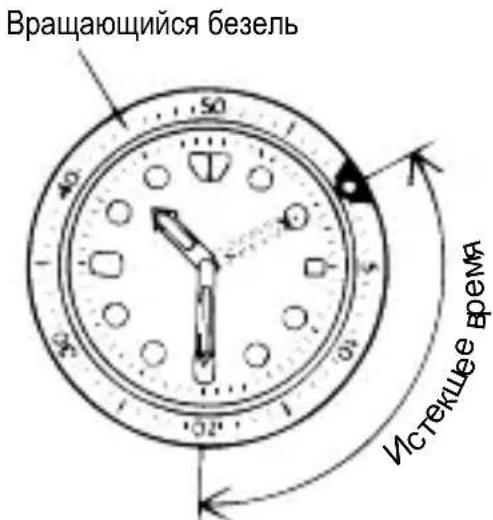
Ha pncyHke Bblie noka3aHO, YTO C MOMeHTa, kOrda 6bIIO 10:10, npoJIo 20 MInHyT.
- B 3aBnCmOCTn OT KOHCTpyKcNn 3aUNTa OT NOBOPTa B O6paTHOM HnPaBHeHn n 1-MnHyTHbI "UeJyOK" Ha HeKOTOpbIX MoJeJx OTCyTCTByET.
jglgall aal Jlaaiul a
J 1 J 1 1 1 1 1 1 1 1 1 1 1 1 1 1 1 1 1 1 1 1 1 1 1 1 1 1 1 1 1 1 1 1 1 1 1 1 1 1 1
y 1
gall gdl gddg d 0jai y jalll paa lgl
y
J 1 J 1 J 1 J 1 J 1 J 1 J 1 J 1 J 1 J 1 J 1 J 1 J 1 J 1 J 1 J 1 J 1 J 1 J 1 J 1 J 1 J 1 J 1 J 1 J 1 J 1 J 1 J 1 J 1 J 1 J 1 J 1 J 1 J 1 J
a 1
a a a a a a a a a a a a a a a a a a a a a a a a a a a a a a a a a a a a a a a a a a a a a a a a a a a a a a a a a a a a a a a a aaa
aJisll aalll gag gaiy
[FX(46Y)]
. 1
![ORIENT Contemporary EV0P002B - [FX(46Y)] - 1](/content/2026/03/497261/images/45f772c96a6e155a31d0e58ca84d45759a9ab239e3d26c0d2dac7b913f1414c2.jpg)
EgJn Jbuiol jzIbcia 1.
1
("iill jil" jipj)abzbsn jy jjj jj jj jj jj jj jj j j j j j j j j j j j j j j j j j j j j j j j j j j j j j j j j j j j j
![ORIENT Contemporary EV0P002B - [FX(46Y)] - 2](/content/2026/03/497261/images/0282a6bfe7fbfaf873c0e457e4c4f5c376dc8d0842eb7e3668926e29178e2c7c.jpg)
auii iie gill a jia Jg 1
gill gll gll gll gll gll gll gll gll gll gll gll gll gll gll gll gll gll gll gll gll gll gll gll gll gll gll gll gll gll gll gll gll gll gll gll gll gll gll gll gll gll gll
a a a a a a a a a a a a a a a a a a a a a a a a a a a a a a a a a a
i jll i gill mai y aia 120 coXl Jgill s jy oJc Js aclll piaiy bbi ciis lj
g5g 1
14:·aclllgclw 1·…nS. aclw 2 pbi (1)
![ORIENT Contemporary EV0P002B - [FX(46Y)] - 1](/content/2026/03/497261/images/aabb8f05fbcbcfb74938f8930ebc1d08d0c9eea088e71ec7604cc56283ce9c5a.jpg)
a 10000000000000000000000000000000000000000000
g j 1000000000000000000000000000000000000000000000000000000
aai 10g k 20 g 100 (r)
1 1
a 1
.
![ORIENT Contemporary EV0P002B - [FX(46Y)] - 2](/content/2026/03/497261/images/2428f3f1ff0529db0d8ab52656a1b5bdb54594e9a699cd0988969610f06f5bcc.jpg)
[FE(46P)]
g 1 1 1 1 1 1 1 1 1 1 1 1 1 1 1 1 1
AeLwY 2 8clg j g jg jgl Jlaauiy
(1)
()
15 15
acllll 10000000000000000000000000000000000000000000
.
J 1
J 9 J 9
(b):9:
![ORIENT Contemporary EV0P002B - [FE(46P)] - 1](/content/2026/03/497261/images/e7514a444229855f4979ea4dc4b7d2554b2c5beb6932b1cab8e9bf52769093e9.jpg)
J 1
y 9 9 9 9 9 9 9 9 9 9 9 9 9 9 9 9 9 9 9 9 9 9 9 9 9 9 9 9 9 9 9
( )
![ORIENT Contemporary EV0P002B - [FE(46P)] - 2](/content/2026/03/497261/images/e0f1a52cb74c8aee805282e0a17277c87788b40a335548779ce1dba4e223dc17.jpg)
[EU(46D)]
[laai gglgcljslaw]
![ORIENT Contemporary EV0P002B - [EU(46D)] - 1](/content/2026/03/497261/images/91d130277ef85915f471f780b42ecde191fbe97793732710adb1fa9aaf097948.jpg)
jI 1
[clgwl]
e 1
.
y 1
![ORIENT Contemporary EV0P002B - [EU(46D)] - 1](/content/2026/03/497261/images/70b25c1cc96134a9bc918fe85f2824eee145def62dfbe5bb1689a7d814f159a5.jpg)
J 1
![ORIENT Contemporary EV0P002B - [EU(46D)] - 2](/content/2026/03/497261/images/24c815e4fb44c7bd1ea00d1c294a4897d462b5ae70ee00e89f010d0225225137.jpg)
![ORIENT Contemporary EV0P002B - [EU(46D)] - 3](/content/2026/03/497261/images/2fb2702b1a9f576d7aecc932f6abaed1bc676f39b254818fa8b8b3c5bed00886.jpg)
[FP(46W)]
.() ▲ 1 (abai) 102y
J 1
()
.
![ORIENT Contemporary EV0P002B - [FP(46W)] - 1](/content/2026/03/497261/images/bd4f57e5a78a377ef76ffb385a707872a07d956d7643f1725b80b8a8c2495e6a.jpg)
![ORIENT Contemporary EV0P002B - [FP(46W)] - 2](/content/2026/03/497261/images/e59b3db95f188ceeb3cacce78f89fa24e90028a70fbae1a59dd8dffd41506edb.jpg)
(gall jj)
.
![ORIENT Contemporary EV0P002B - [FP(46W)] - 3](/content/2026/03/497261/images/2ac66c9157a539126dfbbd657fc74d78a9cbcda38ad9f97ecb59671d4a43c9a3.jpg)
![ORIENT Contemporary EV0P002B - [FP(46W)] - 4](/content/2026/03/497261/images/507b655fc99eebbb13ab0c046027b7b3895fb1e88016d6f3cd4c4ac33952b35e.jpg)
("gall jll" jIb Jia) abiin jy yjz jz jz jz jz jz jz
i 1
J 1
[FN(46V)] (J/ j) AM/PM 8g
J 1
21
AaBb (y/ y) AM/PM 1
J 1 J 1 J 1 J 1 J 1 J 1 J 1 J 1
p
.
a
.
aolil
![ORIENT Contemporary EV0P002B - [FP(46W)] - 5](/content/2026/03/497261/images/062ec88eb3f11202d4a1f26d7af7638af0a2befd8fb2d520a5005fba86e695f4.jpg)
![ORIENT Contemporary EV0P002B - [FP(46W)] - 6](/content/2026/03/497261/images/1e3b739d67cf154738a5c44a75488500763137b66f08b14bc6fe53e563b3d022.jpg)
()
e la! 4aill n 251 yg jz aclll oj l
gall ggl
a"
.【
e 1
aclwY 2 oclj u jac
()
aaiiie 1e aie iie ae eae 8 2
i 1
[FP(46W)·FN(46V)·FE(46P)·FX(46Y)·EU(46D)]
![ORIENT Contemporary EV0P002B - [FP(46W)·FN(46V)·FE(46P)·FX(46Y)·EU(46D)] - 1](/content/2026/03/497261/images/b321acd08ee86b165e86026bcbf7ac1f8ed880f5c89615902be6761b38201fbe.jpg)
()
.
()
1
Lai 1
gall gll
i 1
"
L 1
![ORIENT Contemporary EV0P002B - [FP(46W)·FN(46V)·FE(46P)·FX(46Y)·EU(46D)] - 1](/content/2026/03/497261/images/404fc57bcb9ba56341d360b6d2274a6e86e60dcf6858d53ceba1c4009925fd98.jpg)
![ORIENT Contemporary EV0P002B - [FP(46W)·FN(46V)·FE(46P)·FX(46Y)·EU(46D)] - 2](/content/2026/03/497261/images/bc1f5217de49c59e7931eca34333527cbf56451dfa67ae4a02f3346883fbea0b.jpg)
()
![ORIENT Contemporary EV0P002B - [FP(46W)·FN(46V)·FE(46P)·FX(46Y)·EU(46D)] - 3](/content/2026/03/497261/images/e941087741bb62f28563d6cb7ca66d51c07ada48efb34cbb4723911493aad51a.jpg)
![ORIENT Contemporary EV0P002B - [FP(46W)·FN(46V)·FE(46P)·FX(46Y)·EU(46D)] - 4](/content/2026/03/497261/images/6fb6c72d2fdace8ae0bf7ae6d5618b572f79bab6827a28e066906b3d764a5bbc.jpg)
a.silaogig 1 aiei i
(1)
acllll 1n jn lndic 1d jal aai bll klll jy
S ABO = S ABC
J 1
a gillg jlll lll 4y yj j j j j j j j j j j j j j j j j j j j j j
JyIguiuie puii j. JolSly Ieue 1jai eLw . 0d Jaoiaclll o
AeIw Aiei jy wgi aclll 1e blaal. giaclll dai
J 1
y
a 1
1
:Ls jjll
(1)
()
P( k,2) .C( -2,2)
$$ < F X (4 6 Y) > $$
$$ < F P (4 6 W) > $$
1
aaii iiee eae
acllljce:A
glaB:BC
i j 1 C
D
E
aclwY&ocljgUac:F
G
jH
1
| الله�� | الله�� | الله�� | |||||
| ~ elu9...blu r... | \( \rho_{\text{y}/\text{y}}10- - 10+ \) | \( \tau_{10} \) | \( \tau_{10} \) | \( \tau_{10} \) | |||
| ~ elu9...blu r... | \( \rho_{\text{y}/\text{y}}10- - 10+ \) | \( \tau_{10} \) | \( \tau_{10} \) | \( \tau_{10} \) | |||
| ~ elu9...blu r... | \( \rho_{\text{y}/\text{y}}10 - - 10+ \) | \( \tau_{10} \) | 46D | EU | |||
| ~ elu1...blu r... | \( \rho_{\text{y}/\text{y}}10- - 10+ \) | \( \tau_{10} \) | 46E | EV | |||
| ~ elu9...blu r... | \( \rho_{\text{y}/\text{y}}10- - 10+ \) | \( \tau_{10}- \) | 46P | FE | |||
| ~ elu9...blu r... ~ blu1...blu r... | \( \rho_{\text{y}/\text{y}}10- - 10+ \) | \( \rho_{\text{y}/\text{y}}10- - 10+ \) | 0 | 46V | FN | ||
| ~ elu9...blu r... | \( \rho_{\text{y}/\text{y}}10- - 10+ \) | \( \tau_{10} \) | \( \tau_{10} \) | \( \tau_{10} \) | |||
| ~ elu9...blu r... | \( \rho_{\text{y}/\text{y}}10-\ - 10+ \) | 0 | 0 | 46Y | FX |
clauagglg 1a31914
acl/4j1,7…:j(1)
aL 2. n j5j:
Cldaln jy 1 1 1 1 1 1 1 1 1 1 1 1 1 1 1 1 1 1 1 1 1
i 1
a a a a a a a a a a a a a a a a a a a a a a a a a a a a a a a a
JaeWg
(4)
i ①
aiee
1 1
①
()
a j 8j 8j 8j 8j 8j 8j 8j 8j 8j 8j 8j 8j 8j 8j 8j 8j 8j 8j 8j
yI yI yI yI yI yI yI yI yI yI yI yI yI yI yI yI yI yI yI yI yI yI yI yI yI yI yI yI yI
Laijia jia jia jia jia jia jia jia
Laiie yuul 1 aaii iui u. g. uubliia Jauu lae Lioie l qo jg jao aeull
a 1
j()
(°)
i 1
1 1
(0)
40 0 0 0 0 0 0 0 0 0 0 0 0 0 0
Jaoiie g iig aclll 1d jgai
()
1gjzglg 2
()
i 1
Jg w g a cll Jg jn jn nn d 11 11 11 11 11 11 11 11 11
aallll lllllllllllllllllllllll
1gdi ggs
J 30m clll aagaae aee aan nck
cllly jiai i yie glaiai nn k
50m I agaaiy o jz e aalgaae aae ank
. 1
200m 100m II aagaae aae ank
J 2
bll jz j 1. aell lal l (gall g) cgl Jg Ld Ie g 111 bai ①
aJauu u nn no dui Jauu U u 00
b y aell lal gl clall bry ad aell lly eall 1y 2
() ①
aclgl aol aol aol aol aol aol aol aol aol aol aol aol aol aol aol aol aol aol aol aol aol aol aol aol aol aol aol aol aol aol aol aol aol aol aol aol aol aol aol aol aol aol aol aol aol aol aol aol aol aol aoll alal alal alal alal alal alal alal alal alal alal alal alal alal alal alal alal alal alal alal alal alal alal alal alal alal alal alal alal alal alal alal alal alal alal alal alal alal alal alal alal alal alal alal alal alal alal alal alal alal alal alall
20 20
| العربية الإستعمال الترجمة الإستعمال الترجمة الإستعمال الترجمة الإستعمال الترجمة الإستعمال الترجمة الإستعمال الترجمة الإستعمال الترجمة الإستعمال الترجمة الإستعمال الTRL الإستعمال الTRL الإستعمال الTRL الإستعمال الTRL الإستعمال الTRL الإستعمال الTRL الإستUTION الTRL الإستUTION الTRL الإستUTION الTRL الإستUTION الTRL الإستUTION الTRL الإستUTION الTRL الإستUTION الTRL الإستUTION الTRL الإستUTION الTRL الإستUTION الTRL الإستUTION الTRL الإستUTION الTRL الإستUTION الTRL الإستUTION الTRL الإستUTION AL AL AL AL AL AL AL AL AL AL AL AL AL AL AL AL AL AL AL AL AL AL AL AL AL AL AL AL AL AL AL AL AL AL AL AL AL AL AL AL AL AL AL AL AL AL AL AL AL AL Al Al Al Al Al Al Al Al Al Al Al Al Al Al Al Al Al Al Al Al Al Al Al Al Al Al Al Al Al Al Al Al Al Al Al Al Al Al Al Al Al Al Al Al Al Al Al Al Al Al AL AL AL AL AL AL AL AL AL AL AL AL AL AL AL AL AL AL AL AL AL AL AL AL AL AL AL AL AL AL AL AL AL AL AL AL AL AL AL AL AL AL AL AL AL AL AL AL AL CAL CAL CAL CAL CAL CAL CAL CAL CAL CAL CAL CAL CAL CAL CAL CAL CAL CAL CAL CAL CAL CAL CAL CAL CAL CAL CAL CAL CAL CAL CAL CAL CAL CAL CAL CAL CAL CAL CAL CAL CAL CAL CAL CAL CAL CAL CAL CAL CAL CAL AL AL AL AL AL AL AL AL AL AL AL AL AL AL AL AL AL AL AL AL AL AL AL AL AL AL AL AL AL AL AL AL AL AL AL AL AL AL AL AL AL AL AL AL AL AL AL AL AL ALA AL AL AL AL AL AL AL AL AL AL AL AL AL AL AL AL AL AL AL AL AL AL AL AL AL AL AL AL AL AL AL AL AL AL AL AL AL AL AL AL AL AL AL AL AL AL AL AL AL (AL) AL AL AL AL AL AL AL AL AL AL AL AL AL AL AL AL AL AL AL AL AL AL AL AL AL AL AL AL AL AL AL AL AL AL AL AL AL AL AL AL AL AL AL AL AL AL AL AL AL AL | ||||||||
| XXX | WATER RESISTANT (WATER RESIST) | CLL CLL CLL CLL CLL CLL CLL CLL CLL CLL CLL CLL CLL CLL CLL CLL CLL CLL CLL CLL CLL CLL CLL CLL CLL CLL CLL CLL CLL CLL CLL CLL CLL CLL CAL CAL CAL CAL CAL CAL CAL CAL CAL CAL CAL CAL CAL CAL CAL CAL CAL CAL CAL CAL CAL CAL CAL CAL CAL CAL CAL CAL CAL CAL CAL CAL CAL CAL CAL CAL CAL CAL CAL CAL CAL CAL CAL CAL CAL CAL CAL CAL CAL CAL CAL CAL CAL CAL CAL CAL CAL CAL CAL CAL CAL CAL CAL CAL CAL CAL CAL CAL CAL CAL CAL CAL CAL CAL CAL CAL CAL CAL CAL CAL CAL CAL CAL CAL CAL CAL CAL CAL CAL CAL CAL CAL CAL CAL CAL CAL CAL CAL CAL MAL MAL MAL MAL MAL MAL MAL MAL MAL MAL MAL MAL MAL MAL MAL MAL MAL MAL MAL MAL MAL MAL MAL MAL MAL MAL MAL MAL MAL MAL MAL MAL MAL MAL MAL MAL MAL MAL MAL MAL MAL MAL MAL MAL MAL MAL MAL MAL MAL MAL AL AL AL AL AL AL AL AL AL AL AL AL AL AL AL AL AL AL AL AL AL AL AL AL AL AL AL AL AL AL AL AL AL AL AL AL AL AL AL AL AL AL AL AL AL AL AL AL AL MAL MAL MAL MAL MAL MAL MAL MAL MAL MAL MAL MAL MAL MAL MAL MAL MAL MAL MAL MAL MAL MAL MAL MAL MAL MAL MAL MAL MAL MAL MAL MAL MAL MAL MAL MAL MAL MAL MAL MAL MAL MAL MAL MAL MAL MAL MAL MAL MAL MALL MALL MALL MALL MALL MALL MALL MALL MALL MALL MALL MALL MALL MALL MALL MALL MALL MALL MALL MALL MALL MALL MALL MALL MALL MALL MALL MALL MALL MALL MALL MALL MALL MALL |
aill aill joll gell aagaa cllaln no jassll 0e l jol pia kai aclll

aclw
J 1
J 1
Jaaal 100
J 1
aJ 1
J 1
Clll lgl aaiiaa jbi jbi jniiin
g 1 g 1
iJ 1
S OBC = S ABC + S_ BOC
aaii i aie 1
a 1