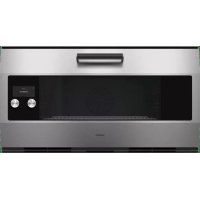
EB333611 - Oven GAGGENAU - Free user manual and instructions
Find the device manual for free EB333611 GAGGENAU in PDF.



| Product type | Built-in oven |
| Brand | Gaggenau |
| Model | EB333611 |
| Height (mm) | 595 mm |
| Width (mm) | 594 mm |
| Depth (mm) | 548 mm |
| Weight (kg) | 55 kg |
| Power supply | 240 V ~ 50/60 Hz |
| Maximum power (W) | 3600 W |
| Oven capacity (L) | 71 L |
| Number of cooking modes | 14 |
| Cooking modes | Natural convection, forced air, grill, ventilated grill, top/bottom heat, pyrolysis, defrost, keep warm, gentle cooking, moist cooking, etc. |
| Installation type | Built-in in a tall cabinet |
| Fixing | With included Torx screws |
| Network connection | LAN (Ethernet cable) |
| Cleaning | Pyrolytic (self-cleaning) |
| Door | Cold door with insulating glass, removable |
| Child safety | Safety lock (disables controls) |
| Energy class | A+ (per EU standard) |
| Repairability index | 8.0/10 |
| Included accessories | Grill rack, drip tray, rotisserie spit (depending on model) |
| Customer service | Toll-free number: 1-877-442-4436 |
Frequently Asked Questions - EB333611 GAGGENAU
User questions about EB333611 GAGGENAU
0 question about this device. Answer the ones you know or ask your own.
Ask a new question about this device
Download the instructions for your Oven in PDF format for free! Find your manual EB333611 - GAGGENAU and take your electronic device back in hand. On this page are published all the documents necessary for the use of your device. EB333611 by GAGGENAU.
USER MANUAL EB333611 GAGGENAU
Installation instructions2
Notice de montage9
IMPORTANT SAFETY INSTRUCTIONS 3
Appliance Handling Safety 3
Safety Codes and Standards 3
Electric Safety 3
Related Equipment Safety 4
Proposition 65 Warning 4
Transport 4
Before you begin 5
Parts included 5
Tools and parts needed 5
Power Requirements 5
Preparing Kitchen Units 5
Dimensions and Cabinet Requirements 6
Removing Packaging 6
Install Appliance 7
Mount to Cabinet 7
Electrical Installation 7
Connection to the home network (LAN) 7
Check the Installation 7
Removal 7
Customer service 8
Safety Definitions
WARNING
This indicates that death or serious injuries may occur as a result of non-observation of this warning.
CAUTION
This indicates that minor or moderate injuries may occur as a result of non-observation of this warning.
NOTICE
This indicates that damage to the appliance or property may occur as a result of non-compliance with this advisory.
Note: This alerts you to important information and/or tips.

IMPORTANT SAFETY INSTRUCTIONS
READ AND SAVE THESE INSTRUCTIONS
WARNING
If the information in this manual is not followed exactly, fire or shock may result causing property damage or personal injury.
WARNING
Do not repair, replace or remove any part of the appliance unless specifically recommended in the manuals. Improper installation, service or maintenance can cause injury or property damage. Refer to this manual for guidance. All other servicing should be done by an authorized servicer.
Appliance Handling Safety
Unit is heavy and requires at least two people or proper equipment to move.
Do not lift appliance by door handle.

Hidden surfaces may have sharp edges. Use caution when reaching behind or under appliance.
Safety Codes and Standards
This appliance complies with the latest version of one or more of the following standards:
CAN/CSA C22.2 No. 61 - Household Cooking Ranges
UL 858 - Household Electric Ranges
CAN/CSA C22.2 No. 150 - Microwave Ovens
- UL 923 - Microwave Cooking Appliances
CSA C22.2 No. 64 - Household Cooking and Liquid-Heating Appliances
- UL 1026 - Electric Household Cooking and Food Serving Appliances
It is the responsibility of the owner and the installer to determine if additional requirements and/or standards apply to specific installations.
Electric Safety
WARNING
Before you plug in an electrical cord or turn on power supply, make sure all controls are in the OFF position.
If required by the National Electrical Code (or Canadian Electrical Code), this appliance must be installed on a separate branch circuit.
Installer - show the owner the location of the circuit breaker or fuse. Mark it for easy reference.
INSTALLER: LEAVE THESE INSTRUCTIONS WITH THE APPLIANCE AFTER INSTALLATION IS COMPLETE.
IMPORTANT: SAVE THESE INSTRUCTIONS FOR THE LOCAL ELECTRICAL INSPECTOR'S USE.

IMPORTANT SAFETY INSTRUCTIONS
READ AND SAVE THESE INSTRUCTIONS
Before installing, turn power OFF at the service panel. Lock service panel to prevent power from being turned ON accidentally.
Refer to data plate for more information. See "Data Plate" under "Service" for data plate location.
Be sure your appliance is properly installed and grounded by a qualified technician. Installation, electrical connections and grounding must comply with all applicable codes.
Related Equipment Safety
Remove all tape and packaging before using the appliance. Destroy the packaging after unpacking the appliance. Never allow children to play with packaging material
Never modify or alter the construction of the appliance. For example, do not remove leveling legs, panels, wire covers or anti-tip brackets/screws.
Before starting up the appliance, remove any packaging material and adhesive film from the cooking compartment and the door.
Proposition 65 Warning:
This product may contain a chemical known to the State of California, which can cause cancer or reproductive harm. Therefore, the packaging of your product may bear the following label as required by California:
STATE OF CALIFORNIA PROPOSITION 65 WARNING:

WARNING
Cancer and Reproductive Harm - www.P65Warnings.ca.gov
Transport
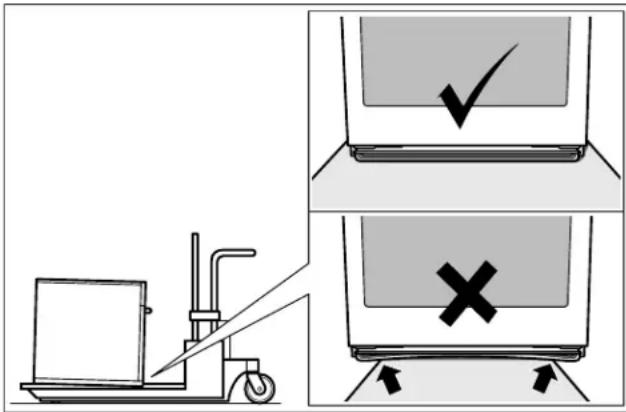
To avoid damage to the oven vent, use the transport method shown in the picture below.
Before you begin
Parts included
Built-in oven
2 Torx screws
Tools and parts needed
Screwdriver Torx T20
Pencil
Jigsaw
- Tape Measure
Spirit level
Power Requirements
The outlet must be properly grounded in accordance with all applicable codes.
Preparing Kitchen Units
Kitchen units must be temperature-resistant up to 195irc F (90ircC) and adjoining furniture frontages up to 160irc F (70ircC) .
The wall socket must be outside the built-in niche.
Cut recesses on the furniture before inserting the appliance. Remove any shavings, as these can affect the operation of electrical components.
Secure unsecured furniture items to the wall using a commercially available bracket.
Only install the appliance so high that accessories can be removed with ease.
Dimensions and Cabinet Requirements
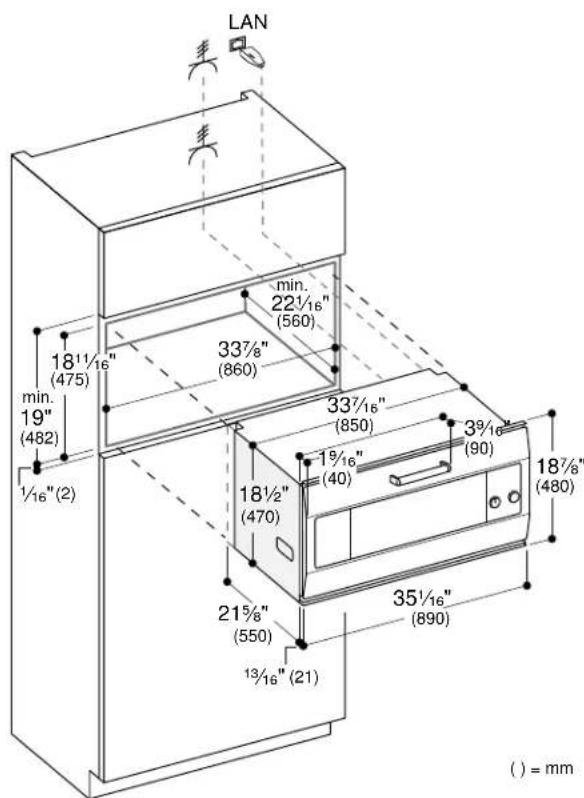
NOTICE
The cabinet base must be flat and capable of supporting a weight of at least 176 lbs (80kg)
Removing Packaging
NOTICE
To prevent damage to your floor keep the unit in its packaging base until ready to be placed in the cabinet opening. Do not slide the unit across the flooring.
Different models use different packaging materials. Actual brackets may look differently. Bracket remains in packaging base.
1.Cut straps on outside of box.
2.Remove cardboard box.
3. Remove all top and side cardboard and Styrofoam braces.
4. Place oven in front of cabinets where it is to be installed.
Install Appliance
Note: The appliance is heavy. It is advisable to install it with a second person.
NOTICE
Before installing the appliance, be sure to verify the cabinet dimensions and electrical connections.
Mount to Cabinet
- Push the appliance fully into the cabinet recess.
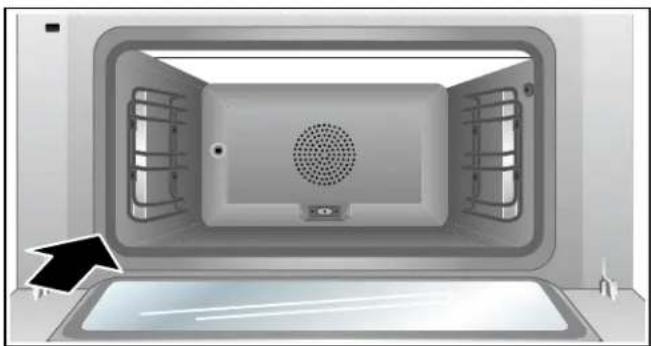
Do not kink or trap the connecting cable, or route it over sharp edges. - Remove the transportation lock from the door. Centre the appliance.
There must be an air gap of 3 / 16 (5 mm) between the appliance and adjacent cabinets.
3.Using a spirit level, adjust the appliance so that it is perfectly level. - Secure the appliance at the top on both sides using into the two screws provided.
Electrical Installation
- Connect red wire from oven to red electrical supply wire (hot wire).
- Connect black wire from oven to black electrical supply wire (hot wire).
- Connect white wire from oven to white electrical supply wire (neutral).
- Connect yellow/green ground oven wire to electrical supply ground wire.
Attach flexible conduit to the junction box.
To facilitate serviceability, the flex conduit must not be shortened and should be routed to allow for temporary removal of the oven.
Connection to the home network (LAN)
This appliance is network-compatible and can be connected to the home network using a LAN cable (LAN cable not included). Before installation, plug the LAN cable into the socket on the rear of the appliance and secure it using the strain relief. Connect the LAN cable to a network socket.
Check the Installation
WARNING
Before you plug in an electrical cord or turn on power supply, make sure all controls are in the OFF position.
Switch on the circuit breaker.
Verify that elements function properly.
Removal
1.Disconnect the appliance from the power supply.
2. Undo the fastening screws.
3. Raise the appliance slightly and pull it out completely.
Customer service
If your appliance needs repairs, our Customer Service is there for you. We work hard to help solve problems quickly and without unnecessary service calls, getting your appliance back up and running correctly in the least amount of time possible.
When you call, please indicate the product number (E-Nr.) and serial number (FD-Nr.) so that we can support you in a qualified manner. You will find the type plate with these numbers on the bottom of the appliance. To avoid having to search for a long time when you need it, you can enter your appliance data and the Customer Service telephone number here.
E-Nr. FD-Nr.
Customer Service
Please read the use and care instructions provided with your appliance. Failure to do so may result in an error in using the appliance. This could result in a service call that instead of fixing a mechanical issue is only needed for customer education. Such calls are not covered by the appliance warranty.
Please find the contact data of all countries in the enclosed customer service list.
To book a service visit and product advice
USA 8774424436
toll-free
CANADA 8774424436
toll-free
Table des matieres
www.P65Warnings.ca.gov

IMPORTANT CONSIGNES DE SECURITÉ
LIRE ET CONSERVER CES INSTRUCTIONS
Transport
1901 Main Street, Suite 600
Irvine, CA 92614
1-877-442-4436
www.gaggenau.com/us
© 2019 BSH Home Appliances
- IMPORTANT SAFETY INSTRUCTIONS 3
- Before you begin 5
- Preparing Kitchen Units 5
- Dimensions and Cabinet Requirements 6
- Removing Packaging 6
- Install Appliance 7
- Customer service 8
- Safety Definitions
- WARNING
- CAUTION
- NOTICE
- IMPORTANT SAFETY INSTRUCTIONS
- READ AND SAVE THESE INSTRUCTIONS
- Appliance Handling Safety
- Safety Codes and Standards
- Electric Safety
- Related Equipment Safety
- Proposition 65 Warning:
- Transport
- Before you begin
- Parts included
- Tools and parts needed
- Power Requirements
- Preparing Kitchen Units
- Dimensions and Cabinet Requirements
- Removing Packaging
- Install Appliance
- Mount to Cabinet
- Electrical Installation
- Connection to the home network (LAN)
- Check the Installation
- Removal
- Customer service
- Table des matieres
- IMPORTANT CONSIGNES DE SECURITÉ
Brand : GAGGENAU
Model : EB333611
Category : Oven