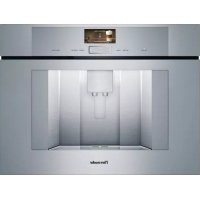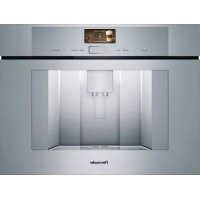
TCM24PS - Coffee machine THERMADOR - Free user manual and instructions
Find the device manual for free TCM24PS THERMADOR in PDF.


User questions about TCM24PS THERMADOR
0 question about this device. Answer the ones you know or ask your own.
Ask a new question about this device
Download the instructions for your Coffee machine in PDF format for free! Find your manual TCM24PS - THERMADOR and take your electronic device back in hand. On this page are published all the documents necessary for the use of your device. TCM24PS by THERMADOR.
USER MANUAL TCM24PS THERMADOR
natural_image
Close-up of a black ceramic cup filled with coffee and sugar, placed on a wooden surface (no text or symbols visible)BUILT-IN COFFEE MACHINE
TCM24PS
en English 2
fr Français 36
es Español 73
A
Included in delivery (see page 6)
natural_image
Two black electronic components with a lid, one open and one closed, labeled 9a and 9 (no text or symbols on the components themselves)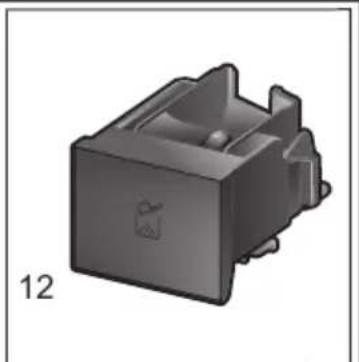
natural_image
3D rendered mechanical component with a small circular feature and a label '12' (no text or symbols on the object itself)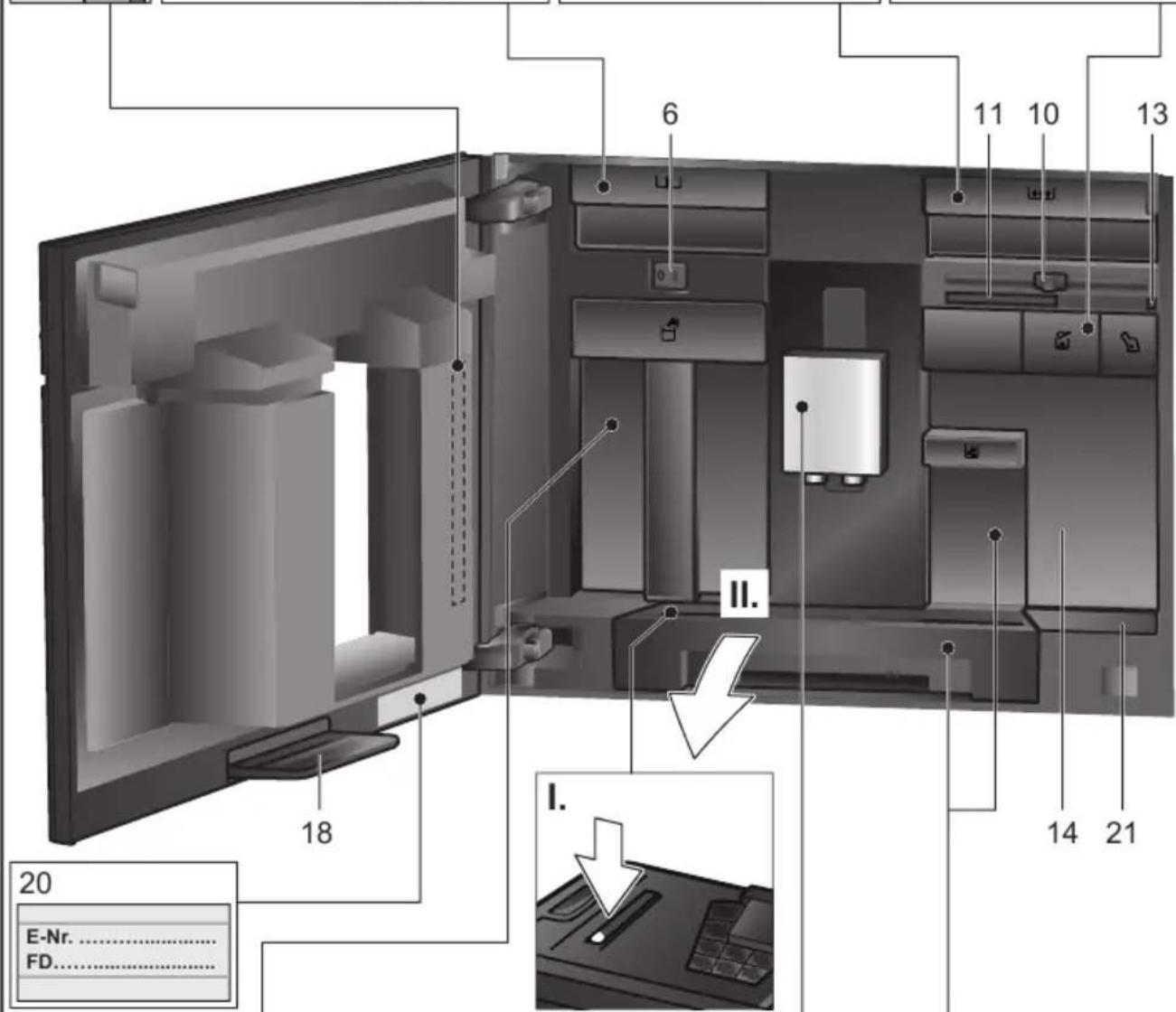
text_image
5 5a 5b 5c 5d 22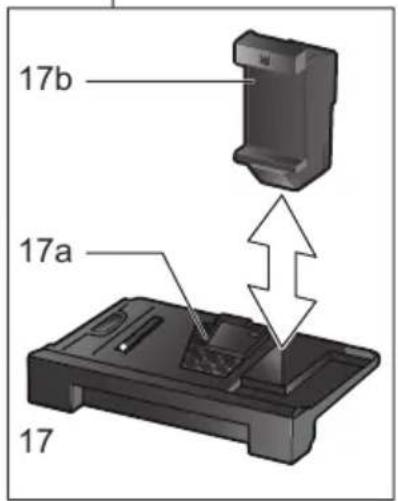
text_image
17b 17a 17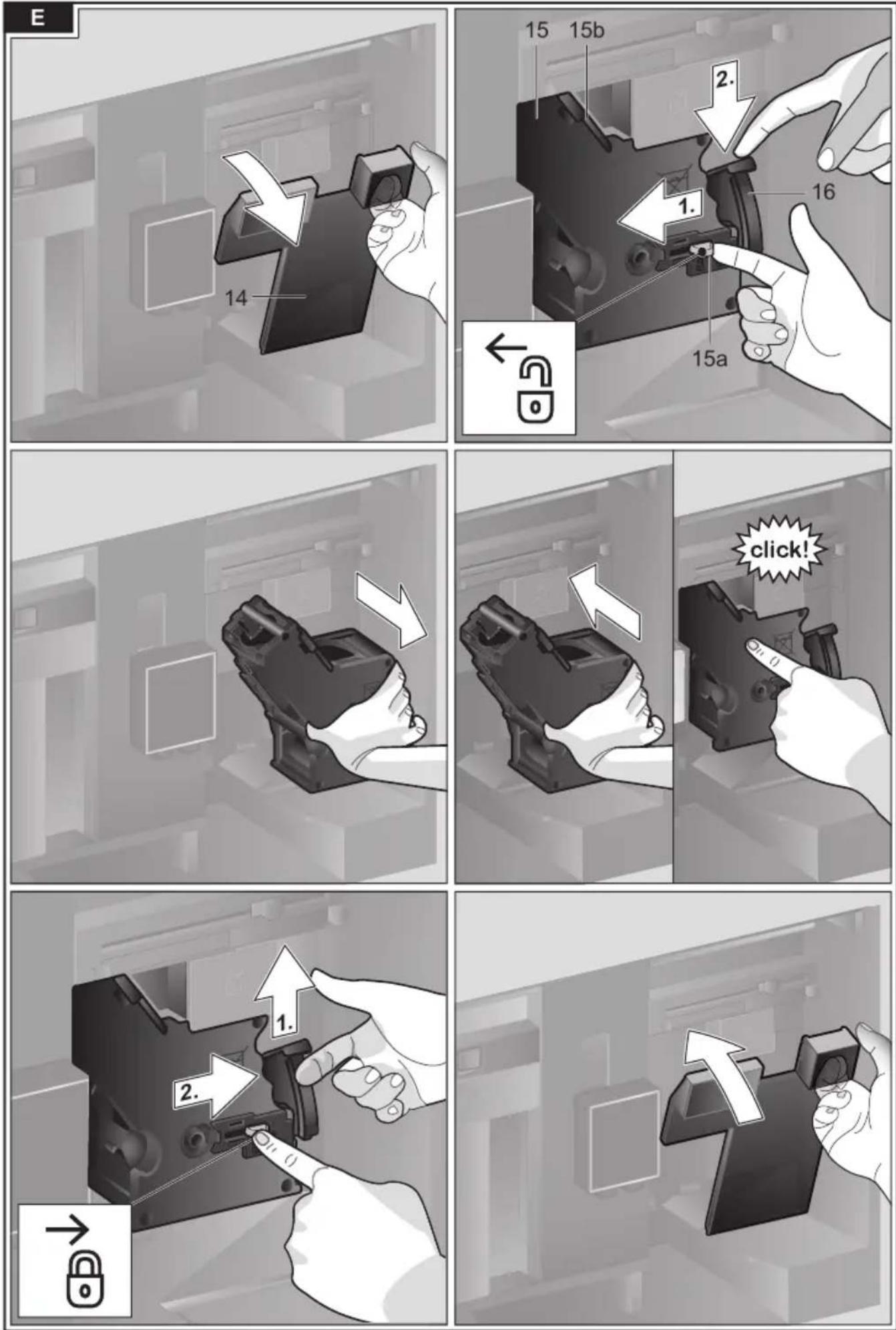
Contents
Important Safety Precautions ....4
Included in delivery....6
Overview....7
Controls 8
Initial use 8
Display....10
Preparing drinks ....10
Preparation using coffee beans....13
Preparation using milk....13
Preparation using ground coffee .....14
Dispensing hot water....15
Personalized drinks 15
Two cups at once....16
Adjusting the grind setting 16
Panel lock....17
Menu....17
Home Connect....19
Care and daily cleaning 23
Service programs 26
Tips on energy saving 28
Frost protection....28
Storing accessories 29
Accessories 29
Disposal....29
Technical specifications....29
Simple troubleshooting....30
AQUA-STOP pledge....33
Warranty 34
This Thermador Appliance is made by
BSH Home Appliances Corporation
1901 Main Street, Suite 600
Irvine, CA 92614
Questions?
1-800-944-2904
www.thermador.com
We look forward to hearing from you.
en
How to use these instructions
You can open up the front cover of this instruction manual. There you will find illustrations of the appliance with each part numbered. These numbers will be referred to throughout the text.
Example: brewing unit (15)
These instructions also show display texts and symbols in a special way. This enable you to clearly see where we refer to texts or symbols that are marked or displayed on the appliance.
Display indicators: "Latte Macchiato"
text_image
Latte Macchiato < < < 6 oz (medium)normal | 6 oz (medium)normalButtons and controls on the display: [ START I STOP ]
text_image
START I STOPThe appliance comes with a quick reference guide where you can find the most important functions at a glance. It can be stored in the accessory drawer of the appliance.
Pay special attention to the important safety instructions in the "Important Safety Precautions" section.
Safety Definitions

WARNING
This indicates that death or serious injuries may occur as a result of non-observance of this warning.

CAUTION
This indicates that minor or moderate injuries may occur as a result of non-observance of this warning.
NOTICE:
This indicates that damage to the appliance or property may occur as a result of non-compliance with this advisory.
Note:
This alerts you to important information and/or tips.
IMPORTANT SAFETY PRECAUTIONS READ AND SAVE THESE INSTRUCTIONS
When using electrical appliances, basic safety precautions should always be followed, including the following:
- Please read and follow the operating instructions carefully and keep them for later reference. If the unit is transferred to another party, please be sure to include these instructions.
- Check the appliance after unpacking it. Do not connect the appliance if it has been damaged in transit.
- Do not touch hot surfaces. Use handles or knobs.
- Be sure that all components are assembled and fastened properly.
- To protect against fire, electric shock and injury to persons, do not immerse cord, plugs, or body in water or in any other liquid. See Use and Care Guide for cleaning.
- Close supervision is necessary when the appliance is used by or near children.
- Unplug from outlet when not in use and before cleaning. Allow to cool before putting on or taking off parts, and before cleaning the appliance.
- Do not operate any appliance with a damaged cord or plug or after it malfunctions, or has been damaged in any manner. Return appliance to the nearest authorized service facility.
- The use of accessories attachments not recommended by the appliance manufacturer may result in fire, electric shock or injury to persons.
- Do not use outdoors or in a damp area.
- Do not let cord hang over edge of table or countertop, or touch hot surfaces.
-
Do not place unit or components on or near a cooktop or range, or in a heated oven.
-
This appliance must not be used by children without adult supervision or by disabled persons without assistance.
- If water is leaking from the inlet hose, turn off the tap at once. When connecting or working on the water pipe, disconnect the appliance from the mains power supply.
- Always attach plug to appliance first, then plug cord into the wall outlet. To disconnect, turn control to "off", then remove plug from wall outlet.
- Do not use appliance for anything other than its intended use.
- Save these instructions.
- Please note the special information on cleaning in the instructions.
State of California Proposition 65 Warnings
WARNING
This product can expose you to chemicals including vinyl chloride, which is known to the State of California to cause cancer and birth defects or other reproductive harm.
For more information go to www.P65Warnings.ca.gov.
IMPORTANT!
This appliance is designed for domestic and not commercial use.
Use indoors at room temperature only.
Do not use at more than 6560 feet / 2000 meters above sea level.
Protect your Coffeemaker against freezing or it will be damaged.
Supervise children to ensure that they do not play with the appliance.

IMPORTANT SAFETY PRECAUTIONS
READ AND SAVE THESE INSTRUCTIONS

WARNING
To reduce risk of fire and electric shock:
Installation
Connect and operate the appliance only according to the rating plate specifications.
Use appliance only with transformer which is identified as Type 8001010566.
Do not connect the appliance to or operate it by means of a time switch or remote control socket. The unit must not be operated with an extension cord.
Use the Coffeemaker only if power cord and appliance show no signs of damage.
Should a problem occur, pull the plug and disconnect from the power immediately.
Never immerse the appliance or power cable in water or any liquid. Avoid spillage on the connector.
Grounding
This appliance may only be connected to a power supply with 120 Volt AC via a correctly installed receptacle with ground.
Repairs
To avoid potential hazards, repairs must only be carried out by authorized service personnel.
If the power cord of this appliance is damaged, it must be replaced by a original replacement power cord, which can be purchased from our Customer Service Department.

CAUTION
To avoid the risk of scalding:
Please note that the beverages are very hot when dispensed.
Do not use chemically softened water!

CAUTION
Risk of scalding (Home Connect)!
If an unattended remote start takes place, third parties may be scalded if they reach under the coffee dispenser during drinks dispensing. You should therefore make sure that with an unattended remote start that there is no risk to other people, in particular not to children, or to property.
To avoid the risk of suffocation:
Do not allow children to play with packaging material. Store small parts safely as they can be a choke hazard.
To avoid the risk of injury:
Keep descaling tablets out of the reach of children. Keep children away from the appliance and power cable.
Do not reach into the grinding unit. Be careful not to pinch your fingers when closing the door. A misuse of the appliance can potentially lead to injury.
To avoid the risk of burns:
The beverage outlet gets very hot. After use, allow to cool down first before touching. After use, the heating element surfaces and warming plate can retain heat. Wait until cool before touching.
Freshly prepared beverages are very hot. Leave to cool a little as necessary.
To avoid the risk of influence electronic implants:
The appliance contains permanent magnets that may influence electronic implants such as pacemakers or insulin pumps. Persons wearing electronic implants must maintain a minimum distance of 4" (10 cm) from the front of the appliance and from the following parts upon removal: milk container, milk system, water tank and brewing unit.
Included in delivery
(Figure A on the fold-out pages)
a Fully automatic coffee machine
b Instruction manual
c Quick reference guide
Home Connect leaflet
e Measuring spoon
f Water hardness testing strip
9 Milk tube (set)
h Milk container
i Suction pipe
Congratulations ...
... on purchasing this fully automatic coffee machine! You have now acquired a high-quality and modern kitchen appliance. It combines innovative technology with a range of functions and is easy to use. It will enable you to prepare a variety of delicious hot drinks quickly and simply – whether you're in the mood for an invigorating espresso, a creamy cappuccino, a smooth latte macchiato or white coffee, or a traditional cup of coffee. At the same time the appliance offers you a wide range of options for adapting it to your individual taste. To ensure that you can use this fully automatic coffee machine with all its functions and features reliably and safely, we recommend you familiarize yourself with its components, functions, displays and controls. These instructions are designed to help you. So please take the time to read them before you switch on the appliance.
Overview
(Figures B to E on the fold-out pages)
1 Appliance door
a) Recessed grip (for opening the door)
b) Drip tray
2 Display
3 Control panel
4 Outlet system (coffee, milk, hot water), height-adjustable
a) Cover
5 Milk system
a) Snap lever
b) Beverage outlet (upper part, lower part)
c) Milk tube (2 pieces)
d) Connecting element, metal (for magnet holder)
6 Power switch [O/I] (power supply)
7 Accessory drawer
(for quick reference guide and accessories)
a) Quick reference guide
b) Measuring spoon
c) Water hardness strip
d) Milk tube (set)
8 Removable water tank
a) Lid for water tank
9 Removable bean container
a) Lid for bean container
10 Slide regulator for grinding degree setting
11 Magnet holder (for connecting element)
12 Removable drawer (for ground coffee/cleaning tablet)
13 Holder (for milk tube)
14 Protective cover (for brewing unit)
15 Brewing unit
a) Locking mechanism
b) Cover
16 Eject lever
17 Removable drip tray
a) Drain filter
b) Coffee grounds container
18 Collecting tray
19 Holder (for suction pipe)
a) Suction pipe
20 Rating plate (E number, FD)
21 Shelf with sensor (for milk container)
22 Milk container
a) Stainless steel container
b) Lower part of the lid
c) Upper part of the lid
Note:
Further information about the appliance, such as how to change the opening angle of the door, can be found in the Installation Instructions.
Controls
The appliance features user-friendly menu navigation to ensure that operation is as easy as possible while at the same time offering a wide range of functions. That means a range of options can be selected with just a few operating steps.
Power switch [O/I]
The power switch [O/I] (with the door open) is used to switch on the appliance or switch it off completely (power supply is interrupted).
NOTICE:
Do not press the power switch while the appliance is in use. Switch off the appliance only when it is in energy saving mode, so that it can rinse automatically.
Control panel (touch field)
Navigate on the control panel by pressing the symbols and characters.
You will hear an audible signal. The audible signal can be switched on and off (see the section "Menu – Key press sound").
[ON I OFF]
Press [ON I OFF] to switch on the appliance or put it into energy saving mode. The appliance is rinsed automatically.
The appliance does not rinse:
- if it is still warm when switched on, or
- if no coffee was dispensed before it was switched off.
The appliance is ready for use as soon as the symbols for the drinks selection appear on the display.
[ SETTINGS ]
Press [ SETTINGS ] to go to menu. Settings can be reconfigured, and able to retrieve information. It can also connect the appliance to Home Connect.
[ CLEAN ]
Press [CLEAN] to view the selection of service programs. Then select the desired program as described in the section "Service Programs."
[DOUBLE]
Press [DOUBLE] after selecting a drink to prepare two cups simultaneously (see the section "Two cups at once").
[FAVORITES]
Press [FAVORITES] to open the selection of "Personalized beverage preparation". Personal settings for coffee drinks can be saved and called up (see the section "Personalized drinks").
[ START I STOP ]
Press [ START I STOP ] to prepare a beverage or to launch a service program.
Note:
If you press [ START I STOP ] again while the drink is being prepared, dispensing will be prematurely halted.
Arrow navigation button
Press the arrows to navigate the display or to change the parameters.
Display
The display shows drinks, settings and information (see the section "Display").
Initial use
General
Fill the appropriate container using only pure, cold, uncarbonated water and only roasted beans. Do not use coffee beans that have been glazed, caramelized or treated with other additives containing sugar, since they will block the brewing unit.

WARNING
Before the appliance can be switched on and used, it must be assembled and connected according to the enclosed assembly instructions.
Setting up the appliance
- Remove any protective plastic film.
NOTICE:
Only use the appliance in a frost-free room. If it has been transported or stored at temperatures below 32^ F, wait at least 3 hours before initial use.
initial use
- Take hold of the appliance door by the recessed grip and open.
- Remove the bean container, fill with coffee beans and replace.
- Set the power switch to [ON I OFF] and close the appliance door.
The appliance heats up and is rinsed. The display is activated.
"Set the language you require" appears.
- Press the [▽] arrow button. The field "English" has a light background. The language can be changed.
- With the [ > ] arrow button select the desired language.
- Press the [^] arrow button. The field "Language" has a light background.
- Select the "Water hardness" with the [ > ] arrow button.
Note:
It is important to set the water hardness correctly to enable the appliance to accurately indicate when the descaling program should be run. The preset water hardness is level 4. If a water softener is installed in the house, please set the water hardness to level 3. You can also check the water hardness by asking your local water supplier.
- Use the enclosed test strip to determine the water hardness. Briefly dip the test strip in water and check the result after one minute.
Level Water hardness
| g/gal (US) | |
| 1 | 1.0426 - 7.2985 |
| 2 | 8.3412 - 14.597 |
| 3 | 15.64 - 21.896 |
| 4 | 22.938 - 31.279 |
- Press touch button [^]. The field "Water hardness" has a light background.
- Press the [▽] arrow button. The field "4 (very hard)" has a light background. The water hardness can be changed.
-
Select "Home Connect" with the touch button [ > ].
-
To now connect the appliance to the Wi-Fi network (home network), press the touch button [√].
- To connect the appliance to a Wi-Fi network later on, press the symbol [ > ].
"Complete set-up" appears. - Press touch button [√]. The settings for Language and Water hardness are saved.

When selecting [Home Connect] please read the detailed description in the section "Home Connect".
The appliance is ready to use when the drink symbols are shown on the display.
The integrated fan switches on each time a drink is dispensed and switches off again after a few minutes.
Note:
When the appliance is used for the first time after running a service program, or if it has not been operated for a long period, the first beverage will not have the full aroma.
When the fully automatic coffee machine is first used, a suitable thick and stable “crema” is only achieved after the first few cups have been dispensed.
Switch off appliance
- Press the [ON I OFF] button.
The appliance rinses and switches to energy saving mode.
Exception: If only hot water is dispensed, the appliance switches off without rinsing.
- To switch the appliance off completely, open the appliance door and set the power switch to [O].
NOTICE:
Do not press the power switch while the appliance is in use.
en Display
Note:
The factory settings of the fully automatic coffee machine are programmed for optimal performance. The appliance switches automatically to the energy saving mode after a specified time and rinses (duration can be set, see “Switch off after” in the section “Menu”).
Note:
The appliance is equipped with a sensor. If there is a milk container, this will be correspondingly shown on the display when switching to the energy saving mode. If there is milk in the container, please store in the fridge.
Display
Display
The display shows the drinks, settings and setting options, as well as messages about the appliance's operating status.
Examples:
Drink selection
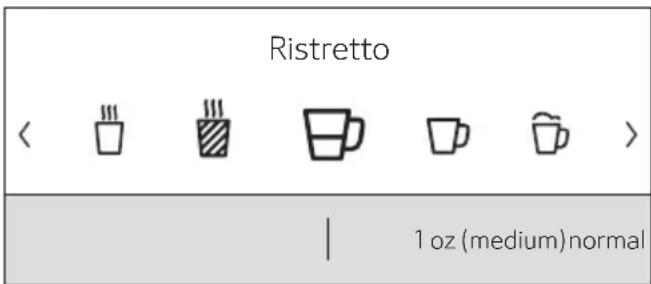
text_image
Ristretto < < < < > 1 oz (medium) normalInformation
Information disappears after pressing the button or after a short time.
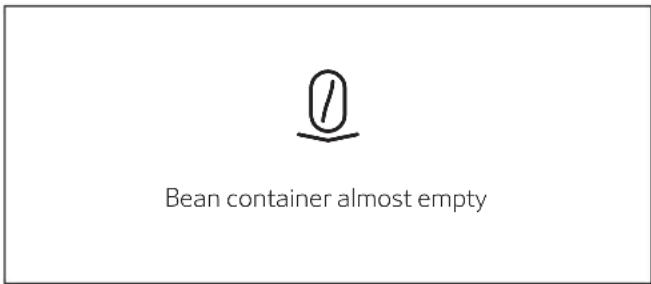
text_image
Bean container almost emptyThe information remains, however at the top of the display in the form of a small symbol.
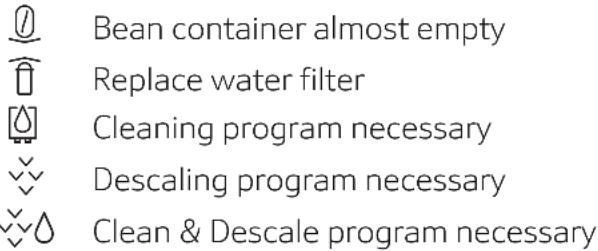
text_image
Bean container almost empty Replace water filter Cleaning program necessary Descaling program necessary Clean & Descale program necessaryPrompts to take action

Fill bean container
Note:
If the action required was carried out, e.g. filling the bean container, the corresponding message and symbol will disappear.
Preparing drinks
This fully automatic coffee machine can be operated using coffee beans or ground coffee (but not instant coffee). If using coffee beans, they will be freshly ground for each brewing. For optimum quality, store the beans in a cool place in sealed containers.
Note:
Cups should be prewarmed, e.g. with hot water. This applies particularly to small thick-walled espresso cups.
Note:
For some settings, coffee is prepared in two stages (see the section "Aroma Double Shot" and "Two cups at once"). Please wait until the process is completely finished.
Preparing drinks
Beverage selection
Press the [ < ] or [ > ] arrow button to select different drinks:
The symbol for the selected drink will appear in the middle. The name of the drink and the values currently set, e.g. for the coffee strength and volume are shown in lower row.
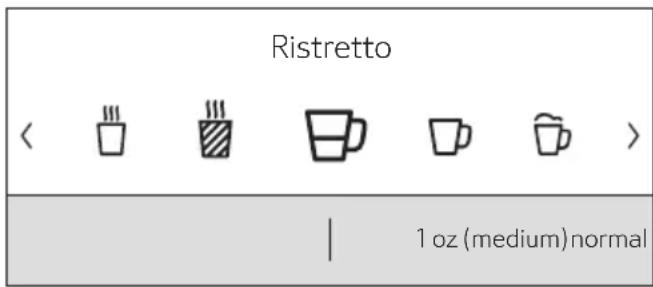
text_image
Ristretto < < < < < > 1 oz (medium) normalThe following drinks can be selected:
Ristretto
Espresso
Espresso Macchiato
Coffee
Cappuccino
Latte Macchiato
Caffe Latte
Milk froth
Warm milk
Hot water
The drink selected can be directly prepared with the pre-set values or first adjusted to individual taste.
Note:
If the appliance is connected to Home Connect, additional drinks can be selected from “Coffeeworld” and adjusted in the app. The last “Coffeeworld” drink selected in the app is shown in the display and can also be adjusted and dispensed directly at the appliance.
Drink adjustment
By pressing the [√] arrow button, different fields will appear for adjustment depending on the drink.
The field where the value can be changed has a light background.
An example:
The values for a cup of coffee can be changed as follows:
- Select "Coffee" with the [ < ] or [ > ] arrow button.
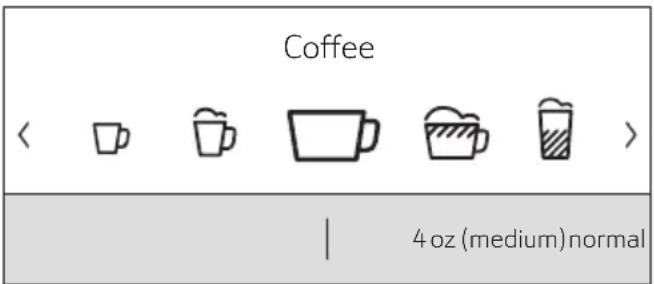
text_image
Coffee 4 oz (medium) normal- Press the [▽] arrow button.
The fields containing the preset values appear. The active field, e.g. “mild” for the coffee strength has a light background.
| Coffee | |
| < normal > | |
| 4 oz (medium) | |
| Temperature normal |
- Set the desired coffee strength, e.g.
"strong" with the [ < ] or [ > ] arrow button.
- Press the [▽] arrow button.
| Coffee | |
| strong | |
| < 4 oz (medium) > | |
| Temperature normal |
- Set the desired amount of coffee, e.g. "5 oz (large)" with the [ < ] or [ > ] arrow button.
- Press the [▽] arrow button.
| Coffee | |
| strong | |
| 5 oz (large) | |
| < Temperature normal > |
en Preparing drinks
- Set the desired temperature, e.g. "Temperature high" with the [ < ] or [ > ] arrow button.
| Coffee | |
| strong | |
| 5 oz (large) | |
| < Temperature high > |
- To go back to the drinks menu either press the [^] arrow button or dispense a drink with [ START I STOP ]. The settings are saved.
Note:
There are different setting options depending on the type of drink. For coffee drinks, for example, the strength, temperature and quantity can be set; for milk, only the volume.
The following settings are possible:
Coffee strength
mild
normal
strong
very strong
DoubleShot
DoubleShot +
DoubleShot ++
Note:
Aroma Double Shot
The longer the coffee is brewed, the more bitter substances and undesirable aromas are released. This has a negative effect on the taste and makes the coffee less easily digested. For extra strong coffee, the appliance has a special Aroma Double Shot function. When half the quantity has been prepared, it grinds and brews fresh coffee beans so that only the pleasant, aromatic scents are released.
Note:
When the 12 oz (360 ml) or 16 oz (480 ml) volume is selected, the Aroma Double Shot function is not operable.
Note:
The Aroma Double Shot function is not available for Ristretto, Espresso Macchiato, and when ground coffee is used.
Volume
The volume differs depending on the type of drink and can be set in "oz" or "ml" increments. The factory setting is in "oz" and can be converted to "ml", see chapter "Menu - Volume units".
Note:
The volume dispensed can fluctuate depending on the quality of the milk.
Drinks temperature
Values for coffee drinks:
Temperature normal
Temperature high
Temperature very high
Values for hot water:
The factory setting is in “° F” and can be converted to “° C”, see chapter “Menu - Temperature format”.
160°F (70°C) White tea
180°F (80°C) Green tea
200°F (90°C) Black tea
Max Fruit tea
Note:
If no controls are activated for approx. 30 seconds, the appliance will automatically exit the settings mode. The settings made will be automatically stored.
Preparation using coffee beans
The appliance must be ready for use.
- Place a cup underneath the beverage outlet.
- Select "Ristretto", "Espresso" or "Coffee" with the [ < ] or [ > ] arrow button.
The display shows the selected drink along with the preset values for the strength of the coffee and the amount for this drink.
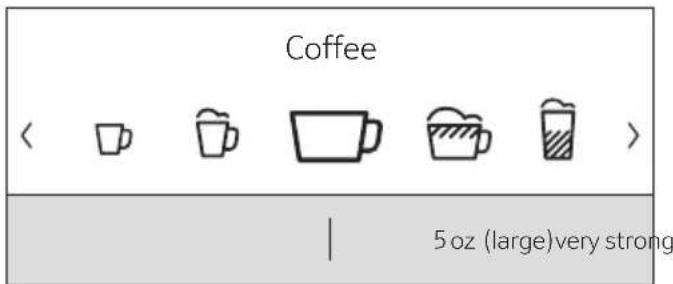
text_image
Coffee < < [m] [m] [m] [m] > 5 oz (large)very strongNote:
The settings can be changed as described in the section "Drink adjustment".
- Press [ START I STOP ] to start dispensing.
The coffee is brewed and then dispensed into the cup.
Press [ START I STOP ] again to prematurely halt dispensing.
Preparation using milk
This fully automatic coffee machine has an integrated beverage outlet. This can be used to prepare coffee drinks with milk or milk froth and warm milk.

CAUTION
Risk of burns!
The beverage outlet gets very hot. After use, always let it cool down before you touch it.
Milk container
This milk container has been specially designed to use together with this fully automatic coffee machine. It is solely intended for use in the household, and for storing milk in the refrigerator.
NOTICE:
Remove cups or glasses before opening the door to prevent them from falling.
Connecting the milk container or a milk carton:
- Open the appliance door.
- Remove the cover of the beverage outlet towards the front.
- Connect and fix the milk tubes and connecting elements as illustrated.
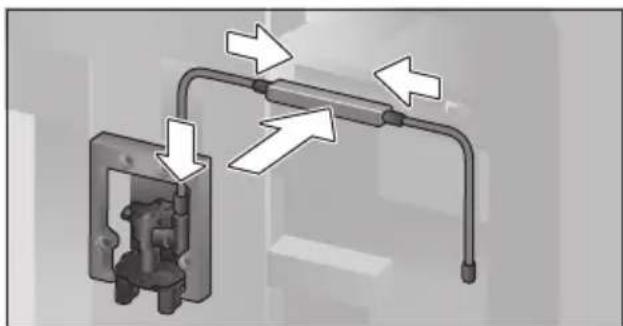
natural_image
Mechanical assembly diagram showing pipe connections and directional arrows (no text or symbols)- Attach the cover firmly from the front on to the beverage outlet.
- Attach the suction pipe and insert into the milk container.
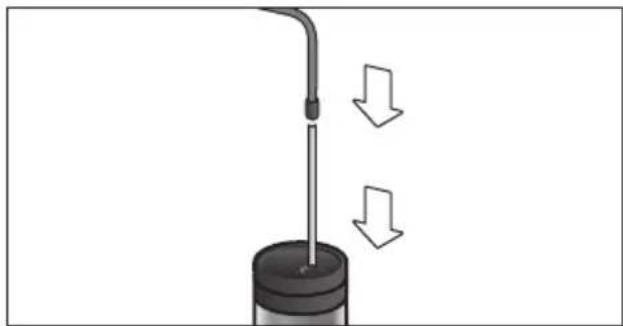
natural_image
Diagram of a mechanical device with a rod and base, showing two downward arrows indicating motion or force (no text or symbols present)- Close the appliance door.
Note:
Dried milk residues are difficult to remove, therefore always clean immediately after use (see the section "Cleaning the milk system").
Coffee drinks with milk
- Place a cup or glass underneath the beverage outlet.
- Select "Espresso Macchiato", "Cappuccino", "Latte Macchiato" or "Caffe Latte" with the [〈] or [〉] arrow button.
The display shows the selected drink along with the preset values for the strength of the coffee and the amount for this drink.
Note:
The settings can be changed as described in the section "Drink adjustment".
- Press [ START I STOP ] to start dispensing.
The milk is dispensed into the cup or glass first. Then the coffee is brewed and runs into the cup or glass.
Press button [ START I STOP ] again to stop the current step of the process prematurely.
Milk froth or warm milk
- Place a cup or glass underneath the beverage outlet.
- Select "Milk froth" or "Warm milk" with the [〈] or [〉] arrow button.
Note:
The settings can be changed as described in the section "Drink adjustment".
- Press [ START I STOP ] to start dispensing.
Milk froth or warm milk is dispensed from the beverage outlet.
Press button [ START I STOP ] again to stop the current step of the process prematurely.
Preparation using ground coffee
Note:
When using ground coffee, the setting for the strength of the coffee, dispensing two cups at once and dispensing larger volumes (12 oz/360 ml or 16 oz/480 ml) is not operable. If the message “Beverage quantity not possible with ground coffee” appears, please select a volume smaller than 12 oz/360 ml.
NOTICE:
Remove cups or glasses before opening the door to prevent them from falling.
The appliance must be ready for use.
- Open the appliance door.
- Remove the ground coffee drawer. The removable drawer must be dry.
- Put in coffee grounds (maximum 2 level measuring spoons); do not press firmly.
NOTICE:
Do not use whole beans or instant coffee.
- Replace the ground coffee drawer.
- Close the appliance door. The display shows "Ground coffee" instead of coffee strength.
Note:
If coffee is not dispensed within 90 seconds, the brewing chamber empties automatically to avoid an overflow. The appliance is then rinsed.
- Place a cup underneath the beverage outlet.
- Select a coffee drink or a coffee drink with milk with the [ < ] or [ > ] arrow button.
The display shows the selected drink along with the preset values for this drink.
Note:
The settings can be changed as described in the section "Drink adjustment".
Note:
For coffee drinks with milk, please observe the instructions in the section "Preparation using milk".
- Press [ START I STOP ] to start dispensing.
The coffee is brewed and then dispensed into the cup. When selecting coffee drinks with milk, the milk is first dispensed and then the coffee brewed.
Note:
For another drink with ground coffee, repeat the procedure.
Dispensing hot water

CAUTION
Risk of burns!
The beverage outlet gets very hot. After use, always let it cool down before you touch it.
The appliance must be ready for use.
- Remove the milk tube from the milk container.
- Remove any milk or coffee residue from the outlet.
- Place a cup or glass underneath the beverage outlet.
- Select "Hot water" with the [ < ] or [ > ] arrow button.
Note:
The settings can be changed as described in the section "Drink adjustment".
- Press [ START I STOP ] to start dispensing.
- The message appears "Milk tube removed from milk container?".
- If still connected, remove the milk tube and press the [▽] arrow button.
Hot water flows out of the beverage outlet.
Press [ START I STOP ] again to prematurely halt the dispensing process.
Personalized drinks
Press [FAVORITES] to open the selection for personalized drinks.
Up to 8 storage spaces can be used. Save your favourite drinks that are frequently dispensed here with all their settings.
Note:
Press [FAVORITES] to exit the menu without saving at any time.
Entering or changing drinks
- Press [FAVORITES].
The selection of memory locations appears.
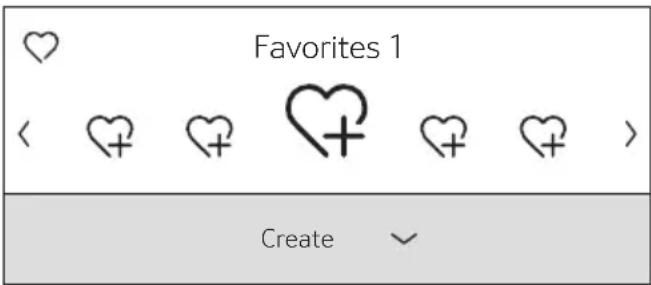
text_image
Favorites 1 < + + + + > Create- Use the [ < ] or [ > ] arrow button to select an empty memory location ⏻ for a new entry, change an occupied memory location, or to delete a favourite drink.
- Select "Create" at an empty memory location or "Change" at an occupied memory location.
- Press the [▽] arrow button.
Note:
If "Delete" is selected, the settings for the memory location are deleted and it is again empty.
The menu for adjusting the drinks opens.
The last drink dispensed is shown with the last settings selected.
- If you do not wish to save last drink dispensed, select another drink with the [〈] or [〉] arrow button.
- Select each setting to be changed with the [▽] or [^] arrow button.
Adjust the values to your own wishes with the [〈] or [〉] arrow button.
Different setting options appear depending on the drink selected.
Note:
For milk drinks, the mixing ratio of coffee and milk can be set.
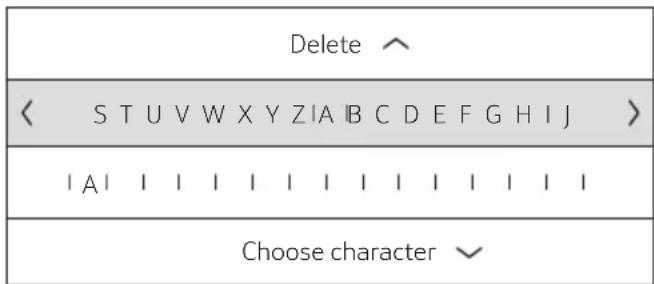
- The settings can be stored under an individual name. Select "Save name". The display for entering the name opens.
text_image
Delete ^ < S T U V W X Y Z I A B C D E F G H I J > | A | | | | | | | | | | | | | Choose character ↙- With [^] exit the entry without any change. The drink selection menu appears.
- Select a letter or a symbol in the upper row with the [ < ] or [ > ] arrow button.
- Press [▽] to confirm the letter selected. To delete select [< ] and press [▽].
- Select other letters or symbols and confirm.
- Press [^] to accept the entry. The selection menu opens.
- Press [FAVORITES] to exit the menu.
Select a personalized drink and dispense Press [FAVORITES]. The selection of memory locations opens.
- Select the desired memory location with the [<] or [>] arrow button.
- Place a cup or glass underneath the beverage outlet.
- Press [ START I STOP ] to start dispensing.
Two cups at once
Press [DOUBLE] to prepare two cups of the selected drink simultaneously. The setting is shown by a second cup symbol and as text, e.g. "2x Espresso".
- Select the desired drink with the [ < ] or [ > ] arrow button.
- Press [DOUBLE].
- Place two cups left and right underneath the beverage outlet.
- Press [ START I STOP ] to start dispensing.
The selected drink is prepared and then dispensed into both cups.
Note:
The drink is prepared in two stages (two grinding operations). Please wait until the process is completely finished, to remove the cup.
Note:
When the 12 oz (360 ml) or 16 oz (480 ml) volume is selected, it is not possible to dispense two cups at once.
Note:
Two cups at once cannot be dispensed for the settings "Aroma Double Shot" or "ground coffee".
Adjusting the grind setting
This fully automatic coffee machine has an adjustable grinding unit. This enables the grinding level of the coffee to be individually changed.
- Open the appliance door.
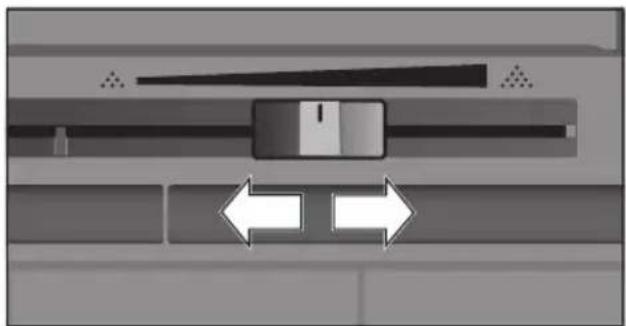
- Slide the regulator to select the grinding degree setting between finely ground coffee ⚙️ and coarsely ground coffee ⚙️.
natural_image
Diagram of a mechanical or electrical component with bidirectional arrows indicating movement or force (no text or symbols present)- Close the appliance door.
Note:
For dark roast coffee beans, choose a finer grind, for lighter beans a coarser grind.
Note:
Make only small changes to the grinding degree setting.
Note:
The new setting will not become apparent until after the second cup of coffee.
Note:
If the display shows the message "Select a coarser degree of grinding", this means that the beans are being ground too finely. Adjust the grinding level to a coarser setting.
Panel lock
The appliance can be locked to prevent the unintended activation and protect children against scalding and burns.
- Press and hold [ SETTINGS ] for at least 4 seconds. "Panel lock activated" briefly appears on the display.
No further operation is now possible; only [ON I OFF] can be pressed.
- To deactivate the child lock, press and hold [ SETTINGS ] for at least 4 seconds. "Panel lock deactivated" briefly appears on the display.
Menu
The menu is used for changing individual settings, accessing information and launching processes.
- Press [ SETTINGS ] to open the menu.
The different setting options will appear.
Navigating through the menu:
The various menu points, e.g. "Language" can be selected with the [〈] or [〉] button. The respective setting, e.g. "English" is displayed with [∨] and changed with [〈] or [〉]. Press [∧] to exit the respective setting again.
| Language | |
| Set the language you require | |
| < English > |
For example:
Set the appliance at 15 minutes to switch off automatically:
- Press [ SETTINGS ]. The menu opens.
- Select "Switch off after" with the [ < ] or [ > ] arrow button.
- Press the [▽] arrow button.
- Select "0h 15min" with the [ < ] or [ > ] arrow button.
- Press [ SETTINGS ]. "Save changes?" appears.
- Press the [▽] arrow button. The setting is saved.
The drink selection appears on the display.
Note:
Press [ SETTINGS ] to exit the menu at any time. If no entry is made within approx. 30 seconds, the menu closes automatically and the settings are not saved.
The following settings can be made:
Language
Set the desired language to show the display texts.
Water hardness
Set this to the local water hardness.
Level "1 (soft)" to "4 (very hard)" can be selected. The preset water hardness is "4 (very hard)".
Note:
It is important to set the water hardness correctly to enable the appliance to accurately indicate when the descaling program should be run.
You can check the water hardness using the enclosed test strip or by asking your local water supplier. If a water softening system is installed in the house, please select the "Softening device" setting.
Water filter
If a water filter is inserted, renewed or removed, the setting "Activate", "Replace" or "Remove" must be made in the menu.
Note:
A water filter lessens limescale deposits and reduces impurities in the water.
The appliance also does not need to be descaled so often.
Water filters are available from retail outlets or from Customer Service (see the section "Accessories").
Inserting or renewing a water filter:
A new water filter must be rinsed before it can be used.
- Select either "Activate" or "Replace" with the [▽] or [^] arrow button.
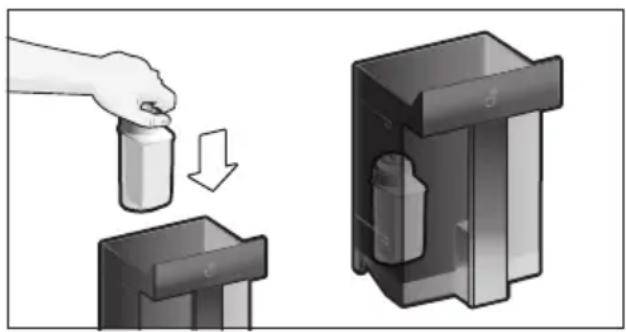
- Press the water filter firmly into the opening of the water tank.
natural_image
Illustration of a hand pouring liquid into a container with an arrow indicating downward motion (no text or symbols)- Remove the milk tube from the milk container and close the door.
NOTICE:
Do not jam the tube when closing the door.
- Press [ START I STOP ].
Water will now flow through the filter to rinse it.
The appliance is ready for use again.
Note:
Rinsing the filter simultaneously activates the setting for the change filter display.
The filter is no longer effective when the "Replace water filter" display appears, or at the latest after two months. It needs to be replaced for reasons of sanitation and to prevent a build-up of limescale (which could damage the appliance).
- If a new filter is not inserted, select the setting "Remove" and press button [ START I STOP ].
The message "Remove filter, reinsert water tank, close door" appears.
Note:
If the appliance has not been used for a prolonged period (for example, while you are on vacation), the existing filter should be rinsed before the first time the appliance is used again. To do this, simply dispense a cup of hot water.
Detailed information about the water filter can be found in the manual supplied with the filter.
Temperature format
Setting option in "°F" or "°C".
Volume units
Setting option in "oz" or "ml".
Switch off after
To set how long the appliance should wait after the last drink was prepared before it automatically rinses and switches itself off. You can specify values from 15 minutes to 12 hours. The factory setting is 30 minutes.
Home Connect
Settings for connection to Wi-Fi network (home network) and mobile devices (see section "Home Connect").
Illumination
Setting the illumination of the beverage outlet. "On", "When in use" or "Off" can be selected.
Brightness illumination
Setting the illumination lightness of the beverage outlet. "Level 1" to "Level 10" can be selected.
Brightness display
Setting the illumination lightness of display.
Key press sound
Switch the signal tones on or off.
Clock display
Display option for time and date "Off" or "Digital" (on). The settings for this can be changed in the next menu options.
Note:
If the appliance is switched off at the power switch or there is a power failure, the settings for the time will be lost.
Time of day
Setting for the current time.
Clock format
Setting option in "12hr" (American mode) or "24hr" (European mode)
Note:
No difference between am and pm.
Frost protection
Service program to prevent frost damage during transportation and storage.
This program completely empties the appliance.
- Select "Start" to begin running the program.
Home Connect
- Empty the water tank and reinsert.
- If available remove the milk container and close the door.
The appliance automatically empties all its pipes.
- Empty the drip tray and re-insert.
Beverage info
Display shows how many drinks have been prepared since its initial use.
- Select "next" to show the information.
Factory settings
Resets your own settings to the condition when delivered.
- Select "reset" with the [ < ] or [ > ] arrow button. The message "Are you sure?" appears.
- Select either "reset" to confirm or "cancel" to interrupt.
Home Connect
This fully automatic coffee machine is Wi-Fi enabled and can be remotely controlled using a mobile device (e.g. tablet, smartphone). The Home Connect app offers additional functions which are a perfect complement to the networked appliance. If the appliance is not connected to a Wi-Fi network (home network), it can still function as a fully automatic coffee machine and be operated as usual via the display.
Important information:
The home network router must be operated in the 2.4 GHz frequency range. Please check it and adjust it if necessary.
The availability of the Home Connect function depends on the availability of Home Connect services in your country. Home Connect services are not available in every country. You can find more information on this at www.home-connect.com.
i Please ensure that you follow the safety instructions given at the beginning of this user manual and make sure that they are also observed when operating the appliance via the Home Connect app and when away from home. Please also follow the instructions in the Home Connect app.
Operation of the appliance itself always takes priority, and during this time it is not possible to operate the appliance using the Home Connect app.
Setting up
To configure settings via Home Connect, you must install the Home Connect app on a mobile device (e.g. tablet, smartphone). When doing so, observe the Home Connect installation instructions supplied, which are also available to download in additional languages at www.thermador.com. Follow the steps specified by the app to configure the settings. Login of the appliance in the Wi-Fi network can be carried out on initial set-up of the fully automatic coffee machine either directly or using the menu (first press [ ] to open the menu):
- Select "Home Connect" with the touch button [ < ] or [ > ].
- Press touch button [√].
- The Home Connect menu appears in the display.
- Switch on Wi-Fi by pressing the touch button [∨].
- Select "Network not connected" with the touch button [ > ].
- Press touch button [√].
- The option "Automatic Network Connection" appears.
If the router has WPS functionality, please select "Automatic Network Connection", otherwise select "Connect manually".
Connecting automatically to the Wi-Fi network (home network)
- Select "Automatic Network Connection" with the touch button [ < ] or [ > ].
- Press touch button [√].
- The display shows "Automatic network connection".
- Press the WPS button on the home network router within a few minutes and wait until the display of the fully automatic coffee machine shows “Network connection successful”.
- Open the app on the mobile device.
- Select "Connect to the app" using the touch button [ < ] or [ > ].
- Press touch button [√] to connect.
The fully automatic coffee machine connects to the app. Follow the instructions in the app.
- Wait until "Successfully connected to app" lights up briefly in the display.
- Select "Remote start off" with the touch button [ < ] or [ > ].
- Press touch button [▽] to switch on.
A warning message appears.
- Continue to press touch button [√] and read the warning message.
- Press touch button [▽] and confirm the warning message.
- Press button [ ] to close the menu.
Using the mobile device, the functions of the fully automatic coffee machine can now be used to their full extent via the app.

If "Remote start off" is selected, only the operating statuses of the fully automatic coffee machine are displayed in the Home Connect app. You can configure settings but not start dispense drinks.
Connecting manually to the Wi-Fi network (home network)
- Select "Connect manually" using the touch button [ < ] or [ > ].
- Press touch button [√].
The fully automatic coffee machine sets up a separate Wi-Fi network that can be accessed with a tablet or smartphone. The display shows the SSID (the name) and the key (the password) of this network.
- Log the mobile device in to the network of the fully automatic coffee machine with the “HomeConnect” SSID and the “HomeConnect” key.
- Start the app on the mobile device and follow the instructions for network login in the app and the supplied Home Connect documents.
The login process is complete when "Network connection successful" lights up briefly in the display of the fully automatic coffee machine.
- Select "Connect to the app" using the touch button [〈] or [〉].
- Press touch button [√] to connect.
The fully automatic coffee machine connects to the app. Follow the instructions on the app.
- Wait until "Successfully connected to app" lights up briefly in the display.
- Select "Remote start off" with the touch button [ < ] or [ > ].
- Press touch button [√] to switch on.
A warning message appears.
- Continue to press touch button [√] and read the warning message.
- Press touch button [√] and confirm the warning message.
- Press button [ ] to close the menu.
Using the mobile device, the functions of the fully automatic coffee machine can now be used to their full extent via the app.

If "Remote start off" is selected, only the operating statuses of the fully automatic coffee machine are displayed in the Home Connect app. You can configure settings but not start dispense drinks.
Switching Wi-Fi on and off
Wi-Fi can be switched "on" or "off" as required (e.g. when on holiday).

Network information is retained after the appliance is switched off.
After switching on, wait a few seconds until the fully automatic coffee machine has connected to the Wi-Fi network again.
In networked standby mode, the appliance requires a maximum of 2 W.
- Press button [ ] to open the menu.
- Select "Home Connect" with the touch button [ < ] or [ > ].
- Press touch button [✓].
The Home Connect menu appears in the display.
- Select "Wi-Fi" with the touch button [ < ] or [ > ].
- Wi-Fi is either switched on or off by pressing the touch button [√].
- Press button [ ] to close the menu.
Additional settings
Home Connect can be adapted to your individual needs at any time.
Note: The fully automatic coffee machine must be connected to the Wi-Fi network.
Disconnecting
The fully automatic coffee machine can be disconnected from the Wi-Fi network at any time.

If the fully automatic coffee machine is disconnected from the Wi-Fi network, it cannot be operated using Home Connect.
- Press button [ ] to open the menu.
- Select "Home Connect" with the touch button [ < ] or [ > ].
- Press touch button [✓].
The Home Connect menu appears in the display.
- Select "Disconnect network" with the touch button [〈] or [〉].
- Press touch button [√]. The appliance is disconnected from the network and app.
- Press button [ ] to close the menu.

Information about the Wi-Fi network is cleared.
Connecting to the app
The Home Connect app can be installed on any number of mobile devices, which can then be used to connect to the fully automatic coffee machine.
The fully automatic coffee machine must already be connected to the Wi-Fi network.
- Open the app on the mobile device.
- Press button [ ] to open the menu.
- Select "Home Connect" with the touch button [ < ] or [ > ].
- Press touch button [▼].
The Home Connect menu appears in the display.
- Select "Connect to the app" using the touch button [〈] or [〉].
- Press touch button [▽] to connect the appliance to the app.
The fully automatic coffee machine connects to the app. Follow the instructions in the app.
- Wait until "Successfully connected to app" lights up briefly in the display.
- Press button [ 🔊 ] to close the menu.
Remote start
If you wish to start dispense drinks on the fully automatic coffee machine via a mobile device, remote start must be activated.

Risk of burns!
If an unattended remote start takes place, third parties may be scalded if they reach under the coffee dispenser during drinks dispensing. You should therefore make sure that there is no risk to other people, in particular not to children, or to property in the event of an unattended remote start.

The text field for turning on remote start can only be selected if connection to Home Connect has been successfully completed.
If remote start is switched off, only the operating statuses of the fully automatic coffee machine are displayed in the Home Connect app.
- Press button [ ] to open the menu.
- Select "Home Connect" with the touch button [ < ] or [ > ].
- Press touch button [√].
The Home Connect menu appears in the display.
- Select "Remote start" with the touch button [ < ] or [ > ].
- Press touch button [▽] to switch on.
- Press button [ 🔊 ] to close the menu.
Appliance information
Display for network and appliance information
- Press button [ ] to open the menu.
- Select "Home Connect" with the touch button [ < ] or [ > ].
- Press touch button [√].
The Home Connect menu appears in the display.
- Select "Home Connect appliance information" with the touch button [ < ] or [ > ].
- Press touch button [√] to make a selection.
The SSID, IP, MAC address and serial number of the appliance are displayed for a few seconds.
- Press button [ ] to close the menu.
Display
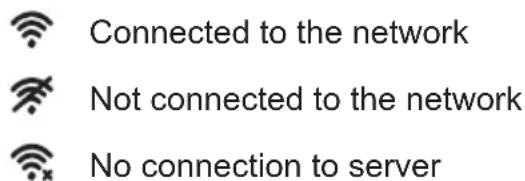
The top right-hand corner of the display shows the Home Connect status with a symbol:
text_image
Connected to the network Not connected to the network No connection to serverRemote diagnostics
In the event of faults, Customer Service can use remote diagnostics to access your appliance. Contact Customer Service and ensure that your appliance is connected to the Home Connect server and check that the remote diagnostics service is available in your country.
For more information and to check whether the remote diagnostics service is available in your country, please visit the Help & Support area of the Home Connect website for your country: www.home-connect.com
Information on data protection
When the fully automatic coffee machine is connected for the first time to a Wi-Fi network which is connected to the Internet, the appliance transmits the following categories of data to the Home Connect server (initial registration):
- Unique appliance identification (consisting of appliance codes as well as the MAC address of the installed Wi-Fi communication module).
- Security certificate of the Wi-Fi communication module (to ensure a secure IT connection).
- The current software and hardware version of the fully automatic coffee machine.
- Status of any previous resetting to the factory settings.
This initial registration prepares the Home Connect functions for use and is only required when you want to use these Home Connect functions for the first time.
i Please note that the Home Connect functions can only be used in conjunction with the Home Connect app. Information on data protection can be accessed in the Home Connect app.
2.4 GHz band: 100 mW max.
Care and daily cleaning

WARNING
Risk of electric shock!
Never immerse the appliance in water.
Do not steam-clean the appliance.

WARNING
Never use harsh chemicals to clean your coffeemaker. Some chloride-containing cleaning products can damage your appliance and may present health hazards. Some chemicals can leave a toxic residue. Use normal dish detergent and water.
- Wipe the outside of the appliance with a soft, damp cloth.
- Use a very mild cleaning agent.
- Clean the control panel and display using a micro-fibre cloth.
- Do not use any cleaning agents containing alcohol or spirits.
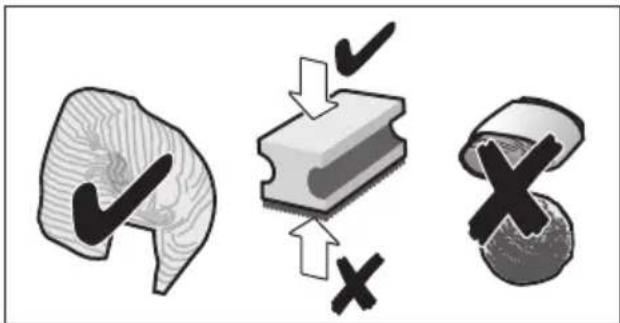
- Do not use abrasive cloths or cleaning agents.
text_image
Diagram illustrating three stages of a biological or material process: surface, step, and cross, with checkmark and cross symbols indicating approval or rejection.- Always remove any limescale, residues of coffee or milk, cleaning or descaling solution immediately. It is possible for corrosion to form underneath such deposits.
Note:
New sponge cloths may contain salts. Salts can cause rust film on stainless steel and must therefore be washed out thoroughly before use.
- Press down the lever in the drip tray and pull out the drip tray forwards.
- Remove drain filter from the drip tray.
• Empty, clean and dry individual parts.
- Insert drain filter into the drip tray and snap into place.
NOTICE:
The drip tray and coffee grounds container should be emptied and cleaned every day in order to prevent deposits.
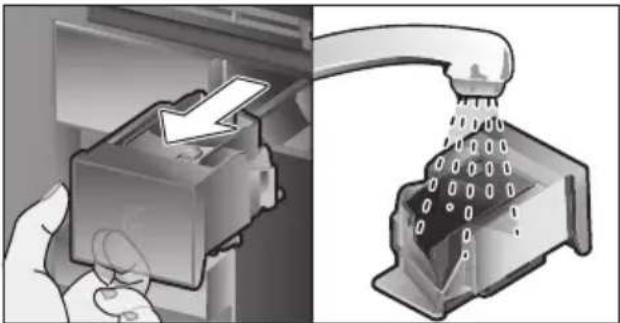
Remove the ground coffee drawer, clean under running water and dry well.
natural_image
Diagram showing a hand inserting a device into a rack with a showerhead pouring liquid (no text or symbols present)- Wipe and dry the inside of the appliance (support, drip tray and the ground coffee drawer) and collecting tray.
- Replace the dried parts, e.g. the ground coffee drawer.
NOTICE:

Do not put the following parts in the dishwasher:
Accessory drawer, water tank, lid of the water tank, beverage outlet cover, bean container, lid of the bean container, metal connecting element, ground coffee drawer, protective cover of the brewing unit and the milk container.

The following parts may be cleaned in the dishwasher:
Drip plate, collecting tray, drip tray, drain filter, coffee grounds container, milk tubes, suction pipes, individual parts of the beverage outlet, measuring spoon and individual parts of the milk container lid.
Note:
If the appliance is cold when switched on, or if it is switched off after dispensing coffee, it rinses automatically.
en Care and daily cleaning
NOTICE:
If the appliance is not used for a lengthy period (e.g. while you are on vacation), clean the entire appliance thoroughly, including the milk system, the ground coffee drawer and the brewing unit before use.
Cleaning the milk system
The milk system is automatically cleaned with a short jet of steam directly after preparing a milk drink.
Note:
For particularly thorough cleaning, the milk system can be additionally rinsed with water (see the section "Rinsing the milk system").
NOTICE:
Additionally clean the milk system manually every week and, if required, more often (see the section "Cleaning the milk system manually").

CAUTION
Risk of burns!
The beverage outlet gets very hot. After use, always let it cool down before you touch it.
Rinsing the milk system
- Press [CLEAN] and select [<] or [>] "Rinse milk system" with the arrow button.
- Press the [▽] arrow button. The program starts.
- Open door and remove suction pipe from the milk tube.
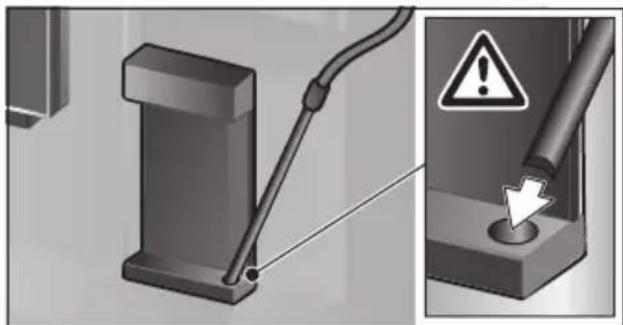
- Wipe the suction pipe and insert the end of the suction pipe into the hole on the coffee grounds container.
natural_image
Mechanical component diagram showing a lever and pin assembly with an alert symbol (no text or labels present)- Close the door. Be careful not to jam the milk tube.
- Press [ START I STOP ].
The milk system is rinsed with water.
- Press [CLEAN] to exit the program.
The milk system has finished rinsing. The appliance is ready for use again.
Cleaning the milk system manually
Take the milk system apart to clean it:
- Push the beverage outlet down completely and pull the cover forward to remove.
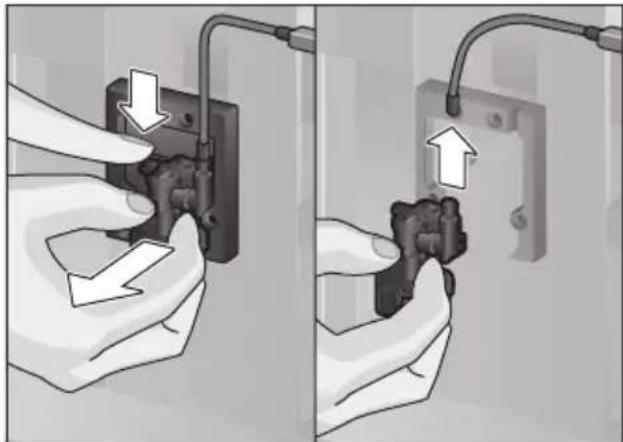
- Press the snap lever to the left of the beverage outlet downwards and pull the beverage outlet forward.
natural_image
Two-panel illustration showing hands installing or adjusting a wall-mounted electrical socket, with arrows indicating the process (no text or symbols present)- Remove the milk tube. Dismantle the top and bottom sections of the beverage outlet.
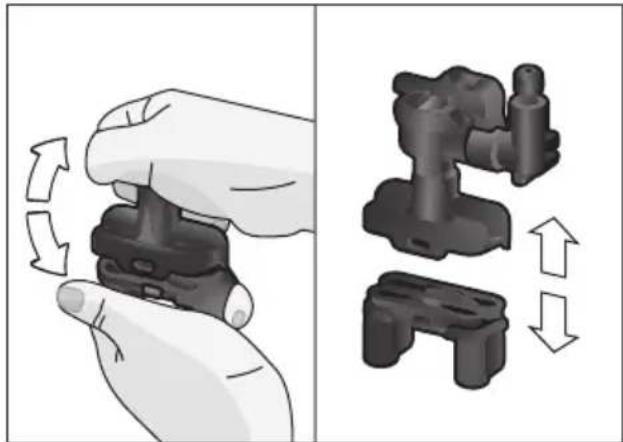
natural_image
Illustration showing a hand holding a device with rotational arrows, alongside a close-up of a mechanical component with directional arrows (no text or symbols)eare and daily cleaning
- Separate the milk tubes, connecting element and suction pipe.
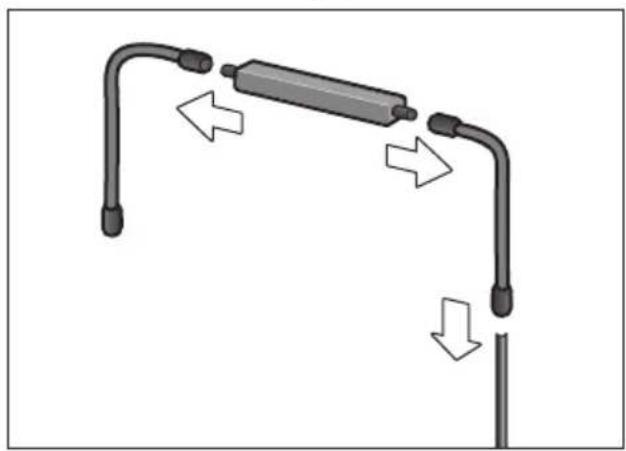
natural_image
Diagram of a mechanical or electrical component with curved ends and directional arrows indicating motion (no text or symbols)- Clean the individual parts with a detergent solution and a soft cloth.
- Rinse all parts with clean water and dry them.
- Put the individual parts back together again (see also the quick reference guide).
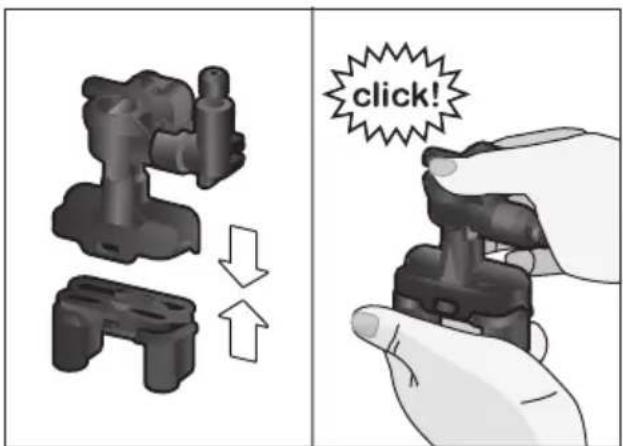
text_image
click!- Attach the beverage outlet directly from the front firmly to the three connections.
- Replace the cover.
Cleaning the milk container

CAUTION
Clean the milk container after each use. Milk residue can spoil.
For reasons of sanitation, the milk container should be cleaned regularly. Only the individual parts of the lid are suitable for being cleaned in the dishwasher. Clean the stainless steel milk container by hand with a mild detergent.
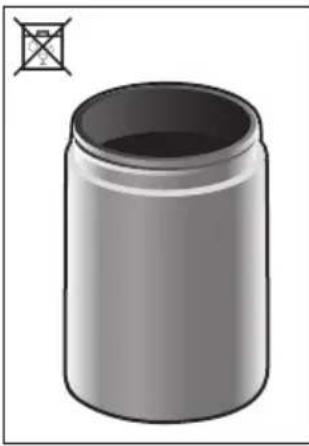
natural_image
Illustration of a cylindrical container with a small symbol on the top-left corner (no text or symbols on the container itself)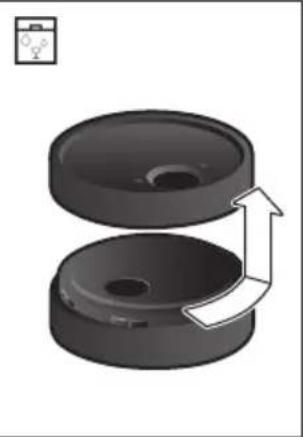
natural_image
Two black mechanical components with a white arrow indicating rotation or movement, no text or symbols present.Cleaning the brewing unit
(see also the Quick reference guide)
In addition to the automatic cleaning program, the brewing unit should be removed regularly for cleaning.
- Open the appliance door.
- Use the power switch [O/I] to switch off the appliance completely.
- Remove the protective cover of the brewing unit.
- Remove the coffee grounds container.
- Slide the red latch on the brewing unit all the way to the left ☐.
- Press the eject lever right down. The brewing unit will be released.
• Take hold of the brewing unit by the recessed grips and carefully remove it. - Remove the cover of the brewing unit and clean thoroughly under running water.
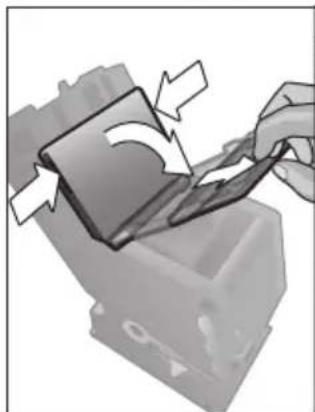
natural_image
Illustration of a hand inserting a card into a device with arrows indicating rotation (no text or symbols)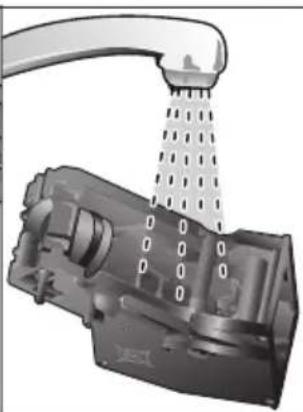
natural_image
Mechanical component with a showerhead spraying water, no visible text or symbols- Clean the strainer of the brewing unit thoroughly under the water jet.
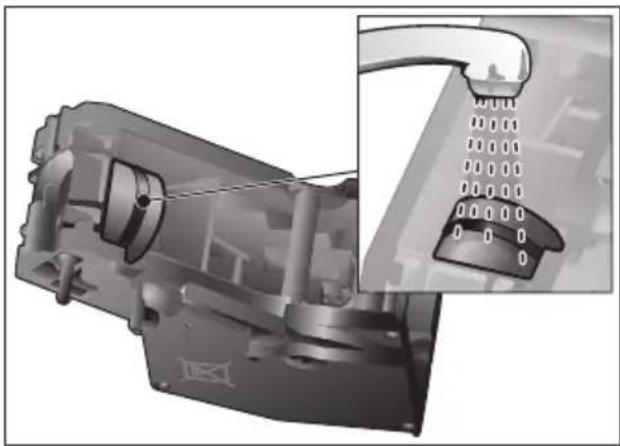
natural_image
Mechanical assembly diagram showing internal components and a close-up of a component with a grid-like structure (no text or symbols visible)- Thoroughly clean the connecting nozzles of the brewing unit.
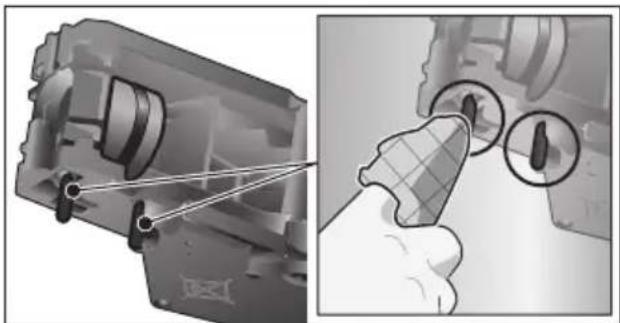
natural_image
Mechanical assembly diagram showing a component being inserted into a housing with a magnified inset (no text or symbols)
Important: Clean it without using washing-up liquid and do not put it in the dishwasher.
- Clean the inside of the appliance thoroughly with a moist cloth, removing any coffee residues.
- Leave the brewing unit and the inside of the appliance to dry.
- Place the cover back on the brewing unit.
- Push the brewing unit all the way into the appliance and press on the middle until it audibly clicks into place.
NOTICE:
The red latch must be right over at the left at ☐ before replacing (see diagram E).
- Press the eject lever up and push the red latch over to the right to 🔒.
- Insert the coffee grounds container.
- Replace the protective cover.
- Close the appliance door.
Service programs
(see also the Quick reference guide)
The following messages will appear on the display at certain intervals, either "Descaling program required!" or "Cleaning program required!" or "Clean & Descale program required!".
The unit should immediately be cleaned or descaled using the appropriate program. Alternatively, the two processes Descale and Clean can be carried out together using the Clean & Descale function (see the section "Clean & Descale"). Failure to carry out the service program according to the instructions may damage the appliance.
Note:
If the appliance is not descaled when it is supposed to be, the message "Descaling program is overdue. Device will shortly be locked." will appear. Immediately perform the descaling process in accordance with the instructions. If the appliance is locked, it can only be operated again once the descaling process has been carried out.
To display how many beverages can still be prepared before one of the service programs needs to be run, proceed as follows:
- Press [CLEAN].
- Select "Service info" with the [ < ] or [ > ] arrow button.
- Press [√] to call up the information.
NOTICE:
For each of the service programs, use descaling and cleaning agents as described in the instructions and observe the (relevant) safety information.
Never interrupt a service program.
Never use citric acid, vinegar or any vine-gar-based agents to descale the appliance.
Never place descaling tablets or other descaling materials in the coffee drawer! Specially developed, suitable descaling and cleaning tablets are available from retail outlets or from Customer Service (see the section "Accessories").

CAUTION
Do not drink or come into contact with cleaning or descaling materials. Keep cleaning materials and descaling tablets out of the reach of children. They may be toxic.
NOTICE:
Before starting each service program (Descale, Clean or Clean & Descale) remove the brewing unit, clean as instructed and replace it. Be careful not to jam the milk tube when closing the door.
After completion of each service program, wipe the appliance immediately with a soft, damp cloth to remove any residues from the descaling and cleaning solution. It is possible for corrosion to form underneath such deposits.
New sponge cloths may contain salts. Salts can cause rust film on stainless steel and must therefore be washed out thoroughly before use. Clean the beverage outlet, milk tubes and connecting piece thoroughly.
Note:
Using a water filter increases the intervals until a descaling program needs to be performed.
Descale
Takes about 21 minutes.
- Press [CLEAN].
- Select "Descale" with the [ < ] or [ > ] arrow button.
- Press [ START I STOP ]. The display indicates the progress of the program.
- Clean and re-insert the beverage outlet, empty, clean and re-insert the drip tray with drain filter and coffee grounds container.
- Remove the water filter (if there is one) and press [ START I STOP ].
- Pour lukewarm water into the empty water tank up to the "0.5 l" mark and then dissolve one Thermador descaling tablet 00311820 in it.
Note:
If there is not enough descaling solution in the water tank, you will be asked to do the following. Refill using uncarbonated water and press [ START I STOP ] again.
- Remove the suction pipe from milk container, wipe it and insert the end of the suction pipe into the hole on the coffee grounds container.
- Close the appliance door.
- Press [ START I STOP ]. The descaling program will now run for about 19 minutes.
- Replace the water filter (if removed).
- Press [ START I STOP ]. The descaling program will now run for about 2 minutes and rinse the appliance.
- Press [ START I STOP ]. The appliance has finished descaling and is ready for use again.
- Press [CLEAN] to exit the program.
Clean
Takes about 5 minutes.
- Press [CLEAN].
- Select "Clean" with the [ < ] or [ > ] arrow button.
- Press [ START I STOP ]. The display indicates the progress of the program.
- Empty, clean and re-insert the drip tray with drain filter and coffee grounds container.
- Open the ground coffee drawer, drop in a cleaning tablet and close the coffee drawer.
- Close the appliance door.
- Press [ START I STOP ]. The cleaning program will now run for about 5 minutes.
- Press [ START I STOP ]. The appliance has finished cleaning and is ready for use again.
- Press [CLEAN] to exit the program.
Clean & Descale
Takes about 26 minutes.
Clean & Descale combines the functions Descale and Clean. If both programs are due to be carried out close together, the fully automatic coffee machine will automatically suggest this service program.
- Press [CLEAN].
- Select "Clean & Descale" with the [ < ] or [ > ] arrow button.
-
Press [ START I STOP ]. The display indicates the progress of the program.
-
Clean and re-insert the beverage outlet, empty, clean and re-insert the drip tray with drain filter and coffee grounds container.
- Open the ground coffee drawer, drop in a cleaning tablet and close the coffee drawer.
- Remove the water filter (if there is one) and press [ START I STOP ].
- Pour lukewarm water into the empty water tank up to the "0.5 l" mark and then dissolve one Thermador descaling tablet 00311820 in it.
Note:
If there is not enough descaling solution in the water tank, you will be asked to do the following. Refill using uncarbonated water and press [ START I STOP ] again.
- Remove the suction pipe from milk container, wipe it and insert the end of the suction pipe into the hole on the coffee grounds container.
- Close the appliance door.
- Press [ START I STOP ].
The program will now run for about 19 minutes.
- Replace the water filter (if removed).
- Replace the water tank and close the door.
- Press [ START I STOP ].
The program will now run for about
7 minutes and rinse the appliance.
- Press [ START I STOP ]. The appliance is descaled, cleaned and ready for use again.
- Press [CLEAN] to exit the program.
Special rinsing
NOTICE:
If any of the service programs are ever interrupted, for instance by a power failure, please proceed according to the information on the display:
- Press [ START I STOP ]. The program will now run for about 2 minutes and rinse the appliance.
- Press [CLEAN] to exit the program.
Tips on energy saving
- Press [ON I OFF] to switch the appliance to “energy saving mode”. The appliance uses very little power when in “energy saving mode”, but monitors all safety-relevant functions as to avoid damage.
- In the menu under "Switch off after", set the automatic switch off period to 15 minutes.
- Reduce the brightness of the display and the illumination in the menu to save energy.
- If possible, do not interrupt the dispensing of coffee or milk froth. Stopping a process prematurely results in higher energy consumption and the drip tray fills up more quickly.
- Descale the appliance regularly to avoid a build-up of limescale. Limescale residues cause higher energy consumption.
Frost protection
To prevent frost damage during transport and storage, completely empty the appliance beforehand (see the section "Menu – Frost protection").
Storing accessories
The fully automatic coffee machine has a special accessory drawer for storing the Quick reference guide and the accessories in the appliance.
- Put the measuring spoon and the water filter into the accessory drawer.
- Put the Quick Reference Guide into the special support at the front of the accessorydrawer.
- The long suction pipe can be stored in the holder on the inside of the door (Figure D).
- The connecting element can be fixed to the magnetic holder above the ground coffee drawer.
Accessories
The following accessories are available from customer service:
Accessories Order number
| Customer service | |
| Cleaning tablets 00311823 | |
| Descaling tablets 00311820 | |
| Water filter 12008246 | |
| Milk container with “FreshLock” lid | 11005967 |
| Restrictors for opening angle 92° | 00636455 |
| Water inlet hose extension | 11019575 |
Disposal

Please check with your local city on your regional disposal options.
All rights reserved.
Technical specifications
| Power connection with transformer type 8001010566 (voltage – frequency) | 120 V AC – 60 Hz |
| Power rating 1600 W | |
| Maximum static pump pressure 19 bar | |
| Maximum water tank capacity (without filter) 81.15 oz (2.4 l) | |
| Maximum capacity of the coffee bean container 1 lb (500 g) | |
| Length of power cable (Power socket – transformer) 39" (1 m) | |
| Dimensions (appliance without transformer) H x B x D | 17 78" x 23 38" x 14 34" (455 x 594 x 375 mm) |
| Weight, empty (appliance without transformer) | 42-44 lb (19-20 kg) |
| Dimensions (only transformer) H x B x D | 8 14" x 6 34" x 6 34" (210 x 172 x 198 mm) |
| Weight (only transformer) | 27.55 lb (12.5 kg) |
| Type of grinding unit | Ceramic |
Simple troubleshooting
The following table provides solutions for problems that may arise as you use your Thermador machine. If you do not find a solution for your specific problem or the problem persists after troubleshooting, please contact 1-800-944-2904.
| Problem Cause Solution | ||
| Strongly fluctuating coffee or milk froth quality (e.g. fluctuation in quantity or milk froth spraying). | Build-up of limescale in the appliance. | Descale the appliance according to the instructions, see the section “Service programs”. |
| The suction pipe is blocked. Clean the suction pipe. | ||
| Drinks cannot be dispensed. | Beverage outlet or one of the 3 connections are blocked. | Clean the beverage outlet and the connections. |
| The drink runs out at the entire outlet during dispensing. | Lower part of the beverage outlet is missing. | Attach the lower part, see the section “Cleaning the milk system”. |
| Too little milk froth, none at all, or the milk system is not taking in any milk. | Build-up of limescale in the appliance. | Descale the appliance according to the instructions, see the section “Service programs”. |
| Beverage outlet or one of the 3 connections are blocked. | Clean the beverage outlet and the connections. | |
| Milk not suitable for foaming. Do not use milk that has already been boiled. Use cold milk with a fat content of at least 1.5%. | ||
| Beverage outlet or the milk tubes are not correctly assembled. | Moisten the individual parts and put them together again. | |
| The suction pipe is blocked. Clean the suction pipe. | ||
| The personally selected volume is not reached.Coffee dispensing slows to a trickle or stops completely. | Coffee is ground too finely.Preground coffee is too fine. | Adjust the grinding level to a coarser setting. Use a coarser ground coffee. |
| Heavy build-up of limescale in the appliance. | Descale the appliance according to the instructions, see the section “Service programs”. | |
| The brewing unit is soiled. Clean brewing unit, see chapter “Cleaning the brewing unit”. | ||
| Hot water milky or tastes of coffee. | Milk tube has not been removed. | Remove the milk tube from the milk container. |
| Milk or coffee residue in the beverage outlet. | Clean the beverage outlet. | |
| Coffee has no “crema”. Unsuitable type of coffee. Use a type of coffee with a higher proportion of robusta beans. | ||
| Coffee is too “acidic”. The grinding level is too coarse. Preground coffee is too coarse. | Adjust the grinding unit to a finer setting. Use a finer ground coffee. | |
| Coffee is too “bitter”. Coffee is ground too finely. Preground coffee is too fine. | Adjust the grinding level to a coarser setting. Use a coarser ground coffee. | |
| Coffee tastes burnt. The brewing temperature is too high. | Reduce the temperature, see the section “Drink adjustment”. | |
| Coffee is too “weak”. Coffee strength selected is too weak. | Raise the strength of the coffee, see the section “Drink adjustment”. | |
| Ground coffee sticks in the coffee drawer. | Do not press the ground coffee firmly into the coffee drawer. | |
| The water filter does not stay in position in the water tank. | Firmly press the water filter straight down into the tank connection. | |
| Bean container sticks when inserting. | Remove the beans. | |
| The coffee grounds are not compact and are too wet. | Adjust the grinding unit to a coarser or finer setting, or use 2 level measuring spoons of ground coffee. | |
| Grinding level adjustment is stiff. | Dispensing a drink from coffee beans. Only make any subsequent changes to the grinding level in small steps. | |
| Brewing unit cannot be inserted. | Insert the brewing unit according to the instructions, see the section “Cleaning the brewing unit”. | |
| Protective cover of the brewing unit cannot be properlyattached. | Brewing unit is not locked. Lock | the brewing unit, see the section “Cleaning the brewing unit”. |
| There is water under the drip tray. | This water is condensation. Do | not insert drip tray without cover. |
| Display shows“12:00” | Power failure or appliance switched off at power switch. | Re-enter values; do not switch the appliance off at the power switch or select the "Off" option in the Clock display menu. |
| Display shows“Milk container connected?” despite connected milk container. | Container is outside the range of the sensor. | Position the container at the right edge. |
| Material e.g. milk carton is not recognised. | Confirm the display request with "yes" or use the enclosed milk container. | |
| Display shows“Overvoltage or undervoltage” | Voltage too high or too low. Con | contact electricity or grid provider. Have the power supply checked by an expert. |
| Display shows“Leave device to cool” | Appliance is too hot. Switch off | appliance for 30 minutes. |
| Display shows, for example:“Fault: E0510” | The appliance has a fault. Pro | eed according to the display screen. |
| Display shows“Fill bean container” although the container is already full, or the grinder is not grinding any beans. | Beans are not falling into the grinding unit (beans too oily). | Gently tap the bean container. Possibly change the type of coffee. When the bean container is empty, wipe it with a dry cloth. |
| Display shows“Clean brewing unit” | Brewing unit is soiled. Clean the | brewing unit. |
| Too much ground coffee in the brewing unit. | Clean the brewing unit. Do not place more than two level measuring spoons of ground coffee in the drawer. | |
| The mechanism of the brewing unit is stiff. | Clean the brewing unit, see the section “Care and daily cleaning”. | |
| Display shows“Remove filter” | New water filter not rinsed according to instructions, or water filter used or defective. | Rinse the water filter according to the instructions and then switch on, or use a new water filter. |
| Air in the water filter. Dip the w | water filter into water until no more air bubbles escape, replace the filter. | |
| Display shows“Empty drip trays”despite them being empty. | Drip tray is soiled and wet. Clean and dry the drip tray thoroughly. | |
| Emptying is not detected when the appliance is switched off. | When the appliance is switched on, remove and re-insert the drip tray. | |
| Display shows“Insert drip trays”even though drip tray in use. | Inside of appliance (tray holder) dirty. | Clean the inside. |
| The coffee grounds container is not fully inserted. | Push the coffee grounds container all the way in. | |
| Very frequent display that descaling is necessary. | Water is too hard. Insert water filter and configure settings accordingly in the menu. | |
| Water dripped onto the inner floor of the appliance when the drip tray was removed. | Drip tray was removed too soon. | Wait a few seconds after the last drink was dispensed before removing the drip tray. |
| Display shows“Switch off with power switch and then back on after 30 sec!” | Appliance is too warm. Leave the appliance to cool down. | |
| Dirty brewing unit. Clean the brewing unit. | ||
| Home Connect does not work correctly. | Go to www.home-connect.com | |
AQUA-STOP pledge
In addition to the standard warranty provided by BSH, BSH will also compensate customers for damage caused by a specific fault in the Aqua-Stop system giving rise to a valid warranty claim. Compensation will be provided under the following conditions:
- If water damage is caused by a defect in materials or workmanship in the Aqua-Stop system, BSH will compensate customers reasonable and verifiable damages.
- A condition of all warranty claims is the appliance with Aqua-Stop must have been installed and connected correctly in accordance with all instructions; this also includes a properly installed Aqua-Stop extension (genuine accessories). The warranty does not cover defective feed lines or fittings leading to the Aqua-Stop connection at the tap.
Warranty
STATEMENT OF LIMITED PRODUCT WARRANTY
What this Warranty Covers & Who it Applies to: The limited warranty provided by BSH Home Appliances (“Thermador”) in this Statement of Limited Product Warranty applies only to the Thermador appliance sold to you, the first using purchaser, provided that the Product was purchased: (1) for your normal, household (non-commercial) use, and has in fact at all times only been used for normal household purposes; (2) new at retail (not a display, “as is”, or previously returned model), and not for resale, or commercial use; and (3) within the United States or Canada, and has at all times remained within the country of original purchase. The warranties stated herein apply to the original purchaser of the product warranted herein and to each succeeding owner of the product purchased for ordinary home use during the term of the warranty.
Please make sure to return your registration card; while not necessary to eff ectuate warranty coverage, it is the best way for Thermador to notify you in the unlikely event of a safety notice or product recall.
How Long the Warranty Lasts: Thermador warrants that the Product is free from defects in materials and workmanship for a period of seven hundred thirty (730) days from the date of purchase. The foregoing timeline begins to run upon the date of purchase, and shall not be stalled, tolled, extended, or suspended, for any reason whatsoever. This Product is also warranted to be free from cosmetic defects in material and workmanship (such as scratches of stainless steel, paint/porcelain blemishes, chips, dents, or other damage to the fi nish) of the Product, for a period of thirty (30) days from the date of purchase or closing date for new construction. This cosmetic warranty excludes slight color variations due to inherent differences in painted and porcelain parts, as well as differences caused by kitchen lighting, product location, or other similar factors. This cosmetic warranty specifically excludes any display, floor, “As Is”, or “B” stock appliances.
Repair/Replace as Your Exclusive Remedy: During this warranty period, Thermador or one of its authorized service providers will repair your Product without charge to you (subject to certain limitations stated herein) if your Product proves to have been manufactured with a defect in materials or workmanship. If reasonable attempts to repair the Product have been made without success, then Thermador will replace your Product (upgraded models may be available to you, in Thermador's sole discretion, for an additional charge). All removed parts and components shall become the property of Thermador at its sole option. All replaced and/or repaired parts shall assume the identity of the original part for purposes of this warranty and this warranty shall not be extended with respect to such parts. Thermador's sole liability and responsibility hereunder is to repair manufacturer-defective Product only, using a Thermador-authorized service provider during normal business hours. For safety and property damage concerns, Thermador highly recommends that you do not attempt to repair the Product yourself, or use an un-authorized servicer; Thermador will have no responsibility or liability for repairs or work performed by a non-authorized servicer. If you choose to have someone other than an authorized service provider work on your Product, THIS WARRANTY WILL AUTOMATICALLY BECOME NULL AND VOID. Authorized service providers are those persons or companies that have been specially trained on Thermador products, and who possess, in Thermador's opinion, a superior reputation for customer service and technical ability (note that they are independent entities and are not agents, partners, affiliates or representatives of Thermador). Notwithstanding the foregoing, Thermador will not incur any liability, or have responsibility, for the Product if it is located in a remote area (more than 100 miles from an authorized service provider) or is reasonably inaccessible, hazardous, threatening, or treacherous locale, surroundings, or environment; in any such event, if you request, Thermador would still pay for labor and parts and ship the parts to the nearest authorized service provider, but you would still be fully liable and responsible for any travel time or other special charges by the service company, assuming they agree to make the service call.
Out of Warranty Product: Thermador is under no obligation, at law or otherwise, to provide you with any concessions, including repairs, pro-rates, or Product replacement, once this warranty has expired.
Warranty Exclusions: The warranty coverage described herein excludes all defects or damage that are not the direct fault of Thermador, including without limitation, one or more of the following: (1) use of the Product in anything other than its normal, customary and intended manner (including without limitation, any form of commercial use, use or storage of an indoor product outdoors, use of the Product in conjunction with air or water-going vessels); (2) any party's willful misconduct, negligence, misuse, abuse, accidents, neglect, improper operation, failure to maintain, improper or negligent installation, tampering, failure to follow operating instructions, mishandling, unauthorized service (including self-performed "fi xing" or exploration of the appliance's internal workings); (3) adjustment, alteration or modification of any kind; (4) a failure to comply with any applicable state, local, city, or county electrical, plumbing and/or building codes, regulations, or laws, including failure to install the product in strict conformity with local fire and building codes and regulations; (5) ordinary wear and tear, spills of food, liquid, grease accumulations, or other substances that accumulate on, in, or around the Product; and (6) any external, elemental and/or environmental forces and factors, including without limitation, rain, wind, sand, floods, fires, mud slides, freezing temperatures, excessive moisture or extended exposure to humidity, lightning, power surges, structural failures surrounding the appliance, and acts of God. In no event shall Thermador have any liability or responsibility whatsoever for damage to surrounding property, including cabinetry, floors, ceilings, and other structures or objects around the Product. Also excluded from this warranty are products on which the serial numbers have been altered, defaced, or removed; service visits to teach you how to use the Product, or visits where there is nothing wrong with the Product; correction of installation problems (you are solely responsible for any structure and setting for the Product, including all electrical, plumbing or other connecting facilities, for proper foundation/ flooring, and for any alterations including without limitation cabinetry, walls, floors, shelving, etc.); and resetting of breakers or fuses.
TO THE EXTENT ALLOWED BY LAW, THIS WARRANTY SETS OUT YOUR EXCLUSIVE REMEDIES WITH RESPECT TO PRODUCT, WHETHER THE CLAIM ARISES IN CONTRACT OR TORT (INCLUDING STRICT LIABILITY, OR NEGLIGENCE) OR OTHERWISE. THIS WARRANTY IS IN LIEU OF ALL OTHER WARRANTIES, WHETHER EXPRESS OR IMPLIED. ANY WARRANTY IMPLIED BY LAW, WHETHER FOR MERCHANTABILITY OR FITNESS FOR A PARTICULAR PURPOSE, OR OTHERWISE, SHALL BE EFFECTIVE ONLY FOR THE PERIOD THAT THIS EXPRESS LIMITED WARRANTY IS EFFECTIVE. IN NO EVENT WILL THE MANUFACTURER BE LIABLE FOR CONSEQUENTIAL, SPECIAL, INCIDENTAL, INDIRECT, “BUSINESS LOSS”, AND/OR PUNITIVE DAMAGES, LOSSES, OR EXPENSES, INCLUDING WITHOUT LIMITATION TIME AWAY FROM WORK, HOTELS AND/OR RESTAURANT MEALS, REMODELLING EXPENSES IN EXCESS OF DIRECT DAMAGES WHICH ARE DEFINITIVELY CAUSED EXCLUSIVELY BY Thermador, OR OTHERWISE. SOME STATES DO NOT ALLOW THE EXCLUSION OR LIMITATION OF INCIDENTAL OR CONSEQUENTIAL DAMAGES, AND SOME STATES DO NOT ALLOW LIMITATIONS ON HOW LONG IMPLIED WARRANTY LASTS, SO THE ABOVE LIMITATIONS MAY NOT APPLY TO YOU. THIS WARRANTY GIVES YOU SPECIFIC LEGAL RIGHTS, AND YOU MAY ALSO HAVE OTHER RIGHTS, WHICH VARY FROM STATE TO STATE.
No attempt to alter, modify or amend this warranty shall be effective unless authorized in writing by an officer of BSH.
Obtaining Warranty Service: To obtain warranty service for your product, you should contact Thermador Customer Service at 1-800-735-4328.
Product manufactured by
BSH Home Appliances Corporation
1901 Main Street, Suite 600
Irvine, CA 92614
Sommaire
text_image
• START I STOPnatural_image
Diagram of a mechanical or electrical component with directional arrows indicating flow or movement (no text or symbols present)natural_image
Diagram of a mechanical device with a rod and arrow indicating downward motion (no text or symbols)natural_image
Diagram of a mechanical or electrical component with bidirectional arrows indicating movement or force (no text or symbols present)natural_image
Illustration of a hand placing a cylindrical object into a container, with an arrow indicating the process (no text or symbols present)www.home-connect.com
text_image
Diagram illustrating three stages of a biological or material process: surface, step, and cross, with checkmarks indicating approval or rejection.natural_image
Diagram showing a hand inserting a device into a container while pouring liquid from a showerhead (no text or symbols present)natural_image
Mechanical assembly diagram showing a lever and pin with warning symbol (no text or labels)natural_image
Two-panel illustration showing hands installing or adjusting a wall socket with cable (no text or symbols)natural_image
Illustration showing a hand holding a game controller and its 3D mechanical assembly with directional arrows indicating motion (no text or symbols)natural_image
Diagram of a mechanical device with curved ends and directional arrows indicating motion (no text or symbols)natural_image
Illustration of a cylindrical container with a small cross symbol on the left (no text or labels)
natural_image
Two black circular mechanical components with a white arrow indicating rotation or movement, no text or symbols present.natural_image
Two-panel illustration showing a hand cleaning a mechanical component and pouring liquid into a showerhead (no text or symbols)natural_image
Mechanical component assembly with inset showing a close-up of a connector pin (no text or symbols visible)natural_image
Mechanical assembly diagram showing a component being inserted into a housing with a hand holding a tool (no text or symbols visible)
1901 Main Street, Suite 600
Irvine, CA 92614
Índice
1901 Main Street, Suite 600
Irvine, CA 92614
¿Tiene preguntas?
1-800-944-2904
www.thermador.com
text_image
START I STOPnatural_image
Mechanical assembly diagram showing pipe connections and directional arrows (no text or symbols)natural_image
Diagram of a mechanical device with a rod and arrow indicating downward motion (no text or symbols)natural_image
Diagram of a mechanical or electrical component with bidirectional arrows indicating movement or force (no text or symbols present)natural_image
Illustration of a hand pouring liquid into a container with a downward arrow, next to a mechanical component (no text or symbols)text_image
Diagram showing three labeled biological structures with checkmarks and X symbols indicating approval or rejection states.natural_image
Diagram showing a hand inserting a device into a rack with a showerhead, alongside a close-up of the rack interior (no text or symbols)natural_image
Mechanical assembly diagram showing a lever and pin with warning symbol (no text or labels)natural_image
Two-panel illustration showing hands installing or adjusting a wall-mounted electrical socket, with arrows indicating the process (no text or symbols present)natural_image
Illustration showing a hand holding a game controller and a mechanical device with directional arrows indicating motion (no text or symbols)natural_image
Diagram of a mechanical device with curved arms and directional arrows indicating motion (no text or symbols)natural_image
Diagram showing a cylindrical container with a cross symbol and its side view of a multi-cylinder lid with an arrow indicating rotation (no text or labels present)natural_image
Two-panel illustration showing a hand cleaning a mechanical component and pouring liquid into a wash bottle (no text or symbols)natural_image
Mechanical component assembly with inset showing a close-up of a curved pipe or valve (no text or symbols visible)natural_image
Mechanical assembly diagram showing a component being inserted into a housing with a close-up view of the tool (no text or symbols present)1901 Main Street, Suite 600
Irvine, CA 92614
Wi-Fi® Module FCC/IC Statements
Model: COMGEN1 FCC ID: 2AHES-COMGEN1 IC ID: 21152-COMGEN1
The Home Connect module is a communication device designed to provide communication between appliances and smart devices.
FCC COMPLIANCE STATEMENT
CAUTION: Changes or modifications not expressly approved could void your authority to use this equipment.
This device complies with Part 15 of the FCC Rules. Operation to the following two conditions: (1) This device may not cause harmful interference, and (2) this device must accept any interference received, including interference that may cause undesired operation.
INDUSTRY CANADA STATEMENT
This device complies with Industry Canada licence-exempt RSS standard(s). Operation is subject to the following two conditions: (1) this device may not cause interference, and (2) this device must accept any interference, including interference that may cause undesired operation of the device.