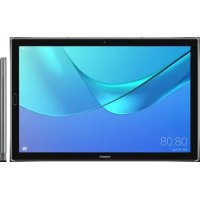
MediaPad M5 Pro - Tablet HUAWEI - Free user manual and instructions
Find the device manual for free MediaPad M5 Pro HUAWEI in PDF.



| Product Type | Tablet |
| Brand | Huawei |
| Model | MediaPad M5 Pro (CMR-AL19 / CMR-AL19G) |
| Operating System | Android |
| Screen | 10.8 inches (estimated) |
| Processor | Kirin 960 (estimated) |
| RAM Memory | 4 GB (estimated) |
| Internal Storage | 64 GB / 128 GB (estimated) |
| Connectivity | Wi-Fi 2.4/5 GHz, Bluetooth, LTE (depending on model) |
| Camera | Rear and front |
| Fingerprint sensor | Yes |
| Speaker | Yes |
| Microphone | Yes |
| Stylus included | M-Pen with function buttons |
| Ports | USB-C, SIM/microSD card tray |
| Power Supply | Power adapter HW-059200XHQ (USB-C) |
| Battery | Lithium-ion, rechargeable (model HB299418ECW) |
| Dimensions (estimated) | 258.7 x 171.8 x 7.3 mm |
| Weight (estimated) | 498 g |
| Operating temperature | 0 °C to 35 °C |
| Storage temperature | -20 °C to +45 °C |
| Certifications | ENERGY STAR, EU compliance |
| Manual content | 128 pages, multilingual |
Frequently Asked Questions - MediaPad M5 Pro HUAWEI
User questions about MediaPad M5 Pro HUAWEI
0 question about this device. Answer the ones you know or ask your own.
Ask a new question about this device
Download the instructions for your Tablet in PDF format for free! Find your manual MediaPad M5 Pro - HUAWEI and take your electronic device back in hand. On this page are published all the documents necessary for the use of your device. MediaPad M5 Pro by HUAWEI.
USER MANUAL MediaPad M5 Pro HUAWEI
KpaTKoe pyKOBoODCTBO NOIb3OBaTeJIa
Contents
English (United Kingdom) 1
Francais. 12
Deutsch 25
Italiano 37
Espanol 49
Portugues. 61
Nederlands 73
yKpaiHcbka. 85
Pycckn 99
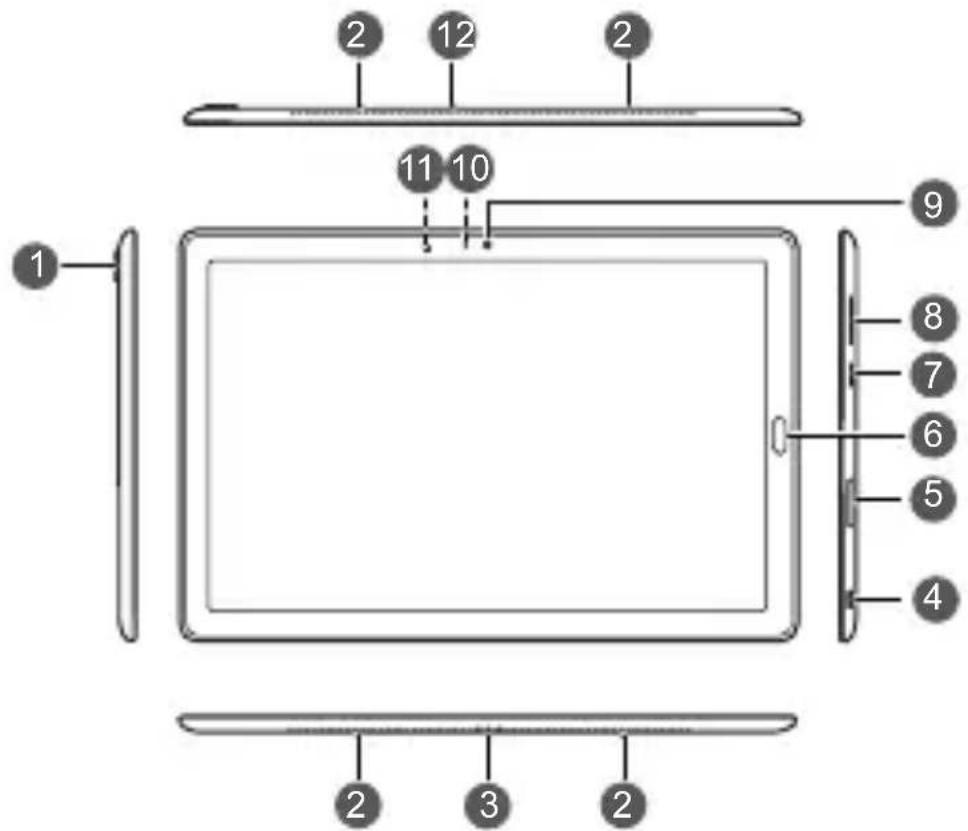
Your device at a glance
Before you start, let's take a look at your new device.
- To power on your device, press and hold the power button until the screen turns on.
- To power off your device, press and hold the power button, and then touch
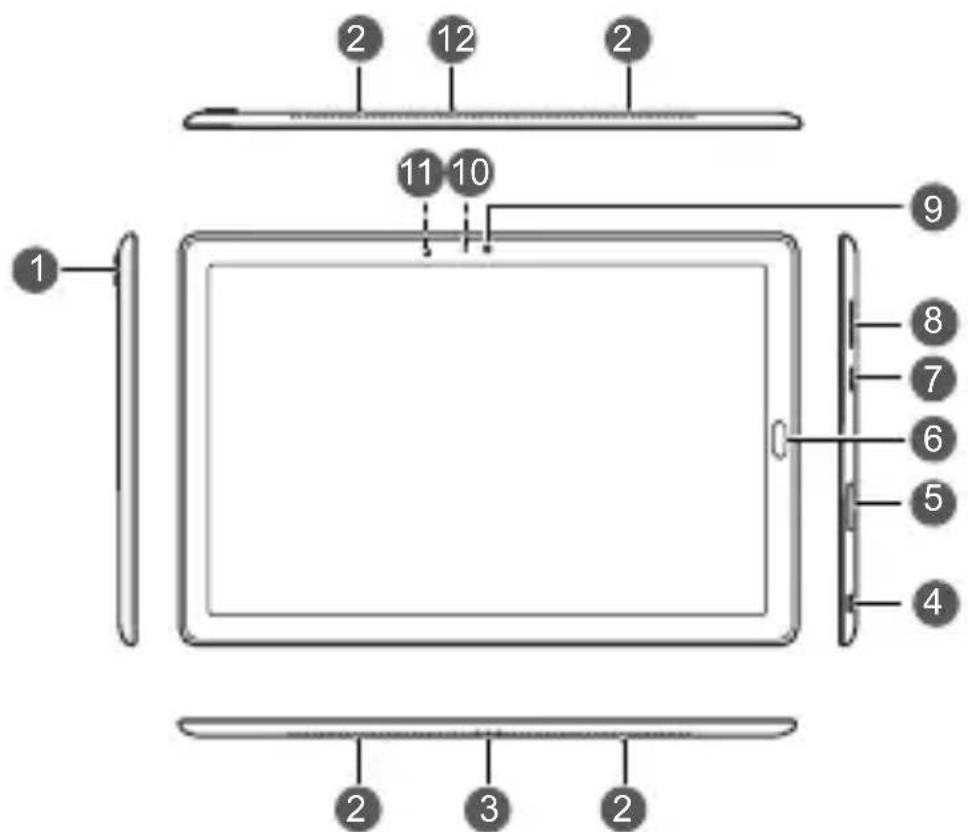
| 1 | Rear camera Speaker | 2 | |
| 3 | Keyboard port pin USB-C port | 4 | |
| 5 | Card tray Fingerprint scanner | 6 | |
| 7 | Power button Volume button | 8 | |
| 9 | Front camera Status indicator | 10 | |
| 11 | Ambient light sensor Microphone |

- Press and hold the power button to force your device to restart.
Getting Started
Follow the instructions in the following figures to set up your device.
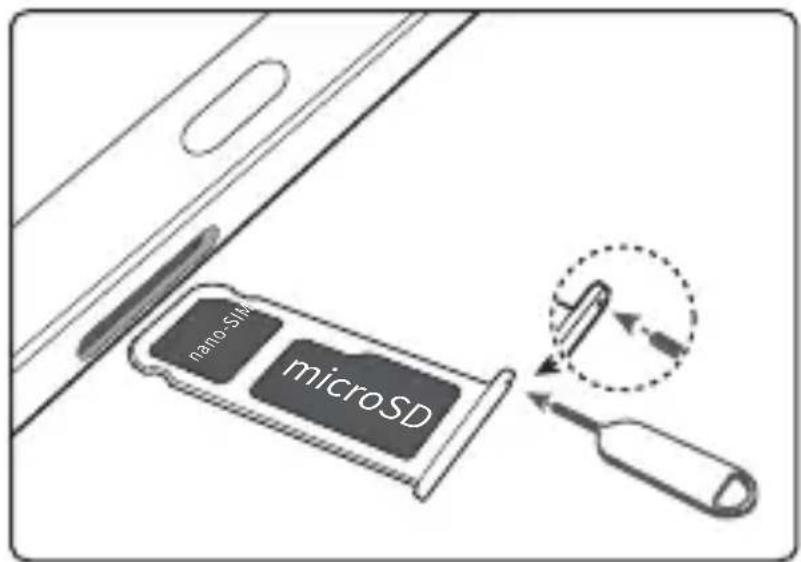

- Do not insert or remove the SIM card when your device is powered on.

Be careful not to scratch your device or hurt yourself when using the eject pin. Store the eject pin out of the reach of children to prevent accidental swallowing or injury.

Do not use cut or modified SIM or microSD cards with your device as these may not be recognised and could damage the card tray (slot).
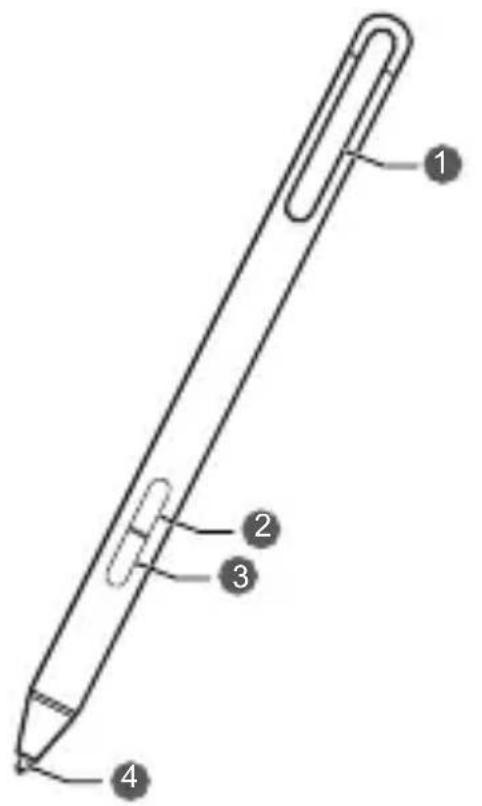
M-Pen
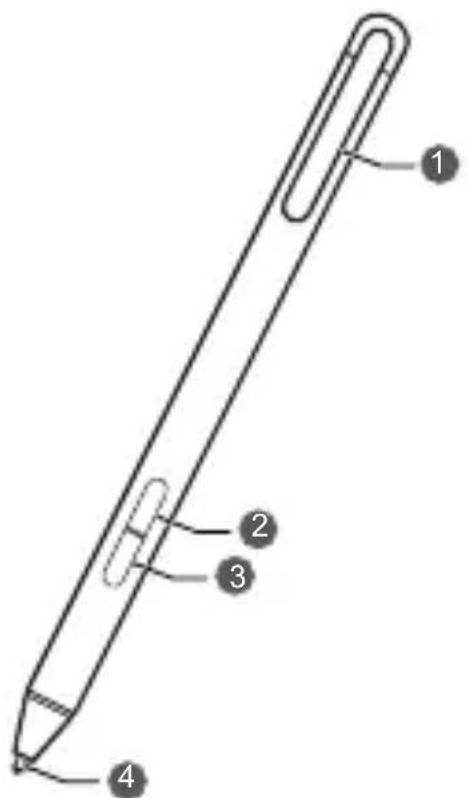
| 1 | Pen clip Upper function button | |
| 3 | Lower function button Pen tip |
Charging
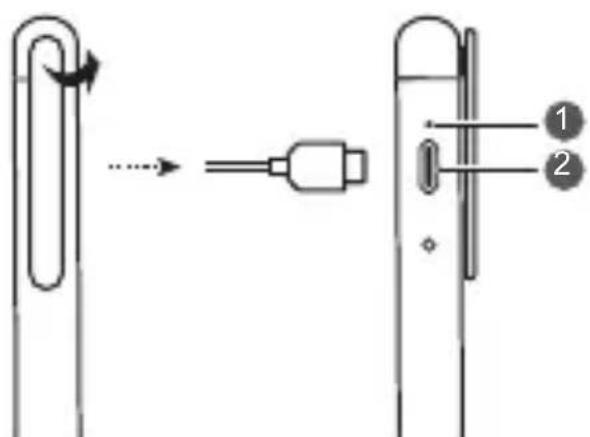
| 0 | Power indicator USB-C port | 2 |
Rotate the pen clip to uncover the USB-C port. Connect the charger to the USB-C port to charge your M-Pen.

Rotate the pen clip by 70^ .
Upper function button
To clear pictures that you draw, press and hold the upper function button, and brush over the pictures with your M-Pen.

This function only works with supporting apps.
Lower function button
- To take a screenshot, press and hold the lower function button, and draw an enclosed circle on the device screen with your M-Pen.
- To capture a full screen, press and hold the lower function button, and tap the device screen twice with your M-Pen.
- To take a scrolling screenshot, press and hold the lower function button, and draw the letter S with your M-Pen while scrolling down the device screen. Tap the scrolling area with your pen to complete the screenshot.
- To enter a feature app, press and hold the lower function button, and tap the device screen with your M-Pen to display the floating menu with feature apps.

In Desktop mode, taking screenshots and displaying the floating menu with your M-Pen are not supported.
For more information
If you encounter any problems whilst using your device, you can get help from the following resources:
- Visit http://consumer.huawei.com/en to view device information, frequently asked questions and other information.
- Visit http://consumer.huawei.com/en/support for the most up-to-date contact information for your country or region.
- You can find service hotlines, retailer addresses, service policies and more information for your local region in HiCare.
Go to Settings and touch System > About tablet > Legal to view legal information for your product.
Go to Settings and touch System > About tablet > Legal > Safety information to view safety information for your product.
Go to Settings and touch System > About tablet > Authentication info to view regulatory information for your product.
Go to Settings and touch System > Certification logos to view more information on certification logos for your product.

All pictures and illustrations in this guide, including but not limited to the product color, size, and display content, are for your reference only. The actual product may vary. Nothing in this guide constitutes a warranty of any kind, express or implied.
Safety Information
Please read all of the safety information carefully before using your device to ensure its safe and proper operation and to learn how to dispose of your device properly.
Operation and Safety

- To prevent possible hearing damage, do not listen at high volume levels for long periods.
- Using an unapproved or incompatible power adapter, charger or battery may damage your device, shorten its lifespan or cause a fire, explosion or other hazards.
- Ideal operating temperatures are 0^ to 35^ . Ideal storage temperatures are -20^ to +45^ .
- Pacemaker manufacturers recommend maintaining a minimum distance of 15cm between a pacemaker and a wireless device to prevent potential interference with the pacemaker. If using a pacemaker, hold the device on the side opposite the pacemaker and do not carry the device in your front pocket.
- Keep the device and the battery away from excessive heat and direct sunlight. Do not place them on or in heating devices, such as microwave ovens, stoves or radiators.
- Adhere to local laws and regulations while using the device. To reduce the risk of accidents, do not use your device while driving.
- While flying in an aircraft or immediately before boarding, ensure that you use your device according to the instructions provided. Using a wireless device in an aircraft may disrupt wireless networks, present a hazard to aircraft operations or be illegal under law.
- To prevent damage to your device's parts or internal circuits, do not use it in dusty, smoky, damp or dirty environments or near magnetic fields.
-
When charging the device, make sure the power adapter is plugged into a socket near the devices and is easily accessible.
-
Unplug the charger from the electric socket and from the device when not in use.
- Do not use, store or transport the device where flammable or explosives are stored (e.g. in a petrol station, oil depot or chemical plant). Using your device in these environments increases the risk of explosion or fire.
- Dispose of this device, the battery and accessories according to local regulations. They should not be disposed of in normal household waste. Improper battery use may lead to fire, explosion or other hazards.
- Please consult your doctor and the device manufacturer to determine if operation of your device may interfere with the operation of your medical device.
- Adhere to any rules or regulations set forth by hospitals and health care facilities.
- If you must make or answer a call, stop your vehicle at a safe location first.
- Keep the device away from sources of heat and fire, such as a heater, microwave oven, stove, water heater, radiator, or candle.
Potentially Explosive Atmosphere
Power off your device in any area with a potentially explosive atmosphere, and comply with all signs and instructions. Areas that may have potentially explosive atmospheres include the areas where you would normally be advised to turn off your vehicle engine. Triggering of sparks in such areas could cause an explosion or a fire, resulting in bodily injuries or even deaths. Do not power on your device at refueling points such as service stations. Comply with restrictions on the use of radio equipment in fuel depots, storage, and distribution areas, and chemical plants. In addition, adhere to restrictions in areas where blasting operations are in progress. Before using the device, watch out for areas that have potentially explosive atmospheres that are often, but not always, clearly marked. Such locations include areas below the deck on boats, chemical transfer or storage facilities, and areas where the air contains chemicals or particles such as grain, dust, or metal powders. Ask the manufacturers of vehicles using liquefied petroleum gas (such as
propane or butane) whether this device can be safely used in their vicinity.
Disposal and recycling information
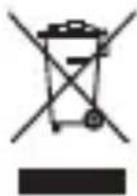
The crossed-out wheelie bin symbol on your product, battery, literature or packaging reminds you that all electronic products and batteries must be taken to separate waste collection points at the end of their working lives; they must not be disposed of in normal household waste. It is the responsibility of the user to dispose of the equipment using a designated collection point or service for separate recycling of waste electrical and electronic equipment (WEEE) and batteries according to local laws.
Proper collection and recycling of your equipment helps ensure EEE waste is recycled in a manner that conserves valuable materials and protects human health and the environment. Improper handling, accidental breakage, damage, and/or improper recycling at the end of its life may be harmful for your health and the environment. For more information about where and how to drop off your EEE waste, please contact your local authorities, retailer or household waste disposal service or visit the website http://consumer.huawei.com/en/.
Reduction of hazardous substances
This device and any electrical accessories are compliant with local applicable rules on the restriction of the use of certain hazardous substances in electrical and electronic equipment, such as EU REACH, RoHS and Batteries (where included) regulations, etc. For declarations of conformity about REACH and RoHS, please visit our web site http:// consumer.huawei.com/certification.
EU Regulatory Conformance
Body worn operation
The device complies with RF specifications when used at a distance of 0.50cm from your body. Ensure that the device accessories, such as a device case and device holster, are not composed of metal components. Keep the device away from your body to meet the distance requirement.
The highest SAR value reported for this device type when tested in portable exposure conditions is
CMR-AL19 1.00 W/kg
Statement
Hereby, Huawei Technologies Co., Ltd. declares that this device is in compliance with the essential requirements and other relevant provisions of Directive 2014/53/EU.
The most recent and valid version of the DoC (Declaration of Conformity) can be viewed at http://consumer.huawei.com/certification.
This device may be operated in all member states of the EU.
Observe national and local regulations where the device is used.
This device may be restricted for use, depending on the local network.
Restrictions in the 2.4 GHz band:
Norway: This subsection does not apply for the geographical area within a radius of 20km from the centre of Ny-Alesund.
Restrictions in the 5 GHz band:
According to Article 10 (10) of Directive 2014/53/EU, the packaging shows that this radio equipment will be subject to some restrictions when placed on the market in Belgium (BE), Bulgaria (BG), the Czech Republic (CZ), Denmark (DK), Germany (DE), Estonia (EE), Ireland (IE), Greece (EL), Spain (ES), France (FR), Croatia (HR), Italy (IT), Cyprus (CY), Latvia (LV), Lithuania (LT), Luxembourg (LU), Hungary (HU), Malta (MT), Netherlands (NL), Austria (AT), Poland (PL), Portugal (PT), Romania (RO), Slovenia (SI), Slovakia (SK), Finland (FI), Sweden (SE), the United Kingdom (UK), Turkey (TR), Norway (NO), Switzerland (CH), Iceland (IS), and Liechtenstein (LI). The WLAN function for this device is restricted to indoor use only when operating in the 5150 to 5350 MHz frequency range.
Frequency Bands and Power
(a) Frequency bands in which the radio equipment operates: Some bands may not be available in all countries or all areas. Please contact the local network provider for more details.
(b) Maximum radio-frequency power transmitted in the frequency bands in which the radio equipment operates: The maximum power for all bands is less than the highest limit value specified in the related Harmonised Standard.
The frequency bands and transmitting power (radiated and/or conducted) nominal limits applicable to this radio equipment are as follows:
CMR-AL19 G
SM900: 37 dBm, GSM1800: 34 dBm,
WCDMA900/2100: 25.7 dBm, LTE Band
1/3/7/8/20/34/38/40: 25.7 dBm, Bluetooth: 20 dBm, Wi-
Fi 2.4G: 20 dBm, Wi-Fi 5G: 5150-5350 MHz: 23 dBm,
5470-5725 MHz: 30 dBm
Accessories and Software Information
Some accessories are optional in certain countries or regions. Optional accessories can be purchased from a licenced vendor as required. The following accessories are recommended:
Adapters: HW-059200XHQ (X represents the different plug types used, which can be either C, U, J, E, B, A, I, R, Z or K, depending on your region)
Batteries: HB299418ECW
The product software version is CMR-AL19: CMR-AL19 8.0.1.1(SP1C432).
Software updates will be released by the manufacturer to fix bugs or enhance functions after the product has been released. All software versions released by the manufacturer have been verified and are still compliant with the related rules.
All RF parameters (for example, frequency range and output power) are not accessible to the user, and cannot be changed by the user.
For the most recent information about accessories and software, please see the DoC (Declaration of Conformity) at http://consumer.huawei.com/ certification.
ErP Product Information
Huawei Technologies Co., Ltd. hereby declares that its products conform to the Energy-related Products Directive (ErP) 2009/125/EC. For detailed ErP information and the user manuals required by Commission Regulation (EU) No 801/2013, please visit: http://consumer.huawei.com/en/certification.
Legal Notice
Trademarks and Permissions

HUAWEI

Handicl trademarks or registered
trademarks of Huawei Technologies Co., Ltd.
Android™ is a trademark of Google Inc.
LTE is a trade mark of ETSI.
The Bluetooth® word mark and logos are registered trademarks owned by Bluetooth SIG, Inc. and any use of such marks by Huawei Technologies Co., Ltd. is under license.
Wi-Fi®, the Wi-Fi CERTIFIED logo and the Wi-Fi logo are trademarks of Wi-Fi Alliance.
ENERGY STAR® MARK
For information related to ENERGY STAR®, please visit the website www.energystar.gov.
Privacy Policy
To better understand how we protect your personal information, please see the privacy policy at http://consumer.huawei.com/privacy-policy.
Copyright © Huawei Technologies Co., Ltd. 2018. All rights reserved.
THIS DOCUMENT IS FOR INFORMATION PURPOSE ONLY, AND DOES NOT CONSTITUTE ANY KIND OF WARRANTY.
Français
Copyright © Huawei Technologies Co., Ltd. 2018.
https://consumer.huawei.com/certification.

3HaKOMCTBO C yCTpoIcTBOM
Ipeed hauaIom pa6Otbl O3HaKOMbTeCb C OCHOBHbIMN yHKcIyMn BaJero HOBOro yCTpoiCTBa.
- UTo6bI BKJIHOuHTb yCTpO'CTBO, HaxMnte n ydepxnBa'Te KHOJky PNTaHn, NOKa He BKJIHOuHTcR 3KpaH yCTpO'CTBa.
- YTO6bl BbIKJIIOHTb yCTPOIcTBO, HaxMMTe n ydepxnBaIte KHOKNy NITAHN, 3aTEM HaxMMTe
He BCTaBJIte n He n3BLeKaIte SIM-KapTy, KOrda yCTPOIcTBO BKJIHOeHO.

Будыт ocToPoJxHbI npn nCNoJIb3OBAHn INHCTpyMeHTaДЯ n3BleueHn cIOTA, He nopahbTeCb n He nOuapanaTe yctpoiCTBO.Bo n36eXaHne cIyuaHoro npOrIaTbIBaHn IIn TpaBM xpaHnTe nHCTpyMeHT dJa n3BleueHn cIOTA B HeIOCTyINHom dJa DeTeN MeTe.

He yctaHaBnBaIte o6pe3aHHbIe nIi nI3MeHHeHbIe BpyuHyO SIM-KapTbI nII KapTbI microSD Ha BaWeM ycTpoIcTBe. OHI He 6ydyT onpeJeHbI, MOryT NOBpeIITb CLOT dIy UCTaHOBKn KApT.
Стейjec M-Pen
HUAHOTCTOBaPbIMN3HaKaMn
Huawei Technologies Co., Ltd.
Android™ YBJIeTcra ToproBOm MapKOg Google Inc.
LTEЯВЯETСТOBAPHBIM3HaKOMEBPONEYCKORO INHCTHTyTaTeLEKOMMyHnKaaUHOHHbIX CTAHdApTOB (ETSI).
Ha3BaHne n Iorotnbluetooth® YBIAOTcA
3aperntpnpobahbIMTOBaphIMN 3HaKaMn KOpnpaun
Bluetooth SIG, Inc. Kompanhui Huawei Technologies Co., Ltd.
IcnoJb3yET yKa3aHHbIe TOBapHbIe 3HaKn B paMKaX IInZeH3nn.
Wi-Fi®, ラOROTUN Wi-Fi CERTIFIED IN ラOROTUN Wi-Fi ABILIOTCA
TOBAPHbIMN 3HaKaMn aIbYHca Wi-Fi Alliance.
3HAK ENERGY STAR®
Информацию, CBязаHHуо C ENERGY STAR®, сM. на Be6-caHTe www.energystar.gov.
Copyright © Huawei Technologies Co., Ltd. 2018. BCE npaba 3aunuehbl.
DAHHBIN DOKYMEHT PPEIOCTABJARETCA TOJIbKO B INHΦOPMAUHOHHbIX ZEJIAX BE3 KAKNX-JINBO YBbIX NJIH HEABHbIX TAPAHTNI.
IocneHne o6HOBLeHn y aDpec 3JI. NooTbI NO cTpaHaM nI npENoHm IpeDCTaBHeHbI Ha caTe:
http://consumer.huawei.com/en/support.
BklaIbIw K kpaTkoMy pyKOBoDCTBy nOlb30BaTeJIa
YcIobnE KcIIyatauH, XpaHeHn I
TpaHcIopTIpOBaHnA
Обopyдоване п徴нэз nauseю дя ИСпОЛьЗВаня B 3akpbIbIX OТаПИВаEMbIX помеших пи TemпepаType okpykaIoшero Bo3dUxa -10°C до +45°C, OTHOCITeNBHOB BlaXHocTи до 95% 6e3 KOнDEHcauNи BlaRn.
O6opuDobAHne npedHa3HaueHO dIy nCNOJb3OBaHnB XINbIX, KOMMepuecknx IN pON3BOIDCTBeHHbIX 3OHax 6e3 BO3dEInCTBnA ONaCHbIX IN BpeHNbIX pON3BOIDCTBeHHbIX paKTopoB. O6opuDobAHne npedHa3HaueHO dIy 3KcNpyaTuCN 6e3 noctoHHoro npicCyTCTBnA ObcnykBaUoero nepcoHana.
Cpok cnyx6bI 3 roda.
Xpahenue n TpaHcnpTnpoBaHne npn TeMnepaType OkpykaIOUeRo BO3dyxa OT -40°C Do +70°C, OTHocHTeNbHOB BnaJxHocTn Do 95% 6e3 KOHdeHcaUN BlaRn.
Ipebe03ka n TpaHcnpTnpOBka o6OpydoBaHna Donyckaetc ToIbko B 3aBoDcKo ypaKOBke, IIO6bIMn BIDAMn TpaHcnpTa, 6e3 OrpaHnueHna pacCTOHN.
AanTep npedHa3NaueH dIy XpaHeHnB 3aKpbItbIX NOMEeHnX, B 3aBOdCKoYnaKOBke.
Cpok xpaHEnn 3 roHa.
AkkeccyapbI
IcnoJb3yIte TOnbKO opuHnHaNbHbI shHyp,
pa3peWeHHbIK npimHeHIO C 3ToI MOeJIbIO npOIN3BOIDTeJIem aAdaNTepa.
HapyuHHe NTOrO Tpe6oBaHnRA MoKET npVBecTNI K aHHyInpoBaHnIO rapaHTN,
HapyuHHeNIO MeCThBIX HOpM IN pRaBnI, a TaKKe K dpyIM ONaCHbIM NocJeDCTBnAM.
IHΦopMaUIO O HaJIuHn pa3peWeHHbIX akceccyapOB MoXHO y3HaTb B MeCTe
npNo6peTeHn DaHHOrO aAdaNTepa.
Hnctpykunno yTNJIN3aun

3TOT 3Hak 603Haayet, yTO daHHoe yCTPOYCTBO, He DOJXHO YHNHTOJA BMeCTe C O6bUHbIMN 6bITOBbIMN OTXODAMN. YCTPOINCTBO n erO akceccyapbl He DOJXHBi YHNHTOXAeB MecTe C HEOTCOPTNPOBAHHbIMN 6bITOBbIMN OTXODAMN, a DOJXHBi 6bITb NpepaHbI B CEPTnΦnUPOBaHHbI NyHKT c6opa dJI BTOpNUHOI nepepa6OTKN IIN IIpaBnIBHOY TUNIN3aun.
Дя поунецьбоггплрбнинфорmaци O npabnax ytnin3aun aanteraобрааntecb MecthyroTopoDCkyu admnhncpaunO, cnyk6y yHHTOXeHЯ 6blTOBbIX OTXODOB IIN MaRa3HH PO3HNHOr TOpROBIn, B KOTOPOM 6blIO npno6pTeHo aanTep.
YcIOBnapeaH3aunn
PeaH3aun aanTepa ocuueCTBnEeTc B 3aBOndcko ynaKOBKe ONTOBbIM np03HnHbIM cnoCobom,6e3 orpaHnueHn.
IpoH3BOdCTBeHHa HnΦopMaun
ToproBára Mapka: HUAWEI
CTpHa npOn3BODCTBa:Knta
ДаразИЗROTOВЕNHЯ yCTpoIcTBA (ROd, MeCraU, DeHb) COOTBETCTByeT 7,8,9
ZnOpe wTPnx-KoJa, HAnHeCeHHoro Ha ...., N OnPepaTeTcR CNeDyUOuIM
6pa30M:
《7》-rOДИЗROTOВЕNHЯ:
| rogen | 2010 | 2011 | 2012 | 2013 | 2014 | 2015 | ...... |
| codon | A | B | C | D | E | F | .... |
《8》-MEcraU N3ROTOBJeHnRA:
| месяц | 1 | 2 | 3 | 4 | 5 | 6 | 7 | 8 | 9 | 10 | 11 | 12 |
| кód | 1 | 2 | 3 | 4 | 5 | 6 | 7 | 8 | 9 | A | B | C |
Huawei Technologies Company Limited,