RC436 - Rice cooker BLACK & DECKER - Free user manual and instructions
Find the device manual for free RC436 BLACK & DECKER in PDF.



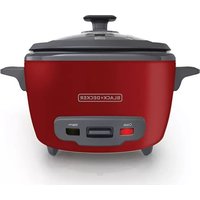
| Product Type | Rice Cooker |
| Brand | Black & Decker |
| Model | RC436 |
| Capacity | 16 cups (about 3.5 L) of cooked rice |
| Power | 700 W (estimated) |
| Voltage | 120 V ~ 60 Hz |
| Main Materials | Non-stick cooking pot, tempered glass lid, plastic body |
| Functions | Rice cooking, steaming, soups and stews, automatic keep warm |
| Indicator Lights | COOK indicator light and WARM indicator light |
| Included Accessories | Cooking pot, steam basket, glass lid, ladle, rice measuring cup, condensate container |
| Approximate Dimensions | 25 x 25 x 28 cm |
| Approximate Weight | 2.5 kg |
| Care and Cleaning | Clean accessories with warm soapy water; do not immerse the body; wipe with a damp cloth |
| Safety | Polarized plug, automatic shut-off, cool-touch handles |
| Available Replacement Parts | Lid (RC436-01), bowl (RC426-05), measuring cup (RC426-30), ladle (RC426-31), steam basket (RC436-02), condensate container (RC436-03) |
| Warranty | 1 year |
Frequently Asked Questions - RC436 BLACK & DECKER
User questions about RC436 BLACK & DECKER
0 question about this device. Answer the ones you know or ask your own.
Ask a new question about this device
Download the instructions for your Rice cooker in PDF format for free! Find your manual RC436 - BLACK & DECKER and take your electronic device back in hand. On this page are published all the documents necessary for the use of your device. RC436 by BLACK & DECKER.
USER MANUAL RC436 BLACK & DECKER
Please Read and Save this Use and Care Book
Register your product online at www.prodprotect.com/applica, for a chance to WIN $100,000!
Accessories/Parts (USA/Canada)
1-800-738-0245
Model
Modelo
Modèle
□RC436
IMPORTANT SAFEGUARDS
When using electrical appliances basic safety precautions should always be followed including the following:
Read all instructions.
Do not touch hot surfaces. Use handles or knobs.
To protect against electrical shock, do not immerse cord, plug or base unit in water or other liquid.
- Close supervision is necessary when any appliance is used by or near children.
Unplug from outlet when not in use and before cleaning. Allow to cool before putting on or taking off parts.
Do not operate appliance with a damaged cord or plug, or after the appliance malfunctions or has been damaged in any manner. Return appliance to an authorized service facility for examination, repair or adjustment.
The use of accessory attachments not recommended by this appliance manufacturer may cause injuries.
Do not use outdoors.
Do not let cord hang over edge of table or counter, or touch hot surfaces.
Do not place on or near a hot gas or electric burner, or in a heated oven.
Extreme caution must be used when moving an appliance containing hot food, water or other hot liquids.
Plug cord into the wall outlet. To disconnect, turn any control to "off", then remove plug from wall outlet.
Do not use appliance for other than intended use.
To reduce the risk of electric shock, cook only in removable container.
SAVE THESE INSTRUCTIONS.
POLARIZED PLUG (120V Models Only)
This appliance has a polarized plug (one blade is wider than the other). To reduce the risk of electric shock, this plug is intended to fit into a polarized outlet only one way. If the plug does not fit fully into the outlet, reverse the plug. If it still does not fit, contact a qualified electrician. Do not attempt to modify the plug in any way.
ELECTRICAL CORD
a) A short power-supply cord (or detachable power-supply cord) is to be provided to reduce the risk resulting from becoming entangled in or tripping over a longer cord.
b) Longer detachable power-supply cords or extension cords are available and may be used if care is exercised in their use.
c) If a long detachable power-supply cord or extension cord is used,
1) The marked electrical rating of the detachable power-supply cord or extension cord should be at least as great as the electrical rating of the appliance,
2) If the appliance is of the grounded type, the extension cord should be a grounding-type 3-wire cord, and
3) The longer cord should be arranged so that it will not drape over the countertop or tabletop where it can be pulled on by children or tripped over.
Note: If the power supply cord is damaged, it should be replaced by qualified personnel or in Latin America by an authorized service center.
Product may vary slightly from what is illustrated.
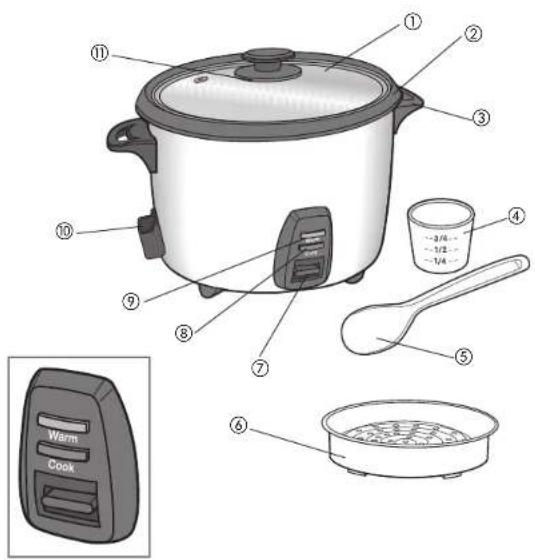
† 1. Tempered glass lid with steam vent (Part # RC436-01)
+2. Cooking bowl with water level marks (Part# RC426-05)
3. Cool-touch side handles
+4.Rice measure (Part # RC426-30)
+5. Serving scoop (Part # RC426-31)
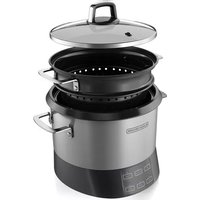
+6. Steaming basket (Part # RC436-02)
7. "On" switch
8. Cook indicator light
9. Warm Indicator light
†10. Condensation catcher (Part# RC436-03)
11. Lid hanger (not shown)
+ Consumer replaceable/removable parts
Congratulations on your purchase of the popular Black and Decker® 16-Cup Multi-Use Rice Cooker. The Cooker is not only great for making perfect rice, but you'll find it ideal for preparing savory soups, stews and other favorite one-pot dishes. We've included several delectable recipes, with preparation directions on Pages 10, 11 and 12.
How to Use
This appliance is for household use only.
- Before first use, wash the cooking bowl, glass lid, condensation catcher, serving scoop, steaming basket and rice measure in warm, soapy water. Rinse and dry well.
- Place unit on a flat, stable surface.
Note: As the rice expands and cooks, steam will come out of the vent in the lid. Do not place the rice cooker directly under your cabinets.
- Measure desired amount of rice with the rice measure provided. Add butter, oil and/or seasonings as desired.
Note: The rice measure provided is based on 5-1/2 oz. (150 g). Your rice cooker can handle a maximum of 7 rice measures of dry rice — yielding approximately 16, 8 oz. (227 g) cups of cooked rice.
Caution: To reduce the risk of electric shock, cook only in removable nonstick cooking bowl provided.
- Place rice in the cooking bowl. Add water. Use the water-level markings inside the cooking bowl as a guide for adding the appropriate amount of water. For example, for 4 measures of uncooked rice, fill with water to water-level marking 4. Be careful not to add too much water as it may cause the unit to boil over. Use the "BROWN RICE" markings when cooking brown rice and "OTHER RICE" for all other varieties.
Note: Taste/hardness will vary depending on the quality/type of rice and length of time it is cooked. For softer, fluffier rice, add a little more water. For firmer, crunchier rice, add a little less water. See cooking guide (pages 6 and 7). You may need to experiment to suit your taste.
- Before placing the cooking bowl into the rice cooker, be sure the heating plate and outside surface of the cooking bowl are clean and dry. Do not let loose rice or particles fall into the rice cooker.
- Insert cooking bowl into the rice cooker. You might have to turn it slightly to the left and right to ensure proper contact with the heating plate.
- Place the lid on the rice cooker.
Note: Always keep the lid on the rice cooker while cooking.
- Plug into a standard electrical outlet. The Warm light comes on.
- Press down the On switch. The Cook light comes on and cooking begins. As the rice expands and cooks, steam comes out through the steam vent on the lid.
Caution: Do not put your hand over the steam vent as you may get burned with the hot steam.
- Once rice is cooked, the Cook light turns off, the switch pops up and the rice cooker automatically switches to the keep warm function. The Warm light comes on and stays on, indicating serving temperature is maintained.
Note: The unit will stay in the keep warm cycle until it is unplugged. Do not try to prevent the rice cooker from switching to the keep warm cycle. Do not immediately press the On switch again after it has begun the keep warm cycle. - After the switch pops up, leave the lid on for at least 15 minutes to further steam the rice. If holding rice for longer than 30 minutes, stir occasionally to prevent browning of rice on the bottom of cooking bowl.
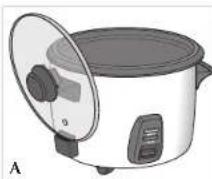
- Remove the lid and stir the rice before serving. The lid hanger may be placed into the hole in the handle with the lip of the lid resting on the condensation catcher to keep water off of the countertop (A).
Caution: When removing the lid, lift away from your body as you may get burned with the hot steam. 13. Unplug the unit when finished.
STEAMING BASKET
-
Fill the cooking bowl with about 1-1/2 cups (12 fl. oz./350 ml) of water using a standard measuring cup.
-
Place vegetables or other food in the steamer basket, and position the basket on top of the cooking bowl.
-
Close the lid.
Note: Always keep the lid closed while cooking.
-
Plug unit into a standard electrical outlet. The Warm light will come on.
-
Press the Cook button to begin cooking.
-
Steaming times vary according to vegetable or food type. Begin checking for doneness after initial 5 minutes. You may need to experiment to suit your taste.
-
Unplug the unit when finished.
Note: When steaming vegetables or other foods without rice in the cooking bowl, the unit will not switch to the Warm mode.
Important Tips:
- Do not keep small amounts of rice in the keep warm cycle for extended periods of time.
- During cooking, a thin crust may develop on the rice at the bottom of the bowl. If you do not like rice with a crust, you can easily peel it off and discard it.
- Use the plastic serving scoop (or a wooden spoon) to stir and remove rice. Do not use metal utensils that can scratch the nonstick cooking bowl.
HOW TO PREPARE SOUPS AND STEWS
- Before first use, wash the cooking bowl, glass lid, condensation catcher, serving scoop, steaming basket and rice measure in warm, soapy water. Rinse and dry well.
- Place unit on a flat, stable surface.
NOTE: Select recipes that will cook in 1 hour or less. Use only boneless meats and poultry that are cut into cubes no larger than 1/2 inches. It is not necessary to brown the meats before cooking. As the soup or stew begins to cook, steam will come out of the vent in the lid. Do not place the cooker directly under your cabinets.
NOTE: When cooking rice or pasta in the soup, allow for additional liquid in the recipe.
Caution: To reduce the risk of electric shock, cook only in removable nonstick cooking bowl provided.
3. Combine meats, vegetables and liquids in the cooking bowl. Stir with a wooden or plastic spoon until ingredients are blended well.
NOTE: Since most frozen vegetables cook very quickly, it is best to add them at the end of the cooking time. Stir them into the soup or stew and allow the mixture to cook an additional 5 to 10 minutes.
Caution: Do not fill cooking bowl higher than the "Maximum" line on the cooking bowl.
4. Before placing the cooking bowl into the rice cooker, be sure the heating plate and outside surface of the cooking bowl are clean and dry. Do not let loose particles fall into the cooker.
-
Insert cooking bowl into the cooker. You might have to turn it slightly to the left or right to ensure proper contact with the heating plate.
-
Place the lid on the cooker.
Note: Always keep the lid on the cooker while cooking.
- Plug into a standard electrical outlet. The Warm light comes on.
- Press down the On switch. The Cook light comes on and cooking begins. As the soup or stew cooks, steam may come out through the steam vent on the lid.
Caution: Do not put your hand over the steam vent as you may get burned with the hot steam.
- Set your kitchen timer for desired cooking time.
Note: The On switch on the cooker is not intended to be an indicator of cooking time for soups or stews. Always use a kitchen timer.
- If desired, stir several times during the cooking process. The lid hanger may be placed into the hole in the handle with the lip of the lid resting on the condensation catcher to keep water off the countertop (see A).
Caution: When removing the lid, lift away from your body as you may get burned with the hot steam.
- Place lid back on the cooker when stirring is done.
- If desired, check seasoning level during cooking and add additional seasoning to taste.
- When cooking is complete, unplug the unit.
CAUTION: Do not keep cooked soups or stews in the Warm cycle. Always unplug the unit after cooking is complete.
FOR BEST RESULTS
- Choose recipes that will cook in 1 hour or less.
- Always use a kitchen timer. Do not rely on the On switch on the cooker since it is not intended to be an indicator of cooking time for soups and stews.
- Use only boneless meats and poultry that are cut into cubes no larger than 1½inches. It is not necessary to brown the meats before cooking.
- When cooking rice or pasta in the soup, allow for additional liquid in the recipe.
- Since most frozen vegetables cook very quickly, it is best to add them at the end of the cooking time. Stir them into the soup or stew and allow the mixture to cook an additional 5 to 10 minutes.
| RICE COOKING GUIDE |
| FOR WHITE LONG GRAIN, JASMINE, BASMATI, YELLOW OR MEDIUM GRAIN RICE |
| AMOUNT AMOUNT APPROX. YIELD OF RICE OF WATER COOKING IN 8 OZ. TIME MEASURES |
| 2 rice measures to 2 mark 23 to 26 minutes 4 to 5 cups |
| 3 rice measures to 3 mark 24 to 26 minutes 5 to 6 cups |
| 4 rice measures to 4 mark 25 to 27 minutes 7 to 10 cups |
| 5 rice measures to 5 mark 29 to 32 minutes 10 to 12 cups |
| 6 rice measures to 6 mark 35 to 40 minutes 12 to 14 cups |
| 7 rice measures to 7 mark 37 to 41 minutes 14 to 16 cups |
| FOR BROWN RICE |
| AMOUNT AMOUNT APPROX. YIELD OF RICE OF WATER COOKING IN 8 OZ. TIME MEASURES |
| 2 rice measures to 2 mark 38 to 42 minutes 2 to 2 1/2 cups |
| 3 rice measures to 3 mark 40 to 42 minutes 4 1/2 to 5 1/2 cups |
| 4 rice measures to 4 mark 40 to 45 minutes 9 to 10 cups |
| 5 rice measures to 5 mark 42 to 46 minutes 10 to 11 cups |
| 6 rice measures to 6 mark 44 to 48 minutes 13 to 14 1/2 cups |
| 7 rice measures to 7 mark 48 to 60 minutes 14 to 16 cups |
| FOR WHITE PARBOILED (OR CONVERTED) RICE |
| AMOUNT AMOUNT APPROX. YIELD OF RICE OF WATER COOKING IN 8 OZ. TIME MEASURES |
| 2 rice measures to 2 mark 20 to 30 minutes 2 1/2 to 3 1/2 cups |
| 3 rice measures to 3 mark 25 to 27 minutes 5 to 6 cups |
| 4 rice measures to 4 mark 26 to 30 minutes 8 1/2 to 9 1/2 cups |
| 5 rice measures to 5 mark 28 to 36 minutes 10 to 11 cups |
| 6 rice measures to 6 mark 30 to 38 minutes 12 to 14 cups |
| 7 rice measures to 7 mark 38 to 42 minutes 15 to 16 cups |
| FOR SMALL GRAIN (OR PEARL) RICE |
| AMOUNT AMOUNT APPROX. YIELD OF RICE OF WATER COOKING IN 8 OZ. TIME MEASURES |
| 2 rice measures to 2 mark 18 to 22 minutes 3 1/2 to 4 1/2 cups |
| 3 rice measures to 3 mark 22 to 24 minutes 5 to 6 cups |
| 4 rice measures to 4 mark 23 to 24 minutes 6 1/2 to 7 1/2 cups |
| 5 rice measures to 5 mark 24 to 26 minutes 10 to 11 cups |
| 6 rice measures to 6 mark 28 to 31 minutes 12 to 13 cups |
| 7 rice measures to 7 mark 31 to 34 minutes 14 to 15 cups |
| WILD RICE |
| AMOUNT AMOUNT APPROX. YIELD OF RICE OF WATER COOKING IN 8 OZ. TIME MEASURES |
| 2 rice measures 7 cups 1 hr 40 minutes 5 to 6 cups to 2 hrs. 20 min. |
| 4 rice measures 9 cups 2 hrs. 2 min. 7 to 8 cups to 2 hrs. 8 min. |
| CHART FOR STEAMED VEGETABLES AND FISH All steamed using 1½ to 2 cups of cold tap water or stock or room temperature vegetable broth | ||||
| VEGETABLE | AMOUNT | PREPARATION | TIME | SUGGESTIONS |
| Fresh Asparagus | 1/2 lb. | Wash; break off woody base where spears snap easily. | 12 to 15 minutes | Season with salt, pepper and grated lemon peel |
| 1lb. | ||||
| Fresh Green or Waxed beans | 1/2 lb. | Leave whole, trim end or cut into 2-inch pieces | 16 to 18 minutes | Season with salt, pepper and freshly snipped dill |
| 1 lb. | 18 to 20 minutes | |||
| Fresh Beets | 1 lb. (about 5 medium) | Cut off stems leaving about 1-in. Wash: do not peel. | 40 to 42 minutes | Slip skin off after cooking |
| 1 lb. (about 5 medium) | Remove stem and 26 to 28 root ends. Peel and cut into wedges. | minutes | ||
| Fresh Broccoli | 1 bunch (about 8 cups) | Cut into florets | 18 to 20 minutes | Season with salt, pepper and grated lemon peel |
| Brussels Sprouts | 4 cups | cut a cross in the base of each sprout | 28 to 30 minutes | Garnish with chopped toasted hazelnuts |
| Cabbage | 1 lb. | cut in wedges | 24 to 26 minutes | Garnish with crumbled cooked bacon |
| Carrots | 12 oz., | cut in thick slices | 16 to 18 minutes | Season with salt, pepper and grated orange peel |
| Cauliflower | 12 oz. | cut into florets | 20 to 22 minutes | Garnish with buttered toasted bread crumbs |
| Celery | 12 oz., (about 2½ cups) | cut in 3-inch pieces | 16 to 18 minutes | Toss with butter, salt and pepper |
| Corn | 1/2 lb. (about 4 ears) | cut in 2-inch pieces | 18 to 20 minutes | Garnish with finely chopped tomatoes and parsley |
| Sugar snap peas | 8 oz. about 2 cups | trimmed and left whole | 10 to 2 minutes | Season with salt, pepper and minced dill |
| Snow peas | 8 oz. | trimmed and left whole | 12 to 14 minutes | Serve drizzled with soy sauce and minced green onions |
| VEGETABLE AMOUNT PREPARATION TIME SUGGESTIONS | |||
| Frozen peas 1 lb. 14 to 16 Stir in chopped fresh | minutes mint | ||
| Potatoes 6 medium halved 24 to 26 Use creamer, red (about 1 lb.) minutes skin or all-purpose | potatoes | ||
| Sweetpotatoes 2 large cut in large pieces 22 to 24 Season with salt and | |||
| Fresh spinach | (about 1/8 lbs.) about 2-inches) | minutes | ground cinnamon |
| Acorn squash | 4 cups firmly packed | whole leaves | 10 to 12 minutes garlic and toasted pine nuts |
| Butternut squash | 1/8 lbs. 1 medium seeds | thickly sliced and removed | 14 to 16 minutes skin on |
| Yellow squash 1 lb. sliced | 16 to 18 Sprinkled with dried minutes minced onion | ||
| Zucchini | 1 lb. | sliced | 18 to 20 minutes and garlic pepper |
| FROZEN VEGETABLES Including mixed vegetables such as beans with a twist, broccoli medley, broccoli stir | |||
| fry and pepper stir fry | |||
| 10 oz. to 1 lb. removed from bag 16 to 18 | |||
| and seasoned | minutes | ||
| FISH | |||
| add 1 1/2 cups water to rice cooking bowl | |||
| add 1 lemon thickly sliced to water | |||
| season fish with lemon juice and Old Bay Seasoning | |||
| Salmon | 1 1/2 lbs. | fillets | 24 to 26 topped with lemon minutes slices and snipped fresh dill |
| Scallops | 1 lb. | medium size | 14 to 16 Very tender; served tartar sauce and lemon wedges |
| Snapper | 1 lb. | whole, head and tail removed | 20 to 22 Drizzle with garlic, minutes soy vinaigrette |
| Tuna steaks | 1 1/4 lbs | 2 medium steaks | 15 to 17 Very tender; served tartar sauce and lemon wedges |
| Swordfish | 1 lb. 2 medium steaks | 15 to 17 Very tender; served minutes with tartar sauce and lemon wedges | |
RECIPES
CHICKEN VEGETABLE SOUP
6 cups chicken broth or stock
1/2 lb. boneless chicken breast cut in bite size pieces
2 cup frozen mixed vegetables
2 cups medium noodles
1 cup diced sweet potatoes
3/4 cup diced onion
2 tbsp. chopped parsley
1/2 lsp. Rolisserie Chicken seasoning
Combine all ingredients in cooking bowl in order listed. Place bowl into rice cooker and plug in the appliance; the "Warm" light will come on. Push the "On" switch to "Cook." Place the lid on the cooker.
Set kitchen timer and cook for 20 minutes. Test noodles for doneness. Place the lid back on the cooker. If necessary, cook several minutes longer until noodles are tender. Serve immediately.
If desired, serve with hot garlic bread.
Makes about 12 cups/6 servings
SPAGHETTI WITH MEATBALLS
1 jar (1lb., 10 oz.) marinara sauce
3½ cups water
1/2 lb. spaghetti rigati or linguini
1 Ib. frozen meatballs (1-inch size)
2 large cloves garlic, minced
2 tbsp. chopped parsley
1 tsp, dried Italian herbs
Combine all ingredients in cooking bowl in order listed. Place bowl into rice cooker and plug in the appliance; the "Warm" light will come on. Push the "On" switch to "Cook." Place the lid on the cooker.
Set kitchen timer and cook for 20 minutes. Test pasta for doneness. Place the lid back on the cooker. If necessary, cook several minutes longer until pasta is tender. Serve immediately.
If desired, garnish each serving with freshly grated Parmesan cheese and serve with Texas loast.
Makes about 8 cups/4 servings
SPICED SHRIMP
1 pkg. (16 oz.) yellow rice mix
2 cups chicken or vegetable broth
1 bottle (8 oz.) clam juice
1 can (14 oz.) diced tomatoes with green chilies
2 tbsp. olive oil
1½ lb. shrimp, shelled and deveined
1 large onion, chopped
2 large cloves garlic, minced
1/4 cup chopped cilantro
1/2 tsp. coarsely ground black pepper
1/2 cups frozen peas
Combine all ingredients, except peas in cooking bowl in order listed. Place bowl into rice cooker and plug in the appliance; the "Warm" light will come on. Push the "On" switch to "Cook." Place the lid on the cooker.
Set kitchen timer and cook for 26 minutes. Stir in frozen peas; place the lid back on the cooker and cook an additional 10 minutes. Serve immediately.
Makes about 9 cups/4 to 5 servings
Note: One can (14/oz, diced tomatoes and 1 can (4oz.) diced green chilies can be substituted for the canned tomatoes with green chilies.
CLASSIC CHICKEN STEW
- lbs. boneless chicken cut into 1-inch cubes
2 cans (10% oz, each) condensed cream of chicken with herbs soup
1 cup water
4 medium carrots, cut in 1-inch pieces (about 1/2 cups)
4 medium red skin potatoes, quartered
3 stalks celery, thickly sliced (about 1/4-cups)
2 medium lecks, halved and sliced
1/2 tsp. coarsely ground black pepper
- cups frozen cut green beans
Combine all ingredients, except frozen vegetables in cooking bowl in order listed. Place bowl into rice cooker and plug in the appliance; the "Warm" light will come on. Push the "On" switch to "Cook." Place the lid on the cooker.
Set kitchen timer and cook for 45 minutes. Stir in frozen green beans; place the lid back on the cooker and cook an additional 10 minutes. Serve immediately.
Makes about 10 cups/5 to 6 servings
TERIYAKI SALMON
1 lb. salmon fillets
1/3 cup teriyaki or toasted sesame marinade
1 can (8 oz.) mandarin oranges
1 cup snow peas
4 green onions cut in 1-inch pieces
1 tsp. kosher salt
1/4 tsp. seasoned pepper
1/4 cup toasted sliced almonds
Place files in shallow baking dish. Pour marinade over all. Turn fish to coat both sides. Cover and refrigerate for at least 30 minutes.
Drain oranges, saving liquid. Set oranges aside. Add water to orange liquid to make 1 cup. Pour into rice cooking bowl. Remove salmon from dish and place in steamer basket. Top with snow peas and green onions. Season with salt and pepper. Insert steamer basket into rice cooker over rice cooking bowl.
Cover and plug appliance into electric outlet. Set kitchen timer and cook for 18 minutes. Top with reserved mandarin oranges. Cook 3 minutes longer or until salmon tests done. If desired, serve over cooked rice and drizzle cooking liquid over all.
Garnish with almonds.
Makes 4 servings.
11
CHILI SHRIMP
1 lb. shrimp, shelled and deveined
1/2 cups thinly sliced yellow squash
1½ cups thinly sliced zucchini
1 medium red pepper, seeded and cut into 2-inch strips
2 large cloves garlic, thinly sliced
1 tbsp. chopped fresh basil
1/4 tsp. chili powder
1/4 tsp. salt
In large bowl, combine all ingredients; toss to blend.
Add 112 cups cold tap water to rice cooking bowl. Place cooking bowl in rice cooker.
Spoon shrimp mixture into steamer basket. Insert steamer basket into rice cooker over rice cooking bowl.
Cover and plug appliance into electric outlet. Set kitchen timer and cook for 20 minutes; test shrimp and vegetables for doneness. If necessary cook several more minutes. If desired, garnish with chopped cilantro and lemon wedges.
Makes 4 servings.
STEAMED PORK DUMPLINGS
1/2 lb. ground pork
1/ cup minced bok choy
1/4 cup minced green onion
1 tbsp. grated fresh g
1 large clove garlic, minced
1/4 tsp. seasoned pepper
1/4 tsp. salt
36 won ton wrappers
1 tsp. rice wine vinegar
1/4 tsp. sesame oil
1 medium clove garlic, minced
In large bowl, combine pork, bok choy, green onions, ginger, large minced garlic clove, pepper and salt; blend well.
Place scantl tablespoon of pork filling in center of 1 wonton wrapper. Lightly moisten edges of wrapper with pastry brush or finger. Fold wrapper in half to form a triangle and press edges to scal. Transfer to tray and repeat process, making about 36 dumplings. Add 12 cups cold tap water to rice cooking bowl. Place cooking bowl in rice cooker. Lightly oil steamer basket. Arrange dumplings in basket about 1/2-inch apart. Insert steamer basket into rice cooker over rice cooking bowl.
Cover and plug appliance into electric outlet. Set kitchen timer and cook for 6 minutes. Cook until dumplings are translucent and filling is just cooked through. Repeat with remaining dumplings.
Dipping sauce: In small bowl, combine soy sauce, rice vinegar and sesame oil; sel aside. If desired, garnish with toasted sesame seeds.
Makes 8 to 10 servings.
Care and Cleaning
This product contains no user serviceable parts. Refer service to qualified service personnel.
- Always unplug the unit before cleaning.
- Never immerse the unit in water or other liquid.
- Wash the cooking bowl, lid, condensation catcher, serving scoop and rice measure in warm, soapy water. Do not use abrasive cleaners or metal scouring pads—they may scratch the nonstick surface or could result in poor contact with the heating plate.
- After it has thoroughly cooled, clean the unit by wiping the inside and outside surfaces with a damp soapy cloth and dry thoroughly.
- If water accidentally gets into the switch area or onto the heating plate, allow to dry thoroughly before using the rice cooker.
I Ibs 2 filetes medianos De 15 a 17 Very lender; served
minutes with tartar sauce and
lemon wedges
Pez espada 1 lb. 2 filetes medianos De 15 a 17 Muy suaves, servidos
IMPORTANT MISES EN GARDE
For service, repair or any questions regarding your appliance, call the appropriate "800" number on the cover of this book. Do not return the product to the place of purchase. Do not mail the product back to the manufacturer nor bring it to a service center. You may also want to consult the website listed on the cover of this manual.
One-Year Limited Warranty
(Appplies only in the United States and Canada)
What does it cover?
- Any defect in material or workmanship; provided; however, Applica's liability will not exceed the purchase price of the product.
For how long?
One year after the date of original purchase.
What will we do to help you?
- Provide you with a reasonably similar replacement product that is either new or factory refurbished.
How do you get service?
- Save your receipt as proof of the date of sale.
- Check our on-line service site at www.prodprotect.com/applica, or call our toll-free number, 1-800-231-9786, for general warranty service.
If you need parts or accessories, please call 1-800-738-0245.
What does your warranty not cover?
- Damage from commercial use
- Damage from misuse, abuse or neglect
- Products that have been modified in any way
- Products used or serviced outside the country of purchase
Glass parts and other accessory items that are packed with the unit - Shipping and handling costs associated with the replacement of the unit
- Consequential or incidental damages (Please note, however, that some states do not allow the exclusion or limitation of consequential or incidental damages, so this limitation may not apply to you.)
How does state law relate to this warranty?
- This warranty gives you specific legal rights, and you may also have other rights that vary from state to state or province to province.
NECESITA AYUDA?
San Jose, Costa Rica
Tel.: (506) 257-5716
223-0136
Ecuador
Servicio Master Ecuador
Av.6 de Diciembre
Los Alamos
Tel. (593) 2281-3882
El Salvador
SedebBlack
Calle San Antonio Abad 2936
San Salvador, Fl Salvador
Tel. (503) 2284-8374
Guatemala
MacPartes SA
3a Calle 414 Zona 9
Frente a Tecun
Tel. (502) 2331-5020
23.32-2101
Honduras
ServiTotal
33 Independence Square,
Port of Spain
Trinidad,W.J.
Tel.: (868) 623-4696
Venezuela
Inversiones BDR CA
Ay, Casanova C.C.
City Market
Nivel Plaza Local 153
Diagonal Hotel Melia
Caracas
Tel. (582) 324 0969
Black & Decker is a trademark of The Black & Decker Corporation, Towson, Maryland, USA. Marca registrada de The Black & Decker Corporation, Towson, Maryland, E.U. Marque de commerce disposée à la société The Black & Decker Corporation, Towson, Maryland, F.-U.
500W120V60-Hz 500W220V50-Hz 500W220V60-Hz

Copyright © 2007 Applica Consumer Products, Inc.
Made in People's Republic of China
Printed in People's Republic of China
Importado por:
Applica de Mexico S. de R.L. de C.V.
Blvd. Manuel Avila Camacho 2900-902, Fracc Los Pirules
Tlalnepanila, Edo. de Mexico. C.P. 54040


- IMPORTANT SAFEGUARDS
- SAVE THESE INSTRUCTIONS.
- POLARIZED PLUG (120V Models Only)
- ELECTRICAL CORD
- How to Use
- STEAMING BASKET
- Important Tips:
- HOW TO PREPARE SOUPS AND STEWS
- FOR BEST RESULTS
- RECIPES
- CHICKEN VEGETABLE SOUP
- SPAGHETTI WITH MEATBALLS
- SPICED SHRIMP
- CLASSIC CHICKEN STEW
- TERIYAKI SALMON
- CHILI SHRIMP
- STEAMED PORK DUMPLINGS
- Care and Cleaning
- IMPORTANT MISES EN GARDE
- One-Year Limited Warranty
- (Appplies only in the United States and Canada)
- What does it cover?
- For how long?
- What will we do to help you?
- How do you get service?
- What does your warranty not cover?
- How does state law relate to this warranty?
- NECESITA AYUDA?
- Ecuador
- El Salvador
- Guatemala
- Honduras
- Venezuela
- Importado por:
Brand : BLACK & DECKER
Model : RC436
Category : Rice cooker