LIDD161 - Fridge Limit - Free user manual and instructions
Find the device manual for free LIDD161 Limit in PDF.


User questions about LIDD161 Limit
0 question about this device. Answer the ones you know or ask your own.
Ask a new question about this device
Download the instructions for your Fridge in PDF format for free! Find your manual LIDD161 - Limit and take your electronic device back in hand. On this page are published all the documents necessary for the use of your device. LIDD161 by Limit.
USER MANUAL LIDD161 Limit
natural_image
Abstract black and white logo with stylized 'L' and dot (no text or symbols)Limit®
INSTRUCTION MANUAL
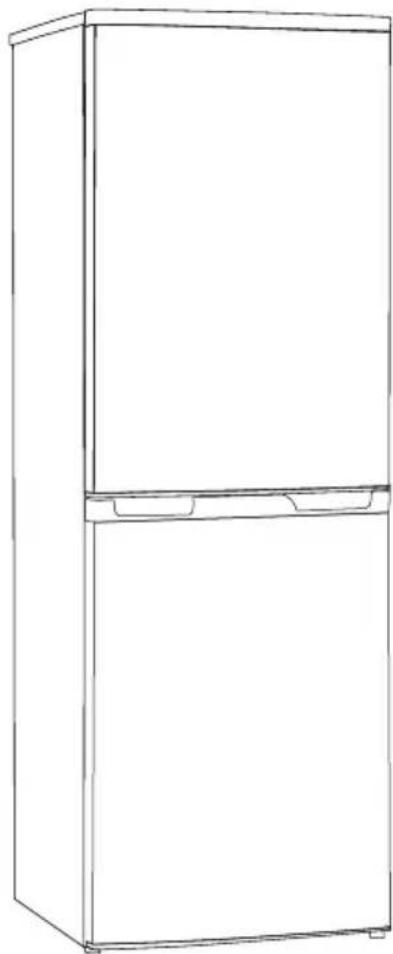
FRIDGE FREEZER
LIDD161
natural_image
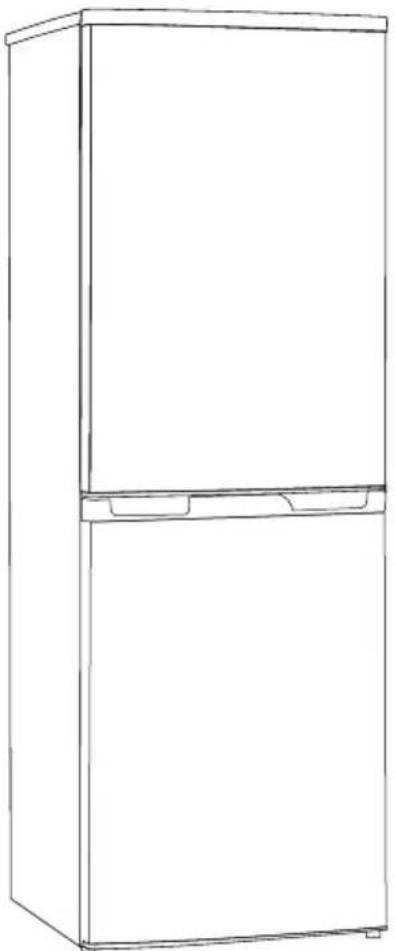
Line drawing of a two-tier refrigerator with front and back panels (no text or symbols)Contents
Safety and warning information ____ 1
Description of the appliance____ 3
Control panel ____ 3
First use and installation ____ 4
Daily use ____ 5
Helpful hints and tips ____ 6
Cleaning and care ____ 7
What to do if 8
Reversing the door 9
Disposal of the appliance ____ 11
This appliance is in accordance with the following EU guidelines: 2006/95/EC and 2004/108/EC and 2009/125/EC and EC.643/2009.

Safety and warning information
For your safety and correct usage, before installing and first using the appliance, read this user manual carefully, including its hints and warnings. To avoid unnecessary mistakes and accidents, it is important to make sure that all people using the appliance are thoroughly familiar with its operation and safety features. Save these instructions and be sure that they remain with the appliance if it is moved or sold, so that a using it throughout its life will be properly informed on its correct appliance usage and safety.
For the safety of life and property, keep the precautions of these user's instructions as the manufacturer is not responsible for damages caused by omission.
Safety for children and others who are vulnerable
- This appliance is not intended for use by persons (including children) with reduced physical, sensory or mental capabilities, or a lack of experience and knowledge, unless they have been given supervision or instruction concerning the use of the appliance by a person responsible for their safety. Children should be supervised to ensure that they do not play with the appliance.
- Keep all packaging away from children as there is risk of suffocation.
- If you are discarding the appliance, pull the plug out of the socket, cut the connection
cable (as close to the appliance as you can) and remove the door to prevent children playing from suffering an electric shock or from closing themselves inside it. If this appliance, featuring a magnetic door seals, is to replace an older appliance having a spring lock (latch) on the door or lid, be sure to make the spring lock unusable before you discard the old appliance. This will prevent it from becoming a death trap for a child.
General safety

Caution! Keep ventilation openings clear of obstructions.
● The appliance is intended for keeping food and/or beverages in a normal household as explained in this instruction manual.
- Do not use a mechanical device or any artificial means to speed up the thawing process.
- Do not use other electrical appliances (such as ice cream makers) on the inside of refrigerating appliances, unless they are approved for this purpose by the manufacturer.
- Do not damage the refrigerant circuit. The refrigerant isobutane (R600a) is contained within the refrigerant circuit of the appliance. It is a natural gas with a high level of environmental compatibility, which is nevertheless flammable.

Caution: Risk of fire!
During the transportation and installation of the appliance, make certain that none of the components of the refrigerant circuit become damaged.
-avoid open flames and sources of ignition.
-thoroughly ventilate the room in which the appliance is located.
- It is dangerous to alter the specifications or modify this product in any way. Any damage to the cord may cause a shortcircuit, fire, and/or electric shock.

Warning! Any electrical component (power cord, plug, compressor) must be replaced by a certified service agent or qualified service personnel.
- The power cord must not be lengthened.
- Make sure that the power plug is not crushed or damaged. A crushed or damaged power plug may overheat and cause a fire.
- Make sure that you can access the main plug of the appliance.
- Do not pull the main cable.
- If the power plug socket is loose, do not insert the power plug. There is a risk of electric shock or fire.
- You must not operate the appliance without the interior lighting lamp cover.
Daily use
- Do not remove nor touch items from the freezer compartment if your hands are damp/wet, as this could cause skin abrasions or frost/freezer burns.
- Do not place the appliance in direct sunlight.
- Do not store flammable gases or liquids inside the appliance. There is a risk of an explosion.
- Do not operate any electrical appliances within the appliance (e.g. electric ice cream makers, mixers, etc.).
- When unplugging, always pull the plug from the main outlet. Do not pull on the cord.
- Do not place hot items near the plastic components of this appliance.
- Do not place food products directly against the air outlet on the rear wall. 1)
● Frozen food must not be refrozen once it has been thawed out. 2) -
Store pre-packaged frozen food in accordance with the frozen food manufacturer's instructions.2)
-
The appliance's manufacturing storage recommendations should be strictly adhered to. Refer to the relevant instructions for storage.
- Do not place carbonated or fizzy drinks in the freezer compartment as it creates pressure on the container, which may cause it to explode, resulting in damage to the appliance. 2)
- Ice lollies(popsicles) can cause frost burns if consumed straight from the refrigerated compartment. 2)
- Do not store explosive substances such as aerosol cans with a flammable propellant in this appliance.
- This appliance is intended to be used in household and similar applications such as -staff kitchen areas in shops, offices and other working environments; -farm houses and by clients in hotels, motels and other residential type environments; -bed and breakfast type environments; -catering and similar non-retail applications.
- Keep burning candles, lamps and other items with naked flames away from the appliance so that do not set the appliance on fire.
Warning!
Care and cleaning
● Before maintenance, switch off the appliance and disconnect the main plug from the main outlet.
- Do not clean the appliance with metal objects, steam cleaners, ethereal oils, organic solvents or abrasive cleansers.
- Do not use sharp objects to remove frost from the appliance.
Important!
Installation
For electrical connection, carefully, follow the instructions given in this manual.
- Unpack the appliance and check it. If it is damaged, do not plug in the appliance; contact the shop immediately from where you purchased it. In this case, keep all packing materials.
- It is advisable to wait at least four hours before connecting the appliance to allow the refrigerant to flow back into the compressor.
- Adequate air circulation should be around the appliance, as a lack of this leads to overheating. To achieve sufficient
ventilation, followtheinstructionsrelevant totheinstallation.
- Whereverpossible,thebackofthe productshouldbeagainstawalltoavoid touchingorcatchingwarmparts (compressor,condenser)andtoprevent theriskoffire;followtheinstructions relevanttoinstallation.
● The appliance must not be located close to radiators or cooking appliances. - Makesurethatthemainplugisaccessible afterinstallationoftheappliance.
Service
- Anyelectricalworkrequiredtodothe servicingoftheapplianceshouldbe carriedoutbyaqualifiedelectricianor authorized person.
- Thisproductmustbeservicedbyan authorizedservicecenter,andonly genuinesparepartsmustbeused.
1) If the appliance is Frost Free.
2) If the appliance contains a freezer compartment.
Description of the appliance
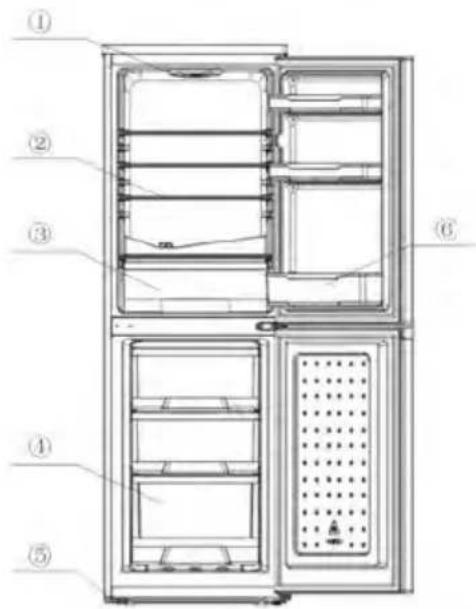
View of the appliance
1.bulb&temperatureregulator
2. Storageshelf.
3.Crisper
4Lowerdrawerinfreezer
5. Adjustablefeet
6. Lowerdoorshelf
text_image
Technical diagram of a refrigerator with numbered parts for identificationNote: Duetocontinualmodificationofourproducts,yourrefrigeratormaybeslightlydifferent fromthisInstructionManual,butitsfunctionsandusagemethodsremainthesame.
Control panel
Starting up and temperature regulation
- Insert the plug of the connection lead into theplugsocketwithaprotective grounding contact. Whentherefrigerator compar-mentdoorisopened,the internal lightingisswitchedon.
- Thetemperatureselectorknobislocated onthetopoftherefrigeratorcompartment.
Setting "OFF" means
Off.
Turning in a clockwise direction the refrigerating unit turns on it will then operate automatically.
Setting "MIN" means
Highesttemperature,warmestsetting.
Setting "MAX" (end-stop) means
Lowesttemperature, coldestsetting.
Important! Normally, weadviseyouselect asetting “MED”; if you want the temperature higher or lower, please turn the knob to a warmer or coldersetting accordingly. When you turn the knob to a colder setting, this can lead to more energy efficiency. Otherwise, it would result the consumption of energy.
Important! High ambient temperatures (e.g. on hot summer days) and a cold setting on the temperature regulator (positionMAX") can cause the compressor to run continuously or even non-stop!
Reason: when the ambient temperature is high, the compressor must run continuously to maintain the low temperature in the appliance.
Changingthelightbulb

Warning! If the light bulb is damaged, only a qualified electrician must carry it out!
The changing of anbulb by inexperienced persons may cause injury or a serious malfunction. It must be replaced by a qualified personnel in order to avoid a hazard. Contact your local Service Force Center for help
Before changing the light bulb, switch off the appliance and unplug it, or pull the fuse or the circuit breaker.
• Light bulb data: 220-240 V.
- To switch off the appliance, set the temperature regulator to position "0" or unplug the mains plug.
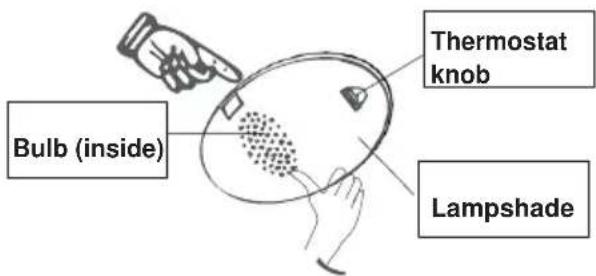
- Press the bulb in the center with finger.
Take out the lampshade with "1" type screwdriver, change the bulb, and then replace the lampshade.
- Put the refrigerator back into operation.
text_image
Bulb (inside) Thermostat knob LampshadeFirstuseandinstallation
Cleaningbeforeuse
- Before using the appliance for the first time, wash the interior and all internal accessories with lukewarm water and neutral soap remover the typical smell of a brand new product, then dry thoroughly.
InstallationPositioning

Warning! Before installing, read the instructions carefully for your safety
and the correct operation of the appliance.
- Position the appliance away from sources of heat such as stoves, radiators, direct sunlight, etc.
● Maximum performance and safety are guaranteed by maintaining the correct indoor temperature for the class of unit concerned, as specified on the rating plate.
- This appliance performs well from N to ST. The appliance may not work properly if it is left for a longer period at a temperature above or below the indicated range.
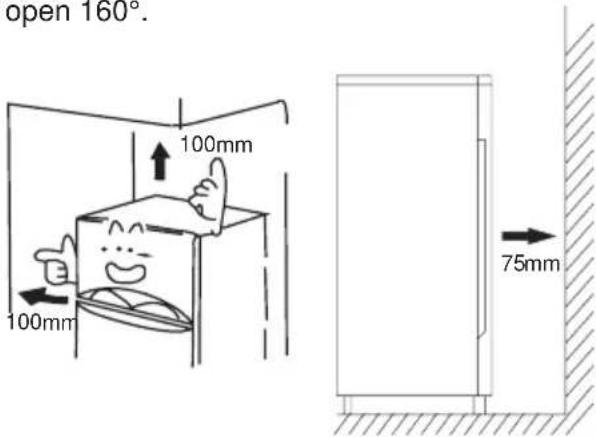
Important! It is necessary to have good ventilation around the refrigerator to allow for the dissipation of heat, high efficiency,
and low power consumption. For this reason, a sufficiently cleared space should be available around the refrigerator is advisable for there to be 75mm separating the back of the refrigerator to the wall at least 100mm of space on its two sides, a height of over 100mm from its top and a clear space in front to allow the doors to open 160°.
text_image
open 160°. 100mm 100mm 75mm| Climate class | Ambient temperature |
| SN | +10°C to +32°C |
| N | +16°C to +32°C |
| ST | +16°C to +38°C |
| T | +16°C to +43°C |
- Appliances must not be exposed to rain. Sufficient air must be allowed to circulate in the lower rear section of the appliance, as poor air circulation can affect performance. Built-in appliances should be positioned away from heat sources such as heaters and direct sunlight.
Leveling
● The appliance should be level in order to eliminate vibration. To make the appliance level, it should be upright and both adjusters should be in stable contact with
the floor. You can also adjust the level by unscrewing appropriate level in the front (use your fingers or a suitable spanner).
Electrical connection
Caution! Any electrical work required to install this appliance should be carried out by qualified or .authorized personnel
Warning! This appliance must be grounded. The manufacturer declines any liability should these safety measures not be observed.
Daily use
Accessories 1)
Movable shelves/trays
- Various glass, plastic storage shelves or wire trays are included with your appliance-different models have different combinations and different models have different features.
- The walls of the refrigerator are equipped with a series of runners so that the shelves can be positioned as desired.
Positioning the door shelves
- To permit the storage of food packages of various sizes, the door shelves can be placed at different heights.
- To adjust, gradually pull the shelf in the direction of the arrows until it comes free, then reposition as required.
Vegetable Drawer
- For storing fruit and vegetables.
- For storing frozen food.
Freezer Drawer
Ice-cube tray
- For making ice and storing ice-cubes.
Refrigerator compartment 2)
- For storing food that does not need to be frozen and different sections suitable for different kinds of food.
Freezer food compartment 2)
- For freezing fresh food and storing frozen and deep-frozen food for long periods of time.
Thawing food 2)
- In the refrigerator compartment.
- At room temperature.
- In a microwave oven.
- In a conventional or convection oven.
● Food once thawed should be re-frozen with the exception of special cases.
1) If the appliance contains related accessories and functions.
2) If the appliance contains a freezer compartment.
Helpful hints and tips
Noises during operation
Clicks- Whenever the compressor switches on or off, a click can be heard.
Humming- As soon as the compressor is in operation, you can hear it humming.
Bubbling- When refrigerant flows into thin tubes, you can hear bubbling or splashing noises.
Splashing- Even after the compressor has been switched off, this noise can be heard for a short time.
Energy saving tips
- Do not install the appliance near stoves, radiators or other sources of warmth.
- Keep the time the appliance is open to a minimum.
- Do not set the temperature colder than necessary.
● Make sure the side plates and back plate of the appliance are at some distance from the wall, and follow the instructions relevant to installation. - If the diagram shows the correct combination for the drawers, crisper and shelves, do not adjust the combination as it would produce an effect on energy consumption.
Hints for fresh food refrigeration
- Do not store warm foods or evaporating liquids in the appliance.
- Do cover or wrap the food, particularly if it has a strong flavor or odor
- Position food so that air can circulate freely around it.
Hints for refrigeration
- Meat (all types): wrap in polyethylene (plastic) bags and place on the glass shelf above the vegetable drawer. For safety, store in this way only one or two days at the most.
- Cooked foods, cold dishes, etc...: these should be covered and may be placed on any shelf.
-
Fruit and vegetables: these should be thoroughly cleaned and placed in the special prawided.
-
Butter and cheese: these should be placed in aluminum foil or polyethylene (plastic) bags while removing as much air as possible.
- Milk bottles: these should have a cap and should be stored in the bottle rack on the door.
Hints for freezing
- When first starting-up or after a period out of use. Before putting the food in the compartment, let the appliance run at least 2 hours on the higher settings.
• Prepare food in small portions to enable it to be rapidly and completely frozen and to make it possible to thaw subsequently only the quantity required. - Wrap up the food in aluminum foil or polyethylene (plastic) and make sure that the packages are airtight.
- Do not allow fresh, unfrozen food to touch food that is already frozen, thus avoiding a rise in the temperature of the latter.
- Iced products, if consumed immediately after removal from the freezer compartment, can possibly cause skin to become freezer burnt.
- It is recommended to label and date each frozen package in order to keep track of the storage time.
Hintsforthestorageoffrozenfoo
• Make sure that commercially frozen food was stored by the retailer.
- Once defrosted, foods deteriorate rapidly and can not be re-frozen.
• Do not exceed the storage period indicated by the food manufacturer.
Note: If the appliance contains related accessories and functions.
Cleaning and Care
Cleaning and care
For hygienic reasons, the appliance interior, including interior accessories, should be cleaned regularly.
The appliance should be cleaned and maintained at least every two months.

Warning! Danger of electrical shock!
- The appliance should not be connected to the during power supply Before cleaning, switch the appliance off and remove the plug from the main power supply, switch off, or the circuit breaker or fuse.
Notice!
- Remove the food from the appliance before cleaning. Store them in a cool place are well predicted.
● Never clean the appliance with a steam cleaner. Moisture could accumulate in electrical components.
● Hot vapor can lead to the damage of plastic parts. - Ethereal oils and organic solvents can attack plastic parts, e.g. lemon juice or the juice from an orange peel, butyric acid, or cleansers that contain acetic acid. Do not allow such substances to come into contact with appliance parts.
- Do not use any abrasive cleansers.
- Clean the appliance and the interior accessories with a cloth and lukewarm water. Commercially available dish washing detergents may also be used.
- After cleaning, wipe with fresh water and a clean dish cloth.
- Accumulation of dust at the condenser increases energy consumption; clean the condenser at the back of the appliance once a year with a soft brush or a vacuum cleaner.(Only for the outside-condenser product)
- Check the water drain hole on the rear wall of the refrigerator compartment.
- Clear a blocked drain hole with the aid of something like soft green peg, an be careful not to create any damage to the cabinet by sharp objects.
- After everything is dry, the appliance back into service.
Defrosting
Defrosting in the fresh food storage compartment
- This is automatically controlled by switching the temperature regulator ON or OFF so that there is no need to use the defrosting setting. Water from the defrosting option will automatically be drained into a drip tray through a drain pipe at the back of the appliance.
Defrosting in the frozen food storage compartment
- Defrosting in the freezer chamber is operated manually. Before defrosting, take the food out.
- Take the ice tray and drawers out or put them into the fresh food compartment temporarily.
- Set the knob of the temperature regulator to the "0" (where the compressor will stop working) and leave the door of the refrigerator open until ice and frost dissolve thoroughly and accumulate at the bottom of the freezer chamber. Wipe out the water with a soft cloth.
- In order to speed up the process of defrosting, you may put a bowl of warm water (about 50°C) into the freezer chamber and scrape away the ice and frost with a defrosting spatula. After doing so, be sure to set the knob of the temperature regulator to the original position.
- It is not advisable to heat the freezer chamber directly with hot water or a hair dryer while defrosting to avoid deformation of the inner case.
- It is also not advisable to scrape off ice and frost or separate foods from the containers which have been congealed together with the food with sharp tools or wooden bars, so as not to damage the inner casing or the surface of the evaporator.
Warning! To switch off the appliance before defrosting, turn the temperature regulator to the "0" position.
Notice! The appliance should be defrosted at least once a month. During its usage, if the door has been opened frequently the appliance has been used in extreme humidity, we advise the user to defrost every two weeks.
Taking the appliance out of service
• Empty the appliance.
• Pull out the power plug.
- Clean thoroughly (see section: Cleaning and Care).
- Leave the door open to prevent odours.
What to do if...

Warning! Before trouble-shooting, disconnect the power supply. Only a qualified electrician or other personnel must carry out the trouble-shooting that is not in the manual.
Important!
Repairs to the appliance may only be performed by competent service engineers. Improper repairs can give rise to significant hazards for the user. If your appliance needs repairing, please contact your specialist dealer or your local Customer Service Center.
| Problem | Possible cause Solution | |
| Appliance does not work. | Appliance is not switched on. | Switch on the appliance. |
| Main plug is not plugged in or is loose. | Plug the appliance into the electrical socket. | |
| Fuse has blown or is defective. | Check fuse, replace if necessary. | |
| Outlet is defective. | Defective parts need to be repaired by an electrician. | |
| Appliance cools too much. | Temperature is set too cold. | Turn the temperature regulator to a warmer setting temporarily. |
| The food is too warm. | Temperature is not properly adjusted. | Please refer Initial Start Up" section. |
| Door was open for an extended period. | Open the door only as long as necessary. | |
| A large quantity of warm food was placed in the appliance within the last 24 hours. | Turn the temperature regulator to a colder setting temporarily. | |
| The appliance is near a heat source. | Please refer Installation Location" section. | |
| Interior lighting does not work. | Light bulb is defective. | Please look in the "Changing the Light Bulb "section. |
| Heavy build-up of frost, possibly also on the door seal. | Door seal is not air-tight (possibly after reversing the door). | Carefully warm the leaking sections of the door seal with a hair dryer (on a cool setting). At the same time, shape the warmed door seal by hand so that it sits correctly. |
| Unusual noises. | Appliance is not level. | Readjust the feet. |
| The appliance is touching the wall or other objects. | Move the appliance slightly. | |
| A component, e.g. a pipe, on the rear of the appliance is touching another part of the appliance or the wall. | If necessary, carefully bend the component out of the way. | |
| The compressor does not start immediately after changing the temperature setting. | This is normal, no error has occurred. | The compressor starts after a period of time. |
| Water on the floor or storage shelves. | Water drain hole is blocked. | Refer to the "Cleaning and Care" section. |
Reversing the door
The side in which the door opens can be changed from the right side (as supplied) to the left side, if the installation site allows for it. Tools you will need:
- 8mm socket driver

- Cross-shaped screwdriver

- Putty knife or thin-blade screwdriver

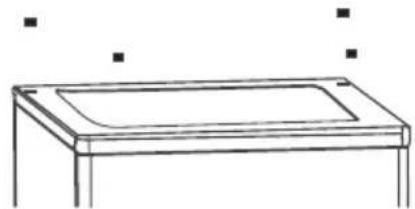
- Stand the refrigerator, use a flat-bladed screw driver to remove the 4 screw covers at the rear of the refrigerator lid.
natural_image
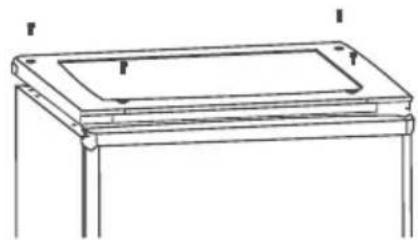
Line drawing of a rectangular table with a curved top and two legs, no text or symbols present- Unscrew and lift the lid from the rear and remove it, then lift the upper door and place it on a padded surface to prevent it from becoming scratched.
natural_image
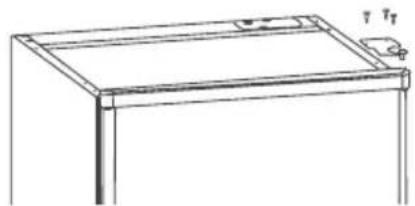
Line drawing of a simple rectangular table with two legs and a central tray (no text or symbols)- Remove the upper hinge core, transfer it to left side and tighten securely, then put it in a safe place.
natural_image
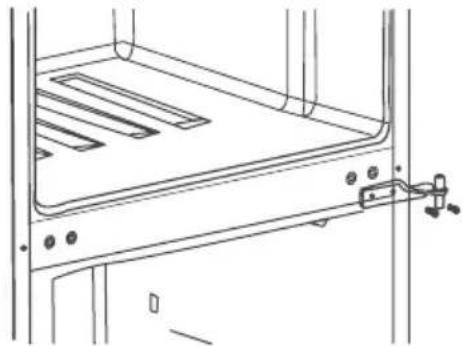
Line drawing of a simple rectangular frame with a small inset showing a handle and label 'T T' (no text or symbols on the frame itself)- Remove the two flange screws, then remove the middle hinge that holds the lower door in place. Lift the lower door and place it on a padded surface to prevent scratching it.
natural_image
Technical line drawing of a mechanical assembly with a clamping bracket (no text or symbols)- Remove the hinge hole cover from the left holes as illustrated and transfer them to the uncovered hole on the siglet
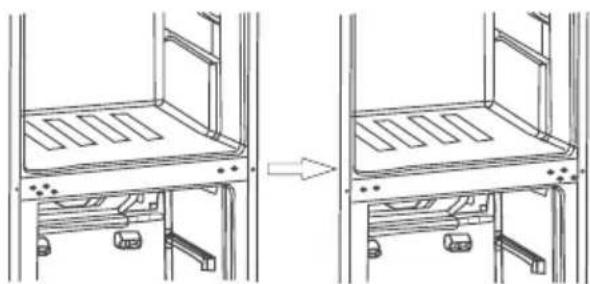
natural_image
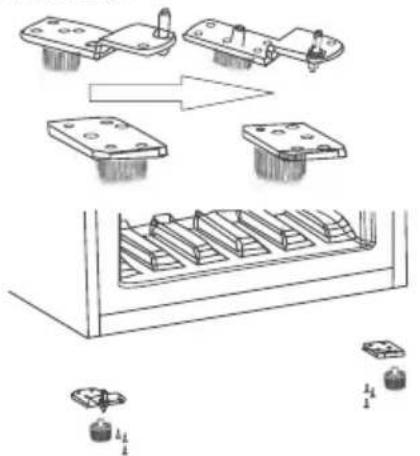
Technical line drawing showing a mechanical assembly with two views of a multi-panel structure (no text or symbols)- Remove both adjustable feet and the bottom hinge bracket by unscrewing the bolts.

natural_image
Simple line drawing of a mechanical or architectural component with no text, numbers, or symbols- Unscrew and remove the bottom hinge pin, turn the bracket over and replace it. Refit the bracket holding the bottom hinge pin. Replace both adjustable feet. Transfer the lower door to the proper position. Secure the level of the door, put the bottom hinge pin into the lower hole of the door, then tighten the bolts.
text_image
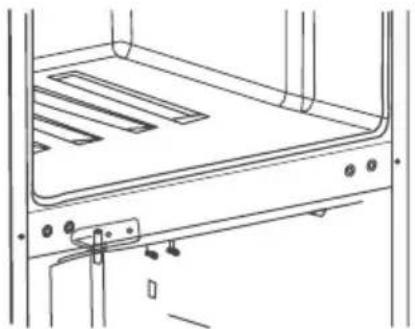
Technical diagram showing assembly steps of a mechanical component with labeled parts and directional arrows indicating process flow.- Allow the middle hinge to reverse the direction 180 degrees, then transfer it to the left position properly. Put the middle hinge pin in the upper hole of the lower door, then tighten the bolts. Transfer the upper door to the proper position. Secure the level of the door; put the middle hinge pin into the lower hole of the upper door.
natural_image
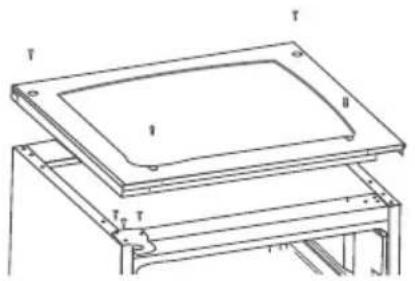
Technical line drawing of a mechanical assembly with no visible text or symbols- Replace the lid by fitting the upper hinge core into the upper door's hole, securing it with the 4 screws. Replace the screw covers.
natural_image
Technical line drawing of a layered electronic component or frame structure (no text or symbols)Warning!
When changing the side at which the door opens, the appliance must not be connected to the main outlet.
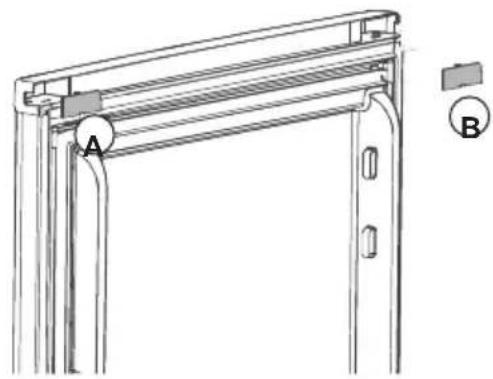
When you reverse the door, please do the following :
- Move the accessory from the upper cover of the upper door and attach accessory that is a small detachable part from a small bag.
natural_image
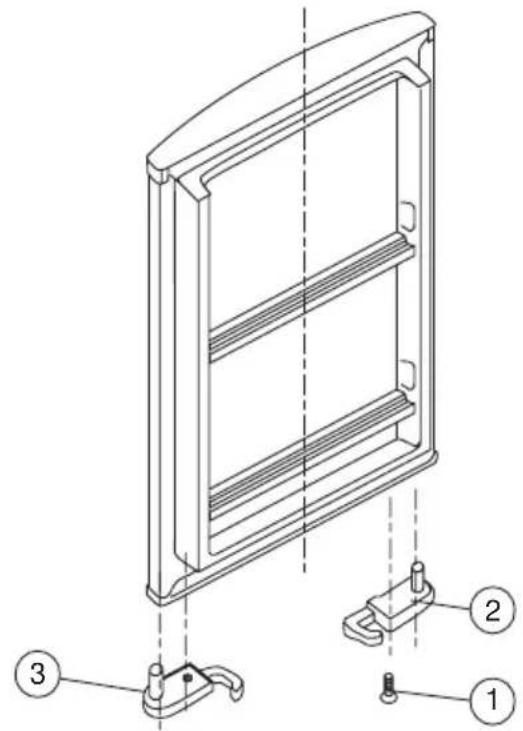
Technical line drawing of a door frame structure with labeled points A and B (no text or symbols beyond labels)- Remove the screw(1) that hold the door stopper(3), then remove the door stopper(3).
- Insert the door stopper(2), then tighten the screw(1).
text_image
Technical diagram of a multi-panel refrigerator with labeled parts including front panel, side panels, and mounting bracket.Disposal of the appliance
It is prohibited to dispose of this appliance in domestic household waste.
Packaging materials
Packaging materials with the recycle symbol are recyclable. Dispose of the packaging in a suitable waste recycle it.
Before disposal of the appliance.
- Disconnect the main plug from the main socket.
- Cut off the main cable and discard it.
| Correct disposal of this product | |
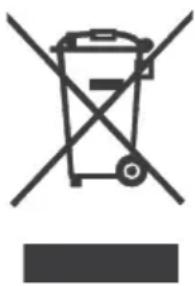 | This symbol on the product, or in its packaging, indicates that this product may not be treated as household waste. Instead, it should be taken to the appropriate waste collection point for the recycling of electrical and electronic equipment. By ensuring this product is disposed of correctly, you will help prevent potential negative consequences for the environment and human health, which could otherwise be caused by the inappropriate waste handling of this product. For more detailed information about the recycling of this product, please contact your local council, your household waste disposal service, or the shop where you purchased the product. |

natural_image
Abstract black and white logo with stylized letter 'L' and dot (no text or symbols)Limit®
MANUEL D'UTILISATION
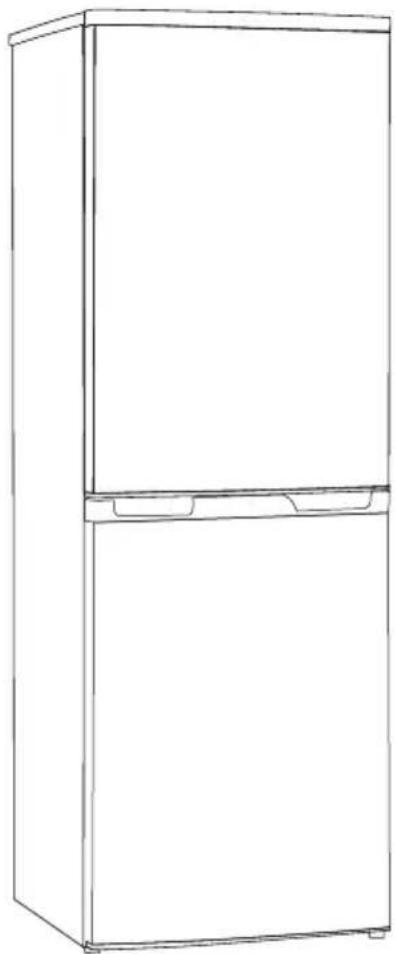
REFRIGERATEUR
LIDD161
natural_image
Line drawing of a two-tier refrigerator with front and back panels (no text or symbols)Table des matières
text_image
Technical diagram of an open refrigerator with numbered compartments and labeled partsInstallation/Emplacement

text_image
100mm 100mm 75mmnatural_image
Line drawing of a rectangular table with a curved top and two legs, no text or symbols presentnatural_image
Line drawing of a rectangular table with a top panel and two side supports (no text or symbols)natural_image
Line drawing of a simple wooden table with a flat top and a small knob on the side (no text or symbols)natural_image
Technical line drawing of a cabinet or rack with mounting holes and a hanging clamp (no text or symbols)natural_image
Diagram showing a mechanical assembly with two views of a multi-level structure, one before and one after change (no text or symbols present)natural_image
Simple line drawing of a mechanical or architectural component with no text, numbers, or symbolstext_image
Technical diagram showing assembly steps of a mechanical component with labeled parts and directional arrows indicating process flow.natural_image
Technical line drawing of a mechanical or electrical component with no visible text or symbolstext_image
T T I II F TAvertissement!
natural_image
Technical line drawing of a door frame structure with labeled points A and B (no text or symbols beyond labels)text_image
Technical diagram of a refrigerator panel with labeled parts including handle, lock, and mounting bracketDisposal of the appliance
natural_image
Abstract black and white logo with stylized 'L' and dot (no text or symbols)Limit®
GEBRUIKSAANWIJZING
KOELKAST
LIDD161