USER MANUAL 477372 MOOOV
This manual is also available online in a version that we are authorized to complete. If you wish you can download the online version on our website www.metronic.com, in the "Besoin d'aide/Documentations" section.
Please read this user manual carefully and keep for future use.
TO START
Remove all packaging materials from the product. Place the packaging materials in the box or dispose of them safely in accordance with the selective sorting instructions on the appliance packaging.
SAFETY INSTRUCTIONS
- Do not squeeze, hurt or collide the product.
- Do not disassemble or put into the fire, water, to avoid short-circuit leakage.
Usage temperature and humidity are 0 - 45^ and 20 - 85%
- Do not use in severe high temperature, humidity or corrosive environments to avoid leakage of damaged circuits.
- Do not place too close to magnetic cards (ID cards, bank cards, etc.) with magnetic strips or chips to avoid magnetic card failure.
- Keep more than 20cm between the implanted medical device (pacemaker, implantable cochlea, etc.) and the wireless charger to avoid potential disruption to medical devices.
- This product is not a toy, keep children away from the product to avoid any accident.
- Keep the alarm clock, the adapter and the USB cable away from water and other liquids.
- To clean the product or the accessories, make sure the power supply is disconnected and use a clean and dry cloth.
- If ever the adapter or the cable gets damaged, stop using, recycling it/them and replace with a similar equipment.
CONTENT OF THE BOX
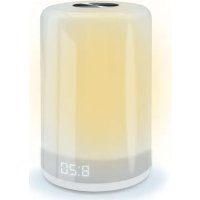
- Alarm clock with light and sunrise simulation
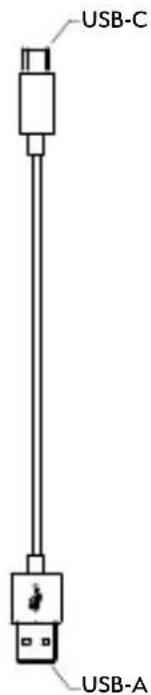
USB-C/USB-A power cable
- Instruction leaflet

TECHNICAL SPECIFICATIONS
- Alarm clock with Snooze function
- Time in 24 hours format per default + 12h format (AM/FM) in LED display
- Display on/off
- Clock LED indicator under the minutes when alarm is ON
- 3W bedside lamp with 3 warm white light levels and color RGB light mode (256 full colors)
- Sunlight simulation starting 30min prior to the alarm
- Touch button on top for Snooze function and Light adjustment
- 3 timers to fall asleep with the light: 30/60/90/off
- LED indicator is blinking under the minutes when the timer is running
- USB-C input: DC 5V/1A
Color temperature: 2900-3100K
- USB-C/USB-A white power cable: 1m length
4 non-slip grey feet underneath
EN
DETAILED DRAWINGS
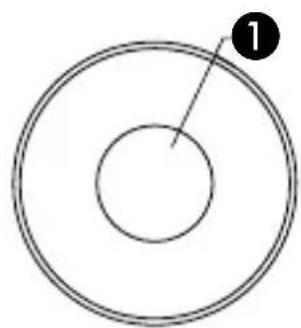
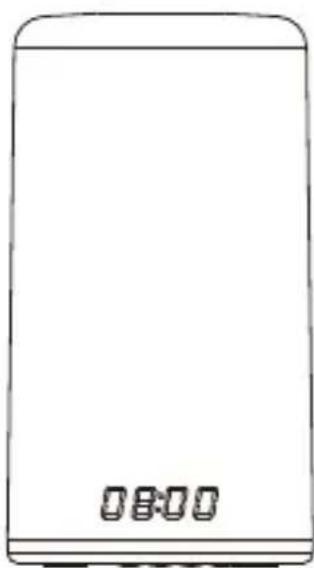
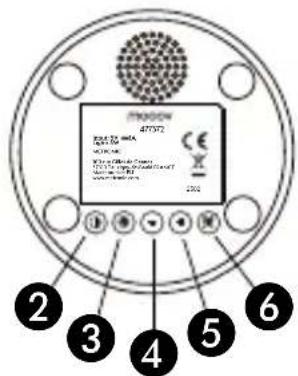
1 Touch panel
2 Sleep setting
3 Time setting
4 Decrease a value
5 Increase a value
6 Alarm setting
10
moov
- A brand of the METRONIC group

1. SETTING THE TIMER
Short press Sleep Setting ② activates the timer function:30/60/90/off. Position on the desired duration (no need to press any other key to confirm). A LED indicator blinks while the timer is running, the light will switch off automatically at the end of the timer.
2. SETTING THE TIME
Press and hold Time Setting ③ enters time setting. - and + are required to adjust hours and minutes, short press ③ to confirm. Choose 24h/12h format using - / + then short press ③ to confirm.
3. ACTIVATE/DEACTIVATE THE DISPLAY
Display can be switched on/off with a short press on Time setting ③.
4. BEDLIGHT
When the light is OFF, long press Touch panel ① switches the color lighting on to alternative mode, short press Touch panel ① whenever you want to choose the current color, short press again to restore the auto change. When the light is OFF, short press ① switches the white lighting on. When in white light, short press ① changes the brightness of the white light: low/medium/high/off. Long press switches to color lighting (no brightness adjustments).
EN
5. SETTING ALARM
Press and hold Alarm setting 6 to adjust alarm time with use of - and + keys. Short press Alarm setting 6 to confirm. Select your desired natural sound among the 5 melodic and natural sounds:
S-01: singing birds
S-02: melancholic piano melody
S-03:river
« S-04 »: waves and seagulls
S-05>:music box
Repeat and confirm with 6 the same operation for the volume (volume 3 is the volume per default): from volume 0 U00 (mute - to be woken up only with the sunrise effect) to the highest volume: volume 3 (U03). Short press Alarm setting 6 to activate/deactivate the alarm (clock symbol appears/ disappears) or check the set alarm time.
6. SUNRISE SIMULATION
The warm white sunrise function starts automatically 30min prior the alarm time at a very low brightness and gradually increases. It reaches the maximum brightness at the alarm time while the natural/melodic sound starts to ring. If no Snooze (or 2 Snooze already done), the sound will automatically turn off 15min after the ringing.
Note : If the clock is set for less than 30min, the sunrise simulation effect does not work, only the sound will ring at the preset alarm time.

7. SNOOZE FUNCTION
When the alarm rings, short press Touch panel ① activates the Snooze function: the clock icon blinks and the alarm will ring again after 5min. The sunrise light continues to shine at full brightness during snooze time. The Snooze function can be activated twice, then it will ring the next day (even if "short press"). To turn the alarm and the sunrise simulation OFF till the next day, press and hold touch panel ① when the alarm sound is playing.
2 YEARS WARRANTY
www.metronic.com/a/garantie.php

This logo indicates that devices may not be disposed of with household waste at the end of their life. The hazardous substances which they are likely to contain are harmful to health and the environment. Return these devices to your distributor or make use of the selective collection methods provided by your community.
| --- | Direct current |
| CE | The device complies with the requirements of all European Directives requiring CE marking. |
moov
METRONIC - 100 rue Gilles de Gennes - 37310 Tauxigny-St-Baud - FRANCE - Made outside EU - fr@metronic.com
Hotline: hotline@metronic.com
IT
This manual is also available online in a version that we are authorized to complete. If you wish you can download the online version on our website www.metronic.com, in the «Besoin d'aide/Documentations» section.
This manual is also available online in a version that we are authorized to complete. If you wish you can download the online version on our website www.metronic.com, in the «Besoin d'aide/Documentations» section.
WAARSCHUWINGEN EN VEILIGHEIDSINSTRUCTIES
Hotline: customerservice@bigben-interactive.nl