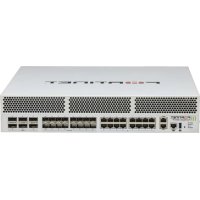
FortiGate 3000F - Firewall Fortinet - Free user manual and instructions
Find the device manual for free FortiGate 3000F Fortinet in PDF.


| Product Type | Firewall (hardware) |
| Brand | Fortinet |
| Model | FortiGate 3000F |
| Form Factor | 2U Rackmount |
| Dimensions (W x D x H) | 440 x 460 x 88 mm |
| Weight | 15 kg (approx.) |
| Power Supply | AC 100-240 V, 50-60 Hz, 2 x 500 W redundant |
| Maximum Power Consumption | 500 W |
| Firewall Throughput | 400 Gbps |
| Number of Ports | 4 x 100 GigE QSFP28, 16 x 25 GigE SFP28, 4 x 10 GigE SFP+ |
| Management Ports | 1 x RJ45, 1 x USB |
| Key Features | Deep Packet Inspection (DPI), IPSec/SSL VPN, Intrusion Prevention (IPS), antivirus, web filtering, application control |
| Operating System | FortiOS |
| Internal Storage | 480 GB SSD (system) + 1 TB (logs) |
| RAM | 64 GB DDR4 |
| Cooling | Redundant fans, front-to-back airflow |
| Operating Temperature | 0°C to 40°C |
| Operating Humidity | 5% to 90% (non-condensing) |
| Safety Certifications | CE, FCC Class A, UL, IEC 62368-1 |
| Maintenance and Cleaning | Clean with a soft dry cloth; do not use solvents |
| Spare Parts and Repairability | Hot-swappable power supplies and fans; replaceable drives |
| Warranty | 1 year manufacturer (extendable) |
Frequently Asked Questions - FortiGate 3000F Fortinet
User questions about FortiGate 3000F Fortinet
0 question about this device. Answer the ones you know or ask your own.
Ask a new question about this device
Download the instructions for your Firewall in PDF format for free! Find your manual FortiGate 3000F - Fortinet and take your electronic device back in hand. On this page are published all the documents necessary for the use of your device. FortiGate 3000F by Fortinet.
USER MANUAL FortiGate 3000F Fortinet
FG-3000F and FG-3001FFG-3000F, FG-3000F
Before you begin
Register your device to access FortiGuard updates, cloud management, firmware upgrades, technical support and warranty coverage.
https://support.fortinet.com
FORTINET
This guide covers: FO-3000F, and 5000000C; DO-3001F, and FO-3001F-DC
February 8, 2024
Copyright © 2023 Fortinet, Inc. All rights reserved. Fortinet®, FortGate®, FortCare® and FortGuard®, and certain other marks are registered trademarks of Fortinet, Inc., in the U.S. and other jurisdictions, and other Fortinet names herein may also be registered and/or common law trademarks of Fortinet. All other products or complex categories may be trademarks of their respective owners. Performances and other rights related to commercial real estate, real estate, or other commercial real estate, other property rights or equipment rights, other commercial real estate, other property rights or equipment rights, other commercial real estate, other property rights or equipment rights, other commercial real estate, other property rights or equipment rights, other commercial real estate, other property rights or equipment rights, other commercial real estate, other property rights or equipment rights, other commercial real estate, other property rights or equipment rights, other commercial real estate, other property rights or equipment rights, other commercial real estate, other property rights or equipment rights, other commercial real property rights, other property rights or equipment rights, other commercial real property rights, other property rights or equipment rights, other commercial real property rights, other property rights or equipment rights, other commercial real property rights, other property rights or equipment rights, other commercial real property rights, other property rights or equipment rights, other commercial real property rights, other property rights or equipment rights, other commercial real property rights, other property rights or equipment rights, other commercial real property rights, other property rights or equipment rights, Other commercial real property rights, Other property rights or equipment rights, Other commercial real property rights, Other property rights or equipment rights, Other commercial real property rights, Other property rights or equipment rights, Other commercial real property rights, Other property rights or equipment rights, Other commercial real property rights, Other property rights or equipment rights, Other commercial real property rights, Other property rights or equipment rights, Other commercial real property rights, Other property rights or equipment rights, Other commercial real property rights, Other property rights or equipment rights, Other commercial resale properties and other commercial real properties and other commercial real properties and other commercial real properties and other commercial real properties and other commercial real properties and other commercial real properties and other commercial real properties and other commercial real properties and other commercial real properties and other commercial real properties and other commercial real properties and other commercial real properties and other commercial real properties and other commercial real properties and other commercial real properties and other commercial real properties and other commercial real properties and other commercial real properties and other commercial real properties and other commercial real properties and other commercialreal properties and other commercial real properties and other commercial real properties and other commercial real properties and other commercial real properties and other commercial real properties and other commercial real properties and other commercial real properties and other commercial real properties and other commercial real properties and other commercial real properties and other commercial real properties and other commercial real properties and other commercial real properties and other commercial real properties and other commercial real properties and other commercial real properties and other commercial real properties and other commercial real properties and other commercial real properties and other commercialal property rights and other commercial real properties and other commercial real properties and other commercial real properties and other commercial real properties and other commercial real properties and other commercial real properties and other commercial real properties and other commercial real properties and other commercial real properties and other commercial real properties and other commercial real properties and other commercial real properties and other commercial real properties and other commercial real properties and other commercial real properties and other commercial real properties and other commercial real properties and other commercialreal properties and other commercial real properties and other commercial real Properties and Other Commercial Real Estate LLC (www.fortinet.com) (http://www.fortinet.com) (http://www.fortinet.com) (http://www.fortinet.com) (http://www.fortinet.com) (http://www.fortinet.com) (http://www.fortinet.com) (http://www.fortinet.com) (http://www.fortinet.com) (http://www.fortinet.com) (http://www.fortinet.com) (http://www.fortinet.com) (http://fortinet.com) (http://www.fortinet.com) (http://www.fortinet.com) (http://www.fortinet.com) (http://www.fortinet.com) (http://www.fortinet.com) (http://www.fortinet.com) (http://www.fortinet.com) (http://www.fortinet.com) (http://www.fortinet.com) (http://www.fortinet.com) (http://www.fertinet.com) (http://www.fortinet.com) (http://www.fortinet.com) (http://www.fortinet.com) (http://www.fortinet.com) (http://www.fortinet.com) (http://www.fortinet.com) (http://www.fortinet.com) (http://www.fortinet.com) (http://www.fortinet.com) (http://www.fortinet.com) (http://www.fortiner.com) (http://www.fortiner.com) (http://www.fortiner.com) (http://www.fortiner.com) (http://www.fortiner.com) (http://www.fortiner.com) (http://www.fortiner.com) (http://www.fortiner.com) (http://www.fortiner.com) (http://www.fortiner.com) (http://www.fortiner.com) (http://www.fortinercom) (http://www.fortinercom) (http://www.fortinercom) (http://www.fortinercom) (http://www.fortinercom) (http://www.fortinercom) (http://www.fortinercom) (http://www.fortinercom) (http://www.fortinercom) (http://www.fortinercom) (http://www.fortinercom) (http://www.fortinercom/) Copyright © 2023 Fortinet, Inc. All rights reserved. Fortinet®, FortGate®, FortCare® and FortGuard®, etc. The same terms are registered trademarks of Fortinet, Inc., in the U.S. and other jurisdictions, and other Fortinet names herein may also be registered and/or common law trademarks of Fortinet's all- product lines. All other products or complex categories may be trademarks of their respective owners. Performances and other entities such as retail sales have not yet been reproduced directly from any of these entities. Performances and other entities such as retail sales have not yet been reproduced directly from any of these entities. Performances and other entities such as retail sales have not yet been reproduced directly from any of these entities. Performances and other entities such as retail sales have not yet been reproduced directly from any of these entities. Performances and other entities such as retail sales have not yet been reproduced directly from any of these entities. Performances and other entities such as retail sales have not yet been reproduceddirect from any of these entities. Performances andother business units sold by Fortinet; this document is also registered trademarks of Fortinet; this document is also registered trademarks of Fortinet; this document is also registered trademarks of Fortinet; this document is also registered trademarks of Fortinet; this document is also registered trademarks of Fortinet; this document is also registered trademarks of Fortinet; this document is also registered trademarks of Fortinet; this document is also registered trademarks of Fortinet; this document is also registered trademarks of Fortinet; this document is also registered trademarks of Fortinet; this document is also registered trademarksof Fortinet; this document is also registered trademarks of Fortinet; this document is also registered trademarks of Fortinet; this document is also registered trademarks of Fortinet; this document is also registered trademarks of Fortinet; this document is also registered trademarks of Fortinet; this document is also registered trademarks of Fortinet; this document is also registered trademarks of Fortinet; this document is also registered trademarks of Fortinet; this document is also registered trademarks of Fortinet; this document is also registered trademarkses of Fortinet; this document is also registered trademarkses of Fortinet; this document is also registered trademarkses of Fortinet; this document is also registered trademarkses of Fortinet; this document is also registered trademarkses of Fortinet; this document is also registered trademarkses of Fortinet; this document is also registered trademarkses of Fortinet; this document is also registered trademarkses of Fortinet; this document is also registered trademarkses of Fortinet; this document is also registered trademarksesof Fortinet; this document is also registered trademarkses of Fortinet; this document is also registered trademarkses of Fortinet; this document is also registered trademarkses of Fortinet; this document is also registered trademarkses of Fortinet; this document is also registered trademarkses of Fortinet; this document is also registered trademarkses of Fortinet; this document is also registered trademarkses of Fortinet; this document is also registered trademarkses of Fortinet; this document is also registered trademarkses ofFortinet; this document is also registered trademarkses of Fortinet; this document is also registered trademarkses of Fortinet; this document is also registered trademarkses of Fortinet; this document is also registered trademarkses of Fortinet; this document is also registered trademarkses of Fortinet; this document is also registered trademarkses of Fortinet; this document is also registered trademarkses of Fortinet; this document is also registered trademarkses of Fortinet; this document is also registered trademarkses of Fortinero; this document is also registered trademarks of Fortinet; this document is also registered trademarks of Fortinet; this document is also registered trademarks of Fortinet; this document is also registered trademarks of Fortinet; this document is also registered trademarks of Fortinet; this document is also registered trademarks of Fortinet; this document is also registered trademarks of Fortinet; this document is also registered trademarks of Fortinet; this document is also registered trademarks of Fortinet; this document is also registered trademarks of Fortinero; this document is also registered trademarks of Fortinet; this document is also registered trademarks of Fortinet; this document is also registered trademarks of Fortinet; this document is also registered trademarks of Fortinet; this document is also registered trademarks of Fortinet; this document is also registered trademarks of Fortinet; this document is also registered trademarks of Fortinet; this document is also registered trademarks of Fortinet; this document is also registered trademarks of Fortinet; this document is also Registered
For Product License Agreement / EJLA and Warranty Terms, visit https://www.fortiret.com/content/dam/fortiret/assets/legal/EJLA.pdf
The Essentials
Default Logins

https://192.168.1.99
Username: admin
Password: leave blank
MGMT1 IP is 192.168.1.99
MGMT2 IP is 192.168.2.99
Admin Guide
For a detailed Getting Started guide, setup and configuration information, refer to the Admin Guide on https://docs.fortinet.com/
Customer Service
For contracts, licensing, product registration and account management, contact FortiCare Support at https://www.fortinet.com/support/contact
Self-service Resources
Access our knowledge base, forums, videos and technical experts at https://www.fortinet.com/support/support-services/forticare-support
Thank you for choosing Fortinet
Package Contents
FortiGate 3000F Series
FG-3000F, FG-3000F-DC, FG-3001F, and FG-3001F-DC

FortiGate Device
QuickStart Guide
2x AC Power Cables (AC Models only)
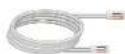
1x Ethernet Cable
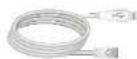
1x Console Cable
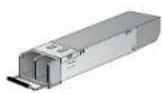
2x SFP+ Transceivers
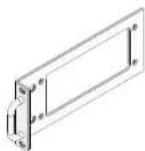
2x Rack-Mount Brackets6x Rubber Fe

12x Bracket Screws
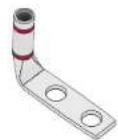
2x Grounding Lugs (DC models only)
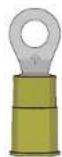
6x Terminal Rings (DC models only)
Setup Options
Set up your Fortinet device locally or connect using forticloud.com
GUI
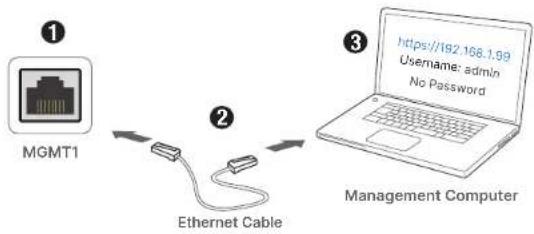
flowchart
graph LR
    A["MGMT1"] -->|② Ethernet Cable| B["Management Computer"]
    B -->|③ https://192.168.1.99
Username: admin
No Password| B
Note: For static IP configuration, use 192.168.1.1 with subnet mask 255.255.255.0
CLI
flowchart
graph LR
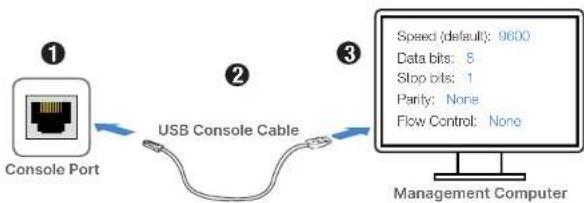
    A["Console Port"] -->|USB Console Cable| B["Management Computer"]
    C["Speed (default): 9600"] --> D["Data bits: 8"]
    C --> E["Stop bits: 1"]
    C --> F["Parity: None"]
    C --> G["Flow Control: None"]
Note: For a detailed CLI guide, visit docs.fortinet.com
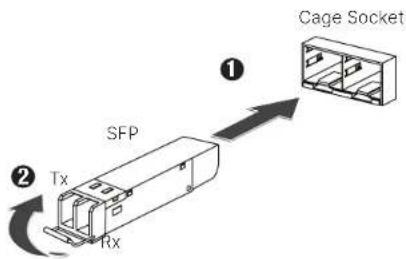
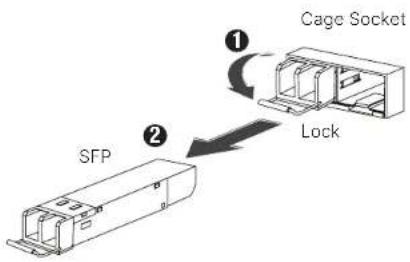
SFP Modules
Installation
Removal
Rack Installation Power Installation
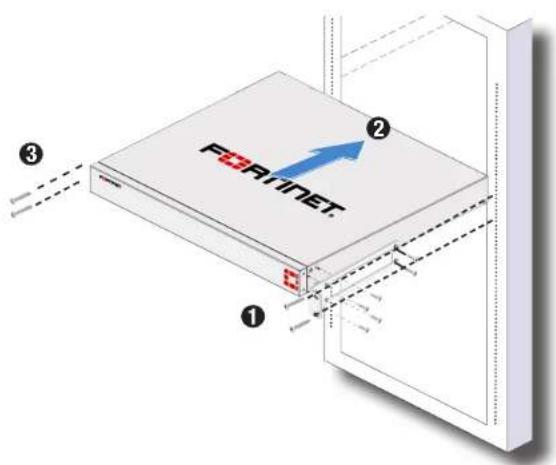
Note: The recommended clearance is 1.5 inches above and below the device in a 19 inch rack.
Caution: To avoid personal injury or damage to the device, it is recommended that two or more people mount the device on a rack.
Optional: For desktop installation, place the device on a flat, clean and stable surface with 1.5 inches of clearance.
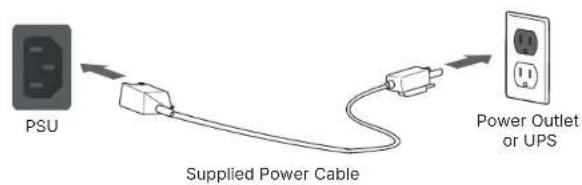
AC Models
DC Models
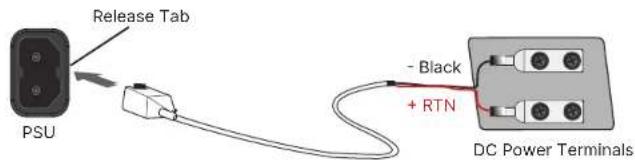
Note: The provided DC power cable is intended for in rack power connection and a local electrician is required for connections off the rack to meet local codes.
FG-3000F Series Front Panel
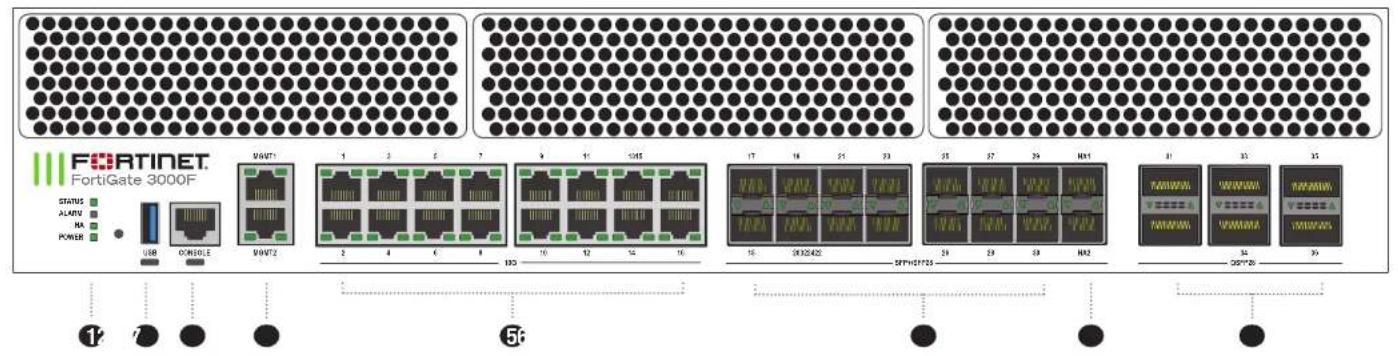
1 STATUS ■ Green: Normal operation
Flashing Green: Booting up
Red: Major Alarm
ALARM ■ Red: Major alarm detected
Amber: Minor alarm detected
■ Off: No errors detected
HA ■ Green: Operating in an HA cluster
Red: HA failure
Off: HA disabled
POWER ■ Green: Device is on
■ Off: Device is off
② USB (USB A) ③ Console (RJ45)
USB 3.0 server port
Console (RJ45)
CLI interface
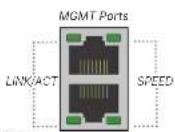
4 MGMT 1 and MGMT 2 (RJ45) 10GE management ports
Green: On, Link up
LINK/ACT Flashing Green: Data activity
■ Off: No link established
Green: Connected at 10 Gbps
■ Amber: Connected at 5 Gbps/ 2.5 Gbps/ 1 Gbps
■ Off: Linked at 100 Mbps or no link established
5 Ports 1 to 16 (RJ45)
Green: On, Link up
Flashing Green: Data activity
■ Off: No link established
Green: Connected at 10 Gbps
SPEED ■ Amber: Connected at 5 Gbps/ 2.5 Gbps/ 1 Gbps
■ Off: Linked at 100 Mbps or no link established
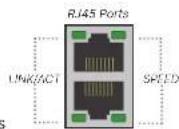
6 Ports 17 to 30 (SFP+/SFP28)
Green: Connected at 25 Gbps/10 Gbps/1 Gbps
Flashing Green: Data activity
Off: No link established
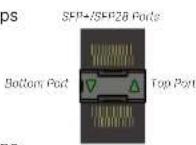
7 Ports HA1 and HA2 (SFP+/SFP28)
Green: Connected at 25 Gbps/10 Gbps/1 Gbps
Flashing Green: Data activity
Off: No link established
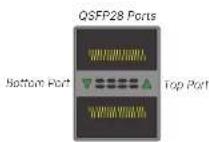
8 Ports 31 to 36 (QSFP28)
Green: Connected at 100 Gbps/ 40 Gbps
Flashing Green: Data activity
▼ Off: No link established
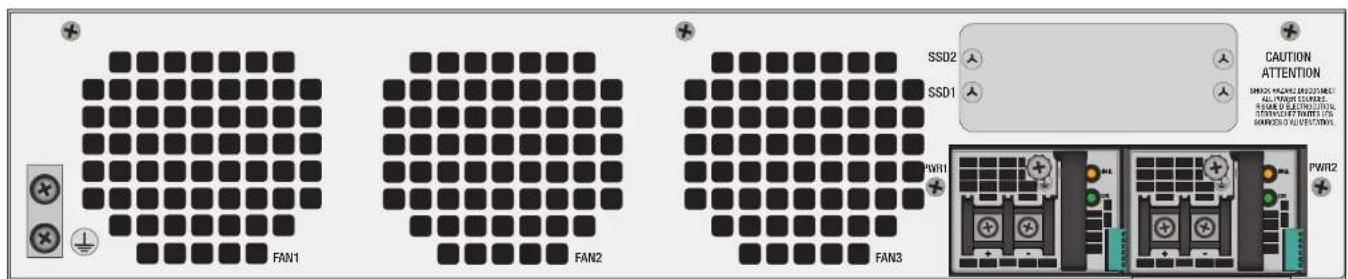
FG-3000F Series AC Model Rear Panel
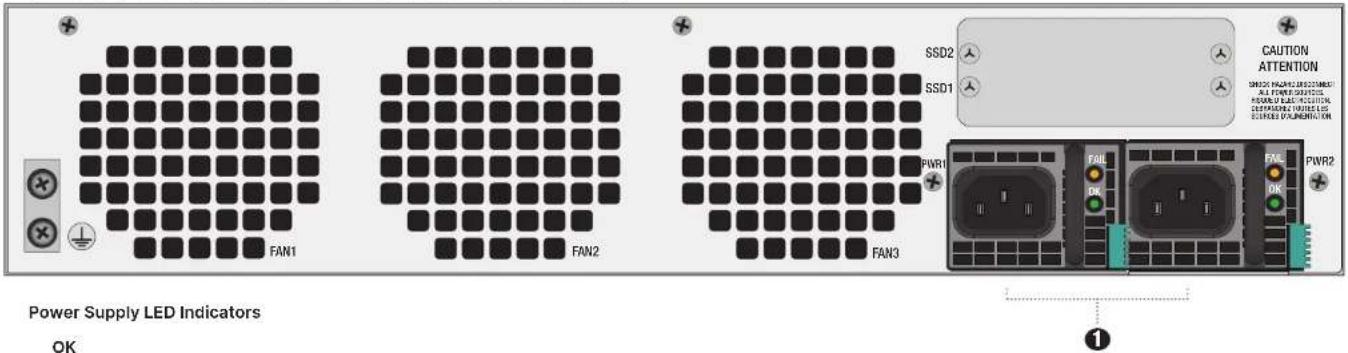
Green: Standby rail and main output on
-Flashing Green: Standby rail and main output off
● Off: Error or no AC power input
FAIL
- Amber: Main output or fan error detected
- Flashing Amber: Power supply warning event detected
● Off: No errors or no power
① AC Model Power
100-120Vac, 12A, 50/60Hz or 200-240Vac, 9A, 50/60Hz (x2)
1+1 Redundant, hot-swappable power supplies
FG-3000F Series DC Model Rear Panel
PS LED Indicator: OK
Green: Standby rail and main output on
- Flashing Green: Standby rail and main output off
● Off: Error or no AC power Input
PS LED Indicator: FAIL
● Amber: Main output or fan error detected
● Flashing Amber: Power supply warning event detected
● Off: No errors or no power
1 DC Model Power
-48 to 60V, 15A@-48V
Cautions and Warnings
Environmental specifications
Ambient operating temperature: 0°C to 40°C
Rack Mount Instructions - The following or similar rack-mount instructions are included with the installation instructions: Instructions de montage en rack - Use instructions de montage en rack subvantes ou similées sont incluses avec les instructions d'installation
- Increased Operating Ambient. It installed in a class or multi unit rack assembly. The operating ambient temperature of the rock environment may be greater than room ambient. Therefore, consideration should be given to installing two equipment in an environment compatible with the maximum ambient temperature (Tint) applied by the manufacturer. Temperature ambient is elevated – 8 ft and installed in an rock frame, or units multiples. In the temperature ambient of knee, instrument in the environment, or rock duct être supérieure de la température ambient de a piece. Par conséquent, l est important of installer le instaire dans un environnement respectant la température installée max made (Tint) applés par fabricant.
Mechanical loading - Mounting of the equipment in the neck should be such that a hazardous condition is not achieved due to uneven mechanical loading.
Reliable Fasting. Foliaric sanding or rock-mounted equipment should be maintained. Particular attention should be given to supply connections, other than direct connections to the branch circuit (e.g. use of power strip).
Battery - Risk or explosion that the battery is replaced by an incurred lysis. Do not dispose of batteries in the fire. They may escape. Dispose of used batteries according to your local regulations. (IMPORTANT: Switzerland. Annar 4.10 de SPB 14.013 applies to batteries.
Grounding — I prevent damage to your equipment, connections may enter from due to the building of roads through a lighting / range protector and be properly grounded. Use an electrostatic discharge workstation (ESD) and/or wear an anti-axial test strap while you work in addition to the grounding terminal of the plug on the book panel; there is another, separate formate for viewing.
Mise a levee: — Pour ever to determine whether material, assurance, or what has beenements quaker into part of the revenues duoument patient pain in satisfaction with care/entirement et cert commement me in care. Use plus a partial medical device to deliver a possible ESD or ESD to ensure that the ESD will be used as a good source of health care services. Our product persists one bone can make it a time que you plan to make du produit, and it's quite able to make it a bit of the space.
Warning. Case I Equipment. This equipment must be earned. The power plug must be connected to a property wired earth ground socket, punct. An approximately 4000 seconds punct sound pressure hazardous voltage on accessible metal parts.
Federal Communication Commission (FCC) - USA
This device consists with Part 1 or FOG Rules. Operation is subject to the following two conditions: (1) this operation may not cause harmful interference, and (2) this operation must accept any performance reception; including maintenance that may cause under and operation
This equipment has been tested and found to comply with the limits or a Class A digital device, pursuant to Plan 15 of the FCC Rules. These limits are designed to provide reasonable protection against harmful interference which the equipment is operated in a commercial environment. This equipment generates, uses, and can extend radio frequency energy, and it is not installed and used in accordance with the instruction manual. It may cause harmful interference to radio communications. Operation of this equipment in a residential area is likely to cause harmful interference. In which case the user will be required to correct the interference at his own experience.
WARNING: Any changes or modifications to this product not expressly approved by the party responsible for compliance could void the user's authority to operate the equipment.
Industry Canada Equipment Standard for Digital Equipment (ICES) - Canada
CANICES-008 (A) / NME-006 (A)
This is a Class A product. In a domestic environment, the product may cause radio interference, in which case the user may be required to live adequate measures.
Voluntary Control Council for Interference (VCCI) - Japan
Bureau of Standards Metrology and Inspection (BSMI) - Taiwan
The presence conditions of the restricted substance (HSM-Fol-G table) are available at the link below. 使用当前含有铅离子(SnF Table-1)程式以下,用如下表。http://www.polar.com/legi