ManualGo.com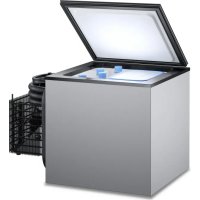
CoolMatic CB 36W - Fridge DOMETIC - Free user manual and instructions
Find the device manual for free CoolMatic CB 36W DOMETIC in PDF.



Download the instructions for your Fridge in PDF format for free! Find your manual CoolMatic CB 36W - DOMETIC and take your electronic device back in hand. On this page are published all the documents necessary for the use of your device. CoolMatic CB 36W by DOMETIC.
USER MANUAL CoolMatic CB 36W DOMETIC
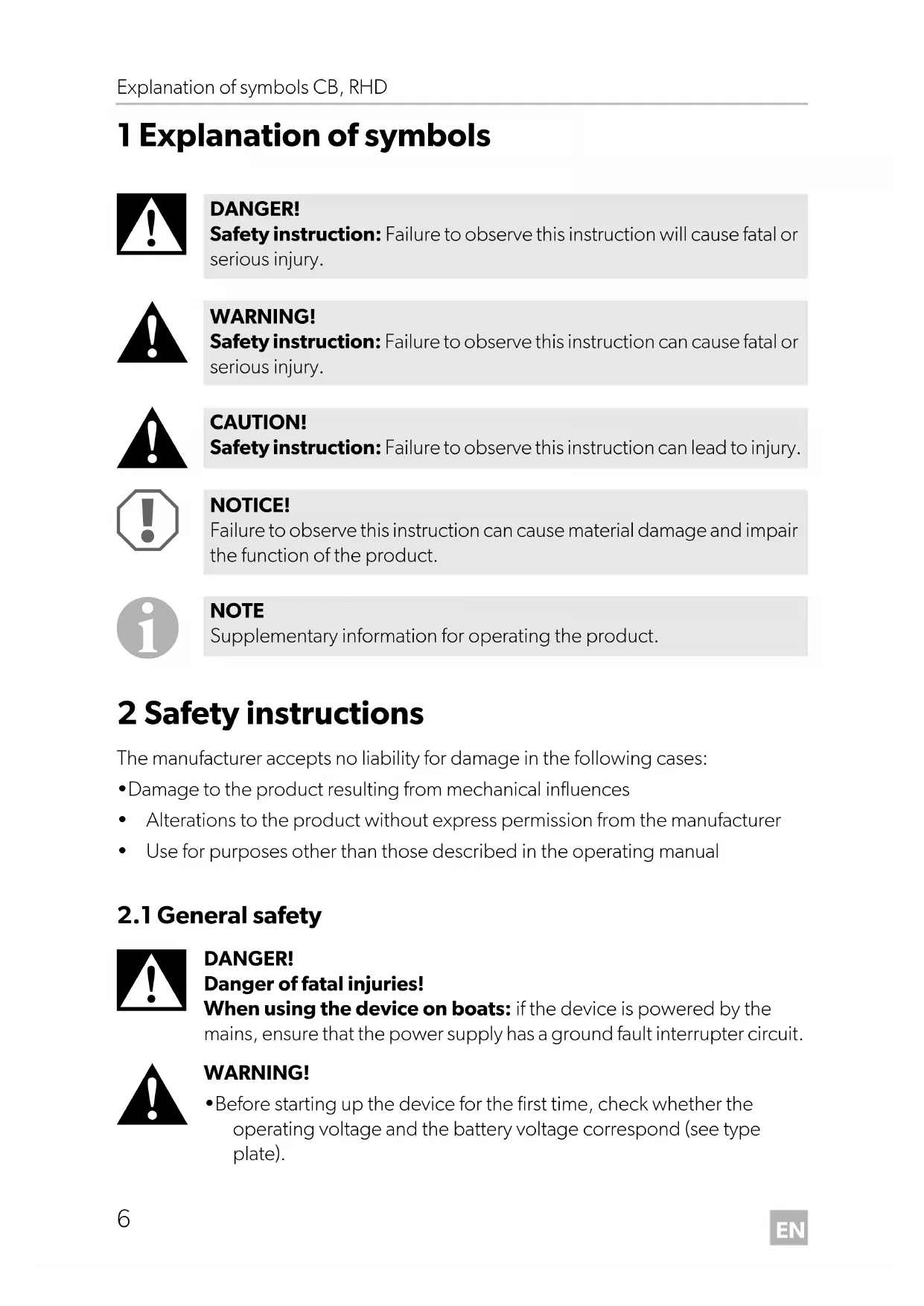
1 Explanation of symbols
2 Safety instructions The manufacturer accepts no liability for damage in the following cases:
- Damage to the product resulting from mechanical influences
- Alterations to the product without express permission from the manufacturer
- Use for purposes other than those described in the operating manual
DANGER! Danger of fatal injuries! When using the device on boats: if the device is powered by the mains, ensure that the power supply has a ground fault interrupter circuit.
- Before starting up the device for the first time, check whether the operating voltage and the battery voltage correspond (see type plate). DANGER! Safety instruction: Failure to observe this instruction will cause fatal or serious injury. WARNING! Safety instruction: Failure to observe this instruction can cause fatal or serious injury. CAUTION! Safety instruction: Failure to observe this instruction can lead to injury. NOTICE! Failure to observe this instruction can cause material damage and impair the function of the product. NOTE Supplementary information for operating the product. RHD-CB--O-West.book Seite 6 Mittwoch, 14. Juni 2017 3:39 15EN CB, RHD Safety instructions
- If the connection cable is damaged, it must be replaced with the cable of the same type and specifications.
- Have a trained technician make installations in wet rooms.
- This device may only be repaired by qualified personnel. Inadequate repairs can lead to considerable hazards. Should your device need to be repaired, please contact customer services.
- Check that the voltage specification on the type plate corresponds to that of the energy supply.
- Do not open the refrigerant circuit under any circumstances.
- Set up the device in a dry location where it is protected against splashing water.
- Do not place the device near naked flames or other heat sources (heaters, direct sunlight, gas ovens etc.).
- If you connect your cooling device to a battery, please remember that the battery contains acid.
- Make sure that the compressor is sufficiently ventilated.
- The cooling device is not suitable for transporting caustic materials or materials containing solvents.
- People (including children) whose physical, sensory or mental capacities or whose lack of experience or knowledge prevent them from using this product safely should not use it without the supervision or instruction of a responsible person.
- Electronic devices are not toys. Always keep and use the device out of the reach of children.
- Food may only be stored in its original packaging or in suitable containers.
- Do not store any explosive substances, such as spray cans with propellants in the device. RHD-CB--O-West.book Seite 7 Mittwoch, 14. Juni 2017 3:39 15EN Intended use CB, RHD
2.2 Operating the device safely
DANGER! Danger of fatal injuries! Do not touch exposed cables with your bare hands. This especially applies when operating the device with an AC mains power supply.
- Do not place any electrical devices inside the cooling device.
- Defrost the device in good time to save energy.
- If you connect the device to a battery, make sure that food does not come into contact with the battery acid.
- Protect the device against rain and moisture.
NOTICE! Disconnect the cooling device and other power consuming devices from the battery before connecting the battery to a quick charging device. Overvoltage can damage the electronics of the device.
NOTE Disconnect the device if you are not going to use it for a long time. 3 Intended use The cooling device is suitable for cooling and freezing (only CB36 and CB40) foodstuffs. The device is also suitable for use on boats.
CAUTION! Health hazard! Please check if the cooling capacity of the device is suitable for storing the food or medicine you wish to cool. RHD-CB--O-West.book Seite 8 Mittwoch, 14. Juni 2017 3:39 15EN CB, RHD Scope of delivery
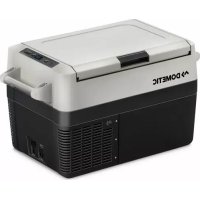
4Scope of delivery 5Accessory If you wish to operate the cooling device with a 230 V AC mains supply, please use one of the following rectifiers: 6 Technical description CoolMatic CB36, CB40 and RHD50 cooling devices are suitable for use with a 12 V or 24 V DC voltage and can therefore also be used for camping or on boats. You can also use the EPS-100W and MPS-35 rectifiers to connect them to a 230 V mains supply. The cooling device can chill products and keep them cool. CoolMatic CB36 and CB40 devices can also be used to freeze products. All materials used in the cooling device are compatible for use with foodstuffs. The refrigerant circuit is maintenance-free. You can use the continuously variable thermostat in the interior of the device to set the desired temperature. The cooling device has a undervoltage protection mechanism. To protect the battery, the cooling device switches off automatically if the voltage is insufficient. When the voltage is sufficient again, it switches on again. When used on boats the cooling device can be subjected to a constant inclination of 30°. CoolMatic CB36 and CB40 devices are equipped with a removable cooling unit that can be mounted separately. Quantity Description 1 Cooling device 1 Operating manual Description Ref. no. EPS-100W, rectifier (230 V: 24 V) 9600000440 MPS-35, rectifier (110 – 240 V: 24 V) 9600000445 RHD-CB--O-West.book Seite 9 Mittwoch, 14. Juni 2017 3:39 15EN Installing and connecting the cooling device CB, RHD
7 Installing and connecting the cooling device
7.1 Installing the cooling device
The device is designed for ambient temperatures between 16 °C and 32 °C. In continuous operation, the air humidity may not exceed 90 %. Install the cooling device in a dry, sheltered place (installation dimensions: fig. 1 to fig. 3, page 3). Avoid installing the devices next to heat sources such as heaters, gas ovens, hot water pipes, etc. The cooling device must be installed so that heated air from the cooling unit can dissipate easily. Therefore make sure there is adequate ventilation. On the CoolMatic CB36, CB40 and RHD50 devices, the cooling unit is removable and can be mounted at a distance of up to 1.5 m (CB36, CB40, RHD50) away from the cooler if space is limited.
7.2 Adapting the decor (only CB36, CB40)
The lids of the devices can be adapted to match the decor of the surroundings.
7.3 Connecting the cooling device
Connecting to a battery The cooling device can be operated with a 12 V to 24 V DC voltage supply.
NOTICE! To avoid voltage loss and therefore a drop in performance, the cable should be kept as short as possible and should not be interrupted if this is possible. For this reason avoid additional switches, plugs or power strips. RHD-CB--O-West.book Seite 10 Mittwoch, 14. Juni 2017 3:39 15EN CB, RHD Installing and connecting the cooling device
➤ Determine the required cross section of the cable in relation to the cable length according to fig. 4, page 4. Key for fig. 4, page 4
➤ Connect the red lead to the positive terminal. ➤ Connect the black lead to earth. ➤ Before starting up the device for the first time, check whether the operating volt- age and the battery voltage correspond (see type plate). ➤ Connect the cooling device – As directly as possible to the pole of the battery or – To a plug socket which is fused with at least 15 A (at 12 V) or 7.5 A (at 24 V).
The cooling device is equipped with an electronic device to protect against reversing the polarity and short circuits when connecting to a battery. To protect the battery, the cooling device switches off automatically if the voltage is insufficient (see table below). Co-ordinate axis Meaning Unit l Cable length m Cable cross section mm² NOTICE! Make sure that the polarity is correct. NOTICE! Disconnect the cooling device and other power consuming devices from the battery before connecting the battery to a quick charging device. Overvoltage can damage the electronics of the device. 12 V 24 V Switch-off voltage
Connecting to 230 V mains supply
- Choose a well ventilated installation location which is protected against direct sunlight.
- Allow food to cool down first before placing it in the device.
- Do not open the cooling device more often than necessary.
- Do not leave the door or lid open for longer than necessary.
- Defrost the cooling device as soon as a layer of ice forms.
- Avoid unnecessarily low temperatures.
- Clean the condenser of dust impurities at regular intervals.
- Clean the lid seal regularly. DANGER! Danger of fatal injuries!
- Never handle plugs and switches with wet hands or if you are standing in a puddle.
- If you are operating your cooling device on board a boat with a mains connection of 230 V from the land, you must install a ground protection circuit breaker between the 230 V mains supply and the cooling device. Seek advice from a trained technician. NOTE Before starting your new cooling device for the first time, you should clean it inside and outside with a damp cloth for hygienic reasons (please also refer to the chapter “Cleaning and maintenance” on page 15). RHD-CB--O-West.book Seite 12 Mittwoch, 14. Juni 2017 3:39 15EN CB, RHD Operation
8.2 Using the cooling device
The cooling device conserves fresh foodstuffs. You can conserve frozen foodstuffs and freeze fresh foodstuffs in the CoolMatic CB36 and CB40 devices.
➤ Switch the cooling device on by turning the knob to the right.
Lock RHD50 To open the cooling device, pull the clip (fig. 5 1, page 4) and open the door. To lock the cooling device, close the door and press it until the lock engages. CB36/CB40 The lid rests on top and is not locked. Setting the temperature You can set the temperature to any level using the knob. The built-in temperature control regulates the temperature as follows:
- Min. (left limit) = warmest setting
- Max. (right limit) = coldest setting
NOTICE! Ensure that food or liquids in glass containers are not excessively refrigerated. Liquids expand when they freeze and can thus destroy the glass containers. NOTE After switching on, the cooling device requires approx. 60 s until the compressor starts up. NOTICE! Ensure that the objects placed in the cooling device are suitable for cooling to the selected temperature. NOTE The cooling capacity can be influenced by
- the ambient temperature,
- the amount of food to be conserved,
- the frequency with which the door/lid is opened. RHD-CB--O-West.book Seite 13 Mittwoch, 14. Juni 2017 3:39 15EN Operation CB, RHD
Conserving foodstuffs You can conserve foodstuffs in the cooling device compartment. The time for which the food can be conserved in this way is usually stated on the package.
The cooling device compartment is divided in different zones with different temperatures:
- The colder zones are immediately over the base.
- Observe the temperature information and best before date on the food packaging. ➤ Observe the following when using the device:
- Do not re-freeze products which are defrosting or have been defrosted, consume them as soon as possible.
- Wrap food in aluminium foil or cling film and shut in in a suitable box with a lid. This ensures that aromas, the shape and the freshness are better conserved. Defrosting the cooling device (only CB36, CB40) Humidity can form frost in the interior of the cooling device or on the vaporiser. This reduces the cooling capacity. Defrost the device in good time to avoid this.
To defrost the cooling device, proceed as follows: ➤ Take out the contents of the cooling device. ➤ Place them in another cooling device to keep them cool, if necessary. ➤ Set the knob to “0”. ➤ Leave the cover open. NOTICE! Do not conserve warm food in the cooling device compartment. Do not place glass containers with liquid in the freezer compartment. NOTE Food which can easily absorb tastes and odours and liquids and products with a high alcohol content should be conserved in air-tight containers. NOTICE! Never use hard or pointed tools to remove ice or to loosen objects which have frozen in place. RHD-CB--O-West.book Seite 14 Mittwoch, 14. Juni 2017 3:39 15EN CB, RHD Cleaning and maintenance
➤ Wipe off the defrosted water. Switching off and storing the cooling device If you do not intend to use the cooling device for a long time, proceed as follows: ➤ Turn the knob to “0”. ➤ Disconnect the power cable from the battery or pull the DC cable plug out of the rectifier. ➤ Clean the cooling device (see chapter “Cleaning and maintenance” on page 15). ➤ Leave the lid or door open for to avoid unpleasant odours building up. 9 Cleaning and maintenance
➤ Occasionally clean the device interior and exterior with a damp cloth. ➤ Make sure that the air inlet and outlet vents on the device are free of any dust and dirt, so that heat can be released and the device is not damaged. ➤ Make sure that no water drips into the sealing. This can damage the electronics. ➤ Wipe the cooling device dry with a cloth after cleaning. WARNING! Always disconnect the device from the power supply before you clean and service it. NOTICE! Risk of damage
- Never clean the cooler under running water or in dish water.
- Do not use abrasive cleaning agents or hard objects during cleaning as these can damage the cooler. RHD-CB--O-West.book Seite 15 Mittwoch, 14. Juni 2017 3:39 15EN Guarantee CB, RHD
10 Guarantee The statutory warranty period applies. If the product is defective, please contact the manufacturer's branch in your country (see the back of the instruction manual for the addresses) or your retailer. For repair and guarantee processing, please include the following documents when you send in the device:
- A copy of the receipt with purchasing date
- A reason for the claim or description of the fault 11 Disposal
➤ Place the packaging material in the appropriate recycling waste bins wherever possible.
If you wish to finally dispose of the product, ask your local recycling centre or specialist dealer for details about how to do this in accordance with the applicable disposal regulations. CAUTION! When disposing of the device, make sure it is not overheated, as the insulating foam was made with flammable gas. RHD-CB--O-West.book Seite 16 Mittwoch, 14. Juni 2017 3:39 15EN CB, RHD Troubleshooting
12 Troubleshooting Compressor does not run Fault Possible cause Remedy
= 0 V The connection between the battery and the electronics is interrupted Establish a connection Main switch defective (if installed) Replace the main switch Additional supply line fuse has blown (if installed) Replacing the fuse
Battery voltage is too low Charge the battery Start attempt with
OFF Loose cables Poor contact (corrosion) Establish a connection Battery capacity too low Replace the battery Cable cross section too low Replace the cable (fig. 4, page 4) Start attempt with
Ambient temperature too high – Insufficient ventilation Move the cooling device Condenser is dirty Clean the condenser Fan defective (if installed) Replace the fan
Voltage between the positive and negative electronic terminals
Switch-on voltage of the electronics
Interior temperature too low in control setting “1” Cooling capacity drops, interior temperature rises Unusual noises Fault Possible cause Remedy Compressor runs constantly Thermostat sensor has no contact to the vaporiser Secure the sensor Thermostat defective Change the thermostat Short circuit in the thermostat line Compressor runs for a long time A large amount has frozen solid in the device (only CB36, CB40)
Fault Possible cause Remedy Compressor runs for a long time/continuously Vaporiser iced over Defrost the vaporiser Ambient temperature too high – Insufficient ventilation Move the cooling device Condenser is dirty Clean the condenser Fan defective (if installed) Replace the fan Compressor runs infrequently Battery capacity exhausted Charge the battery Fault Possible cause Remedy Loud humming A component of the refrigerant circuit cannot move freely (lies against the wall) Bend the component carefully Foreign body jammed between the cooling device and the wall Remove the foreign body Fan noise (if installed) – RHD-CB--O-West.book Seite 18 Mittwoch, 14. Juni 2017 3:39 15EN CB, RHD Technical data
13 Technical data CoolMatic CB36, CB40 and RHD50 cooling devices all have the following features:
- Connection voltage 12 V DC or 24 V DC
- Relative humidity: maximum 90 %
- Short-term inclination: max. 30° CB36 CB40 Capacity: 36 l 40 l Power consumption: 45 W 45 W Cooling temperature range: +10 °C to –12 °C Coolant quantity: 60 g CO2 equivalent: 0.086 t Global warming potential (GWP):
Climatic class: N Dimensions (WxHxD) in mm (with compressor): fig. 1, page 3 fig. 2, page 3 Weight: 17 kg 19 kg RHD50 Capacity: 50 l Power consumption: 45 W Cooling temperature range: +10 °C to +2 °C Coolant quantity: 35 g CO2 equivalent: 0.05 t Global warming potential (GWP):
Te st /c ert ificates The coolant circuit contains R134a. Contains fluorinated greenhouse gases Hermetically sealed equipment Complies with ErP/EuP directive. RHD-CB--O-West.book Seite 20 Mittwoch, 14. Juni 2017 3:39 15DE CB, RHD