EasyManual
 SP5DS2DSSHH - Fridge Summit - Free user manual and instructions
Find the device manual for free SP5DS2DSSHH Summit in PDF.


User questions about SP5DS2DSSHH Summit
0 question about this device. Answer the ones you know or ask your own.
Ask a new question about this device
Download the instructions for your Fridge in PDF format for free! Find your manual SP5DS2DSSHH - Summit and take your electronic device back in hand. On this page are published all the documents necessary for the use of your device. SP5DS2DSSHH by Summit.
USER MANUAL SP5DS2DSSHH Summit
7. This appliance is designed for built-in use only into an enclosed
SAVE THESE INSTRUCTIONS
DANGER Important Safeguards When using this appliance, always exercise basic safety precautions, including the following:
1. Read all of the instructions before using this appliance.
2. Use this appliance only for its intended purpose as described in this use and
3. This refrigerator must be properly installed in accordance with the
installation instructions before it is used. See grounding instructions in the installation section.
4. Never unplug your refrigerator by pulling on the power cord. Always
grasp the plug firmly and pull straight out from the outlet.
5. Unplug your refrigerator before cleaning or before making any repairs.
Note: If for any reason this product requires service, we strongly recommend that a certified technician performs the service.
6. Repair or replace immediately, all electric power cords that have become
frayed or otherwise damaged. Do not use a cord that shows cracks or abrasion damage along its length, the plug or the connector end. 8. If your old refrigerator is not being used, we recommend that you remove the door and leave the shelves in place. This will reduce the possibility of danger to children.
9. Do not operate your refrigerator in the presence of explosive fumes.
10. Cabinet edges along stamp/cut-out areas may be sharp. Please avoid
placing hands, fingers or other appendages near these areas.
11. This appliance is not intended for use by young children or infirm
persons without supervision. Young children should be supervised to ensure they do not play with the appliance. 12. CAUTION: DO NOT USE EXTENSION CORDS. Risk of child entrapment. Before you throw away your old appliance, take off the doors. Leave the shelves in place so that children may not easily climb inside.2
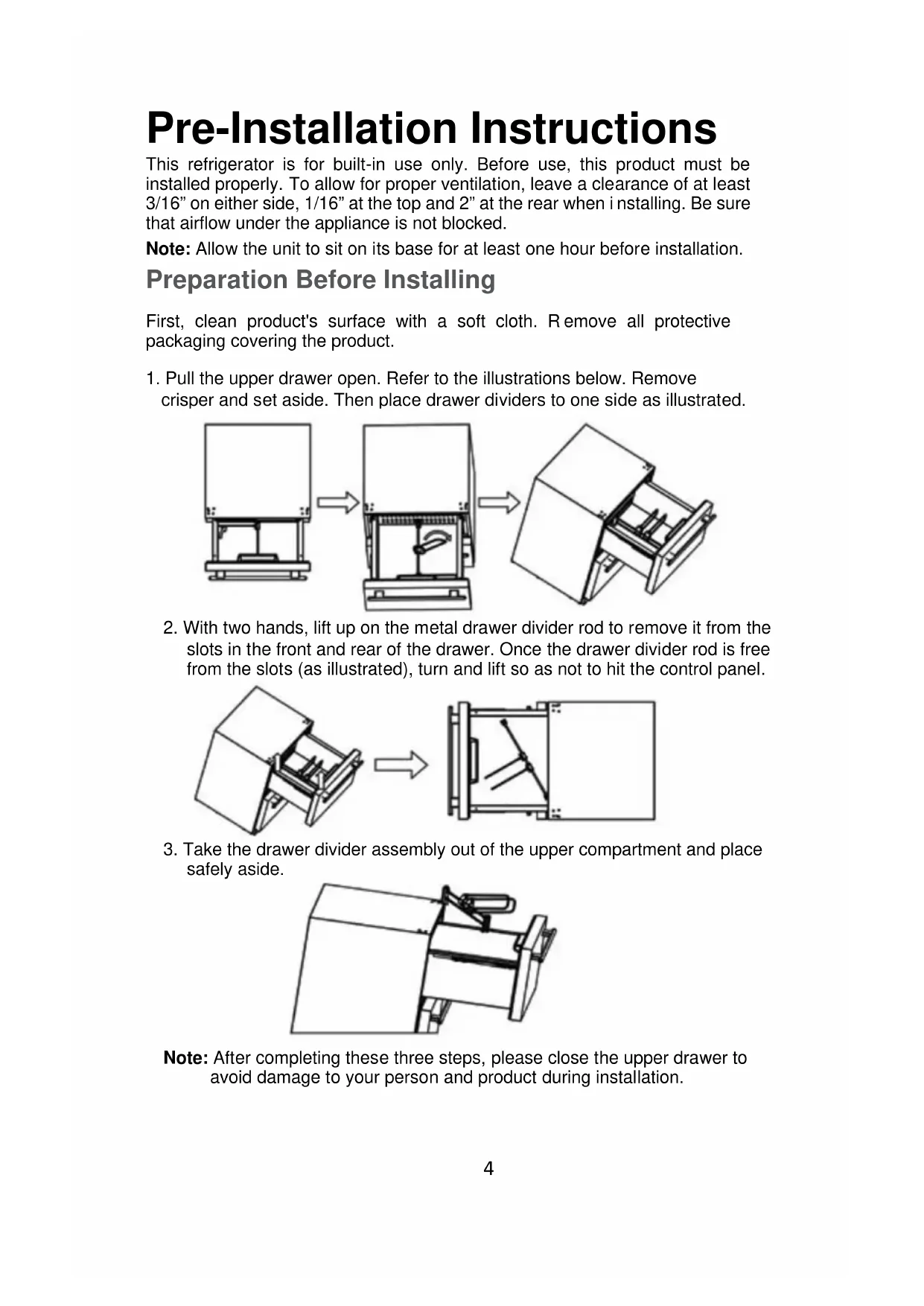
Parts And Overall Dimensions4 Pre-Installation Instructions This refrigerator is for built-in use only. Before use, this product must be installed properly. To allow for proper ventilation, leave a clearance of at least 3/16” on either side, 1/16” at the top and 2” at the rear when i nstalling. Be sure that airflow under the appliance is not blocked. Note: Allow the unit to sit on its base for at least one hour before installation. Preparation Before Installing First, clean product's surface with a soft cloth. R emove all protective packaging covering the product.
1. Pull the upper drawer open. Refer to the illustrations below. Remove
crisper and set aside. Then place drawer dividers to one side as illustrated.
2. With two hands, lift up on the metal drawer divider rod to remove it from the
slots in the front and rear of the drawer. Once the drawer divider rod is free from the slots (as illustrated), turn and lift so as not to hit the control panel.
3. Take the drawer divider assembly out of the upper compartment and place
safely aside. Note: After completing these three steps, please close the upper drawer to avoid damage to your person and product during installation.5
1. Take off hinge cover(Part #1, page 3) with an upward motion. Refer to
2. Take the anti-tip bracket and screws from the accessory bag. Tighten
the anti-tip bracket on the top of the product with screws as follows in
the illustration. Note: Follow instructions properly or you may do damage to the product.
so as not to damage accidently the cabinetry or flooring. Then perform the same adjustments to the front leveling legs to bring the front of unit to the proper level to install the anti-tip bracket and fit evenly under the counter.
Another set of anti-tip brackets for side installation is provided as option when the counter top is granite and hard to fix by screws. This set of brackets includes two anti-tip brackets and eight screws for installation on left side and right side of the cabinet. The illustration below shows this. T
drawer needs to be open to perform this procedure.
necessary for a proper fit in the cabinet opening. Start with the rear legs (if necessary) before you slide the unit fully into the opening - raise or lower the rear legs to make the unit fit properly. Then carefully slide the unit into opening6 Interior Parts Crisper One crisper with cover is located in the upper drawer. Purpose
Convenient storage of fresh vegetables. The user can remove the crisper if it is not needed. Adjustable Divider There is an adjustable divider in each drawer. These can be adjusted for flexibility in food storage. Dividers can be removed if not needed. Note: If dividers are removed, keep them in a safe place away from children. The drawers are designed to hold up to 44.1 lbs/20kg of food items. You can separate a compartment into various configurations, as shown.
The upper compartment is separated by a divider fastened to the bin cradle of the upper compartment. Those two dividers can be adjusted left and right, also back and front. For left and right adjust: rotate directly. For back and front: you should press the “PUSH” button (see illustration) in middle connector and move it back to front. If you want to clean your refrigerator, you can remove the shelf foll owing steps located in section Preparation Before installation.7 Purpose: User can separate the upper compartment with divider according to personal needs. This feature also keeps foods from falling down or spilling when the drawers are opened or closed. Adjust the divider in the lower compartment by referring to illustration:
The divider in the lower compartment is fixed between the embossments of the front and back walls of the drawer. You can choose different embossments to divide into different spaces in the drawer. Purpose: Separate the lower compartment with divider according to personal needs.8 Drawers Upper Drawer Can hold any item under 12 inches tall. Lower Drawer Lower drawer is separated by a step. Foods or beverages whose height is less than 12 inches can be kept in the space without the step. Smaller items can be placed on the step. How to use this product Important Notes Before You Connect the Power Supply Actual power supply should be kept in accordance with marks on rating plate (115V/60HZ). Rating plate is on back of unit. Power socket should be equipped with a 10A fuse. Allow the unit to sit on its base for at least one hour before installation. CAUTION: DO NOT USE AN EXTENSION CORD. Connect the power supply Unit is tested and set to operate at 38ºF before leaving the factory. When connected with the power supply, unit will work properly. Interior LED bulbs An LED bulb is located on top of the interior liner in both the upper and lower compartments. It is controlled by the opening and closing of the drawer : when the drawer is open, the light is on; when drawer is closed, light is off. Caution: There are magnets that are affixed to the left side of the interior upper drawer and to the bottom of the lower drawer door. Don’t re move them as they are required for proper functioning of the light system. Temperature setting
If you want to change the set temperature, press “SET” for three seconds. The unit will beep, the temperature will flash on the control panel, then you can adjust the figure using the ‘ ’ and buttons.
When the desired temperature appears on the display, press the “SET” button again to confirm your setting. The user will hear a beep and the temperature will no longer flash. If you want to lower the temperature, press the ‘ ’ button. If you want to raise the temperature, press the button. Temperature range is : 34-45ºF (1-7ºC)
Control panel9 Centigrade and Fahrenheit Conversion Press and hold “SELECT” for 3 seconds. The temperature display will change from Fahrenheit to Centigrade and the unit will beep once. Press and hold “SELECT” again for 3 seconds, and the display will change from Centigrade back to Fahrenheit. Again, the unit will respond with a beep. Power switch The control panel has a P ower button. If you want to stop unit from working for a short time or to restart, press and hold “POWER” for 3 seconds to turn on and off. Note: If you want to stop the unit from working for an extended period of time, shut off the unit, unplug it, remove food, clean the refrigerator and leave the drawers slightly open to prevent odors. Sabbath mode Press and hold ‘ and ‘ ’ at the same time for 3 seconds. The unit will beep once and the display panel will flash 5 times and stop. This indicates that the unit has entered Sabbath mode. In this mode, normal cooling operations still take place
(compressor, magnetic valve, fan, heater strip), but all luminous equipment including display panel and LED bulbs will shut off, no matter if the door is open ing or closing. To exit the Sabbath mode, press and hold and ‘ ’ at the same time for 3 seconds. The display panel will flash 5 times to indicate that the Sabbath model has been disabled. Note: This mode is available for the observance of certain religious holidays.10
Door Ajar Alarm If the door of unit is ajar for more than 3 minutes, the system will give a beeping alarm. If you want to stop it, please press “SET” button. Auto Defrost: The unit defrosts automatically. The water on the back wall will drain into
water tray and be evaporated by the compressor. Cleaning Before cleaning, turn the unit off and disconnect it. Clean interior and exterior surfaces, as well as accessories, with a solution of cold water and a little baking soda. To avoid damaging the product, don’t clean with steam. Don’t use abrasive, acidic or harsh chemical cleansers. Keep cleaning liquids away from electrical equipment. Clean and dry all accessories. Clean the drain hole which is between compartments of the unit with a small piece of soft material such as a cotton swab. (The drain hole is located behind the lower drawer. Please refer to the Drawer Removal section for these instructions.) Drawer Removal
1. Pull out the lower drawer and, turning a screwdriver in a counter-clockwise
direction, disengage the two screws that fix the lower drawer to the slides
2. Remove the lower drawer.
3. Clean the drain hole illustrated below with a soft material such as a cotton
swab, then reinstall the lower drawer by reversing the procedure described
Troubleshooting If Refrigerator does not operate: Check if refrigerator is plugged in. Check the circuit breaker to see if there is power in the AC outlet. If Refrigerator is too warm: Frequent drawe r openings. Allow time for recently added food items to reach the desired temperature. Check gaskets for proper seal. Clean condenser coils. Adjust temperature control to colder setting. If Refrigerator runs too frequently: This may be normal to maintain constant temperature during days of high temperature and humidity. Drawers may have been opened frequently or left open for an extended period of time.
Clean condenser coils. Check gaskets for proper seal. Check to see if drawe
are completely closed. If Moisture builds up on interior or exterior surfaces of the refrigerator: This is normal during high humidity periods. Prolonged or frequent door openings. Check gaskets for proper seal. If Refrigerator drawer does not shut properly: Level the refrigerator. Check for blockages, e.g., beverage bottles, food spills
Summit Limited Warranty Summit Appliances warrants this product to be free from defects in materials and workmanship for a period of one year from the date of original purchase or delivery with an additional 5 years parts only on the compressor. Any parts determined to be defective will be replaced by SUMMIT at no charge to you. Plastic parts, liners and outer cabinets are warranted to be manufactured to commercially acceptable standards and free from defects at the time of delivery. This limited warranty does not apply to:
1. Improper installation
negligence or damage
4. Products with the serial number
5. Products sold or used outside
the fifty United States or the District of Columbia
7. Damage to this product from
accidents, alterations, failure to follow instructions, fire, floods, earthquakes, war, civil disturbance or Acts of God. Tel.: (718) 893-3900 www.summitappliance.com SUMMIT is not liable for consequential or incidental damage. SUMMIT APPLIANCE DIV. FELIX STORCH, INC. 770 GARRISON AVENUE BRONX, NY 10474