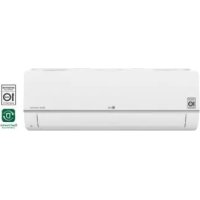
S18ET - Air-conditioner LG - Free user manual and instructions
Find the device manual for free S18ET LG in PDF.



| Brand | LG |
| Model | S18ET |
| Product type | Wall-mounted air conditioner (wall installation) |
| Power supply | 220–240 V, 50 Hz |
| Refrigerant | R32 (flammable) |
| Operating modes | Cooling, Heating, Dehumidification, Fan, Auto (AI) |
| Jet function | Rapid cooling or heating for 30 minutes |
| Fan speed | 5 speeds + Natural |
| Airflow direction | Vertical and horizontal (depending on model) |
| Timer | Programmable on/off, Sleep, Simple timer |
| Special functions | Ion generator, Quiet, Auto cleaning |
| Energy control | 3 steps: 80%, 60%, 40% power |
| Energy display | Instantaneous consumption in kW (optional) |
| Connectivity | Wi-Fi (2.4 GHz) via LG ThinQ app |
| Smart diagnosis | Via app or audible signal |
| Filters | Air filter (washable every 2 weeks), Anti-allergen filter (optional, every 6 months) |
| Maintenance | Regular filter cleaning; annual professional maintenance for coils and electrical components |
| Safety | Automatic shutdown on fault, automatic restart, surge protection |
| Repairability | Spare parts available via LG authorized network; professional intervention mandatory for refrigeration circuit |
Frequently Asked Questions - S18ET LG
- Cooling: cools the room.
- Heating: heats (depending on model).
- Dehumidification: reduces humidity without excessive cooling.
- Fan: circulates air without changing temperature.
- Auto (AI): automatically adjusts the mode to maintain the set temperature.
For Multi models, the Auto (AI) mode automatically manages the system.
User questions about S18ET LG
0 question about this device. Answer the ones you know or ask your own.
Ask a new question about this device
Download the instructions for your Air-conditioner in PDF format for free! Find your manual S18ET - LG and take your electronic device back in hand. On this page are published all the documents necessary for the use of your device. S18ET by LG.
USER MANUAL S18ET LG
Read this owner's manual thoroughly before operating the appliance and keep it handy for reference at all times.
TYPE: WALL MOUNTED
Original instruction
EN ENGLISH
FR FRANÇAIS
EL EΛΛΗΝΙΚΑ
NL NEDERLANDS
PL POLSKI
HU MAGYAR
BG БЪЛГАРСКИ
HR HRVATSKI
CZ ČEŠTINA
ET EESTI
MT MALTI
RO ROMÂNĂ
SK SLOVENČINA
SL SLOVENŠČINA
LV LATVIEŠU
LT LIETUVIŲ
GA GAEILGE
SR SRPSKI
МК МАКЕДОНСКИ
SQ SHQIP
BS BOSANSKI

MFL69780808
Rev.09_092024
TABLE OF CONTENTS
This manual may contain images or content different from the model you purchased.
This manual is subject to revision by the manufacturer.
SAFETY INSTRUCTIONS .... 3
IMPORTANT SAFETY INSTRUCTIONS....4
OPERATION 11
Notes for Operation 11
Parts and Functions.... 11
Wireless Remote Control....12
Restarting the Air Conditioner Automatically 17
Using the Mode Function....17
Using the Jet Mode Function....20
Using the Fan Speed Function....21
Using the Air Flow Direction Function....21
Setting the On/Off Timer....22
Using the Sleep Function (Optional)....23
Using the Simple Timer Function (Optional)....23
Using the Energy Display Function (Optional)....24
Using the Light Off Function (Optional) 24
Using the Comfort Air Function (Optional)....24
Using the Energy Control Function (Optional)....25
Using Special Functions....25
SMART FUNCTIONS....27
LG ThinQ Application....27
Smart Diagnosis 29
MAINTENANCE....30
Clean the Air Filter 32
Clean the Allergy Filter (Optional)....33
TROUBLESHOOTING 34
The following safety guidelines are intended to prevent unforeseen risks or damage from unsafe or incorrect operation of the appliance.
The guidelines are separated into ‘WARNING’ and ‘CAUTION’ as described below.

This symbol is displayed to indicate matters and operations that can cause risk. Read the part with this symbol carefully and follow the instructions in order to avoid risk.

WARNING
This indicates that the failure to follow the instructions can cause serious injury or death.

CAUTION
This indicates that the failure to follow the instructions can cause the minor injury or damage to the product.
The following symbols are displayed on indoor and outdoor units. (for R32)

This symbol indicates that this appliance uses a flammable refrigerant. If the refrigerant is leaked and exposure to an external ignition source, there is a risk of fire.

This symbol indicates that the Operation Manual should be read carefully.

This symbol indicates that a service personnel should be handling this equipment with reference to the Installation Manual.

This symbol indicates that information is available such as the Operating Manual or Installation Manual.
IMPORTANT SAFETY INSTRUCTIONS

WARNING
To reduce the risk of explosion, fire, death, electric shock, injury or scalding to persons when using this product, follow basic precautions, including the following:
Children in the Household
This appliance is not intended for use by persons (including children) with reduced physical, sensory or mental capabilities, or lack of experience and knowledge, unless they have been given supervision or instruction concerning use of the appliance by a person responsible for their safety. Children should be supervised to ensure that they do not play with the appliance.
For use in Europe:
This appliance can be used by children aged from 8 years and above and persons with reduced physical, sensory or mental capabilities or lack of experience and knowledge if they have been given supervision or instruction concerning use of the appliance in a safe way and understand the hazards involved. Children shall not play with the appliance. Cleaning and user maintenance shall not be made by children without supervision.
Installation
- Do not install the air conditioner on an unstable surface or in a place where there is danger of it falling.
- Contact an authorized service center when installing or relocating the air conditioner.
-
Install the panel and the cover of the control box safely.
-
Do not install the air conditioner in a place where flammable liquids or gases such as gasoline, propane, paint thinner, etc., are stored.
- Make sure that the pipe and the power cable connecting the indoor and outdoor units are not pulled too tight when installing the air conditioner.
- Use standard circuit breaker and fuse that conform to the rating of the air conditioner.
- Do not input air or gas into the system except with the specific refrigerant.
- Use non-flammable gas (nitrogen) to check for leak and to purge air; using compressed air or flammable gas may cause fire or explosion.
- The indoor/outdoor wiring connections must be secured tightly, and the cable should be routed properly so that there is no force pulling the cable from the connection terminals. Improper or loose connections can cause heat generation or fire.
- Install dedicated electric outlet and circuit breaker before using the air conditioner.
- Do not connect the ground wire to a gas pipe, a lightning rod, or a telephone ground wire.
- Keep any required ventilation openings clear of obstruction. (for R32)
- Means for disconnection must be incorporated in the fixed wiring in accordance with the wiring rules.
- Do not install the unit in potentially explosive atmospheres.
Operation
- Be sure to use only those parts listed in the service parts list. Never attempt to modify the equipment.
- Make sure that children do not climb on or hit the outdoor unit.
- Dispose of the batteries in a place where there is no danger of fire.
-
Use only the refrigerant specified on the air conditioner label.
-
Cut off the power supply if there is any noise, smell, or smoke coming from the air conditioner.
- Do not leave flammable substances such as gasoline, benzene, or thinner near the air conditioner.
- Contact an authorized service center when the air conditioner is submerged by flood waters.
- Do not use the air conditioner for an extended period of time in a small place without proper ventilation.
- In the event of a gas leak (such as Freon, propane gas, LP gas, etc.) ventilate sufficiently before using the air conditioner again.
- Be sure to ventilate sufficiently when the air conditioner and a heating appliance such as a heater are used simultaneously.
- Do not block the inlet or outlet of air flow.
- Do not insert hands or other objects through the air inlet or outlet while the air conditioner is operating.
- Make sure that the power cable is neither dirty, loose, nor broken.
- Never touch, operate, or repair the air conditioner with wet hands.
- Do not place any objects on the power cable.
- Do not place a heater or other heating appliances near the power cable.
- Do not modify or extend the power cable. Scratches or peeling insulation on the power cables may result in fire or electric shock, and should be replaced.
-
Cut off the power supply immediately in the event of a blackout or a thunderstorm.
-
Take care to ensure that power cable could not be pulled out or damaged during operation.
- Do not touch refrigerant pipe, water pipe and any internal parts while the unit is operating or immediately after operation.
Maintenance
- Do not clean the appliance by spraying water directly onto the product.
- Before cleaning or performing maintenance, disconnect the power supply and wait until the fan stops.
Technical Safety
- Installation or repairs made by unauthorized persons can pose hazards to you and others.
- Any person who is involved with working on or breaking into a refrigerant circuit should hold a current valid certificate from an industry-accredited assessment authority, which authorizes their competence to handle refrigerants safely in accordance with an industry recognized assessment specification. (for R32)
- Servicing shall only be performed as recommended by the equipment manufacturer. Maintenance and repair requiring the assistance of other skilled personnel shall be carried out under the supervision of the person competent in the use of flammable refrigerants. (for R32)
- The information contained in the manual is intended for use by a qualified service technician who is familiar with the safety procedures and equipped with the proper tools and test instruments.
-
Failure to read and follow all instructions in this manual can result in equipment malfunction, property damage, personal injury and/or death.
-
The appliance shall be installed in accordance with national wiring regulations.
- When the power cord is to be replaced, the replacement work shall be performed by authorized personnel using only genuine replacement parts.
- This appliance must be properly grounded to minimize risk of electric shock.
- Do not cut or remove the grounding prong from the power plug.
- Attaching the earth wire to the power outlet cover screw does not ground the appliance unless the cover screw is metal, uninsulated, and the power outlet is grounded through house wiring.
- If you have any doubt whether the air conditioner is properly grounded, have the power outlet and circuit checked by a qualified electrician.
- The refrigerant and insulation blowing gas used in the appliance require special disposal procedures. Consult a service agent or a similarly qualified person before disposing of them.
- If the supply cord is damaged, it must be replaced by the manufacturer, its service agent or similarly qualified person in order to avoid a hazard.
- The appliance shall be stored in a well-ventilated area where the room size corresponds to the room area as specified for operation. (for R32)
- The appliance shall be stored in a room without continuously operating open flames (for example an operating gas appliance) and ignition sources (for example an operating electric heater). (for R32)
- The appliance shall be stored so as to prevent mechanical damage from occurring. (for R32)

CAUTION
To reduce the risk of minor injury to persons, malfunction, or damage to the product or property when using this product, follow basic precautions, including the following:
Installation
- Do not install the air conditioner in an area where it is directly exposed to sea wind (salt spray).
- Install the drain hose properly for the smooth drainage of water condensation.
- Exercise caution when unpacking or installing the air conditioner.
- Do not touch the leaking refrigerant during installation or repair.
- Transport the air conditioner with two or more people or use a forklift.
- Install the outdoor unit such that it is protected from direct sunlight. Do not place the indoor unit in a place where it is directly exposed to sunlight via the windows.
- Safely dispose of packing materials such as screws, nails, plastic bag or batteries using proper packaging after installation or repair.
- Install the air conditioner in a place where the noise from the outdoor unit or the exhaust fumes will not inconvenience the neighbors. Failure to do so may result in conflict with the neighbors.
Operation
- Remove the batteries if the remote control is not to be used for an extended period of time.
- Make sure that the filter is installed before operating the air conditioner.
- Be sure to check if there is a refrigerant leak after installing or repairing the air conditioner.
- Do not place any object on the air conditioner.
- Never mix different types of batteries, or old and new batteries for the remote control.
- Do not let the air conditioner run for a long time when humidity is very high or when a door or a window has been left open.
- Stop using the remote control if there is a fluid leak in the battery. If your clothes or skin are exposed to the leaking battery fluid, wash off with clean water.
- Do not expose people, animals, or plants to the cold or hot wind from the air conditioner for extended periods of time.
- If the leaking battery fluid has been swallowed, rinse the inside of the mouth thoroughly and consult a doctor.
- Do not drink the water drained from the air conditioner.
- Do not use the product for special purposes, such as preserving foods, works of art, and etc. It is an air conditioner for consumer purposes, not a precision refrigeration system. There is risk of damage or loss of property.
- Do not recharge or disassemble the batteries.
Maintenance
- Never touch the metal parts of the air conditioner when removing the air filter.
- Use a sturdy stool or ladder when cleaning, maintaining, or repairing the air conditioner at a height.
- Never use strong cleaning agents or solvents when cleaning the air conditioner or spray water. Use a smooth cloth.
- To clean the interior, contact an authorized service center or dealer. Using harsh detergents may cause corrosion or damage to the unit.
Notes for Operation
Suggestion for Energy Saving
- Do not over-cool the space. This may be harmful for your health and may consume more electricity.
- Block sunlight with blinds or curtains while you are operating the air conditioner.
- Keep doors or windows closed tightly while you are operating the air conditioner.
- Adjust the direction of the air flow vertically or horizontally to circulate indoor air.
- Speed up the fan to cool or warm indoor air quickly, within a short period of time.
- Open windows regularly for ventilation. The indoor air quality may deteriorate if the air conditioner is used for long durations.
- Clean the air filter once every 2 weeks. Dust and impurities collected in the air filter may block the air flow or reduce the unit performance.
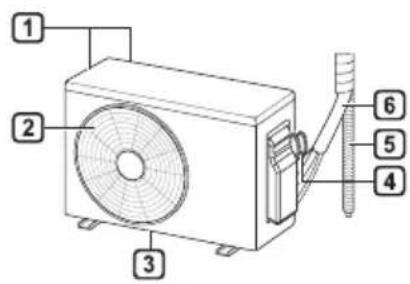
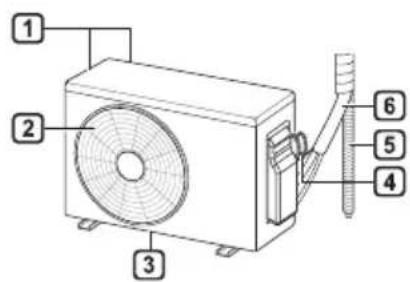
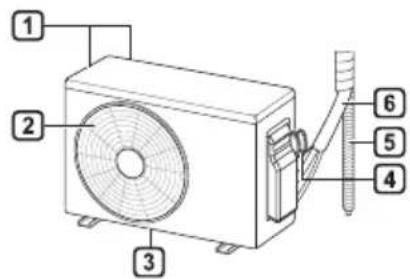
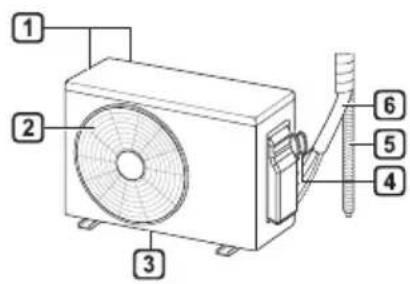
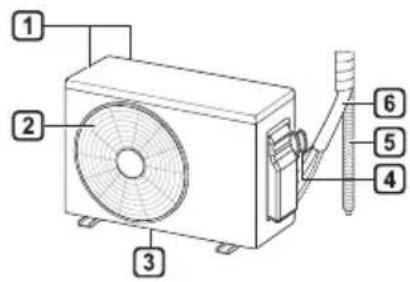
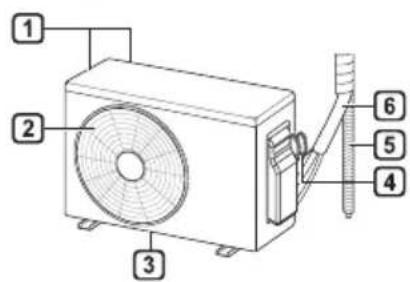
Parts and Functions
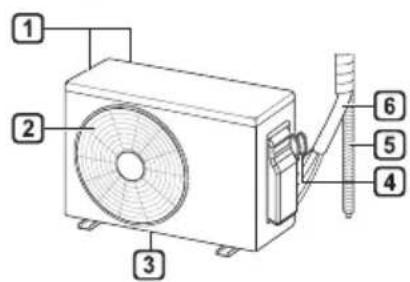
Indoor Unit Outdoor Unit
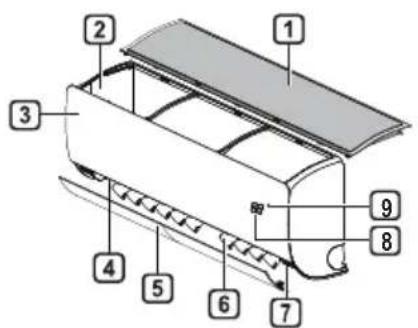
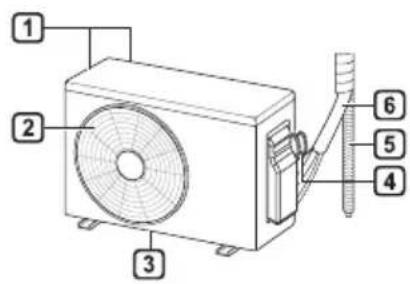
1 Air Filter
2 Air Intake
3 Front Cover
4 Air Outlet
5 Air Deflector (Horizontal Vane)
6 Air Deflector (Vertical Louver)
7 On/Off Button
8 Display
9 Signal Receiver
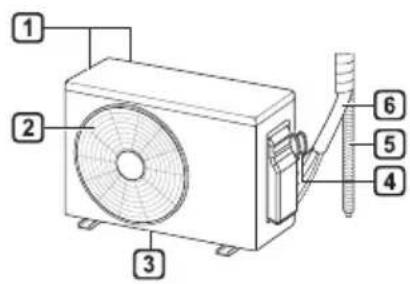
1 Air Intake Vents
2 Air Outlet Vents
3 Base Plate
4 Power Supply Cable
5 Drain Hose
6 Refrigerant Pipes
NOTE
- The number and location of operation lamps may vary according to the model of the air conditioner.
- The feature may be changed according to the type of model.
Wireless Remote Control Inserting Batteries
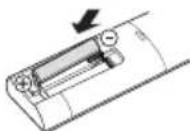
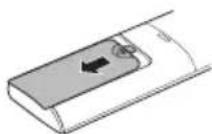
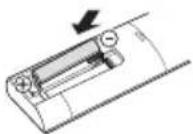
If the display screen of the remote control begins to fade, replace the batteries. Insert AAA (1.5 V) batteries before using the remote control.
1 Remove the battery cover.
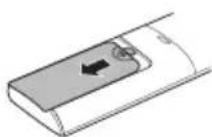
2 Insert the new batteries and make sure that the + and - terminals of the batteries are installed correctly.
Installing the Remote Control Holder (Optional)
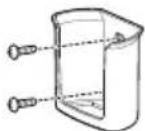
To protect the remote control, install the holder where there is no direct sunlight.
1 Choose a safe and easily accessible location.
2 Fix the holder by fastening 2 screws firmly with a screwdriver.
Operating Method
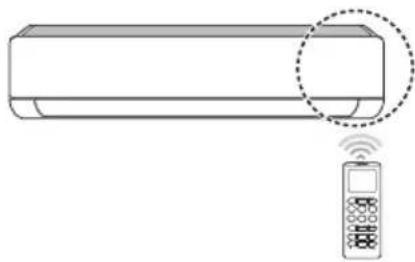
Point the remote control towards the signal receiver at the right side of the air conditioner to operate it.
natural_image
Line drawing of a horizontal air conditioner with a remote control unit emitting signal waves (no text or symbols)NOTE
- The remote control may operate other electronic devices if it is directed towards them. Make sure to point the remote control towards the air conditioner signal receiver.
- For proper operation, use a soft cloth to clean the signal transmitter and receiver.
- In case of a function not provided in the product, no buzzer sound occurs from the product when a button for such function on the remote control is pressed except for Air Flow Direction (SWING), Energy Display (kw[3 s]), Air Purification function (
Setting the Current Time
1 Insert batteries.
- The icon below blinks at the bottom of the display screen.

2 Press or button to select the minutes.
3 Press SET/CANCEL button to finish.
NOTE
- The On/Off Timer is available after setting the current time.
Using the °C/°F Conversion Function (Optional)
This function changes unit between ^ and ^
- Press and hold button about 5 seconds.
Operating the Air Conditioner without the Remote Control
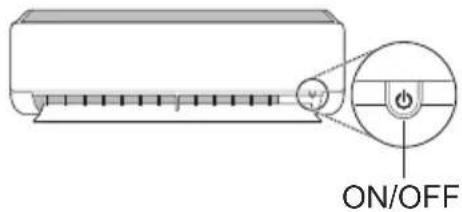
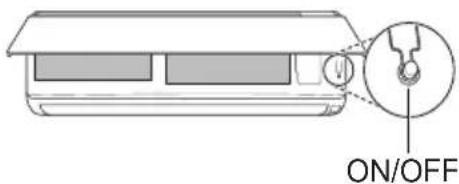
You can use the ON/OFF button of the indoor unit to operate the air conditioner when the remote control is unavailable.
1 Open the front cover (Type2) or horizontal vane (Type1).
2 Press the ON/OFF button.
Type1
Type2
NOTE
- The stepping motor may be broken, if the horizontal vane opens rapidly.
• The fan speed is set to high. - The feature may be changed according to the type of model.
- The temperature cannot be altered when using this emergency ON/OFF button.
- For cooling & heating models, the temperature is set from 22 °C to 24 °C
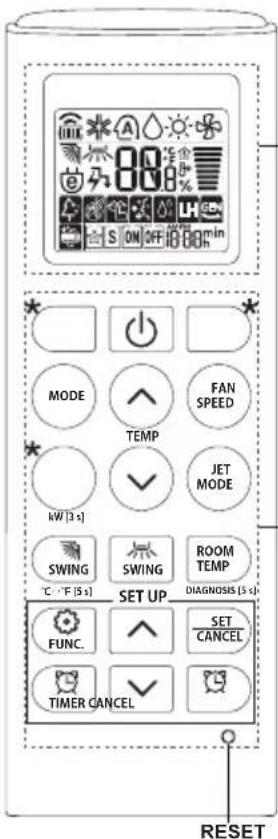
Using Wireless Remote Control
You can operate the air conditioner more conveniently with the remote control.
![2 * MODE FAN SPEED TEMP JET MODE kW [3 s] SWING SWING ROOM TEMP DIAGNOSIS [5 s] SET UP FUNC. SET CANCEL TIMER CANCEL RESET](/content/2026/03/492243/images/771e0c3c3682059e995049e3911dee0cd48c289c2087fdf4ea1b00c052da0f93.jpg)
| 1Button | 2DisplayScreen | Description | Available Function | |
| Single Split | Multi | |||
| - | To turn on/off the air conditioner. | ○ | ○ | |
| 88° | To adjust the desired room temperature in cooling, heating or auto changeover mode. | ○ | ○ | |
| MODE | To select the cooling mode. | ○ | ○ | |
| To select the heating mode. | ○ | ○ | ||
| To select the dehumidification mode. | ○ | ○ | ||
| To select the fan mode. | ○ | ○ | ||
| To select the auto changeover/auto operation mode. | ○ | ○ | ||
| JET MODE | Po | To change room temperature quickly. | ○ | ○ |
| FAN SPEED | To adjust the fan speed. | ○ | ○ | |
| To adjust the air flow direction vertically or horizontally. | ○ | ○ | ||
NOTE
- * buttons may be changed according to the type of model.
- When connected to the Multi Outdoor unit, the Energy Display, Energy Control, Silent and Smart Diagnosis function may not be supported.
![S ON OFF 100% * MODE FAN SPEED TEMP JET MODE KW [3 s] SWING SWING ROOM TEMP °C °F [5 s] SET UP DIAGNOSIS (5 s) FUNC. SET CANCEL TIMER CANCEL RESET](/content/2026/03/492243/images/d31502862a440b66fdca705543dee62e350f4daab8cf057c9b41b2421e54e8b8.jpg)
2
1
| [XY7]Button | [3Y76]DisplayScreen | Description | Available Function | |
| Single Split | Multi | |||
 |   | To turn on/off air conditioner automatically at desired time. | O | O |
| SET/CANCEL | - | To set/cancel the special functions and timer. | O | O |
 | - | To cancel the timer settings. | O | O |
| [2401] | [OK24] | |||
| *LIGHT OFF | - | To set the brightness of the display on the indoor unit. | O | O |
| ROOM TEMP |  | To display the room temperature. | O | O |
| °C←°F[5 s] |  | To change unit between °C and °F | O | O |
| *COMFORT AIR | 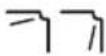 | To adjust the air flow to deflect wind. | O | O |
| kW[3 s] | - | To set whether or not to display information regarding energy. | O | X |
| *ENERGY CTRL. | 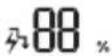 | To bring the effect of the power saving. | O | X |
| DIAGNOSIS[5 s] | - | To conveniently check maintenance information of a product. | O | X |
| 1 Button | 2 Display Screen | Description | Available Function | |
| Single Split | Multi | |||
| 2 FUNC. | The lon generator uses millions of ions to help improve indoor air quality. | O (Optional) | O (Optional) | |
| To reduce noise from outdoor units. | O | X | ||
| To remove moisture generated inside the indoor unit. | O | O | ||
| RESET - | To initialize the remote control settings. | O | O | |
Restarting the Air Conditioner Automatically
When the air conditioner is turned on again after a power failure, this function restores the previous settings.
Disabling Auto Restart
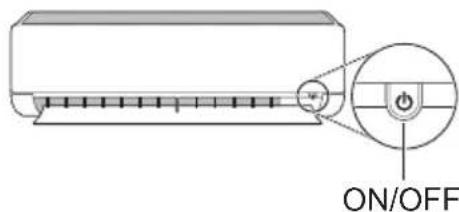
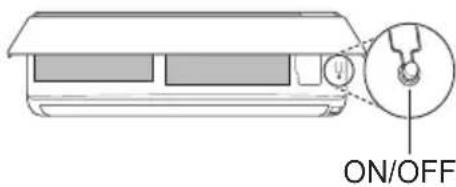
1 Open the front cover (Type2) or horizontal vane (Type1).
2 Press the ON/OFF button and hold it for 6 seconds, then the unit will beep twice and the lamp will blink twice 4 times.
- To re-enable the function, press the ON/OFF button and hold it for 6 seconds. The unit will beep twice and the lamp will blink 4 times.
Type1
Type2
NOTE
- The feature may be changed according to the type of model.
- If you press and hold the ON/OFF button for 3 – 5 seconds, instead of 6 seconds, the unit will switch to the test operation. In the test operation, the unit blows out strong cooling air for 18 minutes and then returns to factory default settings.
Using the Mode Function
This function allows you to select the desired function.
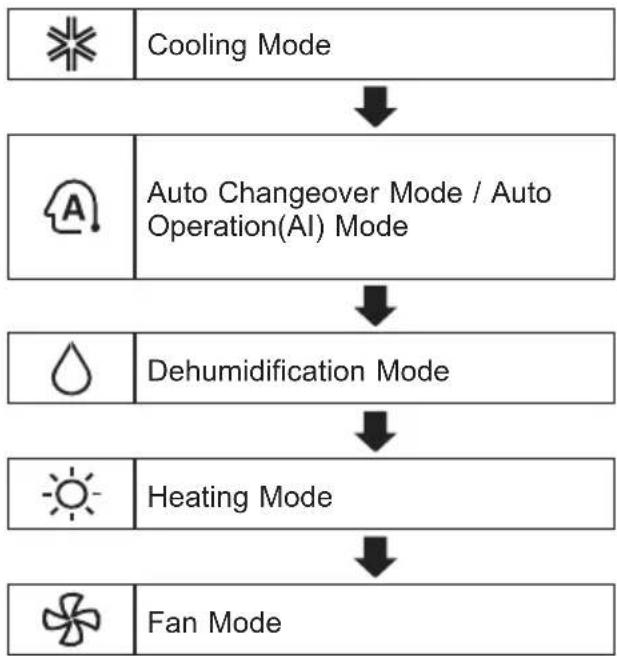
flowchart
graph TD
    A[" Cooling Mode "] --> B[" Auto Changeover Mode / Auto Operation(AI) Mode "]
    B --> C[" Dehumidification Mode "]
    C --> D[" Heating Mode "]
    D --> E[" Fan Mode "]
Cooling Mode
1 Turn the appliance on.
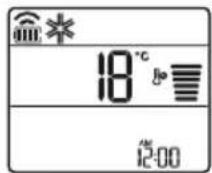
2 Press MODE button repeatedly to select the Cooling Mode.
* is displayed on the display screen.
3 Press or button to set the desired temperature.
Auto Operation (Artificial Intelligence)
Multi Model
In this operation mode, the system is automatically operated by the electronic controls.
1 Turn the appliance on.
2 Press MODE button repeatedly to select the Auto Operation.
A is displayed on the display screen.
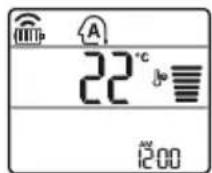
3 Press or button to set the desired temperature.
4 Press FAN SPEED button to adjust the fan speed.
Auto Changeover Mode
Single Split Model
This mode changes the mode automatically to maintain the set temperature at ± 2^
1 Turn the appliance on.
2 Press MODE button repeatedly to select the Auto Changeover Mode.
A is displayed on the display screen.
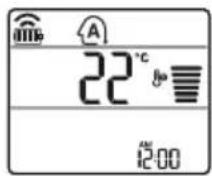
3 Press or button to set the desired temperature.
4 Press FAN SPEED button to adjust the fan speed.
Dehumidification Mode
This mode removes excess moisture from a highly humid environment or during the rainy season, in order to prevent mildew from setting in. This mode adjusts the room temperature and the fan speed automatically to maintain the optimal level of humidity.
1 Turn the appliance on.
2 Press MODE button repeatedly to select the Dehumidification Mode.
is displayed on the display screen.
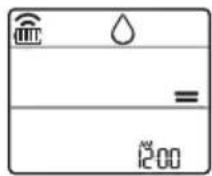
NOTE
- In this mode you cannot adjust the room temperature, it is adjusted automatically.
- The room temperature is not displayed on the display screen.
- In the dehumidification mode, compressor and indoor fan may not operate when the room temperature is below 24 °C
Heating Mode
1 Turn the appliance on.
2 Press MODE button repeatedly to select the Heating Mode.
is displayed on the display screen.
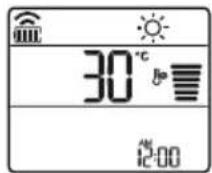
3 Press or button to set the desired temperature.
NOTE
will be displayed on the indoor unit when defrosting is operating.
• Furthermore, this indication will be displayed on the indoor unit:
- When preheating is operating.
- When the room temperature has been reached to the set temperature.
Fan Mode
This mode only circulates the indoor air without changing the room temperature.
1 Turn the appliance on.
2 Press MODE button repeatedly to select the Fan Mode.
is displayed on the display screen.
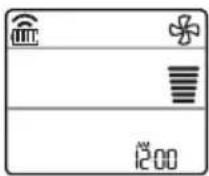
3 Press FAN SPEED button to adjust the fan speed.
NOTE
On or will be displayed on the indoor unit when fan mode is operating.
Using the Jet Mode Function Changing Room Temperature Quickly
This function allows you to cool indoor air quickly during the summer or warm it quickly during winter.
- The Jet Mode function is available with Cooling, Heating and Dehumidification Mode.
1 Turn the appliance on.
2 Press MODE button repeatedly to select the desired mode.
3 Press JET MODE button.
Po is displayed on the display screen.
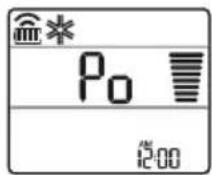
NOTE
- Jet Heating Mode is not available on some models.
- In Jet Cooling Mode, strong air blows out for 30 minutes.
• After 30 minutes later, setting temperature is maintaining 18 °C
If you want to change the temperature, Press ⬆ or ⬇ button to set the desired temperature.
- In Jet Heating Mode, strong air blows out for 30 minutes.
• After 30 minutes later, setting temperature is maintaining 30 °C If you want to change the temperature, Press
or button to set the desired temperature.
- This function may operate differently from the remote control display.
Using the Fan Speed Function
Adjusting the Fan Speed
- Press FAN SPEED button repeatedly to adjust the fan speed.
| Display Screen Speed | |
 | High |
 | Medium - High |
 | Medium |
 | Medium - Low |
 | Low |
| - Natural Wind | |
NOTE
- The fan speed of Natural Wind adjusts automatically.
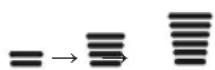
- The fan speed icons are displayed on some indoor units.

- Indoor unit display is displayed only 5 seconds and return to the setting temperature on some models.
Using the Air Flow Direction Function
This function adjusts the direction of the air flow vertically (horizontally).
- Press (SWING) button repeatedly and select the desired direction.
- Select (只) to adjust the direction of the air flow automatically.
NOTE
- Adjusting the air flow direction horizontally may not be supported, depending on the model.
- Adjusting the air deflector arbitrarily may cause product failure.
- If you restart the air conditioner, it starts to operate with the previously set direction of air flow, so the air deflector may not match the icon displayed on the remote control. When this occurs, press SWING or SWING button to adjust the direction of the air flow again.
- This function may operate differently from the remote control display.
Setting the On/Off Timer
This function sets the air conditioner to turn on/off automatically at desired time.
On/Off Timer can be set together.
Setting the On Timer
1 Press TIMER button repeatedly.
- The icon below blinks at the bottom of the display screen.
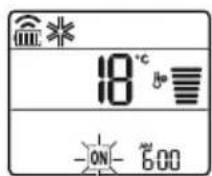
2 Press or button to select the minutes.
3 Press SET/CANCEL button to finish.
- After setting the timer, current time and ON icon are displayed on the display screen indicating that the desired time is set.
Canceling the On Timer
1 Press TIMER button repeatedly.
- The icon below blinks at the bottom of the display screen.

2 Press SET/CANCEL button to cancel the setting.
Setting the Off Timer
1 Press TIMER button repeatedly.
- The icon below blinks at the bottom of the display screen.
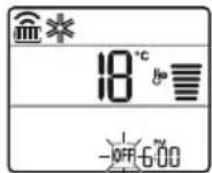
2 Press or button to select the minutes.
3 Press SET/CANCEL button to finish.
- After setting the timer, current time and OFF icon are displayed on the display screen indicating that the desired time is set.
NOTE
- This function is disabled when you set Simple Timer.
Canceling the Off Timer
1 Press TIMER button repeatedly.
- The icon below blinks at the bottom of the display screen.
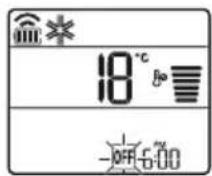
2 Press SET/CANCEL button to cancel the setting.
Canceling the Timer Setting
- Press button to cancel all timer settings.
Using the Sleep Function (Optional)
This function turns off the air conditioner automatically when you go to sleep.
1 Turn the appliance on.
2 Press 📄 timer button repeatedly. - The icon below blinks at the bottom of the display screen.
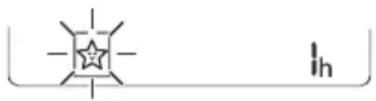
3 Press ☑ or button to select the hour (up to 7 hours).
4 Press SET/CANCEL button to finish. is displayed on the display screen.
NOTE
is displayed on some indoor units.
- Indoor unit display is displayed from 1H to 7H which is displayed only 5 seconds and then return to the setting temperature.
- In the Cooling and Dehumidification Mode, the temperature increases by 1 °C after 30 minutes and additional 1 °C after another 30 minutes for a more comfortable sleep.
- The temperature increases up to 2 °C from the preset temperature.
- Although the remark for fan speed on the display screen may be changed, the fan speed is adjusted automatically.
Using the Simple Timer Function (Optional)
This function turns off the air conditioner automatically when you go to sleep.
1 Turn the appliance on.
2 Press TIMER button repeatedly.
- The icon below blinks at the bottom of the display screen.
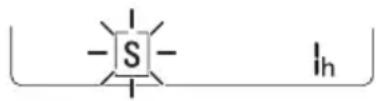
3 Press or button to select the hour (up to 7 hours).
4 Press SET/CANCEL button to finish.
[S] is displayed on the display screen.
NOTE
- This function is disabled when you set Off Timer.
Using the Energy Display Function (Optional)
This function displays the amount of electricity generated on the indoor display as the product operates.
Display the Current Energy Usage
1 Turn the appliance on.
2 Press ○ button and hold it about 3 seconds.
- The instantaneous power consumption (88) is displayed for a while on some indoor units.
NOTE
• The unit of the displayed value is kW.
- It is not displayed on the wireless remote control.
- If it is more than 99 kW, which is the range of expression, maintain it as 99 kW.
- Display wattage under 10 kW with 0.1 kW unit, and display one over 10 kW with 1 kW unit.
- The actual power may differ from the power displayed.
- When connected to the Multi Outdoor unit, this function may not be supported.
Using the Light Off Function (Optional)
Display Screen Brightness
You can set the brightness of the indoor unit display screen.
- Press LIGHT OFF button.
NOTE
- Turn on/off the Display screen.
- If the brightness of an indoor appliance's display is set to OFF, pressing a button on the remote control automatically turns the display on for a while.
- This function may operate differently, depending on the model.
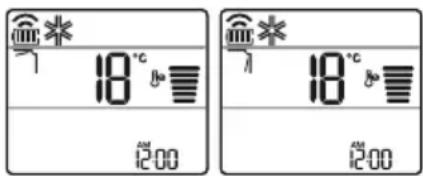
Using the Comfort Air Function (Optional)
Comfort Vane Operation
This function conveniently sets the vane to a preset position to deflect the supply air away from blowing directly onto the occupants in the room.
1 Turn the appliance on.
2 Press COMFORT AIR button repeatedly and select the desired direction.
• or is displayed on the display screen.
NOTE
-7 or Lis displayed on some indoor units.
- This function is disabled when you press MODE or JET MODE button.
- This function is disabled and auto swing of vertical direction is set up when you press SWING button.
- When this function is off, the horizontal vane operates automatically depending on the set mode.
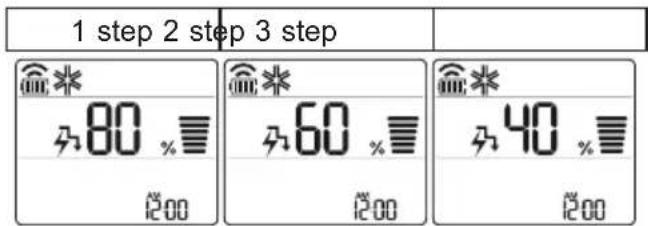
Using the Energy Control Function (Optional)
1 Turn the appliance on.
2 Press ENERGY CTRL. button.
- Press ENERGY CTRL. button repeatedly to select each step.
NOTE
- 1 step: The power Input is decreased by 20% compared to rated power input.
80 is displayed on the display screen.
- 2 step: The power Input is decreased by 40% compared to rated power input.
A60 is displayed on the display screen.
• 3 step (Optional) : The power Input is decreased by 60 % compared to rated power input.
40 is displayed on the display screen.
80 (1 step), 60 (2 step), (3 step) is displayed on some indoor units.
(L(1 step), L(2 step) is displayed on some indoor units.)
- This function is available with Cooling Mode. - Capacity may decrease when Energy Control mode is selected.
- Desired temperature is displayed about 5 seconds if you press FAN SPEED, or button.
• Room temperature is displayed about 5 seconds if you press ROOM TEMP button.
- When connected to the Multi Outdoor unit, this function may not be supported.
Using Special Functions
1 Turn the appliance on.
2 Press FUNC. button repeatedly to select the desired function.
3 Press SET/CANCEL button to finish.
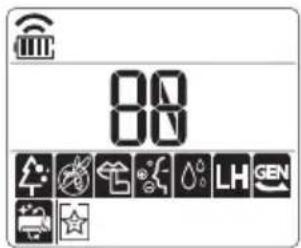
| Display Screen | Description |
| [H370] | The lon generator uses millions of ions to help improve indoor air quality. |
| [77D0] | To reduce noise from outdoor units. |
| [W064] | To remove moisture generated inside the indoor unit. |
NOTE
- Some functions may not be supported, depending on the model.
- Some functions may operate differently from the remote control display.
Canceling Special Functions
1 Press FUNC. button repeatedly to select the desired function.
2 Press SET/CANCEL button to cancel the function.
Using the Air Purification Function
These functions supply clean and fresh air by ion particles and the filter.
| Function Display Description | ||
| Ionizer |  | Ion particles from lonizer reduce the surface bacteria and other harmful substances. |
| Plasma | It removes microscopic contaminants from the intake air completely to supply clean and fresh air. | |
NOTE
- You can use this function without turning the air conditioner on.
- Both the plasma lamp and the cooling lamp light up while Smoke Away/Plasma is in operation on some models.
- Do not touch ionizer during operation.
- This function may operate differently from the remote control display.
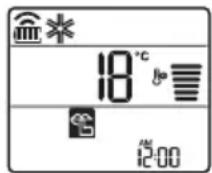
Using the Silent Function
This function prevents potential claims by neighbors, reducing noise from outdoor units.

is displayed on the display screen.
NOTE
- This function is disabled when you press MODE or ENERGY CTRL. or JET MODE button.
- This function is available with Cooling, Heating, Auto Changeover, Auto Operation Mode.
- When connected to the Multi Outdoor unit, this function may not be supported.
Using the Auto Clean Function
In the Cooling and Dehumidification Mode, moisture is generated inside the indoor unit. This function removes such moisture.

is displayed on the display screen.
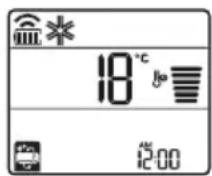
NOTE
- Some functions cannot be used while the Auto Clean function is in operation.
- If you turn off the unit, the fan continues to run for 30 minutes and cleans the inside of the indoor unit.
o is displayed on some indoor units, depending on the model.
LG ThinQ Application
This feature is only available on models with the 📄 or ThinQ logo.
The LG ThinQ application allows you to communicate with the appliance using a smartphone.
LG ThinQ Application Features
Communicate with the appliance from a smartphone using the convenient smart features.
Smart Diagnosis
If you experience a problem while using the appliance, this smart diagnosis feature will help you diagnose the problem.
Settings
Allows you to set various options on the appliance and in the application.
NOTE
- If you change your wireless router, internet service provider, or password, delete the registered appliance from the LG ThinQ application and register it again.
- The application is subject to change for appliance improvement purposes without notice to users.
• Functions may vary by model.
Before Using LG ThinQ Application
1 Check the distance between the appliance and the wireless router (Wi-Fi network).
- If the distance between the appliance and the wireless router is too far, the signal strength becomes weak. It may take a long time to register or installation may fail.
2 Turn off the Mobile data or Cellular Data on your smartphone.
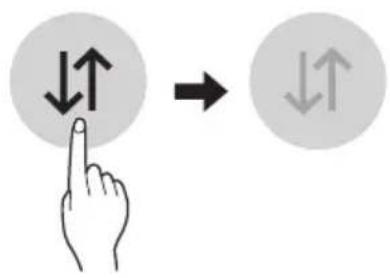
3 Connect your smartphone to the wireless router.
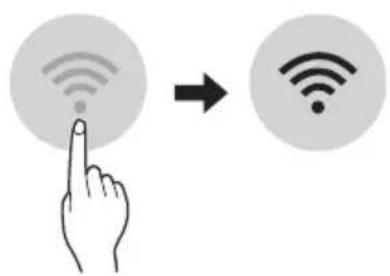
NOTE
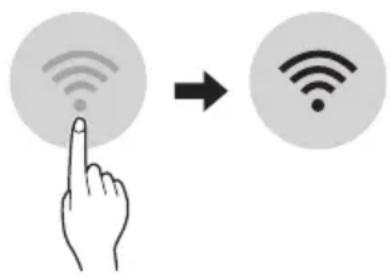
- To verify the Wi-Fi connection, check that icon on the control panel is lit.
- The appliance supports 2.4 GHz Wi-Fi networks only. To check your network frequency, contact your Internet service provider or refer to your wireless router manual.
- LG ThinQ is not responsible for any network connection problems or any faults, malfunctions, or errors caused by network connection.
- If the appliance is having trouble connecting to the Wi-Fi network, it may be too far from the router. Purchase a Wi-Fi repeater (range extender) to improve the Wi-Fi signal strength.
- The Wi-Fi connection may not connect or may be interrupted because of the home network environment.
- The network connection may not work properly depending on the Internet service provider.
- The surrounding wireless environment can make the wireless network service run slowly.
- The appliance cannot be registered due to problems with the wireless signal transmission. Unplug the appliance and wait about a minute before trying again.
- If the firewall on your wireless router is enabled, disable the firewall or add an exception to it.
- The wireless network name (SSID) should be a combination of English letters and numbers. (Do not use special characters.)
- Smartphone user interface (UI) may vary depending on the mobile operating system (OS) and the manufacturer.
- If the security protocol of the router is set to WEP, you may fail to set up the network. Please change it to other security protocols (WPA2 is recommended) and register the product again.
Installing the LG ThinQ Application
Search for the LG ThinQ application from the Google Play Store or Apple App Store on a smartphone. Follow instructions to download and install the application.
Open Source Software Notice Information
To obtain the source code that is contained in this product, under GPL, LGPL, MPL, and other open source licenses that have the obligation to disclose source code, and to access all referred license terms, copyright notices and other relevant documents please visit https://opensource.lge.com.
LG Electronics will also provide open source code to you on CD-ROM for a charge covering the cost of performing such distribution (such as the cost of media, shipping, and handling) upon email request to opensource@lge.com.
This offer is valid to anyone in receipt of this information for a period of three years after our last shipment of this product.
Smart Diagnosis
This feature is only available on models with the 🎨 or 🎨 logo.
Use this feature to help you diagnose and solve problems with your appliance.
NOTE
- For reasons not attributable to LGE's negligence, the service may not operate due to external factors such as, but not limited to, Wi-Fi unavailability, Wi-Fi disconnection, local app store policy, or app unavailability.
- The feature may be subject to change without prior notice and may have a different form depending on where you are located.
Using LG ThinQ to Diagnose Issues
If you experience a problem with your Wi-Fi equipped appliance, it can transmit troubleshooting data to a smartphone using the LG ThinQ application.
- Launch the LG ThinQ application and select the Smart Diagnosis feature in the menu. Follow the instructions provided in the LG ThinQ application.
Using Audible Diagnosis to Diagnose Issues
Follow the instructions below to use the audible diagnosis method.
- Launch the LG ThinQ application and select the Smart Diagnosis feature in the menu. Follow the instructions for audible diagnosis provided in the LG ThinQ application.
1 Plug the power plug in the outlet properly.
2 Place the mouthpiece of your smartphone close to the or logo.
3 Press and hold the DIAGNOSIS [5 s] button for 5 seconds or longer while holding the smartphone mouthpiece to the logo until the data transfer is complete.
- Keep the smartphone in place until the data transfer has finished. Time remaining for data transfer is displayed.
4 After the data transfer is complete, the diagnosis will be displayed in the application.
NOTE
- For best results, do not move the phone while the tones are being transmitted.
- Be sure to keep ambient noise to a minimum or the phone may not correctly receive the buzzer beeps from the indoor unit.
WARNING
- Before cleaning or performing maintenance, disconnect the power supply and wait until the fan stops.
If the air conditioner will not be used for an extended period of time, dry the air conditioner to maintain it in best condition. Clean the product regularly to maintain optimal performance and to prevent possible breakdown.
- Dry the air conditioner in Fan mode for 3 to 4 hours and disconnect the power. There may be internal damage if moisture is left in its components.
- Before using the air conditioner again, dry the inner components of the air conditioner in Fan mode for 3 to 4 hours. This will help to remove the odor generated from moisture.
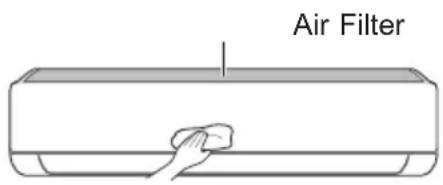
- The feature may be changed according to the type of model.
| Type Description | Interval | |
| AirFilterClean | with a vacuum or hand wash. 2 weeks | |
| Allergy Filter Clean | with a vacuum or brush. Every 6 months | |
| Ionizer (Optional) | Use dry cotton bud to remove any dust. Every 6 months | |
| IndoorUnit | Cleantheindoorunitsurfacebyusingasoft,drycloth.Regularly | |
| Have a professional clean the condensate drain pan. Once a year | ||
| Have a professional clean the condensate drain pipe. Every 4 months | ||
| Replace the remote control batteries. Once a year | ||
| OutdoorUnit | Have a professional clean the heat exchanger coils and the panel vents. (Consult with technician.) | Once a year |
| Have a professional clean the fan. Once a year | ||
| Have a professional clean the condensate drain pan. Once a year | ||
| Have a professional verify that all the fan assembly is firmly tightened. | Once a year | |
| Clean the electric components with air. Once a year |
NOTE
- Never use water that is higher than 40^ when you clean the filters. It may cause deformation or discoloration.
- Never use volatile substances when you clean the filters. They may damage the surface of the product.
- Do not wash the allergy filter with water, because the filter can be damaged (Optional).
Clean the Air Filter
Clean the air filters once every 2 weeks, or more, if necessary.
NOTE
• The air filter can be broken when it is bent.
- When the air filter is not assembled correctly, dust and other substances can enter into the indoor unit.
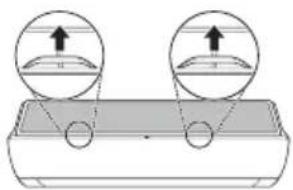
Type1
If you look at the indoor unit from above it, can assemble the top filter easily.
1 Turn off the power to the unit.
2 Hold the knobs of the air filter, lift it up slightly.
natural_image
Diagram showing two circular insets with upward arrows pointing to a curved surface, no text or symbols present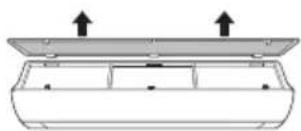
natural_image
Diagram of a device casing with two upward arrows indicating top-down orientation (no text or symbols)3 Remove it from the indoor unit.
4 Clean the filter with a vacuum cleaner or with lukewarm water with neutral detergent.
5 Dry the filter in the shade.
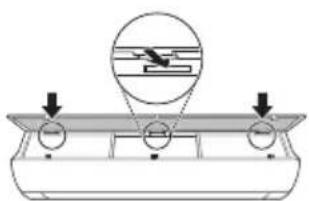
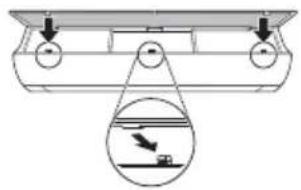
6 Insert the hooks of the air filter into the front cover.
natural_image
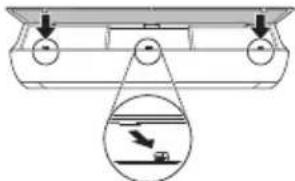
Diagram of a mechanical or electrical component with three circular ports and a circular inset showing a sliding mechanism (no text or symbols)7 Push down hooks to assemble the air filter.
natural_image
Diagram of a mechanical assembly with a pulley and a magnified inset showing a component (no text or symbols)8 Check the side of the front cover for correct assembly of the air filter.
Type2
1 Turn off the power to the unit.
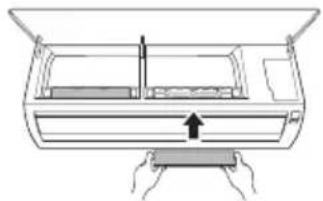
2 Open the front cover.
- Lift up both sides of the cover slightly.
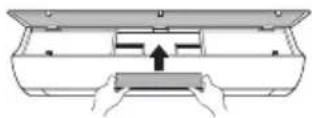
3 Hold the knobs of the air filters, pull them down slightly and remove them from the indoor unit.
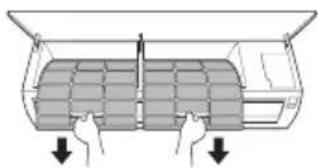
natural_image
Diagram of a car air conditioner unit with hand gestures and load arrows (no text or symbols)4 Clean the filters with a vacuum cleaner or with lukewarm water with neutral detergent.
5 Dry the filters in the shade.
6 Insert the hooks of the air filters into the front cover.
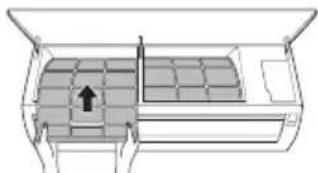
natural_image
Diagram of a car air conditioner unit with internal compartments and a directional arrow indicating airflow (no text or labels)7 Check the side of the front cover for correct assembly of the air filters.
Clean the Allergy Filter (Optional)
1 Turn off the power to the unit.
2 Remove the air filter from the indoor unit.
3 Remove the allergy filter from the indoor unit.
Type1
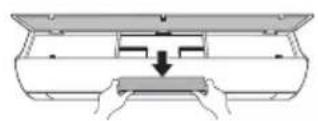
Type2
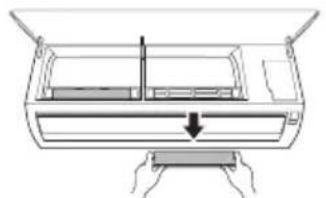
natural_image
Diagram of a car air conditioner unit with cooling fins and a downward arrow indicating airflow direction (no text or labels)4 Clean the filter with a vacuum cleaner.
5 Inserttheallergyfilter.
Type1
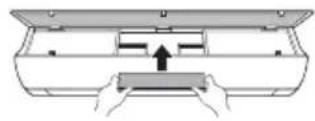
Type2
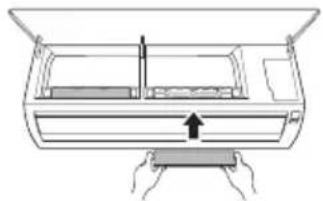
natural_image
Diagram of a mechanical device with a handle and internal components, no text or symbols present6 Assemble the air filter.
7 Check the side of the front cover for correct assembly of the air filter.
NOTE
- The feature and location of allergy filter may vary according to the type of model.
Self-diagnosis Function
This product has a built-in self-diagnosis function. If an error occurs, the lamp of the indoor unit will blink in 2 second intervals. If this occurs, contact your local dealer or service center.
Before Calling for Service
Please check the following before you contact the service center. If the problem persists, contact your local service center.
| Symptoms Possible Causes & Solution | |
| The air conditioner does not work normally. | Burning smell and strange sounds are coming from the unit.Turn off the air conditioner, switch OFF, or disconnect the power supply, and contact the service center. |
| Water leaks from the indoor unit even when the humidity level is low.Turn off the air conditioner, switch OFF, or disconnect the power supply, and contact the service center. | |
| The power cable is damaged or it is generating excessive heat.Turn off the air conditioner, switch OFF, or disconnect the power supply, and contact the service center. | |
| A switch, a circuit breaker (safety, ground), or a fuse is not operated properly.Turn off the air conditioner, switch OFF, or disconnect the power supply, and contact the service center. | |
| The unit generates an error code from its self-diagnosis.Turn off the air conditioner, switch OFF, or disconnect the power supply, and contact the service center. | |
| The air conditioner does not work. | The air conditioner is unplugged.Check whether the power cord is plugged into the outlet or the power isolators are switched on. |
| A fuse exploded, or the power supply is blocked.Replace the fuse or check if the circuit breaker has tripped. | |
| A power failure has occurred.Turn off the air conditioner when a power failure occurs.When the power is restored, wait 3 minutes, and then turn on the air conditioner. | |
| The voltage is too high or too low.Check if the circuit breaker has tripped. | |
| The air conditioner was turned off automatically at a preset time.Turn the air conditioner on. | |
| The battery setting in the remote controller is incorrect.Make sure that the batteries are inserted correctly in your remote controller.If the batteries are placed correctly, but the air conditioner still does not operate, replace the batteries and try again. | |
| The air conditioner does not emit cool air. | Air is not circulating properly.Make sure that there are no curtains, blinds, or pieces of furniture blocking the front of the air conditioner. |
| The air filter is dirty.Clean the air filter once every 2 weeks.See “Clean the Air Filter” for more information. | |
| The room temperature is too high.In summer, cooling the indoor air fully may take some time. In this case, select the Jet Mode to cool the indoor air quickly. | |
| Cold air is escaping from the room.Make sure that no cold air is escaping through the ventilation points in the room. | |
| The desired temperature is higher than the current temperature.Set the desired temperature to a level lower than the current temperature. | |
| There is a heating source nearby.Avoid using heat generators like electric ovens or gas burners while the air conditioner is in operation. | |
| Fan Mode is selected.During Fan Mode, air blows from the air conditioner without cooling or heating the indoor air.Switch the operation mode to cooling operation. | |
| Outside temperature is too high.The cooling effect may not be sufficient. | |
| The fan speed cannot be adjusted. | The Jet Mode, or Auto Operation Mode is selected.In some operation modes, you cannot adjust the fan speed. Select an operation mode in which you can adjust the fan speed. |
| The temperature cannot be adjusted. | The Fan Mode or Jet Mode is selected.In some operation modes, you cannot adjust the temperature. Select an operation mode in which you can adjust the temperature. |
| The air conditioner stops during operation. | The air conditioner is suddenly turned off.The Timer Function may have timed out, which turns the unit off. Check the timer settings. |
| A power failure has occurred during operation.Wait for the power to come back. If you have the Auto Restart function enabled, your unit will resume its last operation several minutes after power is restored. | |
| The indoor unit is still operating even when the unit has been turned off. | The Auto Clean function is being operated.Allow the Auto Clean function to continue since it removes any remaining moisture inside the indoor unit. If you do not want this feature, you can turn the unit off. |
| The air outlet on the indoor unit is discharging mist. | The cooled air from the air conditioner makes mist.When the room temperature decreases, this phenomenon will disappear. |
| Water leaks from the outdoor unit. | In the heating operations, condensed water drops from the heat exchanger.This symptom requires installing a drain hose under the base pan.Contact the installer. |
| There is noise or vibration. | A clicking sound can be heard when the unit starts or stops due to movement of the reversing valve.Creaking sound: The plastic parts of the indoor unit creak when they shrink or expand due to sudden temperature changes.Flowing or Blowing sound: This is the flow of refrigerant through the air conditioner.These are normal symptoms. The noise will stop. |
| The indoor unit gives off an odor. | Odors (such as cigarette smoke) may be absorbed into the indoor unit and discharged with airflow.If the smell does not disappear, you need to wash the filter. If this does not work, contact the service center to clean your heat exchanger. |
| The air conditioner does not emit warm air. | When Heating Mode starts, the vane is almost closed, and no air comes out, even though the outdoor unit is operating.This symptom is normal. Please wait until the unit has generated enough warm air to blow through the indoor unit. |
| The outdoor unit is in Defrosting Mode.In Heating Mode, ice/frost is built up on the coils when the outside temperature falls. This function removes a layer of frost on the coil, and it should finish in approximately 15 minutes. | |
| Outside temperature is too low.The heating effect may not be sufficient. | |
| Your home appliance and smartphone is not connected to the Wi-Fi network. | The password for the Wi-Fi that you are trying to connect to is incorrect.Find the Wi-Fi network connected to your smartphone and remove it, then register your appliance on LG ThinQ. |
| Mobile data for your smartphone is turned on.Turn off the Mobile data of your smartphone and register the appliance using the Wi-Fi network. | |
| The wireless network name (SSID) is set incorrectly.The wireless network name (SSID) should be a combination of English letters and numbers. (Do not use special characters.) | |
| The router frequency is not 2.4 GHz.Only a 2.4 GHz router frequency is supported. Set the wireless router to 2.4 GHz and connect the appliance to the wireless router. To check the router frequency, check with your Internet service provider or the router manufacturer. | |
| The distance between the appliance and the router is too far.If the distance between the appliance and the router is too far, the signal may be weak and the connection may not be configured correctly. Move the location of the router so that it is closer to the appliance. | |
NOTE
- Some functions may not be supported, depending on the model.
Memo
MANUEL DU PROPRIÉTAIRE
CLIMATISATION

Smart Diagnosis (Diagnostic intelligent) 29
MAINTENANCE....30
natural_image
Line drawing of a horizontal air conditioner with a remote control unit emitting signal waves (no text or symbols)REMARQUE
chemical
Simple chemical structure diagram showing a central sulfur atom bonded to two peripheral atoms, with an additional label 'I_h'REMARQUE
Application LG ThinQ
Smart Diagnosis (Diagnostic intelligent)
REMARQUE
Smart Diagnosis (Diagnostic intelligent)
natural_image
Diagram showing two circular views of a device with arrows indicating direction (no text or symbols)natural_image
Diagram of a mechanical or electrical component with circular ports and an inset showing a suspended object (no text or symbols)natural_image
Diagram of a boat hull with a circular structure and a magnified inset showing a boat on water (no text or symbols)natural_image
Diagram of a car air conditioner unit with cooling fins and airflow arrows (no text or labels)natural_image
Diagram of a car air conditioner unit with internal compartments and a directional arrow indicating airflow (no text or symbols)natural_image
Diagram of a car air conditioner unit with hands operating it, showing internal components and airflow direction (no text or labels)natural_image
Diagram of a device with hands holding a tray and a vertical arrow indicating motion (no text or symbols)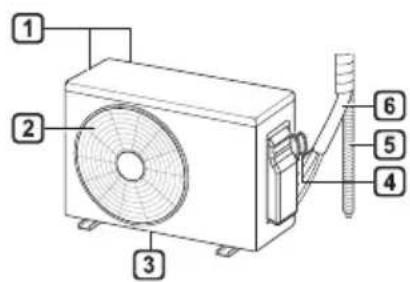
natural_image
Line drawing of a modern air conditioner with a remote control unit and a magnified view of its screen (no text or symbols)ΣΗΜΕΙΩΣΗ
ΣΗΜΕΙΩΣΗ
ΣΗΜΕΙΩΣΗ
natural_image
Diagram showing two circular views of a container with arrows indicating direction (no text or symbols)natural_image
Diagram showing a mechanical setup with two circular components and an inset view of a horizontal component (no text or symbols)natural_image
Diagram of a boat hull with a magnified inset showing a boat being lifted by a crane (no text or labels)natural_image
Diagram of a car air conditioner unit with cooling fins and airflow arrows (no text or labels)natural_image
Diagram of a car air conditioner unit with airflow path and vent slots (no text or labels)natural_image
Diagram of a device with a handle and internal components, showing no text or symbolsnatural_image
Diagram of a hand pressing down on a device with an arrow indicating force (no text or symbols present)SMART FUNCTIONS....27
LG ThinQ applicatie 27
Smart Diagnosis.... 29
ONDERHOUD....30
Reinig de luchtfilter 32
PROBLEEMOPLOSSING....34
natural_image
Line drawing of a modern air conditioner with a remote control unit and a circular annotation highlighting the portion of the device (no text or symbols present)OPMERKING
OPMERKING
OPMERKING
natural_image
Diagram showing two circular views of a device with arrows indicating direction (no text or symbols)natural_image
Diagram of a device casing with two upward arrows indicating top-down orientation (no text or symbols present)natural_image
Diagram of a mechanical or electrical component with circular ports and an inset showing a cross-section (no text or symbols)natural_image
Diagram showing a mechanical setup with pulleys and a magnified view of a boat on a platform (no text or symbols)natural_image
Diagram of a car air conditioner unit with cooling fins and airflow arrows (no text or labels)natural_image
Diagram of a car interior showing ventilation grilles and airflow path (no text or labels)natural_image
Diagram of a car air conditioner unit with cooling fins and a downward arrow indicating airflow direction (no text or symbols)natural_image
Diagram of a hand pressing down on a device component with an arrow indicating motion (no text or symbols present)6 Monteer de luchtfilters.
natural_image
Line drawing of a horizontal air conditioner with a remote control unit emitting signal waves (no text or symbols)UWAGA
UWAGA
UWAGA
natural_image
Simple line drawing of a hand cleaning a rectangular object (no text or symbols)natural_image
Diagram showing two circular views of a mechanical component with arrows indicating direction (no text or symbols)natural_image
Diagram of a mechanical or electrical component with circular ports and a circular inset showing a device (no text or symbols)natural_image
Diagram of a boat hull with a magnified inset showing a boat being lifted by a crane (no text or symbols present)natural_image
Diagram of a car air conditioner unit with cooling fins and airflow arrows (no text or labels)natural_image
Diagram of a car air conditioner unit with internal compartments and a directional arrow indicating airflow (no text or labels)natural_image
Diagram of a car air conditioner unit with hands operating it, showing internal components and airflow direction (no text or labels)natural_image
Diagram of a car air conditioner unit with hands operating it (no text or symbols)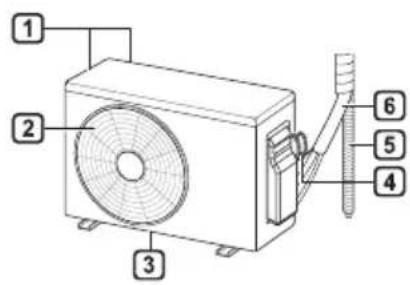
natural_image
Line drawing of a modern air conditioner with a remote control unit and a circular annotation highlighting the portion of the device (no text or symbols present)MEGJEGYZÉS
chemical
Simple chemical structure diagram showing a central sulfur atom bonded to two oxygen atoms, with an additional hydrogen atom labeled I_hMEGJEGYZÉS
MEGJEGYZÉS
natural_image
Diagram showing two circular views of a container with arrows pointing upward, no text or symbols presentnatural_image
Diagram of a mechanical or electrical component with three circular ports and an inset showing a sliding mechanism (no text or symbols)natural_image
Diagram of a crane lifting a platform with a magnified inset showing a crane lifting a platform (no text or symbols present)natural_image
Diagram of a car air conditioner unit with downward arrows indicating cooling or ventilation system (no text or symbols)natural_image
Diagram of a car air conditioner unit with internal grid layout and ventilation slots (no text or labels)natural_image
Diagram of a car air conditioner unit with hands operating it, showing internal components and airflow direction (no text or labels)natural_image
Line drawing of a mechanical device with hands holding a tray and a vertical arrow indicating motion (no text or symbols)Smart Diagnosis....29
ПОДДРЪЖКА ....30
natural_image
Line drawing of a modern air conditioner with a remote control unit and a circular annotation highlighting the portion of the device (no text or symbols present)ЗАБЕЛЕЖКА
ЗАБЕЛЕЖКА
ЗАБЕЛЕЖКА
natural_image
Simple line drawing of a hand cleaning a rectangular object (no text or symbols)natural_image
Diagram showing two circular insets with upward arrows pointing to a rectangular object, no text or symbols present.natural_image
Simple line drawing of a rectangular container with two upward arrows above it (no text or symbols)natural_image
Diagram of a mechanical setup with three circular components and an inset showing a device (no text or symbols)natural_image
Diagram of a boat hull with a circular object inside and an inset showing a boat on water (no text or symbols)natural_image
Diagram of a car air conditioner unit with cooling fins and airflow arrows (no text or labels)natural_image
Diagram of a car interior showing seating arrangement and ventilation duct (no text or symbols)natural_image
Diagram of a device with a handle and internal components, showing no text or symbolsnatural_image
Diagram of a device with hands holding a tray and a vertical arrow indicating motion (no text or symbols)VAŽNE SIGURNOSNE UPUTE 4
RAD 11
Napomene za rad....11
VAŽNE SIGURNOSNE UPUTE

UPOZORENJE
1 Filtar zraka
2 Ulaz zraka
3 Prednji poklopac
4 Izlaz zraka
5 Skretač zraka (vodoravno krilo)
6 Skretač zraka (okomiti rešetkasti otvor)
7 Tipka za uključivanje/isključivanje
8 Zaslon
9 Prijamnik signala
natural_image
Line drawing of a modern air conditioner with a remote control unit and a circular annotation highlighting the portion of the device (no text or symbols present)NAPOMENA
| 1Gumb | 2Prikazzaslona | Opis | Dostupno Funkcija | |
| monosustavom | Multi | |||
| - | Za uključivanje/isključivanje klima-uređaja. | O | O | |
| 88° | Za prilagodbu željenesobne temperature unacinu hlađenja,grijanja ili automatskogprebacivanja. | O | O | |
| MODE | Za odabir načinahlađenja. | O | O | |
| Za odabir načinagrijanja. | O | O | ||
| Za odabir načinaodvlaživanja. | O | O | ||
| Za odabir načinaventilatora. | O | O | ||
| Za odabir načinaautomatskogprebacivanja /automatskog rada. | O | O | ||
| JETMODE | Po | Za brzu promjenusobne temperature. | O | O |
| FANSPEED | Za prilagodbu brzineventilatora. | O | O | |
| Za okomitu ilivodoravnu prilagodbusmjera protoka zraka. | O | O | ||
NAPOMENA
- * tipke mogu biti drugačiji prema vrsti modela.
- Kad je spojen na vanjsku multi jedinicu, funkcije prikaza energije, kontrole energije, tihog rada i pametne dijagnostike možda neće biti podržane.
![S ON OFF 000 min * MODE FAN SPEED TEMP JET MODE KW [3 s] SWING SWING ROOM TEMP °C °F [5 s] SET UP DIAGNOSIS (5 s) FUNC. SET CANCEL TIMER CANCEL RESET](/content/2026/03/492243/images/e8b4055cb56d224d40855e0d57a17b246f179d6ffdacb4def2c570798931b42e.jpg)
2
1
| [G60X]Gumb | [228C]Prikazzaslona | Opis | Dostupno Funkcija | |
| monosustavom | Multi | |||
 |  | Za uključivanje/isključivanje klima-uređaja automatski uželjeno vrijeme. | O | O |
 | ||||
| SET/CANCEL | - | Za postavljanje/poništavanje posebnihfunkcija i brojača. | O | O |
 | - | Za poništavanjepostavki brojača. | O | O |
| [222H] | - | Za prilagodbuvremena. | O | O |
| *LIGHTOFF | - | Za postavljanjesvjetline zaslona naunutarnjoj jedinici. | O | O |
| ROOMTEMP |  | Za prikaz sobnetemperature. | O | O |
| °C↔°F[5 s] |  | Za promjenu jediniceizmeđu °C i °F | O | O |
| *COMFORTAIR |  | Za prilagodbu protokazraka na skretanjestrujanja zraka. | O | O |
| kW[3 s] | - | Za postavljanje želite liprikazati informacije oenergiji. | O | X |
| *ENERGYCTRL. | 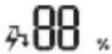 | Za pozivanje učinkauštede energije. | O | X |
| DIAGNOSIS[5 s] | - | Za jednostavnoprovjeravanjeinformacija oodržavanju proizvoda. | O | X |
2
1
| 1Gumb | 2Prikazzaslona | Opis | Dostupno Funkcija | |
| monosustavom | Multi | |||
 | [X6ZZ] | Generator iona koristimilijune iona kako bipomogao u poboljšanjukvalitete zraka uzatvorenom prostoru. | O(Neobavezno) | O(Neobavezno) |
| [03YZ] | Za smanjivanje bukevanjskih jedinica. | O | X | |
 | Za uklanjanje vlagekoja nastaje unutarunutarnje jedinice. | O | O | |
| RESET - | Za pokretanje postavkidaljinskog upravljača. | O | O | |
NAPOMENA
- Neke funkcije možda nisu podržane ovisno o modelu.
- * tipke mogu biti drugačiji prema vrsti modela.
- Pritisnite tipku SET/CANCEL za upravljanje odabranom FUNC..
Automatsko ponovno pokretanje klima-uredaja
Kada se klima-uredaj uključi ponovno nakon nestanka struje, ovom se funkcijom vraćaju prethodne postavke.
Onemogućavanje automatskog ponovnog pokretanja
1 Otvorite prednji poklopac (Vrsta2) ili vodoravno krilo (Vrsta1).
NAPOMENA
• 7 ili lprikazuje se na nekim unutarnjim jedinicama.
- Ova se funkcija onemogućava kada pritisnete tipku MODE ili JET MODE.
- Ova se funkcija onemogućava i automatsko njihanje okomitog smjera postavlja se kada pritisnete tipku SWING.
- Kada je ova funkcija isključena, vodoravno krilo radi automatski ovisno o postavljenom načinu rada.
Upotreba funkcije upravljanja energijom (Neobavezno)
1 Uključite uređaj.
2 Pritisnite tipku ENERGY CTRL..
- Uzastopno pritišćite tipku ENERGY CTRL. kako biste odabrali svaki korak.
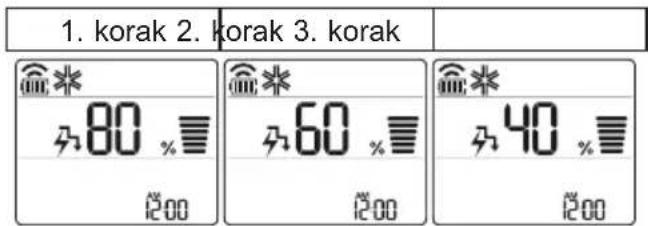
NAPOMENA
• 1. korak: Dovod energije smanjuje se za 20 % u usporedbi s nazivnim dovodom energije.
480 prikazuje se na prikazu zaslona.
• 2. korak: Dovod energije smanjuje se za 40 % u usporedbi s nazivnim dovodom energije.
A60 prikazuje se na prikazu zaslona.
• 3. korak (Neobavezan): Dovod energije smanjuje se za 60 % u usporedbi s nazivnim dovodom energije.
40 prikazuje se na prikazu zaslona.
80 (1. korak), 62 (2. korak), (3) korak) prikazuje se na nekim unutarnjim jedinicama.
(1. korak), (2. korak) prikazuje se na nekim unutarnjim jedinicama.)
3 Povežite svoj pametni telefon s bežičnim usmjerivačem.
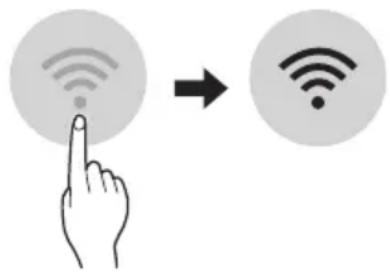
NAPOMENA
natural_image
Diagram showing two circular views of a mechanical component with arrows indicating direction (no text or symbols)natural_image
Diagram of a mechanical setup with a circular component and two downward arrows, no text or symbols present.natural_image
Diagram of a boat hull with a circular inset showing a boat being lowered into the hull (no text or labels)natural_image
Diagram of a container with internal grid structure and two downward arrows indicating flow or movement (no text or symbols)4 Očistite filtar usisivačem ili mlakom vodom s neutralnim deterdžentom.
5 Osušite filtre u hladu.
6 Umetnite kuke filtara zraka u prednji poklopac.
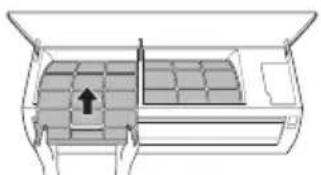
natural_image
Diagram of a vehicle air conditioner unit with internal compartments and a directional arrow indicating airflow (no text or labels)natural_image
Diagram of a hand pressing down on a device panel with arrows indicating motion (no text or symbols)4 Očistite filtre usisivačem.
5 Umetnite alergijski filtar.
Vrsta1
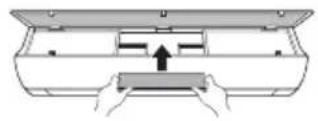
Vrsta2

natural_image
Diagram of a device with hands holding a tray and a vertical arrow indicating motion (no text or symbols)6 Sastavite filtre zraka.
natural_image
Line drawing of a modern air conditioner with a remote control unit and a circular annotation highlighting the portion of the device (no text or symbols present)POZNÁMKA
POZNÁMKA
POZNÁMKA
natural_image
Simple line drawing of a hand cleaning a rectangular object (no text or symbols)natural_image
Diagram showing two circular views of a device with arrows indicating direction (no text or symbols)natural_image
Diagram of a boat hull with a circular inset showing a speedometer or speed limit (no text or symbols)natural_image
Diagram of a mechanical or structural assembly with two circular components and a magnified inset showing a suspended object (no text or symbols)natural_image
Diagram of a car air conditioner unit with cooling fins and airflow arrows (no text or symbols)natural_image
Diagram of a vehicle interior showing seating arrangement and airflow direction (no text or symbols)natural_image
Diagram of a car air conditioner unit with cooling fins and a downward arrow indicating airflow direction (no text or symbols)natural_image
Diagram of a mechanical device with a handle and internal components, no text or symbols present6 Sestavte vzduchové filtry.
Olulised ohutusjuhised 4
KASUTAMINE....11
Olulised ohutusjuhised

OHT
natural_image
Line drawing of a horizontal air conditioner with a remote control unit emitting signal waves (no text or symbols)TÄHELEPANU
TÄHELEPANU
TÄHELEPANU
natural_image
Diagram showing two circular views of a container with arrows indicating direction (no text or symbols)natural_image
Diagram of a device casing with two upward arrows indicating top-down orientation (no text or symbols)natural_image
Diagram of a mechanical or electrical component with circular ports and an inset showing a cross-section (no text or symbols)7 Filtri paigaldamiseks lükake konksud allapoole.
natural_image
Diagram of a boat hull with a circular inset showing a boat being lowered into the hull (no text or symbols present)natural_image
Diagram of a car air conditioner unit with hand and down arrows indicating cooling system (no text or symbols)natural_image
Diagram of a car air conditioner unit with internal compartments and a black arrow indicating airflow direction (no text or symbols)natural_image
Diagram of a device with a handle and arrow indicating direction (no text or symbols)4 Puhastage filtrid tolmuimejaga.
5 Sisestage allergiafilter.
Tüüp 1
Tüüp 2
natural_image
Diagram of a hand pressing down on a device with an arrow indicating force (no text or symbols present)6 Paigaldage õhufiltrid.
Noti ghat-Thaddim 11
1 Filtru tal-Arja
2 Dhul tal-Arja
3 Ghatu ta' Quddiem
4 Żbokk tal-Arja
5 Diflettur tal-Arja (Luver orizzontali)
6 Diflettur tal-Arja (Luver vertikali)
7 Buttuna On/Off
8 Skrin
9 Ricevitur tas-Sinjali
1 Ventijiet tad-Dhul tal-Arja
2 Ventijiet tal-Hruğ tal-Arja
3 Pjanča ta' baži
4 Il-kejbil tal-provvista tal-elettriku
5 Drain Hose
6 Pajping għat-tkessiħ
NOTA
Remote Control Bla Wajer
Meta Ddahhal il-Batteriji
Jekk l-iskrin tal-wiri tar-remote control jibda jiččara, ibdel il-batteriji. Daňhal batteriji AAA (1.5 V) qabel ma tuža r-remote control.
1 Nehhi l-ghatu tal-batteriji.
2 Dañhal il-batteriji l-ğodda u agñmel cert li t-terminals + u - tal-batteriji huma installati tajjeb.
Installazzjoni tal-Holder tar-Remote Control (Fakultattiv)
Biex tipproteği r-remote control, installa l-holder fejn ma hemmx dawl tax-xemx dirett.
1 Agħżel post sigur u fejn tilħqu facilment.
natural_image
Line drawing of a modern air conditioner with a remote control unit and a circled detail (no text or symbols)NOTA
- Ir-remote control jista' jhaddem apparti elettroniči oħrajn jekk ikun ippuntat lejhom. Agħmel ĉert li qed tipponta r-remote control lejn ir-rićevitur tas-sinjal tal-kundizzjonatur tal-arja.
- Ghal tħaddim tajjeb, uża ĉarruta ratba biex tnaddaf it-trażmettitur u r-riċevitur tas-sinjal.
| 1Buttuna | 2Displejtal-lskrin | Deskrizzjoni | Funzjoni disponibbli | |
| maqsumsingolari | Multi | |||
| - | Biex tixghel/titfiI-kundizzjonatur tal-arja. | O | O | |
| 88° | Sabiex tagğustat-temperatura mixtieqatal-kamra fil-modalitàtat-tkessiħ, tat-tishin jewta' bidla awtomatika. | O | O | |
| MODE | Sabiex taghżelil-modalità tat-tkessiħ. | O | O | |
| Sabiex taghżelil-modalità tat-tishin. | O | O | ||
| Sabiex taghżelil-modalità tad-deumidifikazzjoni. | O | O | ||
| Sabiex taghżelil-modalità tal-fann. | O | O | ||
| Sabiex taghżelil-modalità tal-bidlaawtomatika/thaddimawtomatiku. | O | O | ||
| JETMODE | Po | Sabiex tbiddel it-temperatura tal-kamramalajr. | O | O |
| FANSPEED | Sabiex tagğustaI-velocità tal-fann. | O | O | |
| Sabiex tagğustad-direzzjoni tal-flusstal-arja vertikalment jeworizzontalment. | O | O | ||
NOTA
• * il-buttuni jistghu jkunu differenti skont it-tip ta' mudell.
- Meta mqabbad mat-tagħmir Multi Outdoor, il-funzjoni tal-Wiri ta’ Enerġija, Kontroll tal-Enerġija, d-Dijanjożi Intelliġenti u Silenzjuża jista’ jkun li ma jaħdmux.
![2 MODE FAN SPEED TEMP JET MODE KW [3 s] SWING SWING ROOM TEMP C °F [5 s] SET UP DIAGNOSIS (5 s) FUNC. SET CANCEL TIMER CANCEL RESET](/content/2026/03/492243/images/458c4fae3cea9a263d48d62bde41c191aa53a9afaa1e0b1355b5997fe5987328.jpg)
| 1Buttuna | 2Displejtal-Iskrin | Deskrizzjoni | Funzjoni disponibbli | |
| maqsumsingolari | Multi | |||
 |  | Sabiex tixghel/titfi l-kundizzjonatur tal-arja b'mod awtomatiku fil-hin mixtieq. | O | O |
| SET/CANCEL | - | Sabiex tikkonfigura/tikkancella l-funzjonijiet spećjali u t-timer. | O | O |
 | - | Sabiex tikkancella s-settings tat-timer. | O | O |
 | - Sabiex | tagğusta l-hin. O O | ||
| *LIGHTOFF | - | Sabiex tikkonfigura l-luminožità tal-iskrin fuq l-unità ta' ğewwa. | O | O |
| ROOMTEMP |  | Sabiex turi t-temperatura tal-kamra. | O | O |
| °C←°F[5 s] | °C°F | Sabiex tibdel il-unit bejn °C u °F | O | O |
| *COMFORTAIR |  | Sabiex tagğusta l-fluss tal-arja sabiex tibdel id-direzzjoni tar-riħ. | O | O |
| kW[3 s] | - | Sabiex tikkonfigura jekkturix jew le l-informazzjoni rigward l-energija. | O | X |
| *ENERGYCTRL. |  | Sabiex iğgib l-effett tal-iffrankar tal-energija. | O | X |
| DIAGNOSIS[5 s] | - | Sabiex tićčekkja l-informazzjoni tal-manutenzjoni ta' prodott b'mod konvenjenti. | O | X |
![2 MODE FAN SPEED TEMP JET MODE kW [3 s] SWING SWING ROOM TEMP C / °F [5 s] SET UP DIAGNOSIS [5 s] FUNC. SET CANCEL TIMER CANCEL RESET](/content/2026/03/492243/images/51a0ed29a73ff0e24937b13c1392a063c8955205f0ac57874871bd68da512b9d.jpg)
| 1Buttuna | 2Displejtal-Iskrin | Deskrizzjoni | Funzjoni disponibbli | |
| maqsumsingolari | Multi | |||
| Il-GENERatur joniku južamiljuni ta' jonji biex jghinitejjeb il-kwalità tal-arjata' gewwa. | O(Fakultattiv) | O(Fakultattiv) | ||
| Sabiex tnaqqas il-hossmill-unitajiet ta' barra. | O | X | ||
| Sabiex tneñhi l-indewwaggenerata fl-unità ta'gewwa. | O | O | ||
| RESET - | Sabiex tinizjalizzal-konfigurazzjoniettar-remote control. | O | O | |
NOTA
NOTA
NOTA
• pass 1: Id-Dhul tal-energija jitnaqqas b'20 % meta mqabbel mad-dhul tal-energija kklassifikat.
3 Qabbad I-ismartphone mar-router wireless.
NOTA
- Biex tivverifika I-konnessjoni tal-Wi-Fi, iččekkja li I-icon ⏻ hemm fuq il-panew tal-kontroll hija mixghula.
- Dan it-taghmir jiflaħ Wi-Fi netwerk ta’ 2.4GHz biss. Biex tiċċekkja I-frekwenza tar-router, ikkuntattja I-fornitur tas-servizz tal-internet tiegħek jew irreferi għall- manwal tal-wireless router.
- LG ThinQ mhuwiex responsabbli ta' problemi, ŋsarat jew malfunzjonijiet fil-konnessjoni tan-netwerk, ikkawżati mill-konnessjoni tan-netwerk.
- Jekk I-apparat ikun ‘il bogħod mir-router dan jaf ma jkunx jista’ jagħmel konnessjoni man-netwerk tal-Wi-Fi. Ixtri Wi-Fi repeater (range extender) biex ittejjeb is-saħħa tal-Wi-Fi.
- Il-konnessjoni tal-Wi-Fi tista' tigi interrotta jew ma taqbadx minhabba l-ambjent tan-netwerk tad-dar.
-
Il-konnessjoni tan-netwerk tista' ma taħdimx kif suppost minħabba l-fornitur tas-servizz tal-internet.
-
L-ambjent tal-wireless tal-madwar jista' jikkawża lis-servizz tal-wireless netwerk jaħdem bil-mod.
-
It-taghmir ma jistax jigi rregistrat minhabba problemi fit-trasmissjoni ta' qawwa tal-wireless. Skonnettja t-taghmir u stenna madwar minuta qabel terga tipprova.
- Jekk il-firewall fuq ir-router wireless tieghek huwa attivat, skonnettja l-firewall jew aghmel ećcezzjoni għal dan.
- L-isem tan-netwerk tal-wireless (SSID) ghandu jkun kombinazzjoni ta' ittri Ingliži u numri. (Tužax karattri specjali)
- II-user interface (UI) tal-ismartphone tista' tvarja ghax din tiddependi fuq is-sistema operattiva (OS) tal-mobajl u l-manifattur.
- Jekk il-protokoll ta' sigurtà tar-router huwa stabbilit għal WEP, jista' ma jirnexxilekx tħaddem in-netwerk. Jekk jogħġbok ibdlu għal protokolli ta' sigurtà oħra (WPA2 huwa rakkomandat) u erga' rreġistra l-prodott.
Kif tinstalla I-Applikazzjoni LG ThinQ
Fittex I-applikazzjoni LG ThinQ minn Google Play Store jew Apple App Store fuq smartphone. Segwi I-istruzzjonijiet biex tniżżel u tinstalla I-applikazzjoni.
natural_image
Diagram showing two circular views of a device with arrows indicating direction (no text or symbols)natural_image
Diagram of a mechanical or electrical component with three circular ports and an open circular inset showing a device (no text or symbols)natural_image
Diagram of a boat hull with a suspended load and an inset showing a crane lifting a weight (no text or labels)natural_image
Diagram of a car air conditioner unit with cooling fins and airflow arrows (no text or labels)4 Naddaf il-filtru b'vacuum cleaner jew b'ilma fietel b'detergent newtrali mieghu.
5 Nixxef il-filtri fid-dell.
natural_image
Diagram of a car air conditioner unit with internal compartments and a directional arrow indicating airflow (no text or labels)natural_image
Diagram of a car air conditioner unit with hands operating it (no text or symbols)4 Naddaf il-filtri b'vacuum cleaner.
5 Daħħal il-Filtru tal-Allergiji.
Tip1
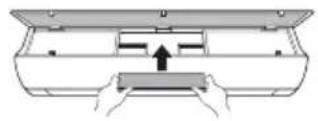
Tip2
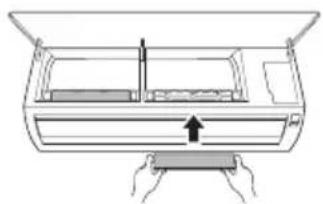
natural_image
Line drawing of a mechanical device with hands holding a tray and a vertical arrow indicating motion (no text or symbols)6 Arma I-filtri tal-arja.
7 Iččekkja l-ğenb tal-ghatu ta' quddiem ghall-armar korrett tal-filtru tal-arja.
NOTA
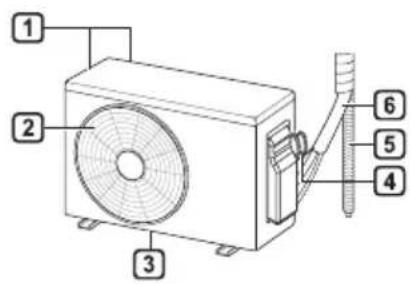
natural_image
Line drawing of a modern air conditioner with a remote control unit and a circular annotation highlighting the portion of the device (no text or symbols present)NOTĂ
NOTĂ
NOTĂ
natural_image
Diagram showing two circular views of a mechanical component with arrows indicating direction (no text or symbols)natural_image
Diagram of a mechanical setup with two circular components and an inset showing a sliding mechanism (no text or symbols)natural_image
Diagram of a boat hull with pulley system and inset showing a crane lifting a weight (no text or symbols)natural_image
Diagram of a car air conditioner unit with hands operating it, showing cooling panel and airflow direction (no text or labels)natural_image
Diagram of a car air conditioner unit with internal compartments and a black arrow indicating airflow direction (no text or labels)natural_image
Diagram of a car air conditioner unit with hands operating it, showing internal components and airflow direction (no text or labels)natural_image
Diagram of a mechanical device with hands holding a tray and a vertical arrow indicating motion (no text or symbols)DÔLEŽITÉ BEZPEČNOSTNÉ POKYNY....4
PREVÁDZKA....11
DÔLEŽITÉ BEZPEČNOSTNÉ POKYNY

VAROVANIE
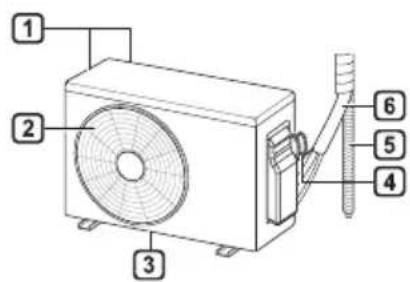
natural_image
Line drawing of a rectangular air conditioner with a remote control unit emitting signal waves (no text or symbols)POZNÁMKA
POZNÁMKA
POZNÁMKA
natural_image
Diagram showing two circular views of a container with arrows indicating direction (no text or symbols)natural_image
Diagram of a device casing with two upward arrows indicating top-down orientation (no text or symbols)natural_image
Diagram of a mechanical setup with three circular components and a magnified inset showing a sliding component (no text or symbols)natural_image
Diagram of a crane lifting a platform with a magnified inset showing a crane lifting a platform (no text or symbols present)natural_image
Diagram of a car air conditioner unit with hands operating it, showing internal grid layout and cooling arrows (no text or symbols)natural_image
Diagram of a car air conditioner unit with internal compartments and a black arrow indicating the air inlet (no text or symbols present)natural_image
Diagram of a car air conditioner unit with hands operating it (no text or symbols)4 Filtre vyčistite vysávačom.
natural_image
Line drawing of a mechanical device with a handle and internal components, no text or symbols present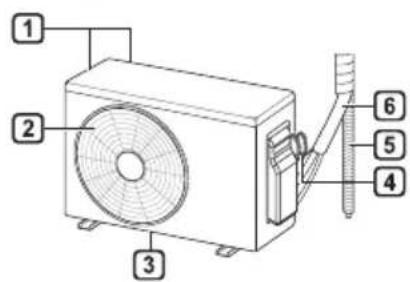
natural_image
Line drawing of a modern air conditioner with a remote control unit and a magnified view of its screen (no text or symbols)OPOMBA
2 Pritisnite gumb ON/OFF.
Tip 1
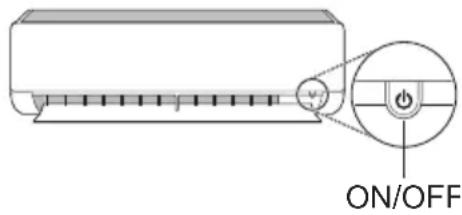
Tip 2
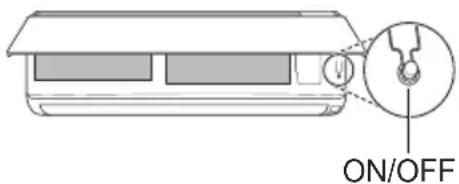
OPOMBA
| 1Gumb | 2Zaslon | Opis | na voljo funkcija | |
| Eno delitvijo | Multi | |||
| - | Za vklop/izklop klimatske naprave. | O | O | |
| 88° | Za prilagoditev želene temperature pri hlajenju, ogrevanju ali načinu samodejni prehod. | O | O | |
| MODE | Za izbiro načina hlajenje. | O | O | |
| Za izbiro načina ogrevanje. | O | O | ||
| Za izbiro načina razvlaževanje. | O | O | ||
| Za izbiro načina ventilator. | O | O | ||
| Za izbiro načina samodejni prehod/samodejno delovanje. | O | O | ||
| JET MODE | Po | Za hitro spreminjanje temperature v sobi. | O | O |
| FAN SPEED | Za prilagajanje hitrosti ventilatorja. | O | O | |
| Za prilagajanje smeri pretoka zraka v navpični ali vodoravni smeri. | O | O | ||
OPOMBA
OPOMBA
OPOMBA
natural_image
Diagram showing two circular views of a container with arrows indicating direction (no text or symbols)3 Odstranite filter iz notranje enote.
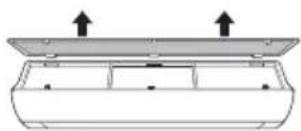
natural_image
Diagram of a device casing with two upward arrows indicating top and bottom components (no text or symbols)natural_image
Diagram of a mechanical or electrical component with circular ports and a magnified inset showing a switch (no text or symbols)natural_image
Diagram of a boat hull with pulleys and a magnified inset showing a boat on water (no text or symbols)natural_image
Diagram of a car air conditioner unit with hands holding a tray and down arrows indicating cooling or ventilation (no text or symbols)4 Očistite ga s sesalcem ali z mlačno vodo, pomešano z nevtralnim detergentom.
5 Filtra posušite v senci.
6 Vstavite kavlja zračnih filtrov v sprednji pokrov.
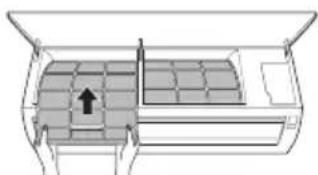
natural_image
Diagram of a car air conditioner unit with airflow path and vent slots (no text or labels)7 Za pravilno sestavljanje zračnih filtrov preverite stranski del sprednjega pokrova.
Očistite alergijski filter (izbirno)
1 Odklopite napajanje in izklopite napajalni kabel.
2 Odstranite zračna filtra iz notranje enote.
3 Odstranite alergijski filter iz notranje enote.
Tip 1
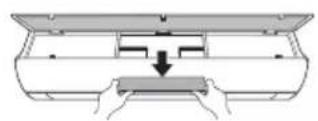
Tip 2
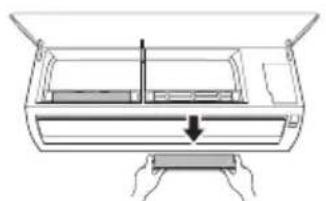
natural_image
Diagram of a car air conditioner unit with cooling fins and a downward arrow indicating airflow direction (no text or symbols)4 Očistite filtra s sesalcem.
5 Vstavite alergijski filter.
Tip 1
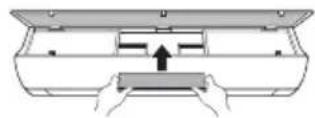
Tip 2
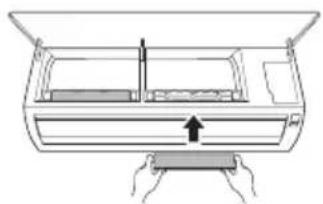
natural_image
Diagram of a car air conditioner unit with hands operating it (no text or symbols)6 Sestavite zračna filtra.
VEIDS: PIESTIPRINÃMS PIE SIENAS
Pýðing á upprunalegu kennsla
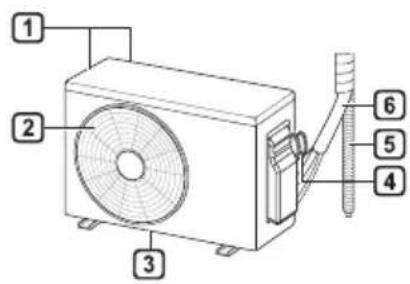
natural_image
Line drawing of a modern air conditioner with a remote control unit and a circular annotation highlighting the portion of the device (no text or symbols present)PIEZIME
PIEZIME
PIEZIME
natural_image
Diagram showing two circular views of a container with arrows indicating direction (no text or symbols)natural_image
Diagram of a device casing with two upward arrows indicating top and bottom components (no text or symbols)natural_image
Diagram of a mechanical or electrical component with circular ports and an inset showing a cross-section (no text or symbols)natural_image
Diagram of a boat hull with two circular sensors and a magnified inset showing a boat on water (no text or symbols)natural_image
Diagram of a car air conditioner unit with hands holding a tray and down arrows indicating cooling or ventilation (no text or symbols)natural_image
Diagram of a car air conditioner unit with airflow path and vent slots (no text or labels)natural_image
Diagram of a device with hands operating it, showing a handle and internal structure (no text or symbols)natural_image
Diagram of a hand pressing down on a device with an arrow indicating force or movement (no text or symbols present)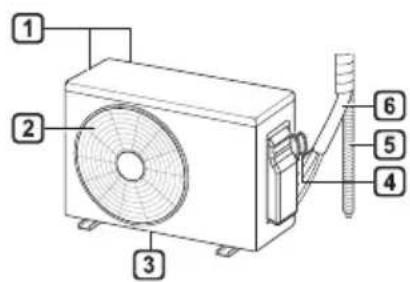
natural_image
Line drawing of a modern air conditioner with a remote control unit and a circular annotation highlighting the portion of the device (no text or symbols present)PASTABA
PASTABA
PASTABA
natural_image
Diagram showing two circular views of a container with arrows indicating direction (no text or symbols)natural_image
Diagram of a device casing with two upward arrows indicating top-down orientation (no text or symbols)natural_image
Diagram of a mechanical or electrical component with three circular elements and an inset showing a sliding mechanism (no text or symbols)natural_image
Diagram of a mechanical assembly with a pulley and a magnified inset showing a boat on a platform (no text or symbols)natural_image
Diagram of a car air conditioner unit with hands operating it, showing cooling system and airflow direction (no text or labels)natural_image
Diagram of a car air conditioner unit with internal compartments and a directional arrow indicating airflow (no text or symbols)natural_image
Diagram of a hand pressing down on a device panel with arrows indicating motion (no text or symbols)natural_image
Line drawing of a door with hands holding a tray, showing internal compartments and a central handle (no text or symbols)6 Surinkite oro filtrus.
LÁMHLEABHAR AN ÚINÉARA
AERCHÓIRITHEOIR

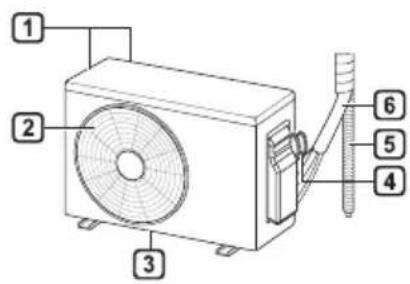
1 Scagaire Aer
2 Iontógáil Aer
3 Clúdach Tósaigh
4 Asraon aer
5 Sraonaire aer (cothrománach)
6 Sraonaire aer (ingireach)
7 Cnaipe Air/As
8 Scáthlán
9 Glacadóir Comhartha
natural_image
Line drawing of a horizontal air conditioner with a remote control unit emitting signal waves (no text or symbols)NOTE
NOTE
3 Ceangail do ghuthán cliste leis an ródaire gan sreang.
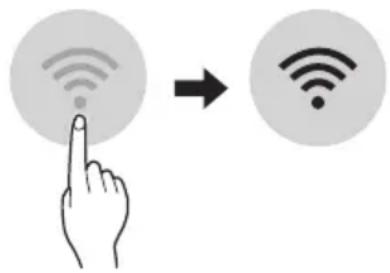
NOTE
natural_image
Simple line drawing of a hand cleaning a rectangular object (no text or symbols)natural_image
Diagram showing two circular views of a container with arrows pointing upward, no text or symbols present3 Bain ón aonad laistigh é.
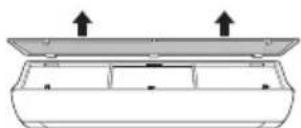
4 Glan an scagaire le glantóir folúis nó le huisce alabhog agus glantach neodrach.
5 Déan an scagaire a thriomú go nádúrtha gan sólás na gréine.
6 Cuir na húcáil an scagaire aer sa chlúdach tósaigh.
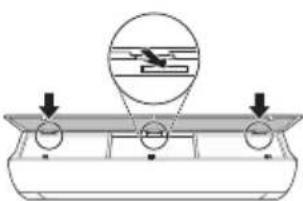
natural_image
Diagram of a mechanical component with arrows indicating direction, no text or symbols presentnatural_image
Diagram of a mechanical assembly with a magnified inset showing a flight path (no text or symbols)natural_image
Diagram of a car air conditioner unit with cooling fins and airflow arrows (no text or symbols)4 Glan an scagaire le glantóir folúis nó le huisce alabhog agus glantach neodrach.
natural_image
Diagram of a car air conditioner unit with internal compartments and a black arrow indicating the airflow direction (no text or symbols)natural_image
Diagram of a hand pressing down on a device component with arrows indicating motion (no text or symbols)natural_image
Diagram of hands installing or adjusting a device panel with an arrow indicating the component (no text or symbols present)6 Cuir na scagairí aer le chéile.
VAŽNA BEZBEDNOSNA UPUTSTVA 4
RAD 11
Napomene za rad....11
Delovi i funkcije....11
Bežični daljinski upravljač....12
Automatsko ponovno pokretanje klima uređaja....17
Korišćenje funkcije režima....17
Korišćenje funkcije brzog režima....20
VAŽNA BEZBEDNOSNA UPUTSTVA

UPOZORENJE
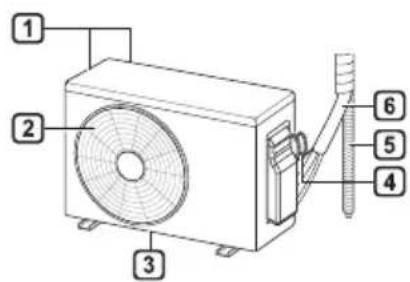
1 Filter za vazduh
2 Dovod vazduha
3 Prednji poklopac
4 Odvod vazduha
5 Usmerivač vazduha (horizontalna lopatica)
6 Usmerivač vazduha (vertikalni rešetkasti otvor)
7 Dugme za uključivanje/isključivanje
8 Ekran
9 Prijemnik signala
1 Ventili za dovod vazduha
2 Ventili za odvod vazduha
3 Osnovna ploča
4 Kabl za napajanje
5 Odvodno crevo
6 Cevi za rashladno sredstvo
NAPOMENA
- Broj i lokacija radnih lampica mogu da variraju u zavisnosti od modela klima uređaja.
natural_image
Line drawing of a modern air conditioner with a remote control unit and a circular annotation highlighting the portion of the device (no text or symbols present)NAPOMENA
- Daljinskim upravljačem možete da upravljate i drugim elektronskim uređajima ako ih usmerite prema njima. Vodite računa da daljinski upravljač usmerite prema prijemniku signala na klima uređaju.
- Da bi uređaj ispravno radio, koristite mekanu tkaninu da očistite predajnik i prijemnik signala.
- U slučaju da proizvod ne poseduje neku funkciju, neće se aktivirati zvučni signal na proizvodu kada se pritisne dugme za tu funkciju na daljinskom upravljaču, osim u slučaju funkcija za smer protoka vazduha (
SWING), prikaz energije (kW [3 s]), pročišćavanje vazduha (
| 1Dugme | 2Ekran | Opis | dostupan Funkcija | |
| Jednog deljenje | Višestruki | |||
| - | Za uključivanje/isključivanje klima uređaja. | O | O | |
| 88° | Za podešavanje željene temperature u prostoriji u režimu hlađenja, grejanja ili automatskog prebacivanja. | O | O | |
| MODE | Za izbor režima hlađenja. | O | O | |
| Za izbor režima grejanja. | O | O | ||
| Za izbor režima isušivanja vlage. | O | O | ||
| Za izbor režima ventilatora. | O | O | ||
| Za izbor režima automatskog prebacivanja / automatskog rada. | O | O | ||
| JET MODE | Po | Za brzu promenu temperature u prostoriji. | O | O |
| FAN SPEED | Za podešavanje brzine ventilatora. | O | O | |
| Za podešavanje pravca protoka vazduha vertikalno ili horizontalno. | O | O | ||
NAPOMENA
NAPOMENA
- Na nekim unutrašnjim jedinicama se prikazuje ili L.
- Ova funkcija je onemogućena kada pritisnete dugme MODE ili JET MODE.
- Ova funkcija je onemogućena i postavljeno je automatsko usmeravanje na vertikalni pravac kada pritisnete dugme SWING.
- Kada je ova funkcija isključena, horizontalna lopatica radi automatski u zavisnosti od podešenog režima.
NAPOMENA
- Da biste proverili Wi-Fi vezu, proverite da li je ikonica osvetljena na kontrolnoj tabli.
- Uređaj podržava samo Wi-Fi mreže od 2,4 GHz. Da biste proverili mrežnu frekvenciju, obratite se internet provajderu ili pogledajte priručnik za bežični ruter.
- LG ThinQ ne snosi odgovornost za probleme sa povezivanjem na mrežu niti za bilo koje smetnje, kvarove ili greške izazvane povezivanjem na mrežu.
natural_image
Simple line drawing of a hand cleaning a rectangular object (no text or symbols)natural_image
Diagram showing two circular views of a mechanical component with arrows indicating direction (no text or symbols)natural_image
Diagram of a mechanical setup with a circular component and two downward arrows, no text or symbols present.7 Gurnite kuke nadole da biste postavili filter za vazduh.
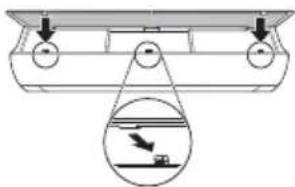
natural_image
Diagram of a boat hull with pulley system and inset showing aircraft flying over water (no text or symbols)8 Pogledajte bočnu stranu prednjeg poklopca da biste proverili da li je filter za vazduh ispravno montiran.
Tip2
1 Isključite napajanje i izvucite kabl iz struje.
2 Otvorite prednji poklopac.
• Podignite malo obe strane poklopca.
3 Držite drške filtera za vazduh, povucite ih lagano nadole i izvadite ih iz unutrašnje jedinice.
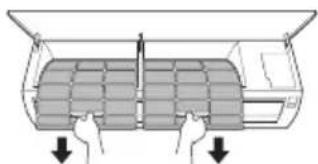
natural_image
Diagram of a car air conditioner unit with hands holding the panel and down arrows indicating cooling or ventilation (no text or symbols)4 Očistite filter usisivačem ili mlakom vodom sa neutralnim deterdžentom.
5 Osušite filtere u hladu.
6 Ubacite kuke filtera za vazduh u prednji poklopac.

natural_image
Diagram of a car air conditioner unit with internal compartments and a black arrow indicating the air gap (no text or symbols present)7 Pogledajte bočnu stranu prednjeg poklopca da biste proverili da li su filteri za vazduh ispravno montirani.
Čišćenje antialergijskog filtera (opciono)
1 Isključite napajanje i izvucite kabl iz struje.
2 Izvadite filtere za vazduh iz unutrašnje jedinice.
3 Izvadite antialergijski filter iz unutrašnje jedinice.
Tip1
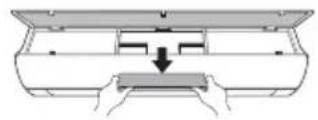
Tip2
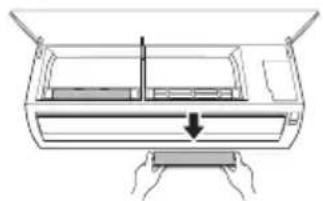
natural_image
Diagram of a car air conditioner unit with hands operating it, showing internal components and airflow direction (no text or labels)4 Očistite filtere usisivačem.
5 Ubacite antialergijski filter.
Tip1
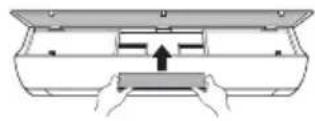
Tip2
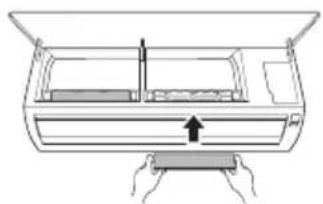
natural_image
Diagram of a car air conditioner unit with hands operating it (no text or symbols)6 Sklopite filtere za vazduh.
7 Pogledajte bočnu stranu prednjeg poklopca da biste proverili da li je filter za vazduh ispravno montiran.
NAPOMENA
- Funkcija i lokacija antialergijskog filtera može da varira kod različitih modela.
Funkcija samostalne dijagnoze
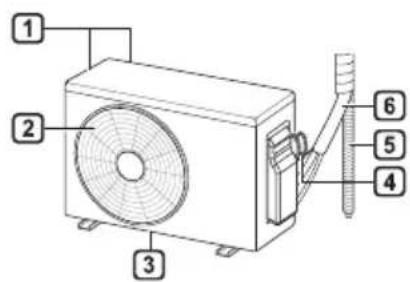
1 Филтер за воздух
2 Довод на воздух
3 Преден капак
4 Одвод на воздух
5 Воздушен дефлектор (хоризонтална перка)
6 Воздушен дефлектор (вертикално ребро)
7 Вклучи/Исклучи копче
8 Екран
9 Приемник на сигнал
natural_image
Line drawing of a horizontal air conditioner with a remote control unit emitting signal waves (no text or symbols)НАПОМЕНА
НАПОМЕНА
НАПОМЕНА
natural_image
Simple line drawing of a washing machine with a hand cleaning the surface (no text or symbols)natural_image
Diagram showing two circular views of a rectangular object with internal features, no text or symbols present.natural_image
Diagram of a mechanical or electrical component with three circular ports and an inset showing a cross-section (no text or symbols)natural_image
Diagram of a boat hull with a crane lifting a weight, showing an inset view of a boat being lifted (no text or symbols present)natural_image
Diagram of a car air conditioner unit with cooling fins and cooling fins (no text or labels)natural_image
Diagram of a car air conditioner unit with internal compartments and a black arrow indicating the air inlet (no text or symbols present)natural_image
Diagram of a device with a handle and internal components, showing a downward arrow indicating motion (no text or symbols present)natural_image
Diagram of a device with hands holding a tray and a vertical arrow indicating motion (no text or symbols)
1 Filtri i ajrit
2 Konsumi i ajrit
3 Kapaku i përparmë
4 Shkarkuesi i ajrit
5 Deflektori i ajrit (fleta horizontale)
6 Deflektori i ajrit (fleta vertikale)
7 Butoni i Ndezjes/Fikjes
8 Ekrani
9 Marrësi i Sinjalit
natural_image
Line drawing of a modern air conditioner with a remote control unit and a circular annotation highlighting the portion of the device (no text or symbols present)SHËNIM
SHËNIM
SHËNIM
natural_image
Diagram showing two circular views of a device with arrows indicating direction (no text or symbols)natural_image
Diagram of a mechanical or electrical component with three circular ports and an inset showing a horizontal line above a circular feature (no text or symbols)natural_image
Diagram of a mechanical assembly with pulleys and a magnified inset showing a boat on a platform (no text or symbols)natural_image
Diagram of a car air conditioner unit with hands operating it, showing internal grid layout and directional arrows (no text or symbols)natural_image
Diagram of a car air conditioner unit with heat sink and vent slots (no text or labels)natural_image
Diagram of a device with hands holding a tray and a vertical line inside, showing a downward arrow (no text or symbols)natural_image
Diagram of a device with hands holding a tray and a vertical arrow indicating motion (no text or symbols)6 Monto filtrat e ajrit.
SIGURNOSNA UPUTSTVA....3
VAŽNA SIGURNOSNA UPUTSTVA....4
RAD 11
Napomene prilikom rada 11
VAŽNA SIGURNOSNA UPUTSTVA
UPOZORENJE
Da biste smanjili opasnost od eksplozije, požara, smrti, strujnog udara, povrede ili opekotina za osobe prilikom korištenja ovog proizvoda, pridržavajte se osnovnih mjera predostrožnosti, uključujući sljedeće:
Djecu u domaćinstvu
Ovaj uređaj nije namijenjen za upotrebu od strane osoba (uključujući djecu) sa smanjenim fizičkim, senzornim ili mentalnim sposobnostima, ili s nedostatkom iskustva i znanja, osim u slučaju da su te osobe pod stalnim nadzorom ili su instruirane po pitanju korištenja uređaja od strane osobe koja je odgovorna za njihovu sigurnost. Djeca trebaju biti pod nadzorom kako bi se osiguralo da se ne igraju s uređajem.
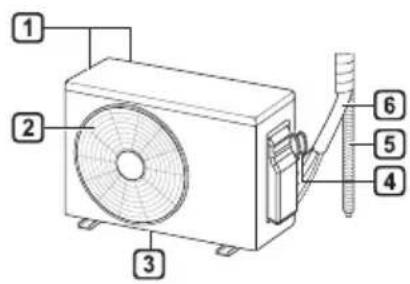
1 Zračni filter
2 Ulaz zraka
3 Prednji poklopac
4 Izlaz zraka
5 Deflektor zraka (horizontalna krilca)
6 Deflektor zraka (vertikalna krilca)
7 Tipka za uključivanje/isključivanje (On/Off)
8 Displej
9 Prijemnik signala
natural_image
Line drawing of a modern air conditioner with a remote control unit and a circular annotation highlighting the portion of the device (no text or symbols present)NAPOMENA
| Tipka1 | Displej2 | Opis | Dostupna funkcija | |
| JednostrukiRazdvojeni | Višestruki | |||
| - | Da biste uključili/isključili klima uređaj. | ○ | ○ | |
| 88° | Da biste podesiliželjenu temperaturu unacinu rada zahlađenje, grijanje ili unacinu radaautomatskogprebacivanja. | ○ | ○ | |
| MODE | Da biste odabrali načinrada za hlađenje. | ○ | ○ | |
| Da biste odabrali načinrada za grijanje. | ○ | ○ | ||
| Da biste odabrali načinrada za odvlaživanje. | ○ | ○ | ||
| Da biste odabrali načinrada ventilator. | ○ | ○ | ||
| Da biste odabraliautomatskoprebacivanje/automatski način rada. | ○ | ○ | ||
| JETMODE | Po | Da biste brzopromijenili sobnutemperaturu. | ○ | ○ |
| FANSPEED | Da podesite brzinuventilatora. | ○ | ○ | |
| Da podesite vertikalniili horizontalni smjerprotoka zraka. | ○ | ○ | ||
NAPOMENA
NAPOMENA
• ili L_prikazano je na nekim unutrašnjim jedinicama.
NAPOMENA
natural_image
Diagram showing two circular views of a device with arrows indicating direction (no text or symbols)natural_image
Diagram of a mechanical or electrical component with circular ports and an inset showing a suspended object (no text or symbols)7 Gurnite kukice prema dolje da biste sklopili zračni filter.
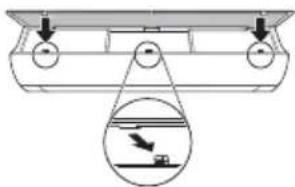
natural_image
Diagram of a boat hull with pulley system and inset showing a crane lifting a weight (no text or symbols)natural_image
Diagram of a car air conditioner unit with hands operating it, showing internal grid layout and cooling arrows (no text or symbols)4 Očistite filtere pomoću usisivača ili mlakom vodom i neutralnim deterdžentom.
5 Osušite filtere u hladu.
6 Umetnite kukice zračnih filtera u prednji poklopac.
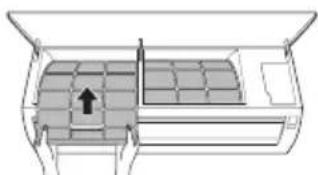
natural_image
Diagram of a car air conditioner unit with internal compartments and a black arrow indicating airflow direction (no text or symbols)natural_image
Diagram of a car air conditioner unit with hands operating it, showing internal components and airflow direction (no text or labels)4 Očistite filtere pomoću usisivača.
5 Umetnite antialergijski filter.
Tip 1
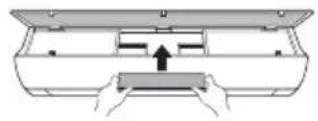
Tip 2
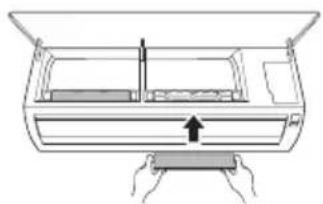
natural_image
Line drawing of a device with hands holding a tray and a vertical arrow indicating motion (no text or symbols)6 Sklopite zračne filtere.