
Access 50S - Smartphone ARCHOS - Free user manual and instructions
Find the device manual for free Access 50S ARCHOS in PDF.



| Product type | Smartphone |
| Brand | ARCHOS |
| Model | Access 50S |
| Operating system | Android 8.1 Oreo (Go Edition) |
| Screen size | 5 inches |
| Screen resolution | 960 x 480 pixels |
| Dimensions (L x W x H) | 141 x 65.5 x 9.3 mm |
| Weight | 130 g |
| Battery | 2000 mAh Lithium-ion |
| Charger | 5V 600mA, micro-USB port |
| Rear camera | 8 MP with autofocus |
| Front camera | 2 MP |
| Video recording | 1080p at 30 fps |
| SIM card | Dual Nano SIM |
| Expandable memory | Micro SD up to 64 GB |
| Network | 4G LTE (bands B1/B3/B7/B20), 3G, 2G |
| Wi-Fi | 802.11 b/g/n |
| Bluetooth | 4.2 + LE |
| Sensors | Proximity sensor, accelerometer |
| Connectivity | Micro-USB, 3.5 mm headphone jack |
| Speaker | Built-in |
| Warranty | 2 years (estimated) |
| Maintenance | Clean with a soft, dry cloth. Do not use harsh chemicals. |
| Safety | Use only approved charger and accessories. Do not expose to water or moisture. |
Frequently Asked Questions - Access 50S ARCHOS
User questions about Access 50S ARCHOS
0 question about this device. Answer the ones you know or ask your own.
Ask a new question about this device
Download the instructions for your Smartphone in PDF format for free! Find your manual Access 50S - ARCHOS and take your electronic device back in hand. On this page are published all the documents necessary for the use of your device. Access 50S by ARCHOS.
USER MANUAL Access 50S ARCHOS
× www.archos.com, click Support > After-sales support
| 4G/3G/2G SIM | 1 |
| 4G/3G/2G SIM | 2 |
| Micro-SD card | 3 |
Matériel
Processeur
Carte graphique Spreadtrum SC9832E - Quad Core @ 1.4
GHz
Mémoire vive Mali-T820 MP1-600MHz
Stockage interne 1Giga
Stockage extensible. 8Giga
4G Oui;800/1800/2600 MHz
GPS Yes, GPS and Glonass
FM Radio Yes
SAR/DAS - Head Max : xxx W/Kg (10g)
- Body Max: xxx W/Kg (10g)
Appareil photo
Gyrocompas/Boussole Non/Non
USB Micro USB
USB OTG Non
EN
Help & assistance
twitter.com/archos www.facebook.com/archos
Blog https://blog.archos.com/
? http://faq.archos.com/
× www.archos.com, click Support > After-sales support
www.archos.com, click Support > Downloads > Declaration of conformity
This is a translation of the original version
Warranty, Legal and Safety booklet: www.archos.com/support/warranty.html
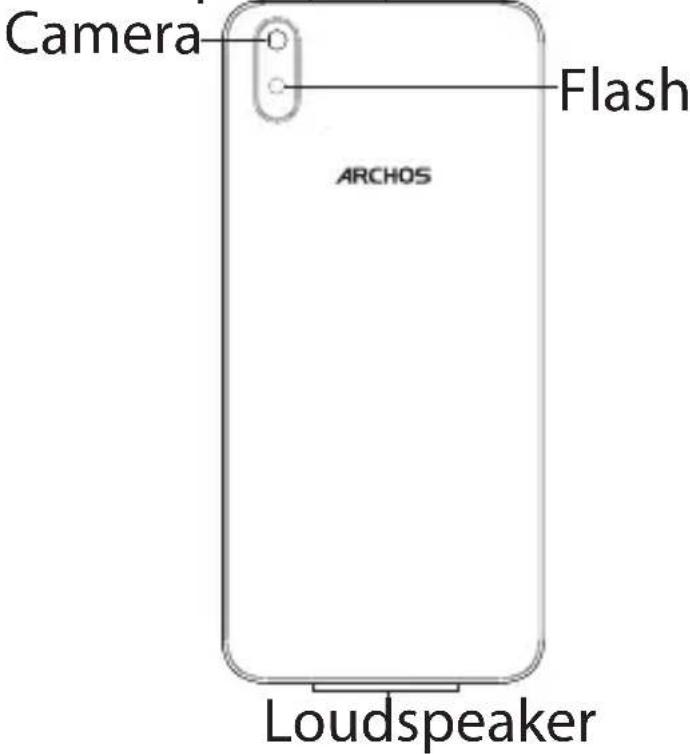
Describing your device

Receiver Light sensor Front camera
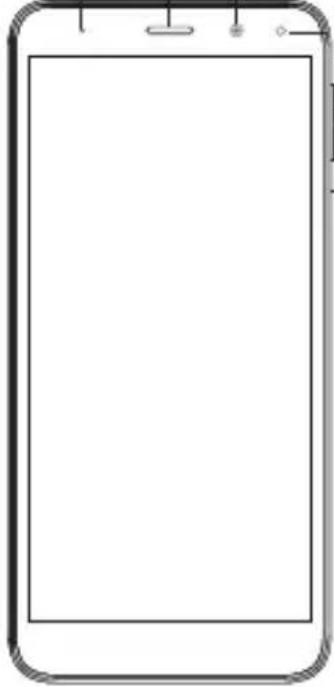
Flash Volume On/Off
Micro USB port, Headphone jack
EN
Getting started
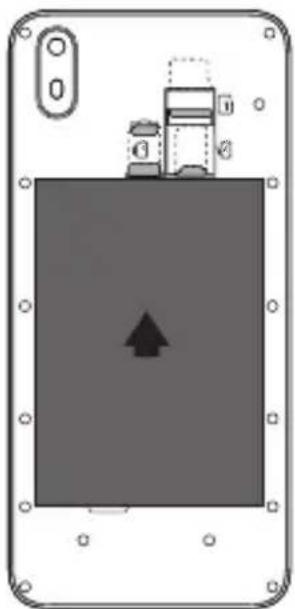
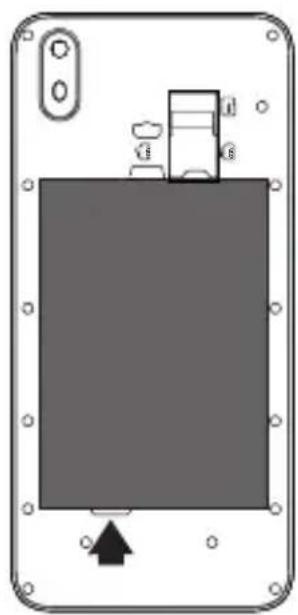
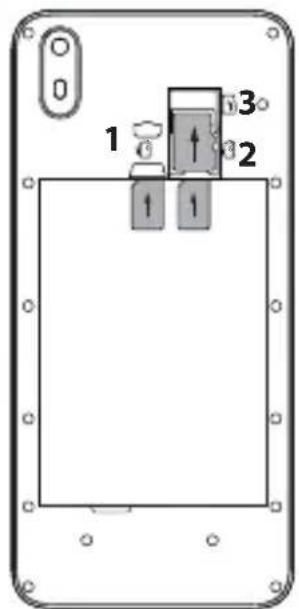
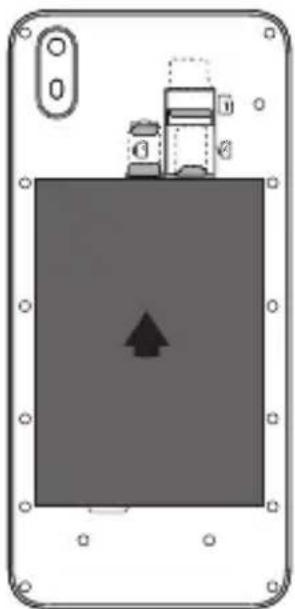
When inserting your SIM card or micro-SD card, make sure to follow the illustration, otherwise you may damage the slot or the card.
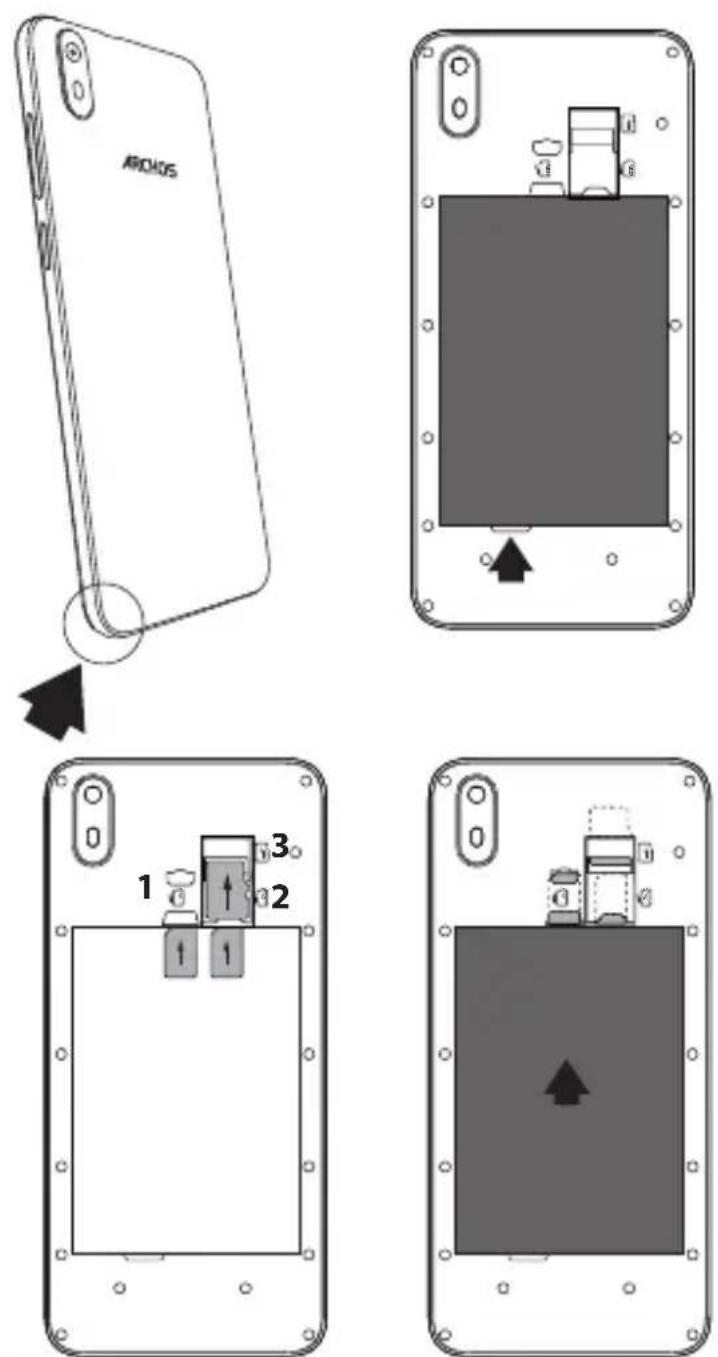
| 4G/3G/2G SIM | 1 |
| 4G/3G/2G SIM | 2 |
| Micro-SD card | 3 |
Willkommen

twitter.com/archos
f www.facebook.com/archos
Blog https://blog.archos.com/
? http://faq.archos.com/
| 4G/3G/2G SIM 1 | |
| 4G/3G/2G SIM 2 | |
| Micro-SD card 3 |
ES
Nuestra comunidad
twitter.com/archos f www.facebook.com/archos
Blog https://blog.archos.com/
Flash Volumen Encender/ Apagar
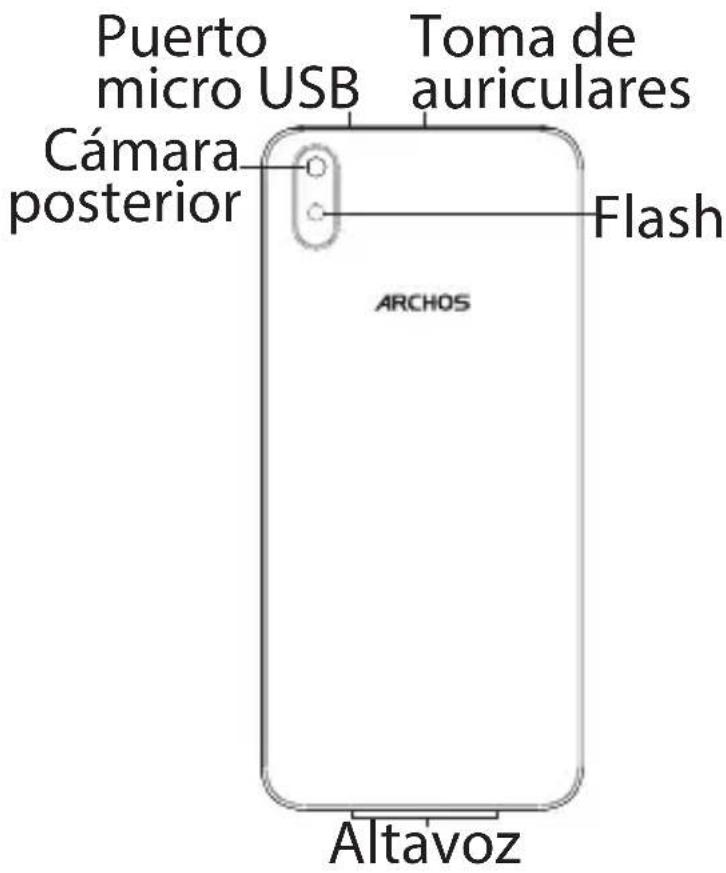
| 4G/3G/2G SIM | 1 |
| 4G/3G/2G SIM | 2 |
| Micro-SD card | 3 |
Benvenuto
IT
twitter.com/archos
f www.facebook.com/archos
Blog https://blog.archos.com/
? http://faq.archos.com/
www.archos.com, fai clic su Assistenza > Supporto post vendita
www.archos.com, fai clic Assistenza > Download > Dichiarazione di conformità
| 4G/3G/2G SIM | 1 |
| 4G/3G/2G SIM | 2 |
| Micro-SD card | 3 |
NL
Kom erbij!
twitter.com/archos f www.facebook.com/archos
Blog https://blog.archos.com/
? http://faq.archos.com/
× www.archos.com, klik op Support > After-sales support
www.archos.com, click Support > Downloads > Declaration of conformity [Conformiteitsverklaring]
| 4G/3G/2G SIM 1 |
| 4G/3G/2G SIM 2 |
| Micro-SD card 3 |
Junte-se a nós

twitter.com/archos
f www.facebook.com/archos
Blog https://blog.archos.com/
? http://faq.archos.com/
Flash Volume Ligar/ Desligar
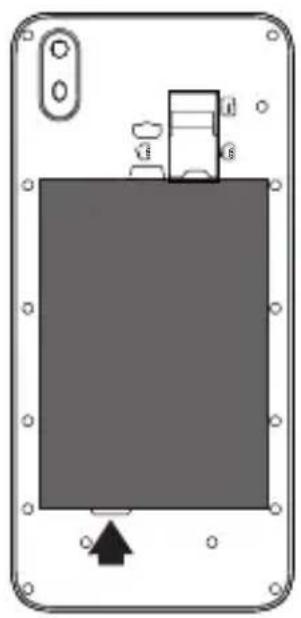
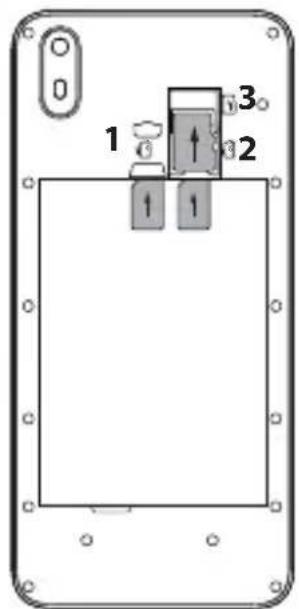
| 4G/3G/2G SIM | 1 |
| 4G/3G/2G SIM | 2 |
| Micro-SD card | 3 |
RU
| 4G/3G/2G SIM | 1 |
| 4G/3G/2G SIM | 2 |
| Micro-SD card | 3 |
Dołącz do nas

twitter.com/archos f www.facebook.com/archos
Blog https://blog.archos.com/
? http://faq.archos.com/
✗ www.archos.com, kliknij Support > After-sales support
www.archos.com, kliknij
CE Support > Downloads > Declaration of conformity
| 4G/3G/2G SIM | 1 |
| 4G/3G/2G SIM | 2 |
| Micro-SD card | 3 |
HU
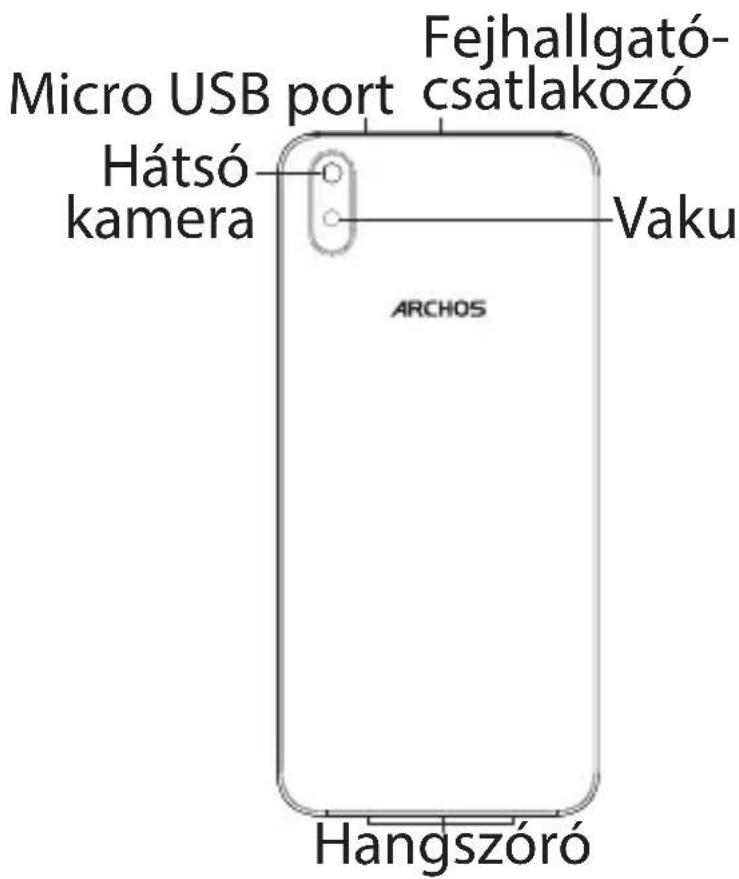
| 4G/3G/2G SIM 1 |
| 4G/3G/2G SIM 2 |
| Micro-SD card 3 |
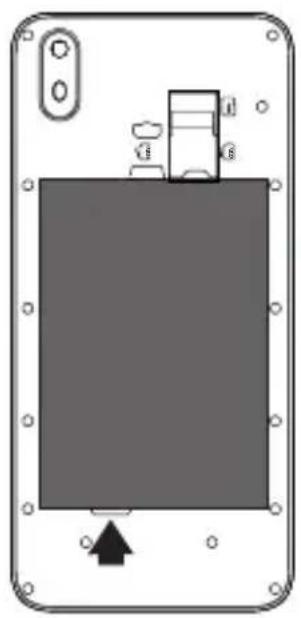
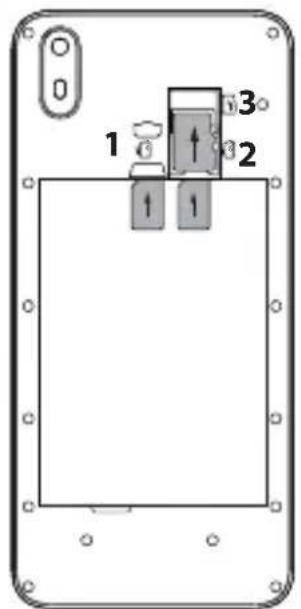
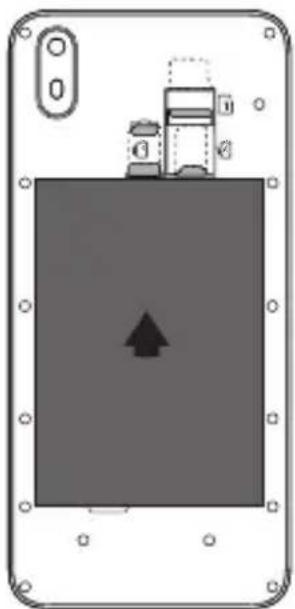
| 4G/3G/2G SIM | 1 |
| 4G/3G/2G SIM | 2 |
| Micro-SD card | 3 |
CZ
Návod k použití
twitter.com/archos
f www.facebook.com/archos
Blog https://blog.archos.com/
? http://faq.archos.com/
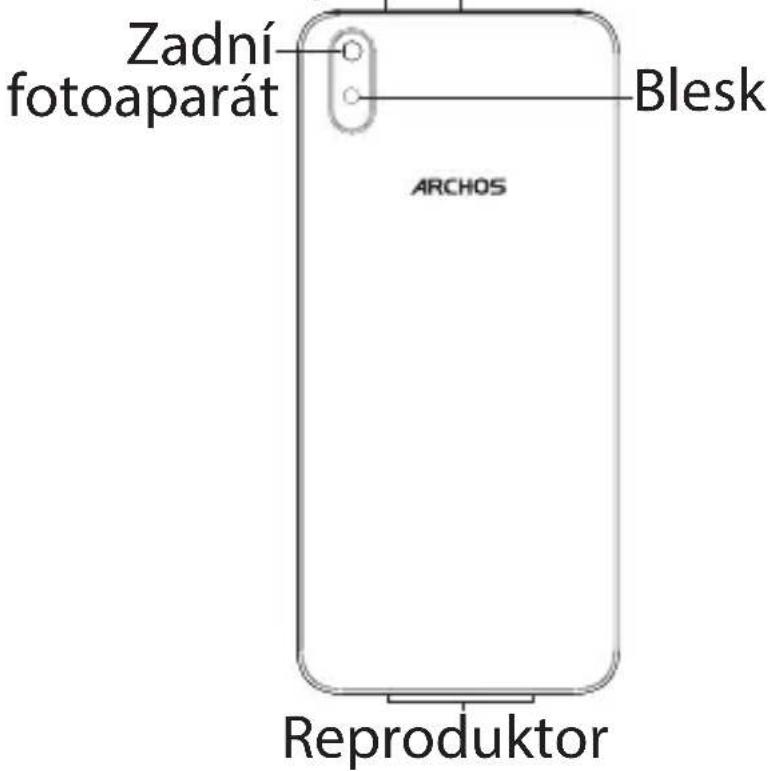
Blesk +/- Hlasitost
Zapnutí/ vypnutí
Micro USB port Konektor sluchátek
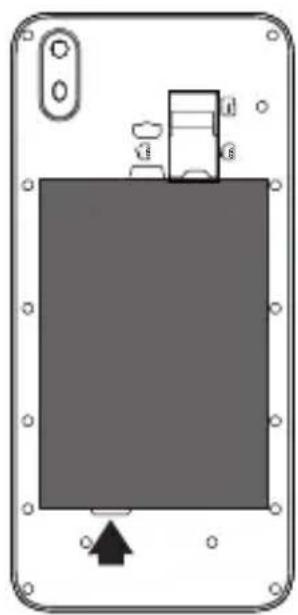
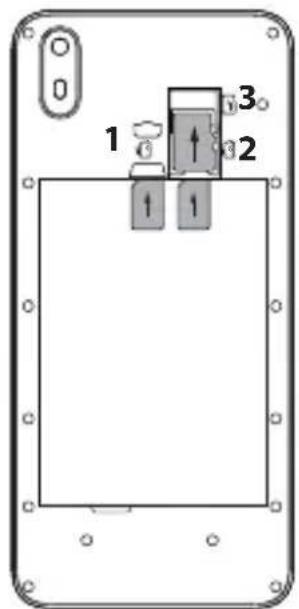
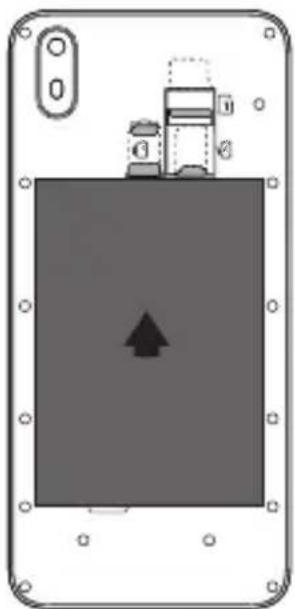
| 4G/3G/2G SIM | 1 |
| 4G/3G/2G SIM | 2 |
| Micro-SD card | 3 |
Pomoc a podpora

twitter.com/archos f www.facebook.com/archos
Blog https://blog.archos.com/
| 4G/3G/2G SIM 1 |
| 4G/3G/2G SIM 2 |
| Micro-SD card 3 |
National restrictions
This device is intended for home and office use in all EU countries (and other countries following the EU directive 2014/53/EU) without any limitation except for the countries mentioned below:
Country Restriction Reason/remark
| Bulgaria None | General authorization required for outdoor use and public service |
| Italy None If used outside of own | premises, general authorization is required. |
| Luxembourg None General authorization | required for network and service supply (not for spectrum) |
| Norway Implemented This subsection does | not apply for the geographical aera within a radius of 20 km from the centre of Ny-Alesund Only for indoor applications |
| Russian Federation None |
Note: Frequencies 2454-2483.5MHZ are restricted to indoor use in France.
SAR
After the laboratory measurements, when it is kept 5 cm from your body the SAR values for this mobile are :
- Head Max: 0.790W/Kg (10g)
- Body Max: 1.280 W/Kg (10g)
Archos company (Contact address : ARCHOS SA 12 Rue Ampère 91430 Igny France) declares that this smartphone ARCHOS Access 50S is in compliance with the essential requirements and other relevant provisions of Directive 2014/53/EU:
https://www.archos.com/products/conformity.html
Declaration of Conformity
We, the undersigned (Manufacturer / □ The manufacturers authorized representative established within EEA):
| Company | ARCHOS S.A. | |||
| Address | 12, rue Ampere 91430 Igny | |||
| Country France | ||||
| Telephone number +(33)1 69 | 33 16 90 | |||
| Telefax number +(33)1 69 33 | 16 99 | |||
| E-mail wu@archos.com | ||||
| Certify and declare under our responsibility that the following product: | ||||
| Product Description | 4G Smart Phone | |||
| Manufacturer | ARCHOS S.A. | |||
| Brand Name | ARCHOS | |||
| Model/Type | AC50ASS, Access 50S | |||
| Is tested to and conforms with the essential test suites Included in the following standards, which are in force within theEEA: | ||||
| Standard | Issue date | Reference to report/file | ||
| Draft ETSI EN 301 489-1 V2.2.0 | 2017-03 | AGC01085181001EE01 | ||
| Draft ETSI EN 301 489-17 V3.2.0 | 2017-03 | AGC01085181001EE01 | ||
| Draft ETSI EN 301 489-19 V2.1.0 | 2017-03 | AGC01085181001EE01 | ||
| Draft ETSI EN 301 489-52 V1.1.0 2016-1 | 1 | AGC01085181001EE01 | ||
| EN 55032 2015/AC:2016 | AGC01085181001EE02 | |||
| EN 55035 2017 | AGC01085181001EE02 | |||
| EN 61000-3-2 2014 | AGC01085181001EE02 | |||
| EN 61000-3-3 2013 | AGC01085181001EE02 | |||
| ETSI EN 300 328 V2.1.1 (BR&ERD) 2016-1 | 11 | AGC01085181001EE04 | ||
| ETSI EN 300 328 V2.1.1 (BLE) 201 6-11 | AGC01085181001EE11 | |||
| ETSI EN 300 328 V2.1.1 (Wifi ) | 201 6-11 | AGC01085181001EE05 | ||
| ETSI EN 303 413 V1.1.1 (GPS) | 2017-06 AGC01085181001EE06 | |||
| ETSI EN 301 511 V12.5.1 (GSM) | 2017-03 | AGC01085181001EE03 | ||
| ETSI EN 301 908-1 V11.1.1 (WCDMA) | 2016-07 | AGC01085181001EE07 | ||
| ETSI EN 301 908-2 V11.1.2 (WCDMA) | 2017-08 | AGC01085181001EE07 | ||
| ETSI EN 301 908-13 V11.1.2 (LTE) | 2017-07 | AGC01085181001EE10 | ||
| Final draft ETSI EN 303 345 V1.1.7 (FM) | 2017-03 | AGC01085181001EE14 | ||
| EN 62479 | 2010 | AGC01085181001EH01 | ||
| EN 50360 2017 | AGC01085181001EH01 | |||
| EN 62209-1 | 2016 | AGC01085181001EH01 | ||
| EN 62209-2 | 2010 | AGC01085181001EH01 | ||
| EN 50566 2017 | AGC01085181001EH01 | |||
| EN 60950-1 | 2006+A11:2009+A1:2010+A12:2011+A2:2013 | AGC01085181001ES01 | ||
| EN 50332-1 | 2013 | AGC01085181001ES04 | ||
| EN 50332-2 | 2013 | AGC01085181001ES04 | ||
| And therefore complies with the essential requirements of the following directives: | ||||
| Dire ctive Na me | Directive number | Further identification | ||
| RED Directive | 2014/53/EU | |||
| EMC Directive | 2014/30/EU | |||
| LVD Directive | 2014/35/EU | Year of affixing the CE Marking: 2018 | ||
| ERP Directive | 2009/125/EC | |||
| RoHS Directive 2011/65/EU | ||||
| Battery Directive | 2006/66/EC | |||
| The following Notified Bodies have been consulted in the Conformity Assessment procedure of RED Directive(whenever applicable): | ||||
| Notified Body number | 0700 | |||
| PHOENIX TESTLAB GmbHKonigswinkel 10D-32825 Blomberg, Germanyhttp://ec.europa.eu/growth/tools-databases/nando/index.cfm?fuseaction=directive.nb&refe_cd=EPOS_44015 | ||||
| The technical documentation as required by the conformity assessment procedure is kept at the following address for a period ending at least 10 years after the last product has been manufactured at the disposal of the relevant national authorities of any Member State for inspection: | ||||
| Company ARCHOS S.A. | ||||
| Address | 12,rue Ampere 91430 igny | |||
| Country FranceTelephone number +(86)75583734670Telefax number +(86)75583734621E-mail wu@archos.com | ||||
| Product is CE-marked in Europe | ||||
 | Name of authorized officer: | Jacky WU | Title of authorized officer | General Manager |
| Drawn up in | ||||
| Date | 2018.10.29 | |||
 | ||||
| Signature and Company Stamp | ||||



Brand : ARCHOS
Model : Access 50S
Category : Smartphone