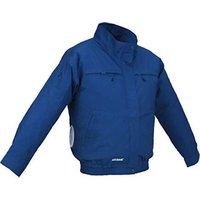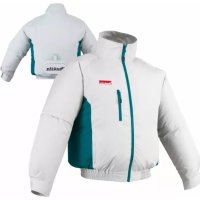
DFJ201ZM - Ventilated clothing MAKITA - Free user manual and instructions
Find the device manual for free DFJ201ZM MAKITA in PDF.



User questions about DFJ201ZM MAKITA
0 question about this device. Answer the ones you know or ask your own.
Ask a new question about this device
Download the instructions for your Ventilated clothing in PDF format for free! Find your manual DFJ201ZM - MAKITA and take your electronic device back in hand. On this page are published all the documents necessary for the use of your device. DFJ201ZM by MAKITA.
USER MANUAL DFJ201ZM MAKITA
GB Cordless Fan Jacket Instruction manual
ENGLISH (Original instructions)
SYMBOLS
The following show the symbols used for the equipment. Be sure that you understand their meaning before use.

Read instructions.

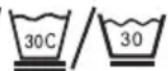
Machine wash cold delicate cycle (30^)

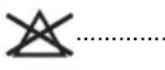
Do not bleach.


Line dry in the shade.

Do not wring.

Cool iron if needed.

Do not dryclean.

Cd Ni-MH Li-Hon
Only for EU countries
Do not dispose of electric equipment or battery pack together with household waste material!
In observance of the European Directives, on Waste Electric and Electronic Equipment and Batteries and Accumulators and Waste Batteries and
Accumulators and their implementation in accordance with national laws, electric equipment and batteries and battery pack(s) that have reached the end of their life must be collected separately and returned to an
environmentally compatible recycling facility.
SAFETY INSTRUCTIONS

WARNING:
Read all safety warnings and all instructions. Failure to follow the warnings and instructions may result in electric shock, fire and/or serious injury.
Intended use
The fan jacket is intended for cooling down body temperature.
Safety warnings
- Do not use the jacket other than its intended use.
- If you sense anything unusual, switch off the jacket and remove the battery holder immediately.
- Do not wear the jacket with bare skin.
- Never use the fan jacket where temperature reaches more than 50^ (122^) . Otherwise it may cause burns on your skin. Also avoid using in high humidity.
- Do not stamp, toss or abuse the fan jacket.
-
Avoid water from electrical parts.
-
Never sleep while wearing the fan jacket. Steep decline of body temperature may harm your health.
- Do not turn on the fan jacket unless you are wearing it.
- Do not put your finger into the fan unit. Especially, pay attention to children not to play with the fan jacket.
- Children, handicapped persons, or anyone who are insensitive to temperature, for example a person with poor blood circulation, shall refrain from using the jacket.
- If any abnormality is found, contact your local service center for repair.
- Keep maintenance labels and nameplate. If they become unreadable or missing, contact your local service center for repair.
- Choose appropriate fan speed in accordance with the usage environment for continuous use.
- The appliance is not to be used by young children unless the controls have been pre-set by a parent or guardian, or unless the child has been adequately instructed on how to operate the controls safely.
- Before washing, detach the fan unit, battery holder and remove the battery cartridge. Wash the jacket part only.
- Do not blow compressed air towards the fan. Do not put small stick into the fan unit. Otherwise the fan and motor may be damaged.
- Do not expose the jacket to rain or wet conditions. Water entering the jacket may increase the risk of electric shock.
- Do not abuse the cord. Never use the cord for carrying, pulling or unplugging the jacket. Keep cord away from heat, oil, sharp edges.
- Do not connect power source to USB port. Otherwise there is risk of fire. The USB port is only intended for charging lower voltage device. Always place the cover onto the USB port when not charging the lower voltage device.
- Do not insert a nail, wire, etc. into USB power supply port. Otherwise a circuit short may cause smoke and fire.
- Do not use the jacket while you are under the influence of drugs, alcohol or medication.
- Do not leave the fan jacket into the high temperature place, such as sun-heated car. Otherwise plastic part may melt and be damaged.
- For long time storage, remove the battery holder and battery cartridge from the jacket, and remove the battery cartridge from the battery holder.
- This appliance is not intended for medical use in hospitals.
Electrical safety
- Do not insert a nail, wire, etc. into USB power supply port. Otherwise a circuit short may cause smoke and fire.
- Do not connect power source to USB port. Otherwise there is risk of fire. The USB port is only intended for charging lower voltage device. Always place the cover onto the USB port when not charging the lower voltage device.
Important safety instructions for battery cartridge
- Recharge only with the charger specified by the manufacturer. A charger that is suitable for one type of
battery pack may create a risk of fire when used with another battery pack.
- Use the jacket only with specifically designated battery packs. Use of any other battery packs may create a risk of injury and fire.
- Before using battery cartridge, read all instructions and cautionary markings on (1) battery charger, (2) battery, and (3) product using battery.
- Do not disassemble battery cartridge.
- If operating time has become excessively shorter, stop operating immediately. It may result in a risk of overheating, possible burns and even an explosion.
- Under abusive conditions, liquid may be ejected from the battery; avoid contact. If electrolyte gets into your eyes, rinse them out with clear water and seek medical attention right away. It may result in loss of your eyesight.
-
Do not short the battery cartridge:
-
Do not touch the terminals with any conductive material.
- Avoid storing battery cartridge in a container with other metal objects such as nails, coins, etc.
-
Do not expose battery cartridge to water or rain. A battery short can cause a large current flow, overheating, possible burns and even a breakdown.
-
Do not store the jacket, battery holder and battery cartridge in locations where the temperature may reach or exceed 50^ (122^) .
- Do not incinerate the battery cartridge even if it is severely damaged or is completely worn out. The battery cartridge can explode in a fire.
- Be careful not to drop or strike battery.
- Do not use a damaged battery.
- Follow your local regulations relating to disposal of battery.
Tips for maintaining maximum battery life
- Never recharge a fully charged battery cartridge. Overcharging shortens the battery service life.
- Charge the battery cartridge with room temperature at 10^ - 40^ (50^ - 104^) .
- Let a hot battery cartridge cool down before charging it.
- Charge the battery cartridge if you do not use it for a long period (more than six months).
- For an optimum life-time, the battery cartridge has to be fully charged, after use.
SAVE THESE INSTRUCTIONS.
(See the last part of this instruction manual for all the illustrations.)
DESIGNATION OF PARTS (Fig. 1)
(1) Fan unit
(2) Power cable
(3) Battery holder
SPECIFICATIONS
| Model DFJ201 | |||
| Material Polyester (100%) | |||
| USB power supply port | DC 5V, 2.1A (1 port)/DC 5V, 3.0A (2 ports in total) | ||
| Operating time (hour) (Approximately) | With battery BL1450 | With battery BL1850 | |
| Air speed | 1 | 2 | 0 |
| 2 | 1 | 5 | |
| 3 | 8 | 1 | |
| Rated voltage (V) 14 | 4 18 | ||
| Battery cartridge | BL1415, BL1415N, BL1430, BL1440, BL1450, BL1815, BL1815N, BL1820, BL1830, BL1840, BL1850 | ||
- Due to our continuing program of research and development, the specifications herein are subject to change without notice.
- Specifications and battery cartridge may differ from country to country.
- Operating time may differ depending on battery type and usage condition.
ASSEMBLY
Installing or removing the battery cartridge to the battery holder (Fig. 2)
CAUTION:
- Hold the battery holder and the battery cartridge firmly when installing or removing battery cartridge. Failure to hold the battery holder and the battery cartridge firmly may cause them to slip off your hands and result in damage to the battery holder and battery cartridge and a personal injury.
To install the battery cartridge (4), align the tongue on the battery cartridge with the groove in the battery holder and slip it into place. Insert it all the way until it locks in place with a little click. If you can see the red indicator (5) on the upper side of the button, it is not locked completely.
Always install the battery cartridge fully until the red indicator cannot be seen. If not, it may accidentally fall out of the battery holder, causing injury to you or someone around you.
Do not install the battery cartridge forcibly. If the cartridge does not slide in easily, it is not being inserted correctly. To remove the battery cartridge, slide it from the battery holder while sliding the button (6) on the front of the cartridge.
Installing or removing the fan unit to the jacket (Fig. 3)
Attach the fan unit onto the jacket with closing the zipper.
And then fasten the snap button to secure it.
Attaching the battery holder (Fig. 4)
Connect the battery holder and the power cable of the jacket.
You can hang the battery holder on your waist belt.
FUNCTIONAL DESCRIPTION
CAUTION:
- The fan jacket takes effect as intaking air which temperature and humidity are lower than body surface. The fan jacket may not take effect if circumstance air temperature and humidity is higher than air in the jacket temperature and humidity.
Switch action (Fig. 5)
To turn on the jacket, press and hold the power button (7). The jacket starts with high air speed. Each time you tap the power button, the air speed changes from high to medium, medium to low, and low to high. The air speed indicator (8) shows current air speed.
To turn off, press and hold the power button again.
Turbo button (Fig. 5)
By pressing turbo button (9), the jacket works in turbo mode for quick cooling. The turbo mode lasts for a minute and the air speed returns to normal.
Air flow control (Fig. 6, 7 & 8)
To maintain stable air flow, close the button at the neck of the jacket.
You can control the air flowing inside the jacket by fastening or opening the inner zippers.
When fastening the inner zippers (Fig. 7), the most of air flows through neck opening with high air volume. When opening the inner zippers (Fig. 8), the air flows through neck and sleeves openings.
The sleeve of the jacket is detachable. Remove the sleeve according to your work condition by unzipping.
Connecting USB devices (Fig. 9)
CAUTION:
- Connect only devices which are compatible with the USB power supply port. Otherwise it may cause malfunction to the battery holder. The battery holder (with the battery) can work as an external power supply for USB devices.
Open the cover and connect the USB cable (not included) with the power supply port (10) of the battery holder. And then connect the other end of the cable with the device. The battery holder (with the battery) supplies DC5V, 2.1A by one port, and 3.0A in total by two ports.
The USB cable can be placed inside the jacket for convenience by using the hole of the pocket and cable holder (Fig. 10).
NOTE:
- Before connecting USB device to the battery holder (with the battery), always backup your data of USB device. Otherwise your data may be lost by any possibility.
-
The charger may not supply power to some USB devices.
-
Wait for 10 seconds before charging another device consecutively.
- When not using or after charging, remove the USB cable and close the cover.
MAINTENANCE
CAUTION:
- Always be sure that the jacket is switched off and the battery cartridge is removed before attempting to perform inspection or maintenance. If jacket does not switch on or any fault is found with fully charged battery cartridge, clean the terminals of the battery holder and the battery cartridge. If jacket still does not work properly, stop using the jacket and contact our authorized service center.
OPTIONAL ACCESSORIES
CAUTION:
- These accessories or attachments are recommended for use with your Makita tool specified in this manual. The use of any other accessories or attachments might present a risk of injury to persons. Only use accessory or attachment for its stated purpose.
If you need any assistance for more details regarding these accessories, ask your local Makita Service Center. - Makita genuine battery and charger
NOTE:
- Some items in the list may be included in the package as standard accessories. They may differ from country to country.
ACCESSIONS EN OPTION
ATTENTION:
3-11-8, Sumiyoshi-cho,
Anjo, Aichi 446-8502 Japan