
KP0810K - Electric planer MAKITA - Free user manual and instructions
Find the device manual for free KP0810K MAKITA in PDF.


| Product type | Electric planer |
| Brand | Makita |
| Model | KP0810K |
| Planing width | 82 mm |
| Planing depth | 4 mm |
| Rebate depth | 25 mm |
| No-load speed | 16 000 min⁻¹ |
| Overall length | 290 mm |
| Net weight | 3,3 kg |
| Power supply | Single-phase, mains voltage, double insulation |
| Main functions | Planing, rabbeting, chamfering |
| Safety | Lock-off button or safety button, protective foot, soft start (model C) |
| Sound pressure level (LpA) | 88 dB(A) (KP0810) / 82 dB(A) (KP0810C) |
| Sound power level (LWA) | 99 dB(A) (KP0810) / 93 dB(A) (KP0810C) |
| Vibrations (planing softwood) | 3,0 m/s² (KP0810) / 3,5 m/s² (KP0810C) |
| Maintenance and cleaning | Carbon brush replacement, blade sharpening with sharpening holder, dust bag cleaning |
| Spare parts and repairability | Standard blades, mini blades, carbon brushes, drum cover, adjustment plate; repairs by Makita authorized service center |
| Optional accessories included | Dust bag, parallel guide, chamfering ruler, elbow, sharpening holder, socket wrench |
Frequently Asked Questions - KP0810K MAKITA
User questions about KP0810K MAKITA
0 question about this device. Answer the ones you know or ask your own.
Ask a new question about this device
Download the instructions for your Electric planer in PDF format for free! Find your manual KP0810K - MAKITA and take your electronic device back in hand. On this page are published all the documents necessary for the use of your device. KP0810K by MAKITA.
USER MANUAL KP0810K MAKITA
GB Power Planer Instruction manual
natural_image
Line drawing of a Makatel manual plow with handle and base (no text or symbols)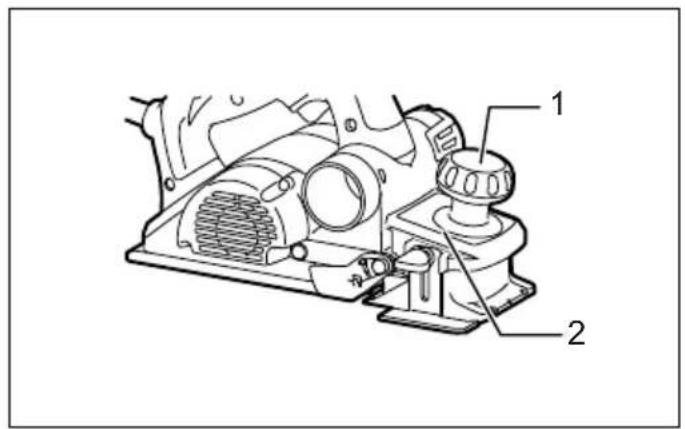
1 007639 2 007640
natural_image
Technical line drawing of hands operating a mechanical device with a numbered label (8), no readable text or symbols present.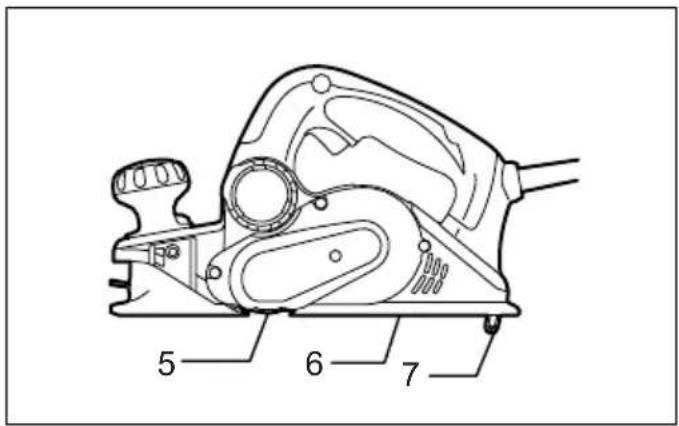
3 007688 4 007641
5 002555 6 002556
natural_image
Technical line drawing of hands operating a mechanical device with labeled part '8' (no text or symbols beyond label)7 007641 8 002565
9 002566 10 007643
11 007801 12 007687
13 007802 14 007644
15 007645 16 007646
natural_image
Pure geometric diagram with curved lines inside a rectangle and a dashed rectangle, no text or symbols present17 002580 18 007647
19 010794 20 007649
natural_image
Technical line drawing of a wooden cutting tool with a bracket and base plate (no text or symbols)21 010795 22 003634
natural_image
Simple geometric diagram showing a shaded rectangular region with curved internal lines, enclosed by a dashed rectangle (no text or symbols)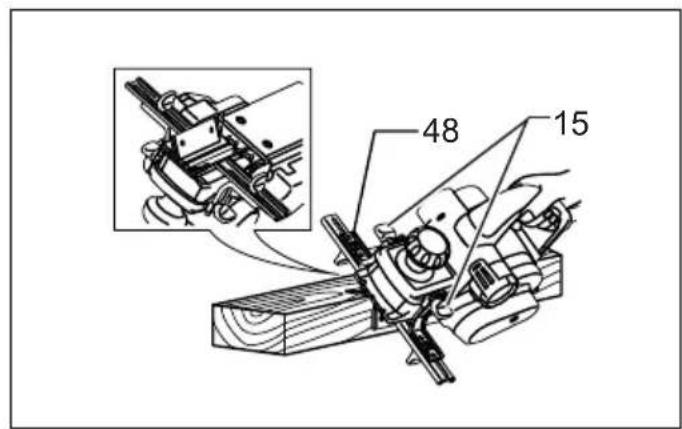
23 007650 24 007653
25 007828 26 002588
natural_image
Line drawing of a hand using a tool to cut or mark a piece on a textured block (no text or symbols)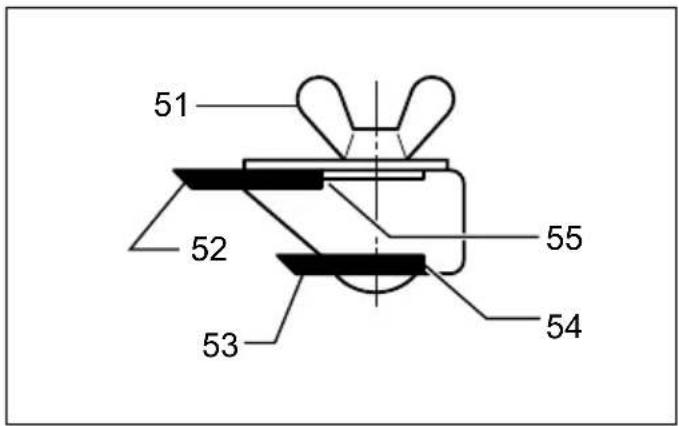
27 002589 28 002590
29 001145 30 007651
31 007652
ENGLISH (Original instructions)
| Explanation of general view | ||
| 1. Knob | 22. Heel of adjusting plate | 43. Screw (B) |
| 2. Pointer | 23. Set plate | 44. Edge fence |
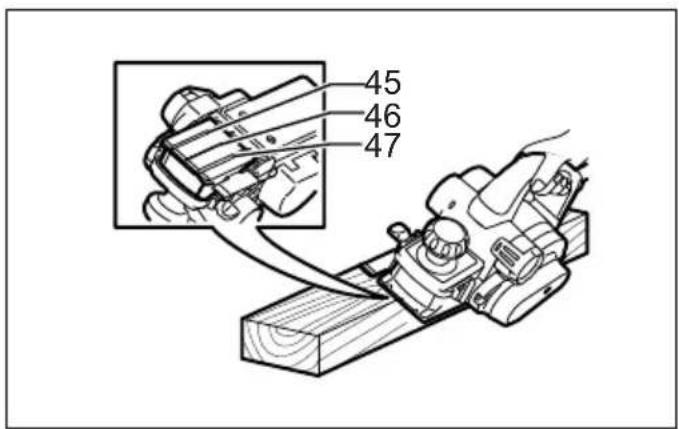
| 3. Lock button / Lock-off button | 24. Inside flank of gauge plate | 45. V groove (medium amount of chamfering) |
| 4. Switch trigger | 25. Back side of gauge base | |
| 5. Planer blade | 26. Mini planer blade | 46. V groove (small amount of chamfering) |
| 6. Rear base | 27. Groove | |
| 7. Foot | 28. Set plate | 47. V groove (great amount of chamfering) |
| 8. Socket wrench | 29. Hex. flange head bolts | |
| 9. Bolts | 30. Stopper | 48. Chamfering rule |
| 10. Drum | 31. Chip discharge opening | 49. Edge of chamfering rule |
| 11. Drum cover | 32. Recessed part | 50. Sharpening holder |
| 12. Adjusting plate | 33. Protrusion | 51. Wing nut |
| 13. Inside edge of gauge plate | 34. Dust bag | 52. Blade (A) |
| 14. Blade edge | 35. Fastener | 53. Blade (B) |
| 15. Screws | 36. Vacuum cleaner | 54. Side (D) |
| 16. Heel | 37. Elbow | 55. Side (C) |
| 17. Back side of gauge base | 38. Start | 56. Limit mark |
| 18. Gauge plate | 39. End | 57. Screwdriver |
| 19. Gauge base | 40. Cutting line | 58. Rear cover |
| 20. Pan head screw | 41. Depth guide | 59. Carbon brushes |
| 21. Planer blade locating lugs | 42. Screw (A) | |
SPECIFICATIONS
| Model KP0810 KP0810C | ||
| Planing width 82 mm | ||
| Planing depth | 4 mm | |
| Shiplapping depth | 25 mm | |
| No load speed (min ^-1 ) | 16,000 | 12,000 |
| Overall length | 290 mm | |
| Net weight | 3.3 kg | 3.4 kg |
| Safety class | ☐/II | |
- Due to our continuing program of research and development, the specifications herein are subject to change without notice.
- Specifications may differ from country to country.
• Weight according to EPTA-Procedure 01/2003
Intended use
ENE001-1
The tool is intended for planing wood.
Power supply
ENF002-2
The tool should be connected only to a power supply of the same voltage as indicated on the nameplate, and can only be operated on single-phase AC supply. They are double-insulated and can, therefore, also be used from sockets without earth wire.
General Power Tool Safety Warnings GEA010-1

WARNING Read all safety warnings and all instructions. Failure to follow the warnings and instructions may result in electric shock, fire and/or serious injury.
Save all warnings and instructions for future reference.
PLANER SAFETY WARNINGS
GEB010-5
- Wait for the cutter to stop before setting the tool down. An exposed rotating cutter may engage the surface leading to possible loss of control and serious injury.
- Hold the power tool by insulated gripping surfaces only, because the cutter may contact its own cord. Cutting a "live" wire may make exposed metal parts of the power tool "live" and could give the operator an electric shock.
- Use clamps or another practical way to secure and support the workpiece to a stable platform. Holding the work by your hand or against the body leaves it unstable and may lead to loss of control.
- Rags, cloth, cord, string and the like should never be left around the work area.
- Avoid cutting nails. Inspect for and remove all nails from the workpiece before operation.
-
Use only sharp blades. Handle the blades very carefully.
-
Be sure the blade installation bolts are securely tightened before operation.
- Hold the tool firmly with both hands.
- Keep hands away from rotating parts.
- Before using the tool on an actual workpiece, let it run for a while. Watch for vibration or wobbling that could indicate poor installation or a poorly balanced blade.
- Make sure the blade is not contacting the workpiece before the switch is turned on.
- Wait until the blade attains full speed before cutting.
- Always switch off and wait for the blades to come to a complete stop before any adjusting.
- Never stick your finger into the chip chute. Chute may jam when cutting damp wood. Clean out chips with a stick.
- Do not leave the tool running. Operate the tool only when hand-held.
- Always change both blades or covers on the drum, otherwise the resulting imbalance will cause vibration and shorten tool life.
- Use only Makita blades specified in this manual.
- Always use the correct dust mask/respirator for the material and application you are working with.
SAVE THESE INSTRUCTIONS.
WARNING:
DO NOT let comfort or familiarity with product (gained from repeated use) replace strict adherence to safety rules for the subject product.
MISUSE or failure to follow the safety rules stated in this instruction manual may cause serious personal injury.
FUNCTIONAL DESCRIPTION
CAUTION:
- Always be sure that the tool is switched off and unplugged before adjusting or checking function on the tool.
Adjusting depth of cut (Fig. 1)
Depth of cut may be adjusted by simply turning the knob on the front of the tool so that the pointer points the desired depth of cut.
Switch action (Fig. 2)
CAUTION:
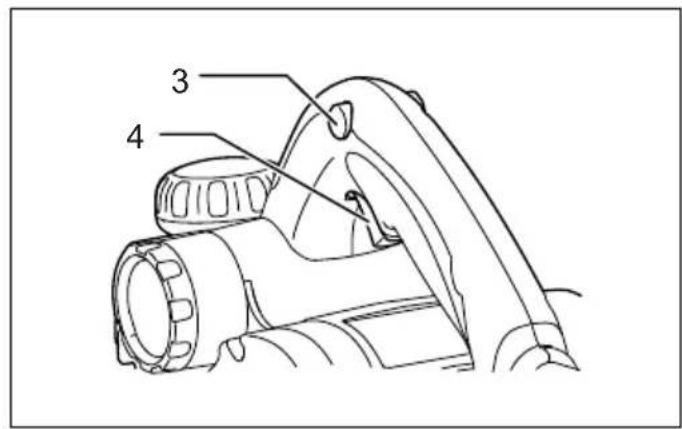
- Before plugging in the tool, always check to see that the switch trigger actuates properly and returns to the "OFF" position when released.
For tool with lock button
To start the tool, simply pull the switch trigger. Release the switch trigger to stop.
For continuous operation, pull the switch trigger and then push in the lock button from either side.
To stop the tool from the locked position, pull the switch trigger fully, then release it.
For tool with lock-off button
To prevent the switch trigger from being accidentally pulled, a lock-off button is provided.
To start the tool, depress the lock-off button from either side and pull the switch trigger. Release the switch trigger to stop.
Electronic function
For Model KP0810C only
The tool equipped with electronic function are easy to operate because of the following features.
Constant speed control
Electronic speed control for obtaining constant speed. Possible to get fine finish, because the rotating speed is kept constant even under load condition.
Soft start
Soft-start feature minimizes start-up shock, and makes the tool start smoothly.
Foot (Fig. 3)
After a cutting operation, raise the back side of the tool and a foot comes under the level of the rear base. This prevents the tool blades to be damaged.
ASSEMBLY
CAUTION:
• Always be sure that the tool is switched off and unplugged before carrying out any work on the tool.
Removing or installing planer blades
CAUTION:
- Tighten the blade installation bolts carefully when attaching the blades to the tool. A loose installation bolt can be dangerous. Always check to see they are tightened securely.
- Handle the blades very carefully. Use gloves or rags to protect your fingers or hands when removing or installing the blades.
- Use only the Makita wrench provided to remove or install the blades. Failure to do so may result in overtightening or insufficient tightening of the installation bolts. This could cause an injury.
For tool with standard planer blades (Fig. 4 - 6)
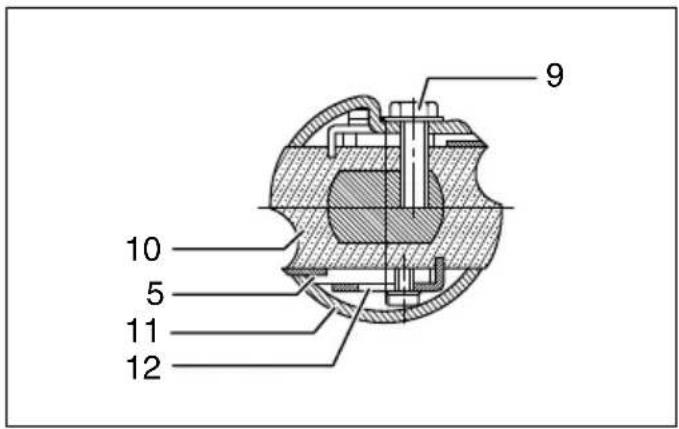
To remove the blades on the drum, unscrew the installation bolts with the socket wrench. The drum cover comes off together with the blades.
To install the blades, first clean out all chips or foreign matter adhering to the drum or blades. Use blades of the same dimensions and weight, or drum oscillation/vibration will result, causing poor planing action and, eventually, tool breakdown.
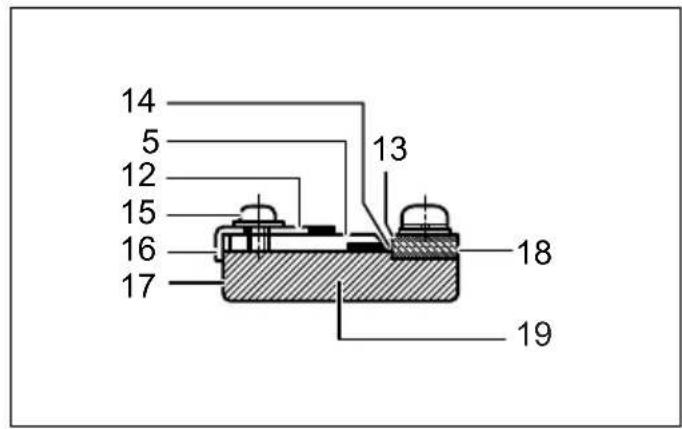
Place the blade on the gauge base so that the blade edge is perfectly flush with the inside edge of the gauge plate.
Place the adjusting plate on the blade, then simply press in the heel of the adjusting plate flush with the back side of the gauge base and tighten two screws on the adjusting plate. Now slip the heel of the adjusting plate into the drum groove, then fit the drum cover on it.
Tighten all the installation bolts evenly and alternately with the socket wrench.
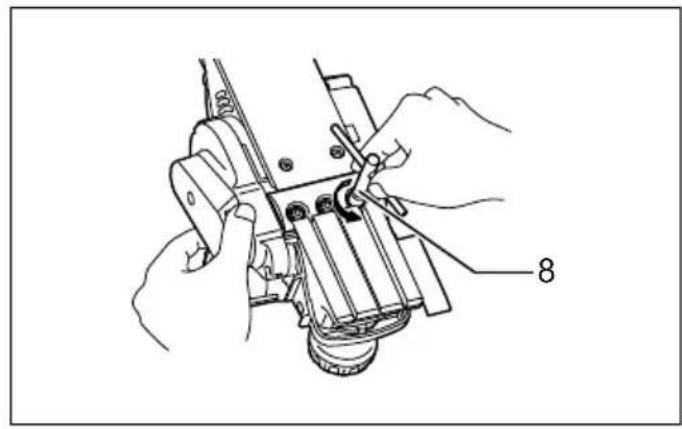
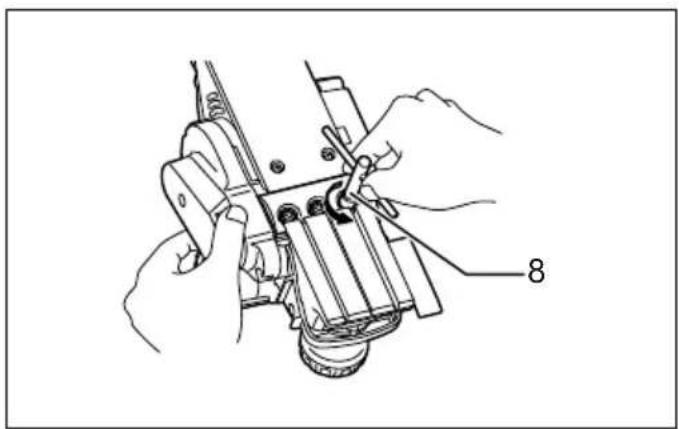
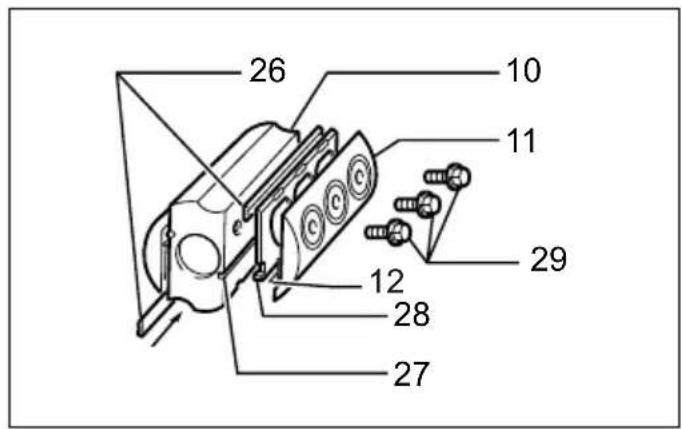
- Remove the existing blade, if the tool has been in use, carefully clean the drum surfaces and the drum cover. To remove the blades on the drum, unscrew the three
installation bolts with the socket wrench. The drum cover comes off together with the blades. (Fig. 7)
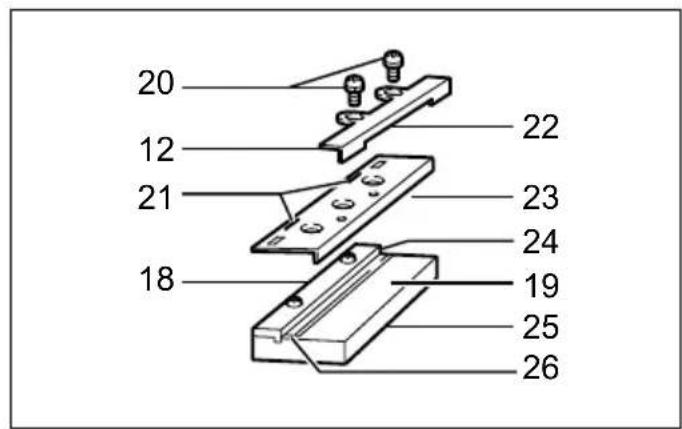
- To install the blades, loosely attach the adjusting plate to the set plate with the pan head screws and set the mini planer blade on the gauge base so that the cutting edge of the blade is perfectly flush with the inside flank of the gauge plate. (Fig. 8)
- Set the adjusting plate/set plate on the gauge base so that the planer blade locating lugs on the set plate rest in the mini planer blade groove, then press in the heel of the adjusting plate flush with the back side of the gauge base and tighten the pan head screws.
- It is important that the blade sits flush with the inside flank of the gauge plate, the planer blade locating lugs sit in the blade groove and the heel of the adjusting plate is flush with the back side of the gauge base. Check this alignment carefully to ensure uniform cutting.
- Slip the heel of the adjusting plate into the groove of the drum.
- Set the drum cover over the adjusting plate/set plate and screw in the three hex flange head bolts so that a
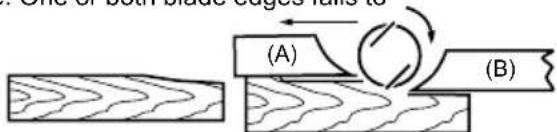
(A) Front base (Movable shoe)
(B) Rear base (Stationary shoe)
Correct setting Although this side view cannot show it, the
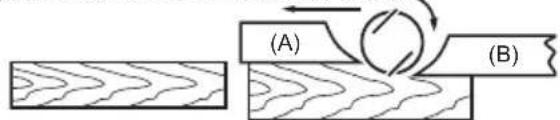
edges of the blades run perfectly parallel to the rear base surface.
Nicks in surface Cause: One or both blades fails to have edge
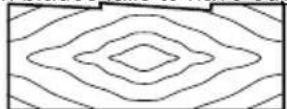
Gouging at start Cause: One or both blade edges fails to
Gouging at end Cause: One or both blade edges protrudes
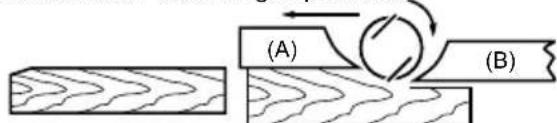
parallel to rear base line.
protrude enough in relation to rear base line.
too far in relation to rear base line.
EN0004-1
Change of chip discharge direction (Fig. 10)
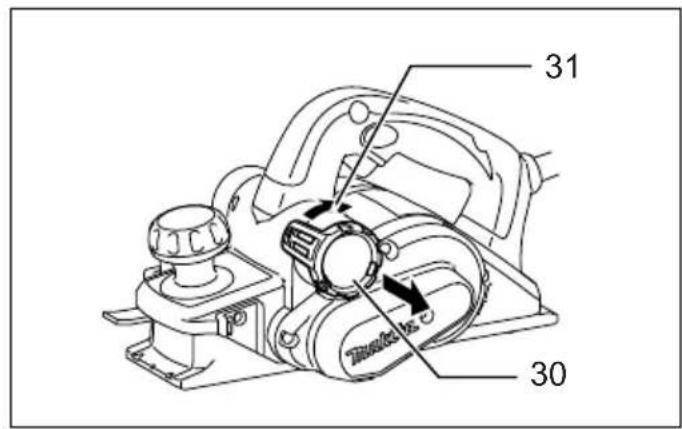
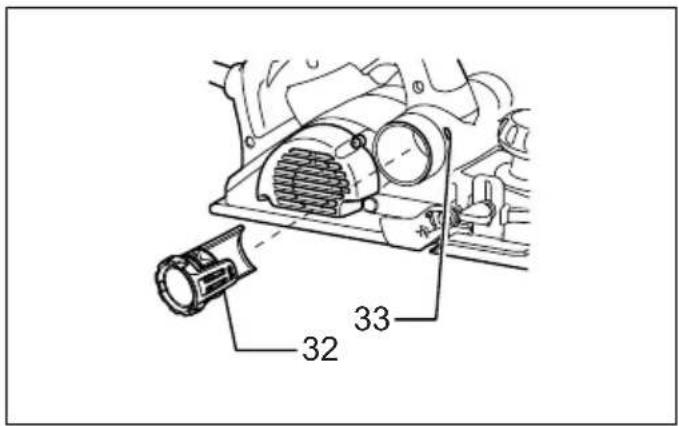
Chip discharge direction can be changed to the right or left. To change the direction, pull out the stopper while turning it slightly backward and fit in it in one of two openings on the opposite side of chip discharge so that the recessed part fits to protrusion. (Fig. 11)
Dust bag (accessory) (Fig. 12)
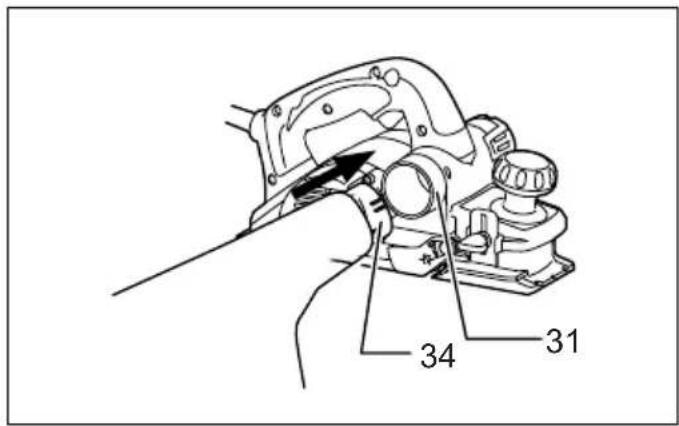
Attach the dust bag onto the chip discharge opening.
The chip discharge opening is tapered. When attaching the dust bag, push it onto the chip discharge opening firmly as far as it will go to prevent it from coming off during operation.
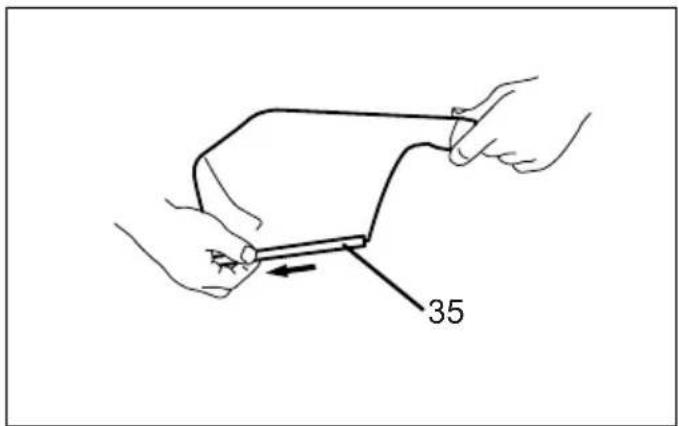
When the dust bag is about half full, remove the dust bag from the tool and pull the fastener out. Empty the dust bag
of its contents, tapping it lightly so as to remove particles adhering to the insides which might hamper further collection. (Fig. 13)
NOTE:
- If you connect a Makita vacuum cleaner to this tool, more efficient and cleaner operations can be performed.
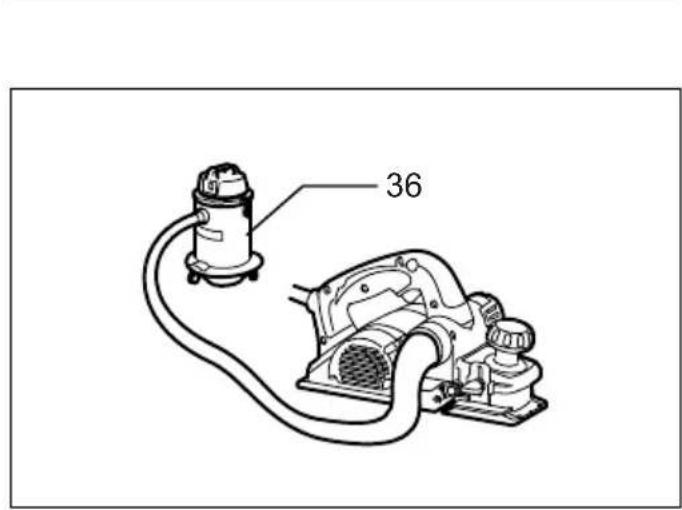
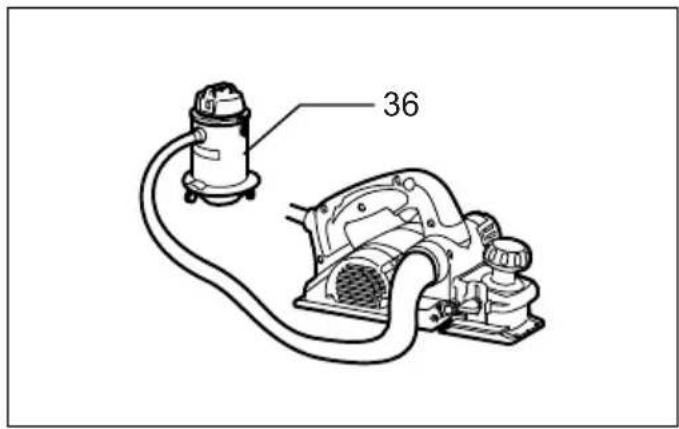
Connecting a vacuum cleaner (Fig. 14)
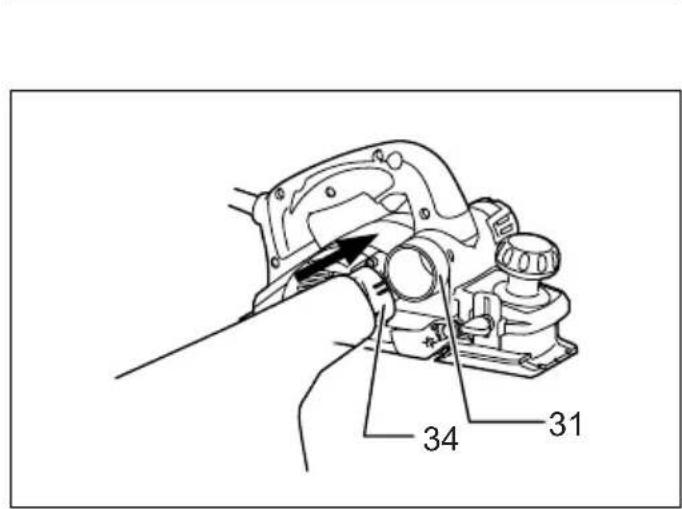
When you wish to perform clean planing operation, connect a Makita vacuum cleaner to your tool. Then connect a hose of the vacuum cleaner to the chip discharge opening as shown in the figures.
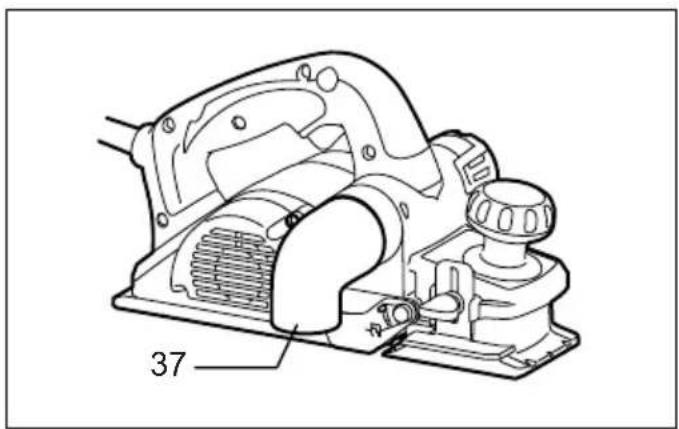
Elbow (optional accessory) (Fig. 15)
Use of elbow allows change of chip discharge direction to perform cleaner work.
Install the elbow (optional accessory) on the tool by just slipping on it. To remove it, just pull it out.
OPERATION
Hold the tool firmly with one hand on the knob and the other hand on the switch handle when performing the tool.
Planing operation (Fig. 16)
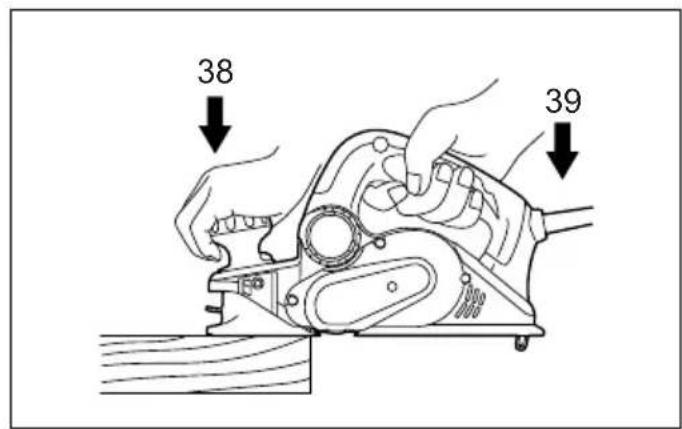
First, rest the tool front base flat upon the workpiece surface without the blades making any contact. Switch on and wait until the blades attain full speed. Then move the tool gently forward. Apply pressure on the front of tool at the start of planing, and at the back at the end of planing. Planing will be easier if you incline the workpiece in stationary fashion, so that you can plane somewhat downhill.
The speed and depth of cut determine the kind of finish. The power planer keeps cutting at a speed that will not result in jamming by chips. For rough cutting, the depth of cut can be increased, while for a good finish you should reduce the depth of cut and advance the tool more slowly.
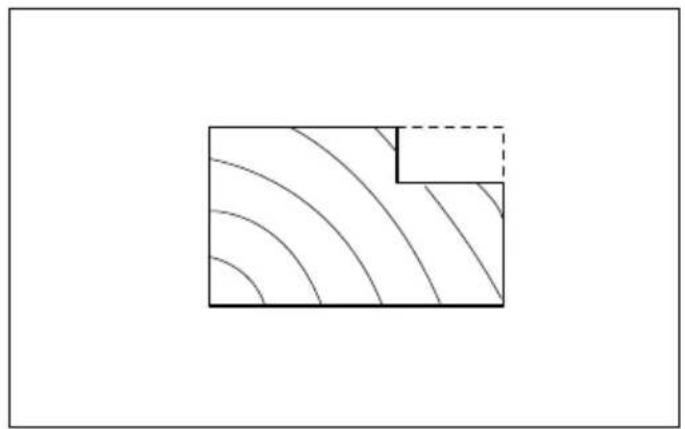
Shiplapping (Rabbeting) (Fig. 17)
To make a stepped cut as shown in the figure, use the edge fence (guide rule).
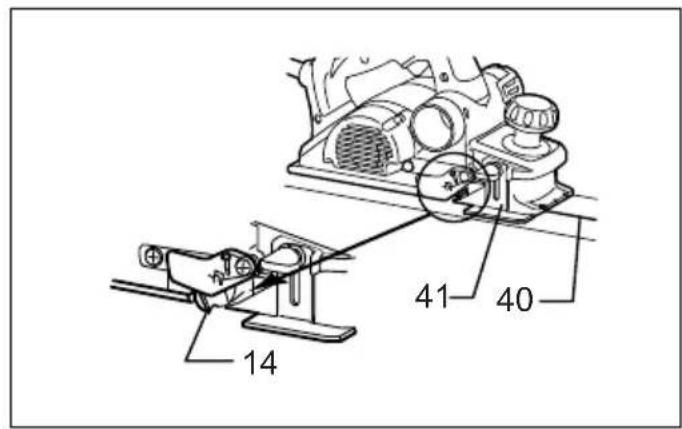
Adjust the shiplapping depth using a depth guide (accessory).
Draw a cutting line on the workpiece. Insert the edge fence into the hole in the front of the tool. Align the blade edge with the cutting line. (Fig. 18)
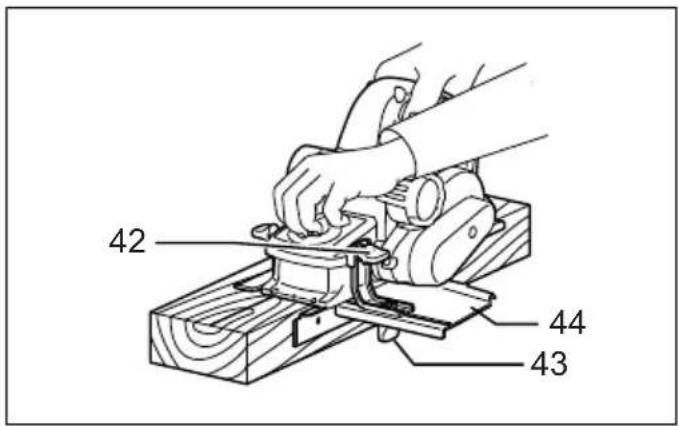
Install the edge fence on the tool and secure it with the washer and thumb screw (A). Loosen the thumb screw (B) and adjust the edge fence until it comes in contact with the side of the workpiece. Then tighten the thumb screw (B) securely. (Fig. 19)
When planing, move the tool with the edge fence flush with the side of the workpiece. Otherwise uneven planing may result.
CAUTION:
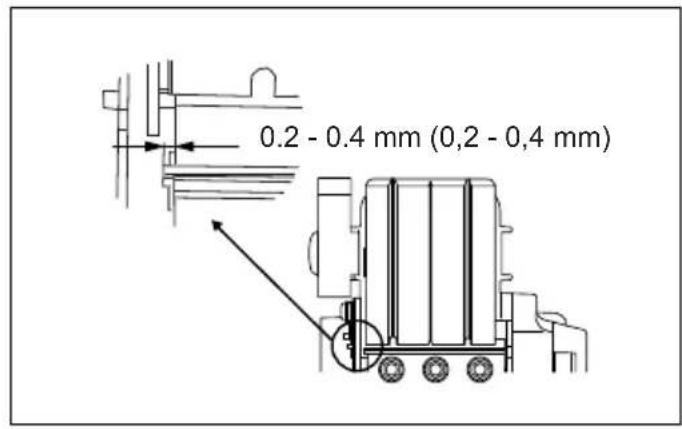
- The blade edge should be made to protrude outside slightly (0.2 mm - 0.4 mm) for shiplapping. (Fig. 20)
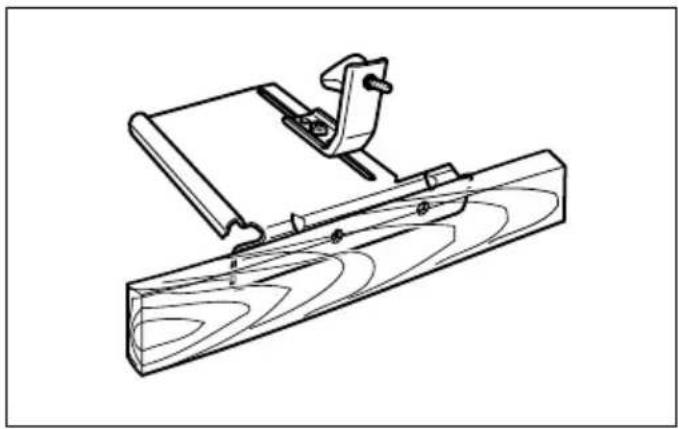
You may wish to add to the length of the fence by attaching an extra piece of wood. Convenient holes are provided in the fence for this purpose, and also for attaching an extension guide (optional accessory).
(Fig. 21)
Chamfering (Fig. 22)
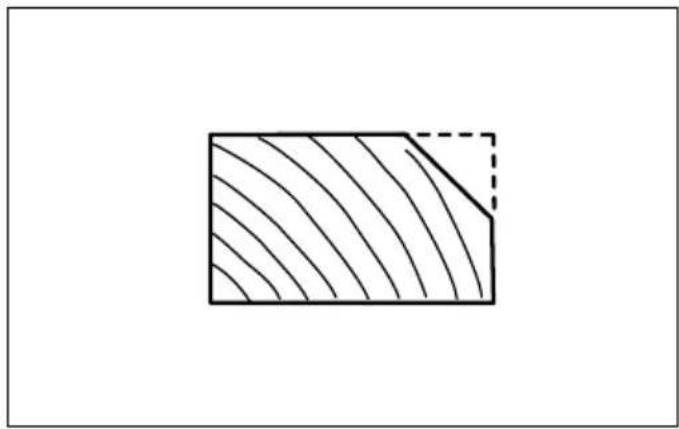
To make a chamfering cut as shown in the figure, align one of three "V" grooves in the front base with the edge of the workpiece and plane it. (Fig. 23)
Use of chamfering rule (optional accessory) assures more tool stability when shiplapping. (Fig. 24)
To install the chamfering rule, remove two screws on both sides of the front of the tool and set the depth of cut to 4 mm. And then install it on the front base of the tool and secure it the screws as shown in the figure.
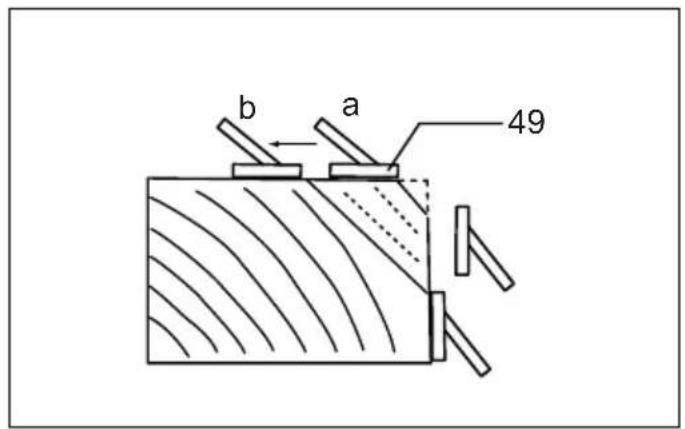
When doing a great amount of chamfering, place an edge of chamfering rule so that it contacts workpiece and make many passes of planing as shown in the figure. (Fig. 25)
MAINTENANCE
CAUTION:
• Always be sure that the tool is switched off and unplugged before attempting to perform inspection or maintenance.
- Never use gasoline, benzine, thinner, alcohol or the like. Discoloration, deformation or cracks may result.
Sharpening the planer blades
For standard blades only
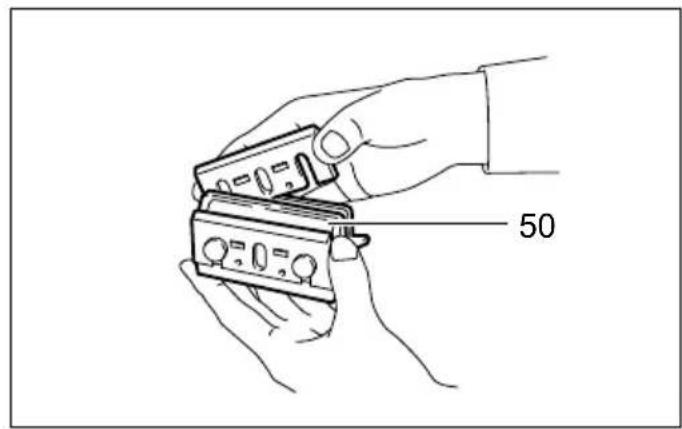
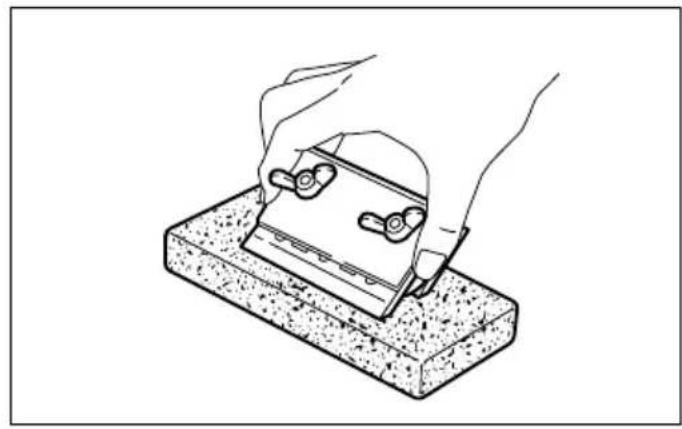
Always keep your blades sharp for the best performance possible. Use the sharpening holder to remove nicks and produce a fine edge. (Fig. 26)
First, loosen the two wing nuts on the holder and insert the blades (A) and (B), so that they contact the sides (C) and (D). Then tighten the wing nuts. (Fig. 27)
Immerse the dressing stone in water for 2 or 3 minutes before sharpening. Hold the holder so that the both blades contact the dressing stone for simultaneous sharpening at the same angle. (Fig. 28)
Replacing carbon brushes (Fig. 29)
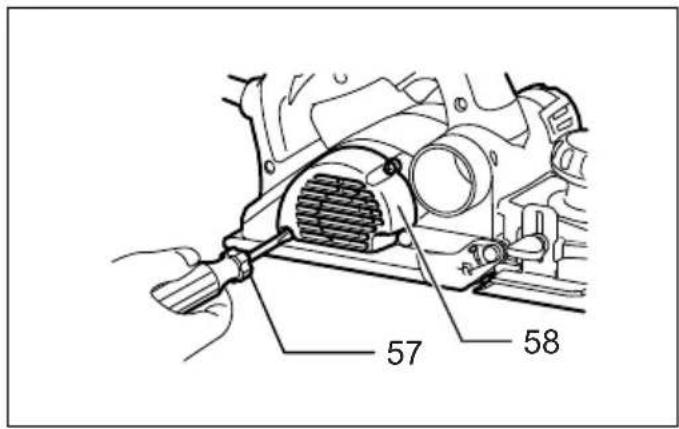
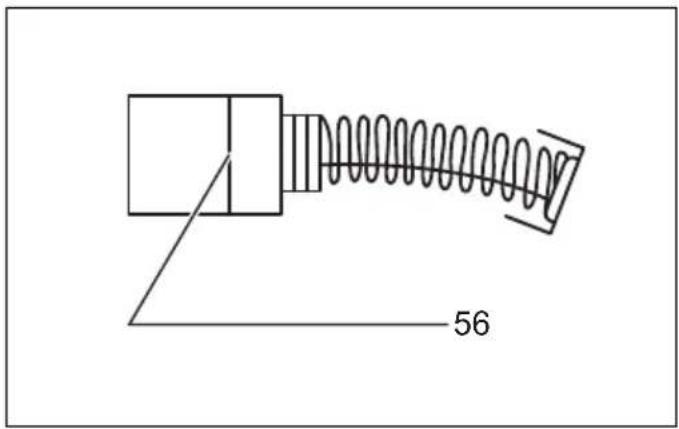
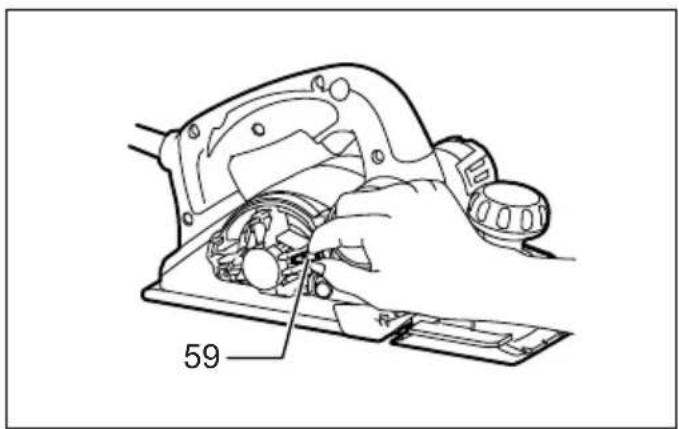
Remove and check the carbon brushes regularly. Replace when they wear down to the limit mark. Keep the carbon brushes clean and free to slip in the holders. Both carbon brushes should be replaced at the same time. Use only identical carbon brushes.
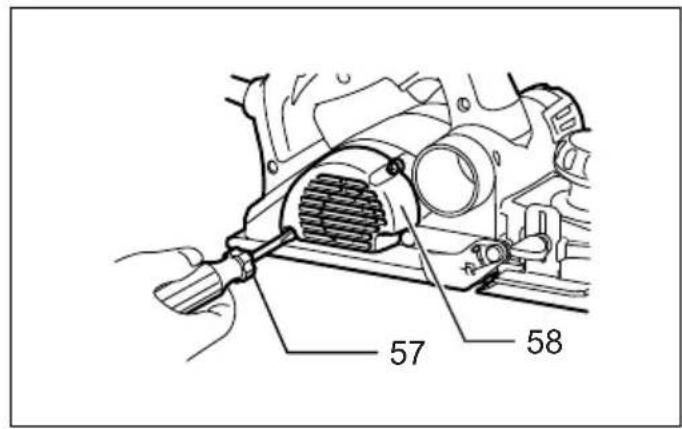
Use a screwdriver to remove the rear cover. (Fig. 30) Take out the worn carbon brushes, insert the new ones and secure the rear cover. (Fig. 31)
To maintain product SAFETY and RELIABILITY, repairs, any other maintenance or adjustment should be performed by Makita Authorized Service Centers, always using Makita replacement parts.
OPTIONAL ACCESSORIES
CAUTION:
• These accessories or attachments are recommended for use with your Makita tool specified in this manual. The use of any other accessories or attachments might present a risk of injury to persons. Only use accessory or attachment for its stated purpose.
If you need any assistance for more details regarding these accessories, ask your local Makita Service Center.
• High-speed steel Planer blade
• Tungsten-carbide Planer blade (For longer blade life)
- Mini planer blade
- Sharpening holder assembly
- Blade gauge
- Set plate set
- Edge fence (Guide rule)
- Dressing stone
- Dust bag assembly
- Elbow
- Socket wrench
- Chamfering rule assembly
NOTE:
- Some items in the list may be included in the tool package as standard accessories. They may differ from country to country.
Noise
ENG905-1
The typical A-weighted noise level determined according to EN60745:
Model KP0810
Sound pressure level ( L_pA ): 88 dB (A)
Sound power level ( L_WA ): 99 dB (A)
Uncertainty (K): 3 dB (A)
Model KP0810C
Sound pressure level ( L_pA ): 82 dB (A)
Sound power level (LWA): 93 dB (A)
Uncertainty (K): 3 dB (A)
Wear ear protection.
Vibration
ENG900-1
The vibration total value (tri-axial vector sum) determined according to EN60745:
Model KP0810
Work mode: planing softwood
Vibration emission ( a_h ): 3.0 m/s ^2
Uncertainty (K): 1.5 m/s²
Model KP0810C
Work mode: planing softwood
Vibration emission ( a_h ): 3.5 m/s ^2
Uncertainty (K): 1.5 m/s ^4
ENG901-1
- The declared vibration emission value has been measured in accordance with the standard test method and may be used for comparing one tool with another.
- The declared vibration emission value may also be used in a preliminary assessment of exposure.

WARNING:
- The vibration emission during actual use of the power tool can differ from the declared emission value depending on the ways in which the tool is used.
- Be sure to identify safety measures to protect the operator that are based on an estimation of exposure in the actual conditions of use (taking account of all parts of the operating cycle such as the times when the tool is switched off and when it is running idle in addition to the trigger time).
For European countries only
ENH101-15
EC Declaration of Conformity
We Makita Corporation as the responsible manufacturer declare that the following Makita machine(s):
Designation of Machine:
Power Planer
Model No./ Type: KP0810, KP0810C
are of series production and
Conforms to the following European Directives:
2006/42/EC
And are manufactured in accordance with the following standards or standardised documents:
EN60745
The technical documentation is kept by our authorised representative in Europe who is:
Makita International Europe Ltd.
Michigan Drive, Tongwell,
Milton Keynes, Bucks MK15 8JD, England
30.1.2009

Tomoyasu Kato
Director
Makita Corporation
3-11-8, Sumiyoshi-cho,
Anjo, Aichi, 446-8502, JAPAN
(A) Base avant (talon mobile)
(B) Base arrière (talon immobile)
Michigan Drive, Tongwell,
Milton Keynes, Bucks MK15 8JD, Angleterre
30.1.2009

Tomoyasu Kato
Directeur
Makita Corporation
3-11-8, Sumiyoshi-cho,
Anjo, Aichi, 446-8502, JAPAN
Michigan Drive, Tongwell,
Milton Keynes, Bucks MK15 8JD, England
-
- 2009

Tomoyasu Kato
Direktor
Makita Corporation
3-11-8, Sumiyoshi-cho,
Anjo, Aichi, 446-8502, JAPAN
Michigan Drive, Tongwell,
Milton Keynes, Bucks MK15 8JD, Inghilterra
30.1.2009

Tomoyasu Kato
Direttore
Makita Corporation
3-11-8, Sumiyoshi-cho,
Anjo, Aichi, 446-8502, JAPAN
WAARSCHUWING Lees alle
Trillingsemissie (a _h ): 3,0 m/s ^2
Michigan Drive, Tongwell,
Milton Keynes, Bucks MK15 8JD, Engeland
-
- 2009

Tomoyasu Kato
Directeur
Makita Corporation
3-11-8, Sumiyoshi-cho,
Anjo, Aichi, 446-8502, JAPAN
3-11-8, Sumiyoshi-cho,
Anjo, Aichi, 446-8502, JAPAN
Para as ferramentas com as lâminas de plaina padrão (Fig. 4 - 6)
Michigan Drive, Tongwell,
Milton Keynes, Bucks MK15 8JD, Inglaterra
30.1.2009

Tomoyasu Kato
Director
Makita Corporation
3-11-8, Sumiyoshi-cho, Anjo, Aichi, 446-8502, JAPAN
Michigan Drive, Tongwell,
Milton Keynes, Bucks MK15 8JD, England
30.1.2009

3-11-8, Sumiyoshi-cho,
Anjo, Aichi, 446-8502, JAPAN
Michigan Drive, Tongwell,
Milton Keynes, Bucks MK15 8JD, England
-
- 2009

Tomoyasu Kato
Διευθυντής
Makita Corporation
3-11-8, Sumiyoshi-cho,
Anjo, Aichi, 446-8502, JAPAN
Makita Corporation
Anjo, Aichi, Japan
884693G996 www.makita.com




- Intended use
- Power supply
- General Power Tool Safety Warnings GEA010-1
- Save all warnings and instructions for future reference.
- PLANER SAFETY WARNINGS
- SAVE THESE INSTRUCTIONS.
- WARNING:
- FUNCTIONAL DESCRIPTION
- CAUTION:
- Adjusting depth of cut (Fig. 1)
- Switch action (Fig. 2)
- For tool with lock button
- For tool with lock-off button
- Electronic function
- For Model KP0810C only
- Constant speed control
- Soft start
- Foot (Fig. 3)
- ASSEMBLY
- Removing or installing planer blades
- For tool with standard planer blades (Fig. 4 - 6)
- EN0004-1
- Change of chip discharge direction (Fig. 10)
- Dust bag (accessory) (Fig. 12)
- NOTE:
- Connecting a vacuum cleaner (Fig. 14)
- Elbow (optional accessory) (Fig. 15)
- OPERATION
- Planing operation (Fig. 16)
- Shiplapping (Rabbeting) (Fig. 17)
- Chamfering (Fig. 22)
- MAINTENANCE
- Sharpening the planer blades
- For standard blades only
- Replacing carbon brushes (Fig. 29)
- OPTIONAL ACCESSORIES
- Noise
- Model KP0810
- Model KP0810C
- Wear ear protection.
- Vibration
- For European countries only
- EC Declaration of Conformity
- Conforms to the following European Directives:
- Tomoyasu Kato
- WAARSCHUWING Lees alle
- Para as ferramentas com as lâminas de plaina padrão (Fig. 4 - 6)
- Makita Corporation
Brand : MAKITA
Model : KP0810K
Category : Electric planer