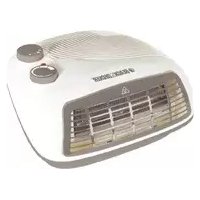
HX210 - Heating BLACK & DECKER - Free user manual and instructions
Find the device manual for free HX210 BLACK & DECKER in PDF.


| Product type | Fan-forced space heater |
| Brand | Black & Decker |
| Model | HX210 |
| Nominal power | 2200 - 2400 W |
| Supply voltage | 220 - 240 V |
| Frequency | 50 - 60 Hz |
| Operating modes | Fan only, low heat (I), high heat (II) |
| Thermostat | Gradual adjustment with automatic shut-off at desired temperature |
| Indicator light | Red indicator light showing that heating is on |
| Safety | Overheat protection, double electrical insulation, do not cover |
| Intended use | Indoor domestic heating, room of at least 4 m² |
| Maximum recommended area | Room up to about 25 m² (estimate) |
| Maintenance and cleaning | Clean grilles with a vacuum cleaner; clean motor unit with a damp cloth; do not immerse |
| Warranty | 24 months (parts and labor) subject to conditions |
| Weight | Approximately 1.5 kg (estimate) |
| Dimensions (W x H x D) | Approximately 25 x 30 x 20 cm (estimate) |
| Spare parts and repairability | Repair by a Black & Decker approved repairer; contact after-sales service |
| General information | Domestic use only; do not use outdoors or in a bathroom |
Frequently Asked Questions - HX210 BLACK & DECKER
User questions about HX210 BLACK & DECKER
0 question about this device. Answer the ones you know or ask your own.
Ask a new question about this device
Download the instructions for your Heating in PDF format for free! Find your manual HX210 - BLACK & DECKER and take your electronic device back in hand. On this page are published all the documents necessary for the use of your device. HX210 by BLACK & DECKER.
USER MANUAL HX210 BLACK & DECKER
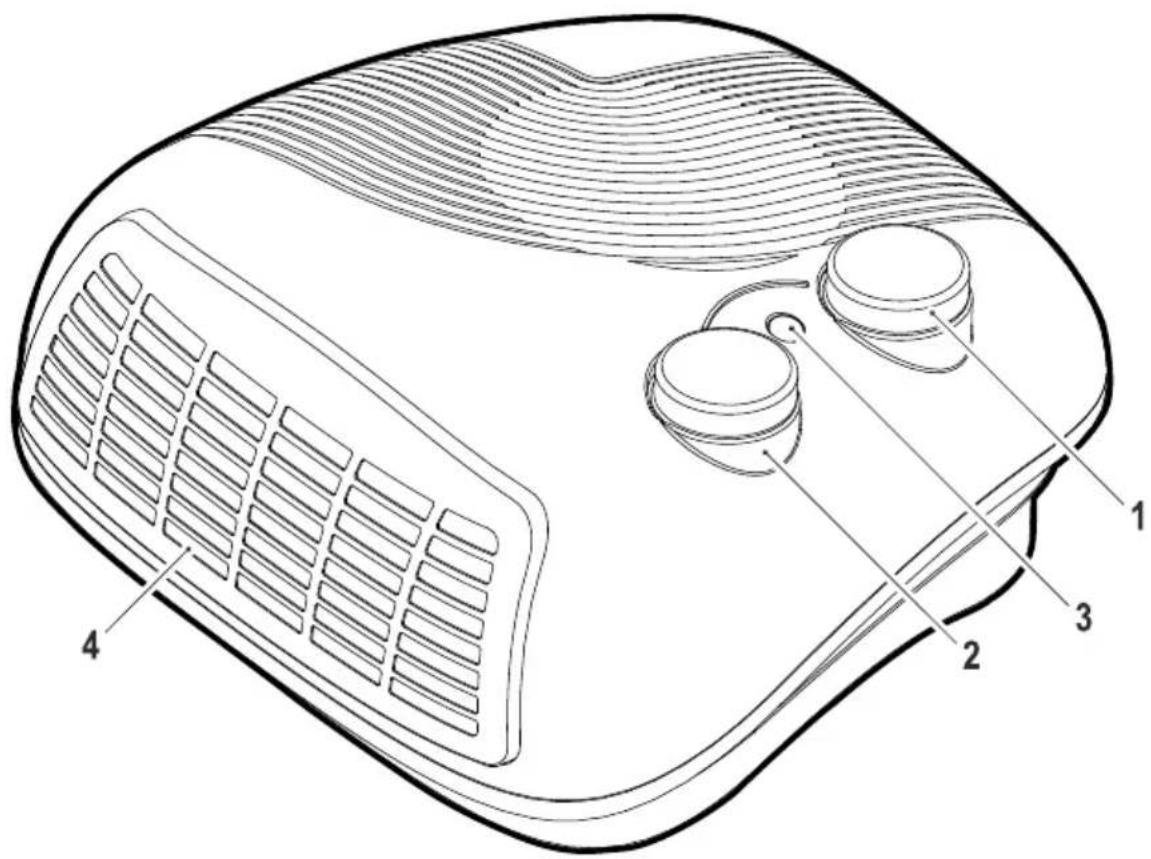
Parts identification
- Mode setting switch
- Thermostat control switch
- Indicator
- Outlet grill
Intended use
- Your Black & Decker appliance is intended for heating rooms.
- Do not use this appliance for any other purposes. This product is intended for indoor household use only.

Read this entire manual carefully before using the appliance.
Safety instructions
Warning! When using mains-powered appliances, basic safety precautions, including the following, should always be followed to reduce the risk of fire, electric shock and personal injury.
- The intended use is described in this manual. The use of any accessory or attachment or the performance of any operation with this appliance other than those recommended in this instruction manual may present a risk of personal injury.
- Retain this manual for future reference.
Using your appliance
Always take care when using the appliance.
- Never pull the power supply cord to disconnect the plug from the socket. Keep the power supply cord away from heat, oil and sharp edges.
- Do not place the appliance on or near heat sources or in a heated oven.
- Do not use the appliance outdoors.
Always protect the motor unit from water or excessive humidity.
- If the power supply cord is damaged during use, disconnect the appliance from the power supply immediately. Do not touch the power supply cord before disconnecting from the power supply.
- Disconnect the appliance from the power supply when not in use, before fitting or removing parts and before cleaning.
- Never let the appliance operate unattended.
- Do not let the cord hang over the edge of a table, counter, or touch hot surfaces.
- Fully uncoil then guide the power supply cord neatly so it cannot be caught accidentally or tripped over.
- The heater must not be located immediately below a socket-outlet.
- To prevent overload and blown fuses, do not plug other appliance into same outlet (receptacle)
- Do not place the heater on carpets, don't place the cable under carpets. Arrange cord away from traffic areas so that it will not be tripped over.
- NEVER use this heater where it may come into contact with water i.e. bathroom, shower room, kitchen. Do not use this heater in the immediate surroundings of a bath, a shower or a swimming pool.
Warning! In order to avoid overheating, do not cover the heater. NEVER use the heater to dry clothes or similar articles.
ENGLISH
-
Don't touch the hot surfaces.
-
Do not position the appliances in close proximatively to curtains or other combustible materials. Keep combustible material such as furniture, cushions, bedding, paper, clothes, curtains etc. at least 1.0m away from the heater.
-
Always ensure that hands are dry before operating or adjusting any switch on the product or touching the plug and mains supply connections.
-
Do not use the appliances with a programmer, timer or any other devices that switches the appliances on automatically.
-
To prevent a possible fire, do not block air intakes or exhaust in any manner. Do not use on soft surfaces, like a bed, where openings may become blocked.
-
Do not store away until the heater cools down, store the heater in cool dry location when not in use.
-
Don't use extension cable
-
Always operate on a flat horizontal surface.
-
Do not insert or allow foreign objects to enter any ventilation or exhaust opening, as this may cause an electric shock, fire or damage to the appliance.
-
Do not operate in areas where gasoline, paint or other flammable liquids are used or stored.
-
The most common cause of overheating is deposits of dust or fluff in the appliance. Ensure these deposits are removed regularly by unplugging the appliance and vacuum cleaning air vents and grilles.
Always use the heater in an upright position. Do not use the appliance in rooms less than 4m2 area.
- To disconnect the appliance, switch it "OFF", then remove the plug from outlet. Do not pull out the cord because this could damage it.
Warning! This heater is not equipped with a device to control the room temperature. Do not use this heater in small rooms when they are occupied by persons not capable of leaving the room on their own, unless constant supervision is provided.
Safety of others
- This appliance can be used by children aged from 8 years and above and persons with reduced physical, sensory or mental capabilities or lack of experience and knowledge if they have been given supervision or instruction concerning use of the appliance in a safe way and understand the hazards involved. Children shall not play with the appliance. Cleaning and user maintenance shall not be made by children without supervision.
Children of less than 3 years should be kept away unless continuously supervised.
Children aged from 3 years and less than 8 years shall only switch on/off the appliancea provided that it has been placed or installed in its intended normal operating position and they have been given supervision or instruction concerning use of the appliance in a safe way and understand the hazards involved. Children aged from 3 years and less than 8 years shall not plug in, regulate and clean the appliance or perform user maintenance.
CAUTION: Some parts of this product can become very hot and cause burns. Particular attention has to be given where children and vulnerable people are present.
- Children should be supervised to ensure that they do not play with the appliance.
After use
- Remove the plug from the socket before leaving the appliance unattended and before changing, cleaning or inspecting any parts of the appliance.
- When not in use, the appliance should be stored in a dry place. Children should not have access to stored appliances.
Inspection and repairs
- Switch off the appliance before cleaning, changing accessories or approaching parts which move in use
- Before use, check the appliance for damaged or defective parts. Check for breakage of parts, damage to switches and any other conditions that may affect its operation.
- Do not use the appliance if any part is damaged or defective.
- Have any damaged or defective parts repaired or replaced by an authorised repair agent.
- Before use, check the power supply cord for signs of damage, ageing and wear.
-
Do not use the appliance if the power supply cord or mains plug is damaged or defective.
-
If the power supply cord or mains plug is damaged or defective it must be repaired by an authorised repair agent in order to avoid a hazard. Do not cut the power supply cord and do not attempt to repair it yourself.
- Never attempt to remove or replace any parts other than those specified in this manual.
Electrical safety
Before use, check the mains voltage corresponds to the voltage on the rating plate.

This appliance is double insulated therefore no earth wire is required.
- To avoid the risk of electric shock, do not immerse the cord, plug or motor unit in water or other liquid.
- Check that the supply voltage shown on the rating plate of the appliance matches that of your electrical system. Any connection error will invalidate the guarantee.

Warning! In order to avoid overheating, do not cover the heater.
Mains plug replacement
If a new mains plug needs to be fitted:
- Safely dispose of the old plug
- Connect the brown lead to the live terminal of the new plug
- Connect the blue lead to the neutral terminal
- If the product is class I (earthed), connect the green/yellow lead to the earth terminal
ENGLISH
Warning! If your product is class II double insulated (only 2 wires in the cord set), no connection is to be made to the earth terminal
- Follow the fitting instructions supplied with good quality plugs
- Any replacement fuse must be of the same rating as the original fuse supplied with the product
Mode setting
The fan heater incorporates a rotate on switch you can select the different air by turning the switch clockwise to:
Off
an only
Warm air
IHot air
Thermostat
When heating mode is selected
- Turn the thermostat knob in a clockwise direction to the max position.
- Once the room temperature has reached the desired temperature, turn the thermostat knob slowly in an anti-clockwise direction until a "click" sound is heard. That is the setting temperature. Now, the thermostat is switched off and the indicator light goes off.
- The thermostat will automatically maintain the set temperature. It will switch on when the room temperature is below and switch off if above the setting.
- The red indicator shows that heating mode is switched on.
Use
Your appliance is fitted with a thermostat for your safety. Using the appliance continuously for very long periods may cause the appliance to overheat and stop working. It is therefore recommended that you disconnect the appliance from the mains supply and allow to fully cool before continuing use.
- Place the appliance on a flat, stable surface.
- Connect it to the electricity supply.
- Select the operating mode.
- Set the thermostat to the required setting.
Maintenance & cleaning
- Switch the appliance off, remove the plug from the power socket.
- The appliance is easier to clean if you do so immediately after use.
- Do not use abrasive cleaning agents, scourers, acetone, alcohol etc. to clean the appliance.
- Clean the motor unit with a damp cloth.
Never immerse the motor unit in water nor rinse it under the tap.
Technical data
| HX210 |
| Voltage 220 – 240 Volts |
| Supply 50 – 60 Hz |
| Power consumption 2200 - 2400 W |
Protecting the environment
arate collection. This product must not be disposed of with normal household waste.
Should you find one day that your Black & Decker product needs replacement, or if it is of no further use to you, do not dispose of it with other household waste. Make this product available for separate collection.
- Black & Decker provides a facility for recycling Black & Decker products once they have reached the end of their working life. This service is provided free of charge. To take advantage of this service please return your product to any authorised repair agent who will collect them on our behalf.
- You can check the location of your nearest authorised repair agent by contacting your local Black & Decker office at the address indicated in this manual. Alternatively, a list of authorized Black & Decker repair agents and full details of our after-sales service and contact are available on the Internet at: www.2helpU.com.
Warranty
Black & Decker is confident of the quality of its products and offers an outstanding warranty.
This warranty statement is in addition to and in no way prejudices your statutory rights.
The warranty is valid within the territories of the Member States of the European Union and the European Free Trade Area.
If a Black & Decker product becomes defective due to faulty materials, workmanship or lack of conformity, within 24 months from the date of purchase, Black & Decker warranty to replace defective parts, repair products subjected to fair wear and tear or replace such products to ensure minimum inconvenience to the customer unless:
The product has been used for trade, professional or hire purposes;
The product has been subjected to misuse or neglect;
The product has sustained damage through foreign objects, substances or accidents;
Repairs have been attempted by persons other than authorised repair agents or Black & Decker service staff.
To claim on the warranty, you will need to submit proof of purchase to the seller or an authorised repair agent. You can check the location of your nearest authorised repair agent by contacting your local Black & Decker office at the address indicated in this manual.
Alternatively, a list of authorised Black & Decker repair agents and full details of our after-sales service and contacts are available on the Internet at: www.2helpU.com.
FRANÇAIS
Identification des pieces
i1i1i1i1i1i1i1i1i1i1i1i1i1i1i1i1i1i
Jieeill
gduLc 5y
LgIgIgIgIgIgIgIgIgIgIgIgIgIgIgIgIgIgIgIgIgIgIgIgIgIgIgIgIgIgIgIgIgIgIgIgIgIgIgIg
ai = 1n j = 1maij
( 0,12,0,14,0,dots ) ( 0,14,0,18,0,dots ) ( 0,18,0,116,0,dots )
a 1000
1 1111110
Lc 1
y
J 1sLg
a3 = 32a2,a4 = 32a3.
12011 134
1 1
y
LoLoJIoJI JIoJIgJyJyJyJy
i 15 i 11
. www.2helpU.com:
ARABIC
a
gaaa 1
11 11
J 1
1000 1
ailll
jiaoo jyaaal lgljg jll Jg 1 1 1
. 3jL0o oolizwJg21 4j6wJgWJz
g.8jbo Loo g, 2b1k 5 jbbii Jgo p1i i
jlgll 4jbbii g, dI J Log JgK g, cJy
JLoa aBa plisiwl yall sag bliip .
J 1
aai
| HX210 |
| الله رز•- رز• محيىالله |
| الله رز•-0• ادالله |
| الله رز•- رز• محيىالله |
golb
Names & Addresses for Black & Decker Service Concessionaries
ALGERIA: SARL Outillage Corporation, After Sale Service Center-08, Rue Mohamed Boudiaf - Cheraga, Algiers, Algeria, Tel: +213 21 375131, Fax: +213-0-369667. AZERBAIJAN: Kontakt - NN LLC, M.Qashqay 43, Baku, Azerbaijan Az1000. Tel: +994 12 4082050, Fax: +994 12 4117090. BAHRAIN: Alfouz Services Co. WLL., P.O. Box 26562, Tubli, Manama, Tel: +973-17783562/ 17879987, Fax: +973-17783479. Kewalram & Sons Co. WLL P.O. Box 84, Manama, Kingdom of Bahrain, Tel: +973-17213110/ 17210617/ 17210619, Fax: +973-17213211/ 17210627. BANGLADESH: Ultra Corporation, 8, Kushol Centre, Uttara, Dhaka 1230. Tel: +880-2-8922144, Fax: +880-2-8951339. EGYPT: Anasia Egypt for Trading S.A.E, P.O. Box 2443, 9, Mostafa Refaat Street, Sheraton Heliopolis 11361, Cairo, Tel: +202-22684159, Fax: +202-22684169. ETHIOPIA: Seif Sherif Trade PLC -Arada Sub City, Kebele 01-02, Global Insurance Bldg., 2nd Flr. Room 43, P.O.Box 2525, Addis Ababa, Ethiopia, Tel: 00-251-11-1563968/ 1563969, Fax: 00-251-11-1558009. INDIA: Gryphon Appliances Ltd., D-6/4, Okhla Industrial Area, Phase-I, New Delhi-110020, Tel: +91-11-46731111, Fax: +91-11-46731111. JORDAN: Bashiti Hardware, 93 King Abdullah 2nd St., Opp ELBA House, P.O. Box 3005, Tel: +962-6-5349098 ext.11, Fax: +962-6-5330731. KENYA: Leading Concepts, P.O. Box: 40877-00100, Nairobi, Kenya. Tel: +254 20 690 5000, Fax: +254 20 690 5111. KUWAIT: Al Omar Technical Co., P.O. Box 4062, Safat 13041, Kuwait, Tel: 00965-24848595/ 24840039, Fax: 00965-24845652. The Sultan Centre, P.O. Box 26567-13126 Safat, Kuwait, Tel: 00965-24343155 Etn. 432, Fax: 00965-24319071. LEBANON: Aces Service Centre, P.O. Box 90-102, Nahr El Mot, Seaside Highway, Pharaoh Building, Beirut. Tel: 00961-1-898989, Fax: 00961-1-245880. LIBYA: Homeworld Co., Building No.5, Senidal St., Amr Ibn Elaa Ros Road, Benghazi, Libya. Tel: 00218-61-9094183. Service Center1 - Benghazi; Tel: +218-061-3383994, Fax: +218-092-7640688, Service Center2 - Tripoli; Tel: +218-021-3606430, Fax: +218-092-6514813. MALTA: John G Cassar Ltd. 36-Victory Street, Qormi QRM 06, Malta. Tel: +356-21493251, Fax: +356-21483231. MAURITIUS: J.M. Goupille & Co. Ltd., Rogers Industrial Park 1, Riche Terre, Mauritius, Tel: +230 206 9450/ +230 207 1700, Fax: +230 206 9474/ +230 248 3188. MOROCCO: UATS 26 Rue Ennarjisse, Hay Erraihan Beausejour - Hay Hassani-Casablanca, Morocco. Tel: +212 522945114, Fax: +212 522942442 NEPAL: Universal Electrocom Tripureshworkathmandu,Nepal.Tel:+977-1-4265191. NIGERIA: Dana Electronics Ltd. (Lagos) 116/ 120 Apapa Oshodi Express Way Isolo Lagos Nigeria.Tel:+234-174318l/ +234-8037767774/+234-8057445477.(Abuja) 18,A.E.Eukuinam Street Off Obsfemi Awolowo Road Utako Abuja Nigeria.Tel+234-803227610l/+234-8037767774.(Kano) 9A - Mai Malari Road,Bompai,Kano,Nigeria.Tel:+234-8053294947/+234-8037767774. OMAN: Oman Marketing & Service Co. (Omasco), P.O.Box 2734,Behind Honda Showroom,Wattayah,Oman,Tel:+968-2456o23/ 2456o255,Fax:+968-2456o993.Oman Marketing & Service Co.(Omasco),Al Ohi,Sohar,Oman,Tel:+968-26846379,Fax:+968-26846379.Oman Marketing & Service Co.(Omasco)- Sanaya,Salahah,Oman,Tel: 00968-23212290,Fax:+968-23210936. PAKISTAN: Ammar Service & Spares - 60-Bank Arcade,Serai Road,Karachi,Pakistan,Tel: 0092-21-32426905,Fax: 0092-21-324272l4. PHILIPPINES: 476 J.P.Rizal St., cor Kakarong St.Brgy Olympia,Makati CityTel:+632 403-5698.QATAR: Al Mufah Service Centre Al Wakrah Road,P.O.Box 875,Doha,Qatar.Tel: 00974-465o88o/ 465o1l/ / 444o868.Fax: 00974-444l4l/ / 466z599.SAUDI ARABIA (Al Khobar) Al-Suwaiket Catering & Trading Co., P.O.Box 4228King AAziz Street Al Khobar,Tel:+966-3-859lO88,Fax:+966-3-8595648.Fawaz Ebrahim Al Zayani Trading Est.P.O.Box 76o26,Ahkbor #3l952Tel:+966-3-8l4o9lFAX:+966-3-8l4o8z/. (Jeddah) Banaja Trading Co.Ltd.P.O.Box 366,Jeddah-2l4lTel:+966-2-65llllll,Fax:+966-2-65o366B.(Riyadh) Banaja Trading Co. Ltd.P.O.Box 566,Riyadh-ll4lTel: 00966-1-4l244lFax:+966-1-4o3o3oN.SOUTH AFRICA:Trevco Power Tool Service 1 Steenbok Street Koedoespoort,O186,Pretoria South AfricaTel:+27-86-1873826,Fax:+27-8G-5oo'f?SRI LANKA:Delmege Construction Products (Pvt) Ltd.No 1O Vinayalankara Mawatha Colombo-l,o Sri LankaTel:+94-ll-2e93oCt-Service hotline:+94-77-2cII l.l TUNISIA:Societe Tunisienne De Manutention - Rue de la Physique,Nouvelle Zone Industrielle de Ben Arous-2O13 TunisiaTel:+2iH-7sRlOo/ 3oRrOxOoFax:+iH-7sRlOoOoTeXm SanaiyaAl AinTel:+97I -ZsDiooFAX:+iH -ZsDiooOoFAX:+iH -ZsDiooOoFAX:+iH -ZsDiooOoFAX:+iH -ZsDiooOoFAX:+iH -ZsDiooOoFAX:+iH -ZsDiooOoFAX:+iH -ZsDiooOoFAX:+iH -ZsDiooOoFAX:+iH -ZSDoOoFAX:+iH -ZsDiooOoFAX:+iH -ZsDiooOoFAX:+iH -ZsDiooOoFAX:+iH -ZsDiooOoFAX:+iH -ZsDiooOoFAX:+iH -ZsDiooOoFAX:+iH -ZsDiooOoFAX:+iH -zDiooOoFAX:+iH -ZsDiooOoFAX:+iH -ZsDiooOoFAX:+iH -ZsDiooOoFAX:+iH -ZsDiooOoFAX:+iH -ZsDiooOoFAX:+iH -ZsDiooOoFAX:+iH -ZsDiooOoFAX:+ iH -ZsDiooOoFAX:+iH -ZsDiooOoFAX:+iH -ZsDiooOoFAX:+iH -ZsDiooOoFAX:+iH -ZsDiooOoFAX:+iH -ZsDiooOoFAX:+iH -ZsDiooOoFAX:+iH -ZsDiooOooFAX:+iH -ZsDiooOooFAX:+iH -ZsDiooOooFAX:+iH -ZsDiooOooFAX:+iH -ZsDiooOooFAX:+iH -ZsDiooOooFAX:+iH -ZsDiooOooFAX:+iH -ZsDiooOooFAX:+iH -Zs


- Parts identification
- Intended use
- Safety instructions
- Using your appliance
- ENGLISH
- Safety of others
- After use
- Inspection and repairs
- Electrical safety
- Mains plug replacement
- Mode setting
- Thermostat
- Use
- Maintenance & cleaning
- Technical data
- Protecting the environment
- Warranty
- FRANÇAIS
- Identification des pieces
- ARABIC
- ailll
- aai
- golb
- Names & Addresses for Black & Decker Service Concessionaries
Brand : BLACK & DECKER
Model : HX210
Category : Heating