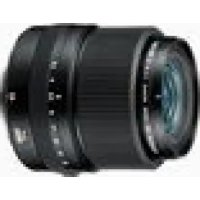
GF45mmF2.8 R WR - Camera FUJIFILM - Free user manual and instructions
Find the device manual for free GF45mmF2.8 R WR FUJIFILM in PDF.



| Product type | Fixed focal length lens for medium format mirrorless camera |
| Compatible mount | Fujifilm G (exclusive, not compatible with X mount) |
| Focal length | 45 mm (36 mm equivalent in 35 mm) |
| Maximum aperture | f/2.8 |
| Minimum aperture | f/32 |
| Angle of view | 62.6° |
| Optical construction | 11 elements in 8 groups (1 aspherical element, 2 extra-low dispersion elements) |
| Number of diaphragm blades | 9 (circular) |
| Minimum focusing distance | 45 cm (measured from the focal plane) |
| Maximum magnification | 0.14× |
| Filter diameter | 62 mm |
| Dimensions (diameter × length) | 84 × 88 mm |
| Weight (without caps and hood) | 490 g |
| Supplied accessories | Front cap, rear cap, lens hood, soft case |
| Weather sealing | Rubber ring on mount for dust and splash resistance |
| Aperture control | Aperture ring with A (auto), C (command dial) positions and manual values (1/3 stops) |
| Maintenance | Clean with blower and soft cloth; avoid organic solvents; store in a cool, dry place |
| Safety | Do not look at the sun through the lens; do not use in humid or dusty environments without protection; keep out of reach of children |
| Repairability | Entrust any repair to a FUJIFILM authorized service center |
Frequently Asked Questions - GF45mmF2.8 R WR FUJIFILM
User questions about GF45mmF2.8 R WR FUJIFILM
0 question about this device. Answer the ones you know or ask your own.
Ask a new question about this device
Download the instructions for your Camera in PDF format for free! Find your manual GF45mmF2.8 R WR - FUJIFILM and take your electronic device back in hand. On this page are published all the documents necessary for the use of your device. GF45mmF2.8 R WR by FUJIFILM.
USER MANUAL GF45mmF2.8 R WR FUJIFILM
Be sure to read these notes before use
Safety Notes
Thank you for your purchase of this product. For repair, inspection, and internal testing, contact your FUJIFILM dealer.
Make sure that you use the lens correctly. Read these safety notes and the camera Owner's Manual carefully before use.
After reading these safety notes, store them in a safe place.
About the icons
The icons shown below are used in this document to indicate the severity of the injury or damage that can result if the formation indicated by the icon is ignored and the product is used incorrectly as a result.

WARNING
This icon indicates that death or serious injury can result if the information is ignored.

CAUTION
This icon indicates that personal injury or material damage can result if the information is ignored.
The icons shown below are used to indicate the nature of the instructions which are to be observed.

Triangular icons tell you that this information requires attention ("Important").

Circular icons with a diagonal bar tell you that the action indicated is prohibited ("Prohibited").

Filled circles with an exclamation mark indicate an action that be performed ("Required").


WARNING

Do not use in the bathroom or shower
Do not immer in or expose to water. Failure to observe this precaution can cause a fire or electric shock.

Do not disassemble
Do not disassemble (do not open the case). Failure to observe this precaution can cause fire, electric shock, or injury due to product malfunction.
Should the case break open as the result of a fall or other accident, do not touch the exposed parts. Failure to observe this precaution could result in electric shock or in injury from touching the damaged parts. Remove the camera battery immediately, taking care to avoid injury or electric shock, and take the product to the point of purchase for consultation.
| WARNING |
| Do not place on unstable surfaces. The product may fall, causing injury. |
| Do not view the sun through the lens or camera view fi nd Failure to observe this precau-tion can cause permanent visual impairment. |
| CAUTION |
| Do not use or store in locations that are exposed to steam, or smoke or are very humid or extremely dusty. Failure to observe this precaution can cause fire or electric shock. |
| Do not leave in direct sunlight or in locations subject to very high temperatures, such as in a closed vehicle on a sunny day. Failure to observe this precau-tion can cause fire. |
| CAUTION | |
| Keep out of the reach of small children. This product could cause injury in the hands of a child. | |
| Do not handle with wet hands. Failure to observe this precaution can cause electric shock. | |
| Keep the sun out of the frame when shooting backlit subjects. Sunlight focused into the camera when the sun is in or close to the frame can cause fire or burns. | |
| When the product is not in use, replace the lens caps and store out of direct sunlight. Sunlight focused by the lens can cause fire or burns. | |
| Do not carry the camera or lens while they are attached to a tripod. The product can fall or strike other objects, causing injury. |
For Customers in the U.S.A.
Tested To Comply With FCC Standards FOR HOME OR OFFICE USE
FCC Statement: This device complies with Part 15 of the FCC Rules. Operation is subject to the following two conditions: (1) This device may not cause harmful interference, and (2) this device must accept any interference received, including interference that may cause undesired operation.
CAUTION: This equipment has been tested and found to comply with the limits for a Class B digital device, pursuant to Part 15 of the FCC Rules. These limits are designed to provide reasonable protection against harmful interference in a residential installation. This equipment generates, uses, and can radiate radio frequency energy and, if not installed and used in accordance with the instructions, may cause harmful interference to radio communications. However, there is no guarantee that interference will not occur in a particular installation. If this equipment does cause harmful interference to radio or television reception, which can be determined by turning the equipment off and on, the user is encouraged to try to correct the interference by one or more of the following measures:
Reorient or relocate the receiving antenna.
- Increase the separation between the equipment and receiver.

- Connect the equipment into an outlet on a circuit different from that to which the receiver is connected.
- Consult the dealer or an experienced radio/TV technician for help.
- You are cautioned that any changes or modifications not expressly approved in this manual could void the user's authority to operate the equipment.
Notes on the Grant: To comply with Part 15 of the FCC Rules, this product must be used with a Fujii Im-specific ed ferrite-core A/V cable, USB cable, and DC supply cord.
For Customers in Canada
CANICES-3 (B)/NMB-3(B)
CAUTION: This Class B digital apparatus complies with Canadian ICES-003.
IMPORTANT SAFETY INSTRUCTIONS
- Read these instructions.
- Keep these instructions.
Heed all warnings. - Follow all instructions.
- Do not use this apparatus near water (excluding waterproof products).
Clean only with a dry cloth. - Do not block any ventilation openings. Install in accordance with the manufacturer's instructions.
- Do not install near any heat sources such as ra
diators, heat registers, stoves, or other apparatus (including amplifiers) that produce heat.
- Protect the power cord from being walked on or pinched particularly at plugs, convenience receptacles, and the point where they exit from the apparatus.
Only use attachments/accessories specified by the manufacturer. - Unplug this apparatus during lightning storms or when unused for long periods of time.
Refer all servicing to qualified service personal. Servicing is required when the apparatus has been damaged in any way, such as power supply cord or plug is damaged, liquid has been spilled or objects have fallen into the apparatus, the apparatus has been exposed to rain or moisture, does not operate normally, or has been dropped.
Disposal of Electrical and Electronic Equipment in Private Households
In the European Union, Norway, Iceland and Liechtenstein: This symbol on the product, or in the manual and in the warranty, and/or on its packaging indicates that this product shall not be treated as household waste. Instead it should be taken to an applicable collection point for the recycling of electrical and electronic equipment.

By ensuring this product is disposed of correctly, you will help prevent potential negative consequences to the environment and human health, which could otherwise be caused by inappropriate waste handling of this product.
The recycling of materials will help to conserve natural resources. For more detailed information about recycling this product, please contact your local city office, your household waste disposal service or the shop where you purchased the product.
In Countries Outside the European Union, Norway, Iceland and Liechtenstein: If you wish to discard this product, including the batteries or accumulators, please contact your local authorities and ask for the correct way of disposal.
U.K. Importer:
FUJIFILM UK Ltd.
Fujii Im House, Whitbread Way, Bedford,
Bedfordshire, MK42 0ZE, United Kingdom
EU Importer:
FUJIFILM Germany GmbH
Balcke-Durr-Allee 6,40882 Ratingen, Germany
Australian RCM

EN-3
ENGLISH
Before Using This Product
Some lens features are not available with older versions of the camera firmware. Be sure to update the camera firmware to the latest version. Instructions on viewing the camera firmware version and updating camera firmware are available from the following website:
http://www.fujifilm.com/support/digital Cameras/software/#firmware
If you do not have access to a computer, support is available from the local distributor listed in the "FUJIFILM Worldwide Network" material provided with your camera.
Product Care
- When using a lens hood, do not pick up or hold the camera using only the hood.
-
Keep the lens signal contacts clean.
-
Use a blower to remove dust and lint from the glass surfaces of the lens or fi Iter. To remove smudges and fi ngerprints, apply a small amount of lens cleaner to a soft, clean cotton cloth or lens-cleaning tissue and clean from the center outwards using a circular motion, taking care not to leave smears or touch the glass with your fi ngers.
- Never use organic solvents such as paint thinner or benzene to clean the lens.
- Attach the front and rear caps when the lens is not in use.
- Store the lens and filter in cool, dry locations to prevent mold and rust. Do not store in direct sunlight or with naphtha or camphoc moth balls.
- Keep the lens dry. Rusting can cause irreparable damage. Wipe off rain and water droplets.
- Leaving the lens in extremely hot locations could cause damage or warping.
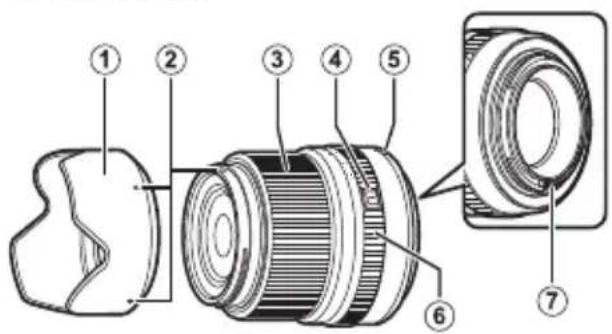
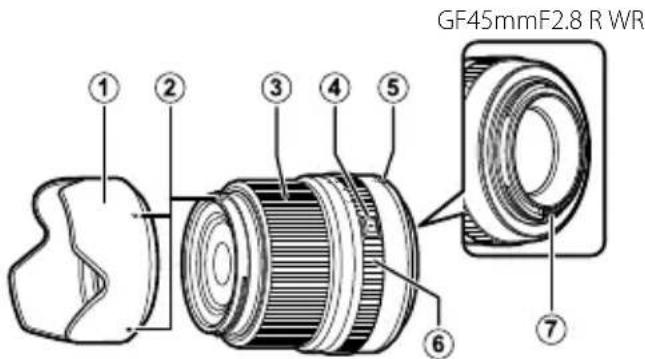
Parts of the Lens
GF45mmF2.8R WR
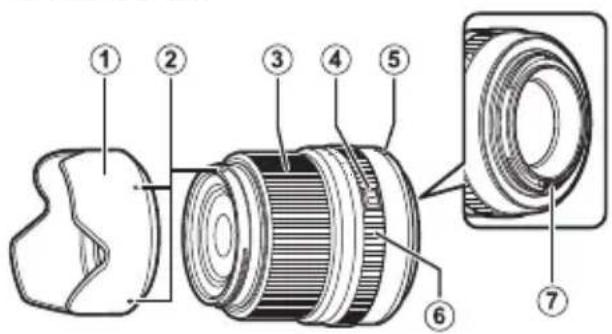
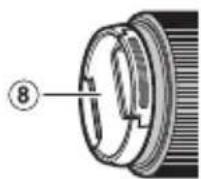
① Lens hood
② Mounting marks
③ Focus ring
④ Aperture ring lock release
⑤ Mounting marks (focal length)
⑥ Aperture ring
Lens signal contacts
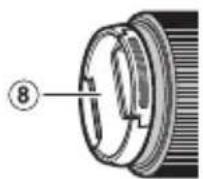
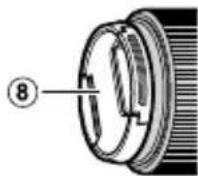
⑧Front lens cap
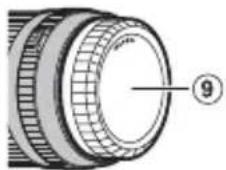
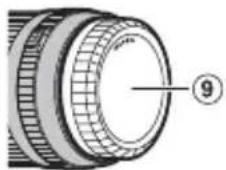
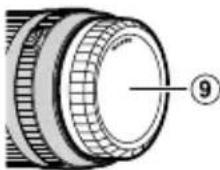
⑨ Rear lens cap
① The lens mount includes a rubber ring to ensure that the lens remains dust- and splash-proof. The ring can be replaced for a fee at any FUJIFILM service center.
Supplied Accessories
-
Front lens cap
Rear lens cap -
Lens hood
- Lens pouch
ENGLISH
EN-5
Attaching the Lens
See the camera manual for information on attaching and removing lenses.
This lens is for use exclusively with FUJIFILM G mounts and can not be used with X mounts.
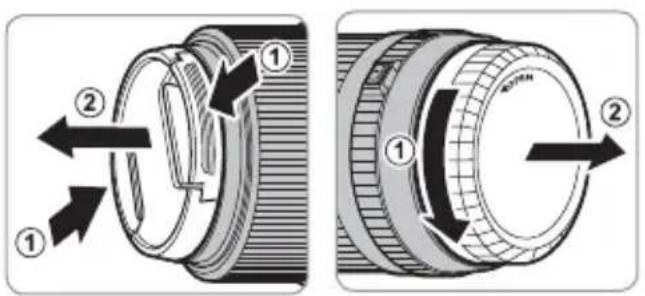
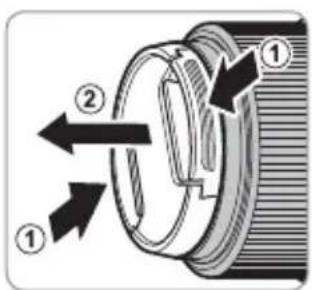
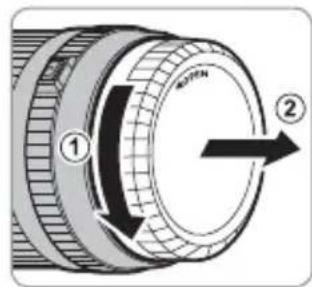
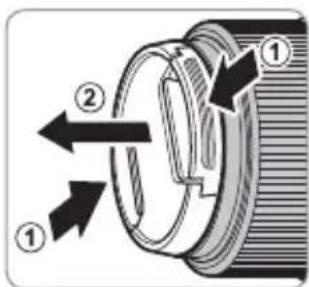
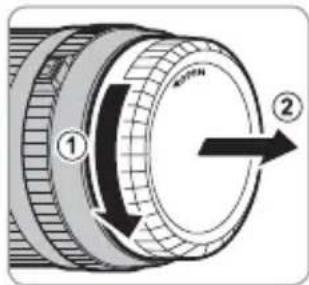
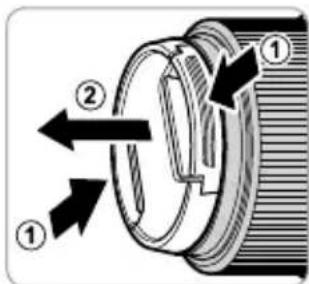
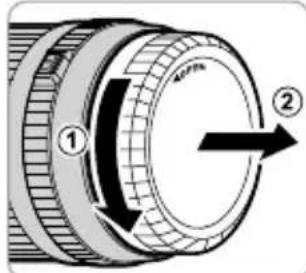
Removing the Caps
Remove the caps as shown.
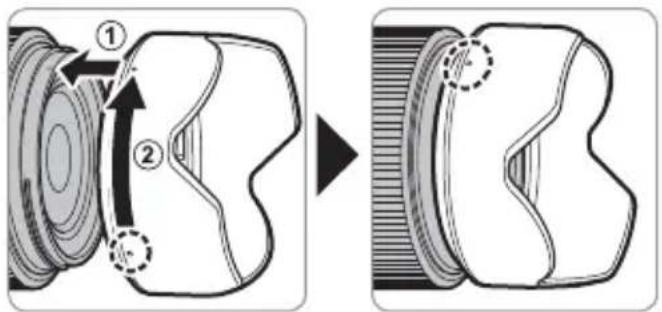
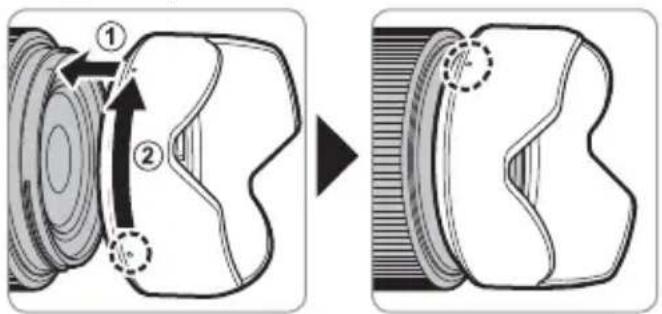
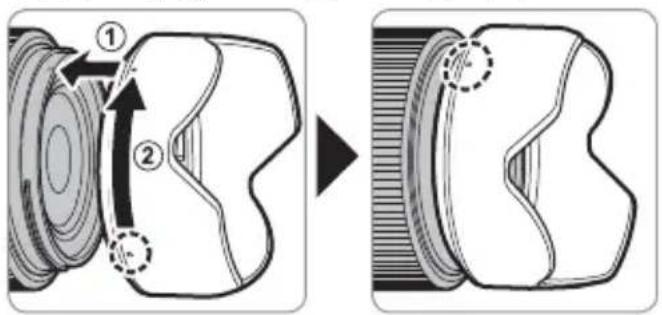
Attaching the Hood
When attached, lens hoods reduce glare and protect the front lens element.
Aperture ring
Rotate the lens aperture ring to choose the aperture (f-number).
① C: Set aperture to the value chosen with the camera command dial.
② A (1/4) : Set aperture to the value chosen automatically by the camera.
③ Other values: Set aperture to the selected value.
To select C or A, or to select another value after selecting C or A, press the aperture ring lock release while rotating the aperture ring.
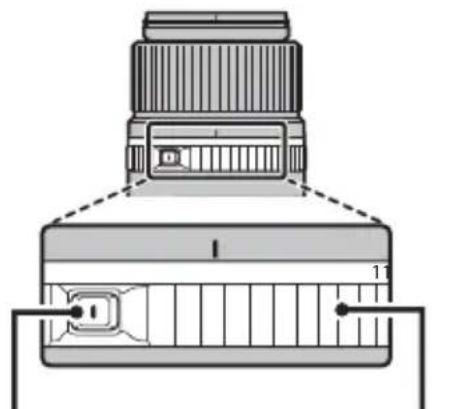
Aperture ring lock release
EN-7ENGLI
Specifications
| Type GF45mmF2.8 R WR | |
| Lens construction | 11 elements in 8 groups (includes 1 aspherical and 2 extra low dispersion elements) |
| Focal length (35 mm format equivalent) | f=45 mm (36 mm) |
| Angle of view 62.6° | |
| Max. aperture f/2.8 | |
| Min. aperture f/32 | |
| Aperture control | |
| Number of blades 9 (rounded diaphragm opening) | |
| Stop size | 1/3 EV (22 stops) |
| Focus range (measured from focal plane) 45 cm – infinity | |
| Max. magnification 0.14× | |
| External dimensions: Diameter × Length* (approx.) | Ø84 × 88 mm |
| * distance from camera lens mount fl ange | |
| Weight* (approx.) | 490 g |
| * excluding caps and hoods | |
| Filter size | Ø62 mm |
① Improvements may result in unannounced changes to specifications and appearance.
Owing to how this lens is constructed, the "Distance indicator" displayed by the camera may in some cases differ from the actual focus distance. Use the "Distance indicator" as a guide only.
Pour vous sécurité
http://www.fujifilm.com/support/digital Cameras/software/#firmware
http://www.fujifilm.com/support/digital Cameras/software/#firmware
http://www.fujifilm.com/support/digital Cameras/software/#firmware
http://www.fujifilm.com/support/digital Cameras/software/#firmware
http://www.fujifilm.com/support/digital Cameras/software/#firmware
http://www.fujifilm.com/support/digital Cameras/software/#firmware
http://www.fujifilm.com/support/digital Cameras/software/#firmware
http://www.fujifilm.com/support/digital Cameras/software/#firmware
B cnyuae, ecn y Bac HeT doctyna K KOMnbIOTepy, 6bpatntecb 3a noDpeKko K MeCTHOMy DnCTPn6bIOTopy n3 cncka "FUJIFILM Worldwide Network", noCTabHeHHoro c Baueh oToKaMepoi.
yxo3a n3eennem
- Пи IncnoIb3OBAHn6JIeHDbI O6beKTHBa He 6e-puTecb 3a foToKaMepy n He depxKeTe ee TOnbKO 3a 6JIeHdy.
He donycka Te 3aarpnaHne HcunhaBn HxOxBeBbX Kaane bnn 6pbI3r BODblnx CneTakTOB o6bekTuBa. dyet BblTepeTb.
-Пользунтугшей дя удалини пьлл и -пси объektub OCTabintb B Mectax, поверраю- -пуха секларых поberpxhocteй obbektuba -плл Фнльста. Дя удалини пятей и OTneuata- -TO может NOВpeNTb Илд Deфорmpobatb ero. - Bepernte obBeKTHB OT Bnarn. Koppo3nMoKTe HaHeCTn HeNoonpaBnMbI yUeep6. Pn nonaHaH HIOXDeBbIX KaneIb nII N 6pbI3r BOblnx CneDyET BblTepeTb.
- Ecnn OBeKTHB OCTaBtB B MeCTax, NOBepraIOUxCBAO3DeIcTBIO BbICOKNX Tempeatyp, TO 3TO MOKeT IOBpeNTb ININ DeOpMnpoBaTb erO.
RU-4
PYCCKM
KOB NaIbceB HaHecnte He6oJbwoe KOJIueCTBO XnIKOCTn IaYnCTKN ObBeKTINBOB Ha MArKyIO, YnCTyIO Xlonuato6ymaxHyIO TkaHb NnN CaI-ΦETky IaYnCTKN ObBeKTINBOB N IpOTpnte ObBeKTINOT CEHTpa K Kpaam KpyRObbIMN DnIXeHNMa, CO6JIIOJa OTOPOXHOCTb, He OCTaBJIa pa3BOIDOB H He KaCaAcb CTekla NaIbCuAM.
- Hukorda He nCnoB3yIe dIy uNCTKN O6bekTnBa opraHueckne paCTBOpNTen, TaKne KaK pa36aBHTenb dIy KpaCKu NII 6EH3IN.
3aKpOte KpbIuKy 06bEeKTHBa u KpbIuKy 6aNoHeTa 06bEeKTHBa, KOrDa 06bEeKTHB He UcNoJIb3yETc.
XpaHnTe o6bekTnB n fNtBp B npoxlaaHbIX, cyxix MeCTax, yTO6bl npeDoTbpaTntb 6pa3oBaHne PnIeHen N KoppOzHN. He xpaHnTe B MeCTax, rDe Ha Hero nonaDaet npraMoN cOnHeuHbIN CBET, INN pAOM C HafTaIIHOBbIMN INN KaMΦOpHbIMN WaPnKaMn OT MOIN.
Yactn 06bekTmBa
GF45mmF2.8R WR
① Bilehda oBbekmuBa
② Memku dny ycmahOBku
③ Φokycupo8oHoe KOJIbua
④Pa36nokupo6kaKolbua dauafpa2Mbi
⑤ Memku dny ycmahOBku (fokychoe paccmohue)
⑥ Konbdo duoΦpa2Mbl
⑦CuZHaBbHbe KOhMaKmbi O6bekMuba
⑧ Kpbwioka o6bekmuBa
⑨ Kpbuuka 6aohema oboekmuBa
1Kpenne Hne obektnBa nmeet pe3nHOoe konbco, KOTOPoe o6ecneHnaeT 3aunTy obektnBa OT nbnn n 6pb3r. Konbco M0XHO 3aMeHnB B IIObOM cepBnCHom cHTpe FUJIFLM 3a OTdennHyo nnaty.
Ipnlaeraembie npnaadnlexxhoctu
Kpbiuka o6beKeTnBa
Kpbioka 6aioHeTa oBeKeTnBa
-Блендаобъektива
-Чеклдя объктува
PYCCKM
RU-5
YcTaHOBka 06beKTnBa
Cm.pykoBOCTBO nOlb3OBaTeIg FOToKa-Mepo InIPOlyeHn INHOpMaun O6 yCTaHOBKe n CHrTIN ObBeKTnBa.
1DaHHbI ObBeKTHB npedHa3HaueH NCKIOUHTeNbHO nC- NOb3OBaHH C 6aNoHETAM FUJIFLM G H He MoXet 6bTb NCnOB3OBaH C 6aNoHETAm X.
ChTne KpbIweK
CHNMMTe KpbIuKn, KaK NOKa3aHo Ha puCyHKe.
yctahOBka6IeHdbI
Pn noDCoeHHeHn 6JeHdbI oBbeKTHBa yMeHbHaOT 6nKn n 3aunuaT nepeHIO JINH3y.
KoIbUO dHaΦparMbI
IobepHnte Kobluo dnaΦpaarmbl obBeKtNbA DnB Bb6Opa BeiUnHb IdaΦpaarmbl (uNcNo f).
① C():YcTaHOBnTe DnaΦpaRMy Ha 3HaueHne,Bbl-6paHHoe c NOMOuI OINCKa ynpabNeHnA φOTOKa-MepoI.
② A(1A):YcTaHOBnTeIinaΦpaRMyHa3HaueHne,Bbl6paHHoeΦOTOKaMepoABTomatnueckn.
http://www.fujifilm.com/support/digital Cameras/software/#firmware
http://www.fujifilm.com/support/digital Cameras/software/#firmware
http://www.fujifilm.com/support/digital Cameras/software/#firmware
http://www.fujifilm.com/support/digital Cameras/ software/#firmware
http://www.fujifilm.com/support/digital Cameras/ software/#firmware
http://www.fujifilm.com/support/digital Cameras/software/#firmware
CouyTeR to sAungd hup u, kMaaL aHJt J. CoQI"FUJIFLMWorldwide Network"JcoEe Iel
GeriHn HJIiTJiJF1M 0
奈吾北
中
- Renshurin
·Lenz sinho jieqin 1
·隣羅號者,亦用如藥之。
KO-4
要,
① I'I'J'FUI'MG MAnOTr'XMnOTr'AndH'K'
←
其LIMF 1
华三
部 用 用
01
LenzstoIeRngi#
∴ \ b : y( 1) . . 4y\ · j
∴ 2.2 = 90
∴ an + 1 = 2an2an + 1 = 1/2
a#zll a#g ①
SjIyIcIe ②
3
aayla a yoo 4
(yjyJgbl)CyjIolx ⑤
aaiyiajoo 6
aayyoljoljogjolj ⑦
8
a
ylll aegao zai jjlaa bbae aess
FUJIFILM a 5y jg
a#b1c1gSsy
a
aewell
∴ θ = 1.
AR-5
g 1
a 1
a 1
a 1
a 1
a 1
a 1
15g 15g
J
J
J
J
J
J
J
J
J
J
J
J
J
J
J
J
J
J
J
J
J
J
J
J
J
J
J
J
J
J
J
J
J
J
J
J
J
J
J
J
J
J
J
J
J
J
J
J
J
J
J
J
J
J
J
J
J
J
J
J
J
J
J
J
J
J
J
J
J
J
J
J
J
J
J
J
J
J
J
J
J
J
J
J
J
AR-4
aoyyjulj 3 yuyyiyg ygyyiyiyiy

aagablaalglalgallge aelauuagablll lao gaaalall alalll no uully
yuaiae naue yae bnae nnae ae aee aee aee aee
Jogclogbtae nae jae aae baae sglblg abae aae plalol glggsd eae
clalaln no aaleaagglgglgglgglgglgglgglgglg
J 15

duolw j0j
y
- BE SURE TO READ THESE NOTES BEFORE USE
- SAFETY NOTES
- ABOUT THE ICONS
- WARNING
- TESTED TO COMPLY WITH FCC STANDARDS FOR HOME OR OFFICE USE
- FOR CUSTOMERS IN CANADA
- CANICES-3 (B)/NMB-3(B)
- IMPORTANT SAFETY INSTRUCTIONS
- DISPOSAL OF ELECTRICAL AND ELECTRONIC EQUIPMENT IN PRIVATE HOUSEHOLDS
- U.K. IMPORTER
- EU IMPORTER
- AUSTRALIAN RCM
- BEFORE USING THIS PRODUCT
- PRODUCT CARE
- PARTS OF THE LENS
- SUPPLIED ACCESSORIES
- ATTACHING THE LENS
- REMOVING THE CAPS
- ATTACHING THE HOOD
- APERTURE RING
- POUR VOUS SÉCURITÉ
- YXO3A N3EENNEM
- YACTN 06BEKTMBA
- IPNLAERAEMBIE NPNAADNLEXXHOCTU
- YCTAHOBKA 06BEKTNBA
- CHTNE KPBIWEK
- YCTAHOBKA6IEHDBI
- KOIBUO DHAΦPARMBI
- 奈吾北
- 中
- ←
- 华三
- 01
- ∴ \ B : Y( 1) . . 4Y\ · J
Brand : FUJIFILM
Model : GF45mmF2.8 R WR
Category : Camera