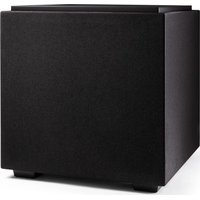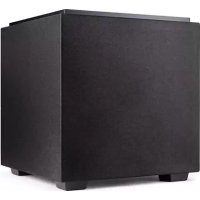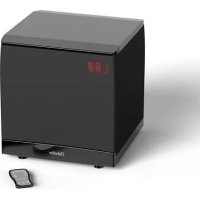
SuperCube SC 6000 - Subwoofer DEFINITIVE TECHNOLOGY - Free user manual and instructions
Find the device manual for free SuperCube SC 6000 DEFINITIVE TECHNOLOGY in PDF.


| Product Type | Active Subwoofer |
| Brand | Definitive Technology |
| Model | SuperCube SC 6000 |
| Dimensions (with feet) | 32,5 x 30,5 x 33 cm |
| Drivers | 1 active 9" (23 cm) driver, 2 passive radiators 10" (25 cm) |
| Frequency Response | 14 Hz - 200 Hz |
| Inputs | 1 LFE line-level input, 1 pair line-level inputs, 1 pair high-level inputs on screw terminals |
| Replacement Fuse | For 220-240 V: T4AL250V time-lag; for 100-120 V: T6.3AL250V time-lag |
| Remote Control Battery | Lithium 3V, CR2025 |
| Power Supply | 220-240 V or 100-120 V (depending on model) |
| Standby Power Consumption | Less than 0.5 W |
| Protection | Overload and overheat protection circuit |
| Maintenance and Cleaning | Clean only with a dry cloth |
| Safety | Do not expose to water or moisture; do not place objects filled with liquid on the device |
| Warranty | 5 years for speakers and cabinet, 3 years for electronic components |
| Included Accessories | Infrared remote control, floor feet |
Frequently Asked Questions - SuperCube SC 6000 DEFINITIVE TECHNOLOGY
User questions about SuperCube SC 6000 DEFINITIVE TECHNOLOGY
0 question about this device. Answer the ones you know or ask your own.
Ask a new question about this device
Download the instructions for your Subwoofer in PDF format for free! Find your manual SuperCube SC 6000 - DEFINITIVE TECHNOLOGY and take your electronic device back in hand. On this page are published all the documents necessary for the use of your device. SuperCube SC 6000 by DEFINITIVE TECHNOLOGY.
USER MANUAL SuperCube SC 6000 DEFINITIVE TECHNOLOGY
Definitive Technology®
The Leader in High-Performance Loudspeakers®
SuperCube®
SC 4000, SC 6000
Owner's Manual
Manual del usuario
Guide d'utilisation

Thank you for choosing the Definitive Technology SuperCube subwoofer. In order to ensure that you experience the finest performance possible, we encourage you to take a moment to fully read this owner's manual and familiarize yourself with the proper installation and setup procedures for your SuperCube speaker. Enjoy.
Safety Precautions 4
Unpacking Your Loudspeakers 5
Placing the SuperCube 6
AC Mains (Power) Connection 7
Connection & Setup .8-9
Adjusting & Using the SuperCube Subwoofer 14,17
LP & HP Filter Guide 18
Service 19
Limited Warranty 20
Indice
-
This lightning flash with arrowhead symbol within an equilateral triangle is intended to alert the user to the presence of non-insulated "dangerous voltage" within the product's enclosure that may be of sufficient magnitude to constitute a risk of electric shock.
-
Warning: To reduce the risk of electric shock, do not remove cover (or back) as there are no user-serviceable parts inside. Refer servicing to qualified personnel.
The exclamation point within an equilateral triangle is intended to alert the user to the presence of important operating and maintenance instructions in the literature accompanying the appliance.
- Correct Disposal of this product. This marking indicates that this product should not be disposed with other household wastes throughout the EU. To prevent possible harm to the environment or human health from uncontrolled waste disposal,
recycle it responsibly to promote the sustainable reuse of material resources. To return your used device, please use the return and collection systems or contact the retailer where the product was purchased. They can take this product for environmental safe recycling.
Each subwoofer leaves our plant in perfect condition. Any visible or concealed damage most likely occurred in handling after it left our plant and should be reported at once to your Definitive dealer or the delivery company that delivered your subwoofer. Please unpack your system carefully. Save all cartons and packing material in case you move or need to ship your system. Record the serial number found on the back of the subwoofer.
Serial Number:
There are some general guidelines that you should bear in mind when locating your subwoofer:
- For best results, place the subwoofer on the same side of the room as your front speakers.
- Placement near walls and in a corner will increase the subwoofer's output, but may sound "muddy" or "boomy."
- An acoustic effect called "standing waves" or "room modes" may cause uneven bass at various locations throughout the room. This phenomenon is a function of the dimensions of the room and not due to the design of the subwoofer. If there is less bass at the main listening position than at other areas of the room, move the subwoofer until you hear full bass at the main listening position.
- Moving the subwoofer even a foot or two can dramatically change the bass output and quality. Experiment with subwoofer placement to achieve the highest performance.
- The subwoofer may be placed inside a cabinet, provided there is a clearance of at least 2 inches (50mm) around the front, back, sides and top of the subwoofer. The front of the cabinet should be completely open or covered with open mesh grille, screen or cloth.
The SuperCube subwoofer must be plugged into an appropriate voltage (use an unswitched outlet if possible). Check the amplifier plate to determine the AC voltage required by your unit. The subwoofer has a circuit which automatically turns the subwoofer on when a signal is fed to the loudspeaker and does not require an on/off switch. Please note that if you hear a pop from the speaker when the amp powers up or powers down, this is normal. The red LED on the back panel will light up when a signal is sensed and the amplifier turns on. Please note that after the cessation of a signal, it may take up to an hour for the amplifier to actually turn off. In some installations where radio frequency (RF) remotes are present in the area, the red light may remain on. This is nothing to be worried about as the amp will be in low idle mode which uses very little power (less than 12 Watt).
To prevent accidental damage to your subwoofer from overdriving the system, the subwoofer features an internal overload protection circuit, which will turn the subwoofer off or down when overdriven or overheated and will then resume normal operation after a few minutes.
There are four options for connecting your subwoofer:
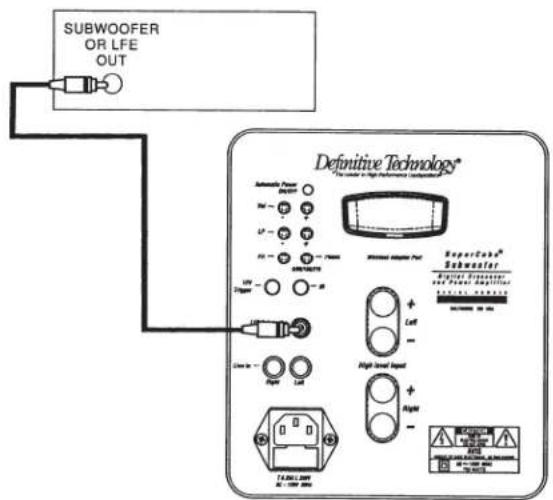
RECEIVER
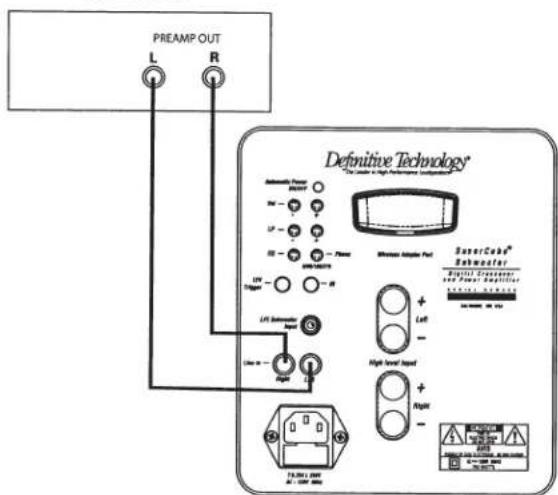
RECEIVER
LFE INPUT
1A (This method is recommended for home theater systems with receivers that do not allow low-pass filter [crossover] and high-pass filter frequencies to be set independently. It uses the low-pass filter built into the receiver and bypasses the one built into the subwoofer.)
- Power-off the amplifier/receiver and disconnect the subwoofer from the AC socket.
- Connect a standard RCA cable from the subwoofer/LFE output of your receiver to the LFE input of the SuperCube subwoofer.
- Connect the subwoofer to an AC power source and turn it on (see page 7).
- Turn on the receiver's power and access the "speaker setup" or "speaker configuration" menu.
- Set the subwoofer to "Yes" or "On".
- Select the crossover frequency that is appropriate for your main front loudspeakers (see chart on page 18).
1B (This method is recommended for home theater systems with receivers that allow low-pass and high-pass filters [crossovers] to be set at different frequencies. This method uses the low-pass filter built into the subwoofer rather than the one built into your receiver as the LPF in the SuperCube is better and more convenient to adjust as you are listening to program material.)
- Power-off the amplifier/receiver and disconnect the subwoofer from the AC socket.
- Connect a standard RCA cable from the subwoofer/LFE output of your receiver to the LFE input of the SuperCube subwoofer.
- Connect the subwoofer to an AC power source and turn it on (see page 7).
- Turn on the receiver's power and access the "speaker setup" or "speaker configuration" menu.
- Set the subwoofer to "Yes" or "On".
- Select the highest possible subwoofer low-pass filter (crossover) frequency allowed by your receiver.
- Set the main, center and surround speakers' high-pass filters (crossovers) to an appropriate frequency (see page 18 for a guide).
2
LINE IN
best for systems with no LFE/subwoofer output jack such as 2-channel systems)
- Power-off the amplifier/receiver and disconnect the subwoofer from the AC socket.
- Connect standard RCA cables from the front L&R pre-out jacks of the receiver.
- Connect the subwoofer to an AC power source and turn it on (see page 7).
- If the system is 2-channel, skip to step 8.
- If the receiver is a multi-channel device, turn on the receiver's power and access the "speaker setup" or "speaker configuration" menu.
- Set the subwoofer to "None" or "Off".
- Set front L&R speakers as "Large".
- Start with the volume set to V25.
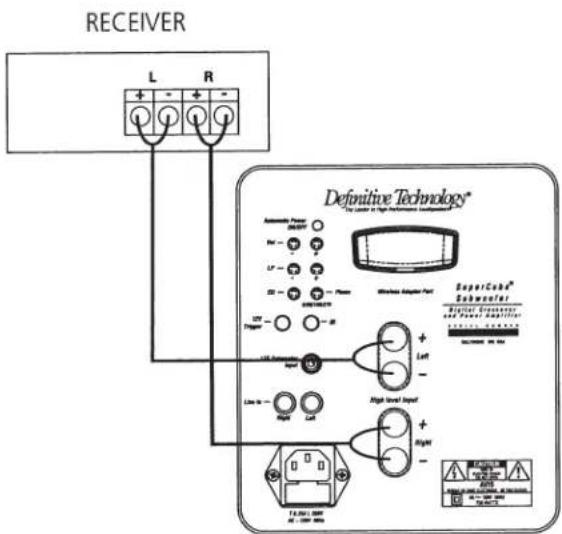
SPEAKER LEVEL IN
best for amps/receivers with no LFE/subwoofer or pre-out jacks)
- Power-off the amplifier/receiver and disconnect the subwoofer from the AC socket.
- Connect standard speaker cables from the speaker output terminals of the amplifier/receiver. Most amplifiers and receiver speaker terminals allow two sets of wires to be connected to one terminal set (one for the main speaker and one for the subwoofer). [IMPORTANT NOTE: One terminal on each channel input is marked with a red band (+) and the other is marked with a black band (-). Make certain that you connect the wire from the red (+) terminal of your amplifier or receiver to the red (+) terminal of the subwoofer and the wire from the black (-) terminal of your amplifier or receiver to the black (-) terminal of the subwoofer. It is essential to connect all speakers in the system to the amplifier in the same way (in correct polarity). If you experience poor bass, one or more of the channels may be connected in incorrect polarity and needs to be rewired. Pay close attention and connect positive to positive; negative to negative on all channels.]
- Connect the subwoofer to an AC power source and turn it on (see page 7).
- If the system is 2-channel, skip to step 8.
- If the receiver is a multi-channel device, turn on the receiver's power and access the "speaker setup" or "speaker configuration" menu.
- Set the subwoofer to "None" or "Off".
- Set front L&R speakers as "Large".
- Proceed to page 17 for subwoofer adjustment and system tweaking.
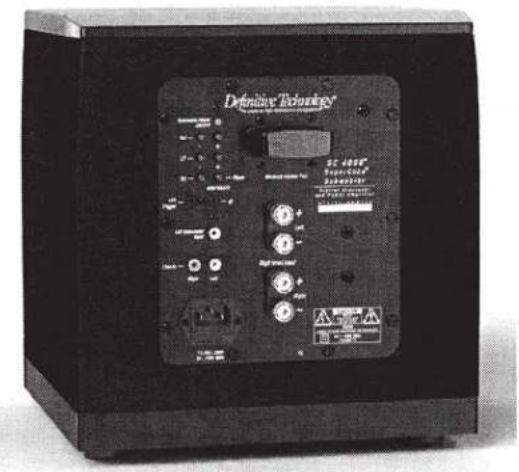
4 WIRELESS CONNECTION
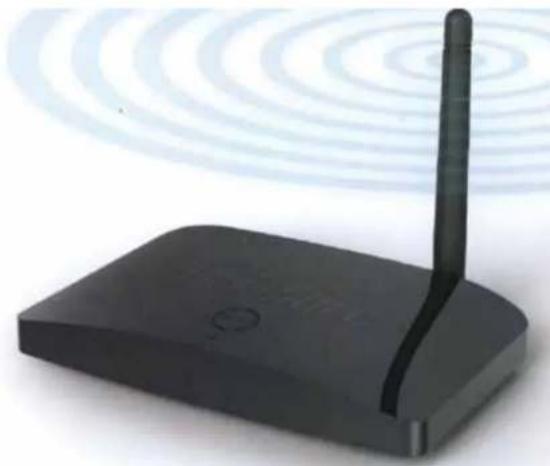
- In order to connect the subwoofer wirelessly, you must purchase an optional Definitive Technology wireless adaptor kit.
- Follow the directions supplied with the wireless kit to connect the system.
OTHER CONNECTIONS
12V trigger (OPTIONAL): Connect a cable with 3.5mm tip/ring male plugs to the 12V trigger output of the system's receiver or preamp/processor for one-button system turn-on.
IR Remote: In installations where the subwoofer is in a cabinet or otherwise blocked, the remote will not work. Connect an IR remote repeater eye (optional, available from most audio/video specialty dealers) to the IR remote jack on the subwoofer's amplifier panel. Position the repeater eye within clear view of your main listening position.
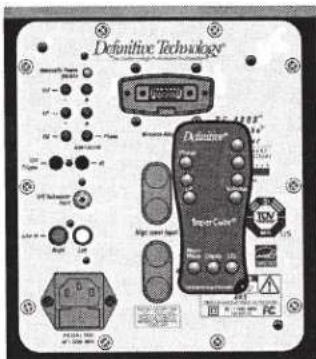
Volume, LP Filter, Phase and EQ controls are duplicated on the amp panel.
Remote Guide
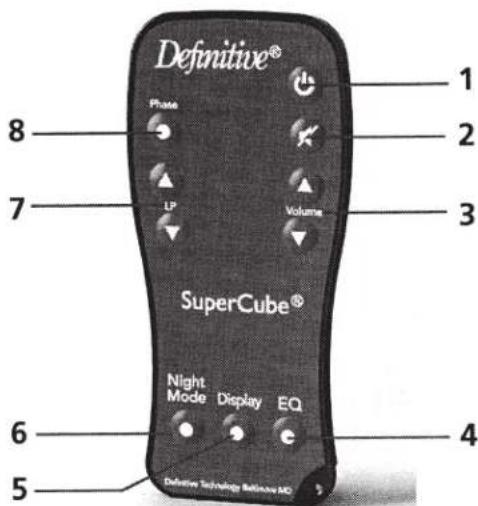
The supplied remote control is attached to the amp panel with a hook and loop fastener; pull to remove it. The remote is the best tool for perfectly adjusting your subwoofer to achieve perfect seamless blending with your main speakers. If you misplace your remote, the most often used controls are duplicated on the rear amp panel.
NOTE: If there is no unobstructed line of sight from your listening position to the display area of the subwoofer, the remote will not work. To remedy the problem, connect an IR remote repeater eye (optional, available from most audio/video specialty dealers) to the IR remote jack on the subwoofer's amplifier panel.
- Power: Press to toggle the unit on or off. ON or OFF will be displayed in LED display. Note: if signal is sent to the subwoofer, it will automatically turn on again. After approximately 30 minutes of no signal, the unit will automatically turn off.
- Mute: Pressing mute turns the sound level of the subwoofer to zero. V00 will flash in the display. Hitting mute again or volume up or down will take the subwoofer out of mute state.
- Volume up/down: Increases/decreases the subwoofer's loudness. Note: the volume range goes from 0 to 40.
- EQ: There are 4 program-specific equalization settings; EQ1, EQ2, EQ3 and EQ4. See Selecting EQ Modes on page 17 for more information.
- Display: Pressing this button turns the display on or off. When commands are issued to the subwoofer, the display will be visible for a brief time and then turn off.
-
Night mode: Engaging night mode compresses the dynamic range so that the peak bass volume level is reduced—ideal for late night listening or apartment dwellers who care about their neighbors. The display will show N_Y when this mode is engaged and N_N when it is turned off. When the subwoofer is turned off with night mode engaged, it will turn back on with night mode off.
-
LP up/down: The adjustable low-pass filter runs can be adjusted from 40 to 140Hz
- Phase: Adjusts the relative phase of the output signal. There are four settings: 0^ (displayed as 000), 90^ (090), 180^ (180), and 270^ (270).
Getting Started
- Power up the subwoofer using the On/Standby button.
- Set volume to the V25 setting on the front panel display.
- Set the LP (low-pass) control according to the chart on page 18 to start. The front panel display will show "L" and numerals when you are making adjustments to this control.
- Push the Phase button until the display shows "0".
- Push the EQ button until the display shows "EQ1".
Adjusting for Best Performance
In an ideal audio system the subwoofer works "invisibly," simply adding deep, loud bass without calling attention to itself and blending seamlessly with the main speakers so it appears that the main speakers are making all the sound. The key to seamless main speaker/sub blending is finding the perfect crossover frequency, equalization and phase settings for your system. And the best place to make those "set and forget" adjustments is from your listening chair via the wireless remote. If your receiver has built-in Audyssey or a similar auto setup/room correction function, run that first. In most cases that is all the adjustment you'll need to do. [NOTE: auto setup functions work best when the subwoofer is connected to the LFE/subwoofer output.]
- Sit in your favorite listening position with remote in hand.
- Play a piece of music you are very familiar with that has good deep bass content.
- Adjust the Volume up or down to taste. The bass should have impact without sounding too "heavy".
- Using the LP & HP Filter Guide on page 18 as a starting point, adjust the LP up or down until there is a smooth transition between main speaker and subwoofer. Play a recording with male vocals and string bass. Turn down the
LP filter frequency until the vocals sound rich but not "thick" or "chesty," turn it up if the vocals sound "thin" or lacking in body.
5. Toggle through the 4 phase settings and use the setting that produces the loudest bass at your listening position.
Selecting EQ Modes
The 4 equalization (EQ) modes are variations in frequency response from "flat" response to adjust for program material differences or personal preference. Use whichever setting(s) sound best to you.
- EQ1: maximizes deepest octave bass response at the sacrifice of maximum volume level—a good choice for pipe organ and symphonic recordings.
CAUTION: This setting should not be used at high-volume levels. - EQ2: raises relative level of mid-bass frequencies—a good choice for hip hop and rock music and movie soundtracks with weak bass.
- EQ3: raises the level of mid- and ultra-low bass frequencies-a great setting for movies when not played at ultra-high volume levels.
- EQ4: the best setting to use when achieving maximum volume levels with minimal distortion is more important than reproducing the lowest frequencies.
The SuperCube 4000 and SuperCube 6000 are ENERGY STAR® qualified powered subwoofoers. When in idle mode, these subwoofoers draw less than 1 Watt of current and thus help lower your electric bills and protect the environment.
Products that earn the ENERGY STAR prevent greenhouse gas emissions by meeting strict energy efficiency guidelines set by the U.S. Environmental Protection Agency and the U.S. Department of Energy.

For further information about the ENERGY STAR mark, please refer to http://www.energystar.gov.
Service
Service and warranty work on your Definitive loudspeaker will normally be performed by the Definitive Technology dealer or importer. If, however, you wish to return the speaker to us, please contact us first, describing the problem and requesting proper authorization.
NOTE: Definitive phone and email technical support offered only in English.
Please note that the address given in this booklet is the address of our offices only. Under no circumstances should loudspeakers be shipped to our offices or returned without contacting us first and obtaining return authorization.
e-mail: info@DefinitiveTech.com
Technical assistance
If you have any questions, please contact the Definitive Technology dealer or importer you purchased it from. If they are unable to help you, please contact us directly. (800) 228-7148 (North America), 01 (401) 363-7148, email: info@DefinitiveTech.com
Contact us directly
Definitive Technology
11433 Cronridge Drive
Owings Mills, MD 21117 USA
call: 800-228-7148
visit: www.DefinitiveTech.com
email: info@DefinitiveTech.com
twitter: @DefinitiveTech
info@DefinitiveTech.com
Servicio de assistencia的技术
info@DefinitiveTech.com
Contactese directamente
con nosotros
Definitive Technology
11433 Cronridge Drive
Owings Mills, MD 21117
Estados Unidos
info@DefinitiveTech.com
Twitter: @DefinitiveTech
Assistance technique
Definitive Technology
11433 Cronridge Drive
5-Years for Drivers and Cabinets, 3-Years for Electronic Components
DEI Sales Co., dba Definitive Technology (herein "Definitive"), warrants to the original retail purchaser only that this Definitive loudspeaker product (the "Product") will be free from defects in material and workmanship for a period of five (5) years covering the drivers and cabinets, and three (3) years for the electronic components from the date of the original purchase from a Definitive Authorized Dealer. If the Product is defective in material or workmanship, Definitive or its Authorized Dealer will, at its option, repair or replace the warranted product at no additional charge, except as set forth below. All replaced parts and Product(s) become the property of Definitive. Product that is repaired or replaced under this warranty will be returned to you, within a reasonable time, freight collect. This warranty is non-transferrable and is automatically void if the original purchaser sells or otherwise transfers the Product to any other party. This Warranty does not include service or parts to repair damage caused by accident, misuse, abuse, negligence, inadequate packing or shipping procedures, commercial use, voltage in excess of the rated maximum of the unit, cosmetic appearance of cabinet not directly attributable to defects in material or workmanship. This warranty does not cover the elimination of externally generated static or noise, or the correction of antenna problems or weak reception. This warranty does not cover labor costs or damage to the Product caused by installation or removal of the Product. Definitive Technology makes no warranty with respect to its products purchased from dealers or outlets other than Definitive Technology Authorized Dealer. The warranty is automatically void if: 1) The product has been damaged, altered in any way, mishandled during transportation, or tampered with. 2) The product is damaged due to accident, fire, flood, unreasonable use, misuse, abuse, customer applied cleaners, failure to observe manufacturers warnings, neglect or related events. 3) Repair or modification of the Product has not been made or authorized by Definitive Technology. 4) The product has been improperly installed or used. Product must be returned (insured and prepaid), together with the original dated proof of purchase to the Authorized Dealer from whom the Product was purchased, or to the nearest Definitive factory service center. Product must be shipped in the original shipping container or its equivalent. Definitive is not responsible or liable for loss or damage to Product in transit. This limited warranty is the only express warranty that applies to your product. Definitive neither assumes nor authorizes any person or entity to assume for it any other obligation or liability in connection with your product or this warranty. All other warranties, including but not limited to express, implied, warranty of merchantability or fitness for a particular purpose, are expressly excluded and disclaimed to the maximum extent allowed by law. All implied warranties on product are limited to the duration of this expressed warranty. Definitive has no liability for acts of third parties. Definitive's liability, whether based on contract, tort, strict liability, or any other theory, shall not exceed the purchase price of the product for which a claim has been made. Under no circumstance will Definitive bear any liability for incidental, consequential or special damages. The consumer agrees and consents that all disputes between the consumer and Definitive shall be resolved in accordance with California laws in San Diego County, California. Definitive reserves the right to modify this warranty statement at any time. Some states do not allow the exclusion or limitation of consequential or incidental damages, or implied warranties, so the above limitations may not apply to you. This warranty gives you specific legal rights, and you may also have other rights which vary from state to state.
This product complies with the essential requirements of the EMC directive 89/336/EEC.
Copyright © 2011 Definitive Technology.
© 2011 Definitive Technology.
© 2011 Definitive Technology.
All rights reserved.
Definitive Technology®
SC4000
SUPERCUBE® WIRELESS-READY SUBWOOFER FEATURING DIGITAL SIGNAL PROCESSING
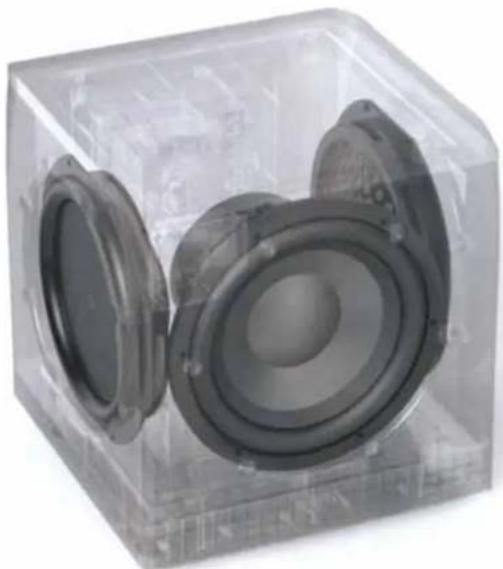
SuperCube® technology - for the performance of a full size subwoofer in an ultra-compact, space saving package.
1200 Watt Digital Signal Processing Amplifier - for precise control and tight, accurate bass performance for music and movies.
Multi-band Dynamic Range Optimizer - for distortion-free high output bass.
Rock solid build quality - braced double wall MDF for resonance-free pure bass.
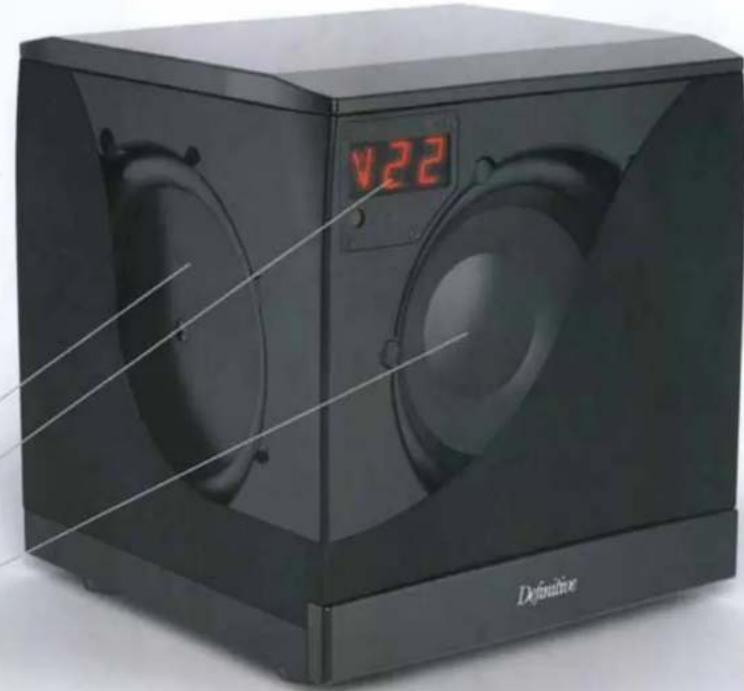
Two 8^ pressure-coupled planar low bass radiators
LCD alpha-numeric display indicates control settings and automatically turns off when not in use.
8" high excursion active low bass driver for deep, tight bass impact
SUPERCUBE® 4000 FEATURES
www.definitivetech.com
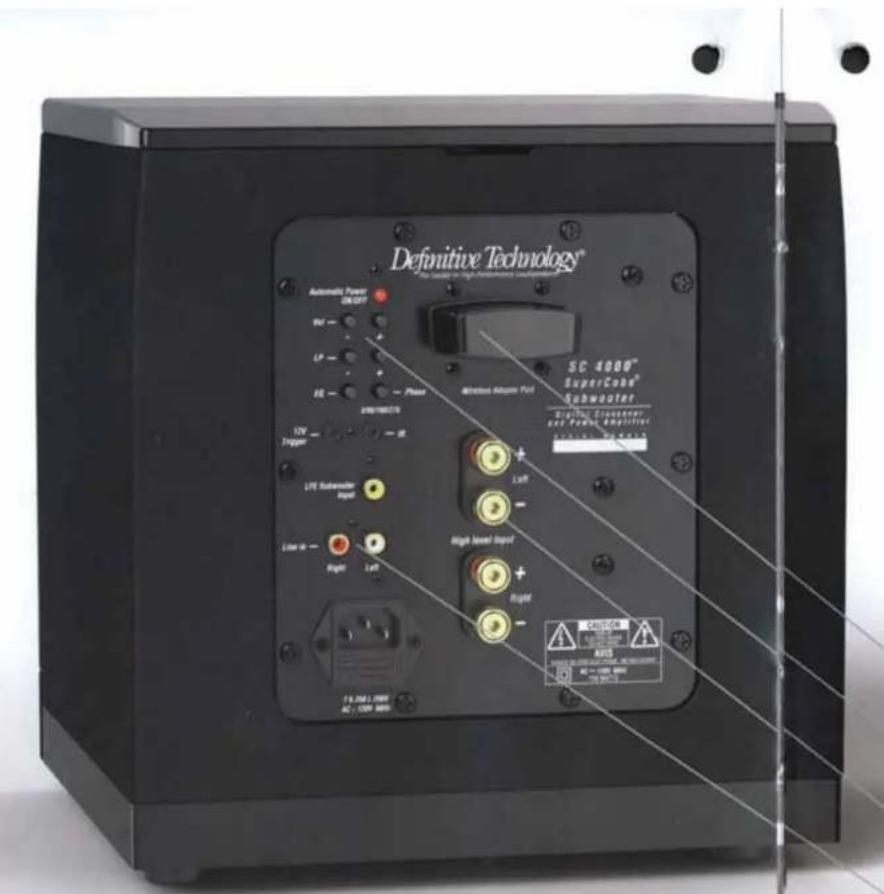
ULTIMATE CONNECTIVITY AND CONTROL
The SuperCube® 4000 easily connects to any audio system. It can be hooked up with speaker wire, low level signal cable or wirelessly with an optional wireless kit.
Wireless receiver module (optional) plugs right in to the amp panel
All the controls that are on the remote are duplicated on the back panel
Heavy duty 5-way binding post speaker connectors for systems without LFE or low level outputs
LFE and Low Level inputs
The SC 4000's wireless remote is more than a convenience feature - it's first and foremost a performance optimizing tool.
In an ideal audio system the subwoofer works "invisibly," simply adding deep, loud bass without calling attention to itself—blending seamlessly with the main speakers. The key to seamless main speaker/sub blending is finding the perfect crossover frequency, equalization and phase settings for your system. And the best place to make those "set and forget" adjustments is from your listening chair via a wireless remote.
For everyday use the remote's volume control makes it easy to set just the right amount of bass output to compensate for program material differences. You'll get exactly the bass performance you want - effortlessly at the touch of a button.
www.definitivetech.com
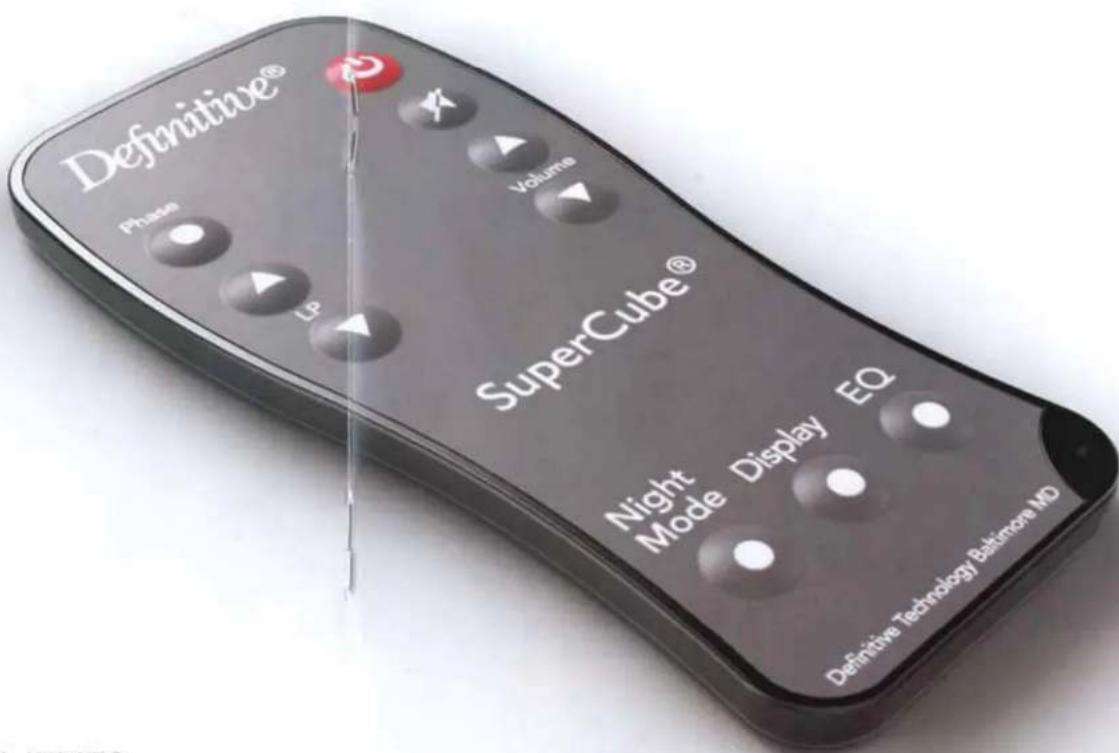
WIRELESS REMOTE BENEFITS
www.definitivetech.com
Phase - toggles between 0^ , 90^ , 180^ , 270^
Low Pass - sets low pass crossover frequency
Night Mode - applies dynamic range compression to the woofer so that the loudest bass in a movie doesn't get loud enough to wake the kids.
Display - turns the LCD display on and off
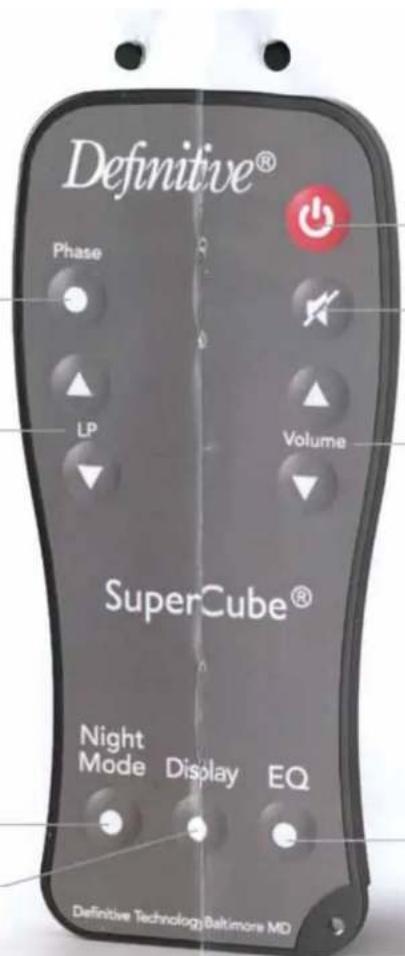
Power - On/Standby
Mute - turns off subwoofer volume (LCD display stays on while mute is engaged)
Volume - choose the right bass level at will
EQ - toggles between 4 equalization settings. Choose the setting that best suits the program material and your room.
REMOTE FUNCTIONS
Dimensions (H× W× D) .. 11 - 7 / 8^ × 11^ × 12^ (30.0cm x 27.9cm× 30.3cm) . The depth with the optional wireless receiver installed is 13^ (32.9cm).
Driver Complement: One 8" high excursion active subwoofer driver, two 8" planar low-bass radiators
Frequency Response: 16Hz 200Hz
Internal Amplifier Power: 1200 Watts
Inputs: One LFE line-level, one pair line level (LP filtered), one pair 5-way binding posts LP filtered
Display: Indicates volume level, crossover frequency, phase, EQ mode settings and night mode on/off.
SUPERCUBE® 4000 SPECIFICATIONS
NEED EVEN MORE BASS?
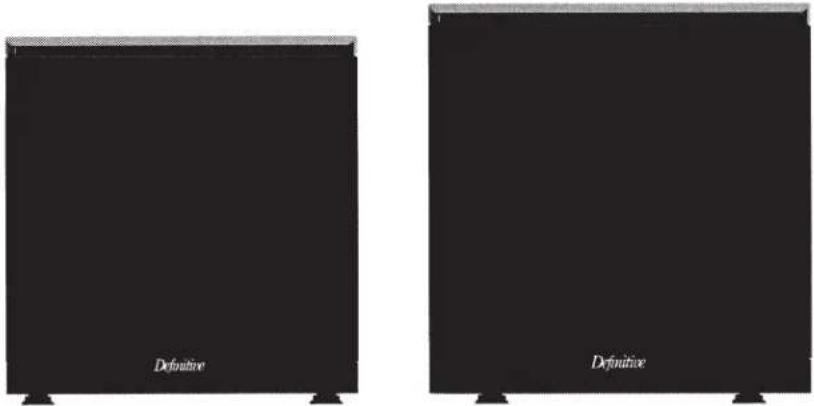
For larger rooms and systems we offer the SuperCube 6000 with the same feature set as the SuperCube 4000 but with more power and bigger drivers for deeper, louder bass.

SUPERCUBE4000
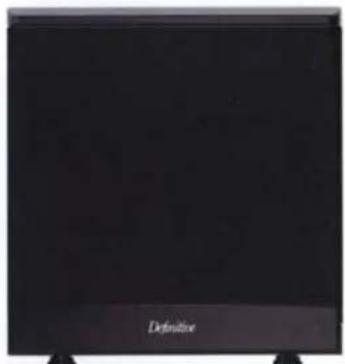
SUPERCUBE®6000

ECO FRIENDLY BASS
The SuperCube 4000 meets or exceeds EnergyStar and European Union standards for low power consumption while in idle mode, drawing less than a 12 Watt of power. It saves you money and helps the environment.
Definitive Technology®
The Leader in High-Performance Loudspeakers
The USA's Most Honored Loudspeaker Brand
Definitive Technology is the best-selling brand of audiophile-grade loudspeakers in the USA. Audio critics praise Definitive loudspeakers for their superior materials, workmanship and sound quality.
"A brand that is as solid as any speaker manufacturer in the world."
AudioVideoRevolution.com
www.definitivetech.com