Big Bang Unico Perpetual Calendar Titanium Ceramic - Watch HUBLOT - Free user manual and instructions
Find the device manual for free Big Bang Unico Perpetual Calendar Titanium Ceramic HUBLOT in PDF.


User questions about Big Bang Unico Perpetual Calendar Titanium Ceramic HUBLOT
0 question about this device. Answer the ones you know or ask your own.
Ask a new question about this device
Download the instructions for your Watch in PDF format for free! Find your manual Big Bang Unico Perpetual Calendar Titanium Ceramic - HUBLOT and take your electronic device back in hand. On this page are published all the documents necessary for the use of your device. Big Bang Unico Perpetual Calendar Titanium Ceramic by HUBLOT.
USER MANUAL Big Bang Unico Perpetual Calendar Titanium Ceramic HUBLOT
natural_image
Close-up of a luxury wristwatch with mechanical dials and a textured black casing, showing no visible text or symbols.FONCTIONNEMENT
natural_image
Close-up of a luxury wristwatch with mechanical dials and branding (no readable text or symbols)FONCTIONNEMENT
natural_image
Close-up of a mechanical component with red annotation boxes highlighting features (no readable text or symbols)Outil correcteur
natural_image
Close-up of a futuristic luxury watch with black and silver casing, featuring intricate mechanical components and branding (no readable text or symbols)
CORRECTEUR A
This function enables you to set the time using the crown positioned at 3 o'clock.

natural_image
Close-up of a luxury watch with mechanical components and red directional arrows (no readable text or symbols)FONCTIONNEMENT
- Loosen and pull the crown into position 2 (time-setting).
- Turn the crown clockwise (ideally) to set your watch to the desired time.
- Push the crown back against the case, into position 1 (winding) and tighten the crown.
USING THE CHRONOGRAPH
INTRODUCTION
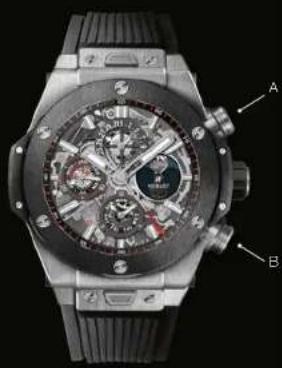
This function enables you to measure time using the two push-pieces positioned at 2 o'clock (Start/Stop) and 4 o'clock (Reset).
natural_image
Close-up of a luxury watch with visible mechanical components and branding (no readable text or symbols)OPERATION
Before timing, make sure that the chronograph centre hand (direct-drive), and the minute and hour counter hands have been reset. Then :
- Press push-piece (A): the chronograph hand will start instantly.
- When the event ends, press push-piece (A): the hand will stop and display the exact elapsed time.
- Press push-piece (B): the direct-drive hand and counter hands will be reset.
To measure a series of sequential times: press push-piece (A) again to restart the hands.
NB : the chronograph can only be reset if it has first been stopped by pressing push-piece (A).
USING THE CALENDER
natural_image
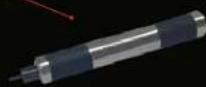
Close-up of a mechanical device with red annotation boxes highlighting specific components (no readable text or symbols)Adjuster tool

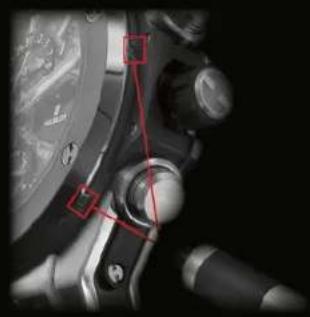
You can adjust the day, date, month and moon phase by pressing the adjusters positioned on the sides of the watch, using the adjuster tool supplied with your watch.
Four adjusters are built-in either side of the watch case, for adjusting the oscillator settings.

ADJUSTER D
ADJUSTING THE MONTH/LEAP YEAR
Press on the adjuster posi- tioned at 9 o'clock.
Each press turns the hand and the disc by one month.
ADJUSTING THE DATE Press on the adjuster positioned at 8 o'clock. Each press turns the hand by one day.

ADJUSTER C

natural_image
Close-up of a futuristic wristwatch with mechanical dials and falt, no visible text or symbols
ADJUSTER A
Press on the adjuster positioned at 2 o'clock.
Each press turns the disc by one day.
Time-setting position
0
Winding position
ADJUSTING THE DAY
Press on the adjuster positioned at 4 o'clock. Each press turns the hand by one day.

ADJUSTER B
INSTRUCTIONS FOR ADJUSTMENT
- Before making any adjustments, turn the crown clockwise (position 0). After turning the crown approx.30 times, the watch will be able to run automatically thanks to the movements of your wrist.
- Pull the crown into position 1, then turn the hands clockwise until the date changes. The watch shows midnight. Continue and position the hands to 3 o'clock (3 am).
- Press the adjuster A positioned at 2 o'clock several times until the full moon appears in the centre of the opening (at 6 o'clock). To adjust this function correctly, use the lunar calendar at the back of the Instruction manual to calculate the number of days since the last full moon. Next, press the adjuster the same number of times as the number of days since the last full moon.
- Press the adjuster C at 8 o'clock several times until the date is positioned at 1.
- Press the adjustor D at 9 o'clock several times until the required month is shown and the year is displayed inside the red zone on the dial (the leap year is indicated by the red number 4).

- Press the adjuster C at 8 o'clock several times until the desired date is shown.
- Press the adjuster B at 4 o'clock several times until the desired day is shown.
- Turn the hands clockwise until the desired hour is shown (position 1). Then press the crown to return it to position 0, the movement begins to function. Tighten the crown.
PRECAUTIONS OF USE
- Do not attempt to tighten the crown when it is in the time-setting position; it must be returned to the winding position before being tightened.
- To guarantee that the watch runs constantly and regularly, you are recommended to stop the timer (using the push-piece at 2 o'clock) when the watch is not being worn or if the timer function is not being used.
- Do not make any adjustments between 8 pm and 1 am, or you will damage the mechanism.
CALENDRIER LUNAIRE (UTC\*)
Showing the date of the full moon and leap years.
2016 *Leap year