XDP210EQ - Car speaker SONY - Free user manual and instructions
Find the device manual for free XDP210EQ SONY in PDF.


| Product Type | Digital equalizer preamplifier |
| Brand | Sony |
| Model | XDP210EQ |
| Dimensions (W × H × D) | 245 × 145 × 40 mm |
| Weight | 1.2 kg |
| Power supply | Car battery 12 V DC (negative ground) |
| Current consumption | 1 A |
| Frequency response | 8 Hz – 20 kHz (FRONT) |
| Signal-to-noise ratio | 105 dB (FRONT, JIS-A) |
| Harmonic distortion | 0.005% (FRONT) |
| Separation | 95 dB at 1 kHz |
| Front equalizer | 18 frequency bands: 30 Hz, 45 Hz, 62 Hz, 90 Hz, 130 Hz, 190 Hz, 270 Hz, 400 Hz, 580 Hz, 840 Hz, 1.2 kHz, 1.7 kHz, 2.5 kHz, 3.6 kHz, 5.2 kHz, 7.5 kHz, 11 kHz, 16 kHz; ±12 dB |
| Rear equalizer | 3 bands: 90 Hz, 840 Hz, 7.5 kHz |
| Tone controls | Bass ±10 dB at 310 Hz, Treble ±10 dB at 3.1 kHz |
| Main functions | Equalizer curve selection and memory (up to 9 curves), curve identification, listening position selection (ALL, FRONT, FRONT R, FRONT L, REAR), subwoofer level adjustment, crossover frequency adjustment (subwoofer, front, rear), source sound memory (LSM), disc sound memory (DSM) |
| Inputs/Outputs | BUS input (2), RCA line input (2), RCA line output (3), digital optical input (2) |
| Supplied accessories | BUS cable (2 m), mounting screws (4) |
| Optional accessories | BUS cable with RCA pin cord, RC-97 optical cable (2 m) |
| Maintenance and cleaning | Check connections and fuse in case of malfunction. For cleaning, use a dry cloth. |
| Safety | Keep volume moderate to hear traffic sounds. Use only a fuse of the same rating as specified. |
| Repairability and spare parts | Consult an authorized Sony dealer for repairs. The fuse is user-replaceable. |
| General information | Compatible with Sony BUS system. Can be controlled by a compatible Sony head unit (XR-C900, CDX-C910, etc.) |
Frequently Asked Questions - XDP210EQ SONY
User questions about XDP210EQ SONY
0 question about this device. Answer the ones you know or ask your own.
Ask a new question about this device
Download the instructions for your Car speaker in PDF format for free! Find your manual XDP210EQ - SONY and take your electronic device back in hand. On this page are published all the documents necessary for the use of your device. XDP210EQ by SONY.
USER MANUAL XDP210EQ SONY
Digital Equalizer Preamplifier
Operating Instructions
EN
Mode d'emploi
F
Owner's Record
The model and serial numbers are located on the bottom of the unit.
Record the serial number in the space provided below.
Refer to these numbers whenever you call upon your Sony dealer regarding this product.
Model No. XDP-210EQ Serial No.
For installation and connections, see the supplied installation/connections manual.
1996 by Sony Corporation
Warning
This equipment has been tested and found to comply with the limits for a Class B digital device, pursuant to Part 15 of the FCC Rules. These limits are designed to provide reasonable protection against harmful interference in a residential installation. This equipment generates, uses, and can radiate radio frequency energy and, if not installed and used in accordance with the instructions, may cause harmful interference to radio communications. However, there is no guarantee that interference will not occur in a particular installation. If this equipment does cause harmful interference to radio or television reception, which can be determined by turning the equipment off and on, the user is encouraged to try to correct the interference by one or more of the following measures: Reorient or relocate the receiving antenna.
Increase the separation between the equipment and receiver.
Connect the equipment into an outlet on a circuit different from that to which the receiver is connected.
- Consult the dealer or an experienced radio/ TV technician for help.
You are cautioned that any changes or modifications not expressly approved in this manual could void your authority to operate this equipment.
Welcome!
Thank you for purchasing the Sony Digital Equalizer Preamplifier. This unit is compatible with the Sony BUS system.
This unit provides flexible equalization using 18-band (front) and 3-band (rear) equalizer with independent control of level and frequency. The characteristics, installation position, and sound field of the speakers make it possible to arrange the frequency response and reproduce the sound quality of the original performance.
You can control this unit with a Sony Master unit which can operate a digital preamplifier.
Table of Contents
Getting Started
Operating this unit 4
About operation mode 4
DSP
Selecting the stored equalizer curve 4
Setting and storing the equalizer curve 4
Labeling an equalizer curve 5
Selecting the listening position 6
Adjusting the listening position 6
Adjusting the level of the subwoofer(s) 6
Adjusting the cut-off frequency 7
Listening to each program source in its registered equalizer curve 7
Registering an equalizer curve onto
each disc 8
Additional Information
Precautions 8
Specifications 9
Troubleshooting guide 10
EN
Getting Started
Operating this unit
You can control this unit by a Sony Master unit. Some master units have + / - (volume) buttons, and some have a dial. This instructions shows as follow. Rotate/press + or - .
Note
There may be a difference between the display items of this manual and the master unit.
Note in operation
- The unit has a digital volume control system. Do not down the volume of the master unit too much as doing so may cause the sound quality to deteriorate.
- When you connect this unit to the master unit, the loudness function will not work.
- The sound becomes unclear in some situations (such as when the BAS, TRE or EQ are excessively boosted).
- Two units can not be used at the same time.
About operation mode
This unit has three operation modes.
Sound Control Mode
Select the item or adjust it partially.
- EQ (Graphic Equalizer): Select the equalizer curve.
- POS (Listening Position): Select the listening position.
- SUB (Subwoofer): Adjust the subwoofer volume level.
Sound control mode can adjust not only BAS, TRE, BAL, FAD but also VOL. For further details, read the master unit instructions.
Sound Tuning Mode
Tune in the item selected in the Sound Control Mode exactly.
- EQ (Graphic Equalizer): Setting and registering the equalizer curve.
POS (Listening Position): Adjust the listening position. - CNW (Cross Over Network): Adjust the cutoff frequency.
Name Edit Mode
EQ (Graphic Equalizer): Naming the equalizer curve.
DSP
Selecting the stored equalizer curve
Sound Control Mode
You can select the stored equalizer curve (MEMORY1 to MEMORY9) or an unadjusted curve (FLAT).
1 Press (SOURCE) to select a source (radio, tape, CD or MD etc.).
2 Press (SOUND) repeatedly until "EQ" appears.

1 MEMORY1
3 Rotate/press + or - to select the stored equalizer curve.
After three seconds, the display goes back to the normal playback mode.
Tip
To adjust the stored equalizer curve further, press SOUND for two seconds within three seconds after following step 3 above. Then go to step 4 to 8 of "Setting and storing the equalizer curve."
Setting and storing the equalizer curve
Sound Tuning Mode
You can adjust the 21 band frequencies to make an equalizer curve, and store up to nine curves.
Front (18 band):
30Hz,45Hz,62Hz,90Hz,130Hz,190Hz,
270 Hz, 400 Hz, 580 Hz, 840 Hz, 1.2 kHz,
1.7 kHz, 2.5 kHz, 3.6 kHz, 5.2 kHz, 7.5 kHz, 11 kHz, 16 kHz
Rear (3 band):
90 Hz, 840 Hz, 7.5 kHz
1 Press (SOURCE) to select a source (radio, tape, CD or MD etc.).
2 Press (SOUND) for two seconds.
3 Press (SOUND) repeatedly until "EQ" appears.
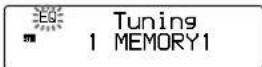
4 Rotate/press ① or 一 to select an equalizer curve.
5 Adjust the equalizer curve.
Press (4) to select the desired frequency.
If you adjust the level too high, the sound becomes distorted. In this case, lower the level until the sound becomes normal.
Repeat steps 1 and 2 to adjust the equalizer curve.
6 Press (ENTER).
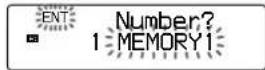
7 Rotate/press + or - to select the number that you want to enter into memory.
8 Press ⑤ (ENTER).
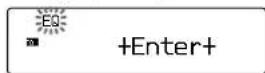
9 To return to the normal playback mode, press (SOUND) for two seconds.
To cancel setting the equalizer curve, press (SOUND) for two seconds after step 7.
Tip
You can label the equalizer curve by pressing (LIST) for two seconds after step 5 above. Then go to step 2 to 7 of "Labeling an equalizer curve".
Note
If the name of the equalizer curve flashes in the display window, the equalizer curve is not stored. To store the equalizer curve again, repeat steps 6 to 9 above.
Labeling an equalizer
curve — Name Edit Mode
You can label each equalizer curve with a personalized name. You can enter up to eight characters for an equalizer curve.
1 Press SOUND for two seconds.
2 Select an equalizer curve and press LIST for two seconds.
3 Enter the characters.
Rotate/press + to select the desired characters.

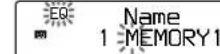
If you rotate/press l , the characters appear in the reverse order.
If you want to put a blank space between characters, select " _" (under-bar).
Press (4) (→) after locating the desired character.
The flashing cursor moves to the next character.
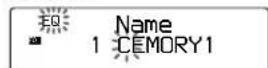
If you press () ( ), the flashing cursor moves to the left.
Repeat steps 1 and 2 to enter the entire name.
4 Press LIST for two seconds.
5 Press (5) (ENTER).
6 Rotate/press ^+ or - to select the number that you want to enter into memory.
7 Press (5) (ENTER).
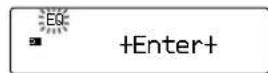
8 To return to the normal playback mode, press (SOUND) for two seconds.
Tip
To erase/correct a name, enter " _" (under-bar) for each character.
Note
When the name of the equalizer curve flashes in the display window, the equalizer curve name is not stored. To store the equalizer curve again, repeat the step 5 to 7 above rightly.
Selecting the listening position—Sound Control Mode
You can set the time for the sound to reach the listeners from the speakers.
The unit can simulate a natural sound field so that you can feel as if you are in the center of the sound field wherever you sit in the car.
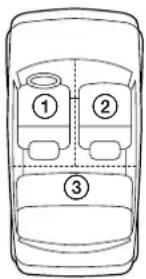
| Display window | Center of soundfield |
| ALL | Normal setting (① + ② + ③) |
| FRONT | Front part (① + ②) |
| FRONT R | Right front (②) |
| FRONT L | Left front (①) |
| REAR | Rear part (③) |
1 Press (SOUND) momentarily until "POS" appears.
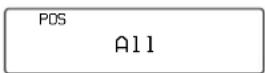
2 Rotate/press + or - to select the desired listening position.
The listening positions appear in the order shown above.
After three seconds, the display goes back to the normal playback mode.
Tip
To adjust the listening position further, press SOUND for two seconds within three seconds after following step 2 above. Then go to step 4 to 8 of "Adjusting the listening position."
Adjusting the listening position — Sound Tuning Mode
Note
When you adjust the listening position, set the balance and fader control to the center position.
1 Press SOUND for two seconds.
2 Press SOUND repeatedly until "POS" appears.
3 Rotate/press + or - repeatedly until the desired listening position appears.
PDS
Tuning A11
4 Press ④ ()
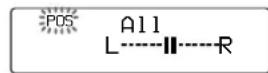
5 Rotate/press ① or 一 to adjust the center of the sound field to the left or right. Then set the center of the sound field.
+ : Center moves to the R (right).
: Center moves to the L (left).
6 Press 4 ()
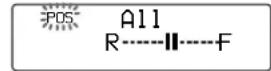
7 Rotate/press or - to adjust the center of the sound field to the front or rear.
+ : Center moves to the F (Front).
: Center moves to the R (Rear).
8 Press (SOUND) for two seconds.
When the listening position setting is complete, the normal playback mode appears.
Adjusting the level of the subwoofer(s)
Sound Control Mode
You can adjust the subwoofer level independently of the speakers.
1 Press SOURCE to select a source (radio, tape, CD or MD etc.).
2 Press (SOUND) repeatedly until "SUB" appears.
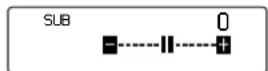
3 Rotate/Press ^+ or 一 to adjust the level.
After three seconds, the display goes back to the normal playback mode.
Tip
To adjust the cut-off frequency of the subwoofer(s), press (SOUND) for two seconds within three seconds after following step 3. The go to step 3 to 4 of "Adjust in the cut-off frequency."
Adjusting the cut-off frequency — Crossover Network (CNW)
Sound Tuning Mode
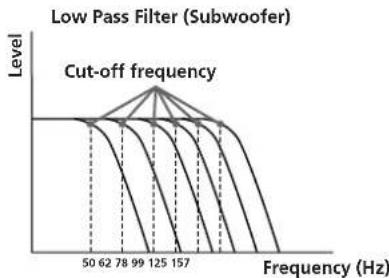
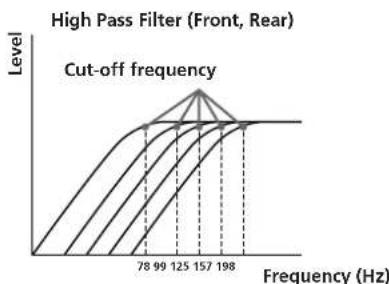
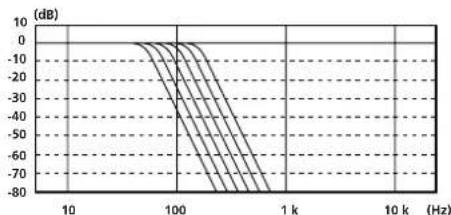
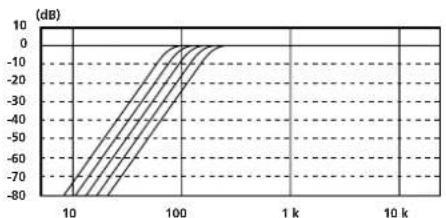
To match the characteristics of the connected speakers or subwoofer(s), you can cut the unwanted high, middle and low frequency signals entering the speakers or subwoofer(s). By setting the cut-off frequency (see the diagram below), the speakers will output only the most suitable frequency signals so that you can get a clearer sound image.
1 Press SOUND for two seconds.
2 Press (SOUND) repeatedly until "CNW" appears.
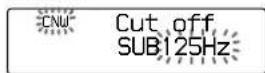
3 Adjust the cut-off frequency
Press (1) or (4) to select the line out. SUB(Subwoofer) F(Front) R(Rear)
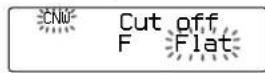
2 Rotate/press + to select the desired cut-off frequency.
Subwoofer
50 Hz → 62 Hz → 78 Hz → 99 Hz → 125 Hz → 157 Hz
Front, Rear:
Flat 78Hz 99Hz 125Hz 157Hz 198Hz
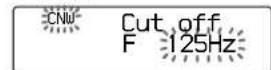
If you rotate/press , the cut-off frequency appear in the reverse order.
Repeat steps 1 and 2 to select the cut-off frequency.
4 Press (SOUND) for two seconds.
When the cut-off frequency setting is complete, the display goes back to the normal playback mode.
Tip
To adjust the subwoofer level, select "SUB" by pressing
① (←) or ③ (→) after step 3 above. Then rotate/press
or 一 to adjust the level. When you finish adjusting the subwoofer level, press (SOUND) for two seconds.
Listening to each program source in its registered equalizer curve
Source Sound Memory
You can listen to the same source (CD, MD, TAPE, FM, AM, TV and AUX) always in the same equalizer curve and sound characteristics (bass, treble and subwoofer level) even after changing the program source or turning the unit on and off again.
Note
"LSM" (Last Sound Memory) appears on the TV display when you have selected an equalizer curve.
Registering an equalizer curve onto each disc
Disc Sound Memory (DSM) CD/MD changer or CD/MD player with program memory function
Once you have registered the desired equalizer curve and the sound characteristics (bass, treble and subwoofer level) onto the discs, you can enjoy the same equalizer curve every time you play them. You can register up to 200 discs.
1 Play the desired disc.
2 Select the equalizer curve, and adjust the sound characteristics.
3 Press SHIFT, then press ③ (PLAY MODE) repeatedly until "DSM SET" appears.
CD1 SCHUBERT DSM set
4 Press (ENTER) momentarily.
DSM +Enter+
When the DSM setting is complete, the display will go back to the normal playback mode.
Changing the stored equalizer curve
Play the disc whose equalizer curve you want to change, and follow the "Setting and storing the equalizer curve".
Erasing the stored equalizer curve
1 Press SHIFT, then press 3 (PLAY MODE) repeatedly until "DSM SET" appears.
2 Press ⑤ (ENTER) for two seconds.
DSM +Delete+
Additional Information
Precautions
- If your car was parked in direct sunlight resulting in a considerable rise in temperature inside the car, allow the unit to cool off before switching on.
- If no power is being supplied to the unit, check the connections first. If everything is in order, check the fuse.
- For safety reasons, keep your car audio volume moderate so that you can still hear sounds outside your car.
If you connect this unit to the XDP-U50D, this unit will not work.
If you have any questions or problems concerning your unit that are not covered in this manual, please consult your nearest Sony dealer.
Fuse replacement
If the fuse blows, check the power connection and replace the fuse. If the fuse blows again after replacement, there may be an internal malfunction. In such a case, consult your nearest Sony dealer.
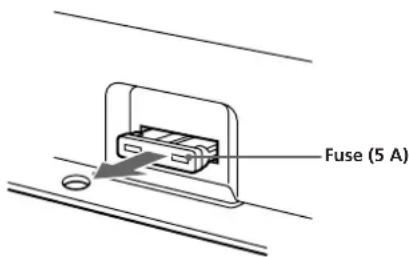
Warning
When replacing the fuse, be sure to use one matching the amperage stated above the fuse holder. Never use a fuse with an amperage rating exceeding the one supplied with the unit as this could damage the unit.
Specifications
Power requirements 12 V DC car battery (negative ground)
Current drain 1 A
Frequency response 8 Hz - 20 kHz (FRONT)
Signal-to-noise ratio 105 dB (FRONT) (JIS-A)
Harmonic distortion 0.005% (FRONT)
Separation 95 dB at 1 kHz
Tone controls Bass ± 10 dB at 310Hz
Trcble + 10 dB at 3.1 kHz
Input/output terminals
BUS input (2)
Line input (RCA jack) (2)
Line output (RCA jack) (3)
Optical digital input (2)
Dimensions Approx. 245
(9³/4·5³/4·1³/8in.) (w/
h/d)
Mass Approx. 1.2 kg (2 lb. 1
Supplied accessories
BUS cable (2 m) (1)
Mounting screw (4)
Optional accessories
BUS cable (supplied with
Master unit (which can
operate a digital
preamplifier)
XR-C900,CDX-C910
CDX-C760 etc.
CD changer
CDX-91 (equipped with a
digital output)
CDX-805, CDX-705
CDX-T62, CDX-T65 etc.
MD changer
MDX-61
Source selector (compatible
with an analog system)
XA-C30
Source selector (compatible
with a digital system
XA-U40D
TVtuner
XT-U400V ctc.
Power amplifier
XM-Series
Speakers
XS-Scrics
Design and specifications subject to change without notice.
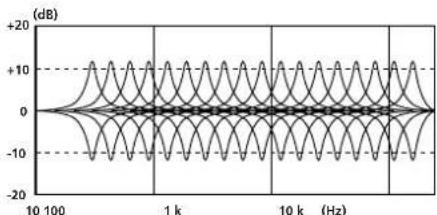
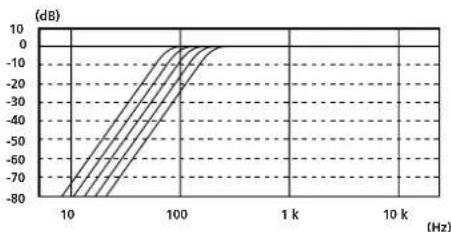
Frequency response
Front Equalizer (± 12dB)
fo=30,45,62,90,130,190,270,400,580,840
Rear Equalizer (± 12 dB)
f0=90,840,7.5kHz
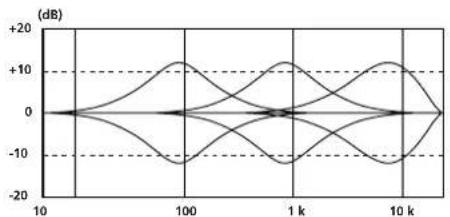
(Hz)
Low Pass Filter (-36 dB/oct)
f_0 = 50,62,78,99,125,157Hz
High Pass Filter (-24 dB/oct)
fo=78,99,125,157,198Hz
(Hz)
Troubleshooting guide
The following check help you remedy most problems that you may encounter with you unit. Before going through the checklist below, check the connection and operating procedures.
| Problem | Cause/Solution |
| The POWER indicator does not light up. | The ground lead is not securely connected. Ground the lead securely to a metal part of the car. |
| Check the battery voltage (10.5 - 16 V). | |
| Alternator noise is heard. | The power connecting leads are run too close to the RCA pin cords. → Keep the leads away from the cords. |
| The RCA pin cords are run too close to other electrical cables of the car. → Keep the cords away from the cables. | |
| No sound | The ground lead is not securely connected. → Ground the lead securely to a metal part of the car. |
| The POWER indicator lights up when the master unit turns on. → Check the amplifier and speaker connections. | |
| The POWER indicator does not light up when the master unit turns on. → Check the BUS cable, RCA pin cord and optical cable connections. |
Felicitations!
1,2k,1,7k,2,5k,3,6k,5,2k,7,5k,11k,16kHz
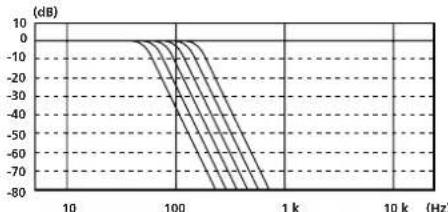
fo=50,62,78,99,125,157 Hz
Filtre salle-haut (-24 dB/oct)
fo=78,99,125,157,198 Hz
Guide de dépannage
Sony Corporation Printed in Japan