QFT15ESSNWW - Tumble drier HAIER - Free user manual and instructions
Find the device manual for free QFT15ESSNWW HAIER in PDF.



| Product type | Condenser dryer |
| Brand | Haier |
| Model | QFT15ESSNWW |
| Dimensions (W x H x D) | 59,5 cm x 84,5 cm x 64,1 cm |
| Height with feet extended | 85,4 cm |
| Weight | Approximately 45 kg |
| Power supply | 120/240 V, 30 A, 60 Hz |
| Loading capacity | Not specified (estimated: 8-10 kg) |
| Drying programs | Mixed Loads, Cotton, Heavy Duty, Towels, Allergen, Sportswear, Sanitize, Quick Dry, Delicates, Wrinkle Release, Preheat, Air Fluff, Drying Rack, Baby, Jeans, Timed Dry |
| Drying options | Dryness level (Extra Dry, Dry, Less Dry, Damp), Temperature (High, Medium, Low, No Heat), Delay Dry, Humidity Alert, Extended Tumble, Wrinkle Prevent, eDry |
| Special functions | Wi-Fi, Control Lock, My Cycle, Drum Light |
| Maintenance | Clean lint filter before each use, clean condenser once a month, empty water reservoir after each cycle (if not drained), internal cleaning once a year by a technician |
| Safety features | Automatic stop if door opened, control lock, overload protection, double beep for incompatible selection |
| Installation | Built-in, stackable (kit GFA24KITL sold separately), reversible door |
| Energy consumption | ENERGY STAR compliant (Cotton cycle with eDry enabled) |
| Spare parts | Available at fr.haiercanada.ca/parts (e.g., drying rack WE01X26416, bulb WE11X26351) |
| Repairability | Limited one-year warranty, after-sales service at fr.haiercanada.ca/service |
| Noise level | Not specified (estimated: 65-70 dB) |
| Energy efficiency class | Not specified (estimated: A+ or higher) |
Frequently Asked Questions - QFT15ESSNWW HAIER
User questions about QFT15ESSNWW HAIER
0 question about this device. Answer the ones you know or ask your own.
Ask a new question about this device
Download the instructions for your Tumble drier in PDF format for free! Find your manual QFT15ESSNWW - HAIER and take your electronic device back in hand. On this page are published all the documents necessary for the use of your device. QFT15ESSNWW by HAIER.
USER MANUAL QFT15ESSNWW HAIER
Installation Instructions
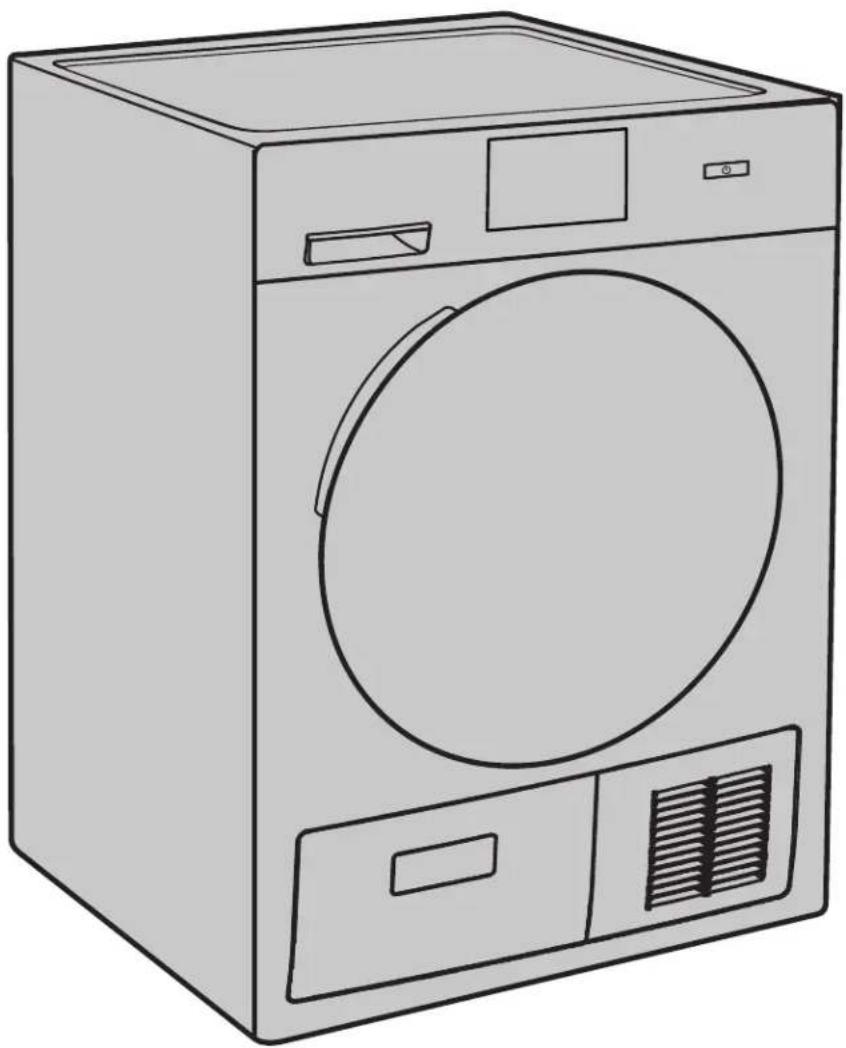
QFT15 Series/Séries/Serie
natural_image
Line drawing of a single front-loading washing machine with front panel and side door (no text or symbols)TABLE OF CONTENTS
SAFETY INFORMATION....3
USING THE DRYER 4
Getting Started 4
Loading....8
Features 8
CARE AND CLEANING 9
INSTALLATION INSTRUCTIONS ....12
Stacking (Optional)....20
Reversing The Door Swing (Optional) 22
TROUBLESHOOTING TIPS 24
LIMITED WARRANTY 27
CONSUMER SUPPORT 28
RECORD KEEPING
Thank you for purchasing this Haier Appliances product. This Owner's Manual will help you get the best performance from your new dryer.
For future reference, record the model and serial number located on a label on the front of the dryer behind the door.
Staple your proof of purchase to this manual to aid in obtaining warranty service if needed.
Model number
Serial number
Date of purchase
IMPORTANT SAFETY INFORMATION READ ALL INSTRUCTIONS BEFORE USING THE APPLIANCE
WARNING
To reduce the risk of fire, explosion, electric shock, or injury to persons when using your appliance, follow basic precautions, including the following:
- Read all instructions before using the appliance.
■ DO NOT dry articles that have been previously cleaned in, washed in, soaked in, or spotted with gasoline, dry-cleaning solvents, or other flammable or explosive substances, as they give off vapors that could ignite or explode.
■ DO NOT place items exposed to cooking oils in your dryer. Items contaminated with cooking oils may contribute to a chemical reaction that could cause a load to catch fire. To reduce the risk of fire due to contaminated loads, the final part of the tumble dryer cycle occurs without heat (cool down period). Avoid stopping a tumble dryer before the end of the drying cycle unless all items are quickly removed and spread out so that the heat is dissipated.
■ DO NOT allow children to play on or in this appliance. Close supervision of children is necessary when this appliance is used near children.
■ Before the appliance is removed from service or discarded, remove the door to the drying compartment.
■ DO NOT reach into the appliance if the drum is moving.
■ DO NOT install or store this appliance where it will be exposed to the weather.
■ DO NOT tamper with controls.
■ DO NOT climb or stand on this unit.
■ DO NOT repair or replace any part of this appliance or attempt any servicing unless specifically recommended in the user-maintenance instructions or in published user-repair instructions that you understand and have the skills to carry out.
■ Follow all fabric care instructions and warnings to prevent melting of garments or damage to the appliance.
■ DO NOT use fabric softeners or products to eliminate static unless recommended by the manufacturer of the fabric softener or product.
■ DO NOT dry articles containing foam rubber or similarly textured rubber-like materials.
■ Clean lint screen and clean and empty the condenser before or after each load.
■ DO NOT operate the dryer without the lint filter and condenser in place.
■ DO NOT store combustible materials, gasoline or other flammable liquids near the dryer. Keep area around the air intake vent on the front of the dryer and adjacent surrounding areas free from the accumulation of lint, dust and dirt.
■ The interior of the appliance should be cleaned periodically by qualified service personnel.
■ Unplug the appliance or turn off the circuit breaker before servicing. Pressing the Power or Start/Pause button DOES NOT disconnect power.
■ DO NOT operate this appliance if it is damaged, malfunctioning, partially disassembled, or has missing or broken parts, including a damaged cord or plug.
■ DO NOT spray any type of aerosol into, on or near dryer at any time. DO NOT use any type of spray cleaner when cleaning dryer interior. Hazardous fumes or electrical shock could occur.
■ See "ELECTRICAL CONNECTION" located in the Installation Instructions for grounding instructions.
READ AND SAVE THESE INSTRUCTIONS
USING THE DRYER
WARNING
To reduce the risk of fire, electric shock, or injury to persons, read the IMPORTANT SAFETY INFORMATION before operating this appliance.
Throughout this manual, features and appearance may vary from your model.
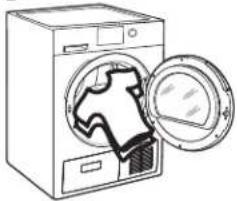
Step 1*
natural_image
Line drawing of a washing machine with an open door and lid, showing internal components (no text or symbols)- Loosely add items.
- Close door.
NOTE: Dryer will not start with door open.
Step 2* Step 3*
- If the screen is dark, press and hold the power button for 2 seconds to "wake up" the display.
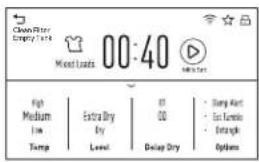
- Select a dry cycle. (Defaults are set for each dry cycle. These default settings can be changed. See control settings for more information.)
Step 4*

Press to start
- Press and hold the start button for 1 second.
*Instructions can also be found by touching the document (☐) icon, on the cycle selection screen, in the top right corner.
Controls
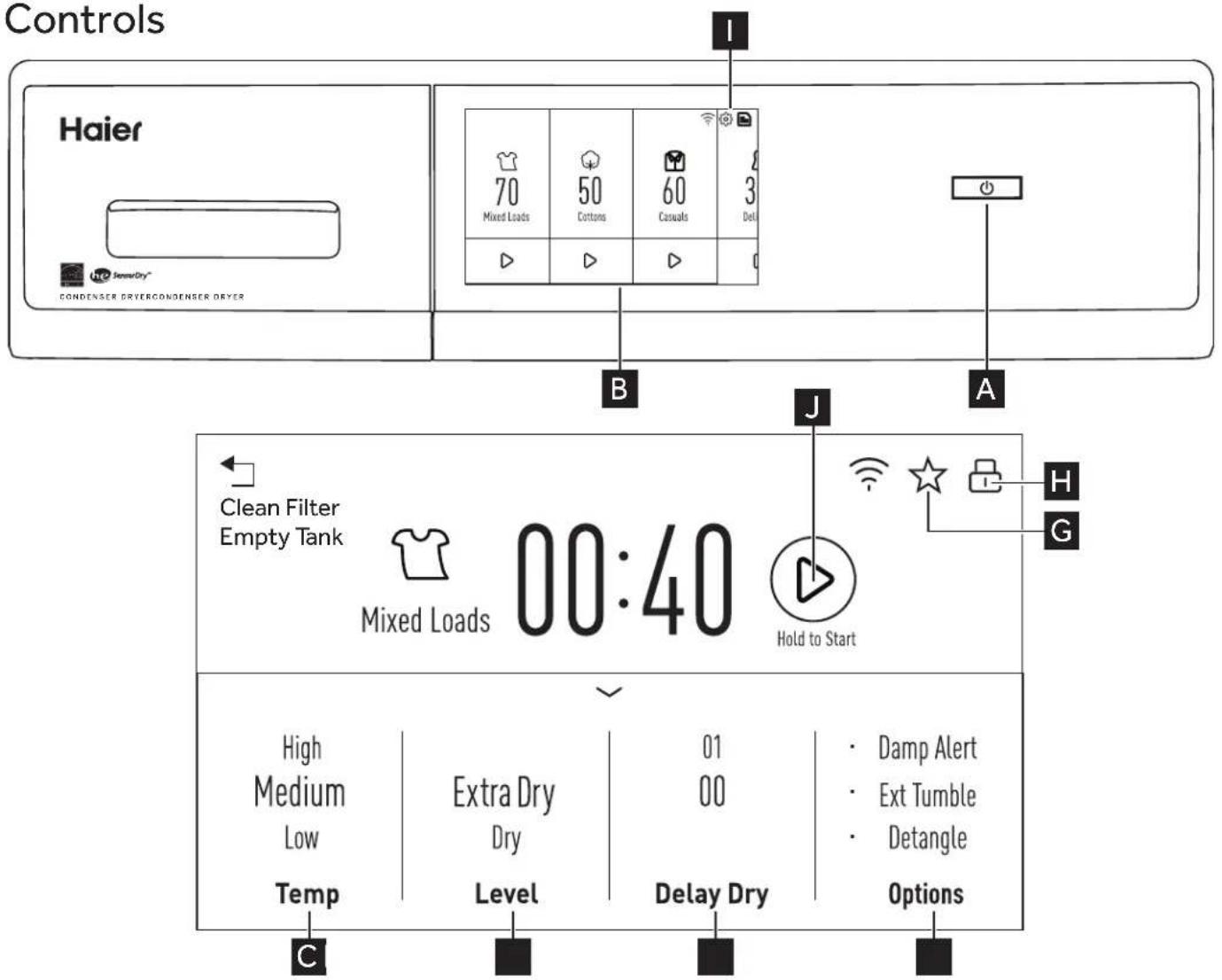
USING THE DRYER
Display and Status Lights
The display shows the approximate time remaining until the end of the cycle.
In addition, this display will show the dryer status:
| Status | Dry ➔ Damp ➔ Cool |
| Controls lock feature. | |
| Clean Filter | Time to clean the filter. See the Care and Cleaning section. |
| Damp Alert | When Damp Alert option is selected and clothes have dried to a damp dryness level, indicator will appear and dryer will beep. |
| Estimated Time Remaining | Display shows the estimated time remaining until set cycle is completed. |
| Ext Tumble | Indicates the Extended Tumble feature is set. |
| Delay | Indicates Delay Dry set time is selected. |
| ★ | Indicates the My Cycle feature is set. |
| eDry Shows | eDry setting selected. |
| Temp | Shows High, Medium, Low or No Heat temperature setting selected. |
| Level | Shows Extra Dry, Dry or Damp dryness setting selected. |
| Delay Dry | Indicates Delay Dry is set time is selected. |

Power
Press and hold for 2 seconds to "wake up" the display. If the display is active, press and hold for 2 seconds to turn the dryer off. NOTE: Pressing the power does not disconnect the appliance from the power supply.

Dry Cycles
The dry cycle controls the cycle time for the drying process. The chart below will help you match the dry setting with the loads.
| Mixed Loads For loads consisting of cottons and poly blends. | |
| Cottons | For cottons and most linens. NOTE: ENERGY STAR® models are tested on Cottons with default settings. |
| Heavy duty | For large coats, bed spreads, mattress covers, sleeping bags, blankets, comforters, jackets, small rugs, and similar large and bulky items. |
| Towels | Use for towels OR sheets. It is not recommended to mix towels and sheets in the same load. |
| Casuals For wrinkle-free, permanent press and delicate items, and knits. | |
| Active Wear | Clothing worn for active sports exercise and some casual wear. Fabrics include new technology finishes and stretch fibers such as Spandex. Also for clothing labeled Easy Care or Perma Press: For wrinkle-free and permanent press items. |
| Sanitize | Reduces certain types of bacteria by 99.6%, including: Staphylococcus aureus and Pseudomonas aeruginosa. The antibacterial process occurs when high heat is used during a portion of this drying cycle. |
| Quick Dry | For small loads that are needed in a hurry, such as sports or school uniforms. Can also be used if the previous cycle left some items damp, such as collars or waistbands. |
| Delicates For lingerie and special-care fabrics. | |
| Dewrinkle | For removing wrinkles from items that are dry or slightly damp. This cycle is not recommended for delicate fabrics. |
| Warm Up Provides 25 minutes of warming time to warm up clothes. | |
| Air Fluff | Provides 30 minutes of tumbling time without heat. |
| Rack Dry | For drying delicate items without tumbling, use drying rack accessory. Place items flat on the drying rack such as wool sweaters and delicate fabrics. Dry with low heat. |
| Baby Care | For drying children's clothes and other small items. |
| Jeans | For drying denim and heavy canvas textiles. |
| Timed Dry | Use to set your own dry time. Time Dry is also recommended for small loads. To use:1. Select Timed Dry cycle.2. Select the drying Time in 10-minute increments up to 2 hours and 30 minutes.2. Select the dry Temp.3. Close the door.4. Press and hold Start. |
USING THE DRYER

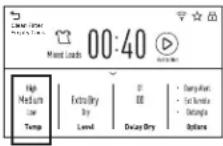
Temp (Temperature)
You can change the temperature of your dry cycle.
| High For regular to heavy cottons. | |
| Medium For synthetics, blends and items labeled Permanent Press. | |
| Low For deicates, synthetics and items labeled Tumble Dry Low. | |
| No Heat | This option may only be used with Air Fluff and Timed Dry, in which items are tumbled without heat. |

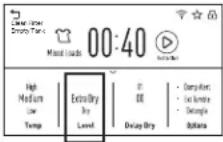
Level
The sensor continuously monitors the amount of moisture in the load. When the moisture in your clothes reaches your selected dry level, the dryer will stop.
NOTE: Sensor dry Level can be used with all cycles except Timed Dry, Air Fluff, Rack Dry, Warm Up and Dewrinkle.
| Extra Dry | Use for heavy-duty fabrics or items that should be very dry, such as towels. |
| Dry | Use for normal dryness level suitable for most loads. This is the preferred cycle for energy saving. |
| Less Dry Use | Use for lighter fabric (ideal for ironing). |
| Damp For | leaving items partially damp. |

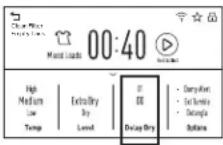
Delay Dry
Use to delay the start of your dryer.
- Choose your dry cycle and any options.
- In the Delay Dry section. You can change the delay time in 1 hour increments up to 24 hours.
- Press and hold the start (▶) icon for 1 second to start the countdown. The selected delay time will not be shown on the screen. Only the estimated cycle time will be visible. Once the delayed time period has been completed, the selected dry cycle will start.
NOTE: If the door is opened while the dryer is in Delay Dry, the countdown time will not restart unless the door is closed and Start icon has been pressed again.

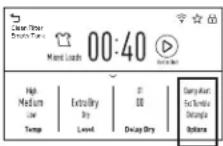
Options
Damp Alert
This option causes the dryer to beep when clothes have dried to a damp level and the Damp Alert indicator to appear on the screen. Remove items that you wish to hang dry. This feature will only beep when the Damp Alert option is selected. The dryer will continue to dry after the Damp Alert indicator is populated on the screen and dryer beeps. Removing clothes and hanging them when they are damp can reduce the need to iron some items.
Extended Tumble
Minimizes wrinkles by adding approximately 2 hours of no-heat tumbling after clothes are dry.
The estimated time remaining display will show "END".
The extended tumble time does not get added to the cycle time on the display.
Detangle
Activates alternating forward and reverse tumbling to reduce tangling, dry more evenly, and improve drying times. Typical loads such as bed and bath mixed loads, where sheets, towels and pillow cases are laundered together, benefit from this capability. When the dryer reverses direction, there will be a slight pause and sound change. This is normal.
NOTE: Detangle is selected by default for Towels and Heavy Duty cycles.
eDry
Reduces total energy consumption of specific dryer cycles by adjusting certain heat settings.
NOTE: Cycle times will change when eDry is selected.
ENERGY STAR ^® models are tested on Cottons cycle with default settings to determine energy use rating of this dryer. The eDry option will default to on for Cottons. Temperature settings on High and dryness level setting on Dry are specifically designed for this cycle to reduce energy consumption. For optimal energy savings, turn eDry on. For optimal drying times, turn eDry off. Energy savings will vary across loads and cycles.
The eDry selection can be used with Mixed Loads, Cottons, Heavy Duty, Towels, Casuals, Active Wear and Delicates.
USING THE DRYER
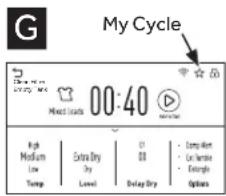
My Cycle
Set up your favorite combination of settings for each cycle and save them here for one touch recall. These custom settings can be set while a cycle is in progress. NOTE: you can store one My Cycle combination of settings for each cycle.
To store a My Cycle combination of settings:
- Select your drying cycle.
- Change Temp and Level settings to fit your needs.
- Select any drying options you want.
- Press and hold the☆ pad for 3 seconds to store your selection. A beep will sound and the icon will light up.
To recall your stored My Cycle combination:
Select the cycle and press the icon before drying a load.
To change your stored My Cycle combination:
Repeat steps 1–4.
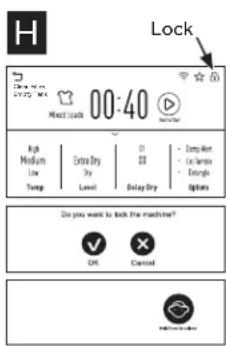
Lock
You can lock the controls to prevent any selections from being made. Or you can lock or unlock the controls after you have started a cycle.
Children cannot accidentally start the dryer by touching pads with this option selected.
To lock the dryer, press and hold the lock (☐) pad in the top right corner for 3 seconds and a lock screen will appear.
To unlock the dryer controls, press and hold the unlock (💡) pad for 3 seconds and the lock screen will disappear.
The control lock icon on the display will light up when it is on.
NOTE: The Power button can still be used when the machine is locked.
![Settings 70 Phone Cars 50 Catsara 60 Catsara 3 Dial Settings Wire... Language... High SES... WiFi Connect + 54 High Open or Download OR Appliance Laundry APP and Follow the Connections. MAC 13 : [REDACTED] SID : [GICMOOLIE-DRG] Password : [VISITOR] WiFi Connect Open or Download OR Appliance Laundry APP and Follow the Connections.](/content/2026/03/480481/images/0f6aea670f4f8c2d02793406054ee9301cdaa7325f8d1a2243eee07b08c02b20.jpg)
Settings
Select the gear symbol (💡) in the top right corner to enter the Settings screen.
Volume
When the control panel is powered on, the dryer will beep at the end of the cycle and every time you press a button on the control panel.
Use the Option pad to select either High, Med, Low, or Off.
NOTE: The selected volume is for both end of cycle and pad sounds.
Language
Use the Option pad to select either English, Spanish, or French.
Brightness
To change the brightness of the screen, use the brightness slider to change from darker to brighter.
WiFi Connect + Tub Light
Use the WiFi Connect + Tub Light toggle button to turn this feature on or off. Toggling this feature on will enable the WiFi Connect function and enable the usage of the tub light when the door is opened & closed. Follow the directions on the Wifi Connect screen using the information provided to connect with the GEA Laundry App. Toggling this feature off will disable the Wifi Connect function and disable the tub light.
NOTE: When the dryer to set up with the GEA Laundry App, new software may be available to install. After approving the installation of the new software through the GEA Laundry App, the dryer tub light will flash on and off during the software installation. The dryer tub light will stop flashing and turn off after the software is done installing.
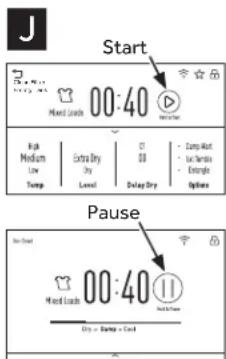
Start/Pause
Start - Press and hold for 1 second to start or restart a cycle.
Pause - If the dryer is running, press and hold for 1 second to pause the cycle. This function can be used to add garments during a cycle.
NOTE: If the dryer is paused and the cycle is not restarted within 15 minutes, the current cycle will be cancelled.
LOADING
Always follow fabric manufacturer's care label when laundering.
Fabric Care Labels
Below are fabric care label "symbols" that affect the clothing you will be laundering.
Dry Labels
Tumble dry

Dry

Normal

Permanent Press/wrinkle resistant

Gentle/delicate

Do not tumble dry

Do not dry (used with do not wash)
Heat setting

High Medium Low No heat/air


Special instructions

Line dry/
hang to dry

Drip dry

Dry flat

In the shade
Sorting and Loading Hints
WARNING

- Fire Hazard
- Keep flammable materials and vapors, such as gasoline, away from dryer.
- DO NOT dry anything that has ever had anything flammable on it (even after washing).
-
No washer can completely remove oil.
-
DO NOT dry anything that has ever had any type of oil on it (including cooking oils).
- Items containing foam, rubber, or plastic must be dried on a clothesline.
- Failure to do so can result in death, explosion, or fire.
As a general rule, if clothes are sorted properly for the washer, they are sorted properly for the dryer. Try also to sort items according to size. For example, do not dry a sheet with socks or other small items.
Do not add fabric softener sheets once the load has become warm. They may cause fabric softener stains. Bounce ^e Fabric Conditioner Dryer Sheets have been approved for use in this dryer when used in accordance with the manufacturer's instructions.
Do not overload. This wastes energy and causes wrinkling.
Drying Rack
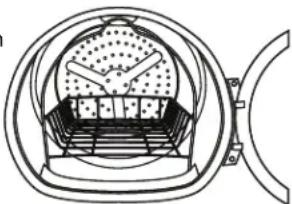
A handy drying rack may be used for drying delicate items such as washable sweaters. Place items flat on the drying rack and block such items as wool sweaters and delicate fabrics. Dry with low heat.
To install the drying rack, extend the drying rack into the dryer drum and rest the front two legs on the front angled ledge.
natural_image
Technical line drawing of a mechanical device with internal components and mounting bracket (no text or symbols)NOTES:
■ The drying rack is designed for use with the Timed Dry cycle. Use with sensor cycles may result in damp items or extended cycle times.
■ Do not use this drying rack when there are other clothes in the dryer, that are not placed on the rack.
■ The drying rack, WE01X26416, is available as an accessory. Visit our website at haierappliances.com/parts or in Canada visit haiercanada.ca/parts.
CARE AND CLEANING
Interior
The interior of the appliance should be cleaned once a year by qualified service personnel.
Exterior
Wipe or dust any spills or washing compounds with a damp cloth. Dryer control panel and finishes may be damaged by some laundry pretreatment soil and stain remover products. Apply these products away from the dryer. The fabric may then be washed and dried normally. Damage to your dryer caused by these products is not covered by your warranty.
Lint Filter
Clean the lint filter before each use.
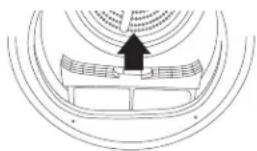
Pull out the lint filter. Moisten your fingers and remove the captured lint. Once clean, slide the filter back into position. Have a qualified technician vacuum the lint from the dryer once a year.
NEVER OPERATE THE DRYER WITHOUT ITS FILTER IN PLACE.
Stainless Steel
To clean stainless steel surfaces use a damp cloth with a mild, non-abrasive cleaner suitable for stainless steel surfaces. Remove the cleaner residue and then dry with a clean cloth.
The stainless steel used to make the dryer drum provides the highest reliability available in a Haier Appliances dryer. If the dryer drum should be scratched or dented during normal use, the drum will not rust or corrode. These surface blemishes will not affect the function or durability of the drum.
Drum Lamp
NOTE: The drum lamp is not consumer replaceable on models where there is a flat cover over an LED bulb. If this light should ever stop working, contact us for service.
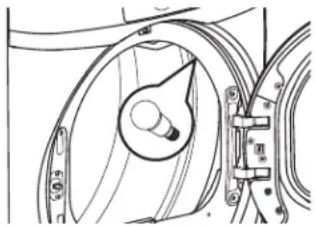
For models that have a domed cover over the bulb secured by a screw:
Before replacing the light bulb, be sure to unplug the dryer power cord or disconnect the dryer at the household distribution panel by removing the fuse or switching off the circuit breaker. Reach above dryer opening from inside the drum to locate the light.
Remove the screw and the plastic cover to access the bulb. Replace with the appropriate bulb and then reaffix the cover and screw.
natural_image
Technical line drawing of a mechanical component with no visible text or symbolsOrder replacement bulb WE11X26351 by visiting our website at haierappliances.com/parts or in Canada visit haiercanada.ca/parts. You may also purchase appliance bulb 7C7 from your local retailer.
When the door is opened, the drum lamp automatically turns on and remains on for 2 minutes. When the door is closed, the drum lamp will remain on for 30 seconds.
WARNING

- Electrical Shock Hazard
Disconnect power supply before servicing.
Replace all parts and panels before operating.
Failure to do so can result in death or electrical shock.
WARNING
- Shock Hazard
Certain internal parts are intentionally not grounded and may present a risk of electric shock only during servicing.
Service personnel – DO NOT contact the following parts while the appliance is energized: motor start capacitor, motor metal holder, and drum wheel shaft.
CARE AND CLEANING
Water Tank
REMOVE THE CONDENSED WATER IN THE TANK AFTER EVERY DRYING CYCLE.
NOTE: If drain hose is installed, emptying the water tank is not required. See the CONNECTING THE DRAIN HOSE section in the Installation Installations of this manual.
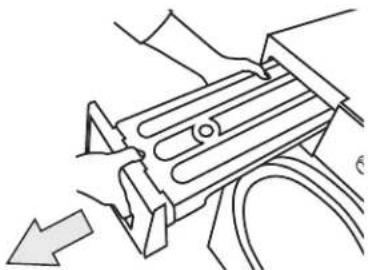
- Pull out the water tank.
When removing the water tank from the product, hold it using both hands as it is heavy and take care not to spill any water inside the tank.
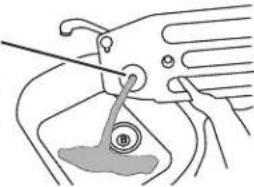
- Remove the condensed water inside the water tank.
To avoid over filling, which could lead to water leaking outside the unit, drain water left in water tank after each cycle. Over filling will cause cycle to stop prematurely until emptied.
NOTE: When the Empty Tank indicator light is on, the dryer will not operate until the tank is emptied and the indicator has been cleared. Press the Start button and the indicator light will turn off and the dryer will resume the cycle.
natural_image
Technical line drawing of a mechanical component with no visible text or symbolsDrain hole is on the top rear of the drawer
natural_image
Illustration of a hand holding a tool near a mechanical component (no text or symbols visible)Condenser
THE CONDENSER SHOULD BE CLEANED ONCE PER MONTH.
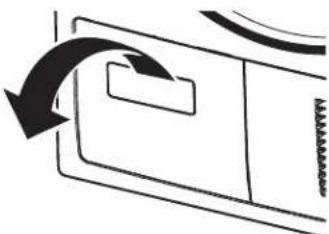
- Open the condenser compartment cover.
natural_image
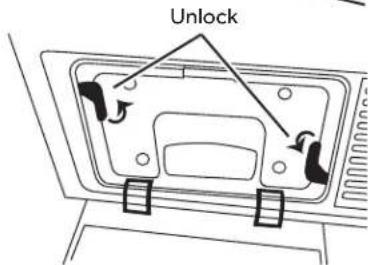
Pure diagram of a door mechanism with arrows indicating direction (no text or symbols)- Unlock both locking tabs.
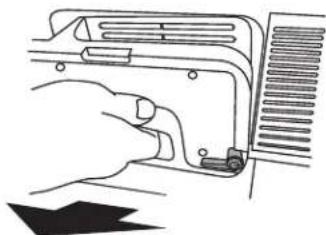
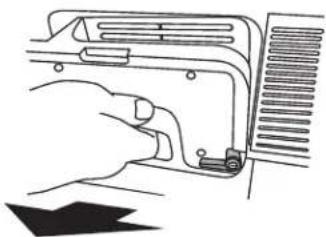
- Remove the condenser box from the condenser compartment.
natural_image
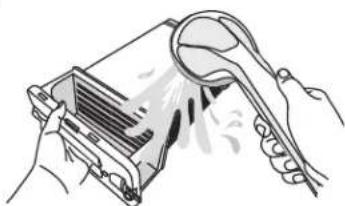
Line drawing of a hand inserting a component into a device (no text or symbols)- Clean the condenser box and inside the condenser compartment completely. Use tap water to clean between the grooves of the condenser box by allowing tap water to flow through it. Reach inside the condenser compartment and wipe away all debris. Make sure the rubber gaskets on the condenser box are free of debris before reinstalling.
natural_image
Illustration of hands holding a computer monitor with a spoon, no text or symbols presentNOTES:
- Make sure to clean your condenser once per month to prevent degradation of the dryer's performance.
- When assembling the condenser after cleaning it, make sure the locking tabs are set to the lock position. Never run the dryer without the condenser installed.
NOTES
INSTALLATION INSTRUCTIONS
DRYER
If you have questions, visit our website at haierappliances.com or in Canada visit haiercanada.ca.
BEFORE YOU BEGIN
Read these instructions completely and carefully.
- IMPORTANT – Save these instructions for local electrical inspector's use.
- IMPORTANT – Observe all governing codes and ordinances.
- Install the clothes dryer according to the manufacturer's instructions and local codes.
- Note to Installer – Be sure to leave these instructions with the Consumer.
- Note to Consumer – Keep these instructions for future reference.
- Clothes dryer installation must be performed by a qualified installer.
- Before the old dryer is removed from service or discarded, remove the dryer door.
- Service information and the wiring diagram are located in the control console.
- Do not allow children on or in the appliance. Close supervision of children is necessary when the appliance is used near children.
- Proper installation is the responsibility of the installer.
- Product failure due to improper installation is not covered under the Warranty.
- Install the dryer where the temperature is above 50^ for satisfactory operation of the dryer control system.
WARNING
- Risk of Fire
- Clothes dryer installation must be performed by a qualified installer.
• Install the clothes dryer according to these instructions and local codes. - DO NOT install or store this appliance in any location where it could be exposed to water or weather.
- To reduce the risk of severe injury or death, follow all installation instructions.
- Save these instructions. (Installers: Be sure to leave these instructions with the customer.)
If you are planning to stack the washer and dryer, order Stacking Kit number GFA24KITL to be used for this dryer. Kit sold separately.
UNPACKING YOUR DRYER
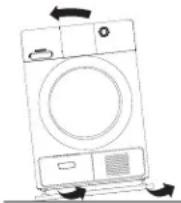
Tilt the dryer sideways and remove the foam shipping pads by pulling at the sides an breaking them away from the dryer legs. Be sure to remove all of the foam pieces at the legs.
Remove the bag containing the literature.
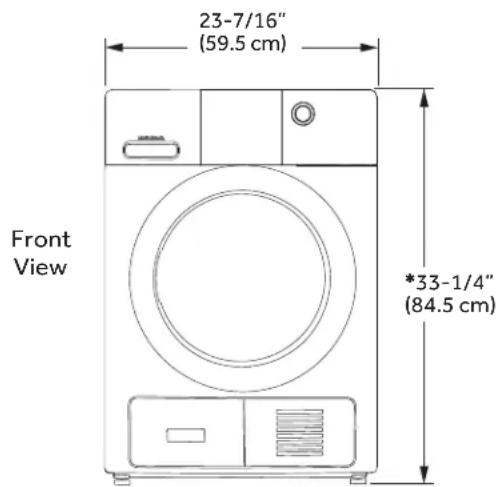
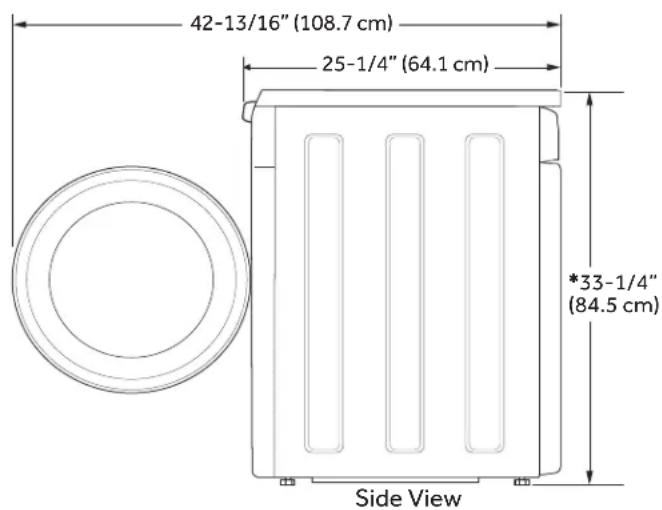
DRYER DIMENSIONS
*NOTE:
With leveling legs retracted: 33-1/4 (84.5 cm)
With leveling legs fully extended: 33-5/8 (85.4 cm)
Stacked: 66-1/2" (168.9 cm)
ELECTRICAL CONNECTION
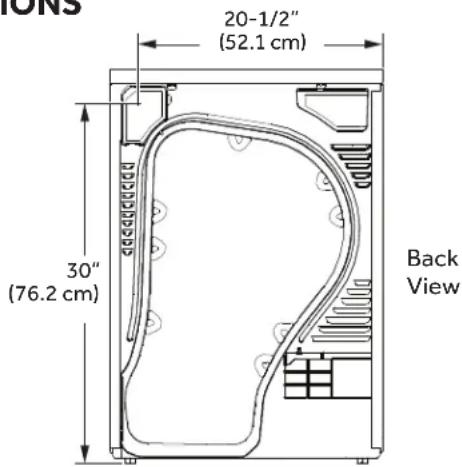
DIMENSIONS
30 1/2"
POWER CORDS
Haier Appliances strongly recommends the use of factory specified parts. Select the power cord to fit your installation requirements.
| Part Number Type Length Amperage | |
| WX9X2 3-Prong 4 Feet 30 | |
| WX9X3 3-Prong 5 Feet 30 | |
| WX9X4 3-Prong 6 Feet 30 | |
| WX9X18 4-Prong 4 Feet 30 | |
| WX9X19 4-Prong 5 Feet 30 | |
| WX9X20 4-Prong 6 Feet 30 |
Visit our website at haierappliances.com/parts or in Canada visit haiercanada.ca/parts.
REQUIREMENTS FOR ALCOVE OR CLOSET INSTALLATION
WARNING

- Explosion Hazard
Keep flammable materials and vapors, such as gasoline, away from dryer.
Place dryer at least 18" (46 cm) above the floor for a garage installation.
Failure to do so can result in death, explosion, or fire.
- Minimum clearance between dryer cabinet and adjacent walls or other surfaces is:
0" either side
1" front and rear
1" top - Consideration must be given to provide adequate clearance for installation and service.
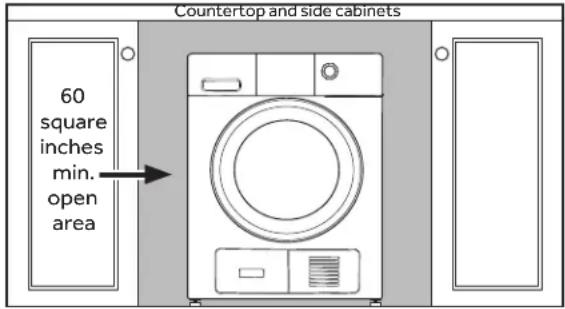
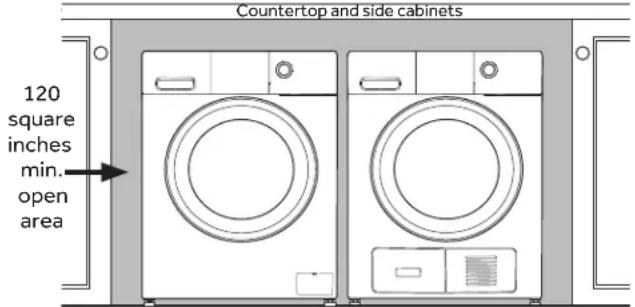
- Closet doors must be louvered or otherwise ventilated and have at least 60 square inches of open area. If the closet contains both a washer and a dryer, doors must contain a minimum of 120 square inches of open area.
MINIMUM CLEARANCE OTHER THAN ALCOVE OR CLOSET INSTALLATION
Minimum clearance to combustible surfaces and for air opening are: 0" both sides, 1" rear and 1" top. Consideration must be given to provide adequate clearance for installation and service.
MOBILE OR MANUFACTURED HOME INSTALLATION
- Installation MUST conform to the MANUFACTURED HOME CONSTRUCTION AND SAFETY STANDARD, TITLE 24, PART 3280 or STANDARD FOR MOBILE HOMES CAN/CSA-Z240 MH, or, when such standards are not applicable, with AMERICAN NATIONAL STANDARD FOR MOBILE HOME, ANSI/NFPA NO. 501B.
- Provide an opening with a free area of at least 25 square inches for introduction of outside air into the dryer room.
• See the sections for electrical connection information.
BATHROOM OR BEDROOM INSTALLATION
The installation must conform with local codes or, in the absence of local codes, with the NATIONAL ELECTRICAL CODE, ANSI/NFPA NO. 70 (for electric dryers).
UNDERCOUNTER INSTALLATION
If an undercounter installation is desired:
- No special dryer installation kit is required.
- If the dryer is installed alone, a minimum of 60 square inches of open area is required. If a washer and dryer are installed together, a minimum of 120 square inches of open area is required.
Dryer Installed Alone
Washer and Dryer Installed Together
CONNECTING AN ELECTRIC DRYER
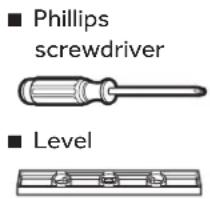
TOOLS YOU WILL NEED
- Slip-jointpliers
■ Flat-blade screwdriver

■ Phillips screwdriver

Level

MATERIALS YOU WILL NEED
■ Safetyglasses
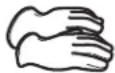
Gloves
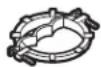
■ 3/4" Strain relief (UL recognized)
■ Dryer power cord kit (not provided with dryer) UL rated 120/240V, 30A with 3 or 4 prongs. Identify the plug type as per the house receptacle before purchasing line cord.
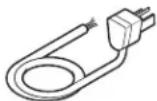
Stacking installations may require a power cord up to 6 feet in length.
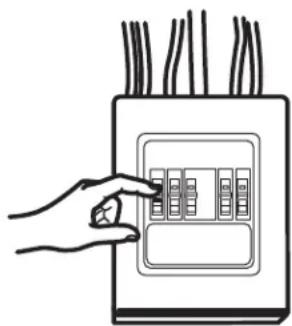
Before making the electrical connection, turn off the circuit breaker(s) or remove the dryer's circuit fuse(s) at the electrical box. Be sure the dryer cord is unplugged from the wall. NEVER LEAVE THE ACCESS COVER OFF THE TERMINAL BLOCK.
natural_image
Hand placing a button into an electrical control box with multiple buttons (no text or symbols visible)▲WARNING

- Electrical Shock Hazard
Disconnect power supply before servicing.
Replace all parts and panels before operating.
Failure to do so can result in death or electrical shock.
WARNING
- Shock Hazard
Certain internal parts are intentionally not grounded and may present a risk of electric shock only during servicing.
Service personnel – DO NOT contact the following parts while the appliance is energized: motor start capacitor, motor metal holder, and drum wheel shaft.
INSTALLATION INSTRUCTIONS
ELECTRICAL CONNECTION INFORMATION FOR ELECTRIC DRYERS
For electrical connections using a power cord:
WARNING

Fire Hazard
Use a new UL-listed 240V 30 amp dryer power supply cord with closed ring terminals or spade terminals with upturned ends.
Use a UL-listed strain relief.
Disconnect power before making electrical connections.
Connect neutral wire (white or center wire) to center terminal.
Ground wire (green or bare wire) must be connected to green ground connector.
Connect remaining two supply wires to remaining two terminals.
Securely tighten all electrical connections.
Replace the terminal block cover.
Failure to do so can result in death, fire or electrical shock.
GROUNDING INSTRUCTIONS
For a grounded, cord-connected dryer: This dryer must be grounded. In the event of a malfunction or breakdown, grounding will reduce the risk of electric shock by providing a path of least resistance for electric current. This dryer uses a cord having an equipment-grounding conductor and a grounding plug. The plug must be plugged into an appropriate outlet that is properly installed and grounded in accordance with all local codes and ordinances.
WARNING
Improper connection of the equipment-grounding conductor can
result in a risk of electric shock. Check with a qualified electrician, or service representative or personnel, if you are in doubt as to whether the appliance is properly grounded. DO NOT modify the plug on the power supply cord. If it will not fit the outlet, have a proper outlet installed by a qualified electrician.
SAVE THESE INSTRUCTIONS
WARNING

- Electrical Shock Hazard
TO PREVENT ELECTRIC SHOCK, DISCONNECT POWER BEFORE SERVICING.
This dryer should be connected to an individual branch circuit with 10 gauge copper wire minimum through a 30 amp fuse or circuit breaker. DO NOT fuse neutral.
Use copper conductors only.
ELECTRICAL CONNECTION INFORMATION FOR ELECTRIC DRYERS
For direct wire connections:
WARNING

Fire Hazard
Use 10 gauge copper wire.
Use a UL-listed strain relief.
Disconnect power before making electrical connections.
Connect neutral wire (white or center wire) to center terminal.
Ground wire (green or bare wire) must be connected to green ground connector.
Connect remaining two supply wires to remaining two terminals.
Securely tighten all electrical connections.
Replace the terminal block cover.
Failure to do so can result in death, fire or electrical shock.
GROUNDING INSTRUCTIONS
For a permanently connected dryer: This dryer must be connected to a grounded metal, permanent wiring system, or an equipment-grounding conductor must be run with the circuit conductors and connected to the equipment-grounding terminal on the appliance.
Improper connection of the equipment-grounding
WARNING
conductor can result in a risk of electric shock. Check with a qualified
electrician, or service representative or personnel, if you are in doubt as to whether the appliance is properly grounded.
SAVE THESE INSTRUCTIONS
WARNING

- Electrical Shock Hazard
TO PREVENT ELECTRIC SHOCK, DISCONNECT POWER BEFORE SERVICING.
This dryer should be connected to an individual branch circuit with 10 gauge copper wire minimum through a 30 amp fuse or circuit breaker. DO NOT fuse neutral.
Use copper conductors only.
CONNECTING DRYER USING 4-WIRE CONNECTION (MUST BE USED FOR MOBILE HOME INSTALLATION)
NOTE: Since January 1, 1996, the National Electrical Code requires that new constructions use a 4-wire connection to an electric dryer. A 4-wire cord must also be used where local codes do not permit grounding through the neutral. 3-wire connection is NOT for use on new construction.
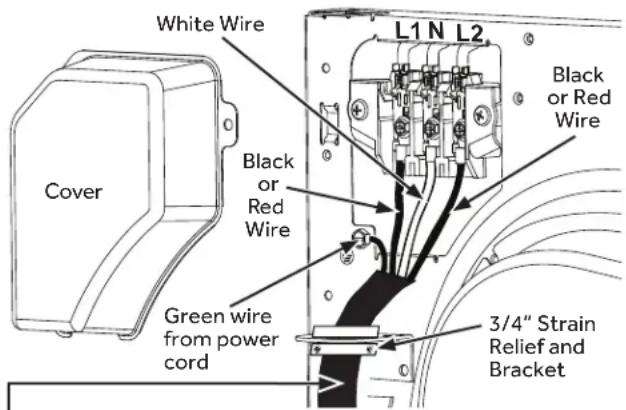
4 #10 AWG minimum copper conductors or 120/240V 30A power supply cord kit marked for use with dryers and provided with closed loop or spade terminals with upturned ends (not supplied).
- Turn off the circuit breaker(s) (30 amp) or remove the dryer's circuit fuse at the electrical box.
- Be sure the dryer cord is unplugged from the wall receptacle.
- Remove the power cord cover located at the upper back.
- Remove green ground screw and retain for use in Step 7. Remove center screw (marked N) in terminal block. Remove and discard ground strap.
- Install 3/4 in. UL-recognized strain relief to power cord entry hole. Bring power cord through strain relief and bracket.
- Connect power cord as follows:
A. Connect the 2 hot lines to the outer screws of the terminal block (marked L1 and L2).
B. Connect the neutral (white) line to the center of the terminal block (marked N).
7. Attach ground wire of power cord with the green ground screw (hole above strain relief bracket). Tighten all terminal block screws (3) securely.
8. Properly secure power cord to strain relief and bracket.
9. Reinstall the cover.
If required, by local code, install external ground (not provided) to grounded metal, cold water pipe, or other established ground determined by a qualified electrician.
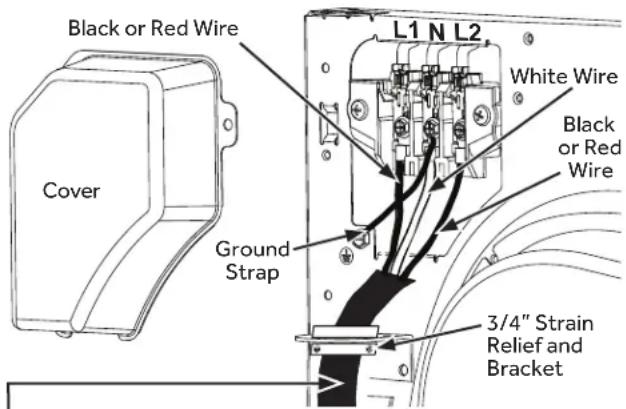
3 #10 AWG minimum copper conductors or 120/240V 30A power supply cord kit marked for use with dryers and provided with closed loop or spade terminals with upturned ends (not supplied).
3-wire Connection
Not for use in Canada.
DO NOT use for Mobile Home Installations.
NOT for use on new construction.
NOT for use on recreational vehicles.
NOT for use in areas where local codes prohibit grounding through the neutral conduction.
- Turn off the circuit breaker(s) (30 amp) or remove the dryer's circuit fuse at the electrical box.
- Be sure the dryer cord is unplugged from the wall receptacle.
- Remove the power cord cover located at the upper back.
- Install 3/4-in. UL-recognized strain relief to power cord entry hole. Bring power cord through strain relief and bracket.
- Connect power cord as follows:
A. Connect the 2 hot lines to the outer screws of the terminal block (marked L1 and L2).
B. Connect the neutral (white) line to the center of the terminal block (marked N).
6. Be sure ground strap is connected to green ground screw on cabinet rear. Tighten all terminal block screws (3) securely.
7. Properly secure power cord to strain relief and bracket.
8. Reinstall the cover.
DRAINING WATER WITHOUT USING THE WATER TANK
You can use the dryer without using the water tank by following the procedures below.
CONNECTING THE DRAIN HOSE
The dryer can pump the condensed water outside of the DRYER directly with drain hose provide.
The procedures to connect the drain hose are as follows.
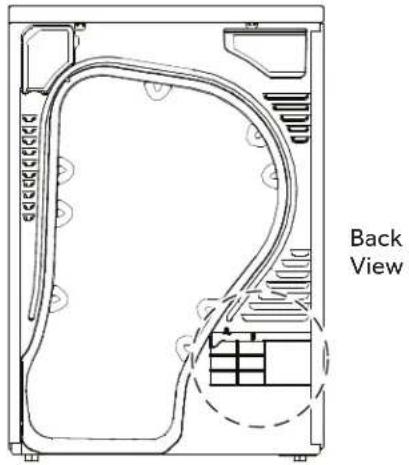
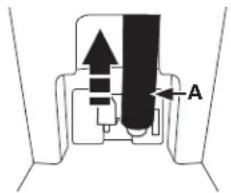
- Disconnect the drain hose A.
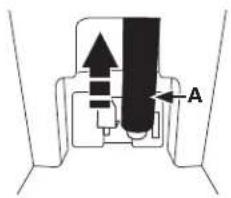
- Connect the drain hose A to the other hole.
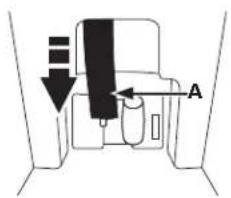
- Connect accessory hose B (long drain hose) adjacent to hose A.
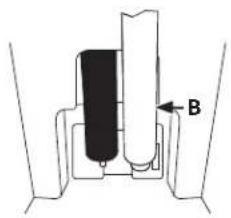
natural_image
Diagram of a mechanical assembly with labeled component B (no text or symbols present)- When connecting hose B, take care that the height of the hose does not exceed 47" (120 cm).
• After connecting the drain hose, you can now directly drain the condensed water to a standpipe or washstand.
CONNECTING THE DRAIN HOSE (CONT.)
- Over the edge of a wash basin: The drain hose must be placed lower than 47" (120 cm) and higher than 30" (76 cm). To keep the drain hose spout bent, use the supplied plastic hose guide. Secure the guide to the wall with a hook or to the tap with a piece of string to prevent the drain hose from moving.
- Assemble the drain hose and the hose guide and fix them with the cable-tie.
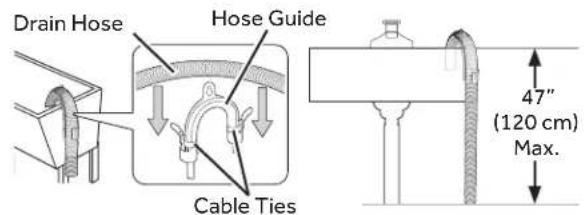

natural_image
Technical line drawings of two pipe installation components: a front panel with pipes and a curved duct (no text or symbols)Do not push the drain hose in the standpipe any further than 4" (10 cm). Pushing the drain hose further in the standpipe can cause leaking.
FINAL SETUP
1 LEVEL THE DRYER
Stand the dryer upright near the final location and adjust the four leveling legs at the corners to ensure that the dryer is level from side to side and front to rear.
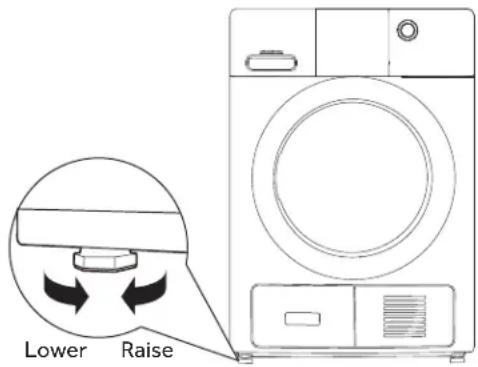
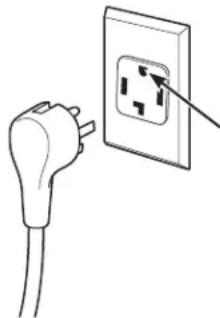
2 PLUG DRYER IN
NOTE: Stacking installations may require a power cord up to 6 feet in length.
natural_image
Illustration of a hand holding an electrical outlet with a plug, showing the outlet symbol (no text or labels present)Ensure proper ground exists before use.
3 DRYER START-UP
Press and hold the power button.
NOTE: If the dryer has been exposed to temperatures below freezing for an extended period of time, allow it to warm up before pressing Power. Otherwise, the display will not come on.
The dryer is now ready for use.
WARNING

- Electrical Shock Hazard
Disconnect power supply before servicing.
Replace all parts and panels before operating.
Failure to do so can result in death or electrical shock.
INSTALLATION INSTRUCTIONS
STACKING THE WASHER AND DRYER (if desired)
If you are planning to stack the washer and dryer, order Stacking Kit number GFA24KITL to be used for this dryer. Kit sold separately.
BEFORE YOU BEGIN
Read these instructions completely and carefully.
- IMPORTANT – Save these instructions for local electrical inspector's use.
- IMPORTANT – Observe all governing codes and ordinances.
- Note to Installer – Be sure to leave these instructions with the Consumer.
- Note to Consumer – Keep these instructions for future reference.
• Service must be performed by a qualified installer. - Do not allow children on or in the appliance. Close supervision of children is necessary when the appliance is used near children.
- Proper installation is the responsibility of the installer.
HAIER APPLIANCES STACK KIT
Visit our website at haierappliances.com/parts or in Canada visit haiercanada.ca/parts.
Part Number Accessory
GFA24KITL Complete Stack Kit
REQUIREMENTS FOR ALCOVE OR CLOSET INSTALLATION
WARNING

Explosion Hazard
Keep flammable materials and vapors, such as gasoline, away from dryer.
Place dryer at least 18" (46 cm) above the floor for a garage installation.
Failure to do so can result in death, explosion, or fire.
- Minimum clearance between dryer cabinet and adjacent walls or other surfaces is:
0" either side
1" front and rear 1" top - Consideration must be given to provide adequate clearance for installation and service.
- Closet doors must be louvered or otherwise ventilated and have at least 60 square inches of open area. If the closet contains both a washer and a dryer, doors must contain a minimum of 120 square inches of open area.
MINIMUM CLEARANCE OTHER THAN ALCOVE OR CLOSET INSTALLATION
Minimum clearance to combustible surfaces and for air opening are: 0" both sides, 1" rear and 1" top. Consideration must be given to provide adequate clearance for installation and service.
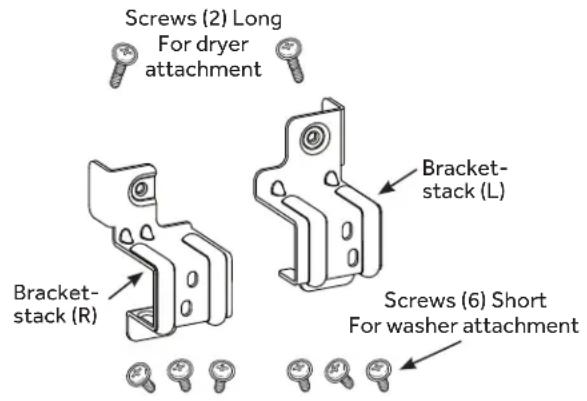
KIT CONTENTS (GE APPLIANCES KIT # GFA24KITL)
TOOLS YOU WILL NEED
INSTALLATION PREPARATION
Remove the packaging.
Flatten the product carton to use as a pad to lay the dryer down on its side. Continue using the carton to protect the finished floor in front of the installation location.
INSTALLING THE STACK BRACKET KIT
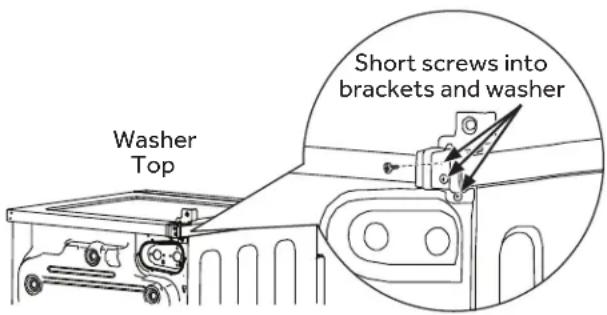
1 INSTALL BRACKET TO WASHER
A. Remove washer top cap screw from the rear left. Align left bracket holes with top cap screw hole on rear left of the unit and replace screw.
NOTE: Leave screws loose so dryer hole alignment will be easier.
B. Drive next screw through the bracket into the rear of the washer.
C. Repeat the above steps with the right side.
② INSTALL DRYER AND BRACKET ON DRYER (CONT.)
C. Tighten the dryer bracket screws; then tighten all stacking kit screws.
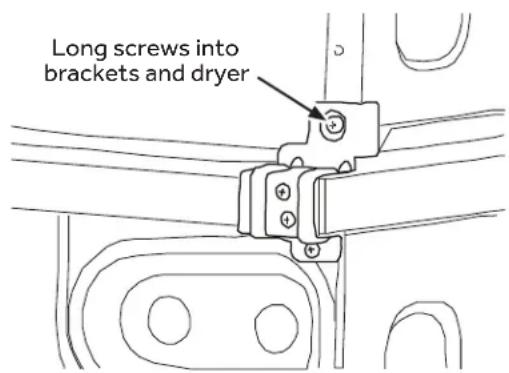
② INSTALL DRYER AND BRACKET ON DRYER
⚠ WARNING
Disconnect power before installing. Failure to do so could result in
serious injury or death.
WARNING

- Excessive Weight Hazard
Failure to do so may result in back or other injury, or property damage.
- Use two or more people to install dryer.
- Avoid tipping and rupture of utility services.
- Dryer must be securely attached to the washer.
- DO NOT place the washer on top of the dryer.
A. Lift the dryer on top of the washer. Protect the washer control panel with cardboard or other protection. Be sure to lift the dryer high enough to clear the washer control panel.
B. Align the holes in the bracket with the holes in the back of the dryer. Using a Phillips screwdriver, attach the 2 #8 x 1/2" tapping screws.
3 FINALIZE THE INSTALLATION
CAUTION
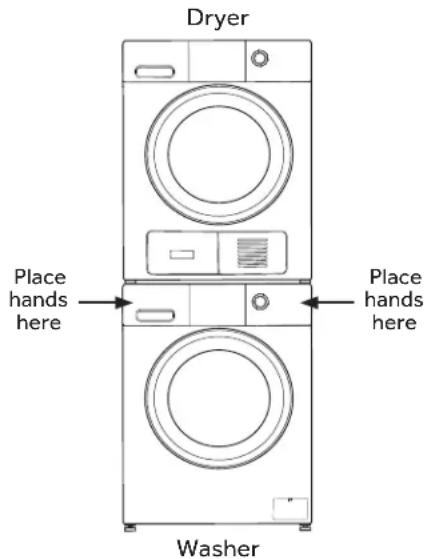
Do not push on the dryer once installed to top of the washer.
Pushing on the dryer may result in pinched fingers.
A. Refer to the washer Installation Instructions to complete the washer installation.
B. Refer to the dryer Installation Instructions to complete the dryer installation.
C. Carefully slide or walk the stacked washer and dryer into place. Use felt pads or other sliding device to assist moving and to protect flooring.
INSTALLATION INSTRUCTIONS
REVERSING THE DOOR SWING (Optional)
IMPORTANT NOTES
- Before you start, unplug the dryer from its electrical outlet.
- Handle parts carefully to avoid scratching paint.
- Provide a non-scratching work surface for the doors.
-
Tools you will need: Phillips-head screwdriver.
-
Once you begin, do not move the cabinet until door-swing reversal is completed.
• These instructions are for changing the hinges from the right side to the left side—if you ever want to switch them back to the right side, follow these same instructions and reverse all references to the left and right.
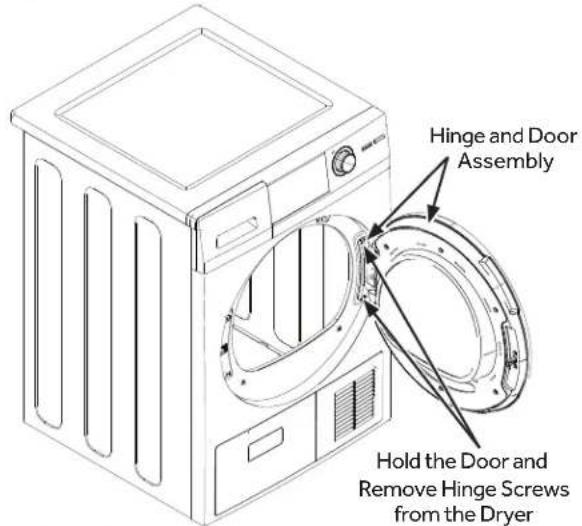
① REMOVE THE DOOR ASSEMBLY
- Open the door. Remove the two screws holding the hinge/door assembly to the dryer. Carefully set the hinge/door assembly aside.
③ REMOVE, ROTATE AND REPLACE THE INNER DOOR
- Remove the six screws securing the inner door to the outer door. Remove the inner door, rotate it 180 and reinstall it into the outer door using the same six screws.
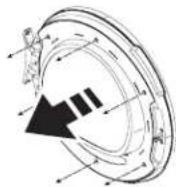
Remove six
screws and the
inner door
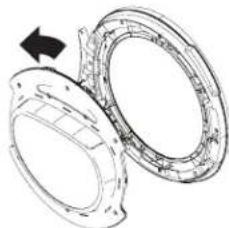
natural_image
Technical line drawing of two mechanical components with a directional arrow indicating rotation (no text or symbols)Inner door shown rotated 180°
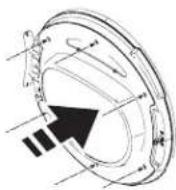
Replace the inner door and six screws
② REMOVE, ROTATE AND REPLACE THE STRIKE PLATE
- Remove the two screws holding the strike plate. Rotate it and install it on the opposite side.
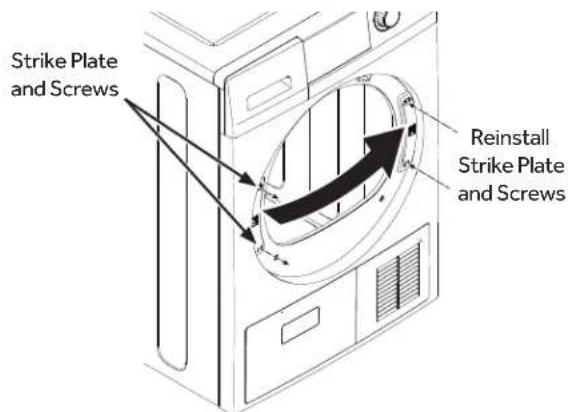
4 ROTATE AND REPLACE THE HINGE/DOOR ASSEMBLY
- Rotate and replace the hinge/door assembly, on the opposite side, using the same two screws.
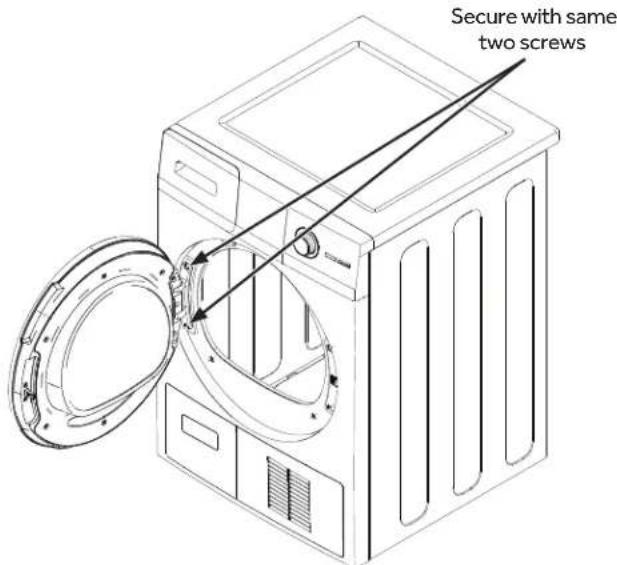
TROUBLESHOOTING TIPS
| Problem Possible Cause What To Do | ||
| Dryer shakes or makes noise | Some shaking/noise is normal. Dryer may be sitting unevenly. | Move dryer to an even floor space, or adjust leveling legs as necessary until even. |
| Clothes take too long to dry | Improper sorting Separate heavy items from lightweight items (generally, a well-sorted washer load is a well-sorted dryer load). | |
| Large loads of heavy fabrics (like beach towels) | Large, heavy fabrics contain more moisture and take longer to dry. Separate large, heavy fabrics into smaller loads to speed drying time. | |
| Non-venting dryer Condensing dryers usually take longer to dry than a vented dryer. | ||
| Controls improperly set Match control settings to the load you are drying. | ||
| Condenser box is clogged Remove and clean the condenser box. Also, clean the location where the condenser box is located ensuring all seals are free from debris. Put the condenser box back and lock it in place. See Condenser in the Care and Cleaning section. | ||
| Lint filter is full Clean lint filter before every load. | ||
| Blown fuses or tripped circuit breaker | Replace fuses or reset circuit breakers. Since most dryers use 2 fuses/ breakers, make sure both are operating. | |
| Overloading/combining loads Do not put more than one washer load in the dryer at a time. | ||
| Underloading If you are drying only one or two items, add a few items to ensure proper tumbling. | ||
| The Dry dryness level was chosen but load is still damp | Load consists of a mixture of heavy and light fabrics | When combining heavy and light fabrics in a load, choose More Dry. |
| Lint filter, condenser, and/or air intake vent located on the front of the dryer is blocked | Inspect and clean lint filter, condenser, and/or air intake vent located on the front of the dryer. | |
| Dry Sensor is dirty Clean the sensor with a moist cloth. | ||
| Control buttons not responding | Controls accidentally put in service mode | Press Start/Pause. |
| Controls accidentally put in lock mode | Hold the Lock Control button for 3 seconds to unlock the dryer. | |
| Controls performed an incorrect operation | Reset the in-house breaker. | |
| Dryer doesn't start | Control panel is "asleep" | This is normal. Press Power to activate the control panel. |
| Dryer is unplugged | Make sure the dryer plug is pushed completely into the outlet. | |
| Fuse is blown/circuit breaker is tripped | Check the building's fuse/circuit breaker box and replace fuse or reset breaker. NOTE: Electric dryers use two fuses or breakers. | |
| Dryer was accidentally paused when starting Delay Dry | If the light on the Start/Pause button is flashing, the dryer is paused. Press Start/Pause to restart the countdown. | |
| Water tank is full | If the Empty Tank light is on, you must empty the water tank before the dryer will start. Refer to the Care and Cleaning section for instructions on emptying the water tank. | |
| No numbers displayed during cycle, only lights | Dryer is continuously monitoring the amount of moisture in the clothes | This is normal. When the dryer senses a low level of moisture in the load, the dryer will display the dry time remaining. |
TROUBLESHOOTING TIPS
| Problem Possible Causes What To Do | ||
| Time Remaining jumped to a lower number | The estimated time may change when a smaller load than usual is drying | This is normal. |
| Cannot make a selection and the dryer beeps twice | The dryness Level, Temp or option that you are trying to select is incompatible with the chosen dry cycle | This is normal. |
| Dryer is running but 00 is displayed in Time Remaining | The Ext Tumble option was chosen | This is normal. During extended tumbling, the time remaining is not displayed. The extended tumbling option lasts approximately 60 minutes. |
| Clean Lint Filter (message) | Power button was activated | Press Start/Pause to begin a dry cycle and the message will disappear. |
| Dryer doesn't heat | Fuse is blown/circuit breaker is tripped; the dryer may tumble but not heat | Check the building's fuse/circuit breaker box and replace both fuses or reset both breakers. Your dryer may tumble if only one fuse is blown or one breaker tripped. |
| Inconsistent drying times | Type of load and drying conditions | The load size, types of fabric, wetness of clothes and the condition of the lint filter, condenser, and/or air intake vent located on the front of the dryer will affect drying times. |
| Excess debris has collected on the condenser preventing proper airflow | Refer to the Care and Cleaning section. | |
| Glow at the rear of the drum | Heaters behind the drum This is normal. Under certain drying conditions and room ambient lighting, the glow of the heaters may be visible at the rear of the drum. | |
| Clothes are still wet and dryer shut off after a short time | The door was opened mid-cycle. The load was then removed from the dryer and a new load put in without selecting a new cycle | A dry cycle must be reselected each time a new load is put in. |
| Small load | When drying 3 items or less, choose Quick Dry or Time Dry. | |
| Load was already dry except for collars and waistbands | Choose Quick Dry or Time Dry to dry damp collars and waistbands. In the future, when drying a load with collars and waistbands, choose More Dry. | |
| Dryer is not level | Move dryer to an even floor space or adjust leveling legs as necessary until even. | |
| Clothes are wrinkled | Overdrying Select a shorter drying time.Remove items while they still hold a slight amount of moisture. Select a Less Dry or Damp setting. | |
| Letting items sit in dryer after cycle ends | Remove items when cycle ends and fold or hang immediately, or use the Ext Tumble option. | |
| Overloading Separate large loads into smaller ones. | ||
TROUBLESHOOTING TIPS
| Problem Possible Causes What To Do | ||
| Clothes shrink Some fabrics will naturally shrink when washed. Others can be safely washed, but will shrink in the dryer. | To avoid shrinkage, follow garment care labels exactly.Some items may be pressed back into shape after drying.If you are concerned about shrinkage in a particular item, do not machine wash or tumble dry it. | |
| Greasy spots on clothes | Improper use of fabric softener F | follow directions on fabric softener package. |
| Drying dirty items with clean ones | Use your dryer to dry only clean items. Dirty items can stain clean items and the dryer. | |
| Clothes were not completely clean | Sometimes stains which cannot be seen when the clothes are wet appear after drying. Use proper washing procedures before drying. | |
| Lint on clothes Lint filter is full Clean lint screen before each load. | ||
| Static occurs No fabric softener was used Try a fabric softener.Bounce® Fabric Conditioner Dryer Sheets have been approved for use in all GE Appliances dryers when used in accordance with the manufacturer's instructions. | ||
LIMITED WARRANTY
haierappliances.com
All warranty service is provided by our Factory Service Centers, or an authorized Customer Carétechnician. To schedule service online, visit us at haierappliances.com/support/schedule-service or in Canada haiercanada.ca/service. Please have your serial number and your model number available when contacting us for service.
Servicing your appliance may require the use of the onboard data port for diagnostics. This gives a Haier Appliances factory service technician the ability to quickly diagnose any issues with your appliance and helps Haier Appliances improve its products by providing Haier Appliances with information on your appliance. If you do not want your appliance data to be sent to Haier Appliances, please advise your technician not to submit the data to Haier Appliances at the time of service.
| For the period of Haier Appliances will replace | |
| One yearFrom date of the original purchase | Any part of the washer which fails due to a defect in materials or workmanship. During this limited one-year warranty, Haier Appliances will provide, free of charge, all labor and in-home service to replace the defective part. |
What Haier Appliances will not cover:
■ Service trips to your home to teach you how to use the product.
■ Improper installation, delivery or maintenance.
■ Failure of the product if it is abused, misused, or used for other than the intended purpose or used commercially.
■ Replacement of house fuses or resetting of circuit breakers.
■ Products which are not defective or broken, or which are working as described in the Owner's Manual.
■ Damage to the product caused by accident, fire, floods or acts of God.
■ Incidental or consequential damage caused by possible defects with this appliance.
■ Defects or damage due to operation in freezing temperatures.
■ Damage caused after delivery.
■ Product not accessible to provide required service.
■ Cleaning of condenser to restore product drying performance.
EXCLUSION OF IMPLIED WARRANTIES
Your sole and exclusive remedy is product repair as provided in this Limited Warranty. Any implied warranties, including the implied warranties of merchantability or fitness for a particular purpose, are limited to one year or the shortest period allowed by law.
In the United States:
This limited warranty is extended to the original purchaser and any succeeding owner for products purchased for home use within the USA. If the product is located in an area where service by a Haier Appliances Authorized Servicer is not available, you may be responsible for a trip charge or you may be required to bring the product to an Authorized Haier Appliances Service location for service. In Alaska, the limited warranty excludes the cost of shipping or service calls to your home.
Some states do not allow the exclusion or limitation of incidental or consequential damages. This limited warranty gives you specific legal rights, and you may also have other rights which vary from state to state. To know what your legal rights are, consult your local or state consumer affairs office or your state's Attorney General.
Warrantor: Haier Appliances, Louisville, KY 40225
In Canada:
This limited warranty is extended to the original purchaser and any succeeding owner for products purchased in Canada for home use within Canada. If the product is located in an area where service by a Haier Appliances Authorized Servicer is not available, you may be responsible for a trip charge or you may be required to bring the product to an Authorized Haier Appliances Service location.
Some provinces do not allow the exclusion or limitation of incidental or consequential damages. This limited warranty gives you specific legal rights, and you may also have other rights which vary from province to province. To know what your legal rights are, consult your local or provincial consumer affairs office.
Warrantor: MC Commercial Inc., Burlington, ON, L7R 5B6
CONSUMER SUPPORT
Haier Appliances Website
Have a question or need assistance with your appliance? Try the Haier Appliances Website 24 hours a day, any day of the year! You can also shop for more great Haier Appliances products and take advantage of all our on-line support services designed for your convenience. In the US: haierappliances.com
Register Your Appliance
Register your new appliance on-line at your convenience! Timely product registration will allow for enhanced communication and prompt service under the terms of your warranty, should the need arise. You may also mail in the pre-printed registration card included in the packing material. In the US: haierappliances.com/support/register
In Canada: prodsupport.mabe.ca/crm/Products/ProductRegistration.aspx
Schedule Service
Expert Haier Appliances repair service is only one step away from your door. Get on-line and schedule your service at your convenience any day of the year. In the US: haierappliances.com/support/schedule-service.
In Canada: haiercanada.ca/service
Remote Connectivity
For assistance with wireless network connectivity (for models with remote enable), visit our website in the US at haierappliances.com
Parts and Accessories
Individuals qualified to service their own appliances can have parts or accessories sent directly to their homes (VISA, MasterCard and Discover cards are accepted).
In the US: haierappliances.com/parts
In Canada: haiercanada.ca/parts
Instructions contained in this manual cover procedures to be performed by any user. Other servicing generally should be referred to qualified service personnel. Caution must be exercised, since improper servicing may cause unsafe operation.
Contact Us
If you are not satisfied with the service you receive from Haier Appliances, contact us on our website at haierappliances.com/support/contact-us with all the details including your phone number, or write to:
In the US: Haier Appliances, Consumer Relations | PO Box 1780 | Rapid City, SD 57709
In Canada: haiercanada.ca/contact-us
Haier
natural_image
Line drawing of a front-loading washing machine with front panel and side door (no text or symbols)TABLE DES MATIÈRES
CONSIGNES DE SÉCURITÉ....3
UTILISATION DE LA SÉCHEUSE ....4
natural_image
Line drawing of a washing machine with a door open and lid removed (no text or symbols)- Chargez le linge sans le tasser.
- Fermez la porte.
Power (alimentation)
Verrouillage
natural_image
Technical line drawing of a mechanical component with no visible text or symbolsREMARQUES :
natural_image
Technical line drawing of a mechanical component with no visible text or symbolsnatural_image
Diagram showing a mechanical or electrical component with directional arrows indicating motion (no text or symbols)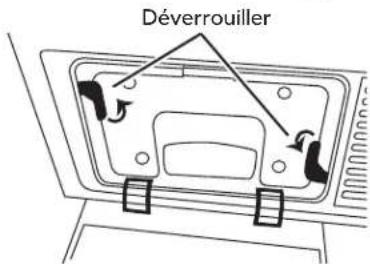
natural_image
Line drawing of a hand inserting a component into a device (no text or symbols)natural_image
Illustration of hands holding a computer monitor with a cable, no text or symbols presentNOTES :
natural_image
Illustration of a hand holding a control panel with wires (no text or symbols)▲AVERTISSEMENT

natural_image
Architectural floor plan outline showing room layout and structural elements (no text or labels)Vue arrière
natural_image
Pure mechanical diagram showing a piston and cylinder assembly without any text, numbers, or symbolsnatural_image
Technical line drawings of electrical piping and a U-shaped pipe assembly (no text or symbols)natural_image
Illustration of a hand holding an electrical outlet with a plug, showing the outlet's internal structure (no text or symbols)natural_image
Technical illustration of a mechanical component with two circular parts and a directional arrow (no text or symbols)Garant : MC Commercial Inc., Burlington, ON, L7R 5B6
SERVICE À LA CLIENTÈLE
Site Web de Haier Appliances
Au Canada : prodsupport.mabe.ca/crm/Products/ProductRegistration.aspx
natural_image
Line drawing of a front-loading washing machine with front panel and side door (no text or symbols)ÍNDICE
natural_image
Illustration of a washing machine with a door open and a lid removed (no text or symbols)Use to delay the start of your dryer.
Bloquear
natural_image
Technical line drawing of a helmet with mesh pattern and handle (no text or symbols)NOTAS:
natural_image
Diagram of a circular structure with concentric rings and a black arrow pointing upward (no text or symbols)Acero inoxidable
natural_image
Technical line drawing of a mechanical component with no visible text or symbolsnatural_image
Technical line drawing of a mechanical component with arrows indicating motion (no text or symbols)natural_image
Illustration of a hand using a tool to adjust or install a component, with no visible text or symbols.Condensador
EL CONDENSADOR SE DEBERÍA LIMPIAR UNA VEZ POR MES.
natural_image
Diagram showing a mechanical component with an arrow indicating rotational motion (no text or symbols)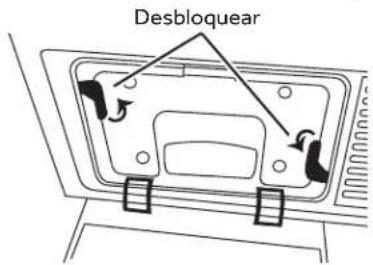
natural_image
Line drawing of a hand inserting a component into a device (no text or symbols)natural_image
Illustration of hands using a tool to adjust or install a component, no text or symbols presentNOTAS:
natural_image
Hand placing a button on an electrical control box with multiple buttons (no text or symbols visible)ADVERTENCIA

natural_image
Technical line drawing of a mechanical or architectural component with no visible text, numbers, or symbols.Visión Trasera
- Desconecte la manguera de drenaje A.
natural_image
Pure mechanical diagram showing a piston and cylinder assembly with no text or symbolsnatural_image
Diagram of a pipe connection with two valves and a curved duct (no text or labels)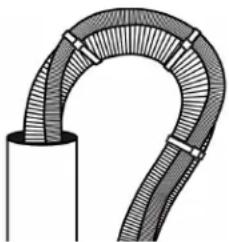
natural_image
Illustration of a curved pipe or tube with mesh texture, no text or symbols present2 ENCHUFE LA SECADORA
natural_image
Line drawing of a hand holding an electrical outlet with a plug, showing the outlet's internal structure (no text or symbols)natural_image
Technical illustration of a mechanical assembly with two circular components and a directional arrow (no text or symbols)Louisville, KY 40225