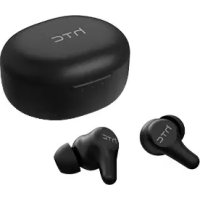
TWS Plus - Earplug HTC - Free user manual and instructions
Find the device manual for free TWS Plus HTC in PDF.


| Product Type | True Wireless Earbuds |
| Model | HTC E-mo1 |
| Color | Not specified |
| Connectivity | Bluetooth 5.0 + EDR |
| Bluetooth Range | Up to 10 meters |
| Frequency Response | 20 Hz - 20 kHz |
| Active Noise Cancellation (ANC) | Yes (ANC mode, ambient sound, off) |
| Water and Sweat Resistance | IPX5 |
| Battery Capacity (earbud) | 45 mAh |
| Battery Capacity (case) | 500 mAh |
| Battery Life (music only) | Up to 6 hours (50% volume) |
| Battery Life (with ANC) | Up to 5 hours (50% volume) |
| Battery Life (ANC only) | Up to 9 hours |
| Talk Time | Up to 5 hours (50% volume) |
| Number of Case Charges | Approximately 3 full charges |
| Case Input Voltage | 5V |
| Charging Interface | USB Type-C |
| Touch Controls | Play/Pause, next/previous track, call, assistant, ANC |
| Box Contents | 2 earbuds, charging case, USB Type-C cable, 2 pairs of ear tips (large and small), quick start guide, warranty card |
| Weight | Not specified (estimated ~50g with case) |
Frequently Asked Questions - TWS Plus HTC
User questions about TWS Plus HTC
0 question about this device. Answer the ones you know or ask your own.
Ask a new question about this device
Download the instructions for your Earplug in PDF format for free! Find your manual TWS Plus - HTC and take your electronic device back in hand. On this page are published all the documents necessary for the use of your device. TWS Plus by HTC.
USER MANUAL TWS Plus HTC
Remove the film before using.
2 Earbuds
1 Charging case
1 Quick Start Guide
- 1 USB Type-C cable
- 2 pairs of rubber tips (large and small)
1 Warranty card
Things to keep in mind with HTC True Wireless Earbuds Plus
- HTC True Wireless Earbuds Plus should not be used in extreme temperatures.
Before using the charging case for the first time, make sure to charge it using a 5 volt charger.
Pairing HTC True Wireless Earbuds with your phone
- The earbuds will turn on automatically when you open the charging case.
- On your phone, go to Settings, turn Bluetooth on, and then pair with "HTC Emo-1". Check your phone user guide to find out how to access Bluetooth settings.
Note:
- If you don't see the earbuds shown in the list, put them in the charging case. With the charging case open, repeatedly plug and unplug the USB Type-C cable thrice. You'll see the three LEDs (orange/green/orange) flash on and off 6 times, which means the earbuds have been reset.
-
When the earbuds are on and haven't connected to any mobile device, they will continue to search for devices. The earbuds will turn off automatically after 10 minutes.
-
Once paired, the earbuds will automatically connect to your mobile device when you open the charging case.
- When you're not using the earbuds, place them in the charging case to charge them. Recharge the case with a 5V charger periodically.
Controls:
| Power on/off Open | en the charging case to turn on the earbuds. Close the charging case to turn off the earbuds. |
| Play / Pause Tap | either earbud. |
| Play next Double | tap either earbud. |
| Play previous Triple | ble-tap either earbud. |
| Answer call / End call | Tap either earbud. |
| Decline call Tap and hold either earbud for 3 seconds. | |
| Assistant Tap and hold the right earbud. | |
| ANC (Accident Noise Cancellation) | Tap and hold the left earbud to switch between these modes: 1. ANC on 2. Ambient sound on 3. Ambient sound off |
Charging case LED notifications:
| Middle LED | When connected to power: • Red: charging the case • Green: case is fully charged When not connected to power: • Flashing red: charging case is low on battery • Green: charging case has sufficient power |
| Left and right LED | • Orange: charging the earbuds • Off: earbuds are fully charged |
Technical specifications:
| Product model HTC E-mo1 | |
| Sweat and water resistant IPX5 | |
| Bluetooth range ≤ 10 m | |
| Bluetooth version 5.0+EDR | |
| Speaker frequency response 20 Hz - 20 kHz | |
| Playback only Up to 6 hours (Volume level 50%) | |
| Playback with noise reduction on | Up to 5 hours (Volume level 50%) |
| Noise reduction only Up to 9 hours | |
| Talk time Up to 5 hours (Volume level 50%) | |
| Earbud charges (when case is fully charged) | Around 3 charges |
| Earbud battery capacity 45mAh | |
| Charging case battery capacity | 500 mAh |
| Charging case input voltage 5V | |
| Charging interface USB Type-C | |
| Charging case power input rating | 5V / 200 mA |
Legal Notice
Trademarks
htc
© 2021 HTC Corporation.
All Rights Reserved
HTC and the HTC logo are trademarks of HTC
Corporation (or HTC). Other companies, products and service names mentioned in this manual are trademarks, registered trademarks or service marks of their individual owners.
THIS DOCUMENT IS FOR INFORMATION PURPOSES
ONLY, AND DOES NOT CONSTITUTE ANY KIND OF
WARRANTIES.
包装内容物
·耳機×2
·充電盒×1
·快速入門指南×1
- USB Type-C 充電線 x1
·耳塞套 × 2 對(大,小)
配件有限保固卡x1
HTCTWS真無線藍牙耳機Plus注意事項
© 2021 HTC Corporation.
著作權所有,並保留一切權利。
© 2021 HTC Corporation.
Specifications techniques :
© 2021 HTC Corporation.
© 2021 HTC Corporation.
Charging case LED notifications:
© 2021 HTC Corporation.