SONY HDRAS30VW - Action Camera

HDRAS30VW - Action Camera SONY - Free user manual and instructions

Find the device manual for free HDRAS30VW SONY in PDF.

📄 77 pages English EN Download 💬 AI Question 10 questions ⚙️ Specs
Notice SONY HDRAS30VW - page 8
View the manual : Français FR English EN
Pick your language and provide your email: we'll send you a specifically translated version.
Product Type Action Camera
Brand Sony
Model HDR-AS30VW
Dimensions (approx.) 24.5 × 47.0 × 82 mm (W × H × D)
Weight 90 g (with battery and memory card)
Power Supply Lithium-ion battery NP-BX1 (3.6 V, 1240 mAh)
Sensor 1/2.3" CMOS Exmor R, 11.9 effective megapixels
Lens Carl Zeiss Tessar, F2.8, focal length 2.5 mm
Stabilization Electronic SteadyShot
Max. video resolution Full HD 1920×1080 at 60p/50p
Photo modes Interval (5, 10, 30, 60 s), single photo up to 12 Mpx
Connectivity Wi-Fi 802.11 b/g/n, NFC, Micro HDMI, Micro USB, microphone input
GPS Built-in (HDR-AS30V only)
Storage Memory Stick Micro (M2), microSD/SDHC/SDXC (Class 4 or higher)
Operating temperature -10 °C to 40 °C
Water resistance No (can be used with waterproof case SPK-AS2 up to 5 m)
Care and cleaning Clean the lens with a soft dry cloth; avoid exposure to dust, sand, and moisture
Spare parts and repairability NP-BX1 battery, micro USB cable, optional waterproof case; contact an authorized Sony repair center
Included accessories Camcorder, micro USB cable, instruction manual (built-in internal memory)

Frequently Asked Questions - HDRAS30VW SONY

How to charge the battery of the Sony HDR-AS30V?
Turn off the device, connect it to a powered computer via the supplied micro USB cable. The CHG indicator lights up. Full charging takes approximately 245 minutes on a computer or 175 minutes with an AC-UD20 charger (sold separately).
What type of memory card to use with this camera?
Use a Memory Stick Micro (M2) or microSD/SDHC/SDXC card of class 4 or faster. Format the card with the camera before first use.
Is the camera waterproof?
No, the camera is not waterproof. For underwater use or in rainy weather, place it in the SPK-AS2 waterproof case (included or optional) which allows immersion up to 5 meters for 30 minutes.
How to activate and use the GPS?
GPS is available on the HDR-AS30V model. In the SETUP menu, select [GPS] and set it to [ON]. Position information is recorded in video files. Use the PlayMemories Home software to view the data on a map.
How to connect the camera to a smartphone via Wi-Fi?
Install the PlayMemories Mobile app on your smartphone. Enable Wi-Fi on the camera (SETUP > Wi-Fi > ON). For Android with NFC, simply touch the smartphone to the N mark on the camera. Otherwise, connect to the SSID and password shown on the supplied sticker.
What is the maximum continuous recording time?
In standard video mode (HQ), continuous recording can reach approximately 13 hours. In slow motion mode (720 60p) it is about 6.5 hours, and in super slow (720 120p) about 3 hours. Actual duration depends on the memory card capacity and battery condition.
How to set the date and time?
In the SETUP menu, select [DATE]. Use the NEXT/PREV buttons to adjust year, month, day, hour, and minutes, then confirm with ENTER. You can also choose your time zone (GMT).
What to do if the camera overheats?
If the HEAT message appears, turn off the camera and let it cool down in a cool place. Avoid prolonged use in direct sunlight or high ambient temperature. Overheating may cause automatic recording stop.
How to view videos on a TV?
Connect the camera to the TV via a micro HDMI cable (sold separately). Turn on the TV and select the HDMI input. Turn on the camera, navigate to [PLAY], then choose [MP4] or [PHOTO] to play files.
What to do if the memory card is not recognized?
Make sure the card is inserted in the correct orientation and is compatible (Memory Stick Micro or microSD class 4 or higher). If the problem persists, format the card in the camera via SETUP > [FORMT]. Note: formatting erases all data.

User questions about HDRAS30VW SONY

0 question about this device. Answer the ones you know or ask your own.

Ask a new question about this device

The email remains private: it is only used to notify you if someone responds to your question.

No questions yet. Be the first to ask one.

Download the instructions for your Action Camera in PDF format for free! Find your manual HDRAS30VW - SONY and take your electronic device back in hand. On this page are published all the documents necessary for the use of your device. HDRAS30VW by SONY.

USER MANUAL HDRAS30VW SONY

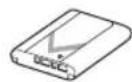
  • Batterie rechargeable (NP-BX1) (1)

SONY HDRAS30VW - 1

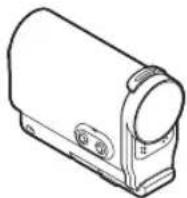
Boitier etanche (SPK-AS2) (1)

SONY HDRAS30VW - 2

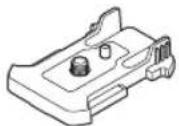
Fixation adhesive (VCT-AM1) Boucle de fixation (1)
SONY HDRAS30VW - 3

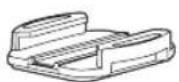
Support adhesif plat (1)

SONY HDRAS30VW - 4

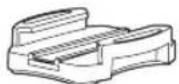
Support adhésif incurve (1)

SONY HDRAS30VW - 5

1Eteignez le camescope.

Specification HDTV 1080/60i, 1080/60p

Specification HDTV 1080/50i, 1080/50p

Batterie rechargeable: 3,6 V (NP-BX1

(fournie))

82,0 mm (31/32 po × 1 7/8 po ×

3 1/4 po) (L/H/P, excluant les parties saillantes)

Poids: Environ 65g (2 oz) (camscope

uniquement)

Batterie rechargeable :

NP-BX1 (fournie)

96,0 mm (1 7/16 po × 2 1/2 po × 3 7/8 po)

(L / H / P, excluant les parties saillantes)

Poids: Environ 55g (1,9 oz)

58.5 mm (1 3/4 po × 9/16 po × 2 3/8 po) (L/H/P,

excluant les parties saillantes)

Poids: Environ 15 g (0,5 oz)

Support adhesif plat

Dimensions: Environ 50,0mm × 12,5mm ×

58,5mm (2po× 1 / 2po× 23 / 8po) (L/H/P, excluant les parties saillantes)

Poids: Environ 14 g (0,5 oz)

Support adhesif incurve

Dimensions: Environ 50,0mm × 16,0mm ×

58,5 mm (2 po × 21/32 po × 2 3/8 po) (L/H/P,

excluant les parties saillantes)

Poids: Environ 16 g (0,6 oz)

Témoin CHG (Charge) 17
Manual assistant
Powered by Anthropic
Waiting for your message
Product information

Brand : SONY

Model : HDRAS30VW

Category : Action Camera