Contemporary EV0U003B - Watch ORIENT - Free user manual and instructions
Find the device manual for free Contemporary EV0U003B ORIENT in PDF.



Frequently Asked Questions - Contemporary EV0U003B ORIENT
User questions about Contemporary EV0U003B ORIENT
0 question about this device. Answer the ones you know or ask your own.
Ask a new question about this device
Download the instructions for your Watch in PDF format for free! Find your manual Contemporary EV0U003B - ORIENT and take your electronic device back in hand. On this page are published all the documents necessary for the use of your device. Contemporary EV0U003B by ORIENT.
USER MANUAL Contemporary EV0U003B ORIENT
Thank you for choosing our product. To ensure prolonged use and optimum performance, please read this instruction manual carefully and familiarize your-self with the terms of the guarantee.
Please keep this Instruction Manual handy for future reference.
◆ SAFETY PRECAUTIONS
Make absolutely sure to observe the demarcated contents indicated below to prevent any possible physical danger and property damage to you as well as other people concerned.
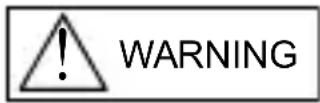
... A demarcation with this symbol represents the contents assuming possibility for death or serious injury when the product is used in any manner different from given instructions.
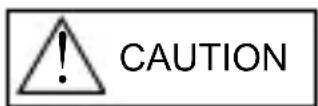
... A demarcation with this symbol represents the contents assuming possibility of causing human injury or material damage only when a product is used in any manner different from given instructions.
◆ IN HANDLING THE WATCH
(1) Water-resistance
| Type\Conditions of use | Underwater operation of crown and operation of crown with drops of water on it | Exposure to small amounts of water (face-washing, rain, etc.) | Water sports (swimming, etc.), frequent contact with water (car-washing, etc.) | Skin diving (air tanks are not used) | Scuba diving (air tanks are used) | Mixed-gas Diving (using helium gas) | ||
| Non water resistant | Without WATER RESISTANT (WATER RESIST) | × × | × × | × × | ||||
| Water resistant watches | Water resistant for daily life | WATER RESISTANT (WATER RESIST) | × | ○ | × × | × × | ||
| Reinforced water resistance for daily life I | WATER RESISTANT (WATER RESIST) 50m (5bar) | × | ○ | ○ | × × | × | ||
| Reinforced water resistance for daily life II | WATER RESISTANT (WATER RESIST) 100m (10bar) 200m (20bar) | × | ○ | ○ | × | × | × | |
| Diver's watches | Diver's watch for Air Diving | AIR DIVER'S 100m / 150m 200m | × | ○ | ○ | ○ | × | |
| Diver's watch for Mixed-gas Diving | He-GAS DIVER'S 200m / 300m /... | × | ○ | ○ | ○ | ○ | ||
* It is recommended that you use the watch correctly following the above-mentioned scope of usage after ascertaining water resistance precautions marked on the dial or caseback.
WARNING
① A watch with water resistance for daily life 30m (3 bar) can be used during face-washing, etc. but cannot be used in an environment in which it will be submerged in water.
② A watch with reinforced water resistance for daily life I 50m (5 bar) can be used while swimming, etc. but cannot be used during any type of diving including skin diving.
③ A watch with reinforced water resistance for daily life II 100m or 200m (10 or 20 bar) can be used while skin diving, but cannot be used while scuba diving using oxygen tanks or saturation diving using helium gas, etc.
CAUTION
④ Keep the crown pushed in at all times (in the normal position) while using the watch. If the crown is the screwed-down type, check that it is securely screwed down.
⑤ Do not operate the crown underwater, or while the watch is wet. Water may enter the interior of the watch and defeat the water resistance.
⑥ If your watch is non-water resistant, beware of splashes of water (during face washing, rain, etc.) and sweat. If the watch becomes wet from water or sweat, wipe the moisture off with a dry, soft cloth.
⑦ Even with a water resistant watch for everyday use, avoid directing strong jets of mains water onto the watch. Water pressure above the limit can apply, which may defeat the water resistance.
⑧ With a water resistant watch for everyday use, rinse sea water off the case after exposure, then wipe it thoroughly to avoid corrosion and other effects.
⑨ The interior of the watch contains some amount of moisture, which may cause fogging on the inside of the glass when the outside air is cooler than the internal temperature of the watch. If the fogging is temporary it causes no harm inside the watch, but if prolonged, or if water enters the watch, consult your place of purchase and do not leave the problem untreated.
(2) Shock
① Be sure not to carry the watch when you engage in strenuous sports, whereas playing such light sports as golf, etc., will not adversely influence the watch.
② Avoid a violent shock such as dropping the watch on the floor.
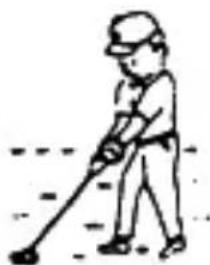
natural_image
Simple line drawing of a person using a golf club to dig (no text or symbols)(3) Magnetism
① If the watch is left at a location with strong magnetism for an extended period of time, the components may be magnetized, resulting in malfunction. Be careful.
② The watch may temporarily speed up or slow down when exposed to magnetism. Precision is restored when placed away from magnetism. In such a case, reset the time.
(4) Vibration
The watch may lose precision if subjected to strong vibrations such as from riding motorcycles, using jackhammers, chain saws, etc.
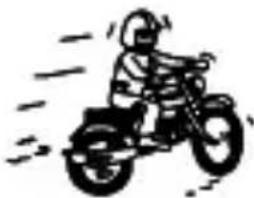
natural_image
Simple line drawing of a person riding a three-wheeled motorcycle (no text or symbols)(5) Temperature
In environments below and above normal temperatures ( 5^ C- 35^ C), the watch may malfunction and stop.

Do not use the watch at high temperatures, such as in a sauna. The watch may heat and cause burns.
(6) Chemicals, Gases, etc.
Utmost caution must be exercised when coming into contact with gases, mercury, chemicals (paint thinner, gasoline, various solvents, detergents containing such components, adhesives, paint, drugs, perfumes, cosmetics, etc.), and so forth. Such may cause discoloration of the watchcase, watchband, and dial face. Discoloration, deformation, and damage to various resin-based component parts may also occur.
(7) About accessory parts
CAUTION
Do not attempt to disassemble or modify the watch.
WARNING
Store the bracelet/strap pin and other small parts out of the reach of children.
If any small parts are swallowed, immediately contact a doctor.
(8) Allergic reactions
CAUTION
If you develop a skin rash or your skin becomes abnormally irritated due to contact with the watch or strap, stop wearing the watch immediately and consult a doctor.
(9) About "luminous light"
Some models have luminous light on the hands and dial.
The luminous light is a safe paint that stores sunlight and artificial light without using any radioactive material, and emits that light in a dark setting. As the paint discharges the stored light, it will become dimmer over time. The amount of light emitted and the time that light is emitted depends on various factors when the light is stored, such as the shape of the glass, the thickness of the paint, surrounding brightness level, the distance from the watch to the light source, and the light absorption level. Please note that when not enough light energy is stored, the watch may emit weak light or emit light for only a short time.
(10) Water resistant watchband
Some models employ leather and nylon bands on which a special treatment to resist perspiration and water absorption have been applied. Please understand that the water resisting effect of this watchband can be lost depending on the period and conditions of use.
◆ HOW TO IDENTIFY THE CALIBER NUMBER
Check the caliber number by referring to the model number of your watch or the case code on the watch's case back.
1. Searching by 10-digit model number
Check the 10-digit model number on the guarantee supplied with your watch. You can also see the number on the product tag put on the watch. Its second and third digits indicate the caliber number of your watch.
Example: If the model number is "FX01002B", the caliber number is "FX".
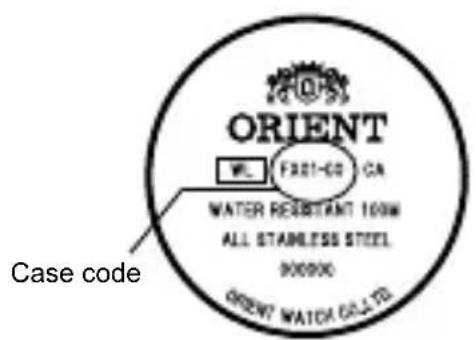
2. Searching by the case code
See the case code on the case back of your watch.
A: If the case code is 6 digits, the first two digits indicate the caliber number.
B: If the case code is 8 or 9 digits, the first three digits indicate the movement number. Search the caliber number corresponding to the movement number referring to the correspondence table.
Example A
text_image
ORIENT FL: FREE-60 CA WATER RESISTANT 100W ALL STAINLESS STEEL 900000 ORIENT WATER GAS LTD Case codeExample B
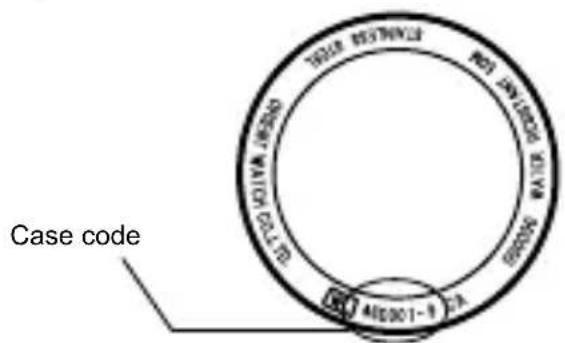
text_image
Case code TIGER BUSTINEL RDT ENRIQUE SILVIA GALWARI AID301-9 CAExample A: When the case code is "FX01-C0", the caliber number is "FX".
Example B: When the case code is "46D001-9", the movement number is "46D". The caliber number corresponding the number will be found "EU" on the table.
* The place of case code may vary and its letter size may be small and difficult to see depending on the characteristics of watches.
* The pictures and illustrations on this manual may differ from the actual appearance of your watch but the function and operation procedures are the same.
◆ SPECIFICATIONS
| Caliber | Number of Jewels | Date | Day of week 24H hand | Daily accuracy | Remark1* | ||
| ES 46C 21 | ○ | Hand Indicating type | - +25~-15s/day | 9:00 p.m. ~ 2:00 a.m. | |||
| ET 46B 21 | ○ | Hand Indicating type | ○ | +25~-15s/day | 9:00 p.m. ~ 2:00 a.m. | ||
| EU 46D 21 | ○ | ○ | - +25~-15s/day | 9:00 p.m. ~ 2:00 a.m. | |||
| EV 46E 21 | ○ | Wide type | - +25~-15s/day | 10:00 p.m. ~ 1:00 a.m. | |||
| FE 46P 21 | ○ | - | ○ | +25~-15s/day | 9:00 p.m. ~ 2:00 a.m. | ||
| FN 46V 21 | ○ | Wide+AM/PM | - +25~-15s/day | 9:00 p.m. ~ 3:00 a.m., 10:30 a.m. ~ 1:30 p.m. | |||
| FP 46W 21 | ○ | Dot or arrow indicating | - +25~-15s/day | 9:00 p.m. ~ 3:00 a.m. | |||
| FX 46Y 21 | ○ | ○ | - +25~-15s/day | 9:00 p.m. ~ 2:00 a.m. | |||
(1) Vibrations: 21.600 vibrations/hour
(2) Running time: More than 40 hours
(3) Shock-proof bearings to protect the balance with hairspring from shocks.
The stated daily accuracy is in the following conditions:
• After 24 hours at room temperature with the mainspring wound fully and the dial facing up.
- Due to the characteristics of the automatic winding watch, the time may deviate from the stated “daily accuracy” depending on the following conditions: amount of time the watch is worn each day, position of the watch, movement of your arm, winding condition of the mainspring.
Product specifications may change without notice, for improvement.
CAUTION
* Avoid setting the date during the time periods listed in “Remark1” above since the calendar changes during this time. If the date is set during this time period, the date may not change or the watch may malfunction. Be sure to move the hour and minute hands away from this time period when setting the date.
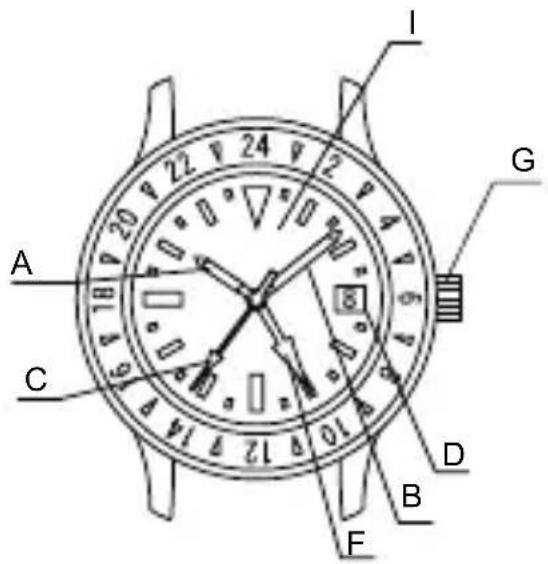
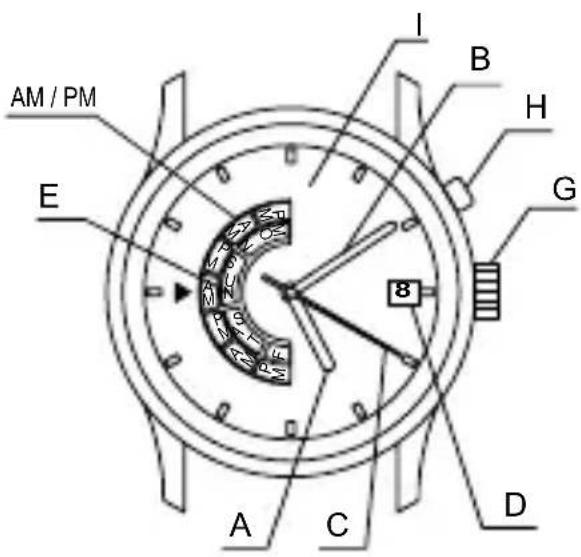
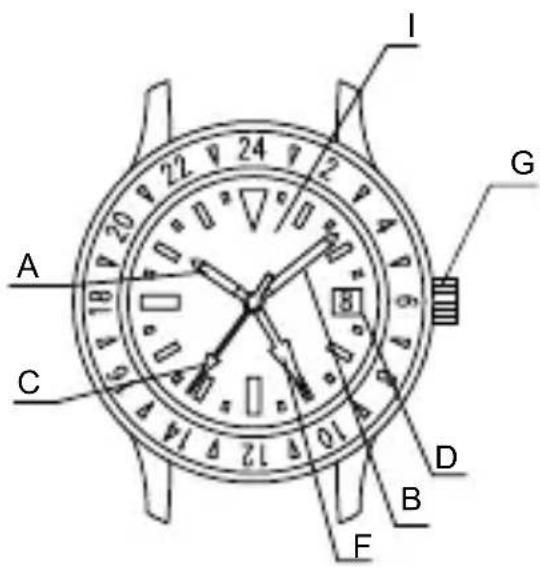
◆ NAMES OF INDIVIDUAL COMPONENT PARTS
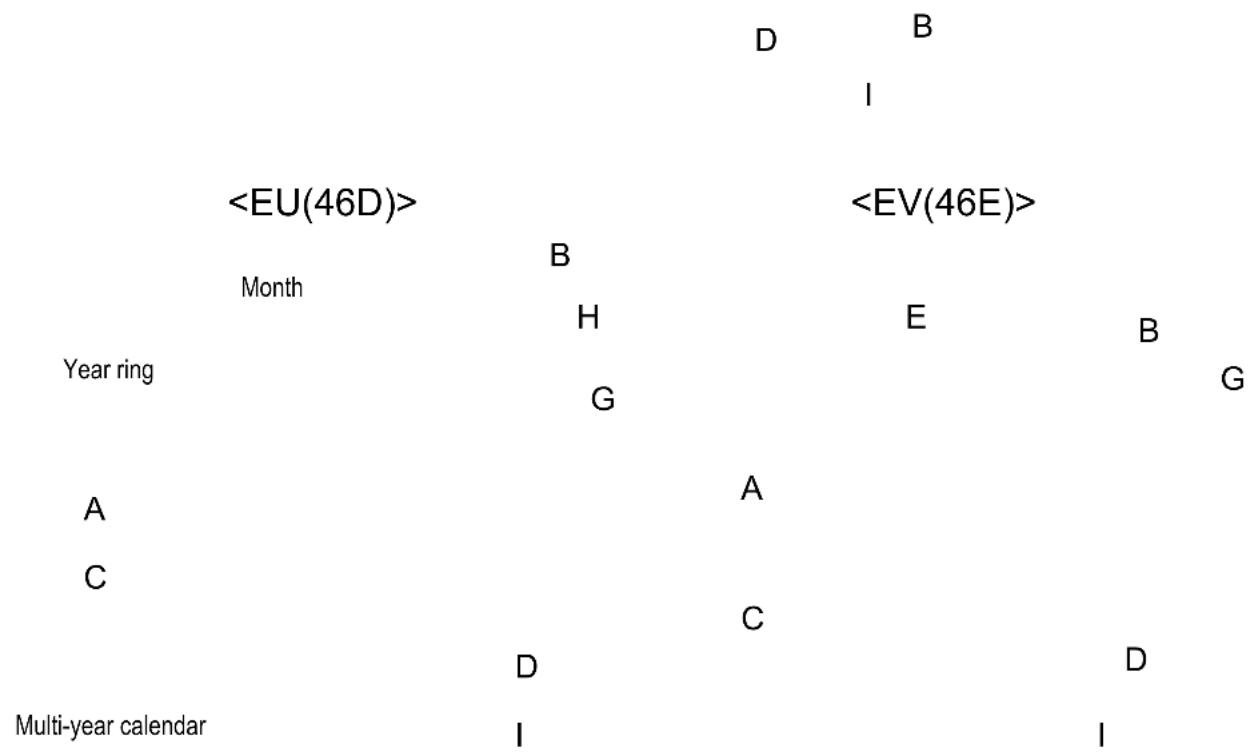
| <ES(46C), ET(46B)> | |
| A: Hour hand | |
| B: Minute hand | E |
| C: Secondhand | |
| D: Date | |
| E: Day of the week | |
| F: 24-hour hand | A |
| G: Crown | F |
| H: Clickbutton | |
| I: Dial | C |
scatter
| Event | Event | Label | | :--- | :--- | :--- | |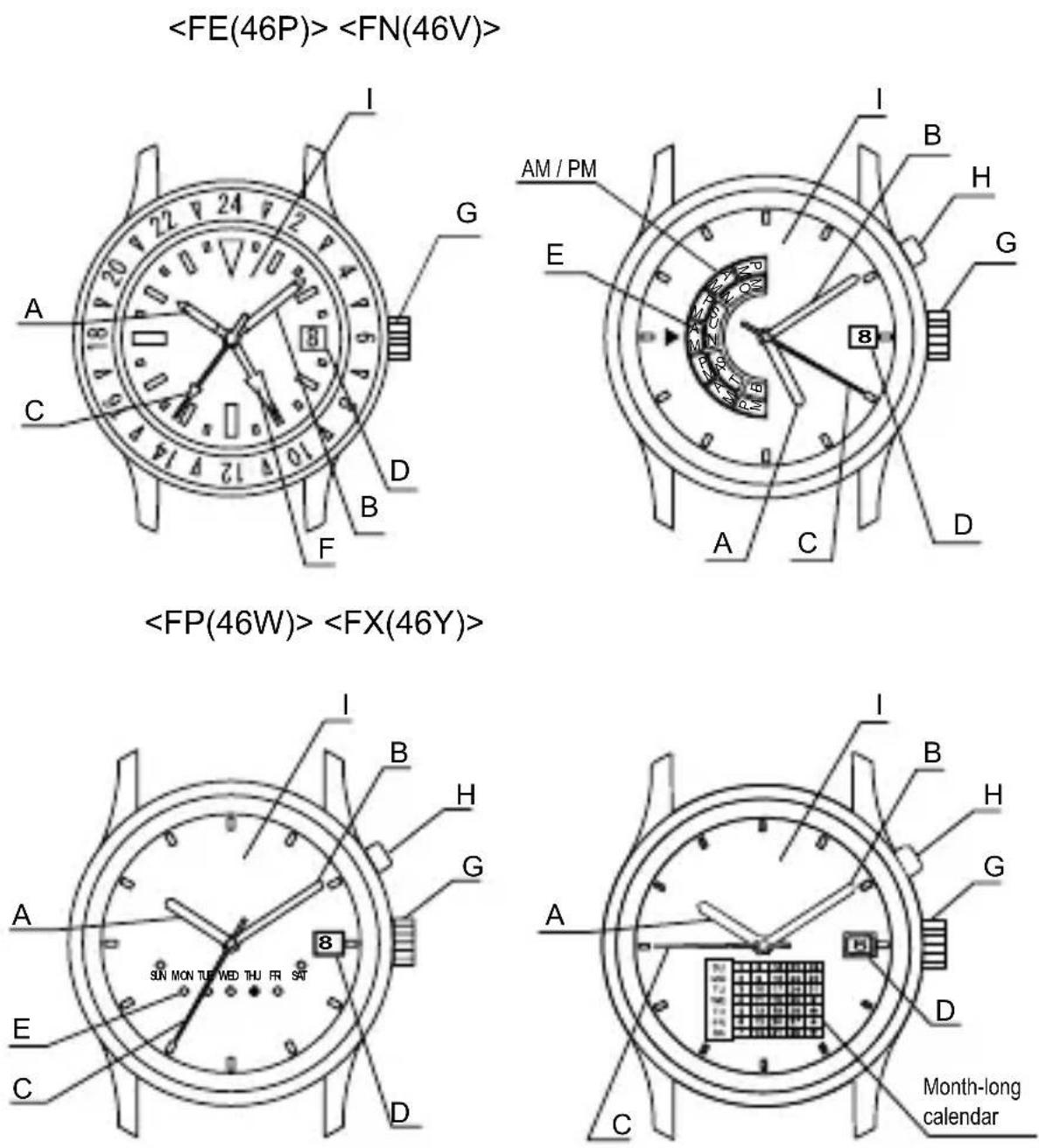
* The position of the crown, date indicator, etc. may vary on some models.
◆ AUTOMATIC WINDING MECHANISM
(1) This is an automatic winding mechanical watch.
(2) The mainspring is wound by natural movements of your arm when wearing the watch on your wrist.
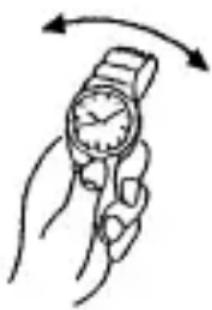
(3) If your watch stops, swing the watch back and forth ten or more times to re-start the second hand. After it starts moving, set the date and time.
(4) This watch will run approximately 40 hours after it is fully wound. If it is not wound enough, the watch may lose
natural_image
Illustration of a hand holding a wristwatch with an arrow indicating rotational motion (no text or symbols)accuracy. In order to maintain the watch's accuracy, we recommend wearing the watch at least 8 hours a day.
◆ MODELS WITH SCREWED-DOWN CROWN
Depending on the model, you may not be able to pull the crown out without unscrewing it (models with screwed-down crown).
Operate this type of watch as follows:
(1) Before setting the date and time, first turn the crown to the left to loosen the screw lock.
(2) After setting the date and time, turn the crown to the right while pressing in, until it stops turning to securely tighten the screw.
◆ HOW TO SET THE TIME [EU(46D), FX(46Y), FE(46P), FN(46V), FP(46W)]
(1) Pull out the crown to the second click. The second hand does not stop.
(2) Turn the crown clockwise and set the current time.
Since this watch comes with a calendar, make sure that you set either a.m. or p.m. without fail.
The date changes at [twelve o'clock midnight].
When setting the time, first bring the hand back slightly earlier the actual time and then move it forward to the actual time.
(3) Press the crown in to the normal position.
![ORIENT Contemporary EV0U003B - ◆ HOW TO SET THE TIME [EU(46D), FX(46Y), FE(46P), FN(46V), FP(46W)] - 1](/content/2026/03/476381/images/70b07a9631b606c326f0cae947ee98300be84398da7d3ab592015869b5e67322.jpg)
text_image
Diagram of a clock face with an arrow indicating rightward movement, showing time measurement and directional arrow.![ORIENT Contemporary EV0U003B - ◆ HOW TO SET THE TIME [EU(46D), FX(46Y), FE(46P), FN(46V), FP(46W)] - 2](/content/2026/03/476381/images/5a316c960650cc6ba360135e4381a2750afc99d1fd26a612f68b831d5b040b06.jpg)
text_image
Turn clockwise![ORIENT Contemporary EV0U003B - ◆ HOW TO SET THE TIME [EU(46D), FX(46Y), FE(46P), FN(46V), FP(46W)] - 3](/content/2026/03/476381/images/fda2d02409aef0e1c6623568fbffdce1b6235182ad649b56344275fcbaca42b1.jpg)
text_image
Diagram of an analog clock showing time with hour and minute hands, accompanied by a directional arrow indicating leftward movement.◆ HOW TO SET THE DATE [ALL MODELS]
(1) Pull the crown out to the first click. The crown on this watch can be pulled out to the first and second clicks.
(2) Turn the crown counterclockwise until you reach today's date.
(3) Press the crown in to the normal position.
![ORIENT Contemporary EV0U003B - ◆ HOW TO SET THE DATE [ALL MODELS] - 1](/content/2026/03/476381/images/3672774a0a06c8ed04730d4bf5841f494a427cdae3d97becff605286906d660e.jpg)
The position of the crown, date indicator, etc. may vary on some models.
About date correction at month's end:
Date correction is necessary for months with 30 days or less. Set the date to the [1st day] on the first day of the next month.
* ET(46B)
The 24-hour hand moves in conjunction with the hour hand and cannot be set by itself.
Some watches may display time using pictures or symbols (Sun & Moon) instead of the 24-hour hand.
![ORIENT Contemporary EV0U003B - ◆ HOW TO SET THE DATE [ALL MODELS] - 2](/content/2026/03/476381/images/40e309b54347ed5d15864ab537a4c322a8bd52d3df9b5e9c54171cfe370416bd.jpg)
text_image
0 0 0 ⑧ ⑧◆ HOW TO SET THE TIME & DAYS OF THE WEEK [ES(46C), ET(46B)]
Set the day of the week first by turning the hour hand and minute hand since this watch does not come with a correcting mechanism for the day of the week.
(1) Pull the crown out to the second click. (Second hand does not stop.)
(2) At first, turn the crown and set the day of the week.
Turn the crown clockwise until the hand indicates the day of the week.
Turn the crown counterclockwise and bring
back the
hands to
about 11:30
p.m. (At this
time, the day
of the week
does not
change.)
Again, turn the crown clockwise until the hand indicates the next day of the week.
Repeat this operation and set the day of the week.
(3) Turn the crown clockwise to set the time.
* Since this watch comes with a calendar, be sure to set either a.m. or p.m.
The date changes at [twelve o'clock midnight].
Also, you can check a.m. and p.m. with the 24-hour hand.
Some models may use a picture-based system (Sun & Moon) instead of the 24-hour hand. The time is twelve o'clock midnight when the Moon symbol is at the top of the window.
* When setting the time, first bring the hand back slightly later than the actual time and then move it forward to the actual time.
(4) Press the crown in to the normal position.
![ORIENT Contemporary EV0U003B - ◆ HOW TO SET THE TIME & DAYS OF THE WEEK [ES(46C), ET(46B)] - 1](/content/2026/03/476381/images/e7f1c47f4321075744cceae2bfd16970caac1229f704669d79ebf1de3a7addf8.jpg)
natural_image
Simple line drawing of a clock face with an arrow pointing right (no text or symbols)![ORIENT Contemporary EV0U003B - ◆ HOW TO SET THE TIME & DAYS OF THE WEEK [ES(46C), ET(46B)] - 2](/content/2026/03/476381/images/d2e42d73ab04361fc39f052ced003a7faec63ba4958de336566e00df1b67658f.jpg)
text_image
Diagram showing a clock with hour and minute hands, followed by a circular arrow indicating rotation or cycle.![ORIENT Contemporary EV0U003B - ◆ HOW TO SET THE TIME & DAYS OF THE WEEK [ES(46C), ET(46B)] - 3](/content/2026/03/476381/images/3a8e0812b9657190d5fd051f81f6cfb6575b805c0d29dc3bdc86b34e32cf53be.jpg)
text_image
Diagram showing a clock with hour and minute hands, accompanied by a circular arrow indicating rotation or refresh.Turn clockwise
![ORIENT Contemporary EV0U003B - ◆ HOW TO SET THE TIME & DAYS OF THE WEEK [ES(46C), ET(46B)] - 4](/content/2026/03/476381/images/b035aee147c831a88a836e461cdbabf2ae2c043bba9966ffc2f31c4e7a5614e7.jpg)
text_image
Diagram showing a clock with an arrow indicating rotation around 12:30, accompanied by a coin and directional arrow.![ORIENT Contemporary EV0U003B - ◆ HOW TO SET THE TIME & DAYS OF THE WEEK [ES(46C), ET(46B)] - 5](/content/2026/03/476381/images/5bcb163174b1d434a8c3d89afbe847fbe0c144917d7690ed5390ca2b381d31ef.jpg)
natural_image
Simple line drawing of a clock face with an arrow pointing to the right side (no text or symbols)◆ HOW TO SET THE TIME & DAYS OF THE WEEK [EV(46E)]
Set the day of the week first by turning the hour hand and minute hand since this watch does not feature a correcting mechanism for the day of the week.
(1) Pull the crown out to the second click. (Second hand does not stop.)
(2) At first, turn the crown and set the day of the week.
Turn the crown clockwise until the hand indicates the day of the week.
If a day of the week is between two days of the week, turn the crown until a day is shown.
Turn the crown counterclockwise and bring back the hands to about 11:30 p.m. (At this time, the day of the week does not come back.)
Again, turn the crown clockwise until the next day of the week is shown.
Repeat this operation and set the day of the week.
(3) Turn the crown clockwise to set the time. Since this watch comes with a calendar, be sure to set either a.m. or p.m.
The date changes at [twelve o'clock midnight].
When setting the time, first bring the hand back slightly later than the actual time and then move it forward to the actual time.
(4) Press the crown in to the normal position.
![ORIENT Contemporary EV0U003B - ◆ HOW TO SET THE TIME & DAYS OF THE WEEK [EV(46E)] - 1](/content/2026/03/476381/images/dfdb69b947b1ddb6a9da16a1157de07d2ccb187eeaab6607a8928b669ff105c1.jpg)
flowchart
graph TD
    A["Clock with grid pattern"] --> B["Clock with grid pattern on the wall"]
    B --> C["Clock with grid pattern on the wall on the wall"]
    C --> D["Clock with grid pattern on the wall on the wall on the wall"]
    D --> E["Clock with grid pattern on the wall on the wall on the wall"]
    E --> F["Turn clockwise"]
![ORIENT Contemporary EV0U003B - ◆ HOW TO SET THE TIME & DAYS OF THE WEEK [EV(46E)] - 2](/content/2026/03/476381/images/641f64f8940fa4a4aa7eeb93972f4cd09d5d1fddc6ce37de7dcba1ac9688a40d.jpg)
text_image
Diagram showing two analog clocks with hand gestures and a curved arrow indicating rotation or change.◆ HOW TO SET THE DAY OF THE WEEK & AM/PM [FN(46V)]
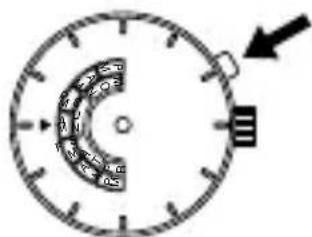
Press the click button at the two o'clock position to set AM/PM and the day of the week.
When setting the time, be sure that AM/PM is set correctly.
Example: Changing the display from SUN AM to MON AM
(1) Press the click button to change the display from SUN AM to SUN PM.
(2) Press the click button again to change SUN PM to MON AM.
natural_image
Simple circular diagram with clock face and arrow, no text or symbols present
text_image
24 18 15 12 9 6 3 0 -2 -4 -6 -8 -10 -12 -14 -16 -18 -20 -22 -24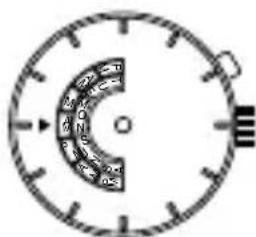
text_image
24 12 15 12 15 12 15* For types of watches with a click button that cannot be pressed with your finger (i.e. the "hidden button" type)
The day of the week can be set by pressing the click button using a sharp, pointed object such as a precision screwdriver, a pair of tweezers or a metal pin.
The layout of the days of the week and the location of the window vary from model to model.
◆ HOW TO SET THE DAY OF THE WEEK [FP(46W)]
There are models that indicate the day of the week with ● (dot) or ▲ (arrow). Though display methods are different, operation methods are the same.
See below for operation methods.
(Dot-indicating type)
Press the click button at the two o'clock position to set the day of the week.
![ORIENT Contemporary EV0U003B - ◆ HOW TO SET THE DAY OF THE WEEK [FP(46W)] - 1](/content/2026/03/476381/images/87acc2bdf8f5189e489311244a297e9327e29725ac2a9ccafac10e2daf77d4af.jpg)
text_image
SUMMON TUEVEDTHURISAT SUMMON TUEVEDTHURISAT(Arrow-indicating type)
Press the click button at the two o'clock position to set the day of the week.
![ORIENT Contemporary EV0U003B - ◆ HOW TO SET THE DAY OF THE WEEK [FP(46W)] - 2](/content/2026/03/476381/images/16633c2bc7ffdd2408970df97af77d4b79bc3543c737a1684266fd9e25c7ae84.jpg)
flowchart
graph LR
    A["Circle dial with 12 segments: MON, TUE, VED"] --> B["Arrow to 'SAT' segment"]
    B --> C["Arrow to 'SAT' segment"]
    C --> D["Arrow to 'SAT' segment"]
    D --> E["Arrow to 'SAT' segment"]
    E --> F["Arrow to 'SAT' segment"]
    F --> G["Arrow to 'SAT' segment"]
* For types of watches with a click button that cannot be pressed with your finger (i.e. the "hidden button" type)
The day of the week can be set by pressing the click button using a sharp, pointed object such as a precision screwdriver, a pair of tweezers or a metal pin.
The layout of the days of the week and the location of the window vary from model to model.
◆ HOW TO USE THE MULTI-YEAR CALENDAR [EU(46D)]
[NAMES AND FUNCTIONS OF COMPONENT PARTS]
![ORIENT Contemporary EV0U003B - [NAMES AND FUNCTIONS OF COMPONENT PARTS] - 1](/content/2026/03/476381/images/082d36b4160f9baba2eab160a9426142d422de708ae8fe7224a95d7036f0829c.jpg)
text_image
Month Last two digits of the year Click button Day of the week Dates (for 1 month)* The click button, location of the date indicator, and style of the month indicator may vary by model.
[HOW TO SET THE MULTI-YEAR CALENDAR]
Press the click button until the month to be set lines up with the last two digits of the year to be set at the top of the dial.
* To display the month of January or February during a leap year, line up the last two digits of the year with the appropriate 1 or 2 in the black box. The last two digits of the year for a leap year are printed in red.
![ORIENT Contemporary EV0U003B - [HOW TO SET THE MULTI-YEAR CALENDAR] - 1](/content/2026/03/476381/images/55882bb73380da7881f20045dcdf4020b40915066bc20506e1ea7c3ef115f893.jpg)
pie
| Category | Value | |---|---| | 1 | 10 | | 2 | 45 | | 3 | 12 | | 4 | 7 | | 5 | 9 | | 6 | 11 | | 7 | 2 | | 8 | 3 | | 9 | 12 | | 10 | 4 |A calendar with the days for the specified month in their appropriate places is displayed at the bottom of the dial.
![ORIENT Contemporary EV0U003B - [HOW TO SET THE MULTI-YEAR CALENDAR] - 2](/content/2026/03/476381/images/57f7ed0702aca6e4097597cc982113992e5fffd89053d66181de9cf24bfb44a1.jpg)
other
| Category | Value | |---|---| | Bar 1 | 25 | | Bar 2 | 27 | | Bar 3 | 24 | | Bar 4 | 21 | | Bar 5 | 19 | | Bar 6 | 17 | | Bar 7 | 10 | | Bar 8 | 4 | | Bar 9 | 11 | | Bar 10 | 16 | | Bar 11 | 25 | | Bar 12 | 5 | | Bar 13 | 12 | | Bar 14 | 13 | | Bar 15 | 12 | | Bar 16 | 16 | | Bar 17 | 6 | | Bar 18 | 13 | | Bar 19 | 20 | | Bar 20 | 21 | | Bar 21 | 28 |◆ HOW TO USE THE DUAL TIME FUNCTION [FE(46P)]
You can see the time for two different time zones, one for the city you are in and another for any other city, using the rotating bezel and the 24-hour hand.
(1) First be sure that the watch is showing the correct time.
(2) Get the time difference for the city you want to know the time of. (See Comparison table of standard times.)
(3) When the time difference is a negative number, turn the bezel clockwise to that number of hours. When the time difference is positive, turn the bezel counterclockwise to that number of hours.
(4) The number on the bezel where the 24-hour hand is pointing will be the time in the city you selected.
Example: When you want to know the time in London while you are in Japan London time is 9 hours behind Japan. Therefore, turn the rotating bezel clockwise 9 hours. The hours and minutes shown by the watch hands is the time in Japan. The number on the bezel where the 24-hour hand is pointing is the time in London. (Japan time: 10:09 a.m., London time: 01:09 a.m.)
![ORIENT Contemporary EV0U003B - ◆ HOW TO USE THE DUAL TIME FUNCTION [FE(46P)] - 1](/content/2026/03/476381/images/84dc663a041e2e21814821116202c4f0bb74bc79736b10a4092b82aa0821ad09.jpg)
text_image
Diagram showing a clock face with hour and minute hands, before and after an arrow indicating rotation or change.Example: When you want to know the time in Japan while you are in London Japan time is 9 hours ahead of the time in London. Therefore, turn the rotating bezel counterclockwise 9 hours. The hours and minutes shown by the watch hands is the time in London. The number on the bezel where the 24-hour hand is pointing is the time in Japan. (London time: 10:09 a.m., Japan time 07:09 p.m.).
![ORIENT Contemporary EV0U003B - ◆ HOW TO USE THE DUAL TIME FUNCTION [FE(46P)] - 2](/content/2026/03/476381/images/8c9d3003effef1f1e84af4f034de266b685982744b44b7923fd0c0135250366d.jpg)
text_image
Diagram showing a clock face with hour and minute hands, before and after an operation.◆ USING THE ROTATING WORLD TIME RING
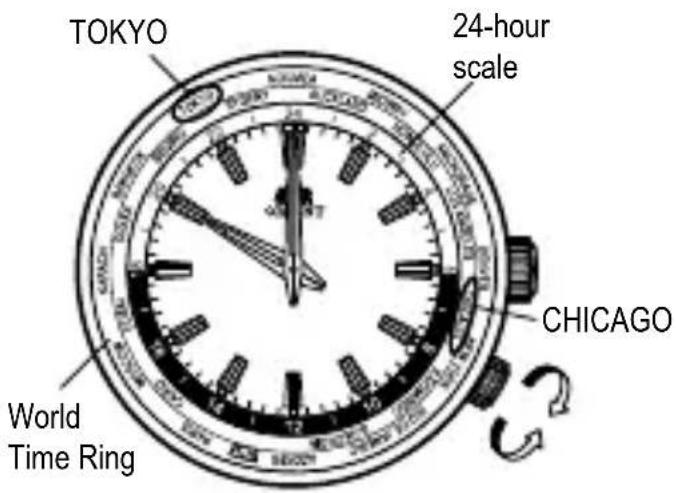
When you turn the rotating indicator ring and align the city names with the times, you can read the respective times of the cities right away.
Example: It is 10:00 p.m. in Tokyo now.
(1) In the 24-hour system, 10:00 p.m. is 22:00 hours.
(2) Set TOKYO on the World Time Ring to the 22-hour position of the 24-hour scale.
* The World Time Ring comes in various types, such as with a crown for setting world time or with a rotating bezel.
(3) The position that CHICAGO on the World Time Ring indicates is the time in Chicago.
* The position indicated by each
scale on the World Time Ring represents the time in that country.
Using this method, you can simultaneously see the time in countries around the world by using the scales on the World Time Ring and reading the dial.
* The position of the inner ring crown and details of the date indicator may vary depending on the model.
text_image
TOKYO 24-hour scale CHICAGO World Time Ring◆ COMPARISON TABLE OF STANDARD TIMES
| City indication Typical city Time differences with GMT | ||
| GMT GMT ±0 | ||
| PAR PARIS +1 | ||
| CAI CAIRO +2 | ||
| MOW MOSCOW +3 | ||
| DXB DUBAI +4 | ||
| KHI KARACHI +5 | ||
| DAC DHAKA +6 | ||
| BKK BANGKOK +7 | ||
| BJS | BEIJING | +8 |
| TYO TOKYO +9 | ||
| SYD SYDNEY +10 | ||
| NOU | NOUMEA | +11 |
| AKL AUCKLAND | +12 | |
| MDY | MIDWAY | -11 |
| HNL HONOLULU | -10 | |
| ANC ANCHORAGE | -9 | |
| LAX LOS ANGELES | -8 | |
| DEN DENVER | -7 | |
| CHI CHICAGO | -6 | |
| NYC NEW YORK | -5 | |
| SDQ | S. DOMINGO | -4 |
| RIO | RIO DE JANEIRO | -3 |
| SGS S.GEORGIA | -2 | |
| PDL AZORES | -1 | |
* Some countries use daylight savings time. There may be cases where the time difference and daylight savings time change to suit the country's convenience.
* The city names listed are major cities in various countries of the world. Please note in advance that some product specifications are subject to change for product improvement purposes.
* If planning to use the watch in a place not listed in the table above, select a city in the same time zone as the city for which you want to indicate time.
◆ HOW TO ADJUST A DAY OF THE WEEK [FX(46Y)]
Correction of a day of the week is required the beginning of a month.
Please unite the day of the week display of a dial on the day at the beginning of a month.
Please adjust the following procedure.
![ORIENT Contemporary EV0U003B - ◆ HOW TO ADJUST A DAY OF THE WEEK [FX(46Y)] - 1](/content/2026/03/476381/images/1d26124c599f21814399d9936c502af78d8412aa1f596ac16b89c5f3d05828f8.jpg)
flowchart
graph LR
    A["Clock with grid"] --> B["Step 1: First step"]
    B --> C["Step 2: Second step"]
    C --> D["Step 3: Third step"]
Push the click button, and adjust a day of the week.
Whenever it pushes a day of the week display twice, it changes.
(* It does not change to the right position only by pushing once)
Please repeat this operation and adjust with the day of the week of that month.
* For types of watches with a click button that cannot be pressed with your finger (i.e. the "hidden button" type)
The day of the week can be set by pressing the click button using a sharp, pointed object such as a precision screwdriver, a pair of tweezers or a metal pin.
◆ USING THE ROTATING ORIENTATION RING [FE (46P)]
Turning the crown will rotate the rotating orientation ring. If you point the hour hand in the direction of the sun while keeping the watch horizontal, the direction between the hour hand and twelve o'clock will face south.
(1) In the morning, with twelve o'clock as the origin, "the position midway between twelve o'clock and the hour hand counterclockwise from twelve o'clock" will point toward south. Refer to FIG. 1.
(2) In the afternoon, with twelve o'clock as the origin, "the position midway between twelve o'clock and the hour hand clockwise from twelve o'clock" will point toward south. Refer to FIG. 2.
The orientation ring is labeled with indications for north, south, east, and west (N, S, E, and W) as well as numbers for degrees of angles to allow directions to be known quickly.
![ORIENT Contemporary EV0U003B - ◆ USING THE ROTATING ORIENTATION RING [FE (46P)] - 1](/content/2026/03/476381/images/ff1c5ff14b1fc61ff881662ba76ba41676322e72491b7e5740a9ab6068658dcc.jpg)
text_image
12 o'clock South SW 240 255 195210 S 165 SE 150 10.71 1.71 105 10 F 15 NE 60 30 NE 300 320 345 N 285 300 Rotating Orientation Ring EastFIG. 1
![ORIENT Contemporary EV0U003B - ◆ USING THE ROTATING ORIENTATION RING [FE (46P)] - 2](/content/2026/03/476381/images/475fbfe185040b4e02266fdcbc6d368c37296cfbd61dc9bc9a11e85da0b77d8f.jpg)
text_image
12 o'clock NE 60 75 105 120 SE 150 165 S 195 210 SW 240 255 W 285 300 AM 330 345 SouthFIG. 2
* The position of the inner ring crown and details of the date indicator may vary depending on the model.
This function can only be used in the northern hemisphere. However, you may not be able to use it in regions in latitudes lower than the Tropic of Cancer, depending on the season.
- To use this function, you need to be able to confirm the position of the sun.
- To use this function, you need to set the watch's time to the local time of the place where you are located.
- This function is merely a simple compass and cannot be used to determine true direction.
Example: When wanting to know the direction of east at nine o'clock in the morning. Refer to FIG. 1.
(1) Point the hour hand toward the sun.
(2) The position midway between the hour hand (nine o'clock) and twelve o'clock points toward south, so turn the S on the rotating orientation ring to line it up with the position of 10:30 on the dial.
(3) In this case, the direction in which E points (7:30) on the rotating orientation ring is east.
◆ HOW TO SET THE MONTHLY CALENDAR
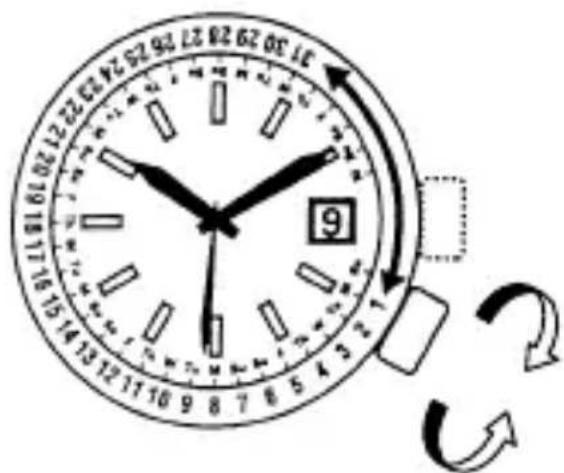
Some models come with a calendar function which uses an inner ring or bezel on the exterior of the case to indicate the date.
The monthly calendar can be used by turning the crown to set the rotating ring inside the watchcase and aligning it with the day of the week that is printed on the dial.
Turn the crown to align the first day of the month to the appropriate day of the week.
* Note that when setting the first day of the month, if the days at the end of the month (31st, etc.) are aligned with the section that does not have the days of the week printed on the dial (3 - 4 o'clock side), days of the week will not be indicated at the end of the month.
text_image
12:30 12:31 12:32 12:33 12:34 12:35 12:36 12:37 12:38 12:39 12:40 12:41 12:42 12:43 12:44 12:45 12:46 12:47 12:48 12:49 12:50 12:51 12:52 12:53 12:54 12:55 12:56 12:57 12:58 12:59 12:60 12:61 12:62 12:63 12:64 12:65 12:66 12:67 12:68 12:69 12:70 12:71 12:72 12:73 12:74 12:75 12:76 12:77 12:78 12:79 12:80 12:81 12:82 12:83 12:84 12:85 12:86 12:87 12:88 12:89 12:90 12:91 12:92 12:93 12:94 12:95 12:96 12:97 12:98 12:99 13:00 9* The position of the inner ring crown and details of the date indicator may vary depending on the model.
◆ HOW TO USE THE ROTATING INDICATOR BEZEL
Please notice that some models come with a rotating indicator bezel, which should be used properly.
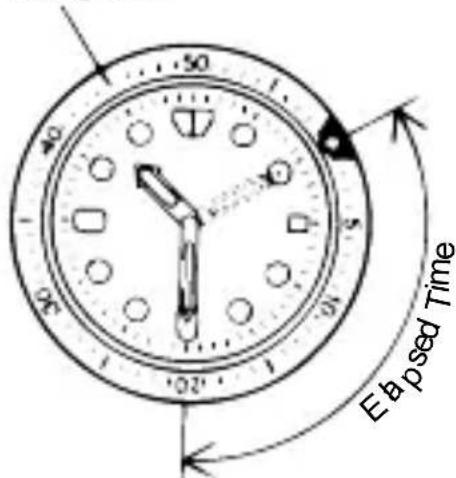
Turn the bezel by pointing the ▽ mark to the minute-hand. While certain time goes by, you can measure the elapsed time from the distance between minute-hand and figures on the rotating indicator bezel. You can also set the ▽ mark as a desired time to remind you how long time is still remain for an appointment.
You cannot turn the bezel reversely since it comes with a protection mechanism for preventing wrong operation by force or shock. Figures on the bezel could also help you to read the current time easily.
Rotating bezel
text_image
50 50 120 Eb p sed TimeThe above shows that 20 minutes have elapsed from 10:10.
* Depending on design, anti-reversely and 1 minute “click” sound mechanism on rotating indicator bezel does not apply to some models.
DEUTSCH
MECHANISCHE UHR
BEDIENUNGSANLEITUNG
natural_image
Cartoon illustration of a person riding a tricycle with motion lines indicating speed (no text or symbols)(5) Temperatur
text_image
E G A 24° F N C 8 D B I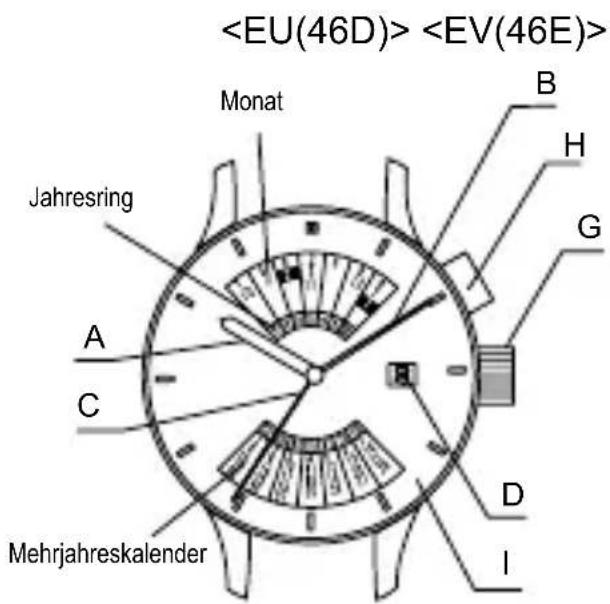
text_image
E SUNDAY A B G C 8 D Inatural_image
Illustration of a hand holding a wristwatch with an arrow indicating rotational motion (no text or symbols)◆ MODELLE MIT VERSCHRAUBBARER KRONE
text_image
Diagram of a clock face with an arrow indicating rightward movement, showing time and duration.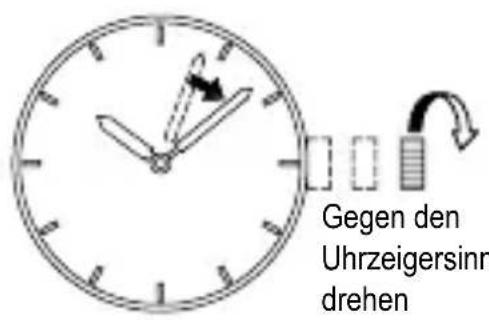
natural_image
Simple analog clock face with hour and minute hands, showing time near 10:30 (no text or symbols beyond clock face markings)◆ EINSTELLEN DES DATUMS [ALLE MODELLE]
natural_image
Simple line drawing of a clock face with an arrow pointing right (no text or symbols)![ORIENT Contemporary EV0U003B - ◆ EINSTELLEN DES DATUMS [ALLE MODELLE] - 1](/content/2026/03/476381/images/1ef9cc770849cd2189843bf02e59f89887c2a1016ab7aaa2c99d88635b9b5312.jpg)
natural_image
Simple line drawing of a clock face with an arrow pointing to the left side (no text or symbols)natural_image
Simple line drawing of a clock face with an arrow pointing right (no text or symbols)![ORIENT Contemporary EV0U003B - ◆ EINSTELLEN DES DATUMS [ALLE MODELLE] - 2](/content/2026/03/476381/images/66e199073183a3507ed0bda0a7f258636ad3fde4018e02d473dbf229907dd3e1.jpg)
text_image
Diagram illustrating time synchronization between two clocks with arrows indicating rotation and change.text_image
Hand-drawn analog clock face showing time with hour and minute hands, accompanied by a circular arrow indicating rotation or sequence.natural_image
Simple line drawing of a clock face with hour and minute hands, no text or symbols presentflowchart
graph TD
    A["Clock with 20/1/0/0"] --> B["Clock with 20/1/0/0"]
    B --> C["Clock with 20/1/0/0"]
    C --> D["Clock with 20/1/0/0"]
    D --> E["Clock with 20/1/0/0"]
    E --> F["Clock with 20/1/0/0"]
    F --> G["Clock with 20/1/0/0"]
    G --> H["Clock with 20/1/0/0"]
    H --> I["Clock with 20/1/0/0"]
    I --> J["Clock with 20/1/0/0"]
    J --> K["Clock with 20/1/0/0"]
    K --> L["Clock with 20/1/0/0"]
    L --> M["Clock with 20/1/0/0"]
    M --> N["Clock with 20/1/0/0"]
    N --> O["Clock with 20/1/0/0"]
    O --> P["Clock with 20/1/0/0"]
    P --> Q["Clock with 20/1/0/0"]
    Q --> R["Clock with 20/1/0/0"]
    R --> S["Clock with 20/1/0/0"]
    S --> T["Clock with 20/1/0/0"]
    T --> U["Clock with 20/1/0/0"]
    U --> V["Clock with 20/1/0/0"]
    V --> W["Clock with 20/1/0/0"]
    W --> X["Clock with 20/1/0/0"]
    X --> Y["Clock with 20/1/0/0"]
    Y --> Z["Clock with 20/1/0/0"]
    Z --> AA["Clock with 20/1/0/0"]
    AA --> AB["Clock with 20/1/0/0"]
    AB --> AC["Clock with 20/1/0/0"]
    AC --> AD["Clock with 20/1/0/0"]
    AD --> AE["Clock with 20/1/0/0"]
    AE --> AF["Im Uhrzeigersinn drehen"]
![ORIENT Contemporary EV0U003B - ◆ EINSTELLEN DES DATUMS [ALLE MODELLE] - 3](/content/2026/03/476381/images/753cf85c437510baade5f3fcc4438086a38957e9e347dfb7ba78fb9db94e1bf5.jpg)
text_image
Diagram illustrating time frame changes with clock and digital display, showing movement from left to right.◆ EINSTELLEN VON WOCHENTAG UND AM/PM (VORMITTAG/NACHMITTAG) [FN(46V)]
text_image
Diagram of a clock face with hour and minute hands, showing 24-hour division and an arrow pointing to the 10:30 mark.![ORIENT Contemporary EV0U003B - ◆ EINSTELLEN VON WOCHENTAG UND AM/PM (VORMITTAG/NACHMITTAG) [FN(46V)] - 1](/content/2026/03/476381/images/76ef21c6f88f787269669522e753ce68e2e1ff0c15bc54377678c148ef547dba.jpg)
text_image
12:00 15:00 04:00![ORIENT Contemporary EV0U003B - ◆ EINSTELLEN VON WOCHENTAG UND AM/PM (VORMITTAG/NACHMITTAG) [FN(46V)] - 2](/content/2026/03/476381/images/05266911bba2a3cad3d95aea7977404ab913c0687fa49038b62a0460291a983b.jpg)
text_image
24 12:00 15:00flowchart
graph LR
    A["Circle dial with Solar Panel"] --> B["SUN MON THU FRI SAT"]
    B --> C["SUN MON THU FRI SAT"]
    C --> D["SUN MON THU FRI SAT"]
    D --> E["..."]
    E --> F["SUN MON THU FRI SAT"]
    F --> G["Output arrow"]
text_image
Diagram showing a clock face with hour and minute hands, before and after rotation, illustrating time and duration changes.text_image
Diagram showing a clock face with hour and minute hands, before and after an operation.natural_image
Simple line drawing of a person using a golf club to walk (no text or symbols)(3) Magnétisme
natural_image
Simple line drawing of a person riding a three-wheeled motorcycle (no text or symbols)(5) Température
text_image
A F C E G 24 34 D B I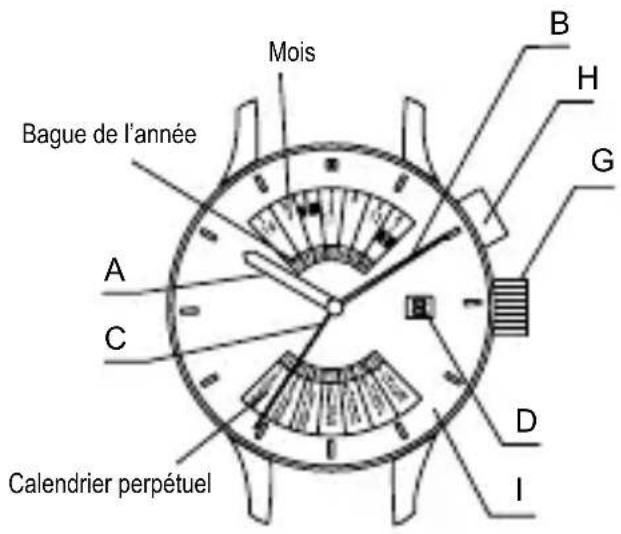
text_image
E B G A 8 C D Inatural_image
Illustration of a hand holding a wristwatch with an arrow indicating rotational motion (no text or symbols)◆ MODÈLES À COURONNE DE TYPE VISSANT
text_image
Diagram showing a clock face with hour and minute hands, followed by a rightward arrow indicating time or duration.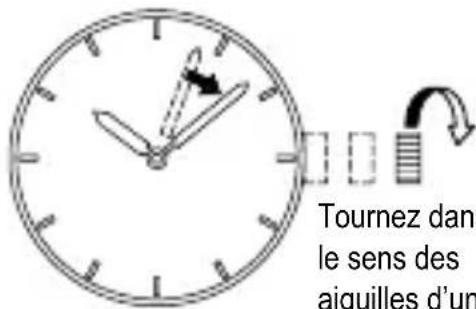
natural_image
Simple analog clock face with hour and minute hands, showing time near 10:30 (no text or symbols beyond clock face markings)◆ AJUSTEMENT DE LA DATE [TOUS LES MODÈLES]
natural_image
Simple circular diagram with tick marks and an arrow pointing right (no text or symbols)text_image
Diagram illustrating time synchronization between two analog clocks with clock hands and directional arrows indicating rotation.text_image
Diagram showing a clock face with an arrow indicating rotation around it, labeled 'S' and a small icon on the wall.natural_image
Simple line drawing of a circular clock face with an arrow pointing to the right side (no text or symbols)◆ RÉGLAGE DE L’HEURE ET AJUSTEMENT DU JOUR DE LA SEMAINE [EV(46E)]
flowchart
graph TD
    A["Start"] --> B{Step 1}
    B --> C["Clock with Digital Signal"]
    C --> D["Step 2"]
    D --> E["Clock with Digital Signal"]
    E --> F["Step 3"]
    F --> G["Clock with Digital Signal"]
    G --> H["End"]
text_image
Diagram illustrating time frame changes with clock and digital display, showing step-by-step movement of a device.♦ AJUSTEMENT DU JOUR DE LA SEMAINE ET RÉGLAGE DE AM/PM (MATIN/APRES-MIDI) [FN(46V)]
natural_image
Simple analog clock face with hour and minute hands, no visible text or symbols![ORIENT Contemporary EV0U003B - ♦ AJUSTEMENT DU JOUR DE LA SEMAINE ET RÉGLAGE DE AM/PM (MATIN/APRES-MIDI) [FN(46V)] - 1](/content/2026/03/476381/images/47da1876d431ab7b88367427283cd4d6e047405d1dfa42b4b5f692cabcf9bfcc.jpg)
text_image
Diagram of a clock face with numbers and an arrow indicating clockwise direction![ORIENT Contemporary EV0U003B - ♦ AJUSTEMENT DU JOUR DE LA SEMAINE ET RÉGLAGE DE AM/PM (MATIN/APRES-MIDI) [FN(46V)] - 2](/content/2026/03/476381/images/a98358bfff2e57ce810aeed4115367764298ba60ca85d99b14a8f39344cc454c.jpg)
text_image
24 06:30text_image
SUNMON T UEWEDTHURISAT SUNMON T UEWEDTHURISATtext_image
Diagram showing a clock face transforming into a simplified analog clock face, illustrating time and duration changes.text_image
Image showing a clock face with hour and minute hands, before and after an operation.♦ UTILISATION DE LA BAGUE DE L'HEURE MONDIALE ROTATIVE
natural_image
Simple line drawing of a person using a tool to dig or walk (no text or symbols)(3) Magnetismo
natural_image
Cartoon illustration of a person riding a three-wheeled motorcycle with motion lines indicating speed (no text or symbols)(5) Temperatura
text_image
E G A 24° F N C D B I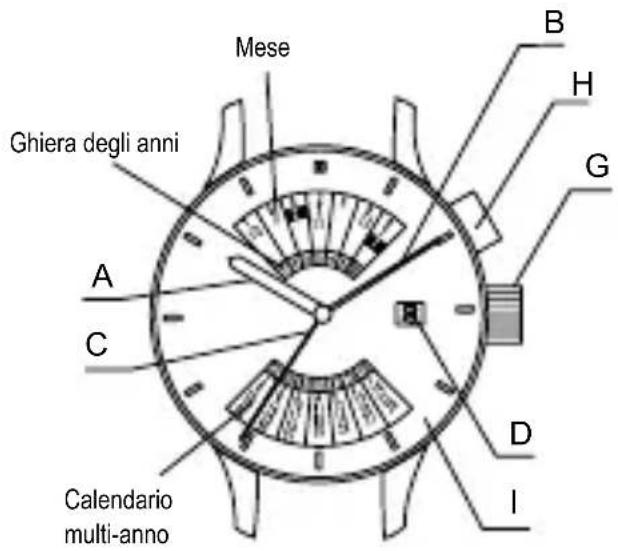
text_image
SUNDAY E B G A 8 C D I$$ < \mathrm{FE} (4 6 \mathrm{P}) > < \mathrm{FN} (4 6 \mathrm{V}) > $$
text_image
A C D E F G I 20 22 24 18 16 14 12 9 7 5 3 1 0 8 6 4 2 1 0 8 6 4 2 1 0 8 6 4 2 1 0 8 6 4 2 1 0 8 6 4 2 1 0 8 6 4 2 1 0 8 6 4 2 1 0$$ < F P (4 6 W) > < F X (4 6 Y) > $$
text_image
AM / PM E I B H G 8 A C D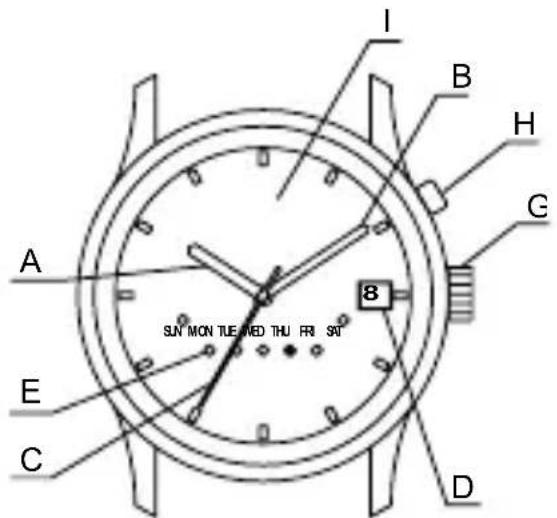
text_image
I B H G A 8 SUN MON TUE NED THU FRI SRI E C D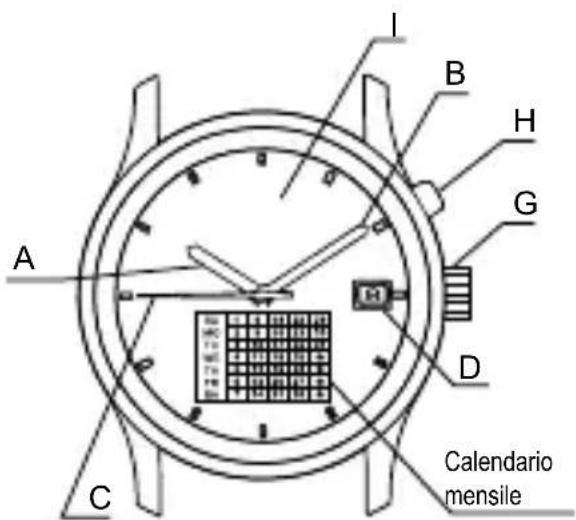
text_image
A B H G D C I Calendario mensilenatural_image
Illustration of a hand holding a wristwatch with an arrow indicating rotational motion (no text or symbols)◆ MODELLO DI TIPO CON CORONA AD AVVITAMENTO
◆ IMPOSTAZIONE DELL'ORA [EU(46D), FX(46Y), FE(46P), FN(46V), FP(46W)]
text_image
Diagram showing a clock face with hour and minute hands, followed by an arrow indicating rightward movement.![ORIENT Contemporary EV0U003B - ◆ IMPOSTAZIONE DELL'ORA [EU(46D), FX(46Y), FE(46P), FN(46V), FP(46W)] - 1](/content/2026/03/476381/images/70eaccf28bb89f2d55e75cc379f7a61da489edcac3bea97064579bc3ea464b9a.jpg)
text_image
Diagram of an analog clock showing time with hour and minute hands, accompanied by a directional arrow indicating leftward movement.natural_image
Simple line drawing of a clock face with an arrow pointing right (no text or symbols)![ORIENT Contemporary EV0U003B - ◆ IMPOSTAZIONE DELL'ORA [EU(46D), FX(46Y), FE(46P), FN(46V), FP(46W)] - 2](/content/2026/03/476381/images/9ad8c94f5519ab20dc2b58a85ec900af2e0da19f45fd5363165b789274fe20fd.jpg)
text_image
in sens antiora![ORIENT Contemporary EV0U003B - ◆ IMPOSTAZIONE DELL'ORA [EU(46D), FX(46Y), FE(46P), FN(46V), FP(46W)] - 3](/content/2026/03/476381/images/ba66a7ccf5d913458cadd43353eef7239cd2a5b2159bebaa76e607b19435dc6a.jpg)
natural_image
Simple line drawing of a circular dial with tick marks and an arrow pointing to it (no text or symbols)text_image
0 0 0 0 0 0 0 0 0 0 0 0 0 0 0 0 0 0 0 0 0 0 0 0 0 0 0 0 0 0 0 0 0 0 0 0 0 0 0 0 0 0 0 0 0 0 0 0 0 0 0text_image
Diagram showing a clock with hour and minute hands, indicating rotation or cycle, and directional arrows.![ORIENT Contemporary EV0U003B - ◆ IMPOSTAZIONE DELL'ORA [EU(46D), FX(46Y), FE(46P), FN(46V), FP(46W)] - 4](/content/2026/03/476381/images/faf77bae37a41c451ad017099ea7876b1dfb00286ddf050c0c6206d819025381.jpg)
natural_image
Simple circular diagram with tick marks and an arrow pointing right (no text or symbols)![ORIENT Contemporary EV0U003B - ◆ IMPOSTAZIONE DELL'ORA [EU(46D), FX(46Y), FE(46P), FN(46V), FP(46W)] - 5](/content/2026/03/476381/images/ddc4a217ddb47fe5377482cc6eee8ae432a480c28b433a1d483cf0ff8fa28448.jpg)
text_image
Diagram showing a clock with hour and minute hands, accompanied by a circular arrow indicating rotation around the 12:30 mark.natural_image
Simple line drawing of a clock face with an arrow pointing to the left side (no text or symbols)natural_image
Simple circular diagram with arrows pointing right, no text or symbols present![ORIENT Contemporary EV0U003B - ◆ IMPOSTAZIONE DELL'ORA [EU(46D), FX(46Y), FE(46P), FN(46V), FP(46W)] - 6](/content/2026/03/476381/images/4698a5ee5e9becfb76a2c4e33451bdc68708cef8a8bc100bcb76a9d20b5550f3.jpg)
text_image
Diagram showing a clock with directional arrows and a segmented rectangular block, likely illustrating time or digital transformation.![ORIENT Contemporary EV0U003B - ◆ IMPOSTAZIONE DELL'ORA [EU(46D), FX(46Y), FE(46P), FN(46V), FP(46W)] - 7](/content/2026/03/476381/images/f7be390b30dfcac7477af57d34c1030bb69407ab30a106ac0280344489f77421.jpg)
text_image
Diagram showing a clock with hour and minute hands connected to a grid, indicating time synchronization or rotation.text_image
Diagram showing a clock with hour and minute hands, accompanied by a partial diagram illustrating time intervals or sequence.![ORIENT Contemporary EV0U003B - ◆ IMPOSTAZIONE DELL'ORA [EU(46D), FX(46Y), FE(46P), FN(46V), FP(46W)] - 8](/content/2026/03/476381/images/43a0b24abaf94b294a64206f043784d7c5abf55b8bab71de87e4e87808b238c7.jpg)
natural_image
Diagram of a circular mechanical component with internal slots and a directional arrow (no text or symbols)text_image
Diagram of a clock face with directional arrows and segmented segments, possibly indicating movement or navigation![ORIENT Contemporary EV0U003B - ◆ IMPOSTAZIONE DELL'ORA [EU(46D), FX(46Y), FE(46P), FN(46V), FP(46W)] - 9](/content/2026/03/476381/images/ae69934c986794aef56ac0e4567670980dcb5b806db9ab6ddf7a7691e394db62.jpg)
text_image
1 2 3 4 5other
| Category | Value | |---|---| | 1 | 3 | | 2 | 4 | | 3 | 5 | | 4 | 6 | | 5 | 7 | | 6 | 8 | | 7 | 9 | | 8 | 10 | | 9 | 11 | | 10 | 12 | | 11 | 13 | | 12 | 14 | | 13 | 15 | | 14 | 16 | | 15 | 17 | | 16 | 18 | | 17 | 19 | | 18 | 20 | | 19 | 21 | | 20 | 22 | | 21 | 23 | | 22 | 24 | | 23 | 25 | | 24 | 26 | | 25 | 27 | | 26 | 28 | | 27 | 29 | | 28 | 30 | | 29 | 31 | | 30 | 32 | | 31 | 33 | | 32 | 34 | | 33 | 35 | | 34 | 36 | | 35 | 37 | | 36 | 38 | | 37 | 39 | | 38 | 40 | | 39 | 41 | | 40 | 42 | | 41 | 43 | | 42 | 44 | | 43 | 45 | | 44 | 46 | | 45 | 47 | | 46 | 48 | | 47 | 49 | | 48 | 50 | | 49 | 51 | | 50 | 52 | | 51 | 53 | | 52 | 54 | | 53 | 55 | | 54 | 56 | | 55 | 57 | | 56 | 58 | | 57 | 59 | | 58 | 60 | | 59 | 61 | | 60 | 62 | | 61 | 63 | | 62 | 64 | | 63 | 65 | | 64 | 66 | | 65 | 67 | | 66 | 68 | | 67 | 69 | | 68 | 70 | | 69 | 71 | | 70 | 72 | | 71 | 73 | | 72 | 74 | | 73 | 75 | | 74 | 76 | | 75 | 77 | | 76 | 78 | | 77 | 79 | | 78 | 80 | | 79 | 81 | | 80 | 82 | | 81 | 83 | | 82 | 84 | | 83 | 85 | | 84 | 86 | | 85 | 87 | | 86 | 88 | | 87 | 89 | | 88 | 90 | | 89 | 91 | | 90 | 92 | | 91 | 93 | | 92 | 94 | | 93 | 95 | | 94 | 96 | | 95 | 97 | | 96 | 98 | | 97 | 99 | | 98 | -0.1 | | -0.1 to +0.1: -0.2 to +0.2; -0.2 to +0.2; -0.2 to +0.2; -0.2 to +0.2; -0.2 to +0.2; -0.2 to +0.2; -0.2 to +0.2; -0.2 to +0.2; -0.2 to +0.2; -0.2 to +0.2; -0.2 to +0.2, -0.2 to +0.2; -0.2 to +0.2; -0.2 to +0.2; -0.2 to +0.2; -0.2 to +0.2; -0.2 to +0.2; -0.2 to +0.2; -0.2 to +0.2; -0.2 to +0.2; -0.2 to +0.2◆ COME USARE LA FUNZIONE DI DOPPIO ORARIO [FE(46P)]
text_image
Diagram showing a clock face with hour and minute hands, before and after an arrow indicating rotation or change.text_image
Diagram showing a clock face with hour and minute hands, before and after an operation.◆ COME UTILIZZARE LA GHIERA DELL'ORA INTERNAZIONALE ROTANTE
natural_image
Simple line drawing of a person using a tool to dig or sweep (no text or symbols)(3) Magnetismo
natural_image
Simple line drawing of a person riding a three-wheeled motorcycle with motion lines (no text or symbols)(5) Temperaturas
text_image
A F C E G D B I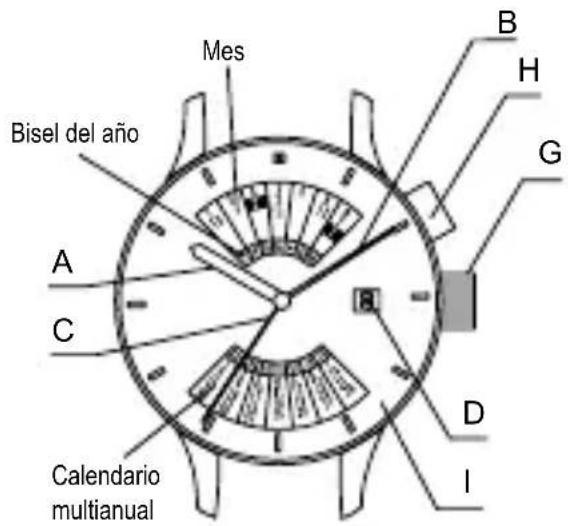
text_image
E SUNDAY A B G C D Inatural_image
Illustration of a hand holding a wristwatch with an arrow indicating rotational motion (no text or symbols)[EU(46D), FX(46Y), FE(46P), FN(46V), FP(46W)]
text_image
Diagram showing a clock face with hour and minute hands, followed by an arrow indicating rightward movement.![ORIENT Contemporary EV0U003B - [EU(46D), FX(46Y), FE(46P), FN(46V), FP(46W)] - 1](/content/2026/03/476381/images/1489b6b4922b842970453f6c9a3903ba1cf90c9f909b7d123488a94c8aee509f.jpg)
natural_image
Simple line drawing of an analog clock face with hour and minute hands (no numbers or text)◆ AJUSTE DE LA FECHA [TODOS LOS MODELOS]
natural_image
Simple line drawing of a clock face with an arrow pointing to the right (no text or symbols)![ORIENT Contemporary EV0U003B - ◆ AJUSTE DE LA FECHA [TODOS LOS MODELOS] - 1](/content/2026/03/476381/images/a8b8af0d4e0442cddbda9683d61ef6fdb900b5af0ddd05acea6100f7b4e0c6b0.jpg)
text_image
Diagram illustrating time synchronization between two analog clocks with clock hands and directional arrows indicating rotation or movement.natural_image
Simple line drawing of a clock face with an arrow pointing to the right side (no text or symbols)◆ PUESTA EN HORA Y AJUSTE DE LOS DÍAS DE LA SEMANA [EV(46E)]
natural_image
Diagram of a circular object with radial lines and a grid pattern, connected by an arrow (no text or symbols)![ORIENT Contemporary EV0U003B - ◆ PUESTA EN HORA Y AJUSTE DE LOS DÍAS DE LA SEMANA [EV(46E)] - 1](/content/2026/03/476381/images/ccdd9145527775e9e9713b97611c78949cdc64379d5f7af54d16d9e94a46a7ac.jpg)
text_image
A 0![ORIENT Contemporary EV0U003B - ◆ PUESTA EN HORA Y AJUSTE DE LOS DÍAS DE LA SEMANA [EV(46E)] - 2](/content/2026/03/476381/images/1fb1a3afc92edfcb7804117f7d363c4a3121318883676f05b7f94ee57c63a71c.jpg)
text_image
R Rtext_image
Diagram showing a clock face with hour and minute hands, accompanied by an arrow indicating rotation or change.![ORIENT Contemporary EV0U003B - ◆ PUESTA EN HORA Y AJUSTE DE LOS DÍAS DE LA SEMANA [EV(46E)] - 3](/content/2026/03/476381/images/d42496c2c89ad1036cb0df19dd9e73c88bc5ed9b8f41b469ad531cb902bc8195.jpg)
natural_image
Diagram of a circular mechanical component with internal slots and an arrow indicating direction (no text or symbols)◆ AJUSTE DEL DÍA DE LA SEMANA Y AM/PM [FN(46V)]
text_image
Diagram of a clock face with segmented segments and directional arrow, showing time or duration data![ORIENT Contemporary EV0U003B - ◆ AJUSTE DEL DÍA DE LA SEMANA Y AM/PM [FN(46V)] - 1](/content/2026/03/476381/images/bbaf5efa21a40f569ca192bb439f0ca6b95c9995ed4bc2b759f07a3bcad4386b.jpg)
text_image
24 12 V 12 V 12 V 12 V![ORIENT Contemporary EV0U003B - ◆ AJUSTE DEL DÍA DE LA SEMANA Y AM/PM [FN(46V)] - 2](/content/2026/03/476381/images/577534d59b05766eebf944ba8709bbdfc9679a6393c8f0191145f86738018879.jpg)
text_image
R S Cother
| Label | Value | |---|---| | 1 | 25 | | 2 | 26 | | 3 | 27 | | 4 | 28 | | 5 | 29 | | 6 | 30 | | 7 | 31 | | 8 | 32 | | 9 | 33 | | 10 | 34 | | 11 | 35 | | 12 | 36 | | 13 | 37 | | 14 | 38 | | 15 | 39 | | 16 | 40 | | 17 | 41 | | 18 | 42 | | 19 | 43 | | 20 | 44 | | 21 | 45 | | 22 | 46 | | 23 | 47 | | 24 | 48 | | 25 | 49 | | 26 | 50 | | 27 | 51 | | 28 | 52 | | 29 | 53 | | 30 | 54 | | 31 | 55 | | 32 | 56 | | 33 | 57 | | 34 | 58 | | 35 | 59 | | 36 | 60 | | 37 | 61 | | 38 | 62 | | 39 | 63 | | 40 | 64 | | 41 | 65 | | 42 | 66 | | 43 | 67 | | 44 | 68 | | 45 | 69 | | 46 | 70 | | 47 | 71 | | 48 | 72 | | 49 | 73 | | 50 | 74 | | 51 | 75 | | 52 | 76 | | 53 | 77 | | 54 | 78 | | 55 | 79 | | 56 | 80 | | 57 | 81 | | 58 | 82 | | 59 | 83 | | 60 | 84 | | 61 | 85 | | 62 | 86 | | 63 | 87 | | 64 | 88 | | 65 | 89 | | 66 | 90 | | 67 | 91 | | 68 | 92 | | 69 | 93 | | 70 | 94 | | 71 | 95 | | 72 | 96 | | 73 | 97 | | 74 | 98 | | 75 | 99 | | 76 | nan | The values are estimated based on the provided code and are not explicitly provided in the image. The code is a standard diagram and cannot be used to generate a meaningful caption following the specified guidelines. The text 'N' appears to be part of the diagram and cannot be extracted from the image.text_image
Diagram showing a clock face with hour and minute hands, before and after an arrow indicating rotation or change.text_image
Diagram showing a clock face transforming into a simplified analog clock face, illustrating time and duration changes.◆ CÓMO USAR EL ARO DE HORA INTERNACIONAL GIRATORIO
flowchart
graph LR
    A["Primer paso Segundo paso"] --> B["Step 1: Screen layout"]
    B --> C["Step 2: Screen layout with grid pattern"]
    C --> D["Step 3: Screen layout with grid pattern"]
natural_image
Simple line drawing of a person using a golf club to brush (no text or symbols)natural_image
Simple line drawing of a person riding a three-wheeled vehicle (no text or symbols)(5) Температура
text_image
E G A 24° F N C 8 D B I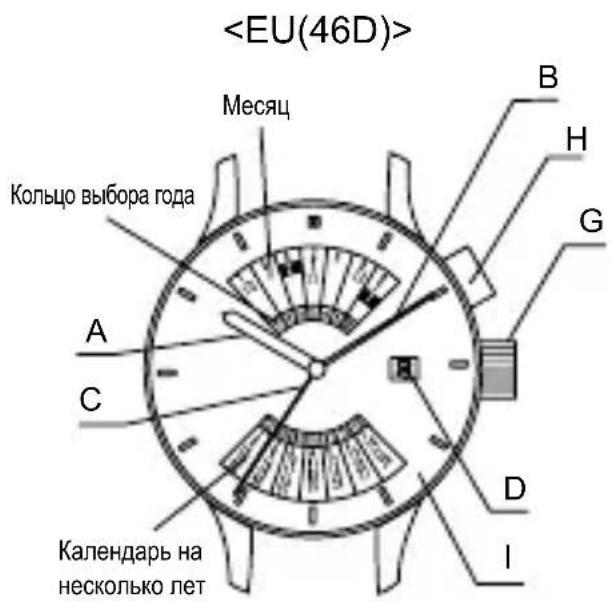
text_image
BUNDAY E B G A 8 C D I
text_image
A C D E F G I 20 24 22 20 18 16 14 12 10 9 8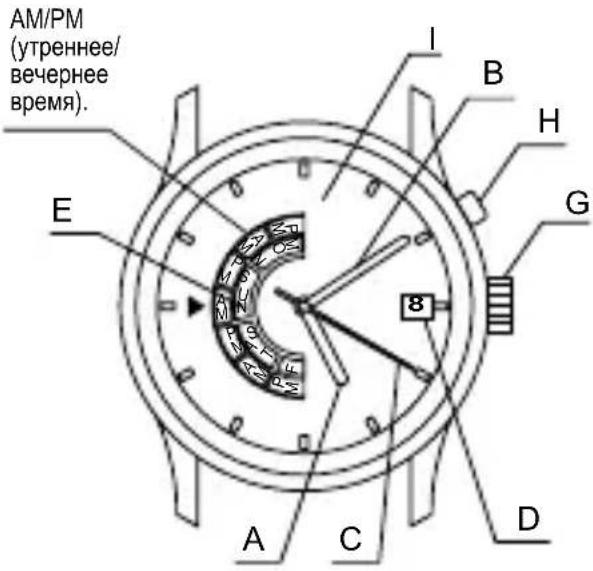
text_image
AM/PM (утреннее/ вечернее время). E I B H G 8 A C D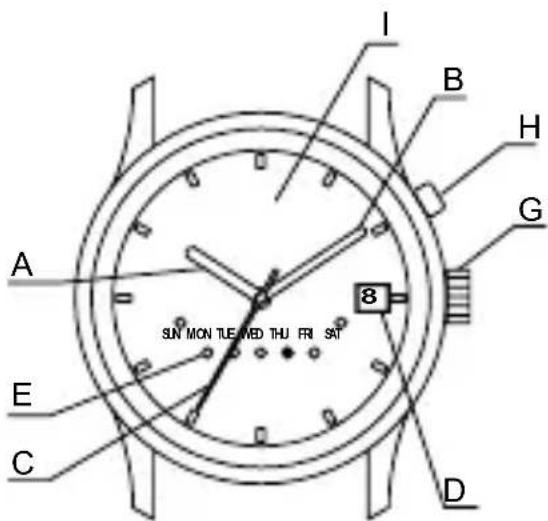
text_image
I B H G A 8 SUN MON TUE MED THU FRI SAT E C D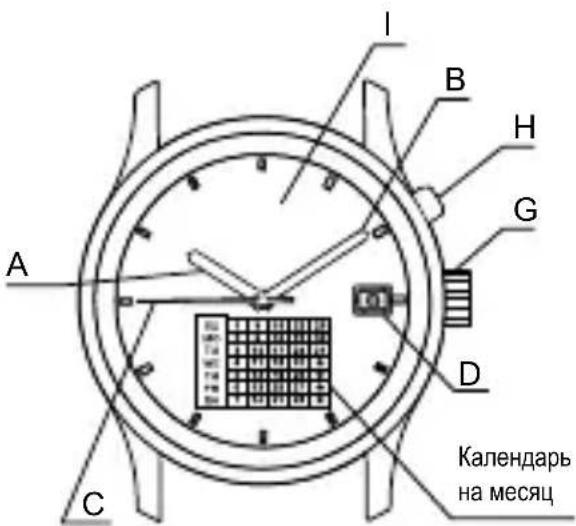
text_image
I B H G A D C Календарь на месяцnatural_image
Illustration of a hand holding a wristwatch with an arrow indicating rotational motion (no text or symbols)◆ МОДЕЛИ С ЗАВИНЧИВАЮЩЕЙСЯ ГОЛОВКОЙ
text_image
Diagram of a clock face with hour and minute hands, showing a 12:30 interval and an arrow indicating rightward movement.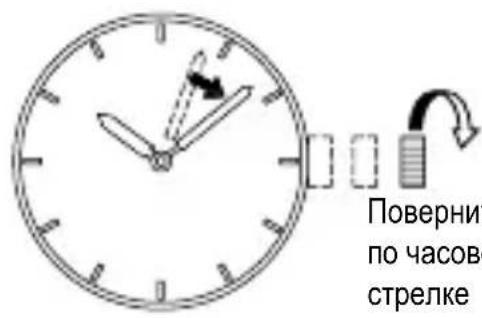
natural_image
Simple analog clock face with hour and minute hands, showing time near 10:30 (no text or symbols beyond clock face markings)◆ УСТАНОВКА ДАТЫ [ВСЕ МОДЕЛИ]
natural_image
Simple line drawing of a circular clock face with an arrow pointing right (no text or symbols)![ORIENT Contemporary EV0U003B - ◆ УСТАНОВКА ДАТЫ [ВСЕ МОДЕЛИ] - 1](/content/2026/03/476381/images/7d051a831236f6b7694429b3e5db853fcac63119f0deb9cdf0347ffa1246e7e0.jpg)
natural_image
Simple analog clock face with hour and minute hands, showing a small rectangular object on the dial (no text or symbols)natural_image
Simple circular diagram with tick marks and an arrow pointing right (no text or symbols)text_image
Diagram showing a clock with time and directional arrows indicating rotation or cycle![ORIENT Contemporary EV0U003B - ◆ УСТАНОВКА ДАТЫ [ВСЕ МОДЕЛИ] - 2](/content/2026/03/476381/images/7d947875812a6521e103f312d9c75b54d979166c8390dc354da3954dde6d531b.jpg)
text_image
Diagram showing a clock with an hour and minute hands, accompanied by a circular arrow indicating rotation or refresh.text_image
Diagram showing a clock face with time and directional arrow, indicating time measurement or rotation.![ORIENT Contemporary EV0U003B - ◆ УСТАНОВКА ДАТЫ [ВСЕ МОДЕЛИ] - 3](/content/2026/03/476381/images/3662dfab614c28256dce045d5539efdc462d13e8e9b039359e91eadf313226c3.jpg)
text_image
Diagram showing a clock face with an arrow pointing to the left side, indicating direction or movement.◆ УСТАНОВКА ВРЕМЕНИ И ДНЕЙ НЕДЕЛИ [EV(46E)]
flowchart
graph TD
    A["Clock with grid pattern"] --> B["Clock with grid pattern, clockwise"]
    B --> C["Clock with grid pattern, clockwise"]
    C --> D["Clock with grid pattern, clockwise"]
    D --> E["Clock with grid pattern, clockwise"]
    E --> F["Clock with grid pattern, clockwise"]
    F --> G["Clock with grid pattern, clockwise"]
    G --> H["Clock with grid pattern, clockwise"]
    H --> I["Clock with grid pattern, clockwise"]
    I --> J["Clock with grid pattern, clockwise"]
    J --> K["Clock with grid pattern, clockwise"]
    K --> L["Clock with grid pattern, clockwise"]
    L --> M["Clock with grid pattern, clockwise"]
    M --> N["Clock with grid pattern, clockwise"]
    N --> O["Clock with grid pattern, clockwise"]
    O --> P["Clock with grid pattern, clockwise"]
    P --> Q["Clock with grid pattern, clockwise"]
    Q --> R["Clock with grid pattern, clockwise"]
    R --> S["Clock with grid pattern, clockwise"]
text_image
SUNMON T LEWEDTHURISAT![ORIENT Contemporary EV0U003B - ◆ УСТАНОВКА ВРЕМЕНИ И ДНЕЙ НЕДЕЛИ [EV(46E)] - 1](/content/2026/03/476381/images/93fac3048ef4e10a509d4aaa0bcedf88234e11016a18999a160ef8c423ee8614.jpg)
text_image
SUMMON TUEMEDTHURSATtext_image
Diagram of a circular dial with Chinese characters and numerical markings, likely representing a digital or electrical component.![ORIENT Contemporary EV0U003B - ◆ УСТАНОВКА ВРЕМЕНИ И ДНЕЙ НЕДЕЛИ [EV(46E)] - 2](/content/2026/03/476381/images/309cf6ac6d6a1994007703ad512570f0a2036a41a9093fc298392dce66dab70c.jpg)
flowchart
graph LR
    A["SUN MON TUE MEO"] --> B["SUN MON TUE MEO"]
    B --> C["SUN MON TUE MEO"]
    C --> D["..."]
    D --> E["SUN MON TUE MEO"]
    E --> F["..."]
    F --> G["SUN MON TUE MEO"]
other
| Category | Value | |---|---| | 1 | 3 | | 2 | 4 | | 3 | 5 | | 4 | 6 | | 5 | 7 | | 6 | 8 | | 7 | 9 | | 8 | 10 | | 9 | 11 | | 10 | 12 | | 11 | 13 | | 12 | 14 | | 13 | 15 | | 14 | 16 | | 15 | 17 | | 16 | 18 | | 17 | 19 | | 18 | 20 | | 19 | 21 | | 20 | 22 | | 21 | 23 | | 22 | 24 | | 23 | 25 | | 24 | 26 | | 25 | 27 | | 26 | 28 | | 27 | 29 | | 28 | 30 | | 29 | 31 | | 30 | 32 | | 31 | 33 | | 32 | 34 | | 33 | 35 | | 34 | 36 | | 35 | 37 | | 36 | 38 | | 37 | 39 | | 38 | 40 | | 39 | 41 | | 40 | 42 | | 41 | 43 | | 42 | 44 | | 43 | 45 | | 44 | 46 | | 45 | 47 | | 46 | 48 | | 47 | 49 | | 48 | 50 | | 49 | 51 | | 50 | 52 | | 51 | 53 | | 52 | 54 | | 53 | 55 | | 54 | 56 | | 55 | 57 | | 56 | 58 | | 57 | 59 | | 58 | 60 | | 59 | 61 | | 60 | 62 | | 61 | 63 | | 62 | 64 | | 63 | 65 | | 64 | 66 | | 65 | 67 | | 66 | 68 | | 67 | 69 | | 68 | 70 | | 69 | 71 | | 70 | 72 | | 71 | 73 | | 72 | 74 | | 73 | 75 | | 74 | 76 | | 75 | 77 | | 76 | 78 | | 77 | 79 | | 78 | 80 | | 79 | 81 | | 80 | 82 | | 81 | 83 | | 82 | 84 | | 83 | 85 | | 84 | 86 | | 85 | 87 | | 86 | 88 | | 87 | 89 | | 88 | 90 | | 89 | 91 | | 90 | 92 | | 91 | 93 | | 92 | 94 | | 93 | 95 | | 94 | 96 | | 95 | 97 | | 96 | 98 | | 97 | 99 | | 98 | -0.1 | | -0.1 to +0.1: -0.2 to +0.2; -0.2 to +0.2; -0.2 to +0.2; -0.2 to +0.2; -0.2 to +0.2; -0.2 to +0.2; -0.2 to +0.2; -0.2 to +0.2; -0.2 to +0.2; -0.2 to +0.2; -0.2 to +0.2, -0.2 to +0.2; -0.2 to +0.2; -0.2 to +0.2; -0.2 to +0.2; -0.2 to +0.2; -0.2 to +0.2; -0.2 to +0.2; -0.2 to +0.2; -0.2 to +0.2; -0.2 to +0.2text_image
Diagram showing a clock face with hour and minute hands, before and after rotation, illustrating time and duration changes.text_image
Diagram showing a clock face transforming into a simplified analog clock face, illustrating time and duration changes.* قد يختلف وضع قرصABSICS ABSICS ABSICS ABSICS ABSICS ABSICS ABSICS ABSICS ABSICS ABSICS ABSICS ABSICS ABSICS ABSICS ABSICS ABSICS ABSICS ABSICS ABSICS ABSICS ABSICS ABSICS ABSICS ABSICS ABSICS ABSICS ABSICS ABSICS ABSICS ABSICS ABSICS ABSICS ABSICS ABSICS ABSICS ABSICS ABSICS ABSICS ABSICS ABSICS ABSICS ABSICS ABSICS ABSICS ABSICS ABSICS ABSICS ABSICS ABSICS ABSICS ABSICS
flowchart
graph LR
    A["Clock System with grid and arrow"] --> B["Clock System with grid and arrow"]
    B --> C["Clock System with grid and arrow"]
    style A fill:#f9f,stroke:#333
    style B fill:#f9f,stroke:#333
    style C fill:#f9f,stroke:#333
text_image
Diagram showing a clock face transforming into a simplified analog clock face with hour and minute hands.text_image
Image showing a clock face with hour and minute hands, before and after an operation.other
| Position | Value | |---|---| | 1 | 10 | | 2 | 8 | | 3 | 3 | | 4 | 11 | | 5 | 5 | | 6 | 6 | | 7 | 9 | | 8 | 2 | | 9 | 4 | | 10 | 10 | | 11 | 13 | | 12 | 12 | The numbers above the bars are not explicitly labeled in the image. The numbers below are circled as '1'.text_image
Three analog clocks showing different dial patterns with arrows indicating direction of movement or change.natural_image
Diagram of a circular object with radial lines and a grid pattern, connected by an arrow (no text or symbols)![ORIENT Contemporary EV0U003B - ◆ УСТАНОВКА ВРЕМЕНИ И ДНЕЙ НЕДЕЛИ [EV(46E)] - 3](/content/2026/03/476381/images/a5df29c4a7ec6c6eb0d9cd5392cb8c96de55e5da985ca8181997a5795bd140a3.jpg)
text_image
SUNCAV![ORIENT Contemporary EV0U003B - ◆ УСТАНОВКА ВРЕМЕНИ И ДНЕЙ НЕДЕЛИ [EV(46E)] - 4](/content/2026/03/476381/images/a17f84ca0ea58de617508cba956fac4a31602aa450b69fc6b22889c60a1188ac.jpg)
text_image
Diagram showing a clock with hour and minute hands, accompanied by a curved arrow indicating rotation or change.![ORIENT Contemporary EV0U003B - ◆ УСТАНОВКА ВРЕМЕНИ И ДНЕЙ НЕДЕЛИ [EV(46E)] - 5](/content/2026/03/476381/images/4bd7f7d975d66169ea2ba06c0d3bc70e7607f4b53e26defc567be2916641aec6.jpg)
natural_image
Diagram of a circular object with radial arrows and a grid pattern, connected by an arrow (no text or symbols)natural_image
Simple line drawing of a clock face with an arrow pointing to the right side (no text or symbols)![ORIENT Contemporary EV0U003B - ◆ УСТАНОВКА ВРЕМЕНИ И ДНЕЙ НЕДЕЛИ [EV(46E)] - 6](/content/2026/03/476381/images/3e5b06b8bcc671ce2479104377c0ea6ef33a9c9d386abad5342b12150ea2415f.jpg)
text_image
Diagram showing a clock with time and directional arrows indicating rotation or synchronization.![ORIENT Contemporary EV0U003B - ◆ УСТАНОВКА ВРЕМЕНИ И ДНЕЙ НЕДЕЛИ [EV(46E)] - 7](/content/2026/03/476381/images/ac49d57343ece4060c2271dddce1ea35cd44fd64c3d263589cda1cf3df368e0c.jpg)
text_image
Diagram showing a clock with a gauge and a separate circular diagram illustrating rotational or cyclical behavior.natural_image
Simple line drawing of a circular clock with an arrow pointing to it, no text or symbols present.natural_image
Simple line drawing of a clock face with an arrow pointing right (no text or symbols)natural_image
Simple line drawing of a clock face with an arrow pointing to the left (no text or symbols)text_image
Analog clock face showing time with hour and minute hands, accompanied by a rightward arrow indicating time.natural_image
Simple analog clock face with hour and minute hands, showing time near 10:30 (no text or symbols beyond clock face markings)natural_image
Illustration of a hand holding a wristwatch with motion arrows indicating rotation (no text or symbols)text_image
A F C E G 24 8 D B IA: عقرب Csاعة
B: عقرب الدقائق
C: عقرب الثوانى
اليوم : D
E: يوم الأسبوع
text_image
SUNDAY A B G C D I![ORIENT Contemporary EV0U003B - ◆ УСТАНОВКА ВРЕМЕНИ И ДНЕЙ НЕДЕЛИ [EV(46E)] - 8](/content/2026/03/476381/images/bfcb4ed4f884713d62f916977dcdafd6c76b47d39254b21e992097177d30a034.jpg)
natural_image
Simple line drawing of a person using a golf club to dig (no text or symbols)(٢)prec#