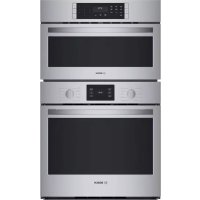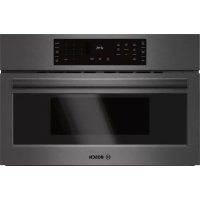
HMC80242UC - Built-in oven BOSCH - Free user manual and instructions
Find the device manual for free HMC80242UC BOSCH in PDF.


| Product Type | Built-in microwave and convection oven |
| Brand | Bosch |
| Model | HMC80242UC |
| Category | Built-in oven |
| Power Supply | 120 V / 208-240 V AC, 60 Hz, single-phase |
| Microwave Power | 10 power levels, max 1000 W (estimated) |
| Oven Capacity | Approximately 1.5 cubic feet (42 L) |
| Cooking Functions | Microwave, Convection, Broil (high/low), Speed Chef, Auto Defrost, Sensor Reheat, Sensor Cook, Pizza, Popcorn, Beverage, Keep Warm, Melt, Soften |
| Cooking Modes | Microwave only, Convection, Broil, Convection + Broil, Speed Chef, Frozen Food, Keep Warm |
| Control Panel | Digital touch with LED display |
| Child Lock | Yes (Panel Lock) |
| Turntable | Metal turntable and removable ceramic plate |
| Metal Rack | Included, reversible for convection and broil |
| Interior Light | Yes, auto-off after 1 minute with door open |
| Kitchen Timer | Yes, adjustable |
| Auto Shut-off | Yes, after inactivity |
| Cleaning | Built-in cleaning guide; stainless steel, glass, plastic surfaces |
| Installation | Built-in above a 36-inch (914 mm) or smaller oven |
| Net Weight | Approximately 22 kg (48 lb) |
| Dimensions (W x H x D) | 607 x 410 x 470 mm (23.9 x 16.1 x 18.5 in) |
| After-sales Service | Authorized Bosch center; telephone support 1-800-944-2904 (USA) |
Frequently Asked Questions - HMC80242UC BOSCH
User questions about HMC80242UC BOSCH
0 question about this device. Answer the ones you know or ask your own.
Ask a new question about this device
Download the instructions for your Built-in oven in PDF format for free! Find your manual HMC80242UC - BOSCH and take your electronic device back in hand. On this page are published all the documents necessary for the use of your device. HMC80242UC by BOSCH.
USER MANUAL HMC80242UC BOSCH
Built-In Convection Microwave Oven (Speed Oven)
Use and Care Manual
800 SERIES
HMC80152UC HMC87152UC HMC80252UC
HMC80242UC

BOSCH
Invented for life
natural_image
Modern kitchen interior with wooden cabinets, brick oven, and city skyline view (no visible text or symbols)Table of Contents
⚠ Safety Definitions ...... 3
IMPORTANT SAFETY INSTRUCTIONS .... 4
PRECAUTIONS TO AVOID POSSIBLE EXPOSURE TO EXCESSIVE MICROWAVE ENERGY 4
GROUNDING INSTRUCTIONS 5
TV / Radio Interference 5
Intended Use 5
Child Safety 5
Cleaning Safety 5
Cooking Safety 6
In Case of Fire 6
Liquids 6
Cooking Items 7
Cooking Utensils 7
Metal Tray Turntable 7
Thermometers 7
Pacemakers 8
State of California Proposition 65 Warnings ....8
Fan Motor Operation 8
Causes of Damage 9
Protecting the environment 9
Tips for saving energy 9
Getting to know the appliance 10
Parts 10
Control Panel 11
Accessories 12
Before Using the Appliance for the First Time ..... 13
Setting the clock 13
Heating up the appliance 13
Cleaning accessories 13
Applying the program label 13
Microwave 14
Microwave utensil guide 14
Microwave power levels 14
Setting the microwave 15
Suggestions for best results 15
Convection 16
Cookware tips for Convection 16
Setting Convection mode 16
Broil 17
Setting Broil mode 17
Automatic programs 17
Speed Chef 17
Auto Defrost 19
Frozen Foods 20
Pizza 20
Popcorn 21
Beverage 21
Sensor cooking 21
Sensor Reheat 21
Sensor Cook 22
More Modes 23
Setting Keep Warm 23
Setting Convection Broil 23
Setting Melt Butter 23
Setting Melt Chocolate 24
Setting Soften Ice Cream 24
Setting Soften Cream Cheese 24
Kitchen timer 24
Setting the kitchen timer 24
Panel Lock 25
Automatic Shutoff 25
Basic settings 25
Changing the basic settings 25
Cooking Charts 26
Broil 26
Convection Broil 26
Convection 26
Cooking eggs in your microwave 27
Cooking vegetables in your microwave 27
Cooking seafood in your microwave 27
Cleaning and Maintenance 28
Cleaning Guide 28
Before Calling for Service 29
Bosch® Support 30
Before Calling Service 30
Data Plate 30
Service 30
Parts and Accessories 30
STATEMENT OF LIMITED PRODUCT WARRANTY .. 31
What this Warranty Covers & Who it Applies to ..... 31
How Long the Warranty Lasts 31
Repair/Replace as Your Exclusive Remedy 31
Out of Warranty Product 31
Warranty Exclusions 31
Additional information on products, accessories, replacement parts and services can be found at www.bosch-home.com and in the online shop www.bosch-home.com/us/store
This Bosch Appliance is made by
BSH Home Appliances Corporation
1901 Main Street, Suite 600
Irvine, CA 92614
Questions?
1-800-944-2904
www.bosch-home.com/us
We look forward to hearing from you!
⚠️ Safety Definitions
WARNING
This indicates that death or serious injuries may occur as a result of non-observance of this warning.
CAUTION
This indicates that minor or moderate injuries may occur as a result of non-observance of this warning.
NOTICE: This indicates that damage to the appliance or property may occur as a result of non-compliance with this advisory.
Note: This alerts you to important information and/or tips.
IMPORTANT SAFETY INSTRUCTIONS READ ALL INSTRUCTIONS BEFORE USING THE APPLIANCE
⚠ PRECAUTIONS TO AVOID POSSIBLE EXPOSURE TO EXCESSIVE MICROWAVE ENERGY
PRECAUTIONS TO AVOID POSSIBLE EXPOSURE TO EXCESSIVE MICROWAVE ENERGY
(1) Do not attempt to operate this oven with the door open, since open-door operation can result in harmful exposure to microwave energy. It is important not to defeat or tamper with the safety interlocks.
(2) Do not place any object between the oven front face and the door or allow soil or cleaner residue to accumulate on sealing surfaces.
(3) Do not operate the oven if it is damaged. It is particularly important that the oven door close properly and that there is no damage to the:
- door (bent)
• hinges and latches (broken or loosened)
• door seals and sealing surfaces.
(4) The oven should not be adjusted or repaired by anyone except authorized service personnel. Improper installation, service or maintenance can cause injury or property damage. Refer to this manual for guidance. Refer all servicing to a factory authorized servicer.
WARNING
To reduce the risk of burns, electric shock, fire, injury to persons, or exposure to excessive microwave energy, read all instructions before using the appliance.
WARNING
If the information in this manual is not followed exactly, fire or shock may result causing property damage or personal injury.
When using electrical appliances basic safety precautions should be followed, including the following:
Read and follow the specific “PRECAUTIONS TO AVOID POSSIBLE EXPOSURE TO EXCESSIVE MICROWAVE ENERGY” found in the Safety Instructions chapter.
This appliance must be grounded. Connect only to properly grounded outlet (see GROUNDING INSTRUCTIONS).
Install or locate this appliance only in accordance with the provided installation instructions.
Some products such as whole eggs and sealed containers – for example, closed glass jars – can explode and should not be heated in this oven.
Use this appliance only for its intended use as described in the manual. Do not use corrosive chemicals or vapors in this appliance. This type of oven is specifically designed to heat, cook, or dry food. It is not designed for industrial or laboratory use.
As with any appliance, close supervision is necessary when used by children (see CHILD SAFETY).
This appliance should be serviced only by authorized service personnel. Contact nearest authorized service facility for examination, repair, or adjustment.
Do not cover or block any vents or openings on the appliance.
Do not store this appliance outdoors. Do not use this product near water – for example, near a kitchen sink, in a wet basement, near a swimming pool, or similar locations.
Suitable for plug-connected only:
(1) Do not immerse cord or plug in water.
(2) Keep cord away from heated surfaces.
(3) Do not let cord hang over edge of table or counter.
(4) Do not operate this appliance if it has a damaged cord or plug, if it is not working properly, or if it has been damaged or dropped.
When cleaning surfaces of door and oven that come together on closing the door, use only mild, nonabrasive soaps, or detergents applied with a sponge or soft cloth. See door surface cleaning instructions in chapter "Cleaning and Maintenance".
To reduce the risk of fire in the oven cavity:
- Do not overcook food. Carefully attend appliance when paper, plastic, or other combustible materials are placed inside the oven to facilitate cooking.
- Remove wire twist-ties from paper or plastic bags before placing bag in oven.
- If materials inside the oven ignite, keep oven door closed, turn oven off, and disconnect the power cord, or shut off power at the fuse or circuit breaker panel.
- Do not use the cavity for storage purposes. Do not leave paper products, cooking utensils, or food in the cavity when not in use.
IMPORTANT SAFETY INSTRUCTIONS READ ALL INSTRUCTIONS BEFORE USING THE APPLIANCE
GROUNDING INSTRUCTIONS
For all cord-connected appliances:
This appliance must be grounded. Grounding reduces risk of electric shock by providing a safe pathway for electric current in the event of a short circuit.
If this oven is equipped with a cord having a grounding wire with a grounding plug, the plug must be plugged into an outlet that is properly installed and grounded. See INSTALLATION INSTRUCTIONS.
Consult a qualified electrician if grounding instructions are not completely understood, or if doubt exists as to whether the oven is properly grounded.
Do not use an extension cord. If the product power cord is too short, have a qualified electrician install a three-slot receptacle. This oven should be plugged into a separate 60 Hertz circuit with the electrical rating as shown in specifications table. When the oven is on a circuit with other equipment, an increase in cooking times may be required and fuses can be blown.
The models stated on the front cover are designed to be connected to 120V AC, 60 Hz and use a NEMA 5-20 plug to connect to a dedicated 120 V microwave circuit.
WARNING - Improper grounding can result in a risk of electric shock.
For a permanently connected appliance
This appliance must be connected to a grounded, metallic, permanent wiring system, or an equipment grounding conductor should be run with the circuit conductors and connected to the equipment grounding terminal or lead on the appliance.
WARNING
Improper use of the grounding can result in a risk of electric shock.
The models stated on the front cover are dual-rated, designed to be connected to either 208 or 240V AC, 60 Hz, 4-wire, single-phase power supply.
TV / Radio Interference
This appliance generates and uses ISM frequency energy. If not installed and used properly, in strict accordance with the manufacturer's instructions, it may cause interference to radio and television reception. It has been type tested and found to comply with limits for ISM equipment pursuant to part 18 of FCC rules, which are designed to provide reasonable protection against such interference in a residential installation. However, there is no guarantee that interference will not occur in a particular installation. Turn the appliance on and off to determine if it causes interference. Try the following to correct the interference:
- Clean door and sealing surface of the oven.
- Reorient the receiving antenna of the radio or television.
- Relocate the microwave oven with respect to the receiver.
- Move the microwave oven away from the receiver.
- Plug the microwave into a different outlet so that the oven and the receiver are on different branch circuits.
The manufacturer is not responsible for any radio or TV interference caused by unauthorized modification to this microwave oven. It is the responsibility of the user to correct such interference.
Intended Use
This appliance is intended for normal family household use only. It is not approved for outdoor use. See the Statement of Limited Product Warranty. If you have any questions, contact the manufacturer.
Do not use the cavity for storage purposes. Do not leave paper products, cooking utensils, or food in the cavity when not in use.
Do not operate oven when room humidity is excessive.
This oven is suitable for use above both conventional built-in gas and electric ovens 36" (914 mm) or less wide.
Child Safety
Do not allow children to use this appliance. Failure to do so can result in burns or serious injury to children.
Children and pets should not be left alone or unattended in the area where the appliance is in use. They should never be allowed to play in its vicinity, whether or not the appliance is in use.
When children become old enough to use the appliance, it is the responsibility of the parents or legal guardians to ensure that they are instructed in safe practices by qualified persons.
Do not allow anyone to climb, stand, lean, sit, or hang on any part of an appliance, especially a door, warming drawer, or storage drawer. This can damage the appliance, and the unit may tip over, potentially causing severe injury.
Cleaning Safety
When cleaning surfaces of door and oven that come together on closing the door, use only mild, nonabrasive soaps, or detergents applied with a sponge or soft cloth. See door surface cleaning instructions in chapter "Cleaning and Maintenance".
Clean turntable roller rest and oven bottom frequently to prevent excessive noise.
Allow the ceramic tray to cool before cleaning or placing in water.
WARNING
Be sure the entire appliance (including the light bulb) has cooled and grease has solidified before attempting to clean any part of the appliance.
IMPORTANT SAFETY INSTRUCTIONS READ ALL INSTRUCTIONS BEFORE USING THE APPLIANCE
Cooking Safety
CAUTION
To avoid personal injury or property damage, observe the following:
- Do not leave oven unattended while in use.
- Do not store flammable material next to or in the oven.
- When flaming foods under the microwave, always turn the fan on.
- Do not operate the oven while empty. This could damage the oven and result in a risk of fire.
- Do not store or use corrosive chemicals, vapors, flammables or nonfood products in or near this appliance. It is specifically designed for use when heating or cooking food. The use of corrosive chemicals in heating or cleaning will damage the appliance and could result in injury.
- Do not dry clothes, newspapers or other materials in the oven. Do not use newspapers or paper bags for cooking. Fire could result.
- Do not use recycled paper products unless labeled safe for microwave use. They may contain impurities which may cause sparks and result in fires when used.
- Always use potholders when removing items from the oven. The cooking container and the glass tray can be hot even if the oven is cool.
- Whenever possible, do not operate the ventilation system during a cooktop fire. However, do not reach through fire to turn it off.
- Do not mount over sink.
- Do not store anything directly on top of the appliance surface when the appliance is in operation.
- Oversized food or oversized metal utensils should not be inserted in a microwave oven as they may create a fire or risk of electric shock.
- Do not clean with metal scouring pads. Pieces can break off the pad and touch electrical parts involving a risk of electric shock.
- Do not store any materials, other than manufacturer's recommended accessories, in this oven when not in use.
- Do not cover racks or any other part of the oven with metal foil. This will cause overheating of the oven.
- Do not use paper products when appliance is operated in the toaster mode.
In Case of Fire
If materials inside an oven should ignite:
- Keep door closed
- Turn appliance off
- Unplug the appliance or shut off at fuse or circuit breaker
Liquids
natural_image
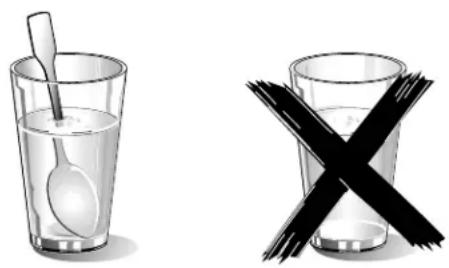
Two glassware illustrations: one with a spoon inside water, the other with a black X symbol crossed out (no text or symbols present)Liquids, such as water, coffee, or tea could be overheated. They can be heated beyond the boiling point without appearing to boil. For example, visible bubbling or boiling when the container is removed from the microwave oven is not always present. THIS COULD RESULT IN VERY HOT LIQUIDS SUDDENLY BOILING OVER WHEN THE CONTAINER IS DISTURBED OR A UTENSIL IS INSERTED INTO THE LIQUID.
When heating liquids, always place a glass rod/spoon in the container. This will prevent delayed boiling.
CAUTION
Metal e.g. a spoon in a glass must be kept at least 1 inch (25 mm) from the oven walls and the inside of the door. Sparks could irreparably damage the glass on the inside of the door.
- Take ready meals out of the packaging. They will heat up more quickly and evenly in microwaveable ovenware. The different components of the meal may not require the same amount of time to heat up.
- Always cover the food. If you do not have a suitable cover for your container, use a plate or special microwave foil.
- Stir or turn the food several times during cooking. Check the temperature.
- After heating, allow the food to stand for a further 2 to 5 minutes so that it can achieve an even temperature.
- Always use an oven cloth or oven gloves when removing plates from the oven.
IMPORTANT SAFETY INSTRUCTIONS READ ALL INSTRUCTIONS BEFORE USING THE APPLIANCE
Cooking Items
Eggs: Do not cook or reheat whole eggs, with or without shell. Steam buildup in whole eggs may cause them to explode, and possibly damage the oven or cause injury. Reheating sliced hard-boiled eggs and cooking scrambled eggs is safe.
Popcorn: Use only popcorn in packages designed and labeled for microwave use, or pop it in a microwave oven corn popper. Follow popcorn manufacturers' directions and use a brand suitable for the wattage of your oven. Do not continue to heat after popping has stopped. Popcorn will scorch or burn. Do not leave oven unattended.
CAUTION
When using pre-packaged microwave popcorn, check package weight before using the popcorn function. Set the oven for the weight of the popcorn package. If these instructions are not followed, popcorn may not pop adequately or may ignite and cause fire.
Foods with nonporous skins: Potatoes, tomatoes, sweet potatoes, apples, whole squash and sausages are examples of foods with nonporous skins. These types of foods must be pierced before cooking to prevent them from exploding.
Baby food / Baby formula: Do not heat baby bottles or food in microwave oven. The glass jar or the surface of food may appear warm while the interior can burn the infant's mouth and esophagus.
Deep fat frying: Do not deep fat fry in oven. Oil can be heated beyond ideal temperatures very quickly in a microwave oven. Temperatures can climb high enough for the cooking oils to reach their respective flash points and burst into flames. The heated oil may bubble and spatter causing possible damage to the oven and perhaps result in burns. Additionally, microwave-safe utensils may not be able to withstand the temperature of the hot oil, and could result in the utensil shattering, if it contains a slight imperfection, scratch or chip.
Home Canning / Drying foods / Small quantities of
foods: Do not use microwave oven for home canning or heating of any closed jar. Pressure will build up and the jar may explode. In addition, the oven cannot maintain the food at the proper canning temperature. Improperly canned food may spoil and be dangerous to consume. Small quantities of food or foods with low moisture content can dry out, burn or catch on fire. Do not dry meats, herbs, fruits or vegetables in your oven.
Proper cooking depends on time set and weight of food. If you use a smaller portion than recommended and cook at the time for the recommended portion, fire could result.
Browning dishes: Microwave browning dishes or grills are designed for microwave cooking only. Preheating times vary depending on the size of the browning dish and food being cooked. Always follow instructions provided by the browning dish or grill manufacturer. Do not preheat browning dishes more than 6 minutes.
Oven roasting bags: If an oven bag is used for microwave cooking, prepare according to package directions. Do not use wire twist-ties to close bags, instead use nylon ties, cotton string or a strip cut from the open end of the bag. Make six 12 " (12.7 mm) slits by closure. Place oven cooking bag in a dish slightly larger than the food being cooked.
Cooking Utensils
See also Microwave Utensil Guide.
Cooking utensils, the ceramic tray and racks get hot during microwaving. Always use potholders when removing items from the oven. Allow the ceramic tray and the metal racks (if used) to cool before handling.
Do not use metal utensils, or dishes with metallic trim in the oven.
When using aluminum foil in the oven, allow at least 1 inch (25 mm) of space between foil and interior oven walls or door.
The ceramic tray and the metal racks (if used) will get hot during cooking. The cooking container and the ceramic tray can be hot even if the oven is cool.
Never use paper, plastic, or other combustible materials that are not intended for cooking.
When cooking with paper, plastic, or other combustible materials, follow manufacturer's recommendations on product use. Do not use paper towels which contain nylon or synthetic fibers. Heated synthetics could melt and cause paper to ignite.
Do not heat sealed containers or plastic bags in oven.
Food or liquid could expand quickly and cause container or bag to break. Pierce or open container or bag before cooking.
Metal Tray Turntable
Do not operate the oven without the metal tray turntable in place.
Verify that the metal tray turntable is properly positioned and turning when the oven is in use. Improper cooking or damage to the oven could result.
Only use the metal tray turntable designed for this oven. Do not substitute any other tray.
Always replace the metal tray in its proper position.
Thermometers
Do not use regular cooking thermometers in oven. Most cooking thermometers contain mercury and may cause electrical arc, malfunction, or damage to the oven.

IMPORTANT SAFETY INSTRUCTIONS
READ ALL INSTRUCTIONS BEFORE USING THE APPLIANCE
Pacemakers
CAUTION
To avoid pacemaker malfunction, consult physician or pacemaker manufacturer about effects of microwave energy on pacemaker.
State of California Proposition 65 Warnings:
WARNING
This product can expose you to chemicals including vinyl chloride, which is known to the State of California to cause cancer and birth defects or other reproductive harm. For more information go to www.P65Warnings.ca.gov.
Fan Motor Operation
After using the oven the fan motor can continue to run to cool the electric components. This is perfectly normal, and you can take out the food from the oven while the fan operates.
SAVE THESE INSTRUCTIONS.
Causes of Damage
NOTICES:
- Metal - e.g. a spoon in a glass - must be kept at least 1 inch (25 mm) from the oven walls and the inside of the door. Sparks could irreparably damage the glass on the inside of the door.
- Water in the hot oven interior: Never pour water into the hot oven interior. Steam is produced. Damage to the enamel can arise due to the temperature change.
- Do not leave moist groceries in a closed oven for an extended period of time. It can lead to corrosion inside the oven.
- Fruit juice can leave stains in the oven. Always remove fruit juice immediately when safe to touch, and wipe up first with a damp and then a dry cloth.
- Cooling with the appliance door open: only allow the oven cavity to cool when it is closed. Even if the appliance door is only open a little, front panels of adjacent units could be damaged over time.
-
Highly soiled door seal: the appliance door will no longer close properly during operation if the door seal is highly soiled. Adjoining furniture fronts may be damaged. Always keep the door seal clean.
-
Appliance door as a seat or storage surface: do not stand, sit or hang on the appliance door. Do not place any cookware or accessories on the appliance door.
- Inserting accessories: depending on the appliance type, accessories can scratch the door pane when closing the appliance door. Always slide accessories fully into the oven interior.
- Do not hold or carry the appliance by the door handle. The door handle cannot carry the weight of the device and could break off, or the hinges can be damaged.
- Operating the microwave without food in the oven cavity may lead to overloading. Never run the microwave unless there is food in the oven cavity. An exception to this rule is a short ovenware test, see section → "Microwave utensil guide", or a Speed Chef mode that needs pre-heating.
- Always set the microwave power as recommended for the food. High power settings can overheat foods very quickly.
- The turntable may jump if overloaded.
Protecting the environment
Unpack the appliance and dispose of the packaging in an environmentally friendly manner.
Tips for saving energy
- Open the appliance door as little as possible while cooking, baking or roasting.
- Use dark, black-painted or enameled baking forms. These absorb the heat particularly well.
- It is best to bake several cakes in succession. The oven is still warm. This shortens the baking time for the second cake. You can also slide in two loaf tins next to each other.
Getting to know the appliance
Parts
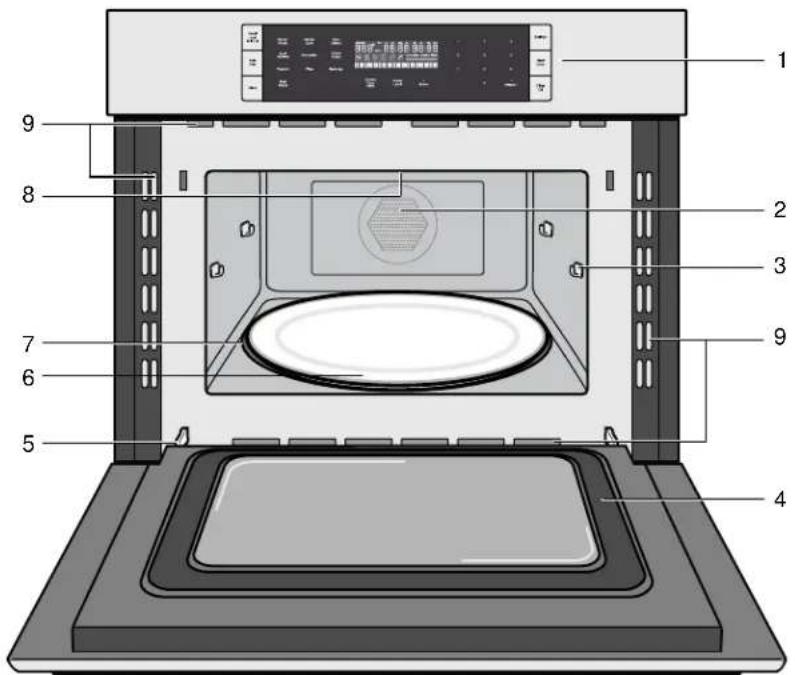
1 Control panel and display
2 Convection fan and element
3 Rack holders (4)
4 Door gasket
5 Door hinges
6 Ceramic microwave tray
7 Metal tray turntable with bake element below
8 Broil element
9 Oven vents
Oven Vents
The oven vents are located around the sides of the oven cavity. Warm air may be released from the top and bottom vents before, during and after cooking. It is normal to see steam escaping from these vents, and condensation may collect in this area. This area may be warm when the oven is in use. Do not block any vents, since they are important for air circulation.
Cooling Fan
The cooling fan runs during all cooking modes. The fan can be heard when it is running, and warm air may be felt as it is released from the oven vents. The fan may also run after the oven is off.
Convection Fan
The convection fan operates during all convection modes. When the oven is operating in a convection mode, the fan turns off automatically when the door is opened.
Oven light
The oven light turns off to save energy after one minute with the door open. To turn the light back on, close the door and open it again.
Control Panel
| Panel Lock(hold 3 sec) | SensorReheat | SensorCook | AutoDefrost | interIOR lim | 1 | 2 | 3 | Settings | ||||
| 8:88°temp | 88:08 | 88:08 | ||||||||||
| SpeedChef | Broil(high/low) | Convection | FrozenFoods | 64 | ||||||||
| Popcorn | Pizza | Beverage | 97 | |||||||||
| Clock | MoreModes | KitchenTimer(on/off) | PowerLevel | Microwave+ 30 sec | 0 | +Amount | Clear/Off | |||||
Touch keys
You can activate a function by briefly touching the corresponding touch key. Each time you touch a key a short beep will sound. A long beep will tell you that you have made an invalid input.
| Touch key Function | |
| Panel Lock Activate/deactivate child lock | |
| Speed Chef Select Speed Chef programs | |
| Clock Set time of day | |
| Settings Enter basic settings menu | |
| Start/Enter Confirm entered values/Start cooking mode | |
| Clear/Off Clear entered value/turn appliance off | |
| Sensor Reheat | Select Sensor Reheat programs |
| Sensor Cook | Select Sensor Cook programs |
| Auto Defrost | Select Auto Defrost programs |
| Broil | Set Broil modes (Hi/Lo) |
| Convection | Set Convection mode |
| Frozen Foods | Start cooking programs for frozen convenience foods |
| Popcorn | Cook popcorn |
| Pizza | Select pizza programs |
| Beverage | Heat beverages |
| More Modes | Enter menu for additional modes:Keep WarmConvection BroilMelt ButterMelt ChocolateSoften Ice CreamSoften Cream Cheese |
| Kitchen Timer | Set the kitchen timer |
| Power Level | Set power level for microwave operation |
| Microwave +30 sec | Add 30 seconds to microwave cooking time |
| +Amount | Can be used to browse through menu options |
| 0 - 9 | Use the number keys to enter customized values |
Display elements
The display gives you information on the current settings of your appliance. Blinking display elements indicate that an input is required.
| Element | Meaning |
| Child lock activated | |
| Convection | |
| Microwave | |
| Speed Chef | |
| Broiling high level | |
| Broiling low level | |
| Auto Defrost | |
| start/enter | Touch Start/Enter key required |
| 000° temp | Temperature is displayed |
| tbsp/kg/lbs/cups/oz | Measuring units |
| hr/min | Kitchen timer value in hours/minutes |
| min/sec | Programmed cooking time in minutes/seconds |
| preheating Appliance is preheating | |
| sensing | Appliance is sensing |
| timer | Kitchen timer is running |
| Shows progress of preheating | |
| Line for free text | Displays program information,prompts required user input |
Accessories
natural_image
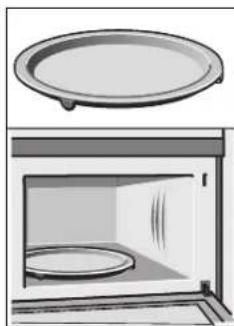
Illustration of a microwave oven with a lid above it (no text or symbols)Metal tray turntable
Food which particularly requires a lot of heat from underneath, such as pizza and chicken nuggets, can be prepared directly on the metal tray turntable.
The turntable can turn clockwise or counterclockwise.
It is dishwasher safe and cut resistant. You can cut pizza into slices on the turntable itself.
Place the metal tray turntable on the drive in the center of the cooking compartment. Ensure that it is properly fitted.
- Never use the microwave without the metal tray turntable.
- The metal tray turntable can support max. 12 lbs.
- The metal tray turntable must turn when using all types of heating.
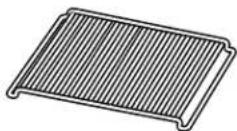
Wire rack
The wire rack can be used with the recess facing up — or down —.
Use it facing down for Speed Chef, Convection, Keep Warm and to fit larger dishes into the oven cavity.
Use it facing up (as shown) for Broil and Convection Broil.
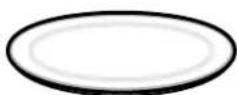
Ceramic tray
Use for microwave cooking.
- You can place food, like a popcorn bag or potatoes, directly on the ceramic tray.
- The ceramic tray can also be used for conventional cooking.
CAUTION
The ceramic tray will get hot during convection cooking. Place the ceramic tray on top of the metal tray turntable.
The ceramic tray can remain in the oven for all cooking modes, unless "Bake on Metal Tray" is required.
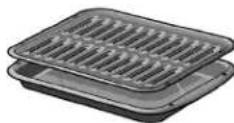
Broil pan and grid (optional accessory)
Use for broiling and roasting.
Available from www.bosch-home.com/us/store
Pan - PAN, BROILER, MINI
Part number 00666709
Grid - GRILL, BROILER, PAN, MINI
Part number 00666710
How to install the turntable
Place the turntable with the rollers "A" as shown in the picture, on the carrier "B" in the middle of the oven cavity bottom.
The turntable must sit straight on the carrier.
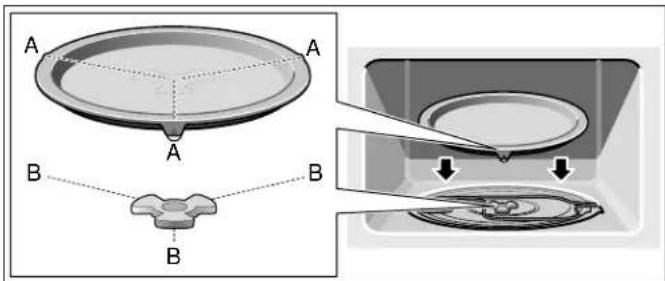
Note: Do not use the appliance if the turntable is not in place. Confirm that all parts are properly seated and that the turntable rotates freely when the microwave is operated.
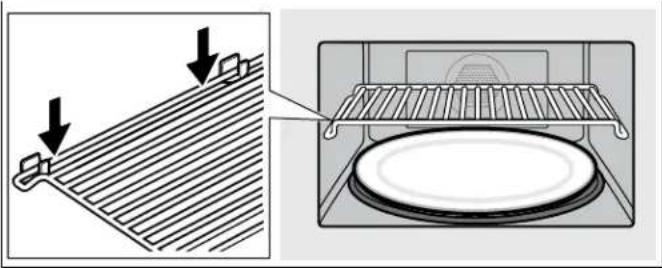
Inserting the wire rack
- Place rack securely in the four plastic supports.
natural_image
Diagram showing a roof structure with arrows indicating direction, alongside an open oven with a circular plate (no text or symbols)Note: Rack must not touch metal walls or back of microwave.
- Place food on the rack.
CAUTION
- Do not use the rack to pop popcorn.
- The rack must be on the four plastic supports when used.
- Do not cook with rack on the bottom of the oven cavity.
- For regular microwave cooking use the ceramic tray and remove the rack.
- The rack can get hot during cooking. Allow the rack to cool down before handling.
- When not in use, store the rack outside of the microwave in a cabinet.
Before Using the Appliance for the First Time
- Appliance must be properly installed by a qualified technician before use.
- Remove all packing materials from inside and outside the oven.
• While cool, wipe with a clean, damp cloth and dry. - There may be a slight odor from your new appliance; this is normal and will disappear after a short time.
- Optimum cooking results depend on proper cookware being used.
- Read and understand all safety precautions and Use and Care Manual information.
Execute the following sections prior to operating:
Setting the clock
Once the appliance has been properly connected, 12:00 will be displayed as the time of day. To set the correct time, proceed as follows:
-
Touch Clock.
-
Enter the correct time using the number keys. Example: To set the clock to 12:41 type in 1 2 4 1.
-
Touch Start/Enter to confirm.
The clock will also be displayed when your appliance is turned off. Please refer to the chapter "Basic Settings" on how to hide the clock.
Heating up the appliance
To remove the new oven smell, heat up the appliance when it is empty and closed. One hour with Convection at 350^ F ( 180^ C) is ideal. Ensure that no packaging remnants have been left in the oven cavity.
- Touch Convection
- Enter the numbers 3 5 0 with the number keys.
- Touch Start/Enter.
The oven light turns on and the appliance starts heating.
Cleaning accessories
Before using accessories for the first time, thoroughly clean them with hot soapy water and a soft dish cloth.
Applying the program label
Apply the included program label in the desired language to the side of the oven cavity, as indicated on the leaflet that carries the program label.
Microwave
Microwave utensil guide
Suitable ovenware
- Heat-resistant glass, glass ceramic and earthenware:
Utility dishes, loaf dishes, pie plates, cake plates, liquid measuring cups, casseroles and bowls without metallic trim (e.g. Pyrex ^® , Anchor Hocking ^™ , Corning Ware ^® , Emile Henry, etc.).
China:
Bowls, cups, serving plates and platters without metallic trim.
• Plastic films and wraps:
Plastic wrap (as a cover) - lay the plastic wrap loosely over the dish and press it to the sides. Vent plastic wrap by turning back one edge slightly to allow excess steam to escape. The dish should be deep enough so that the plastic wrap will not touch the food.
• Microwave-safe plastics:
Microwave-safe plastic dishes, cups, semi-rigid freezer containers and plastic bags for short cooking times. Use these with care because the plastic may soften from the heat of the food.
• Paper products:
Paper towels, wax paper, parchment paper, paper napkins and paper plates with no metallic trim or design. Look for the manufacturers label for any special instructions for use in the microwave oven.
Unsuitable ovenware
• Metal utensils and cookware:
Metal shields the food from microwave energy and produces uneven cooking. Also, avoid metal skewers, thermometers or foil trays. Metal utensils can cause arcing, which can damage your microwave oven.
• Metal decoration:
Bowls, cups, serving plates and platters with metallic trim.
- Aluminum foil:
Avoid large sheets of aluminum foil because they hinder cooking and may cause harmful arcing. Use small pieces of foil to shield poultry legs and wings. Keep ALL aluminum foil at least 1 inch (25 mm) from the side walls of the oven cavity and door of the microwave.
- Wood:
Wooden bowls and boards will dry out and may split or crack when you use them in the microwave oven. Baskets made of wood will react in the same way.
• Tightly covered cookware:
Be sure to leave openings for steam to escape from covered cookware. Pierce plastic pouches of vegetables or other food items before cooking. Tightly closed pouches may explode.
- Brown paper:
Avoid using brown paper bags. They absorb heat and can burn.
- Flawed or chipped cooking utensils:
Any utensil that is cracked, flawed or chipped may break in the oven.
• Metal twist ties:
Remove metal twist ties from plastic or paper bags. They become hot and could cause a fire.
Ovenware test
Do not turn on the microwave unless there is food inside. The following ovenware test is the only exception to this rule.
Perform the following test if you are unsure whether your ovenware is suitable for use in the microwave:
-
Heat the empty ovenware at maximum power for 12 to 1 minute.
-
Check the temperature occasionally during that time. The ovenware should still be cold or warm to the touch.
The ovenware is unsuitable if it becomes hot or if sparks are generated.
Microwave power levels
You can select from 10 different microwave power levels. If you do not set a power level, the microwave will automatically operate at the highest power level 10.
The table below provides suggested power levels for various types of food that can be prepared in the microwave.
| Power level | Microwave output | Use for |
| 10 | 100% Boiling water | |
| High | Cooking ground meat | |
| Making candy | ||
| Cooking fresh fruit & vegetables | ||
| Cooking fish & poultry | ||
| Preheating browning dish | ||
| Reheating beverages | ||
| Cooking bacon slices | ||
| 9 | 90% Reheating meat slices quickly | |
| Saute onions, celery & green peppers | ||
| 8 | 80% All reheating | |
| Cooking scrambled eggs | ||
| 7 | 70% Cooking breads & cereal products | |
| Cooking cheese dishes | ||
| Cooking muffins, brownies & cupcakes | ||
| Cooking whole poultry | ||
| 6 | 60% Cooking pasta | |
| 5 | 50% Cooking meat | |
| 4 | 40% Cooking less tender cuts of meat | |
| 3 | 30% Thawing meat, poultry & seafood | |
| 2 | 20% Softening butter & cream cheese | |
| 1 | 10% Softening ice cream | |
Setting the microwave
The appliance must be turned off.
- Enter the desired cook time with the number keys. The timer display will fill in from right to left.
Example: To set a microwave time of 20 minutes and 30 seconds, enter the numbers 2 0 3 0.
The microwave symbol 📋 lights up and start/enter is blinking on the display.
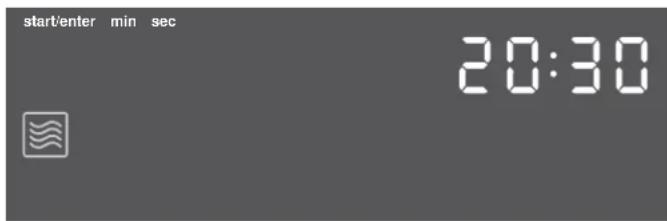
- You can start microwave operation with the default power level 10 by touching Start/Enter, -or -
you can set a different power level. Touch Power Level. 10 and start/enter are blinking in the upper left section of the display.
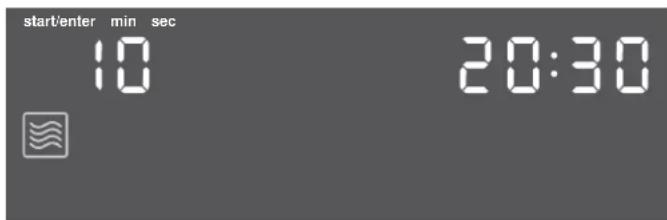
-
Enter the desired power level using the number keys. The entered power level and start/enter are blinking.
-
Touch Start/Enter to start microwave operation.
The microwave timer will start to count down.
You can step up the microwave timer at any time during operation by touching +30 sec.
The appliance turns off and a beep sounds once the microwave time has run out. The appliance turns off and the clock is displayed.
Change power level
You can change the power level at any time during microwave operation.
- Touch Power Level.
The display shows POWER LEVEL 1 - 10.
-
Enter the desired power level with the number keys. The entered power level and start/enter are blinking.
-
Touch Start/Enter.
Microwave operation continues with the new power level.
Opening appliance door during operation
Opening the appliance door during operation will interrupt the current mode. Close the appliance door and then touch Start/Enter to resume operation.
+ 30 sec
Use the +30 sec key to quick start your microwave at the highest power level. You can touch the key repeatedly to increase the microwave time in steps of 30 seconds. Touching this key during microwave operation will add 30 seconds to the remaining microwave time.
Cancel operation
Touch Clear/Off to cancel the active oven mode. The appliance turns off and the clock is displayed. The cooling fans may continue to run for awhile and then switch off automatically.
Suggestions for best results
To help you achieve the best possible results from your microwave oven, read the following suggestions below:
• Storage temperature
Foods taken from the freezer or refrigerator take longer to cook.
- Size
Small pieces of food cook faster than large ones. Pieces similar in size and shape will cook more evenly when cooked together. For more even results, reduce the power levels when cooking large pieces of food.
• Natural moisture
Very moist foods cook more evenly because microwave energy heats water molecules very efficiently.
- Stirring
Stir foods such as casseroles and vegetables from the outside to the center to distribute the heat more evenly. This will allow the food to cook faster. (Constant stirring is not necessary.)
- Turning
Turn over foods such as pork chops, roasts or whole cauliflower halfway through the cook time. This will help to expose all sides equally to microwave energy.
- Placing food
Place delicate areas of food items, such as asparagus tips, toward the center of the turntable tray.
- Arranging food
Arrange unevenly shaped foods, such as chicken pieces or salmon, with the thicker or meatier parts toward the outside of the turntable tray.
- Letting food stand
After removing the food from the microwave, cover the food with foil or a casserole lid and let it stand to finish cooking. This will help the food finish cooking in the
center and avoids overcooking the outer edges. The length of stand time depends on the density and surface area of the food items.
- Wrapping foods
Sandwiches and many other food types containing pre-baked bread should be wrapped in paper towels or wax paper prior to placing in the microwave to help prevent the food items from drying out while heating.
Convection
Convection cooking circulates hot air through the oven cavity with a fan. The constantly moving air surrounds the food to heat the outer portion quickly, creating even browning and sealed-in flavor by the constant motion of hot air over the food surfaces.
You can set a temperature range from 200 to 450°F (100 to 230°C).
Notes
- Use the Speed Chef mode for cooking with microwave and conventional heat combined. You can not combine these two modes manually.
- For best cooking results always use the wire rack with Convection mode.
CAUTION
The oven door and exterior and the wire rack will become hot during Convection. Always use oven mits.
Cookware tips for Convection
• Metal Pans:
Recommended for all types of baked products, especially where browning is important.
Dark or dull finish metal pans are best for breads and pies because they absorb heat and produce crisper crust.
Shiny aluminum pans are better for cakes, cookies or muffins because they reflect heat and help produce a light tender crust.
• Glass or glass-ceramic casseroles or baking dishes:
Best suited for egg and cheese recipes due to the cleanability of glass.
Note: Always use the convection rack when using the Convection mode.
Setting Convection mode
The appliance must be turned off.
1. Touch Convection.
The convection symbol lights up. start/enter and the default temperature 325^ F ( 160^ C) are blinking on the display. The time of day will be permanently displayed during convection cooking.
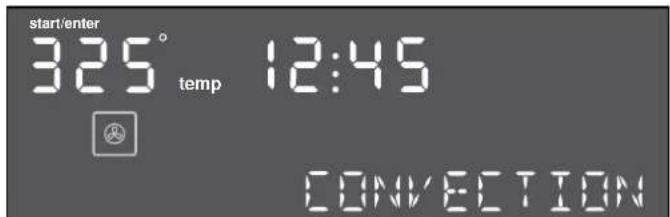
2. Change the temperature using the number keys and touch Start/Enter.
The appliance starts preheating.
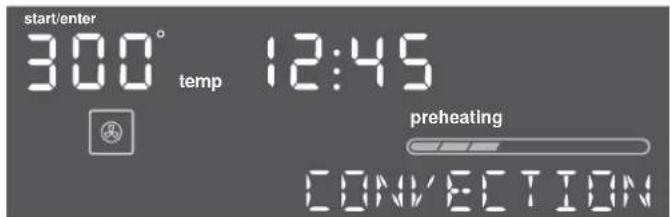
The set temperature is reached once the preheat bar has filled up completely and five beeps sounds.
To change the temperature during operation, touch
Convection. The temperature and start/enter begin to flash. Type in the new temperature using the number keys and confirm with Start/Enter.
Opening appliance door during operation
Opening the appliance door during operation will interrupt the current mode. When you close the appliance door, operation will be resumed.
Cancel operation
Touch Clear/Off to cancel the active oven mode. The appliance turns off and the clock is displayed. The cooling fans may continue to run for awhile and then switch off automatically.
Broil
The Broil feature uses intense heat radiated from the upper element.
You can set two intensity levels:
- Broil high
- Broil low
Setting Broil mode
The appliance must turned off.
- Touch Broil.
The Broil mode is set to high. H1 and start/enter are blinking, the Broil high symbol ☐ will be displayed.
The time of day will be permanently displayed in Broil mode.
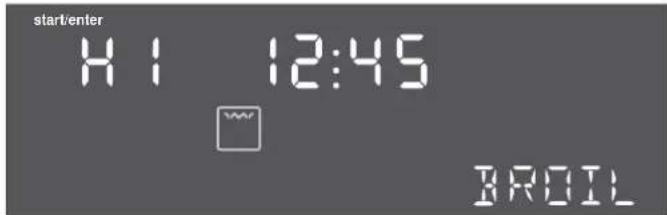
- Touch Broil again or use the +Amount key, to change to Broil low mode.
LO and the broil low symbol ☐ will light up on the display.
- Touch Start/Enter to start operation.
You can alternate between Broil high and Broil low during operation by touching either Broil or +Amount.
Note: Always use a broil pan when cooking in Broil mode (see optional accessories).
Opening appliance door during operation
Opening the appliance door during operation will interrupt the current mode. When you close the appliance door, operation will be resumed.
Cancel operation
Touch Clear/Off to cancel the active oven mode. The appliance turns off and the clock is displayed.
The cooling fans may continue to run for awhile and then switch off automatically.
Automatic programs
The automatic programs let you prepare food in a fast and simple way using Microwave and conventional heat. Select the program and enter the values prompted on the display, the automatic program selects the optimum setting for you.
Speed Chef
With Speed Chef you can select from nine different foods. You only have to enter the weight and Speed Chef calculates the fastest cooktime for best results.
See program label on the left side of the oven cavity for available Speed Chef programs.
Note: Only use ovenware that is suited for both microwave and conventional cooking. (Earthenware is recommended).
Setting Speed Chef
The appliance must be turned off.
Example: Set Speed Chef for Beef Roast.
- Touch Speed Chef.
The Speed Chef symbol 📊 lights up and the display shows SELECT FOOD 1 - 9.
- Select the desired food from the label at the oven cavity. For Beef Roast touch the number key 4. -or-
Touch Speed Chef or +Amount repeatedly to scroll through all Speed Chef modes. When Beef Roast is displayed 0.00 is blinking and the selected food item is shown on the display.
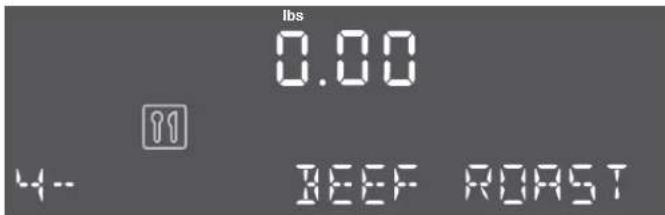
-
Enter the weight of the food you want to cook using the number keys. For example, to enter 3 lbs type 300. The weight and start/enter are blinking.
-
Touch Start/Enter.
Speed Chef will set the appropriate cook time and start counting down.
During cooking a beep will sound and "Turn food over" is shown in the display. Open door and turn food over. Return food to the microwave and touch Start/Enter.
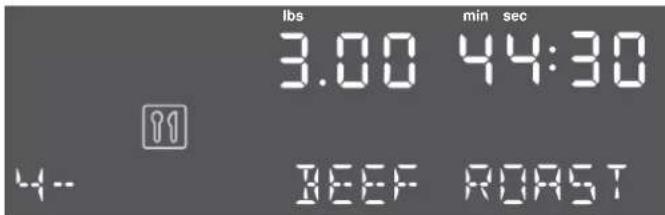
Once the cook time has run out a beep will sound. The appliance turns off and the clock is displayed.
Opening appliance door during operation
Opening the appliance door during operation will interrupt the current mode. Close the appliance door and then touch Start/Enter to resume operation.
Cancel operation
Touch Clear/Off to cancel the active oven mode. The appliance turns off and the clock is displayed.
The cooling fans may continue to run for awhile and then switch off automatically.
Speed Chef Programs
Place the food in a dish that is suitably sized for the amount of food you want to cook. Use cookware that is suited for both microwave and conventional cooking.
| Speed Chef Program Weight range Cooking tips Food placement Stand time | |||
| (minutes) | |||
| 1 - Chicken Breast 0.5 - 3.0 lbs Use with boneless chicken breasts.Turn chicken over at beep. Small pieces cook faster. | Wire rack, facing down 5 to 10 | ||
| 2 - Chicken Thighs 0.5 - 3.0 lbs Place thicker ends toward outside.Turn chicken over at beep. Small pieces cook faster. | Wire rack, facing down 3 to 8 | ||
| 3 - Whole Poultry 1.5 - 4.5 lbs Start cooking with breast side down.Turn over at the beep. | Turntable 5 to 10 | ||
| 4 - Beef Roast 0.5 - 3.25 lbs Suitable for beef roast 2" or less.Turn over at the beep. | Turntable 5 to 10 | ||
| 5 - Pork Tenderloin 1.0 - 3.0 lbs Tuck under thin ends. Turn over at the beep. | Wire rack, facing down 5 to 10 | ||
| 6 - Pork Chops 0.5 - 3.0 lbs Suitable for pork chops 1/2 to 1".Turn chops over at beep. | Wire rack, facing down 3 to 8 | ||
| 7 - Meatloaf | 1.0 - 3.25 lbs | Suitable for meatloaf 3" or less.Food is not turned. Add ketchup last 10 - 15 minutes of cooking. | Turntable 5 to 10 |
| 8 - Fish Fillets | 0.5 - 2.0 lbs Brush fillets with vegetable or olive oil. Food is not turned. Tuck under thin ends. | Wire rack, facing down 2 to 3 | |
| 9 - Brownies 16 servings | Food is not turned. For best results use a 9" metal pan. | Wire rack, facing down Cool | |
Notes
- For meat pieces enter total weight of all the pieces.
- Use a meat thermometer to check meat temperatures after stand time.
- Place food on countertop and cover with foil during stand time.
Auto Defrost
With the Auto Defrost feature you can defrost three different types of food by entering the weight. The ideal defrost time will be calculated by the program.
Ovenware for defrosting
Place the food in a microwaveable shallow dish, such as a glass casserole dish or glass plate, but do not cover.
Stand time
The defrosted food should be left to stand for an additional 10 to 30 minutes until it reaches an even temperature. Large pieces of meat require a longer standing time than smaller pieces. Flat pieces of meat and items made from ground meat should be separated from each other before leaving to stand.
After this time, you can continue to prepare the food, even though thick pieces of meat may still be frozen in the middle.
Setting Auto Defrost
The appliance must be turned off.
Example: Set Auto Defrost for Ground Meat.
- Take the food out of the packaging and weigh it, then place it in a suitable dish on the ceramic tray.
- Touch Auto Defrost.
The Auto Defrost symbol Ⓞ* lights up and the display shows SELECT FOOD 1 - 3.
- Select the desired program from the label at the oven cavity. For Ground Meat touch the number key 1.
-or-
Touch Auto Defrost or +Amount repeatedly to scroll through all Auto Defrost modes.
0.00 is blinking and the food item is shown on the display.
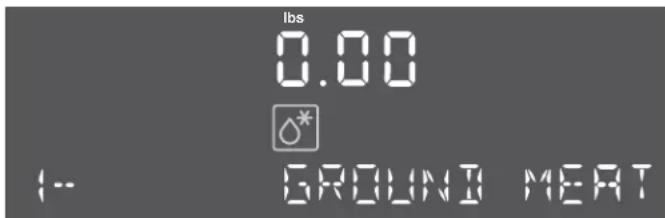
- Enter the weight of the food you want to defrost using the number keys. For example, to enter 2 lbs type 200. The weight and start/enter are blinking.
- Touch Start/Enter.
Auto Defrost will set the appropriate defrosting time and start counting down.
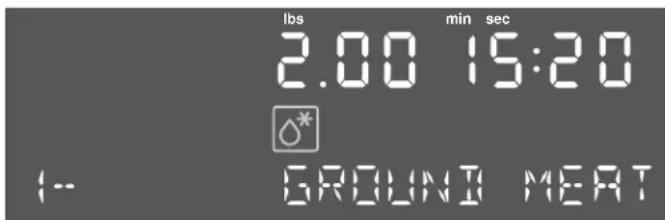
Once the defrost time has elapsed a beep will sound.
The appliance turns off and the clock is displayed.
Note: A beep sounds during defrosting for all foods to turn food over or separate pieces.
Opening appliance door during operation
Opening the appliance door during operation will interrupt the current mode. Close the appliance door and then touch Start/Enter to resume operation.
Cancel operation
Touch Clear/Off to cancel the active oven mode. The appliance turns off and the clock is displayed.
The cooling fans may continue to run for awhile and then switch off automatically.
Auto Defrost programs
No. Name Weight range
| 1 Ground Meat 0.5 - 2.0 lbs |
| 2 Meat Pieces 0.5 - 3.0 lbs |
| 3 Poultry Pieces 0.5 - 3.0 lbs |
Tips for defrosting
WARNING
HEALTH RISK
Liquid will be produced when defrosting meat or poultry. Drain off this liquid when turning meat and poultry, and under no circumstances, use it for other purposes, or allow it to come into contact with other foods.
- Always enter the weight in lbs when using the defrost by weight feature (0.1 to 6.0 lbs).
- Use the defrost mode for raw food items only.
- Defrosting gives best results when food to be thawed is a minimum of 0^ F (taken directly from a freezer). If the food has been stored in a refrigerator-freezer that does not maintain a temperature of 5^ F or below, always program a lower food weight or lower cook time to prevent cooking the food.
- If the frozen food is stored outside the freezer for up to 20 minutes, enter a reduced cook time or weight.
- The shape of the package will alter the defrosting time. Shallow rectangular food packets defrost more quickly than a deep frozen block of food.
- Separate pieces as they begin to defrost. Separated frozen pieces of food defrost better.
- Shield warm areas of food with small pieces of aluminum foil, if they start to heat up.
Use small pieces of aluminum foil to shield food items like chicken wings, leg tips and fish tails.
Do not allow aluminum foil to touch the oven cavity when defrosting.
Frozen Foods
Use the Frozen Foods feature to prepare frozen convenience foods, like chicken nuggets, french fries, fish sticks, using bottom heat and Convection.
Place the food you want to cook directly on the metal tray turntable.
You can set a temperature range from 200 to 450°F (100 to 230°C).
Setting Frozen Foods
The appliance must be turned off.
1. Touch Frozen Foods.
The symbol for bottom heat and Convection lights up. The default temperature 425° and start/enter are blinking and the display shows BAKE ON METAL TRAY.
- You can change the temperature by using the number keys. You can enter a temperature between 200 and 450°F (100 - 230°C).
3. Touch Start/Enter.
The appliance starts preheating. The set temperature, the preheat bar and the oven mode FROZEN FOODS are displayed. The time of day will be permanently displayed.
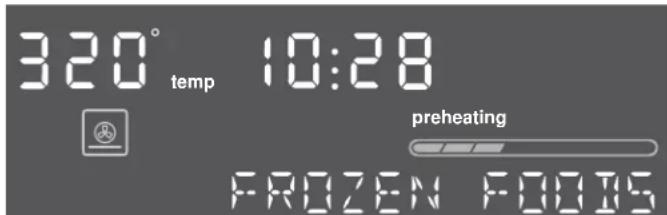
The set temperature is reached once the preheat bar has filled up completely and a beep sounds. Place food in the preheated oven on the metal tray in a single layer.
To change the temperature during operation, touch Frozen Food. Type in the new temperature using the number keys and confirm with Start/Enter.
Opening appliance door during operation
Opening the appliance door during operation will interrupt the current mode. When you close the appliance door, operation will be resumed.
Cancel operation
Touch Clear/Off to cancel the active oven mode. The appliance turns off and the clock is displayed.
The cooling fans may continue to run for awhile and then switch off automatically.
Pizza
You can use the Pizza mode to bake three different types of pizza:
Mode no. Pizza type Bake on
| 1 Frozen pizza Metal tray |
| 2 Fresh pizza Metal tray |
3 Microwave pizza Ceramic tray
Pizza tips
- Check pizza before minimum time, pizza may cook faster compared to a traditional oven.
- For fresh pizza use a pizza paddle for sliding the pizza on and from the metal turntable.
- If using a pizza paddle, sprinkle the paddle liberally with cornmeal for ease in transferring the dough to the metal turntable.
• Maximum size is 12 inches for fresh and frozen pizzas. - Avoid using a pizza stone as it can damage the oven.
- The metal turntable can be used for cutting pizza into slices. Remove the turntable from the oven after the pizza is baked.
Setting Pizza mode for fresh or frozen pizza
The appliance must be turned off.
You can set a temperature range from 375 to 450°F (190 to 230°C) for fresh and frozen pizza modes.
You can bake fresh or frozen pizza directly on the metal tray turntable.
1. Touch Pizza.
The display shows SELECT TYPE 1 - 3.
-
Touch Pizza or +Amount repeatedly to scroll through all pizza modes.
-
Touch Start/Enter. For frozen or fresh pizza the display reads BAKE ON METAL TRAY. The default temperature and light up on the display.
-
You can change the temperature by using the number keys. Touch Start/Enter to confirm. The appliance starts preheating.
The set temperature is reached once the preheat bar has filled up completely and a beep sounds.
Opening appliance door during operation
Opening the appliance door during operation will interrupt the current mode. When you close the appliance door, operation will be resumed.
Setting Pizza mode for microwave pizza
Place the microwave pizza on the ceramic tray and put it in the oven following package directions.
- Touch Pizza.
The display shows SELECT TYPE 1 - 3. - Touch the number key 3 or touch Pizza or +Amount repeatedly until MICROWAVE PIZZA is displayed.
- Touch Start/Enter. For microwave pizza the display reads USE CERAMIC TRAY. start/enter is blinking.
- Touch Start/Enter again. sensing and the microwave symbol 📋 light up on the display. The appliance starts sensing.
When sensing is complete, a beep will sound and the calculated cook time will start to count down.
After the cook time has run out a beep will sound. The appliance turns off and the clock is displayed.
Note: Do not open the door during the sensing process, or the program will be cancelled.
Once the calculated cook time is displayed, you can open the door to stir, turn or rearrange the food. Touch Start/Enter to resume operation.
Opening appliance door during operation
Opening the appliance door during operation will interrupt the current mode. Close the appliance door and then touch Start/Enter to resume operation.
Popcorn
CAUTION
Do not leave oven unattended while popping corn. Popcorn may ignite and cause fire.
The popcorn feature lets you pop 3 different bag sizes of commercially packaged microwave popcorn. Use the following table to determine the setting to use:
Bag size Touch Popcorn key
| 1.2 oz. once |
| 2.5 oz. twice |
| 3.5 oz. 3 times |
Setting Popcorn mode
The appliance must be turned off.
- Touch Popcorn. The display shows the microwave symbol 📄, 1.2 oz. and start/enter are blinking. The cook time is displayed.
- Touch Popcorn or +Amount repeatedly until the desired weight is shown in the display.
Sensor cooking
You can select two sensor cooking modes. Sensor cooking allows you to cook many of your favorite foods without selecting cooking times and power levels. The microwave oven automatically determines the required cooking time for each food item.
For best results for cooking by sensor, follow these recommendations:
- Food cooked with the sensor system should start from normal storage temperature.
- Turntable tray, ceramic tray and outside of container should be dry.
- Foods should always be covered loosely with microwavable plastic wrap, wax paper or lid.
- Do not open the door or touch Clear/Off key during sensing time. When sensing time is over, the oven beeps once and the remaining cooking time will appear in the display. At this time you can open the door to stir, turn or rearrange the food.
3. Touch Start/Enter.
The microwave timer starts counting down.
When the microwave time has elapsed, a beep will sound. The appliance turns off and the clock is displayed.
Beverage
The beverage feature heats 0.5 to 2 cups of a beverage. Use the table below to determine the setting to use.
Amount Touch Beverage key
| 0.5 cups (about 4 oz.) once |
| 1 cup (about 8 oz.) twice |
| 1.5 cups (about 12 oz.) 3 times |
| 2 cups (about 16 oz.) 4 times |
Setting Beverage mode
Example: Heat one cup of a beverage.
- Touch Beverage. The display shows the microwave symbol 📋, 0.5 cups and start/enter are blinking. The cook time is displayed.
- Touch Beverage again or touch +Amount. / cup is shown in the display.
- Touch Start/Enter.
The microwave timer starts counting down.
When the microwave time has elapsed, a beep will sound. The appliance turns off and the clock is displayed.
Sensor Reheat
The Sensor Reheat feature lets you reheat dinner plates or casseroles (8-12 oz.) for your cooking convenience.
Setting Sensor Reheat
- Touch Sensor Reheat.
The microwave symbol 📋 lights up and SENSOR REHEAT is displayed.
- Touch Start/Enter.
sensing is displayed. The microwave operates during sensing. - When sensing is complete, a beep will sound and the calculated cook time will start to count down.
Note: Do not open the door during the sensing process, or the program will be cancelled.
Once the calculated cook time is displayed, you can open the door to stir, turn or rearrange the food. Touch Start/Enter to resume operation.
When sensor reheat is finished, a beep will sound and the appliance turns off.
Notes
• Cover with vented plastic wrap or wax paper.
- Reheat food on a microwaveable dinner plate.
Food Directions Quantity
| Dinner plate Use only pre-cooked, refrigerated foods. Cover plate with vented plastic wrap or waxed paper, tucked under plate. If food is not hot enough after heating with the Reheat feature, continue heating using manual time and power level setting.Contents:3-4 oz. meat, poultry or fish (up to 6 oz. with bone)1/2 cup starch (potatoes, pasta, rice, etc.)1/2 cup of vegetables (about 3-4 oz.) | 1 serving (1 plate) |
| Casserole, Pasta Cover plate with lid or vented plastic wrap. If food is not hot enough after heating with the Reheat feature, continue heating using manual time and power level setting.Stir foods once before serving.Contents:Casserole: refrigerated foods (such as beef stew or lasagna)Pasta: Canned spaghetti and ravioli, refrigerated foods | 1 to 4 servings |
Sensor Cook
Sensor Cook allows you to cook many of your favorite foods without selecting cooking times and power levels. The microwave oven automatically determines the required cooking time for each food item.
Sensor Cook programs
| Sensor Cook Program | Quantity Cooking tips | |
| 1 - Baked Potato | 1 - 4 potatoes (8 - 32 oz.) | Pierce skin with a fork. Do not cover. After cooking, allow to stand wrapped in foil for 5 minutes. |
| 2 - Sweet Potato | 1 - 4 potatoes (8 - 32 oz.) | Pierce skin with a fork. Do not cover. After cooking, allow to stand wrapped in foil for 5 minutes. |
| 3 - Fresh Vegetables | 4 - 16 oz. (0.25 - 1 lbs) | No water is needed if vegetables have just been washed. Add 2 tablespoons water per 8 ounces of fresh vegetables. |
| 4 - Frozen Vegetables | 6 - 16 oz. (0.75 - 1 lbs) | Add 1 tablespoon water per 4 ounces of frozen vegetables. |
| 5 - Ground Meat | 8 - 24 oz. (0.5 - 1.5 lbs) | After cooking, allow to stand, covered, for 3 - 4 minutes. |
| 6 - Fish/ Seafood | 8 - 20 oz. (0.5 - 1.25 lbs) | Roll thin edges underneath. Arrange in a ring around microwaveable dish. |
Sensor Cook Program Quantity Cooking tips
| 7 - Brown Rice | 0.5 - 2 cups (dry rice) | Use a high-sided casse-role dish. Do not cover. Use 1 cup rice to 3 cups water. |
| 8 - White Rice | 0.5 - 2 cups (dry rice) | Use a high-sided casse-role dish and lid. Use 1 cup rice to 2 cups water. |
| 9 - Frozen Entrees | 10 - 20 oz. Follow package instructions for venting, cutting plastic film, etc. | |
Setting Sensor Cook
The appliance must be turned off.
Example: Set Sensor Cook for Ground Meat.
- Touch Sensor Cook.
The microwave symbol 📋 lights up and the display shows SELECT FOOD 1 - 9.
- Select the desired program from the label at the oven cavity. For Ground Meat touch the number key 5. -or-
Touch Sensor Cook or +Amount repeatedly to scroll through all Sensor Cook modes.
start/enter is blinking and the food item is shown on the display.
- Touch Start/Enter.
The program will start sensing with the microwave operating.
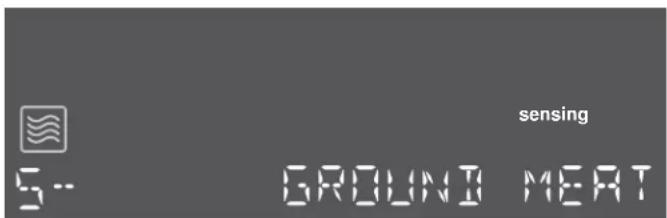
When sensing is complete, a beep will sound and the calculated cook time will start to count down.
Note: Do not open the door during the sensing process, or the program will be cancelled.
Once the calculated cook time is displayed, you can open the door to stir, turn or rearrange the food. Touch Start/Enter to resume operation.
When sensor cook is finished a beep will sound and the appliance turns off.
Opening appliance door during operation
Opening the appliance door during operation will interrupt the current mode. Close the appliance door and then touch Start/Enter to resume operation.
Cancel operation
Touch Clear/Off to cancel the active oven mode. The appliance turns off and the clock is displayed.
The cooling fans may continue to run for awhile and then switch off automatically.
More Modes
The More Modes feature offers you six additional convenient programs.
Program No. Name
| 1 Keep Warm |
| 2 Convection Broil |
| 3 Melt Butter |
| 4 Melt Chocolate |
| 5 Soften Ice Cream |
| 6 Soften Cream Cheese |
Setting Keep Warm
- Touch More Modes once.
The display shows SELECT PROGRAM 1 - 6.
- Touch the number key 1 or touch More Modes once more.
KEEP WARM, the convection symbol ⚙ and the temperature 170° F (75°C) are displayed. start/enter is blinking.
- Touch Start/Enter.
The Keep Warm temperature cannot be changed.
Notes
- Use the Keep Warm mode to keep cooked foods hot and ready to serve.
- Food cooked covered should remain covered during Keep Warm.
- Pastry items (pies, turnovers, etc.) should be uncovered.
- Complete meals kept warm on a dinner plate can be covered during Keep Warm.
Setting Convection Broil
This mode uses the Broil element combined with the convection fan.
Place food in a cold oven on the wire rack facing up for broil.
- Touch More Modes once.
The display shows SELECT PROGRAM 1 - 6.
-
Touch the number key 2 or touch More Modes twice. CONV BROIL and the convection broil symbol 📁 are displayed. The default setting H1 and start/enter are blinking.
-
Touch +Amount to change from broil intensity H1 to LO.
-
Touch Start/Enter.
Convection Broil starts preheating.
Opening appliance door during operation
Opening the appliance door during operation will interrupt the current mode. When you close the appliance door, operation will be resumed.
Cancel operation
Touch Clear/Off to cancel the active oven mode. The appliance turns off and the clock is displayed.
The cooling fans may continue to run for awhile and then switch off automatically.
Setting Melt Butter
You can set three different quantities for melting butter:
• 2 tablespoons (tbsp)
• 14 cup
• 12 cup
- Touch More Modes once.
The display shows SELECT PROGRAM 1 - 6.
- Touch the number key 3 or touch More Modes three times.
MELT BUTTER and the microwave symbol 📋 are displayed. The first quantity 2 tbsp and start/enter are blinking. The cook time is displayed.
- Touch +Amount to change the quantity.
- Touch Start/Enter.
The heating time starts counting down.
Setting Melt Chocolate
You can set two different quantities for melting chocolate:
• 1 cup
- 2 cups
- Touch More Modes once.
The display shows SELECT PROGRAM 1 - 6.
- Touch the number key 4 or touch More Modes four times.
MELT CHOCOLATE and the microwave symbol 📋 are displayed. The first quantity 1 cup and start/enter are blinking. The cook time is displayed.
- Touch +Amount to change the quantity.
- Touch Start/Enter.
The heating time starts counting down.
Setting Soften Ice Cream
You can set four different quantities for softening ice cream:
• 8 oz.
• 16 oz.
• 32 oz.
• 48 oz.
- Touch More Modes once.
The display shows SELECT PROGRAM 1 - 6.
- Touch the number key 5 or touch More Modes five times.
SOFTEN ICE CREAM and the microwave symbol are displayed. The first quantity 8 oz and start/enter are blinking. The cook time is displayed.
- Touch +Amount to change the quantity.
- Touch Start/Enter.
The heating time starts counting down.
Setting Soften Cream Cheese
You can set four different quantities for softening cream cheese:
• 3 oz.
- 6 oz.
• 8 oz.
- Touch More Modes once.
The display shows SELECT PROGRAM 1 - 6.
- Touch the number key 6 or touch More Modes six times.
SFTEN CRM CHEESE and the microwave symbol are displayed. The first quantity 3 oz and start/enter are blinking. The cook time is displayed.
- Touch +Amount to change the quantity.
- Touch Start/Enter.
The heating time starts counting down.
Kitchen timer
The kitchen timer can be used when the appliance is turned off, or while a cooking mode is active.
You can set the kitchen timer value in hours and minutes.
The last minute of the set time will count down in seconds.
Setting the kitchen timer
- Touch Kitchen Timer once.
0:00 is blinking.
- Enter the desired time using the number keys.
Example: To set the kitchen timer to 3 hours and 5 minutes, enter 305.
- Touch Start/Enter or Kitchen Timer.
The kitchen timer starts counting down. timer lights up in the display.
Note: The kitchen timer continues to run if a cooking mode is selected. Depending on the cooking mode, the kitchen timer may not be visible, but it continues to count down and will show again when the cooking mode finishes.
Time has elapsed
Once the set time has elapsed, TIMER END may appear in the display and an alarm tone beeps every 10 seconds. After 2 minutes the alarm tone stops.
To stop the beep manually, touch Kitchen Timer, or open the appliance door.
Canceling the kitchen timer
To clear the kitchen timer, touch Kitchen Timer once.
Panel Lock
You can use the panel lock to prevent children from accidentally turning the appliance on.
The panel lock feature is also very useful when cleaning the control panel. The lock will prevent accidental programming when wiping the control panel clean.
To activate the panel lock:
Touch and hold Panel Lock for 3 seconds. The panel lock symbol 📋 and PANEL LOCKED will appear in the display and a double beep sounds.
To deactivate the panel lock:
Touch and hold Panel Lock for 3 seconds. The panel lock symbol 📋 will disappear and PANEL is UNLOCKED is displayed.
Automatic Shutoff
Your appliance features an automatic shutoff function.
Automatic shutoff is activated when the appliance has been heating for an extended period of time.
The time when automatic shutoff is activated depends on the selected operating mode.
Heating mode Max. operating time
| Convection 5 hours |
| All other modes 99 minutes + 99 seconds |
Basic settings
The appliance has various basic settings. You can adjust these settings to the way you usually cook.
| Num- Display Settingsber | |
| 1 TEMP MODE Temperature mode | |
| °F/°C | |
| F* (Fahrenheit) | |
| C (Celsius) | |
| 2 BRIGHTNESS HI | |
| MED * | |
| LO | |
| 3 VOLUME HI* | |
| LO | |
| 4 BEEP (button) On* | |
| Off | |
| 5 CLOCK On* | |
| Off | |
| 6 LANGUAGE ENGLISH* | |
| FRENCH | |
| * default setting | |
Changing the basic settings
The appliance must be turned off.
Example: Change the display language to French.
-
Touch Settings. The display shows SELECT SETTINGS 1 - 6.
Select the language setting menu with the number key 6 or touch the settings key repeatedly until the display shows 6 - LANGUAGE. En and start/enter is blinking. -
Touch +Amount until Fr is displayed. start/enter is blinking.
-
Touch Start/Enter. The display language has been changed to French and the appliance goes to stand-by mode.
Note: The Basic Settings menu will not show if a cooking mode or the kitchen timer are running. Clear the Cooking Mode or Kitchen Timer to allow the Basic Settings to be changed.
Cooking Charts
The charts can be used as a guide. Follow package or recipe directions.
Broil
Place pan of food on the wire rack with the recess facing up.
| Food Oven tem-perature | Cooking time(minutes) | Internaltemperature | Cooking tip / Procedure |
| Hamburgers, 34 " to 1", medium | High Side 1: 9 - 11Side 2: 10 - 12 | 160°F(71°C) | Use pan that allows fat to drain away from the food.High fat meat causes more spattering. |
| Lamb chops,1", medium | High Side 1: 9 - 11Side 2: 10 - 12 | 160°F(71°C) | Use pan that allows fat to drain away from the food.Slit fat to prevent curling. |
| Sausage, fresh High Side 1: 9 - 11Side 2: 8 - 10 | 160°F(71°C) | Use pan that allows fat to drain away from the food. | |
| Steaks, 34 " to 1",medium rare | High Side 1: 9 - 11Side 2: 10 - 12 | 145°F(63°C) | Use pan that allows fat to drain away from the food.Slit fat to prevent curling. |
| Steaks, 34 " to 1",medium | High Side 1: 9 - 11Side 2: 10 - 12 | 160°F(71°C) | Use pan that allows fat to drain away from the food.Slit fat to prevent curling. |
| Toasting bread Low 3 - 5 - Check at minimum time. | |||
| Top browning cas-seroles | Low 3 - 5 - Use only metal or glass ceramic dishes such as Corning Ware® | ||
Convection Broil
Place pans of food on the wire rack with the recess facing up.
| Food Oven tem-perature | Cooking time(minutes) | Internaltemperature | Cooking tip / Procedure |
| Chicken breasts,bone-in | Low Side 1: 9 - 11Side 2: 10 - 12 | 170°F(76°C) | Start breast side down. |
| Fish filets, ^3/_4 " to 1" | Low 11 - 15 145°F | (63°C) | No turning of fish.Turn thin ends under.Brush with olive oil or butter to prevent sticking. |
Convection
Preheat the oven before adding foods. Once the oven is preheated, place the food in the oven quickly to minimize
loss of heat. Place pans of food on the wire rack with the recess facing down.
| Food Oven | temperature | Cooking time (minutes) | Cooking tip / Procedure |
| Biscuits 350°F (175°C) | 13 - 20 A dark or dull baking sheet will result in a browner, crisper crust. | ||
| Cake, 13"x9" 350°F (175°C) | 23 - 28 For a tender, light golden brown crust, use light, shiny metal bakeware. | ||
| Cookies 350 - 375°F | (175 - 190°C) | 8 - 14 A dark or dull baking sheet will result in a browner, crisper crust. | |
| Cornbread 425 - 450°F | (220 - 230°C) | 25 - 30 Use a square baking pan. | |
| Cupcakes | 350°F (175°C) | 18 - 21 Ideal for ready-made mixes. Prepare according to package directions. | |
| Dinner rolls | 400°F (205°C) | 12 - 18 Use with fresh or frozen dinner rolls. | |
| Food Oven temperature | Cooking time (minutes) | Cooking tip / Procedure | |
| Fresh fruit pie 375°F (190°C) 50 - 60 A dark or dull baking | pie pan will result in a browner, crisper crust. | ||
| Muffins 400°F (205°C) 10 - 18 Ideal for ready-made mixes. | Prepare according to package directions. | ||
| Roasted vegetables 425 - 450°F (220 - 230°C) | 15 - 20 Use dark or dull metal pan. Stir once. | ||
| Shortcakes 450°F (230°C) 10 - 18 Best for individual shortcakes. Use dark coated pan. | |||
Cooking eggs in your microwave
- Never cook eggs in the shell and never warm hard-cooked eggs in the shell; they can explode.
- Always pierce yolk on whole eggs to keep them from bursting.
- Cook eggs just until set; they will become tough if overcooked.
• Cooking scrambled eggs is safe.
Cooking vegetables in your microwave
- Vegetables should be washed just before cooking. Rarely is extra water needed. If dense vegetables such as potatoes or carrots are being cooked, add about 14 cup of water.
- Small vegetables (sliced carrots, peas, lima beans, etc.) will cook faster than larger vegetables.
- Whole vegetables, such as potatoes, acorn squash or corn on the cob, should be arranged in a circle on the turntable before cooking. They will cook more evenly if turned over halfway through cooking.
- Always place vegetables like asparagus and broccoli with the stem ends pointing towards the edge of the dish and the tips toward the center.
- When cooking cut vegetables, always cover the dish with a lid or vented microwavable plastic wrap.
- Whole, unpeeled vegetables such as potatoes, sweet potatoes, squash, eggplant, etc., should have their skin pricked in several locations before cooking to prevent them from bursting.
- For more even cooking, stir or rearrange whole vegetables halfway through the cook time.
- Most of the time, the denser the food, the longer the required standing time. For example, a baked potato should stand for 5 minutes before serving, while a dish of peas may be served immediately.
Cooking seafood in your microwave
Be sure to place fish on a microwave-safe roasting rack in a microwave-safe dish. Be sure to always cook fish until it flakes easily with a fork. Use a tight cover to steam fish; a lighter cover of wax paper or paper towel provides
less steaming. And be sure not to overcook fish; check it for doneness at a minimum cooking time before cooking longer.
Seafood Power level Cook time Directions
| Fish steaks up to 1 12 lbs | medium high (7) 7–11 min. /lb Arrange fish on roasting rack with meaty portions towards the outside of rack. Cover with wax paper. Turn over and rearrange halfway through cook time. Cook until fish flakes easily with fork. Let stand 3–5 mins. |
| Fish fillets up to 1 12 lbs. | medium high (7) 7–11 min. /lb Arrange fillets in a baking dish, turning any thin pieces under. Cover with wax paper. If over 12 inch thick, turn over and rearrange halfway through cook time. Cook until fish flakes easily with fork. Let stand 2–3 mins. |
| Shrimp up to 1 12 lbs. | medium high (7) 7–11 min. /lb Arrange shrimp in a baking dish without overlapping or layering. Cover with wax paper. Cook until firm and opaque, stirring 2 or 3 times. Let stand 5 mins. |
Cleaning and Maintenance
WARNING
Be sure the entire appliance has cooled and grease has solidified before attempting to clean any part of the appliance.
Cleaning Guide
- For best performance and for safety reasons, keep the oven clean inside and outside. Take special care to keep the inner door panel and oven front frame free of food and grease build-up.
- Never use abrasive scouring powder or pads on the microwave. Wipe the microwave oven inside and out
with a soft cloth and warm (not hot) mild detergent solution. Then rinse and wipe completely dry.
- Wipe spatters immediately with a wet paper towel, especially after cooking greasy foods like chicken or bacon.
- Clean your microwave oven weekly or more often, if needed.
- Never operate the microwave oven without food in the oven cavity, unless pre-heating with Convection, Pizza, Frozen Foods and Keep Warm mode; this can damage the magnetron tube or ceramic tray. You may wish to leave a cup of water standing inside the oven when it is not in use to prevent damage if the oven is accidentally turned on.
Part Recommendations
| Oven cavity Keep inside (cavity) of the oven clean. Food particles and spilled liquids can stick to the oven walls, causing the oven to work less efficiently.Wipe up spills immediately. Use a damp, clean cloth and mild soap.DO NOTuse harsh detergents or abrasive cleaners.To help loosen baked-on food particles or liquids, heat 2 cups of water (add the juice of 1 lemon if you desire to keep the oven fresh smelling) in a 4 cup measuring glass at High power for 5 minutes or until boiling. Let stand in oven cavity for 1 or 2 minutes.For baked-on grease spatters, wash with hot, soapy water, rinse and dry. | |
| Wire rack Wash with | soapy water. Rinse thoroughly and dry, or gently rub with cleansing powder or soap-filled pads as directed. The wire rack can also be washed in the dishwasher. |
| Metal turntable tray | Remove metal turntable tray from the oven when cleaning the oven cavity and tray.Wash the metal turntable tray in warm sudsy water or in the dishwasher. |
| Ceramic tray Clean with warm, soapy water or in the dishwasher. | |
| Door seal Wipe with damp cloth. | |
| Door glass Wash with | soap and water or glass cleaner. Apply Fantastik® or Formula 409® to a clean sponge or paper towel and wipe clean. Avoid using powder cleaning agents, steel wool pads and oven cleaners.If steam accumulates inside or outside the oven door, wipe with a soft cloth. Steam can accumulate when operating the oven in high humidity and in no way indicates microwave leakage. |
| Painted surfaces Clean with hot soapy water or apply Fantastik® or Formula 409® to a clean sponge or paper towel and wipe clean. Avoid using powder cleaning agents, steel wool pads and oven cleaners. | |
| Stainless steel surfaces/exterior surfaces | Always wipe or rub in the direction of the grain. Clean with a soapy sponge, then rinse and dry, or wipe with Fantastik® or Formula 409® spray on a paper towel. Protect and polish with Stainless Steel Magic® and a soft cloth. Remove water spots with a cloth dampened with white vinegar. |
| Plastic & Controls When cool, clean with soapy water, rinse and dry. | |
| Printed areas (words & numbers) | Do not use abrasive cleaners or petroleum based solvents. |
| Black Stainless Surfaces (some models) | For black stainless steel and anti-fingerprint surfaces, use a soft, dry towel. For stubborn dirt, use warm water diluted with a non-abrasive, mild cleansing soap. Never use stainless steel polish. |
Before Calling for Service
Before calling Customer Service, consider the suggestions and instructions below:
| Problem Suggestion | |
| Neither the microwave's display nor oven operates. | Properly insert the plug into a grounded power outlet.Reset the household circuit breaker or replace any blown fuses. |
| The oven display works, but the oven will not operate. | Make sure the oven door is closed securely and completely.Check to see if packing material or other materials are stuck to the door seal.Check for damage to the oven door.Press theClear/Offkey twice and attempt to re-enter cooking instructions. |
| The power goes off before the cook time has elapsed. | Reset the clock and any cooking instructions.Reset the household circuit breaker or replace any blown fuses.Press theClear/Offkey twice and attempt to re-enter cooking instructions. |
| The microwave power level switches from power level 10 to power level 8. | If the oven is set to cook for more than 30 minutes at 100% power level, it will automatically reduce the power to a 80% power level after 30 minutes to avoid overcooking. |
| You see sparks or arcing. | Remove any metallic utensils, cookware or metal ties from the oven cavity. If using aluminum foil, use only narrow strips and allow at least one inch between the foil and the interior oven walls. |
| The turntable makes noises or sticks. | Clean the underside of the metal tray turntable, and the oven cavity bottom.Make sure the metal tray turntable is positioned correctly. |
| Using your microwave causes TV or radio interference. | This is similar to the interference caused by other small appliances, such as hair dryers. Move your microwave further away from other appliances, like your TV or radio. |
| The display shows error message E-xx | A malfunction has occurred. Note any error codes that may appear on the display. Disconnect the appliance from the power supply by switching off the fuse in the fuse box and call a qualified after-sales service technician. |
| The display shows error messageE-11 | The touch keys do not operate properly. This may be due to condensation on key-pad. Clean the control panel with a dry cloth. Disconnect the appliance from the power supply by switching off the fuse in the fuse box and switch it back on after 10 seconds. |
Bosch® Support
Before Calling Service
See the Use and Care Manual for troubleshooting information. Refer to the "Statement of Limited Product Warranty" in the Use and Care Manual.
To reach a service representative, see the contact information at the front of the manual or in the following section. Please be prepared with the information printed on your product data plate prior to calling.
Data Plate
The data plate shows the model and serial number. Refer to the data plate on the appliance when requesting service.
The data plate can be found on the inside of the appliance door.
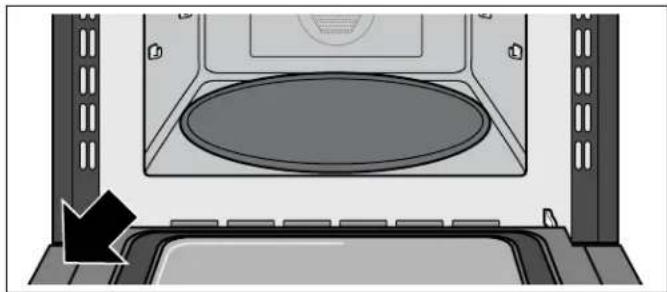
natural_image
Interior view of a microwave oven with a circular vent and airflow arrow indicating direction (no text or symbols)To avoid having to search for each piece of information when calling, you can enter the four items needed in the spaces provided below.
Model No.
FD-No.
Date of Purchase
Customer Service
Keep your invoice or escrow papers for warranty validation if service is needed.
Service
We realize that you have made a considerable investment in your kitchen. We are dedicated to supporting you and your appliance so that you have many years of creative cooking.
Please don't hesitate to contact our Customer Support Department if you have any questions or in the unlikely event that your Bosch® appliance needs service. Our service team is ready to assist you.
USA
800-944-2904
www.bosch-home.com/us/support
Canada
800-944-2904
www.bosch-home.ca/en/support
Parts and Accessories
Parts, filters, descalers, stainless steel cleaners and more can be purchased in the Bosch® eShop or by phone.
USA
www.bosch-home.com/us/store
Canada
Marcone 800-482-6022
or
Reliable Parts 800-941-9217
STATEMENT OF LIMITED PRODUCT WARRANTY
What this Warranty Covers & Who it Applies to
The limited warranty provided by BSH Home Appliances Corporation ("BSH") in this Statement of Limited Product Warranty applies only to the Bosch appliance ("Product") sold to you, the first using purchaser, provided that the Product was purchased:
- For your normal, household (non-commercial) use, and has in fact at all times only been used for normal household purposes.
- New at retail (not a display, "as is", or previously returned model), and not for resale, or commercial use.
- Within the United States or Canada, and has at all times remained within the country of original purchase.
The warranties stated herein apply only to the first purchaser of the Product and are not transferable. Please make sure to return your registration card; while not necessary to effectuate warranty coverage, it is the best way for BSH to notify you in the unlikely event of a safety notice or product recall.
How Long the Warranty Lasts
BSH warrants that the Product is free from defects in materials and workmanship for a period of three hundred sixty-five (365) days from the date of purchase. The foregoing timeline begins to run upon the date of purchase, and shall not be stalled, tolled, extended, or suspended, for any reason whatsoever.
This Product is also warranted to be free from cosmetic defects in material and workmanship (such as scratches of stainless steel, paint/porcelain blemishes, chip, dents, or other damage to the finish of the Product), for a period of thirty (30) days from the date of purchase or closing date for new construction. This cosmetic warranty excludes slight color variations due to inherent differences in painted and porcelain parts, as well as differences caused by kitchen lighting, product location, or other similar factors. This cosmetic warranty specifically excludes any display, floor, "As Is", or "B" stock appliances.
Repair/Replace as Your Exclusive Remedy
During this warranty period, BSH or one of its authorized service providers will repair your Product without charge to you (subject to certain limitations stated herein) if your Product proves to have been manufactured with a defect in materials or workmanship. If reasonable attempts to repair the Product have been made without success, then BSH will replace your Product (upgraded models may be available to you, in BSH's sole discretion, for an additional charge). All removed parts and components shall become the property of BSH at its sole option. All replaced and/or repaired parts shall assume the identity of the original part for purposes of this warranty and this warranty shall not be extended with respect to such parts. BSH's sole liability and responsibility hereunder is to repair manufacturer-defective Product only, using a BSH-authorized service provider during normal business hours. For safety and property damage concerns, BSH highly recommends that you do not attempt to repair the Product yourself, or use an un-authorized servicer; BSH will have no responsibility or liability for repairs or work performed by a non-authorized servicer. If you choose to have someone other than an authorized service provider work on your Product, THIS WARRANTY WILL AUTOMATICALLY BECOME NULL AND VOID. Authorized service providers are those persons or companies that have been specially trained on BSH products, and who possess, in BSH's opinion, a superior reputation for customer service and technical ability (note that they are independent entities and are not agents, partners, affiliates or representatives of BSH). Notwithstanding the foregoing, BSH will not incur any liability, or have responsibility, for the Product if it is located in a remote area (more than 100 miles from an authorized service provider) or is reasonably inaccessible, hazardous, threatening, or treacherous locale, surroundings, or environment; in any such event, if you request, BSH would still pay for labor and parts and ship the parts to the nearest authorized service provider, but you would still be fully liable and responsible for any travel time or other special charges by the service company, assuming they agree to make the service call.
Out of Warranty Product
BSH is under no obligation, at law or otherwise, to provide you with any concessions, including repairs, pro-rates, or Product replacement, once this warranty has expired.
Warranty Exclusions
The warranty coverage described herein excludes all defects or damage that are not the direct fault of BSH, including without limitation, one or more of the following:
- Use of the Product in anything other than its normal, customary and intended manner (including without limitation, any form of commercial use, use or storage of an indoor product outdoors, use of the Product in conjunction with air or water-going vessels).
- Any party's willful misconduct, negligence, misuse, abuse, accidents, neglect, improper operation, failure to maintain, improper or negligent installation, tampering, failure to follow operating instructions, mishandling, unauthorized service (including self-performed "fixing" or exploration of the appliance's internal workings).
- Adjustment, alteration or modification of any kind.
- A failure to comply with any applicable state, local, city, or county electrical, plumbing and/or building codes, regulations, or laws, including failure to install the product in strict conformity with local fire and building codes and regulations.
- Ordinary wear and tear, spills of food, liquid, grease accumulations, or other substances that accumulate on, in, or around the Product.
- Any external, elemental and/or environmental forces and factors, including without limitation, rain, wind, sand, floods, fires, mud slides, freezing temperatures, excessive moisture or extended exposure to humidity, lightning, power surges, structural failures surrounding the appliance, and acts of God.
In no event shall BSH have any liability or responsibility whatsoever for damage to surrounding property, including cabinetry, floors, ceilings, and other structures or objects around the Product. Also excluded from this warranty are Products on which the serial numbers have been altered, defaced, or removed; service visits to teach you how to use the Product, or visits where there is nothing wrong with the Product; correction of installation problems (you are solely responsible for any structure and setting for the Product, including all electrical, plumbing or other connecting facilities, for proper foundation/flooring, and for any alterations including without limitation cabinetry, walls, floors, shelving, etc.); and resetting of breakers or fuses.
TO THE EXTENT ALLOWED BY LAW, THIS WARRANTY SETS OUT YOUR EXCLUSIVE REMEDIES WITH RESPECT TO PRODUCT, WHETHER THE CLAIM ARISES IN CONTRACT OR TORT (INCLUDING STRICT LIABILITY, OR NEGLIGENCE) OR OTHERWISE. THIS WARRANTY IS IN LIEU OF ALL OTHER WARRANTIES, WHETHER EXPRESS OR IMPLIED. ANY WARRANTY IMPLIED BY LAW, WHETHER FOR MERCHANTABILITY OR FITNESS FOR A PARTICULAR PURPOSE, OR OTHERWISE, SHALL BE EFFECTIVE ONLY FOR THE PERIOD THAT THIS EXPRESS LIMITED WARRANTY IS EFFECTIVE. IN NO EVENT WILL THE MANUFACTURER BE LIABLE FOR CONSEQUENTIAL, SPECIAL, INCIDENTAL, INDIRECT, "BUSINESS LOSS", AND/OR PUNITIVE DAMAGES, LOSSES, OR EXPENSES, INCLUDING WITHOUT LIMITATION TIME AWAY FROM WORK, HOTELS AND/ OR RESTAURANT MEALS, REMODELLING EXPENSES IN EXCESS OF DIRECT DAMAGES WHICH ARE DEFINITIVELY CAUSED EXCLUSIVELY BY BSH, OR OTHERWISE. SOME STATES DO NOT ALLOW THE EXCLUSION OR LIMITATION OF INCIDENTAL OR CONSEQUENTIAL DAMAGES, AND SOME STATES DO NOT ALLOW LIMITATIONS ON HOW LONG AN IMPLIED WARRANTY LASTS, SO THE ABOVE LIMITATIONS MAY NOT APPLY TO YOU. THIS WARRANTY GIVES YOU SPECIFIC LEGAL RIGHTS, AND YOU MAY ALSO HAVE OTHER RIGHTS WHICH VARY FROM STATE TO STATE. No attempt to alter, modify or amend this warranty shall be effective unless authorized in writing by an officer of BSH.
Table des Matières
Réglage du mode Convection Broil (Gril Convection) 56
1901 Main Street, Suite 600
Irvine, CA 92614
natural_image
Cross-shaped warning symbol on a glass of liquid, no text or symbols present| Panel Lock(hold 3 sec) | SensorReheat | SensorCook | AutoDefrost | intersector: the888°temp88:0088:00preheating sensing timer64 | Settings | |||||
| SpeedChef | Broil(high/low) | Convection | FrozenFoods | Start/Enter | ||||||
| Popcorn | Pizza | Beverage | 97 | |||||||
| Clock | MoreModes | KitchenTimer(on/off) | PowerLevel | Microwave+30 sec | 0 | +Amount | Clear/Off | |||
Touches
natural_image
Illustration of a microwave oven with a lid above it, showing interior and exterior views (no text or symbols)natural_image
Diagram showing a lathe cooling system with arrows indicating cooling process (no text or symbols)1. Touchez Convection.
Réglage du mode Convection Broil (Gril Convection)
• 1 tasse
- 2 tasses
natural_image
Interior view of a microwave oven with a circular vent and side-mounted dish (no text or symbols visible)www.bosch-home.com/us/support
Canada
800-944-2904
www.bosch-home.ca/en/support
www.bosch-home.com/us/store
Canada
Marcone 800-482-6022
ou
Reliable Parts 800-941-9217
ÉNONCÉ DE LA GARANTIE LIMITÉE
1901 Main Street, Suite 600
Irvine, CA 92614
¿Preguntas?
1-800-944-2904
www.bosch-home.com/us
natural_image
Simple illustration of a glass with a black X mark, no text or symbols present.natural_image
Illustration of a microwave oven with a lid above it (no text or symbols)natural_image
Diagram showing a lathe cooling system with arrows indicating cooling process (no text or symbols)natural_image
Interior view of a microwave oven with a circular vent and side-mounted dish (no text or symbols visible)www.bosch-home.com/us/support
Canadá
800-944-2904
www.bosch-home.ca/en/support
Piezas y accesorios
www.bosch-home.com/us/store
Canadá
Marcone 800-482-6022
O
Reliable Parts 800-941-9217