EasyManual
HNL 9166Z83M - Washing machine HOOVER - Free user manual and instructions
Find the device manual for free HNL 9166Z83M HOOVER in PDF.


Frequently Asked Questions - HNL 9166Z83M HOOVER
User questions about HNL 9166Z83M HOOVER
0 question about this device. Answer the ones you know or ask your own.
Ask a new question about this device
Download the instructions for your Washing machine in PDF format for free! Find your manual HNL 9166Z83M - HOOVER and take your electronic device back in hand. On this page are published all the documents necessary for the use of your device. HNL 9166Z83M by HOOVER.
USER MANUAL HNL 9166Z83M HOOVER
Unpacking the Product 5
Installation 7
Choose a location 7
Electricity supply 8
Water supply 8
Connecting to the cold water supply 9
Connection of the machine to the drain 10
Moving the machine into position 11
Adjusting the feet 11
Testing the installation 12
Washing advice 13
Loading your washing machine. 13
Sorting the laundry 14
The Dispenser 15
Detergent dosage 15
Dispensing instructions 16
Using Inter@ct 3D for the first time. 17
The Control Panel 20
Wash Options 23
Automatic Features 28
Programme Selector 29
Special Programmes. 30
Daily Programmes 31
Programme Guide 32
A Typical Wash 33
Selecting the wash programme 34
Starting the wash cycle 34
Cleaning and Routine Maintenance 35
Troubleshooting 37
Power Failure 39
Introduction
Please read and follow these instructions carefully and operate the machine accordingly. This booklet provides important guidelines for safe use, installation, maintenance and some useful advice for best results when using your machine.
Keep all documentation in a safe place for future reference or for any future owners.
Delivery information
Please check that the following items are delivered with the appliance:
Instruction manual
Guarantee card
- Blanking plug
Inlet hose & hooked end support (see Unpacking and Installation Instructions)
-Base panel & x2 push clips
Energy Label
Do's
All packaging materials used are environmentally-friendly and recyclable. Please help dispose of the packaging via environmentally-friendly means. Your local council will be able to give you details of current means of disposal.
To ensure safety when disposing of an old washing machine disconnect the mains plug from the socket, cut the mains power cable and destroy this together with the plug. To prevent children shutting themselves in the machine break the door hinges or the door lock.
This machine is solely for domestic use, i.e. to wash, rinse and spin dry household textiles and garments.
Check that no damage has occurred to the machine during transit. If it has, call for service by GIAS.
If the appliance is not running properly or breaks down, switch it off, disconnect the plug from the socket, turn off the water supply and do not tamper with the appliance. Consult GIAS Service for possible repair.
Failure to comply with the above can compromise the safety of the appliance. You may be charged for a service call if a problem with your machine is caused by misuse.
Don'ts
Do not touch the appliance when hands or feet are damp or wet.
Do not lean on the door when loading the machine or use the door to lift or move the machine.
Do not use adapters, multiple connectors and/or extensions.
Do not allow children to play with the machine or its controls.
Do not try to open the door when water is visible in the drum, when the wash programme is in progress or when the DOOR LOCKED (DEUR OP SLOT) message appears on the display.
European directive 2002/96/EC
This appliance is marked according to the European directive 2002/96/EC on Waste Electrical and Electronic Equipment (WEEE).
By ensuring this product is disposed of correctly, you will help prevent potential negative consequences for the environment and human health, which could otherwise be caused by inappropriate waste handling of this product.
The symbol on the product indicates that this product may not be treated as household waste. Instead it shall be handed over to the applicable collection point for the recycling of electrical and electronic equipment
Disposal must be carried out in accordance with local environmental regulations for waste disposal.
For more detailed information about treatment, recovery and recycling of this product, please contact your local city office, your household waste disposal service or the shop where you purchased the product.
Unpacking the product
Remove the machine from its packaging close to the final location of the machine.
- Cut carefully around the base of the packaging.
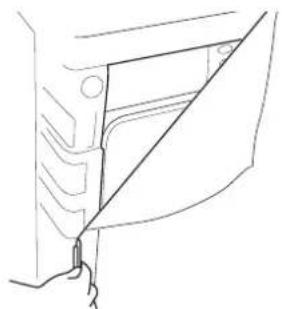
- Lay the machine on its back and remove the base and the two polystyrene spacers on each side of the machine. We recommend that a second person assist in the lifting and manoeuvring of the machine.
Dispose of the packaging safely.
Make sure it is out of the reach of children, it is a potential source of danger.
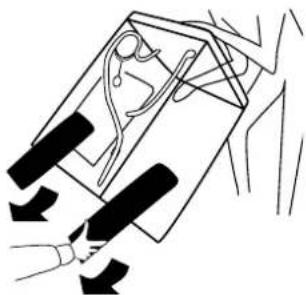
- Return the machine to the upright position, remove the remainder of the packaging and the central screw in the transit bar.
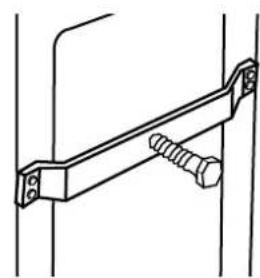
- Remove the four retaining screws in the transit bar and pull out the transit bracket.
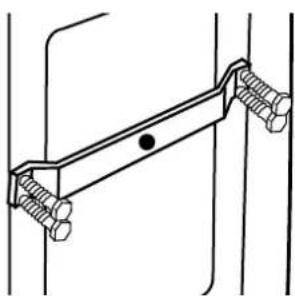
We recommend you keep the transit bracket and screws to protect the machine for future transit. The manufacturers will not be responsible for any damage to the machine caused by not following the instructions relating to releasing the transit protection. The user is responsible for all installation costs.
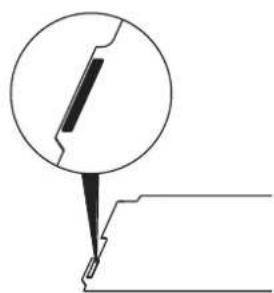
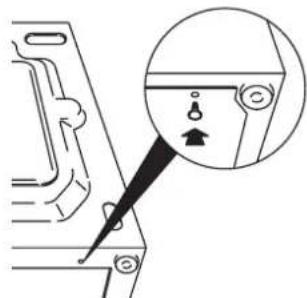
- Take the base panel provided and fit the two self adhesive strips by removing the backing paper on one side and locating the strips on each side of the base panel.
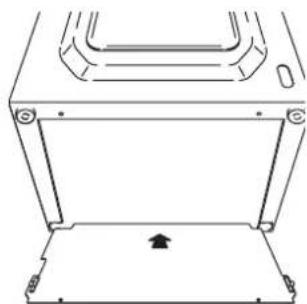
- Tilt the machine forward and locate the base panel under the front of the machine. Remove the remaining backing paper from the self-adhesive strips and offer up the base panel to the bottom of the cabinet.
-
Take the two plastic fixing clips and fix the base panel to the base of the machine. Bring the machine back to the upright position.
-
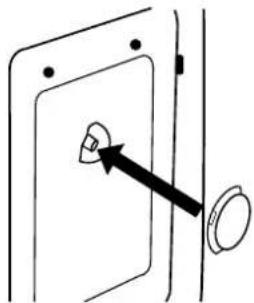
Cover the central hole in the rear of the machine with the cap enclosed in the instruction bag.
Installation
Choose a location
After the machine has been installed, ensure that the mains plug and water supply valves are easily accessible.
Make sure there is enough space for the machine. Select a space at least 600mm wide and 850mm high. Also leave enough space to open the door fully so you can load and unload it easily.
- Keep the area underneath and around the machine free of combustible materials such as lint, paper, rags, chemicals etc.
Do not plug the machine in and switch it on at the mains until the installation is completed.
You may be charged for a service call if a problem with your machine is caused by incorrect installation.
If the mains cord on this appliance is damaged, it must be replaced by a special cord which is ONLY obtainable from the GIAS spares service. It must be installed by a competent person.
Electricity supply
Washing machines are supplied to operate at a voltage of 230V 50 Hz single phase. Check that the supply circuit is rated to at least 10A.
Electricity can be extremely dangerous.
This washing machine must be earthed.
The socket outlet and the plug on the appliance must be of the same type.
Do not use multiple adapters and/or extension leads.
The wires in the mains lead are coloured in accordance with the following codes:
Blue NEUTRAL
Brown LIVE
Green and Yellow EARTH
CE Appliance complies with European Directive 89/336/EEC, 73/23/EEC and subsequent amendments.
Water supply
The cold water pressure should be between 0.05-0.8 Mpa.
Do not connect the machine to a single outlet instantaneous water heater.
The water supply tap should be accessible when the machine is installed.
Before connecting the fill hose, check that the water is running from the water supply tap to be used.
Connecting to the cold water supply
This machine has an inlet hose with a 19mm (3/4") threaded ferrule fitted to the end, to attach between the threaded connector on the appliance and the water supply.
Only use the new hose supplied to connect the machine and ensure that the sealing washers are in place inside the hose connectors.
Do not re-use old hoses which are attached to existing installations.
Do not over-tighten the connections. Hand tight is sufficient.
Do not trap or kink the hose.
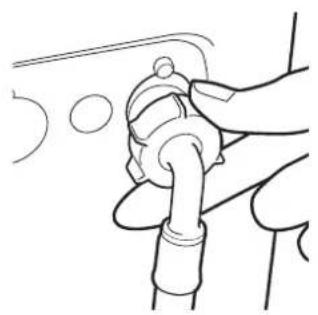
- Connect the elbow end of the hose provided to the threaded inlet on the back of the machine.
Grey pipe to the white threaded inlet on the machine. - Hand tighten the connector.
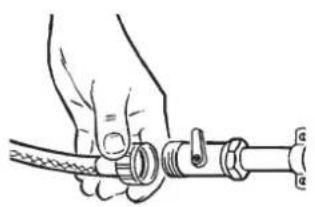
- Connect the straight ends of the pipes to the water supply; ensure that there are no kinks.
- Turn on the water supply and check for leaks. If there is a leak, turn off the water supply, disconnect the hose and check the sealing washers are in place. Refit the hose and turn on the water supply.
Aqua-stop
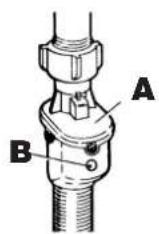
Certain models will be supplied with a special hose that has a double skin and incorporates a water valve (A). If the inner hose bursts the valve will automatically shut off the water supply to prevent flooding. The indicator turns red (B). Should this happen, turn off the water supply immediately and obtain a replacement hose from GIAS Service.
The installation is the same as a conventional hose with the valve end of the aqua-stop hose fitted to the water supply.
Connection of the machine to the drain
This machine must be connected in accordance with the water supply regulations. Water byelaws prohibit connection to a surface water drain.
Decide which plumbing option suits you best then follow the instructions below.
All machines are tested with water prior to leaving the factory so a small amount of water may remain in the drum and drain hose.
Flooding could occur if any part of the installation is not completed correctly.
Option 1
Waste pipe connection (waste trap)
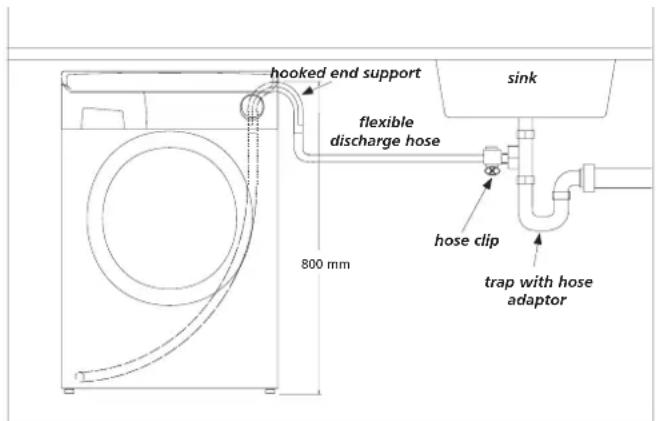
Fit the hooked end support to the outlet pipe. Position at least 800mm off the floor.
After removing the blanking plug or cutting the membrane from the waste system securely fix the outlet pipe to the drainage system, using a hose clip.
Secure the hooked end support up to at least 800mm to avoid water being drawn back into the machine.
Option 2
Into a standpipe
Ensure that the standpipe is not located near an electrical socket.
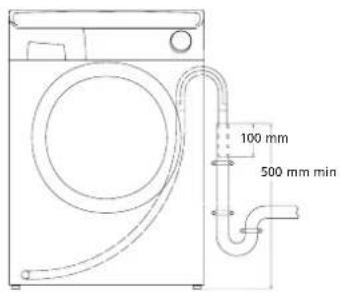
Fit the hooked end support to the outlet pipe. Install the hose into the standpipe ensuring that the pipe is at least 500mm from the floor. Insert the outlet pipe approximately 100mm into the standpipe.
Moving the machine into position
Your machine is heavy so care must be taken when moving it. We recommend that two people move the machine to avoid strain and possible injury.
Take care not to damage flooring when moving the machine.
- When moving the machine to its final position take care not to kink or damage the hose at the back of the machine.
Do not drag or lift the machine by its door.
Adjusting the feet
Once the machine is in place the feet should be adjusted to ensure that the machine is level. If the machine is not level it may become noisy or move.
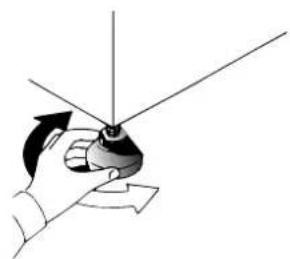
Adjust the feet on the front corners of the machine until the machine is firm and level. When the machine is firm and level, tighten the locking nuts on the two feet.
Testing the installation
Refer to 'Selecting the wash programme' for details of how to select programmes.
- Turn on the water supply and check for leaks from the fill hose.
- Switch on the electricity supply.
- Select the spin programme and then press the button to start the machine. Allow the programme to continue for one minute and then cancel the programme by returning the selector to the OFF position. This will remove any water remaining in the machine from factory testing.
- To check for cold water filling to the machine:
Select the rinse programme and press the button to start the machine.
Allow the tumble action to continue until the water has pumped out. Check that the drain outlet is not leaking or overflowing.
- Switch off the machine at the end of the cycle by turning the programme knob to the OFF position.
- Select the spin programme and press the button to start the machine. If the machine takes longer than one minute to empty check the drain hose for kinks.
Installation testing is now complete.
This programme will take approximately 2 hours to complete.
Now you have successfully installed the machine we advise that you run the machine to ensure the drum is thoroughly clean after testing and storage. Select Cottons 90 and run the machine for a complete cycle using only wash detergent and water.
Washing advice
The following tips are designed to assist in getting the best results from your machine whilst using it in the most environmentally-friendly and economical way. It is also important to understand the items to avoid in your laundry, to ensure the continued safe and reliable operation of your machine.
Loading your washing machine
To make further reductions of energy, water and detergent consumption, we recommend that you put a full load into your machine. Energy savings of up to 50% can be achieved by washing one full load compared to two half loads.
Do not overload the machine as this will reduce the quality of the wash and may cause damage to the machine and your laundry.
When is prewashing really needed?
Only with particularly dirty loads! Energy savings of 5 to 15% are made by not selecting the prewash option for less dirty laundry. Pre-treat awkward stains with a washable stain remover.
Which wash temperature should you choose?
Using stain removers before machine washing reduces the need to wash at temperatures over 60^ .
Using a 40^ wash temperature can make energy savings of up to 50% .
Heavily soiled laundry
To ensure the best performance when washing a particularly dirty load, we recommend that you reduce the amount of items to be put into the machine. Allowing more space in the drum the
items can circulate more freely and will wash better.
Sorting the laundry
Items to avoid
Do not use the machine to wash items that do not have a wash label.
We recommend that you do not wash underwired bras in the machine. Should the wires become detached they could cause damage to your clothes and the machine. If the washcare label states that the bra is machine washable then we advise placing it in a wash bag.
Recommendations
Always follow the wash care labelling on the garments.
Do not wash items previously treated with solvents.
Fasten zips, tie strings and close press studs to prevent tangling. Ensure that pockets are emptied of loose change and other small items.
Check that there are no metal objects in the laundry as these may damage the laundry and the machine.
Place small items in a wash bag.
The Dispenser
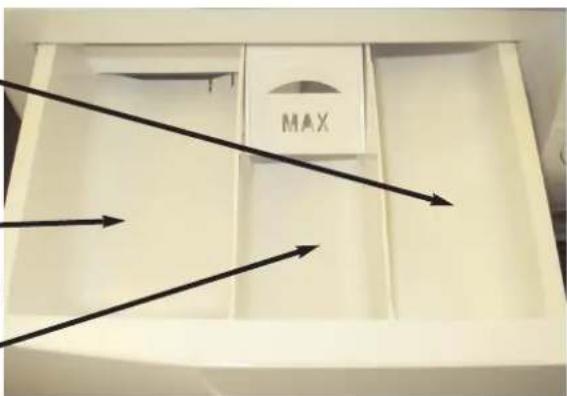
COMPARTMENTI
Prewash detergent
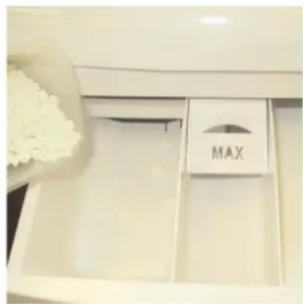
Maximum dosage
100ml of powder
COMPARTMENT II
Mainwash detergent
Maximum dosage
200ml of powder
COMPARTMENT
Fabric Conditioner
Maximum dosage 200ml
Detergent dosage
Only use detergents which are suitable for use in a washing machine. You will obtain the best results from your wash with the minimum use of chemical products, and the best care for your laundry if you take into consideration the degree of soiling as well as the type of detergent to choose.
The amount of detergent to use depends on:
Water hardness.
Depending on the hardness of the water and the type of detergent used, it is possible to reduce the amount of detergent.
The softer the water supply, the less detergent is required.
The degree of soiling.
It is possible to reduce the amount of detergent used depending on the degree of soiling.
Use less detergent for less soiled items.
Amount of laundry.
It is possible to reduce the amount of detergent when washing only a small amount of laundry.
For smaller loads use less detergent.
The dosages shown on the packaging of detergents for washing delicates often already refer to a reduced wash size. Always follow the dosage instructions on the detergent packaging.
DO NOT exceed the maximum detergent dosage
Do not put any items into the drawer other than detergents that are designed to be dispensed from the drawer as they may cause blockage or damage.
Dispensing instructions
The detergent drawer is split into 3 compartments:
the left-hand compartment, labelled "II", is for detergent used during the main wash.
the centre compartment, labelled for special additives such as fabric softeners, fragrances, starch, brighteners etc.
the right-hand compartment, labelled "I", is for detergent used during Prewash.
Dispensing in the drum
Liquid detergents and some tablets are dispensed via the machine drum using the recommended dispensing device which is placed upright on top of the washload towards the back of the drum. Some tablets are designed to be placed in the dispenser drawer, check the detergent pack for details.
Using Inter@ct 3D for the first time
This machine will operate even if you do not programme the Inter@ct set-up. However, this machine has Start Delay and Programme Set End Time functions and for these functions to work efficiently the Inter@ct 3D must be programmed. This is a simple operation and special care has been taken during manufacture to ensure that the user can operate this machine simply and effectively.
Programming the machine
Inter@ct needs to be programmed so that the correct clock setting, language and personal requirements are set. When the machine is turned on and the programme dial is moved away from the OFF position to a programme selection, a welcome message will appear:
| 00 | WELCOME! 8:00 | 00 |
This message is displayed for a short time while the machine recognises which programme has been selected. When the machine is ready, the programme details will appear on the display and from here you may now begin programming the machine.
Example
| 11 | WITTE WAS STERK VERVUILD | 90 |
| Spin Speed x100 | Programme selected | Temperature (℃) |
Please note that when using the Inter@ct menu you have 30 seconds per operation to make your selection. Should you run out of time, the display will
return to the start screen, and you simply have to re-enter the Inter@ct menu and continue with the programming.
To enter the menu
Hold down the and the buttons together for 5 seconds or until the beep sounds.
The menu options can be changed by pressing the button. To confirm and enter an option press the button.
ADOPT LANGUAGE (default setting - DUTCH)
Your washing machine is automatically set to Dutch. If you require another language you have the option to change it within this set-up menu. Press to change the language, keep pressing the button until the desired language is indicated. Press to confirm your selection. When you have entered your chosen language, the display will then ask you to Set the Time.
SET NEW TIME
This function needs to be set for two reasons, firstly to display the current time of day on the screen and secondly for the Programme Set End Time/Start Delay settings to work correctly.
| STEL TIOD IN 0:08 |
You will notice in the display window that the hours on the clock will be flashing. To set the hours you must press the button until the required figure is displayed. Then press the button to enter the chosen figure. Now the minutes on the clock will begin to flash. Again, press the button until the required minutes are displayed and press to input the selection. When you have set the time, the display will ask if you wish to Set the Time Mode.
SET TIME MODE (default setting - ABSOLUUT)
The Set Time Mode allows you choose how you wish the Programme Set End Time and Start Delay functions to be controlled.
You will be presented with two options. The first, called Absolute Time Mode (ABSOLUUT), allows you to set the actual time you want the programme to begin or end, e.g. Programme to start/end at 08:00. The second, called Relative Time Mode (RELATIEF), allows you to delay the start or end of your wash cycle by adding hours to the current time displayed on the clock, e.g. Programme to start/end in 4 hours 30 minutes.
You can select which option you require by pressing the button until your preferred option is displayed, and then pressing the button to accept the option you have chosen.
Both options are very useful, but Absolute Time Mode is easier to use since there is no need for you to calculate how many hours to leave before you want the machine to end or start your chosen cycle.
When you have entered your preferred Time Mode the display will then ask for Enable Final Beeping to be set.
SET FINAL BEEP (default setting - JA)
Here you have the option to have a beeping alarm to let you know the wash cycle has finished. By pressing the button you can scroll through the YES (JA) and NO (NEE) options.
To confirm your selection press the button. The screen will then move to the next stage and ask you if you wish to Enable Memory.
ENABLE MEMORY? (default setting - NEE)
This is a useful feature if you frequently wash laundry using the same programme. SelectING ENABLE MEMORY? will tell the machine to remember the last programme/functions used and set them in the memory. This feature works only on the Cottons, Delicates, Synthetics and Woollens programmes. The memory does not retain settings within the Special Programmes group. Select JA or NEE by using the button and confirm your selection by pressing the button.
SET DEMO MODE? (default setting - NEE)
The display will now show a message asking if you require the demo mode to be set. Please set this option to NEE if this has not already been done. This function is for SERVICE use only. If the demo mode option is set to JA, the wash programme WILL NOT commence when you exit the Inter@ct 3D menu. The Demo Mode must be set to NEE for the wash cycle to commence. Select NEE using the button and confirm your choice with the button. You will then be asked if you wish to Exit the Menu.
EXIT MENU?
If you are happy with the settings you have selected, you can now exit the menu by selecting JA via the button and confirm this selection using the button. However, if you are not happy with some of the settings selected you must select NEE and you can then start programming again from the beginning. By pressing the button you can enter and bypass each option individually until you reach the option you would like to change.
When you are completely satisfied with the menu options you have selected, you may exit the menu. Testing of the installation may now start. If you wish to change any of the menu settings at a later date, you can enter the menu as
previously described, run through the menu options from the beginning and change whichever options you wish. This may be useful for changing Set New Time when Daylight Saving starts or ends.
Once set, the menu options will remain in the memory of the machine even if the machine is unplugged or there is a power cut.
The Control Panel
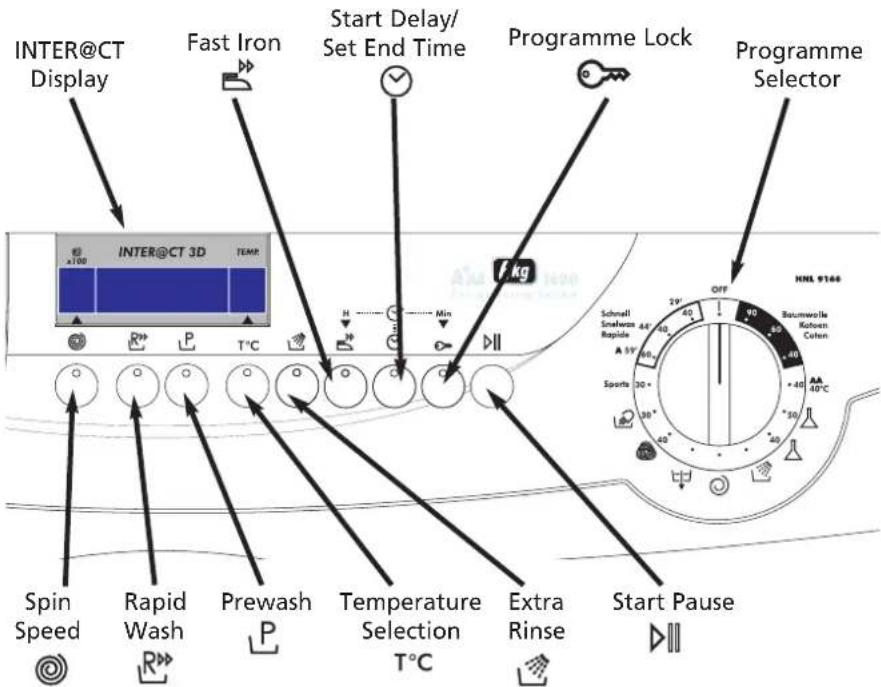
The programme selector must be returned to the OFF position to reset the controls between each wash cycle.
Turning the machine on
Turn the machine on by selecting a programme using the programme selector. The display will then indicate the name of the programme, the spin speed and temperature of the wash and this display will remain until you press the button or return the programme selector to the OFF position.
| 11 | WITTE WAS STERK VERVUILD | 90 |
Start/Pause (D)
Start
After selecting the programme and the required options (see the Wash Options section of this manual), press the button once to start the wash cycle. The display will indicate that the door is locked and the machine will begin to sense the wash load and ask you to wait.
| 11 | WACHTHEN AUB STEL PARAMETER | 90 |
After the appropriate parameters have been programmed by the machine the display will indicate the approximate time until the end of the programme. This calculation is based on a full load and will be adjusted to suit the size and composition of the load as the machine progresses through the wash cycle.
| 11 | EINDE: 2H 45M WASSEN | 90 |
Pause
The programme may be paused at any time during the wash cycle by holding down the button for about three seconds. When the machine is in the paused mode the following display will appear:
11
PAUZE DEUR OP SLOT
90
After about two minutes the display will then change to the following, which means that the door can now be opened:
11 11
PAUZE DEUR OPEN
90
To restart the programme, close the door and press the button.
Cancelling and changing the programme
To cancel the programme the programme selector should be turned to the OFF position. In this mode the display will go blank because the machine is now OFF. When a new programme is selected the display will indicate that the programme has been cancelled as follows:
11
PROG. GESTOPT
90
To start another wash cycle the programme selector must be returned to OFF once again BEFORE the next programme can be selected and started.
Wash Options
The following options should be selected BEFORE pressing the button. The light on each option button will come on if the option has been selected.
Spin Speed Selection ( )
By pressing the option button it is possible to reduce the maximum spin speed of your selected programme to suit your needs and to help reduce any creasing of fabrics. The maximum spin speed will vary depending on the specification of the machine.
11
WITTE WAS STERK UERUILD
80

Spin Speed ÷ 100 rpm; so in this example 11 = 1100 rpm
The light on the option button will come on if a spin speed lower than that stated in the programme guide has been selected.
Rapid Wash (R)
This option can be used on the Cottons and Synthetics (J) programmes. By selecting the R_p option, the wash time can be reduced by up to 50 minutes, depending on the selected programme, temperature and load, without affecting the quality of the wash.
Prewash (P)
This option is available on the Cottons and Synthetics (A) programmes. P is set automatically on the Sports programme. This option is particularly useful for heavily soiled loads and can be used independently of the main wash programme. Detergent for this programme should be added to the first compartment of the soap drawer labelled "I" (please refer to The Dispenser section of this manual). We recommend you use only 20% of the quantity used for the main wash programme.
Temperature Selection (T^)
This washing machine is equipped with a variable temperature function. Each press of the T^ button reduces the temperature of the wash. Greater energy savings can be achieved by setting the temperature between 15^ and 40^ . By setting the temperature to 15^ the wash temperature is equivalent to the water inlet temperature, thus reducing energy consumption further.
We recommend that the temperature shown on wash care garments should never be exceeded. The machine will not accept a temperature input that is higher than that stated in the programme guide.
11
The light on the option button will come on if a temperature lower than that stated in the programme guide has been selected.
ExtraRinse()
This option is available on the Cottons programmes and it increases the number of rinses to five (including the final conditioned rinse). This can help prevent skin irritation from detergent residue, which can affect people with particularly sensitive skin. Selecting the button is also recommended when washing heavily soiled fabrics which need a lot of detergent, or when the wash load contains towelling fabrics that have a greater tendency to retain detergent.
Fast Iron (
This option is only available on the Synthetics, Acrylics, Woolmark and Silk programmes.
| Programme | Fast Iron function | Action required to complete the cycle |
| Synthetics (50) | The programme is completed by a short spin, of very low speed. | To select a full spin cycle please turn the dial to the required spin programme (see Programme Guide). |
| Acrylics (40) | The machine stops in the final rinse stage and the option indicators blink. The load is held in the water in the drum, thus reducing creasing and enabling easier ironing. | Press the button to continue with the programme. The machine will then pump out the water and the programme will conclude with a short spin. Finally, the programme carries out a brief tumbling action to loosen the items in the load. |
| Woolmark ( ) | The machine stops in the final rinse stage and the option indicators blink. The load is held in the water in the drum, thus reducing creasing and enabling easier ironing. | Press the button and the machine will pump out the water and complete the cycle with a short spin. |
| Silk ( ) | The machine stops in the final rinse stage and the option indicators blink. The load is held in the water in the drum, thus reducing creasing and enabling easier ironing. | Press the button and the machine will pump out the water to complete the cycle. The load will not be spun and will therefore be very wet. |
Start Delay ()
The Programme Set End Time/Start Delay options can be used if you want the washing to be ready at a later time (but within 24 hours). The way these buttons function will depend on which Time Mode you have selected in the Inter@ct menu.
1. Set Start Delay
Press the button once and press the hours and minutes buttons (and) until the required time is set. The display returns to the programme option if you do not start to set the time within 5 seconds. Once you have set the required Start Delay, press the button.
If the Absolute Time Mode has been selected at the menu set-up stage and you wish to delay the start of the programme until 08.00, the display will appear as follows:
| PROG. START OP 08:00 |
If the Relative Time Mode has been selected at the menu set-up stage and you wish to delay the start of the programme by 4 hours 30 minutes, the display will appear as follows:
| STARTUITSTEL OVER 4H 30M |
2. Programme Set End Time
Press the button twice and press the hours and minutes buttons (and) until the required time is set. When you are entering the Set End Time option, the display will automatically show the earlier time at which the programme can end. This time may only be extended as you require.
If the Absolute Time Mode has been selected at the menu set-up stage and you wish to delay the end of the programme until 08.00, the display will appear as follows:
| PROGR. EINDE OP 08:00 |
If the Relative Time Mode has been selected at the menu set-up stage and you wish to delay the end of the programme by 4 hours 30 minutes, the display will appear as follows:
| UITSTE L EINDE OVER 4H 30N |
These options can be cancelled at any stage after they have been set by pressing the button for five seconds. The indicator light will go out and the buzzer will sound.
When using the Start Delay/Set End Time functions, detergents must only be put in the dispenser drawer. Adding detergents etc. to the drum and then leaving them to stand for a long period of time may damage your laundry.
Programme Lock (
This is a useful feature to prevent children playing with the option buttons and tampering with the programme you have set. After you have set the programme and option buttons you require, press the button. Press the button in order to lock the control panel.
| BEVEILIGD ONGEUIJZIGD |
You may cancel this function by pressing the button briefly until you see the light above the button flash. While this light is flashing, press the button - the display will inform you that the options are no longer locked and further changes can now be made.
| PROG.VAN.SLOT WJZIG.OKAY |
Automatic Features
Automatic Variable Capacity (Half Load)
The washing machine is fitted with a self adjusting water level system. This system enables the machine to use the optimum amount of water needed to wash and rinse the laundry in relation to the particular load. This results in a reduction of the water and electricity used without in any way compromising the washing and rinsing performance. The amount of water and electricity used will always be appropriate for the clothes load.
The washing machine automatically ensures excellent washing results at minimum cost whilst respecting the environment.
Out of Balance protection
This model is fitted with an electronic sensor device that checks if the load is balanced correctly. If the load is slightly unbalanced the machine will re-balance it automatically to then carry out the normal spin.
If, after several attempts, balance is not restored a reduced spin speed will be used.
If loads are seriously unbalanced the spin stage will be cancelled. This helps limit vibration, reduce noise and improve the washing machine's reliability and life.
Programme Selector
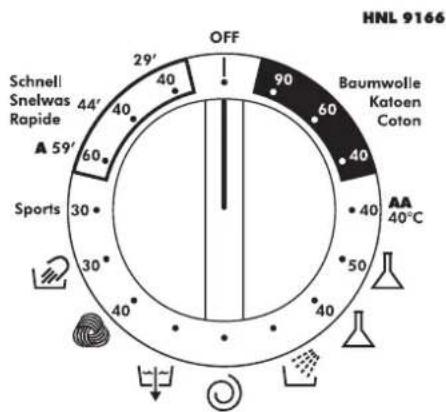
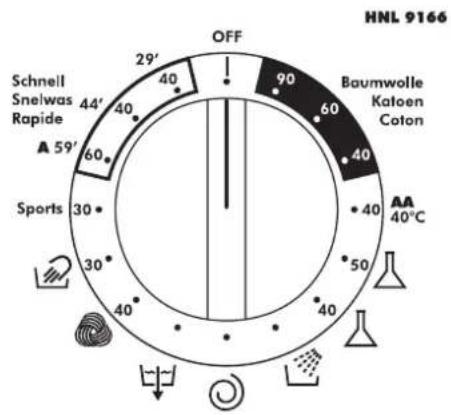
For handling the various types of fabric and their level of soiling in your laundry the washing machine has different programme groups according to type of wash, temperature, spin speeds and duration (see Programme Guide).
Cottons
The Cottons programmes are designed for maximum washing and rinsing. With spin cycles in between, they guarantee the laundry is rinsed perfectly. The final spin cycle ensures laundry is spun dry as much as possible up to the maximum speed.
Synthetics and mixed fabrics
Washing and rinsing performance is optimised through drum rotation speeds and water levels. The delicate spin action minimises creasing.
Delicates
This is a new concept in washing, with a cycle that consists of alternate periods of activity and pauses, particularly suitable for washing very delicate fabrics. Washing and rinsing are carried out using a high water level to provide the best results.
Rinse, Spin and Drain

Individual programmes are available for rinsing, (including the opportunity to add fabric conditioner), spinning, at 800rpm or less if selected via the button, and draining the water from the machine.
Special Programmes
Woolmark (
This is a programme dedicated to washing fabrics labelled with the woolmark symbol. The cycle consists of alternate periods of activity and pauses. Washing and rinsing are carried out using a high water level to provide the best results. The programme has a maximum temperature of 30^ and concludes with 3 rinses, one for fabric conditioner, and a short spin.
Silk (2)
This washing machine also has a gentle Silk and Hand Wash programme. This programme allows a complete washing cycle for garments specified as "Hand Wash only" and laundry items made from silk or specified "Wash as silk" on the fabric label. The programme has a maximum temperature of 30^ and concludes with 3 rinses, one for fabric conditioner, and no final spin.
Sports
This washing machine has a unique Sportswear programme.
It is specially designed to wash mixed sportswear fabrics that cannot be washed on hotter programmes and is designed to remove the soiling and staining created by participation in sports activities.
This programme starts with a cold prewash that breaks down and loosens any excess dirt and then washes at a cool 30^ , rinses twice (one is for fabric conditioner) and spins slowly for the best care of your heavily soiled, delicate garments.
Detergent for the prewash part of the programme should be added to compartment I and detergent for the mainwash should be added to compartment II. Follow the instructions given in 'The Dispenser' section.
59'CLASS A
This specially designed programme maintains the high quality wash performance identified with the 'A' rating whilst greatly reducing the wash time.
The programme is designed for a maximum load of
3kg and is intended for cotton fabrics and items colourfast to 60^ . The programme concludes with
2 rinses and a high speed spin sequence.
Daily Programmes
By maintaining exceptional washing performance, these programmes allow you to know in advance the necessary time for your everyday laundry. In fact, this washing machine is equipped with two daily rapid programmes at 40^ , that were designed for lightly soiled fabrics and medium or small loads.
DAILY FAST 44
A complete washing cycle (wash, rinse and spin), able to wash in approximately 44 minutes suitable for:
a maximum load of 3 kgs
-lightly soiled fabrics (cotton and mixed fabrics)
With this programme we recommend that you reduce the detergent loading dose (compared to the normal one), in order to avoid detergent waste.
DAILY FAST 29
A complete washing cycle (wash, rinse and spin), able to wash in approximately 29 minutes suitable for:
a maximum load of 2 kgs
-lightly soiled fabrics (cotton and mixed fabrics)
With this programme we recommend that you reduce the detergent loading dose (compared to the normal one), in order to avoid detergent waste.
Programme Guide
Energy label data based on Cotton 60 programme tested in accordance with CENELEC EN60456
| RimMixprogramme | Fabric Type | Maximum Load Size (kg) | Maximum Water Temp (°C) | ||
| CottonsSynthetic RIMx | 90 | Cotton 90 | Cottons, linen | 6 | 90 |
| 60 | Cotton 60 | Cotton, colourfast mixed fibres | 6 | 60 | |
| 40 | Cotton 40 | Cottons, mixed fabrics, Coloureds Non-fast | 6 | 40 | |
| Fabrics | 40 | AA 40°C | Cottons, mixed fabrics and synthetics | 6 | 40 |
| 50 | 50 | Mixed fabrics and synthetics | 2 | 50 | |
| Delicates | 40 | 40 | Synthetics, acrylics and coloured mixed fabrics | 2 | 40 |
| Special Programmes | Rinse | Mixed Fabrics | - | - | |
| Spin | Mixed Fabrics. Spin speed of 800 rpm max. | - | - | ||
| Drain | Mixed Fabrics | - | - | ||
| 40 | Machine washable wool | 1 | 40 | ||
| 30 | Silks and 'Hand Wash only' garments | 1.5 | 30 | ||
| 30 | Sports | Mixed fabrics | 2.5 | 30 | |
| 60 | 59' Class A | Cotton, colourfast mixed fibres | 3 | 60 | |
| 40 | Daily Fast 44' | Lightly soiled cottons and mixed fabrics | 3 | 40 | |
| 40 | Daily Fast 29' | Lightly soiled cottons and mixed fabrics | 2 | 40 | |
A Typical Wash
This section summarises the main points when completing a wash cycle. For detailed explanations of features, options and details of the machine refer to the relevant section in the instruction manual.
Preparing the laundry
Select and sort the laundry according to the wash care labels found on each garment. Always check the care labels.
Loading the laundry
Open the door.
Put the laundry in the washing machine. Close the door by pushing it until it clicks, ensuring that no items of laundry are obstructing the lock or door seal.
Putting detergent in machine
Open the drawer, choose the detergent and put in the recommended amount.
Do not exceed the dosage stated below
Close the drawer again.
Liquid detergents and some concentrated powders and tablets that are to be placed directly into the drum should be placed in the recommended dispensing device.
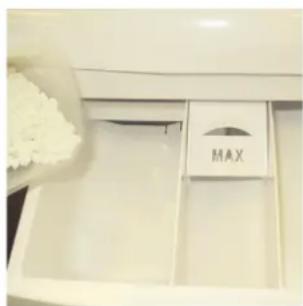
| Compartment | Wash | Maximum quantity of powder/liquid |
| Ⅰ | Prewash (option) | 100ml |
| Ⅱ | Main Wash (all programmes) | 200ml |
| ※ | Fabric Conditioner | 200ml |
Selecting the wash programme
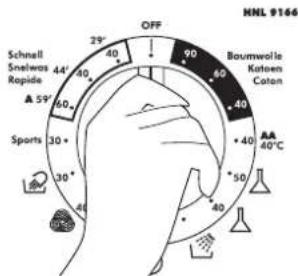
Refer to the Programme Guide or the programme descriptions on the front of the machine to select the most suitable programme.
The programme is selected by turning the programme selector and aligning the programme name with the indicator.
The programme will be displayed on the Inter@ct 3D screen, along with the standard spin speed and the wash temperature for the selected programme.
Check that the tap is turned on and that the discharge hose is positioned correctly.
Select the required wash options, including the spin speed and wash temperature if you wish to change these from the standard settings.
Starting the wash cycle
Press the button. The Inter@ct 3D screen will indicate that the machine is setting the wash parameters and then after a few seconds the wash programme will begin. The display will then indicate the time to the end of the cycle and the current phase of the cycle (i.e. washing, rinsing or spinning).
Do not try to open the door when the washing programme is in progress. The screen will indicate when the door can be opened.
Do not open the dispenser drawer during the wash programme.
If you wish to pause the programme press the button; after two minutes you will be able to open the door. To cancel the programme please refer to the 'Cancelling and changing the programme' section of this manual.
When the programme has finished
Wait approximately two minutes for the door lock to be released. When the Inter@ct display indicates DOOR OPEN (DEUR OPEN) it will then be safe to open the door.
Switch off the machine by turning the programme selector to the OFF position so that it will be ready the next time you use the machine (this action resets the memory in the machine).
Open the door and remove the laundry.
Disconnect the plug from the mains power supply and turn off the water supply every time you finish using it.
Cleaning and Routine Maintenance
The washing machine needs very little maintenance, but regular attention to a few small details will ensure the continued performance of your washing machine.
Do not use abrasive cleaners, scouring pads, solvent based cleaners or polishes; wiping the outside of the machine with a damp cloth will suffice.
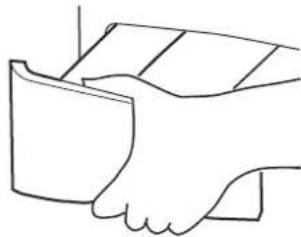
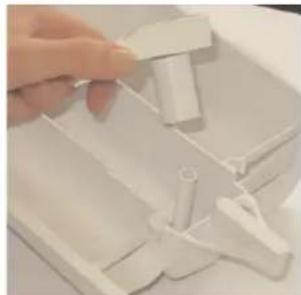
Cleaning the soap dispenser
- Clean the compartments occasionally to remove detergents and additives.
- To do this you just need to pull the drawer out firmly from the machine, but without forcing it.
- Clean the compartments and the syphon cover under warm running water.
- Clean the soap dispenser housing to remove any residue of soap powder
- Replace the drawer.
Cleaning the door glass
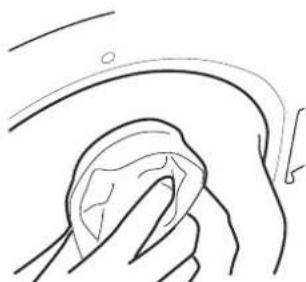
Regularly clean the door glass with a damp cloth. A build up of soiling and residues from the water may result in water leaking from the door.
Do not use abrasive cleaners as they can scratch the surface.
Cleaning the filter
The washing machine is fitted with a special filter to prevent items such as coins, buttons, etc. blocking the discharge hose. These may be retrieved by:
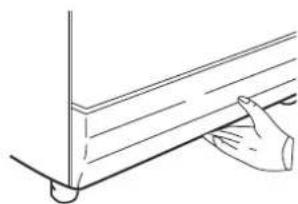
- Removing the kickplate by gently pulling it from the bottom in an outwards and upwards direction.
- Use the kickplate to collect the water still in the filter.
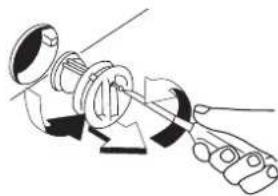
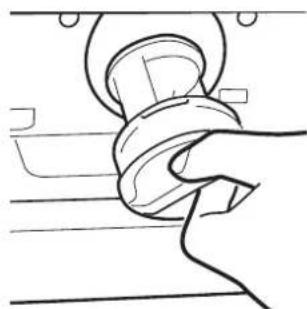
- Use a screwdriver to loosen the screw holding the filter, turn the filter anticlockwise until it stops, remove it and clean it. After cleaning it, reassemble following the above instructions in reverse order.
Replace the kickplate.
We recommend that the filter be cleaned frequently, at least once a month.
Maintenance wash
Using small quantities of detergent and low temperature wash programmes can cause the gradual build up of grease, dirt and scale. Over time these deposits can damage your laundry and your machine. They can also cause your machine to smell. We recommend that you carry out a maintenance wash a couple of times per year to keep your machine and pipe work clean and free of these deposits. Simply run the Cottons 90 programme without a load and with the normal quantity of detergent.
This wash will take approximately 2 hours to complete.
Troubleshooting
What might be the cause of...
Defects you can remedy yourself
Before calling GIAS Service for technical advice please run through the following checklist. A charge will be made if the machine is found to be working or has been installed incorrectly or used incorrectly. If the problem persists after completing the recommended checks, please call GIAS Service, they may be able to assist you over the telephone.
The machine will not start...
- Close the door. Check that there is power to the machine. Select a programme and press . Check if the DOOR LOCKED (DEUR OP SLOT) message is displayed.
If it is not, check the following:
- Is the machine connected to the electrical supply?
- Is the electrical supply OK, check another socket?
- Has the fuse on the machine blown? If so, replace it.
If the DOOR LOCKED (DEUR OP SLOT) message is displayed and the machine does not start this means that the machine cannot fill with water, check the following:
- Check the programme dial is correctly aligned with the programme.
- Is the water supply to the machine switched on?
- Are the pipes kinked or restricted in any way?
Water does not drain away...
- Ensure that there is not a blockage in the drain hose or the hose is not kinked.
Is the drain hose installed correctly? If connected to the sink waste make sure you have cut the membrane or removed the bung from the under sink drainage unit.
Check for foreign bodies in the filter. If present, clean the filter.
If you have found any of the above problems correct them and run the machine through a spin cycle to drain the water.
Is the function selected? If so, deselect the option and the programme will complete (see page 25 for complete explanation of the function).
Water on the floor around the washing machine...
Is the fill hose tightened? If so, replace the rubber washers and re-tighten.
Is the standpipe or the household drain blocked? If so, clear the blockage
yourself or call a plumber.
Is there clothing or dirt between the door gasket and the door glass? Ensure that the door glass and gasket are kept clean and free of laundry when loading the machine.
The machine does not spin...
Water has not drained from the machine? Check the points highlighted above.
- Have you selected an option that changes the spin profile ( change of spin speed using the button)? Check the feature in the description of the controls.
Is the load unbalanced? To reduce noise and vibration and improve the machine's reliability and life, the machine is fitted with an electronic sensor that detects if the load is unbalanced. To improve the spin performance the load can be re-distributed by hand at the end of the cycle and then re-spun.
The machine is noisy or vibrates a lot during the cycle...
- Has the transit system been fully removed? Check that the bracket and the polystyrene packing have been taken off the machine.
- Are there any loose items in the pockets of clothing that can rattle in the drum and cause damage?
Is the load unbalanced? Stop the programme, re-distribute the load and restart.
The programme takes a long time...
Some programmes do take a long time (over 2 hours). Low water pressure can increase the length of the programme.
The door will not open...
- Has the programme finished? Does the machine show 'PROGRAM ENDED DOOR OPEN' ('EINDE PROGR. DEUR OPEN')? If not the programme is not complete, wait a further couple of minutes and the message 'PROGRAM ENDED DOOR OPEN' ('EINDE PROGR. DEUR OPEN') will appear and you will be able to open the door.
- If water remains in the drum refer to 'Water does not drain away...' above.
Problem with the dispenser...
Not all the detergent has been flushed away.
- Check the water supply tap is fully turned on.
- Check the inlet hose is not kinked.
The dispenser drawer will not close properly.
-
Check the drawer is aligned properly.
-
Check the drawer is not clogged with detergent (see Cleaning and Routine Maintenance).
Steam is coming from the dispenser.
The machine is designed to vent through the drawer, this is nothing to worry about.
Remember, you may be charged for the service call if incorrect installation or misuse causes a problem with your machine.
Note:
The use of environmentally-friendly, phosphate-free detergents (check detergent information on pack) can have the following effects:
Waste water from rinsing may be cloudier because of the presence of a white powder (zeolites) held in suspension, without the rinse performance being adversely affected.
Presence of white powder on laundry after washing, which is not absorbed by the fabric and does not alter the colour of the fabric.
The presence of foam in the final rinsing water is not necessarily an indication of poor rinsing. Carrying out more rinse cycles does not serve any purpose in such cases.
Power Failure
If there is a power failure the wash cycle will be interrupted, and the wash programme and functions will be suspended. When the power is restored, the wash programme and functions will restart from the same point and complete the programme.
During a power failure the water can be drained and the load can be removed from the machine as follows:
- Switch off the machine both via the programme knob and the mains power supply. Remove the plug from the mains power supply socket.
- Carefully move the machine so the rear of the machine is accessible. Please follow the safety precautions which we recommend under the Safety Notes section of this manual.
- Unclip the drain hose from the rear panel of the machine and lower the hose into a bowl on the floor. When the bowl is full raise the end of the drain pipe to a height higher than the top of the appliance to stop the flow of water. Empty and replace the bowl and continue draining the machine until empty.
- Once the machine is fully drained of water, clip the hose to the rear of the machine. Open the door and remove the load.
The door can be opened approximately 2 minutes after the power failure.
Do not force open the door.
De machine is nu getest.
Programmakeuzeschakelaar
De was in de machine laden
Open de deur.
| DEPART DIFFERE PAR 4H 30M |
Refermez le compartment.