
Lumix DMWFL360E - Camera lens PANASONIC - Free user manual and instructions
Find the device manual for free Lumix DMWFL360E PANASONIC in PDF.
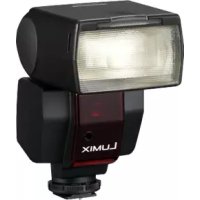


| Product type | Electronic flash for digital camera |
| Brand | Panasonic |
| Model | Lumix DMWFL360E |
| Flash modes | TTL AUTO, AUTO, MANUAL, FP TTL AUTO, FP MANUAL |
| Maximum guide number (GN) | 36 (at 42 mm, ISO 100) |
| Illumination angle | 12 mm to 42 mm (equivalent 24-85 mm in 35 mm); wide-angle diffuser: 8-10 mm |
| Power source | 2 AA batteries (alkaline or rechargeable Ni-MH) |
| Recycling time | Approx. 8 s (alkaline), 7.5 s (Ni-MH) |
| Number of flashes (full power) | Approx. 120 (alkaline), 200 (Ni-MH 2700 mAh) |
| Flash duration | 1/20000 s to 1/500 s (depending on power) |
| Tilting reflector | Vertical: 0° to 90° up, 0° to 7° down; Horizontal: 0° to 90° right, 0° to 180° left |
| Built-in wide-angle diffuser | Yes, retractable |
| AF assist lamp | Yes, for Panasonic Four Thirds cameras |
| Display | LCD panel with distance, aperture, ISO, mode, zoom information |
| Dimensions (W×H×D) | Approx. 67 × 108 × 95 mm (without protrusions) |
| Weight | Approx. 270 g (without batteries), 320 g (with batteries) |
| Operating temperature | 0 °C to 40 °C |
| Operating humidity | 10% to 80% (no condensation) |
| Included accessories | Carrying case VFC4230 |
| Compatibility | Panasonic digital cameras with flash shoe (e.g., DMC-FZ50, DMC-L1K) |
| Maintenance | Clean with a dry, soft cloth; do not use solvents; remove batteries if not used for extended periods |
Frequently Asked Questions - Lumix DMWFL360E PANASONIC
User questions about Lumix DMWFL360E PANASONIC
0 question about this device. Answer the ones you know or ask your own.
Ask a new question about this device
Download the instructions for your Camera lens in PDF format for free! Find your manual Lumix DMWFL360E - PANASONIC and take your electronic device back in hand. On this page are published all the documents necessary for the use of your device. Lumix DMWFL360E by PANASONIC.
USER MANUAL Lumix DMWFL360E PANASONIC
Operating Instructions
Operating Instructions
Before use, please read these instructions completely.
Information for Your Safety 3 Precautions 4 Supplied accessories 5 Names of the Components.... 5 Displays Appearing on the Display Panel.... 7
Concerning the batteries....8
Inserting and Removing the Unit's Batteries (optional) 13
Checking the Flash's Remaining Battery Charge.... 14
Mounting the Unit onto the Digital Camera, and Removing it 15
Taking Pictures using a Digital Camera with Communication Functions..... 17 How to select the flash mode 17 [TTL AUTO] 19 [AUTO] 20 [MANUAL] 21 [FP TTL AUTO] 22 [FP MANUAL] 23
Taking Pictures using a Digital Camera without Communication Functions 26 How to select the flash mode 26 [AUTO] 27 [MANUAL] 30 Other Applications.... 32 Taking pictures with bounce lighting.... 32 Taking pictures at close range.... 33 Selecting the lighting angle manually.... 34 How to use the Wide Panel 35 Many choices for different flash photography applications.... 36
Functions.... 37
Concerning Continuous Firing.... 40 Table of Guide Numbers (GN)...... 41 Troubleshooting 44 Cautions for Use.... 46 Specifications 48
Information for Your Safety
- This flash is designed to be used with digital cameras made by Panasonic. It is compatible with DMC-FZ50, DMC-L1K (with communication functions: P17 to 25), DMC-FZ30 etc. (without communication functions: P26 to 31). (as of September 2006)
- The digital camera illustrations in these operating instructions show DMC-FZ50 as an example.
- Four Thirds TM is a trademark.
WARNING
TO REDUCE THE RISK OF FIRE OR SHOCK HAZARD AND ANNOYING INTERFERENCE, USE ONLY THE RECOMMENDED ACCESSORIES AND DO NOT EXPOSE THIS EQUIPMENT TO RAIN, MOISTURE, DRIPPING OR SPLASHING. DO NOT REMOVE THE COVER (OR BACK); THERE ARE NO USER SERVICEABLE PARTS INSIDE. REFER SERVICING TO QUALIFIED SERVICE PERSONNEL.
-If you see this symbol-
Information on Disposal for Users of Waste Electrical & Electronic Equipment (private households)
This symbol on the products and/or accompanying documents means that used electrical and electronic products should not be mixed with general household waste.
For proper treatment, recovery and recycling, please take these products to designated collection points, where they will be accepted on a free of charge basis. Alternatively, in some countries you may be able to return your products to your local retailer upon the purchase of an equivalent new product.
Disposing of this product correctly will help to save valuable resources and prevent any potential negative effects on human health and the environment which could otherwise arise from inappropriate waste handling. Please contact your local authority for further details of your nearest designated collection point.
Penalties may be applicable for incorrect disposal of this waste, in accordance with national legislation.
For business users in the European Union
If you wish to discard electrical and electronic equipment, please contact your dealer or supplier for further information.
Information on Disposal in other Countries outside the European Union
This symbol is only valid in the European Union.
If you wish to discard this product, please contact your local authorities or dealer and ask for the correct method of disposal.
Precautions
Handling the unit
- Do not subject the unit to strong vibration or impact. Doing so may cause not only the unit to malfunction but also the flash head to break.
- Before carrying the unit around with you, ensure that the wide panel is properly retracted. (P35)
- Sand and dirt may cause the unit to malfunction. When using the unit in an environment such as a beach, take steps to protect it from sand and dirt.
- When taking photos on rainy days or on a beach, take care to keep the unit dry.
- The unit is not waterproof. If rain or drops of water splash onto the unit, wipe off the water with a dry cloth. If the unit does not operate normally, consult the dealer or your nearest servicenter.
- Read the operating instructions for your digital camera.
■ When the unit is not going to be used for a prolonged period
- Be absolutely sure to remove the batteries from the unit.
- If the batteries are left inside the unit, a faint current will flow continuously, even when the unit's power is off, gradually discharging the batteries. (For details on nickel metal hydride batteries, refer to P11.)
- Store the batteries in a cool, moisture-free location where the temperature is kept as constant as possible. (Recommended temperature range: 15 °C to 25 °C; recommended humidity range: 40% to 60%)
- If you plan to store the unit and/or its batteries inside a closet or cupboard, it is recommended that you put a desiccant (silica gel) in with them.
Supplied accessories
[Inspection to be performed when you unpack the unit]
When removing the unit from its packing box, check that the main unit and its supplied accessory is there and also check their external appearance and functions to verify that they have not sustained any damage during distribution and transportation.
If you discover any trouble, contact your vendor before using the product. For this flash, use only the flash case shown below.
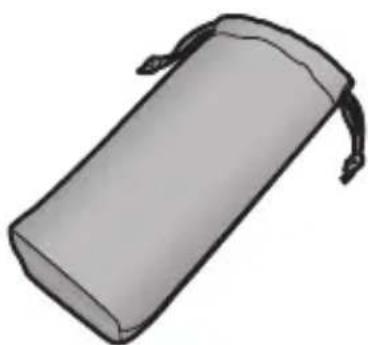
Flash case VFC4230
- The batteries are optional.
Names of the Components
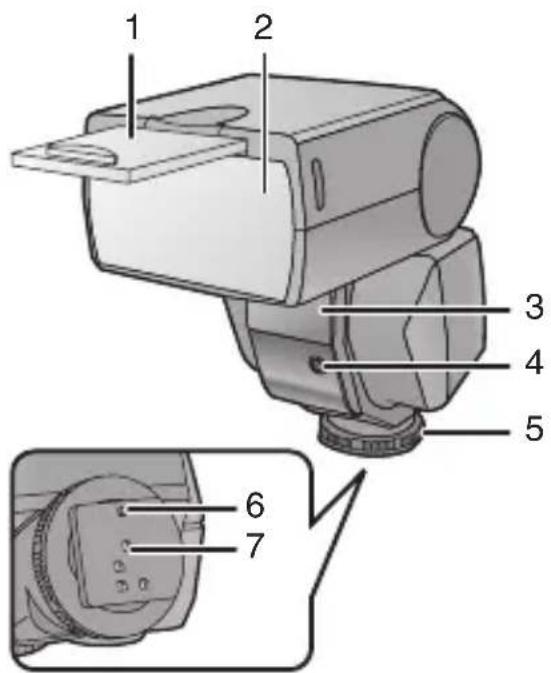
1 Wide panel (P35)
2 Flash head
3 AF assist lamp (P38)
- In dark locations where it is difficult to bring the subject into focus, you can direct light onto the subject to facilitate focusing. (The AF assist works only when this flash is used in combination with Panasonic's "Four ThirdsTM", digital single-lens reflex camera: it will not work with other cameras.)
4 Flash sensor
5 Lock ring (P15)
6 Lock pin (P15)
7 Terminal area (P15)
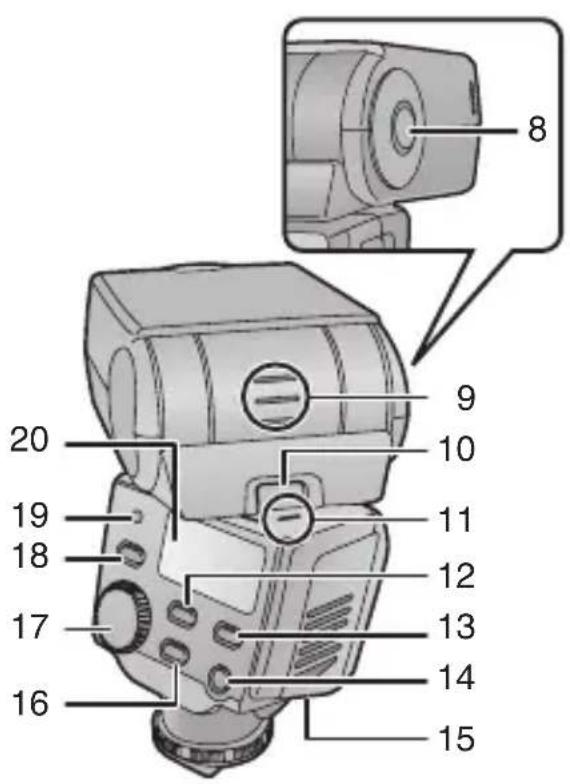
8 Bounce unlock button (up/down direction) (P15, 32)
9 Bounce up/down angle display (P32)
10 Bounce unlock button (left/right direction) (P15, 32)
11 Bounce left/right angle display (P32)
12 [MODE] button (P17, 26, 37)
13 [LIGHT] button - The display panel will light for about 15 seconds. It may also light depending on the operation on the digital camera with communication functions.
14 [POWER] button (P14, 17, 26, 37)
15 Battery cover (P13)
16 [ZOOM] button (P27, 30, 34, 35)
17 Select dial (P21, 24, 27, 30, 37) 18 [TEST/CHARGE] button (P14, 17, 26) 19 [AUTO CHECK] lamp (P14, 19, 20, 22, 27) 20 Display panel (P7)
Displays Appearing on the Display Panel

1 FP firing (P22, 23) 2 Flash intensity adjustment (P24) 3 Flash mode (P17, 26) 4 Lighting angle display (P38) - [FOURTHIRDS]: The lighting angle is displayed by the focal length of the “Four Thirds” digital camera format lens. [135]: The lighting angle is converted into the focal length of the 135 camera (35 mm film conversion) and displayed. 5 ZOOM mode (P34) 6 ZOOM value (P34) 7 Aperture 8 Distance display (P38)
9 Setting displays (guide number, ISO sensitivity, aperture, flash working range, correct distance, flash intensity adjustment)
10 ISO sensitivity 11 Guide number (GN) (P41) 12 Close-up flash (P33) 13 Wide panel display (P35)
Concerning the batteries
■Types of batteries that can be used
| AA Alkaline dry batteries (LR6) |
| AA Rechargeable nickel metal hydride batteries (Ni-MH) |
- The use of batteries made by Panasonic is recommended.
- The performance of the batteries used may significantly differ depending on which battery brand is used, how long the batteries have been stored since they were manufactured and how they have been stored.
- The performance of the batteries decreases temporarily at low temperatures (below 10 °C), but will be restored when the temperature returns to room temperature.
- Malfunctioning may occur under certain ambient temperatures and operating conditions. However, this is not indicative of trouble.
- In order to ensure that the batteries will function for as long as possible, it is recommended that you turn off the unit's power during the intervals between taking photos. If the unit is to be used for prolonged periods, the use of rechargeable nickel metal hydride batteries is recommended.
- Once spent, batteries may recover their performance when left standing for a while, but they will quickly become unusable again. For this reason, always make a point of replacing spent batteries with fresh ones.
■ Types of batteries with which operation is not guaranteed
| AA Ni-Cd batteries |
| AA Nickel-manganese batteries (ZR6) |
| AA Lithium batteries (FR6) |
| AA Manganese batteries (R6) |
| AA Oxyride (oxy-nickel-hydroxide) dry batteries |
| CR-V3 Lithium battery packs |
- Panasonic offers no guarantees that the unit will operate properly when any of the batteries listed above are used. Furthermore, use of these batteries may result in electrolyte leakage, power failure etc.
■ Batteries with shapes that cannot be used
- Installing batteries with irregular shapes in the unit may cause electrolyte leakage, heat generation and even rupturing of the batteries themselves.
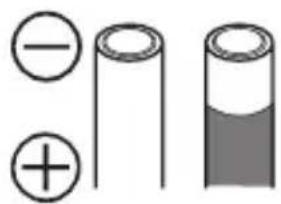
- Some batteries sold on the market have part or all of their jackets missing: Under no circumstances should such batteries be used. (Refer to the figure below.)
- Batteries (bare batteries) with no external jackets or batteries with parts of their jackets missing
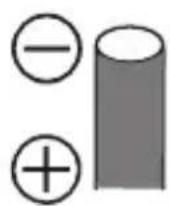
- Batteries whose ⊖ electrode is flat
■ Handling the batteries
Mishandling of batteries may cause electrolyte leakage, heat generation and even rupturing of the batteries themselves. Heed with the following cautions.
- Do not expose batteries to water or seawater or allow their terminal areas to become wet.
- Do not remove their external jackets or damage them in any way.
- Do not drop the batteries, knock them into other objects, or subject them to any other kind of strong impact.
- Stop using the batteries as soon as you notice any electrolyte leakage, deformation, discoloration, or any other such trouble.
- Do not store batteries in locations where the temperature and/or humidity levels are high.
- Keep batteries out of the reach of infants and small children. ● Always use 2 new batteries of the same type when replacing batteries.
- Remove the batteries from the unit when you do not intend to use the unit for a prolonged period.
- Batteries may be hot immediately after the unit has been used. Before removing them from the unit, turn off the unit's power and wait until the temperature of the batteries has dropped.
- At low temperatures (under 10 °C), the performance of batteries will deteriorate and the number of flashes fired by the unit will be sharply reduced. The operating duration of batteries tends to be shorter particularly when alkaline dry batteries are used, so warm them in your pocket before use. When warming batteries in your pocket, avoid direct contact with cigarette lighters and other metal objects as well as with pocket/body warmers.
- The number of flashes fired by the unit may also be sharply reduced if the ⊕ and ⊖ electrodes of the batteries are exposed to oils from the skin or other forms of dirt. Before installing the batteries, wipe the ⊕ and ⊖ electrodes carefully using a soft, dry cloth.
If electrolytes should leak from the batteries, wipe away all traces of the electrolyte in the battery compartment, and then insert fresh batteries or fully charged nickel metal hydride batteries.
If you should get electrolyte on your hands or clothes, rinse it off thoroughly with water. If you should get electrolyte in your eyes, you risk losing your sight. In such a case, do not rub your eyes but immediately wash them with clean water, and then seek medical advice.
■ Rechargeable nickel metal hydride batteries
Nickel metal hydride batteries can be made ready for use by recharging them using a dedicated charger. However, mishandling may cause electrolyte leakage, heat generation, the ignition of flames, and even rupturing of the batteries themselves. Heed the following precautions.
- It may not be possible to properly recharge batteries with dirty ⊕ and ⊖ electrodes. Use a soft, dry cloth to carefully wipe the ⊕ and ⊖ electrodes as well as the terminal areas of the charger.
- Either when they are purchased or when they have not been used for a prolonged period, nickel metal hydride batteries may not have a sufficient charge. This is due to their characteristics and is not indicative of trouble. Their regular performance will be restored after they have been charged a number of times.
- It is recommended that the batteries be recharged only after their existing charge has been used up. If they are repeatedly charged without their existing charge first having been used up, it may be difficult for them to sustain their capacity. (A phenomenon referred to as the memory effect.)
- If the memory effect has occurred, use up the existing charge in the batteries until the unit cannot fire and then recharge them fully a number of times. This will restore their capacity.
- When nickel metal hydride batteries are not being used, their capacity will diminish due to the effects of natural discharging.
- Do not continuously charge nickel metal hydride batteries which already have a charge.
- Do not remove their external jackets or damage them in any way.
- Read the instructions accompanying the charger used when recharging the batteries.
Nickel metal hydride batteries have a specific service life. As they are increasingly used or as time goes by, their capacity will diminish gradually. When the length of time during which the unit can be used has dropped drastically, the batteries may have reached the end of their service life. Obtain fresh batteries.
- The length of the service life of batteries differs depending on their storage method, operating conditions and the environment in which they are used.
■When the unit is not going to be used for a prolonged period
- If the batteries are left inside the unit, a faint current will flow continuously, even when the unit's power is off, gradually discharging the batteries. If they are left like this, they may overdischarge and may become unusable even when recharged.
- When storing the batteries for a prolonged period, it is recommended that they be charged once a year and that after their remaining charge has been used up, they be removed from the unit and stored again.
■ Service life of batteries Number of flashes (number of full flashes in MANUAL mode at intervals of 30 seconds)
| Batteries used | Number of flashes |
| Alkaline dry batteries (LR6) | Approx. 120 flashes |
| Nickel metal hydride batteries (Ni-MH) | Approx. 200 flashes |
Photo taking conditions
• Temperature: 23 °C
Flash interval
| Batteries used Flash interval | |
| Alkaline dry batteries (LR6) | Approx. 8 s |
| Nickel metal hydride batteries (Ni-MH) | Approx. 7.5 s |

- The number of flashes and flash interval differ slightly depending on the storage status of the batteries and the operating conditions.
Inserting and Removing the Unit's Batteries (optional)
- Check that the unit's power is off.
- Use alkaline dry batteries or rechargeable nickel metal hydride batteries.
1 Slide the battery cover to open it.
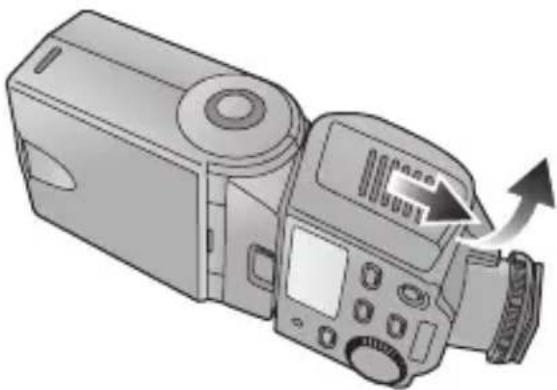
- There is tape adhered to the battery cover the first time that you use the unit. Peel it off.
2 When inserting the batteries, ensure that the ⊕ and ⊖ poles of the batteries are aligned correctly.
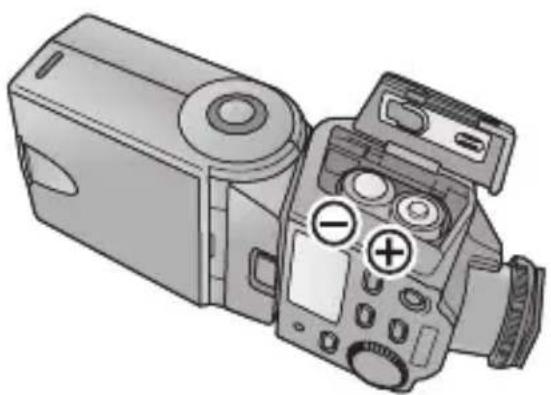
3 Close the battery cover by sliding it back firmly as far as it will go.
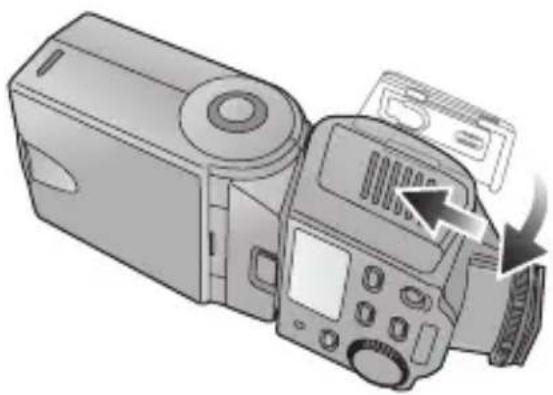

- After using the unit, take out the batteries.
Checking the Flash's Remaining Battery Charge
- Install the batteries and then turn on the unit and check the battery remaining power.
1 Press the [POWER] button.
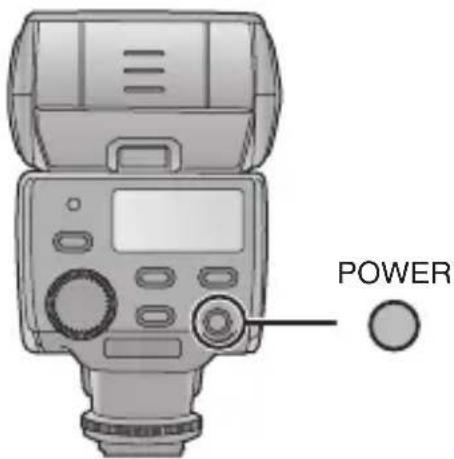
- Charging now starts.
2 Check that the [TEST/CHARGE] button lights.
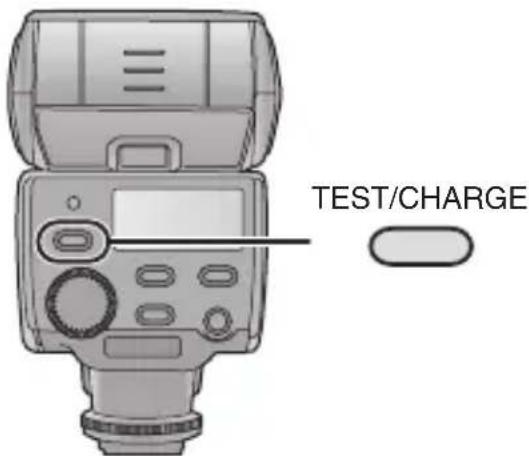
- After the batteries have been fully charged, the [TEST/CHARGE] button lights.
- If it takes as long for the [TEST/CHARGE] button to light as the period indicated in the table below, it means that the batteries are nearly worn out. Replace them with fresh batteries as soon as possible.
| Alkaline batteries | More than 30 s |
| Rechargeable nickel metal hydride batteries | More than 10 s |
- If the [TEST/CHARGE] button and [AUTO CHECK] lamp both flash at the same time, it means that the batteries are almost completely worn out and should be replaced with fresh batteries as soon as possible.
3 Press the [POWER] button to turn off the unit's power.
![PANASONIC Lumix DMWFL360E - Press the [POWER] button to turn off the unit's power. - 1](/content/2026/03/468977/images/6710180df7bb7345e27c7c0f0b4c0cc91279c73342a9fd2d16401521ae46238e.jpg)
- When the [TEST/CHARGE] button is pressed, the unit may fire.
- Turn off the power in the following situations:
- When mounting the unit onto, or disengaging it from, the digital camera
- When you do not want the unit to fire
- When you are not going to use the unit
Mounting the Unit onto the Digital Camera, and Removing it
- Check that the power of the digital camera and unit is off. (Mounting the unit onto, or disengaging it from, the camera while the power is on may cause trouble and is not recommended.)
■ Mounting the unit
1 Secure the flash head at the horizontal front position.
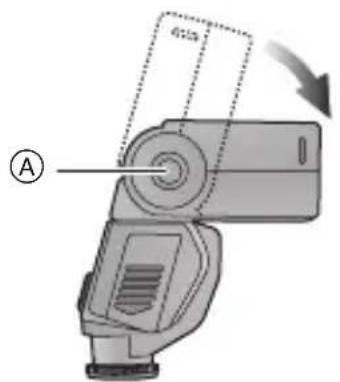
Ⓐ: Bounce unlock button
- If the flash head is at the lock position, rotate it while pressing the bounce unlock button.
2 Loosen the lock ring.
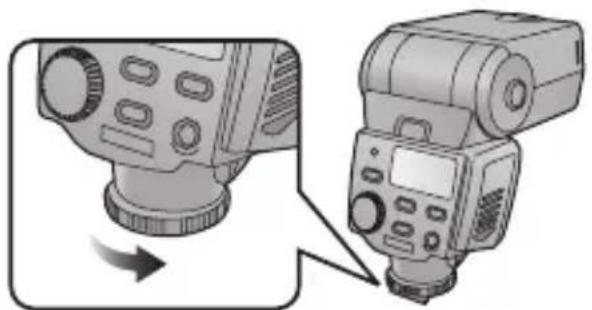
- If the lock pin is protruding, turn the lock ring in the opposite direction from [◄LOCK] and retract the pin.
- Do not apply more force than is necessary to the lock ring.
- Do not touch the terminal areas with your fingers, metal objects, etc.
- Do not mount the unit onto the digital camera while the lock pin is protruding. Otherwise you may damage the unit.
3 Slide the unit firmly toward the back of the hot shoe until a clicking sound is heard.
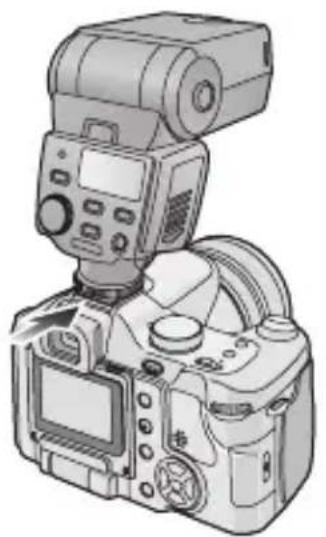
4 Turn the lock ring in the [◄LOCK] direction until it stops turning.
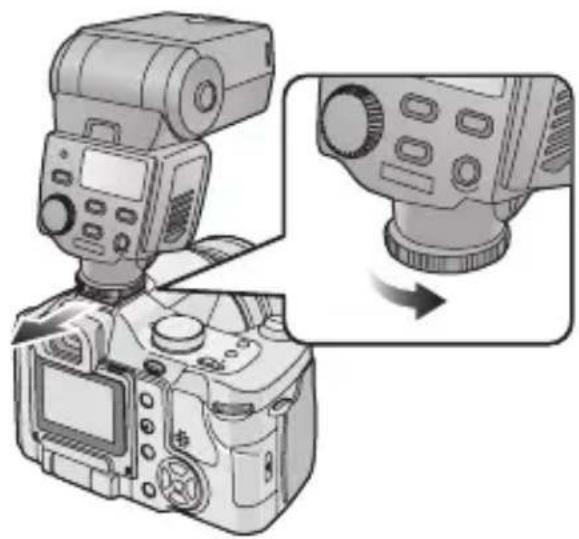
■ Removing the unit Completely loosen the lock ring, and slide the unit off from the hot shoe.
Taking Pictures using a Digital Camera with Communication Functions
How to select the flash mode
- For details on each flash mode, turn to P19 to 23.
1 Turn on the power of the digital camera.
2 Press the [POWER] button on the unit.
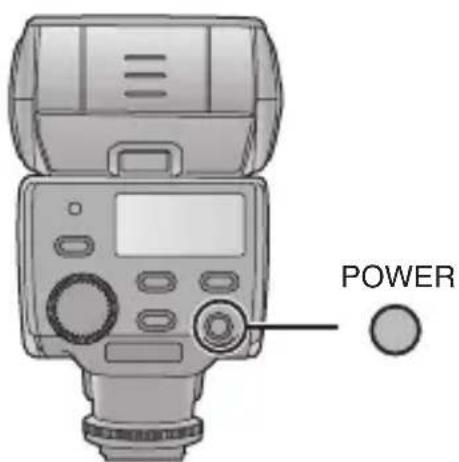
- The [TEST/CHARGE] button lights after the batteries have been fully charged.
3 Press the shutter button of the digital camera halfway down.
- The ISO sensitivity, aperture, shutter speed and other photo taking information are sent between the digital camera and the unit.
4 Press the [MODE] button, and select the flash mode.
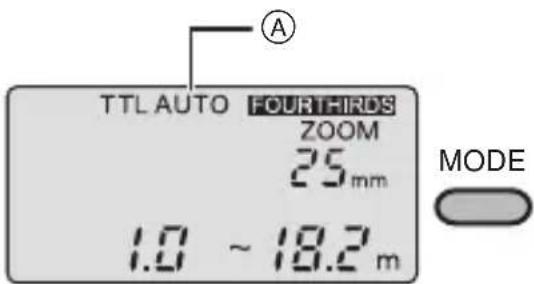
Ⓐ: Flash mode
- The flash mode is shown on the display panel.
- The mode is changed each time the [MODE] button is pressed.
■Concerning the flash modes
| Item Details of settings | |
| [TTL AUTO] After me | asuring the appropriate flash intensity by discharging a pre-flash, the unit fires again for photo taking. (P19) |
| [AUTO] The unit senses | es the light by its flash sensor in accordance with the aperture of the lens, and it adjusts the flash intensity. (P20)● This mode can be used only for digital camera models with communication functions which support the [AUTO] mode. |
| [MANUAL] The unit fires at the guide number (GN) *which has been set. (P21) | |
| [FP TTL AUTO] This | mode enables flash photo taking even at the high shutter speeds of the digital camera by FP firing (repeatedly firing the flash at high speed). (P22)The unit initiates FP firing at the flash intensity set in the [FP MANUAL] mode. (P23) |
| [FP MANUAL] | |
* The guide number (GN) is a value which indicates the light quantity of a flash. The higher the value, the greater the quantity of light emitted by the unit.

- You may not be able to use some modes depending on the type of digital camera.
(○: Available, —: Not available)
| [TTL AUTO] | [AUTO] [M | ANUAL] | [FP TTL AUTO] | [FP MANUAL] | |
| DMC-L1K | ○ | ||||
| DMC-FZ50 | ○ — | ||||
- It is not possible to select a mode which cannot be used.
[TTL AUTO]
Press the [MODE] button, and select the flash mode. (P17)
- The flash working range is shown on the display panel in line with the settings of the digital camera.
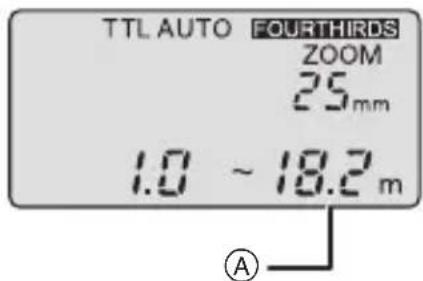
Ⓐ: Flash working range
1 Check that the distance to the subject is within the flash working range.
- If the subject is outside the range, adjust the aperture of the lens or change the distance to the subject.
- The flash working range changes depending on the type and settings (ISO sensitivity, aperture and focal length) of the digital camera used.
2 Press the shutter button all the way down, and take the picture.
3 Check that the [AUTO CHECK] lamp is flashing.
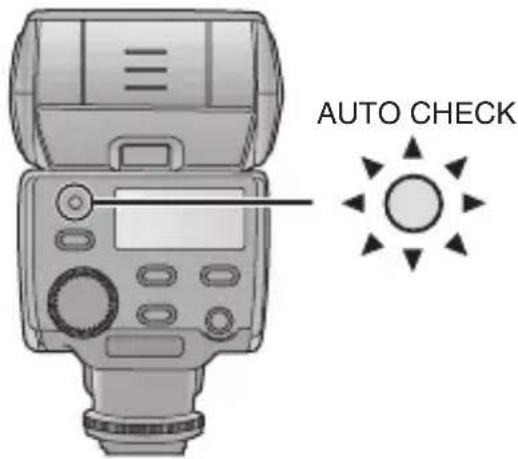
- If the [AUTO CHECK] lamp continues to flash for about 5 seconds, it means that the unit has fired successfully. If it does not flash, the unit has not fired successfully. Check the settings on the unit and the digital camera and then take the picture again.
[AUTO]
Press the [MODE] button, and select the flash mode. (P17)
- The flash working range is shown on the display panel in line with the settings of the digital camera.
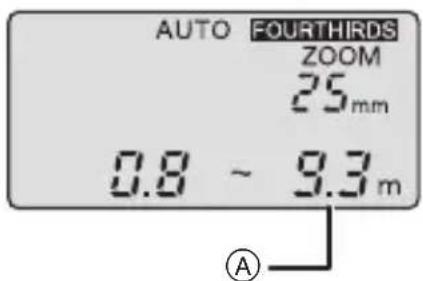
(A): Flash working range
- If the settings on the digital camera (ISO sensitivity and aperture) are outside the combinations of the ISO sensitivity and aperture which can be adjusted, the flash working range is not displayed and the user is warned by the flashing of [ISO] and [F] on the display. In a case like this, change the digital camera settings.
1 Check that the distance to the subject is within the flash working range.
- If the subject is outside the range, adjust the aperture of the lens or change the distance to the subject.
- The flash working range changes depending on the type and settings (ISO sensitivity, aperture and focal length) of the digital camera used.
2 Press the shutter button all the way down, and take the picture.
3 Check that the [AUTO CHECK] lamp is flashing.
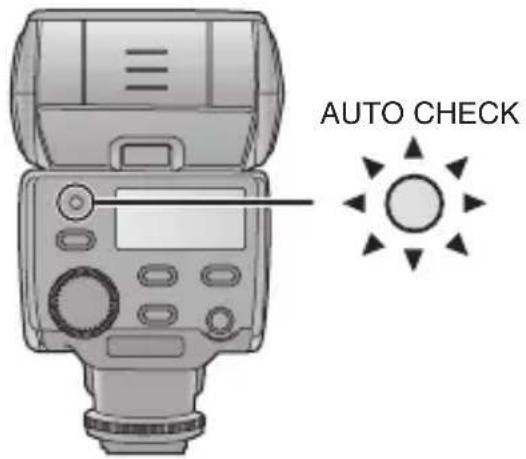
- If the [AUTO CHECK] lamp continues to flash for about 5 seconds, it means that the unit has fired successfully. If it does not flash, the unit has not fired successfully. Check the settings on the unit and the digital camera and then take the picture again.
■ Combinations of the ISO sensitivity and aperture which can be adjusted in the [AUTO] mode
| ISO sensitivity Aperture | |
| 3200 F8 to F32 | |
| 1600 F5.6 to F32 | |
| 8 0 0 | F 4 t o F 3 2 |
| 400 F2.8 to F32 | |
| 2 0 0 | F 2 t o F 3 2 |
| 100 F1.4 to F22 | |
| 50 F1.4 to F16 | |
| 25 F1.4 to F11 | |
[MANUAL]
Press the [MODE] button, and select the flash mode. (P17)
- The optimum camera to subject distance and guide number (GN) matching the digital camera settings are shown on the display panel.
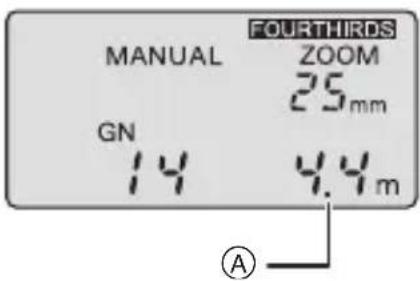
(A): Optimum camera to subject distance
1 Turn the select dial and set the guide number (GN) so that the optimum camera to subject distance is set to the distance to the subject.
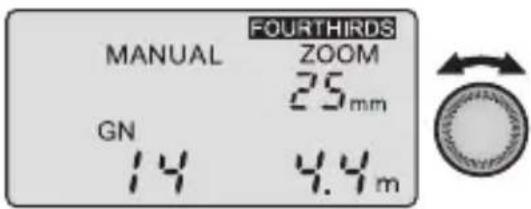
- If the optimum camera to subject distance is closer than 0.6 m (or 0.5 m for close-up photos), the lighting range of the flash will shift. In this case, the user is warned by the flashing of the optimum camera to subject distance on the display.
- The optimum camera to subject distance changes depending on the digital camera settings (ISO sensitivity, aperture, focal length and shutter speed).
2 Press the shutter button all the way down, and take the photo.
1
- If the ISO sensitivity is [100], the optimum camera to subject distance can be calculated by dividing the guide number (GN) by the aperture. (P41)
- The optimum camera to subject distance is an estimate.
[FP TTL AUTO]
Press the [MODE] button, and select the flash mode. (P17)
- This mode enables flash photography even at the high shutter speeds of the digital camera by FP firing (repeatedly firing the flash at high speed).
- The flash working range is shown on the display panel in line with the settings of the digital camera.
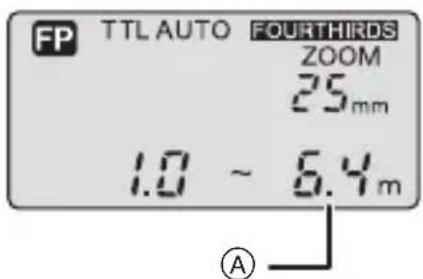
A: Flash working range
1 Check that the distance to the subject is within the flash working range.
- If the subject is outside the range, adjust the aperture of the lens or change the distance to the subject.
- The flash working range changes depending on the type and settings (ISO sensitivity, aperture and focal length) of the digital camera used. The range is narrower than in the [TTL AUTO] mode.
2 Press the shutter button all the way down, and take the photo.
3 Check that the [AUTO CHECK] lamp is flashing.
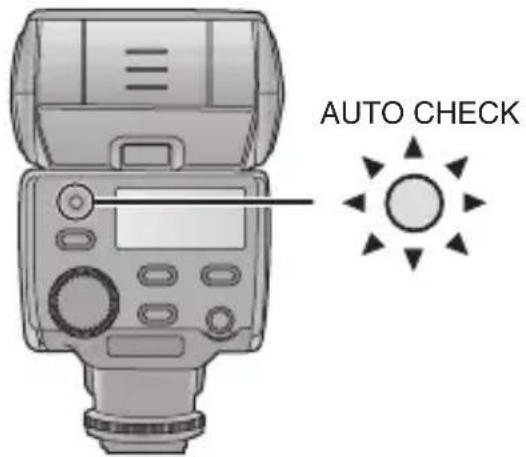
- If the [AUTO CHECK] lamp continues to flash for about 5 seconds, it means that the unit has fired successfully. If it does not flash, the unit has not fired successfully. Check the settings on the unit and the digital camera and then take the picture again.
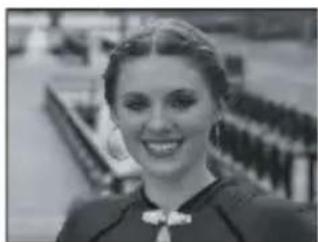
The following kinds of photos can be taken using high shutter speeds.
● Photo taking with the shadows softened by backlight photography
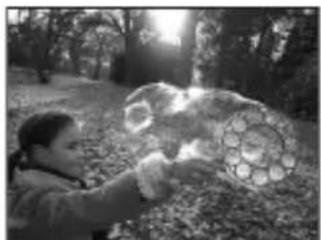
- Portrait photos taken outdoors with an open aperture and with the background defocused
[FP MANUAL]
Press the [MODE] button, and select the flash mode. (P17)
- The optimum camera-to-subject distance and guide number (GN) matching the digital camera settings are shown on the display panel.
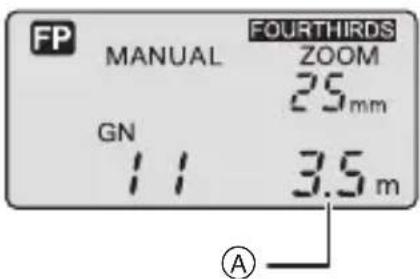
(A): Optimum camera-to-subject distance
1 Turn the select dial and set the guide number (GN) so that the optimum camera-to-subject distance is set to the distance to the subject.
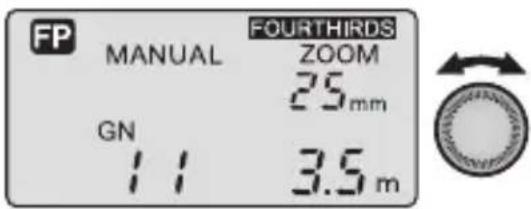
- If the optimum camera-to-subject distance is closer than 0.6 m (or 0.5 m for close-up photos), the lighting range of the flash will shift. In this case, the user is warned by the flashing of the optimum camera-to-subject distance on the display.
- The optimum camera-to-subject distance changes depending on the digital camera settings (ISO sensitivity, aperture, focal length, and shutter speed).
2 Press the shutter button all the way down, and take the photo.
![PANASONIC Lumix DMWFL360E - [FP MANUAL] - 3](/content/2026/03/468977/images/219ae7f95561189a21693644c52ae4aef82574384831752dfd9c5cbdc9c39485.jpg)
- The optimum camera-to-subject distance is an estimate.
■ Adjusting the flash intensity
The flash intensity can be adjusted in steps.
Set the flash intensity adjustment to [ON] before adjusting the flash intensity. (P38)
- 📁 appears on the display panel.
1 Turn the select dial and set the flash intensity adjustment value.
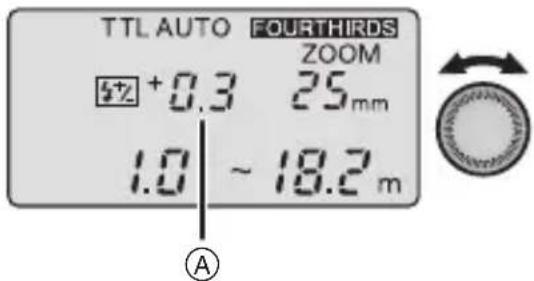
(A): Flash intensity adjustment value
- The flash intensity adjustment value is always displayed except when it is [0].
- The flash working range displayed is for when the flash intensity adjustment value is [0].

- You cannot adjust the flash intensity when the guide number is at the highest or lowest value.
The flash intensity adjustment range and the actual flash intensity may differ depending on the flash mode.
- Flash intensity adjustment range
- If [TTL AUTO], [AUTO] or [FP TTL AUTO] is selected, the flash intensity can be adjusted over a range of ±3.0 steps.
0 + 0.3 + 0.7 + 3.0 ...
0 → -0.3 → -0.7 ... -3.0
- If [MANUAL] or [FP MANUAL] is selected, the flash intensity can be adjusted over a range of ±0.7 steps.
0 + 0.3 + 0.7 →
0 → -0.3 → -0.7
- The actual flash intensity may vary when the flash intensity adjustment value has been set on both the digital camera and the unit.
- If [TTL AUTO], [AUTO] or [FP TTL AUTO] is selected, the unit fires at the adjustment value obtained by adding together the adjustment values set on the digital camera and the unit. (The value set on the unit only is displayed as the flash intensity adjustment value.)
[Example]
| Unit Digital camera | ||
| Adjustment value setting +0.3 | +0.3(+1/3 EV) | |
| Unit's flash intensity adjustment value display | +0.3 | |
| Actual adjustment value used for firing | +0.6(+2/3 EV) | |
- If [MANUAL] or [FP MANUAL] is selected, the unit fires at the adjustment value set on the unit only.
[Example]
| Unit Digital camera | ||
| Adjustment value setting +0.3 | +0.3(+1/3 EV) | |
| Unit's flash intensity adjustment value display | +0.3 | |
| Actual adjustment value used for firing | +0.3(+1/3 EV) | |
Taking Pictures using a Digital Camera without Communication Functions
How to select the flash mode
- For details on each flash mode, turn to P27 to 30.
- The [TEST/CHARGE] button lights after the batteries have been fully charged.
1 Press the [POWER] button on the unit.
2 Press the [MODE] button to select the flash mode.
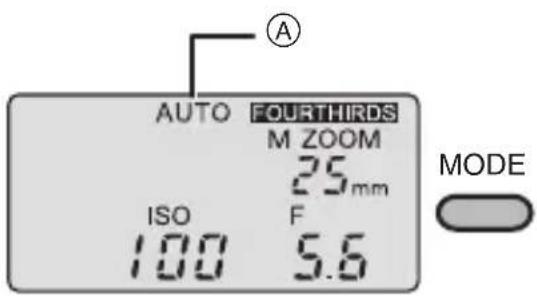
Ⓐ: Flash mode
- The flash mode is shown on the display panel.
- The mode is changed each time the [MODE] button is pressed.
Concerning the flash modes
| Item Details of settings | |
| [AUTO] The | unit senses the light by its flash sensor in accordance with the aperture of the lens, and it adjusts the flash intensity. (P27) |
| [MANUAL] | The unit fires at the guide number (GN)* which has been set. (P30) |
* The guide number (GN) is a value which indicates the light quantity of a flash. The higher the value, the greater the quantity of light emitted by the unit.
[AUTO]
Press the [MODE] button, and select the flash mode. (P26)
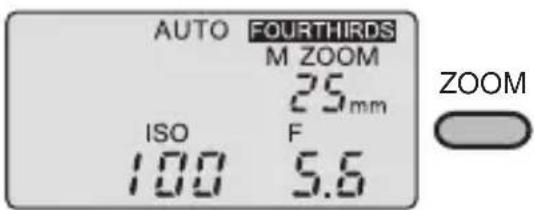
1 Press the [ZOOM] button to set the zoom value to the focal length of the lens.
2 Press and hold the [MODE] button and then turn the select dial within 2 seconds to set the ISO sensitivity.
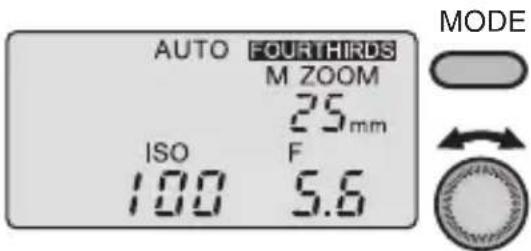
- The unit will switch to the function settings if the [MODE] button is pressed for more than 2 seconds. (P37)
3 Turn the select dial and set it to the aperture of the lens.
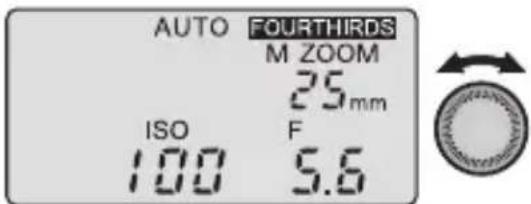
- If the combination of the ISO sensitivity and aperture are outside the usable range, a warning is given in the form of the flashing ISO sensitivity and aperture displays. In a case like this, change the ISO sensitivity and aperture.
4 Press the shutter button all the way down, and take the photo.
5 Check that the [AUTO CHECK] lamp is flashing.
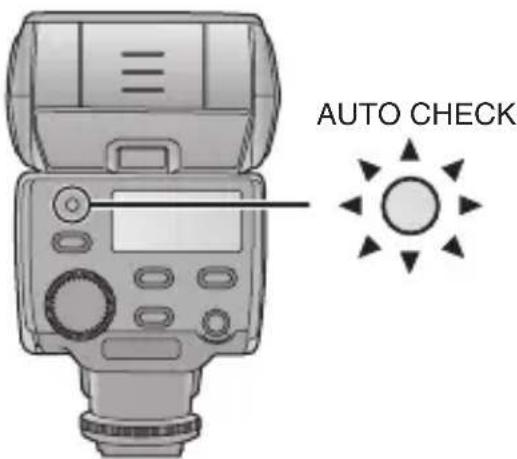
- If the [AUTO CHECK] lamp continues to flash for about 5 seconds, it means that the unit has fired successfully. If it does not flash, the unit has not fired successfully. Check the settings on the unit and the digital camera and then take the picture again.
![PANASONIC Lumix DMWFL360E - [AUTO] - 5](/content/2026/03/468977/images/c9796e3de849d5f1c1848490bea48e48a6abcc47a135ec9b80aace634839cd64.jpg)
- The flash intensity can be adjusted in 1/3 steps by varying the ISO sensitivity and aperture from the digital camera settings.
■Flash working range in [AUTO] mode
| ISO sensitivity Lighting angle | ||||||||||
| 3200 | 1600 | 800 | 400 200 | 100 50 | 25 8 | (16) 10 | (20) | |||
| F8 F | 5.6 F4 | F2.8 F | 2 F1.4 | - | - | 0.8 to 8.6 | 0.9 to 10.0 | |||
| F11 | F8 | F5.6 | F4 | F2.8 | F2 | F1.4 | - | 0.6 to 6.0 | 0.6 to 7.0 | |
| F16 | F11 | F8 F | 5.6 F4 | F2.8 F | 2 F1.4 | 0.5 to 4.3 | 0.5 to 5.0 | |||
| F22 F | 16 F11 | F8 F5 | 6 F4 F | 2.8 | F2 | 0.5 to 3.0 | 0.5 to 3.5 | |||
| F32 F | 22 F16 | F11 F | 8 F5 | 6 F4 | F2.8 | 0.5 to 2.1 | 0.5 to 2.5 | |||
| - | F32 | F22 | F16 | F11 | F8 | F5.6 | F4 | 0.5 to 1.5 | 0.5 to 1.8 | |
| - | - | F32 | F22 | F16 | F11 | F8 | F5.6 | 0.5 to 1.1 | 0.5 to 1.3 | |
| - | - | - | F32 | F22 | F16 | F11 | F8 | 0.5 to 0.8 | 0.5 to 0.9 | |
| - | - | - | - | F32 | F22 | F16 | F11 | 0.5 to 0.5 | 0.5 to 0.6 | |
| Aperture values that can be set | ||||||||||
![PANASONIC Lumix DMWFL360E - [AUTO] - 6](/content/2026/03/468977/images/3a58f79229ecd1845bccf9435beb55c51d73e8a2a442ca5b31d974e08eea6e71.jpg)
- The areas framed by the bold lines indicate the flash working range when the wide panel is used. (P35)
- When the flash head is facing toward the front, the number displayed at the near-distance side is 0.6 m or more, and when it is pointed downward, it is 0.5 m or more.
| Focal length (mm) (35 mm film conversion) | |||||
| 12 (24) | 14 (28) | 17 (35) | 25 (50) | 35 (70) | 42 (85) |
| 1.3 to 14.3 1.4 to 15.7 1.5 to | 17.1 1.8 to 20.0 | 2.0 to 22.9 2.3 | to 25.7 | ||
| 0.9 to 10.0 1.0 to 11.0 1.1 to | 12.0 1.3 to 14.0 | 1.4 to 16.0 1.6 | to 18.0 | ||
| 0.6 to 7.1 0.7 to 7.9 0.8 to 8.6 | 0.9 to 10.0 1.0 | to 11.4 1.1 to 12.9 | |||
| 0.5 to 5.0 0.5 to 5.5 0.5 to 6.0 | 0.6 to 7.0 0.7 | to 8.0 0.8 to 9.0 | |||
| 0.5 to 3.6 0.5 to 3.9 0.5 to 4.3 | 0.5 to 5.0 0.5 | to 5.7 0.6 to 6.4 | |||
| 0.5 to 2.5 0.5 to 2.8 0.5 to 3.0 | 0.5 to 3.5 0.5 | to 4.0 0.5 to 4.5 | |||
| 0.5 to 1.8 0.5 to 2.0 0.5 to 2.2 | 0.5 to 2.5 0.5 | to 2.9 0.5 to 3.3 | |||
| 0.5 to 1.3 0.5 to 1.4 0.5 to 1.5 | 0.5 to 1.8 0.5 | to 2.0 0.5 to 2.3 | |||
| 0.5 to 0.9 0.5 to 1.0 0.5 to 1.1 | 0.5 to 1.3 0.5 | to 1.5 0.5 to 1.6 | |||
| Working range when taking pictures in [AUTO] (m) | |||||
[MANUAL]
Press the [MODE] button, and select the flash mode. (P26)
- The guide number (GN) appears on the display panel.
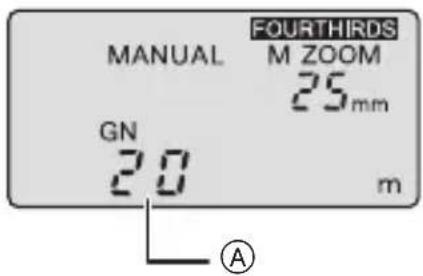
Ⓐ: Guide number (GN)
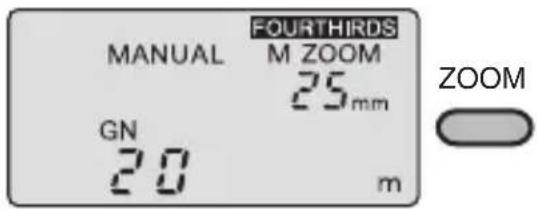
1 Press the [ZOOM] button to set the zoom value to the focal length of the lens.
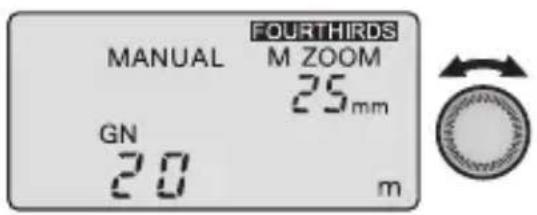
2 Turn the select dial and set the guide number (GN).
3 Press the shutter button all the way down, and take the photo.
![PANASONIC Lumix DMWFL360E - [MANUAL] - 4](/content/2026/03/468977/images/33cce5ed6461e2627d5264e0577fa5721af6f74e91183cd53020fc842b037b21.jpg)
- If [Guide number (GN) display] is set to [OFF], the light quantity can be displayed as the light quantity ratio.
- The “light quantity ratio” is the ratio of the flash intensity to the full flash.
How to determine the guide number, the aperture and the optimum camera to subject distance
When the camera to subject distance and aperture have been decided upon
- The following formula is used to obtain the guide number (GN), which is then set in the unit. “Aperture (F)” × “Camera to subject distance (m)” ÷ “ISO sensitivity coefficient*”
When the aperture is to be set
- The following formula is used to obtain the aperture, which is then set in the digital camera.
"Guide number (GN)" × "ISO sensitivity coefficient*" ÷ "Camera to subject distance (m)"
How to obtain the optimum camera to subject distance
"Guide number (GN)" × "ISO sensitivity coefficient*" ÷ "Aperture (F)"
* ISO sensitivity coefficient
| ISO sensitivity | Compensation coefficient |
| 3200 5.6 | |
| 1600 4.0 | |
| 800 2.8 | |
| 400 2.0 | |
| 200 1.4 | |
| 100 1.0 | |
| 50 0.71 | |
| 25 0.5 |
- For a list of guide numbers (GN), turn to P41.
Other Applications
Taking pictures with bounce lighting
- Bounce light photography is a technique which uses the reflected light from a ceiling or a wall onto which the light emitted from a flash unit has been directed.
- If the flash is aimed directly at the front of the subject when the portrait of a person is to be taken, for instance, strong shadows may form or the person's skin and other areas may appear whitish and indistinct. However, if the bounce light technique is used at times like this, the strong shadows can be minimized and the subject captured naturally.
1 While holding down the bounce unlock button, turn the flash head so that it is pointing in the desired direction.
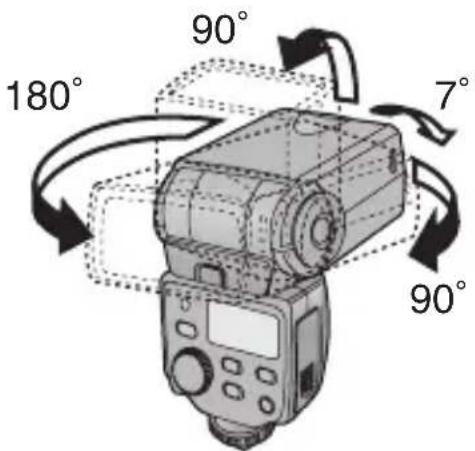
- At the locked position, change the direction while holding down the bounce unlock button.
2 Point the flash at the ceiling or other reflective surface, and take the photo.
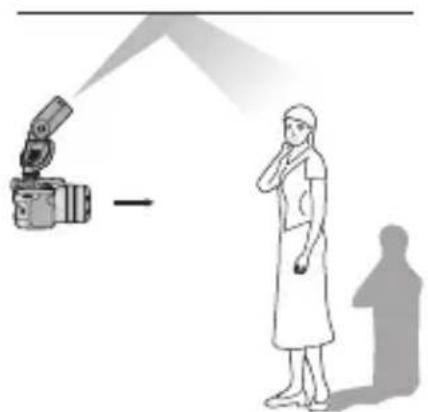
- The flash working range and optimum camera to subject distance do not appear on the display panel.
- When the lighting angle is set to [ZOOM] (auto), the zoom value appears on the display panel as [--] and 25 mm [135 camera (35 mm film conversion): 50 mm] is set.
● The lighting angle can be changed manually. (P34)

- We recommend taking a test photo to decide the proper exposure. Check the exposure using the histogram function on your digital camera. For further details, refer to the operating instructions of your digital camera.
- When the [TEST/CHARGE] button is pressed, the [AUTO CHECK] lamp lights, and whether or not the firing is appropriate can be verified. (This is possible only when [AUTO] is established as the flash mode.)
- If the surface (such as the ceiling or walls) off which the light from the flash is to be reflected is coloured, this may affect the photo images. Choose a surface which is white or off-white as the reflecting surface.
Taking pictures at close range
- When the camera to subject distance is 0.5 m to 1 m, the light emitted from the flash will be skewed. For this reason, while holding down the bounce unlock button, point the flash head downward (7 degrees), and then take the picture.
Point the flash head down as far as it will go (7 degrees downward).
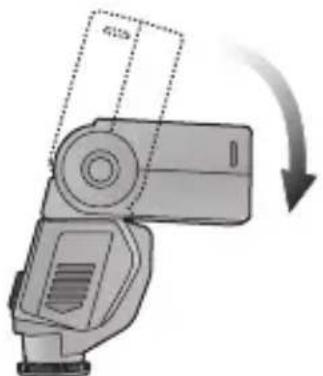
- 📁 appears on the display panel.

- Vignetting may be caused by the light from the flash when the lens has a long overall length or a large diameter. Take a test photo first, and then take the picture.
- Use the flash in this way only for close-up photos. If you keep the flash head pointed down during regular photo taking, the light emitted from the flash at the top of the screen will be insufficient.
Selecting the lighting angle manually
- The lighting angle can be adjusted manually.
Press the [ZOOM] button, and select the lighting angle.
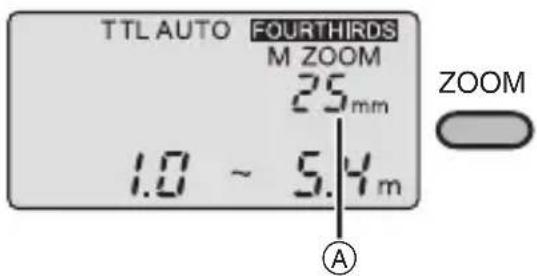
(A): Lighting angle
- [M ZOOM] appears on the display panel.
Any of the following ZOOM settings can be selected:
12 mm, 14 mm, 17 mm, 25 mm, 35 mm, 42 mm
[With a 135 camera (35 mm film conversion): 24 mm, 28 mm, 35 mm, 50 mm, 70 mm, 85 mm]
The zoom values that are appropriate for the flash lighting angle appear:
![graph TD A["ZOOM"] --> B["M ZOOM 12 (24)"] B --> C["M ZOOM 14 (28)"] C --> D["M ZOOM 17 (35)"] D --> E["M ZOOM 25 (50)"] E --> F["M ZOOM 35 (70)"] F --> G["M ZOOM 42 (85)"]](/content/2026/03/468977/images/476c5c70e5dcac9d1e5ce00a32e5f733911365dc9a6b630b0aa583fa3f5226f4.jpg)
- [ZOOM] can be used only when a digital camera with communication functions is used.
- When the wide panel is used, any of the following settings can be selected: [ZOOM], [10 (20)] or [8 (16)].

- The number that appears at the top right of the display panel is the flash lighting angle.
- When the lighting angle is set to [ZOOM] (auto), the zoom value is set between 12 mm (24 mm) and 42 mm (85 mm).
- When a value higher than the focal length of the lens used is selected, the edges of the images will darken.
How to use the Wide Panel
- Use the built-in wide panel for flash photography when the focal length of the lens is wider than 12 mm.
- Set [Wide panel switching] to [ON]. (P38)
1 Pull out the wide panel and then push it down.
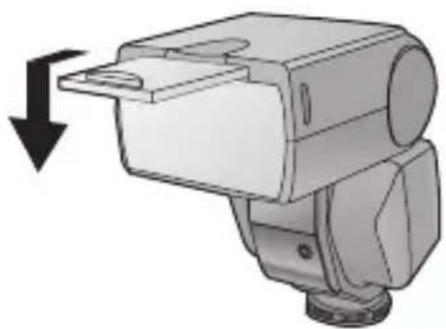
- [R] appears on the display panel.
2 Press the [ZOOM] button, and select the lighting angle.
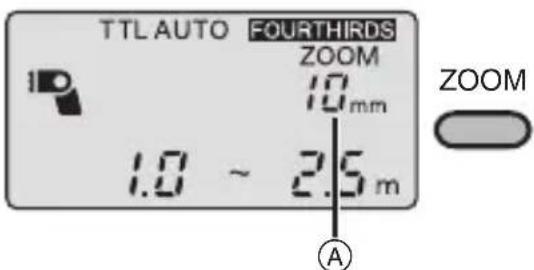
Ⓐ: Lighting angle
- ZOOM, 8 mm or 10 mm [ZOOM, 16 mm or 20 mm for a 135 camera (35 mm film conversion)] can be selected.
![PANASONIC Lumix DMWFL360E - Press the [ZOOM] button, and select the lighting angle. - 2](/content/2026/03/468977/images/36f242a4fc1fec600f893e083a169648fcb40a07f475d7d6b7b0cf526dc431ab.jpg)
- When using the wide panel, the guide number (GN) is reduced. This means that the working range is reduced when taking photos in the [TTL AUTO], [AUTO] or [FP TTL AUTO] mode and that the optimum camera to subject distance is reduced when taking photos in the [MANUAL] or [FP MANUAL] range.
● After taking the photos, retract the wide panel. - Do not push the wide panel upward. Otherwise it may be damaged.
Many choices for different flash photography applications
- Many different flash photography applications can be chosen by the digital camera settings.
- It may not be possible to use some functions depending on the functions and shape of the digital camera used.
- For further details, refer to the operating instructions of your digital camera.
- Select [TTL AUTO] or [FP TTL AUTO] as the flash mode.
Red-eye reduction flash
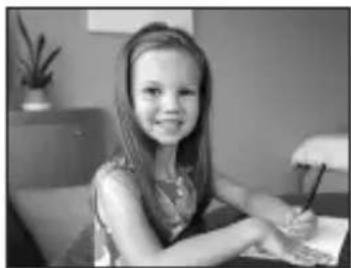
- The light emitted by the flash reduces red eye where the eyes of the subjects appear red.
Slow synchronization
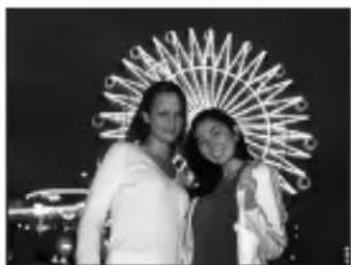
● Light from the unit can be emitted using the slow shutter. This enables shots of people to be
taken clearly against the backdrop of night scenes.
2nd curtain synchronization
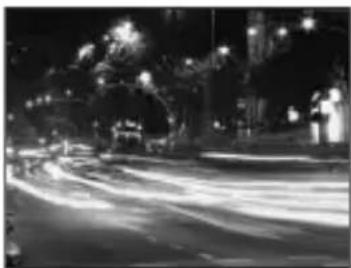
- When taking slow-shutter shots of moving subjects, the flash is activated just before the shutter closes.
Light sources emanating from behind the subject are captured to achieve a dynamic feeling.
Functions
- You can set each function in advance.
1 Press the [POWER] button. 2 Press the [MODE] button for 2 or more seconds to switch to the function settings.
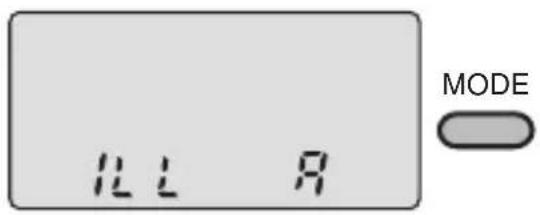
3 Press the [MODE] button lightly to select the menu item.
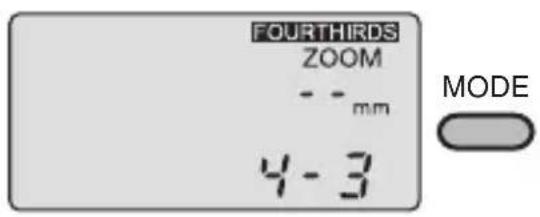
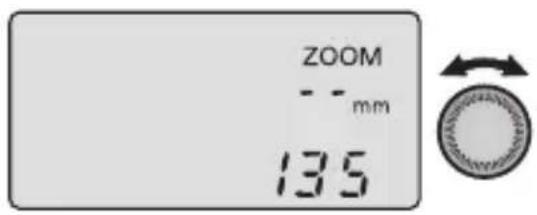
4 Turn select dial to select the setting.
5 Press the [MODE] button for 2 or more seconds to exit the settings.
■ Returning the function settings to the default status (status at the time of purchase)
When the [MODE] button and [LIGHT] button are pressed together for two or more seconds, all the settings except for the [Distance display] (m/ft) are returned to their defaults.
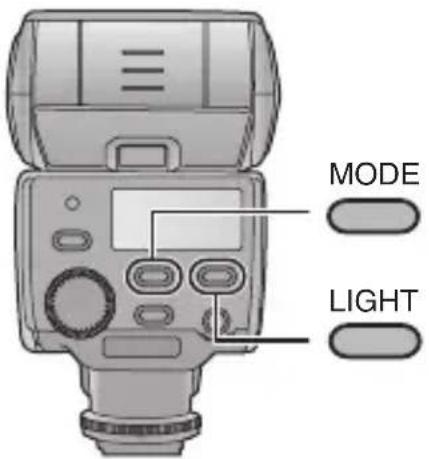
- The setting for the [Distance display] (m/ft) remains unchanged.
Press the [MODE] button for 2 or more seconds to switch to the function settings. (P37)
| Item Setting | |
AF assist lamp A: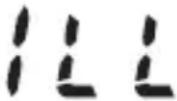 | The AF assist lamp lights, and focusing is facilitated.OFF: The AF assist lamp does not light. |
- AF assist will not work with digital cameras which are not part of Panasonic's “Four Thirds” system.
Lighting angle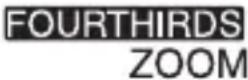 | 4-3: The lighting angle is indicated by the focal length of the lens for the format used with the “Four Thirds” digital camera.135: The lighting angle is converted into the focal length of a 35 mm film camera. |
- 135 camera: This is a synonym for a 35 mm film camera format.
Distance display ft:  | Distances are indicated in feet.m: Distances are indicated in meters. |
Flash intensity adjustment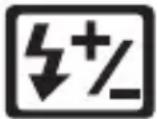 | ON: The flash intensity is adjusted.OFF: The flash intensity is not adjusted. |
Wide panel switching | ON: The wide panel takes effect. The unit recognizes that the wide panel is extended.OFF: The wide panel has no effect. |
| Item Setting | |
| Guide number (GN) display | ON: The light quantity of the flash is displayed as a guide number (GN).OFF: The light quantity of the flash is displayed as the light quantity ratio. |
| GN |
| ISO sensitivity and aperture adjustmentISO F | ON: The ISO sensitivity and the aperture are adjusted to match the digital camera.OFF: The ISO sensitivity and the aperture can be adjusted with the select dial. |
- This can only be used for digital cameras with communication functions. (Only when the flash mode is set to [AUTO] mode.)
| ISO sensitivity adjustment | The ISO sensitivity can be set between 25 and 3200. |
| ISO |
- This can be used for digital cameras with communication functions if [ISO sensitivity and aperture adjustment] is set to [OFF] and for digital cameras without communication functions. (Only when the flash modes are set to [AUTO] mode)
- The [ ] function does not work. There is no problem operating the flash if you select either [ON] or [OFF].
Concerning Continuous Firing
When the flash is fired continuously, its flash head becomes hot, and this may possibly lead to deterioration or malfunction of the unit. Keep continuous firing within the number of times given below, and then allow the unit to rest for at least 10 minutes.
Restriction on number of flashes during continuous firing
| Flash intensity Flash interval | Restriction on number of flashes | |
| 1/1(FULL) | 6 s 10 | |
| 1/2 3 s 20 | ||
| 1/4 1 s 40 | ||
| 1/8 to 1/128 0.5 s or less 80 | ||
Continuous firing is synchronized up to the number of frames listed below. If the restriction on the number of flashes during continuous firing is exceeded, allow the unit to rest for at least 10 minutes.
Number of frames for which continuous firing is possible (serial photography speed: 8 frames per second)
| Light quantity No. of frames | |
| 1/4 2 | |
| 1/8 5 | |
| 1/16 10 | |
| 1/32 16 | |
| 1/64 30 | |
| 1/128 40 | |
Table of Guide Numbers (GN)
● The tables show the values when the ISO sensitivity is [100]. - Depending on the digital camera lens, you may not be able to select the lighting angles in the tables as the focal length is decided by the camera. - You can adjust the lighting angle between 12 mm (24 mm) and 42 mm (85 mm) if you are using the DMC-L1K.
[TTL AUTO]/[AUTO]
| Lighting angleFocal length (mm) (35 mm film conversion) | ||||||||
| 8(16) | 10(20) | 12(24) | 14(28) | 17(35) | 25(50) | 35(70) | 42(85) | |
| Full flash 12 | 14 20 2 | 2 24 28 | 32 36 | |||||
[MANUAL]
| Light quantity ratio | Lighting angleFocal length (mm) (35 mm film conversion) | |||||||
| 8(16) | 10(20) | 12(24) | 14(28) | 17(35) | 25(50) | 35(70) | 42(85) | |
| 1/1 12.0 | 14.0 20.0 | 22.0 24 | 0 28.0 | 32.0 36.0 | ||||
| 1/2 8.5 9 | 9 14.1 1 | 5.6 17.0 | 19.8 22.6 | 25.5 | ||||
| 1/4 6.0 7 | 0 10.0 1 | 1.0 12.0 | 14.0 16.0 | 18.0 | ||||
| 1/8 4.2 4 | 9 7.1 7.8 | 8.5 9.9 | 11.3 12.7 | |||||
| 1/16 3.0 3 | 3.5 5.0 5 | 5 6.0 7.0 | 8.0 9.0 | |||||
| 1/32 2.1 2 | 2.5 3.5 3 | 9 4.2 4.9 | 5.7 6.4 | |||||
| 1/64 1.5 1 | 1.8 2.5 2 | 8 3.0 3.5 | 4.0 4.5 | |||||
| 1/128 1.1 | 1.2 1.8 1 | 9 2.1 2.5 | 2.8 3.2 | |||||
[FP TTL AUTO]
| Shutter speed | Lighting angle Focal length (mm) (35 mm film conversion) | |||||||
| 8(16) | 10(20) | 12(24) | 14(28) | 17(35) | 25(50) | 35(70) | 42(85) | |
| 1/125 8.5 | 9.9 14.1 | 15.6 17.0 | 19.8 22.6 | 25.5 | ||||
| 1/160 7.5 | 8.8 12.5 | 13.8 15.0 | 17.5 20.0 | 22.5 | ||||
| 1/200 6.7 | 7.8 11.2 | 12.3 13.4 | 15.7 17.9 | 20.1 | ||||
| 1/250 6.0 | 7.0 10.0 | 11.0 12.0 | 14.0 16.0 | 18.0 | ||||
| 1/320 5.3 | 6.2 8.8 9.7 | 10.6 12.4 | 14.1 15.9 | |||||
| 1/400 4.7 | 5.5 7.9 8.7 | 9.5 11.1 | 12.6 14.2 | |||||
| 1/500 4.2 | 4.9 7.1 7.8 | 8.5 9.9 | 11.3 12.7 | |||||
| 1/640 3.8 | 4.4 6.3 6.9 | 7.5 8.8 | 10.0 11.3 | |||||
| 1/800 3.4 | 3.9 5.6 6.1 | 6.7 7.8 | 8.9 10.1 | |||||
| 1/1000 3.0 | 3.5 5.0 | 6.0 7.0 | 8.0 9.0 | |||||
| 1/1250 2.7 | 3.1 4.5 | 4.9 5.4 6.3 | 7.2 8.0 | |||||
| 1/1600 2.4 | 2.8 4.0 | 4.7 5.5 | 6.3 7.1 | |||||
| 1/2000 2.1 | 2.5 3.5 | 4.2 4.9 | 5.7 6.4 | |||||
| 1/2500 1.9 | 2.2 3.2 | 3.8 4.4 | 5.1 5.7 | |||||
| 1/3200 1.7 | 2.0 2.8 | 3.4 3.9 | 4.5 5.0 | |||||
| 1/4000 1.5 | 1.8 2.5 | 3.0 3.5 | 4.0 4.5 | |||||
| 1/5000 1.3 | 1.6 2.2 | 2.7 3.1 | 3.6 4.0 | |||||
| 1/6400 1.2 | 1.4 2.0 | 2.4 2.8 | 3.2 3.6 | |||||
| 1/8000 1.1 | 1.2 1.8 | 2.1 2.5 | 2.8 3.2 | |||||
[FP MANUAL]
- Listed below are the guide numbers (GN) for 1/1 (FULL) flashes.
| Shutter speed | Lighting angleFocal length (mm) (35 mm film conversion) | |||||||
| 8(16) | 10(20) | 12(24) | 14(28) | 17(35) | 25(50) | 35(70) | 42(85) | |
| 1/125 8.5 | 9.9 14.1 | 15.6 17.0 | 19.8 22.6 | 25.5 | ||||
| 1/160 7.5 | 8.8 12.5 | 13.8 15.0 | 17.5 20.0 | 22.5 | ||||
| 1/200 6.7 | 7.8 11.2 | 12.3 13.4 | 15.7 17.9 | 20.1 | ||||
| 1/250 6.0 | 7.0 10.0 | 11.0 12.0 | 14.0 16.0 | 18.0 | ||||
| 1/320 5.3 | 6.2 8.8 9.7 | 10.6 12.4 | 14.1 15.9 | |||||
| 1/400 4.7 | 5.5 7.9 8.7 | 9.5 11.1 | 12.6 14.2 | |||||
| 1/500 4.2 | 4.9 7.1 7.8 | 8.5 9.9 | 11.3 12.7 | |||||
| 1/640 3.8 | 4.4 6.3 6.9 | 7.5 8.8 | 10.0 11.3 | |||||
| 1/800 3.4 | 3.9 5.6 6.1 | 6.7 7.8 | 8.9 10.1 | |||||
| 1/1000 3.0 | 3.5 5.0 | 6.0 7.0 | 8.0 9.0 | |||||
| 1/1250 2.7 | 3.1 4.5 | 4.9 5.4 6.3 | 7.2 8.0 | |||||
| 1/1600 2.4 | 2.8 4.0 | 4.7 5.5 | 6.3 7.1 | |||||
| 1/2000 2.1 | 2.5 3.5 | 4.2 4.9 | 5.7 6.4 | |||||
| 1/2500 1.9 | 2.2 3.2 | 3.8 4.4 | 5.1 5.7 | |||||
| 1/3200 1.7 | 2.0 2.8 | 3.4 3.9 | 4.5 5.0 | |||||
| 1/4000 1.5 | 1.8 2.5 | 3.0 3.5 | 4.0 4.5 | |||||
| 1/5000 1.3 | 1.6 2.2 | 2.7 3.1 | 3.6 4.0 | |||||
| 1/6400 1.2 | 1.4 2.0 | 2.4 2.8 | 3.2 3.6 | |||||
| 1/8000 1.1 | 1.2 1.8 | 2.1 2.5 | 2.8 3.2 | |||||
- In the [FP MANUAL] mode, the following formula can be used to obtain the guide numbers (GN) when any setting except 1/1 is used for the light quantity.
Guide number (GN) = Guide number for 1/1 × light quantity ratio coefficient *
* Light quantity ratio coefficient
| Light quantity ratio 1/1 1/2 1/4 1/8 1/16 | |||||
| Light quantity ratio coefficient | 1.0 | 0.71 | 0.5 | 0.35 | 0.25 |
Troubleshooting
■Q&A for the unit The unit becomes hot.
When the unit is fired continuously immediately after the [TEST/CHARGE] button has lighted, the batteries will generate heat, but this does not pose any problems in terms of performance or quality. In cases like this, wait until the flash head and batteries cool off before resuming use.
I can't install the unit on my digital camera.
Is the lock pin protruding?
You cannot install the unit on your digital camera if this pin is protruding.
Turn the lock ring in the opposite direction from [◄LOCK] until it stops and retract the pin before proceeding to install the unit on the digital camera.
I can't select the flash modes even by pressing the [MODE] button.
When connecting the unit to some digital camera models capable of communication, you can select the flash's mode only from the digital camera.
The colouring of the images differs from what I see.
Adjust the white balance of the digital camera. (Setting to the [AUTO] mode is recommended.)
The images are too bright.
Is the subject closer than the flash working range? Adjust the flash working range using one of the operations below.
- Adjust the aperture of the lens.
- Set the flash intensity to a [-] value.
- Use the wide panel.
The flash working range does not appear on the display panel.
The flash working range is not displayed in the following cases:
- When the lens has been detached
- When bounce light photography is performed
- When the light intensity is adjusted
- When the ISO sensitivity or aperture setting is outside the range
The display panel is extinguished even though the unit's power is on.
Is the digital camera's power-saving function working?
The flash is coupled to the digital camera so that when the digital camera's power-saving function is working, the flash's display panel will be extinguished.
- Press the digital camera's shutter button halfway down to release the function.
The flash's power does not go off even though I turned off the power of my digital camera which comes with communication functions.
When the power of a digital camera with communication functions is switched off, the flash is set to the power-saving mode. When the power of the digital camera is turned back on, the flash's power is also turned on.
When the flash's power is to be turned off, turn off its power first. When the flash is used in combination with a digital camera without communication functions, it is automatically set to the power-saving mode when no operations have been performed for about 15 minutes.
I can't switch to the lighting angle.
Has the wide panel been damaged?
- If the wide panel is damaged while it is extended, you will no longer be able to use the [ZOOM] button. In this case, you can use the [ZOOM] button if you set wide panel switching to [OFF].
■ Q&A for the panel display [ISO] and [F] are flashing or the numbers for the ISO sensitivity and aperture are flashing.
This means that the ISO sensitivity and aperture of the digital camera are outside the flash working range of the flash.
Change the ISO sensitivity and aperture of the digital camera.
The optimum camera to subject distance is flashing.
The flash is too close to the subject. If the subject is too close, the lighting range of the flash will shift, so take photos at a distance further than 0.6 m (or 0.5 m for close-up photos).
[ ] and the lighting angle are flashing.
Extend the wide panel.
[ ] does not go off.
The flash head has been set to point downward (7 degrees). Do not use this setting unless you are taking close-ups.
[ ] does not go off.
The wide panel is extended.
- The guide number (GN) is reduced. Pay attention to the camera to subject distance.
Cautions for Use
■Concerning the unit
- Do not look directly at the flash at close range when it is activated.
- Avoid bringing the unit into close proximity with objects. Its heat and light may cause deformation or discolouration.
- When taking photos outside the flash working range, the proper exposure will not be achieved, and images which are whitish or too dark may be taken.
- At high shutter speeds, the effects obtained by the unit may not be sufficient.
Keep the unit away from insecticide sprays and other volatile substances.
- If the unit is exposed to these sprays or substances, its external case may deteriorate and/or its paint may peel off.
- Do not leave the unit in contact with any items made of rubber or PVC for prolonged periods of time.
Do not use benzine, paint thinners, alcohol or other such solvents to maintain the unit.
- Remove the batteries before proceeding with maintenance.
- Use of solvents may cause a deterioration in the unit's external case and/or the paint to peel off.
- Wipe away dust and fingerprints using a soft, dry cloth.
- Do not use kitchen detergents or chemical cleaning cloths.
- If rain or drops of water splash onto the unit, wipe off the water with a dry cloth.
Do not carry the unit when it is still attached to the camera body.
- Under no circumstances should the unit be stored in any of the following locations since doing so may cause trouble in operation or malfunctioning.
- In direct sunlight or on a beach in summer
- In locations with high temperatures and humidity levels or where the changes in temperature and humidity are acute
- In locations with high concentrations of sand, dust or dirt
- Where there is fire
- Near heaters, air conditioners or humidifiers
- Where water may make the unit wet
- Where there is vibration
- Inside a vehicle
- Multiple-light shots cannot be taken by using the flash in combination with other flash units.
- Do not drop the unit, knock it into other objects or subject it to any other kind of strong impact or shock.
- When the unit is not going to be used for a prolonged period, mold and other problems may cause failure of the unit. It is recommended that you check the unit's operation prior to use.
- Do not touch the unit's electrical contacts. Doing so can cause failure of the unit.
- To safeguard the flash head from overheating and deterioration, stop using the unit after 10 continuous firings at the full flash intensity, and allow the unit to rest for at least 10 minutes to ensure that the flash head cools off.
■ Concerning the batteries Be sure to remove the batteries when you will not be using the camera for a long period of time.
- If the temperature is too high or low, the terminals may rust causing a malfunction.
If you drop the batteries accidentally, check to see if the body of the batteries or the terminals are damaged.
- Inserting a damaged battery in the camera will damage the camera.
Bring charged spare batteries when going out.
- Be aware that the operating time of the batteries becomes shorter in low temperature conditions such as at a ski resort.
Dispose of unusable batteries.
- Batteries have a limited life.
- Do not throw batteries into fire because they may cause an explosion.
Do not allow battery terminals to come into contact with metal objects (such as necklaces, hairpins, etc.).
- This can cause short circuiting or heat generation and you may be badly burned if you touch the batteries.
Do not attempt to recharge dry batteries.
Do not throw batteries into a fire or expose to excessive heat such as sunshine.
Power requirements: DC 3.0 V
| Batteries recommended for use | AA Alkaline dry batteries (LR6) × 2/ AA Rechargeable nickel metal hydride batteries (Ni-MH) × 2 |
| Charging time (from full flash until the [TEST/CHARGE] button lights) | Approx. 8 s: AA Alkaline dry batteries Approx. 7.5 s: AA Rechargeable nickel metal hydride batteries |
| Firing period | Approx. 1/20000 s to 1/500 s (Varies depending on the flash intensity; FP firing excluded.) |
| No. of flashes (with full flash) | Approx. 120 flashes: AA Alkaline dry batteries Approx. 200 flashes: AA Rechargeable nickel metal hydride batteries (2700 mAh type) (Differs depending on the photo taking conditions.) |
| Flash modes TTL AUTO/AUTO/MANUAL/FP TTL AUTO/FP MANUAL | |
| Bounce angle Upward: 0 | to 90 degrees, downward: 0 to 7 degrees, toward the right: 0 to 90 degrees, toward the left: 0 to 180 degrees |
| Power-saving mode | Coupled to power-saving mode of a digital camera having communication capability |
| AF assist lamp Only for co | combinations with digital camera having communication capability approximate distance enabling automatic lighting at low-brightness levels: 1 m to 5 m (Differs depending on the digital camera and type of lens used) |
| Guide number Automatically selected36: At 42 mm setting(85 mm when a 135 camera is used)20: At 12 mm setting(24 mm when a 135 camera is used)8/10 selected: When the wide panel is used | |
| Lighting angle Automatically selectedAt 12 mm setting: 61 degrees up/down,78 degrees left/right(View angle of 12 mm lens covered)*At 42 mm setting: 21 degrees up/down,28 degrees left/right(View angle of 42 mm lens covered)*Using wide panel:83 degrees up/down,101 degrees left/right(View angle of 8 mm lens covered)* * When “Four Thirds” applies as the ZOOM display | |
| Dimensions | Approx. 67 mm (W)×108 mm (H)×95 mm (D) (excluding the projecting parts) |
| Mass | Approx. 270 g (main unit)Approx. 320 g (including batteries) |
| Operating temperature 0 °C to 40 °C | |
| Operating humidity 10% | to 80% (no condensation) |

Ⓐ: Flash mode
Ⓐ: Guide number (GN)
(left/right direction)
(P111, 128)
(P117, 120, 123, 126, 133)

(A): Flash mode
[FP MANUAL]
(A): Flash mode
(A): Guide number (GN)
Power requirement: 3.0 V DC
Flash case VFC4230

(A): Flash mode
[FP MANUAL]
(A): Flash mode
Matsushita Electric Industrial Co., Ltd.
Web site: http://panasonic.net
Pursuant to the directive 2004/108/EC, article 9(2)
Panasonic Testing Centre
Panasonic Marketing Europe GmbH
Winsbergring 15, 22525 Hamburg, F.R. Germany
- INFORMATION FOR YOUR SAFETY
- WARNING
- IF YOU SEE THIS SYMBOL
- INFORMATION ON DISPOSAL FOR USERS OF WASTE ELECTRICAL & ELECTRONIC EQUIPMENT (PRIVATE HOUSEHOLDS)
- FOR BUSINESS USERS IN THE EUROPEAN UNION
- INFORMATION ON DISPOSAL IN OTHER COUNTRIES OUTSIDE THE EUROPEAN UNION
- PRECAUTIONS
- HANDLING THE UNIT
- WHEN THE UNIT IS NOT GOING TO BE USED FOR A PROLONGED PERIOD
- SUPPLIED ACCESSORIES
- [INSPECTION TO BE PERFORMED WHEN YOU UNPACK THE UNIT]
- FLASH CASE VFC
- NAMES OF THE COMPONENTS
- DISPLAYS APPEARING ON THE DISPLAY PANEL
- CONCERNING THE BATTERIES
- TYPES OF BATTERIES THAT CAN BE USED
- TYPES OF BATTERIES WITH WHICH OPERATION IS NOT GUARANTEED
- BATTERIES WITH SHAPES THAT CANNOT BE USED
- HANDLING THE BATTERIES
- RECHARGEABLE NICKEL METAL HYDRIDE BATTERIES
- PHOTO TAKING CONDITIONS
- INSERTING AND REMOVING THE UNIT'S BATTERIES (OPTIONAL)
- SLIDE THE BATTERY COVER TO OPEN IT
- WHEN INSERTING THE BATTERIES, ENSURE THAT THE ⊕ AND ⊖ POLES OF THE BATTERIES ARE ALIGNED CORRECTLY
- CLOSE THE BATTERY COVER BY SLIDING IT BACK FIRMLY AS FAR AS IT WILL GO
- CHECKING THE FLASH'S REMAINING BATTERY CHARGE
- PRESS THE [POWER] BUTTON
- CHECK THAT THE [TEST/CHARGE] BUTTON LIGHTS
- PRESS THE [POWER] BUTTON TO TURN OFF THE UNIT'S POWER
- MOUNTING THE UNIT ONTO THE DIGITAL CAMERA, AND REMOVING IT
- MOUNTING THE UNIT
- SECURE THE FLASH HEAD AT THE HORIZONTAL FRONT POSITION
- LOOSEN THE LOCK RING
- TAKING PICTURES USING A DIGITAL CAMERA WITH COMMUNICATION FUNCTIONS
- HOW TO SELECT THE FLASH MODE
- CONCERNING THE FLASH MODES
- [TTL AUTO]
- CHECK THAT THE DISTANCE TO THE SUBJECT IS WITHIN THE FLASH WORKING RANGE
- PRESS THE SHUTTER BUTTON ALL THE WAY DOWN, AND TAKE THE PICTURE
- CHECK THAT THE [AUTO CHECK] LAMP IS FLASHING
- [AUTO]
- COMBINATIONS OF THE ISO SENSITIVITY AND APERTURE WHICH CAN BE ADJUSTED IN THE [AUTO] MODE
- [MANUAL]
- [FP TTL AUTO]
- PRESS THE SHUTTER BUTTON ALL THE WAY DOWN, AND TAKE THE PHOTO
- THE FOLLOWING KINDS OF PHOTOS CAN BE TAKEN USING HIGH SHUTTER SPEEDS
- [FP MANUAL]
- ADJUSTING THE FLASH INTENSITY
- TURN THE SELECT DIAL AND SET THE FLASH INTENSITY ADJUSTMENT VALUE
- THE FLASH INTENSITY ADJUSTMENT RANGE AND THE ACTUAL FLASH INTENSITY MAY DIFFER DEPENDING ON THE FLASH MODE
- TAKING PICTURES USING A DIGITAL CAMERA WITHOUT COMMUNICATION FUNCTIONS
- PRESS THE [POWER] BUTTON ON THE UNIT
- PRESS THE [MODE] BUTTON TO SELECT THE FLASH MODE
- Ⓐ: FLASH MODE
- WHEN THE CAMERA TO SUBJECT DISTANCE AND APERTURE HAVE BEEN DECIDED UPON
- WHEN THE APERTURE IS TO BE SET
- HOW TO OBTAIN THE OPTIMUM CAMERA TO SUBJECT DISTANCE
- OTHER APPLICATIONS
- TAKING PICTURES WITH BOUNCE LIGHTING
- WHILE HOLDING DOWN THE BOUNCE UNLOCK BUTTON, TURN THE FLASH HEAD SO THAT IT IS POINTING IN THE DESIRED DIRECTION
- POINT THE FLASH AT THE CEILING OR OTHER REFLECTIVE SURFACE, AND TAKE THE PHOTO
- TAKING PICTURES AT CLOSE RANGE
- POINT THE FLASH HEAD DOWN AS FAR AS IT WILL GO (7 DEGREES DOWNWARD)
- SELECTING THE LIGHTING ANGLE MANUALLY
- ANY OF THE FOLLOWING ZOOM SETTINGS CAN BE SELECTED
- HOW TO USE THE WIDE PANEL
- PULL OUT THE WIDE PANEL AND THEN PUSH IT DOWN
- PRESS THE [ZOOM] BUTTON, AND SELECT THE LIGHTING ANGLE
- MANY CHOICES FOR DIFFERENT FLASH PHOTOGRAPHY APPLICATIONS
- RED-EYE REDUCTION FLASH
- SLOW SYNCHRONIZATION
- ND CURTAIN SYNCHRONIZATION
- FUNCTIONS
- CONCERNING CONTINUOUS FIRING
- TABLE OF GUIDE NUMBERS (GN)
- TROUBLESHOOTING
- Q&A FOR THE UNIT THE UNIT BECOMES HOT
- I CAN'T INSTALL THE UNIT ON MY DIGITAL CAMERA
- I CAN'T SELECT THE FLASH MODES EVEN BY PRESSING THE [MODE] BUTTON
- THE COLOURING OF THE IMAGES DIFFERS FROM WHAT I SEE
- THE IMAGES ARE TOO BRIGHT
- THE FLASH WORKING RANGE DOES NOT APPEAR ON THE DISPLAY PANEL
- THE DISPLAY PANEL IS EXTINGUISHED EVEN THOUGH THE UNIT'S POWER IS ON
- I CAN'T SWITCH TO THE LIGHTING ANGLE
- THE OPTIMUM CAMERA TO SUBJECT DISTANCE IS FLASHING
- [ ] AND THE LIGHTING ANGLE ARE FLASHING
- [ ] DOES NOT GO OFF
- CAUTIONS FOR USE
- CONCERNING THE UNIT
- KEEP THE UNIT AWAY FROM INSECTICIDE SPRAYS AND OTHER VOLATILE SUBSTANCES
- DO NOT USE BENZINE, PAINT THINNERS, ALCOHOL OR OTHER SUCH SOLVENTS TO MAINTAIN THE UNIT
- DO NOT CARRY THE UNIT WHEN IT IS STILL ATTACHED TO THE CAMERA BODY
- CONCERNING THE BATTERIES BE SURE TO REMOVE THE BATTERIES WHEN YOU WILL NOT BE USING THE CAMERA FOR A LONG PERIOD OF TIME
- IF YOU DROP THE BATTERIES ACCIDENTALLY, CHECK TO SEE IF THE BODY OF THE BATTERIES OR THE TERMINALS ARE DAMAGED
- BRING CHARGED SPARE BATTERIES WHEN GOING OUT
- DISPOSE OF UNUSABLE BATTERIES
- DO NOT ALLOW BATTERY TERMINALS TO COME INTO CONTACT WITH METAL OBJECTS (SUCH AS NECKLACES, HAIRPINS, ETC.)
- DO NOT ATTEMPT TO RECHARGE DRY BATTERIES
- MATSUSHITA ELECTRIC INDUSTRIAL CO., LTD
Brand : PANASONIC
Model : Lumix DMWFL360E
Category : Camera lens