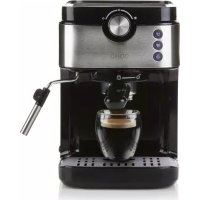
USER MANUAL DO711K DOMO
natural_image
Exterior view of a modern espresso machine with black and silver casing (no visible text or symbols)
DO711K
| Handleiding Espressomachine |
| Mode d'emploi Machine Espresso |
| Gebrauchsanleitung Espressomaschine |
| Instruction booklet Espresso machine |
| Manual de instrucciones Máquina de café exprés |
| Istruzioni per l'uso Macchina per caffè espresso |
| Návod k použití Pákový kávovar |
| Návod na použitie Pákový kávovar |

natural_image
Two black-and-white icons: a warning triangle with an exclamation mark and an open book (no text or symbols)
natural_image
Line drawing of a hand pouring dark liquid into a small container (no text or symbols)
natural_image
Illustration of a hand using a tool to measure a small object, with no visible text or symbols.
natural_image
Illustration of a hand using a dropper to measure a small object, with no visible text or symbols.
text_image
Prohibition sign for a trash bin with crossed and unexposed lines, indicating no waste or discharge.
natural_image
Recycling symbol icon with three chasing arrows forming a triangle (no text or labels)
natural_image
Illustration of hands pouring dark liquid into a small container (no text or symbols)
natural_image
Illustration of a hand using a dropper to measure a small container with a downward arrow (no text or symbols)
natural_image
Illustration of a hand holding a small object with a pointer and arrow, no text or symbols present
text_image
Prohibition sign with crossed-out trash bin and no text, indicating no waste or disposal.
natural_image
Recycling symbol icon with three chasing arrows forming a triangle (no text or labels)
natural_image
Illustration of hands using a tool to extract dark liquid from a small container (no text or symbols)
natural_image
Illustration of a hand using a dropper to measure a small container with a downward arrow (no text or symbols)
natural_image
Illustration of a hand holding a small object with a pointer and arrow, no text or symbols present
text_image
Prohibition sign with a trash bin crossed out and a black rectangle below, indicating no waste or discharge.
natural_image
Recycling symbol icon with three chasing arrows forming a triangle (no text or labels)
All of our products are always submitted to a strict quality control before they are sold to you.
Should you nevertheless experience problems with your device, we sincerely regret this. In that case, we kindly request you to contact our customer service.
Our staff will gladly assist you.

+32 14 21 71 91

info@linea2000.be
Monday – Thursday: 8.30 – 12.00 and 13.00 – 17.00
Friday: 8.30 - 12.00 and 13.00 - 16.30
This appliance has a two year warranty period. During this period the manufacturer is responsible for any failures that are the direct result of construction failure. When these failures occur the appliance will be repaired or replaced if necessary. The warranty will not be valid when the damage to the appliance is caused by wrong use, not following the instructions or repairs executed by a third party. The guarantee is issued with the original till receipt. All parts, which are subject to wear, are excluded from the warranty. If your device breaks down within the 2-year warranty period, you can return the device together with your receipt to the shop where you purchased it.
The guarantee on accessories and components that are liable to wear-and-tear is only 6 months.
The guarantee and responsibility of the supplier and manufacturer lapse automatically in the following cases:
- If the instructions in this manual have not been followed.
· In case of incorrect connection, e.g., electrical voltage that is too high.
· In case of incorrect, rough or abnormal use.
- In case of insufficient or incorrect maintenance.
· In case of repairs or alterations to the device by the consumer or non-authorised third parties.
- If the customer used parts or accessories that are not recommended or provided by the supplier / manufacturer.
SAFETY INSTRUCTIONS
When using electrical appliances, basic safety precautions should always be taken, including the following:
- Read all instructions carefully. Keep this manual for future reference.
- Make sure all packaging materials and promotional stickers have been removed before using the appliance for the first time. Make sure children cannot play with the packaging materials.
· This appliance is intended to be used in household and similar applications such as:
· staff kitchen areas in shops, offices and other working environments;
· farm houses;
- by clients in hotels, motels and other residential type environments;
- bed and breakfast type environments.
· Children should be supervised to ensure that they do not play with the appliance.
· This appliance can be used by children aged from 16 years and above and persons with reduced physical, sensory or mental capabilities or lack of experience and knowledge if they have been given
supervision or instruction concerning use of the appliance in a safe way and understand the hazards involved. Children shall not play with the appliance. Cleaning and user maintenance shall not be made by children unless they are older than 16 and supervised.
- Keep the appliance and its cord out of reach of children younger than 16 years.
· The appliance must be disconnected from its power source when not in use, during service and when replacing parts. Allow to cool before putting on or taking off parts, and before cleaning the appliance.
- CAUTION: In order to avoid a hazard this appliance must not be supplied through an external switching device, such as a timer, or connected to a circuit that is regularly switched on and off by the utility.
- The surfaces of the appliance are likely to get hot during use. It is advised not to touch the surfaces of the appliance other than the handles to avoid burns.
- Never leave the appliance unattended while it is functioning.
· Do not use or store this appliance outdoors.
- Do not use this appliance for other than intended use.
- Check carefully that the voltage and frequency of the power net match the indications on the rating label of the appliance.
- The plug must be plugged into an appropriate outlet that is installed and grounded in accordance with all local standards and requirements.
- Do not operate this appliance with a damaged cord or plug or in the event the appliance malfunctions or has been damaged in any manner. Return the appliance to the DOMO Service Department or its service agent for examination, repair, or electrical or mechanical adjustment. Do not try to repair the appliance yourself.
· To protect against electrical shock or burns, do not immerse unit, cord, or plug in water or other liquid.
· Do not operate the appliance with wet hands.
- A short power supply cord is provided to reduce the risk of becoming entangled in or tripping over a longer cord. DO NOT USE WITH AN EXTENSION CORD.
- Unwrap the cord completely to prevent overheating of the cord.
- Do not let the power supply cord hang over the edge of a counter, or touch hot surfaces.
- Do not allow the power cord supply to run underneath or around the unit.
- Do not place on or near a hot gas or electric burner or sink, or in a heated oven.
- Do not place near flammable materials, gases or explosives.
- Make sure the appliance is correctly assembled, then plug the cord in the wall outlet. To disconnect, turn controls to "OFF" or "o" position, then remove the plug from the wall. Never pull the cord or appliance to remove the plug from the socket.
- Failure to maintain this appliance in a clean condition could adversely affect the life of the appliance and possibly result in a hazardous situation.
- During boiling, hot steam may come through the filter or any other opening. Keep hands and face at a safe distance during operation.
- Any injury or damage caused by failure to comply with these rules are at your own risk. Neither the manufacturer, importer, or the supplier may be held liable.
· Do not overfill the kettle. Never add water above the maximum level marked on the appliance.
- Do not spill any liquid on the connector.
- Only use the utensils delivered with the appliance.
· Do not move the appliance while in use or when still hot. Allow to cool before moving the appliance.
- Do not remove the porta-filter while brewing coffee. Caution should also be taken while removing the porta-filter since the metal parts will be hot. Please make sure to hold it by the handle and to use the filter retention clip to dispose the grounds. Caution should be taken when moving unit with hot liquids.
PARTS
- Selection button
- Espresso button
- Double Espresso button
- Steam button
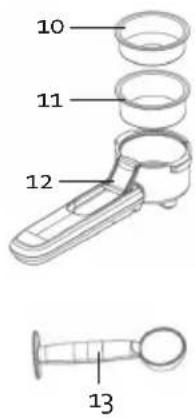
- Portafilter
- Drip catcher
- Water reservoir
- Steam pipe
- On-off button
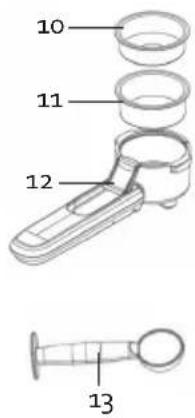
- Small filter
- Large filter
- Retainer clip portafilter
- Measuring spoon
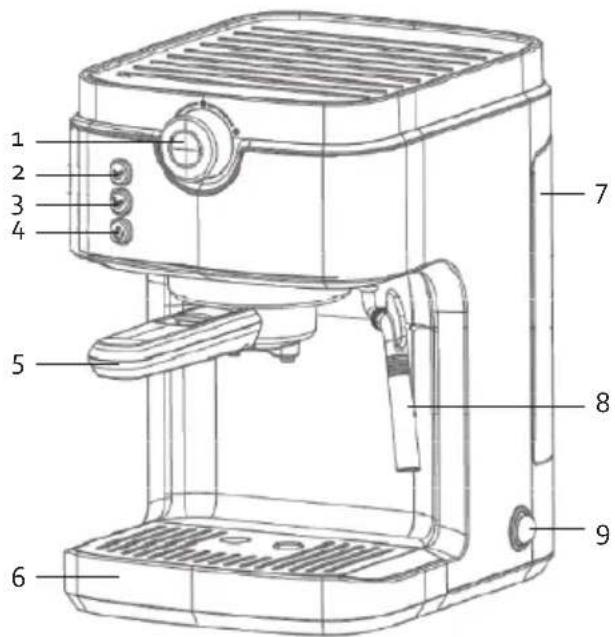
text_image
1
2
3
4
5
6
7
8
9
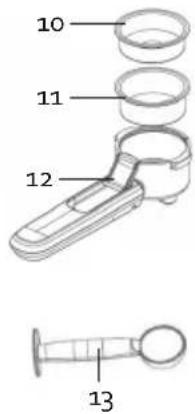
text_image
10
11
12
13
BEFORE FIRST USE
Check whether all accessories are included with the appliance and whether or not the appliance is damaged.
First run some water through it without adding coffee. Fill the water reservoir to the maximum line. Place a cup under the drip catcher. Put the plug in the socket and press the on-off button. The indicator lights will flash. Press one of the buttons to allow the water to run through. Then throw the water away. The appliance will go into standby mode.
USE
COFFEE
- Fill the reservoir with the desired amount of water. Make sure the water level stays between the "MIN" and "MAX" lines on the reservoir. The reservoir can be removed by using the handle to pull it toward you.
- Put the plug in the socket and press the on-off button.
- Turn the selection button to the middle position "o". The appliance will begin to heat up and the indicator lights will flash. While heating, a small amount of water may be deposited into the drip catcher via a hose at the bottom of the appliance. This is normal.
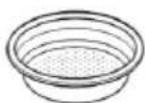
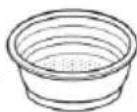
- Select the desired filter
- the small filter for an espresso
- the large filter for 2 cups or a double espresso
- Press the filter in the portafilter.
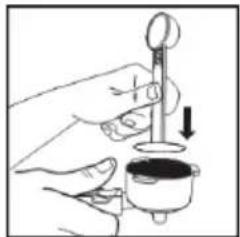
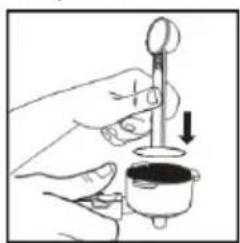
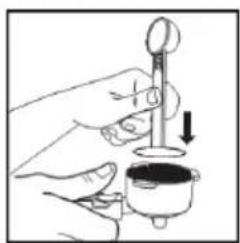
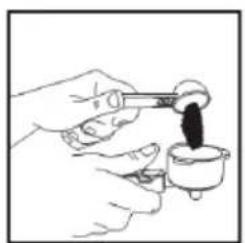
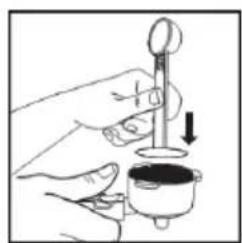
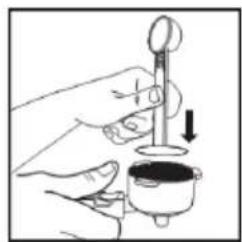
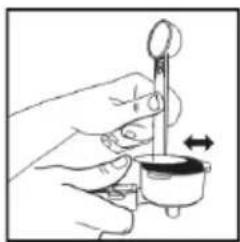
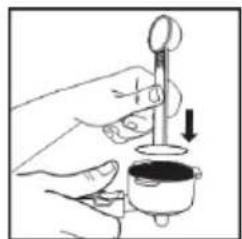
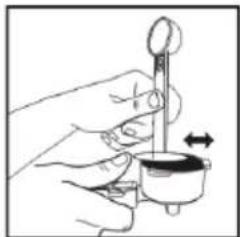
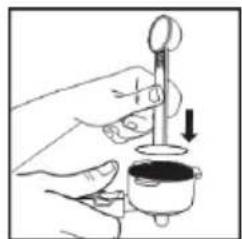
- Fill the filter with fresh, finely ground espresso coffee using the measuring spoon.
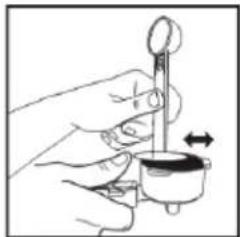
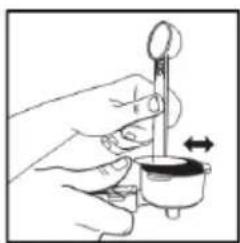
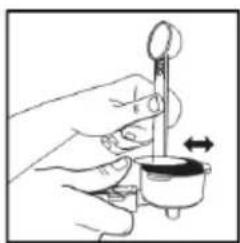
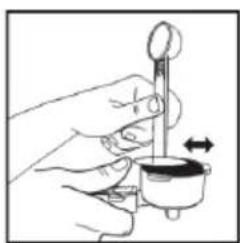
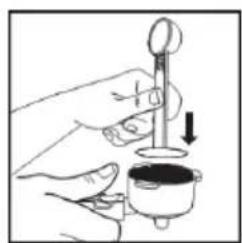
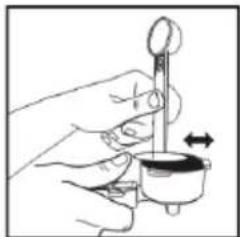
- Press the ground coffee firmly and evenly using the presser on the back side of the measuring spoon.
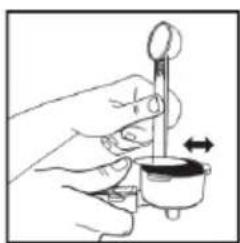
- Remove any excess coffee from the edge.
1
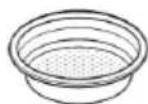
2
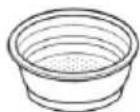
natural_image
Line drawing of a hand pouring dark liquid into a small container (no text or symbols)
natural_image
Illustration of a hand using a dropper to measure a small container with a downward arrow (no text or symbols)
natural_image
Illustration of a hand using a tool to measure a small object, with an arrow indicating rotation (no text or symbols present)
- Place the portafilter under the brew group. Hold the handle so that it connects correctly to the open-lock symbol on the appliance and fits into the groove.
· Turn it slowly to the right, to the closed-lock symbol on the appliance.
- Once the appliance has been preheated, the indicator lights of the espresso and double espresso button will light up. Turn the selection button to the coffee symbol 📄
- Place a cup under the drip catcher and press one of the lit up buttons for a small cup or a large cup. By default, the espresso button fill a 40ml cup, the double espresso button an 80ml cup. Consult the heading "setting capacity" to program the standard amounts differently.
The coffee will run through and the indicator light on the selected button will flash. When the coffee is ready, both indicator lights will light up. If you want to stop the appliance before it is done, press the selected button again while the coffee is running.
- Remove your cup from under the portafilter. Turn the selection button to the middle position "o". A small amount of water may be deposited into the drip catcher via a hose at the bottom of the appliance. This is normal.
- Remove the portafilter from the appliance. Place the retainer clip against the filter and bang the coffee grounds out of the filter.
· Clean the portafilter and dry it off for the next use.
MILK
- Put the plug in the socket and press the on-off button.
- Turn the selection button to the middle position "o". Press the steam button to heat up the appliance. The indicator light will flash. Once the indicator light stays on, the appliance is heated.
While it is heating up, a small amount of water may end up in the drip catcher. This is normal.
- Fill a small jar with cold milk (not hot!). Be careful not to fill it too full. When the milk foams, it increases in volume. Place the jar under the steam pipe.
· Turn the selection button to the steam symbol.
- Immerse a few millimetres of the steam pipe into the milk. To get creamier foam, immerse the steam pipe in the milk and rotate the jar with slow movements from the bottom to the top.
Once you have the desired amount of foam, turn the selection button to the middle position "o".
· Clean the steam pipe after each use. Caution: the steam pipe may still be hot.
HOT WATER
- Put the plug in the socket and press the on-off button.
· Turn the selection button to the steam symbol.
- Place a cup under the steam pipe.
- Press the espresso button.
- When you have enough water, turn the selection button to the middle position "o".
SETTING THE CAPACITY
By default, the espresso button fills a 40ml cup, the double espresso button an 80ml cup. You can program
the amounts for the espresso button at a minimum of 25ml and a maximum of 100ml and for the double espresso at 200ml.
- Put the plug in the socket and press the on-off button.
- Place the filter in the portafilter and secure the portafilter in the appliance.
- Turn the selection button to the coffee symbol .
- As soon as you release the button, that is the new default amount for that button.
- Press the button that you wish to program. Press and hold this button until the desired amount is reached.
The drip catcher can be removed to fit a large cup under the portafilter. Be sure that the drip tray is replaced before turning the selection button to the middle position "o". A small amount of water may be deposited into the drip catcher via a hose at the bottom of the appliance when turning it to this position.
Resetting factory setting
If you wish to undo the new programming and reset the factory setting for the standard amounts, do the following:
- Put the plug in the socket. Make sure that the on-off button is off.
- Put the portafilter with filter but without coffee in the appliance.
- Turn the selection button to the steam symbol.
- Press the steam button and the espresso button at the same time. Turn the on-off button on while pressing and holding both buttons.
- The two espresso buttons will flash. Turn the selection button back to the middle position "o". Turn the on-off button off.
- Turn the appliance back on. The three buttons will flash red and blue.
- Turn the selection button to the coffee symbol 📋. Position a cup and press on one of the espresso buttons. The standard amount of water will now run through.
- The factory setting has been restored.
CLEANING AND MAINTENANCE
Caution: Unplug the appliance and let it cool down before cleaning it. Never immerse the cord, the plug or the appliance in water or other fluids in order to avoid the risk of electrical shock. After each use, make sure the plug is removed from the outlet.
- Clean the filters, portafilter and the drip catcher with clean, hot water. Caution: These parts are not dishwasher safe.
- Wipe the product's exterior body with a soft, damp cloth to remove stains.
· Rinse the appliance regularly by setting coffee without putting ground coffee in the filter.
- Rinse the steam pipe regularly by setting hot water.
DESCALING
When?
Descale the appliance regularly. Regular descaling ensures constant quality of the coffee, lower energy consumption and extends the life of the espresso machine.
How?
- Fill the water reservoir with 1/4 vinegar and 3/4 water up to the maximum line.
- Put the plug in the socket and press the on-off button.
- Put the portafilter with filter but without coffee in the appliance.
- Remove the drip catcher and put a receiving container under the brew group.
- Turn the selection button to the coffee symbol 📋. Press the steam button for at least 5 seconds.
- The descaling procedure will begin and the vinegar solution will run through the filter. The three buttons will flash in turn. After 5 minutes, the procedure will be done. The three buttons will flash at the same time.
- Remove and empty the receiving container. Put the container under the steam pipe.
· Turn the selection button to the steam symbol.
- Start the descaling procedure of the steam pipe and the vinegar solution will come out of the pipe under high pressure. The three buttons will flash in turn. After 5 minutes, the procedure will be done. The two espresso buttons will flash in turn, and the steam button will remain lit up.
· The appliance has now been descaled.
ENVIRONMENTAL GUIDELINES
text_image
Prohibition sign with a trash bin crossed out by two diagonal lines, indicating no waste or discharge.
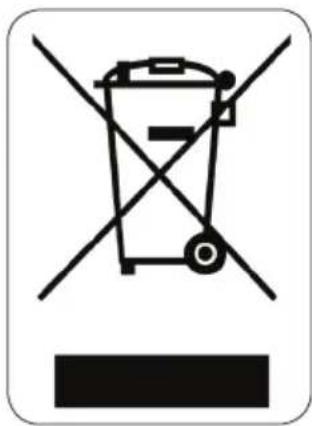
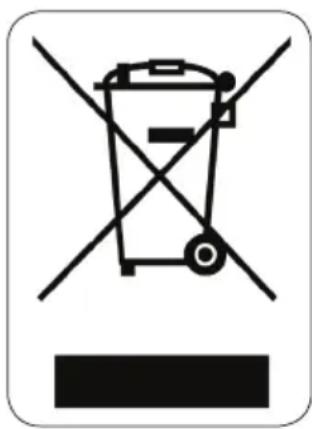
This symbol on the product or on its packaging indicates that this product may not be treated as household waste. Instead it must be brought to the applicable collection point for recycling of electrical and electronic equipment. By ensuring this product is disposed of correctly, you will help prevent potential negative consequences for the environment and human health, which could otherwise be caused by inappropriate waste handling of this product. For more detailed information about recycling of this product, please contact your local city office, your household waste disposal service or the shop where you purchased the product.
natural_image
Recycling symbol icon with three chasing arrows forming a triangle (no text or labels)
The packaging is recyclable. Please treat the packaging ecologically.
GARANTIA
text_image
Technical diagram of a coffee maker with numbered parts labeled for identification.
text_image
10
11
12
13
natural_image
Line drawing of a hand pouring dark liquid into a small container (no text or symbols)
natural_image
Illustration of a hand using a dropper to measure a small container with a downward arrow (no text or symbols)
natural_image
Illustration of a hand using a tool to measure a small object, with an arrow indicating rotation (no text or symbols present)
text_image
Prohibition sign depicting a trash bin crossed with a diagonal line, indicating no waste or discharge.
natural_image
Recycling symbol icon with three chasing arrows forming a triangle (no text or labels)
text_image
Technical diagram of a coffee maker with numbered parts labeled for identification.
text_image
10
11
12
13
PRIMA DELL'USO
natural_image
Illustration of hands pouring dark liquid into a small container (no text or symbols)
natural_image
Illustration of a hand using a dropper to measure a small container with a downward arrow (no text or symbols)
1
2
natural_image
Illustration of a hand using a tool to measure a small object, with an arrow indicating rotation (no text or symbols present)
text_image
Prohibition sign with crossed-out trash bin and no text, indicating no waste disposal or restriction
natural_image
Recycling symbol icon with three chasing arrows forming a triangle (no text or labels)
natural_image
Illustration of hands pouring dark liquid into a small container (no text or symbols)
natural_image
Illustration of a hand using a tool to measure a small container with a lid, showing a downward arrow (no text or symbols)
natural_image
Illustration of a hand using a tool to measure a small object, with no visible text or symbols.
OHLED NA ŽÍVOTNÍ PROSTŘEDÍ
text_image
Prohibition sign depicting a trash bin crossed with a diagonal line, indicating no waste or discharge.
natural_image
Recycling symbol icon with three chasing arrows forming a triangle (no text or labels)
natural_image
Illustration of hands pouring dark liquid into a small container (no text or symbols)
natural_image
Illustration of a hand using a tool to measure a small container with a lid, showing a downward arrow (no text or symbols)
natural_image
Illustration of a hand using a tool to measure a small object, with no visible text or symbols.
text_image
Prohibition sign depicting a trash bin crossed with a diagonal line, indicating no waste or discharge.
natural_image
Recycling symbol icon with three chasing arrows forming a triangle (no text or labels)
text_image
QR code image containing encoded data, no visible human-readable text