ELTO700.10.2 - Toaster AFK - Free user manual and instructions
Find the device manual for free ELTO700.10.2 AFK in PDF.



| Feature | Details |
|---|---|
| Device type | Toaster |
| Power | 700 W |
| Number of slots | 2 slots |
| Defrost function | Yes |
| Browning setting | 6 levels |
| Material | Stainless steel |
| Dimensions | 25 x 15 x 18 cm |
| Weight | 1.2 kg |
| Safety system | Automatic shut-off |
| Ease of cleaning | Removable crumb tray |
| Warranty | 2 years |
Frequently Asked Questions - ELTO700.10.2 AFK
User questions about ELTO700.10.2 AFK
0 question about this device. Answer the ones you know or ask your own.
Ask a new question about this device
Download the instructions for your Toaster in PDF format for free! Find your manual ELTO700.10.2 - AFK and take your electronic device back in hand. On this page are published all the documents necessary for the use of your device. ELTO700.10.2 by AFK.
USER MANUAL ELTO700.10.2 AFK
Please keep these instructions for future reference.
IMPORTANT NOTES:
- Please read the operating manual before using the toaster and keep it for reference.
- To avoid an electric shock, do not dip any part of the toaster or the power plug and cable in water or any other liquid.
- Please be extremely careful if the appliance is located near children.
- Please keep an eye on the appliance while it is in use.
- Always use the appliance on a dry surface.
- Do not use the appliance outdoors.
- Remove the plug from the socket when the toaster is not in use and before cleaning.
- Do not use the appliance if it is damaged or if any function is impaired. Return the toaster to the service centre as special tools are necessary for any repairs.
- For greater safety and to avoid any damage, ensure that the power cable and plug are checked regularly. If the cable or plug seems to be damaged in any way, please return the complete appliance to the service centre.
- Do not leave the power cable hanging over the edge of a table or working surface, and do not allow it to touch a hot surface. Let the appliance cool down before winding the cable onto the cable holder.
- Make sure that thetoaster is not placed on a hot surface. Only move, cover or put the appliance away when it has cooled down.
- Never place the toaster near a gas or electric burner and make sure that it does not come in contact with a cooker or microwave.
- Do not use hard, sharp or abrasive cleaning materials or an oven cleaner to clean the appliance.
- Before using the toaster, make sure that there is enough room for air to circulate above and around it. Make sure that the toaster does not touch any wall, curtain, towel or other inflammable material when it is in use. Be careful with any heatsensitive surfaces. It is advisable to use an insulating stand.
- This appliance is designed solely for domestic use. Use it only for the purpose for which it is intended.
- Use the toaster only when the crumb collector is inserted. You should clean the crumb collector regularly to avoid large conglomerations collecting inside.
-
Do not use the toaster for foodstuffs containing sugar, jam or preservatives.
-
This appliance can be used by children aged from 8 years and above and persons with reduced physical, sensory or mental capabilities or lack of experience and knowledge if they have been given supervision or instruction concerning use of the appliance in a safe way and understand the hazards involved. Children shall not play with the appliance. Cleaning and user maintenance shall not be made by children without supervision.
Keep the appliance and its cord out of reach of children less than 8 years
WARNING!!
Should any pieces of toast or other items happen to get stuck in the toaster, never try to remove them with a knife or any other object, since contact with live parts can cause an electric shock. Let the appliance cool down and take the plug out of the socket before removing the bread.
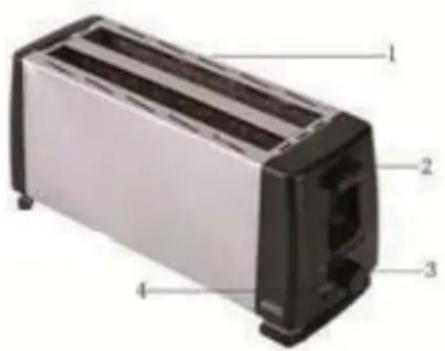
FUNCTIONAL CHARACTERISTICS
1.Widebread slots
2. Carriage control lever
3. Electric browning control
4. Stop button
INSTRUCTIONS FOR USE
- Insert the power plug and cable into the socket and turn on the toaster.
- Insert up to four slices of bread in the browning slot.
- Use the browning control switch to select the desired degree of browning between 1 and 6 (1 = lightest; 6 = darkest degree of browning). No. 3 is recommended for first use.
- Press the toasting lever down until it engages. The toasting process starts automatically. Please remember that the toasting lever will not engage if the power plug is not inserted in the socket and the toaster is not switched on.
- The toaster switches itself off automatically and the toasted bread is ejected when the desired of browning has been reached. The "Stop" button can always be used to cancel the baking process.
Do not place any rolls etc. directly on the toast aperture.
MAINTENANCE AND CLEANING
- Before cleaning, make sure that you have switched the appliance off and removed the power
plug and cable from the socket. Let the toaster cool down first.
- To clean the crumb collector, pull it out from base of the appliance. Empty it and re-insert it before using the toaster again.
- Clean the outside of the toaster with a slightly damp cloth and wipe dry with a soft cloth. Never dip the toaster in water to clean it!
- To clean the inside, turn it upside down and shake it over the sink until any crumbs adhering to the inside fall out.
Clean the crumb collector regularly to avoid crumbs accumulating inside.
Technical Data
Voltage supply: 220-240V~50/60Hz
Power input: 1100-1300W


Environment friendly disposal
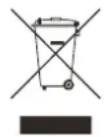
You can help protect the environment!
Please remember to respect the local regulations:
hand in the nonworking electrical equipments to an appropriate waste
disposal centre
Szanowski Państwo
B) Regulator temperature
C) Przycisk STOP
Obsługa
Environment friendly disposal