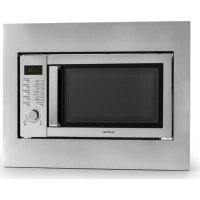
Steelwave - Microwave Oven Klarstein - Free user manual and instructions
Find the device manual for free Steelwave Klarstein in PDF.


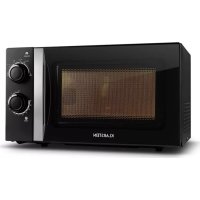
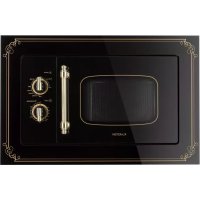
| Product type | Built-in microwave oven |
| Brand | Klarstein |
| Model | Steelwave |
| Item number | 10028201, 10028202 |
| Power supply | 230 V ~ 50 Hz |
| Microwave power | 800 W |
| Grill power | 1000 W |
| Capacity | 23 L |
| Luminous flux | ≤ 60 lm |
| Cabinet opening (W x H x D) | 560 x 443 x 550 mm |
| Appliance dimensions (approx.) | 595 x 465 x 550 mm |
| Weight (approx.) | 17 kg |
| Microwave cooking | Yes, 5 power levels (100P-20P) |
| Grill | Yes, 1000 W |
| Combination cooking | Yes, two programs (C1, C2) |
| Defrosting | Yes, by weight (meat, poultry, seafood) |
| Automatic programs | 8 (popcorn, reheat, liquids, pizza, potatoes, ready meal, rice, vegetables) |
| Delayed start | Yes, programmable up to 24h |
| Turntable | Yes, glass |
| Metal rack | Included |
| Child safety | Yes, key lock |
| Cleaning | Damp cloth, no steam cleaner or abrasives |
| Supplied accessories | Turntable, roller ring, metal rack, feet, supports, screws |
| Repairability | Repairs by professional only |
Frequently Asked Questions - Steelwave Klarstein
User questions about Steelwave Klarstein
0 question about this device. Answer the ones you know or ask your own.
Ask a new question about this device
Download the instructions for your Microwave Oven in PDF format for free! Find your manual Steelwave - Klarstein and take your electronic device back in hand. On this page are published all the documents necessary for the use of your device. Steelwave by Klarstein.
USER MANUAL Steelwave Klarstein
Member of Berlin Brands Group
Handwerkerstr. 11
15366 Dahlwitz-Hoppegarten
Deutschland
Berlin Brands Group UK Ltd
PO Box 1145
Oxford,OX19UW
United Kingdom
Dear Customer,
Congratulations on purchasing this equipment. Please read this manual carefully and take care of the following hints to avoid damages. Any failure caused by ignoring the items and cautions mentioned in the instruction manual is not covered by our warranty and any liability. Scan the QR code to get access to the latest user manual and other information about the product.

CONTENT
Safety Instructions 28
Notes on the Cooking Utensils 30
Cooking Tips 31
Product Overview and Control Panel 32
Mounting 34
Installation 37
Operation 38
Programs and functions 39
Cleaning and Care 46
Troubleshooting 47
Disposal Considerations 48
Manufacturer & Importer (UK) 48
TECHNICAL DATA
| Item number 10028201, 10028202 | |
| Power supply 230 V ~ 50 Hz | |
| Power microwave 800 W | |
| Power grill 1000 W | |
| Capacity 23 L | |
| Amount of light emitted when switched on | ≤ 60 lm |
SAFETY INSTRUCTIONS
Read all the safety and operating instructions carefully and retain them for future reference. Make sure the voltage in your living area corresponding to the one shown on the rating label of the appliance. And the wall socket is properly grounded.
To reduce the risk of fire in the oven cavity:
- Do not overcook the food.
- Remove wire twist ties from paper or plastic bags before placing bags in the oven.
- Do not heat oil or fat for deep drying as the temperature of oil cannot be controlled.
- After use wipe the waveguide cover with a damp cloth, followed by dry cloth to remove any food splashes and grease.
Built up grease may overheat and begin to cause smoke or catch fire. - If materials inside the oven should smoke or ignite, keep oven door closed, turn oven off and disconnect the power supply.
- When heating food in plastic or paper containers, keep an eye on the oven due to the possibility of ignition.
To reduce the risk of explosion and sudden boiling:
- Liquids and other foods must not be heated in sealed container since they are liable to explode; Baby bottles fitted with a screw cap or teat are considered to be sealed containers.
- Use the wide mouthed container to cook liquid, and the cooked liquid should not be removed out immediately. Several moments should be waited before removing. In order to avoid possible hazards caused by delayed eruptive boiling of liquids.
- Potatoes, sausage and chestnut should be peeled or pierced before cooking. Eggs in their shell, whole hard boiled eggs should not be heated in microwave ovens since they may explode, even after microwave heating has ended.
- The contents of feeding bottles and baby food jars are to be stirred or shaken and the temperature is to be checked before consumption, in order to avoid burns.
- If the supply cord is damaged, it must be replaced by the manufacturer or its service agent or a qualified technician in order to avoid a shock hazard.
- After cooking, the container is very hot. Using gloves to take out the food and avoid steam burns by directing steam away from the face and hands.
- Slowly lift the furthest edge of dishes cover and microwave plastic wrap and carefully open popcorn and oven cooking bags away from the face.
To prevent the turntable from breaking:
- Let the turntable cool down before cleaning.
- Do not place hot foods or utensils on the cold turntable.
- Do not place frozen foods or utensils on the hot turntable.
General Instructions
- Make sure that the cookware does not touch the walls of the microwave.
- Only use containers that are suitable for microwave ovens.
- Do not store food or other items in the microwave.
- Do not use the microwave without contents, otherwise it may be damaged.
- If you use the microwave, do not leave it unattended in the presence of children.
- Only use accessories specified by the manufacturer.
- Only use the microwave indoors.
- If the door or seals are damaged, do not continue to use the microwave, have it repaired by a specialist company.
- Do not attempt to repair the appliance yourself. Repairs may only be carried out by trained specialists.
- If smoke is generated, pull the plug and keep the microwave door closed to prevent possible flames.
- Heating liquids may result in sudden boiling. Be careful when removing the container.
- Do not use abrasives or metal scrapers to clean the door to avoid scratching or shattering the glass.
- Do not use the unit with an external timer or remote-controlled power outlet.
- The unit is not intended for commercial use, but only for household and similar environments.
- The appliance is designed to heat food and beverages. Heating clothes, slippers, heat pads, and sponges may cause injury, fire, or fire.
- Children, physically and mentally handicapped persons should only use the unit if they have been thoroughly familiarized with its functions and safety precautions by a supervisor. Ensure that children do not play with the device.
- Do not use a steam jet for cleaning.
- Do not touch any parts of the appliance, door or heating elements inside during operation, they can become very hot.
- This appliance must not be placed in a cabinet with a door.
NOTES ON THE COOKING UTENSILS
It is strongly recommended to use the containers which are suitable and safe for microwave cooking. Generally speaking, the containers which are made of heat-resistant ceramic, glass or plastic are suitable for microwave cooking. Never use the metal containers for microwave cooking and combination cooking as spark is likely to occur. You can take the reference of below table.
| Material Micro Grill Combi | Notes | ||
| Heat-resistant ceramic | Yes Yes Yes Never use | the ceramics | which are decorated with metal rim or glazed |
| Heat-resistant plastic | Yes No No Can not be used for long time microwave cooking | ||
| Heat-resistant glass | Yes Yes Yes | ||
| Plastic film Yes No | No It should not be used when | cooking meat or chops as the over-temperature may do damage to the film | |
| Grill rack No Yes Yes | |||
| Metal container No | No No It should not be used | in microwave oven. Microwave can not penetrate through metal. | |
| Iacquer No No No Poor heat-resistant. Can | not be used for High-temperature cooking | ||
| Bamboo wood and paper | No No No Poor heat-resistant. Can | can not be used for High-temperature cooking | |
COOKING TIPS
The following factors may affect the cooking result:
Food arrangement
Place thicker areas towards outside of dish, the thinner part towards the centre and spread it evenly. Do not overlap if possible.
Cooking time length
Start cooking with a short time setting, evaluate it after it times out and extend it according to the actual need. Over cooking may result in smoke and burns.
Cooking food evenly
Food such as chicken, hamburger or steak should be turned once during cooking.
Depending on the type of food, if applicable, stir it from outside to centre of dish once or twice during cooking
Allow standing time
After cooking times out, leave the food in the oven for an adequate length of time, this allows it to complete its cooking cycle and cooling it down in a gradual manner.
Whether the food is done
Color and hardness of food help to determine if it is done, these include: Steam coming out from all parts of food, not just the edge, Joints of poultry can be moved easily, Pork or poultry shows no signs of blood and Fish is opaque and can be sliced easily with a fork.
Microwave safe plastic wrap
When cooking food with high fat content, do not allow the plastic wrap come into contact with food as it may melt
Microwave safe plastic cookware
Some microwave safe plastic cookware might not be suitable for cooking foods with high fat and sugar content. Also, the preheating time specified in the dish instruction manual must not be exceeded.
PRODUCT OVERVIEW AND CONTROL PANEL
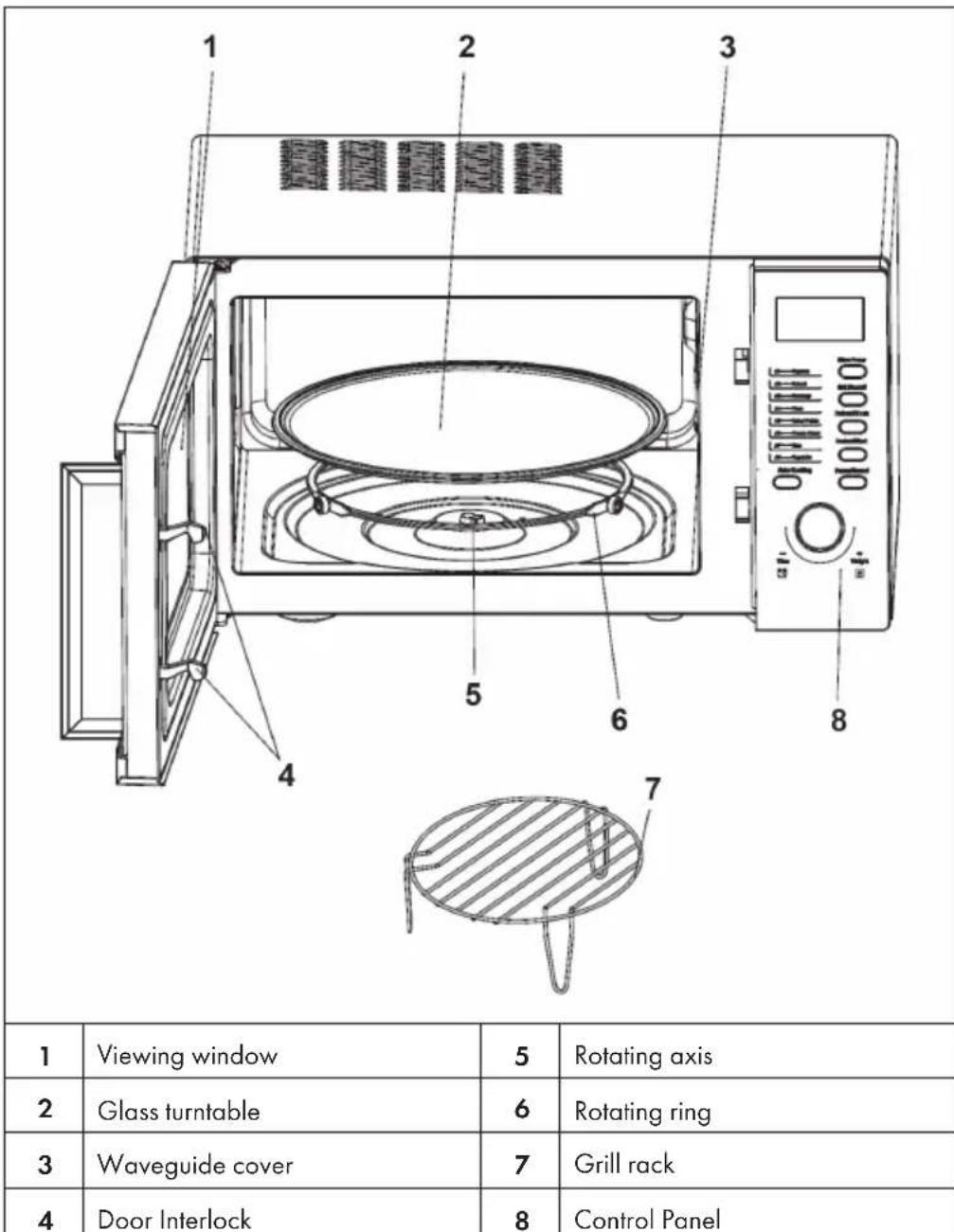
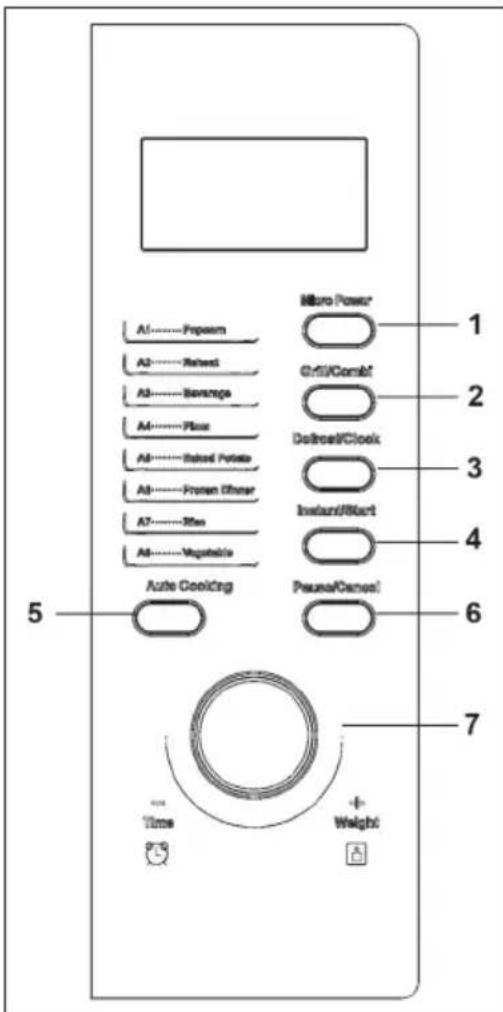
1 Power
2 Grill or grill combinaton
3 Defrost or clock
4 Start
5 Auro cooking menu
6 Pause/Cancel
7 Cooking time or weight
MOUNTING
Given the limited room of the cabinet, the microwave oven must be installed under the following instructions so as to avoid danger:
a) Intake and exhaust port position, as shown in Figure 4.
b) Net depth ≥ 550mm , as shown in Figure 4.
c) Reference plate thickness between 18 and 20mm .
| 1 | Screw High foot | Click on the icon way into the microwave furnace support sets foot in the oven, with self-lock screws, as shown in Figure 1. |
| 2 | Top air guide Self lock screw | Installation of top air guide, shown in Figure 2. |
| 3 | Self-lock screw Holder | Install the holders on the side of the microwave as shown in Figure 3. |
| 4 | Exhaust port Cabinet Screw ST4X12(BPCS) Intake | Place microwave oven into cabinet, and then fix it with wood screws (4x12), as shown in Figure 4. Cabinet Details: • Cavity: (L) 560mm* (H) 443mm* (D) 550mm • Intake: (L)≥272mm* (W)≥72mm • Exhaust Port: (L) ≥560mm* (W)≥50mm |
| 5 | Ornamental frame | Secure ornamental frame to holders, as shown in Figure 5. The microwave is now finally assembled. |
| 6 | Airflow | Cabinet airflow chart as shown in Figure 6. |
INSTALLATION
- Take out all the packing. If there is a safe film over the oven, tear it off before Use. Check carefully for damage. If any, immediately notify dealer or send to the manufacturer's service center.
- Microwave ovens must be placed under dry and non corrosiveness environments, kept away from heat and humidity, such as gas burner or water tank.
- To ensure sufficient ventilation, the distance of the back of microwave to the wall should be at least 10cm , the side to the wall should be at least 5cm , the free distance above the top surface at least 20cm . The distance of the microwave to the ground should be at least 85cm .
- The position of the oven shall be such that it is far from the TV, Radio or antenna as picture disturbance. The distance should be more than 5m .
- The appliance must be positioned so that the plug is accessible.
- The microwave oven must be operated with the door closed.
- The microwave must not be placed in a cabinet. The microwave oven is intended to be used freestanding.
- The back of the oven must be placed against a wall
- As there is manufacturing residue or oil remained on the oven cavity or heat element, it usually would smell the odor, even a slight smoke, It is normal case and would not occur after several times use, keep the door or window open to ensure good ventilation. So it is strongly recommended to set the oven to grill mode and operate dry several times.
OPERATION
The LED flashes 3 times when plugged in power supply. Then it flashes "::", prompting you to input the cooking menu and time.
Auto reminder
When your preset cooking procedure has finished, the LED Display will show End and three beeps sound will be heard to prompt you to take out food. If you do not press Pause/Cancel button once or open the door, the beep will sound at an interval of 3 minutes.
Clock setting
Clock button make it available for you to input current or preset time when ":" flashes onto LED display after plugged in, or try to skip it over to continue if unnecessary.
Example: How to set 12:30
| Steps Display | ||
| 1 | After power-up, the colon flashes. | : |
| 2 | Press Clock button once. | 00:00 |
| 3 | Turn Time/Weight knob to set exact hours. | 12:00 |
| 4 | Press Clock button once again. | 12:00 |
| 5 | Turn Time/Weight knob to set exact minutes. | 12:30 |
| 6 | Press Clock button once again or wait for 5 seconds, and the numbers will go steadily. |
This button is with two functions: set clock and set defrost menu. If you want to set clock, you need to press and hold this button for 3 seconds, but just press this button once to enter defrost state.
PROGRAMS AND FUNCTIONS
Microwave cooking
Press the power button several times. The LED will display the following options in turn: 100P - 80P - 60P - 40P - 20P.
| 100P | High power 100% microwave power. |
| 80P | Medium High power 80% microwave power.. |
| 60P | Medium power 60% microwave power. |
| 40P | Medium Low power 40% microwave power. |
| 20P | Low power 20% microwave power. |
- The max time which can be set is 60 minutes. Never use the grill rack during microwave cooking. Never operate the oven empty.
- If you turn the food during operation, press the Instant/Start button once and the preset cooking procedure will continue.
- If you intend to remove the food before the preset time, you must press Pause/Cancel button once to clear the preset procedure to avoid unintended operation of next time use.
- You may change the cooking time during cooking. And it is recommended turning the food halfway, after you turn the food. Press Instant/Start button once to continue.
- At the maximum microwave power, the oven will automatically lower the power after a certain time of cooking to lengthen the service life.
Example: To cook at 80P for 10 minutes
| Steps Display | ||
| 1 | After power-up, the colon flashes | : |
| 2 | Select the desired microwave power by pressing Micro Power button consecutively | 80P |
| 3 | Set cooking time by turning Time/Weight knob. | 10:00 |
| 4 | Press Instant/Start button to start and LED will count down to show running time. |
Grill Combi
This function use for grill food, press this button, LED Display will cycle to show G, G1, G2.
| G | Grill, the heat element will be energized during operation time. Which is applicable for rolling thin meats or pork, sausage, chicken wing as good brown color can be obtained. |
| C1 | Combination of Grill and microwave cooking. 30% of time microwave output and 70% of time grilling. |
| C2 | Combination of Grill and microwave cooking. 55% of time microwave output and 45% of time grilling. |
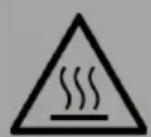
CAUTION
Risk of burns! In the mode of grill, all of the oven parts, as well as the rack and cooking containers, may become very hot. Use caution when removing any item from the oven. Use heavy potholders or oven mitts to prevent burns.
Example: To grill food with C2 cook menu for 10 minutes
| Steps Display | ||
| 1 | After power-up, the colon fl ashes. | : |
| 2 | Press Grill /Combi button to select desired grill menu. | C2 |
| 3 | Set cooking time by turning the Time/ Weight knob. | 10:00 |
| 4 | Press Instant. Start to start cooking. |
Defrost
This function use for Defrost food, Press Defrost button and the LED display will cycle to show d.1 - d.2 - d.3.
| d.1 | For defrosting meat, the weight range from 0.1 to 2.0 kg. |
| d.2 | For defrosting poultry, the weight range from 0.2 to 3.0kg. |
| d.3 | For defrosting seafood, the weight range from 0.1 to 0.9kg. |
- It is necessary to turn over the food during operation to obtain uniform effect.
Usually defrosting will need longer time than that of cooking the food. - If the food can be cut by knife, the defrosting process can be considered completed.
- Microwave penetrates around 4cm into most food e. Defrosted food should be consumed as soon as possible, it is not advised to put back to fridge and freeze again.
Example: To defrost 0.4kg poultry
| Steps Display | ||
| 1 | After power-up, the colon flashes | : |
| 2 | Press Defrost/Clock once button to set the food kind. | d.2 |
| 3 | Turn Time/Weight knob to set the defrost weight | 0.4 |
| 4 | Start cooking by pressing Instant/Start | |
| 5 | In half way during defrosting 3 beep sound will be heard two times to prompt you turn over the food. Open the door and turn over the food. Then close the door. Press Instant/start button again to continue defrosting. |
Auto cooking
The oven has default cooking menu for simple operation. When the LED flash colon, press the Cook button and LED will cycle to show A.1, A.2 ....... A.8. Choose the appropriate menu according to the food type and weight and strictly observe the directions in below table, otherwise the cooking effect will be largely influenced.
| Meal Method | ||
| A.1 | Popcorn Suitable | for popping a bag of corn, which is available in the market, weighted 85-100 g. Popcorn prior to completing, if the popping speed has been decreased to 1 time per 1-2 seconds you should press Pause/Cancel button to stop the popping process |
| A.2 | Reheat This setting | suitable for reheating 0.2~1.0 kg, which lets you reheat a dinner plate of chilled leftovers with good results. |
| A.3 | Beverage Heating | a cup of 250 or 500 ml liquid. The liquid temperature is about 5-10°C. Use a big mouth cup and do not seal |
| A.4 | Pizza Warm 1 or 2 shares pizza | |
| A.5 | Potato Cooking the potato strips, cut into 5mm width and height, length. Total weight is about 0.45 or 0.65 kg. Place the strips on a large dish and cover the dish with a thin film to prevent water loss | |
| A.6 | Frozen dinner Suitable for cooking 1 or 2 shares frozen dinner. | |
| A.7 | Rice Suitable for cooking 0.1~0.5 kg rice. | |
| A.8 | Vegetable Suitable for cooking 0.1~0.5 kg vegetable. | |
The temperature of food before cooking would be 20 - 25^ . Higher or lower temperature of the food before cooking would require increase or decrease of cooking time. The temperature, weight and shape of food will largely influence the cooking effect. If any deviation has been found to the factor noted on above menu, you can adjust the cooking time for best result.
Example: Cook 0.5kg rice
| Steps Display | ||
| 1 | After power-up, the colon flashes. | : |
| 2 | Press Auto Cooking button to set the cooking menu. | A.7 |
| 3 | Set cooking weight by turning Time/Weight knob. | 0.5 |
| 4 | Start cooking by pressing Instant/Start button and LED will count down to show running time. |
Automatic starting (delayed function)
If you do not want the menu be started immediately, you can preset the cooking menu and time and the preset menu will be automatically started at your set time. The setting will consist of 2 steps: Setting the current clock and setting the cooking menu and time.
Example: Now it is 12:30 clock, if you hope that the microwave oven will automatically start cooking with 100P microwave power for 9 minutes and 30 seconds at 14:20.
| Steps Display | ||
| 1 | After power-up, the colon flashes | : |
| 2 | Press and hold Defrost/Clock button for 3 seconds | 00:00 |
| Setting the current clock | ||
| 3 | Set hours by turning Time/ Weight knob | 12:00 |
| 4 | Press Defrost/Clock button again to confirm hours | 12:00 |
| 5 | Set minutes by turning Time./ Weight knob | 12:30 |
| 6 | Press Defrost/Clock button once or waiting for 5 seconds, and the numbers will go steady. | |
| Set the cooking menu and time | ||
| 7 | Select cooking power by pressing Micro Power button | 100P |
| 8 | Turn Time/Weight button to set cooking time | 9:30 |
| 9 | Press and hold Defrost/Clock button for 3 seconds to return to current clock. | |
| 10 | Set the time you expect to start. Repeat the steps of 3-5. | |
| 11 | Press Defrost/Clock button to confirm the delayed menu. Now the program has been activated. And the menu will be started at 14:20. | |
| 12 | You may check the preset starting time by pressing Defrost/Clock button. | |
Multi-sequence cooking
To obtain best cooking result, some recipes call for different cook mode and time. You may program your personalized menu as follow.
Example: You want cook food with 100P microwave for 3 minutes then grill for 9 minutes. This is 2 sequence setting.
| Steps Display | ||
| 1 | Press Power button to select power level. | 100P |
| 2 | Turn Time/Weight knob to set cooking time. | 3:00 |
| 3 | Press Grill/combi button to select desired grill menu | G |
| 4 | Turn Time/Weight knob to set cooking time. | 9:00 |
| 5 | Start cooking by pressing Instant/Start |
Note: When microwave power cooking is finished, microwave oven will begin grilling operation automatically. Max 4 sequences can be set per time, repeat the steps.
Child lock function
Use this feature to lock the control panel when you are cleaning or so that children can not use the oven unsupervised. All the buttons are rendered inoperable in this mode. Set lock: Press and hold Pause/Cancel button about 3 seconds. Cancel lock: Press and hold Pause/Cancel button about 3 seconds.
CLEANING AND CARE
- The oven should be cleaned regularly and any food deposits removed.
- Remove the power cord from the wall outlet before cleaning. Don't immerse the appliance in water or other fluids when cleaning.
- Failure to maintain the oven in a clean condition could lead to deterioration of the surface that could adversely affect the life of the appliance and possibly result in a hazardous situation
- Never use hard detergent, gasoline, abrasive powder or metal brush to clean any part of the appliance
- Do not remove the waveguide cover
How get rid of strange odors
When the microwave oven has been used for a long time, there may be some strange odors exist in oven, Following 3 methods can get rid of them:
1 Place several lemon slices in a cup, then heat with high Micro Power for 2-3 min.
2 Place a cup of red tea in oven, then heat with high micro power.
3 Put some orange peel into oven, and then heat them with high Micro Power for 10 minute.
Tips for Cleaning
| Exterior | Wipe the enclosure with a dampened soft cloth |
| Door | Using a dampened soft cloth, wipe clean the door and window Wipe the door seals and adjacent parts to remove any spill or spatter. |
| Control panel | Wipe the control panel with a slightly dampened soft cloth. |
| Interior walls | Wipe clean the cavity with a dampened soft cloth. Wipe clean the waveguide cover to remove any food splashed |
| Turntable, rotation ring and rotation axis | Wash with mild soap water. Rinse with clean water and allow drying thoroughly. |
TROUBLESHOOTING
Please check the following before contacting our customer service:
Place a cup of water (150 ml) in the microwave and close the door. Once the door is securely closed, the interior lights will go out. Turn on the microwave and let it run for one minute.
Is the oven light on?
- Is the cooling fan running? To check, hold your hand to the ventilation slots on the back.
- Is the glass plate turning? The plate can rotate both clockwise and counterclockwise.
Is the water hot after one minute?
If you answer any of these questions NO, check the socket and fuse in the fuse box. If the socket and fuse are OK, contact our customer service or a specialist company.
DISPOSAL CONSIDERATIONS
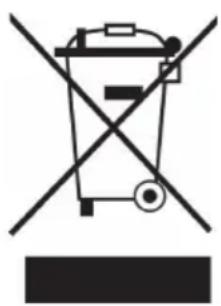
If there is a legal regulation for the disposal of electrical and electronic devices in your country, this symbol on the product or on the packaging indicates that this product must not be disposed of with household waste. Instead, it must be taken to a collection point for the recycling of electrical and electronic equipment. By disposing of it in accordance with the rules, you are protecting the environment and the health of your fellow human beings from negative consequences. For information about the recycling and disposal of this product, please contact your local authority or your household waste disposal service.
MANUFACTURER & IMPORTER (UK)
Manufacturer:
Chal-Tec GmbH, Wallstrasse 16, 10179 Berlin, Germany.
Importer for Great Britain:
Berlin Brands Group UK Ltd
PO Box 1145
Oxford,OX19UW
United Kingdom
Estimado cliente:
Berlin Brands Group UK Ltd
PO Box 1145
Oxford,OX19UW
United Kingdom
Chere cliente, cher client,
Berlin Brands Group UK Ltd
PO Box 1145
Oxford,OX19UW
United Kingdom
Gentile cliente,
PRODUTTORE IMPORTATORE (UK)
Produtlore:
Chal-Tec GmbH, Wallstraße 16, 10179 Berlin, Germania.
Berlin Brands Group UK Ltd
PO Box 1145
Oxford,OX19UW
United Kingdom

KLARSTEIN

- Dear Customer,
- CONTENT
- TECHNICAL DATA
- SAFETY INSTRUCTIONS
- To reduce the risk of fire in the oven cavity:
- To reduce the risk of explosion and sudden boiling:
- To prevent the turntable from breaking:
- General Instructions
- NOTES ON THE COOKING UTENSILS
- COOKING TIPS
- Food arrangement
- Cooking time length
- Cooking food evenly
- Allow standing time
- Whether the food is done
- Microwave safe plastic wrap
- Microwave safe plastic cookware
- PRODUCT OVERVIEW AND CONTROL PANEL
- MOUNTING
- INSTALLATION
- OPERATION
- Auto reminder
- Clock setting
- PROGRAMS AND FUNCTIONS
- Microwave cooking
- Example: To cook at 80P for 10 minutes
- Grill Combi
- CAUTION
- Defrost
- Auto cooking
- Example: Cook 0.5kg rice
- Automatic starting (delayed function)
- Multi-sequence cooking
- Child lock function
- CLEANING AND CARE
- How get rid of strange odors
- Tips for Cleaning
- TROUBLESHOOTING
- Please check the following before contacting our customer service:
- DISPOSAL CONSIDERATIONS
- MANUFACTURER & IMPORTER (UK)
- Estimado cliente:
- Chere cliente, cher client,
- Gentile cliente,
- PRODUTTORE IMPORTATORE (UK)
Brand : Klarstein
Model : Steelwave
Category : Microwave Oven