InnerScan BC583 - Scale TANITA - Free user manual and instructions
Find the device manual for free InnerScan BC583 TANITA in PDF.




| Product type | Impedance meter scale with body composition analysis |
| Brand | Tanita |
| Model | InnerScan BC583 |
| Maximum weighing capacity | 150 kg |
| Weight increments | 0.1 kg |
| Fat percentage accuracy | 0.1 % |
| Number of user memories | 4 |
| Power supply | 2 CR2032 lithium batteries (included) |
| Measurement functions | Weight, body fat percentage, total body water, muscle mass, bone mass, visceral fat, BMR (basal metabolic rate), metabolic age, body shape evaluation |
| Age range | 5 to 99 years |
| Athlete mode | Yes (for adults practicing more than 10 hours/week of physical activity) |
| Child mode | Yes (5-17 years, displays weight and fat % only) |
| Guest mode | Yes (quick entry without saving) |
| Safety | Not recommended for pacemaker wearers; pregnant women: weight function only |
| Maintenance and cleaning | Clean with a dry cloth; electrodes with an alcohol-dampened cloth |
| Included accessories | 2 CR2032 batteries, floor mat for carpet |
| Auto shut-off | Yes (after 10-60 s of inactivity depending on operation) |
| Power consumption | 60 mA maximum |
| Electromagnetic compatibility | Compliant with directive 2004/108/EC |
Frequently Asked Questions - InnerScan BC583 TANITA
User questions about InnerScan BC583 TANITA
0 question about this device. Answer the ones you know or ask your own.
Ask a new question about this device
Download the instructions for your Scale in PDF format for free! Find your manual InnerScan BC583 - TANITA and take your electronic device back in hand. On this page are published all the documents necessary for the use of your device. InnerScan BC583 by TANITA.
USER MANUAL InnerScan BC583 TANITA
Body Composition Monitor
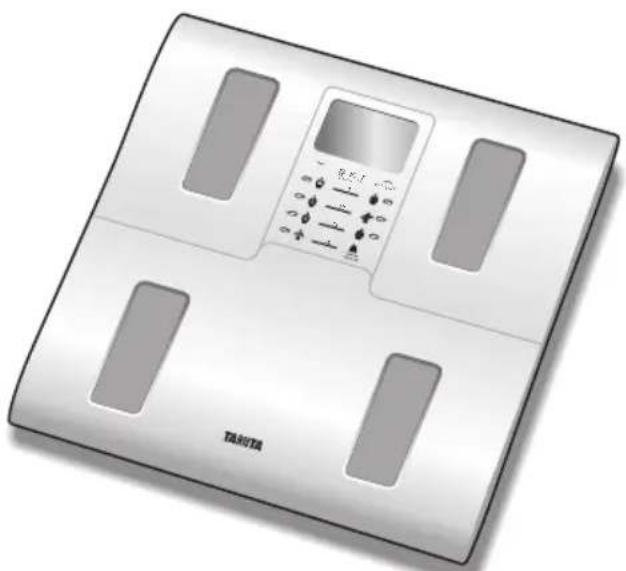
Model:BC-583
Eng Instruction Manual
Read this Instruction Manual carefully and keep it for future reference.
Features and functions 2
Preparations before use 2
Getting accurate readings 3
Automatic shut-down function 3
Switching the weight mode 3
Setting and storing personal data in memory 4
Taking weight and body fat readings. 5
Programming the guest mode 6
Taking weight measurement only ....6
Troubleshooting 7
IoproTOBka KncnoJIb3OBAHnIO 44
TOnyuHHe ToUhBIX Noka3aHn 45
IcnoJb3ObaHne ToJbKO JnI
n3MepeHnBEca 48
Ponck HncnpaBHOtei 49
Introduction
Thank you for selecting a Tanita Body Composition Monitor. This monitor is one in a wide range of home healthcare products produced by Tanita.
This Instruction Manual will guide you through the setup procedures and outline the key features. Please keep it handy for future reference. Additional information on healthy living can be found on our website www.tanita.com.
Tanita products incorporate the latest clinical research and technological innovations. All data is monitored by our Tanita Medical Advisory Board to ensure accuracy.
Note: Read this Instruction Manual carefully and keep it handy for future reference.

Safety Precautions
Note that people with an electronic medical implant, such as a pacemaker, should not use a Body Composition Monitor as it passes a low-level electrical signal through the body, which may interfere with its operation.
Pregnant women should use the weight function only. All other functions are not intended for pregnant women.
Do not place this monitor on slippery surfaces such as a wet floor.
Recorded data may be lost if the monitor is used incorrectly or is exposed to electrical power surges. Tanita takes no responsibility for any kind of loss caused by the loss of recorded data. Tanita takes no responsibility for any kind of damage or loss caused by the monitor, or any kind of claim made by a third person.
Important Notes for Users
This Body composition monitor is intended for adults and children (ages 5-17) with inactive to moderately active lifestyles and adults with athletic body types.
Tanita defines "athlete" as a person involved in intense physical activity of approximately 10 hours per week and who has a resting heart rate of approximately 60 beats per minute or less. Tanita's athlete definition includes "lifetime of fitness" individuals who have been fit for years but currently exercise less than 10 hours per week.
The body composition monitor function is not intended for pregnant women, professional athletes or bodybuilders.
Recorded data may be lost if the unit is used incorrectly or is exposed to electrical power surges. Tanita takes no responsibility for any kind of loss caused by the loss of recorded data.
Tanita takes no responsibility for any kind of damage or loss caused by these units, or any kind of claim made by a third person.
Note: Body fat percentage estimates will vary with the amount of water in the body, and can be affected by dehydration or overhydration due to such factors as alcohol consumption, menstruation, illness, intense exercise, etc.
Features and functions
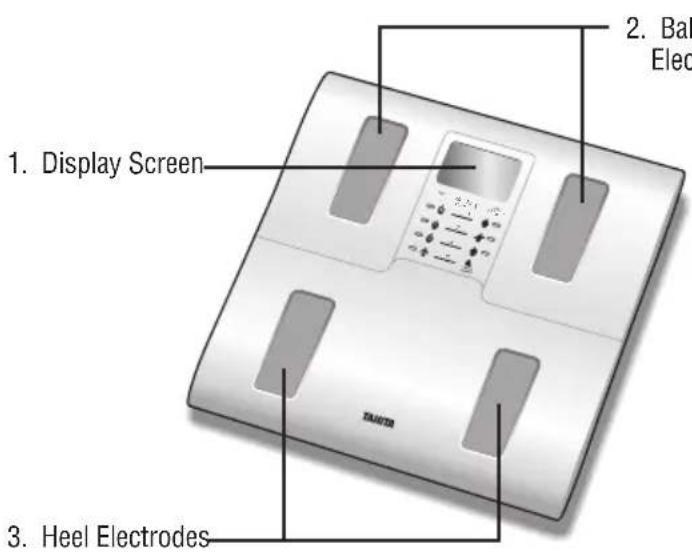
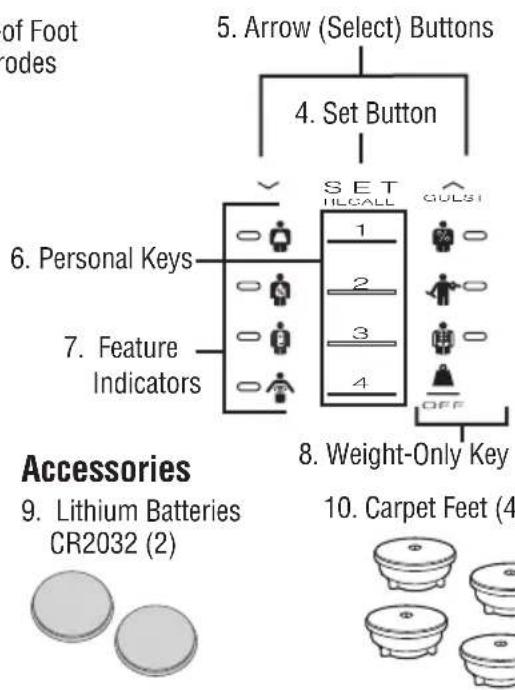
2. Ball-of Foot Electrodes
Preparations before use
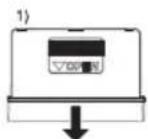
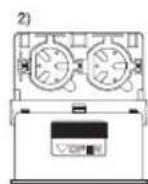
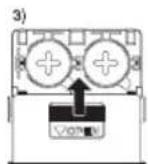
Inserting the Batteries
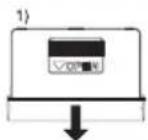
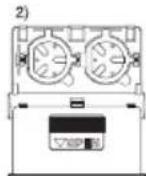
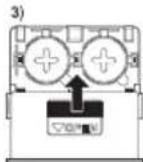
Open the battery cover at the back of the measuring platform. Insert the supplied CR2032 batteries as indicated.
Note: Be sure that the polarity of the batteries is set properly. If the batteries are incorrectly positioned the fluid may leak and damage flours. If you do not intend to use this unit for a long period of time, it is advisable to remove the batteries before storage.
Please note that the included batteries from factory may have decreased energy levels over time.
Positioning the Monitor
Place the measuring platform on a hard, flat surface where there is minimal vibration to ensure safe and accurate measurement.
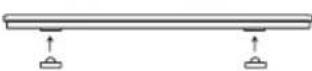
Use carpet feet when the scale is used on soft surface, such as rugs or carpeting.
Note: To avoid possible injury, do not step on the edge of the platform.
Do not use the carpet feet on hard, fl at surface as the unit may tip over.

For use on carpeting or rugs only of thickness up to 1/4'' (6mm).
Handling Tips
This monitor is a precision instrument utilizing state-of-the-art technology.
To keep the unit in the best condition, follow these instructions carefully:
- Do not attempt to disassemble the measuring platform.
- Store the unit horizontally, and place it so that the buttons will not be pressed accidentally.
- Avoid excessive impact or vibration to the unit.
- Place the unit in an area free from direct sunlight, heating equipment, high humidity, or extreme temperature change.
- Never submerge in water. Use alcohol to clean the electrodes and glass cleaner (applied to a cloth first) to keep them shiny; avoid soaps.
- Do not step on the platform when wet.
- Do not drop any objects onto the platform.
Getting accurate readings
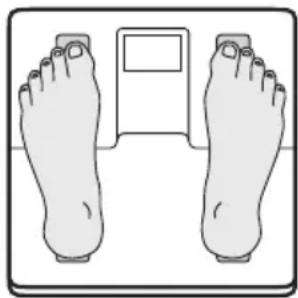
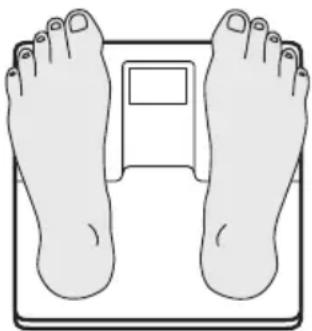
To ensure accuracy, readings should be taken without clothing and under consistent conditions of hydration. If you do not undress, always remove your socks or stockings, and be sure the soles of your feet are clean before stepping on the measuring platform. Be sure that your heels are correctly aligned with the electrodes on the measuring platform. Don't worry if your feet appear too large for the unit -accurate readings can still be obtained if your toes overhang the platform.
It is best to take readings at the same time of day. Try to wait about three hours after rising, eating, or hard exercise before taking measurements.
While readings taken under other conditions may not have the same absolute values, they are accurate for determining the percentage of change as long as the readings are taken in a consistent manner. To monitor progress, compare weight and body fat percentage taken under the same conditions over a period of time.
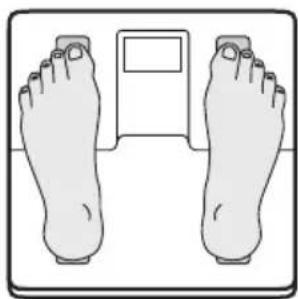
Heels centered on electrodes
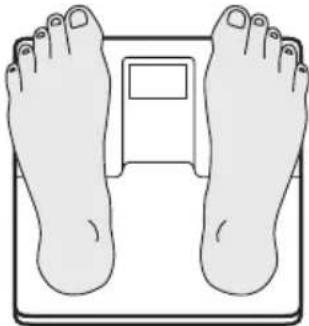
Toes may overhang measuring platform
Note: An accurate reading will not be possible if the soles of your feet are not clean, or if your knees are bent or you are in a sitting position.
Automatic shut-down function
The automatic shut-down function shuts off the power automatically in the following cases:
- If you interrupt the measurement process, the power will shut down automatically within 10 to 20 seconds, depending upon the type of operation.
- If an overload is applied to the platform.
- During programming, if you do not touch any of the keys or buttons within 60 seconds.*
-
After you have completed the measuring process.
-
Note: If the power shuts off automatically, repeat the steps from "Setting and Storing Personal Data in Memory" (p.4).
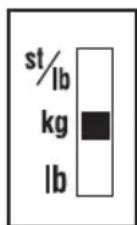
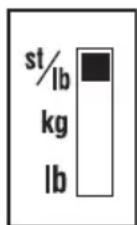
Switching the weight mode Note: For use only with models containing the weight mode switch
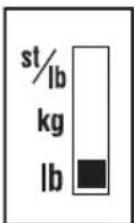
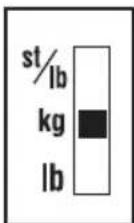
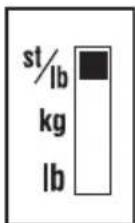
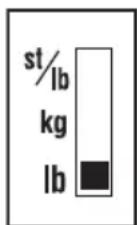
You can switch the unit indication by using the switch on the back of the scale as shown in the figure.
Note: If weight mode is set to pounds or stone-pounds, the height programming mode will be automatically set to feet and inches. Similarly, if kilograms is selected, height will be automatically set to centimetres.
lb (pounds) kg (kilograms) st-lb (stone pounds)
Setting and storing personal data in memory
You will receive readings only if data has been programmed into one of the personal data memories or the Guest mode.
The monitor can store personal details for up to 4 people.
1. Turn on the Power
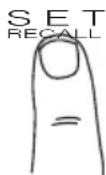
Press the Set button to turn on the unit (once programmed, pressing a Personal Key turns on the unit.) The unit will beep to confirm activation, the Personal Key numbers (1, 2, 3, 4) will be displayed, and the display will flash.

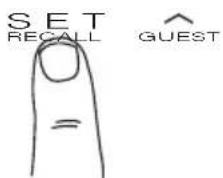
Note: If you don't operate the unit for sixty seconds after the unit has been turned on, the unit will turn off automatically.
Note: If you make a mistake or want to turn the unit off before you have finished programming it, press the Weight-Only Key (△) to force quit.
2. Select a Personal Key Number
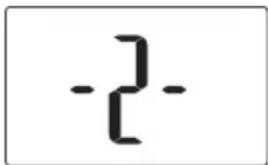
Press the Up/Down buttons to select a Personal Key. Once you reach the Personal Key number you wish to use, press the Set button. The unit will beep once to confirm.
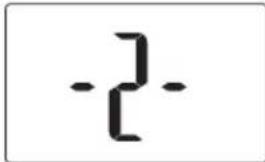
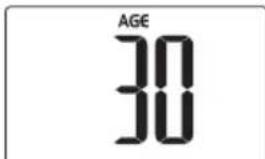
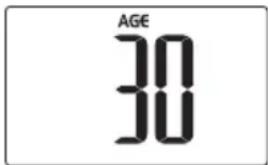
3. Set Age
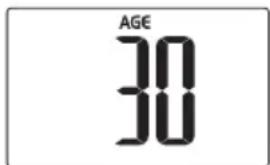
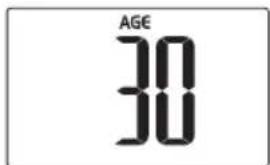
The display defaults to Age 30 (range of user age is between 5-99). Use the Up/Down buttons to scroll through numbers. When you reach your age, press the Set button. The unit will beep once to confirm.
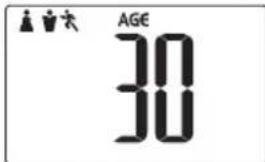
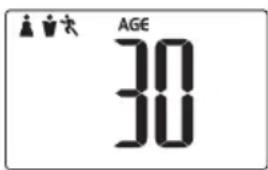
4. Select Female or Male
Use the Up/Down buttons to scroll through Female (♂ or Male (♀) Female/Athlete (♂ and Male/Athlete (♀) settings, then press the Set button. The unit will beep once to confirm.
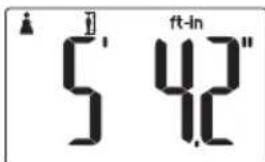
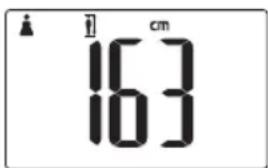
5. Specify the Height
The display defaults to 57.0 (170 cm) (range of user is from 30.0 - 73.0 or 90 cm -220 cm). Use the Up/Down buttons to specify Height and then press the Set button. The unit will beep once to confirm.
Taking weight and body fat readings
1. Select Personal Key and Step On
Press your pre-programmed Personal key. The unit will beep and the display will show the programmed data.
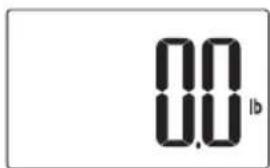
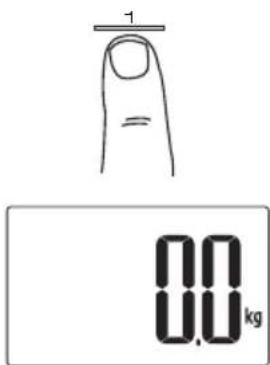
The unit will beep again and the display will show "0.0". Now step onto the platform.
Note: If you step onto the platform before "0.0" appears the display will show "Error" and you will not obtain a reading. Furthermore, if you do not step onto the measuring platform within about 30 a seconds after "0.0" appears, the power is shut-off automatically.
2. Obtain Your Readings
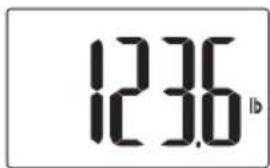
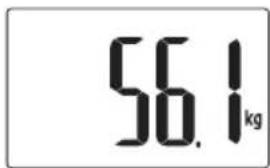
Your weight will be shown first.
Continue to stand on the platform.
"00000" will appear on the display and disappear one by one from left to right.
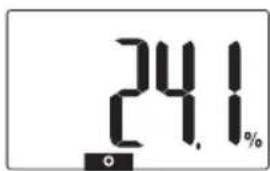
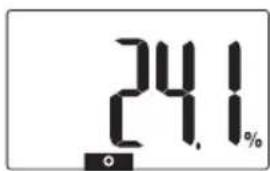
Your Body Fat percentage (%FAT) and Body Fat Range will appear on the display screen.
After your body fat percentage has been calculated, the healthy range indicator with a black bar will be shown along the bottom of the display identifying where you fall within the Body Fat Ranges for your age and gender.
Note: Do not step off until Body Fat % is shown.
Note: For children (age 5-17), the unit will only display the Weight and the Body Fat %.
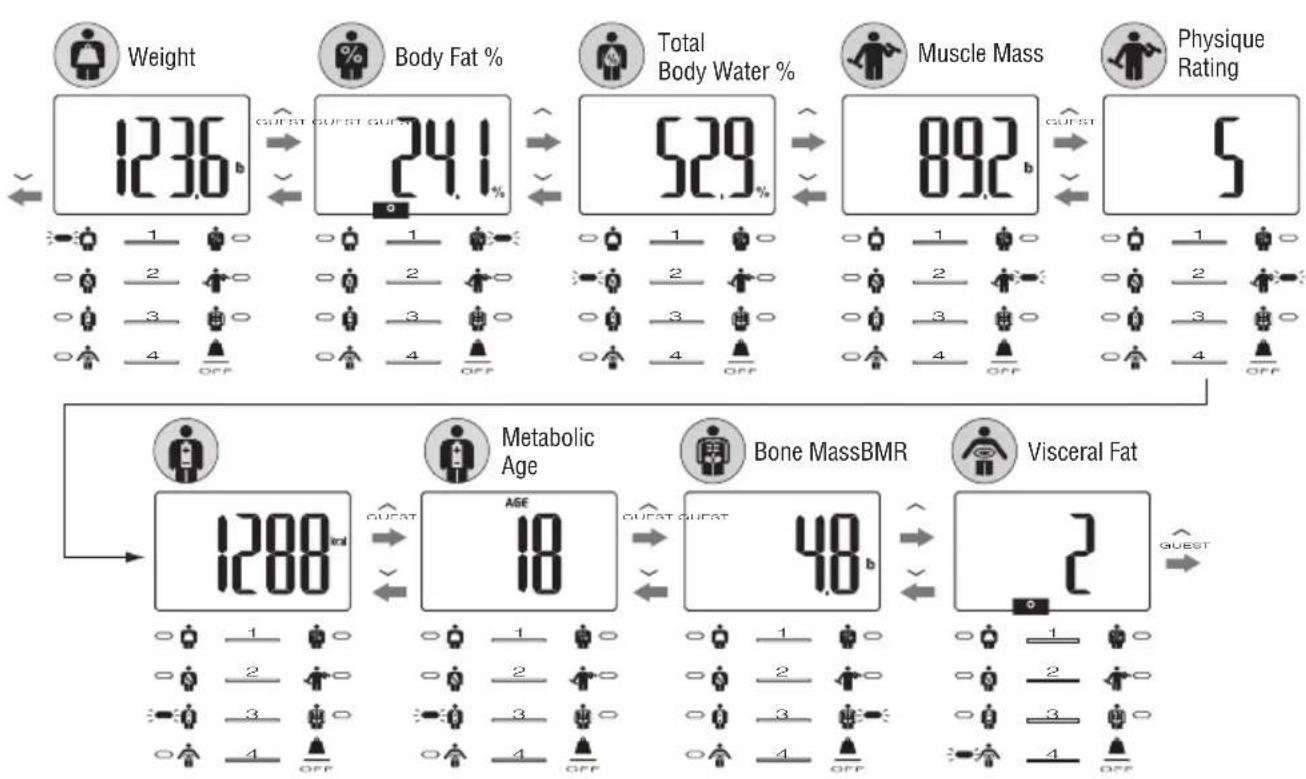
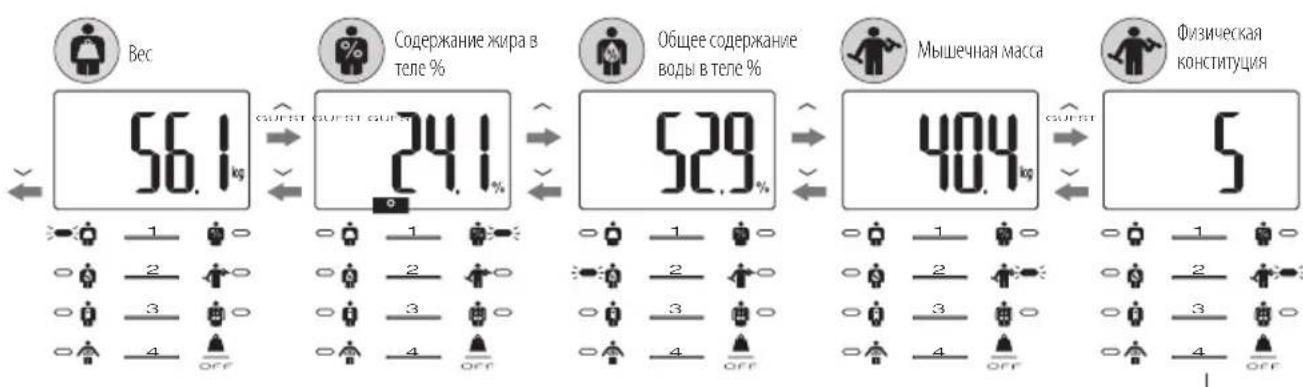
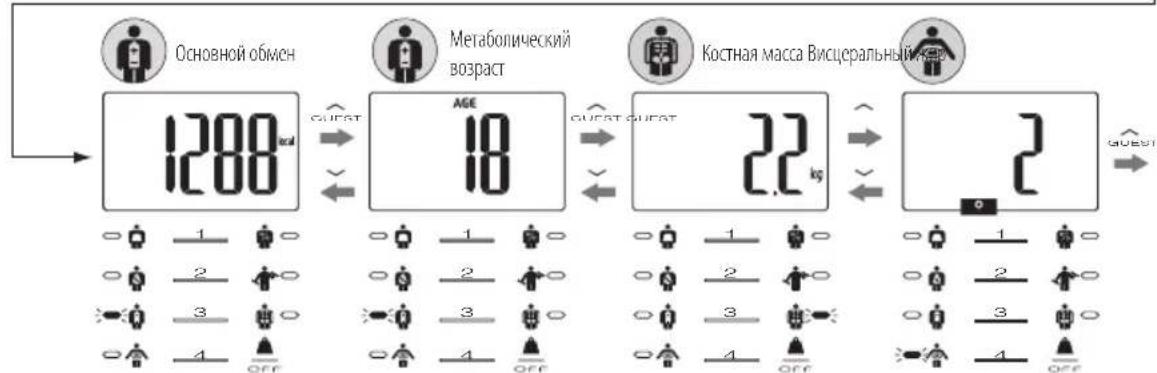
To see other readings, carefully step off the scale, press the up button continually to display readings in the order listed below. (Press the down button for reverse.)
The Up/Down buttons will not function while remaining on the scale.

3. Recall Function
The previous readings of the following features can be obtained using the recall function.
Weight BMR and Metabolic Age
- Body Fat % - Bone Mass
Total Body Water % Visceral Fat Level
- Muscle Mass and Physique Rating
To obtain previous readings, press the SET button while the current readings are being displayed.
The display will show the previous readings.
To see other previous readings, press the Up/Down buttons for each desired reading.
Press the SET button again to go back to the current result display.
Note: For Children (age-5-17), the unit will only display the previous Weight and the Body Fat %.
Programming the guest mode
Guest mode allows you to program the unit for a one-time use without resetting a Personal data number.
Press the Up button to activate the unit. Then follow the steps: Set Age, Select Female or Male, and Specify Height.
Note: If you step onto the platform before "0.0" appears the display will show "Error" and you will not obtain a reading.
Taking weight measurement only

Select Weight-Only Key
Press the Weight-only key. After 2 or 3 seconds, "0.0" will appear in the display and the unit will beep. When "0.0" appears in the display, step onto the platform. The body weight value will appear.
Troubleshooting
If the following problems occur ...then...
- A wrong weight format appears followed by kg, lb, or st-lb.
Refer to Switching the Weight Mode on p. 3.
The display shows and goes off when the personal key is pressed.
No data (age gender, height) has been stored in the memory.
- 0 appears on the display, or all the data appears and immediately disappears.
Batteries are low. When this message appears, be sure to replace the batteries immediately, since weak batteries will affect the accuracy of your measurements. Change all the batteries at the same time with new batteries.
Note : Your settings will not be erased from the memory when you remove the batteries.
- Error appears while measuring.
Please stand on the platform keeping movement to a minimum.
The unit cannot accurately measure your weight if it detects movement.
The Body Fat Percentage is more than 75% , readings cannot be obtained from the unit.
- The Body Fat Percentage reading does not appear or appears after the weight is measured.
Your personal data has not been programmed. Follow the steps on p. 4. Make sure socks or stockings are removed, and the soles of your feet are clean and properly aligned with the guides on the measuring platform.
appears while measuring.
Reading cannot be obtained if the weight capacity is exceeded.
Specifications
BC-583
Weight Capacity
150 kg (330 lb) (23 st 8 lb)
Weight Increments
0.1 kg (0.2 lb) (0.2 lb)
Body Fat Increments
0.1%
Personal Data
4 memories
Power Supply
2 pcs. Lithium batteries CR2032 (included)
Power Consumption
60 mA maximum
Measuring Current
50 kHz, 6.25 kHz, 100 μA
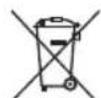
Notice:
These marks can be found out on contaminant-containing
Batteries: Pb Pb = Battery contains lead,
CdCd = Battery contains cadmium,
Hg Hg = Battery contains mercury.

Not allowed to mix batteries with consumer wastes!
As consumer you are legally bound to return used or discharged batteries. You can deposit your old batteries at the public collecting points in your town, or wherever the corresponding batteries are sold and specifically marked collecting boxes have been set up. In case of scrapping the apparatus, the batteries should be removed from it and deposited at the collecting points as well.
CE The device features radio interference suppression in compliance with EC regulation 2004/108/EC
Einleitung
50 kHz, 6.25 kHz, 100 μA
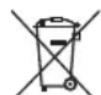
Hinweis:
50 kHz, 6.25 kHz, 100 μA
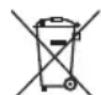
Remarque:
50 kHz, 6.25 kHz, 100 μA
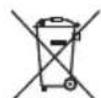
Opmerking:
50 kHz, 6.25 kHz, 100 μA
Avviso:
50 kHz, 6.25 kHz, 100 μA
Nota:
MepblnpedoctopoXHOCTnIO6ecneueHnaCHOCTN
Cneyet 3aMeTb, yTO IIOAM C MMnAHTnpOBaHHbIMM EKeKTPoHHbIMM MeiHcHCKMM PpIbOpAM, TaKMIM KAK EKeKTPokApNIOCTMMyTOp, HeB3a NOBtCA MOHITOPOM COCTaBA TkaHe NTe, NoKoJIbKy OH pOBoDIT Uepe3 TeNo Hn3KOypOBHeBbI EKeKTPuueckm CINHaI, CNocobHn HapuyHnTb pa60Ty MMnAHTnpOBaHHoro npbopa.
IJIb6epeMeHHbIX JxHcHIN pa3peaetcra TolbKO fYHKUNB3BeuHbAHn. Bce npTIOBONOKa3Ahbl 6epeMeHHbIMJxHcHnHaM.
3apeHCTPnpoBaHHbIe daHHbIe MOYt 6bIb TypaehbIe, cIMN PnBOp MCIOJIb3yeTcH He IIO npaBnAM WII IOBepraTeCA BO3deNCTBNO BbOpcOB JIEKTPueckO MouHOctm. Tanita He Hecet OTBETCTBEHHOCb 3a IIbIe BnIbIOTepb, BblbBaemble ytpaToI 3apeHCTpnpoBaHHbx DAHHbx.
Tanita He Hecet OTBETCTBEHOCb 3a JIObIe BnIbI NOBpeKdHm IIN y6ItKOB, BblBacMbIX MOHITOpOM, H He IIpNHMaCT HkKaNX IpTeEH3MOT TpcTbN X
BaxKbIe 3aMeuHn I nI noIb3oBaTeNei
JaHHb MOHHTOP cOePKaHa Hmpa B TeI ne pEHa3HaueH nI BA B3POCbIx ITeT (OT 5 DO 17 net), Bedyux o6pa3 Km3Hn COTcyTCTBMem fN3MecKoAKTINBHOCT IN CymepeHHbIMn Fn3NueCKMn Hapy3KaMn, nI BA B3POCbIX CATIETNUeCKM TNIOM TEJA.
I0 onpeelenHIO Tanita "atneTOM" cHTaETc YeNoBek, HaxoJaunscn NOB Bo3deNCTBHeM INHTehCBHOH OHN3HueCKO Harpy3Kn npimepno 10 yacob B HeJenIO u Nmeounn qactoty nylba C coCToHHN NOKo, He npebbuaooy 60 yapob B Mnhy. B onpeelenHnn, npinHrTom Tanita, K atneTAM OTHOcTc TaKKe "BeTepaHbI fHTheCa" - Te, KTO 3aHmAmncb fHTHECOM B TeueHne HEckoJIbKnX IET, HO B HAcToaJe e Bpem HaxoJrTa B COtOHHN BBICOKo hN3HueCKo AKTUBHOCT MeHee 10 acob B HeJenIO. OHKUN KoHTpON CoepKaHn Jknpa B Tene He npedHa3NaueHa dJa 6epeMeHHbIX JeHUnn, IpOeCCNOHaNbHBix CnOpTCMeHOB nn 60nd6uIndepob.
3apeTnpoBaHHbIe daHbIe moTy 6bIb TypaehbIe, cncn npmbop mCnObl3yeTcH He nipabnam mNIOBperaeTcBO3deCTBNO BbOpocOB 3neKtpueckoi MOuHOctm. Tanita He Hecet OTBeTCTBEHHOCTb 3a IIbIe BnIbNoTePb, BblbBaembc ytpaToI 3apeTnpoBaHHbx daHHbx.
Tanita He Hecet OTBeTCTBHeHcTb 3a IIObIe BnDbl NOBpeXdEHN mYbITKOB, Bbl3blBaEMbIX 3TNMM npN6OpAMM, H He npNHMaET HnKaKx npTeH3n O TtpEBHX nII.
PpmeHn: PaCHTbIe 3NaueHnI pOeHTHO cOpEpaHn XnPa B TeIe N3MeHHOTcB 3aBNCMOCTN OT cOpEpaHn BOIb B TeIe MOnyT 3aBnCtB O T 06e3BOXnBaHn INI NOBIIeHHo IINpATAUIM, BblBaEBMaMn TakMMn fakTopaM, KAK yNtpe6neHm anKOrON, MeHCTpyAUN, 3a6oneBAHn, HNTecNBHbIe 03uueckme Hapy3k n np.
XapakTepeNCTnKm n yHKqum
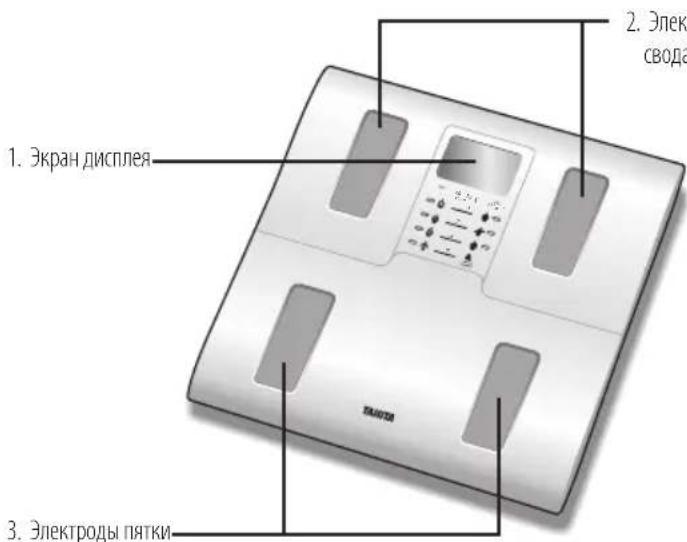
OOOblIOIbemaCTOIIb
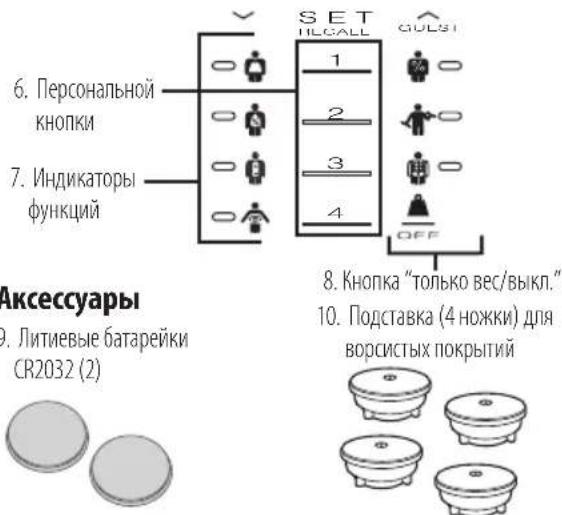
Akceccyapbl
- JIITMEBbIe 6BaTapeKn CR2032(2)
Tpeonok (Bb6opa)
ET
8.KHONKa“TONbKO BEC/BBKn.
10.ПОДТАВК(4HOKK)ДИBOPCHTBIXIPOKpbITIN

IoproTOBka KncnoJIb3ObaHnIO
BCTaBka 6aTapeek
OTkpoTe KpbuKy cekunb baTapeek Ha HmKHe CTOpoe N3MepntelbHoi nIaTphiopMb.IBCTabBTe Noctabnaemble bTaapeKn CR2032, KaK nokaaHo Ha pncyHke.
PnmuueHne: y6eIntecb, 706atapeKu BCTaBHeC C6oJIIOHeM npAunBHOI NOJAPHOCTN. EcIM 6atapeKu pacIOIOXeHb HENpABUNbHO, XIKIOCTb MOKe TB bTeCh I IOBpeNTb non. EcIM He PIIaHmpyETCA NCIIOB3OBaTb DAHHBI pIN6Op B TeEHme DInITeBHorO nepMODa BPMeHN, UeNEcoO6pa3HO npeD KOHcEpaMeI pIN6opa YdaJIb NT HeO 6atapeKu.
CneyET IMeT B BVny, YTO batapeKn, BKNIOaemBc B KOMNNEKT NOCTABKN N3rOToBNTeHm, MOrYT pa3pKaTaBCr CTeEHmE BpeMeHn.
yctahOBka MOHHTopa
YCTaHOBnTE IN3MepInTeNbHyIO nIaTΦOpMy HA TBepyIO POBYIO NOBepxHOCTb CMHIMMaIbHO BO3MOKHO Bn6paUeIN DnIg OecneueHHaHeXbIX NTOHbIX IN3MepeHNI.
Pn yCTaHOBke BeCOB Ha MmKyIO NOBepXHOCTb (HaIpmMep, Ha KOBpbI IIN KOBPOBble NOKpbITMa) INcNoIb3yIte NoCTABky
PpMueHHe: 36KbB03MOXhBIX TpaBM, He BCTaBnTe Ha KpaIJIaTOpMbI.
He nIIOJIb3yIte IIOCTabKy IIN BOPCnCTbIX IOBepXHOCTe H a POBHyIO TBepyIO IOBepXHOCTb,IOCKOJIbKy BeCyMOYT ONPOKHcy
ДЯMCNOLB30BaHWAToIbKHa KOBpax IN KOBpObblx NOKpbTMAX ToIJIHHoJdo 14JIOIMa (6 MM)
Pekomehdaun no o6paueHIO c np6opom
JaHHbMoHHTOp ABnEaTcPnepu3N0HHbIM npNoBOPoM,Co3DaHHbIM No CaMOI COBpeMeHHoTIexHOIOrIM.
Ytobb coepkabtpnboB pONTMaHbOM COCTOHHM, cneyET HeyKOCHHTeBHcNEoBaTbpNBOIMmHHeCTpyKmH
He nbitaTbca pa36mbpaTb n3mepntelbHy npnatafopmy.
XpaHntb npO6pB TROP30HTaNbHOM COCToAHm IN pa3MeuTa b efo TaKM O6pa3OM, yTO6bi NCKIOHTb CnyaHoe HxKaTME KHOJOK.
ObeperaTb npn6op OT n3bTochbix ydpHbIX N B6paLMOHHbIX Harpz3OK.
YCTaHaBnBaTb PmOp B MeCTax,3aUuHcHHbIX OT Bo3dEeCTBnI pRambix CONHeuHbIX Lyuei, BdaIyOT HArpeBaTeBbIX PmOpOB INrde NCKIOaIOTcBA BICKaBnAaKHOCTb IN KCTpeMaJIbHBe KOeBaHnI TemepaTybl.
HnB Koem cyuae He noptpykaTb np6op B yOy. IaOn OCTK3eKToDob N0b30BaTcCmPTOM, aIpaN pndHaHIM 6neKa -OCHNTenEM dA CTeKoI, npedBapntelbHO HaOHCMbIM HA TKAHb; NCKIOHTb NCIOJIb3OBAHME Mbila.
He BCTaBaTb HnnaTΦOpM YoKpbIM CTynHAM.
ObeperaTb natafopmy ot naednna Hn He npdeMeTOB.
IonyueHneToUhbixnoka3aHm
YTO6bI pOlyuHTB TOHbIE NOKa3AHNA, CJIeDyET IPOBOUITb B3BeWbAHnE 6e3 OeJDbI IN B COCToHNN, MCKIOUaOJeM AHOMaIbHyIO TnPaTauHIO. ECIN npOBoITb B3BeWbAHnE B OeJDe, CJIeDyET OJb3aTeNbHO CnTb HocKn IIN PcNkN IN PepeB CtBaAHmE Ha N3MePntbHyIO PnATOpM y6eHTbC, YTO nOIOuBBb CTynHe NcTb. IPOcneNTe, YTO6bI pAkn bIbn IbipAOHeBIO BTOPHe IOTHOCInbHO 3NeKtpoOB HA N3MePntbHOB nPnTfOpM. He oBaPaaIte BHIMaHNA, ecNI CTynH KAKeTcA CNlXkOM BoIbShon DnI np6opA; ToHbIe NOKa3AHNr MOyT 6bIT NOnyueHb IAxE B TOM Cnyae, ecNI naIbCbI BvICTyNaIOT HApKy 3a KpOMky PnATfOpMbI.
PekomeHnyetc CHMaTb NOKa3AHn B ODoHn To Jx BpeM cyToK. I0 OKOHuaHn pa6oTb, nocne eBti nncne BblonHeHHn fN3uuecknx ynpaxHeHHn NOCTapAteCb OTIOXKNb M3MepeHHn IpIMePHo Ha TpN caca.
HecmtpnHaTo,TO poka3aHn CHMaembIe Bpa3hbx yCIOBnx,MOyT pa3niuATbcN IO abcoiOThbIM 3NaueHnM,ONH ABnIOCTc TOnHyBMn DnOpedeHnnpoueHTHO OTHoWeHn N3MeHeHn PnU yCIOBn,TO ChrTne poka3aHn IPOCNxODIT cOrnaOBaHHM o6pazOM. Yo6bl KOHTpOIpOBaTB npOCXODJIme N3MeHeHn, CnElyET cPabHBaTb 3NaueHn BECa N IpOeHTHO CoepKaHn XnPa B TeJe, NOyuaEmbIe B OdnHX nTex Xe ycNOBnx B TeueHne OnpeDeHnHO nepnoDa BpeMeHn.
PRTKPOBHOpaoIOJIOKeHbHaJNEKTpoaX
Bo3MOXHO BbCTyNaHMe TJIbIeB CTOnbl 3a KpOMky PnIbOpa
IpmeHHe: ToHbIe 3aueHHe MoTy 6bItb NOnyueHbI, cINIOIOUBBi CTynHeH HeIOCTaTOHcTb, cINIO30rHyTb KOEN MII NOKa3AHN CHIMAOHTCBnDqEHNOJOKeHN.
Функця abTomatnueckoro OTKlioueHna
ФИнКИА abTOMaTmueCKOrO OTKIIQUeHnA bTOMaTmueCKN BbIKIOHae T nTaHne B yKa3aHHbIX HnHex CJIyuaX:
- IpepbIbAHne 3MepuTeBHOro pOceca nonb3OBaTeJIeM. IIHTaHHe aTOMaTHueCKn OTKIIIOVAeTcB IIpeJenax 10 - 20 cekyHd B 3abNCIMOCTN OT TINa OtnepaLIMN.
PnIOxKeHMe KIIaTΦOpMe N36bItoHOro Beca.
OTCYCTBNE KACAHNA KHONOK B TeueHMe 60 cekyH, BO BpeMa nporpamMPOBaHn.
-ПО OkOHaHIMI NOJIb3OBAteJIbCKOrI PnOceCa IImMepeHIN.
*PnmuueHne: nocne aTOMaTHueCKoTO OTKIOUeHn PNTAHN CNEyET 3aHOBO BbIOnHrTB WaTN pOcEpybl "3daHne I 3aNNCB B NAmrB npcoHaNbHbIX daHbix" (Ctp.46).
IpeeknIOueHne pexmAb3BWeuBaHna
PpmeaHHe: FmnoIb3yertc TaIbKoB MDoJIeX, fJe IMceTcA IpeKJIIOuTeIb peXIMAb 3B8eUBaHnA.
OTo6paKaembeEHNHbIbIMpeHnMOxHOpeKIOaTbCmOuBIOpeKIOaTeNa3aINBeOB,KaKIOKa3aHOHaPcYHke.
PpmeHHeEYCTAHOBIEH pKMM B3BELLBAHMH BdyHTAX IMI CTOyHAX-yyHTAX TO pKMM IPOIPAMMPOBAHMA POCTA ABOTMAUeCKN PpeKIOOaETCA H aTybl MIOMb. AhAnorHHO - eCIM BB6paHb KMIOPaMMb, TO OTb6paKeHMe POCTA ABOTMAUeCKN PpeKIOOaETCA HA CTHMETpbI.
Ib (φyHtbl) kg (KMIOTpAMMbbl) st-lb (ctOyHbl - φyHtbl)
3aHnue n 3aHnscb B naMaTb nepcoHaJIbHbIX daHHbIX
Ioka3aHmMyoTbblnyueHbI npu yCIOBn,TO daHHbIe 3anporpaMMPOBaHbI B ODHn N3 nepcoHaJIbHbIX NOJIb3OBAteJIbCKnx Ryeek nAMrN,JI60B roCTeBOM pexKIMe.
MonHtOp cno6eB 3aONMnHaTb nOpa6bHe IepcoHaJIbHbIe daHbIe dIg5 (He 6oJe) IIOeI.
1. BkIIOueHne nHTaHn
Haxmnte SET, yto6bI BKJIOHTb np6bop. Ipn6bOp BbIaDc3 2yKOB0n CmHaJI nIe NIOITBepXKeHnA aKTHBn3aun, nocne Yero Ha 3kpahe noBaTcHomep nepcoHaIbHbIX KHOPIK (1, 2, 3, 4, 5), nI3o6paKeHne HauHET MMrTaTb.
PpmeaHHe: EHa npbope He BbINOJIHIOCTra HnKaKMe DeIcTBraB TceHMe 60 cekyHn noCte erO BKIOUeHMA, npboop ATOMATueckn BbIKHOaETca.

PpmeaHne: Ecn nOnyckaeTc Oun6ka Hn Tpe6yeTc BbIKIOeHne np6opa do OKOHuaHn npoPamMnpoBaHn, nI npepbHaHH npoucca cndyet hXaTb Weight-Only (ToIbKO Bec).
2. Bb6op Homepa nepcoHaJIbHoi KhoIKN
HaxaTne KhoNok BBepx/Bn3" BbIepeTe nepcoahnyo KhoNky. Iocne BbIbopa Hmepa nCnoB3yeMoNEpcoahbHOKhoNknaHaxMnte SET. Pnp6op BbIdaCT OINHOuHbI 3ByKOBoC mHaHn DnA NOITBePKeDeHMy yTaHOBKn.
3. YctaHObKa Bo3paCTa
CTaHdApTbIM NOka3aHmE Mdcnpe No yMOnUaHmIO DnB O3paCTa AByIeTcA Age 30 (Obnactb 3Naehn COCTaBnae ot 5do99).ДЯ npokpyTK m3aueHm BO3pTa(Age) nCnONb3yTe KHOKN "BBePx/BHN3".ПрnoABNeHn Ha dncnnee CBOero BO3pTa HxKMTe KHOKNy Set(yCTaHOBNtB).Прбop BblAcT OINHOuHbI 3ByKOBo CmHaI DnI NOdTBePckDeHn.
4. yctahOBka myxckoro nn XeHCKOro nola
HakatneM KhoNOK "BBePx/BH3" BbIooHNHe IpoKpyTKy, YTO6bl BbIbpaTb XeHCKn NOI), MyXCKo NOL (XeHCKn NOL/ATNeTMeCKn TIN (一 /一) INM MyXCKo NOL/ATNeTMeCKn TIN (一 /一) n HaxmTe SET. Pn60p BbIaCT OAnHOuHb 3ByKOBO CMHan DnI NOITBePKeJENH yCTaHOBKn.
5. YukazHne poCtA
CTaHdApTHbIM NOKa3AHmC DcNJIeNo yMOJuaHnO JIy poCTa ABJREcTc 5'7.0"(5fytOB7IOHMOB,IN170cm) (obnaTb 3NaueHn Ira NoIb3oBaTeIa CoCTABnEOT 3'0.0"do 7'3.0",nnIOT 90 cm Do 220 cm).McnoJIb3yIte KHOJKN "BBePx/Bn3"JRA yKa3AHnPoCTa (Height) n daane HaxMITE KHOJky Set (ycTaHOBtB).PpNOOp BblaCT OAnHOChnB 3ByKOBo CnHAN Iy NOITBePxJeHn.
IonyuHne 3NaeHn BeCa n cOepXaHn Xupa B TeJe
1. Bb6epnte nepcoHaJIbHyIO KhoNky (Personal) n BCTaHbTe Ha BeCbl
HaMMTe 3aiporpaMMPOBaHHy DnB Bac nepcoHbHy (Personal) KOnky.
Pn60p BbdaCt 3ByKOBOM CmHaj, HHa EKpaHe IIOBRA Tc3aIporpaMMPOBaHbIe DaHHBe.
Pn6op 3aHOBO BbIaCT 3ByKOBoi CmHaI, HHa 3KpaHe NoBtca "0.0". Tenepb BCTaHbTe Ha nlaTfOpmy.
PnmeH: Ecn BCTab Ha natafopmy Do toro, KaHa hKpaHe noBHTca "0.0", dncnnen Oto6paT "Error" (ouwoka), nokazn He 6yuy T noJyuHb. Kpome ToR, cCm Hc BCTab Ha n3MeptelHyho natafopmy BteHne 30 ckyHn oocne noaBHe "0.0", ntaHHe ABtOMuueCKN OTKIOHTCA.
2.ПolyчENE nepcoHaJIbHbIX noka3aHn
Bhaaane oTo6paXaetc3HaueHne BaWero Beca.
PpOoJXkaTe CTaTb HaIpaTfopeMe.
Ha nncnne noanbtae 0000" Hnyb6yT nooepedno hce3aTcbe ha npaba. Ha ekpahe noaBtca 3auehne npoueHTHO coepkAHm Xnpa B Baem Tene (%FAT) n dnaana3OHa coepkAHm Xnpa B Tene (Body Fat Range). Iocne bHNCHe npoeHTHO coepkAHm Xnpa B Baem Tene naHcTe MraHne yepHn nonocblnDnkaum 3doPoboro COCTOHn, npoxoJauen no Dnne H3KpHa Bn3y dncnner uYk3bBAIOuJe, rde noluyehhie 3aueHn yklaDbBaIOTcB dnaana3OHi coepkAHm Xnpa dna Baewero BO3pacta nnona.
ПиMuMeaHnE: He cxOuTe c nlaTΦopMbI, noka He noBHTc3HaueHne npoceHTHO rO coepKaHnJ Knpa B Tene (Body Fat %).
PpmeaHne: IaI deTei (ot 5 do 17 ne) np6op noka3bIbaet TOnbKO Becn npoentHOe coepkaHne Knpa B Te.
TTObI NOnyHtB ApTyMe NOKa3AHn, CNeIyET OCTOpOxHO CoITN C BECOB INOCNEIOBATEHBHO HAXMMATb KHONKy "BBePx" IINIPOUeHn Ha 3KpaHe 3HaueHn BYka3AHHom HIXe IopRJaKe. (TTo6bI N3MeHtB NOPdOK Ha o6paTHbI - HAXMITE KHNky "BHn3".)
Ecn He coTn C BEOB, KHOJIKN "BBepx/BH3" He yHKUMOHNpyIOT.
3.Функцma NOBTOPO HorO Bbl3Oba(Recall)
DyHKUINIOBTOPOBOaNO3BOAeBb3bBaTbaHeIOnyueHbIeNOKa3AHNoYka3AHbIMHNKeIyHKTaM.
BecOCHBOHIO6MeHIMeta60nuecknBo3pact
Copepkahme xma B Tene % KocthaMaca
06uue coepkaHne BoIb Tene % ypoBeH BucpepaHoro Xnpa
MbluehMaCCa
YtobbBb3BaTba paHHe nOJIyUeHHbIe 3HaueHHa, HAXMITE KHOINKY SET, KOrda oTo6paKaiaOTcTeKyuIe noka3AHn.
Ha nncnnee noBraTc npdebluyne noka3aHna.
TObI npocmatpmbaB dpyme pahee noJyehHbIe nok3aHaHn, HaxmMATE KONKIN""BBepx/Bn3""no KaXdomy TpebyemMy nyHKTy noka3AHN.
YtobbephybckOToBpaKeHHTeKyuHxpe3yIbTaTOB,3aHOBOHaXMMte SET.
IpmeaHne: IyaTei (ot 5 do 17 let) np6op oTo6paKaet tobko paHee noLyueHHble 3HaueHnB BEca n npoentHorO coepxAHn Xnpa B Tene.
IporpamMnpoBaHne roCTeBOro peXmMa
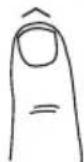
TcB0 peKMMIOBHNETIpoIpaMMPOBaTB IIN6Op Ha ODHOKpHoe NCIIOB3OBAHMe 6e3 C6poca Homepa nepcoHaJIbHbIX DaHHbIX.
HaKMTe KhoNkY BBepx' YTOb6B BKNHOTb npbOp, N bBbepnte G. Danee BblONHITe cIedyUOHe onepaun: yKaJNTe BO3pact, Bb6epTe Myckoi nn KeHcKn non n yKaKHTe poCT.
PnmeHHe: EcnBCTaB Ha nIaTphiOpMy Do TOro, KaK Ha eKpaHe noaBntca"0.0", dncnnie oTo6pa3nt"Error"(ouin6ka), nokazAHn He bdyr nonyuhenb.
IcnoIb3ObaHne ToIbKO JnIa N3MepeHna Beca

BbI6Op KhoNk "ToJIbKO Bec"
Haxmte Khony Weight-only (ToIbKO Bec).Yepe3 2 mnn 3 cekyHda H da nCnnee noBnTc "0.0", n np6op bDact 3BykoBo CnHaN. Korda Ha dncnnee BbcBntc "0". BCTaHBe Ha nPaTfOpMy. POnBtC 3HaueHne BeCa Tena.
Ponck HencnpaBHOCTe
Ecn npocxodt yka3aHhoe hapweenne ...To...
- OTo6paXaetcBec B OUnbOuHOM oOpMaTe N DaJIe BcBcUmbaETcKg, Ib nnn st-lb. Cm.n. "IpeKeJIOueHMe peKIMa B3BeUNBaHn"Ha cTp.45.
- Pn HaxaTm KHNKn NepcoHahBbix DaHHbx Dcnnne BkNIOaTeCn m Cp3y BbIKIOaTeCn. B namrHe 3aIncAh Tpebyembe daHbte (Bo3pact, non, Bec).
Ha nncnne noBnreTc 10, nbo npocxOmt MoneHtBHOe NcE3HOBEHMe Bce daHHbIX.
Pa3paKeHb 6aTaepKu. KoJa noBnRETC DaHHoe COoUeHme, He3aMeDInTeBHO 3aMeHHe 6aTaepKu, IockoJIbKy pa3paKeHbIe 6aTaepKu CHMaKaOT
ToHOCb nOlyaEmbIX pe3yNbTAoB 3MpeHn. 3aMeHy BCEX IMeIOUXxCBaTaapeek Ha HOBle npOn3BOJNTe ODHOBPeMHNO.
PpImeAHHe: 3BNeueHHe 6aTaapeek He npINBOIT K CTpaHnIO NOBtBcKmX HaCTpoE, 3aNCAHHbX B NaMAtb.
BoBpMaH3MepenHnnoBnTcCo06eHHe Error, IocapainTecb He uBeBnTbCn, noka cToNTe Ha nlaTOpme
Pp60H MoKet ToHn M3Mepnt BaBec, eOH OH6hApXkBaet WeBeHeHne.
PpoeHTHOe Coepxahme Xpa B TeIe npeBbHaet 75%, H np60p He CnoCobEH BbDtB pe3yblT.
He noBnAeTc3aueHHe npoueHTHO cOepxHa HmAp B Tene NIO BO NOBnAeTc NoCne H3MepeHn BEca. He 3anporpammpoBaHb Baun nepcoHaNbhe daHhie. BbnoHnTe warr no Ctp.46.
Y6eHITcB, yTO CHATbI HCKN (nIM cyKNK), aNoOoBbBAaNX CTyNHcNtBn NpabNtBHO BbPobHeHb No HApBaNtIOUmm Ha 3MepeTbHON PAtOpMe.
BoBpMaH3MepeHHnnoABnAeTcB PezynbTaH Me MoKet 6bItb NOnyueH BBNy npeBbIeHn BExHero npedena Beca.
Texnueckx xapaktepnctkn BC-583
Ppeenbno DonyctmblBec 150K
Warr nppaenna Beca 0.1K
Warrnpaenno coepkaHnKupaB Tene 0.1%
PepcoHaBbIe daHHbIe 4aeeKnam
NCTOCHIK NHTAHNA
PbPb = BaTapeiKa coOpexKNT CBHHe
Cd Cd = BaatapeKa coepKuT KaMn
HgHg=baTapeKcOedeepkntpTyb
Helen3a CmeuBaTb 6aTapeKn cdpyHMN 6bITOBbIMN OTXOdAMN.
Kak nopebntenB, Bby o63aHb cneObaT npabnIam BblpaBcBAHm B OTxObl
otpabtoHHbx n pa3p8kHeHHbx 6bataeek. MoXHO bblpaBcBAbT cTapbie 6bataeIKN B
KOMMyHbHbIe Mycopoc6OpHNK B CBOEM rpoDe IIN CdaBAbTHx HA NyHKbTI pOdaXn
COOTBeCTByIOxMx 6bataeek npu yCNOBN, YTO B3THX MecTx IMeKOTc CneuaJIbHbIe
MapKnPOBaHbIe KOHTeHepbI dIn 6bataeek. EChn B OTxObl BblpaBcBAeTc BeCb IIpNbop,
Heo6xoIMMo N3BNeKaTB N3 Hero 6bataeIKN IN BblpaBcBAbT IN X B MeTa CdaHn OTxOIOB,
yka3aHHbc Bblue.
C E Jannhoe yctpoiCTBO COOTBETCTBYET Tpe6oBaHnM NOaBHeHnpaHNOOMEX cornacho DeIcTByUoien EC-dIpeKtmbc 2004/108/EC.
Representative
Tanita Europe B.V.
Holland Office Centre. Kruisweg 813-A
2132NG Hoofddorp, the Netherlands
Tel: +31(0)23-5540188
Fax: +31(0)23-5579065
www.tanita.eu
Business Location in UK
The Barn, Philpots Close, Yieldsley,
Middlesex, UB7 7RY
United Kingdom
Tel: +44(0)1895-438577
Fax: +44(0)1895-438511
Tanita Corporation of America Inc.
2625 South Clearbrook Drive
Arlington Heights, IL 60005 USA.
Tel: +1-847-640-9241
Fax: +1-847-640-9261
www.tanita.com
Tanita Health Equipment H.K. Ltd.
Unit 301-303 3/F Wing On Plaza,
62 Mody Road, Tsimshatsui East,
Kowloon, Hong Kong
Tel: +852-2838-7111
Fax:+852-2838-8667
Manufacturer
Tanita Corporation
1-14-2, Maeno-Cho, Itabashi-ku,
Tokyo, Japan 174-8630
Tel: +81(0)-3-3968-2123
Fax: +81(0)-3-3967-3766
www.tanita.co.jp
ISO 9001 Certified
TANITA India Private Limited
Level 9, Platina, C-59, G Block,
Bandra Kurla Complex, Bandra East,
Mumbai 400051, INDIA
Tel: +91-22-3953-0507
Fax: +91-22-3953-0604

- Body Composition Monitor
- Model:BC-583
- Eng Instruction Manual
- Introduction
- Safety Precautions
- Important Notes for Users
- Features and functions
- Preparations before use
- Inserting the Batteries
- Positioning the Monitor
- Handling Tips
- Getting accurate readings
- Automatic shut-down function
- Switching the weight mode Note: For use only with models containing the weight mode switch
- Setting and storing personal data in memory
- Turn on the Power
- Select a Personal Key Number
- Set Age
- Select Female or Male
- Specify the Height
- Taking weight and body fat readings
- Select Personal Key and Step On
- Obtain Your Readings
- Recall Function
- Programming the guest mode
- Taking weight measurement only
- Select Weight-Only Key
- Troubleshooting
- If the following problems occur ...then...
- Specifications
- Weight Capacity
- Weight Increments
- Body Fat Increments
- Personal Data
- Power Supply
- Power Consumption
- Measuring Current
- Not allowed to mix batteries with consumer wastes!
- Einleitung
- Hinweis:
- Remarque:
- Avviso:
- MepblnpedoctopoXHOCTnIO6ecneueHnaCHOCTN
- BaxKbIe 3aMeuHn I nI noIb3oBaTeNei
- XapakTepeNCTnKm n yHKqum
- Akceccyapbl
- IoproTOBka KncnoJIb3ObaHnIO
- BCTaBka 6aTapeek
- yctahOBka MOHHTopa
- Pekomehdaun no o6paueHIO c np6opom
- IonyueHneToUhbixnoka3aHm
- Функця abTomatnueckoro OTKlioueHna
- IpeeknIOueHne pexmAb3BWeuBaHna
- 3aHnue n 3aHnscb B naMaTb nepcoHaJIbHbIX daHHbIX
- BkIIOueHne nHTaHn
- Bb6op Homepa nepcoHaJIbHoi KhoIKN
- YctaHObKa Bo3paCTa
- yctahOBka myxckoro nn XeHCKOro nola
- YukazHne poCtA
- IonyuHne 3NaeHn BeCa n cOepXaHn Xupa B TeJe
- Bb6epnte nepcoHaJIbHyIO KhoNky (Personal) n BCTaHbTe Ha BeCbl
- 2.ПolyчENE nepcoHaJIbHbIX noka3aHn
- 3.Функцma NOBTOPO HorO Bbl3Oba(Recall)
- IporpamMnpoBaHne roCTeBOro peXmMa
- IcnoIb3ObaHne ToIbKO JnIa N3MepeHna Beca
- BbI6Op KhoNk "ToJIbKO Bec"
- Ponck HencnpaBHOCTe
- Ecn npocxodt yka3aHhoe hapweenne ...To...
- Helen3a CmeuBaTb 6aTapeKn cdpyHMN 6bITOBbIMN OTXOdAMN.
- Representative
- Tanita Europe B.V.
- Business Location in UK
- Tanita Corporation of America Inc.
- Tanita Health Equipment H.K. Ltd.
- Manufacturer
- Tanita Corporation
- TANITA India Private Limited
Brand : TANITA
Model : InnerScan BC583
Category : Scale