
5MA 15500 - Microwave BLAUPUNKT - Free user manual and instructions
Find the device manual for free 5MA 15500 BLAUPUNKT in PDF.
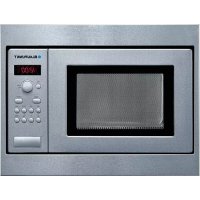



| Product type | Built-in microwave oven |
| Brand | Blaupunkt |
| Model | 5MA 15500 |
| Dimensions (H x W x D) | 364 mm x 460 mm x 333 mm |
| Dimensions of cooking compartment (H x W x D) | 194 mm x 290 mm x 274 mm |
| Power supply | 220-230 V, 50 Hz |
| Power consumption | 1270 W |
| Maximum microwave power | 800 W |
| Microwave frequency | 2450 MHz |
| Recommended fuse | 10 A |
| Automatic programs | 7 programs: defrost (meat, poultry, bread) and cooking (rice, potatoes, vegetables) |
| Memory function | Yes, to save a custom setting |
| Display | Digital, with adjustable clock |
| Included accessories | Glass turntable, roller ring |
| Control type | Retractable rotary selector and touch keys |
| Front material | Stainless steel |
| Cleaning and maintenance | Clean with a damp cloth and mild detergent. Do not use steam cleaner or abrasives. |
| Safety | Child safety lock (not specified), automatic shut-off, door lock system |
| After-sales service | Repairs by approved technician. Spare parts available via aftersales service. |
| Standards | EN 55011, CISPR 11, group 2 class B |
| Eco-friendly disposal | Compliant with WEEE directive 2012/19/EU |
Frequently Asked Questions - 5MA 15500 BLAUPUNKT
User questions about 5MA 15500 BLAUPUNKT
0 question about this device. Answer the ones you know or ask your own.
Ask a new question about this device
Download the instructions for your Microwave in PDF format for free! Find your manual 5MA 15500 - BLAUPUNKT and take your electronic device back in hand. On this page are published all the documents necessary for the use of your device. 5MA 15500 by BLAUPUNKT.
USER MANUAL 5MA 15500 BLAUPUNKT
A malfunction, what to do?
Important safety information. 15
Installation and connection. 17
The control panel 18
Before using the appliance for the first time 19
The microwave. 19
Memory 20
Changing the signal duration. 21
Care and cleaning 21
Malfunction table. 21
After-sales service 22
Automatic programmes 23
Tested for you in our cooking studio 24
Test dishes in accordance with EN 60705 27
Important safety information
Read these instructions carefully. Only then will you be able to operate your appliance safely and correctly. Retain the instruction manual and installation instructions for future use or for subsequent owners.
This appliance is only intended to be fully fitted in a kitchen. Observe the special installation instructions.
Check the appliance for damage after unpacking it. Do not connect the appliance if it has been damaged in transport.
Only a licensed professional may connect appliances without plugs. Damage caused by incorrect connection is not covered under warranty.
This appliance is intended for domestic use only. The appliance must only be used for the preparation of food and drink. The appliance must be supervised during operation. Only use this appliance indoors.
This appliance may be used by children over the age of 8 years old and by persons with reduced physical, sensory or mental capabilities or by persons with a lack of experience or knowledge if they are supervised or are instructed by a person responsible for their safety how to use the appliance safely and have understood the associated hazards.
Children must not play with, on, or around the appliance. Children must not clean the appliance or carry out general maintenance unless they are at least 8 years old and are being supervised.
Keep children below the age of 8 years old at a safe distance from the appliance and power cable.
Always insert the accessories into the cooking compartment correctly. See
"Description of accessories" in the instruction manual.
Risk of fire!
- Combustible items stored in the cooking compartment may catch fire. Never store combustible items in the cooking compartment. Never open the appliance door if there is smoke inside. Switch off the appliance and unplug it from the mains or switch off the circuit breaker in the fuse box.
- Using the appliance for anything other than its intended purpose is dangerous and may cause damage.
The following is not permitted: drying out food or clothing, heating slippers, grain or cereal pillows, sponges, damp cleaning cloths or similar.
For example, heated slippers and grain or cereal pillows may catch fire, even several hours after they have been heated. The appliance must only be used for the preparation of food and drinks.
- Food may catch fire. Never heat food in heat-retaining packages. Do not leave food heating unattended in containers made of plastic, paper or other combustible materials. Do not select a microwave power or time setting that is higher than necessary. Follow the information provided in this instruction manual. Never use the microwave to dry food. Never defrost or heat food with a low water content, e.g. bread, at too high a microwave power or for too long.
- Cooking oil may catch fire. Never use the microwave to heat cooking oil on its own.
Risk of explosion!
Liquids and other food may explode when in containers that have been tightly sealed. Never heat liquids or other food in containers that have been tightly sealed.
Risk of serious damage to health!
- The surface of the appliance may become damaged if it is not cleaned properly. Microwave energy may escape. Clean the appliance on a regular basis, and remove any food residue immediately. Always keep the cooking compartment, door seal, door and door stop clean; see also section Care and cleaning.
- Microwave energy may escape if the cooking compartment door or the door seal is damaged. Never use the appliance if the cooking compartment door or the door seal is damaged. Contact the after-sales service.
- Microwave energy will escape from appliances that do not have any casing. Never remove the casing. For any maintenance or repair work, contact the after-sales service.
Risk of electric shock!
- Incorrect repairs are dangerous. Repairs may only be carried out and damaged power cables replaced by one of our trained after-sales technicians. If the appliance is defective, unplug the appliance from the mains or switch off the circuit breaker in the fuse box. Contact the after-sales service.
- The cable insulation on electrical appliances may melt when touching hot parts of the appliance. Never bring electrical appliance cables into contact with hot parts of the appliance.
- Do not use any high-pressure cleaners or steam cleaners, which can result in an electric shock. Penetrating moisture may cause electric shock. Never subject the appliance to intense heat or humidity. Only use this appliance indoors.
- A defective appliance may cause electric shock. Never switch on a defective appliance. Unplug the appliance from the mains or switch off the circuit breaker in the fuse box. Contact the after-sales service. The appliance is a high-voltage appliance. Never remove the casing.
Risk of burns!
- The appliance becomes very hot. Never touch the interior surfaces of the cooking compartment or the heating elements. Always allow the appliance to cool down. Keep children at a safe distance.
- Accessories and ovenware become very hot. Always use oven gloves to remove accessories or ovenware from the cooking compartment.
- Alcoholic vapours may catch fire in the hot cooking compartment. Never prepare food containing large quantities of drinks with a high alcohol content. Only use small quantities of drinks with a high alcohol content. Open the appliance door with care.
- Foods with peel or skin may burst or explode during, or even after, heating. Never cook eggs in their shells or reheat hard-boiled eggs. Never cook shellfish or crustaceans. Always prick the yolk when baking or poaching eggs. The skin of foods that have a peel or skin, such as apples, tomatoes, potatoes and sausages, may burst. Before heating, prick the peel or skin.
- Heat is not distributed evenly through baby food. Never heat baby food in closed containers. Always remove the lid or teat. Stir or shake well after the food has been heated. Check the temperature of the food before it is given to the child.
- Heated food gives off heat. The ovenware may become hot. Always use oven gloves to remove ovenware or accessories from the cooking compartment.
- Airtight packaging may burst when food is heated. Always observe the instructions on the packaging. Always use oven gloves to remove dishes from the cooking compartment.
Risk of scalding!
- When you open the appliance door, hot steam may escape. Open the appliance door with care. Keep children at a safe distance. Water in a hot cooking compartment may create hot steam. Never pour water into the hot cooking compartment.
- There is a possibility of delayed boiling when a liquid is heated. This means that the liquid reaches boiling temperature without the usual steam bubbles rising to the surface. Even if the container only vibrates a little, the hot liquid may suddenly boil over and spatter. When heating, always place a spoon in the container. This will prevent delayed boiling.
Risk of injury!
- Scratched glass in the appliance door may develop into a crack. Do not use a glass scraper, sharp or abrasive cleaning aids or detergents.
- Unsuitable ovenware may crack. Porcelain or ceramic ovenware can have small perforations in the handles or lids. These perforations conceal a cavity below. Any moisture that penetrates this cavity could cause the ovenware to crack. Only use microwave-safe ovenware.
Causes of damage
Caution!
Heavily soiled seal: If the seal is very dirty, the appliance door will no longer close properly during operation. The fronts of adjacent units could be damaged. Always keep the seal clean. - Operating the microwave without food: Operating the appliance without food in the cooking compartment may lead to overloading. Never switch on the appliance unless there is food in the cooking compartment. An exception to this rule is
a short crockery test (see the section "Microwave, suitable crockery").
- Microwave popcorn: Never set the microwave power too high. Use a power setting no higher than 600 watts. Always place the popcorn bag on a glass plate. The disc may jump if overloaded. Liquid that has boiled over must not be allowed to run through the turntable drive into the interior of the appliance. Monitor the cooking process. Choose a shorter cooking time initially, and increase the cooking time as required.
- Never use the microwave oven without the turntable. Creation of sparks: Metal - e.g. a spoon in a glass - must be kept at least 2 cm from the oven walls and the inside of the door. Sparks could irreparably damage the glass on the inside of the door.
- Foil containers: Do not use foil containers in the appliance. They damage the appliance by producing sparks. Cooling with the appliance door open: Only leave the cooking compartment to cool with the door closed. Do not trap anything in the appliance door. Even if the door is only slightly ajar, the fronts of adjacent units may be damaged over time.
- Condensation in the cooking compartment: Condensation may appear on the door window, interior walls and floor. This is normal and does not adversely affect microwave operation. To prevent corrosion, wipe off the condensation every time you cook.
Installation and connection
This appliance is intended for domestic use only.
This appliance is only intended to be fully fitted in a kitchen.
Please observe the special installation instructions.
The appliance can be fitted in a 60 cm wide wall cabinet (min. 30 cm deep and 85 cm off the floor).
The appliance is fitted with a plug and must only be connected to a properly-installed earthed socket. The fuse protection must be rated at 10 amperes (L or B circuit breakers). The mains voltage must correspond to the voltage specified on the rating plate.
The socket must be installed and the power cable replaced by a qualified electrician only. If the plug is no longer accessible following installation, an all-pin disconnecting device must be present on the installation side, with a contact gap of at least 3 mm.
Multiple plugs, plug bars and extension leads must not be used. Overloading can result in a risk of fire.
The control panel
Here, you will see an overview of the control panel. Depending on the appliance model, there may be differences in the particular details.
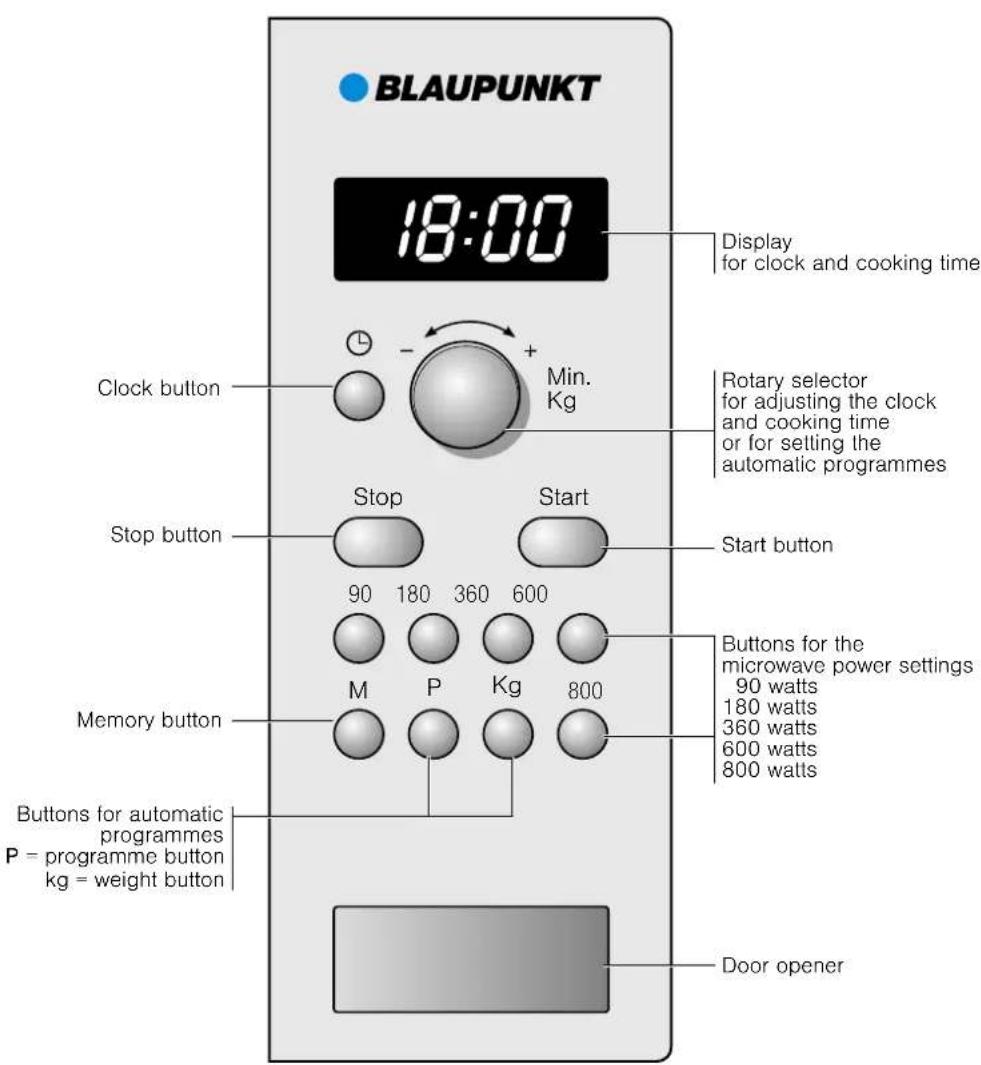
Rotary selector
The rotary selector is used to alter the default values and set values.
The rotary selector is retractable. Press on the rotary selector to lock it in or out.
Accessories
The turntable
How to fit the turntable:
- Place the turntable ring a in the recess in the cooking compartment.
- Let the turntable b slot in place in the drive c in the centre of the cooking compartment floor.
Note: Do not use the appliance if the turntable is not in place. Ensure that it is properly slotted into place. The turntable can turn clockwise or anti-clockwise.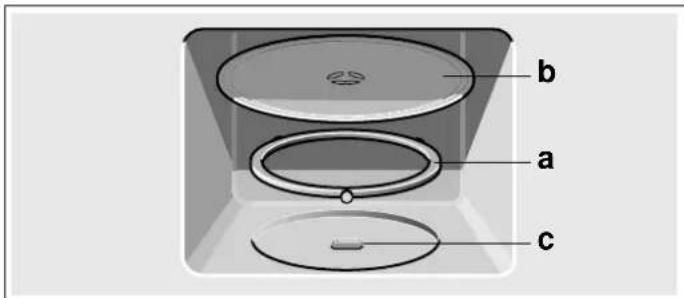
Before using the appliance for the first time
Here you will find everything you need to do before using the microwave to prepare food for the first time. First read the section on Safety information.
Setting the clock
When the appliance is first connected or after a power cut, three zeros will appear in the display panel.
- Press the button. "12:00" and 日 appear in the display.
- Set the clock using the rotary selector.
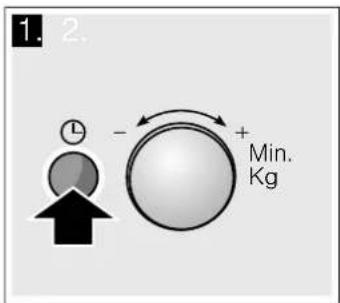
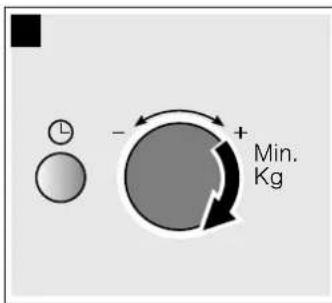
- Press the button again.
The current time is set.
Hiding the clock
Press the button and then press Stop.
The display is blank.
Resetting the clock
Press the button.
"12:00" appears in the display. Make settings as detailed in points 2 and 3.
Change the clock, e.g. from summer to winter time
Set as described in point 1 to 3.
The microwave
Microwaves are converted to heat in foodstuffs. You will find information about ovenware and how to set the microwave.
Note: In the Tested for you in our cooking studio section, you will find examples for defrosting, heating and cooking with the microwave oven.
Try out the microwave straight away. You could heat up a cup of water for your tea, for example.
Use a large cup without any decorative gold or silver trim and place a teaspoon in it. Place the cup containing the water on the turntable.
- Press 800 W.
- Set 1:30 minutes using the rotary knob.
- Press the Start button.
After 1 minute 30 seconds, a signal sounds. The water is hot.
As you are drinking your tea, please take time to read again the safety information that can be found at the front of the instruction manual. This is very important.
Notes regarding ovenware
Suitable ovenware
Suitable dishes are heat-resistant ovenware made of glass, glass ceramic, porcelain, ceramic or heat-resistant plastic. These materials allow microwaves to pass through.
You can also use serving dishes. This saves you having to transfer food from one dish to another. You should only use ovenware with decorative gold or silver trim if the manufacturer guarantees that they are suitable for use in microwaves.
Unsuitable ovenware
Metal ovenware is unsuitable. Metal does not allow microwaves to pass through. Food in covered metal containers will remain cold.
Caution!
Creation of sparks: metal - e.g. a spoon in a glass - must be kept at least 2 cm from the oven walls and the inside of the door. Sparks could destroy the glass on the inside of the door.
Ovenware test
Do not switch on the microwave unless there is food inside. The following ovenware test is the only exception to this rule. Perform the following test if you are unsure whether your ovenware is suitable for use in the microwave:
- Heat the empty ovenware at maximum power for 1/2 to 1 minute.
- Check the temperature occasionally during that time. The ovenware should still be cold or warm to the touch. The ovenware is unsuitable if it becomes hot or sparks are generated.
Microwave power settings
Use the button to set the desired microwave power.
| 90 W For defrosting delicate foods |
| 180 W For defrosting and continued cooking |
| 360 W For cooking meat and heating delicate foods |
| 600 W For heating and cooking food |
| 800 W For heating liquids |
Note: You can set the 800 W microwave power setting for 30 minutes, 600 W for 1 hour, the other power settings for 1 hour and 39 minutes respectively.
Setting the microwave
Example: microwave power setting 600 W
- Press the required microwave power setting. The selected microwave power setting lights up in the display, and "1:00 min" appears.
- Set a cooking time using the rotary selector.
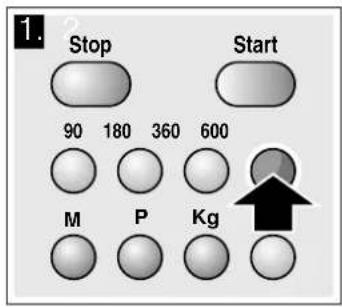
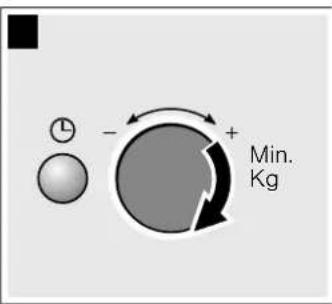
- Press the Start button.
The cooking time starts counting down.
The cooking time has elapsed
A signal sounds. Open the appliance door or press Stop. The clock reappears.
Changing the cooking time
This can be done at any time. Change the cooking time using the rotary selector.
Pausing
Press the Stop button once, or open the appliance door. Press the START button after closing the door.
Cancelling operation
Press the Stop button twice, or open the door and press the Stop button once.
Note: You can also adjust the cooking time first and then the microwave power setting.
Cooling fan
The appliance is equipped with a cooling fan. The fan may run on even if the oven has been switched off.
Notes
The cooking compartment remains cold during microwave operation. The cooling fan will still switch on. The fan may run on even when microwave operation has ended.
Condensation may appear on the door window, interior walls and floor. This is normal and does not adversely affect microwave operation. Wipe away the condensation after cooking.
Memory
You can save the settings for a dish in the memory and call them up again at any time.
The memory is useful if you frequently prepare a specific dish.
Saving memory settings
Example: 360 W, 25 minutes
- Press the "M" button.
"M" appears in the display.
- Press the required microwave power setting.
"M", the selected power setting and "1:00 min" appear in the display.
- Set the cooking time using the rotary selector.
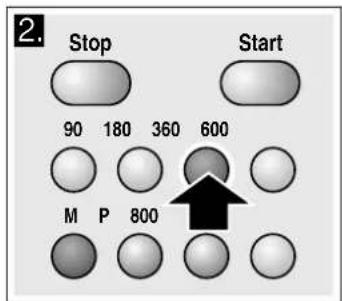
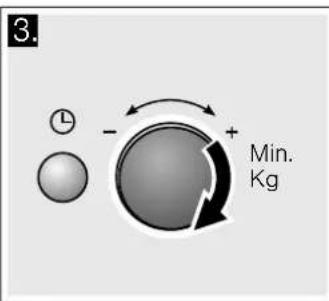
- Confirm by pressing the "M" button.
The clock reappears. The setting is saved.
Note: You can save the memory settings and start the appliance immediately. When finishing, instead of pressing the "M" button, press Start.
Adding to the memory
Press the "M" button.
The old settings appear. Save the new programme as described in points 1 to 4.
Notes
You cannot save several microwave power settings one after the other. You cannot save automatic programmes.
Starting the memory
It is very easy to start the saved programme. Place your meal into the appliance. Close the appliance door.
- Press the "M" button.
The saved settings are displayed.
- Press the Start button.
The cooking time counts down in the display.
The cooking time has elapsed
A signal sounds. Open the appliance door or press Stop. The clock reappears.
Pausing
Press the Stop button once or open the appliance door. Operation is suspended. The display above Start flashes. After closing the door, press the Start button again.
Cancelling the setting
Press the Stop button twice, or open the appliance door and press the Stop button once.
Changing the signal duration
You will hear a signal when the appliance is switched off. You can change the duration of the acoustic signal.
Press the Start button for approx. 6 seconds.
The new signal duration is adopted.
The clock reappears.
The following are possible:
Short signal duration - 3 tones
Long signal duration - 30 tones.
Care and cleaning
With careful care and cleaning your microwave oven will retain its looks and remain in good order. We will explain here how you should care for and clean your appliance correctly.
Risk of short circuit!
Never use high-pressure cleaners or steam cleaners to clean the oven.
Risk of burns!
Never clean the appliance immediately after switching off. Let the appliance cool down.
Risk of electric shock!
Do not immerse the appliance in water or clean under a jet of water.
Surfaces are different, and damage caused by using the wrong cleaning agent can be avoided by observing the information in the table below.
Do not use
sharp or abrasive cleaning agents. The surface could be damaged. If such a substance comes into contact with the front of the appliance, wash it off immediately with water. metal or glass scrapers to clean the glass in the appliance door. metal or glass scrapers for cleaning the seal. - hard scouring pads or cleaning sponges.
Wash new sponge cloths thoroughly before use.
cleaning agents with high concentrations of alcohol.
Cleaning agents
Caution!
Before cleaning, unplug the appliance from the mains or switch off the circuit breaker in the fuse box. Clean the outside of the appliance and the cooking compartment with a damp cloth and mild detergent. Dry with a clean cloth.
Area Cleaning agents
| Appliance front Hot soapy water:Clean with a dish cloth and dry with a soft cloth. Do not use glass cleaners or metal or glass scrapers for cleaning. | |
| Appliance front with stainless steel | Hot soapy water:Clean with a dish cloth and dry with a soft cloth. Remove flecks of limescale, grease, starch and albumin (e.g. egg white) immediately. Corrosion can form under such residues. Special stainless steel cleaning agents can be obtained from the after-sales service or from specialist shops. Do not use glass cleaners or metal or glass scrapers for cleaning. |
| Cooking compa-ment made of stain-less steel | Hot soapy water or a vinegar solution: Clean with a dish cloth and dry with a soft cloth.If the oven is very dirty: use oven cleaner, but only when cooking compa-artment is cold. It is best to use a stain-less-steel sponge. Do not use oven spray or other aggressive oven cleaners or abrasive materials. Scouring pads, rough sponges and pan cleaners are also unsuitable. These items scratch the surface. Allow the interior surfaces to dry thoroughly. |
| Recess in cooking compartment | Damp cloth: Ensure that no water seeps through the turntable drive into the appliance inter-rior. |
| Turntable and turnta-ble ring | Hot soapy water: When putting the turntable back in place, make sure it slots in correctly. |
| Door panels Glass cleaner:Clean with a dish cloth. Do not use aglass scraper. | |
| Seal Hot soapy water:Clean with a dish cloth, do not scour. Do not use a metal or glass scraper for cleaning. | |
Malfunction table
Malfunctions often have simple explanations. Please refer to the malfunction table before calling the after-sales service.
If a meal does not turn out exactly as you wanted, refer to the Tested for you in our cooking studio section, where you will find plenty of cooking tips and tricks.
Risk of electric shock!
Incorrect repairs are dangerous. Repairs may only be carried out by one of our trained after-sales engineers.
You can take remedial action yourself for some error messages.
Error message Possible cause Remedy/Note
| The appliance does not work The plug is not plugged into the mains. Plug the plug in | ||
| Power cut Check whether the kitchen light works. | ||
| Faulty circuit breaker Look in the fuse box and check that the cir-cuit breaker for the appliance is in working order. | ||
| Incorrect operation Switch off the circuit breaker in the fuse box. Reconnect it after approx. 10 seconds. | ||
| Three zeros flash in the display. Power cut Reset the time. | ||
| The appliance is not in operation. A cooking time appears in the display. | The rotary selector was accidentally pressed. Press the Stop button. | |
| The Start button was not pressed after the set-ting was made. | Press the Start button or clear the setting by pressing the Stop button. | |
| The microwave does not work. The door was not fully closed. Check whether food remains or foreign material is trapped in the door. | ||
| The Start button was not pressed. Press the Start button. | ||
| The food takes longer than usual to heat up | The microwave power setting was too low. Select a higher microwave power setting. | |
| You have placed a larger amount of food than normal in the appliance. | Double the amount = double the cooking time. | |
| The food was colder than usual. Stir or turn the food during cooking | ||
| The turntable is making a scratching or grinding noise. | There is dirt or a foreign object in the area around the turntable drive. | Clean the roller ring and recess in the cooking compartment. |
| Microwave operation has been cancelled for no apparent reason. | The microwave has a fault. | If this fault occurs repeatedly, please call the after-sales service. |
After-sales service
Our after-sales service is there for you if your appliance needs to be repaired. We will always find the right solution in order to avoid unnecessary visits from a service technician.
E number and FD number
When calling us, please give the product number (E no.) and the production number (FD no.) so that we can provide you with the correct advice. The rating plate bearing these numbers can be found on the right-hand side when you open the appliance door. To save time, you can make a note of the number of your appliance and the telephone number of the after-sales service in the space below, should it be required.
E no.
FD no.
After-sales service
Please note that there will be a fee for a visit by a service technician in the event of a malfunction, even during the warranty period.
After-sales contact details for all countries can be found in the attached after-sales service directory.
This appliance corresponds to the standards EN 55011 and CISPR 11. It is a Group 2, Class B product.
Group 2 means that microwaves are produced for the purpose of heating food. Class B states that the appliance is suitable for private households.
Technical data
| Input voltage | 220-230 V, 50 Hz |
| Power consumption | 1270 W |
| Maximum output power | 800 W |
| Microwave frequency | 2450 MHz |
| Fuse | 10 A |
| Dimensions (HxWxD) | |
| - appliance | 364 mm x 460 mm x 333 mm |
| - cooking compartment | 194 mm x 290 mm x 274 mm |
| VDE approved | yes |
| CE mark | yes |
Environmentally-friendly disposal
Dispose of packaging in an environmentally-friendly manner.

This appliance is labelled in accordance with European Directive 2012/19/EU concerning used electrical and electronic appliances (waste electrical and electronic equipment - WEEE). The guideline determines the framework for the return and recycling of used appliances as applicable throughout the EU.
Automatic programmes
You can use the automatic programmes to defrost food with the greatest of ease and prepare dishes quickly and easily. You select the programme and enter the weight of your food. The automatic programme makes the optimum setting. You can select from 7 programmes.
Setting a programme
Once you have selected a programme, make settings as follows:
- Press "P" repeatedly until the desired programme number appears.
- Press "Kg".
"P" and a default weight appear in the display.
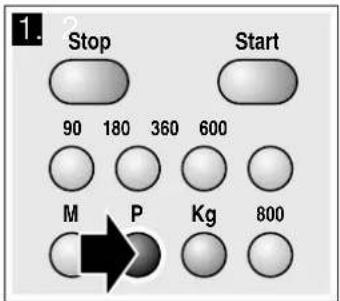
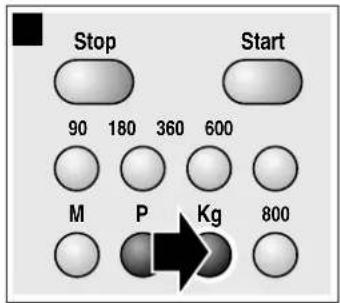
- Turn the rotary selector to specify the weight of the dish.
- Press the Start button.
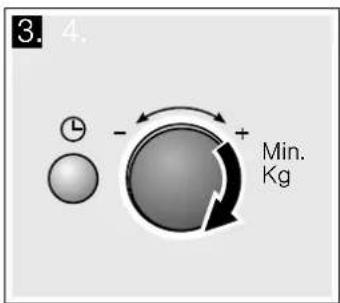

You will see the cooking time for the programme counting down.
The cooking time has elapsed
A signal sounds. Open the appliance door or press Stop. The clock reappears.
Correction
Press the Stop button twice and reset.
Pausing
Press the Stop button once, or open the appliance door. Press the START button after closing the door.
Cancelling operation
Press the Stop button twice, or open the door and press the Stop button once.
Notes
For some programmes, a signal sounds after a certain time. Open the appliance door and stir the food or turn the meat or poultry. After closing, press the Start button again. - You can query the programme number and weight using "P" or "kg". The queried value is shown for 3 seconds in the display.
Defrosting using the automatic programmes
You can use the 4 defrosting programmes to defrost meat, poultry and bread.
Notes
Preparing food
Use food that has been frozen at -18°C and stored in portion-sized quantities that are as thin as possible.
Take the food to be defrosted out of all packaging and weigh it. You need to know the weight to set the programme.
Liquid will be produced when defrosting meat or poultry. Drain off this liquid when turning meat and poultry and under no circumstances use it for other purposes or allow it to come into contact with other foods.
Ovenware
Place the food in a microwaveable shallow dish, e.g. a china or glass plate, but do not cover.
Resting time
The defrosted food should be left to stand for an additional 10 to 30 minutes until it reaches an even temperature. Large pieces of meat require a longer standing time than smaller pieces. Flat pieces of meat and items made from minced meat should be separated from each other before leaving to stand.
After this time, you can continue to prepare the food, even though thick pieces of meat may still be frozen in the middle. The giblets can be removed from poultry at this point.
Signal
For some programmes, a signal sounds after a certain time. Open the appliance door and separate the food out or turn the meat or poultry. Close the door and press the Start button.
Programme no. Weight range in kg
| Defrost | |
| P 01 | Minced meat 0.20 - 1.00 |
| P 02 | Pieces of meat 0.20 - 1.00 |
| P 03 | Chicken, chicken pieces 0.40 - 1.80 |
| P 04 | Bread 0.20 - 1.00 |
Cooking with the automatic programmes
With the 3 cooking programmes, you can cook rice, potatoes or vegetables.
Notes
Ovenware
The food must be cooked in microwaveable cookware with a lid. For rice, you should use a large, deep dish.
Preparing food
Weigh out the food. You need to know the weight to set the programme.
Rice:
Do not use boil-in-the-bag rice. Add the required amount of water, as specified on the packaging. This is usually two or three times the quantity of rice.
Potatoes:
For boiled potatoes, cut the fresh potatoes into small, even-sized pieces. Add one tablespoon of water for each 100 g of boiled potatoes, and a little salt.
Fresh vegetables:
Weigh out the fresh, trimmed vegetables. Cut the vegetables into small, even-sized pieces. Add a tablespoon of water for each 100 g of vegetables.
Signal
While the programme is running, a signal sounds after some time. Stir the food.
Resting time
Once the programme has finished, stir the food again. You should leave it to stand for another 5 to 10 minutes until it reaches an even temperature.
The cooking result will depend on the quality and consistency of the food.
Programme no. Weight range in kg
| Cooking |
| P 05 Rice 0.05 - 0.2 |
| P 06 Potatoes 0.15 - 1.0 |
| P 07 Vegetables 0.15 - 1.0 |
Tested for you in our cooking studio
Here you will find a selection of recipes and the ideal settings for them. We show you which microwave power setting is best suited to your dish. There are also tips about ovenware and preparation methods.
Information regarding the tables
The following tables provide you with numerous options and settings for the microwave.
The times specified in the tables are only guidelines. They may vary according to the ovenware used, the quality, temperature and consistency of the food.
Time ranges are often specified in the tables. Set the shortest time first and then extend the time if necessary.
It may be that you have different quantities from those specified in the tables. A rule of thumb can be applied: Double the amount - almost twice the cooking time. Half the amount - half the cooking time.
Always place the ovenware on the turntable.
Defrost
Notes
Place the frozen food in an open container on the turntable. - Delicate parts such as the legs and wings of chicken or fatty outer layers of roasts can be covered with small pieces of aluminium foil. The foil must not touch the oven walls. You can remove the foil half way through the defrosting time. Liquid will be produced when defrosting meat or poultry. Drain off this liquid when turning meat and poultry and under no circumstances use it for other purposes or allow it to come into contact with other foods. Turn or stir the food once or twice during the defrosting time. Large pieces of food should be turned several times. - Leave defrosted items to stand at room temperature for a further 10 to 20 minutes so that the temperature is even throughout. The giblets can be removed from poultry at this point. The meat can still be further prepared, even if it has a small frozen core.
| Defrost Weight Microwave power setting in watts, cooking time in minutes | Notes | |
| Whole pieces of meat (beef, veal or pork - on the bone or boned) | 800 g 180 W, 15 mins + 90 W, 10-20 mins - | |
| 1 kg 180 W, 20 mins + 90 W, 15-25 mins | ||
| 1.5 kg 180 W, 30 mins + 90 W, 20-30 mins | ||
| Meat in pieces or slices of beef, veal or pork | 200 g 180 W, 2 mins + 90 W, 4-6 mins Separate any defrosted parts when turning | |
| 500 g 180 W, 5 mins + 90 W, 5-10 mins | ||
| 800 g 180 W, 8 mins + 90 W, 10-15 mins | ||
| Minced meat, mixed | 200 g 90 W, 10 mins | Freeze food flat if possible |
| 500 g 180 W, 5 mins + 90 W, 10-15 mins | Turn several times, remove any defrosted meat | |
| 800 g 180 W, 8 mins + 90 W, 10-20 mins | ||
| Poultry or poultry portions | 600 g 180 W, 8 mins + 90 W, 10-15 mins | - |
| 1.2 kg 180 W, 15 mins + 90 W, 20-25 mins | ||
| Fish fillet, fish steak or slices | 400 g 180 W, 5 mins + 90 W, 10-15 mins | Separate any defrosted parts |
| Vegetables, e.g. peas | 300 g 180 W, 10-15 mins | - |
| Fruit, e.g. raspberries | 300 g 180 W, 7-10 mins | Stir carefully during defrosting and separate any defrosted parts |
| 500 g 180 W, 8 mins + 90 W, 5-10 mins | ||
| Butter, defrosting | 125 g 180 W, 1 min. + 90 W, 2-3 mins | Remove all packaging |
| 250 g 180 W, 1 min + 90 W, 3-4 mins | ||
| Loaf of bread | 500 g 180 W, 6 mins + 90 W, 5-10 mins | - |
| 1 kg 180 W, 12 mins + 90 W, 10-20 mins | ||
| Cakes, dry, e.g. sponge cake | 500 g 90 W, 10-15 mins | Only for cakes without icing, cream or crème pâtissière, separate the pieces of cake |
| 750 g 180 W, 5 mins + 90 W, 10-15 mins | ||
| Cakes, moist, e.g. fruit flan, cheese-cake | 500 g 180 W, 5 mins + 90 W, 15-20 mins | Only for cakes without icing, cream or gelatine |
| 750 g 180 W, 7 mins + 90 W, 15-20 mins | ||
Defrosting, heating up or cooking frozen food
Notes
Take ready meals out of the packaging. They will heat up more quickly and evenly in microwaveable ovenware. The different components of the meal may not require the same amount of time to heat up. - Food which lies flat will cook more quickly than food which is piled high. You should therefore distribute the food so that it is as flat as possible in the ovenware. Different foodstuffs should not be placed in layers on top of one another.
Always cover the food. If you do not have a suitable cover for your ovenware, use a plate or special microwave foil. Stir or turn the food 2 or 3 times during cooking. After heating, allow the food to stand for a further 2 to 5 minutes so that it can achieve an even temperature. Always use an oven cloth or oven gloves when removing plates from the oven. This will help the food retain its own distinct taste, so it will require less seasoning.
| Defrosting, heating up or cooking frozen food | Weight Microwave power setting in watts, cooking time in minutes | Notes |
| Menu, plated meal, ready meal (2-3 components) | 300-400 g 600 W, 8-11 mins - | |
| Soup 400 g 600 W, 8-10 mins - | ||
| Stews 500 g 600 W, 10-13 mins - | ||
| Slices or pieces of meat in sauce, e.g. | 500 g 600 W, 12-17 mins Separate the pieces of meat when stir-g | ring |
| goulash | ||
| Fish, e.g. fillet steaks 400 g 600 W, 10-15 mins Add water, lemon juice or wine as desired | ||
| Bakes, e.g. lasagne, cannelloni 450 g 600 W, 10-15 mins - | ||
| Side dishes, e.g. rice, pasta 250 g 600 W, 2-5 mins Add a little liquid | ||
| 500 g 600 W, 8-10 mins | ||
| Vegetables, e.g. peas, broccoli, carrots | 300 g 600 W, 8-10 mins Pour water into the dish so that it cov- | |
| 600 g 600 W, 14-17 mins | ers the base | |
| Creamed spinach 450 g 600 W, 11-16 mins Cook without additional water | ||
Heating food
Risk of scalding!
There is a possibility of delayed boiling when a liquid is heated. This means that the liquid reaches boiling temperature without the usual steam bubbles rising to the surface. Even if the container only moves a little, the hot liquid can suddenly boil over and spatter. When heating liquids, always place a spoon in the container. This will prevent delayed boiling.
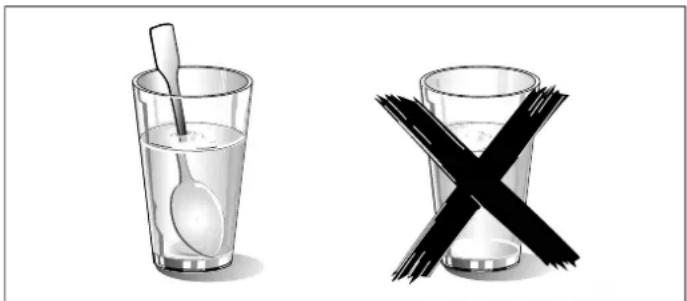
Caution!
Metal - e.g. a spoon in a glass - must be kept at least 2 cm from the oven walls and the inside of the door. Sparks could irreparably damage the glass on the inside of the door.
Notes
Take ready meals out of the packaging. They will heat up more quickly and evenly in microwaveable ovenware. The different components of the meal may not require the same amount of time to heat up. Always cover the food. If you do not have a suitable cover for your container, use a plate or special microwave foil. - Stir or turn the food several times during the heating time. Check the temperature. After heating, allow the food to stand for a further 2 to 5 minutes so that it can achieve an even temperature. Always use an oven cloth or oven gloves when removing plates from the oven.
| Heating food | Weight | Microwave power setting in watts, cooking time in minutes | Notes |
| Menu, plated meal, ready meal (2-3 components) | 350-500 g | 600 W, 4-8 mins | - |
| Drinks | 150 ml | 800 W, 1-2 mins | Place a spoon in the glass; do not overheat alcoholic drinks; check during heating |
| 300 ml | 800 W, 2-3 mins | ||
| 500 ml | 800 W, 3-4 mins | ||
| Baby food, e.g. baby bottle | 50 ml | 360 W, approx. 1/2 min | No teats or lids. Always shake well after heating. You must check the temperature. |
| 100 ml | 360 W, approx. 1 min. | ||
| 200 ml | 360 W, 11/2 min | ||
| Soup 1 cup | 200 g | 600 W, 2-3 mins | - |
| Soup, 2 cups 400 g | 600 W, 4-5 mins | - | |
| Meat in sauce | 500 g | 600 W, 8-11 mins | Separate the slices of meat |
| Heating food Weight Microwave power setting in watts, cooking time in minutes | Notes | |
| Stew 400 g 600 W, 6-8 mins - | ||
| 800 g 600 W, 8-11 mins - | ||
| Vegetables, 1 portion 150 g 600 W, 2-3 mins Add a little liquid | ||
| Vegetables, 2 portions 300 g 600 W, 3-5 mins | ||
| Cooking food | ||
| Notes | ||
| ■ Food which lies flat will cook more quickly than food which is piled high. You should therefore distribute the food so that it is as flat as possible in the ovenware. Different foodstuffs should not be placed in layers on top of one another. | ■ Cook the food in ovenware with a lid. If you do not have a suitable lid for your ovenware, use a plate or special microwave foil. | |
| ■ This will help the food retain its own distinct taste, so it will require less seasoning. | ||
| ■ After cooking, allow the food to stand for a further 2 to 5 minutes so that it can achieve an even temperature. | ||
| ■ Always use an oven cloth or oven gloves when removing plates from the oven. | ||
| Cooking food Weight Microwave power setting in watts, cooking time in minutes | Notes | |
| Meat loaf 750 g 600 W, 20-25 mins Cook uncovered | ||
| Whole chicken, fresh, no giblets 1.2 kg 600 W, 25-30 mins Turn halfway through the cooking time | ||
| Fresh vegetables | 250 g 600 W, 5-10 mins | Cut vegetables into pieces of equal size. |
| 500 g 600 W, 10-15 mins | Add 1 to 2 tbsp water per 100 g of vegetables. Stir during cooking | |
| Potatoes | 250 g 600 W, 8-10 mins | Cut potatoes into pieces of equal size; |
| 500 g 600 W, 11-14 mins | Add 1 to 2 tbsp water for every 100 g. | |
| 750 g 600 W, 15-22 mins | Stir during cooking | |
| Rice | 125 g 600 W, 5-7 mins + 180 W, 12-15 mins | Add double the quantity of liquid. |
| 250 g 600 W, 6-8 mins + 180 W, 15-18 mins | ||
| Sweet foods, e.g. blancmange (instant) | 500 ml 600 W, 6-8 mins | Stir the custard pudding thoroughly 2 to 3 times during cooking using an egg whisk. |
| Fruit, compote | 500 g 600 W, 9-12 mins | - |
Microwave tips
| You cannot find any information about the settings for the quantity of food you have prepared. | Increase or reduce the cooking times using the following rule of thumb: Double the amount \( = \) almost double the cooking time Half the amount \( = \) half the cooking time |
| The food has become too dry. | Next time, set a shorter cooking time or select a lower microwave power setting. Cover the food and add more liquid. |
| When the time has elapsed, the food is not defrosted, hot or cooked. | Set a longer time. Large quantities and food which is piled high require longer times. |
| When the time has elapsed, the food is overheated at the edge but not done in the middle. | Stir it during the cooking time and next time, select a lower micro- wave power setting and a longer cooking time. |
| After defrosting, the poultry or meat is defrosted on the out- side but not defrosted in the middle. | Next time, select a lower microwave power setting. If you are defrosting a large quantity, turn it several times. |
Condensation
Condensation may appear on the door window, interior walls and floor. This is normal. This does not affect how the microwave operates. Wipe away the condensation after cooking.
Test dishes in accordance with EN 60705
The quality and correct operation of microwave appliances are tested by testing institutes using these dishes.
In accordance with EN 60705, IEC 60705, DIN 44547 and EN 60350 (2009)
Cooking and defrosting with microwave
Microwave cooking
| Dish Microwave setting (watts) nd cooking time in minutes Notes |
| Custard, 565 g 180 watts, 25-30 mins + 90 watts, 20-25 mins Place the 20 x 17 cm Pyrex dish on the turntable. |
| Sponge 600 watts, 8-10 mins Place the Ø 22 cm Pyrex dish on the turntable. |
| Meatloaf 600 watts, 20-25 mins Place the Pyrex dish on the turntable. |
| Microwave defrosting |
| Dish Microwave setting (watts) nd cooking time in minutes Note |
| Meat 180 watts, 5-7 mins + 90 watts, 10-15 mins Place the Ø 22 cm Pyrex dish on the turntable. |
Tested in our cooking studio 50
Test dishes according to EN 60705. 53
Tested in our cooking studio



- A MALFUNCTION, WHAT TO DO
- IMPORTANT SAFETY INFORMATION
- RISK OF FIRE
- RISK OF EXPLOSION
- RISK OF SERIOUS DAMAGE TO HEALTH
- RISK OF ELECTRIC SHOCK
- RISK OF BURNS
- RISK OF SCALDING
- RISK OF INJURY
- CAUSES OF DAMAGE
- CAUTION
- INSTALLATION AND CONNECTION
- THE CONTROL PANEL
- ROTARY SELECTOR
- ACCESSORIES
- THE TURNTABLE
- HOW TO FIT THE TURNTABLE
- BEFORE USING THE APPLIANCE FOR THE FIRST TIME
- SETTING THE CLOCK
- HIDING THE CLOCK
- RESETTING THE CLOCK
- CHANGE THE CLOCK, E.G. FROM SUMMER TO WINTER TIME
- THE MICROWAVE
- NOTES REGARDING OVENWARE
- SUITABLE OVENWARE
- UNSUITABLE OVENWARE
- OVENWARE TEST
- MICROWAVE POWER SETTINGS
- SETTING THE MICROWAVE
- THE COOKING TIME HAS ELAPSED
- CHANGING THE COOKING TIME
- PAUSING
- CANCELLING OPERATION
- COOLING FAN
- NOTES
- MEMORY
- SAVING MEMORY SETTINGS
- EXAMPLE: 360 W, 25 MINUTES
- ADDING TO THE MEMORY
- STARTING THE MEMORY
- CANCELLING THE SETTING
- CHANGING THE SIGNAL DURATION
- CARE AND CLEANING
- RISK OF SHORT CIRCUIT
- DO NOT USE
- CLEANING AGENTS
- MALFUNCTION TABLE
- AFTER-SALES SERVICE
- E NUMBER AND FD NUMBER
- E NO
- FD NO
- ENVIRONMENTALLY-FRIENDLY DISPOSAL
- AUTOMATIC PROGRAMMES
- SETTING A PROGRAMME
- CORRECTION
- DEFROSTING USING THE AUTOMATIC PROGRAMMES
- PREPARING FOOD
- OVENWARE
- RESTING TIME
- SIGNAL
- COOKING WITH THE AUTOMATIC PROGRAMMES
- TESTED FOR YOU IN OUR COOKING STUDIO
- INFORMATION REGARDING THE TABLES
- DEFROST
- DEFROSTING, HEATING UP OR COOKING FROZEN FOOD
- HEATING FOOD
- CONDENSATION
- TEST DISHES IN ACCORDANCE WITH EN
- COOKING AND DEFROSTING WITH MICROWAVE
- MICROWAVE COOKING
- TESTED IN OUR COOKING STUDIO
Brand : BLAUPUNKT
Model : 5MA 15500
Category : Microwave