
CT6558 - Mobile Phone PHILIPS - Free user manual and instructions
Find the device manual for free CT6558 PHILIPS in PDF.



| Product Type | Mobile phone |
| Brand | Philips |
| Model | CT6558 |
| Dimensions | 105 x 46 x 18 mm |
| Weight | 85 g |
| Screen Type | TFT color LCD |
| Screen Size | 1.8 inches |
| Screen Resolution | 128 x 160 pixels |
| Battery | Lithium-ion 1000 mAh |
| Standby time | Up to 400 hours |
| Talk time | Up to 4 hours |
| Network | GSM 900/1800 MHz |
| Connectivity | Bluetooth 2.0, USB 2.0 |
| Internal memory | 32 MB |
| Expandable memory | microSD up to 2 GB |
| Camera | 1.3 megapixels |
| Main functions | Calls, SMS, MMS, alarm, calculator, calendar, games |
| Maintenance and cleaning | Clean with a soft, dry cloth. Avoid moisture. |
| Security | PIN code, keypad lock, anti-theft function |
| Spare parts and repairability | Battery and charger replaceable by user. Other parts: authorized center. |
Frequently Asked Questions - CT6558 PHILIPS
User questions about CT6558 PHILIPS
0 question about this device. Answer the ones you know or ask your own.
Ask a new question about this device
Download the instructions for your Mobile Phone in PDF format for free! Find your manual CT6558 - PHILIPS and take your electronic device back in hand. On this page are published all the documents necessary for the use of your device. CT6558 by PHILIPS.
USER MANUAL CT6558 PHILIPS
Read these instructions for use carefully before using the appliance and save them for future reference.
- Store and use the appliance at a temperature between 5°C and 35°C.
- Keep the appliance dry.
Inserting batteries
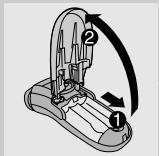
The appliance runs on three R6 AA 1.5-volt batteries. Preferably use Philips alkaline batteries. Make sure that your hands are dry when inserting the batteries.
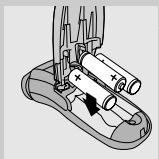
1 Slide the battery lid of the battery compartment backwards (1) and open it (2). Put three batteries in the battery compartment.
Make sure the + and - indications on the batteries match the indications in the battery compartment.
Push the lid of the battery compartment down onto the appliance and slide it upwards to close it.
To avoid damage due to battery leakage:
- do not expose the appliance to temperatures higher than 35°C;
- remove the batteries if the appliance is not going to be used for a month or more;
- do not leave empty batteries in the appliance.
Shaving time
Three new batteries offer a shaving time of 60 minutes.
Using the appliance
Shaving
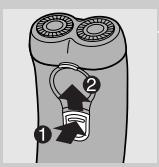
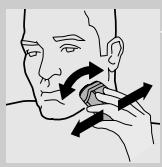
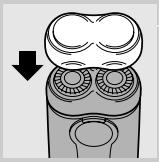
Switch the appliance on by pressing the switch lock (1) and pushing the on/off slide upwards (2). - The switch lock prevents accidental switching on of the appliance. 2 Move the shaving heads quickly over your skin, making both straight and circular movements. Shaving on a dry face gives the best results. Your skin may need 2 or 3 weeks to get accustomed to the Philips shaving system. 3 Switch the shaver off by pushing the on/off slide downwards. Put the protection cap on the shaver every time you have used it, to prevent damage.

Trimming (HQ404 and HQ406 only)
For grooming sideburns and moustache.
Open the trimmer by pushing the slide upwards.
The trimmer can be activated while the motor is running.
Cleaning and maintenance
Regular cleaning guarantees better shaving performance.
For easy and optimal cleaning, the Philips Action Clean (shaving head cleaner, type HQ100) is available. Ask your Philips dealer for information. The Philips Action Clean may not be available in all countries. Contact the Customer Care Centre in your country about the availability of this accessory.
You can also clean the shaver in the following way:
Every week: shaving unit and hair chamber
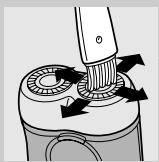
Switch the shaver off. 2 Clean the top of the appliance first, using the brush supplied.
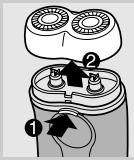
Press the release button (I) and remove the shaving unit (2).
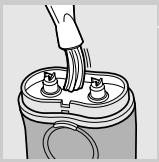
4 Clean the inside of the shaving unit and the hair chamber with the brush.
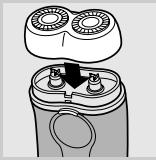
Put the shaving unit back onto the shaver.
Every two months: shaving heads
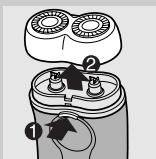
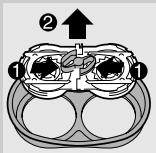
Switch the shaver off. Press the release button (I) and remove the shaving unit (2). 3 Remove the retaining frame by pushing the sides of the central spring towards each other (1) and lifting the retaining frame out of the shaving unit (2).
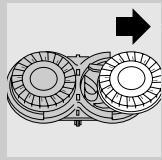
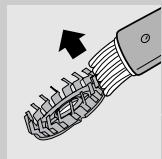
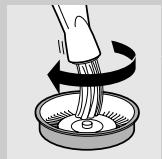
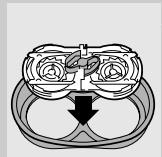
4 Slide the shaving heads out of the retaining frame and clean them one by one. Do not mix up the cutters and the guards. This is essential since each cutter has been ground with its corresponding guard for optimal performance. If you accidentally mix the sets up, it could take several weeks before optimal shaving performance is restored. Clean the cutter with the short-bristled side of the brush. Brush carefully in the direction of the arrow. Brush the guard. 7 Slide the shaving heads back into the retaining frame and put the retaining frame back into the shaving unit. Put the shaving unit back onto the shaver.
For extra thorough cleaning, clean the shaving heads by putting them in a degreasing liquid (e.g. alcohol) every six months. To remove the shaving heads, follow steps 1 to 4 described above. After cleaning, lubricate the central point on the inside of the guards with a drop of sewing machine oil to prevent wear of the shaving heads.
Trimmer (HQ406 and HQ404 only)
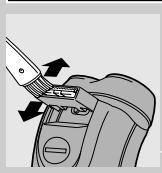
Clean the trimmer every time you have used it.
Switch the shaver off. 2 Clean the trimmer with the brush supplied. 3 Lubricate the trimmer teeth with a drop of sewing machine oil every six months.
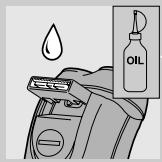
Storage
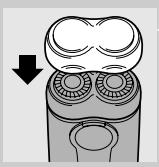
Put the protection cap on the shaver to prevent damage. - HQ406 only: The appliance can be stored in the pouch supplied.
Replacement
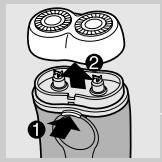
Replace the shaving heads every two years for optimal shaving results.
Replace damaged or worn shaving heads with HQ4+ Philips shaving heads only.
Switch the shaver off. Press the release button (I) and remove the shaving unit (2).
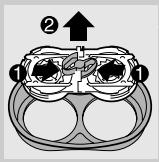
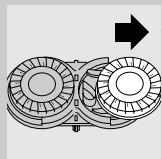
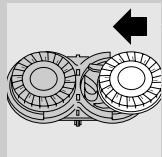
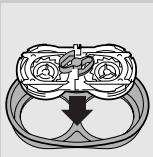
3 Remove the retaining frame by pushing the sides of the central spring towards each other (1) and lifting the retaining frame out of the shaving unit (2). 4 Slide the shaving heads out of the retaining frame. 5 Slide new shaving heads into the retaining frame. Put the retaining frame back into the shaving unit. Put the shaving unit back onto the shaver.
Accessories
The following accessories are available:
- HQ4+ Philips shaving heads. HQ100 Philips Action Clean (shaving head cleaner). HQ101 Philips Action Clean refill (shaving head cleaning liquid). HQI10 Philips shaving head cleaner (shaving head cleaning spray).
Environment
Batteries contain substances that may pollute the environment. Always remove the batteries before discarding the appliance or handing it in at an official collection point. Dispose of the batteries at an official collection point for batteries.
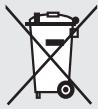
Do not throw the appliance away with the normal household waste at the end of its life, but hand it in at an official collection point for recycling. By doing this you will help to preserve the environment.
Guarantee & service
If you need information or if you have a problem, please visit the Philips website at www.philips.com or contact the Philips Customer Care Centre in your country (you will find its phone number in the worldwide guarantee leaflet). If there is no Customer Care Centre in your country, turn to your local Philips dealer or contact the Service Department of Philips Domestic Appliances and Personal Care BV.
Troubleshooting
Reduced shaving performance
- Cause 1: the shaving heads are dirty. The shaver has not been cleaned well enough or has not been cleaned for a long time.
Clean the shaver thoroughly before you continue shaving. See chapter 'Cleaning and maintenance'. - Cause 2: long hairs are obstructing the shaving heads. Clean the cutters and guards with the brush supplied. See chapter 'Cleaning and maintenance', section 'Every two months: shaving heads'. - Cause 3: the shaving heads are damaged or worn.
Replace the shaving heads. See chapter 'Replacement'.
The shaver does not work when the on/off slide is pushed upwards. Cause: the batteries are empty - Replace the batteries. See chapter 'Inserting batteries'.
Important
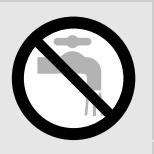
Make sure your hands are dry when inserting the battery.
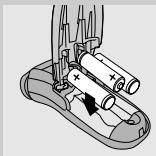
Slide the battery compartment cover towards the back (1) and open it (2). 2 Insert three batteries into the battery compartment.
The device does not work when the on/off switch is set to the top.
- Cause: Batteries are empty. Replace the batteries. See the 'Inserting the batteries' section.




- INSERTING BATTERIES
- SHAVING TIME
- USING THE APPLIANCE
- SHAVING
- TRIMMING (HQ404 AND HQ406 ONLY)
- OPEN THE TRIMMER BY PUSHING THE SLIDE UPWARDS
- CLEANING AND MAINTENANCE
- TRIMMER (HQ406 AND HQ404 ONLY)
- STORAGE
- REPLACEMENT
- ACCESSORIES
- ENVIRONMENT
- GUARANTEE & SERVICE
- TROUBLESHOOTING
- REDUCED SHAVING PERFORMANCE
- IMPORTANT
Brand : PHILIPS
Model : CT6558
Category : Mobile Phone